Access and developer integrations
Using Veo through Gemini API, AI Studio, Flow, Google Vids, Google Ads, compatibility layers, and custom apps.
38.7%
Best tweets about Google Veo
Find the best tweets about Google Veo, covering video model releases, prompts, image-to-video, filmmaking, benchmarks, access, and creator experiments.
Google Veo video generation, model updates, prompting, visual quality, access, comparisons, filmmaking workflows, and demonstrated outputs.
Original Xholic analysis
The supplied Google Veo posts center on Veo 3.1 Lite’s lower-cost access, visual experiments, and workflows combining video generation with image, audio, and editing tools. Enthusiasm for fast iteration sits alongside concerns about shot consistency and physical accuracy. [2039013918312689694, 2039021972089417822, 2034781268408508662, 2022416320982323419]
67.7% of posts
All-time engagement
58.1% of posts
Published in 90 days
Conversation map
Using Veo through Gemini API, AI Studio, Flow, Google Vids, Google Ads, compatibility layers, and custom apps.
38.7%
Shared prompts and generated examples spanning cinematic product shots, historical FPV scenes, vlogs, animation, and short-form video.
35.5%
Launches, lower pricing, speed, audio, clip lengths, resolutions, aspect ratios, and text- or image-to-video support.
35.5%
Combining Veo with image tools, mood boards, storyboarding, asset management, clip editing, extensions, and finishing tools.
25.8%
Comparisons with rival video models, generation speed and visual realism, multi-image performance, and remaining issues with consistency or physical accuracy.
22.6%
Selfie-based character creation, reference images for consistency, talking avatars, scripted dialogue, voice, and lip-sync pipelines.
12.9%
Tone and stance
Performance benchmark
Posts with media make up 77.4% of this collection. Their median all-time score is 5.43, compared with 3.42 for text-only posts.
Format mix
Consensus and debate
Shared view
Posts announce Veo 3.1 Lite access through the Gemini API, AI Studio, and Flow. They describe text- and image-to-video, short clips, and inexpensive iterations for storyboarding before final production. [2039013918312689694, 2039014102811427263, 2039021972089417822]
Shared view
Shared workflows pair Veo with reference images, image generators, voice tools, and editing software rather than treating a generated clip as the whole production. [2037554793833697323, 2067967814246244533, 2034781268408508662]
Open debate
A filmmaker describes a visually compelling Veo world despite inconsistencies between shots. Separately, a video-science benchmark post warns that photorealistic results can depict physically incorrect events and reports only weak scientific-understanding signals from Veo-3 and other models. These are different evaluation criteria, not a direct dispute. [2034781268408508662, 2022416320982323419]
Open debate
An arena post ranks Veo 3.1 Fast and Veo 3.1 first and second for multi-image video. Another invites viewers to judge Veo 3.1 Lite against Kling, Seedance, and PixVerse on smoothness and expression without stating a winner. Neither establishes superiority across all video tasks. [2041635784835657994, 2042289185000673351]
What performs
The 3 tutorials have a median all-time score of 99.103, versus 4.903 overall. A selfie-to-video workflow is the largest listed outlier at 849.33, or 173.23 times the overall median. This is a descriptive comparison within the supplied sample. [2038700313470005480, 2037554793833697323, 2055202022496870869]
Media appears in 24 posts (77.4%); those posts have a median all-time score of 5.43, versus 3.418 for text-only posts. Shared examples include a watch product-shot prompt and historical FPV scenes. The score difference does not establish that media caused higher performance. [2041739675682140334, 2040806829664719175]
Statistical standouts
Creator landscape
The five most represented creators account for 32.3% of the selected posts.
1. Philipp Schmid
@_philschmid
2 posts
2. 👩💻 Paige Bailey
@DynamicWebPaige
2 posts
3. Julian Goldie SEO
@JulianGoldieSEO
2 posts
4. Shushant Lakhyani
@shushant_l
2 posts
5. DEV Community
@ThePracticalDev
2 posts
6. 0x ROAS
@0xROAS
1 post
Philipp Schmid explains compatibility-layer access and Lite’s formats and pricing; Paige Bailey posts Lite output impressions and resolution-specific prices. [2035047230051176953, 2039014102811427263, 2039016750248051018, 2039101512572649568]
One tutorial describes a selfie-based talking character with reference photos; another presents a generated-character influencer workflow. A product maker instead animates a Midjourney face in Veo as one element of a coded design. [2038700313470005480, 2037554793833697323, 2067967814246244533]
Since the previous snapshot
Themes, sentiment, stance, and post format are classified per tweet. All counts, shares, medians, creator concentration, freshness, and performance comparisons are then calculated directly from the published snapshot.
Xholic's all-time score compares engagement while accounting for reach, post age, and creator consistency. It is used for relative comparisons within this collection.
This report analyzes the exact 31-post snapshot shown below. AI identifies editorial categories and drafts explanations; all statistics are calculated from the snapshot, and every narrative claim is checked against cited posts before publication.
Best Google Veo tweets
Ranked 01–31

@EXM7777 ·
Google Veo 3.1 lets you clone yourself from a single selfie and produce daily content without ever recording a video... here's the workflow: STEP 1: analyze your selfie with Gemini - upload a photo of yourself - prompt: "analyze this photo and write a detailed Veo 3 character description including facial features, hair, skin tone, clothing, and body language" - Gemini outputs a character profile STEP 2: generate video prompts - take that character description - ask Gemini: "write a 100-150 word cinematic Veo 3 prompt with character appearance, camera angle, and dialogue in quotes" some key tricks: start with "a selfie video of...", make the arm visible (sells the selfie illusion), add natural eye movement, put dialogue in quotes (Veo generates synced audio) and specify "no subtitles" STEP 3: generate with Veo 3.1 - paste into Google AI Studio - use "Ingredients to Video" : upload 4 reference photos for face consistency - output: 8-second clips at 1080p with synchronized dialogue you can create a lot of formats with this... the one going most viral: selfie-style walking + talking to camera... viewers genuinely can't tell it's AI

@OfficialLoganK ·
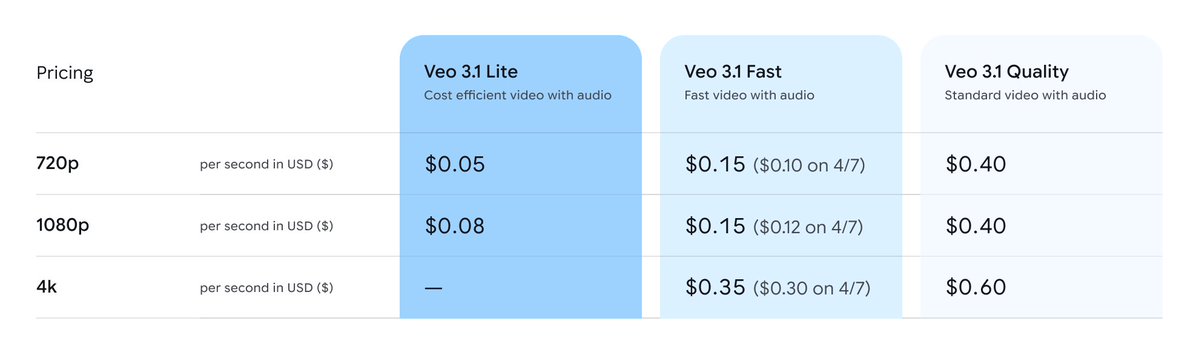
Video’s here to stay - introducing Veo 3.1 Lite, our most cost efficient video generation model to date, and on April 7th we are also reducing the price for Veo 3.1 Fast : )

@googleaidevs ·
Introducing Veo 3.1 Lite, now available via the Gemini API and @GoogleAIStudio. Veo 3.1 Lite supports both Text-to-Video and Image-to-Video, and is less than half the cost of Veo 3.1 Fast.
 Watch video
@alexcooldev ·
The simplest way to create an AI influencer using workflow (3 steps): Nano Banana → Veo 3 → Arcads AI Workflow Step 1: Build your character with a JSON prompt (Nano Banana Workflow) → Use a structured JSON prompt instead of writing random text → Define the look clearly: character, outfit, lighting, camera style, background → Add negative constraints like: no logos, no text, no extra fingers, no CGI skin, no warped mirror This makes the output more stable and reusable. You’re not just prompting. You’re building a repeatable image system Step 2: Turn image → video (Veo 3 Workflow) → Connect the Nano Banana output directly into Veo 3 → Add a simple motion prompt: slight body movement, natural head turn, subtle phone movement → Keep it minimal so it feels more real Workflow removes the manual back-and-forth. Step 3: Add script + voice (Arcads AI Workflow) → Feed the generated video into Arcads AI → Add a short script, usually 10–20 seconds → Generate voice + lipsync that matches the character vibe Now the character becomes actual content. Why workflow matters: Prompt → Image → Video → Voice No messy manual process. No repeating the same setup every time. Just a clean pipeline you can scale. Nano Banana + Veo 3 + Arcads AI + workflow feature = simple AI influencer factory
 Watch video
@0xROAS ·
this AI PODCAST VIDEO cost less than $1. VEO 3.1 is literally crazy cost efficient and one of my fav models rn. you can do anything you want: - talking videos - podcasts - 3d pixar animations - claymation - whatever you want and literally the cost per 8s video is $0.05 p.s i know voice can be fixed easy
 Watch video
@FlowbyGoogle ·
Veo 3.1 Lite is now available in Flow. It’s perfect for fast prompt iterations and storyboarding before upscaling to the final product. Here's how you can use it: — Text and Image to Video — Landscape (16:9) and Portrait (9:16) — First and Last Frame We can't wait to see what you create!

@_philschmid ·
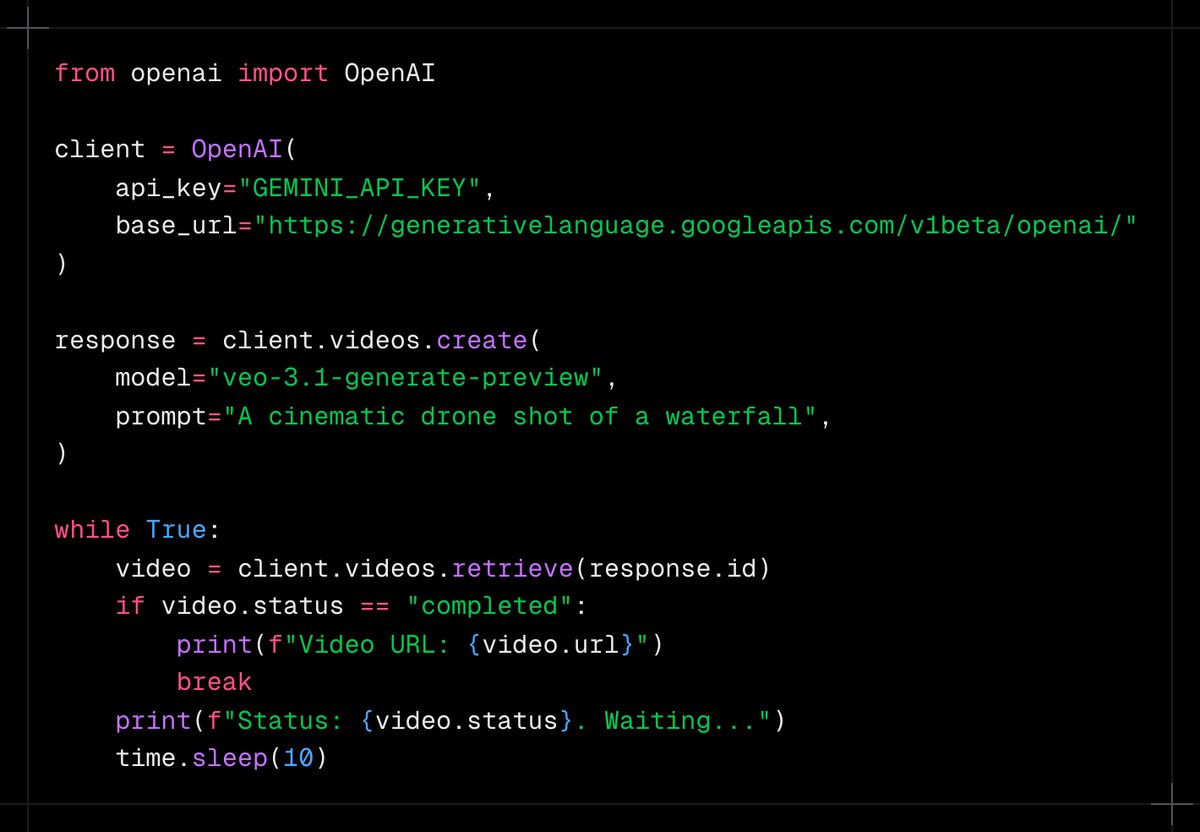
Veo 3.1 and Gemini image models are now available through the OpenAI compatibility layer, no SDK swap needed. 🎬 Generate videos via `/v1/videos` using Veo 3.1 🍌 Generate images with Nano Banana via `images.generate` 🔌 Drop-in compatible with OpenAI Python and JS SDKs 🔀 Switch to Gemini API by changing just 3 lines of code

@DesignArena ·
BREAKING: Veo 3.1 Fast and Veo 3.1 by @GoogleDeepMind are in 1st and 2nd place on Multi-Image to Video Arena These models can successfully reference multiple input images to create a video that users love At an average generation time of 48 seconds, they are also the two fastest video generation models Huge congrats to the @GoogleDeepMind team for this achievement!

@_philschmid ·
Veo 3.1 Lite now available in Gemini API and @GoogleAIStudio. Designed for rapid prototyping and high-volume video generation, starting at $0.05/sec. 🪶 - 1/2 the cost of Veo 3.1 Fast. - Text-to-Video (T2V) & Image-to-Video (I2V). - Landscape (16:9) and Portrait (9:16) format - 4s, 6s, and 8s clips.


@alex_barashkov ·
Probably our cringiest branding and design work yet. The console was rendered in Blender. The character’s face came from Midjourney, then got animated in Google Veo. We added the sound-indicator lights in Figma, then wired them up in code so they actually react to the audio waveform. Did it help sell the product? No, but it's our product, and we learned a lot by making it.
 Watch video
@zazzygfx ·
been playing with “daily vlog moments” concepts using Veo and Seedance within Flora focusing on small human moments instead of big ideas with a bit of voiceovers this came out really interesting 👇 prompt + workflow below

 Watch video
@ZaraIrahh ·
Google Veo 3.1 on @yapper_so Prompt: A high-end skeleton mechanical watch with a brushed titanium case and finely woven metal strap rests embedded within cracked volcanic rock, glowing rivers of molten lava flowing beneath and around it, casting an intense fiery orange illumination that radiates through the exposed inner mechanics of the dial. The scene opens in an ultra-tight macro shot, the camera positioned low and close, slowly tracking laterally along the lava fissure without any zoom-out, maintaining a compressed, intimate perspective as molten liquid pulses and flows beneath the watch, creating dynamic reflections that flicker across the sapphire crystal and polished metal edges. Heat distortion subtly warps the air above the lava, producing a realistic shimmer that bends light around the watch, while tiny sparks and embers rise slowly into the dark background, drifting with natural randomness. The camera transitions into a controlled micro-orbit at extremely close range, revealing the intricate movement of gears and complications inside the skeleton dial, with specular highlights gliding across brushed surfaces, beveled edges, and rotating components. The orange glow intensifies and fades rhythmically as the lava shifts, casting animated shadows through the internal structure of the watch, emphasizing depth and engineering precision. The strap shows slight thermal tension with minimal, believable movement, while surrounding rocks crack faintly, releasing subtle glowing fragments. A soft cinematic contrast between deep blacks and molten highlights enhances the premium, aggressive aesthetic. The sequence ends in a locked, razor-sharp hero close-up, centered on the watch face, with the lava’s glow breathing beneath it, embers floating in slow motion, and the entire composition radiating power, heat, and ultra-luxury craftsmanship.
 Watch video
@haider1 ·
gemini has always had a big edge in images and video and that strength comes from its early multimodal foundation, plus google's huge media ecosystem, like youtube, photos, and lens with that kind of data behind imagen and veo -- google is very hard to beat on anything visual

@shushant_l ·
FPV video of the ancient Mitanni empire Created with Google Veo 3.1 Prompt: extremely fast-paced cinematic FPV flying through the ancient Mitanni Empire at its peak, sweeping over vast Mesopotamian plains, grand palaces, fortified cities, and bustling markets filled with chariots, horses, and richly dressed nobles. Hyper-realistic, golden-hour lighting, dynamic motion blur, dramatic shadows, and epic scale architecture inspired by ancient Near Eastern design. Rapid transitions, seamless aerial dives, tight corridor fly-throughs inside temples, and high-speed chariot chase sequences. Shot in 8K, photorealistic textures, cinematic color grading, immersive atmosphere, highly detailed environment, volumetric lighting, and epic historical realism
 Watch video
@jerrod_lew ·
Google Veo 3.1 Lite is now available. Built for speed, at a lower cost, you can iterate visuals with start + end frames, and native audio, before upscaling later on. Here's how to find it on Google Flow.
 Watch video
@haoailab ·
Seedance-2 and Kling-3 signal that AI video generation is entering a “photorealistic” era, but realism does not guarantee reasoning and scientific correctness. In the classic breaking dry spaghetti experiment, real fractures arise from elastic energy and stress waves, often producing three pieces. Yet models frequently generate physically incorrect snaps. We introduce VideoScience-Bench to evaluate scientific reasoning in video generation. Most models look convincing but lack true scientific understanding, with only weak signals from Kling-3, Sora-2, and Veo-3. Learn details from our blog 👇🧐🧪 https://t.co/Vm1ncKnm58
 Watch video
@miketaylorcai ·
Vibe#05 - LogoMotion - A logo generator using Nano Banana Pro and Veo 3.1 https://t.co/GSZvWgyfva I was a little stuck for inspiration today so I turned to the "I'm Feeling Lucky" button in @GoogleAIStudio and it came through for me! Now I have a logo generator for all my side projects.
 Watch video
@starks_arq ·
To give you an idea of the speed of progress in AI film capabilities. We made this AI commercial with veo3 exactly 1 year ago TODAY.
 Watch video
@9to5Google ·
Google Vids adds AI avatars that you can customize & direct, free Veo generation https://t.co/pWny8uam4L by @technacity

@DynamicWebPaige ·
📽️ veo-3.1-lite-generate-preview is here! Smaller, faster, cheaper and still all of the great video generation features from Veo 3.1 that you know and love (ex: background sound effects and audio). Paid tier, per second: $0.05 (720p) $0.08 (1080p) (4k output not supported)
 Watch video
@wavespeed_ai ·
Same prompt. Same scene. Tested across: Kling 3.0 / Seedance 2.0 / PixVerse V6 / Veo 3.1 Lite Which one is: ✨ smoothest 🎭 most expressive Results below 👇 Which model should we test next?
 Watch video
@ivanleomk ·
Try out Veo 3.1 Lite today in @GoogleAIStudio ! We've designed it for folks to tinker with different ideas quickly and cheaply. The best part is that it starts at just $0.05/sec!! That's an 50% drop in price, support for 8s clips and a new model you're not gonna want to miss :)


@jordanurbs ·
It's fascinating to experience AI models evolve. Here's a "should've used @AskVenice" short film I made using Veo 3.1 a couple months back, demonstrating just one of the infinite possible realities where privacy over your consumption of artificial intelligence is of the utmost importance. It's a neat little dystopic sci-fi world we dreamed up, Claude and I, which Nano Banana Pro and Veo 3.1 later brought to life inside a Claude Code harness using the Venice API. I even got to have fun in the editing room, capitalizing on the weird AI-generated dialogue scenes to actually give it a dry feeling of a film-school student cutting their first project. But back to that dystopic sci-fi world. This world is so novel, in fact, that I think it's almost hard to really tell it's AI-generated (besides the obvious fact that it's clearly AI-generated, of course) —what I mean to say by that is that it's so visually compelling that you don't really have time to judge it: is this AI slop or not? Because curiosity has been invoked. It's not more aesthetic Netflix slop (though it might be close). The message here is that if you get creative enough with AI, you can get away with a lot. This was just a weekend project, nothing professional meant to meet enterprise standards... but also: it's not half bad. I ask myself why: in a world full of AI slop, what AI stuff could still actually pass an attention test? Upon closer inspection of this sci-fi video, anyone can see the clear inconsistencies in the shot generations—yet the world created within them, combined with its aesthetic, is so novel and visually foreign to the average viewer's eye that it somehow becomes "worth it" to savor it visually... even if you know its blatant AI. I'm not trying to applaud my work here, but rather put my finger on something: I believe this is a metaphor for something deeper with combining our human creativity with AI. As we move forward into this new age, let's not forget to try new things, build new worlds, and jump into new spaces of consciousness... and have fun while doing it. There is so much possible here—and potentially so much at stake—that spending the tokens to create and imagine is so important for us as a storytelling species. It'd be a waste to try and save all those tokens all just for our businesses and productivity, simply trying to use AI to hustle all the time. (if this were a Venice post, I would insert a DIEM call-to-action right about now) I'll loop this back around to the evolution of AI models. In the next week, I'll re-generate this video with newer Kling Reference-to-Video models—higher quality output and visual consistency across characters, objects, scenes. There's even a chance it will be so good that it doesn't look like blatant AI anymore, eliminating the margin of error that is the mark of the human: we make mistakes. For all of human history, we have errored and learned from our mistakes. What happens when AI helps us make everything "perfect"? All our art, culture, economy, governance? So I ask myself: if the next version of this short film were to come out absolutely perfect with Kling O3 Pro R2V.... will it still be as fun to watch?
 Watch video
@shushant_l ·
FPV video of the ancient Sumer kingdom Created with Google Veo 3.1 Prompt: Extremely fast-paced cinematic FPV flying through the ancient Sumerian kingdom, soaring over massive ziggurats, bustling marketplaces, mud-brick cities, and the Euphrates river at golden hour, realistic ancient Mesopotamian architecture, people in traditional garments, dynamic lighting, volumetric sun rays, dramatic shadows, hyper-detailed textures, smooth high-speed camera motion, epic scale, cinematic color grading, 4K, HDR, motion blur, depth of field, Unreal Engine style realism
 Watch video
@DynamicWebPaige ·
Wildly impressed with the caliber of outputs from the new Veo 3.1 Lite models - each of these took less than a minute to generate, and is a reasonably solid short. 🤯📹


 Watch video
@glenngabe ·
Direct an avatar -> Google adds new features to its video editing app Vids, including directing and customizing avatars through text prompts and Veo 3.1 support "Users will be able to use natural language prompts to direct avatars to “act” in a scene. This can include the avatar interacting with a product, a prop, or a piece of equipment. The company said that despite the dynamic nature of the output, Vids maintains character consistency." "Google said that based on the theme of the video, users can customize characters by tweaking appearance, changing apparel, and creating new backgrounds through prompts." "What’s more, Google is adding the ability to export finished videos directly to YouTube, saving the hassle of downloading and uploading them to the channel. All the exported videos are by default private, so you can review the video before making it public." https://t.co/HinHsYaKAl


@ThePracticalDev ·
AI video gen is powerful but getting a perfect 1:1 square output with clean audio sync is surprisingly tricky. This dev found a reliable workaround using NanoBanana 2, Veo 3.1 Lite, and a single FFmpeg crop filter. { author: @DynamicWebPaige + @GoogleAI } https://t.co/jeSNewYF7r

@JulianGoldieSEO ·
𝗚𝗼𝗼𝗴𝗹𝗲 𝗚𝗲𝗺𝗶𝗻𝗶 𝗷𝘂𝘀𝘁 𝗱𝗿𝗼𝗽𝗽𝗲𝗱 𝟰 𝗳𝗿𝗲𝗲 𝘂𝗽𝗱𝗮𝘁𝗲𝘀. Gemma 4 is open weight and runs on your own laptop. The 31B model ranks number 3 on the AI leaderboard. VO 3.1 Light makes AI video at half the cost. Extend videos, use image-to-video, and pick 1080p. Google AI Studio has a new coding agent for real builds. Firebase now plugs right in for apps with real logins. Save this. The best AI stack this week is free.
 Watch video
@ThePracticalDev ·
Veo 3.1 Lite just dropped in the Gemini API and this dev wired it up with Angular, Firebase Cloud Functions, and Cloud Storage to build an app that generates, interpolates, and extends AI videos end-to-end. { author: Connie Leung + @GoogleDevExpert } https://t.co/nBwEr68EMm
@JulianGoldieSEO ·
GOOGLE FLOW JUST BECAME A FULL AI FILM STUDIO Most people still think it’s “just another video generator.” That’s the mistake. What Changed: → Flow now merges video generation, Whisk-style mood boards, ImageFX-style image creation, and asset management into one workspace. → Nano Banana is built directly into Flow for high-fidelity image generation. → You can generate images, use them as ingredients, then animate them into Veo videos without leaving the tool. The Workflow Upgrade: ✓ Build a visual mood board. ✓ Generate polished images. ✓ Turn those images into cinematic video. ✓ Add audio with Veo 3.1. ✓ Organize everything inside the new asset grid. The Features That Matter: → Lasso editing lets you select part of an image and type the change you want. → Video editing now supports object insertion, object removal, camera movement, clip extension, and scene continuation. → referencing lets you tag exact assets from your library directly inside prompts. The biggest lesson: Google Flow is no longer just for “making clips.” It’s becoming a one-tab creative production system for images, videos, audio, references, edits, and full content workflows.
 Watch video
@Techmeme ·
Google rolls out its Veo video model globally within Google Ads, allowing advertisers to create 10-second videos for YouTube from up to three static images (@themarketinganu / Search Engine Land) https://t.co/hSGEvq5STm https://t.co/03N9nuQ709
Best Google Veo tweets
Xholic studies what works in your niche, drafts posts in your voice and schedules them for the hours your audience is online.
$0 today · Cancel anytime
Browse all tweet collectionsKeep exploring