There is a moment most X creators know well. You are scrolling through your feed, you spot a viral tweet in your niche, and you know that a smart reply right now could get you in front of thousands of new eyeballs.
So you open a new tab to draft something. Then your writing tool. Then maybe your saved inspirations folder. Then you are back on X trying to remember which tweet you even wanted to reply to. By the time you have pulled it all together, the moment has already passed. Someone else dropped the comment that everyone replied to. The window closed.
This is the tab-switching trap. And if you spend any real time on X, you have fallen into it more times than you can count.
Xholic AI just launched a Chrome extension designed to eliminate exactly this problem. Instead of forcing you out of X and into another dashboard, it brings the tools directly into your timeline, sitting underneath every tweet, ready the moment you need them.
Here is a thorough look at what the extension does, who it is built for, and whether it is worth adding to your browser today.
What Is the Xholic AI Chrome Extension?
The Xholic AI Chrome extension is a browser-based add-on for Google Chrome that integrates directly into X. Once installed, it adds a small, unobtrusive toolbar underneath tweets in your feed, giving you one-click access to tools for replying, remixing, saving, and analyzing content without ever leaving the platform.
It is currently available on the Chrome Web Store and connects to your Xholic AI account, which also includes a web app with a broader suite of growth features.
The extension itself is focused on four core actions: generate AI-powered replies, remix viral tweets into your own voice, extract structural frameworks from high-performing posts, and save tweets into organized collections. When you have product context saved in Xholic, the reply, remix, and structure tools can also become product-aware, so drafts can reference your offer, audience, use cases, or positioning when it actually fits the conversation.
There is also automatic streak tracking built in, so every reply you send through the extension counts toward your daily posting goal, without you having to log it anywhere.
Why a Chrome Extension Changes the Game for X Growth
Before getting into the specific features, it is worth spending a moment on why this matters from a strategic standpoint.
X rewards engagement velocity, specifically, how quickly your post or reply picks up interaction after it goes live. This creates a narrow window. Viral tweets move fast. Conversations that are gaining traction in hour one are often cooling off by hour three. If your workflow involves jumping between tabs and tools, you are consistently showing up late to conversations that already have momentum.
The best X creators in 2026 are not necessarily better writers than everyone else. They are faster. They have reduced the friction between “I see an opportunity” and “I have said something worth reading” to a matter of seconds. That speed is a competitive advantage, and it compounds every single day.
A Chrome extension that works inside X does not just save time, it fundamentally changes your relationship with the platform. Instead of X being a place you consume and then leave to create, it becomes a place where both happen simultaneously. The timeline and your content workflow exist in the same window.
Feature Breakdown: What You Can Actually Do
AI Reply Generation: Context-Aware, In Your Tone
The reply composer is the feature most people will use first, and it is the one that demonstrates most clearly what makes Xholic different from generic AI writing tools.
When you hover over a tweet and click the Xholic reply button, the extension reads the full context of that post, the topic, the tone, the specific claim or question being made, and generates a reply draft that is calibrated to fit naturally into that conversation. It is not a generic “Great point, I agree because…” filler. It is a response that actually engages with the specific content.
If you have added product details to Xholic, the reply composer can also use that context when the source tweet overlaps with your product’s audience, workflow, pain point, use case, or category. That means a reply can connect the conversation back to what you build without forcing a sales pitch into every thread.
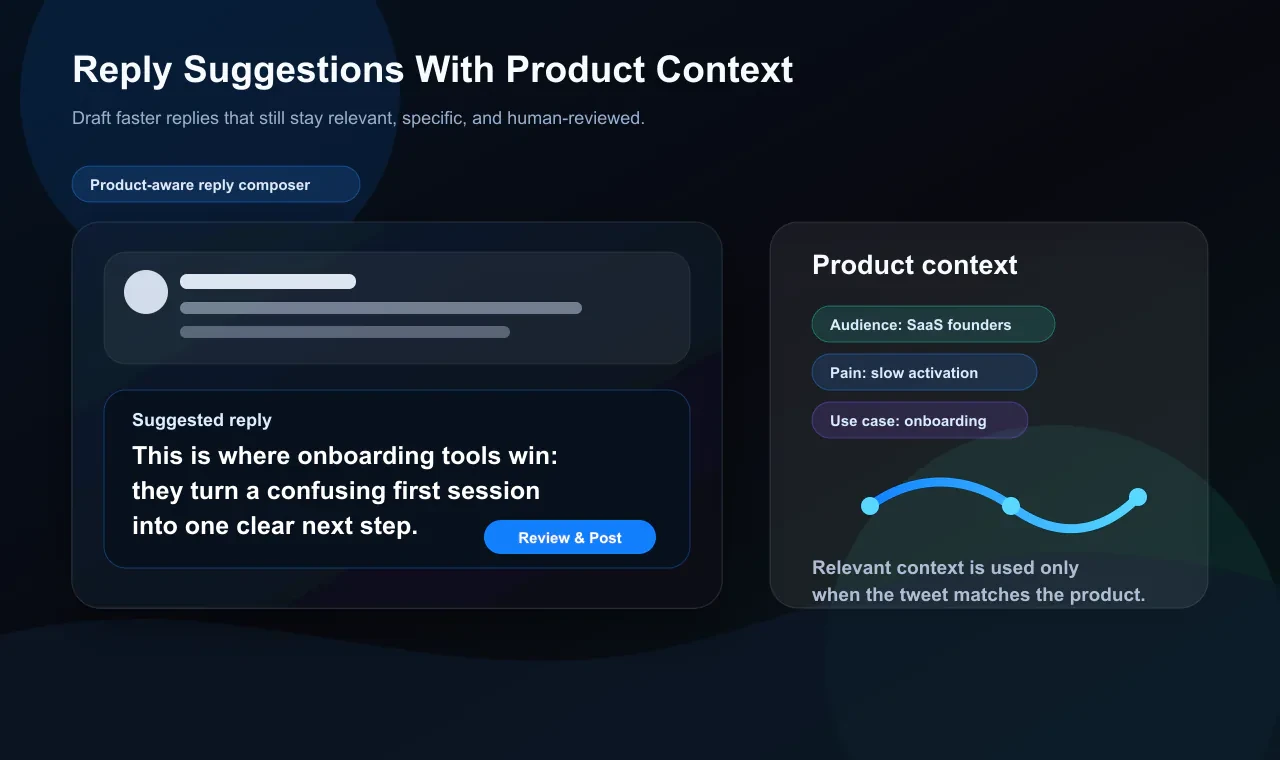
You review the draft, tweak anything you want, and post. The whole process takes under 30 seconds.
More importantly, the AI learns your voice over time. The more you use it, the more it picks up your phrasing, your rhythm, whether you tend toward humor or directness, whether you like to ask questions or make statements. The replies start feeling less like drafts and more like something you would have written yourself on a good day.
For anyone whose main growth lever on X is strategic commenting, and that is most people who are growing right now, this is meaningful. It removes the blank-page friction from the activity that grows accounts the fastest.
Tweet Remixer: Your Voice, Their Structure
Remixing is one of the most underused growth tactics on X, and Xholic has built a dedicated tool for it.
The idea is simple but effective. High-performing tweets in your niche have already proven that a certain format, a certain angle, or a certain kind of hook resonates with the audience you want to reach. Rather than starting every post from scratch, you take a tweet that worked, not the words, but the underlying structure, and rebuild it around your own content, perspective, and style.
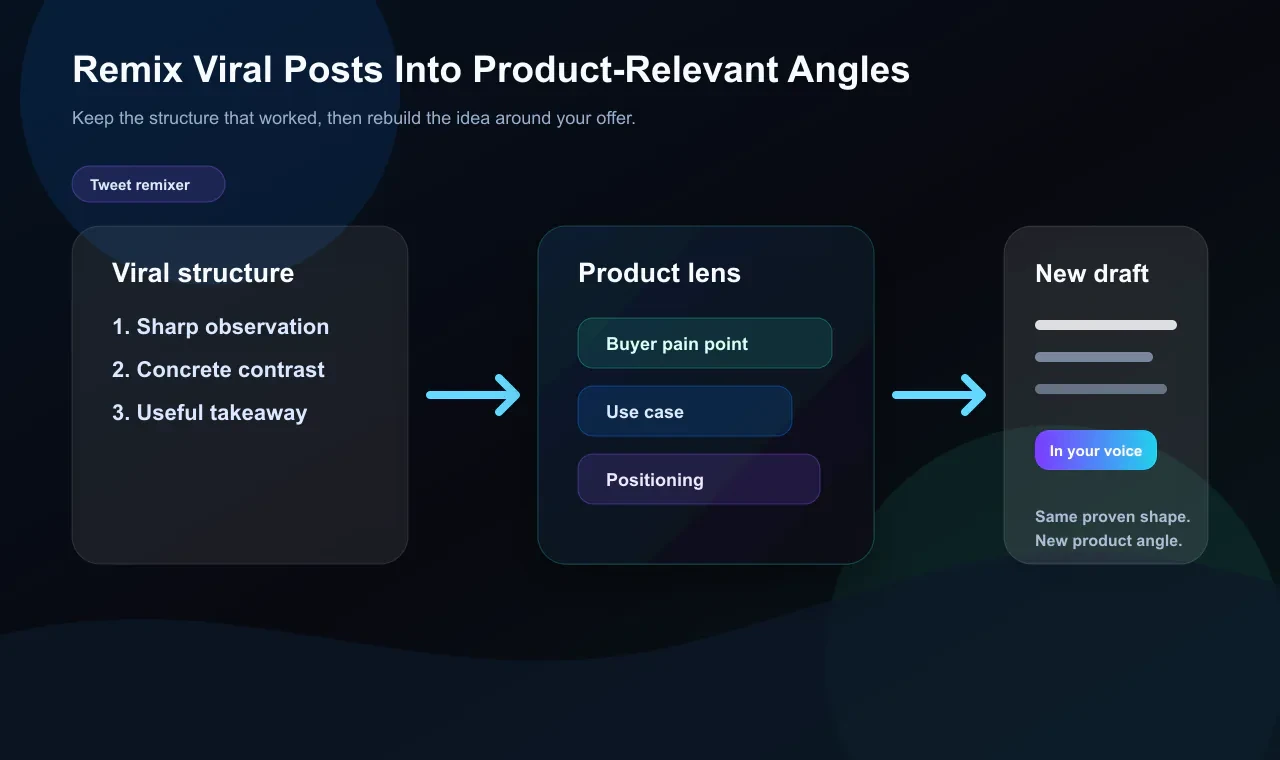
The Xholic remixer does this inside the extension. You click Remix on any tweet in your feed. The AI rewrites it in your voice, at the angle relevant to your niche, with a creativity dial you can adjust depending on how close to the original you want to stay. The result is something that is structurally borrowed but substantively original.
The remixer can also be product-aware. If a proven tweet structure fits your category, the extension can adapt that format around your product’s positioning, buyer pain points, benefits, or use cases. You still get a post in your voice, but the angle can be grounded in what you actually sell or build.
This is not plagiarism, it is craft. It is the same reason musicians learn by playing covers, or writers study sentence structure by reading writers they admire. The form is the teacher; the content is yours.
For indie hackers, founders, and content creators who know what they want to say but struggle with how to package it, the remixer cuts the packaging time dramatically.
Steal the Structure: Learn What Makes Tweets Work
This feature is what separates Xholic from tools that are just AI text generators wearing a Twitter costume.
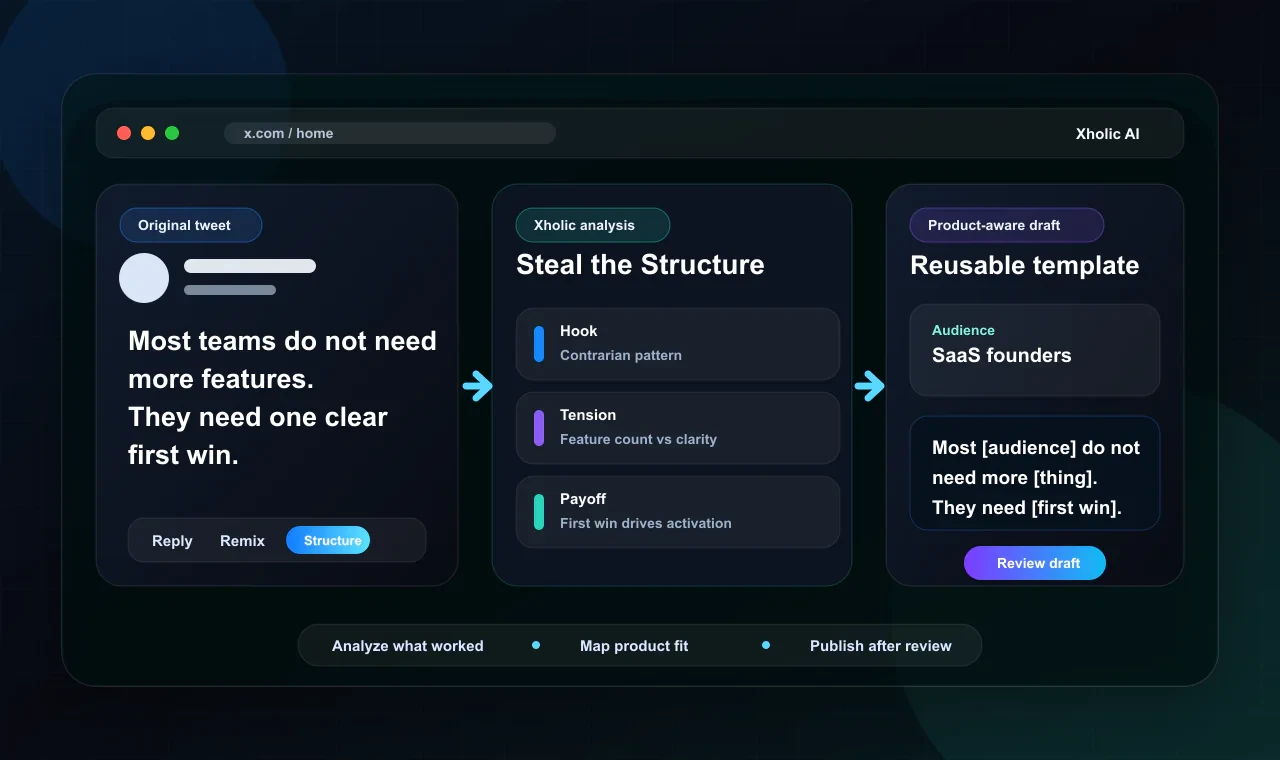
When you click “Steal the Structure” on any tweet, the extension breaks down that post into its structural components: the hook mechanism, the tension or curiosity gap it creates, how the payoff lands, and what made the reader stick around long enough to get there.
It is essentially a pattern X-ray. You see the skeleton of a viral tweet deconstructed in a way that makes it transferable. Then you can turn that skeleton into a fill-in-the-blanks template and either write your own version or let the AI draft one based on your niche.
This is where product awareness becomes especially useful. Instead of stealing a template and filling it with generic industry advice, Xholic can map the structure to your product context: the audience you serve, the transformation you promise, the problem you solve, and the specific use case the tweet is pointing toward.
Over time, this trains something more valuable than any single good tweet: it trains your eye for structure. You start seeing why posts land before you have finished reading them. That pattern recognition is what separates creators who grow consistently from creators who occasionally go viral but cannot replicate it.
Save to Collections: Your Research Lives in Your Feed
Most people who are serious about X have some version of a saved tweet system. Twitter’s native bookmarks are a mess, chronological, unsearchable, and basically a black hole. Some people use Notion. Some use a spreadsheet. Most use nothing and lose great ideas constantly.
Xholic’s Save feature inside the extension gives you a one-click system for capturing tweets directly into organized collections you create and name yourself. Research by topic, inspiration by content type, swipe file by niche, however you think, the collections adapt to it.
If you come across a tweet on X and want to save it without the extension, you can also paste any X link directly into your Xholic library. The tweet lands in your collection, ready to reference whenever you need it.
This turns your timeline from a place where good content disappears into a living research archive. Creators who build this kind of library over time have a structural advantage: they never run out of raw material.
Auto Streak Tracking: Consistency Becomes Automatic
This is a smaller feature that ends up mattering more than you would expect.
Every reply you send through the Xholic extension automatically counts toward your daily goal in the Goals & Streaks system. You do not have to log it, check it, or think about it. The streak updates in the background.
If you have ever tried to build a posting habit on X and watched it collapse after a busy week, you understand the value of systems that remove the tracking overhead. Knowing your streak is being maintained passively, every real reply you make counts, not just posts through the app, means consistency feels less like discipline and more like something that is just happening.
Who Is This Built For?
The Xholic Chrome extension is built for founders, indie hackers, content creators, researchers, analysts, and power users on X.
That is a wide range, but there is a common thread: these are people who use X as a genuine growth channel, not just a place to scroll. They have something to say, an audience they are trying to reach, and a limited amount of time to do it in.
If you are posting once a week hoping something sticks, this extension is probably more than you need. But if you are treating X seriously, engaging daily, building in public, using replies as a distribution strategy, and studying what works, then Xholic fits into that workflow without asking you to redesign it.
It is also worth noting that the extension is specifically useful for people who find the blank page the hardest part. The AI does not replace your thinking, it removes the activation energy cost of expressing that thinking in a form that is ready to post.
How Xholic Compares to Other X Chrome Extensions in 2026
The Chrome Web Store has a handful of extensions that operate in this space. Tweet Hunter X, formerly Twemex, is one established option, and its main strengths are in content discovery and viewing other creators’ top posts. SuperX offers an analytics sidebar with scheduling. Kleo focuses on feed organization and content inspiration. Bisonary is built specifically around contextual replies.
What makes Xholic different is not any single one of its features, it is that it covers the full content workflow in a single toolbar: reply, remix, extract structure, save, add product-aware context, and track streaks. Most competing tools do one or two of these things well. Xholic is trying to be the complete system that replaces the need for multiple extensions running simultaneously.
It is also brand new, which means early users are getting in at the ground floor before the feature set expands. The core platform at xholic.ai includes additional tools, a Reply Deck for discovering high-momentum conversations, a Daily Pack that generates posts every morning in your voice, a semantic search engine across 2.5 million indexed tweets, and a Goals & Streaks dashboard, all of which the extension connects to.
FAQs
Does the Xholic AI Chrome extension post anything automatically?
No. Nothing is published without your review and approval. Every reply, remix, and draft is presented to you to edit or discard before it goes anywhere. The tool generates, you decide.
Does it work on any tweet, or only specific ones?
It works on any tweet you see in your X feed. The toolbar appears underneath posts as you scroll, so you can use it on content from any creator in any niche without navigating away.
Will X’s algorithm flag replies made with AI assistance?
X’s terms restrict automated posting and mass, unattended publication without human review. Xholic does not do that. Every action requires your active participation. Using an AI writing assistant the same way you would use any drafting tool is different from automated posting.
Do I need the full Xholic AI subscription to use the extension?
The extension connects to your Xholic AI account. Pro and Max include a 7-day free trial, giving you access to test both the extension and the web app.
How do product-aware reply, remix, and template suggestions work?
When you save product context in Xholic, the extension can use it as grounding material for replies, remixes, and stolen structures. It looks for relevant overlap between the tweet and your product’s audience, workflow, pain point, category, or use case, then suggests a draft you can review, edit, or discard.
Is the extension available for browsers other than Chrome?
Currently, the extension is Chrome-only. It is listed on the Chrome Web Store at xholic.ai and under the extension ID ofbanmlgeepbbkcnmgdcpnbnbddkplpd.
How quickly does the AI learn my voice?
The composer improves with use. The more replies you generate and edit through the extension, the more it calibrates to your specific phrasing, tone, and style. Users typically notice meaningful improvement within the first week of consistent use.
Practical Tips for Getting the Most Out of the Extension
If you install the extension and want to hit the ground running, here are a few approaches worth trying from day one.
Start with replies, not original posts. The biggest growth lever for most X accounts right now is strategic commenting on high-momentum posts. Use the AI composer to show up in more conversations faster, and let the audience of larger creators discover you through your replies.
Use “Steal the Structure” before you write your next original post. Take two or three tweets from your niche that performed well recently, run them through the structure tool, and study what they have in common. Then write your next post with that structural awareness.
Build your collections intentionally. Do not just save tweets randomly; decide in advance what categories matter to you, such as “hooks that worked,” “posts about my niche topic,” or “reply examples I like,” and save with those categories in mind. In 30 days you will have a library that is actually useful.
Treat the streak as a commitment device, not a vanity metric. The goal is consistency, and the streak is the scoreboard. Set a daily reply target you can realistically hit. Even five thoughtful replies a day adds up faster than you would think over 90 days.
What You Will Get
Most of the friction in X growth is not a lack of ideas, insight, or effort. It is the gap between having something worth saying and actually saying it, quickly enough, in the right conversation, in a form that represents you well.
The Xholic AI Chrome extension is a focused attempt to close that gap. It sits quietly inside X until you need it, then gives you exactly what you need to engage faster, organize better, and stay consistent without turning content creation into a second job.
For anyone who has been treating X as a serious distribution channel but losing momentum to tab-switching and blank pages, it is worth installing and testing with the 7-day trial. The cost of staying inconsistent is compounding every day you wait.