Comparison

Xholic vs Typefully

Typefully is a polished writing and scheduling app that publishes to X, LinkedIn, Threads, Bluesky, Mastodon and Substack, with team collaboration and an API. Xholic is built only for growing on X: drafts and replies in your voice, feeds of posts worth replying to, lead finding and analytics. The real question is whether you need a great editor for many networks or growth tools for one.

Pricing and features checked on

Pick Xholic if X is your main channel and you want help finding conversations, replying and finding leads, not just writing and scheduling. Pick Typefully if you publish to several networks, work in a team, need an API today, or want a free plan.

Choose Xholic if

  • You want an AI wand in every X reply box and Engage feeds that surface posts worth replying to.
  • You want Workers to draft batches of posts in your voice, plus a library of more than 12 million posts to learn from on Max and Ultra.
  • You want lead-finding Signal agents and analytics for any profile you open on X.

Choose Typefully if

  • You publish to LinkedIn, Threads, Bluesky, Mastodon or Substack as well as X.
  • You work in a team and need roles, permissions, comments and Slack alerts.
  • You want a free plan, or an API and MCP server you can use today, even without paying.

Xholic and Typefully, side by side

A polished writing and scheduling app for X, LinkedIn, Threads, Bluesky, Mastodon and Substack, with team collaboration and an API for AI agents.

Xholic compared with Typefully, feature by feature
FeatureXholicTypefully
AI writing in your voiceDrafts posts that sound like you, not a template.
YesWorkers draft from your own posts and voice
YesWriting assistant that learns your voice
AI reply helpHelps you write replies to other people's posts.
YesA reply wand in every X reply box
PartlyReply to posts; AI reply drafting not stated
Feed of posts worth replying toSurfaces conversations in your niche so you can reply early.
YesEngage feeds and a Mentions inbox
Not stated
Viral post libraryA searchable library of high-performing posts for ideas.
Yes12M+ posts on Max and Ultra
Not stated
Scheduling queueQueue posts for set times or recurring slots.
YesExact times or recurring slots
Yes
ThreadsWrite and schedule multi-post threads.
Yes
Yes
X ArticlesWrite long-form X Articles.
YesWith AI covers
YesLong-form posts
Auto repost and auto plugRules that repost or add a follow-up to posts that do well.
YesAuto repost, plug and delete on Max and Ultra
YesScheduled retweets and auto plug
Auto DMsAutomated direct messages on triggers you set.
Yes800 to 4,000 a month
YesAuto-DMs and giveaways
Lead findingFinds people on X who are likely buyers or partners.
YesSignal agents
Not stated
Analytics for your accountFollowers, impressions and post performance over time.
YesWith X history import and a streak heatmap
YesFrom Creator
Analytics for any profileStats for other people's public accounts.
YesIn the Chrome extension, 40 other profiles a day
Not stated
Chrome extensionTools that work inside x.com itself.
YesReply wand, panel, Remix
Not stated
Multiple X accountsRun more than one X account from one subscription.
Yes5, or 10 on Ultra
YesBilled per social set
Team accessLet other people work in your account with set permissions.
PartlyEditor or Full access sharing; no seats
YesTeams, roles and permissions on Business
Other social networksPublish to LinkedIn, Bluesky, Threads and others too.
NoX only
YesLinkedIn, Bluesky, Threads, Mastodon, Substack
API or MCPConnect your own scripts or AI agents.
NoComing soon
YesAPI and MCP, even on Free
Free planUse it without paying, with limits.
No3-day trial
Yes10 posts/month

What each one costs

Prices as each company lists them on its own pricing page.

Xholic

3-day trial, $0 today

  • Pro$29/mo

    5 X accounts · 500 posts/month · 750 AI credits/month · 1 Signal agent · 800 Auto DMs/month

  • Max$29/mo launch price (normally $49)

    5 X accounts · 750 posts/month · 2,000 AI credits/month · 3 Signal agents · 1,000 Auto DMs/month

  • Ultra$149/mo

    10 X accounts · 2,500 posts/month · 10,000 AI credits/month · 5 Signal agents · 4,000 Auto DMs/month

Xholic pricing

Typefully

Free plan; Enterprise trial on request

  • Free$0

    1 social set · 1 user · 10 posts/month · API, MCP and agents

  • Creator$99/yr, annual billing only

    X analytics · AI writing features · 1,000 posts/month · 1 social set, 1 user

  • Business$18/mo per social set, billed yearly

    Up to 50 social sets · Unlimited users · Teams, roles and permissions · Comments and Slack

Typefully pricing

Where they really differ

Price: a free plan versus a trial

Typefully has a free plan with 10 posts a month for one social set. Creator costs $99 a year, billed annually only, and adds X analytics, AI writing features and 1,000 posts a month. Business is $18 a month per social set, billed yearly, with unlimited users and up to 50 social sets.

Xholic has no free plan. It charges $29 for Pro, $29 for Max and $149 for Ultra, with a 3-day trial at $0 today. If you only need a writing and scheduling app for one account, Typefully's Creator plan is cheaper. Xholic's price covers growth tools that Typefully doesn't describe, like reply feeds, lead finding and, on Max and Ultra, a viral library.

Where Typefully is ahead: networks, teams and API

Typefully publishes to six networks: X, LinkedIn, Threads, Bluesky, Mastodon and Substack. Xholic publishes to X only, so if you post the same ideas across several networks, Typefully saves you a second tool.

Typefully's Business plan has proper team features: unlimited users, roles and permissions, comments and Slack alerts. Xholic lets you share an account with one other Xholic user as an Editor or with Full access, without sharing a password, but it has no seats or approval queue.

Typefully also offers an API, MCP server and AI-agent access on every plan, including Free. Xholic's API and MCP server are coming but not live yet.

Writing: Workers versus a writing assistant

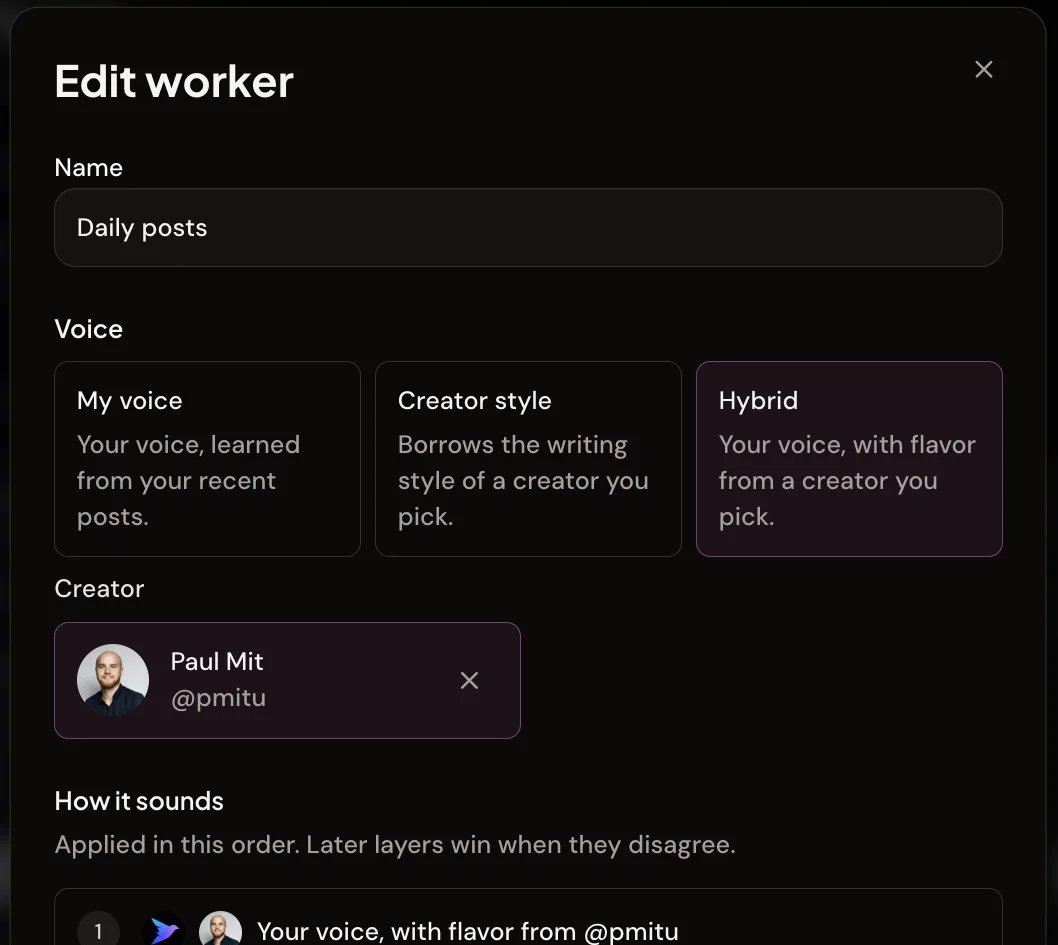
Both tools learn your voice. Typefully has a writing assistant that learns your voice. Xholic's Workers draft batches of review-ready posts in your voice, a chosen creator's style, or a mix, on demand or on a schedule, so drafts can be waiting before you open the app.

On Max and Ultra, Xholic's Inspiration Library lets you search more than 12 million posts by meaning and Remix any of them in your voice. Typefully doesn't describe a viral post library.

Editing an Xholic Worker that drafts posts in a chosen voice

Replies and engagement on X

Replying early to the right posts matters on X. Xholic's Engage feeds surface posts worth replying to from keywords, searches and lists, and the Chrome extension adds an AI wand to every reply box on x.com. The draft lands in X's own editor and you press Reply.

Typefully lets you reply to posts, but its pricing and changelog don't describe AI reply drafting or an engagement feed. It's built for publishing, not for working the replies.

Xholic topic feeds with keyword filters and an inline reply box

Leads, DMs and analytics

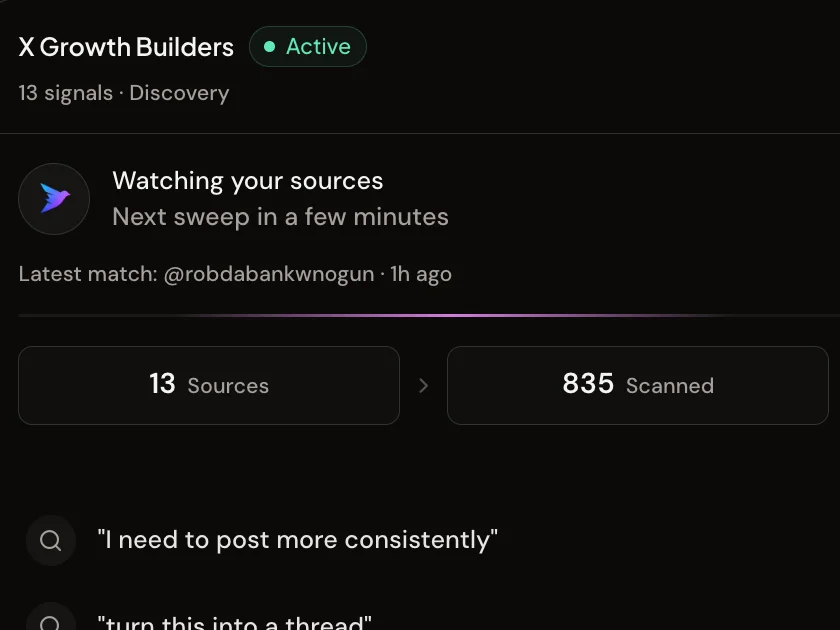
Xholic's Signal agents watch X for people likely to become customers, and Auto DMs are on every plan, with 800 a month on Pro and 4,000 on Ultra. Typefully has auto-DMs and giveaways too, but doesn't describe lead finding.

Both have X analytics for your own account; Typefully's start on Creator. Xholic's Chrome extension also shows analytics and estimated earnings for any profile you open, up to 40 other profiles a day.

An Xholic Signal agent finding leads on X

The honest trade-offs

Where Typefully is the better choice

  • A real free plan, and Creator costs $99 a year.
  • Publishes to six networks. Xholic publishes to X only.
  • Proper team features: roles, permissions, comments and Slack alerts.
  • API, MCP and AI-agent access, even on the free plan.

Where Xholic falls short

  • No free plan; the trial is 3 days.
  • Publishes to X only.
  • The public API and MCP server aren't available yet.
  • No team seats or approval queue; sharing is one owner and one teammate at a time.

Typefully's limits

  • No viral post library, engagement feed or lead finding is described.
  • Business is billed per social set, which adds up for agencies.
  • Creator is annual billing only.

Moving from Typefully to Xholic

  1. 01

    Start the 3-day trial and connect your X account through X's official sign-in. No password sharing.

  2. 02

    Let Xholic learn your voice during setup, then import your X analytics history so your numbers carry over.

  3. 03

    Install the Chrome extension to get the reply wand and profile analytics inside X.

  4. 04

    Let your old tool's queue run out before you cancel, so nothing scheduled gets skipped.

FAQs

Xholic vs Typefully questions

Short answers, with sources below.

Is Xholic cheaper than Typefully?

No. Typefully has a free plan, and Creator is $99 a year. Xholic starts at $29 a month with a 3-day trial. Xholic's plans include X growth tools Typefully doesn't describe, like reply feeds, the reply wand, lead-finding agents and, on Max and Ultra, a viral library. Compare Xholic plans
Does Xholic post to LinkedIn or Threads like Typefully?

No. Xholic publishes to X only. Typefully publishes to X, LinkedIn, Threads, Bluesky, Mastodon and Substack.

Does Typefully help with replies on X?

You can reply to posts in Typefully, but it doesn't describe AI reply drafting or a feed of posts to reply to. Xholic has both: Engage feeds and a reply wand in every X reply box. See the Xholic extension

Can my team use Xholic like Typefully Business?

Partly. You can share your Xholic account with another Xholic user as an Editor or with Full access, without sharing a password. Xholic has no seats, roles beyond those two, or approval queue. For larger teams, Typefully Business is the better fit. Xholic for teams

Does Xholic have an API like Typefully?

Not yet. Xholic's API and MCP server are coming. Typefully offers an API and MCP server today, even on its free plan.

Can I switch from Typefully to Xholic?

Yes, for X. Start the 3-day trial, connect your X account through X's official sign-in, import your X analytics history, and install the Chrome extension. If you also post to other networks, you can keep Typefully for those.

How we compared

We build Xholic, so we're not neutral. Every claim about Typefully comes from their own pricing and feature pages, checked on , and we say where they do better. "Not stated" means their pages don't say. Prices change, so check each site before you buy. Spotted something out of date? Email [email protected] and we'll fix it.

Sources

Xholic is not affiliated with Typefully. Product names are trademarks of their owners.

Try Xholic before you decide

Write in your voice, reply inside X, find leads and see what's working, all in one place.

$0 today · Cancel anytime

Compare plans