Twitter trends are topics and hashtags that become popular in a short period on X (Twitter). They are determined by the platform’s algorithm, which prioritizes the velocity and acceleration of conversations, not just the total volume of posts.
You’ve probably seen this happen: by the time a topic hits your sidebar, everyone already has a take, the best replies are gone, and your post feels late. That’s a core problem with most advice about Twitter trends. It teaches you to react to what’s visible, not how to spot momentum early enough to benefit from it.
For creators, founders, marketers, analysts, and social media managers, the useful skill isn’t “check Trending Topics.” It’s building a repeatable habit for finding fast-moving conversations, qualifying them, and turning them into replies, posts, threads, and scheduled content before the timeline gets crowded.
What Are Twitter Trends and How Do They Form
Twitter trends are X topics, phrases, and hashtags that the platform surfaces because discussion around them is rising fast. The important word is fast. X doesn’t just reward the biggest topic overall. It rewards sudden movement.
Consider the analogy of weather. A steady river keeps flowing, but a sudden downpour gets attention immediately. That’s why a niche event can hit the trends list while a larger long-running conversation stays invisible. X looks for rapid increases in usage around a phrase or hashtag, not just total popularity, as explained in BrandMentions’ overview of Twitter Trending.
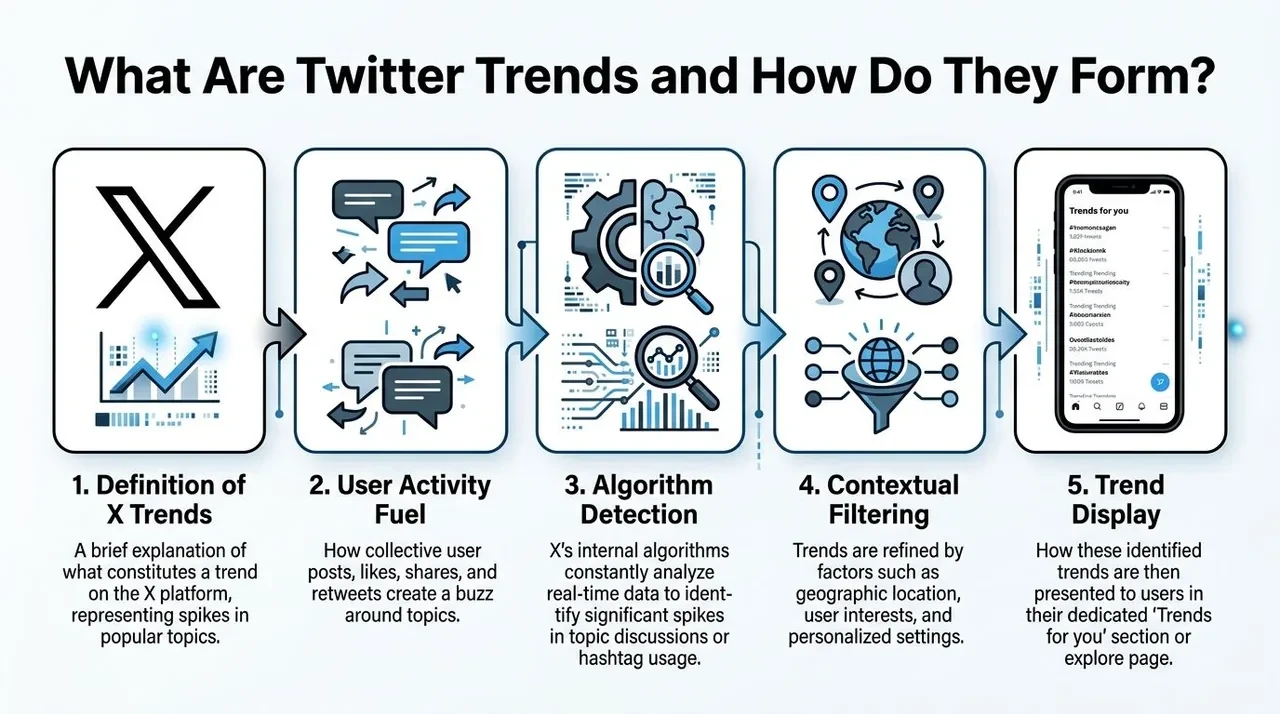
Twitter trends are about spikes, not steady popularity
This is the mental model often overlooked. A topic that grows quickly over a short window can outrank a more broadly discussed topic that grows slowly. That’s why trend-spotting for growth should focus on momentum signals:
- Sharp mention increases: A phrase shows up repeatedly in a compressed time window.
- Reply density: More people start reacting to the same core idea.
- Quote-post spread: Users begin reframing the same topic from their own angle.
- Acceleration: The conversation isn’t just active. It’s speeding up.
A research summary on trend analysis also points in the same direction: ranking signals are tied closely to how quickly tweet volume rises in short windows, which makes velocity a better predictor than raw volume for spotting what may trend next, as discussed in this ScienceDirect abstract on Twitter trend analysis.
Practical rule: Don’t ask, “Is this big?” Ask, “Is this getting bigger right now?”
Personalization changes what each user sees
There is no single universal trend feed for most users. X personalizes trend visibility based on location, interests, and accounts followed. That means the same hashtag can appear high for one person and not appear at all for another. X states this directly in its trending FAQ and settings guidance.
For a creator or brand, this changes the job. You’re not trying to win “the internet.” You’re trying to appear inside the conversation your target audience is seeing. A B2B founder targeting U.S. startup Twitter should care more about the right local and network-specific trend than a generic global list.
Most trends have a short working window
Timing matters because trend lifecycles are short. A 2021 study found that major news can remain in the trending list for roughly 5 to 6 days, while entertainment-focused topics often fade in 2 to 3 days, according to the PMC study on Twitter trend lifecycles.
That doesn’t mean you have that entire window to post. In practice, your best opportunity is earlier, when there’s still room to add something fresh.
One way to approach this is:
| Stage | What it looks like | Best action |
|---|---|---|
| Early rise | Small but obvious spike in discussion | Reply fast and save examples |
| Visible breakout | Trend appears across your niche | Publish a sharp original post |
| Peak crowding | Everyone is posting the same angle | Take a contrarian or niche-specific angle |
| Decline | Recycled memes and stale takes | Stop forcing it and move on |
If you understand those mechanics, twitter trends stop feeling random. They become a system you can read.
How to Discover Emerging Trends Before They Peak
Relying on the sidebar often leads to late trend discovery. By then, the topic is already obvious, crowded, and often diluted by people posting generic takes.
That matters because the default trends layer isn’t always clean. A 2023 study found that coordinated networks can hijack trending topics, which makes many visible trends noisy or artificially inflated, as noted in the International Journal of Communication study on algorithmic amplification.
Why the sidebar is too late for serious growth
If your workflow is “open X, check Explore, post something,” you’re joining after the market has already priced in the opportunity.
A better approach is to watch for emerging clusters before they become obvious. That means tracking:
- Repeated phrases across different creators
- Reply chains that are getting more active
- A new framing of an old topic
- Specific terms showing up across adjacent niches
- Momentum in quotes and replies, not only original posts
This is also why smart search beats passive scrolling. If you want to manually uncover content ideas with Twitter, search-led workflows are usually stronger than waiting for the platform to hand you a trend.

A simple workflow for early trend discovery
Use this sequence daily.
-
Start with a small creator set
Build a focused list of accounts in your niche: founders, operators, analysts, creators, and reporters. You want signal-rich accounts, not just big names. -
Scan replies before top posts
Trends often surface first in replies, quote posts, and argument clusters. If the same phrase keeps appearing under multiple accounts, pay attention. -
Search by meaning, not just hashtag
Hashtags are often late-stage labels. Early momentum usually starts as language patterns, recurring claims, product names, or event references. -
Save examples fast
Don’t trust memory. Save the original post, the best replies, and a few adjacent takes. This gives you raw material for your own angle. -
Decide the format immediately
Is this a reply opportunity, a standalone post, a thread, or a post to queue for later today? Speed matters more when the topic is moving.
The best trend opportunities rarely announce themselves as “a trend.” They first look like several smart people suddenly talking about the same thing.
What to look for in your own search and analytics workflow
If you use tools, don’t just look for “top tweets.” Look for workflows that help you find high-momentum discussion early, save examples, and act without leaving your process.
A practical setup might include:
- semantic search for related posts
- filtering by engagement and recency
- a way to monitor high-value creators
- in-feed reply drafting
- a place to save and group tweets by topic
- scheduling for approved drafts later in the day
If you want a framework for reading post performance after discovery, this guide to a Twitter analyzer tool is useful because it shifts the focus from vanity metrics to decision-making.
Evaluating Trends for Your Audience and Goals
Not every trend deserves your attention. Some are irrelevant. Some are risky. Some will bring the wrong audience. The fastest way to waste time on X is to chase motion without checking fit.
Use the relevance risk and reach filter
I use a simple three-part filter before joining any trend.
Relevance
Ask whether the topic fits your audience, your voice, and your usual content lane.
A founder can comment on product launches, hiring debates, AI tools, or market shifts if those topics overlap with their audience’s interests. The same founder probably shouldn’t jump into a celebrity feud unless they have a very specific and defensible angle.
Use these checks:
- Audience fit: Would your followers care about this even if it weren’t trending?
- Voice fit: Can you talk about it naturally, or will it sound borrowed?
- Content fit: Can you add expertise, humor, analysis, or a useful example?
Risk
Some trends carry context you need to understand before posting. News events, sensitive social issues, and controversy-heavy hashtags can punish low-context participation.
Run a quick audit:
- search the phrase directly
- read several top posts and replies
- check whether the tone is celebratory, sarcastic, angry, or grief-driven
- avoid commercial hooks on tragic or high-conflict topics
If you need five minutes to understand what a trend means, take the five minutes. That pause saves a lot of cleanup.
Reach
A trend can be relevant and safe but still not worth the effort. Some topics are too fleeting. Others are broad enough to earn attention for several cycles of content.
This is where your analytics matter. Look at what usually works for you. Short reactive posts may work for commentary accounts. Explainers may work better for operators and analysts. If you need a better decision loop, reviewing your Twitter analytics workflow can help connect impressions, replies, and follower growth to actual content choices.
Check location before you commit
X tailors trends by geography and social graph, which means trend rankings can differ sharply by location and who a user follows, as explained in Missinglettr’s guide to Twitter trends.
That matters for campaign planning and audience targeting. A U.S.-focused creator should qualify a trend in the U.S. context. A sports account targeting the UK should check that market specifically. If you skip this step, you can end up posting into a conversation your real audience never saw.
Use this quick decision table:
| Filter | Good sign | Bad sign |
|---|---|---|
| Relevance | Natural overlap with your niche | Forced tie-in |
| Risk | Clear context and tone | Ambiguous, political, or sensitive without expertise |
| Reach | Enough room for your angle | Already stale or oversaturated |
| Location | Matches your audience geography | Visible only in a different context |
Actionable Tactics for Leveraging Twitter Trends
Once you’ve found a real trend and cleared it through your filter, the next question is execution. Typically, individuals either post a bland observation or stuff a hashtag into an unrelated tweet. Neither works well.
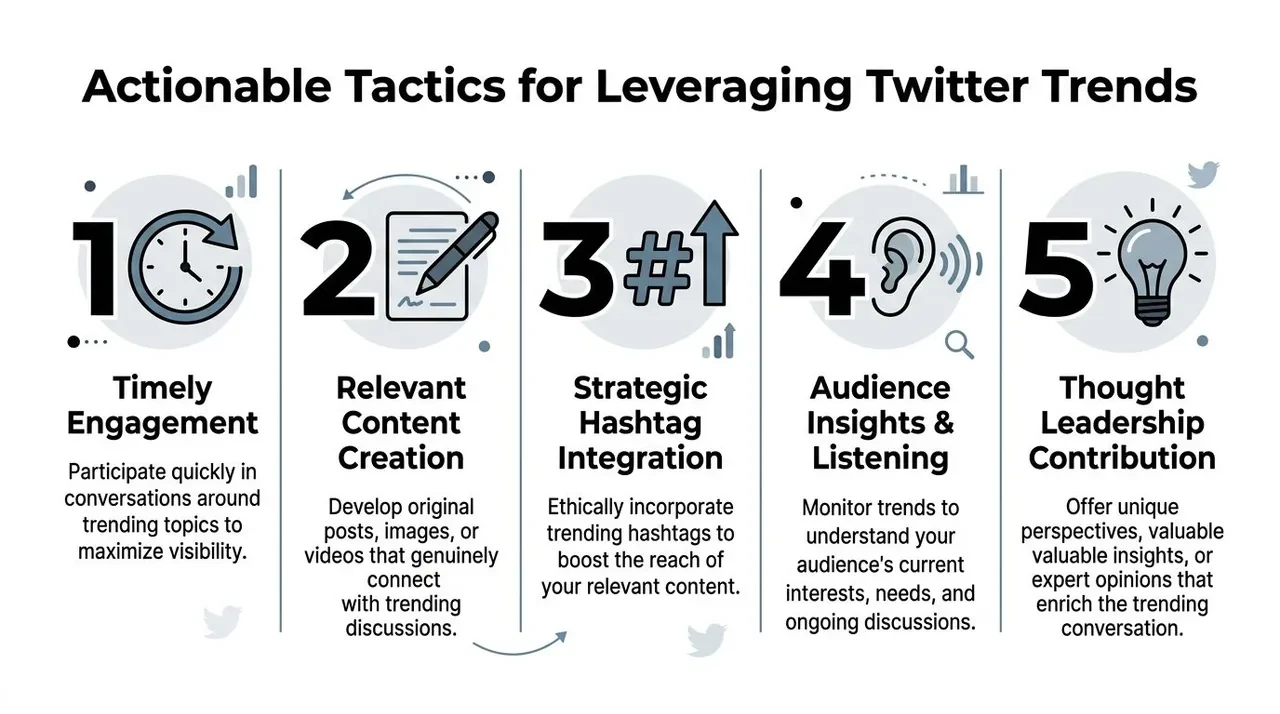
Five ways to turn a trend into content
1. The timely reply
This is the fastest move. Find a post driving conversation and add one useful angle.
Do: add context, a sharp example, or a contrarian point.
Don’t: agree vaguely.
Example reply:
This matters less because of the announcement itself and more because it changes buyer expectations. Once one tool ships this, every competitor gets compared against it.
2. The themed original post
Use the trend as a hook, then connect it back to your expertise.
Sample tweet:
Everyone’s reacting to today’s AI launch like it’s a feature war. The core issue is workflow compression. The products that win won’t just add AI. They’ll remove steps users hate.
3. The content remix
Sometimes the angle is right, but your format is wrong. If you’ve saved proven post structures, adapt one to the live topic.
Try this structure:
- Hook with the trend
- Reframe the common opinion
- Add your niche-specific takeaway
- End with a decision or prediction
If you study viral formats often, this is the same logic behind post breakdowns and remix workflows. This piece on how to make a tweet go viral is useful for seeing how hooks and structure shape distribution.
A sample trend response workflow
Let’s say you run a SaaS founder account and a product pricing debate starts spreading across startup Twitter.
You could respond three ways in one day:
| Time | Format | Example angle |
|---|---|---|
| Morning | Reply | “Most pricing debates are really packaging debates.” |
| Midday | Original post | “3 signs your product is underpriced during a market shift” |
| Afternoon | Thread | Break down how to test pricing language without rewriting your whole homepage |
That’s stronger than one generic tweet using the trending phrase once.
A second format that works well is the explainer post. When a trend is noisy, explain what it means for a narrower audience.
Example:
If you’re an indie hacker, this trend matters for one reason: users are comparing onboarding friction more aggressively now. Faster setup is becoming part of perceived product quality.
Here’s a solid walkthrough on trend-based posting strategy:
How teams can plan trend posts without posting them live
Trend content is often hard to approve because speed matters. If you work with a team, a visual mockup helps you move faster.
For campaign approvals, training, creative reviews, or internal planning, a fake tweet generator can help teams preview how a post will look before it goes live. That’s useful for social media managers, agency teams, and founders who want feedback on messaging.
Use mockups responsibly. Label them clearly when needed. They should help with planning, education, and internal review, not impersonation, fabricated evidence, or misleading claims.
Common Mistakes to Avoid When Trend-Jacking
A trend appears in your feed, you post within minutes, and the result still falls flat. That usually happens for one of three reasons. The post was late relative to the ongoing conversation, the framing missed the context, or the content added nothing your audience could use.
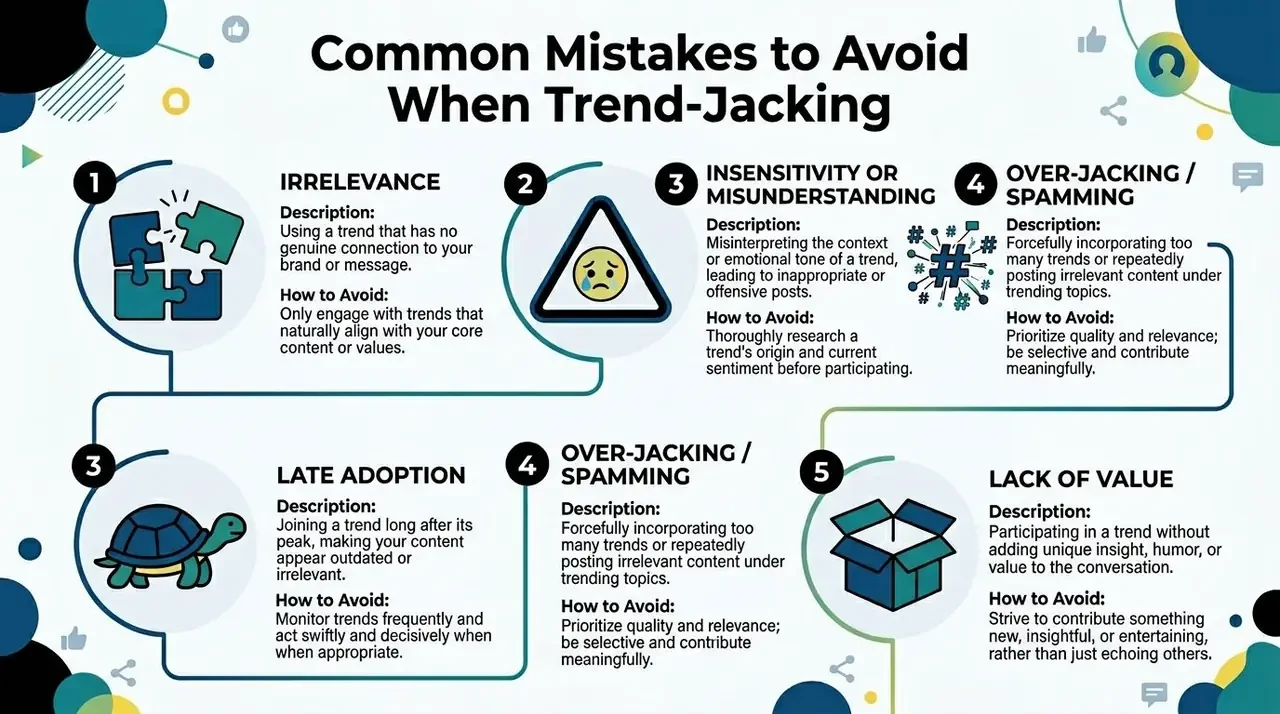
The mistakes that make you look late forced or careless
Trend-jacking fails when creators treat a trend as a distribution shortcut instead of a signal. The sidebar only shows that attention is already visible. The better question is whether you caught the shift early enough, understand what people are reacting to, and have a useful angle for your specific audience.
The common mistakes are easy to spot.
- Posting without context: You saw the phrase, but you did not read enough replies, quote posts, or related posts to understand why it is spreading.
- Forcing your offer into the trend: The post exists to mention the product, not to contribute to the conversation.
- Joining after the joke or insight is exhausted: The wording is still circulating, but the interesting part is already over.
- Using sensitive events for attention: Trust drops fast when the post reads like opportunism.
- Copying the same take everyone else is using: If the post could come from any account in the feed, there is no reason to engage with yours.
A practical filter helps here. Before posting, check four things: source, tone, shelf life, and fit. Source tells you where the trend started. Tone tells you whether the conversation is playful, technical, angry, or fragile. Shelf life tells you whether people are still adding new meaning or just repeating each other. Fit tells you whether your audience will care even if the trend disappears tomorrow.
What to do instead
Use a simple replacement system.
Instead of posting without context, read enough of the thread network to understand the stakes and emotional tone.
Instead of forcing promotion, connect the trend to a problem, decision, or mistake your audience already cares about.
Instead of posting late, keep a light workflow for saving signals, drafting angles, and publishing while the conversation still has room for a fresh take.
Instead of chasing every trend, choose the ones that overlap with your niche, product category, or audience pain points.
Instead of repeating the obvious, add interpretation. Explain what the trend changes, who it affects, or what to do next.
That is the difference between random participation and a repeatable growth habit. Strong trend posts come from a system. Spot an early signal. Verify context. Match it to audience relevance. Publish a format that adds clarity, not noise.
Tooling matters too. Publishing tools help with speed, but growth on X depends on judgment before distribution. That trade-off explains why many teams stay busy and still miss the best opportunities. This breakdown of why many X growth tools optimize output instead of decision quality explains the gap.
FAQ: Twitter Trends
Can you create your own trending topic
Yes, but it’s difficult because X trends favor sudden increases in discussion, not just one account posting repeatedly. In practice, a topic is more likely to gain momentum when multiple accounts begin using the same phrase or framing in a short period. The cleaner way to influence this is to publish an angle others want to quote, reply to, and restate in their own words.
How do you know if a trend is safe to engage with
Use a simple safety check:
- search the term directly
- read top posts and recent replies
- identify whether the topic is comedic, professional, political, grief-related, or conflict-heavy
- avoid posting if you don’t understand the origin
- avoid sales language on serious events
If the context is unstable or emotionally charged, skip it unless you have real authority and a careful reason to contribute.
Does using a trending hashtag guarantee more impressions
No. A trending hashtag can improve discovery only if your post is relevant to the conversation and strong on its own. Weak posts don’t become strong because they include a popular tag. In many cases, a clear opinion, good timing, and a useful angle outperform lazy hashtag use.
How are Topics to Follow different from trends
Trends reflect what is rising quickly right now. Topics to Follow are broader interest categories that help shape what X shows a user over time. Trends are about immediate momentum. Topics are about ongoing relevance.
Should you always post when you find a trend
No. Sometimes the best move is a reply. Sometimes it’s saving examples for tomorrow’s content ideas. Sometimes the trend is useful only as audience research. Good operators don’t force output from every signal.
What’s the best format for trend content
It depends on your account and audience. Replies work well when speed matters. Standalone posts work when you have a sharp insight. Threads work when the trend needs explanation. Quote posts work when reacting to a specific claim adds useful context.
If you want a faster way to spot high-momentum conversations, turn them into better replies and posts, and stay consistent without living inside the feed all day, try Xholic AI. It’s built for creators, founders, marketers, analysts, and X power users who want a practical growth workflow for discovery, reply writing, content ideation, research organization, and scheduling approved posts.