Most advice about a Twitter automation strategy starts in the wrong place. People obsess over posting more, faster, and with less effort. That’s how accounts get noisy, repetitive, and eventually ignored. The better model is simpler, automation should help you capture signal, decide faster, and publish with judgment intact on X (formerly Twitter).
That shift matters because automation has been part of X’s playbook for a long time, and trust problems are not new. In a 2011 study of 19,436 public timeline accounts, researchers found that 16% of active accounts showed a high degree of automated behavior, and 12% of automated accounts spoofed their source as “web” to look organic. Today, one widely cited industry estimate says 66% of all tweets on X are generated by bots, and with more than 500 million tweets sent daily, that implies roughly 330 million automated tweets per day. The lesson is blunt, volume alone doesn’t win, relevance does. The winning setup is human-in-the-loop automation that helps you move through the noise faster without sounding machine-made. 2011 Twitter automation research, industry estimate on bot-generated tweets and daily volume
Why Most Twitter Automation Strategies Fail Before They Start
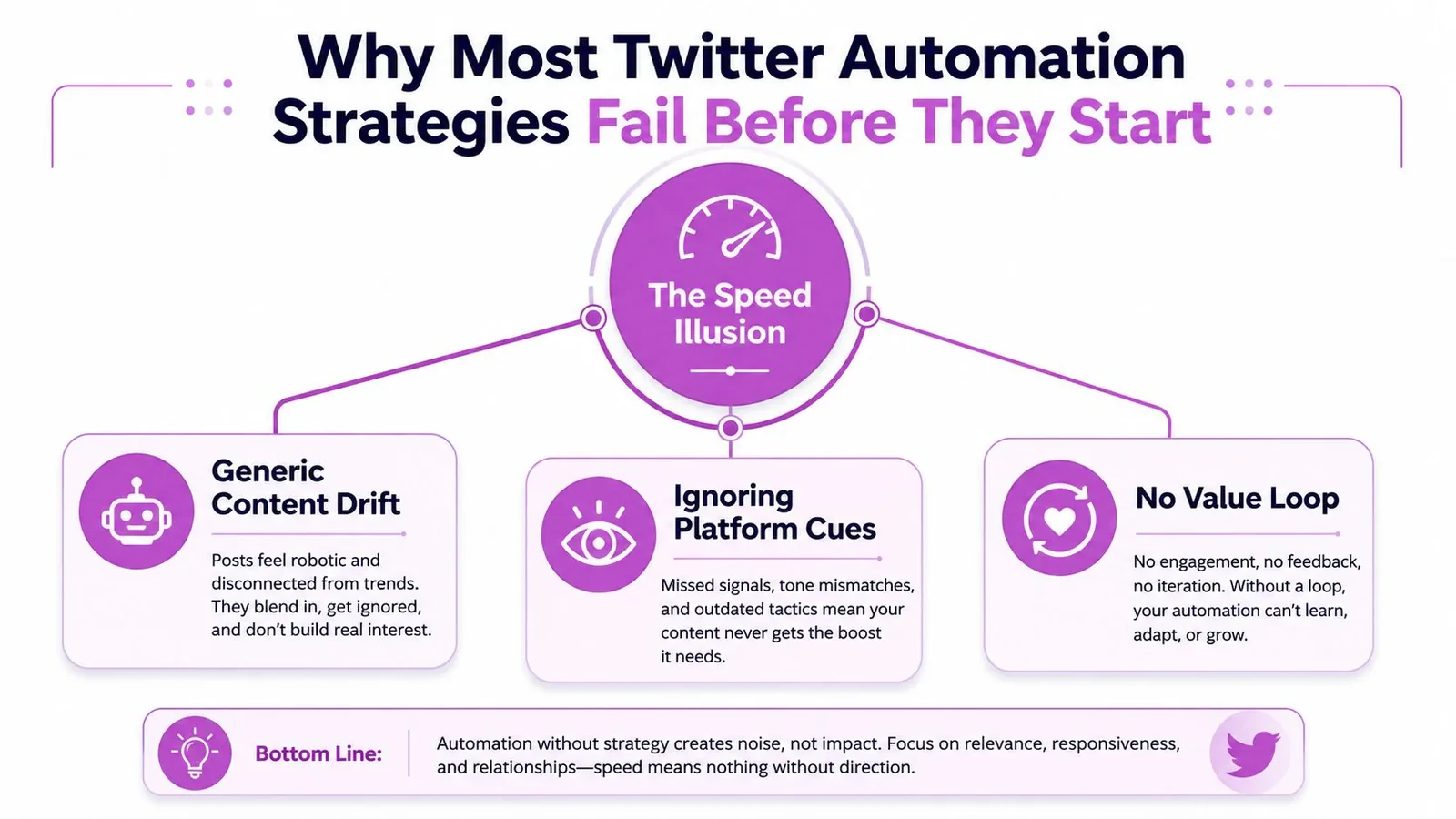
The biggest mistake is treating automation like a posting engine. That mindset produces generic content drift, weak timing, and a feed full of output that no one asked for. A better twitter automation strategy starts with a more useful question, where should your attention go, and what should a machine help you notice first?
The speed illusion
Speed feels productive because it creates output. But output without direction just multiplies the same weak idea across more posts, more replies, and more accounts. On X, that usually means your automation starts acting like a noise generator instead of a strategic layer.
The platform’s history makes that clear. Automation was already embedded in attention flows years ago, and trust issues were there from the start. That’s why “just post more” is a lazy strategy now. X is crowded, and if your system doesn’t help you separate worthwhile conversations from junk, you’re paying to scale irrelevance.
Practical rule: if automation can’t improve your judgment, it’s probably making your account harder to trust.
Signal capture beats blind volume
The best accounts don’t automate the same way. They use tools to spot patterns, surface conversations, and shorten the gap between “this matters” and “a human should respond here.” That’s the difference between signal capture and noise production.
This is the right frame for founders, creators, and marketers. A founder wants to catch product questions early. A creator wants to spot repeatable hooks. A marketer wants to know which conversations are warm enough to join without looking forced. If your automation can’t support those decisions, it’s not strategy, it’s just scheduling.
The reason this matters more now is scale. If most output on the platform is already automated by estimate, then raw throughput is no longer the edge. The edge is human-in-the-loop automation that preserves voice, judgment, and timing. That’s the line to protect before you touch any tool.
Set Goals and KPIs Before You Touch Any Tool
Pick one primary outcome before you buy anything or wire up any workflow. If you skip that step, you’ll end up comparing tools by features instead of by business value. A sane twitter automation strategy starts with the result you want, then works backward to the metrics that predict it.
Choose one outcome and two leading indicators
For most X accounts, the primary outcome is one of these, more qualified replies, more people saving your posts, more product conversations, or a steadier publishing cadence. Then choose leading indicators that show whether automation is helping. I’d use a small set like qualified replies per week, saved posts per week, and your reply-to-post ratio if replies are part of the workflow.
Don’t confuse vanity metrics with operational ones. Follower count can move while your content quality stays flat. A smaller but sharper audience is often more useful than a larger one that never responds. For a founder building in public, the signal is whether people ask about the product. For a creator launching a newsletter, the signal is whether the content earns saves and repeat engagement. For a marketer, the signal is whether posts create conversations that support campaigns.
Use the right scorecard for the account stage
A brand-new account needs consistency and basic responsiveness. A mature account needs sharper topic fit, better reply quality, and stronger topic selection. That means the same automation feature can be useful or useless depending on where you are.
A simple planning sheet helps a lot here. If your team already uses structured planning, a resource like workflow management for marketing teams is useful because it shows how a repeatable process keeps people from making ad hoc decisions every day. Use the same idea for X.
Simple test: if a tool saves time but doesn’t improve one of your chosen KPIs, it’s not the right tool yet.
Write this down before shopping:
- Primary outcome: what the account should do more of.
- Leading indicators: the few metrics that prove progress early.
- Review cadence: how often you’ll inspect performance.
- Kill rule: what result means a format should stop.
That one-page scorecard makes tool selection a lot less emotional later.
Build the Four-Stage Automation Pipeline
The most reliable workflow is boring in the right ways. It doesn’t try to automate everything, and it doesn’t let publishing happen without review. It uses four stages, content pillars, drafting presets, a batch-content pipeline, and a human approval layer before anything goes live. That’s the core of a durable twitter automation strategy.
Stage one define content pillars
Start with three to five content pillars. For a founder, that might be product learning, customer pain, behind-the-scenes building, market opinion, and proof points. For a creator, it could be audience education, hot takes, story posts, breakdowns, and personal credibility.
If your pillars are fuzzy, automation will amplify the fuzz. Weak pillars produce random posts that don’t build memory in the audience. Strong pillars give every draft a lane, which makes both AI drafting and manual review much faster.
Stage two create drafting presets
Drafting presets are your templates for tone, structure, and post type. One preset might be a contrarian one-liner. Another might be a short thread opener. Another might be a reply format that adds context rather than agreement.
Tools can help, but only if they respect your voice. If you want a deeper list of idea-generation workflows, the internal guide on content ideation tools is a useful companion to this process. The goal isn’t more drafts, it’s better first passes.
Stage three run batch-content sessions
Batching is where the time savings show up. Open a block, generate a set of drafts, cut the weak ones, keep the strongest, and schedule what survives. A good weekly rhythm is simple, batch, review, trim, schedule, monitor live replies manually, then feed learnings into the next batch.
Stage four approve before publishing
Never let the system publish unreviewed AI content. That’s how you lose voice and accidentally create duplicate, shallow, or risky posts. Human approval is the checkpoint that keeps your account from sounding flat. It also catches tone mistakes before your audience does.
The easiest way to make this workflow stick is to treat automation as support, not authorship. If you want a higher-level example of how structured automation can support retention and repeated action, reduce churn with automation is a good reminder that systems work when they reinforce real behavior, not when they replace it.
The video below is a useful visual reminder that scheduling is only one piece of the system.
Choosing Tools for Scheduling, Replies, and Remixing
Don’t shop for “the best automation tool.” Shop by job. Scheduling, reply surfacing, and content remixing solve different problems, and one tool rarely handles all three well. A strong twitter automation strategy matches the tool to the bottleneck, not the other way around.
Scheduling tools solve consistency
If your main issue is missed posts, look at the scheduler first. You want drag-and-drop planning, easy queue management, and a way to see the week at a glance. If you already approve content in batches, scheduling should disappear into the background.
That’s where Xholic AI’s Smart Scheduler fits naturally, because it’s designed for planning approved drafts on a calendar and keeping the queue visible. If you’re evaluating a broader stack, the product overview on Twitter automation tools is a practical starting point. Don’t buy scheduling features you won’t use.
Reply tools solve conversation discovery
Reply tools matter when the bottleneck is finding the right conversations. You don’t need more replies. You need better targets. That means surfacing posts from the right people, in the right topics, at the right time.
If you do not want to search manually, Engage is the kind of workflow that helps because it surfaces conversations worth joining. That’s much closer to signal capture than spammy engagement. It also keeps your replies anchored to context, which matters more than speed alone.
Remix tools solve idea reuse without copying
Remixing is the right answer when you see a strong post format and want to adapt it to your niche. Use it to preserve the structure, hook logic, or payoff pattern, then rewrite the content so it fits your audience. That’s cleaner than chasing inspiration from a blank screen.
Tools like Tweet X-Ray and Tweet Remixer are useful here because they break down why a post works, then help you rebuild it around your own product, voice, or lesson. If you use other tools, compare them on whether they produce natural text. A resource like AI tools that produce natural text can help you think about output quality, not just speed.
The right tool doesn’t just save minutes. It reduces decision fatigue before you publish.
If you use Chrome workflows directly inside X, switching costs drop because the work happens where the conversation already is. That matters more than people admit, especially for reply-heavy accounts.
Guardrails, Compliance, and Account-Safe Automation
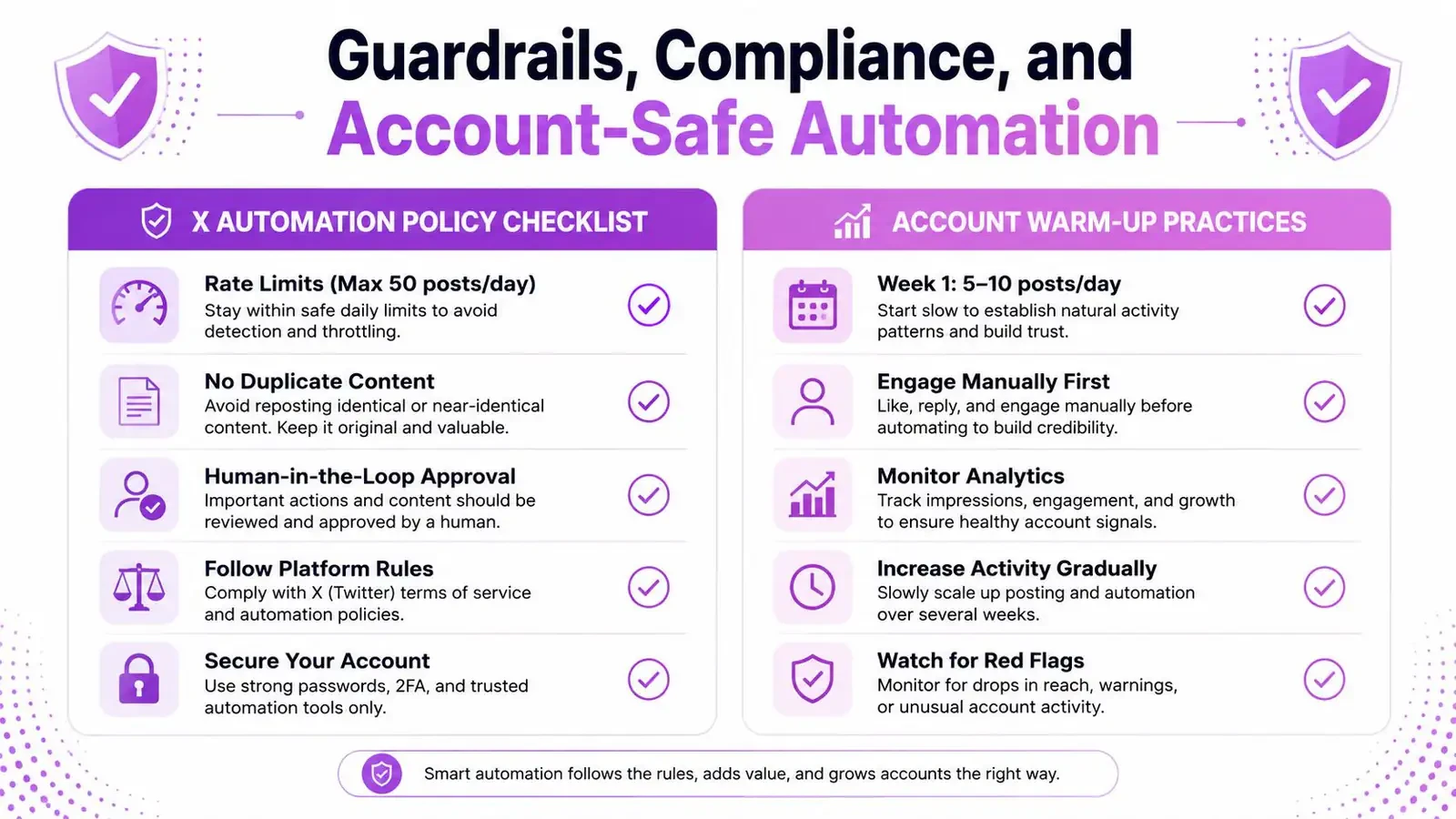
X’s rules are not ambiguous if you read them carefully. Automation that helps people find content or have real conversations is allowed. Spammy behavior, including keyword-triggered auto-replies, follow/unfollow loops, and posting identical content to multiple accounts you control, is not. If you want an account-safe twitter automation strategy, build around what the policy permits.
Turn policy into a checklist
Think in do’s and don’ts, not in vague safety language. Allowed automation should support human pace and purpose. Forbidden automation tries to game visibility or impersonate real engagement. That distinction is the only one that matters when you’re designing a workflow.
Use this filter:
- Allowed support: scheduling original posts, assisting reply drafting, surfacing relevant conversations, helping users discover content.
- Not allowed behavior: automated keyword replies, follow/unfollow loops, duplicate posting across controlled accounts, spammy engagement bursts.
- Required practice: keep a human reviewing what gets published.
Warm the account up before automation
A newer account should not jump straight into aggressive automation. One advanced guide recommends a 15-day warm-up period before automation starts, with days 1 through 7 limited to manual browsing and likes, and days 8 through 14 gradually adding a small number of follows and retweets. It also recommends 30 to 120 second random delays, a 10-minute rest after every 30 minutes of activity, residential proxy and IP isolation per account, fingerprint isolation, and staying within official API rate limits such as 300 GET statuses/user_timeline requests per 15 minutes. account-safe Twitter automation guide
That doesn’t mean you need to micromanage every action forever. It means you need to avoid looking like a bursty machine from day one. A paced account with normal behavior is much easier to trust than one that looks scripted.
Audit the risky parts first
The easiest failures are the ones people justify as “efficient.” Automated replies to keywords sound clever until they look like spam. Identical cross-posting looks neat until it signals duplication. Aggressive follow/unfollow tactics are the fastest way to make an account feel manufactured.
If you want a broader critique of misused tooling, why X growth tools fail is worth reading because it forces the same compliance-first mindset. Build boring guardrails first. Then automate.
Measure What Worked and Feed It Back Into Next Week
A good system gets sharper every week. A bad one keeps producing the same average posts and calling that consistency. The measurement loop is where the content engine learns, and it’s the part that often gets skipped. If you want a real twitter automation strategy, you need to measure what deserves to be repeated.
A realistic weekly loop
On Monday, scan the posts from the prior week and tag the ones that earned meaningful replies or sparked product-relevant conversations. On Tuesday, mark strong replies and save the posts that showed a format worth reusing. On Wednesday, update your content collection with the patterns that felt useful, not just popular.
On Thursday, adjust your drafting presets. If a hook style underperformed, cut it. If a content pillar produced better replies, raise its priority. On Friday, check whether the change improved your next batch or whether the format needs to be retired.
| Day | Focus | Output | Feeds Back Into |
|---|---|---|---|
| Monday | Review last week’s posts | Tags on high-signal posts | Content collection |
| Tuesday | Review replies | Saved strong reply patterns | Reply presets |
| Wednesday | Sort patterns | Clean research notes | Drafting rules |
| Thursday | Update drafts | New presets and pillar weights | Next batch |
| Friday | Check trend line | Kill or keep decisions | Next week’s plan |
Watch trends, not just single-post spikes
Per-post metrics tell you what happened once. Per-week trend metrics tell you whether your system is improving. That distinction matters because one lucky post can hide a bad process, and one flat post can hide a solid one.
If you want a more structured view of that layer, the internal guide on Twitter analytics dashboards is useful because it keeps reporting tied to decisions. Use the dashboard to answer one question, what should I do differently next week?
Know when to kill a format
The hard part is stopping a format that looks busy but doesn’t create useful engagement. If a post type keeps getting attention from the wrong people, it’s a drag on the account. If a topic repeatedly fails to produce comments, it’s probably not an automation problem, it’s a content fit problem.
That’s why measurement isn’t reporting. It’s the input to your next draft batch.
A One-Page Automation Checklist You Can Run Today
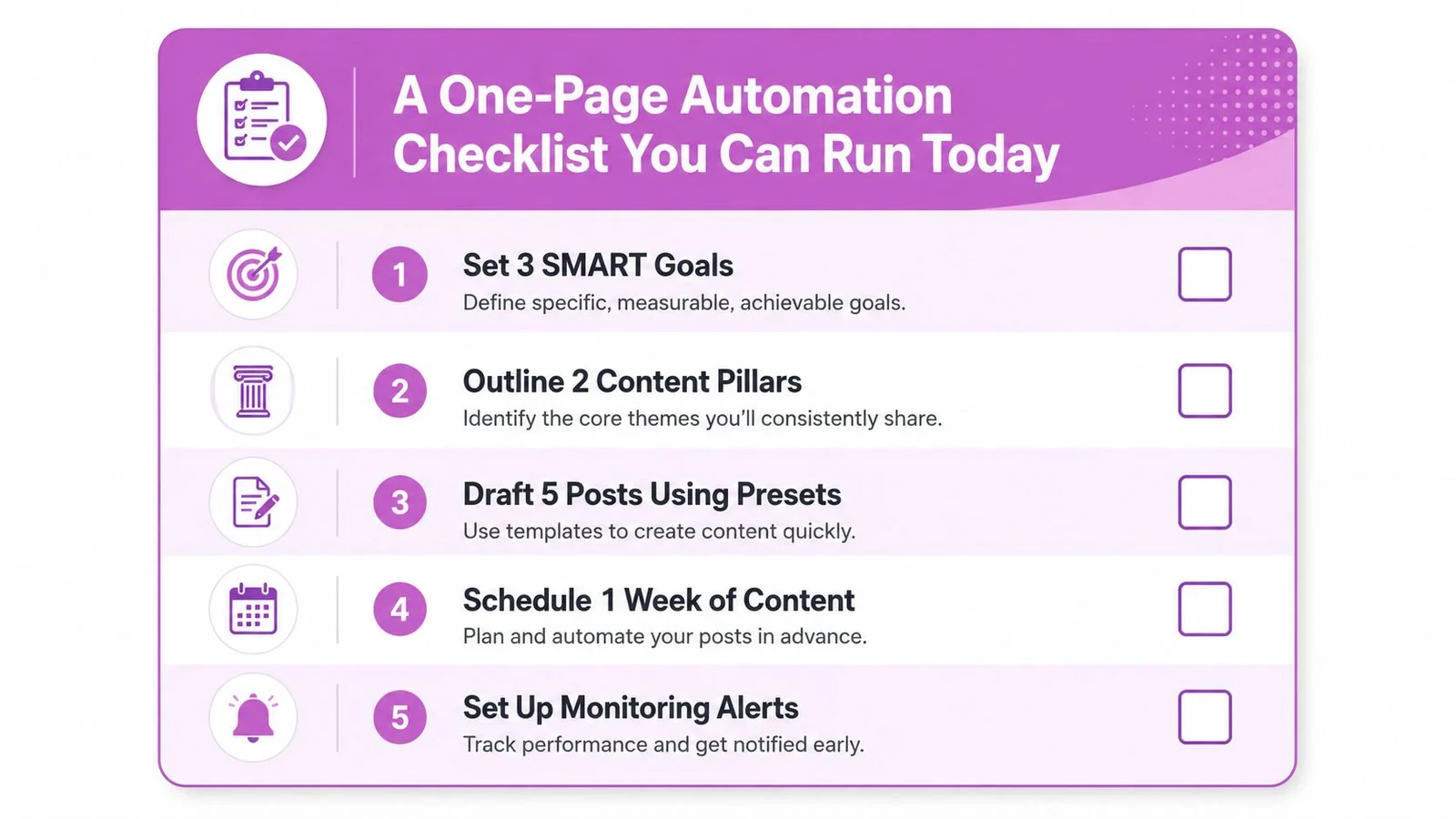
Start small. Pick one outcome, one workflow, and one guardrail layer. Then automate the most annoying part of the process, but keep a human review step before anything publishes. That’s the safest way to build momentum without creating account risk.
Run this checklist
- Set three SMART goals. Keep them tied to replies, saves, or consistency, not vanity alone.
- Outline two content pillars. Use topics your audience already cares about.
- Draft five posts using presets. Keep the format reusable, but the wording original.
- Schedule one week of content. Review everything before it goes live.
- Set up monitoring alerts. Watch for replies, saves, and formats worth repeating.
If you want a tool that keeps the human in the loop while helping with replies, remixing, scheduling, and context memory, visit Xholic AI. It’s built to help you decide what to say next, which conversations are worth joining, and what patterns deserve another run. Start with the bottleneck you hate most, then automate only that part first.