Operational workflow automation
Practical Zaps for meetings, CRM updates, lead response, task creation, reporting, content scheduling, and internal coordination.
35.7%
Best tweets about Zapier
Browse the best tweets about Zapier, featuring automations, Zaps, integrations, AI workflows, business operations, templates, and productivity results.
Useful Zapier automations, integrations, AI features, workflow design, limitations, reliability, operating outcomes, and product updates.
Original Xholic analysis
Zapier discussion centers on practical workflow automation and agent integrations, while pricing, reliability, data quality, and migration concerns temper enthusiasm. In the supplied analytics, posts with media had a higher median all-time score than text posts.
60.7% of posts
All-time engagement
42.9% of posts
Published in 90 days
Conversation map
Practical Zaps for meetings, CRM updates, lead response, task creation, reporting, content scheduling, and internal coordination.
35.7%
Automation systems that reduce manual work, accelerate response times, save sales or marketing time, and scale repeatable processes.
32.1%
Comparisons with n8n, Activepieces, Make, custom code, and self-hosted workflows around price, openness, control, and capabilities.
28.6%
Automation failures, AI hallucinations, brittle spreadsheet integrations, trustworthy data connections, and the need for human-in-the-loop QA.
28.6%
Choosing among humans, AI, and deterministic software; designing clear triggers, feedback loops, approvals, QA, and maintainable systems.
28.6%
Zapier SDK, MCP, and agent-oriented integrations that give coding agents access to thousands of business apps.
21.4%
Concerns about per-task pricing, expensive multi-step workflows, batching, monitoring costs, and migration effort at scale.
17.9%
Open-source GTM agents, skill libraries, prompt libraries, and packaged automations for repeatable business workflows.
14.3%
Tone and stance
Performance benchmark
Posts with media make up 46.4% of this collection. Their median all-time score is 15.3, compared with 2.86 for text-only posts.
Format mix
Consensus and debate
Shared view
Examples span meeting-note routing, CRM updates, follow-ups, task creation, lead response, and content scheduling, framing Zapier as a tool for operational workflows.
Shared view
Posts describe the Zapier SDK giving coding agents access to 8,000+ apps, as well as open-sourced GTM agent skills and pre-built automations built with the SDK and MCP.
Shared view
Several posts distinguish probabilistic AI work from deterministic software and recommend approval steps, QA, or operations ownership when accuracy matters.
Open debate
Zapier is presented as a broad integration layer, while n8n and Activepieces are promoted by some authors as more open or lower-cost alternatives. Another post warns that reliance on external tools can reduce operational control.
Open debate
Posts describe time savings and useful workflows, while others report broken spreadsheet formulas, an outage, inaccurate AI output, and constraints from predefined integration endpoints.
Open debate
Several authors argue that task-based pricing can become difficult in multi-step or high-volume use. Other posts highlight migration effort and the maintainability trade-offs of custom code as counterweights.
What performs
The supplied analytics report a 15.286 median all-time score for posts with media, versus 2.858 for text posts. Media appeared in 13 of 28 tweets.
Announcements were the largest format group at 12 posts and had a 14.97 median all-time score, ahead of case studies, tutorials, lists, and questions in the supplied format data.
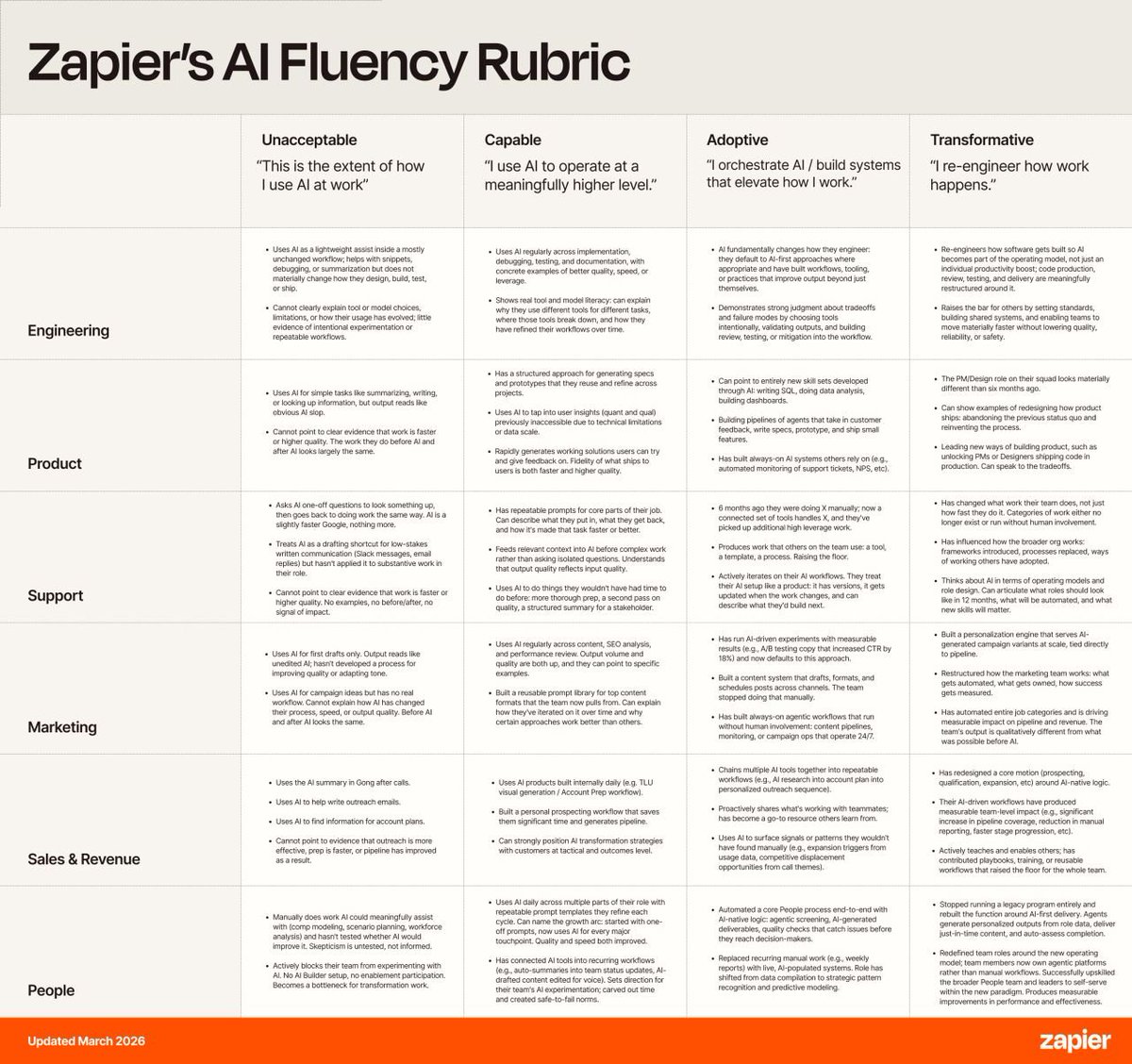
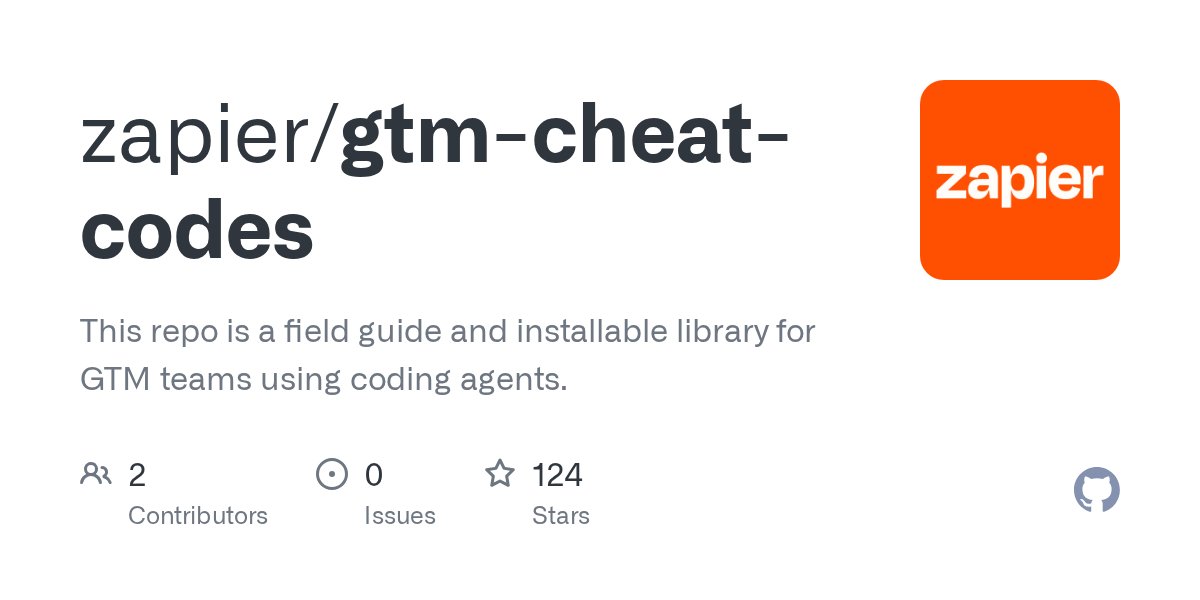
The supplied benchmark list identifies five high-scoring outliers: a meeting-automation post, Zapier’s AI hiring-rubric post, the SDK launch, the GTM-agent repository launch, and a Marketing Skills update that includes Zapier SDK integrations.
Statistical standouts
Creator landscape
The five most represented creators account for 32.1% of the selected posts.
1. adriane schwager
@aschwags3
2 posts
2. Tiago Forte
@fortelabs
2 posts
3. Harsh Makadia
@MakadiaHarsh
2 posts
4. Wade Foster
@wadefoster
2 posts
5. Alex Cohen
@anothercohen
1 post
6. The Boring Marketer
@boringmarketer
1 post
Wade Foster’s two evidence posts announce the public opening of the Zapier SDK and the open-sourcing of GTM-agent skills and pre-built automations.
Creators describe concrete workflows: Point Nine routes meeting notes into an AI knowledge base, while Tiago Forte’s posts describe sales and meeting automation systems.
Harsh Makadia’s posts focus on cost control, limits of long workflows, exact-data requirements, batching, and monitoring as guardrails for automation.
Since the previous snapshot
Themes, sentiment, stance, and post format are classified per tweet. All counts, shares, medians, creator concentration, freshness, and performance comparisons are then calculated directly from the published snapshot.
Xholic's all-time score compares engagement while accounting for reach, post age, and creator consistency. It is used for relative comparisons within this collection.
This report analyzes the exact 28-post snapshot shown below. AI identifies editorial categories and drafts explanations; all statistics are calculated from the snapshot, and every narrative claim is checked against cited posts before publication.
Best Zapier tweets
Ranked 01–28

@anothercohen ·
I've now added Wispr, Notion, Granola, Fireflies, Zoom, Gemini, Cluely, Otter, Fathom, Read AI, and Wingrep to every meeting. Each produces slightly different meeting notes. I send all of them to Claude and ChatGPT, which push the summaries into Slackbot and Salesforce AI. Linear agents automatically create tickets while Notion agents create follow-ups in Notion. A Zapier workflow then uses 500k tokens to draft a follow up email in Superhuman. None of it works and all of it is wrong but man, is it beautiful. AGI is here.

@aschwags3 ·
Zapier’s CEO just released their internal AI hiring rubric. “Capable” AI operators are no longer hireable. The new floor is "Adoptive.” What gets you rejected now: Marketers who use AI for first drafts and edit output manually. Can’t show before/after evidence of AI implementations/prompts. Using LLMs for campaign ideation without personalization. What will get you hired: Repeatable, shareable prompt libraries that and always-on workflows that run without your supervision. Specific measurable results that signal where to push next. This is the new baseline.

@wadefoster ·
Today we open the Zapier SDK to everyone. If you're building with AI agents, this is for you. I've been using this for 2 months. It's totally changed how I do my job. You install it in your coding agent. Cursor, Claude Code, Codex, whatever you use. Now that agent has access to 8,000+ apps through @Zapier and can do anything those APIs can do. I think it’s the most powerful thing we’ve launched in years. Now in open beta. Just give this link right to your agent: https://t.co/k6arEyZMMU
 Watch video
@wadefoster ·
We just open-sourced Zapier’s GTM agents. It's a GitHub repo of GTM agent skills and pre-built automations, built on @Zapier SDK + MCP. Some of the automations included: - Daily lead audits to flag what's slipping - No-lead-left-behind rollup - Cross-CRM Opportunity Sync - Customer Deck Builder - PR & Media Inbox Triage Plus skill files across marketing, sales, revops, customer advocacy, and support. Drop them right into Cursor, Codex, Claude Code, or wherever you're building. https://t.co/7xzpfzwxVr

@coreyhainesco ·
Marketing Skills v1.7.0 is out. What shipped: 🆕 /aso-audit — audit and optimize App Store and Google Play listings. Keyword analysis, visual asset assessment, competitive benchmarking, and conversion rate optimization for mobile apps. Community contribution from @basseko. 🛠️ Zapier SDK — AI agents get direct access to 8,000+ app integrations (Slack, HubSpot, Salesforce, and more) without building a single OAuth flow. Includes install guide, CLI commands, SDK methods, and marketing automation examples. Enhanced skills: • /community-marketing — added task-specific questions + related skills sections • /aso-audit — cleaned up for cross-agent compatibility • /social-content — formatting fixes for platform reference links Now shipping 36 skills and 52 tool integrations. Free, open source. npx skills add coreyhaines31/marketingskills
 Watch video
@boringmarketer ·
how to use Zapier to easily connect just about any data/tool to Claude Code -create stunning reports - automate social content - sky’s the limit you can access 8000+ apps
 Watch video
@KanikaBK ·
I found 5 AI agent GitHub repos that most developers have never heard of. COMBINED STARS: 750,000+. ALL OPEN SOURCE. ALL FREE. Here is exactly what each one does. 1. n8n: https://t.co/y5MH1YnDFm ↳ 180,000+ stars and still climbing ↳ Open source alternative to Zapier but built for serious technical teams ↳ 400+ integrations, visual workflow builder, and native AI agent nodes ↳ Self-host it and get unlimited automations for free with zero per-task fees 2. Dify: https://t.co/Sww2R8KVT5 ↳ 136,000+ stars ↳ Build, deploy, and manage AI applications without drowning in boilerplate code ↳ Comes with RAG pipelines, prompt orchestration, model management, and usage monitoring built in ↳ Supports OpenAI, Anthropic, Ollama, and 100+ other model providers out of the box 3. Langflow: https://t.co/3cBWhbnHSv ↳ 146,000+ stars ↳ Drag and drop visual builder for AI agents and RAG workflows ↳ Shortens the path from idea to working AI pipeline without writing extensive code ↳ Used by data scientists and engineers who want to prototype and ship fast 4. Open WebUI: https://t.co/ISqMHwCnyd ↳ 124,000+ stars and 282 million Docker downloads ↳ Self-hosted ChatGPT-style interface that runs completely offline ↳ Connects to Ollama and any OpenAI-compatible API with one pip command ↳ Built-in RAG, voice features, custom agent builder, and enterprise SSO 5. Ollama: https://t.co/nnQaDjLa1T ↳ 165,000+ stars ↳ Run Llama, Mistral, Gemma, and DeepSeek entirely on your own hardware ↳ No data sent to external servers, no API fees, no cloud dependency ↳ The backbone of almost every serious self-hosted AI stack running today Most developers are paying per token for things they could be running locally for free. These five repos are why that excuse is running out.


@chrija ·
In case it's useful for others, here's how we at @PointNineCap are adding @meetgranola notes to our AI knowledge base: 1) Saving a note in a shared folder in Granola fires a workflow in @zapier 2) Zapier creates a Google Doc, containing AI-enhanced notes + user notes + raw transcript The AI knowledge has access to our entire G-Drive, incl. the Granola folder. I'm sure @meetgranola will come up with a better solution soon ... but this works quite well for now.

@TaylorPearsonMe ·
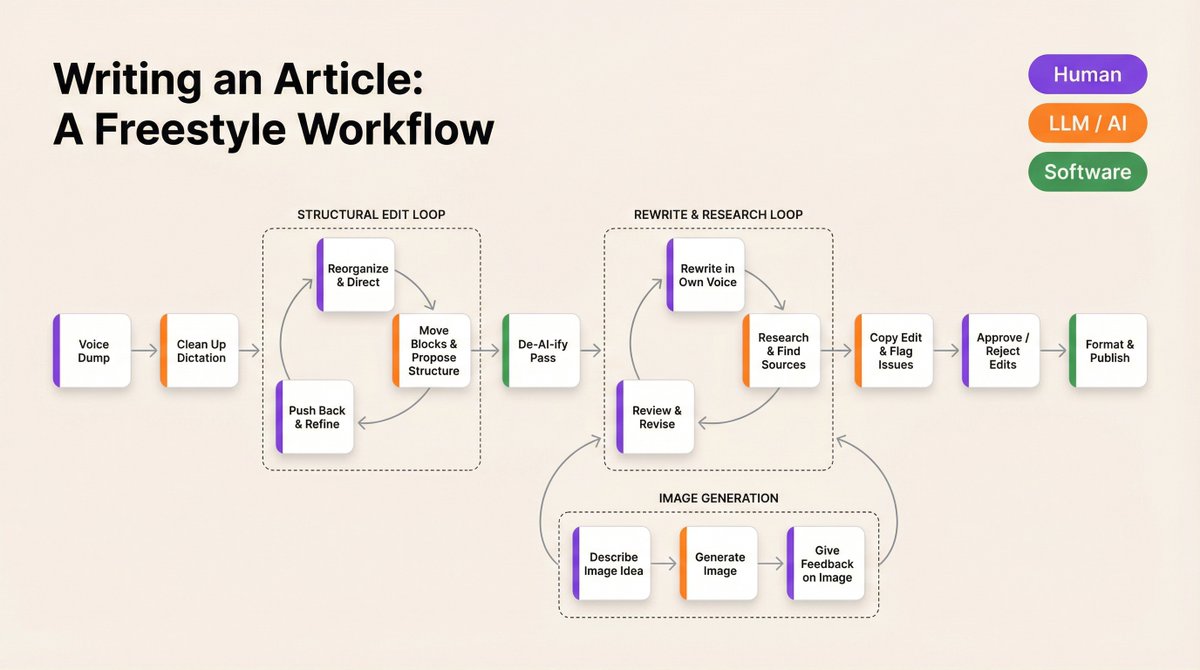
I've been trying to get better at "thinking in software" as a non-technical person. My premise is that almost all knowledge work can be visualized like a Zapier or N8N automation. A series of steps where the question is: what's the right tool for each step. AI really changes the calculus for what the right tool in two ways: 1. It can do a lot of things that traditionally required a human (E.g. Write a research report on a topic) 2. It makes it much cheaper to build deterministic software for parts of that workflow. So the tool set is broadly: - Human - AI - Software My default is typically humans (with SOPs where possible) That's the world I grew up in. But now, LLMs and software are eating that pyramid of layers of abstraction from the bottom up. - LLMs can do lots of things that only humans used to be able to do. - LLMs can build software that was historically not really worth building Using LLMs to replace human work is intuitive for me. They feel anthropomorphic enough that it's easy to substitute "delegate this to a person with a SOP" for "delegate this to an agent with a skill file." That substitution has been really productive. But, there's a lot of pieces in that workflow should really be done by deterministic software. It's both cheaper from a compute perspective and deterministic rather than probabilistic. Part of the issue is that most of my work right now is writing and project management, which doesn't lend itself to deterministic software very well. But I keep asking myself: to what extent is that just old habits and a failure to adapt to the new reality? If it's now 100x easier to build software, the ROI calculation has fundamentally changed on whether I should be doing it. My intuition about that is probably less than ideal because it's grounded in a tech paradigm that no longer exists. At the margin, we should all be building more deterministic software. The returns are probably the same as they've always been for many software projects, but the cost is down by an order of magnitude or two. Same return, 10x-100x cheaper investment — the ROI math is just different now. I'm not a software guy, so it's hard for me to reason about the boundaries here. Curious what other people's approaches or examples look like.

@SamPeterToT ·
AI cut my content production time by 40%. Here's the workflow: →Brief Claude with brand voice + goals →AI drafts 10 posts across all platforms →I edit in 30 min →Zapier schedules everything From 15 hours/week to under 4. Prompt engineering is the new marketing superpower.

@illyism ·
I just finished an SEO roast for a SaaS company planning to build 1 landing page per video game they support Thousands of pages, huge engineering effort So I pulled data on their biggest competitor who already did it: → 12 programmatic pages (one per game) → Their BEST page ranks #1 for "Fortnite <keyword>" → Traffic value: $18/month Eighteen dollars For the #1 spot On the biggest game in the category Here's what everyone gets wrong about programmatic SEO: You're not rewarded for quantity You're rewarded for "search volume × commercial intent" And outside the top 3–4 games (Fortnite, Valorant, CS2, CoD)… Nobody is searching "[game] <keyword>" The demand just isn't there Meanwhile, a competitor took the opposite approach: → 1 blog post: "Best <keyword> for Fortnite" → ~60 clicks/month → Ranks for dozens of keywords → Converts better (readers are actively comparing) Just 1 blog post > 12 programmatic pages The right question to ask is "What are people actually searching for and will they convert?" What works for most SaaS SEO: → Listicles ("best X for Y") → Dedicated /tools pages → High-intent commercial keywords What usually doesn't: → Thousands of thin programmatic pages The only time programmatic SEO wins is when you have high-volume, templated queries like Zapier's "connect X to Y" pages Everything else? Just write a blog post!


@Toriva_ ·
Hey everyone — quick update we're excited about. There are a lot of automation platforms out there — Zapier, n8n, Make, you name it — but they all have the same problem: you have to build the automation. You sit there picking triggers, dragging actions, writing prompts, figuring out what to connect to what. It’s powerful but it’s manual, and if you’re not already comfortable with that kind of tooling, you bounce. We’ve seen this with our own users — automations work great once they’re set up, but two things keep tripping people up: 1. Writing the agent prompt properly is hard if you’re not used to it 2. A lot of you have the gut feeling that something in your week could be automated but aren’t sure what So we built a Setup Helper — a chat that sits next to the new-automation form and does both for you. It has two modes: “I know what I want to build” — describe it in plain English (“every Monday email me last week’s revenue”) and it fills in the form: schedule, instructions, connectors, the lot. You just hit Save. “Help me figure out what to automate” — it reads your business profile, role-plays a typical week for someone in your shoes, and proposes 2–3 specific ideas tied to your actual operations. No generic “weekly Gmail digest” — it’ll suggest things like a 6am prep alert for a restaurant or a Sunday-evening pipeline brief for a SaaS founder. Video below shows both flows end-to-end. Try it on /automations/new and let me know how it feels — especially if the discovery proposals miss the mark for your business.
 Watch video
@thisdudelikesAI ·
A dev in Amman, Jordan built a free open-source Zapier that ships 300+ integrations, all available as MCP servers out of the box. Your AI agent can already talk to Gmail, Slack, Notion, Airtable, Stripe, GitHub, HubSpot, and hundreds of other tools. No glue code. Zapier Starter is $29.99 a month for 750 tasks. Zapier Team is $103.50 a month for 2,000 tasks. To connect your AI to the tools you already pay for. It's called Activepieces. 22,450 stars. MIT core. Pushed yesterday. Activepieces vs Zapier vs n8n: - Price: Zapier $29 to $103+ a month → n8n free → Activepieces free - Task limits: Zapier caps at 750 or 2,000 → n8n unlimited → Activepieces unlimited - License: Zapier closed → n8n Sustainable Use → Activepieces MIT core - AI-native: Zapier bolted on → n8n bolted on → Activepieces built around MCP Here is the wildest part. n8n's Sustainable Use License explicitly forbids "hosting n8n and charging people money to access it" ([n8n docs](https://t.co/2MibbC1BHf)). Activepieces core is MIT. You can resell it. SaaS-host it. White-label it. The license does not bite back. Honest flag: code under packages/ee/ is enterprise-licensed. For 95% of dev use cases this does not matter. Mo AbuAboud built Activepieces from Amman, Jordan. YC-backed, but he still ships commits as a top contributor. Zapier charges $1,242 a year on Team and caps you at 2,000 tasks. Activepieces does the same job, unlimited, on a $5 VPS. This is what workflow automation looks like when the dev who built it is also the dev who would refuse to pay Zapier. (Link in the comments)


@SimonHoiberg ·
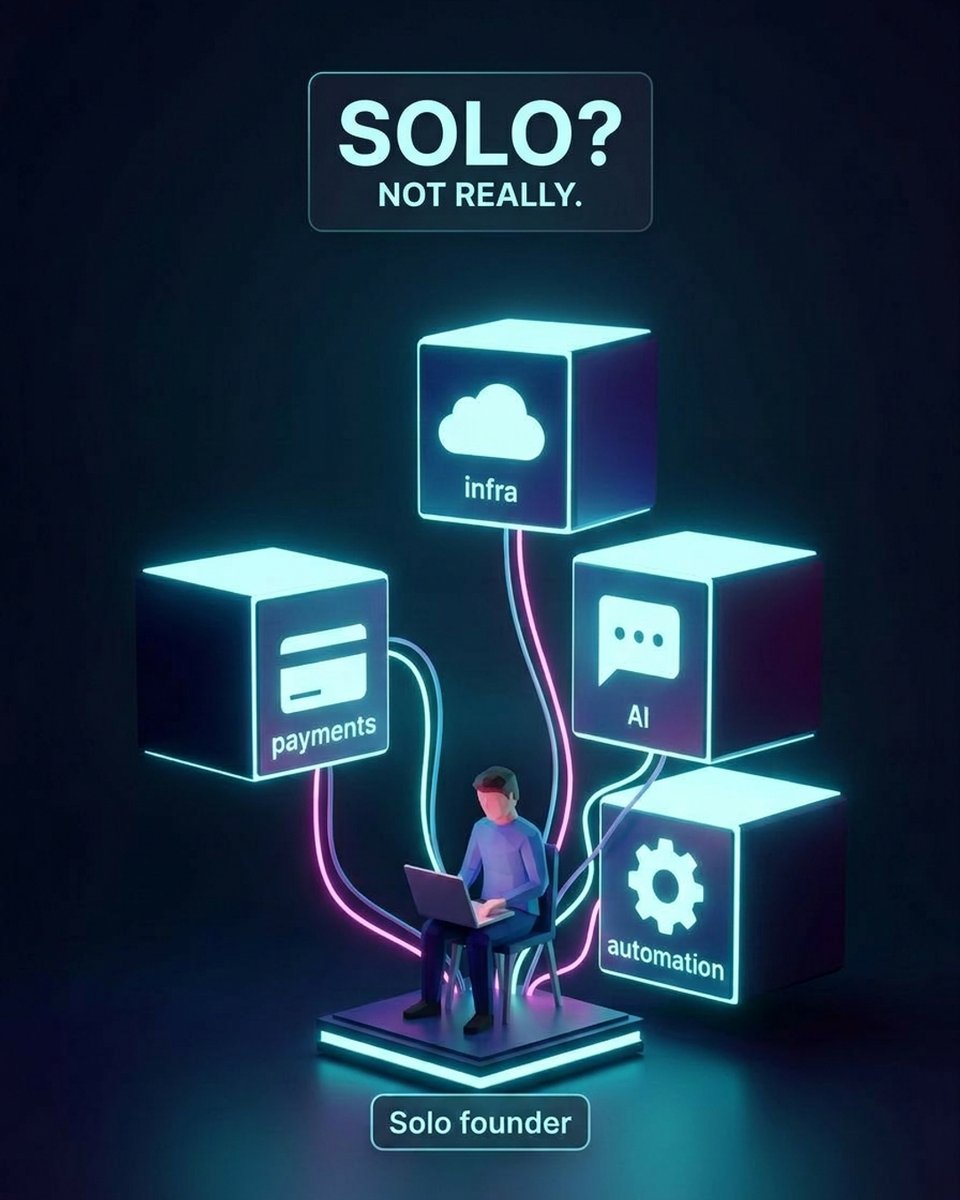
The "solo founder" label is misleading. You are not really solo. You just replaced employees with vendors. OpenAI, AWS, Stripe, Google, Zapier, etc. Your entire "team" is a stack of external dependencies. This is not always a bad thing. But it's definitely not "independence" either. Most of the "I run a 7-figure business solo" posts skip a few details: → API policy changes can kill your product overnight. → Pricing updates can wipe out your margins in a week. → One outage in a critical tool can block your entire funnel. So what do you actually control? → Your audience. → Your offer. → Your data. → Your infrastructure. (If you set yourself up correctly!) If you want real leverage in the AI economy: 1️⃣ Own your audience: Move people from YouTube, social media, etc, to your own email lists, communities, channels. 2️⃣ Reduce platform risk: Use BYO key when you can. Prefer tools that are self-hostable. Have at least one fallback for key providers. 3️⃣ Build simple, replaceable systems. The more custom glue you add between tools, the harder it is to switch. Keep your workflows clean and documented so you can migrate when you need to. Just be honest about what you control and what you rent. Solo is not the goal in itself. Control and sovereignty is.

@nocodelife ·
I've been deep in a Claude Code hole for the past few months but recently have been trying out Claude Cowork to see how it compares. Here are 10 of the best Cowork tips I've found: 1/ The "End of Session" prompt. Before you close Cowork, ask it to save key takeaways to a local memory.md file AND write the exact prompt you should use to start your next session. Perfect continuity every time. 2/ Import your ChatGPT memories. Don't start from scratch. Use Claude's "Start import" tool in settings to port your entire memory history over from ChatGPT or Gemini automatically. 3/ The "Successful Examples" folder. Don't just give Claude instructions. Create a subfolder full of your best past work (emails, proposals, ads) so it can reverse-engineer your exact style and see what "success" actually looks like. 4/ Force "Plan Mode." Add "show a plan, wait for approval, then execute" to your Global Instructions. Stops the AI from rushing into assumptions, saves you a massive amount of tokens, and lets you course-correct before it acts. 5/ The Zapier MCP trick. Is Claude missing a native connector for your favourite tool? Use Zapier MCP to build a custom server that connects Cowork to 8,000+ apps like Stripe, HubSpot, or Skool. Takes a few clicks. 6/ Dynamic context routing. Don't hardwire your entire business context into every prompt. That burns through your usage limits fast. Instead, add a Global Instruction telling Claude to "only check the Business Folder if asked a strategic business question." 7/ Apple Watch and iMessage control. Enable the "Read and Send iMessage" extension on a Mac running 24/7, and you can text tasks or send screenshots to your desktop Claude directly from your Apple Watch while you're out for a run 😄 8/ Master "hard" vs "soft" memory. Claude has two types of memory inside Projects. "Soft memory" runs automatically, sweeping your conversations every 24 hours and pulling out important details for background context. "Hard memory" is when you explicitly tell Claude to save specific workflows, preferences, or rules to a local file like memory.md. Soft memory is useful, but for the stuff you absolutely cannot afford the AI to forget, maintain those hard memory files yourself. 9/ The "Handover Test." Unsure if a workflow should be a Skill or a Plugin? If it requires 3+ steps across 2+ tools and you could hand it off to a human employee, bundle it into a shareable Plugin. 10/ Zero-hallucination maths. Never ask Claude to directly calculate totals from a folder of receipts or invoices. Instead, have it write the actual formulas into an Excel spreadsheet. It handles Excel formulas perfectly, completely eliminating AI maths errors.

@fortelabs ·
Most people assume workflow automation requires a development team or expensive consultants Hayden's team built a system that saves salespeople 90 minutes daily using nothing but Zapier, a screen recorder, and basic AI prompts The first setup took under a week. Now they can replicate it in two hours What makes you hesitate to automate the repetitive parts of your work?

@DanielMiessler ·
Zapier is down. Whenever this happens now I consider building my own version of what that service did for me. And I'm sure I'm not alone. 1. Maybe as good or better 2. One less subscription That's a hard environment to run a service in. You have to be unreproducible.

@MakadiaHarsh ·
things i don't use, and why: > zapier for anything past 3 steps (pricing scales against you exactly when you need it most) > AI for data that must be exact (invoice amounts don't get to be "probably right") > chatbots on websites with under 50 conversations/month (a form + fast reply beats a robot nobody talks to) > custom code when an orchestrator does 90% (the client can't maintain what only i understand) > fine-tuning when a better prompt gets you there (weeks of work vs an afternoon) > any tool without an export button (your data held hostage is not a feature) the stack that impresses engineers and the stack that serves clients are different stacks. i stopped confusing them years ago.

@MarketingMax ·
Anyone run into this? My zapier bill is $450/mo and that same exact functionality and volume on n8n would be $50 a month... that's $5k/yr in savings aka a weekend golf trip with the boys! But I have hundreds of zaps that would need to be migrated. Any ideas?

@pipelineclub100 ·
One difference that AI is making in business is replacing features of larger software that you might use. The net effect will be more churn and lower user counts if you aren’t a core sticky software. Take the example of Zapier. I had it for a few things for my SMB to create webhooks and send notifications to slack. Today I used Claude code and 40 minutes later we are doing custom webhooks for everything. Zapier was limited to the pre-designed end points of the integration. Now we added several new ways to centralize our workflow into slack with notifications.
@fortelabs ·
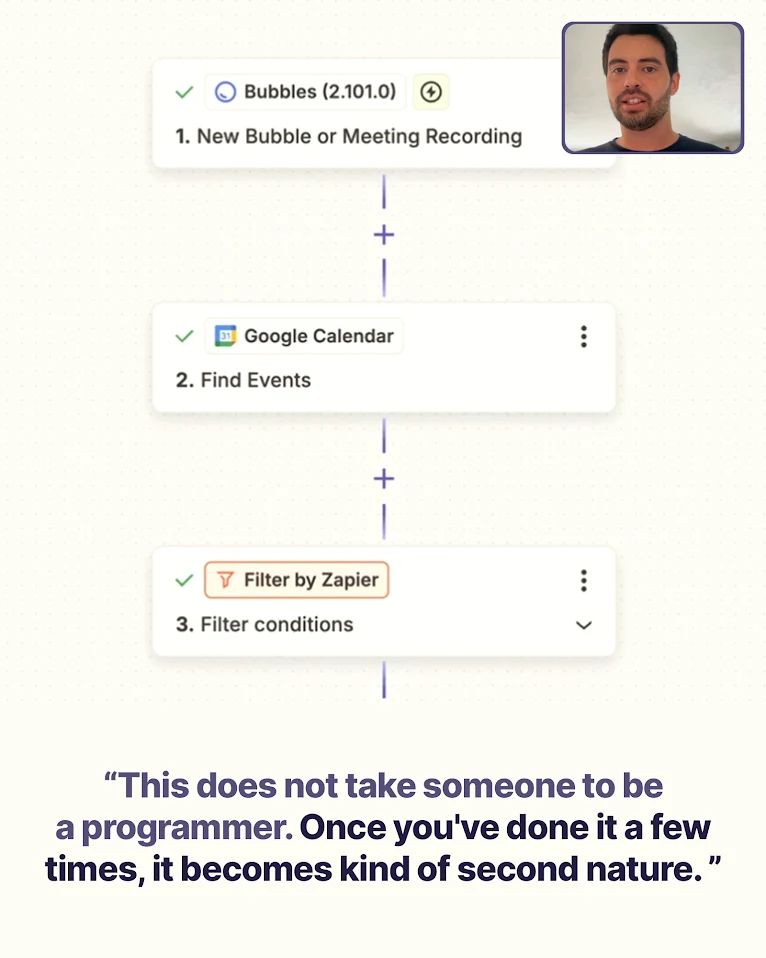
I invited my friend and serial entrepreneur, Hayden Miyamoto, back to my YouTube channel to share the AI workflow his team uses for meetings In this video, he walks through a Zapier automation that records calls, analyzes transcripts with AI prompts, updates CRMs, sends Slack notifications, and tracks everything automatically This eliminates hours of manual notes, follow-ups, and reporting. The system works for sales calls, onboarding, team huddles, or personal learning—and you don't need developer skills to set it up
@MakadiaHarsh ·
My playbook for keeping automation costs flat as a client scales from 100 to 10,000+ daily operations: Move 1: Batch where possible. Instead of triggering on every single event, batch process every 15 minutes. One execution with 50 items costs less than 50 individual executions. Move 2: Cache responses. If you're calling the same API with similar inputs repeatedly, cache the result. Same customer lookup doesn't need a fresh API call every time. Move 3: Self-host n8n. At 5,000+ monthly executions, the cost difference vs Zapier is $400-500/month. At 50,000, it's thousands. The math is obvious. Move 4: Kill zombie workflows. Every month I audit which automations actually ran and which are sitting idle. Move 5: Monitor per-workflow cost. Log execution time × API calls × data transferred for each workflow. The top 3 most expensive workflows usually account for 80% of the bill. Optimize those first.

@BryanShankman ·
Most home service companies lose Yelp leads simply because they respond too slowly. Yelp sends the same lead to multiple businesses. First to reply usually wins. Recorded a walkthrough showing how to auto-reply instantly using Zapier: https://t.co/FIL355b4uz

@danpantelo ·
Data ops is becoming a nightmare for us. My head of ops is wrangling too many google sheets duct taped by zapier integrations. Formulas are starting to break, need something more scalable. Anybody know an expert in this?

@sachinrekhi ·
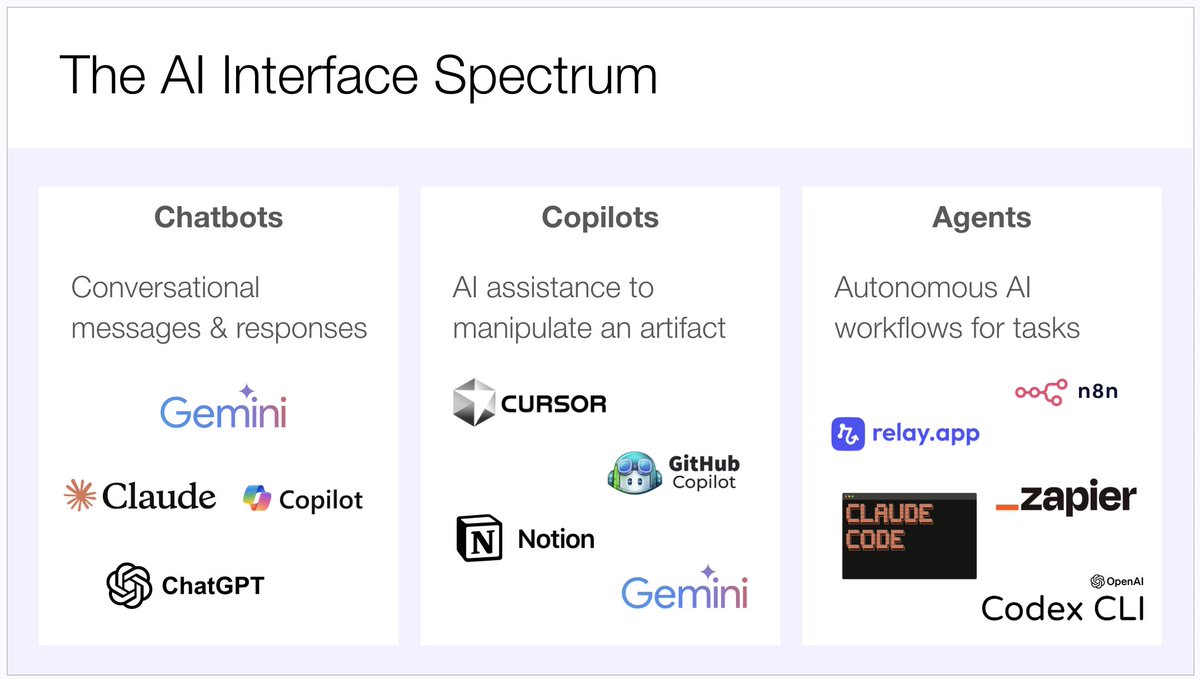
What's the right AI tool for the job? The answer has gotten far more complicated today with the proliferation of tools. To deal with this, I've developed the following mental model around AI interfaces and their applicability to particular tasks. Chatbots - This is the category that started it all. ChatGPT, Claude, Gemini. Simple question & answers end up being useful for a whole host of exploratory questions. And this remains my daily personal driver. Copilots - Copilots then emerged as a way to use AI to manipulate artifacts. Code was the original artifact with tools like Cursor. But copilots expanded beyond code to documents with AI tooling in Notion, Google Docs, Google Sheets, and more. Whenever I want to manipulate an artifact, I reach for the appropriate copilot. Agents - Agents have emerged as fully autonomous AIs designed to execute workflows all on their own. On one side you have the coding agents like Claude Code and Codex. On the other end you have workflow automation tools like Zapier, Relay, and n8n. Whenever I want to create a fully autonomous workflow that I can repeatedly run, I reach for an agent. So now every time I think about using AI, I ask myself whether I should reach for a chatbot, a copilot, or an agent for the task.
@aschwags3 ·
There’s a new kind of role we’ve placed 2x more in the past 3 months, only at AI-pilled teams. A CMO’s most in-demand hire right now is: AI + Ops. Here are some of the titles we’ve placed within the last 3 month: – AI Annotations Specialist – AI Outreach QA Assistant – AI Native Performance Designer – Partnerships & AI Ops Assistant We just placed that last role at a high-growth agency to set up and maintain cross-functional automations in Zapier, Make, Claude, etc. The lesson for every team right now: AI processes need an ops-minded human to own and QA them. This is the human-in-the-loop economy.

@BrettErik ·
tight feedback loops win as an operator, one of the best things you can give yourself is tight communication loops, there are a few ways to hardwire this into your workflow: 1- @clickup (personal favorite) task management seems simple enough until you begin rolling out and testing new angles, new workflows, or have any tailoring in your client-based services can't recommend clickup enough for this, or some form of fast, visible task management. i've been hammering my team and myself on this point: when in doubt assign it and give it a deadline due dates help you build the muscle of prioritization, which is in my opinion, the top skill of leaders in 2026 (not a paid promo, just my favorite tool, clickup let me know if you want it to be a paid promo tho i'm game we love it) 2- calendar event reminders sounds too simple/trite but with so many tasks that occur on a cadence, having clickup--> early calendar event on team members calendar is clutch 3- bird's eye view on all calendars call me what you will but i like having a complete view of all team member calendars so i know who's where and when, it's messy to look at for the first bit but once you're used to it it becomes priceless for timing and assigning (specific to lean teams) 4- simple task assignment zaps my personal favorite is the emoji-->clickup task simple zapier flow that goes -specific emoji response to slack message -pull slack message -uses logic to name the task -automatically adds it to a specific channel different emojis go to different channels, when in doubt it gets assigned (if anyone is using agents to do the assignment well i'd love to see it, seems like a clear use-case but easy to mess up at scale) 5- @viktor__com (again not paid but lmk because this one is fantastic) scheduled reporting using viktor has been a massive time-saver for our team, one caveat here is that you'll want to make sure you get your api connections setup right (and choose the right tools) otherwise you won't get trustworthy data for scheduled tasks +1 if you have a clean spot where all data is housed so viktor can really help you glean information 6- automate the triggers again with the zapier flows, but having a clear sense of what's happening at any point allows you to do the hard work of prioritizing tasks appropriately, make it easy on yourself. If you're in the operator seat you need to be maximizing your visibility into the key events (this does not mean ALL events, it means the ones that must happen or things break)

@evielync ·
Before Claude Code, building an automation for my business looked like this: ↓ Log into Zapier. Pay for the plan that actually lets you do things. Spend two hours dragging boxes around a screen. Hit a wall because the integration you need doesn't exist. Give up and do it manually. After Claude Code: Describe the problem in plain English and it just... builds it. I have so many automations I have always dreamed of built this way: ↳ Checking payment issues from my membership every Monday ↳ Running morning briefs that pull from my calendar, emails, and task list ↳ Writing & scheduling social media posts just by having a conversation ↳ Even building live business dashboards Claude Code is like having my own private Zapier, except all I have to do is say what I want and it just goes and works it out.
Best Zapier tweets
Xholic studies what works in your niche, drafts posts in your voice and schedules them for the hours your audience is online.
$0 today · Cancel anytime
Browse all tweet collectionsKeep exploring