Learning paths and beginner-to-builder progression
Level-by-level skill roadmaps (prompting → integration → engineering → scale), no-code entry points, and first-person stories of going from zero to building working automations.
18%
Discover the best tweets about AI automation, from agent workflows and integrations to business processes, reliability, and measurable results. Updated every two weeks.
Automations with clear inputs, tools, outcomes, failure handling, and honest operating costs.
Original Xholic analysis
Across 50 posts from 41 creators on AI automation, the conversation converges on a disciplined recipe: test whether a task has repeated triggers, stable inputs, clear tools and a measurable finish line before automating it; build workflow-first from documented processes; engineer for silent failure with validation layers, retries and approval gates; and keep humans on irreversible or judgment-heavy steps. Cost honesty is tied for the smallest theme by volume (3 posts) but carries the highest theme median allTimeScore (24.186), directly challenging 'set up agents and chill' narratives.
64% of posts
All-time engagement
100% of posts
Published in 90 days
Conversation map
Level-by-level skill roadmaps (prompting → integration → engineering → scale), no-code entry points, and first-person stories of going from zero to building working automations.
18%
Builders running scheduled agents for daily briefings, inbox/Slack triage, news and signal monitoring, onboarding pipelines, and reporting — with concrete tool combos and time savings.
18%
Frameworks for judging whether a task is suitable for AI automation or agentic work — repeated triggers, stable inputs, deterministic vs. probabilistic steps, ROI filters, and lists of what should stay human.
16%
MCP protocol layers, tool/API connections, multi-agent orchestration, validation layers between agents, error handling, retries, logging, and fallback models for reliability.
16%
Recurring failure causes: skipping process mapping, demo-only happy paths, missing baselines, silent mid-pipeline failures, unowned deployments, data quality issues, and legal/infosec arriving too late.
10%
Start from the existing process, not the tool: write down inputs/outputs, clean the data, build one workflow, run it in parallel or shadow mode, then retire the manual version.
10%
Debunking 'set up agents and chill': subscription/tool/token costs, monitoring and maintenance load, the 90% plumbing vs. 10% model ratio, and human operators remaining in the loop regardless.
6%
Confidence-tiered outputs (green/yellow/red), write/read boundaries, human approval for irreversible or costly actions, escalation paths, oversight fatigue, and assigning accountable human owners.
6%
Tone and stance
Performance benchmark
Posts with media make up 50% of this collection. Their median all-time score is 18.8, compared with 5.49 for text-only posts.
Format mix
Consensus and debate
Shared view
gregisenberg's five-part agent test — repeated trigger, stable inputs, clear tools, measurable finish line, plus judgment in the middle — is the dataset's biggest outlier at 117.43x the median allTimeScore (2088402134190399520). frog_omo frames the same filter as deterministic-vs-probabilistic: only predictable steps are safe to fully automate, and probabilistic steps need a human in the loop because AI 'fails'
Shared view
IAmAaronWill's five-line recipe — pick one daily task, write inputs and outputs, run AI alongside the manual version for a week before switching it off — matches the theme's playbook (2037987491794374800). Harsh Makadia says start from the workflow, not the tool, and put a dollar value on delay (2087228541658431625). Daniel Valiquette warns skipping data cleanup means the automation amplifies the mess (206304746825
Shared view
vasuman's list of 13 pilot-killers — skipping process mapping, happy-path demos, no baselines, no owner, legal/infosec arriving late — scored 50.45x the median (2107530654741348354). Andrew describes agents that fail quietly and confidently, and fixed it with validation layers between agents and confidence thresholds (2075248689795227981). frog_omo compresses the pre-flight check to four questions: is your data
Shared view
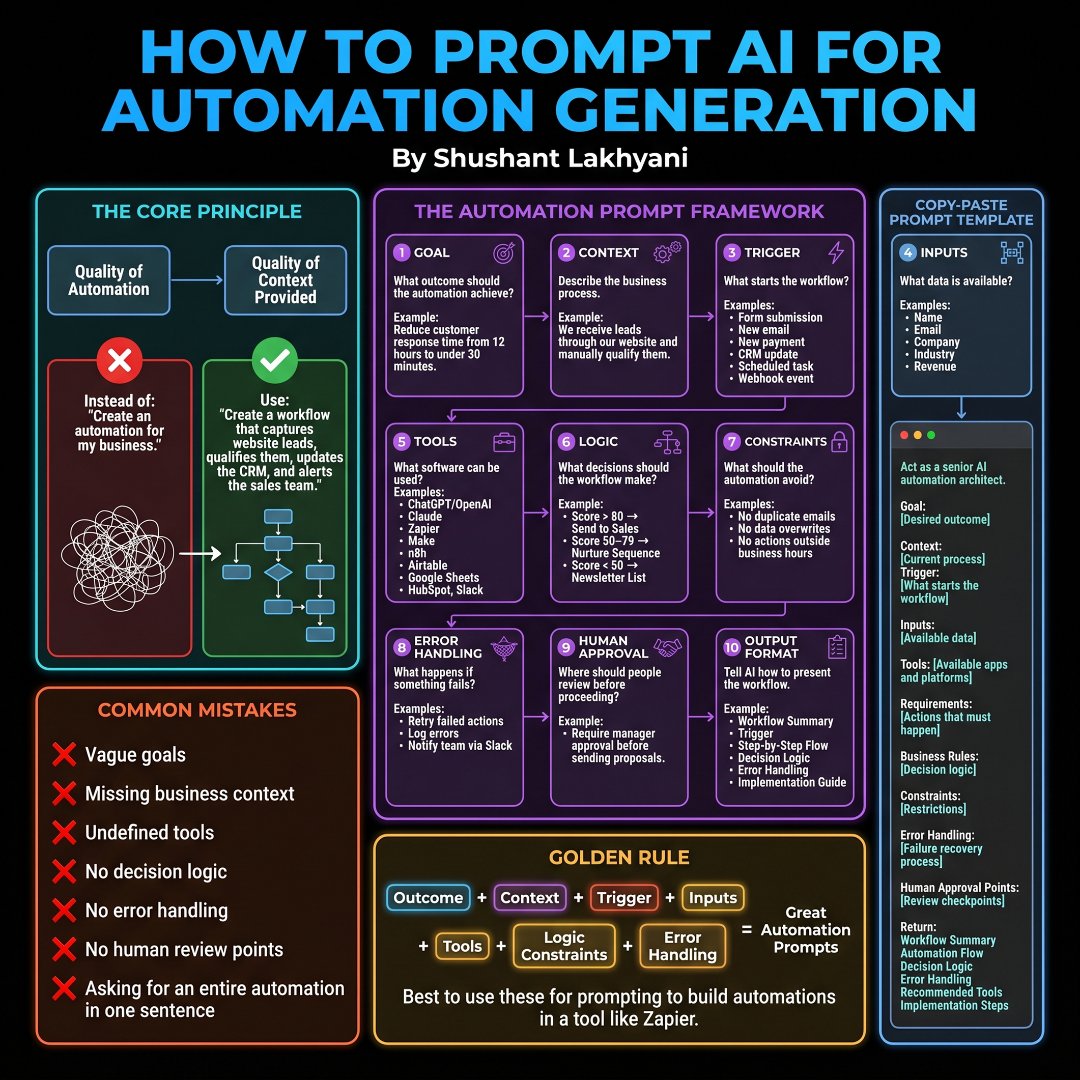
Jian Wang's four-layer MCP breakdown frames protocol design — permission checking, sandboxed credentials, isolated servers — as why production agents hold up (2082498383986774467). aditya describes queues, cron jobs and fallback models 'because stuff breaks' (2049848421499199829). Shushant Lakhyani's prompting guide explicitly instructs builders to define failure behavior, retry rules, error logging/alerting and
Open debate
Julian Goldie SEO pitches an 'org chart of agents working 24/7' as the Goldie Method (2056051244729614368). Corey Ganim argues the opposite: one defined function, explicit read/write boundaries, approval gates and a named human owner — installation is not acceptance (2083225928793203058). Dominik Berger adds oversight fatigue and the rule that a human belongs in front of anything irreversible, expensive to get wrong,
Open debate
IAmAaronWill lists what he would never automate: sales calls, positioning, offer creation, objection handling and high-stakes DMs — automate the inputs, keep the outputs human (2033975198710456441). Ricky reports that autopilot X-account tools sit at $0 MRR while the $21k/mo top earner keeps humans writing replies, with the agent harvesting ideas, drafting in the owner's voice, scheduling and measuring (2077335
What performs
The honest-costs theme has only 3 posts (6% share) but the highest theme median allTimeScore at 24.186. Alexa | Startup founder itemizes $100-$200/month Claude plans up to $40k-$100k+/year enterprise deployments, plus lead data, CRM, infrastructure, monitoring, maintenance, tokens and your own time (2063721106150686950). Shayan Jamil | Building MVPs, SaaS & Apps reports the 90%-plumbing/10%-model ratio usually
Half the posts carry media (50% share), and media posts have a median allTimeScore of 18.795 versus 5.491 for text-only posts — a roughly 3.4x lift. All 50 posts in the dataset are list-format (100%), so list structure is table stakes here rather than a differentiator. The top three outliers by score are all structured breakdowns: the agent fit test (2088402134190399520), the 13 pilot-failure reasons (2107530
Stance is 88% supportive versus 12% critical across 44/6 posts, and sentiment runs 64% positive with 16% mixed. The dataset's pushback voices cluster around the editorial angle's themes: Alexa | Startup founder debunking 'set up a few agents and chill' with itemized costs (2063721106150686950), Tibo calling AI automations 'a bit overhyped' and applying ROI filters (2085278792000393431), and Turing Post citing
Statistical standouts
Creator landscape
The five most represented creators account for 20% of the selected posts.
1. Amit | Frogomo | AI 🐸
@frog_omo
2 posts
2. Aaron
@IAmAaronWill
2 posts
3. Jian Wang
@jianw851
2 posts
4. Julian Goldie SEO
@JulianGoldieSEO
2 posts
5. Harsh Makadia
@MakadiaHarsh
2 posts
6. Chinaza Monday
@PreciousMoonday
2 posts
With 41 creators and a top-five placement share of 20%, engagement clusters tightly. Jian Wang leads with a median allTimeScore of 111.07 across two posts — the MCP architecture teardown and an agent-plus-APIs GTM stack (2082498383986774467, 2102807682986193261). Turing Post (Ksenia Se) follows at a median of 42.2, anchored by the adoption-gap essay and the capacity-to-outcome chain argument (20414552103428
Since the previous snapshot
Themes, sentiment, stance, and post format are classified per tweet. All counts, shares, medians, creator concentration, freshness, and performance comparisons are then calculated directly from the published snapshot.
Xholic's all-time score compares engagement while accounting for reach, post age, and creator consistency. It is used for relative comparisons within this collection.
This report analyzes the exact 50-post snapshot shown below. AI identifies editorial categories and drafts explanations; all statistics are calculated from the snapshot, and every narrative claim is checked against cited posts before publication.
Best AI Automation tweets
Ranked 01–50

@gregisenberg ·
The question I get most right now is "what should I turn into an AI agent?" Here is the 5 part test I use (works for Claude/Codex/Grokbot etc): 1. It has a repeated trigger, so the same kind of task keeps happening over and over. 2. The inputs are stable, so the information comes in a predictable shape every time. 3. The tools are clear, so there is a defined set of things it can actually go do. 4. There is a measurable finish line, so you can tell when it is done and whether it worked. 5. There is judgment in the middle, so each run is a little different and needs a real decision made in the moment. The first 4 are really just asking "can this be automated at all?" The 5th is the one that matters, because judgment in the middle is what makes it an agent instead of a simple automation. Once you see it this way, you start spotting agent work pretty much everywhere.


@vasuman ·
The most common reasons why AI pilots fail, even at the 'best' companies: In order of prevalence: 1. Not starting with a thorough process mapping exercise (standard operating procedures vs. what’s actually happening across systems) 2. Automating a process step instead of the entire process (saving 8 mins in a 22-day process still leaves you with a 22-day process) 3. Not capturing baseline metrics for cycle time, cost per transaction, error rate, etc. 4. Building a sidekick instead of a background agent (chatbots will always only be used by ~10% of users) 5. Not embedding the AI into the organization’s existing systems of record (if users have to login, adoption will be low) 6. Not assigning an AI owner (IT built it, the business tolerated it, and no one was “on call” when it broke) 7. Not engaging legal, infosec, and finance early (we routinely see pilots “discover” these groups in month 3 - and get immediately killed) 8. Not scoping for exceptions (the “demo” only covers the “happy path” - but exceptions often represent 40%+ of process volume) 9. Not running the AI in “shadow mode” for a period of time to build confidence (going straight to production often leads to an AI mishap in front of the CFO) 10. Building with only a single AI model provider (one price hike or deprecation later, the pilot is a migration project) 11. Focusing on vanity metrics (e.g. # of logins, “adoption”) instead of business metrics (time saved, $ generated, risk reduced) 12. Not planning for month 7 (who will own and pay for the AI?) 13. Not engaging the subject matter experts (if you capture all their knowledge in an AI, what incentive do they have to help?) Varick does enterprise AI the right way. Work with us below:

@jianw851 ·
Everyone is talking about MCP (Model Context Protocol). But almost nobody is talking about how it actually connects AI models to real-world data and tools at production scale. This architecture changed the way I think about building agentic workflows. The Model Context Protocol (MCP) transforms isolated LLMs into powerful connected systems by acting like a universal USB-C port for AI applications. Instead of writing custom API integration code for every tool, MCP standardizes how hosts, clients, and servers talk to each other. Here is the exact 4-part architecture behind it 👇 1️⃣ Layer 1: The Host — The Context Consumer Think of the Host as the user interface and orchestrator. Examples: Claude Desktop, Cursor, VS Code, or custom AI web apps. What it does: • Captures the user query • Manages the visual context • Requests explicit human approval before running tools • Synthesizes the final output It’s the front door for all agent interactions. 2️⃣ Layer 2: The MCP Client — The Protocol Handler Don't let your LLM talk directly to APIs. The MCP Client acts as the secure middleware engine inside the host. What it manages: • Session Management: Handles 1:1 connections with servers • Capability Negotiation: Discovers available tools and resources automatically • JSON-RPC Routing: Translates model intent into standardized protocol messages • Permission Checking: Blocks unauthorized tool calls before execution Result: Clean separation between model logic and execution safety. 3️⃣ Layer 3: The MCP Servers — The Resource Providers Instead of one monolithic API client, MCP splits external capabilities into lightweight, specialized servers. Each server exposes three core primitives: • Resources: Ambient data (file contents, database schemas, live logs) • Tools: Executable actions (SQL execution, Git commits, API calls) • Prompts: Pre-configured prompt templates managed server-side Examples of MCP Servers: 👉 Postgres Server (Queries & schema inspection) 👉 GitHub Server (PRs, issues & code search) 👉 File System Server (Local workspace files) 4️⃣ Layer 4: External Services — The Target Layer The underlying databases, APIs, and file systems. Crucially: Credentials never touch the LLM prompt. They live entirely within the sandboxed MCP server environment. 🔄 The Complete Execution Flow User Query ↓ Host identifies required context ↓ MCP Client negotiates capabilities & verifies permissions ↓ MCP Server fetches resources / executes tools ↓ System state updates & response returns to Host 💡 Why This Architecture Wins Most legacy AI integrations look like this: Prompt → Hardcoded API → Response Production-grade MCP systems look like this: Host UI → Protocol Client → Sandboxed MCP Server → Isolated Data Source Why does this matter? 1. Write once, run anywhere: Build a Postgres MCP server once; use it across Cursor, Claude Desktop, and custom apps. 2. Security by default: 1:1 server isolation prevents cross-tool data leakage. 3. Decoupled code: Update database logic without breaking prompt engineering pipelines. The best AI applications won't win because they have the biggest context windows. They'll win because they have the best protocol architecture. Protocols > One-off integrations. 📌 Save this breakdown for when you build your next MCP server. 🔁 Repost to help your dev network understand MCP architecture! Which part of MCP do you think is most underrated: Resources, Tools, or the Client security layer? #MCP #ModelContextProtocol #AIAgents #AgenticAI #LLM #SoftwareEngineering #Developers #AIArchitecture #AIEngineering #Coding #Automation #SystemDesign


@APompliano ·
Here are 13 things learned after making a big push to integrate AI into our companies: 1. We haven’t replaced a single external SaaS tool with something we built internally. 2. We have refrained from hiring numerous entry level jobs because AI can do the work faster/better/cheaper. 3. The automation provided by AI highlights how much time every person was wasting on tedious tasks daily. 4. Each company is capturing more revenue and each employee is becoming more productive. 5. There is still a bit of apprehension in giving agents full control of machines or systems. 6. There has been no obvious trend in age, gender, or role for those who adopt AI the fastest. More of a mindset than anything. 7. Many non-technical people have started to create software tools or products, which has changed the speed of execution across the companies. 8. One downside is the AI slop across written documents/memos. If humans don’t review the content, it is painful to read and I worry critical thinking gets lost. 9. The implementations of AI are incredible once you get them done, but it is much more difficult to build/implement than most people want to communicate online. Persistence needed! 10. We have walked away from numerous potential small acquisitions because we realized we could build the product ourselves for a fraction of the cost. 11. Our best engineers are invincible now. They produce high quality products at warp speed. Forget 10x engineers, they are 1,000x engineers now. 12. The adoption of AI starts at the top. If the company leader is not constantly asking “how do we automate this?,” it is harder to drive internal change. 13. I am personally working harder than I have in a long time and having more fun than ever. It feels like a moment in time that has to be seized. Overall, I believe AI is underestimated, not overestimated. The worries about SaaS software are probably overblown. The labor market impact is very real and only accelerating. Businesses are fundamentally changing. Start paying attention!

@coreyganim ·
HOW TO DESIGN A MANAGED AI AGENT A BUSINESS CAN ACTUALLY TRUST STOP pitching "AI employees." No one knows what that means. START selling one defined function instead. Here's the operating model: 1. Give the agent one job. -Speed to lead. -Speed to quote. -Lead qualification. -Knowledge-base maintenance. -Meeting preparation. A narrow job is easier to explain, build, test, and improve. 2. Ground it in the same company knowledge as the team. The agent needs the offer, customer, process, policies, history, and current priorities. It shouldn't reconstruct the business from random emails every time it runs. 3. Separate knowledge from action. The knowledge layer tells the agent what is true. The action layer lets it use email, calendar, CRM, documents, or other tools. Keeping those layers separate makes the system easier to govern and manage. 4. Define what it can read. Full company context may be useful but that doesn't mean every agent should see every confidential record. 5. Define what it can change. A marketing agent should be able to maintain marketing knowledge. It should not be able to edit finance rules. We have tested this with positive and negative checks: an agent can make an in-scope change and gets rejected when it tries to write outside its domain. That is a far better proof point than saying it is "autonomous." 6. Define what requires approval. -External messages. -Calendar changes. -Public content. -Destructive actions. -Financial actions. -Customer commitments. Drafting and recommending are different from deciding and publishing. 7. Build acceptance tests before. thedemo. -Can it find the canonical source? -Can it refuse stale or conflicting information? -Can it stay inside its write boundary? -Can it escalate uncertainty? -Can it recover when a connection fails? Installation is not acceptance. 8. Show the work every month. -What did the agent handle? -Where did it fail? -What changed? -What still needs a human? -What is the next improvement? Managed agents are not software you install and forget. They are a defined function you operate, monitor, improve, and keep aligned with the business. The winning offer is: "we manage a specific piece of work, on top of your company's knowledge, with clear boundaries and human control" The final step is boring but important: assign a human owner. Someone has to review failures, approve boundary changes, and keep the underlying knowledge current. A managed agent without an accountable owner slowly turns into unmanaged risk..

@sharbel ·
I Made $4M, Here’s The AI Automation Stack We Use: 0:00 The AI stack behind $4M 0:50 Most businesses are bottlenecked by small tasks 1:42 Our old stack vs our current stack 2:35 Why Claude Code changed everything 3:21 Founder Funnel 6:26 Our clipping platform 8:00 Sales automation pipeline 9:06 What each tool is actually for 9:46 The $62/hour automation test 10:33 What I would not fully automate 11:40 What to build first
 Watch video
@TheTuringPost ·
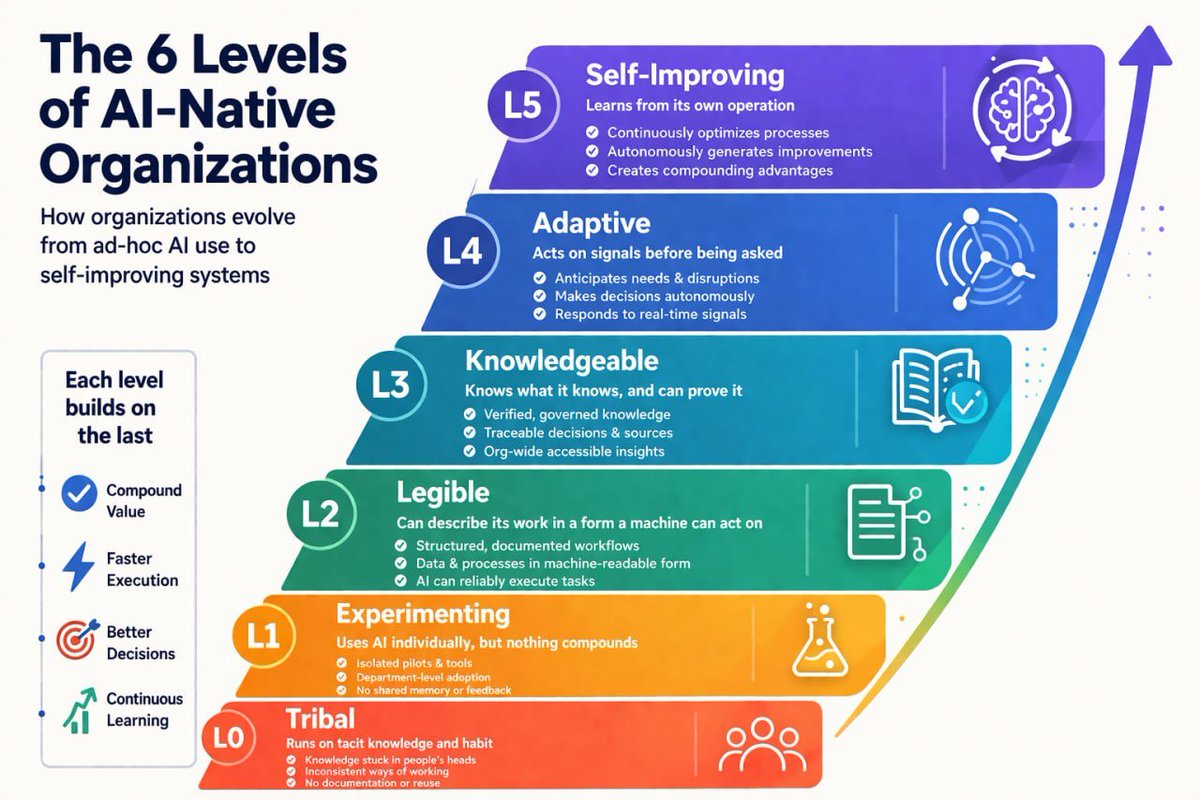
AI feels like it’s everywhere now. Spend a few days in San Francisco and it feels like the future has already arrived – agents, autonomy, AI-native companies. It creates a powerful illusion: the rest of the world is moving at the same speed. But it isn’t. Most companies are still at a much earlier stage. For many, AI means ChatGPT for writing, Copilot for code, maybe a few internal experiments, and a lot of pressure to “do something with AI.” The real gap is the organization itself. Work inside companies is still largely invisible to machines. Processes live in people’s heads, data is fragmented, and decisions don’t follow the org chart. That’s why so many AI pilots look impressive, and then quietly disappear. Because AI adoption isn’t a straight line, it's a stack of dependencies. You can’t jump to agents if workflows aren’t legible. You can’t act on data you don’t trust. You can’t automate decisions that aren’t clearly defined. The real work sits in the middle: • Making the organization legible to itself • Making data trustworthy and verifiable • Letting systems act and reshaping roles around that • Closing the loop so systems learn from human decisions That’s where deployments either become real or die. And it’s not really about AI – it's more about organizational redesign. AI adds intelligence while forcing companies to confront how they actually work. And the winners will be those who did the unsexy work of becoming organizations AI can actually understand and operate within. We break this down with @wschenk in our article → The Unsexy Truth of AI Adoption https://t.co/fXs9VgrmqI And I'm really interested in how this looks inside your companies. Where are you getting stuck?

@goyalshaliniuk ·
AI agents are the future, but how well do you understand them? This one-page guide breaks down everything you need to know about AI agents: from how they work to where they're used 👇 1. Core Concepts That Power Agents Understand key ideas like Goal Decomposition, Self-Reflection, Memory, and Multi-Agent Collaboration to grasp how agents reason and act autonomously. 2. Capabilities You Should Expect Modern AI agents can scrape web data, call APIs, execute code, retrieve documents (RAG), and even handle multi-step planning with tool orchestration. 3. Tools, Frameworks & Libraries From LangChain and AutoGen to LangGraph and Superagent, these frameworks help developers build, host, and monitor smart agent workflows. 4. Real-World Applications Think beyond chatbots. Agents are now used for content generation, meeting automation, research, data cleaning, CRM updates, and even test refactoring. 5. Challenges & Risks AI agents can hallucinate, loop indefinitely, or misuse tools. Watch out for token costs, data privacy risks, and debugging complexity in production. AI agents are not just a trend, they’re a paradigm shift. If you understand their architecture, tech stack, and risks, you’re already ahead of 90% of the market. Which of these areas do you want to explore deeper? 👇


@dabit3 ·
much of whatever success I've had in my career can be attributed to being terminally online, and being intentional about the people and places where I consume information being able to identify and act on the right information as quickly as possible opens up a lot of weird and interesting opportunities that are hard to explain sometimes the next phase of this is having agents surface this information more quickly and precisely. automations allow me to process a vastly larger set of inputs than I could as a human for me this is looking like daily reports from Devin and Hermes agent using xAI, Exa, GitHub and other APIs that process signals I'm looking for, summarize and brief me on things I should be looking into I'm still only scratching the surface here but I am already floored by the value these types of automations provide me vs doing it all myself

@AlexIsBuilding ·
[Full Interview]: How @kelanoo started a $20,000 per month AI automation agency. I've also dropped an 8 min recap in the comments if you want the key highlights. In this interview we cover: 00:00 Quick intro 01:30 From reply-guy agency to AI automation 04:48 Landing the first client (a $5K retainer) 09:33 The first automation Kelano built 17:19 Client #2 25:45 Starting from zero today: niches + the Upwork playbook 37:00 Building a SaaS from service learnings 49:20 The big pivot: $5K–$30K AI workshops 1:12:30 The endgame: five apps at $10K/month
 Watch video
@JJEnglert ·
Once you learn these three things, you can build nearly anything yourself. Skills, chains, and plugins. Learn them once and you can automate a real part of your week yourself. Here's the system: A skill is a standard operating procedure. It's one long, reusable prompt that does one thing well, like writing a newsletter, setting up a PPC campaign, triaging your inbox, or drafting a note to the board. You write it once and reuse it forever. The trick is to feed it your real work. For my writing skill, I gave Claude posts I admire and my own exported analytics with the winners marked, so it could see the patterns. Show it what good looks like and it nails your voice. Skip that step and it guesses. A chain connects skills into an automation. One skill's output feeds the next, in order. A copywriting skill writes the messaging, then hands it to a PPC-setup skill that builds the campaign. That's an automation, and you built it without writing code. A plugin is the harness that holds it all. It bundles your skills and chains into one thing you share with your team. Instead of sending 15 separate prompts around, you send one plugin, and it knows when to use each skill on its own. Skill, chain, plugin. It's one step up the ladder, and once you're up there it's easy. Now the worked example. I call it the Daily Driver. It's five skills chained together: email triage, a writer, Slack triage, a thinking partner, and a setup skill that connects my tools and personalizes everything. I chained them into one morning brief and scheduled it to run at 9am and message me the list. Two things made the biggest difference. Give it memory. I made plain docs for About Me, my Brand Voice, and my working preferences. I had Claude interview me and saved each answer as a file. Now every output sounds like me and knows my projects and my team. Connect your tools. The plugin reads my inbox, Slack, and calendar through MCP connectors for Gmail, Slack, and Google Calendar. That's what turns "summarize my morning" into a real brief instead of an empty wish. This is the highest-ROI thing an operator can set up this week. I run my YouTube channel, podcast, community, and newsletter on plugins I built myself, all on the $100 Max plan with no engineer in sight. I made a full walkthrough that shows the whole build start to finish. Want the Daily Driver plugin to start from? Comment PLUGIN below and I'll send it to you. #AI #automation #ClaudeCode
 Watch video
@thenowhereway ·
Most people think starting an AI automation agency is easy. Learn a tool. Build a workflow. Sign a client. Scale. Clean. Linear. Predictable. Reality? You learn 5 tools. Change your offer 3 times. Book calls you can’t close. Struggle to price. Start questioning everything. It’s not simple. It’s only simple after you understand the structure. The biggest lie: “If I just learn more tech, it’ll click.” It won’t. This game rewards: • Clarity > tools • Positioning > features • Sales > workflows • Execution > ideas • Consistency > motivation

@parcifap ·
How to learn AI Automation? Step-by-step guide in 4 levels - - Level 1: Using AI Start by mastering the fundamentals: > Prompt engineering (zero-shot, few-shot, chain-of-thought) > Calling APIs (OpenAI, Anthropic, Cohere, Hugging Face) > Understanding tokens, context windows, and parameters (temperature, top-p) With just these basics, you can already solve real problems But yeah, it's not enough to build real automation - - Level 2: Integrating AI Move from using AI to building with it: > Retrieval Augmented Generation (RAG) with vector databases (Pinecone, FAISS, Weaviate, Milvus) > Embeddings and similarity search (cosine, Euclidean, dot product) > Caching and batching for cost and latency improvements > Agents and tool use (safe function calling, API orchestration) This is the foundation of most modern AI products. - - Level 3: Engineering AI Systems Level up from prototypes to production-ready systems: > Fine-tuning vs instruction-tuning vs RLHF (know when each applies) > Guardrails for safety and compliance (filters, validators, adversarial testing) > Multi-model architectures (LLMs + smaller specialized models) > Evaluation frameworks (BLEU, ROUGE, perplexity, win-rates, human evals) Here’s where you shift from “it works” to “it works not like an unstable shit.” - - Level 4: Optimizing AI at Scale Learn how to run AI systems efficiently and responsibly: > Distributed inference (vLLM, Ray Serve) > Managing context length and memory (chunking, summarization, attention strategies) > Balancing cost vs performance (open-source vs proprietary tradeoffs) > Privacy, compliance, and governance (PII redaction, SOC2) At this stage, you’re not just building AI, you’re designing systems that scale in the real world.


@alexabelonix ·
Every day I see another post about the future: 1 founder. 10 AI agents. 0 employees. Fully automated startup. Maybe. But I think a lot of people are confusing leverage with autonomy. Claude Max costs $100-$200/month. Sounds cheap. Until you realize you're still the one debugging, reviewing outputs, fixing workflows, talking to customers, doing sales and figuring out distribution. Then you move beyond a simple AI assistant. And the costs start getting interesting. Some AI SDR products are estimated at: • ~$600/month on the low end • ~$2k-$5k/month for meaningful usage • $40k-$100k+/year for enterprise deployments And that's before you add: lead data CRM infrastructure monitoring maintenance tokens and your own time. That's the part nobody puts in the viral videos. The funniest thing? A lot of bootstrapped founders could hire a real operator from India, Nigeria, Vietnam or the Philippines for the same budget or less. Someone who can actually take ownership. Not just generate outputs. AI is real. The leverage is real. But I don't buy the "set up a few agents and chill" narrative. The cheap version isn't autonomous. The autonomous version isn't cheap. Founders who are heavily using AI agents: Has your workload actually gone down? Or did the work just change?

@jianw851 ·
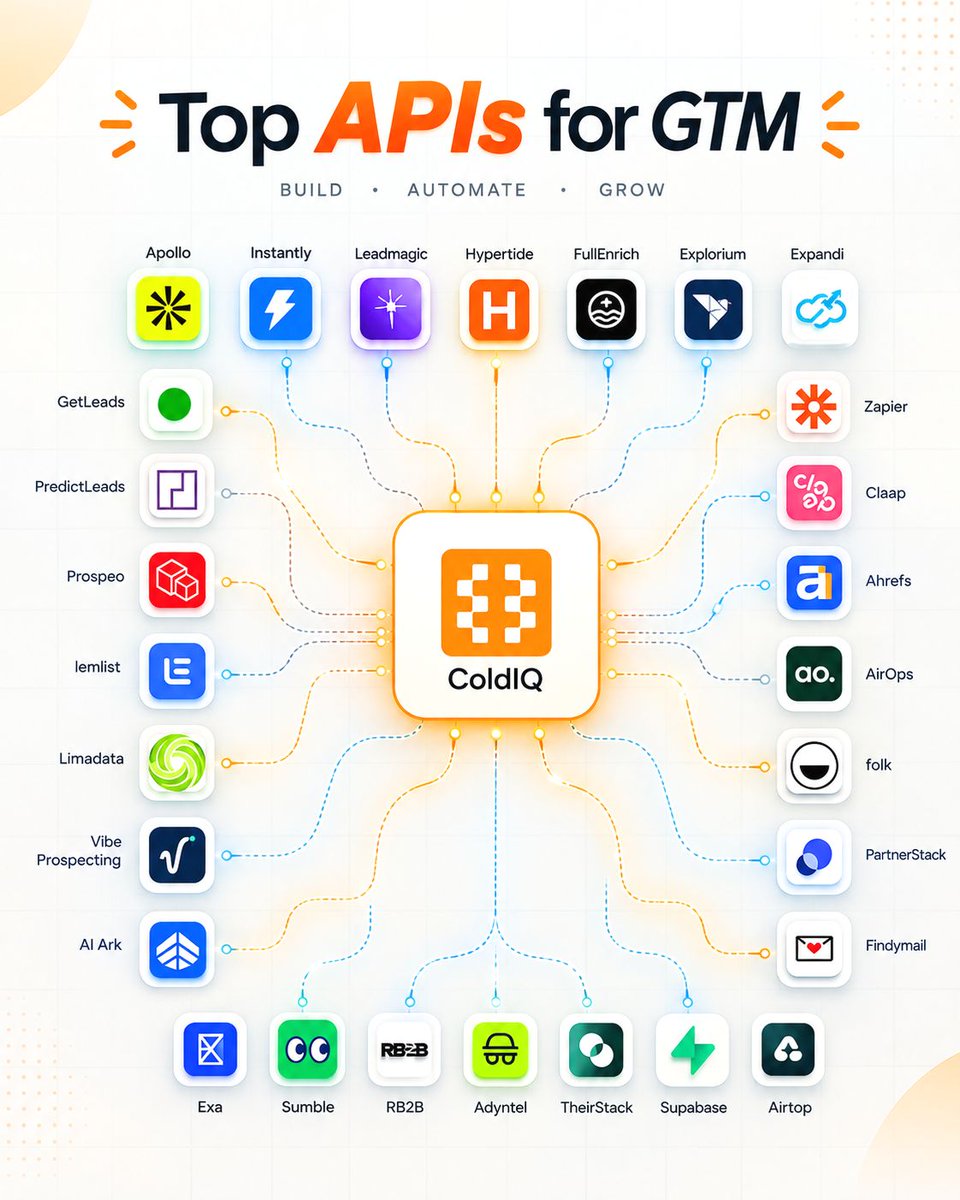
Your AI agent doesn’t need to just chat. Give it access to the right APIs and it can become a GTM machine: → Find prospects → Enrich leads → Research accounts → Detect buying intent → Run outreach → Update your CRM → Monitor SEO/AEO → Automate repetitive workflows A practical AI GTM stack could look like this: 🔎 Data Apollo • Exa • Prospeo • FullEnrich • Findymail 🎯 Intent TheirStack • RB2B • PredictLeads • Adyntel 📩 Outreach lemlist • Instantly • Expandi ⚙️ Automation Zapier • Airtop • Vibe Prospecting 💰 Sales Claap • folk • Supabase 📈 SEO / AEO Ahrefs • AirOps The interesting part isn't building another chatbot. It's connecting: AI agents + APIs + workflows + proprietary data That’s when an AI agent starts doing actual GTM work. Save this for your next AI automation project. Which API would you add to this stack? #AI #AIAgents #Automation #GTM

@Scobleizer ·
AI news from X improved. https://t.co/8L5xphk0qQ Just had my AI agent change how it picks headlines, which improved them. This reads 30,000 posts a day from the AI community (50,000 people, 9,200 companies) and analyzes them. Every headline links back to X. So this is a new "X algorithm" for watching what is going on here on X in the AI community. Got any improvements you would like me to make?

@AndrewBolis ·
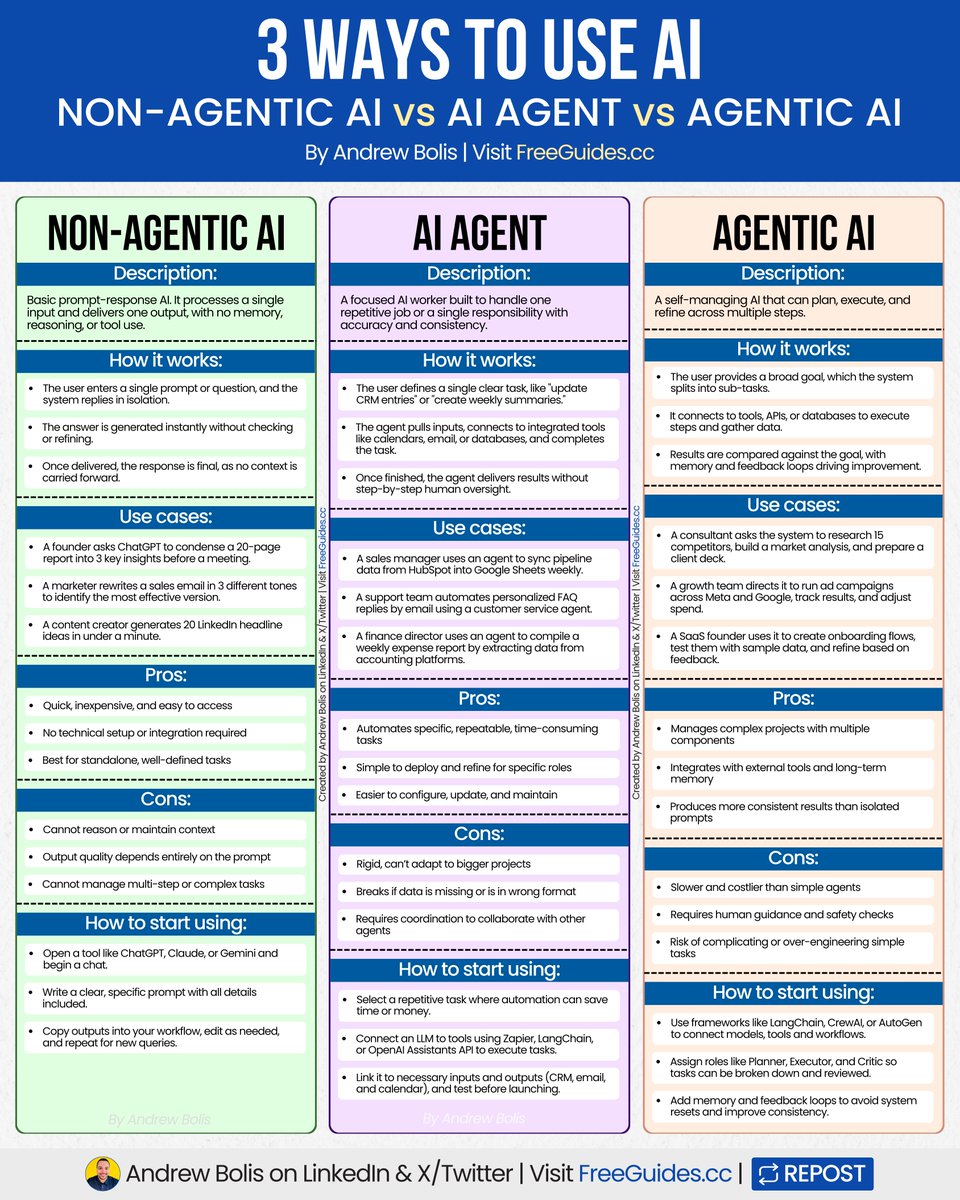
There are 3 ways you can use AI in your workflows. Non-Agentic (prompts), AI Agents and Agentic AI. Each works differently and has specific use cases. Here are the pros, cons and guidelines for using each. [ bookmark 🔖 this post for later ] 💻 Non-Agentic AI ↳ Simple prompt-response AI with no memory or reasoning. 🛠️ How it works: ↳ User enters one prompt, system replies in isolation ↳ Output generated instantly without refinement ↳ Interaction ends with no context retained 🟢 Pros: ↳ Fast, cheap, and widely accessible ↳ No technical setup required ↳ Ideal for one-off, simple tasks 🛑 Cons: ↳ No reasoning or memory ↳ Quality depends on prompts ↳ Weak for multi-step work 📈 How to start using: ↳ Open ChatGPT, Claude, or Gemini ↳ Write clear, specific prompts ↳ Copy, edit, and reuse output 🤖 AI Agent ↳ Single-task AI worker built to automate one job. 🛠️ How it works: ↳ User defines one clear role (e.g., update CRM) ↳ Agent pulls inputs and uses integrated tools ↳ Executes and outputs without supervision 🟢 Pros: ↳ Automates repetitive tasks ↳ Specialized and very capable ↳ Easy to refine within roles 🛑 Cons: ↳ Limited scope, rigid use ↳ Breaks if inputs are unclear ↳ Needs coordination to work with other agents 📈 How to start using: ↳ Select one repetitive task ↳ Connect LLM via Zapier, LangChain, or API ↳ Link inputs/outputs and test 🚀 Agentic AI ↳ Self-managing AI that plans, executes, and improves. 🛠️ How it works: ↳ Goal broken into smaller sub-tasks ↳ Connects to tools, APIs, and data sources ↳ Refines results with memory and feedback 🟢 Pros: ↳ Handles complex, multi-step projects ↳ Integrates with tools and databases ↳ Produces consistent outcomes 🛑 Cons: ↳ Slower and more expensive ↳ More complex and resource-intensive ↳ Difficult to configure, needs regular maintenance 📈 How to start using: ↳ Use LangChain, CrewAI, or AutoGen ↳ Assign roles (Planner, Executor, Critic) ↳ Add memory and feedback loops In short: Non-Agentic AI = prompts AI Agents = Automate one task Agentic AI = Run complex workflows Start with prompts. Then try AI Agents or Agentic AI. Use all three to get the most out of AI. 📌 Get Advanced ChatGPT Guide (free): https://t.co/kOBWfKrBaX 👉 Follow me @AndrewBolis for more and 🔄 Repost this to help others use AI

@shushant_l ·
Here's how to automate your work with AI so aggressively that your to-do list starts feeling unemployed. --- 1. AI automation basically means giving repetitive work to machines while you enjoy pretending to be the CEO. --- 2. Old automation followed rules; AI automation actually thinks before ruining your spreadsheet. --- 3. Automation evolved from scripts to workflows to AI assistants to agents that basically want their own LinkedIn profiles. --- 4. Every solid AI automation needs a trigger, AI brain, memory, tools, and feedback loop to stop it from developing goldfish memory. --- 5. A trigger starts the workflow because even robots apparently need someone to tell them to begin working. --- 6. The AI brain analyzes information, reasons through it, and decides what happens next without scheduling another meeting. --- 7. Tools let AI actually do stuff like send emails, update Notion, query databases, and terrorize Google Sheets. --- 8. Memory helps your AI remember context instead of greeting you like a complete stranger every five minutes. --- 9. Feedback loops help automations improve over time, which is more personal growth than most New Year's resolutions get. --- 10. AI agents work through goals, planning, reasoning, tools, execution, observation, and improvement until the job is actually finished. --- 11. One agent can handle simple jobs, while multi-agent systems assemble an entire digital office without demanding free snacks. --- 12. MCP connects AI models with APIs, databases, files, apps, and tools like a universal adapter for your increasingly ridiculous AI stack. --- 13. Your modern automation stack can combine AI models, agent frameworks, workflow platforms, databases, and business tools into one beautiful monster. --- 14. Start building by finding repetitive tasks because manually doing the same boring thing 400 times is not a personality trait. --- 15. Define your inputs and outputs before automating anything unless you enjoy creating extremely efficient chaos. --- 16. Connect the right tools, build the workflow, test it, monitor it, and only then unleash it upon humanity. --- 17. Great automation use cases include marketing, sales, customer support, HR, finance, and operations, AKA every department currently drowning in tabs. --- 18. Security still matters because giving an AI unlimited permissions is basically handing your house keys to an intern with superpowers. --- 19. The future is agentic AI, multi-agent teams, MCP ecosystems, context-aware agents, and businesses running increasingly autonomous workflows. --- 20. The ultimate formula is AI models + memory + tools + workflows + feedback + security + human oversight = fewer boring tasks and more actual work getting done. --- To learn more, check the infographic. --- Get all my visual guides for free here: https://t.co/p3DBZe1GLQ ---


@tibo_maker ·
AI automations are a bit overhyped "you relax, while AI does the work" sounds good in theory, but it's not that simple in practice I use 3 filters for an AI workflow 1 - does it save me a ton of time 2 - does it save or make me money 3 - does it let me do something I couldn't do before if it doesn't clear at least one, it's not worth building sharing my top 5 AI workflows in today's newsletter goes out in 2 hours, subscribe below to get the email 👇


@zaimiri ·
AI Automation will replace your job. Anyone can learn it. No code required. No agency experience needed. Here’s the 6 step plan to turn this into a profitable business: Step 1: Pick one industry. Don't go broad. Restaurants, law firms, real estate, e-commerce. Pick one and learn how it actually runs. Step 2: Find the manual work. Every business has tasks done the same way every week. Reporting. Follow-ups. Data entry. Scheduling. That's your product. Step 3: Build one workflow. Not a full system. One workflow. Solve one specific pain point end-to-end. Make it work before you sell it. Step 4: Give away one free audit. Walk into a business (or DM a founder) and show them where they're bleeding time. Don't pitch. Diagnose. Most of them will ask you to fix it. Step 5: Charge for outcomes, not hours. "This workflow will save you 8 hours/week" is worth a flat fee. Hourly makes you sound like an employee. Step 6: Productise. Once you've built it for one client, you've built it for all of them in that industry. Same workflow. New client. 80% margin. That's the business. The market for this is wide open. The biggest opportunity of this decade. Most businesses are still doing manually what should have been automated 3 years ago.


@IAmAaronWill ·
how to add AI into your business: > pick one task you do every single day > write the inputs and outputs > ask Claude to try and replicate > if it can, build it in n8n > run it alongside your manual version for a week if the output matches, turn the manual version off
@IAmAaronWill ·
Things I would never automate with AI: > Comments > Sales calls > Positioning > Offer creation > Client relationships > Objection handling > High stake DMs/emails Automate the inputs. Keep the outputs human.

@VaibhavSisinty ·
I've read hundreds of AI case studies. This is the only one that changed how I think. Every company is asking: what can AI automate? IKEA asked something different. They deployed Billie an AI chatbot for customer service. Billie resolved 47% of all queries instantly. 8,500 employees suddenly looked redundant. This is where most builders stop. But IKEA looked at the 53% failure rate. Every. Single. Failure. Was a customer asking for interior design help. A problem their entire team had completely missed. What they did next is insane. They retrained all 8,500 employees as remote design consultants. AI handled the intelligence work. Humans handled the judgement work. That one decision generated €1.3 billion in new revenue. In one year. 🤯 The companies winning with AI aren't the ones finding better automation. They're the ones paying attention to what the AI can't do.
 Watch video
@MSUKyleBrown ·
AI automation win we implemented at my HVAC parts distribution business: When some of our vendors ship customers orders they email us the tracking details. We used to enter this information into BigCommerce manually so customers would receive their shipment notifications. Some vendors only send tracking once they generate an invoice, which delayed our updates even further. We've automated the entire process. Any tracking information we receive from vendors is automatically captured, pushed into BigCommerce, and sent straight to the customer - no manual entry, no delays. One less repetitive manual task for our Team each day and one more step toward focusing on meaningful work. Less busywork, more actual building.
@zaimiri ·
Closed another automation client. They had 2 people doing onboarding by hand. Same cycle every week: > collect intake answers > chase missing files > create CRM records > schedule content > build the research brief I built one agent to do the first pass. One form submission becomes: > client folder > CRM profile > onboarding checklist > content calendar > research queue The human still approves. The machine removes the 8 hours of manual work nobody wanted to own. This is where AI gets obvious. Not replacing the business. But removing the boring work.

@adxtyahq ·
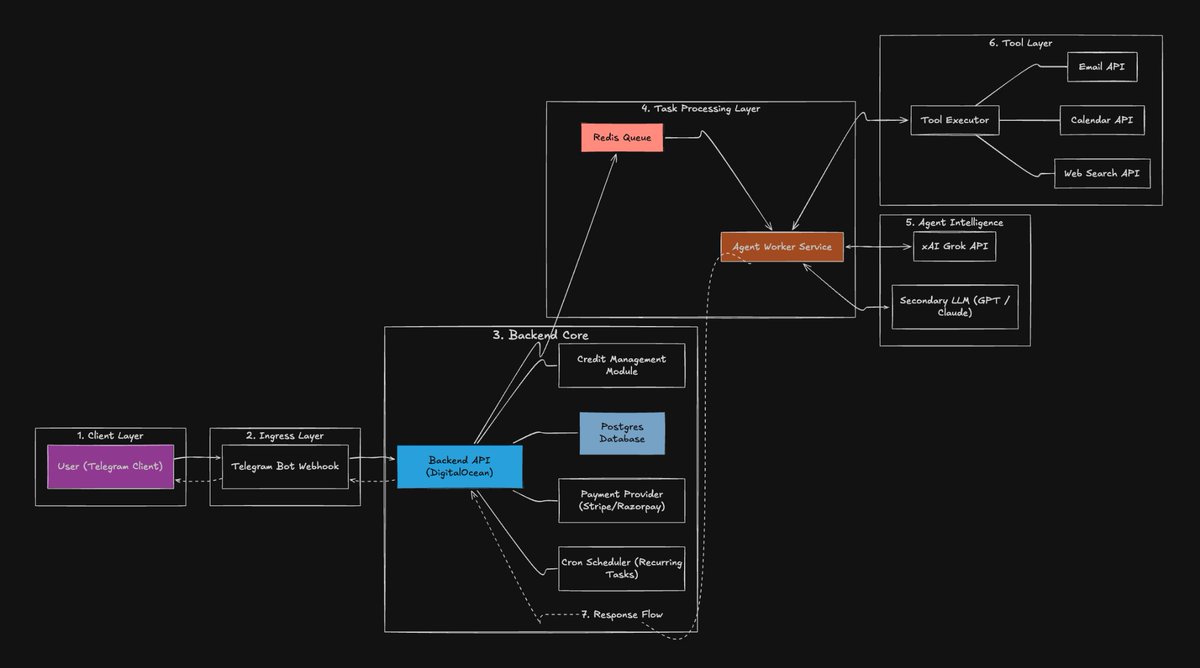
When openclaw hype was everywhere, I built a mini AI automation assistant for myself on telegram, just wanted something that actually does stuff, not just talk. Never shipped it, but the way it worked was interesting. Most AI assistants are just prompt in, response out, works fine until you try real automation. Things that take time or multiple steps just break. So I treated it like a backend flow. Message comes in, gets logged, pushed to a queue, worker picks it up. Model decides what to do, not hardcoded logic. It figures out actions, system executes via tools like email, calendar, search. Used xAI API as primary, with GPT/Claude fallback because stuff breaks lol. Mostly for reliability and cost. Everything ran async, otherwise it just wouldn’t hold up in real usage. Added basic things like credits, cron jobs, db for state. Real shift was simple, not a chatbot anymore. Just an AI automation system that takes a message and gets shit done.

@SamPeterToT ·
Everyone thinks AI automation is about speed, I can tell you that it's not. I believe it's all about survival. Last month, a founder I know was drowning. Customer messages piling up, Leads going cold, Revenue flatlining. He didn’t need more hustle, he only needed leverage. So he did one thing: He automated the boring, repeatable work. Follow-ups were automated. Onboarding emails were automated. Lead scoring were automated. In 30 days, something strange happened: Nothing looked different from the outside but everything changed underneath. Response time dropped from hours to minutes, conversion rates quietly climbed and he stopped being the bottleneck. Here’s the lesson most people miss: AI automation doesn’t make you more productive rather it removes the parts of your business that don’t deserve your attention. And that’s the real shift. Because in today’s market: The winners aren’t the hardest workers. They’re the ones who design systems that work without them. If your business still depends on you doing everything manually, You don’t have a business. You have a very stressful job with extra steps.

@heystevetan ·
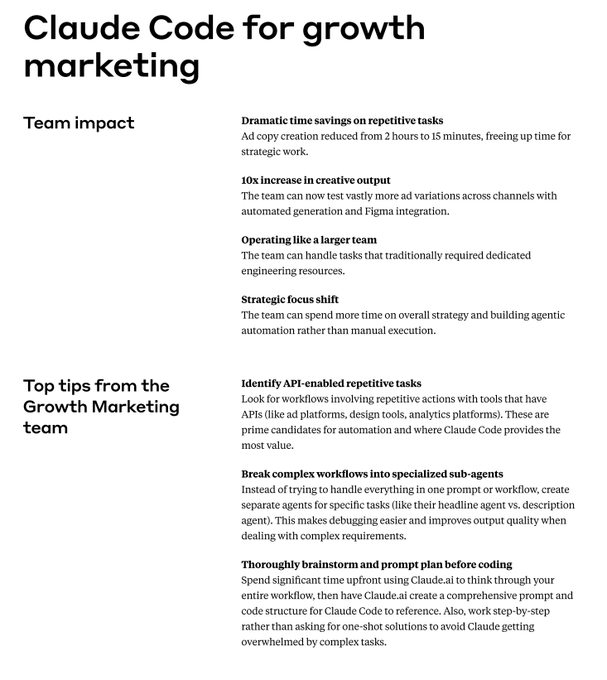
Anthropic's own marketing team runs three jobs through their AI every week. Writing content isn't one of them. Here's what they actually run: 1/ An overnight briefing. It reads Slack, Gmail and their ad accounts while the team sleeps, so priorities are sitting there in the morning. 2/ A Google Ads audit. It flags negative keywords, shows its reasoning, then stops and waits for a human to approve before touching anything. 3/A live reporting dashboard with drill-downs per channel, so nobody pulls numbers by hand. None of that is glamorous. All of it repeats. That's the part most people miss. Content is a task. You do it, it's done, tomorrow you start again. Operations is a system. You build it once and it runs whether you show up or not. Everyone is using AI to produce more. The people who built it are using it to remove the work nobody wants to do twice. The boring jobs are the ones worth automating. They're the only ones that repeat.


@AlexEngineerAI ·
AI automation advice for builders: 1. Solve real pain, not hype cycles 2. Ship small, validate fast 3. Automate your bottlenecks first 4. Build tools you'd pay for yourself 5. Stay close to your users The rest is noise.

@sachinrekhi ·
.@joulee, former VP Design at Meta, has really solidified my thinking on how taste manifests itself in the age of AI automation. Whether your AI workflow generates high quality output or AI slop comes down to your ability to encode taste into your instruction set. Building a high quality AI workflow now requires two distinct skills: 1. Ability to evaluate whether the output is in fact good in the first place. This has been our classic definition of taste - you know good work when you see it. And of course this is necessary as you iterate on an AI workflow to know whether the output is actually improving. 2. Ability to articulate how to generate great output in a clear and detailed enough way for an LLM to understand and systemize. This is the uniquely new craft that AI automation requires of us - the art of distilling the art. The professionals who can do both well are best positioned in the age of AI.
@shushant_l ·
I'm shocked most people still ask AI to "build an automation" and expect something useful. Here's how to prompt AI to generate smarter, actually usable automations. --- 1. Start with the exact outcome you want the automation to achieve. --- 2. Give AI enough business context to understand the process. --- 3. Define the trigger that should start the workflow. --- 4. List every input or piece of data available to the automation. --- 5. Tell AI which tools, apps, and platforms it can use. --- 6. Define the decision logic instead of leaving AI to guess. --- 7. Add clear constraints for what the automation should never do. --- 8. Explain exactly what should happen when something fails. --- 9. Add retry rules so temporary failures don't kill the workflow. --- 10. Tell the automation when it should log errors or alert your team. --- 11. Add human approval points for important or risky decisions. --- 12. Define the output format you want AI to return. --- 13. Ask for a workflow summary before jumping into implementation. --- 14. Request a clear trigger, step-by-step flow, and decision logic. --- 15. Avoid vague goals like "create an automation for my business." --- 16. Don't leave your tools undefined and expect AI to pick perfectly. --- 17. Never skip business rules when the workflow needs to make decisions. --- 18. Don't forget constraints like business hours, duplicate prevention, or data protection. --- 19. Think in workflows, not one giant sentence describing everything. --- 20. Combine outcome + context + trigger + inputs + tools + logic + constraints + error handling for better automation prompts. --- To learn more, check the infographic. --- Get all my visual guides for free here: https://t.co/p3DBZe1GLQ ---

@anulagarwal ·
Automating workflows with AI is super fun and enables you think in specialized terms rather than general terms. Some workflows that I recently optimized and helps save me hours now: 1) Managing App Store app pages: -Using Claude code to write ASO descriptions -Using Claude to whip up localized screenshots (in 15+ lanugages) -Claude builds the IOS app, uploads to App Store Connect, sends it for review. -It has access to Astro ASO tool - so it fetches best keywords and adds them. most of it due to @rudrank 's ASC CLI!! I only need to test the app, iterate with Claude, and take raw screenshots. Saves me hours to not fill up everything manually in App Store Connect. 2) Generating engaging game/short form videos: -Claude edits my game videos with captions/voiceovers/scripting -It has access to API keys of various tools -I have given some solid guidelines on how to think about hooks and stuff (same workflow is available in my web-tool!) 3) Managing invoicing/accounts: -In a simple raw form Claude is able to track my monthly revenue/expenses -I just feed it raw invoices and data and it is connected to my local db and keeps updating -I am now converting this to a web-app so I can use it on the go too! 4) Understanding level design: -Levels in my Unity game are just prefabs -I throw level funnel data in it and it analyzes high churn points -Then it goes through my Unity my project, compares those level prefabs and analyses -My game is 2D and physics based so it analyses positions, obstacles, etc. -And it does this perfectly since prefabs are YAML files only -For eg. my level 11-14 had high churn rates. It analyzed and concluded that spikes came in the direct path of the objective whereas in other levels that was not the case. Just a few use cases - everyday I am delegating some or the other task to AI. In my free time now I am learning new (spoken) languages - something I always loved to do. Just for fun.

@PreciousMoonday ·
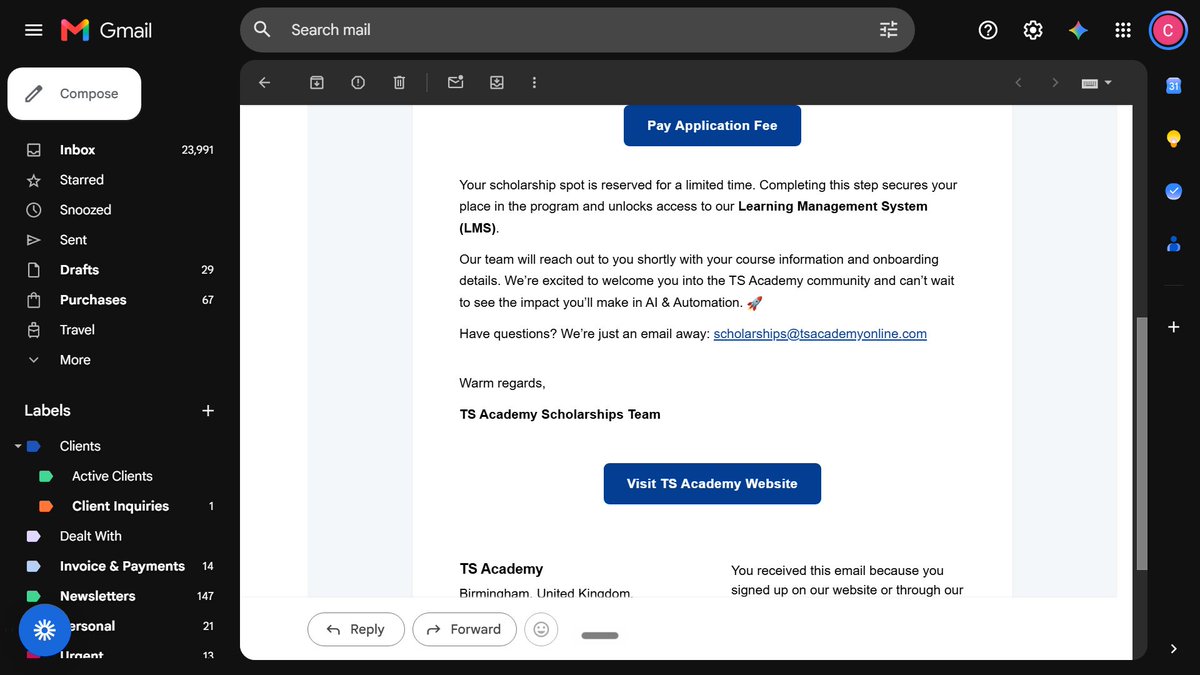
From not knowing how to make a Telegram bot to building AI automations. My TS Academy story. In February this year, I didn't know what AI automation was. Around February 20th, I came across a post from @elewachii Emmanuel. People kept asking him to explain AI automation in a way they could actually understand, so he put it all into one PDF: "AI Automation for Absolute Beginners." ₦5,000. I bought it a few days later. The email that came with the book said something I still remember. Reading it wouldn't make me an expert. Saving it to my phone and forgetting it wouldn't get me clients. The only way it works is if you read the concepts and open a canvas and start building. That was my first real exposure. And it clicked. Businesses were spending hours on work a system could do in seconds, and people were getting paid to build those systems. A few months later, a post came across my timeline. People were thanking their tutor, @errah_didit Chidera Okonkwo, and thanking TS Academy for the scholarships that got them into the program. I got curious. I went to the TS Academy page on X, then to their website, and found the scholarship page. Each scholarship was sponsored by someone, and you chose your sponsor when applying. I picked @aproko_doctor . Then I chose AI Automation from the list of courses, filled the form, and waited. About a weeks later, the email came. I'd been selected for a scholarship. All that was left was ₦26,500 for my learning platform access. I paid immediately. Classes were supposed to start in April. They moved to June. Three months later, at the end of September, we wrapped up. It wasn't easy. I was already in a virtual assistant bootcamp when TS started, so my weeks looked like this: Thursday, 6–8pm: TS Academy Friday, 6–8pm: VA bootcamp Saturday, 9–11am: TS Academy Saturday, 6–9pm: VA bootcamp Sunday, 6–9pm: VA bootcamp Plus assignments for both. Some weeks I didn't know which class I was preparing for. But this is what came out of it. When I started, I couldn't create an ordinary Telegram bot. I didn't know what a workflow was, or a webhook, or an API. Now I've built: → A voice assistant on Telegram. I send a voice note, it books, checks or cancels events on my Google Calendar → An AI inbox assistant that labels every email, drafts replies, and pings my phone when something is urgent → A Monday briefing that summarizes my inbox and my week, and lands in Telegram at 8am → An AI lead qualifier that scores leads Hot, Warm or Cold and updates HubSpot. Last week it was picked as the #1 AI agent use case of the day on Ideabot I won't call myself an expert. I still hit errors every week. But I build things that work, and when they break, I know how to find out why and fix it. Funny enough, the two courses ended up fitting together. In the VA bootcamp, I learned to do admin work by hand: inboxes, calendars, CRM, reports. At TS Academy, I learned to automate that same work. On October 28th, I graduate. @errah_didit Mr Chidera, thank you for your patience and for teaching in a way that made sense to someone starting from zero. @aproko_doctor , thank you for sponsoring my scholarship. You opened a door I couldn't have opened on my own. @TechSphereAcad TS Academy, thank you for the platform, the structure, and the push. @elewachii , your ₦5,000 PDF started all of this. What's next: landing my first clients and building more in public. Every workflow I build, I'll share here. If you're where I was in February, curious but confused, just start. Apply for the scholarship. Open the canvas and build something small. #MyTSAcademyStory #GraduatingWithTS #AIAutomation #n8n


@MakadiaHarsh ·
The fastest way to find useful AI automation is not to start with a tool. Start with the workflow. 1. List the repeated tasks that happen every day 2. Mark the handoffs where work waits 3. Put a dollar value on the delay 4. Separate decisions from data entry 5. Automate the repeatable part 6. Keep a human approval step where the cost of being wrong is high 7. Track the business result, not the number of prompts The question is not Where can we add AI? It is Where is the business already paying for a delay?

@mercer70638 ·
Most AI automations break because people skip the cleanup step. Your CRM has duplicate contacts, inconsistent naming, missing fields. Clean your data first or your automation will amplify the mess. #AI #Automation #DataQuality
@TheTuringPost ·
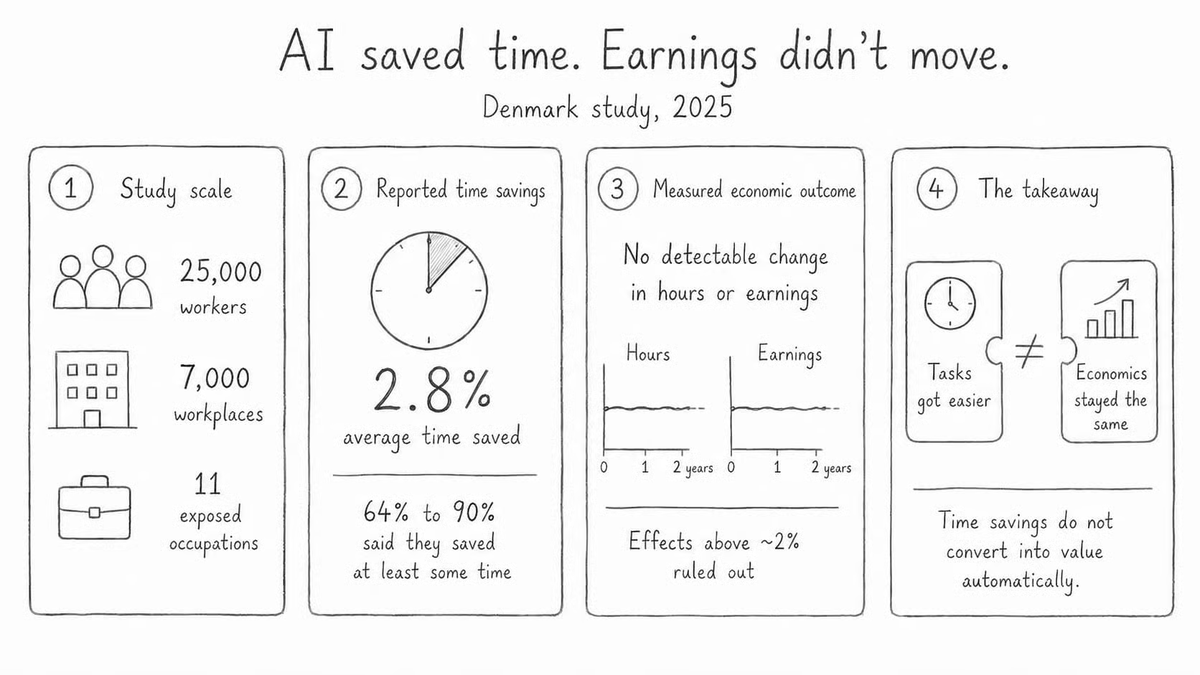
AI can save employees time without creating any measurable value for the business. A large Danish study found that workers using AI saved around 2.8% of their total work time. Yet those gains did not show up in their recorded hours or earnings. The study measured only part of the economic effect and didn't measure business outcomes. But it reveals the real enterprise AI problem: ➡️ A task can become easier while the economics around it stay exactly the same. The missing link is the Capacity-to-Outcome Chain: - AI improves a task - The task releases time, attention, or cost - The organization deliberately reallocates that capacity - A measurable business outcome changes Most companies measure the first stage and assume the rest will follow. The problem is that saved time often just gets swallowed by meetings, reviews, and the same old bottlenecks - the workflow just doesn't speed up So before automating a workflow, the company needs to decide what the released capacity is for: • More volume • Shorter cycle times • Higher quality • Lower costs • Less risk • Work that was previously too expensive or impractical And then someone needs the authority to redesign the workflow, change the service level, reallocate the team, or fund the new product. ❗Remember: AI ROI appears only when the organization decides what happens to the saved time. Our guide ↓

@kenyeung128 ·
Small business AI automation agencies are exploding locally. Saw 3 new ones launch in my city this month. The opportunity is real. Local restaurants, dental offices, car dealers. They need simple voice agents and WhatsApp automation, not complex AI. Low-hanging fruit everywhere.

@dominikjberger ·
I believe "full autonomy" is the wrong goal for AI agents and I say that as someone who runs AI workflows every day (if not every hour). The most valuable component of an AI workflow isn't the prompt. Also, not the model and not the integration. It's a traffic light: 🟢🟡🔴 Every output gets a confidence flag. 🟢 goes through. 🟡 needs a quick look (probably by another model) 🔴 stops and waits for a human. Building this way has taught me two things about where checkpoints belong: If a human has to approve every step, you haven't automated anything, you've built a slow, manual process with extra software. And when people approve 30 things a day, they stop actually reviewing (oversight fatigue is real). However, autonomous agents fail in a sneaky way: the output often looks awesome. It's fluent, well formatted, and confident. A simple rule could be: A human belongs in front of any action that is... → irreversible (sending, publishing, paying) → expensive to get wrong (consumes a lot of tokens, i.e.) → dependent on context the agent can't have (or that context is too sensitive to share) One lesson from my own workflows, the failure mode nobody talks about: After a couple of weeks, the human gets lazy. I caught myself skimming the outputs instead of reading them. Funny thing and where this goes full circle: this is exactly what I wanted to research during my PhD studies back in 2015: interruption management. Systems that interrupt humans only when it's truly necessary. Where do you draw the line in your workflows, what does your agent never get to do without you? 👇 #AIAgents #AIWorkflows #AutonomousAgents

@rcmisk ·
everyone wants an AI agent to run their X account on autopilot. i pulled the verified revenue numbers. autopilot tools sit at $0 MRR. the top earner ($21k/mo) sells analytics to humans who still write their own posts. what actually works in 2026: 1. agent harvests ideas from your commits and metrics 2. agent drafts in YOUR voice, not generic AI voice 3. agent schedules the queue 4. agent measures what worked 5. you approve every post 6. you write every reply 15 min a day. 1,504 posts and replies in 66 days as one person.

@AndreyK09474778 ·
Built my first multi-agent automation last month. Completely broke it within 48 hours. Here's what actually happened — and what I'd do differently now. I wired three AI agents together: one to scrape, one to classify, one to output. Looked clean on paper. In practice, agent #2 kept hallucinating categories when the input was slightly off-format. No error. No flag. Just... wrong outputs flowing silently downstream for hours. The real gotcha nobody warns you about: agents don't fail loudly. They fail quietly and confidently. -> Add a validation layer BETWEEN agents, not just at the end -> Log the raw output of every agent pass, not just the final result -> Set a confidence threshold — if the model isn't sure, route to human review instead of auto-passing This one architecture fix turned a brittle pipeline into something I actually trust. If you're building automations right now — even no-code ones — silent failures are your biggest enemy. Not the tools. Not the learning curve. The 30-minute automations you're seeing trend online are real starting points. But the 31st minute is adding the guardrails. What's the messiest failure you've hit building an AI workflow? Drop it below — genuinely curious what's tripping people up. #AIAutomation #BuildInPublic #IndieHacker #NoCode #AIAgents #Solopreneur #AITools 100+ AI prompts & 20 automation workflows. The AgentOps Playbook: https://t.co/TBA4zjgq02


@frog_omo ·
@nvidia revenue ops team shared the most useful AI framework I've seen this year. Before any automation project, they ask one question: Is this workflow deterministic or probabilistic? Here's why it changes everything. A deterministic workflow has fixed rules and predictable outputs. Same input → same output. Every time. No judgment required. Examples: → Lead from a 500+ employee company + ICP domain match → route to Enterprise → Deal over $50K + no activity in 14 days → flag for manager review → New contact added → enrich with Clay → update CRM These are safe to fully automate. AI is excellent here. A probabilistic workflow requires context, nuance, and judgment. The right answer changes depending on signals that are hard to define as rules. Examples: → Is this prospect a genuine fit? → Should we escalate this support ticket? → Is this deal actually going to close? These need a human in the loop. AI here doesn't fail quietly. It fails confidently. Most AI projects fail because teams deploy AI on probabilistic workflows and expect deterministic results. The output looks reasonable. Nobody checks it carefully. Six months later, the pipeline is a mess, and nobody knows why. The fix isn't a better AI tool. It's running this check before you start: Write down the workflow step by step For each step, ask: Does this always produce the same output given the same input? If yes → safe to automate If no → human stays in the loop That's the entire framework. The companies winning with AI in 2026 aren't using better tools. They're asking better questions before they start.

@citizen906 ·
If you're struggling to make AI agents work the way everyone says they should, you're not alone. 2026 is "the year of the agent." Everyone's automating everything. But here's what's really happening: I've been automating parts of my workflow for almost a year now. Custom news feeds. Report automations. Invoice handling, etc. I've tried so many tools like n8n, Make, Lindy, Claude. The micro automations works. Then I saw a post from @boringmarketer and decided to try something bigger: end-to-end ad automation for https://t.co/SHzqCiVXgT from market research > competitor intelligence > positioning > actual asset generation. Everyone's raving about Claude's Agent SDK, and it is impressive. But there's heavy caveats for non-devs like me. The real build took over a week. Because I kept getting pulled into side quests. Context windows maxing out mid-task. Scraping tools failing silently. Integrations just stopping. Problems that had nothing to do with the actual work I was trying to do, but completely blocked my progress. When the TikTok scraper silently failed, the agent didn't say "I couldn't access the data." It confidently told me "Your competitor doesn't do ads on TikTok!" I knew that wasn't true. But I had to dig into the process to figure out what broke. A marketer shouldn't have to debug software to get competitor research. AI confidence is unreal. It will tell you wrong things with complete conviction. And if you don't have the domain expertise to know what right looks like, you'll just believe it. Managing these tools isn't set-and-forget, it requires knowing your craft well enough to catch when the AI is confidently wrong. Eventually, once everything worked, the research was actually quite good. But the part that really can't be automated is the final step: asset generation. On-brand creative with the right colour schemes, the right visual language, you can't fully automate that without a human in the loop. Even the best models like Nano Banana Pro can't get there alone. This is exactly what we've spent three years building with Nexus. The secret isn't better model, it's better systems around the model. Visual context so the tool knows what on-brand actually looks like. Checkpoints where humans can review before things go sideways. Refining questions so it asks instead of assumes. Brand rules encoded as constraints, not suggestions. It works for us. But the full end-to-end loop from research to on-brand assets to shipping? I haven't found anything that just works. Marketers aren't going to become developers. And they shouldn't have to. The solutions that win this year will be the ones that actually solve the UX. I'm hopeful we're close. What agents are you getting the most value from right now?

@JulianGoldieSEO ·
Learning how Hermes Agent and Paperclip work together completely changed how I think about AI automation. Instead of chatting with one AI, you can run an entire org chart of agents that assign tasks, report back, and work 24/7. Both tools are open source and free to install — you only pay for the AI tokens behind them. This is the Goldie Method: AI as a workforce, not just a tool.
 Watch video
@ShayanJ81846859 ·
A founder I work with was spending ~6 hours a week manually onboarding new users. Sending welcome emails, creating workspaces, checking whether they'd actually activated. We didn't build "an AI product." We built a boring pipeline: webhook → check activation state → decide next action → send. The only place a model was involved was writing the follow-up copy based on what the user had and hadn't done yet. Everything else was plain Node. Week one it caught 40 accounts that had signed up and never opened the app. 11 came back. Most "AI automation" projects are 90% plumbing and 10% model. Founders are usually surprised by that ratio.

@AIGenesis_ ·
🚨 Breaking: One long video can now become: • 3 finished Shorts • Platform-specific posts • A downloadable lead magnet • A complete distribution funnel All automatically. I found the 44-node workflow that does it—but the automation isn’t even the smartest part. For every concept, it can then generate: • A rewritten hook and script • AI-avatar narration • Relevant AI-generated B-roll • A finished 1080×1920 video • Dynamic layouts and transitions • Captions for YouTube, Instagram and TikTok • Platform-specific titles and descriptions • A downloadable lead magnet • A tracking entry inside Google Sheets The finished Shorts are uploaded to Google Drive, while the lead magnet is converted into a shareable Google Doc. Think about what this changes. A creator normally publishes one long video and waits for views. With this system, that same video becomes: 1 long-form video 3 finished Shorts 3 platform campaigns Multiple social posts 1 audience-building resource Several opportunities to generate leads or sales That’s the real power of AI automation. Not creating more disposable content. Extracting every possible asset, audience touchpoint and monetization opportunity from work you have already completed. The creators who win won’t necessarily work more. They’ll build systems that make every hour of creative work produce results repeatedly. Here's the Automation: https://t.co/3OMXfLvifu

@PreciousMoonday ·
Sourcing B-roll for a single documentary used to take me 5 hours. Last night, I built an AI agent to do it in 55 seconds. 👇 (Watch the raw demo below) If you run a faceless YouTube channel or video agency, you know the soul-crushing reality of pre-production. You write a killer script, but then your momentum completely dies. You spend hours jumping between Pexels, YouTube, and the Internet Archive, manually hunting for cinematic shots, historical clips, and news broadcasts—downloading them one by one. It’s a massive bottleneck. And as an AI Automation Specialist, doing repetitive manual data-scraping feels like a crime. I needed unfair leverage to scale my content business. So, I stopped working in my business, started engineering around it, and built "Locked Planet Studio." Here is the heavy machinery under the hood: 🧠 The Brain: Groq (Llama-3) reads my raw voiceover script, understands the context, and extracts the exact visual keywords I need. 🌍 The Sourcing: It simultaneously hits the Pexels API (modern 4K), YouTube Data API (news clips), and Internet Archive API (vintage history). 📥 The Engine: Using yt-dlp, it bypasses the websites completely and rips the raw .mp4 files straight to my local hard drive, ready for DaVinci Resolve. Was it a smooth build? Absolutely not. At 3:00 AM, I was battling "Streamlit Amnesia" (where the app kept forgetting my loaded videos), writing defensive code to stop API crashes, and dealing with a complete laptop shutdown right at the finish line thank God for Chrome tab restore 😅 But the ROI is undeniable. What used to take hours now takes less than a minute. Script in. Assets out. Building this made me realize something bigger: This technology scales. Whether it becomes a standalone SaaS product or a custom backend installation, the ability to automate repetitive content workflows is an absolute superpower for modern businesses Creators, Founders, and Agency Owners: What is the most repetitive, time-sucking bottleneck in your workflow right now? Drop it in the comments, or send me a DM. Let’s talk about building a custom AI agent to automate it for you. ✌️ (Documenting the journey: 30-Day Building in Public Challenge) 🚀 #AI #Automation #NoCode #LowCode #n8n #Make #UiPath #LearningInPublic @errah_didit @elewachii @__lordfaith @TechnicalBben @Aje_Dynamicz
 Watch video
@BernardMarr ·
AI agents are quickly moving from “future concept” to real-world business advantage 🚀 From automating customer support workflows to streamlining reporting, inventory management and operational tasks, businesses are beginning to unlock new levels of efficiency through agentic AI. In this latest article, Bernard Marr breaks down a practical framework for building AI agents using simple inputs, tasks and outputs — making the process far more accessible for organisations looking to explore AI automation without needing deep technical expertise. A strong reminder that successful AI adoption starts with clearly defining workflows, outcomes and human oversight — not simply chasing the latest technology trend. Read the full article here: https://t.co/wsIFeXOP7b #AI #AIAgents #ArtificialIntelligence #BusinessAutomation #DigitalTransformation #Innovation #FutureOfWork #BusinessTechnology
@frog_omo ·
Before any AI project, I ask four questions. Most teams can't answer more than one. - Is your data accurate? - Is the process documented? - Does every step have an owner? - Do you know what "good" looks like today? That's it. Four questions. And the teams that skip them are the ones calling me six months later, asking why their AI deployment failed. Here's what I've learned watching this play out: AI doesn't fix broken foundations. It scales them. Bad data becomes bad outputs faster, at higher volume, with more confidence. Undocumented processes become unpredictable automation. Workflows without owners become nobody's problem until they're everyone's crisis. I started thinking of it like building a house. Layer 1 — Data Quality (the ground) Only 3% of enterprise data meets basic quality standards. 38% of RevOps leaders say poor data is their top barrier to AI. If the ground isn't solid, nothing built on it stands. Layer 2 — Process Documentation (the blueprint) If the workflow isn't written down, actually documented, not just in someone's head, AI can't follow it reliably. This is the most skipped layer. Layer 3 — Clear Ownership (the materials) Every step needs a named owner who catches errors and handles exceptions. AI without oversight is a liability. Layer 4 — Measurement Baseline (the builders) If you don't know what "good" looks like before automation, you can't tell if automation made it better or worse. Score each layer 1–3 before starting. All four need to be at least a 2 before you touch any AI tooling. Otherwise, you're building on sand. I write about AI automation for SaaS twice a week. (Full readiness audit in this week's Frogomo: link in bio)
@JulianGoldieSEO ·
Open Code + Qwen 3.6 just changed how AI works. This isn’t another chatbot update. This is agent AI that actually finishes tasks for you. Here’s what makes this combo different: → Qwen 3.6 plans multi-step workflows → 1M token context reads entire projects → Native tool calling connects real software → Thinking mode before execution improves reliability → Open Code edits files directly in your system → Runs commands + checks outputs automatically → Fixes errors without babysitting Chat AI gives answers. Agent AI delivers results. Save this video, you’ll understand where AI automation is going next. Want the SOP? DM me. 💬
 Watch video
@MakadiaHarsh ·
9 Ways to Build Better AI Automations 1. Accept messy data 2. Don't deploy on impulse 3. Stop depending on one tool 4. Monitor your pipelines 5. Test before you assume 6. Handle errors gracefully 7. Choose reliability over complexity 8. Learn from failed runs 9. Document everything
Best AI Automation tweets
Xholic studies what works in your niche, drafts posts in your voice and schedules them for the hours your audience is online.
No card needed · Nothing to cancel
Browse all tweet collectionsLive demo: no sign-up or login needed · takes about 2 minutes
Keep exploring