CI/CD and release engineering
Automated build, test, artifact, promotion, rollback, pipeline speed, branch/release hygiene, and delivery-versus-deployment practices.
72%
Best tweets about DevOps
Find the best tweets about DevOps, covering deployments, CI/CD, infrastructure, observability, reliability, incidents, automation, and platform engineering.
Production DevOps systems, deployment pipelines, infrastructure, observability, incidents, reliability, automation, and engineering tradeoffs.
Original Xholic analysis
DevOps discussion is led by CI/CD and release engineering, alongside production reliability, infrastructure, and deployment-safety practices. The posts also surface tradeoffs between delivery speed, testing environments, automation, security, and human operational accountability.
54% of posts
All-time engagement
32% of posts
Published in 90 days
Conversation map
Automated build, test, artifact, promotion, rollback, pipeline speed, branch/release hygiene, and delivery-versus-deployment practices.
72%
Metrics, logs, traces, alerts, SLOs, incident response, runbooks, root-cause analysis, resilience, and capacity planning.
34%
Cloud service selection, compute, storage, networking, data services, multi-region design, and system design tradeoffs.
30%
Docker packaging, Kubernetes primitives, ingress, service networking, resource limits, cluster operations, and production debugging.
26%
Environment topology, staging drift, contract versus end-to-end testing, PR preview environments, and isolated test infrastructure.
22%
Pipeline hardening, secrets isolation and rotation, dependency risks, vulnerability scanning, IAM, SBOMs, and CI/CD attack surfaces.
20%
Canary, blue-green, rolling releases, feature flags, dark launches, progressive exposure, and production rollout risk control.
16%
Terraform, Bicep, GitOps, repeatable provisioning, configuration management, and automation of infrastructure workflows.
12%
Tone and stance
Performance benchmark
Posts with media make up 50% of this collection. Their median all-time score is 9.62, compared with 7.58 for text-only posts.
Format mix
Consensus and debate
Shared view
CI/CD and release engineering is the largest identified theme, appearing in 36 of 50 tweets (72%). The theme includes automated builds, testing, artifacts, promotion, rollback, and the distinction between continuous delivery and continuous deployment.
Shared view
Posts discuss blue-green deployments, canaries, feature toggles, dark launches, rollback capability, small diffs, and automated stopping of bad deployments as ways to manage rollout risk.
Shared view
Posts emphasize networking, container and Kubernetes behavior, logs, metrics, traces, incident response, runbooks, and production debugging as parts of operating production systems.
Shared view
Posts discuss dependency and CI/CD attack surfaces, separate staging and production secrets, patching known vulnerabilities before deployment, least-privilege IAM, secret rotation, SBOMs, and security checks in delivery workflows.
Open debate
One post recommends Dev → Staging → Prod as a starting point while acknowledging staging drift. Another argues that shared staging infrastructure and end-to-end tests become fragile as service counts grow, and favors service-owned and contract tests instead.
Open debate
Posts describe AI-assisted incident investigation and AI-built ephemeral GitHub Actions runners. Other posts argue that humans still need to verify changes, make rollback decisions, and carry pager or compliance accountability.
Open debate
One post argues that young startups can defer a dedicated DevOps specialist when capable full-stack engineers can cover the work. Another argues that fast-growing teams eventually need platform capabilities that help developers build, test, deploy, and scale software.
What performs
List-format posts had a median all-time score of 45.084, compared with 21.3 for tutorials, 8.38 for opinions, 4.279 for announcements, and 1.445 for case studies.
The post comparing Dev → Prod, Dev → Test → Staging → Pre-Prod → Prod, and Dev → Staging → Prod scored 185.62 all-time—19.87 times the 9.34 dataset median.
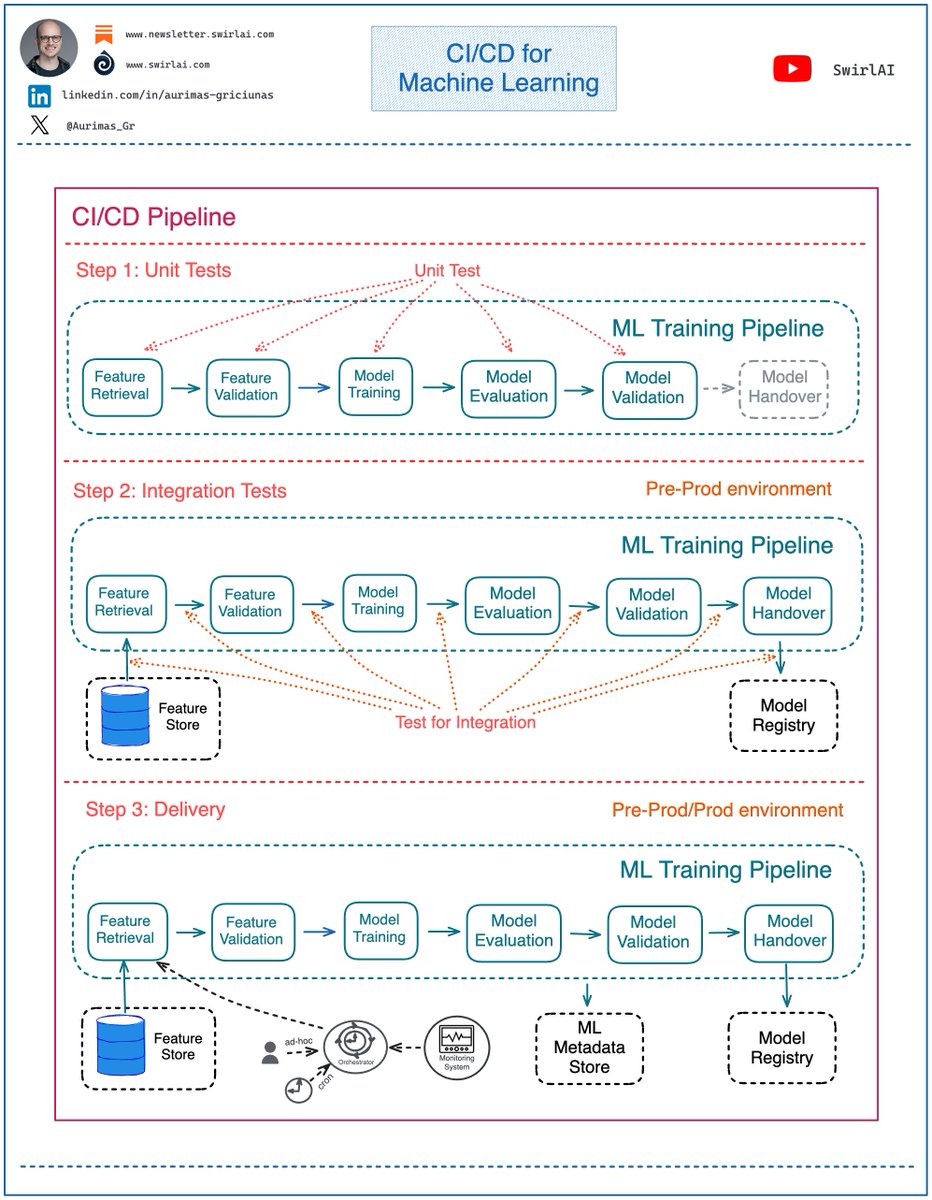
The post distinguishing software CI/CD pipelines from ML training pipelines scored 164.23 all-time, or 17.58 times the dataset median.
Posts with media had a median all-time score of 9.617, versus 7.583 for text posts. Media appeared in 25 of 50 tweets (50%).
Statistical standouts
Creator landscape
The five most represented creators account for 20% of the selected posts.
1. Vaishnavi
@_vmlops
2 posts
2. Abhishek Singh
@0xlelouch_
2 posts
3. Arpit Bhayani
@arpit_bhayani
2 posts
4. Branko
@brankopetric00
2 posts
5. HackerNoon | Learn Any Technology
@hackernoon
2 posts
6. Hot Aisle
@HotAisle
2 posts
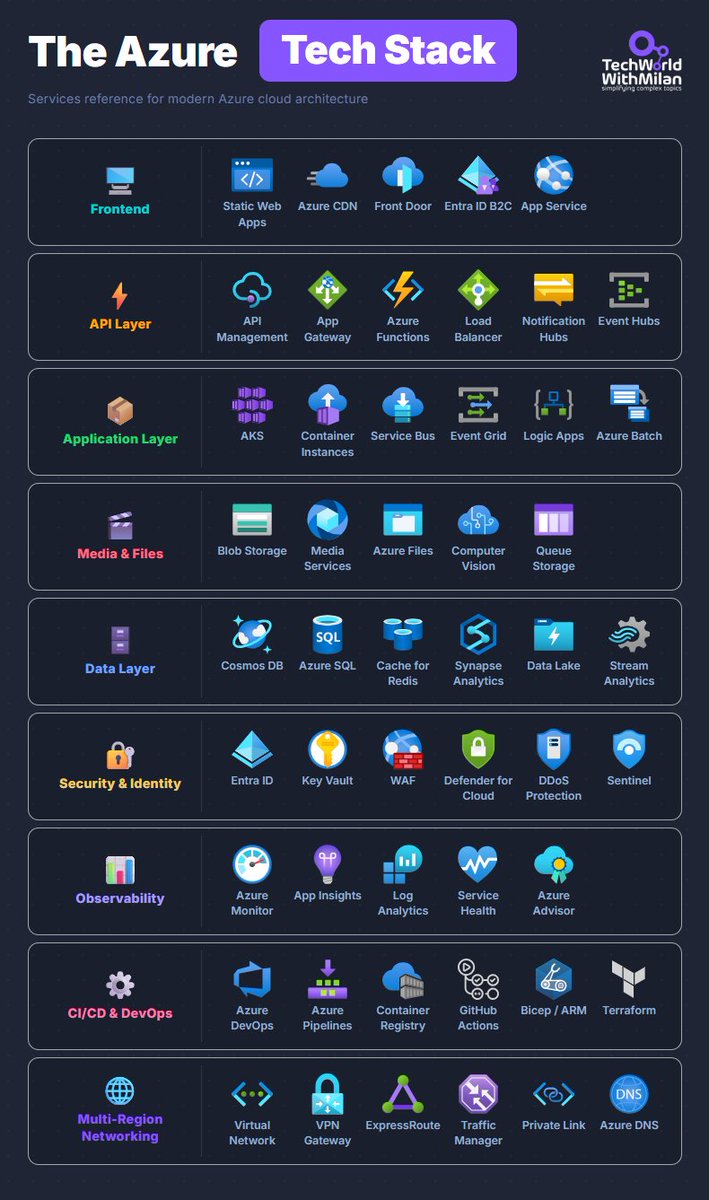
Among the listed top voices, Dr Milan Milanović had a median all-time score of 110.28 and Arpit Bhayani had 121.11. Their cited posts cover Azure architecture and DevOps guidance, plus testing-environment and deployment-process viewpoints.
Mischa van den Burg’s post recommends hands-on Linux, cloud, Kubernetes, and homelab experience rather than accumulating certifications. Branko’s posts emphasize defending operational tradeoffs and describe AI-related delivery-stability and verification concerns.
The dataset contains 40 creators across 50 tweets. The top five creators account for 20% of placements, indicating that the sample is not concentrated in a small set of authors.
Since the previous snapshot
Themes, sentiment, stance, and post format are classified per tweet. All counts, shares, medians, creator concentration, freshness, and performance comparisons are then calculated directly from the published snapshot.
Xholic's all-time score compares engagement while accounting for reach, post age, and creator consistency. It is used for relative comparisons within this collection.
This report analyzes the exact 50-post snapshot shown below. AI identifies editorial categories and drafts explanations; all statistics are calculated from the snapshot, and every narrative claim is checked against cited posts before publication.
Best DevOps tweets
Ranked 01–50
@milan_milanovic ·
𝗧𝗵𝗲 𝗔𝘇𝘂𝗿𝗲 𝗧𝗲𝗰𝗵 𝗦𝘁𝗮𝗰𝗸 Here are the most important Azure services organized by layer. 𝟭. 𝗙𝗿𝗼𝗻𝘁𝗲𝗻𝗱 Here we have Static Web Apps for Single-Page Applications, and a Content Delivery Network (CDN) for edge caching. If you need global routing, you can use Front Door, and here you also get WAF. Entra ID B2C can be used for customer identity. Most teams start with App Service, and honestly, that's the right call because it handles 80% of the cases that we need. 𝟮. 𝗔𝗣𝗜 𝗟𝗮𝘆𝗲𝗿 API Management is heavy, but if you need versioning, rate limiting, and a developer portal, it's worth the cost. App Gateway in front of internal services. Functions for event-driven compute, Event Hubs, when you're ingesting at scale and need Kafka compatibility. Load Balancer for Layer 4 routing. 𝟯. 𝗔𝗽𝗽𝗹𝗶𝗰𝗮𝘁𝗶𝗼𝗻 𝗟𝗮𝘆𝗲𝗿 Use AKS if your project requires Kubernetes. Container Instances for short-lived jobs, where spinning up a cluster is overkill. Service Bus for reliable queuing between services. Event Grid for reactive, event-driven stuff. Logic Apps is something people swear by for integration workflows, and I've never quite gotten there myself, but the use case is legitimate. 𝟰. 𝗗𝗮𝘁𝗮 𝗟𝗮𝘆𝗲𝗿 Most of the real architecture arguments happen here. Cosmos DB is when you need global distribution and multi-model flexibility, but also write-heavy systems. Azure SQL when relational is the right fit and you'd rather not manage your own SQL Server. Cache for Redis in front of either. Synapse for analytics workloads, Data Lake for raw storage, Stream Analytics when you need real-time processing on incoming event streams. 𝟱. 𝗦𝗲𝗰𝘂𝗿𝗶𝘁𝘆 𝗮𝗻𝗱 𝗜𝗱𝗲𝗻𝘁𝗶𝘁𝘆 Entra ID for identity, Key Vault for secrets and certificates. WAF placement depends on whether you're using Front Door or App Gateway. Defender for Cloud across the subscription, Sentinel as the SIEM. This layer tends to get scoped down when budgets are tight. Then something happens, and you rebuild it properly under pressure. 𝟲. 𝗢𝗯𝘀𝗲𝗿𝘃𝗮𝗯𝗶𝗹𝗶𝘁𝘆 App Insights for application telemetry and distributed tracing. Log Analytics for querying everything. Service Health so you know when Azure itself is having a bad day, which happens more often than the 99.9% SLA suggests. Most teams set this up too late. 𝟳. 𝗖𝗜/𝗖𝗗 𝗮𝗻𝗱 𝗗𝗲𝘃𝗢𝗽𝘀 Azure DevOps or GitHub Actions. Pick one, use it everywhere, don't mix them across teams. Bicep over ARM, the syntax is dramatically cleaner, and the tooling has caught up. Terraform, if you're multicloud or the team already has it. Container Registry for images close to your AKS clusters. The projects I've seen with the messiest pipelines are the ones that let different teams pick different tools. 𝟴. 𝗠𝗲𝗱𝗶𝗮 𝗮𝗻𝗱 𝗙𝗶𝗹𝗲𝘀 Blob Storage for unstructured data, Azure Files for SMB shares, Queue Storage for simple message passing. Media Services, if you're doing video processing. Computer Vision, when you need image analysis without building the model yourself. 𝟵. 𝗠𝘂𝗹𝘁𝗶-𝗥𝗲𝗴𝗶𝗼𝗻 𝗡𝗲𝘁𝘄𝗼𝗿𝗸𝗶𝗻𝗴 Virtual Network as the foundation. VPN Gateway for site-to-site, ExpressRoute, when you need private dedicated connectivity with predictable latency, and the cost is justified. Traffic Manager for DNS-based global routing. Private Link to expose services internally without putting them on the public internet. Most teams don't think about this layer until they're designing for a second region.
@Njuchi_ ·
The Minimalist, The Paranoid, and The Practical walk into a bar... Actually, they walk into a deployment meeting. And they all think the other two are doing CI/CD completely wrong. But here is the thing: 𝗧𝗵𝗲𝗿𝗲'𝘀 𝗻𝗼 "𝗰𝗼𝗿𝗿𝗲𝗰𝘁" 𝗻𝘂𝗺𝗯𝗲𝗿 𝗼𝗳 𝗲𝗻𝘃𝗶𝗿𝗼𝗻𝗺𝗲𝗻𝘁𝘀 𝗯𝗲𝘁𝘄𝗲𝗲𝗻 𝘆𝗼𝘂𝗿 𝗹𝗮𝗽𝘁𝗼𝗽 𝗮𝗻𝗱 𝗽𝗿𝗼𝗱𝘂𝗰𝘁𝗶𝗼𝗻. But every team acts like theirs is the only way that makes sense. Let me break down the 3 main approaches I see: 𝟭) 𝗧𝗵𝗲 𝗠𝗶𝗻𝗶𝗺𝗮𝗹𝗶𝘀𝘁: 𝗗𝗲𝘃 → 𝗣𝗿𝗼𝗱 ↳ Ship fast, fix faster. No safety nets. ↳ Your tests better be solid because that's your only checkpoint. ✅ Good: Lightning fast deployments. You learn to write bulletproof tests. ❌ Bad: One bad merge and your customers are your QA team. Best for: Startups, internal tools, teams with crazy good automation 𝟮) 𝗧𝗵𝗲 𝗣𝗮𝗿𝗮𝗻𝗼𝗶𝗱: 𝗗𝗲𝘃 → 𝗧𝗲𝘀𝘁 → 𝗦𝘁𝗮𝗴𝗶𝗻𝗴 → 𝗣𝗿𝗲-𝗣𝗿𝗼𝗱 → 𝗣𝗿𝗼𝗱 ↳ Every environment catches something different. ↳ Takes 2 weeks to deploy a button color change. ✅ Good: You'll catch bugs. All of them. Eventually. ❌ Bad: By the time you deploy, the original developer left the company. Best for: Banking, healthcare, anywhere a bug costs millions or lives 𝟯) 𝗧𝗵𝗲 𝗣𝗿𝗮𝗰𝘁𝗶𝗰𝗮𝗹: 𝗗𝗲𝘃 → 𝗦𝘁𝗮𝗴𝗶𝗻𝗴 → 𝗣𝗿𝗼𝗱 ↳ Staging is a production clone where you test the scary stuff. ↳ Fast enough to ship daily, safe enough to sleep at night. ✅ Good: Balance between speed and safety. Most teams end up here. ❌ Bad: Staging environments drift from prod. Always. No exceptions. Best for: Most software companies, SaaS products, anything customer-facing Here's what I actually tell people: Start with Dev → Staging → Prod. Seriously. Don't add environments because they sound professional. Add them when you have a specific problem to solve. Every extra environment is another place for things to break, drift, or slow you down. The best pipeline is the one your team actually uses correctly. 💬 Real talk: How many environments does your team have? And how many of them are actually working as intended? ------ 🧑🏻💻 And if you want to learn how to actually build this multi-stage deployment from scratch, we walk through the whole Dev → Staging → Prod flow in our CI/CD masterclass: https://t.co/oGzTE7q7uN
@Aurimas_Gr ·
As an 𝗔𝗜 𝗘𝗻𝗴𝗶𝗻𝗲𝗲𝗿 you should also care about regular, non LLM-based ML models, productionising them comes with its own challenges. For example, 𝗖𝗜/𝗖𝗗 process is 𝗱𝗶𝗳𝗳𝗲𝗿𝗲𝗻𝘁 𝗳𝗼𝗿 𝗠𝗮𝗰𝗵𝗶𝗻𝗲 𝗟𝗲𝗮𝗿𝗻𝗶𝗻𝗴 𝗣𝗿𝗼𝗷𝗲𝗰𝘁𝘀 compared to regular software. The important difference that the Machine Learning aspect of the projects brings to the CI/CD process is the treatment of the Machine Learning Training pipeline as a first class citizen of the software world. ➡️ CI/CD pipeline is a separate entity from Machine Learning Training pipeline. There are frameworks and tools that provide capabilities specific to Machine Learning pipelining needs (e.g. KubeFlow Pipelines, Sagemaker Pipelines etc.). ➡️ ML Training pipeline is an artifact produced by Machine Learning project and should be treated in the CI/CD pipelines as such. What does it mean? Let’s take a closer look: Regular CI/CD pipelines will usually be composed of at-least three main steps. These are: 𝗦𝘁𝗲𝗽 𝟭: Unit Tests - you test your code so that the functions and methods produce desired results for a set of predefined inputs. 𝗦𝘁𝗲𝗽 𝟮: Integration Tests - you test specific pieces of the code for ability to integrate with systems outside the boundaries of your code (e.g. databases) and between the pieces of the code itself. 𝗦𝘁𝗲𝗽 𝟯: Delivery - you deliver the produced artifact to a pre-prod or prod environment depending on which stage of GitFlow you are in. What does it look like when ML Training pipelines are involved? 𝗦𝘁𝗲𝗽 𝟭: Unit Tests - in mature MLOps setup the steps in ML Training pipeline should be contained in their own environments and Unit Testable separately as these are just pieces of code composed of methods and functions. 𝗦𝘁𝗲𝗽 𝟮: Integration Tests - you test if ML Training pipeline can successfully integrate with outside systems, this includes connecting to a Feature Store and extracting data from it, ability to hand over the ML Model artifact to the Model Registry, ability to log metadata to ML Metadata Store etc. This CI/CD step also includes testing the integration between each of the Machine Learning Training pipeline steps, e.g. does it succeed in passing validation data from training step to evaluation step. 𝗦𝘁𝗲𝗽 𝟯: Delivery - the pipeline is delivered to a pre-prod or prod environment depending on which stage of GitFlow you are in. If it is a production environment, the pipeline is ready to be used for Continuous Training. You can trigger the training or retraining of your ML Model ad-hoc, periodically or if the deployed model starts showing signs of Feature/Concept Drift. Let me know your thoughts. 👇
@arpit_bhayani ·
End-to-end tests do not work at scale, nor does staging infrastructure. Past a certain number of services, both turn into a liability, and a big one at that. It is nearly impossible to run a "company-in-a-box" environment at scale. Staging is meant to be a smaller, calmer copy of production. In practice, it becomes its own fragile system. A shared database, shared services, and everything around them all need to be up, on the right version, and in the right state at the same time. Running tests across services on top of that staging infrastructure is even more fragile. Test for service A now depends on service B being deployed, service C having the right data, and the staging database not being mid-migration because of someone else's change. One flaky service and the whole suite goes red, for a reason that has nothing to do with the code being tested. When that happens, nobody owns the failure, and it somehow becomes the responsibility of a central team (most likely DevOps, SRE, or Platform. Yesss... been in the same situation a decade ago). What works instead is each service owning its own tests and mocking the responses of the services it depends on. No shared staging database. No waiting on five other teams to deploy before you can run a single test suite. This gives you a clear separation of concerns. A service is responsible for its own contract and its own correctness, nothing more. Cross-service behavior gets verified through contract tests between two teams, not through a shared environment that everyone touches and no one owns. It also shifts accountability to the left because there is no one to blame. If a mock does not match reality, that is a contract problem between two teams, caught early by the team that owns the code. Fewer moving parts, less shared infrastructure to babysit. Somehow, every company struggles with, there is no end to this problem, and there is probably a billion-dollar business to be built solving it :) Hope this helps.
@goyalshaliniuk ·
Choosing the right deployment strategy can make or break the rollout of new microservices. This guide breaks down five popular deployment patterns every DevOps and backend engineer should understand: 1. Blue-Green Deployments Switch traffic between two identical environments (Blue and Green) to minimize downtime and risk. Great for seamless rollbacks. 2. Canary Releases Gradually expose new features to a small subset of users before full rollout. Monitor performance and catch issues early. 3. Feature Toggles Enable or disable features at runtime for specific user segments—without redeploying code. Ideal for staged rollouts and A/B testing. 4. Dark Launches Deploy features in production but keep them hidden from end users. Used for internal testing, performance tuning, and readiness checks. 5. A/B Testing Run controlled experiments by comparing two feature versions with different user groups. Use data to guide product decisions. Takeaway: These strategies help you ship fast, reduce risk, and gather real-world feedback—without breaking your production environment. Which strategy do you use the most?
@arpit_bhayani ·
Months of building and shipping AI systems made me realize - one thing that makes agentic workflows work is good old best devops practices. If you do not have proper tooling, clean (and also well-defined) processes, and ephemeral environments set up, an AI agent cannot run or help you reliably. Be it agentic SDLC, running evals, phased agent rollouts, circuit breakers, database access, or anything else. Think about what an agent actually needs to do good work. It needs a safe place to run code, a fast feedback loop to know if something broke, and clear boundaries between development, staging, and production. Most skip this and go straight to "let the agent write and deploy code." Then they hit weird failures, lose trust in the system (and even AI), and quietly give up on agentic workflows altogether. The fix is not about AI at all. It is the same old devops discipline that made human engineering teams reliable in the first place. Good things die hard :)
@Njuchi_ ·
Most DevOps engineers can deploy to Kubernetes. Very few can explain what happens on the network when they do. That gap is why debugging networking issues feels like guesswork — and why so many engineers avoid infrastructure problems they don't fully understand. But the good thing is: you don't need to know everything about networking. You need to know the 20% that covers 80% of what you'll actually use on the job. In my latest video, I break down exactly that — from physical servers, VMs, cloud, Docker, all the way to Kubernetes networking — using one real-world example the whole way through. No dry theory. Just the concepts that actually come up when things break in production. If you work with containers, cloud, or Kubernetes — this one is worth 40 minutes of your time. 🎥 Watch the complete guide here: https://t.co/3u41DJhOgC What was the networking concept that confused you the most? Drop it in the comments 👇
@jianw851 ·
Cloud Computing in one tree 🌳 Cloud ├── Compute │ ├── Virtual Machines │ ├── Containers │ ├── Kubernetes │ └── Serverless │ ├── Storage │ ├── Object Storage │ ├── Block Storage │ ├── File Storage │ └── Backup & Archive │ ├── Networking │ ├── VPC │ ├── Load Balancer │ ├── DNS │ ├── CDN │ └── VPN │ ├── Databases │ ├── SQL │ ├── NoSQL │ ├── Cache │ └── Data Warehouse │ ├── Security │ ├── IAM │ ├── Secrets Manager │ ├── Encryption │ └── WAF │ ├── Observability │ ├── Monitoring │ ├── Logging │ ├── Tracing │ └── Alerting │ └── DevOps ├── CI/CD ├── Infrastructure as Code ├── GitOps └── Automation Most cloud certifications teach hundreds of services. Most cloud engineers use variations of this tree every day. Learn the branches first. The service names change. The fundamentals don't. Save this cloud roadmap. 🌳☁️ #CloudComputing #AWS #Azure #GCP #DevOps #CloudEngineer

@mischavdburg ·
AI won't replace the DevOps engineer. AI will replace the DevOps engineer who only knows how to follow tutorials. 64% of people exploring a DevOps career change say AI job displacement is their #1 concern. But Kubernetes clusters don't prompt themselves into existence. Someone still has to design the networking, debug the CrashLoopBackOff mid-incident, and explain to the CTO why the architecture won't scale. The infrastructure layer is where AI runs. Not where AI replaces.
@_jaydeepkarale ·
📂 System Design Made Simple ∟ What is system design ∟ Functional vs non-functional requirements ∟ Scalability basics ∟ Availability vs reliability ∟ Latency vs throughput ∟ CAP theorem ∟ Horizontal vs vertical scaling ∟ Monolith vs microservices ∟📂 Networking Fundamentals ∟ DNS ∟ HTTP vs HTTPS ∟ TCP vs UDP ∟ REST vs gRPC ∟ WebSockets ∟ Load balancers ∟ Reverse proxies ∟ CDNs ∟📂 Databases ∟ SQL vs NoSQL ∟ Database indexing ∟ Replication ∟ Sharding ∟ Partitioning ∟ ACID properties ∟ Eventual consistency ∟ Read replicas ∟ Distributed databases ∟📂 Caching ∟ Why caching matters ∟ Cache-aside pattern ∟ Write-through caching ∟ Write-back caching ∟ Distributed caches ∟ Cache invalidation ∟ Redis fundamentals ∟ CDN caching ∟📂 Message Queues & Streaming ∟ Why queues matter ∟ Pub/Sub model ∟ Kafka fundamentals ∟ RabbitMQ fundamentals ∟ Consumer groups ∟ Event-driven architecture ∟ Dead letter queues ∟ Idempotency ∟📂 API Design ∟ REST API principles ∟ API versioning ∟ Pagination ∟ Rate limiting ∟ Authentication vs authorization ∟ API gateways ∟ Service discovery ∟📂 Distributed Systems ∟ Distributed systems basics ∟ Consensus algorithms ∟ Leader election ∟ Distributed locking ∟ Clock synchronization ∟ Split brain problem ∟ Quorum ∟ Consistent hashing ∟📂 Reliability Engineering ∟ High availability ∟ Fault tolerance ∟ Retries & backoff ∟ Circuit breakers ∟ Bulkheads ∟ Health checks ∟ Graceful degradation ∟ Disaster recovery ∟📂 Observability ∟ Logging ∟ Metrics ∟ Tracing ∟ SLIs / SLOs / SLA ∟ LGTM stack ∟📂 Kubernetes & Cloud ∟ Containers basics ∟ Docker fundamentals ∟ Kubernetes architecture ∟ Pods / Deployments / Services ∟ Ingress controllers ∟ Autoscaling ∟ Service mesh ∟ Cloud-native systems ∟📂 Deployment Strategies ∟ Rolling deployment ∟ Blue-green deployment ∟ Canary deployment ∟ Feature flags ∟ Immutable infrastructure ∟ CI/CD pipelines ∟ GitOps ∟📂 Security in System Design ∟ TLS & mTLS ∟ Authentication systems ∟ Authorization models ∟ Secrets management ∟ Zero trust architecture ∟ DDoS protection ∟ Secure service communication ∟ Rate limiting for security ∟📂 Data Engineering Concepts ∟ OLTP vs OLAP ∟ Data lakes vs warehouses ∟ Batch vs stream processing ∟ ETL vs ELT ∟ Change Data Capture (CDC) ∟ Data pipelines ∟ Event sourcing ∟ CQRS ∟📂 Advanced Architecture Patterns ∟ Saga pattern ∟ Outbox pattern ∟ Sidecar pattern ∟ Backend for frontend (BFF) ∟ Strangler fig migration ∟ Hexagonal architecture ∟ CQRS + Event sourcing ∟ Service mesh patterns ∟📂 SRE & Production Engineering ∟ Incident management ∟ Root cause analysis ∟ Error budgets ∟ Capacity planning ∟ Production debugging ∟ Runbooks ∟ Chaos engineering ∟ Production readiness reviews
@brankopetric00 ·
Nobody gets hired in DevOps for knowing what a load balancer is. I've spent 2 years sharing free content with people trying to break in, and the ones who struggle almost always make the same mistake: They collect. Certs. Courses. Cheat sheets. Another YouTube playlist. Meanwhile the ones who get hired do something different. They can defend a decision. Ask them "why did you scale the pods instead of fixing the memory leak?" and they don't panic. They walk you through the tradeoff like they've done it a hundred times. Because in their head, they have. That's the gap between "I studied DevOps" and "I can do the job." Certs prove you can memorize. Judgment proves you can be trusted at 3am. Interviewers are buying the second one. So practice the second one. Take real decisions. Get challenged on them. Defend them until it's second nature. That's the whole game.
@ennycodes ·
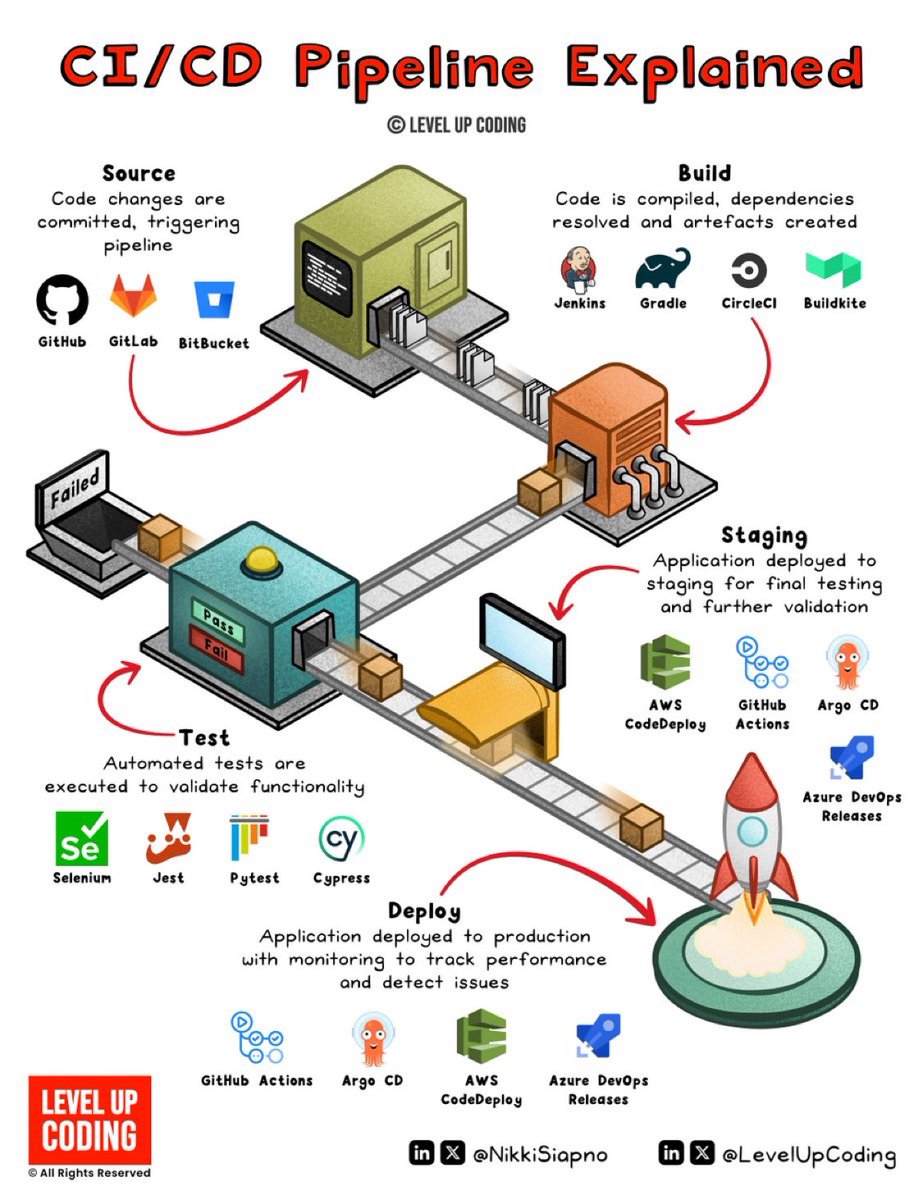
How CI/CD pipelines work (explained in 2 mins or less): A CI/CD pipeline is an automated workflow that facilitates continuous integration (CI) and continuous delivery or deployment (CD) by managing code building, testing, and release processes. It integrates the various stages of the software development lifecycle (SDLC) into a seamless, repeatable process. These stages include source code management, automated testing, artifact creation, and deployment orchestration. Continuous ‘delivery’ and ‘deployment’ are sometimes used synonymously. But there is a clear and important distinction between the two. Delivery is about ensuring the software can be released at any time. It requires manual intervention to deploy to production. Deployment, on the other hand, does the release through automated workflows.
@milan_milanovic ·
𝗔𝘇𝘂𝗿𝗲 𝗥𝗼𝗮𝗱𝗺𝗮𝗽 𝗳𝗼𝗿 𝗡𝗘𝗧 𝗗𝗲𝘃𝗲𝗹𝗼𝗽𝗲𝗿𝘀 As a .NET Developer, you probably already know C#, ASP .NET, and other technologies, but in today's cloud-first world, knowing Microsoft Azure is essential for running and deploying your apps. This article provides a step-by-step roadmap for .NET developers who want to master Azure, from the basics to advanced DevOps and architecture. 1) Cloud Fundamentals Lay the foundation so nothing feels mysterious later • IaaS / PaaS / SaaS distinctions • Regions & Availability Zones • SLAs & cost basics 2) Azure Basics Learn how Azure is organized and controlled • Azure Portal, CLI & PowerShell • Microsoft Entra ID & RBAC (access control) • Resource groups & tags • Azure Policy fundamentals 3) .NET Compute + Hosting Deploy your services reliably • App Service (web app deployment patterns) • Azure Functions (triggers & bindings) • Containers fundamentals + Azure Container Registry • AKS basics (container orchestration) 4) Data Services Store and connect data with patterns that scale • Azure SQL + EF Core practices • Cosmos DB (multi-model, partitioning) • Blob & Queue Storage essentials • Service Bus & Event Grid (async/eventing) 5) DevOps & Automation Shift from manual to repeatable, safe workflows • GitHub Actions / Azure DevOps pipelines • Infrastructure as Code: Bicep (Terraform optional) • Automated builds, tests & gates • Deployment strategies (canary, blue/green) 6) Security & Identity Security isn’t optional once you’re live • Azure Key Vault & secret management • Managed identities for services • App security patterns & best practices 7) Observability & Ops Run it healthily in production, not just launch it • Application Insights (traces + metrics) • Log Analytics & KQL basics • Alerts + dashboards that teams use • Resilience patterns (retry, circuit breaker) 8) Architecture & Ops Make systems that tolerate stress and evolve • Scalability patterns (CQRS, event-driven, partitioning) • Microservices vs modular monolith thinking • Cost optimization in design decisions • Multi-region distribution fundamentals Cert milestones you can align with: AZ-900 → AZ-204 → AZ-400 → AZ-305 #dotnet #csharp #azure #cloud #devops
@manthanguptaa ·
Security has completely gone off the rails! And most might not even realize it, because if you look at just the last month, the number of serious incidents across the AI dev ecosystem is honestly insane. Axios, a package with over 100M weekly downloads, was allegedly hijacked and used to ship a RAT. LiteLLM, which sits deep inside many modern AI stacks, was backdoored on PyPI with a multi-stage credential harvester across ~97M monthly installs. Railway ended up leaking authenticated user data due to a CDN misconfiguration. There’s now a disclosure around command injection in OpenAI Codex via branch names, which should make anyone building agentic coding systems pause for a second. And it doesn’t stop there because Mercor AI allegedly had ~939GB of source code and ~4TB of total data exfiltrated! There are claims around Copilot injecting ads into 1.5M+ GitHub PRs without developer consent, and even the Claude Code source code has been leaked! If you zoom out instead of looking at these as isolated incidents, the pattern becomes very obvious. Core infrastructure packages are getting compromised, supply chains are being poisoned, CI/CD pipelines are being used as entry points, and even the systems that are supposed to guarantee trust are failing. We have effectively built an ecosystem where installing a dependency is equivalent to running arbitrary code, dependencies are just layers of transitive blind trust, and all of this is happening inside environments that are loaded with high-value secrets like cloud credentials, API keys, and production access, and then we casually stack hundreds of these dependencies without questioning it. The attack surface is no longer your application or your infrastructure, it’s your dependency graph, and that’s what makes this so dangerous because it scales insanely well for attackers. You don’t need to break into systems anymore, you just compromise one package, one maintainer, or one pipeline, and the blast radius takes care of itself. Focus on security!
@0xlelouch_ ·
Top 10 practical DevOps resources (for working devs): 1) Google SRE Book (free online): SLOs, error budgets, incident response, and why toil kills teams. 2) The Phoenix Project: good mental model for flow, constraints, and why approvals and batching wreck delivery. 3) Kubernetes docs + kubebuilder tutorial: skip courses until you can read the upstream docs and ship a controller. 4) Terraform docs + a real module repo: learn state, drift, import, and how to not brick prod with a plan. 5) AWS Well-Architected Framework: concrete checklists for reliability, cost, security, and ops tradeoffs. 6) Linux Upskill Challenge: the unsexy stuff that pays off at 2am (systemd, networking, logs, disks). 7) Brendan Gregg’s blog (perf): flame graphs, CPU/memory/IO debugging, and how to stop guessing. 8) Grafana + Prometheus docs: build RED/USE dashboards, alerts that page for symptoms not causes. 9) GitHub Actions or GitLab CI docs: write a pipeline with caching, artifacts, env promotion, and rollback. 10) Practice project: build + ship a tiny service - Dockerfile, helm/kustomize - CI to deploy to a test cluster - metrics/logs/traces - chaos test: kill pods, drop DB, rotate secrets
@freeCodeCamp ·
Cloud-native .NET apps need more than just code: think automated builds, containerized deployments, and reliable release workflows. In this tutorial, Gopinath teaches you how to build Azure DevOps CI/CD pipelines for enterprise .NET apps using Docker, Kubernetes, and Azure Kubernetes Service. You'll learn about deployment stages, infrastructure as code, security checks, & lots more. https://t.co/h3DnfVNwIF
@ManningBooks ·
Most ML problems aren't really about the model. They're about the system as a whole. Machine Learning Platform Engineering by @bentanweihao & co. breaks down the platform behind real ML systems — pipelines, infra, deployment, monitoring. Check it out: • Manning: https://t.co/i0oHoPGSLv • Amazon: https://t.co/baI4H89Mcg
@0xlelouch_ ·
90% of DevOps in 2026 is still 10 boring concepts executed under pressure: 1) Linux + networking basics. DNS vs TCP timeouts, conntrack, MTU, and why it works on the node but not in the pod. 2) Containers are packaging, not isolation. Know cgroups limits, file descriptors, PID 1, and how OOMKill looks in metrics and logs. 3) Kubernetes primitives. Deployments/Jobs, probes, requests vs limits, PDBs, and how rollouts actually fail (and wedge). 4) CI/CD with safety rails. Small diffs, fast rollback, canaries, and stopping a bad deploy automatically instead of paging humans. 5) State and data ownership. Backups you have restored, schema migrations with rollback plans, and the cost of cross-region replication. 6) Incident response as a system. Clear severity, runbooks that match reality, and postmortems that fix triggers not people. 7) Observability you can query. RED/USE, high-cardinality tradeoffs, traces for async hops, and sampling that doesn’t hide the bad tail. 8) Debugging production. Reproduce with real inputs, diff configs, check last change, and avoid SSH-driven fixes that never land in git. 9) Security as defaults. Least-privilege IAM, secret rotation, SBOMs, patch windows, and blocking outbound egress until needed. 10) Cost and capacity tradeoffs. Right-size, autoscale with guardrails, know p95 vs p99, and don’t confuse load tests with steady state traffic.
@zavxai ·
Everyone wants to become a Software Engineer. Very few are talking about Platform Engineering. But every fast-growing engineering team eventually needs a platform that helps developers build, test, deploy, and scale software efficiently. If I were starting in 2026, this is the roadmap I’d follow: 1.Learn Linux, networking, and Git. 2.Master Docker and Kubernetes. 3.Learn cloud platforms like AWS, GCP, or Azure. 4.Understand Infrastructure as Code with Terraform. https://t.co/qkLetEEN51 CI/CD pipelines using GitHub Actions or GitLab CI. 6.Learn observability with Prometheus, Grafana, and OpenTelemetry. 7.Understand service meshes, API gateways, and microservices. 8.Learn scripting with Python, Go, or Bash. https://t.co/rmG6tL4CXL security fundamentals, secrets management, and IAM. https://t.co/8mKKEgw7vF internal developer platforms and automate repetitive workflows. Your portfolio should include: • A Kubernetes deployment from scratch. • A complete CI/CD pipeline. • Infrastructure managed with Terraform. • A monitoring dashboard with Prometheus and Grafana. • A self-service developer platform or deployment portal. Platform Engineers don’t just keep servers running. They build the infrastructure, tooling, and automation that enable developers to ship software faster, more reliably, and at scale. As engineering organizations continue to grow, Platform Engineering is becoming one of the most valuable and high-impact careers in software.
@Hartdrawss ·
This reddit engineer's company got HACKED in <1 week here's what they missed ( the mistake was not the code ) : 1/ they shipped before owning the release > first basic version was ready to deploy > another dev handled it like routine work > founder believed vibe coding was “good” > nobody treated release as a risk point 2/ the exploit was sitting in plain sight > AI chose Next 16.0.0 > critical CVEs were already reported > the issue was raised, then ignored > server got hacked a week later 3/ “only staging” still cost them > staging used production credentials > less important services still had real keys > team had to rotate keys after damage > weak environments create real blast radius 4/ the actual failure was ownership > vibe coding wasnt the full problem > no one owned patching before deploy > no one owned security after warning > no one owned the deployment pipeline 5/ every founder needs this launch rule > check framework versions before deploy > separate staging and production secrets > assign one person release responsibility > patch known CVEs before users arrive the real takeaway: > fast builds still need slow checks > staging still needs real discipline > AI output still needs one owner vibe coding gives you speed. it doesnt give you responsibility.
@_devEmmy ·
Day 37 of Coding – AI | Machine Learning 🚀 Hi guys, Just wrapped up Day 37. I was on seat for about 8 hours today working on deploying my FastAPI application on a real server. I walked through the full deployment pipeline on an AWS EC2 server running Ubuntu, which helped me understand what actually happens when you move a backend app from local development to the internet. I worked with nano to edit server configs, set up NGINX as a reverse proxy to forward traffic from port 80 to my FastAPI app on port 8000, and ran the app using Gunicorn with Uvicorn workers for production. I also created a systemd service so the app runs in the background and restarts automatically if the server reboots. Along the way I practiced debugging with logs and testing configs using nginx -t, which helped me catch and fix configuration errors. So the deployment flow now makes a lot more sense to me: Browser → NGINX → Gunicorn → FastAPI It’s interesting realizing this is the same pattern many real backend services use in production.
@Techjunkie_Aman ·
Most people think Docker is complicated. It’s not. You’re just missing the point. Docker: • Packages your app + dependencies • Runs the same everywhere • Lightweight vs VMs • No “works on my machine” Think: Portable app box 📦 Why devs rely on it: • Faster setup (no manual installs) • Consistent environments • Easy testing (prod = local) • One-command deployment Core pieces: • Image → blueprint (layered, reusable) • Container → running instance • Dockerfile → build instructions Power features: • Docker Compose (multi-container apps) • Volumes (persistent data) • Networks (service communication) • Registries (share images) • BuildKit (faster builds) Infra benefits: • Works on local, cloud, CI/CD • Easy scaling (spin up/down) • Better resource usage • Isolation without heavy VMs Docker = dev → test → deploy Same environment. Zero surprises.
@DivyanshT91162 ·
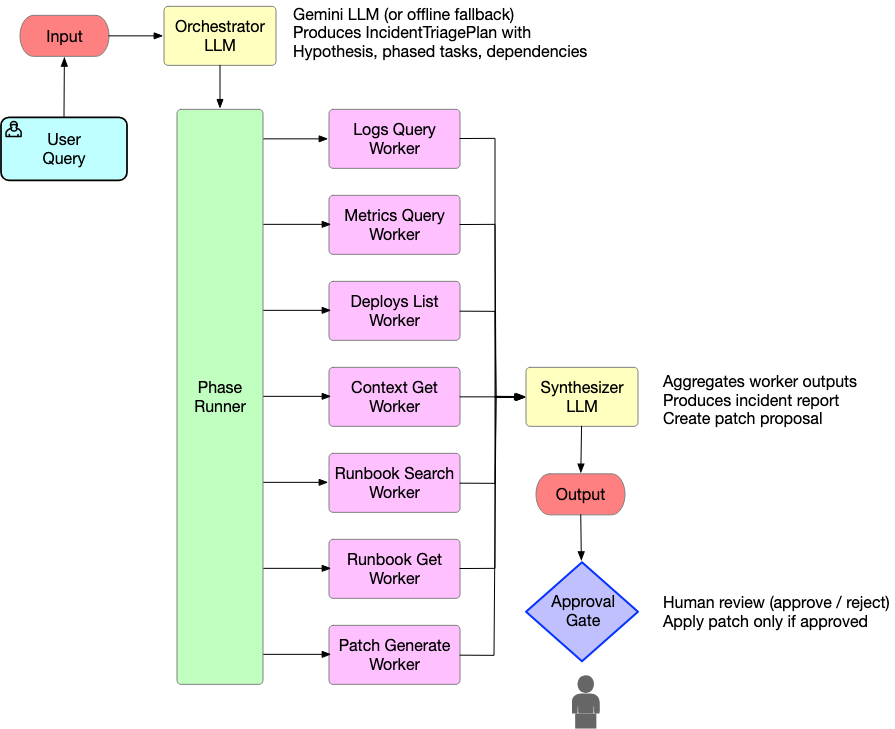
Your AI coding agent won't help much when production goes down at 3 AM. OpenSRE is building AI agents for the problems that start after the code ships. It investigates incidents across logs, metrics, traces, cloud infrastructure, runbooks, and incident platforms to find the actual root cause instead of throwing guesses at the wall. The interesting part? They're not just building an agent. They're building the benchmark, training environment, and failure simulations needed to make AI SRE agents better over time. Think SWE-Bench for infrastructure incidents. 60+ integrations already supported, including Kubernetes, AWS, Datadog, Grafana, CloudWatch, PostgreSQL, Kafka, PagerDuty, Slack, OpenAI, Anthropic, Gemini, Ollama, and more. One of the more ambitious open-source AI infrastructure projects I've seen recently. Repo: https://t.co/h3YlfA6Pzk
@uday_devops ·
Cloud Engineer != DevOps Engineer📚 Let me clear this up once and for all. They're not interchangeable roles, no matter what those job descriptions tell you. Cloud Engineers own: ✔️Cloud infrastructure architecture, maintenance, Resource provisioning and management ✔️Migrations to cloud environments ✔️Security & Network Implementation ✔️Cost optimization strategies ✔️AI/ML infrastructure setup and scaling ✔️Managing GPU resources for AI workloads and more, depending on your cloud stack and niche DevOps Engineers drive: ✔️Development workflow optimization ✔️CI/CD pipelines and Infrastructure as Code (IaC) ✔️Deployment automation ✔️Breaking down dev–ops silos ✔️Monitoring, alerting, and logging ✔️Automating ML model deployment pipelines (MLOps) ✔️Building CI/CD for AI/ML experimentation and production Here's the interesting part: Modern cloud platforms are built with DevOps in mind. Think AWS CodePipeline, Azure DevOps, or Google Cloud Build ~ they're all devops services in the cloud.
@anuraggoel ·
The best infrastructure shifts happen when a new application pattern breaks old assumptions. Agents are breaking a lot of them. They still need the basics: CI/CD, databases, caches, networking, previews, autoscaling, and IaC. But they also need isolated compute, long-running execution, disk-as-memory, and stateful workflow orchestration. Let's make agents boring to ship.
@brankopetric00 ·
AI can't replace DevOps Engineers, here's why: AI raises throughput and instability at the same time. DORA 2025 found AI adoption correlates with higher delivery throughput but a negative relationship with delivery stability. More changes, same blast radius. 66% of developers say the top AI frustration is output that is almost right, but not quite. Almost right in prod is an incident. 45% say debugging AI-generated code takes more time. Guess who debugs it at 3am. AI does not carry the pager. It cannot own a rollback decision. Half the job is not code. Vendors, permissions, cloud bill, saying no. No model knows why that one node group is pinned to an old AMI. That context lives in people (unfortunately). Compliance asks who approved the change. "The model suggested it" is not an answer. The tools got faster. The verification did not.
@RaulJuncoV ·
You wouldn’t ship a service with no tests. But teams are shipping agents with no evals. That’s the part nobody wants to admit. Most agent quality today is still a vibe check: “It worked in the demo.” “Users haven’t complained.” “The dashboard is green.” But green dashboards can lie. You update a system prompt, and everything looks fine. Then three days later, you find out the agent has been routing tool calls to the wrong endpoint 9% of the time. Same thing happens when you add a new tool. The agent gets a new capability. Then it starts using it in places where it shouldn’t. A real agent eval pipeline should include: 1. Tool correctness check. For every agent run in CI, assert that the right tools were called with the right parameters. Wrong tool call = failed test. 2. LLM-as-judge on production traces. Score live traces for faithfulness, hallucination risk, and goal completion. Not just “did the request finish?” Ask: “Did the agent do the right thing?” 3. Behavioral diff on every prompt change. Keep a golden set of inputs and expected outputs. Before a prompt ships, compare the new behavior against the baseline. Your prompts need regression tests too. 4. Intervention rate as a pipeline metric. Track how often humans override, correct, or roll back agent decisions. That metric matters as much as error rate. If it spikes after a deploy, behavior regressed. 5. Failure-to-dataset automation. Every edge case a reviewer touches should become a future test case. Production failures should feed the next eval suite. This is just CI/CD for agents. We already learned this lesson with software: You don’t trust code without tests. You shouldn’t trust agents without evals. What does your current agent eval pipeline look like?
@ankit_ops2799 ·
If your CI/CD pipeline takes more than 15 minutes to run, your developers aren't building software. They're context-switching into oblivion waiting for a green checkmark. Slow feedback loops are the hidden productivity killer in modern engineering teams. Here's how to shrink build and test times from 20+ minutes down to under 3. 1. Cache your dependency layers aggressively: Stop re-downloading the same packages on every single run. Build and application layers should be cached separately, so a code change doesn't force a full dependency reinstall every time. 2. Parallelize your test suites: Running thousands of unit tests sequentially is an anti-pattern. Split them across parallel jobs instead of grinding through everything on one runner. 3. Spin up ephemeral test environments per PR: Don't queue pipelines waiting on a shared staging environment everyone's fighting over. Isolated environments created on-demand and destroyed after the PR closes remove that bottleneck entirely. 4. Move off resource-constrained default runners: Auto-scaling, properly resourced runner pools finish the same job in a fraction of the time. Fast CI/CD isn't a luxury. It's the difference between shipping 10 times a day or twice a week.
@hamidships ·
the real "software factory" isn’t everyone using coding agents. that’s the 2x. the 10x is a different thing entirely. the loop starts closing on its own. 2x = every engineer using agents, ~100% AI-generated code. soon, that’ll be table stakes. you made the same loop faster, but the bottleneck is still human attention at every gate. 10x = the loop self validates. agents stop waiting on you. but it only works if the scaffolding is real: comprehensive CI, evals that actually catch regressions, and end-to-end test environments agents spin up to check their own work. to be clear, 10x is not "fewer humans." it is humans on the decisions that carry real risk and off the rote gates. we still need to hire exceptional engineers, their judgment is the scarce input now, so you spend it where it actually counts. but here is what breaks traditional SaaS instincts: building agents is divergent. fix one thing and 10 new things need evaluating. converging on that locally is a trap. so ship the 80/20 fast, but through controlled early access: opt-in design partners, clear guardrails, tiered rollout. never unfinished work dumped on people who did not sign up for it. then close the loop. feedback-loop agents take that signal, implement it, merge it, validate post-deploy, continuously. and because CI/CD is fast, the gap between "customer said X" and "X is live and validated" collapses. coding at the speed of thought. give agents the same context a human uses to make the call, user feedback, docs, prod monitoring, ephemeral test clusters. encode your review standards as rules the reviewer agent reads. auto-merge the low-risk stuff classified by your reviewer agent. reserve human eyes for billing, auth, the paths where a mistake is expensive. humans do not disappear, they concentrate. incidents stay human-led, business impact's too high to hand off, though agents now dig datadog + telemetry + code and hand you impact + root cause + mitigation in minutes. and someone guards the critical paths: as agentic volume climbs you risk losing deep understanding of your own codebase. the fix isn't to slow down — it is to lock down what's expensive to get wrong. Not all code carries equal risk. at Ramp, this is Inspect, our internal coding agent: deep Ramp context, MCP integrations, CI visibility, and self-validation that boots the UI and tests real workflows. On a recent UI change, it deployed a preview, authenticated as a fixture user, validated desktop and mobile behavior, and attached visual evidence to the PR. the metric I actually care about: fewest human touches per safely merged PR. not lines, not PR count. how much can the loop close on its own without breaking the things that matter and do it super fast? that's the edge.
@SaiyamPathak ·
How many NGINX annotations does your cluster have? I scanned 50+ production clusters. Average: 12 per Ingress. Most teams have no idea what half of them do. ingress-nginx was archived last week. March 31 = zero patches forever. When I first built ing-switch, it supported ~50 annotations and 2 migration targets. Today's update: - 119 annotations mapped (every known NGINX annotation) - 3 migration targets (Traefik v3, Gateway API + Envoy, Gateway API + Traefik) - Impact ratings on every annotation so you know what's safe to ignore vs what needs work The Gateway API + Traefik target was the #1 request from KubeCon. If you run Rancher or k3s, you can now migrate to Gateway API without Envoy. Most teams find 70% of "unsupported" annotations are just NGINX internals. What annotation is giving YOUR team the most trouble? Link in reply #kubernetes #devops
@TosinOlugbenga ·
I just moved a production app off an online AI builder onto full local dev. Clone → configure → full stack running on any machine. Hosted builders are great for MVPs. Serious products need local-first. Why local matters If your app only runs in a hosted builder, you don't own your workflow.Local dev = faster loops, real debugging, reproducible envs, and confidence you're not shipping environment magic. The boring work The unglamorous migration work that actually pays off:• Docker Compose for one-command stack • Pinned tooling so builds don't drift • Split env files by concern • One onboarding doc, not five READMEsBoring = reliable. CI/CD angle Local working is step 1.Step 2: every PR gated, branch flow develop → staging → prod, images via GitHub Actions, DB migrations manual + confirmed.DevOps isn't flashy. It's how you ship without praying. Hot take Online AI building tools are brilliant for prototyping.But "works in the builder" ≠ "works for the team."Invest early in local-first + pipeline-first, or pay later. Punchy Moved off a hosted AI builder this week.Full stack runs locally. CI/CD owns deploy. No platform lock-in.Worth the migration pain.
@_vmlops ·
AWS JUST SHIPPED AN AGENT THAT WAKES UP AT 2AM SO YOU DON'T HAVE TO aws devops agent just hit GA it's not a chatbot...it's an autonomous ops teammate the moment a cloudwatch alarm fires or a pagerduty alert, dynatrace problem, or servicenow ticket the agent starts investigating... no human prompt needed what it does: ▫️ correlates telemetry, deployment data, and code across your stack ▫️ triages incidents and deduplicates noisy alerts automatically ▫️ learns your org's patterns and builds reusable investigation skills ▫️ now supports azure + on-prem via MCP (not just aws) in preview: 75% lower MTTR.... 94% root cause accuracy united airlines, t-mobile & wgu are already running it in prod this is what "always-on sre" actually looks like https://t.co/4hVcZ74eCs
@tristanbob ·
Software developers, how many of you perform security stages in your CI/CD pipeline, including secret leak detection, static application security testing (SAST), and dependency vulnerability scanning? My guess is that indie devs don't do these steps and enterprise does... but I'm not sure. (They are quite easy to add, FYI. It seems like a no-brainer, the only downside is the increased cost of runners)
@lucamezzalira ·
The most expensive belief in our industry is that a new architecture will fix the rest of the company. Unless you also decentralise the decision making, reassess who owns what, and rethink the team boundaries, the architecture will start raising friction instead of removing it. Pipelines slow down, deployments need coordination across three teams, bundle sizes creep up. The blame goes to the architecture when the architecture is just doing its job, which is surfacing the fact that something deeper isn't working. Most of the time it's not a tech problem at all. It's how communication flows inside the teams, it's the engineering culture, it's the org chart. The architecture is the messenger. This is the triangle I always come back to when I design distributed systems: architecture, organisational structure, and engineering culture, all three linked together. You cannot pull on one and ignore the other two and expect the system to work. At @ReactAdvanced in November I sat down to talk through all of this, plus the Tokyo flight that led to the first micro-frontend PoC at @DAZN, the 25-deployments-a-day teams I worked with, and why a CI/CD pipeline taking more than 15 minutes should stop everything else in the team until it's fixed. Check it out: https://t.co/DlYssTs7FJ
@jonahlau_ ·
Security engineering just became the most important hire across tech and most companies still don't realize it Every company built on the assumption that their deployment infrastructure, CI/CD pipelines, and third-party services were secure. Last few weeks proved they're not When the platforms you deploy through get compromised, your code review process doesn't matter. Your internal security doesn't matter. Someone pushed malicious code through infrastructure you trusted and didn't control Most companies have security people who focus on application layer: reviewing code, fixing vulnerabilities, running pen tests. That worked when threats were isolated to what you built Now the threat is everything your application touches. DNS providers, deployment platforms, package registries, monitoring tools. Your app security team wasn't hired to audit those The skill set needed is completely different. Supply chain security, infrastructure hardening, understanding how CI/CD systems can be exploited. That's DevSecOps background, not application security Maybe 5000 people globally actually know how to secure a modern deployment stack end-to-end. Demand just spiked across every company that realized their threat model was outdated Fintech, crypto, SaaS companies with customer data, anyone handling payments - all competing for the same tiny talent pool If you're trying to hire security infrastructure engineers right now you're in the worst talent market in tech. Everyone just figured out they need this role and almost nobody has it Companies treated security as a layer you add to your product. Turns out it's your entire foundation and most of it was outsourced to platforms you never evaluated
@_vmlops ·
SOMEONE JUST VIBE-CODED THEIR INTERVIEW ASSIGNMENT... AND LANDED A SENIOR DEV OFFER. 🤯 A Redditor shared how they leaned into AI instead of avoiding it. Using Antigravity IDE + Gemini Flash 3.5 with AWS CLI and GitHub CLI, they built a production-grade distributed system, iterating through 500+ commits while learning the company's business domain. This wasn't another AI-generated CRUD app. The open-source repo includes API Gateway, Lambda, DynamoDB, S3, SQS + DLQ, EventBridge, Groq for LLM inference, and full GitHub Actions + AWS SAM CI/CD. The company was impressed enough to extend an offer and reportedly even considered adopting a similar interview format for future candidates. AI isn't just for shipping side projects anymore. In the right hands, it can help build systems that actually get people hired.
@HotAisle ·
i noticed today that our github actions usage over the last month cost us a whopping $0.88 to build our software. so, i decided to move it in-house onto an actions runner. setting this up properly is a pain because you really need to build your own isolation. for safety, your builds should run in ephemeral VMs, similar to how github actions works. i used Codex to build the whole thing for me. it gave me step-by-step instructions for setting up the GH App and private key, wrote the shell scripts, configured the systemd units, then debugged everything over ssh directly on the server. what would have taken me hours or days, along with filling my brain with a bunch of esoteric devops knowledge that i really don't care about, was done in under 30 minutes. now we have two idle runners. one takes a build job, runs it, then dies and gets reaped. the second takes over while the first resets. my mind is blown. if you're not all in on AI, i feel for you.
@HotAisle ·
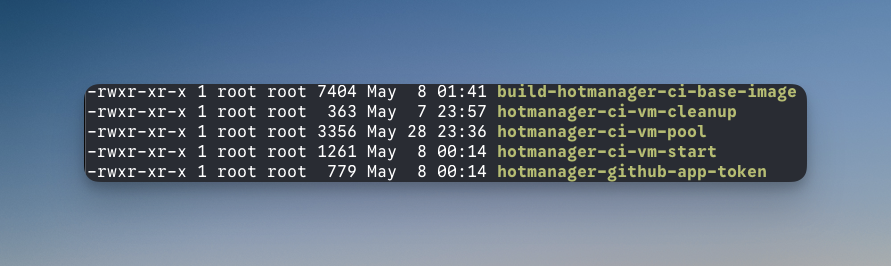
I used AI to build this awesome self-hosted ephemeral GH runner solution on one of our extra servers. Crazy enough, as a test, I let Codex run remotely with ssh/sudo access (through Zed!). I gave specific instructions to ask for permission when it needed to do anything destructive or write data. That part worked flawlessly. The implementation wasn't perfect out the gate. I've tuned it over time. For example, AI missed some of the cleanup tasks that need to happen, but it was also no big deal to prompt it to fix things. Again, running amok as root. I baked all of our tooling (golang, etc...) into the base VM image, so that it just grabs the source and everything is already installed and ready to go. There is an AI generated 7400 line bash script that will rebuild the image with whatever versions we want. Cut our build times in half. Every build is done in a fresh VM, just like GH does. The script keeps 2 VM's running at all times and cleans up after itself, including telling GH to updates its state as well. It even keeps the GH App Access token refreshed. I'd love to document it as a blog post, but I can't figure out the best way to do that. It is kind of a gnarly set up with several bash scripts. I doubt anyone would read this and think to themselves: "Yea, I'll get right on that." Probably the best takeaway is that AI is really good at this stuff now and don't be afraid to try it. Something that would have taken expert devops a week+ of effort, is now minutes. Give it a try.
@rheejust ·
Last week I spoke at @ycombinator DevTool Day. The focus of my talk was a summary of the merits and demerits of selling to startups. A lot of people don't realize that in the beginning, Porter never intended to have startups as users. After years of pivoting we initially built a product designed to migrate Enterprise-tier PaaS users to the hyperscalers. I remember actively turning away early-stage companies looking to use us because they seemed too small to justify the migration effort. Eventually, a couple startups hell-bent on using us managed to self-serve even though we had no documentation and had exclusively built our "onboarding" flow as an internal tool to process white-glove migrations. We let those startups stay on the platform expecting nothing to come of it. Luckily for us, we had some rocket ships in that initial sample. A few of those users rapidly grew to a significant usage scale (with individual clusters on the order of terabytes of RAM and hundreds of nodes) within months of onboarding. This was larger and higher-value than most of the customers we were running through a multi-month sales process. That got our attention. Even still, we were initially pretty reluctant to bet the farm on startups. As any VC knows, all the growth is overwhelmingly concentrated into a tiny subset of companies. This gets to a key downside of pursuing this strategy: unless you have a product that an overwhelming percentage of startups can use (like payment processing, HR, or corporate card), you run the risk of not capturing enough mindshare to effectively guarantee there are some winners in your basket. If your carrying capacity for pre-seed startup adoption is something like 15% of all companies, you could struggle to get off the ground unless you're somehow indexing for only the best of the best. For devtools in particular, you're almost always better off going truly bottoms-up with indie devs if your product allows it. In retrospect, I believe we were fortunate that two things were the case: (1) frustration with DevOps overhead (i.e. having to manage AWS/GCP/Azure) is essentially ubiquitous, and (2) cloud infrastructure is a higher-order expense for virtually all startups (probably the 2nd or 3rd largest line item after payroll and tokens). The upshot is also massive. Winning startup mindshare means you are building for the next generation of public companies. If you can keep up with your best customers and preserve sufficient pricing power, you have the ultimate NRR engine. As a devtool company, there's also nothing better than getting to work with smart, high-growth teams at the bleeding edge of technology.
@Lockhead ·
Story time 📖 Imagine you've spent months building the perfect internal platform. The tooling is elegant. The docs are solid. But no one is using it. Sound familiar? Research in platform engineering shows that voluntary adoption requires a deliberate strategy — and the 'Three Asks' framework is emerging as a practical model to guide teams from awareness to active engagement. Here's what the data says about adoption metrics for optional platforms: ✅ Early adopters signal platform health ✅ Measuring 'asks' reveals friction points ✅ Optional platforms build long-term trust Dive into the full conversation with Steve 👇 https://t.co/e85ivDcsRV #PlatformEngineering #InternalDeveloperPlatform #EngineeringLeadership #DevOps #PlatformTeams #DeveloperProductivity
@chrsaravia ·
Day 40 of building Sara, my personal AI agent. "Sara, take the HTML file we built yesterday, add a draggable tennis ball that moves the ASCII art, push it to production. Add something to track visit analytics." This is where things start getting interesting. Not because of any single tool, but because multiple capabilities are compounding together. First, Sara taking on the coder role... She picked up yesterday's pretext project (from Day 39 post, shoutout to @_chenglou) and kept building. The page is a single HTML file with zero frameworks. "SARA" is rendered in ASCII characters on a canvas, each one flickering through a color wave. She drew a tennis ball entirely with canvas APIs (no image file), added gravity and bounce physics, and built a water-like effect where dragging the ball through the text displaces the characters and they spring back like a finger through water. All running Codex on my Mac Mini while I gave feedback over Telegram from my phone. Then, Sara the DevOps engineer... After my Day 38 post about Stripe Projects, @jeff_weinstein from Stripe's Product team replied on X and got me early access (thx jeff!)... I pointed Sara at the docs and told her to figure it out. She ran: → stripe projects init → stripe projects link vercel → stripe projects add posthog/analytics Linking my existing Stripe and Vercel accounts was straightforward. But that last command is the one worth paying attention to. I didn't have a PostHog account. Sara ran one command and Stripe Projects created the account from scratch, provisioned a project, and injected the environment variables into .env automatically. No signup form. No dashboard. No copy-paste. She added the analytics snippet, deployed to Vercel, and it was live. I opened PostHog and watched my own pageview events arrive in real time. Try it → https://t.co/yFDZ7G8vjh (drag the tennis ball through the text, or drop it and watch it bounce... silly project but useful to show the capabilities) One agent. One conversation. Code, infrastructure, deployment, analytics. All done by Sara, my ai agent. I'm convinced this is the future of how software gets built. Not just AI writing code, but AI provisioning the infrastructure the code needs to run. Hosting, analytics, databases, authentication... in this example, @stripe Projects makes all of it programmable from the command line. When infrastructure is programmable, agents can own the full loop from code to prod... Tiny bumps along the way still (some of these tools are in developer preview), but directionally this is where I see everything is heading... The human says what they want. The agent either builds it or picks the best provider for the job (e.g. vercel, posthog, yalo), sets it up, ships it, and tracks it. Exciting times...
@alexanderOpalic ·
Everyone's asking which jobs AI will replace. Wrong question. The real shift isn't roles disappearing. It's roles merging, and the unit of accountability getting bigger per person. The teams that win will look like startups inside big companies. Fewer people, each owning more of the value chain end to end. Here's how I think it plays out. Most roles will either merge or become obsolete. Take business development and design. A designer will use agents to implement features directly, and the business person will do the same from their side. The handoffs that used to separate these roles start to disappear when anyone can turn intent into a working feature. Developers shift too. Less time writing every line by hand, more time managing the codebase, setting guardrails, and making sure the agents are actually doing the right thing. They'll still build their own features, but babysitting the agents becomes part of the job. Scrum is where I expect the biggest break. All the scrum related roles will fade out. Scrum was built for a world where humans had to write code by hand and coordinate every step. That world is ending. The coordination problem doesn't vanish, but it gets so much lighter that the heavy ceremony around it stops earning its keep. We need a new framework, not a faster version of the old one. So what stays fixed while everything else consolidates? Two things: security and devops. Not because AI can't touch them, but because they're where accountability concentrates. When agents write most of the code, the scarce skill becomes verifying, constraining, and securing what gets shipped. These roles don't shrink. They become the platform that everything else stands on. That's the shape I see coming. Small autonomous teams that operate like startups, each owning a slice of the product, supported by a platform team of security and devops that keeps the whole thing safe and running. Two questions I keep coming back to. How do you think roles will actually change as this lands? And would you still tell someone to start their career as a scrum master today?
Best Tweets by Topic