Xholic for Chrome

AI replies and analytics, right inside X

The Xholic Chrome extension writes replies in your voice, sizes up any profile, and keeps every mention in one place, without opening another tab.

  • Included in every plan
  • Works on x.com
  • One permission
  • Never posts for you
An X post with the Xholic reply wand open under the reply box and the Xholic panel showing the author's top posts in place of X's sidebar

Four things appear on X

No new tab to switch to. The extension adds itself to the pages you already use.

Chrome extension features

Replies that sound like you wrote them

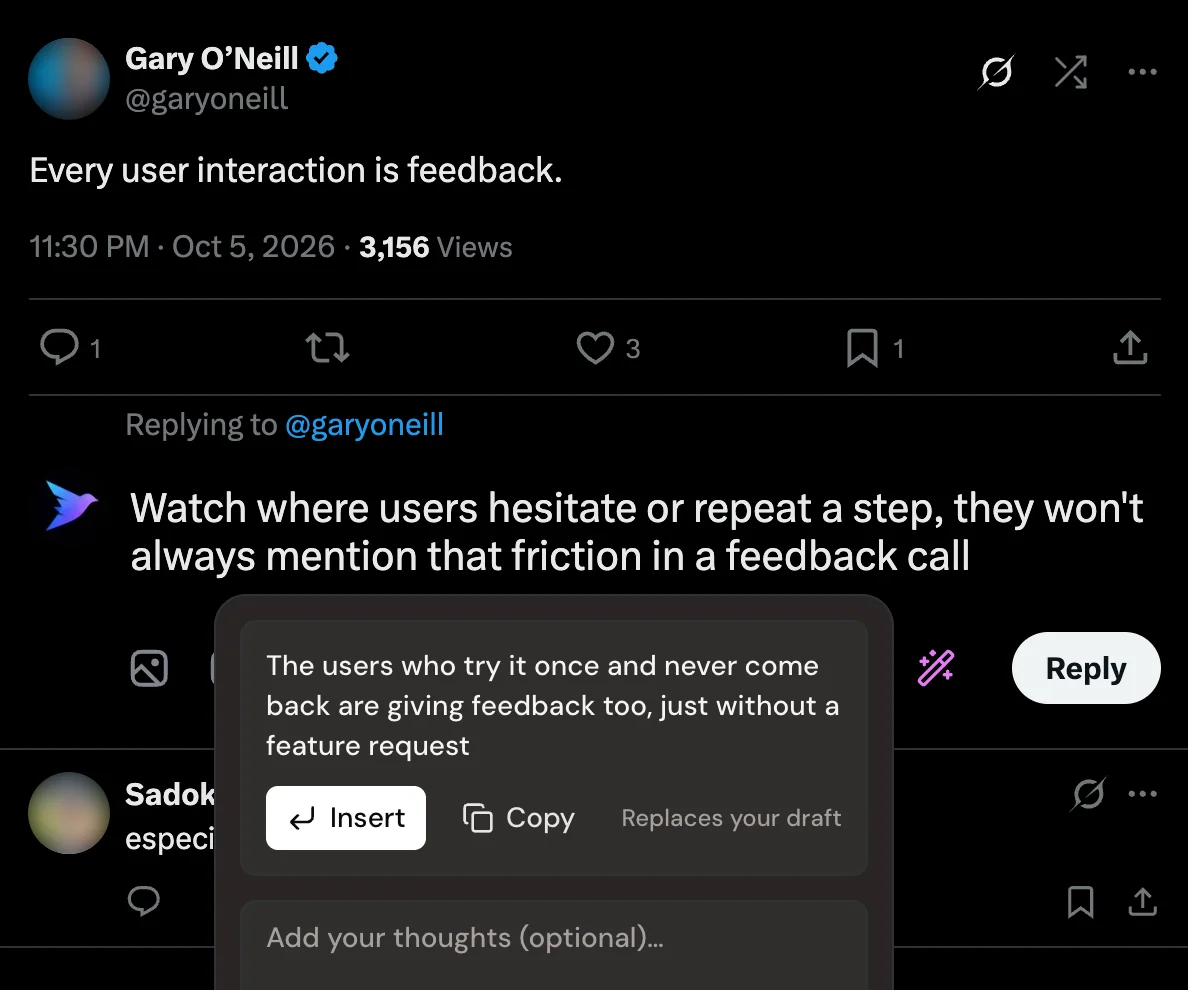
Click the wand in any reply box. Xholic reads the post, looks at your own past replies on similar posts, and writes one reply in your voice straight into X's editor.

  • Six tones: engaging, humorous, creative, sarcastic, inspirational or concise, or leave it on auto.
  • Add an optional thought so the reply makes your point, not a generic one.
  • Already typed something? Fix the grammar, translate it to English, sharpen the hook or add detail.
  • Press Cmd or Ctrl + Enter to generate. You still press Reply yourself.
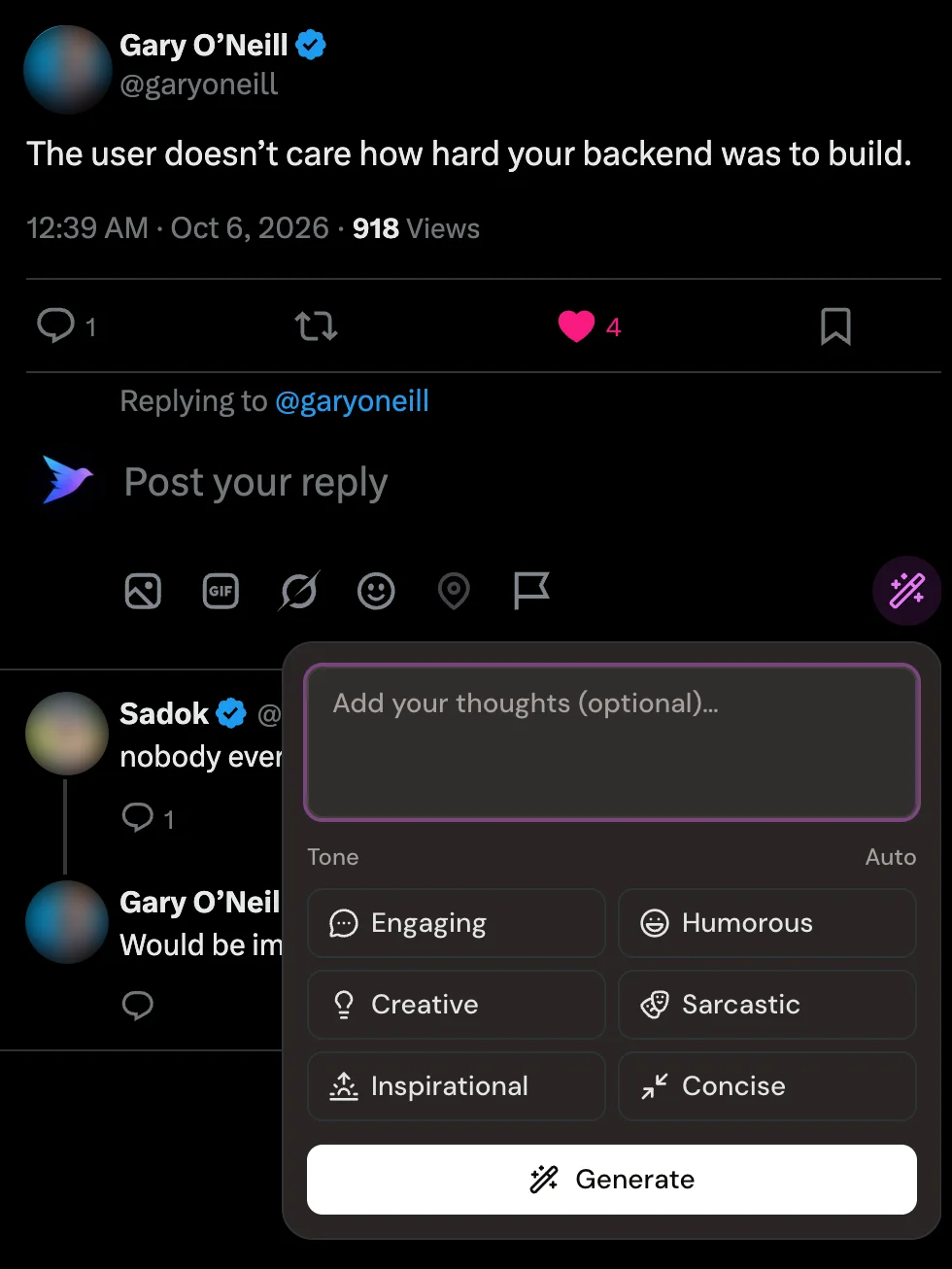
The Xholic reply wand open under an X reply box, with an optional thoughts field, six tone buttons and a Generate button

Reply wand with tones

A reply written by Xholic inside X's reply box with Insert and Copy options

Reply ready to review

Size up any profile without leaving it

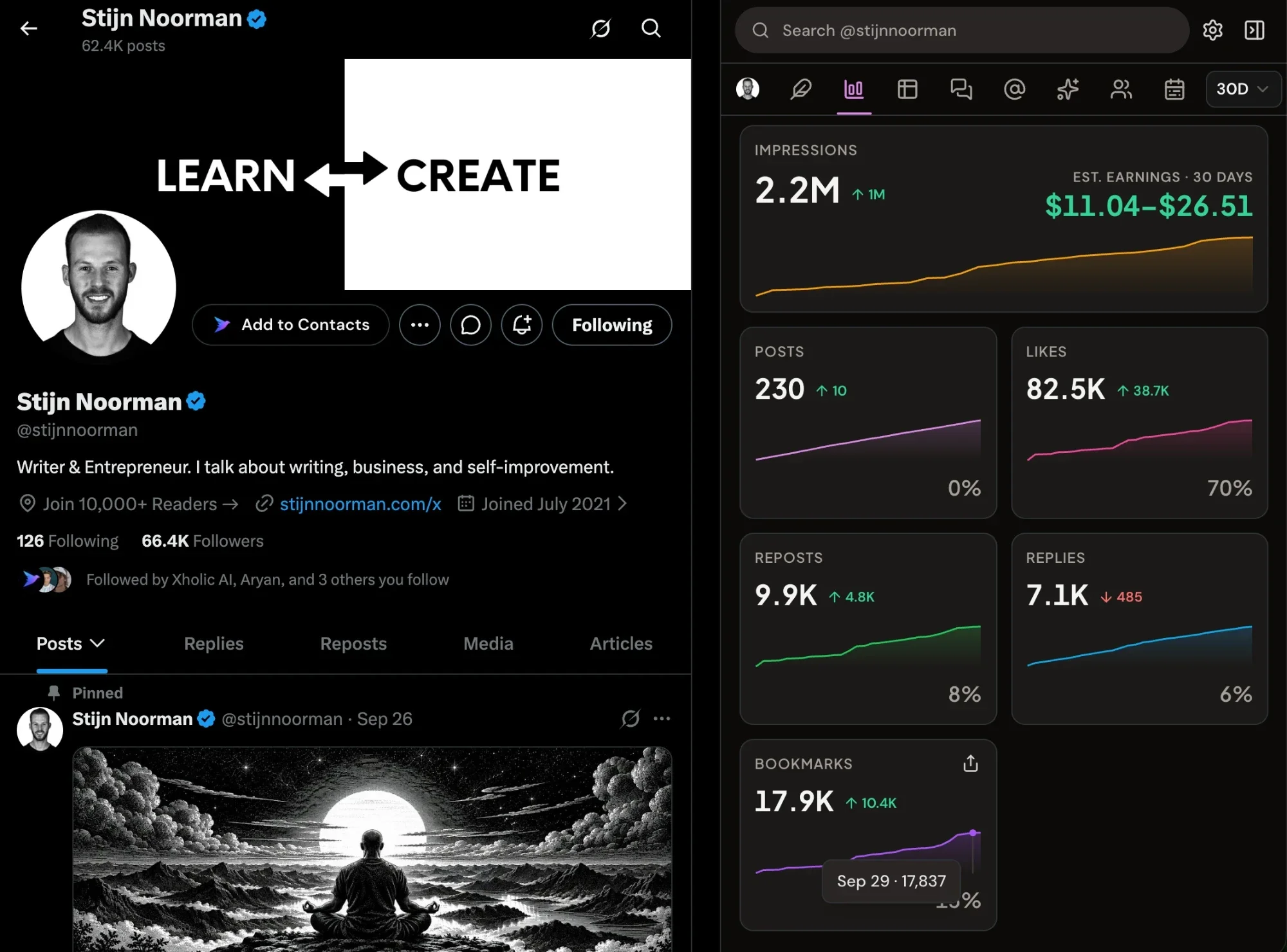
Open a profile and the Analytics tab shows how the account is really doing, from today back to all time.

  • Followers, impressions, likes, reposts, replies and bookmarks over 7 to 180 days or all time.
  • A posting heatmap and an hour-by-day impressions grid in your local time, so you can see the best hours to post.
  • Estimated creator earnings and a tracker for X's creator rewards requirements.
  • Works on your own account any time and on up to 40 other profiles a day.
An X profile with the Xholic analytics panel beside it showing impressions, estimated earnings for 30 days and trends for posts, likes, reposts, replies and bookmarks

Profile analytics with estimated earnings

Find the posts worth replying to

Build feeds from keywords, a saved search, a contact list or an X list, and reply early while the conversation is still small.

  • Filter out the noise so each feed shows posts you'd actually answer.
  • Timelines of original posts from the people and lists you care about.
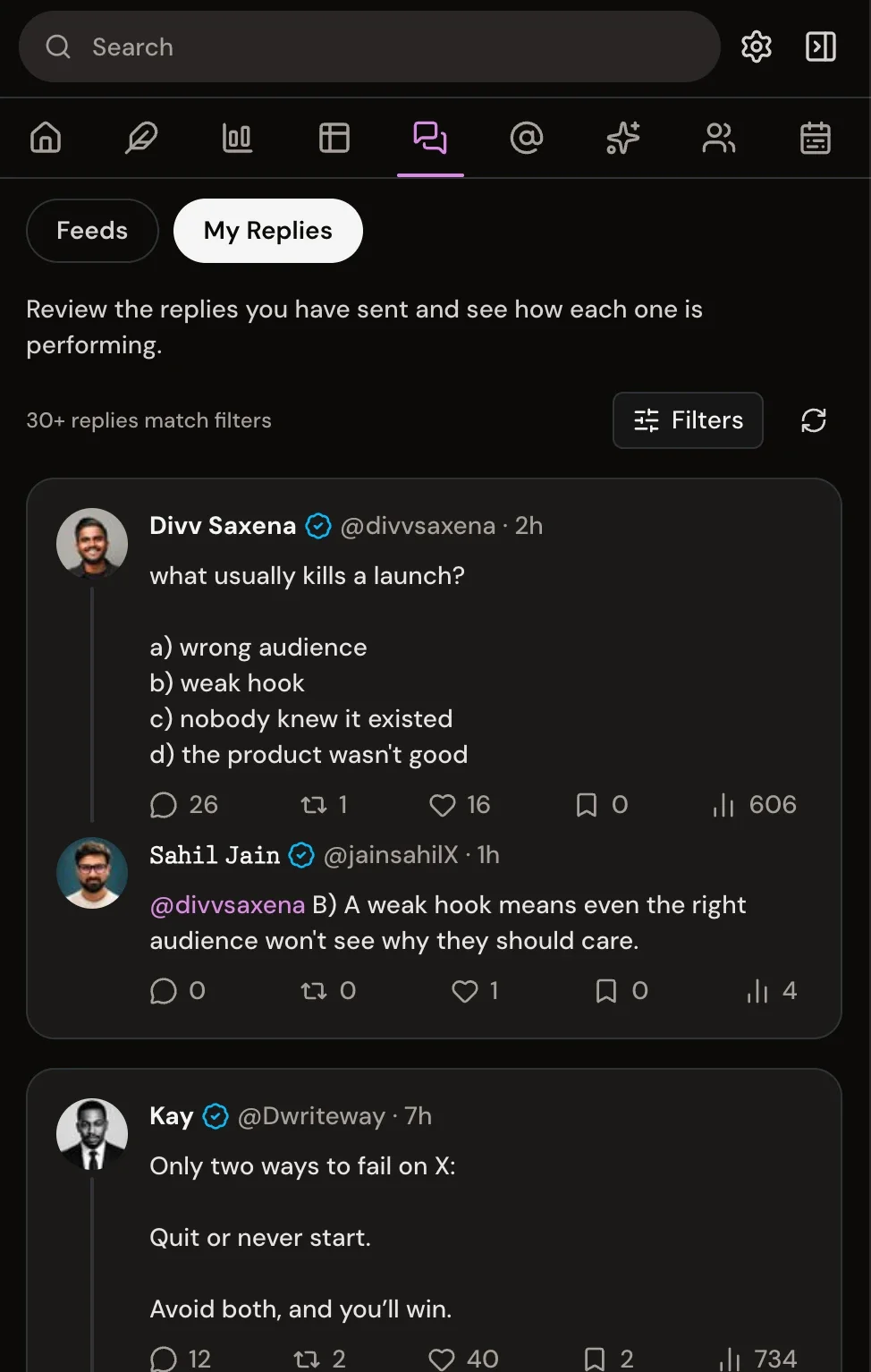
  • My Replies shows the views and likes on every reply you've sent.
  • Replies open in X's composer, so you always review before posting.
Xholic topic feeds with keyword filters and an inline reply box

Topic feeds

The My Replies tab tracking views and likes on each reply sent

My Replies

Every mention, across every account

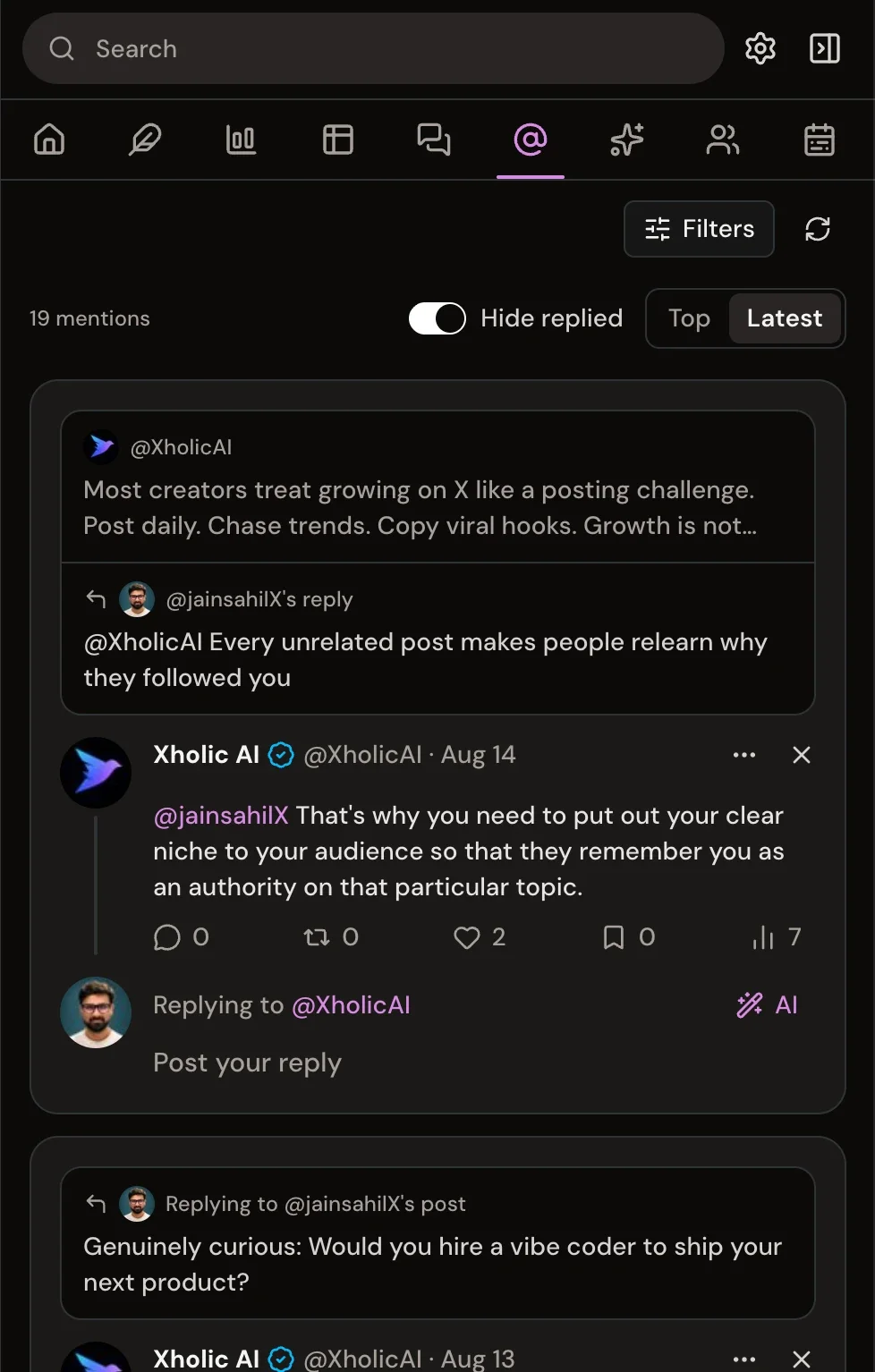
Mentions and replies from all your connected X accounts land in one tab, sorted by top or latest.

  • See the original post and your reply side by side.
  • Hide mentions you've already replied to.
  • Refreshes from X at most every 15 minutes, so you don't have to keep checking.
Xholic mentions inbox sorted by top, with the original post, your reply and a reply box

Top mentions

Xholic mentions inbox sorted by latest, with replied mentions hidden

Latest mentions

Write, schedule and ask, right inside X

The rest of Xholic comes with you: compose and schedule posts, rank what's working, and ask questions about your account.

  • Compose posts and threads, then schedule them in plain English, like "tomorrow at 9am", or into your next free slot.
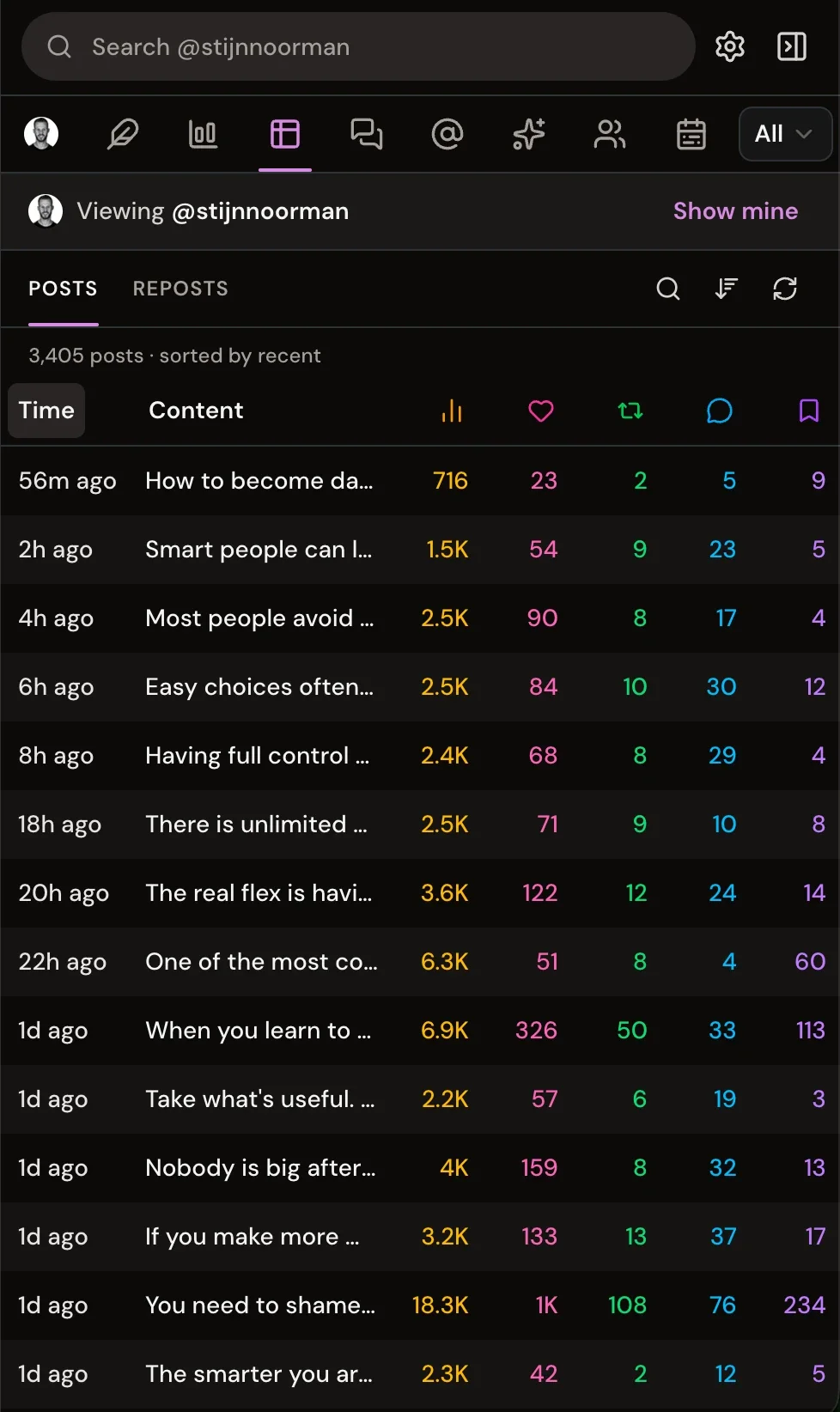
  • Sort every post, reply and repost by any metric, with an optional estimated revenue column.
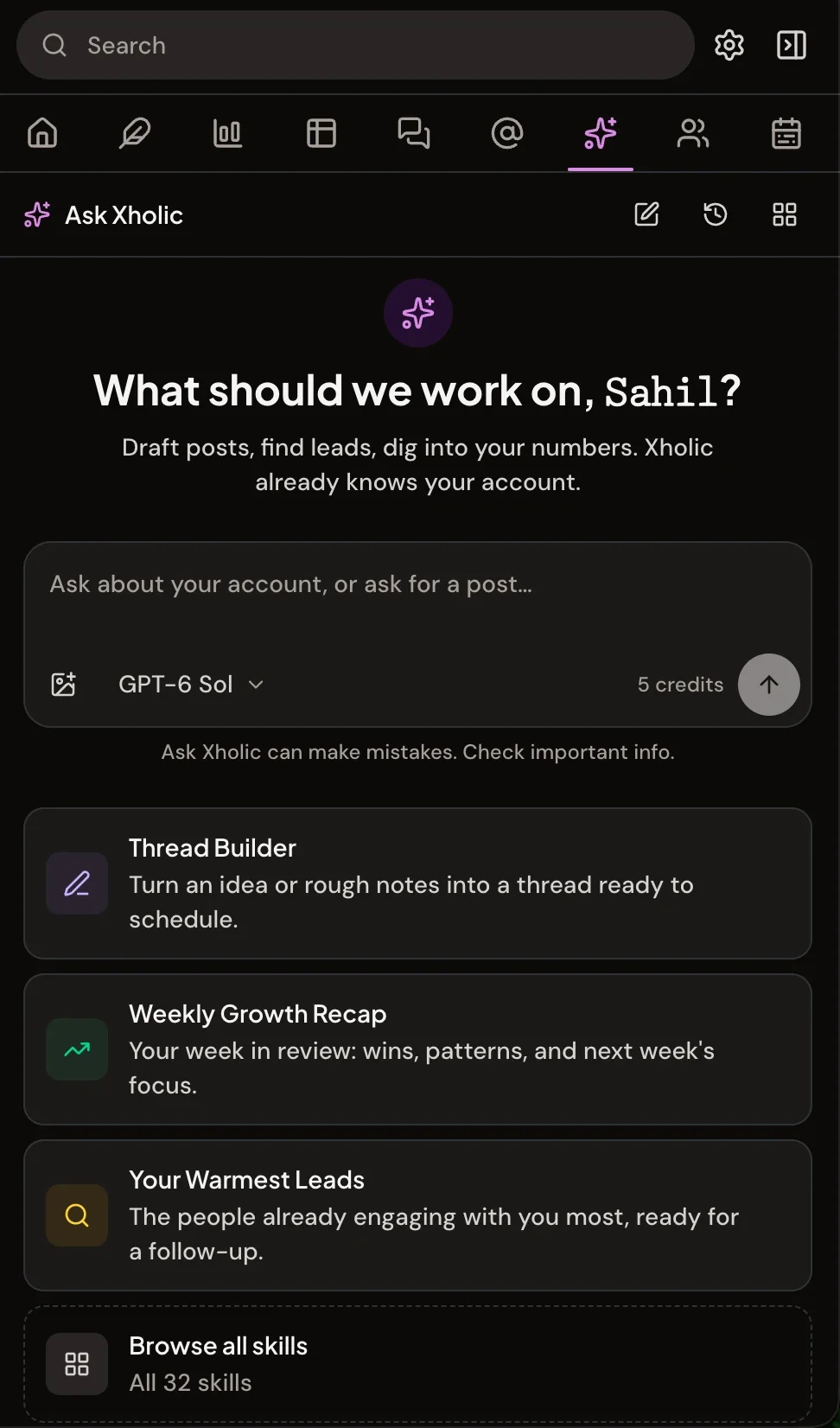
  • Ask Xholic answers questions about your analytics, mentions and leads, with chat history shared with the web app.
The Xholic posts table ranking posts by views, likes and replies

Posts table

Ask Xholic chat inside the extension panel

Ask Xholic

Set up

Ready in under a minute

  1. 1

    Add it to Chrome

    Open the Xholic listing on the Chrome Web Store and click Add to Chrome. Desktop Chrome 116 or later.

  2. 2

    Sign in to Xholic

    Sign in on app.xholic.ai with X. New here? Your 3-day trial starts at $0 today.

  3. 3

    Open X and click the icon

    Go to x.com and click the Xholic icon in your toolbar. The panel opens beside your feed.

Open the Chrome Web Store

Built to stay in its lane

A browser extension sees what's on the page, so we kept this one narrow on purpose.

Read what the extension collects
  • Runs only on X

    The extension works on x.com and nowhere else. It can't read the other sites you visit.

  • One permission

    It asks Chrome for storage and nothing more: no tabs, history or browsing data.

  • Never posts for you

    Every reply lands in X's own editor. You read it, change it, and press Reply.

  • Sign-in stays private

    You sign in on app.xholic.ai, and your session is kept where x.com pages can't read it.

FAQs

Chrome extension questions

What it does, what it needs, and what it costs.

Is the Xholic Chrome extension free?

It's free to install from the Chrome Web Store. To use it you need an Xholic plan or the 3-day trial, which is $0 today. The extension is included in every plan at no extra cost and uses the same AI credits and limits as the web app.

Does the extension post or reply for me?

No. The reply wand writes a draft into X's own reply box, and you decide whether to press Reply. Replies started from Feeds open in X's composer too, so nothing goes out without you reviewing it.

What permissions does it need?

Only Chrome's storage permission. It runs on x.com and talks to Xholic's own API, and nothing else. It can't read other sites you visit.

Which browsers does it work in?

It's built for desktop Chrome, version 116 or later, and installs from the Chrome Web Store.

Can I see analytics for other people's accounts?

Yes. Open any public profile on X and the Analytics tab shows its followers, impressions, engagement trends, posting heatmap, best hours to post and estimated earnings. You can analyze up to 40 other profiles a day, and your own account is always available.

How are estimated earnings calculated?

They're a rough estimate. X doesn't publish a payout rate, so Xholic assumes about $5 to $12 per million original-post impressions, based on payouts creators have reported. Only impressions from Premium viewers count toward real payouts, so actual earnings can be much lower.

How many AI credits does a reply use?

At today's rates, writing a reply uses 5 AI credits and polishing a draft you've written uses 1. Credits come from the same monthly allowance as the web app, and the full rate card is in the Terms. See the AI credit rate card

Does it work with more than one X account?

Yes. The extension follows the X account you're signed into on x.com, as long as that account is on your plan or shared with you, and the Mentions tab covers every connected account. You can stay signed in to several Xholic accounts on one device. How Xholic works for teams

What data does the extension send to Xholic?

When you post a reply on X, the extension sends the reply text and the post it answers to your Xholic account, so My Replies can show how your replies perform. Sign-in happens on app.xholic.ai, and your session is stored where x.com pages can't read it. Read the privacy policy

How do I install it?

Open the Xholic listing on the Chrome Web Store and click Add to Chrome. Then sign in with your Xholic account, open x.com, and click the Xholic icon in your toolbar to open the panel.

Bring Xholic into your feed

Install the extension, sign in, and your next reply, profile check and mention are one click away.

Free to install · Needs an Xholic plan or the $0 3-day trial

Start your 3-day trial