Comparison

Xholic vs Circleboom

Circleboom is an account management tool: it audits your followers, finds fake and inactive accounts, cleans up old profiles and analyzes other accounts' followers, with a separate scheduler sold as Circleboom Publish. Xholic is built for the other half of the job, growing through posts and replies written in your voice. Which one you need depends on whether your problem is the account you have or the audience you want.

Demo needs no sign-up. Trial is $1 for 7 days. Pricing and features checked on

The short answer

Xholic or Circleboom?

Pick Xholic if you grow by posting and replying and want AI that writes like you, inside X. Pick Circleboom if you need to audit followers, bulk unfollow or bulk delete, or study another account's followers.

Choose Xholic if

  • You want posts and replies drafted in your own voice, with a reply wand in every X reply box.
  • You want feeds of posts worth replying to, lead signal agents and Auto DMs in one plan.
  • You'd rather have one product than a management tool and a separate scheduler with their own plans.

Choose Circleboom if

  • You need the deepest follower analysis and cleanup: fake and inactive followers, bulk unfollow and bulk delete.
  • You want to search and analyze other accounts' followers.
  • You also schedule to networks other than X through Circleboom Publish.

Feature by feature

Xholic and Circleboom, side by side

An X account management tool for follower analysis, account search and cleanup, sold alongside a separate multi-network scheduler (Circleboom Publish).

Xholic compared with Circleboom, feature by feature
FeatureXholicCircleboom
AI writing in your voiceDrafts posts in your voice from your own posts.
YesWorkers draft from your own posts and voice
PartlyAI Writer; voice training not stated
AI reply helpHelps you write replies to other people's posts.
YesA reply wand in every X reply box
Not stated
Feed of posts worth replying toSurfaces conversations in your niche so you can reply early.
YesEngage feeds and a Mentions inbox
Not stated
Viral post libraryA searchable library of high-performing posts for ideas.
Yes12M+ posts on Pro, Max and Ultra
PartlyContent inspiration
Scheduling queueQueue posts for set times or recurring slots.
YesExact times or recurring slots
Yes
ThreadsWrite and schedule multi-post threads.
YesWith polls, images, GIFs and video
YesIn Circleboom Publish
X ArticlesWrite long-form X Articles.
YesWith AI covers; publishing needs X Premium
Not stated
Auto repost and auto plugRules that repost or add a follow-up to posts that do well.
YesAuto repost, plug and delete on Pro, Max and Ultra
YesAuto RT and reshare
Auto DMsAutomated direct messages on triggers you set.
Yes300 a month on Ultra; DM packs on any paid plan
Not stated
Lead findingFinds people on X who are likely buyers or partners.
YesLead signal agents
PartlyAccount and bio search
Analytics for your accountFollowers, impressions and post performance over time.
YesPosts, replies and audience, with X history import
Yes
Analytics for any profileStats for other people's public accounts.
YesIn the Chrome extension, 40 other profiles a day
YesFollower analysis of other accounts
Learns from your resultsUses how your past posts performed to shape what it drafts next.
YesLessons, edits and saves; checks its beliefs with predictions
Not stated
Memory shared across your AIsWhat it knows about you carries over to Claude, ChatGPT and other AIs you connect.
YesEvery connected AI picks up where you left off
Not statedNo API or MCP described
Chrome extensionTools that work inside x.com itself.
YesReply wand, panel, Remix
Not stated
Multiple X accountsRun more than one X account from one subscription.
Yes1 on Pro, 3 on Max and 5 on Ultra; 10 on the agency plan, more on request
YesSeveral accounts in Publish
Team accessLet other people work in your account with set permissions.
YesEditor or Full access sharing and client approval links on every paid plan; 1 seat on Ultra, 3 on the agency plan
PartlyTeams from Publish Premium ($44.99/mo)
Other social networksPublish to LinkedIn, Bluesky, Threads and others too.
NoX only
YesIn Circleboom Publish
API or MCPConnect your own scripts or AI agents.
YesAPI, MCP, CLI and webhooks on every plan
Not stated
Free planUse it without paying, with limits.
No7-day trial for $1
PartlyLimited free demo

Pricing

What each one costs

Prices as each company lists them on its own pricing page.

Xholic

7-day trial for $1

  • Pro$49/mo ($24.50/mo for 12 months with the Cyber Month offer)

    1 X accounts ยท 150 posts/month ยท 500 AI credits/month ยท 4 Workers ยท 1 lead signal agent ยท Auto DMs as add-on packs

  • Max$99/mo ($49.50/mo for 12 months with the Cyber Month offer)

    3 X accounts ยท 300 posts/month ยท 1,000 AI credits/month ยท 10 Workers ยท 3 lead signal agents ยท Auto DMs as add-on packs

  • Ultra$199/mo ($99.50/mo for 12 months with the Cyber Month offer)

    5 X accounts ยท 800 posts/month ยท 2,500 AI credits/month ยท 25 Workers ยท 8 lead signal agents ยท 300 Auto DMs/month

  • Agencyfrom $299/mo

    10 X accounts ยท 3 team seats ยท Client approval links and monthly client reports

Xholic pricing

Circleboom

Free demo; Publish advertises 90 days free

  • Twitter Management, Limited$29.99/mo ($12.99/mo billed yearly)

    Bulk delete for posts, likes, DMs and bookmarks ยท X post planner and AI Writer

  • Twitter Management, Pro$39.99/mo ($23.99/mo billed yearly)

    Follower analysis, with fake and inactive detection ยท Account and tweet search (10 searches a month) ยท Prices shown cover up to 25K followers; larger accounts pay more

  • Twitter Management, Plus$48.99/mo ($29.99/mo billed yearly)

    Everything in Pro ยท 30 account searches a month

  • Twitter Management, Premium$58.24/mo ($35.24/mo billed yearly)

    Everything in Plus ยท 150 account searches a month

  • Publish, Pro$29.99/mo ($24.99/mo billed yearly)

    Multi-network scheduler for 5 accounts ยท AI writer ยท Threads, polls, RSS ยท No team members

Circleboom pricing

The details

Where they really differ

Two different jobs: cleanup and growth

Circleboom's core is follower analysis. It shows which followers look fake or inactive, lets you unfollow or delete in bulk, and searches accounts by bio. That is useful when an account is years old, cluttered, or you're auditing who actually follows you.

Xholic doesn't do follower audits or bulk cleanup. It focuses on what you post and who you reply to: Workers draft posts in your voice, Engage feeds surface conversations worth joining, and the reply wand writes a draft right in X's reply box. Some people use both, one to tidy the account and the other to grow it.

Where Circleboom wins: follower audits and bulk actions

If you want to find fake or inactive followers, bulk unfollow or bulk delete, or look at who follows another account, Circleboom is the better tool. Those are its strongest features, and Xholic doesn't offer follower cleanup or bulk unfollow and delete.

One thing to check before you buy: the follower tools are on Circleboom's Pro plan, not Limited, and Pro's price rises with your follower count (the base price covers accounts up to 25,000 followers). Who-followed and who-unfollowed tracking is only available for accounts up to 25,000 followers.

Writing and replies in your voice

Circleboom includes an AI Writer in its X plans and an AI content generator in Circleboom Publish. Its pages don't describe voice-trained writing, an engagement feed or reply help.

Xholic learns from your real posts and replies, your style guide and the edits you make to drafts. Workers draft batches of posts on demand or on a daily or weekly schedule for you to review. In the Chrome extension, the reply wand sits in every X reply box: add a thought, pick a tone, and the draft lands in X's editor. Nothing is posted until you press Reply. The same memory works when you use Xholic from Claude, ChatGPT or Grok, so whichever AI you open next picks up where the last one left off.

The Xholic reply wand with an optional thoughts field, six tones and a Generate button

Analyzing other accounts

Both tools look beyond your own profile, but at different things. Circleboom analyzes another account's followers: who they are, and which ones you might want to reach.

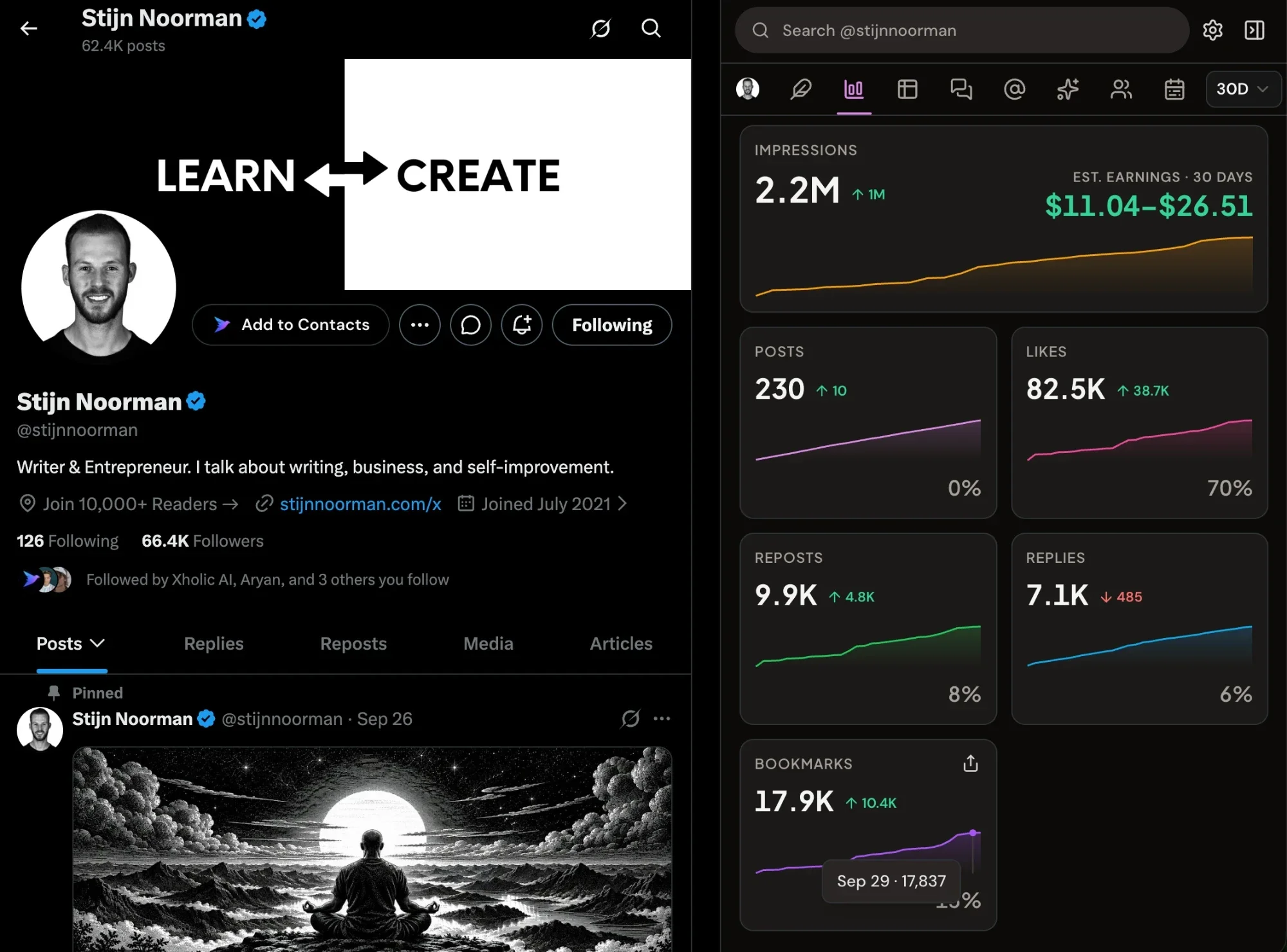
Xholic's Chrome extension shows how any profile you open performs: its follower count, then posts, impressions, likes, reposts, replies and bookmarks over time, a posting-frequency heatmap, best times by hour and day, and estimated creator earnings. You can look up 40 other profiles a day, plus your own account at any time.

An X profile with the Xholic analytics panel showing impressions, estimated earnings and engagement trends

Finding leads

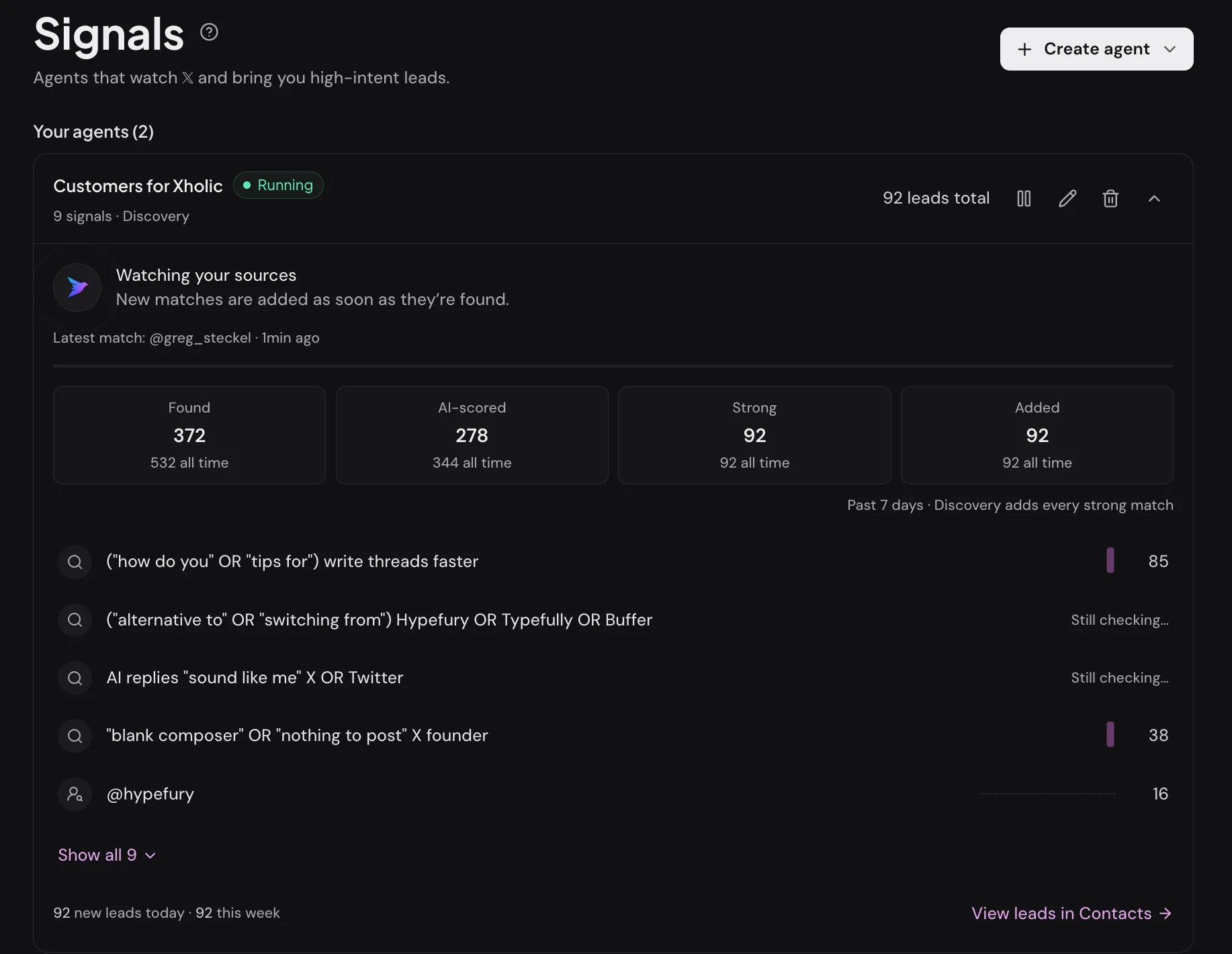
Circleboom's account and bio search can help you find people in a niche. Xholic's lead signal agents watch X for people likely to become customers, and automated DMs (included on Ultra, or as DM packs on any paid plan) let you follow up from the same place.

An Xholic Signals agent finding leads on X, with found, AI-scored, strong and added counts

Price and plan structure

Circleboom sells two products. Twitter Management is $29.99 a month, or $12.99 a month billed yearly, on the Limited plan, which covers bulk delete tools, a post planner and the AI Writer. Pro, which adds the follower tools, is $35.99 a month ($23.99 billed yearly) for accounts up to 25,000 followers, and more above that. Circleboom Publish, the multi-network scheduler, is $29.99 a month ($24.99 billed yearly) on Pro for 5 social accounts, with team members from its Premium plan at $44.99, and currently advertises 90 days free. The X tool has a limited free demo.

Xholic has one product with three plans: Pro at $49, Max at $99 and Ultra at $199 a month, and a 7-day trial for $1. There is no free plan, and Xholic publishes to X only.

Trade-offs

The honest trade-offs

Where Circleboom is the better choice

  • The deepest follower analysis and cleanup tools here: fake and inactive followers, bulk unfollow and bulk delete.
  • Search and analyze other accounts' followers.

Where Xholic falls short

  • No free plan; the trial is 7 days.
  • Publishes to X only.
  • Team seats come with Ultra (1) and the agency plan (3, from $299/mo); on Pro and Max you share access with people who have their own plan instead.

Circleboom's limits

  • Two separate products, each with its own plans and add-ons.
  • Follower tools start on Pro, whose price rises with follower count; who-followed and who-unfollowed tracking stops at 25,000 followers.
  • No voice-trained writing, engagement feed or reply help is described.

Switching

Moving from Circleboom to Xholic

  1. Start the 7-day trial and connect your X account through X's official sign-in. No password sharing.

  2. Let Xholic learn your voice during setup, then import your X analytics history so your numbers carry over.

  3. Install the Chrome extension to get the reply wand and profile analytics inside X.

  4. Let your old tool's queue run out before you cancel, so nothing scheduled gets skipped.

FAQs

Xholic vs Circleboom questions

Short answers, with sources below.

How does Xholic's price compare with Circleboom's?

It depends on which Circleboom products you need. Circleboom's Twitter Management starts at $29.99 a month ($12.99 a month billed yearly), and Publish, its scheduler, is $29.99 a month ($24.99 billed yearly) on Pro, so using both costs more than either alone. Xholic's plans start at $49 a month and include writing, replies, scheduling, leads and analytics. Compare Xholic plans

Can Xholic remove fake or inactive followers?

No. Xholic doesn't audit followers or bulk unfollow. If cleanup is what you need, Circleboom is built for it.

Can I use Circleboom and Xholic together?

Yes. They overlap little: Circleboom for follower audits and cleanup, Xholic for posts, replies, leads and analytics. If you use both, schedule from one tool so the same posts aren't queued twice.

Which is the better Circleboom alternative for growing on X?

If your goal is growth rather than cleanup, Xholic is built for it: posts and replies drafted in your voice, feeds of posts worth replying to, lead signal agents and Auto DMs. For follower audits, Xholic doesn't replace Circleboom.

Can I see another account's analytics with Xholic?

Yes, in the Chrome extension. Open any X profile to see its follower count, impressions, engagement, best posting times and estimated creator earnings. You can look up 40 other profiles a day. See the Xholic extension

Can I switch from Circleboom Publish to Xholic?

Yes. Start the 7-day trial, connect your X account through X's official sign-in, import your X analytics history (X's own analytics export, which needs X Premium) and set up your queue. Let your Circleboom queue run out before you cancel so nothing is skipped. Xholic also imports your recent posts automatically.

Sources

How we compared

We build Xholic, so we're not neutral. Every claim about Circleboom comes from their own pricing and feature pages, checked on , and we say where they do better. "Not stated" means their pages don't say. Prices change, so check each site before you buy. Spotted something out of date? Email support@xholic.ai and we'll fix it.

Sources

Xholic is not affiliated with Circleboom. Product names are trademarks of their owners.

Try Xholic before you decide

Write in your voice, reply inside X, find leads and see what's working, all in one place.

$1 for 7 days, then your plan ยท Cancel anytime

Compare plans

Live demo: no sign-up or login needed ยท takes about 2 minutes