Backend Engineering Fundamentals
HTTP and API lifecycles, databases, caching, asynchronous processing, real-time communication, system design, scaling, and server-side architecture.
42%
Best tweets about Web Development
Discover the best tweets about web development, including frontend, backend, performance, accessibility, browsers, architecture, tooling, and deployment.
Technical web development practices, browser behavior, performance, accessibility, architecture, frameworks, tooling, and production lessons.
Original Xholic analysis
Web-development discussion centers on durable engineering fundamentals: HTTP, data, security, browser behavior and production resilience. Tooling and AI-assisted stacks are presented as accelerants, while multiple contributors emphasize performance, accessibility, observability and maintainable architecture.
66% of posts
All-time engagement
62% of posts
Published in 90 days
Conversation map
HTTP and API lifecycles, databases, caching, asynchronous processing, real-time communication, system design, scaling, and server-side architecture.
42%
Web Vitals, rendering and hydration costs, caching, bundles, profiling, observability, error handling, retries, timeouts, circuit breakers, and real-world failure modes.
42%
React, Next.js, Node.js, Tailwind, managed services, deployment platforms, vibe coding workflows, coding agents, and evolving developer stacks.
32%
Structured frontend, backend, and full-stack learning paths; practice projects; repositories; courses; and foundational concepts for career development.
30%
Authentication, authorization, OAuth scopes and permissions, sessions and JWTs, secrets, CORS, CSRF, XSS, injection defenses, and secure application design.
30%
Git workflows, CI/CD, Docker, cloud deployment, browser extensions, testing, diagnostics, documentation, environment management, and developer utilities.
28%
Browser rendering, event loops, layout and paint, storage, browser APIs, HTML/CSS/JavaScript foundations, responsive interfaces, and web standards.
26%
Accessible semantic interfaces, ARIA, usability, state management, resilient UX, onboarding, content structure, internationalization, and user-centered frontend engineering.
26%
Tone and stance
Performance benchmark
Posts with media make up 20% of this collection. Their median all-time score is 23.5, compared with 26.7 for text-only posts.
Format mix
Consensus and debate
Shared view
Backend guidance repeatedly prioritizes HTTP, databases, authentication, caching, async work and system design before deep framework specialization.
Shared view
Retries, timeouts, circuit breakers, idempotency, logging and observability are framed as core production concerns rather than optional polish.
Shared view
Rendering, event loops, caching, hydration, Web Vitals and reflow are repeatedly identified as important knowledge for responsive frontend work.
Shared view
Posts distinguish HTTPS transport protection from application security and emphasize authentication, authorization, input defenses and secrets handling.
Open debate
Vibe-coding advice favors managed auth, databases, payments and deployment to ship quickly, while one startup anecdote attributes lower hosting costs to owning more of the stack.
Open debate
Some posts present AI-assisted stacks as a current setup, while others argue that coding agents remain weak at accessibility, performance, responsive behavior and complex interaction design.
Open debate
Roadmaps include microservices among architecture options, but a cautionary post criticizes adopting them before customer demand or when a single VPS would suffice.
What performs
Lists account for 62% of posts and have a median all-time score of 55.995. The supplied outliers include resource, backend-learning and workflow lists.
The highest-scoring outlier is a list of learning, debugging, package-size and browser-compatibility tools, with an all-time score of 2761.4.
Media appeared in 10 posts (20%), yet its median all-time score was 23.47, below the text median of 26.67.
Developer Tooling and Delivery has the highest supplied theme median all-time score, 45.51, ahead of the other tracked themes.
Statistical standouts
Creator landscape
The five most represented creators account for 20% of the selected posts.
1. Abhishek Singh
@0xlelouch_
2 posts
2. Ajay Yadav
@ATechAjay
2 posts
3. avrl โ
@avrldotdev
2 posts
4. Edison
@CodeEdison
2 posts
5. Ritesh Roushan
@devXritesh
2 posts
6. K.O.O
@Dominus_Kelvin
2 posts
Among the supplied top voices, Hartdrawss has the highest median all-time score at 343.89. The two cited posts focus on managed tooling, reliability practices and shipping workflows.
CodeEdisonโs cited posts cover backend fundamentals and a backend roadmap through deployment, while Ajay Yadavโs frontend roadmap runs from web basics through quality and delivery.
0xlelouch_ emphasizes caching, rendering, observability, browser runtime behavior and production failure modes; avrldotdev argues frontend work extends beyond visual assembly to state, performance and accessibility.
Since the previous snapshot
Themes, sentiment, stance, and post format are classified per tweet. All counts, shares, medians, creator concentration, freshness, and performance comparisons are then calculated directly from the published snapshot.
Xholic's all-time score compares engagement while accounting for reach, post age, and creator consistency. It is used for relative comparisons within this collection.
This report analyzes the exact 50-post snapshot shown below. AI identifies editorial categories and drafts explanations; all statistics are calculated from the snapshot, and every narrative claim is checked against cited posts before publication.
Best Web Development tweets
Ranked 01โ50
@ennycodes ยท
Low-key websites I quietly rely on 1) https://t.co/DOL411EVne Gives you a brutally clear learning path for roles like frontend, backend, DevOps, etc No fluff, just โlearn this โ then this โ then thisโ. 2) https://t.co/Zoh2Jtfiqq An online playground to quickly test HTML, CSS, JS without setting up anything locally Perfect for quick experiments and debugging ideas 3) https://t.co/cufUB80WLF A collection of reusable React hooks with real use cases Saves time and helps you avoid rewriting the same logic again and again 4) https://t.co/6lXfAIq2Zj Concise cheat sheets for languages, frameworks, and tools. Ideal when you forget syntax and donโt want to read a 20-minute blog 5) https://t.co/CRXx9MVHgP Turns messy JSON into a clean visual tree Makes understanding large APIs and configs way easier than staring at raw text 6) https://t.co/ue9PTccXQJ Lets you generate and preview color palettes instantly Useful when you want decent UI colors without guessing or copying blindly 7) https://t.co/j5NE9ZShW6 Build, test, and debug regex step by step with explanations Honestly, the fastest way to stop hating regex 8) https://t.co/gdZxoGApT6 Shows how big an npm package really is before you install it Helps you avoid bloating your app with โtinyโ libraries 9) https://t.co/9KaWeMqJox Tells you which CSS/JS features actually work across browsers Essential before using shiny new features in production 10) https://t.co/QZnckJ1VXA Googleโs own diagnostics tools for DNS, email, headers, and network issues Surprisingly useful for debugging real-world problems ๐ Which one of these do you already use and which one did you not know existed?
@Adarsh____gupta ยท
If you wanna get really good at backend, learn these: 1. Backend Communication Patterns - REST API - Request-Response Flow - Sync vs. Async - Polling, Server-Sent Events (SSE), Producer-Consumer Pattern 2. Protocols - TCP/UDP - WebSockets - WebRTC - gRPC 3. Databases & Data Persistence - SQL Databases: PostgreSQL or MySQL - Core Concepts: ACID Transactions, Normalization, Joins - NoSQL Databases - Key-Value - ORMs - Database Scaling: Indexing, Read Replicas, Sharding 4. Architecture & System Design - Monolith vs. Microservices - Design Patterns: MVC, Singleton, Factory - Horizontal vs. Vertical Scaling - Stateless vs. Stateful Architecture - Load Balancers, CDNs - Message Brokers / Queues 5. Application Security - Authentication - Session-based (cookies) vs. Token-based (JWTs) - OAuth 2.0 & OpenID Connect - Authorization - OWASP Top 10: Common vulnerabilities (SQL Injection, XSS, Broken Control) -CORS Now maybe get familiar with devops tool and all those jargons that makes you feel like you are doing rocket science.
@Hartdrawss ยท
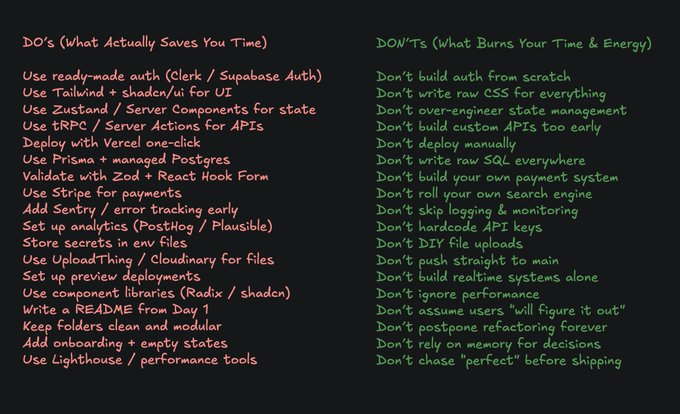
Vibe Coding lessons I learnt the HARD WAY ( Extended Edition ) Bookmark this to 10X your workflow DO's (What Actually Saves You Time) > Use ready-made auth (Clerk / Supabase Auth) > Use Tailwind + shadcn/ui for UI > Use Zustand / Server Components for state > Use tRPC / Server Actions for APIs > Deploy with Vercel one-click > Use Prisma + managed Postgres > Validate with Zod + React Hook Form > Use Stripe for payments > Add Sentry / error tracking early > Set up analytics (PostHog / Plausible) > Store secrets in env files > Use UploadThing / Cloudinary for files > Set up preview deployments > Use component libraries (Radix / shadcn) > Write a README from Day 1 > Keep folders clean and modular > Add onboarding + empty states > Use Lighthouse / performance tools > Use a monorepo or clear app structure from the start > Document your env vars in .env.example DON'Ts (What Burns Your Time & Energy) > Don't build auth from scratch > Don't write raw CSS for everything > Don't over-engineer state management > Don't build custom APIs too early > Don't deploy manually > Don't write raw SQL everywhere > Don't build your own payment system > Don't roll your own search engine > Don't skip logging & monitoring > Don't hardcode API keys > Don't DIY file uploads > Don't push straight to main > Don't build realtime systems alone > Don't ignore performance > Don't assume users "will figure it out" > Don't postpone refactoring forever > Don't rely on memory for decisions > Don't chase "perfect" before shipping > Don't skip error boundaries and fallbacks > Don't forget a health check endpoint
@suni_code ยท
He told you about Frontend Now, ๐จ As a Backend Engineer in 2026, please learn: - One Core Language (Java / Node.js / Go / Python โ deeply, not just syntax) - Backend Fundamentals (HTTP, REST principles, request lifecycle, middleware, status codes) - Database Design (SQL, NoSQL, indexing, normalization, transactions, query optimization) - System Design Basics (scalability, load balancing, CAP theorem, consistency models) - API Design (REST, GraphQL, versioning, rate limiting, idempotency) - Authentication & Authorization (JWT, OAuth, sessions, RBAC, secure password storage) - Performance Optimization (caching with Redis, DB optimization, async processing, batching) - Web Security (SQL injection, XSS, CSRF, HTTPS, hashing, secrets management) - Message Queues & Async Systems (Kafka, RabbitMQ, event-driven architecture) - Testing (unit, integration, API testing) - Build & Dependency Management (package managers, environment configs, versioning) - Version Control (Git, branching strategies, PR reviews, rebasing) - Logging & Monitoring (structured logs, metrics, alerting) - Error Handling & Resilience (retries, circuit breakers, fallbacks) - CI/CD (automated testing, deployments, pipelines) - Containerization & Deployment (Docker, basics of Kubernetes) - Cloud Basics (AWS/GCP/Azure core services, storage, compute) - Data Handling (file uploads, streaming, pagination, large datasets) - Architecture Patterns (monolith vs microservices, when to use what) - Framework Internals (understand how your chosen backend framework actually works) Pick ONE stack and Stop jumping between stacks.
@jahirsheikh8 ยท
As a modern web developer in 2026, you should clearly understand: - CSR vs SSR vs SSG - Hydration - Reconciliation - Virtual DOM - State Management - Memoization - Debouncing vs Throttling - Browser Rendering Pipeline - Critical Rendering Path - Lazy Loading - Code Splitting - Tree Shaking - CORS - Same-Origin Policy - Service Workers - WebSockets - SSE (Server-Sent Events) - HTTP Caching - ETags - Preload / Prefetch - Lighthouse Metrics - TTI / FCP / LCP - Layout Shift (CLS) - Accessibility Basics Otherwise, you're just shipping JS, not engineering UX.
@jahirsheikh8 ยท
Youโre not a real backend developer until you understand these terms: โข ๐ REST โ Standard API architecture โข โก gRPC โ High-performance binary RPC communication โข ๐ JWT โ Stateless auth tokens โข ๐ง Redis โ In-memory cache / datastore โข ๐จ Kafka โ Distributed event streaming โข ๐ Idempotency โ Safe retry without duplicate effects โข ๐งต Queue โ Background job processing โข ๐ฆ CDN โ Fast global asset delivery โข ๐ก Rate Limiting โ Prevent abuse / overload โข ๐ Load Balancer โ Distribute traffic across servers โข ๐ Index โ Speeds up database queries โข ๐งฌ Sharding โ Split DB across machines โข โป๏ธ Replication โ Copy DB for redundancy โข ๐จ Circuit Breaker โ Prevent cascading failures โข ๐ช Webhooks โ Event-driven HTTP callbacks ๐ Save this before your next interview.
@devXritesh ยท
Many developers jump straight into frameworks like Spring Boot, Express.js, or Django But frameworks don't make you a strong backend engineer Here's what actually matters: โข Learn how HTTP works (methods, headers, cookies, status codes). โข Understand databases indexing, transactions, joins, and query optimization. โข Master authentication and authorization (JWT, OAuth, sessions). โข Learn caching with Redis and when to use it. โข Build REST APIs before exploring GraphQL or gRPC. โข Understand asynchronous processing with queues like Kafka, RabbitMQ, or SQS. โข Learn how files are uploaded, stored, and served efficiently. โข Study logging, monitoring, and observability using tools like Prometheus and Grafana. โข Learn containerization with Docker and basic Kubernetes concepts. โข Understand system design fundamentals: load balancers, CDNs, replication, sharding, and rate limiting. โข Learn cloud basics (AWS, Azure, or GCP) and deploy real projects. โข Most importantly, build projects that solve real problems. Don't try to learn everything at once. Master one concept, build something with it, then move to the next. That's how good backend engineers are made.
@Hartdrawss ยท
Things every Vibe Coder MUST Learn (Extended Edition) 1/ Donโt reinvent databases > Use Prisma + Postgres (Neon / Supabase / PlanetScale) > Manual SQL + migrations = silent suffering 2/ Donโt write forms by hand > Use React Hook Form + Zod > Validation bugs will eat your soul 3/ Donโt build payment flows yourself > Use Stripe or Polar for web. Superwall or revenuecat for mobile > Never touch PCI compliance willingly 4/ Donโt build search from scratch > Use Algolia / Meilisearch / Typesense > Text search is way harder than it looks 5/ Donโt overbuild backend infra early > Use Serverless / BaaS first > Scale later, survive now 6/ Donโt ignore error tracking > Use Sentry / LogRocket > Console.log is not observability 7/ Donโt skip analytics > Use PostHog / Plausible > Youโre flying blind otherwise 8/ Donโt design UI without components > Use shadcn/ui / Radix / Mantine > Consistency > creativity at MVP stage 9/ Donโt hardcode configs > Use env + dotenv + secrets manager > Leaks = instant regret 10/ Donโt DIY file uploads > Use UploadThing / Cloudinary / S3 > Multipart hell is real 11/ Donโt โjust push to mainโ > Use GitHub Actions + Preview Deploys. Future-you will thank you 12/ Donโt skip performance tools > Use Lighthouse + Vercel Analytics. Slow apps donโt convert 13/ Donโt assume users understand anything > Add onboarding + empty states UX > Features 14/ Donโt wait to modularize > Use clean folders early. Refactors cost 10x later 15/ Donโt trust โIโll remember thisโ > Document in README or markdowns. Your memory will betray you Bookmark to ship Better !
@shekhu04 ยท
GitHub repos that can genuinely improve your backend skills: 1. system-design-primer Learn scaling, caching, load balancing, databases, CAP theorem, queues, etc. This repo changes how you think about backend systems at scale. Perfect when you want to move beyond "CRUD app developer" level. 2. build-your-own-x Build databases, servers, Docker, BitTorrent, Redis, Git clones from scratch. Helps you understand what actually happens under the hood. There's a massive difference between "using tech" vs "understanding tech." 3. backend-clean-architecture Teaches layered architecture, dependency inversion, separation of concerns. Shows how large backend codebases stay maintainable. Useful when your projects start becoming messy and hard to scale. 4. the-art-of-readme Sounds simple, but teaches documentation like a professional engineer. You learn how to explain APIs, setup, architecture, and decisions clearly. Good backend devs don't just write code they communicate systems. 5. nodejs-best-practices Production-grade patterns for logging, errors, testing, security, structure, etc. Shows what "real backend engineering" actually looks like. Great repo when your code worksโฆ but still feels amateur. 6. realworld The same full-stack app implemented in multiple backend stacks/frameworks. Lets you compare real architectural decisions side by side. Probably one of the best repos for learning how real apps are structured.
@vivoplt ยท
Backend Development Project Ideas โข Expense Tracker API โข Blogging Platform API โข Task Tracker โข TMDB CLI Tool โข Caching Proxy โข Markdown Note Taking App โข Image Processing Service โข Broadcast Server โข Workout Tracker โข Real Time Leaderboard โข database Backup Utility โข Movie Reservation System โข Scalable E Commerce Platform
@DesignArena ยท
BREAKING: @AnthropicAI models overwhelmingly dominate design-centric coding tasks, as of March 2026. Opus 4.6 places first across Web Development (HTML & React & Full-Stack), in both one-shot and multi-turn categories. Opus 4.6 and Sonnet 4.6 place first in mobile development (React Native and Android). Opus 4.6 places first on 3D Design, Game Dev, and Data Viz. Gemini 3.1 by @GoogleDeepMind takes first place on SVG design. This title was previously held by @QuiverAI (see our change log). This map looked very different just 2 months ago. Huge congrats to the @AnthropicAI team on defining SOTA.
@EOEboh ยท
As a frontend engineer, you should be able to explain these backend concepts: - What an API actually is under the hood - The difference between 401 and 403 - Why you never trust client-side validation alone - What CORS is and why it exists - The difference between cookies and localStorage - What a webhook is vs a regular API call - Why you shouldn't store JWTs in localStorage - What rate limiting means for your API calls Frontend devs who understand these are the ones who become fullstack
@ossia ยท
This weekend learn Network Engineering fundamentals for FREE with this new 12-hour course. ๐ Here are this week's five freeCodeCamp ๐๏ธ resources that are worth your time: 1. freeCodeCamp just published a comprehensive course that will teach you the fundamental concepts, protocols, and architectures of computer networking. You'll learn key network engineering topics like topology, subnetting, flow control, routing, IPv4 addressing, DNS, and more. (12 hour YouTube course): https://t.co/Y1XRzbxw4i 2. And we just published our second-ever chess course. This time you'll learn the Italian Game, one of the most common chess openings. This handbook and accompanying video course are taught by freeCodeCamp engineer Ihechikara Abba, who has a chess Elo rating of 2285. He will lay out the many traps that white can set for black, and how to not fall for them. (full-length handbook and 1 hour YouTube course): https://t.co/JKNSq3kfGf 3. On this week's freeCodeCamp podcast I interview Robby Russell, creator of the OhMyZSH command line tool and host of a popular podcast about software maintainability. We talk about how a โDon't let that happen againโ culture often leads to precautions that stifle codebase momentum, and how to reverse this. Robby also shares tips for reducing your team's dependency on that one developer who's been there for years but could die at any time. Finally, he shares his nuanced perspective on LLM tools and how he uses them to speed up his workflows. (1 hour watch or listen in your favorite podcast app): https://t.co/2Kidfxq15H 4. freeCodeCamp also published a full-length book on Product-Led Research. This is a must-read for any manager within a tech company. It's written by a CTO and security researcher named Omer Rosenbaum, who says: โif you manage Research like it's Development, things aren't going to go well for you.โ He breaks down the most common research frameworks and methodologies, and contextualizes them through a series of case studies. (full-length book): https://t.co/R5pECO0Luf 5. If you're a Python developer and use the Django web development framework, this tutorial will help you optimize the heck out of your APIs. Mari will teach you how to use profiling and logging to find bottlenecks in your codebase. Then she'll show you how to get extra performance through caching, so you can serve users at scale. (20 minute read): https://t.co/qy7tcwTrRk The freeCodeCamp community is making steady progress toward finishing Version 10 of our core full stack development curriculum. If you're not sure where to start with your programming journey, start there :) Also, our charity is possible thanks to the 10,121 kind folks who support us each month. Join them and aid us in our mission: https://t.co/PJXlqTfhI9 Quote of the Week: โThere's this tendency for developers to think: we could just rip this code out and rewrite it to be simpler or faster. But we underestimate just how much complexity and time and energy went into building a piece of software that has actually been running in production.โ โ Software Engineer and codebase maintainability expert Robby Russell on this week's freeCodeCamp podcast
@avrldotdev ยท
10 browser concepts every UI engineer must know: 0. Event loop (microtasks vs macrotasks) 1. Rendering pipeline (paint, layout, composite) 2. Reflow vs Repaint 3. Critical rendering path 4. Caching (HTTP cache, service workers) 5. Debounce vs throttle 6. Intersection Observer (lazy loading) 7. Web storage (localStorage & sessionStorage) 8. Same-origin policy (CORS) 9. Preloading/prefetching resources
@CodeEdison ยท
Backend development is โsimpleโ as long as you understand these fundamentals: HTTP basics โข Methods โข Status codes โข Request and response headers Security & identity โข Authentication vs authorization โข JWTs, sessions, and cookies โข OAuth 2.0 โข Password hashing (bcrypt / Argon2) โข Salting and peppering โข 2FA and SSO โข RBAC and ABAC API fundamentals โข API design principles โข RESTful APIs โข GraphQL โข WebSockets โข API versioning โข Rate limiting and throttling โข Pagination, filtering, and sorting โข File uploads and streaming Server concepts โข Middleware โข Error handling โข Logging and monitoring โข APM (performance monitoring) โข Server-side rendering Databases โข Database design โข SQL and NoSQL โข Indexing and query optimization โข ACID properties โข CAP theorem โข Normalization vs denormalization โข ORMs โข Connection pooling โข Transactions, migrations, and seeding Caching & performance โข Caching strategies โข Redis and Memcached โข CDN integration Scalability & architecture โข Load balancing โข Horizontal vs vertical scaling โข Monoliths, microservices, and SOA โข Message queues and Pub/Sub โข Event-driven systems โข CQRS and Saga patterns โข API gateways and service mesh Infrastructure & DevOps โข Docker containers โข Kubernetes orchestration โข CI/CD pipelines โข Environment variables โข Configuration and secrets management Security hardening โข CORS โข CSRF protection โข XSS prevention โข SQL injection prevention โข Input validation and output sanitization Background processing โข Background jobs โข Cron jobs and schedulers โข Worker processes Concurrency & runtime โข Async/await โข Promises and callbacks โข Thread pools โข Process and memory management โข Garbage collection Quality & tooling โข Testing (unit, integration, E2E) โข Mocking and stubbing โข API documentation (Swagger / OpenAPI) โข Postman or Insomnia โข Git and version control โข Code reviews โข Debugging and benchmarking Production โข Deployment strategies โข Monitoring in production Once you grasp these, backend stops being โmysteriousโ and starts becoming systematic.
@DivyanshT91162 ยท
Stop watching tutorials. Start building. Here are 10 BEST Frontend Practice Websites to level up fast: 1. Frontend Mentor https://t.co/uVquqTEzhN 2. Frontend Practice https://t.co/LS1iaCkF6o 3. Web Dev Daily https://t.co/S4mdEMZX1N 4. CSSBattle https://t.co/qIsyd6RLik 5. JavaScript30 https://t.co/Y0bKTRm6CV 6. BigFrontend https://t.co/MSBpEfyUt3 7. Codewell https://t.co/wrI4oxJme8 8. DevChallenges https://t.co/qJY8vX3ZQN 9. FrontendPro https://t.co/Bfcb3vEt4R 10. Daily UI https://t.co/1nqFxPaUns Want more dev resources like this? Follow @DivyanshT91162 for daily drops ๐
@aditiitwt ยท
Here's the list of 22 chrome Extensions Every Developer Should Know 1. SingleHire โ Find contact details of founder 2. Ghostery โ Enhance privacy while browsing 3. uBlock Origin โ Block ads & improve performance 4. daily(dot)dev โ Stay updated with dev news 5. Lighthouse โ Analyze performance, SEO, and accessibility 6. Web Developer โ Adds helpful dev tools to your browser 7. CSS Peeper โ Inspect CSS styles quickly 8. Apollo(dot)io โ Find emails, contact number & company data 9. VisBug โ Edit UI directly on any website 10. Octotree โ Better GitHub code navigation 11. PerfectPixel โ Compare design with pixel precision 12. Fonts Ninja โ Identify fonts instantly 13. Window Resizer โ Test responsive layouts 14. GoFullPage โ Capture full-page screenshots 15. Check My Links โ Find broken links quickly 16. ColorZilla โ Pick colors from any webpage 17. Session Buddy โ Manage and restore tabs 18. Cursorful โ Screen recording + quick video editing for dev demos 19. React Developer Tools โ Inspect React component hierarchy 20. Tampermonkey โ Run custom scripts on websites 21. Wappalyzer โ Identify technologies used on websites 22. JSON Viewer โ Format and view JSON easily
@EOEboh ยท
Checklist for frontend devs going fullstack: [ ] Understand HTTP methods beyond GET and POST [ ] Know the difference between 401 and 403 [ ] Can write a SQL query with a JOIN [ ] Understand why you never trust client input [ ] Know what an index does in a database [ ] Understand async vs sync processing [ ] Can read and write a basic auth flow [ ] Know what happens when you hit an API endpoint Save this ๐
@0xlelouch_ ยท
90% of frontend engineering in 2026 comes down to mastering these 10 concepts: 1) Browser runtime model. Event loop, microtasks, layout/paint, and why one long task makes the app feel broken. 2) Network + caching. HTTP caching, CDNs, ETags, stale-while-revalidate, and why a bad cache key ships old JS to 5% of users for days. 3) State + data fetching. Server state vs UI state, invalidation, retries, and preventing double-submits with idempotency keys. 4) Rendering tradeoffs. SSR vs CSR vs streaming, hydration costs, and how one heavy component can blow TTI on mid-range Android. 5) Performance budgets. LCP/INP/CLS, bundle splitting, image/video strategy, and measuring p75 not local dev fast. 6) Tooling + build pipeline. TS strictness, lint rules that prevent incidents, dependency drift, and reproducible builds in CI. 7) Debugging in prod. Source maps, feature flags, bisecting releases, and turning a minified stack trace into a real root cause. 8) Security basics. XSS, CSP, CSRF, clickjacking, supply chain risk, and treating innerHTML plus user content as a sev2 waiting to happen. 9) Observability. Frontend logs, RUM, trace correlation IDs, error rates by route, and sampling that still catches rare crashes. 10) Real-world failure modes. Time skew, flaky mobile networks, offline queues, race conditions between tabs, and assuming localStorage is durable when Safari decides it isnโt.
@CodeEdison ยท
Backend Development Learning Roadmap |-- Programming Foundations | |-- Core Language Basics (Python, Node.js, Java, or Go) | |-- Control Flow: Conditionals & Loops | |-- Functions & Modular Design | |-- Error Handling & Exception Management | |-- Data Structures & Algorithms Fundamentals |-- Server-Side Programming | |-- Request & Response Lifecycle | |-- Routing & RESTful API Design | |-- MVC & Modular Architecture Patterns | |-- Middleware Concepts | |-- Template Engines (if applicable) |-- Databases & Storage | |-- Relational Databases (PostgreSQL, MySQL) | |-- SQL Queries, Joins, Indexes & Transactions | |-- NoSQL Databases (MongoDB, Redis) | |-- ORMs (Sequelize, SQLAlchemy, TypeORM) | |-- Caching Strategies & In-Memory Stores |-- Authentication & Authorization | |-- Session-Based Auth & Cookies | |-- Token-Based Auth: JWT, OAuth2 | |-- Role-Based & Permission Systems | |-- Secure Password Storage (bcrypt, argon2) | |-- API Key Management |-- APIs & Integration | |-- RESTful API Design Best Practices | |-- API Versioning & Documentation | |-- API Testing (Postman, Insomnia) | |-- Integrating Third-Party Services | |-- Webhooks & Event-Driven APIs |-- Asynchronous Programming | |-- Promises, Async/Await | |-- Background Workers & Task Queues | |-- Event Emitters & Pub/Sub Patterns | |-- Message Brokers (RabbitMQ, Kafka) | |-- Scheduling Jobs & Cron Tasks |-- WebSockets & Real-Time Systems | |-- WebSockets Fundamentals | |-- Real-Time Libraries (https://t.co/tmCozHoRL6, WS) | |-- Pub/Sub for Real-Time Messaging | |-- Synchronization & State Management | |-- Scaling Real-Time Systems |-- Testing & Quality Assurance | |-- Unit Testing Frameworks | |-- Integration Testing | |-- End-to-End Testing | |-- Mocking, Fixtures & Test Coverage | |-- Linting & Formatting Tools |-- Performance & Optimization | |-- Query Optimization & Indexing | |-- Caching Layers & CDN Integration | |-- Load Balancing Fundamentals | |-- Profiling & Benchmarking | |-- Memory Management & GC Tuning |-- Security Best Practices | |-- Input Validation & Sanitization | |-- Rate Limiting & Throttling | |-- CORS & CSRF Protections | |-- Secure Headers & HTTPS | |-- Secrets & Config Management |-- DevOps & Deployment | |-- Environment Configuration | |-- CI/CD Pipelines | |-- Containerization (Docker) | |-- Cloud Hosting & Platforms | |-- Monitoring, Logging & Alerts |-- Real-World Projects & Portfolio | |-- CRUD APIs & Microservices | |-- Authentication & Authorization Systems | |-- Real-Time Chat or Collaboration App | |-- E-Commerce Backend API | |-- Scalable Event-Driven Architecture |-- Continuous Learning & Growth | |-- Reading Official Docs & RFCs | |-- Community Forums & Developer Groups | |-- Open Source Contributions | |-- Keeping Up with Backend Trends & Tools
@Dominus_Kelvin ยท
My friend made his startup profitable last month. He is 27. No DevOps engineer. No frontend engineer. No backend engineer. Just one experienced full-stack web developer. First hosting bill: $300. Last month: $18. What changed? He stopped outsourcing complexity to SaaS companies. And started owning his stack.
@SidJain_80 ยท
Most devs โlearn Node.jsโ Very few actually master backend Core JS - Event loop, async/await, promises - Closures, error handling Node Fundamentals - Non-blocking I/O - Streams, buffers - fs, process HTTP - REST, headers, status codes - Request/response lifecycle Frameworks - Express / Fastify - Middleware, validation, errors Databases - SQL (joins, indexes, transactions) - NoSQL basics - ORM (Prisma/Mongoose) Security - JWT, OAuth - Hashing (bcrypt) - XSS, CSRF, SQL injection Performance - Event loop bottlenecks - Caching (Redis) - Scaling basics API Design - Idempotency - Versioning - Rate limiting Async Systems - Queues (Kafka/RabbitMQ) - Background jobs Testing - Unit + integration DevOps - Docker, CI/CD - Logging, monitoring Skip the fluff. Master these and youโre production-ready
@patilvishi ยท
OAuth Scopes โ Roles โ Permissions These three terms are used together in almost every modern authentication system... Yet they are one of the most misunderstood concepts in backend development. They are not interchangeable. Here is the easiest way to remember them OAuth Scopes โ Define what an application is allowed to access on behalf of a user. Roles โ Define who the user is inside your application. Permissions โ Define what the user is allowed to do. Quick memory trick - Scopes = App Access - Roles = User Identity in the System - Permissions = Allowed Actions --- Imagine a CRM application A sales employee logs in using Google. Step 1 OAuth Scopes The user grants: read:profile read:contacts The application can access only the approved Google resources. Scopes protect external APIs. Step 2 Roles Inside your application: Role = Sales Manager Roles describe the user's function. Examples: - Admin - Manager - Finance - Sales - Support Step 3 Permissions The role maps to permissions like: customer. read customer.update order.create invoice.approve Every request checks these permissions before allowing the operation. --- Real API Flow User โ OAuth Login โ Access Token (with Scopes) โ Application โ User Role โ Permissions โ Allow / Deny Request --- When should you use each? OAuth Scopes - Google APIs - GitHub APIs - Microsoft Graph - OAuth 2.0 - Third-party integrations Purpose: ๐ Limit what an application can access. Roles - Employee hierarchy - Customer types - Admin portals - SaaS applications Purpose: ๐ Group users with similar responsibilities. Permissions - Delete Order - Refund Payment - View Salary - Edit Product - Approve Invoice Purpose: ๐ Control individual actions with fine-grained access. --- The biggest misconception Many developers think: A role is just another permission. Not quite. A Role is simply a collection of permissions. For example: Admin โโโ user. read โโโ user.update โโโ user.delete โโโ order.approve Permissions are what the system actually checks. Roles just make managing those permissions easier. --- Another common mistake Many developers put Roles inside OAuth Scopes. They solve different problems. Scopes answer: What can this application access? Roles answer: Who is this user? Permissions answer: Can this user perform this action? --- One sentence to remember forever - Scopes limit the application. - Roles classify the user. - Permissions authorize the action. --- The strongest authorization systems don't rely on just one of these... They combine all three: โ๏ธScopes protect external API access. โ๏ธRoles simplify user management. โ๏ธPermissions enforce fine-grained security. Thats how modern systems built with OAuth 2.0, OpenID Connect, Spring Security, and enterprise IAM platforms handle authorization at scale.
@TeeDevh ยท
Real tech stacks from builders on X (March 2026) โ @marc_louvion Next.js + Tailwind + Supabase + Vercel โ @levelsio PHP + jQuery + SQLite (10+ years, still running strong) โ @yongfook Ruby on Rails + jQuery โ @dannypostmaa_ Next.js + Supabase + AI APIs โ @tdinh_me Next.js + simple SaaS stack The "indie stack" I see everywhere in 2026: โ Next.js + Tailwind โ shadcn/ui โ Supabase / Firebase โ Polar / Lemon Squeezy / Stripe . โ AI tools (Cursor, Codex, ClaudeCode, etc.) Who's your favorite builder? Drop their stack ๐
@0xlelouch_ ยท
90% of frontend engineering in 2026 comes down to mastering these 10 concepts: 1) HTTP + caching semantics ETag, Cache-Control, Vary, CDN behavior. Most โfrontend latencyโ bugs are caching bugs. 2) Rendering + hydration costs SSR/CSR/streaming are tradeoffs. Know when youโre paying in TTFB, JS parse, or hydration stalls. 3) State and data fetching discipline Idempotent mutations, retries, pagination, optimistic UI, and cache invalidation without ghost data. 4) Performance budgets, not vibes Measure LCP/INP/CLS, long tasks, bundle size. A 200kb โsmallโ dependency can blow INP on mid phones. 5) Tooling and build pipeline literacy Vite/Webpack/Rollup, source maps, tree-shaking, code splitting. Debug why a module is suddenly in the critical path. 6) Browser platform fundamentals Event loop, layout/paint/composite, IntersectionObserver, timers. Fix jank by knowing what triggers reflow. 7) Security basics that actually ship XSS, CSP, CSRF, trusted types, cookie flags. Sanitizing HTML is not a plan, itโs a liability. 8) Observability from the client Correlation IDs, RUM, error boundaries, session replay sampling. Tie a frontend error to a backend trace. 9) Debugging in production constraints Reproduce with real headers, locales, timezones, and flaky networks. Source maps access and PII redaction matter. 10) Real-world failure modes Race conditions, double submits, stale closures, aborted requests, 429 backoffs. Most incidents look like โworks on my Wi-Fiโ
@suni_code ยท
internet basics โ html โ css โ javascript โ git & github โ how the browser works (most important) โ http / https โ react โ typescript โ state management โ next.js โ node.js โ express โ databases (postgres / mongodb) โ orm (prisma / drizzle) โ rest apis / graphql โ authentication (jwt / oauth) โ caching (redis) โ file uploads & storage โ websockets / realtime โ testing โ docker โ ci/cd โ system design โ cloud (aws / gcp / azure) โ monitoring & logging Now you are ready to go. ๐ฅณ Build Projects from here and apply as much as you can.
@ManningBooks ยท
What if your stack is doing more work than your app? Modern browsers already handle a lot โ routing, UI patterns, even app installs. Vanilla Web by @firt shows how to build real apps with plain JS, HTML, and CSS. You get less tooling with more control. Learn more: https://t.co/I6AMDRB5dl
@Shruti_0810 ยท
Master CSS CSS MASTER TREE โ โโโ 1. CSS Fundamentals โ โโโ What is CSS โ โโโ CSS Syntax โ โโโ CSS Types โ โ โโโ Inline CSS โ โ โโโ Internal CSS โ โ โโโ External CSS โ โโโ CSS Comments โ โโโ 2. Selectors โ โโโ Basic Selectors โ โ โโโ Element โ โ โโโ Class โ โ โโโ ID โ โโโ Combinators โ โ โโโ Descendant โ โ โโโ Child โ โ โโโ Adjacent Sibling โ โ โโโ General Sibling โ โโโ Attribute Selectors โ โโโ Pseudo โ โโโ Pseudo-classes โ โโโ Pseudo-elements โ โโโ 3. Box Model โ โโโ Content โ โโโ Padding โ โโโ Border โ โโโ Margin โ โโโ box-sizing โ โโโ 4. Layout โ โโโ display โ โ โโโ block โ โ โโโ inline โ โ โโโ inline-block โ โ โโโ none โ โ โโโ contents โ โโโ position โ โ โโโ static โ โ โโโ relative โ โ โโโ absolute โ โ โโโ fixed โ โ โโโ sticky โ โโโ float / clear โ โโโ z-index โ โโโ 5. Flexbox โ โโโ flex container โ โโโ flex direction โ โโโ justify-content โ โโโ align-items โ โโโ align-content โ โโโ flex-wrap โ โโโ flex-grow / shrink / basis โ โโโ 6. Grid Layout โ โโโ grid container โ โโโ grid-template โ โโโ grid-gap โ โโโ grid-area โ โโโ grid-column โ โโโ grid-row โ โโโ 7. Typography โ โโโ font-family โ โโโ font-size โ โโโ font-weight โ โโโ line-height โ โโโ letter-spacing โ โโโ text-align โ โโโ 8. Colors & Backgrounds โ โโโ color formats โ โ โโโ HEX โ โ โโโ RGB โ โ โโโ HSL โ โ โโโ Named colors โ โโโ background-color โ โโโ background-image โ โโโ background-position โ โโโ background-size โ โโโ gradients โ โโโ 9. Responsive Design โ โโโ Media Queries โ โโโ Mobile First โ โโโ Breakpoints โ โโโ Responsive Units โ โ โโโ % โ โ โโโ vw / vh โ โ โโโ rem / em โ โโโ Fluid Layouts โ โโโ 10. Transforms โ โโโ translate โ โโโ rotate โ โโโ scale โ โโโ skew โ โโโ 11. Transitions โ โโโ transition-property โ โโโ transition-duration โ โโโ transition-delay โ โโโ transition-timing-function โ โโโ 12. Animations โ โโโ animation-name โ โโโ animation-duration โ โโโ animation-delay โ โโโ animation-iteration-count โ โโโ animation-direction โ โโโ 13. Variables โ โโโ CSS Custom Properties โ โโโ var() โ โโโ Global vs Local Scope โ โโโ 14. Advanced CSS โ โโโ CSS Functions โ โ โโโ calc() โ โ โโโ clamp() โ โ โโโ min() / max() โ โโโ Filters โ โโโ Backdrop Filter โ โโโ Object-fit โ โโโ Aspect-ratio โ โโโ 15. Preprocessors โ โโโ Sass / SCSS โ โโโ Less โ โโโ Stylus โ โโโ 16. Frameworks & Tools โ โโโ Tailwind CSS โ โโโ Bootstrap โ โโโ PostCSS โ โโโ Autoprefixer โ โโโ 17. Performance โ โโโ Minification โ โโโ Critical CSS โ โโโ Lazy Loading Styles โ โโโ Reducing Reflows โ โโโ 18. Best Practices โโโ BEM Naming โโโ SMACSS โโโ OOCSS โโโ Maintainable CSS
@prayag_sonar ยท
๐จ Most people donโt fail full stack because itโs hard. They fail because they learn in random order. A simple roadmap (Beginner โ Job Ready): 1๏ธโฃ Frontend Basics: HTML5 (page structure) CSS3 (styling) JavaScript ES6+ (logic) Responsive Design (mobile-friendly UI) DOM (interactivity) Build: Landing Page, Portfolio 2๏ธโฃ Frontend Development: React (UI library) Components (reusable code) Props (data passing) State (data management) Hooks (React features) React Router (navigation) Context API (global state) API Integration (fetch data) Build: To-do App, Weather App, Blog 3๏ธโฃ Backend Development: Node.js (JavaScript runtime) Express.js (web framework) REST APIs (backend services) Middleware (request processing) MVC (project structure) Error Handling (reliability) Build: REST API, Notes API, Auth API 4๏ธโฃ Database: MongoDB (NoSQL database) Mongoose (ODM) CRUD (Create/Read/Update/Delete) Aggregation (advanced queries) Build: Connect API with Database 5๏ธโฃ Tools & Technologies: Git & GitHub (version control) Postman (API testing) VS Code (editor) npm/yarn (package manager) .env (secret management) JWT (authentication) bcrypt (password hashing) Focus: Version Control, Testing & API Security 6๏ธโฃ Advanced Concepts: Authentication (login) Authorization (roles & permissions) File Upload (media handling) Error Handling (stability) CORS (cross-origin access) Environment Variables (configuration) Focus: Secure & Scalable Apps 7๏ธโฃ Build Projects: Full Stack Blog (content management) E-commerce (payments & orders) Real-time Chat (WebSockets) Admin Dashboard (analytics) Goal: 3โ5 production-ready projects 8๏ธโฃ Career Ready: DSA (problem solving) Resume (ATS-friendly) Portfolio (showcase work) LinkedIn (personal branding) Interview Prep (technical rounds) Job Applications (consistent outreach) ๐ฏ Formula: Consistency + Practice = Success
@LeaVerou ยท
Some claim that web standards no longer matter now that an increasing percentage of code is written by AI. If developers are not the ones writing code, who cares whether those languages and APIs are well-designed? I beg to differ. In fact, I think it now matters more than ever! Hear me out. AI is effectively a new type of web developer โ a user of web technologies with its own constraints and user needs. Some overlap with humans. Many donโt. But one thing still holds true: how well web technologies cater to user needs directly affects how efficiently they can be learned, composed, used, and verified. Usability has always struggled with quantification. We could describe friction, but mapping it cleanly to cost was hard. But when the user is an AI, there is now a direct metric of user effort, and it maps cleanly to financial cost: tokens! Try this experiment: Compare how many tokens @claudeai uses on a front-end project with complex UI interactions and implicit state, versus a similarly sized Node.js CLI application with explicit data flow. In my experience, the difference in tokens used, accuracy, and iterations necessary, is dramatic. API design affects how *much* of the codebase an AI agent needs to traverse to understand whatโs going on. It affects whether the relevant pieces fit in context windows. It affects how confidently they can verify correctness. All of these translate *directly* to cost and reliability. Weโre still in the early days. Weโve spent decades refining design principles for humans, and weโre still not done. Figuring out what design principles we should follow to make languages and APIs learnable, efficient, and safe *for AIs as well* is a whole new (exciting) field of study. But *what* the principles are is orthogonal to *how much* they matter. The latter seems clear to me: In a world where code is increasingly generated, how could the quality of our code interfaces matter *less*? Quite the contrary โ it compounds!
@subinium ยท
> Since 2026, our organization (@hashed_official) is going through AI transition very rapidly. As an dev, I'm onboarding about 10+ members into vibecoding through 1:1 sessions. > Including partners with dev/founder backgrounds who already vibecode and some members who study on their own, over 70% of the company now does vibecoding. What's notable is that 70% of them come from non-dev backgrounds, encountering development and terminal for the very first time. > The first hour covers: choosing vibecoding tools (SaaS, IDE, CLI), basic terminal commands (cd, ls, mkdir, clear, etc), foundational understanding of claude code features, understanding frontend/backend/database, simple local web development, and deployment via vercel or railway. > From there, they learn cc's modes, plugins, settings, and many other features one by one, while also picking up programming knowledge like frameworks, libraries, APIs, OAuth, etc. > Quickly understanding developer term isn't easy, but their learning curve is remarkably fast given their will. Will is a booster for top down comprehension. > They all have GitHub accounts now, and discussions around collaboration structures are starting to emerge. > For reference, our organization covers AI costs and the boss vibecodes the hardest. Thanks to super boss, @simonkim_nft
@ATechAjay ยท
Frontend Engineer Roadmap ๐ Step 1: Internet Basics โ Internet โ DNS โ HTTP & HTTPS โ Browser โ Domain & Hosting Step 2: HTML โ Basic Tags โ Semantic HTML โ Forms โ Tables โ Accessibility Basics Step 3: CSS โ Selectors โ Box Model โ Flexbox โ Grid โ Position โ Responsive Design โ Animations Step 4: JavaScript โ Variables โ Functions โ Arrays & Objects โ DOM โ Async JavaScript โ Fetch API โ ES6+ โ Event Loop Step 5: TypeScript โ Types โ Interfaces โ Generics โ Utility Types Step 6: React โ Components โ JSX โ Props & State โ Hooks โ Context API โ React Router Step 7: Next.js โ App Router โ Server Components โ API Routes โ SSR โ SSG Step 8: Styling โ Tailwind CSS โ CSS Modules โ shadcn/ui Step 9: Quality โ Accessibility โ Performance โ Playwright โ AI-assisted Verification โ Managed QA (Bug0) Step 10: Git & Deployment โ Git โ GitHub โ Vercel โ CI/CD Step 11: Build Projects โ Dashboard โ SaaS โ Portfolio โ Clone Projects Now start applying. Good luck ๐
@avrldotdev ยท
I have seen an emerging sentiment that Frontend development is dead because AI can do it very easily. But frontend is not just about placing boxes on the screen. There's a lot more to it behind the scenes. There's state & perf management, business logic, accessibility & what not. While AI can easily scaffold & write a component, it cannot alone write a maintainable, scalable frontend that can run on any device in different network conditions & configurations. AI will take you 80% there, but the last 20% is what makes or breaks the UX & scalability of your app for thousands of users.
@tapasadhikary ยท
If you are into web development now, consider these: => How to handle UI Performance? => Accessibility aspects => How to handle security concerns? => Making the App responsive => Scaling by users and developers => Edge cases Agents are helping to write code; you have to be better at thinking big.
@ainativedev ยท
An agent cannot read your website. And that needs to change. In this episode of AI Native Dev, @guypod sits down with Maximiliano Firtman (@firt), 30-year web developer and author of 14 books, to talk about what building for the web looks like when traffic comes from agents and humans both. They get into: โข why AI agents taking screenshots of your website is inefficient and expensive โข what Web MCP is and how it gives agents a direct API into your website โข how a 200MB Apple model running offline is opening up a whole new category of web apps โข why every vibe coded app is a web app and what that means for the future of the web Your next visitor might not be human. Are you ready for that? (0:00) Trailer (1:19) AI DevCon (2:13) Introduction and Vanilla Web (6:25) WebMCP: what it is and why it matters (8:01) How agents browse websites today (10:20) Why screenshot-based browsing is inefficient (11:43) Exposing JavaScript functions to agents (14:41) User confirmation and trust delegation (16:52) WebMCP vs traditional APIs (18:00) Client-side use cases like Apple Pay (19:33) Headless browsers and playwright (22:47) WebMCP vs standard MCP (25:57) Declarative HTML version (27:16) Detecting when an agent controls your site (29:08) Who should adopt Web MCP first (33:03) WebMCP for end-to-end testing (36:44) Local models in the browser (39:12) Chrome's built-in Gemini Nano (42:38) WebAssembly, WebGPU and neural network APIs (45:47) Cost, latency and privacy benefits (47:03) Small models for specific tasks (50:28) Who's using client-side AI today (53:55) Browser sandboxing and security (56:49) The future of web apps and local AI (59:37) Wrap-up
@SumitM_X ยท
As a frontend developer In 2026 , Make sure you have covered performance. Interviewers wonโt ask "what is React.memo" now.. They will expect you to more about performance.. Things every React js candidate should cover ๐ In Measurement & profiling: React DevTools Profiler Chrome Performance tab Web Vitals Lighthouse For Re-render control : React.memo useCallback useMemo Keys & reconciliation For Concurrency & UX : useTransition useDeferredValue Suspense For Code splitting & bundles : lazy loading Dynamic imports Bundle analyzers Tree shaking For State & data : React Query / TanStack Query Lists & rendering Virtualization (react-window / react-virtualized) Lazy rendering IntersectionObserver In Network & runtime : Debounce / throttle Caching strategies Service workers CDN usage
@Dominus_Kelvin ยท
I have seen many follies under the sun: Graphic designers calling themselves UX designers because they learned Figma. People learning frontend or backend, but never learning the web development. Startups adopting microservices before acquiring customers. Teams adding Kubernetes to applications one VPS could comfortably run. Developers choosing databases by social media popularity. Founders paying cloud bills that could employ another engineer. Buttons pretending to be links. localStorage pretending to be a database. Activities around work pretending to be work. And junior developers planning on remaining juniors Vanity of vanities. There is nothing new under the cloud.
@piyush784066 ยท
Your Journey to Becoming a Full Stack Developer Stage 1 โ HTML Lay the foundation. Learn how the web is structured. Stage 2 โ CSS Bring your ideas to life with styling, layouts, and responsiveness. Stage 3 โ Git + GitHub Master version control and showcase your work like a pro. Stage 4 โ Build Your First Project Apply what youโve learned. Start simple, but make it real. Stage 5 โ JavaScript Add interactivity and logic. Make your websites dynamic. Stage 6 โ Choose Your Framework Pick your weapon: React | Vue | Svelte | Angular Stage 7 โ Build Another Project Level up with a modern frontend project. Stage 8 โ Node.js Step into backend development and server-side logic. Stage 9 โ Databases Work with data using MySQL or MongoDB Stage 10 โ Create APIs Connect frontend and backend. Build real-world systems. Stage 11 โ Build a Full Stack Project Bring everything together into one powerful application
@victorokolie_ ยท
One of the biggest misconceptions in web development: HTTP โ insecure, HTTPS โ a secure application. HTTPS simply means your communication with the server is encrypted using TLS. It protects data while it's traveling across the internet, preventing attackers from intercepting or modifying it in transit. That's where its job ends. HTTPS doesn't stop SQL injection. It doesn't prevent XSS. It doesn't fix CSRF. It doesn't secure your APIs. It doesn't enforce authorization. It doesn't protect against IDOR. It doesn't prevent broken authentication. It doesn't patch vulnerable backend code. I've seen applications proudly display the padlock icon while exposing sensitive endpoints, relying on client-side validation, or allowing users to access resources they shouldn't. The padlock tells users their connection is secure. It says nothing about whether your application is. TLS secures the connection. Secure backend engineering secures the application. Know the difference.
@TosinOlugbenga ยท
There are many technical concepts you will never know as a software engineer until you work in a structured big company. In a simple term, what are the observability tools you need to know as a frontend engineer? How do you know how your frontend applications perform? How are server errors communicated to you? How do you know which of the APIs you are consuming is returning errors behind the scenes?
@_devEmmy ยท
Ever heard developers say โit works on my machineโ but the app fails on the server? Thatโs one of the problems Docker was created to solve. Docker is a containerization tool that allows you to package your application together with all its dependencies (libraries, runtime, system tools) into a container. This container can run anywhere, your laptop, a teammateโs system, a staging server, or production and behave the exact same way. Instead of manually installing dependencies on every machine, Docker ensures the environment is consistent and reproducible. Hereโs a simple Docker setup guide: 1. Install Docker Download and install Docker from the official Docker website. 2. Create a Dockerfile A Dockerfile is a configuration file that tells Docker how to build your application image (what base image to use, dependencies to install, and how to run the app). 3. Build the Docker Image This converts your Dockerfile into a runnable image. docker build -t your-app-name . 4. Run the Container Run your application inside a Docker container. docker run -p 8000:8000 your-app-name 5. Push to Docker Hub (optional) Docker Hub acts like a repository for Docker images so they can be pulled and deployed anywhere. docker tag your-app-name username/your-app-name docker push username/your-app-name Simple flow: Code โ Dockerfile โ Build Image โ Run Container โ Deploy anywhere. This is why Docker is widely used in modern backend development, CI/CD pipelines, and cloud deployments. Bookmark & repost so you can always come back to this guide ๐
@TheJobfather__ ยท
Front-end development is not only making something look pretty. It is usability, accessibility, responsiveness, performance, content structure, and helping people complete tasks without friction. If your portfolio only shows visuals, add the thinking behind the interface. Employers need to see that you understand the user, not just the screen.
@TosinOlugbenga ยท
Vibe coders need to know that frontend development is more than making screens look good (most time AI design terrible UIs). Questions experienced frontend engineers ask: โข How is state managed? โข How does data flow through the app? โข What re-renders and when? โข How do we prevent performance bottlenecks? The UI is often the easiest part and thatโs what AI is good at.
@MakadiaHarsh ยท
web development 4 years ago vs now. - hosting is now edge deployment - custom code is now ai-assisted builds - design handoffs are now component systems - manual testing is now automated qa - client briefs are now ai-scoped projects - integrations are now no-code pipelines - support docs are now ai knowledge bases - mvps took 6 months, now take 6 weeks the way we build software has already changed.
Best Tweets by Topic