Frameworks and ecosystem choices
Next.js, TanStack Start, React Router, Vite, React Native, competing frameworks, releases, and production tradeoffs.
42.9%
Best tweets about React
Explore the best tweets about React, including components, hooks, Server Components, performance, state, architecture, releases, and production lessons.
React JavaScript framework patterns, components, hooks, rendering, performance, architecture, releases, debugging, and real application experience.
Original Xholic analysis
In this 49-post sample, ecosystem choices are the largest theme, followed by hooks/state/data and performance/profiling. Several posts recommend diagnosing unnecessary rendering and providing concrete component context to development tools. Server architecture and Compiler use draw context-specific recommendations. Tutorials have the highest supplied format median all-time score.
46.9% of posts
All-time engagement
32.7% of posts
Published in 90 days
Conversation map
Next.js, TanStack Start, React Router, Vite, React Native, competing frameworks, releases, and production tradeoffs.
42.9%
Effect usage, state ownership, stores, API fetching, async behavior, and hooks for interactive or streaming UIs.
34.7%
Diagnosing re-renders, measuring real-world speed, optimizing bundles and rendering, and evaluating React Compiler memoization.
30.6%
Building reusable components, forms, accessible interfaces, animations, loading states, and design-system integrations.
28.6%
Source-inspection tools, browser-level verification, React pitfalls, production hygiene, and security issues.
24.5%
Agents that inspect components, generate or migrate React apps, optimize frontends, and compose UI from constrained component catalogs.
22.4%
Server Components, SSR, client-side rendering, streaming, data waterfalls, and server–client boundaries.
20.4%
Fiber extraction, reconciliation experiments, native gesture APIs, WebAssembly-backed logic, and specialized React renderers.
16.3%
Tone and stance
Performance benchmark
Posts with media make up 59.2% of this collection. Their median all-time score is 11.7, compared with 9.74 for text-only posts.
Format mix
Consensus and debate
Shared view
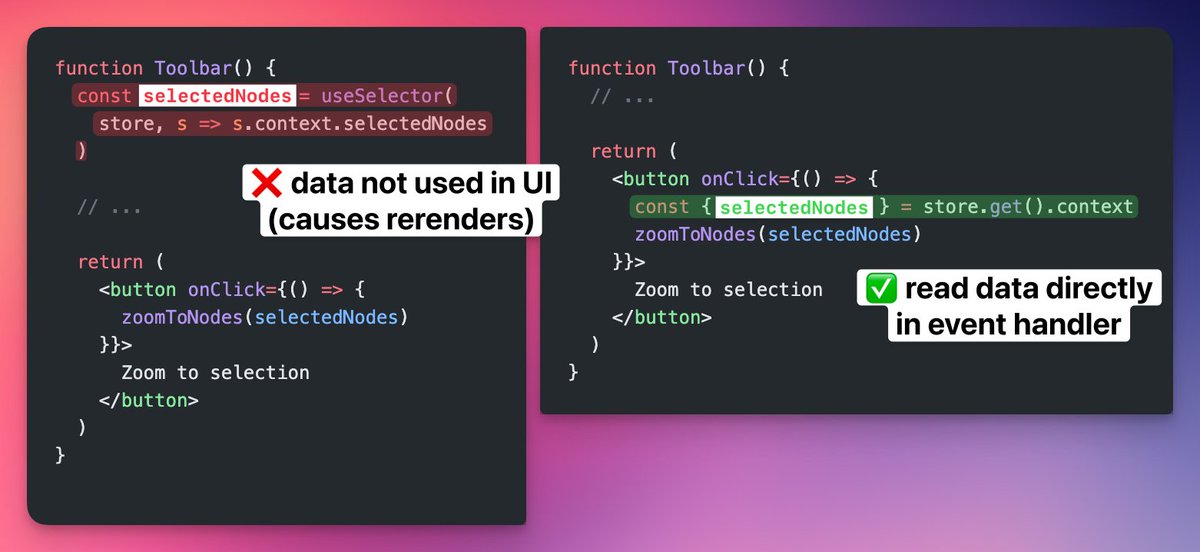
A react-scan case study reports identifying unnecessary rerenders, subscription guidance recommends reading event-only data in handlers, and interview advice emphasizes profiling before optimizing. Together, these posts recommend identifying avoidable work rather than applying memoization indiscriminately.
Shared view
The forms guide covers validation and error display. The AI-code checklist and component prompt recommend loading/error states, TypeScript definitions, and explicit component requirements. Browser-testing advice separately recommends verifying real user journeys beyond isolated component tests.
Open debate
One author argues that non-SEO SaaS apps overuse SSR; another describes moving markdown parsing to the server for a React Native app. Migration accounts also run in opposite directions: from Next.js to plain React for one project, and from Vite/React to Next.js for server actions in another. These are contextual accounts, not controlled speed comparisons.
Open debate
The Compiler announcement promotes automatic memoization instead of pervasive manual wrappers. A Motion user reports production animation breakage and recommends selective opt-in for non-Motion components. This is an integration-specific caution, not evidence of general Compiler failure.
What performs
Tutorials account for 9 posts (18.4%) and have a median all-time score of 88.159, versus 12.115 for case studies and 8.18 for announcements. The supplied tutorial examples cover component extraction, forms, and Server Component data waterfalls. These descriptive comparisons do not establish that format causes higher scores.
The component-extraction post and Claude Code DOM-selection announcement are the two largest supplied outliers: all-time scores of 1639.61 and 1227.6, respectively, or 155.95 and 116.76 times the dataset median. Both describe obtaining concrete component context; the extraction post contrasts this with screenshot-based recreation, while the Claude announcement contrasts it with describing the component to update.
Framework/ecosystem choices are the largest supplied theme at 21 posts (42.9%), with a median all-time score of 8.21. Performance/profiling covers 15 posts (30.6%) with a median of 16.09. The more prevalent theme therefore does not have the higher median score in this comparison; these figures do not measure change over time.
Statistical standouts
Creator landscape
The five most represented creators account for 20.4% of the selected posts.
1. George Moller
@_georgemoller
2 posts
2. Alex Nguyen
@alexcooldev
2 posts
3. freeCodeCamp.org
@freeCodeCamp
2 posts
4. GitHub Projects Community
@GithubProjects
2 posts
5. Harshil Tomar
@Hartdrawss
2 posts
6. Joe Sluis
@jyobo10
2 posts
shadcn's two posts pair a Field-component forms guide with the announcement of React Aria availability in shadcn/ui. The supplied creator median all-time score is 484.38, the highest among the listed top voices.
George Moller's two posts cover Server Component waterfalls and Compiler memoization, with a supplied creator median all-time score of 146.83. freeCodeCamp's two posts cover API fetching and animated-tab implementation, with a median of 48.96.
Since the previous snapshot
Themes, sentiment, stance, and post format are classified per tweet. All counts, shares, medians, creator concentration, freshness, and performance comparisons are then calculated directly from the published snapshot.
Xholic's all-time score compares engagement while accounting for reach, post age, and creator consistency. It is used for relative comparisons within this collection.
This report analyzes the exact 49-post snapshot shown below. AI identifies editorial categories and drafts explanations; all statistics are calculated from the snapshot, and every narrative claim is checked against cited posts before publication.
Best React tweets
Ranked 01–49

@da_fant ·
you can steal react components from any website without source code most people screenshot UIs and ask AI to recreate them. but with react fiber, you can extract the exact component 1:1 - same styling, props, design system, component structure
 Watch video
@lydiahallie ·
Claude Code on desktop lets you select DOM elements directly, much easier than describing which component you want updated! Claude gets the tag, classes, key styles, surrounding HTML, and a cropped screenshot. React apps also get the source file, component name and props
 Watch video
@shadcn ·
I just published the full guide to building forms with the Field component: - TanStack Form & React Hook Form - Zod validation and displaying errors - Practical examples we’ll actually use - Inputs, Radios, Fieldset, Arrays & more Check it out. Link below.
 Watch video
@Hartdrawss ·
25 red flags hiding in your VIBE CODED app : Bookmark this before your next PR ! 1/ no .env.example file > new dev joins. cant run the app. nobody knows what env vars exist. 2/ API keys in git history > deleted from .env doesn't mean deleted from history. rotate those keys. 3/ no README with setup instructions > three steps to run locally that only you know. 4/ functions with 500+ lines > AI fills files. nobody splits them. untestable, unreadable, unmaintainable. 5/ catch blocks that swallow the error > silent failures. user sees nothing. you get no alerts. bug persists. 6/ hardcoded localhost URLs > breaks in staging. breaks in production. search "localhost" in the repo right now. 7/ no TypeScript or type definitions > you refactor one prop and nothing tells you about the 12 places it broke. 8/ console.log statements in production > performance overhead and sensitive data leaking into browser consoles. 9/ zero tests > you change one utility function and don't know what broke until a user tells you. 10/ missing loading and error states in the UI > API call takes 3 seconds. user sees blank screen and refreshes. request fires twice. 11/ dead code everywhere > AI generates functions. AI forgets them. nobody knows whats active. 12/ no linting or formatting config > every file has different indentation. code reviews become style arguments. 13/ mixed naming conventions > camelCase, snake_case, PascalCase. all from AI. all in the same repo. 14/ god components doing everything > 500-line React components handling state, data fetching, and UI simultaneously. 15/ DB queries directly in route handlers > business logic tangled with framework code. change one thing, you touch everything. 16/ secrets in committed config files > not .env. config.js or settings.json that didnt seem like a secret file. 17/ no CI/CD pipeline > deploy = "i hope nothing breaks." you find out in production. 18/ direct DOM manipulation inside React > mixing jQuery patterns with React. breaks silently on re-renders. 19/ state mutated directly > `state.items.push(item)` instead of a new array. causes unpredictable renders. 20/ memory leaks from uncleaned intervals > setInterval inside useEffect with no cleanup. fires after the component unmounts. 21/ blocking the event loop with sync operations > `fs[.]readFileSync` in a request handler. one request pauses all others. 22/ no pagination on list endpoints > fetch all 50,000 records to display 20. works fine in dev with 5 test rows. 23/ missing Content-Type headers on API responses > clients parse JSON as text. debugging nightmare across different clients. 24/ no error boundary in React > one uncaught error in a child component crashes the entire app. 25/ inconsistent API response shapes > some endpoints return `{data: {}}`. others return the object directly. good luck building a client.
@shadcn ·
React Aria is now available in shadcn/ui. Use `--base aria` or choose React Aria in shadcn/create. All components, docs, CLI, styles and skills have been updated for React Aria Components. Shoutout to @devongovett who did most of the work behind this release.


@steventey ·
react-scan by @aidenybai is truly a gamechanger for debugging frontend perf issues. case in point: @dubdotco's filter UI has been "feeling" sluggish, so I set up react-scan and poof – it found the exact root cause (unnecessary rerenders). filters should feel much quicker now!
 Watch video
@_georgemoller ·
⚛️ React tip: How to avoid data fetching waterfalls in Server Components ↓
 Watch video
@mattpocockuk ·
Every React app should probably have a 'dont-use-use-effect' skill That explains why you might not need a useEffect, and what state/effect manager you use instead
@_georgemoller ·
❌ useMemo, useCallback, memo everywhere ✅ React Compiler handles it automatically React Compiler v1.0 is here. It analyzes your code at build time and adds memoization where needed.↓
 Watch video
@DavidKPiano ·
Quick React tip: don't subscribe to data that you don't render; it causes unnecessary rerenders. If it's only used in event handlers, read it there. AI coding agents tend to get this wrong.

@theodorvaryag ·
Here's a freebie for the homies: Rust backend, React app, expose browser-side domain types and business logic in a Rust crate that compiles to wasm, wasm-bindgen for JS bindings and TypeScript API, publish as an NPM library for the frontend dev

@freeCodeCamp ·
As a developer, you'll need to know how to fetch data from APIs. And in this tutorial, you'll learn how to fetch that data and store and display it in a React app. First you'll get data using the built-in fetch method, then you'll refactor using the popular Axios library. https://t.co/nsaQkaQ6lD


@fernandorojo ·
I get a lot of questions about how we made markdown parsing fast on the @v0 mobile app. The answer: we do less work on the client. v0 doesn’t parse markdown strings in React Native. Instead, the server parses MDX and streams a JSON tree to the client. During message streaming, the server sends JSON patches for each chunk. The client applies the patch to its local cache using jsondiffpatch. We even modified the jsondiffpatch protocol to send the diff for string fields inside any JSON. Finally, the client recursively loops over the JSON tree and renders custom components for each MDX element.

@alexcooldev ·
Why do most SaaS apps that don’t need SEO still overuse Next.js server-side rendering, making the app slower than client-side rendering? Use Vite + React for the app, and a separate Next.js project for the blog.

@jherr ·
Is TanStack replacing React itself? No. But "redact" is an interesting experiment in seeing how much overhead is currently in React, and also pushing the limits of agentic coding. https://t.co/SRzIQx4DQn (Personally I think it should have been called freeact, but that's just me)

@ImSh4yy ·
I'm getting close to a year running TanStack Start in production. I have two apps on Cloudflare Workers, they are completely stateless and talk to the backend API via tRPC. I'm not using any of the proprietary features of Workers, just have their Vite plugin to serve the Start app. Everything else is containerized and deployed to Swarm. It's been a great experience so far, and I can't recommend it enough. If you're starting a new project, or looking to migrate your current one to a different React framework, I highly recommend giving it a try.

@Tristan0x ·
Claude Code is a huge productivity unlock. As a career backend dev (with minimal React experience), I spent just a few hours on Sunday optimizing our frontend performance and our app now loads 75% faster! The beautiful thing is its able to run its own lighthouse tests, as well as perform chrome browser automation (`claude --chrome`) to validate/quantify results, then iteratively improve. Easy wins it picked up: * Convert all pngs to webp * Preload fonts with fallback * Inline icon SVGs for less network requests * Optimized imports and tree shaking using Nextjs optimizePackageImports for heavy deps * Lazy-loaded large SDKs and certain modals * Defer GraphQL client initialization until used * Create slick loading animations for charts and skeleton loaders for data fields Crazy to think how we could speed up the majority of web applications on the internet for the cost of a few dollars per site.
 Watch video
@matteocollina ·
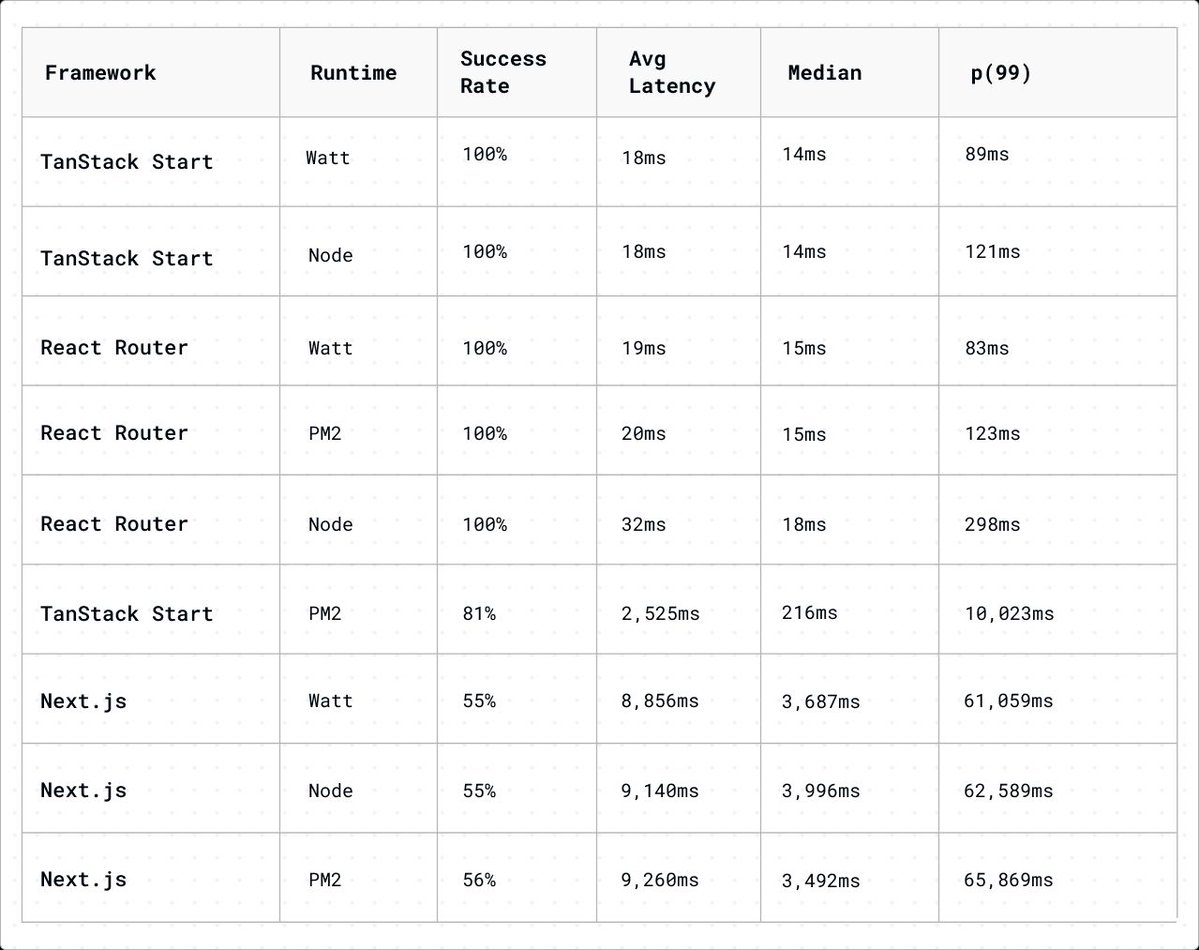
Readers spotted that compression was not applied consistently in our React SSR benchmarks. TanStack Start had it disabled while the others had it on. We disabled compression everywhere and re-ran the tests. Here are the corrected results.

@tan_stack ·
Independent benchmark: @Platformatic put TanStack Start, React Router, and Next.js under load and shared the results. Worth a read if you care about SSR performance beyond toy benchmarks. https://t.co/D7ntpzaXp3

@swmansion ·
Tired of wrapping gestures in useMemo? 🥱 Gesture Handler 3 introduces a hook-based API — the hook manages the native recognizer, which means you don’t need manual memoization. If you’re using React Compiler, it also handles memoization automatically. But with no React Compiler, the hook still takes care of it for you. Learn more 👉 https://t.co/njZveKldO3
 Watch video
@0xlelouch_ ·
90% of React interviews in 2026 come down to these 7 points: 1) Rendering model: what triggers a re-render, why referential equality matters, and how to avoid accidental work. 2) Hooks fundamentals: useEffect dependencies, cleanup, and why derived state is usually a bug (compute it, don’t store it). 3) State management: local vs server state, when Context is enough, and when you need a store for cross-page workflows. 4) Performance: memoization tradeoffs, virtualization for long lists, and profiling before optimizing. 5) Async + data fetching: request cancellation, race conditions, caching, and handling loading/error/retry without UI flicker. 6) Forms and validation: controlled vs uncontrolled inputs, debouncing, schema validation, and keeping UX fast under network latency. 7) Testing + production hygiene: React Testing Library patterns, mocking fetch, and catching regressions like double effects in StrictMode

@cathrynlavery ·
I built a product demo video with @reactjs and @remotion ~16 seconds. 480 frames. 6 scenes. zero screen recordings & didn't leave the terminal once. T𝗵𝗲 𝘀𝘁𝗮𝗰𝗸: • react 18 + typescript • ~15 custom components • remotion 4.0.429 for video-as-react • 8 voiceover & sounds with @ElevenLabs ngl pretty impressive for a first-timer 😍
 Watch video
@Hartdrawss ·
PRO TIP for FRONTEND DEVS : The component prompt that generates production-ready UI in Cursor every time. Most people prompt: "create a user profile card." Output: no loading state, no error state, no empty state, hardcoded data, no TypeScript. Here's how i prompt instead: --- "Create a UserProfileCard React component. Requirements: - Props: user object (id, name, email, avatarUrl, role, createdAt) — TypeScript interface required - Loading state: skeleton UI using the existing Skeleton component from /components/ui - Error state: error message with retry button, error passed as prop - Empty state: 'No user found' with a clear illustration or icon - Avatar: use Next.js Image component with fallback to initials if avatarUrl is null - Date formatting: 'Member since [Month Year]' — use the existing formatDate util - Responsive: full width on mobile, max-w-sm on desktop - Accessible: proper ARIA labels, keyboard focusable action buttons - No hardcoded data. No inline styles. Use only Tailwind classes from the design system. Export: named export only. No default export."
 Watch video
@hausdorff_space ·
react-prosemirror, like prosemirror core, is a modern marvel of engineering. New blog post talks about all the work react-prosemirror core put in to make it really, really fast. On par with, and maybe faster, than, the pure JS version. Seriously. Here we are editing Moby Dick with no perceptible lag at all:
 Watch video
@tlbtlbtlb ·
Something Claude did in 20 minutes that I'd been procrastinating for months: "Please convert this project from next.js to esbuild & plain React". The project had wasm, canvases, MathJaX. It just worked.

@GithubProjects ·
json-render by Vercel Labs is an open-source generative UI framework that's actually safe to ship. AI → JSON → UI, constrained to components YOU define: → AI can only use components in your catalog. → JSON output matches your schema, every time. → Streams & renders progressively. → Works across React, Vue, Svelte, Solid, React Native, even video & email. → 36 pre-built shadcn/ui components out of the box. → MCP support (render UIs inside Claude, ChatGPT, Cursor).

@freeCodeCamp ·
Tabs are common in dashboards and settings pages, but small motions can make them feel more polished. In this tutorial, @gupta05_vaibhav shows you how to build an animated tab component with Shadcn/ui, React, Tailwind CSS, and Motion. You'll learn about spring tab indicators, stacked card hover effects, entrance animations, and more. https://t.co/bArjFiJ9Je

@alexcooldev ·
Building a B2C app in 2025? React Native vs Flutter I’ve built with both. Here’s the real difference: React Native: - Faster to hire (lots of devs know React) - Easier to integrate with native modules - Ecosystem is massive (especially for startups) - UI sometimes feels slightly off on Android - Most importantly: you can reuse custom hooks across Web (I use Next.js, this was a big reason I picked RN) Flutter: - Pixel-perfect UI across platforms - Smooth animations, feels native -Dart is niche, harder to find good devs - App size can get heavy For B2C? Go with whatever gets you to market faster. Retention won’t be saved by “better UI”, it’s product and marketing. I picked React Native. Because I wanted growth, not perfection.

@ctbbpodcast ·
HackerNotes TLDR for episode 168! — https://t.co/HDM9ssvdg8 ►⠀React Router's useParams double URL decodes path parameters, and a case-sensitive regex on the React Source Code of matchPath means %252F (uppercase F) decodes to / while %252f (lowercase f) does not ►⠀Not all frameworks are equal: Vue and React are the most vulnerable to CSPT, Next.js and SvelteKit expose secondary context path traversal on the server side, while SolidStart is largely safe ►⠀Pre-production endpoints may serve uploaded HTML inline instead of as Content-Disposition: attachment, a reliable technique to bypass XSS mitigations on file upload ►⠀fetch() silently strips tab characters (%09), enabling WAF bypasses with payloads like %2F%2e%09%2e%5C

@ATechAjay ·
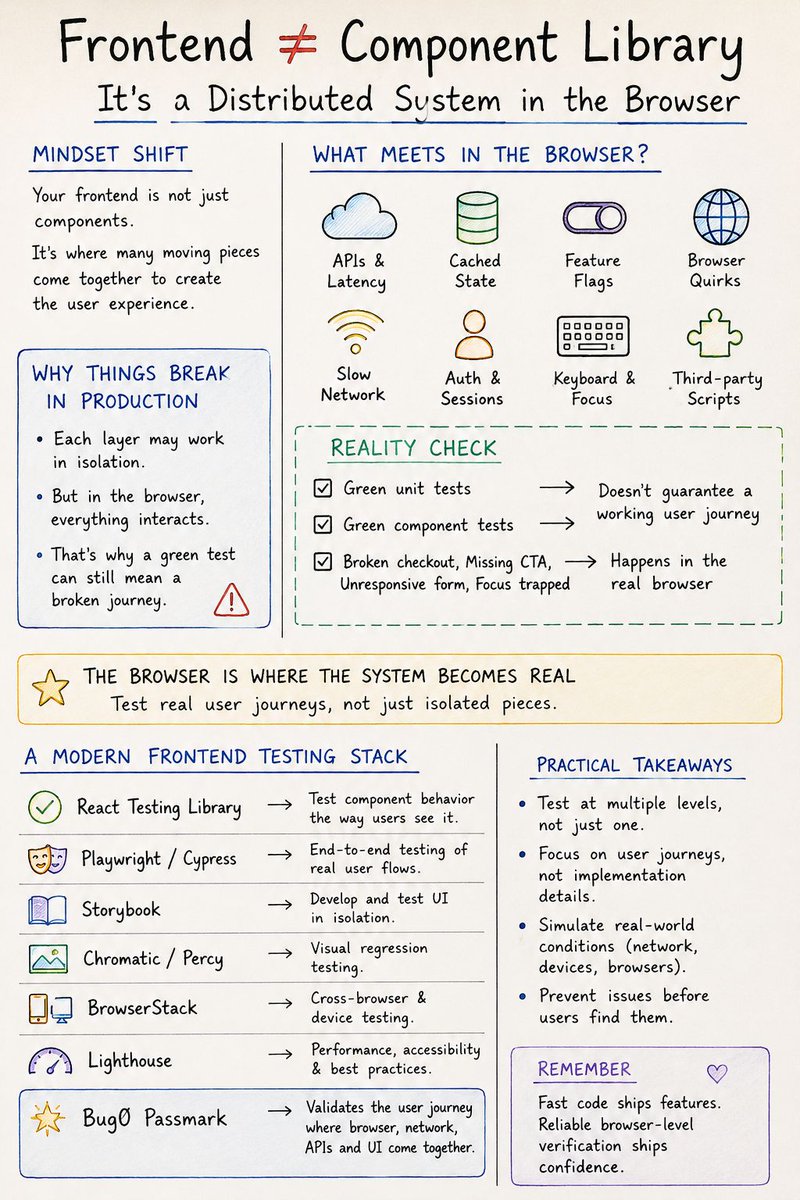
Your frontend isn't just a component library. It's a distributed system running inside a browser. A single user interaction depends on: • APIs • Caching • Authentication • Feature flags • Browser behavior • Network speed • Local state • Accessibility • Third-party scripts Everything can pass in isolation... ...and still fail together. That's why you can have: ✅ Green unit tests ✅ Green component tests ❌ Broken checkout ❌ Missing CTA ❌ Unresponsive form ❌ Focus trapped inside a modal The browser is where the entire system finally meets. So don't stop testing at the component level. Also verify real user journeys. Tools that help at different layers: • React Testing Library → component behavior • Playwright / Cypress → end-to-end flows • Storybook → isolated UI development • Chromatic/Percy → visual regression • BrowserStack → cross-browser/device testing • Lighthouse → performance & accessibility • Bug0 Passmark → validates the user journey where browser, network, APIs, and UI come together. Fast code ships features. Reliable browser-level verification ships confidence.

@kettanaito ·
I told this years ago: every framework is going implement RSCs in their own way and this is exactly where we are today. RSC between Next.js, TanStack Start, and React Router rely on the flight protocol alone, which is so low-level you cannot have a unified testing strategy.

@TosinOlugbenga ·
Using the MCP Server is the most powerful tool you can give to your AI. Wired up an application with Lovable which uses Vite + React. Connected the code to GitHub and cloned it to my IDE. And then asked my AI agent to use next-dev MCP to convert the app from react vite to NextJS app (because I need some server actions functionality) And this happened in 4 minutes, deployed to Vercel and app is ready for use. No bug, no error, no issues. What a time to be a developer…. @hackSultan , help with the LinkedIn version of this career exploit.

@DivyanshT91162 ·
Someone got tired of manually building skeleton loaders... so they automated the entire process. Instead of drawing fake placeholder boxes every time your UI changes, Boneyard scans your real components and generates pixel-perfect skeleton screens automatically. No measuring. No tweaking. No keeping loading states in sync by hand. → Extracts skeletons directly from your real UI → Supports React, Vue, Svelte 5, Angular, Preact & React Native → Works seamlessly with Suspense and async data fetching → Vite plugin with automatic HMR re-capturing → Responsive across multiple breakpoints → Zero production overhead → MIT licensed → 100% open source This is one of those developer tools that saves hours of repetitive frontend work while making your loading states look exactly like the final UI. MIT licensed 100% open source Repo👇


@LangChain_JS ·
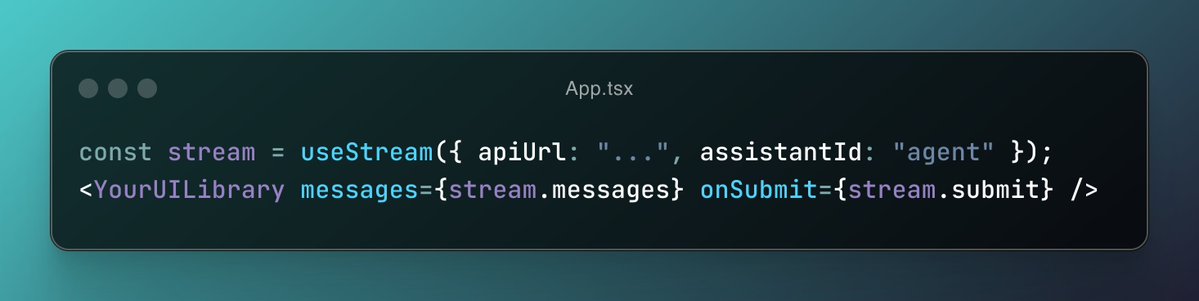
We just shipped new docs showing how to wire @langchain/react's #useStream hook to any React UI library 🎉 Two ready-to-go integrations: 🧩 AI Elements: composable, @shadcn - ui-style components for chat 🤖 @assistantui: headless runtime with a full thread UI out of the box 📚 https://t.co/UnJq2HBkT6
@GithubProjects ·
Zustand is a small, fast state management library for React that correctly handles zombie children, concurrent rendering, and context loss. - Simplified flux principles with a hooks-based API - No providers or boilerplate required - Selectively re-renders only on state changes - Handles common React state pitfalls correctly Explore it here: https://t.co/YScb2oogQW


@orcdev ·
tested Svelte + shadcn-svelte again (new project page) honest take 👇 DX isn't bad… but setup still not as smooth as React from official shadcn page you literally just use one command and that's it, it works with multiple frameworks after setup I wanted to implement https://t.co/OcH61UmmW7 blocks, and managed to do that in only 3 prompts which was really awesome (screenshot) overall Svelte is solid, but React still wins because of two reasons: 1. AI works better with it (for now) 2. entire shadcn ecosystem is supporting React, so we have to burn tokens to rewrite the code thing is that AI is still pretty bad at UI, too many edge cases it misses pre built blocks are still the fastest / cheapest way to ship curious what happens in 6 - 12 months


@SumitM_X ·
As a frontend developer In 2026 , Make sure you have covered performance. Interviewers won’t ask "what is React.memo" now.. They will expect you to more about performance.. Things every React js candidate should cover 👇 In Measurement & profiling: React DevTools Profiler Chrome Performance tab Web Vitals Lighthouse For Re-render control : React.memo useCallback useMemo Keys & reconciliation For Concurrency & UX : useTransition useDeferredValue Suspense For Code splitting & bundles : lazy loading Dynamic imports Bundle analyzers Tree shaking For State & data : React Query / TanStack Query Lists & rendering Virtualization (react-window / react-virtualized) Lazy rendering IntersectionObserver In Network & runtime : Debounce / throttle Caching strategies Service workers CDN usage

@jyobo10 ·
Built a small React dev tool powered by @aidenybai's element-source. You can hover over any element on your frontend and click on it to see the component's source file and last commit + author. You can also immediately jump to that component in your IDE.
 Watch video
@Dominus_Kelvin ·
Every piece of UI state belongs somewhere. URL. Memory. Local Storage. Server. Derived. Most developers only know "React state."

@housecor ·
I'm reviewing the State of React survey results. React Server Components have been out for years and less than half of React devs have tried them. And over the last year, the percentage who have used RSC only climbed from 40% to 45%. Server function usage is even lower at 37%.
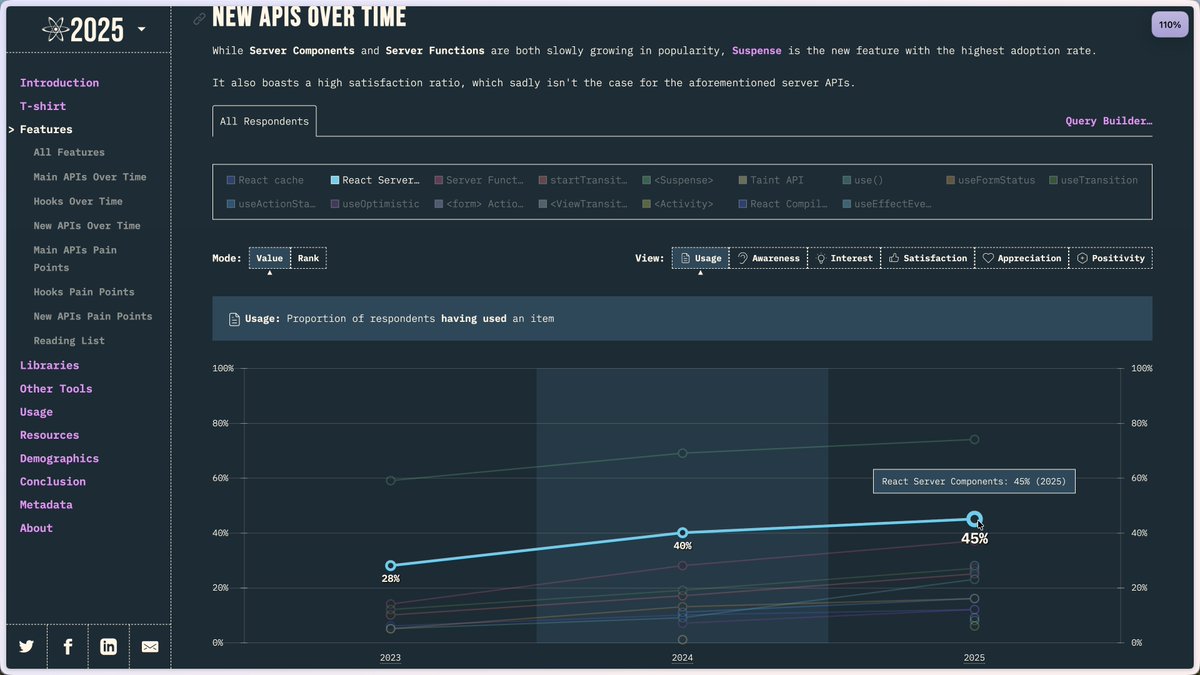

@AlemTuzlak ·
With the new release of TanStack Devtools you won't be seeing the panel render twice in React StrictMode! 🚀

@thekitze ·
i was waiting for april 1 to pass so i can tell u that i'm playing with @nuxt_js modules 🙃 the fact that we haven't figured out reusability and proper plugins in the next/react ecosystem just blows my mind.

@jyobo10 ·
Built a mini examples site for my React clone. The whole site is rendered by my own React implementation and includes hook demos + reconciliation experiments. I made it to validate the behavior of my React implementation but thought it would be cool to share here too.
 Watch video
@mauricekleine ·
how is a nextjs app on vercel with the whole stack in the same region still so laggy? my tanstack start app with a hono backend on AWS and a postgres database absolutely FLIES there are ZERO skeletons or spinners in the tanstack app... ...on a throttled 4G network no server components no cache components no opaque non-standard APIs no security mistakes that LLMs make all the time (auth only in layout.tsx and not in child page.tsx? it's safe bro!! (it's NOT)) just react and oRPC routers boggles the mind

@ThePracticalDev ·
Generative UI isn't only for chat. This dev shows React letting AI compose screens from a registry, same JSON a CMS sends. { author: @neetigya_chahar } https://t.co/D8ymvcTOmC

@creowistech ·
Fetch → Store → Render Pattern in React 👇🏻 1. When the app first loads, this code runs automatically and calls a function to fetch all the conversations from the backend. 2. Once the data is received, it is passed into setConversations, which stores it in state. 3. As soon as the state updates, React re-renders the UI, so all the conversations become visible on the screen without doing anything manually. Have you used this pattern?


@saurra3h ·
if you're using @motiondotdev with the React Compiler in Next.js disable auto-compilation for motion components the compiler memoizes renders, but framer needs to re-run on every render to track element positions for layout and layoutId animations everything works locally but silently breaks in prod fix: reactCompiler: { compilationMode: "annotation" } and opt-in with "use memo" only on non-motion components let me know if any of you found better solution

@DJbennyBuff ·
I just spent the weekend converting my Framer site into custom code. I'd say it got ~95% parity! My steps: 1. Use the "React Export" Framer plugin (they have a free trial) 2. Download Vercel's agent-browser will all the skills 3. Prompt Claude to recreate the site using the React components in step 1. Repeat until happy :)


@shrutikapoor08 ·
This week's Top 5 in React & AI is live 🚀 Server Components became one of React's most disliked features, yet React 19 is in nearly half of production codebases. The data is full of (not)surprises. This week's issue covers: 1️⃣ Designing Netflix's frontend 2️⃣ Bulletproof React components 3️⃣ State of React 2025 takeaways 4️⃣ React Doctor: health-check your codebase 5️⃣ WebMCP: making your site agent-ready #ReactJS #JavaScript #Frontend

Best React tweets
Xholic studies what works in your niche, drafts posts in your voice and schedules them for the hours your audience is online.
$0 today · Cancel anytime
Browse all tweet collectionsKeep exploring