Quick answer: Build a realistic-looking quote tweet screenshot entirely in your browser. Edit the parent post and the quoted post separately names, handles, text, metrics, and badges then export a clean PNG. No Twitter account or login needed.
What Is It?
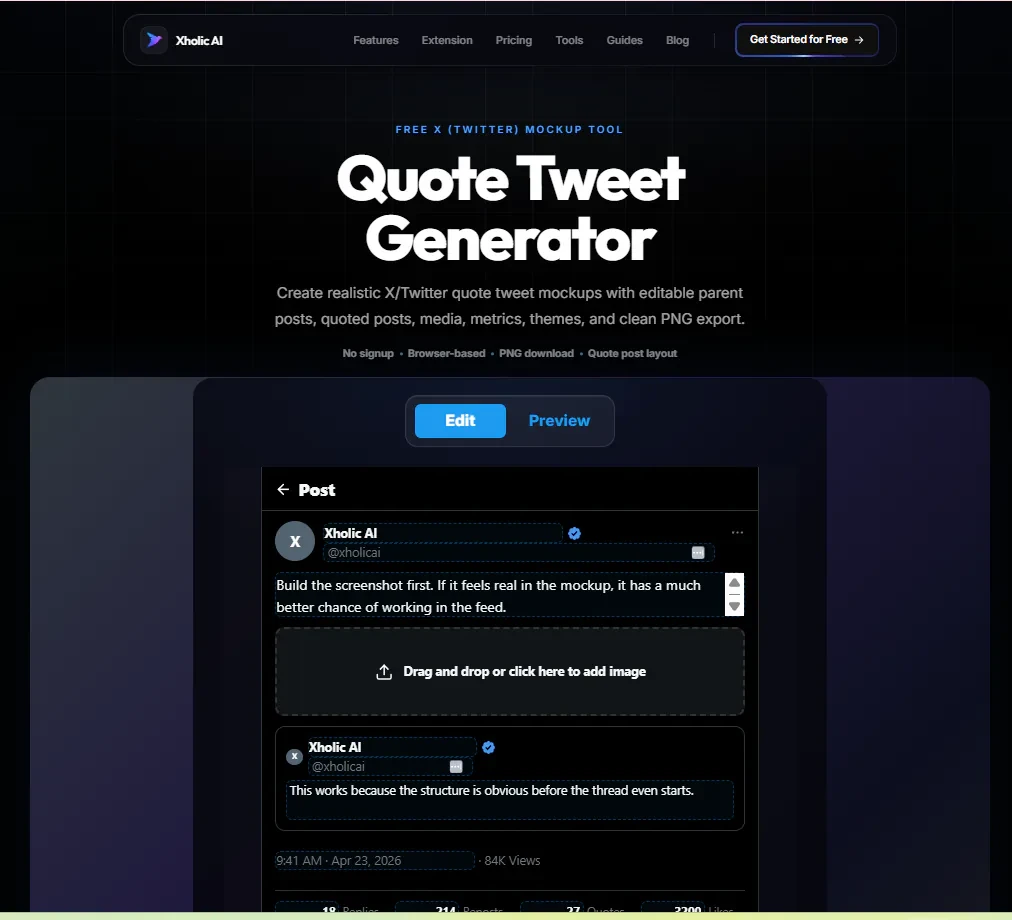
The Quote Tweet Generator is a free tool at xholic.ai. Build a realistic-looking quote tweet screenshot entirely in your browser. Edit the parent post and the quoted post separately - names, handles, text, metrics, and badges - then export a clean PNG. No Twitter account or login needed.
Open the Quote Tweet Generator Tool.
Who Uses It and Why
| Who Uses It | What They Use It For |
|---|---|
| Content creators | Preview how a quote tweet will look before posting - especially useful for threads and campaign content |
| Marketers & agencies | Create mockups for client presentations showing proposed Twitter content in context |
| Educators & trainers | Generate example quote tweets for social media courses or workshop slides without using real accounts |
| Designers | Prototype Twitter-based UI concepts or ad mockups with accurate X styling |
| Journalists & bloggers | Illustrate articles with tweet examples when real screenshots aren’t available or appropriate |
How to Use It - Step by Step
It takes under a minute. Here’s exactly what to do:
Step 1: Open the tool
Go to Quote Tweet Generator in any browser. Everything runs in your browser no upload, no account.
Step 2: Edit the parent post
Fill in the display name, handle, avatar, verification badge, tweet text, and engagement metrics (likes, reposts, replies, and views) for the outer post, the one doing the quoting.
Step 3: Edit the quoted post
Below the parent post editor, fill in the details for the nested quoted post, the original tweet being referenced. Use a different name and handle to show it’s a different account.
Step 4: Choose your theme
Switch between Light, Dim, and Dark Twitter themes to match the context you’re creating the mockup for.
Step 5: Export as PNG
Click the Download or Export button. You get a clean, high-resolution PNG that looks like a real Twitter screenshot ready for presentations, docs, or social posts.
Pro tip: Use realistic-looking names and handles in your mockups to make presentations more persuasive. A mockup with placeholder text like ‘User123’ looks like a draft. One with a real-seeming name and handle looks like a real example.
Real Example
A marketing agency is pitching a Twitter campaign to a B2B software client. They use the Quote Tweet Generator to mock up what a happy customer quoting the brand’s product announcement would look like. They export the PNG and drop it into the pitch deck, the client immediately understands the content strategy without needing a lengthy explanation.
What to Do With Your Result
The tool creates visual mockups only. It does not connect to Twitter, post anything, or access any real account data. Every detail you see in the export is something you typed in.
Heads up: Clearly label mockups as examples when using them publicly or in client work. A quote tweet mockup shown without context can be mistaken for a real screenshot. Adding a small ‘Example’ watermark or a note in your presentation prevents confusion.
Frequently Asked Questions
Does this create a real tweet?
No. The tool generates a visual mockup a PNG image that looks like a tweet. It doesn’t post to Twitter or connect to any account.
Can I use any name and handle?
Yes, you can type any name and handle for mockup purposes. When using mockups professionally or publicly, consider using fictional names rather than real public figures to avoid any suggestion of misrepresentation.
What resolution is the exported PNG?
The tool exports at 2x resolution (retina-ready), which looks sharp on any screen, including high-resolution displays and slides.
Can I add a profile photo to the mockup?
Yes. You can upload a custom avatar image for both the parent post author and the quoted post author.
What themes are available?
Light (white background), Dim (dark blue-grey), and Dark (black). All three match the current X/Twitter interface.
Is there a limit on how many mockups I can create?
No. The tool is free and unlimited.
Related Xholic Tools
These tools work well alongside this one:
- Fake Tweet Generator - Create single tweet mockups with the same simplicity
- Reply Chain Generator - Build a full reply thread mockup for content planning
- Reply Chain Generator - Learn how to structure a thread before you mock it up
- Twitter Character Counter - Check your tweet text length before building the mockup