Quick answer: Build a realistic-looking tweet mockup entirely in your browser, edit the name, handle, text, avatar, media, and engagement metrics directly inside the tweet card, then export a clean PNG. Built for presentations, content previews, and education, not for impersonating real accounts.
What Is It?
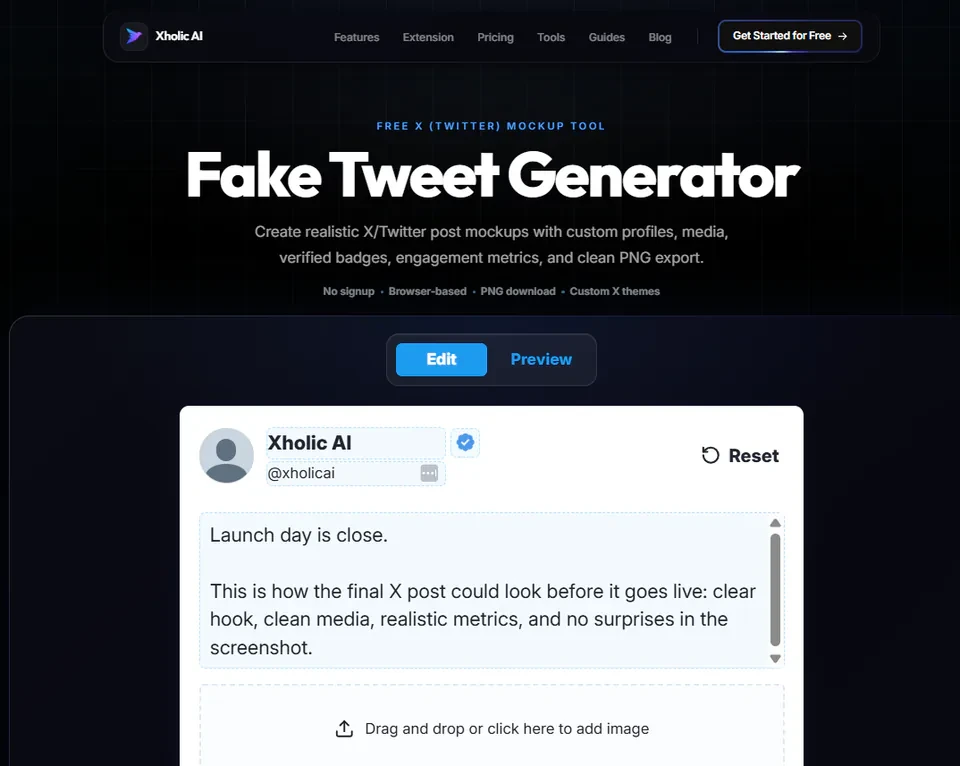
The Fake Tweet Generator is a free tool at xholic.ai. Build a realistic-looking tweet mockup entirely in your browser, edit the name, handle, text, avatar, media, and engagement metrics directly inside the tweet card, then export a clean PNG. Built for presentations, content previews, and education, not for impersonating real accounts.
Open the Fake Tweet Generator Tool.
Who Uses It and Why
| Who Uses It | What They Use It For |
|---|---|
| Marketers & agencies | Mock up proposed tweet content for client presentations before anything is actually posted |
| Educators & trainers | Create example tweets for social media courses or workshops without needing real screenshots |
| Content creators | Preview how a tweet will look, text length, media placement, formatting, before posting for real |
| Designers | Prototype Twitter-based UI concepts with accurate, pixel-correct styling |
How to Use It - Step by Step
It takes under a minute. Here’s exactly what to do:
Step 1: Open the tool
Go to Fake Tweet Generator Tool in your browser. Nothing to install, no account needed.
Step 2: Edit directly in the card
Click into the name, handle, and tweet text fields right inside the live preview and type your content.
Step 3: Add media if needed
Upload an image or video to attach to the mockup tweet, matching how it would look as a real post.
Step 4: Tune the metrics
Adjust the like, reply, repost, and view counts to match the scenario you’re illustrating.
Step 5: Export your PNG
Click Download to save a clean, high-resolution image that looks like a real tweet screenshot.
Pro tip: Use realistic but clearly fictional details for any mockup you’ll share publicly, a name like ‘Alex Rivera’ rather than a real public figure. This keeps the mockup obviously illustrative and avoids any confusion about whether it’s a real tweet.
Real Example
A content agency is presenting a Twitter campaign concept to a client who has never used the platform. Rather than describing what the proposed tweets would look like, they use the Fake Tweet Generator to mock up three example posts exactly as they’d appear live, then drop the PNGs into the pitch deck, the client immediately understands the visual direction.
Good to Know
Heads up: This tool creates a visual mockup image only - it does not post to Twitter, connect to any account, or interact with the platform in any way. Don’t use mockups to misrepresent real people’s statements; that can mislead viewers and may violate platform policies if shared as though it were real.
Frequently Asked Questions
Does this post a real tweet?
No. It only creates a visual mockup, a PNG image styled to look like a real tweet. It has no connection to Twitter and doesn’t post anything.
Can I use any name or handle?
You can type any name for mockup purposes, but for anything shared publicly, it’s best to use clearly fictional names rather than real public figures to avoid misrepresentation.
What resolution does it export at?
2x (retina) resolution PNG, sharp and clear on any screen, including presentation slides and high-resolution displays.
Can I edit the engagement metrics?
Yes. You can set custom like, reply, repost, and view counts to match whatever scenario you’re illustrating.
Is there a watermark on the exported image?
The export is a clean PNG mockup. If you use it publicly, add your own context or label so viewers understand it is an example, not a real tweet.
Related Xholic Tools
If you are still choosing an editor, compare the best fake tweet generators by realism, controls, export quality, signup requirements, and responsible-use features.
These tools work well alongside this one:
- Quote Tweet Generator - Mock up a quote tweet with a nested original post
- Reply Chain Generator - Build a full multi-tweet thread mockup
- Twitter Character Counter - Check your tweet text length before building the mockup
How to Make the Mockup Look Believable
The fastest way to improve a tweet mockup is to check the small details in order:
- Use a display name, handle, avatar, and verification state that agree with one another.
- Keep the post copy as short and natural as the account would genuinely write it.
- Make replies, reposts, likes, bookmarks, and views proportionate instead of choosing dramatic numbers independently.
- Select the light, dim, or dark theme before reviewing line wrapping and media placement.
- Label fictional examples clearly when the image leaves an internal draft or presentation.
The generator is intended for planning, education, product mockups, and clearly disclosed examples. It should never be used to impersonate a real person or fabricate evidence.