You’re trying to figure out whether a Twitter poll is worth posting, or whether it’s just another engagement gimmick that makes the numbers look busier than they are. Used well, X (formerly Twitter) polls are fast, lightweight, and surprisingly useful for forced-choice feedback, content testing, and simple decision support. Used badly, they turn into noisy vanity metrics that feel precise without being trustworthy.
What Twitter Polls Do and When to Use Them
If you want a quick answer from your audience, twitter polls are built for that. They’re not a full survey tool, they’re a forced-choice format with hard limits that shape what you can ask and what you can learn. X’s help center confirms the mechanics, including up to four answer choices, 25 characters per choice, and a duration that defaults to 1 day, with a range from 5 minutes to 7 days (X help center on polls).
The shape of the question matters
That structure is why polls work best for lightweight feedback, content testing, and engagement prompts. You get one question, one vote per person, and only a small set of options, so the format naturally favors short, forced decisions over nuance. If your question needs follow-up context, segmentation, or a long explanation, a poll is the wrong tool.
Practical rule: If you need people to explain their answer in detail, you probably need a post thread, a reply prompt, or a real survey instead of a poll.
The short time window can also help. A default 24-hour run creates urgency, which is useful when you want concentrated feedback fast rather than a slow trickle of responses. That makes polls especially handy for founders testing positioning, creators choosing a topic, and marketers checking which angle their audience reacts to first.
Use polls when the decision is narrow
Use a poll when the decision is simple enough to fit into a clean binary or 3-4 option choice. Good use cases include a feature preference, a headline test, a content format vote, or a “which idea should I ship next” prompt. Bad use cases include pricing research, broad market validation, or anything that depends on demographics, intent depth, or nuanced opinion.
The easiest way to decide is to ask one question before you publish: do I need a directional pulse or a statistically solid answer? If it’s the first one, a poll is fine. If it’s the second one, skip the poll and use something built for structured research.
Poll Question Templates That Actually Get Votes
The best polls are easy to understand in about three seconds. That means the question has to be obvious, and the answers have to be short, balanced, and mutually exclusive. If people have to decode your wording before they can vote, the poll is already leaking attention.
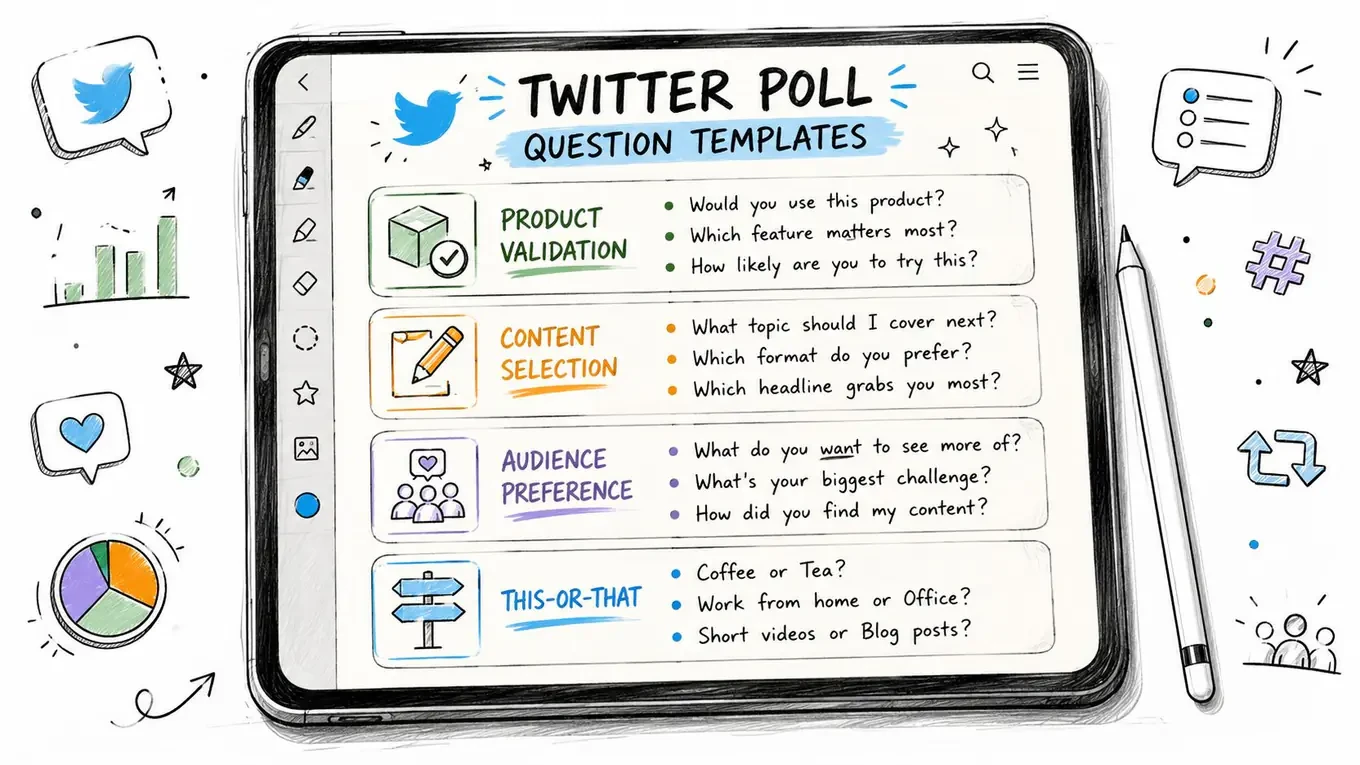
A good place to start is with a blank post structure you can adapt quickly. If you want a clean way to frame your setup, the blank Twitter post template is a useful starting point for tightening the wording before you publish.
Product validation templates
For product decisions, keep the options symmetrical and concrete.
-
Which should we build next?
Option 1. Dark mode
Option 2. Faster search
Option 3. Team roles
Option 4. Mobile alerts -
What matters most in this tool?
Option 1. Speed
Option 2. Simplicity
Option 3. Integrations
Option 4. Price
Those work because each option is a clean idea, not a sentence disguised as a choice. You’re not asking people to read a mini pitch, you’re asking them to choose a priority.
Content and audience preference templates
For creators and marketers, polls work well when you’re deciding what to post next.
-
Which post would you read first?
Option 1. A teardown
Option 2. A checklist
Option 3. A case study
Option 4. A hot take -
What should I write about next?
Option 1. Hooks
Option 2. Replies
Option 3. Scheduling
Option 4. Analytics
These are simple because they’re easy to answer and easy to act on. A poll like this doesn’t just gather opinions, it gives you a content queue.
This-or-that engagement templates
These are the easiest polls to vote on because they require almost no effort.
-
Morning work or night work?
Option 1. Early start
Option 2. Late start -
Build in public or build privately?
Option 1. Build in public
Option 2. Build privately
If you want more votes, this style usually beats a more complex setup because the choice is instant. It also invites replies from people who want to explain themselves after voting.
Decision polls for the next move
These are best when you’ve already narrowed the decision down.
-
Which launch step should come first?
Option 1. Waitlist
Option 2. Demo video
Option 3. Landing page
Option 4. Beta invite -
What should I post after this?
Option 1. Results thread
Option 2. Breakdown post
Option 3. Follow-up poll
Option 4. Short recap
Keep the options parallel. If one answer is a verb, don’t make the others nouns. If one is a category, don’t make the others outcomes.
Reading Poll Results Without Fooling Yourself
A poll result can be useful without being representative. That’s the line that gets blurred, and it’s where bad decisions start. X polls are visible, easy to vote on, and heavily shaped by who happened to see them, who bothered to click, and how the platform displays the results.
Treat the result as a signal, not a census
Researcher Robert Hansen’s critique of Twitter poll outcomes argues that they can be “grossly inaccurate” and “bogus”, pointing to mismatches between voting counts and tweet activity reports and to rounding behavior that can distort close races (Robert Hansen’s analysis). The practical takeaway is simple. A poll may tell you what a self-selected subset of your audience prefers, but it doesn’t tell you what the whole market thinks.
That’s why poll percentages can be directionally helpful and still misleading. If your followers are highly engaged founders, traders, creators, or operators, their votes reflect that slice of the world, not a neutral sample.
When the numbers are useful
Polls are most useful when the decision is already narrow and you need a fast preference check. They can help you compare two feature directions, choose between two headlines, or validate which of several already-formed ideas feels strongest to your audience.
They’re also helpful after you’ve shipped something and want to confirm which part resonated most. In that setting, the poll is not the source of truth, it’s a feedback layer on top of a decision you’ve already made.
When the numbers mislead
Polls become dangerous when you start using them as market research. A split that looks decisive can still come from a small, self-selected audience, and a close result can be affected by rounding and display quirks. Don’t turn a casual poll into evidence for a major pricing change, product strategy shift, or audience-wide conclusion.
For anyone tracking how poll outcomes fit into the rest of their X metrics, the Twitter analytics guide is a better companion than another engagement-only checklist. It helps you separate simple interaction from broader content performance.
A clean way to label every poll is to tag it as either a signal poll or a decision poll.
- Signal poll: you’re gathering directional feedback.
- Decision poll: you’ve narrowed the choice and want the audience to help pick the final direction.
If a poll can’t be tagged cleanly, it probably needs a better question.
Timing, Duration, and the Follow-Up Post
A poll only earns its keep when the timing, run length, and follow-up all work together. The practical pattern is simple, launch while your audience is active, keep the window aligned with how long the question stays relevant, and publish the result soon after the poll ends. That is the part that keeps a poll from becoming a stray engagement blip.
Match the duration to the question
Fast-moving questions need short windows. If you are reacting to a launch, a live event, or a conversation that is already moving quickly, a brief poll keeps the energy focused and prevents the topic from going stale before you share the result. Longer windows make more sense when you want people across time zones to see it, or when the audience needs more time to think before voting.
X gives you enough range to do both, from 5 minutes to 7 days, with 1 day as the default if you do not change it (X help center on polls). That range covers a quick engagement check and a slower decision prompt without forcing you into one style.
Post when your audience is already around
Audience timing matters more than people like to admit. If your followers are most active at certain points in the day, publish the poll then so it gets an early burst of responses. Early traction matters because a poll that starts with little activity can stay that way, while an active first wave gives the post a better chance to keep moving.
For a practical scheduling angle, the best time to post on Twitter guide is a useful companion. Pair that with your own analytics, and you will make better calls than you will by posting on habit alone.
Close the loop with the next post
The follow-up is where the poll turns into a content asset instead of a one-off interaction. Share a results breakdown within 24 to 48 hours so the audience sees the poll mattered, then turn the winning option into the next post, thread, or update.
A simple workflow looks like this:
- Publish the poll. Keep the question narrow and the answers symmetrical.
- Watch the early pattern. Notice whether the result is swinging fast or settling quickly.
- Post the result. Share the outcome while the question is still fresh.
- Reuse the losing option. Save it for another post, thread, or angle later.
That follow-up step is where many creators leave value behind. The poll itself is just the prompt, the results post is the asset.
A Worked Example From Question to Next Post
A founder is deciding what to build next in public. The choice is between a dashboard overhaul and a better onboarding flow, and both ideas are good enough that internal debate keeps going in circles. Instead of guessing, the founder posts a poll with two clean options and a short question that fits on one screen.
The poll itself
The question is direct. The choices are symmetrical. Nothing in the wording pushes people toward one answer. That matters, because the poll is supposed to reveal preference, not smuggle in a pitch.
The founder runs the poll for 1 day, because the question is simple and doesn’t need a long shelf life. During that window, replies start to show not just which option people prefer, but why they care, which is often more useful than the vote count itself.
The result post
When the poll closes, the founder posts a thread with the outcome and a short interpretation. The result post doesn’t pretend the poll is scientific, it frames the choice as a directional signal from an engaged audience. That keeps the update honest and gives the audience a reason to read it as part of an ongoing build-in-public story.
One clean structure is:
- State the result.
- Explain what it means for the roadmap.
- Call out what happens next.
That sequence works because it turns the poll into a narrative, not just a tally.
The next content asset
The winning option becomes the next announcement. If onboarding won, the founder posts a preview of the onboarding change and explains the problem it solves. If dashboard overhaul won, the next post teases the design direction and why that area got priority.
The losing option doesn’t disappear. It becomes future material for a later thread, a roadmap update, or a “why we didn’t choose this” post. That gives one poll three separate content moments without recycling the same wording.
If you want to see how other founders and creators shape follower growth around recurring content decisions, SubmitMySaas follower expansion tips is worth reading alongside your own experiments. The useful part isn’t the tactics alone, it’s seeing how a larger audience strategy makes each poll more valuable.
Fitting Polls Into a Broader X Workflow
Polls work best when they sit inside a research and publishing routine, not when they show up as isolated engagement bait. The best operators use them to discover ideas, study patterns, draft follow-up posts, and keep a queue of future angles ready. That’s also why a strong workflow matters more than a clever one-off question.
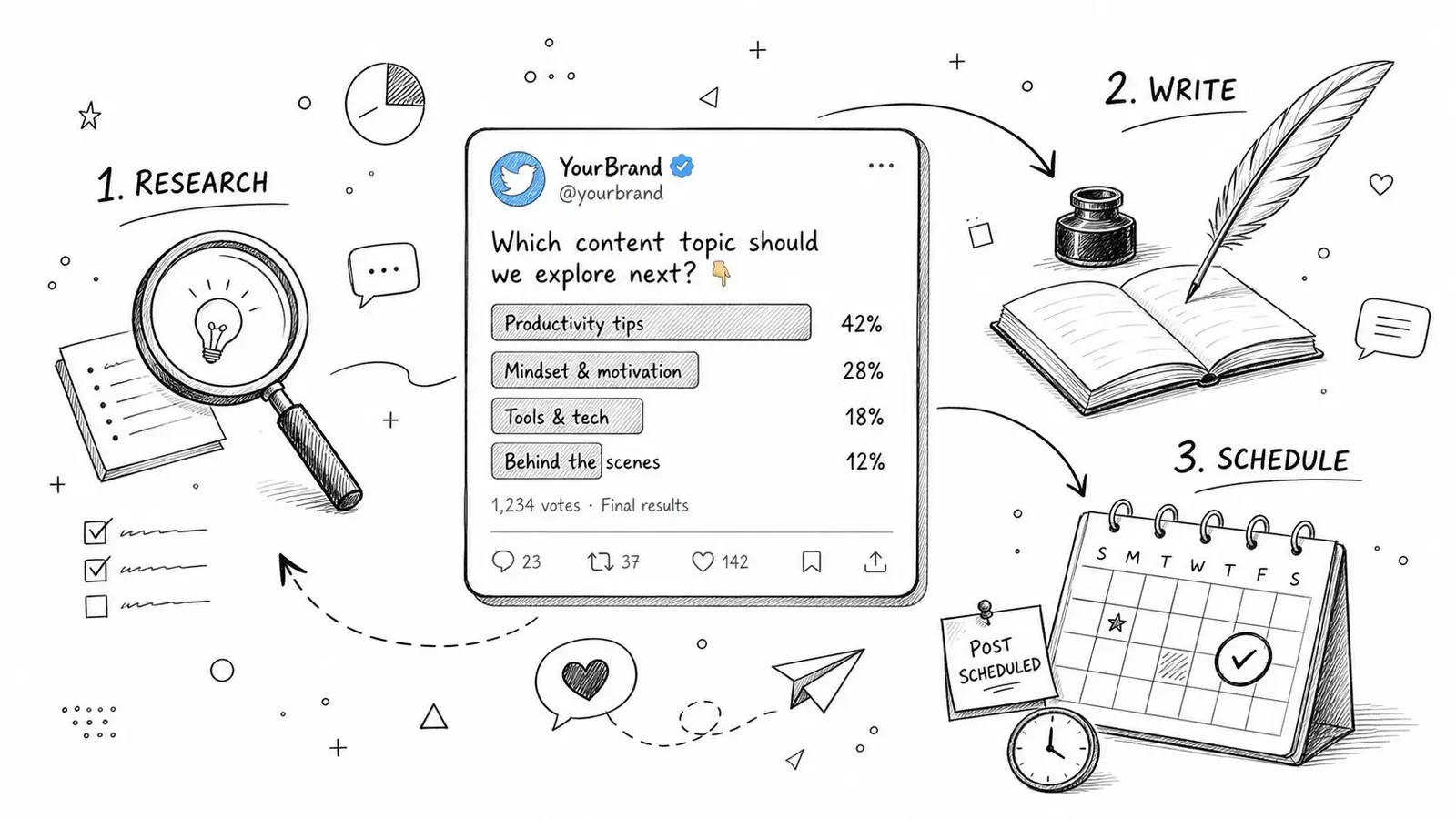
Research, then remix
The first useful habit is studying which poll formats already get traction in your niche. Save strong examples into a collection, then break down the hook, structure, and choice design before you try to write your own. If you’re using a tool like Xholic, that’s where an Inspiration Library, Ask Xholic, and Tweet Remixer can fit naturally into the process, not as magic shortcuts, but as ways to reduce blank-page friction.
The point is to learn the pattern, then adapt it to your own voice and context. That keeps your polls from sounding copied while still letting you borrow what works.
Turn replies into research
Replies around a poll are often more valuable than the vote total. They show language your audience uses, objections you may not have thought of, and side-questions that deserve their own posts. A conversation-focused workflow, including a Engage if you use one, helps you keep those interactions organized instead of letting them vanish into the feed.
That’s also how polls feed content calendars. One poll can become a result post, a thread, a quote post, and a later follow-up if you save the right parts instead of treating the poll as the whole story.
Schedule the system, not just the post
Consistency comes from planning ahead. If you only post polls when you feel stuck, they stay random. If you schedule the poll, the result post, and the next asset together, you’ve built a repeatable content loop.
For planners who want that broader sequence mapped out, the Twitter content calendar guide helps connect research, posting, and follow-up into one weekly rhythm. And if you want a scheduling layer that keeps those pieces moving without losing the human review step, a smart scheduler can help you keep the workflow tight.
Your Pre-Launch Checklist and Next Step
Before you post a poll, make sure the setup is clean enough that the result will mean something. If one of these pieces is sloppy, the whole poll gets weaker.
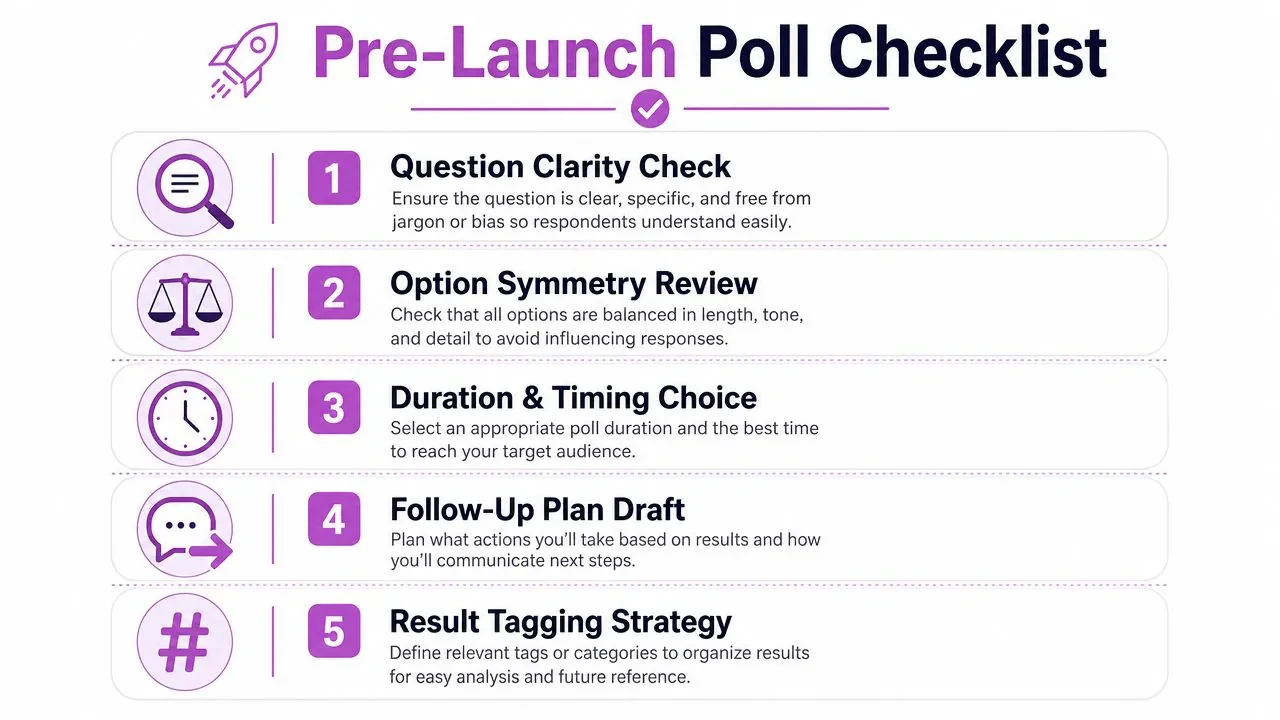
- Question clarity check. Can someone understand the poll in three seconds without reading it twice?
- Option symmetry review. Are the choices parallel, short, and mutually exclusive?
- Duration and timing choice. Does the window fit the shelf life of the question and the time your audience is active?
- Follow-up plan draft. Do you already know what you’ll post when the poll closes?
- Result tagging strategy. Have you decided whether this is a signal poll or a decision poll?
Keep this simple: if you can’t explain why each option exists, the poll isn’t ready yet.
The next move is straightforward. Pick one template from earlier, adapt it to a real decision you’re facing this week, and schedule the poll plus the results post as a pair. If you want help managing the surrounding workflow, Xholic AI can support the research, reply, and scheduling pieces so you’re not starting from scratch every time.
If you want a more consistent way to turn X polls into research, content, and follow-up posts, try Xholic AI. It helps you decide what to post next, study what worked, and keep the workflow moving without losing your voice. For founders, creators, and marketers who use X seriously, that means less guesswork and a cleaner system around every poll you run.