The fastest way to create a Twitter content calendar is to stop trying to write every post in advance. Instead, define 3–5 content pillars and assign one theme to each day of the week, then publish within the commonly effective range of 3–5 tweets per day for sustainable growth and engagement, as noted by Tweet Archivist’s summary of Buffer and Sprout Social data.
If you’re staring at the X (Twitter) composer every day trying to think, write, edit, and post in one sitting, the problem usually isn’t discipline. It’s workflow. Most creators don’t need a bigger spreadsheet. They need a lighter system that separates planning from writing so consistency stops feeling like a daily test.
That’s the shift that makes a Twitter content calendar useful. Plan themes first. Write later. Leave room for real-time posts. Review performance on a simple rhythm. When you do that, the calendar stops being admin work and starts acting like a publishing system.
When a calendar idea needs a multi-post sequence, use the complete Twitter threads guide to choose the structure, map the payoff, and review the opening three posts before scheduling.
Your Fast and Effective Twitter Content Calendar
Users often make the same mistake with a Twitter content calendar. They try to finish the entire week in one sitting, then burn out halfway through Tuesday. That approach looks organized, but it usually produces stiff posts, missed days, and a lot of open tabs.
A better system is lean. Pick a few themes, map them to days, and keep each planned post to one sentence. That sentence is the point of the post, not the final copy. When it’s time to publish, you only need to write the hook and delivery, not invent the topic from scratch.
Practical rule: Planning should remove decisions, not create more writing.
That’s why this works for founders, indie hackers, marketers, and creators who are busy building something real. Your calendar should guide the week, not lock you into finished tweets that already feel stale by the time they go live.
If the blank composer keeps slowing you down, start with a one-line prompt for each day and keep your idea bank close. This is the same logic behind using a blank Twitter post template before you worry about polish. You’re reducing friction first.
Define Your Goals and Content Pillars
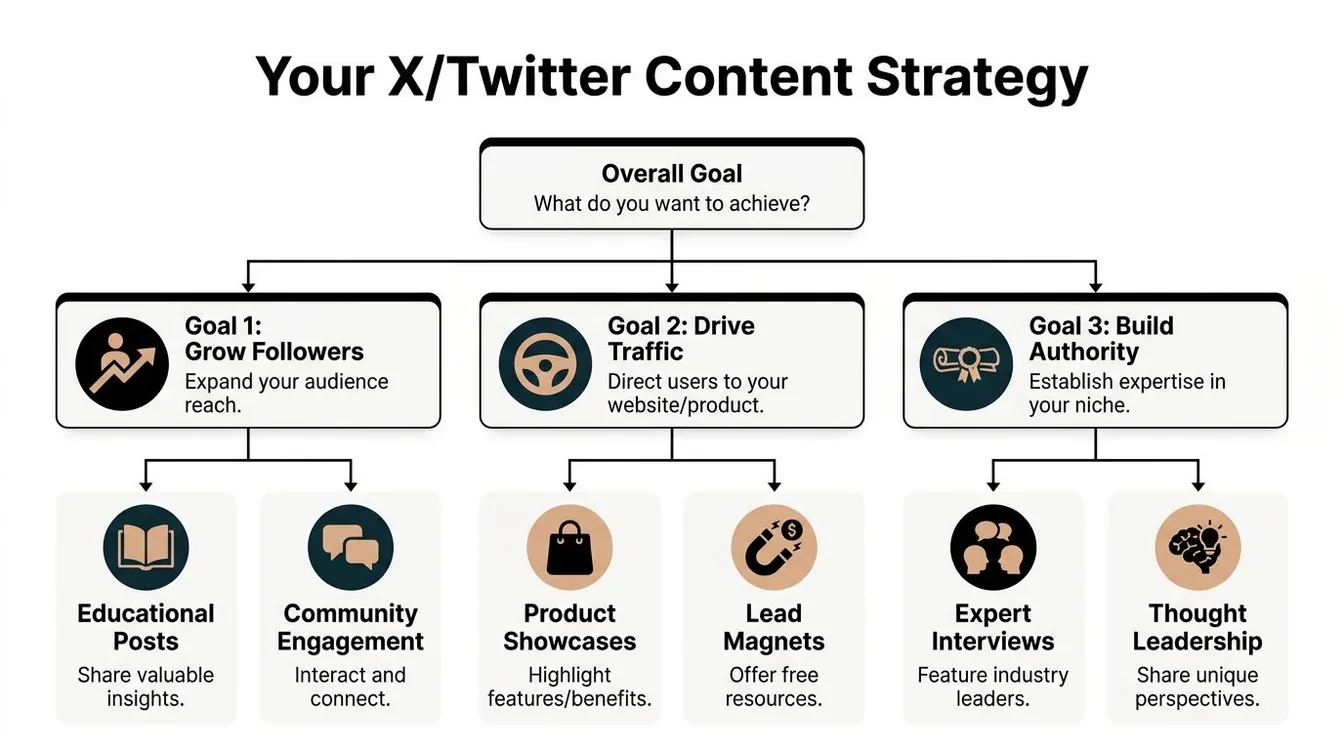
Before you pick posting days, decide what the account is supposed to do. A calendar without a goal becomes a pile of content ideas with no direction.
Start with the outcome
Your content mix changes depending on what you want from X.
| Goal | What your posts should do | What usually hurts |
|---|---|---|
| Grow followers | Earn replies, shares, saves, profile visits | Repeating the same angle every day |
| Drive traffic | Build curiosity, then give people a reason to click | Posting links with no context |
| Build authority | Show judgment, pattern recognition, and specificity | Generic educational posts |
For solo founders and indie hackers, a practical batching rhythm is to block 30–45 minutes on Sunday evening or Monday morning to create the upcoming week’s content, then spend 15 minutes every Friday reviewing metrics and adjusting your pillar mix for the next cycle, according to OpenTweet’s Twitter content calendar guide.
That review matters because your best calendar isn’t static. It gets sharper as you learn which topics produce stronger engagement, better replies, and more qualified attention.
Turn one goal into repeatable themes
Once the goal is clear, build 3–5 content pillars. These are the subjects people should expect from you.
A founder building in public might use pillars like these:
- Build lessons from shipping, mistakes, user feedback, or product trade-offs
- Practical X advice about replies, hooks, scheduling, analytics, or content ideas
- Industry opinions on AI, creator tools, platform changes, or product design
- Progress updates that show what changed this week and what didn’t work
The tendency is to overcomplicate things here. A pillar doesn’t need to be clever. It needs to be reusable.
When a pillar is strong, you can generate ten post angles from one week of work.
If your ideas feel thin, study what already resonates in your niche and save patterns you can reinterpret. A simple ideation process like the one covered in this guide to content ideation works better than waiting for inspiration at posting time.
Build Your Weekly Content Schedule Template
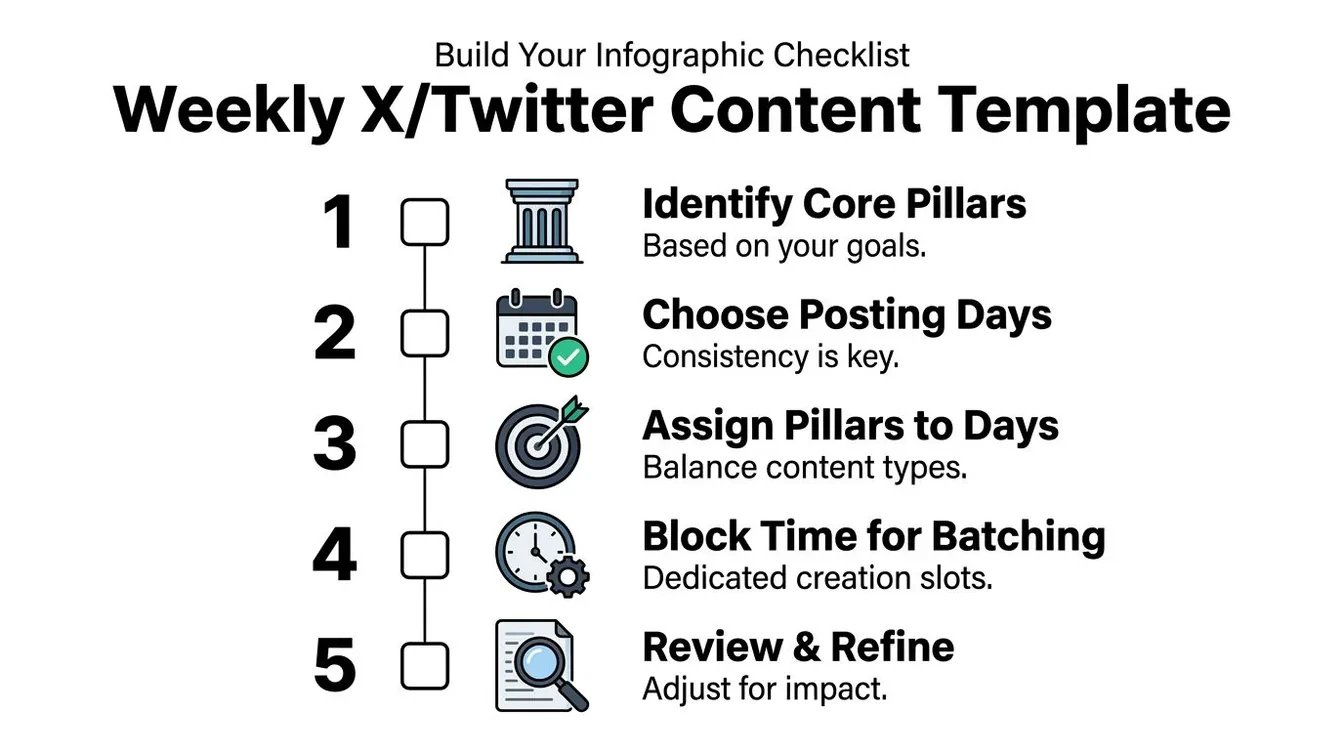
The weekly template is where the calendar becomes usable. You’re not writing seven polished tweets here. You’re assigning purpose to days.
Use a simple day-based structure
This is the schedule I’d recommend for a founder or creator who wants consistency without turning X into a full-time job:
- Monday lesson from building your product
- Tuesday practical advice about replies, content, or growth
- Wednesday stronger opinion or industry observation
- Thursday product problem, feature, or user insight
- Friday transparent progress update
- Weekend reactive content, repurposing, or no post if you have nothing useful to say
That takes about 15 minutes to plan because each day only needs one sentence.
For example:
- Monday: “A small onboarding mistake created support friction I didn’t expect.”
- Tuesday: “Many fail on X because they combine ideation and writing in the same session.”
- Wednesday: “AI-generated tweets aren’t the problem. Generic inputs are.”
- Thursday: “A feature request showed me users wanted organization, not more generation.”
- Friday: “What got easier this week, what stayed messy, and what I’m changing next.”
What this looks like in practice
The separation between planning and writing is the part that improves consistency. Earlier, many creators open X, search for an idea, draft the hook, edit, and publish in one block. That creates pressure and often leads to filler.
A better process looks like this:
- Plan the topic for each day in one sentence.
- Write later when you have enough context and energy.
- Keep open space for timely posts and replies.
That last point matters. Common calendar mistakes include filling every slot too tightly and stacking promotional posts back to back. According to Planify’s Twitter content calendar guide, clustering promotional tweets can reduce engagement rates by 18–22% across A/B tests on 1,200 scheduled posts.
A rigid calendar looks efficient until the platform gives you a better conversation to join.
If you’re comparing workflows before choosing software, this roundup of best social media scheduling tools is useful because it frames the trade-offs between simplicity, automation, and team needs instead of treating every scheduler as the same product.
Create a Smart Workflow from Idea to Post
A content calendar usually breaks at the same point. Monday looks organized, then Tuesday turns into staring at a half-empty draft box, trying to write and decide at the same time.
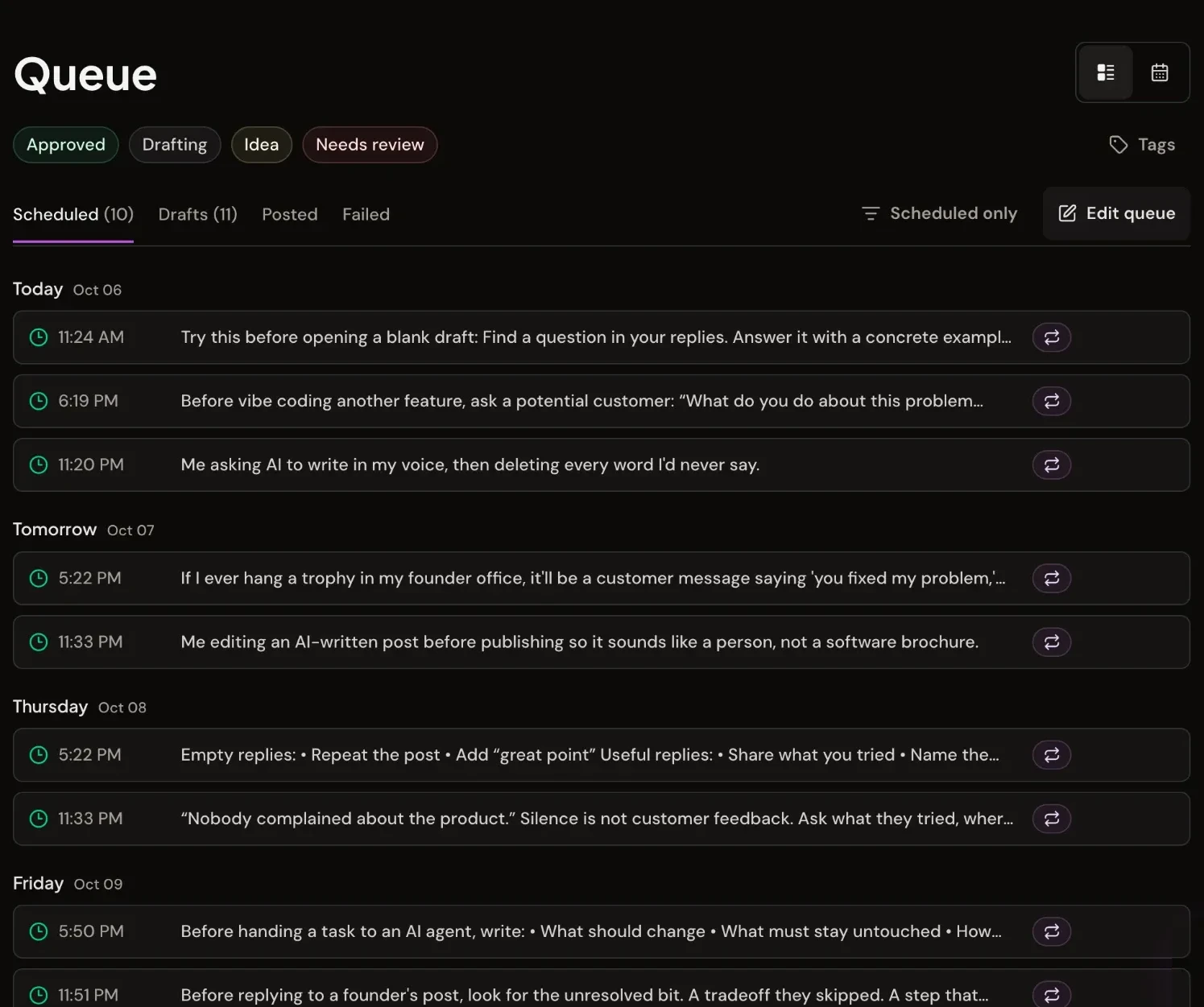
The fix is simple. Separate planning from writing.
Planning sets direction. Writing turns one good idea into a post with a clear opinion, example, or takeaway. Combining both into one session feels efficient, but it usually creates vague drafts because the idea is still undercooked. Keeping them separate gives each step a smaller job, which makes consistency easier to maintain.
A lean workflow looks like this:
| Session | What happens |
|---|---|
| Planning block | Assign themes to days and write one-line prompts |
| Writing block | Turn the strongest prompts into finished tweets, threads, and reply starters |
| Scheduling block | Queue approved posts into your publishing slots |
| Review block | Note what shipped, what stalled, and which prompts deserve another pass |
That middle step matters most. A one-line prompt is enough for the calendar. It might be “why customer research beats dashboards for content ideas” or “mistake I made scheduling too much promo.” That gives you a direction without forcing finished copy before you have the time or energy to write well.
Timing still matters, but it comes after quality. Buffer’s analysis of the best time to post on X points to weekday mornings, especially midweek, as a strong baseline for reach. Use those windows for posts you care about most. Everything else can fill the edges.
Queue approved posts, not rough thoughts
Scheduling works best as a filter, not a crutch. The calendar should hold ideas and approved posts, not every half-formed sentence that crossed your mind during planning.
I treat these as four separate actions for a reason:
- Capturing records the idea in plain language
- Drafting turns it into a post with a point
- Queueing places approved content into a slot
- Scheduling assigns the publishing time
That distinction keeps the calendar clean. It also prevents a common burnout loop where creators fill every slot first, then scramble to make weak prompts sound publishable.
A better mix is to keep a small bench of ready posts. Include a few anchor posts with stronger takes, a few lighter support posts, and space for replies or timely observations. That gives you structure without boxing you in.
If you use AI during drafting, keep its role narrow. A tool can help expand a one-line prompt into options, but the final post still needs your examples, your standards, and your sense of timing. This AI tweet generator workflow is useful for first drafts when you want speed without handing over judgment.
If your workflow also supports paid campaigns, keep conversion tracking separate from the organic calendar. Organic posting is for attention and conversation. Ad reporting answers a different question. Cometly for Twitter conversions is useful on that side because it shows what happens after the click instead of treating impressions as the finish line.
Measure Performance and Iterate Your Calendar
If you don’t review the calendar, you’re just repeating a routine. The point of analytics is to decide what to keep, cut, or rewrite.

Track the few numbers that change decisions
The cleanest metric to start with is engagement rate. On X, the formula is (Total Engagements / Total Impressions) × 100. Benchmarks in Swydo’s X analytics overview define above 0.03% as average, above 0.05% as good, and consistently above 0.1% as excellent.
That benchmark matters because it gives you a decision line. If your posts sit below the good threshold for weeks, the answer usually isn’t “post more.” It’s to test better topics, stronger hooks, different formats, or better timing.
A useful weekly review can be as simple as this:
- Check engagement rate by content pillar
- Compare impressions across days and formats
- Look at replies and profile visits to spot posts that create deeper interest
- Flag candidates for repurposing instead of always chasing new ideas
If you run paid campaigns alongside organic posting, it also helps to separate social engagement from downstream business outcomes. For that side of the workflow, Cometly for Twitter conversions is a helpful reference point for thinking about attribution without confusing ad performance with organic content quality.
Use results to change the next cycle
Your calendar should evolve month to month. If opinion posts outperform product commentary, shift the ratio. If educational threads get attention on peak weekdays, protect those slots. If a format repeatedly underperforms, stop defending it.
Posts don’t fail because the calendar failed. They usually fail because the idea, angle, or timing was weak.
For smaller accounts, there’s also a useful visibility check. A Twitter account with 1,000 followers should typically expect 200–400 impressions per tweet, or about 20–40% of follower count, according to Reply Guy Framework benchmarks. That’s a straightforward way to judge whether the calendar is producing reach.
If you want a clearer review loop, a dedicated Twitter analytics guide can help you connect impressions, engagement, and consistency to actual posting decisions instead of vanity reporting.
Frequently Asked Questions About Content Calendars
How far in advance should you plan Twitter content
For most creators, one week ahead is enough. It gives you structure without making your content feel detached from what people are discussing right now.
The planning window doesn’t need to include finished tweets. In practice, it’s better when it doesn’t. A rolling weekly plan of themes and rough post purposes stays flexible and keeps the writing fresher.
If you want a lighter template, use a weekly map like this:
- Core days: assign your strongest recurring themes
- Flexible day: keep one slot available for something timely
- Weekend buffer: repurpose a strong post, reply more actively, or skip posting if there’s nothing worth saying
This is easier to maintain than a month of fully drafted posts because it doesn’t ask you to predict every useful conversation in advance.
How do you handle trends and breaking news
Here, rigid scheduling breaks down. You need open space in the calendar.
Existing Twitter content calendar advice often leans on a fixed 70% pre-scheduled model, but it misses the mid-week decision of when to swap a planned evergreen post for something more timely. That gap matters because 30% of viral growth on X now comes from reactive, timely replies rather than planned posts, according to Tweet Archivist’s content strategy framework.
A practical rule set:
- Keep one or two open slots for reactive posts or high-quality replies
- Swap planned content when the trend directly overlaps with your niche
- Don’t chase every topic just because it’s loud
- Use replies first if you have a sharp angle but not a full standalone post yet
A founder talking about product, AI, or growth might use that flexible slot for an X platform update, an industry announcement, or a debate already gaining momentum in relevant creator circles.
What is the best tool for a Twitter content calendar
The best tool is the one that reduces friction between idea, draft, and publish.
Some people do well with a Google Doc, Notion board, or sheet. That’s fine if your workflow is simple and you don’t mind jumping between research, drafting, and scheduling tools. But as soon as your process includes saving examples, studying high-performing formats, drafting replies, remixing old posts, and queueing approved content, disconnected tools start creating drag.
Here’s the trade-off:
| Tool type | Best for | Limitation |
|---|---|---|
| Notes app or doc | Very simple solo workflows | Weak for scheduling and review |
| Spreadsheet | Teams that want visibility | Easy to overbuild and underuse |
| Scheduler only | Publishing consistency | Doesn’t solve ideation or writing |
| Integrated X workflow tool | Research, drafting, saving, scheduling in one place | Needs a clear system to avoid over-automation |
If you prefer one environment for discovery, idea storage, writing assistance, and scheduling approved posts, Xholic AI fits that workflow well. Its Chrome extension keeps reply drafting and remixing inside the X feed, and the broader toolkit supports inspiration search, reply drafting, remixing, scheduling, and consistency tracking. That matters if your main bottleneck isn’t publishing. It’s deciding what to say and finding better conversations to join.
Should you schedule every tweet
No. Scheduling should handle predictable content, not replace judgment.
Leave room for real-time posts. If you pre-fill every slot, the account starts sounding detached. Planned posts create consistency. Unscheduled posts keep the account current.
That balance also protects your best ideas. Some posts should wait for a stronger day or time slot rather than being pushed live just because the queue is empty.
A useful calendar starts with clear Twitter content pillars and a cadence you can sustain, so decide how often to post on Twitter before filling every slot. The complete How to Grow on Twitter guide shows where the calendar fits within the wider growth system.
Conclusion Start Building Your Growth Engine
A Twitter content calendar works best when it does less. It should tell you what kind of post to make, why it matters, and roughly when it belongs. It shouldn’t force you to finish every tweet before the week even starts.
The system is simple. Choose a few pillars. Assign them to days. Plan in one short session. Write in a separate session. Keep at least one slot flexible. Review what performed and adjust the next cycle.
That’s the version of consistency most creators can maintain. It removes the blank-page problem without trapping you in a rigid schedule. And it usually leads to better posts because you’re writing with a clear angle instead of posting just to fill the calendar.
If you want one place to discover high-momentum conversations, save ideas, draft better posts and replies, organize your workflow, and schedule approved content, try Xholic AI. It’s built for people who want a real X publishing system without living in the timeline all day.