@claudeai ·
Computer use is now in Claude Code. Claude can open your apps, click through your UI, and test what it built, right from the CLI. Now in research preview on Pro and Max plans.
Watch video
Best tweets about Claude Code
Read the best tweets about Claude Code, covering terminal workflows, agents, hooks, skills, debugging, and real software projects. Updated weekly.
Concrete Claude Code workflows, configuration, production use, and lessons from developers shipping real changes.
Best Claude Code tweets
Ranked 01–50
@claudeai ·
Computer use is now in Claude Code. Claude can open your apps, click through your UI, and test what it built, right from the CLI. Now in research preview on Pro and Max plans.
Watch video
@om_patel5 ·
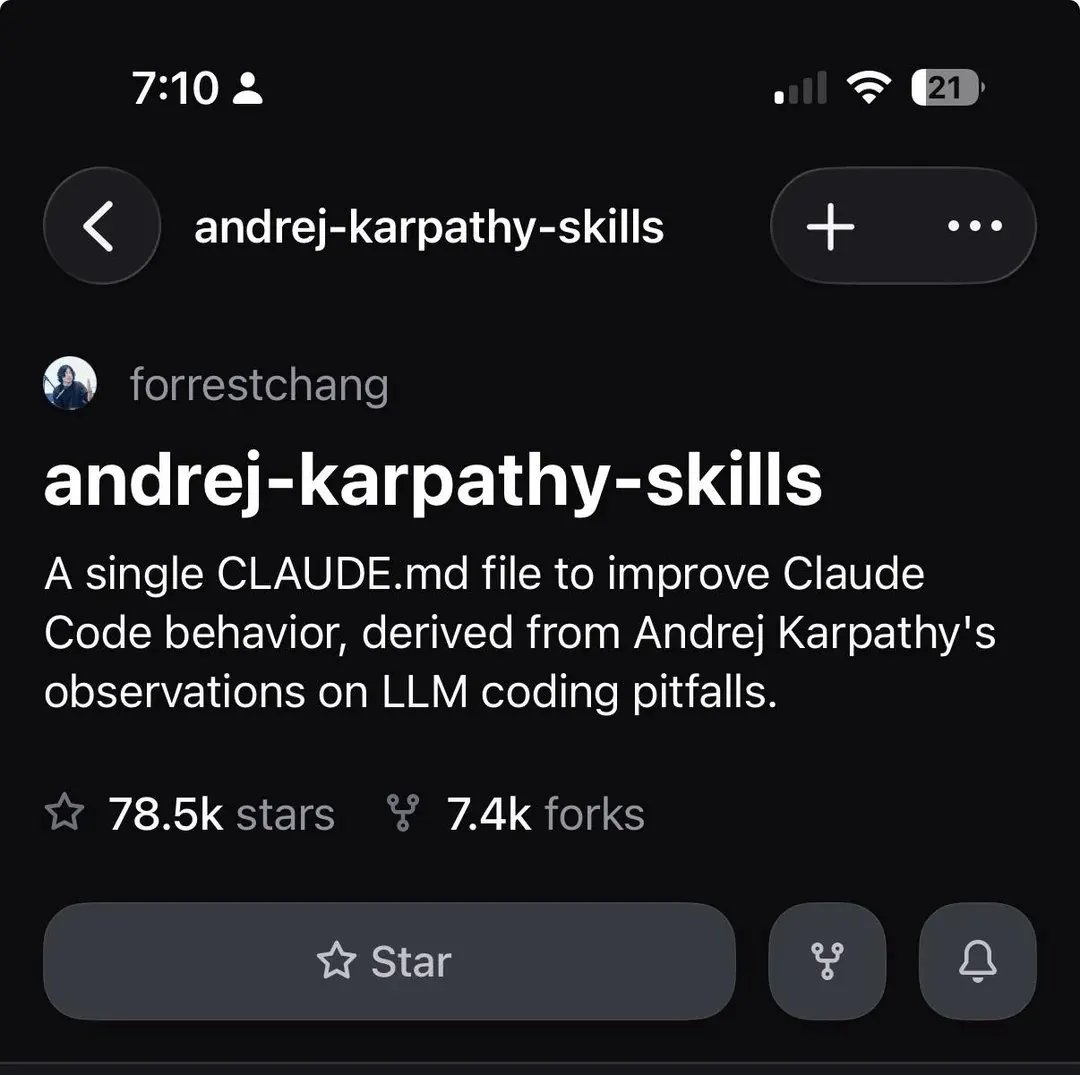
SOMEONE BUILT A SINGLE CLAUDE.MD FILE THAT FIXES EVERY BAD HABIT CLAUDE CODE HAS AND IT HIT 78.5K STARS it's based on andrej karpathy's public observations about how LLMs write code the problem he pointed out is that claude makes silent assumptions, overcomplicates everything, writes 1000 lines when 100 would do, and sometimes deletes code it doesn't fully understand as a side effect so forrestchang turned karpathy's critique into 4 behavioral principles and dropped them in one claude.md file: 1\ surface your assumptions don't pick an interpretation silently. if there are multiple ways to read the task, say so. if uncertain, ask. push back when something doesn't make sense instead of just running with a bad plan 2\ minimum viable code no speculative features, no abstractions for single use code, no "flexibility" you weren't asked for. if you wrote 200 lines and 50 would work, REWRITE IT. ask yourself if a senior engineer would call this overcomplicated 3\ surgical changes only don't touch code you don't fully understand, don't refactor unrelated stuff as a side effect, don't delete comments because they look unnecessary. only change what the task actually requires 4\ goal driven execution give claude success criteria instead of step by step instructions. karpathy's exact quote: "LLMs are exceptionally good at looping until they meet specific goals. don't tell it what to do, give it success criteria and watch it go" one file has 78.5k STARS AND 7.4k FORKS on a single github repo. install is one curl command that drops it straight into your ~/.claude folder
@trq212 ·
We just released Claude Code channels, which allows you to control your Claude Code session through select MCPs, starting with Telegram and Discord. Use this to message Claude Code directly from your phone.
@startupideaspod ·
Boris Cherny, the creator of Claude Code, shared his entire setup. He runs 5-10 Claudes in parallel. Half his coding happens from his phone. Here's his 3-part formula for better results: Use the smartest model available — Counterintuitive: it's actually cheaper — Smarter model = fewer tokens = lower total cost — "Once the plan is good, the code is good" Invest in your Claude MD — Plain text file. No special format. — Whole team contributes multiple times a week — Every mistake Claude makes gets added so it never happens again Give Claude a way to verify its own output — Let it run the code. Let it see the browser. — "Imagine you're a painter wearing a blindfold" — Same thing for an AI that can never check its work His morning routine: wake up, kick off 3 sessions from his phone, check in later. His workflow: start in plan mode → lock the plan → auto-accept edits → done. No fancy setup. No complex tooling. Just multiple Claudes, a good plan, and a shared knowledge base.
@akshay_pachaar ·
Claude Code fully dissected! Researchers from UCL reverse-engineered the leaked Claude source. What they found changes how you should think about agent design. Only 1.6% of the codebase is AI decision logic. The other 98.4% is operational infrastructure. Permission gates, tool routing, context compaction, recovery logic, session persistence. The model reasons. The harness does everything else. This is the opposite of what most agent frameworks do today. LangGraph routes model outputs through explicit state machines. Devin bolts heavy planners onto operational scaffolding. Claude Code gives the model maximum decision latitude inside a rich deterministic harness, and invests all its engineering effort in that harness. The core loop is a simple while-true. Call model, run tools, repeat. But the systems around that loop are where the real design lives: A permission system with 7 modes and an ML classifier. Users approve 93% of prompts anyway, so the architecture compensates with automated layers instead of adding more warnings. A 5-layer context compaction pipeline. Each layer runs only when cheaper ones fail. Budget reduction, snip, microcompact, context collapse, auto-compact. Four extension mechanisms ordered by context cost. Hooks (zero), skills (low), plugins (medium), MCP (high). Each answers a different integration problem. Subagents return only summary text to the parent. Their full transcripts live in sidechain files. Agent teams still cost roughly 7x the tokens of a standard session. Resume does not restore session-scoped permissions. Trust is re-established every session. That friction is the point. The bet behind all of this is simple. As frontier models converge on raw coding ability, the quality of the harness becomes the differentiator, not the model. Paper: Dive into Claude Code (arXiv:2604.14228) In the next tweet, I've shared an article I wrote on Agent Harness and what every big company is building. Do check.
@sickdotdev ·
Everyone is talking about Claude Code. Very few people actually understand it. The ones who do aren't smarter. They just have a mental model that the hype crowd doesn't. Here's the model: Claude Code has 6 core components. Once you internalize them, the whole thing clicks. You stop fumbling and start building with intention. ━━━━━━━━━━━━━━━━━━━━ 𝟏. CLAUDE. md — Project Memory This is where Claude learns your project before touching a single file. Conventions, architecture, rules. Without this, you're prompting blind every session. 𝟐. Hooks — Lifecycle Control Deterministic shell commands at exact lifecycle points. Before a tool runs. After a file is written. When a session ends. This is how serious teams enforce standards instead of hoping Claude remembers. 𝟑. MCP Servers — External Integrations This is what separates a coding assistant from an actual agent. Claude connects to GitHub, Slack, databases, internal APIs — and acts on them. Not just code generation. Real workflow execution. 𝟒. Subagents — Parallel Orchestration One Claude orchestrates. Others execute in parallel — research, implementation, testing — all running at the same time. This is where the productivity ceiling breaks open. 𝟓. Skills — Reusable Knowledge SKILL. md files encode domain expertise Claude reads before every relevant task. You teach it once. It applies that knowledge forever. Your best decisions become the default. 𝟔. Computer Use — Full Execution Claude doesn't just write code. It navigates browsers, fills forms, controls desktop UI. The loop closes. Idea to shipped — without you touching the keyboard. ━━━━━━━━━━━━━━━━━━━━ Most people will keep using Claude Code as a fancy autocomplete. The ones who go deep into each of these 6 components will build things that look impossible to everyone still lost in the hype. The architecture is the advantage. Which of these 6 do you think is the most underrated — and why?
@TaylorPearsonMe ·
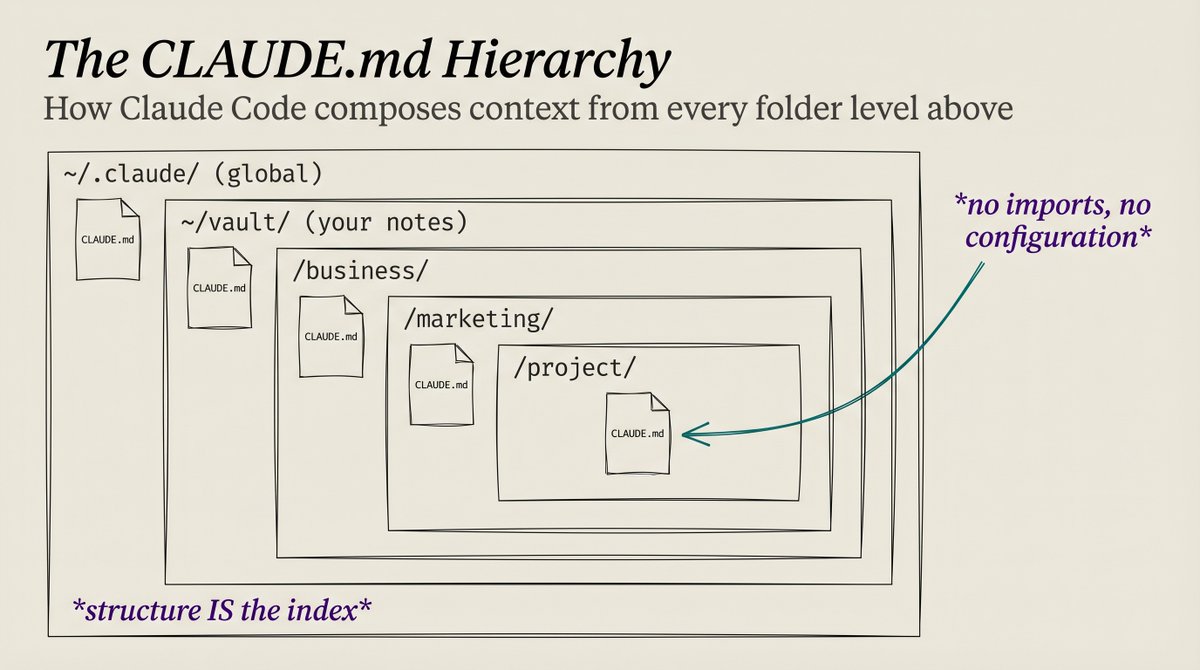
I think the top tip I've picked up since I started using Claude Code: write a CLAUDE [dot] md at every level of your file structure and be intelligent about how you nest folders. Claude Code automatically loads the Claudemd file from every directory level above whatever file you're working on. So if you organize it intelligently, it always has the right context at the right time. Say you're running a business and doing some marketing work. You might have: - A general CLAUDEmd on your computer — how you like Claude to work, voice, tools you have wired up - A vault CLAUDEmd — how your files are organized - A folder for your business with a CLAUDEmd — what the business does, who the clients are, how you price, etc. - A folder for marketing inside the business with a CLAUDEmd — channels you run, what's working, brand voice, etc. - The specific marketing project with its own CLAUDEmd When you open anything in the marketing project folder, Claude Code walks up the tree and pulls all five into context automatically. Global → vault → business → marketing → project. That means the very first message in a chat about that marketing project is going to be like talking to someone that knows you, your business, your marketing history, etc. You need to keep the CLAUDEmd at each level current for this to work I have a "wrap" skill that I run at the end of every chat session. It updates the relevant CLAUDEmd(s) and makes a more detailed entry into a workbench file for whatever I was working on. So if I make a decision about a project or learn something about a client, that context lives in the right file by the time I close the session. Next time I come back, Claude already has it. Starter repo for this kind of setup: https://t.co/m78XGeG7ii I built a little mini-extension for the workbench structure I use: https://t.co/dKQPab0EJv
@Suryanshti777 ·
🚨 Breaking: The guy who created Claude Code @bcherny — just revealed how his team actually builds software with AI. And it’s not prompting. It’s a 5-layer operating system for AI-driven development. Most developers only use: • one Claude session • long prompts • manual reviews • sequential work Boris’s team does the opposite. They run Claude like a parallel engineering org. Here’s what he shared: 1. Parallel sessions (not one AI) They run 5–10 Claude instances at once. Each handles a different task. One writes code One reviews One tests One refactors Everything happens in parallel. 2. Persistent memory via CLAUDE.md They keep a shared CLAUDE.md in the repo. It stores: • past mistakes • architecture rules • coding conventions • verification steps Claude reads it every session. So the AI improves over time. 3. Custom AI subagents Instead of one Claude, they define roles: • backend-reviewer • migration-guard • code-simplifier • verify-app Each agent has a specific job. Like a real team. 4. Worktree isolation (true parallelism) Each agent gets: • its own git worktree • its own task • its own tests • its own PR No context collisions. No waiting. Just parallel execution. 5. Orchestration commands They use compound commands: /simplify → runs multiple reviewers in parallel /batch → launches dozens of agents → each opens a PR This enables: • large migrations • repo-wide refactors • automated reviews • parallel implementation The insight: This isn’t one AI assistant. It’s an AI engineering system. Parallelism Memory Custom roles Isolation Orchestration Stack them together and Claude stops behaving like a chatbot — and starts behaving like a team of engineers. This is what most people missed. They copied prompts. Boris built infrastructure. Bookmark this. This changes how you use Claude Code.
@svpino ·
I asked Claude Code to summarize my talk at the Sonar Summit. Here are the 18 Claude Code tips I shared (and the complete talk below): 1. Always reference files directly using `@filename.py` or `@src/classes/` to constrain the agent. 2. CLAUDEmd → Before writing any code, describe your approach and wait for approval. Ask clarifying questions if requirements are ambiguous. 3. CLAUDEmd → If a task requires changes to more than 3 files, stop and break it into smaller tasks first. 4. Consider creating a `/decompose` command that takes a plan and outputs a list of small tasks to implement one at a time. 5. CLAUDEmd → Describe your tech stack, folder structure, coding conventions, and any anti-patterns you'd like to avoid. 6. Use `/memory` to save any personal preferences that should persist across projects. 7. Create a `.claudeignore` file containing any files the agent shouldn't read or modify. 8. CLAUDEmd → When there's a bug, start by writing a test that reproduces it, then fix it until the test passes. 9. CLAUDEmd → After writing code, list what could break and suggest tests to cover it. 10. Create a `/review-xyz` command that checks for correctness, edge cases, and consistency with codebase patterns. 11. Create a `/test` command that invokes a test sub-agent that runs your test suite. 12. CLAUDEmd → When I say something is wrong, ask clarifying questions before rewriting. 13. Use the `/rewind` command to rollback changes, then give more specific feedback and try again. 14. Use Git worktrees to run parallel agent sessions on different tasks. 15. Use `claude --dangerously-skip-permissions` on a disposable environment to iterate faster while still being able to recover when things go wrong. 16. CLAUDEmd → Every time I correct you, add a new rule to the CLAUDE .md file so it never happens again. 17. Convert any successful, repeatable prompt into a workflow by saving it as a slash command or a skill. 18. Create sub-agents for any repetitive tasks that require a large context or specialized analysis. Reuse these agents without polluting your main context.
@ihteshamali ·
🚨 Anthropic's Claude Code just got a Bloomberg Terminal and it changes how developers work forever. It's called Maestro and it lets you run 1 to 12 Claude Code sessions simultaneously, each in its own isolated git worktree, so every feature, bug fix, and refactor happens in parallel with zero merge conflicts. You assign branches, the app creates the worktrees, every session runs its own AI instance, and a built-in MCP server reports real-time status across all of them in a live grid. → Dynamic grid layout from 1x1 to 3x4 that adapts to however many sessions you launch → Works with Claude Code, Gemini CLI, OpenAI Codex, and plain terminal in any combination → Plugin marketplace lets you install skills, commands, and MCP servers directly per session → GitKraken-style visual git graph shows you which session is working on which branch in real time 99 stars. MIT License. 100% Opensource. Link in comments.
@VaibhavSisinty ·
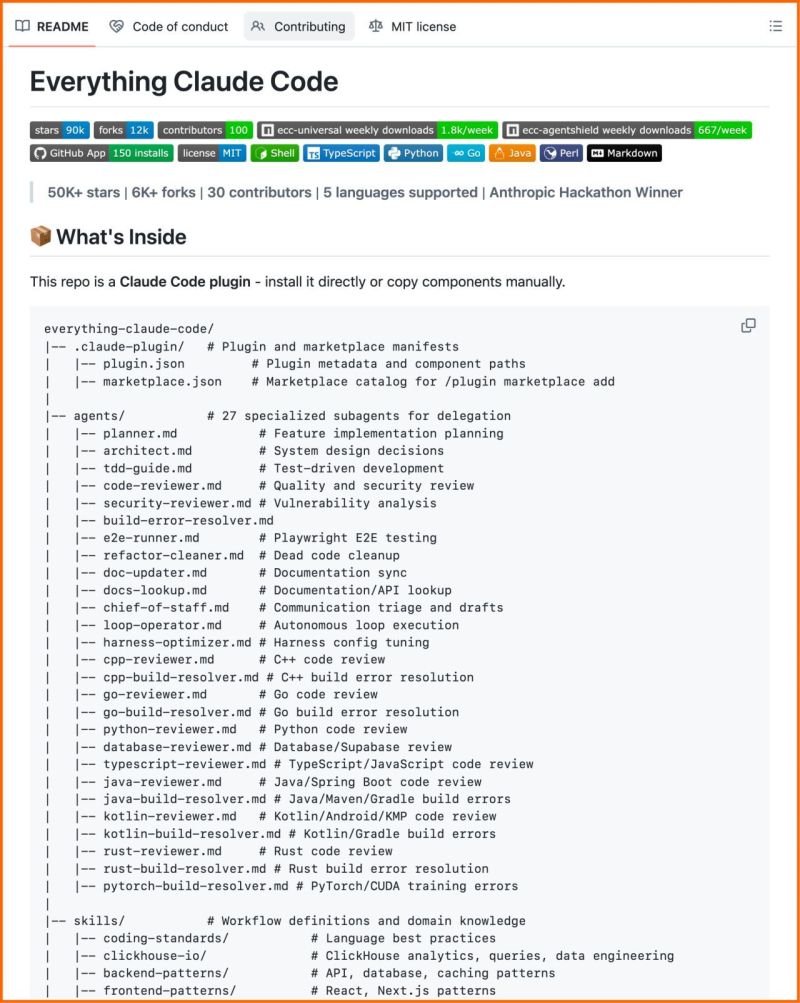
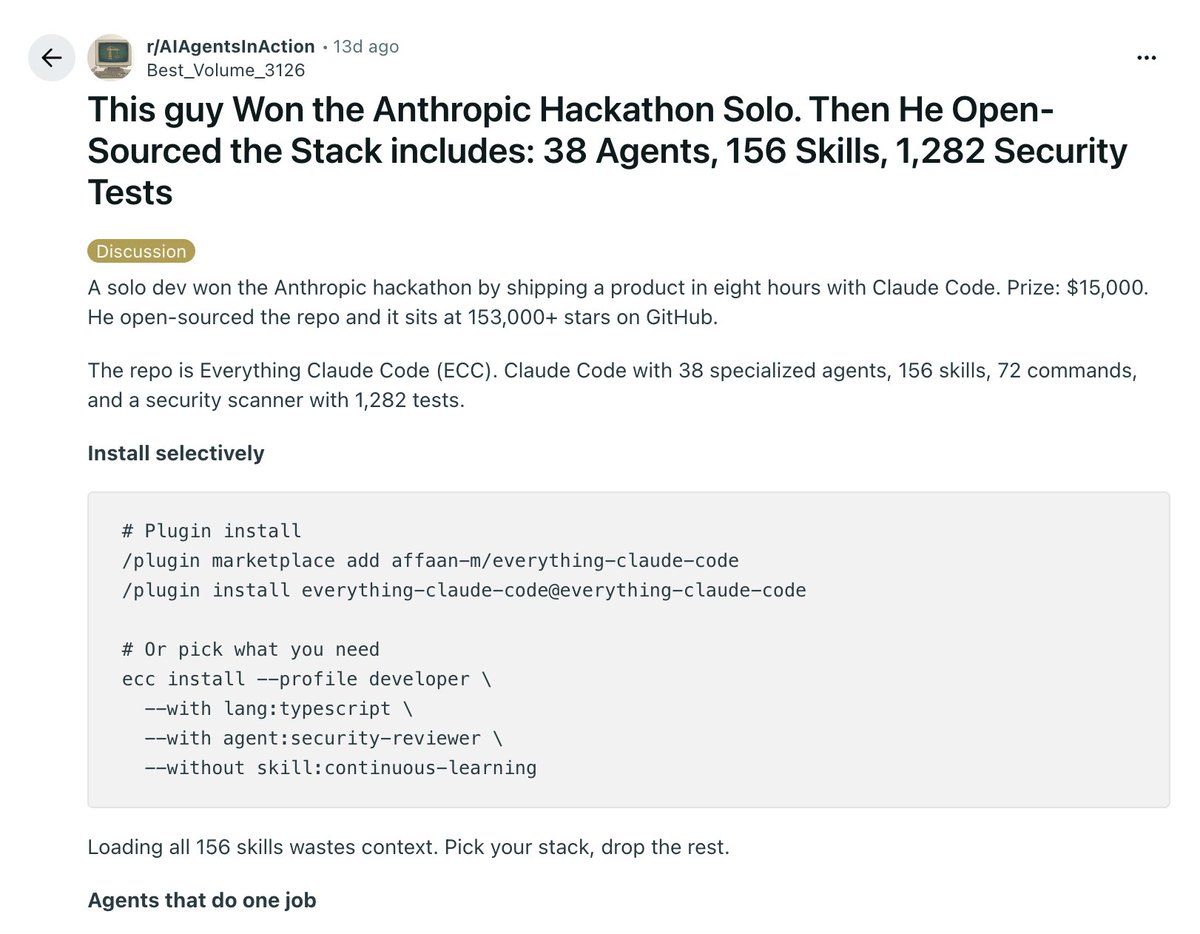
This guy absolutely cooked. Won the Anthropic hackathon solo then open-sourced everything. 🤯 Built a product in 8 hours. The repo now has 153,000+ stars on GitHub. It's called Everything Claude Code. And it turns Claude Code from a single agent into a full engineering team. 38 specialized agents. 156 skills. 72 commands. And a security scanner with 1,282 tests. Here's what actually matters inside it: The planner agent takes a task, breaks it down, and routes each piece to a specialist a security reviewer, a typescript reviewer, a debugger, a code reviewer running 5 parallel checks. Skills load on demand. You don't carry all 156 in context. You pick your stack, drop the rest. AgentShield is the part most people skip. It runs three Opus agents an attacker, a defender, and an auditor against your setup and hands you a prioritized risk report. And the learning layer is what makes it stick. Claude starts blank every session. ECC watches your patterns across sessions and builds confidence over time. By session 10, it writes in your conventions, not generic defaults. The repo is free. The stack is open-source. On GitHub right now.
@JJEnglert ·
Our engineers at @tenex_labs are slamming this new Claude Code feature. Here's how it works: @AnthropicAI just shipped Agent Teams — and it's a big deal even if you're not writing code yourself. Here's the simple version: Instead of one AI working on your problem alone, you can now spin up a whole team of AI agents that work together. One acts as the lead. The others are teammates. They each focus on a different piece of the work, talk to each other directly, and coordinate through a shared task list. Think of it like hiring a project manager who breaks the work into pieces, assigns it to specialists, and makes sure nothing falls through the cracks. Except all of those people are Claude, and they spin up in seconds. Why this matters even if you're not a developer If you've ever used Claude Code to research a problem, write a report, or automate a workflow — you've been working with one brain at a time. That brain has a limit on how much it can hold in its head before things start slipping. Agent Teams removes that bottleneck. Each teammate gets its own full memory. One can be deep in your financials while another is reviewing your competitor landscape while a third is drafting recommendations. They don't confuse each other's work because they literally can't see each other's context. And the best part — they talk to each other. The lead doesn't have to relay everything. Teammates share findings, challenge each other's conclusions, and build on each other's work directly. "Wait, didn't Claude Code already have subagents?" Yes. And this is where most people get confused. Here's the difference: Subagents are like sending an intern to go research something and come back with an answer. They do the work, hand you a summary, and they're done. They never talk to each other. You manage everything. Simple, cheap, good for focused tasks where you just need a result. Agent Teams are like assembling a working group. The teammates coordinate with each other, not just with you. They claim tasks from a shared list, message each other when they find something relevant, and the lead synthesizes everything at the end. More expensive, but the output is fundamentally different. When to use which: - Need a quick answer or a focused task done? Subagent. Fast, cheap, gets the job done. - Need multiple people looking at different angles of the same problem? Agent Team. The coordination is the point. - One person can do it without talking to anyone else? Subagent. The work benefits from debate, cross-checking, or parallel exploration? Agent Team. What our team is using it for right now: 1. Parallel code reviews — 3 teammates reviewing the same PR simultaneously. One on security, one on performance, one on test coverage. A single reviewer gravitates toward one issue type. Three specialists catch everything. 2. Competing hypotheses — 5 agents investigating the same bug, each with a different theory, actively trying to disprove each other. The theory that survives is almost always the root cause. 3. Cross-layer features — Frontend, backend, and tests each owned by a different teammate. No one steps on anyone else's work. Quick start if you want to try it: Requires Claude Code v2.1.32 or later. Add one environment variable to your settings.json: "CLAUDE_CODE_EXPERIMENTAL_AGENT_TEAMS": "1" Tell Claude what kind of team you want in plain English. "Create a team with 3 teammates to review this project from different angles." Claude proposes the team, you confirm, and it handles the rest — spawning teammates, assigning tasks, coordinating work. Start with 3 teammates. Keep tasks independent. Don't let two teammates touch the same files. Still experimental. But this is the first multi-agent architecture I've seen actually hold up on real dev work. Link to docs in comments below.
@_vmlops ·
14-YEAR PRINCIPAL ENGINEER... 100 HOURS IN CLAUDE CODE...20 HOURS IN CODEX.... HERE'S WHAT NOBODY TELLS YOU His stack: 80k LOC python/typescript 2800 tests, real architecture, not vibed together claude code felt like a senior dev on a deadline rushing to ship...patching instead of refactoring...spewing helper functions when the real fix was deeper...ignoring the CLAUDE.md... almost every single session 1M context window? he called it a noob trap keeps it under 25% on purpose the workflow that actually worked for him: plan mode first → 8 subagents reviewing architecture, coding standards, performance, ui design. each one grounded in reference docs he built over time postgres_performance.md python_threading.md. real guardrails then code... then commit per phase.. then code review runs again on each commit even with all that claude still moved too fast...too much babysitting codex felt different... slower...more deliberate 20 hours in, different vibe entirely the takeaway: these tools don't replace engineering judgment..they amplify it good or bad your CLAUDE.md, your architecture docs, your review loops that's the actual product...the AI is just execution
@heygurisingh ·
Holy shit... someone built a TUI that shows where your Claude Code tokens actually go. Turns out 56% of my $200/day spend wasn't coding. It was Claude just... talking. It's called codeburn. Reads the session transcripts Claude Code already stores at ~/.claude/projects/ and classifies every turn into 13 categories based on tool usage patterns. No LLM calls for classification. Fully deterministic. No config. The breakdown that broke me: >> Conversation (no tools used): 56% >> Actual coding (edits + writes): 21% >> Everything else: 23% I was paying $200/day to watch Claude type paragraphs at me. ccusage shows cost per model per day. codeburn shows cost per task type, project, model, tool, and MCP server. Daily activity chart with gradient bars. Arrow keys to switch between today / week / month. SwiftBar menu bar widget if you're on Mac. One command. Works with any Claude Code install: npx codeburn
@sentient_agency ·
Say goodbye to black-box AI coding agents. Someone just built Claude Code's open twin and published every line of it. MiniCode is a terminal coding assistant with the same agent loop, tool model, and TUI architecture built to be understood, not just used. The gap vs Claude Code is only two things: price and team size. Everything architectural is replicated: → model → tool → model loop running until task is done → review-before-write with unified diff before any file changes land → dynamic MCP over stdio connects any server, auto-registers tools → local skills via SKILL.md same pattern Claude Code uses → reject with guidance push corrective instructions back mid-loop → run_command with single-string invocations and auto arg splitting → explicit background shell commands surfaced as lightweight shell tasks Three implementations. One ecosystem. TypeScript is the reference. Rust stores conversation history inside the working directory so project context moves with the codebase. Python version is shipping soon. The entire project structure is documented with an architecture guide that walks you through every module and why each decision was made. This is the fastest way to go from "I use AI coding agents" to "I understand how AI coding agents work." MIT License. 100% Opensource
@_vmlops ·
ANTHROPIC JUST RELEASED A GUIDE ON RUNNING CLAUDE CODE IN MILLION-LINE CODEBASES and the biggest lesson...? the model is the least important part here's what actually makes or breaks claude code at enterprise scale: ▫️ CLAUDE.md files set the foundation root file for big picture, subdirectory files for local context. keep them lean or performance tanks ▫️ hooks automate the boring stuff AND capture session learnings to improve your setup over time ▫️ skills load specialized knowledge on-demand no bloating every session with things you don't need ▫️ plugins stop good configurations from staying tribal across thousands of engineers ▫️ LSP integrations = symbol-level navigation, not grep. the difference is massive in large repos ▫️ subagents split exploration from editing so neither kills the other's context window ▫️ MCP servers connect claude to internal tools, docs, and APIs it can't otherwise reach no stale embedding index no outdated retrieval claude traverses the live codebase like a senior engineer would The org insight most teams miss: dedicate someone to claude code infra *before* the rollout.... teams that did this had developers productive from day one...teams that didn't hit frustration walls & stalled adoption also revisit your config every 3–6 months...instructions tuned for an older model can actively limit what a newer one can do this is the playbook enterprise eng teams needed full read → https://t.co/k3KdzR51bA
@sharbel ·
10 Claude Code tricks most people don't know (save this): 1. CLAUDE.md: permanent memory. Claude reads it every session. Stack, rules, naming conventions. Never explain yourself again. 2. /clear between tasks: context degrades at 90%+. Claude gets measurably dumber. New task = /clear. Every time. 3. Esc Esc: checkpoint menu. Rewind code + conversation to any point. Zero damage if Claude derails. 4. claude -w feature-branch: isolated git worktree. Claude works there, commits, PRs. Main never touched. 5. git diff main | claude -p "review": pipe anything into Claude. Logs, diffs, files. -p = non-interactive mode. 6. --effort high: 4 levels: low / medium / high / max. Default is not max. Use high on hard problems. 7. Auto memory: Claude saves its own learnings across sessions. Build commands, quirks, your preferences. Zero effort. 8. --max-budget-usd 5.00: hard spend cap per session. Pair with --max-turns 3. Essential for CI/CD. 9. .claude/rules/api.md: path-scoped rules. API rules only load for API files. Test rules for test files only. 10. claude -n "auth-refactor": name your sessions. Resume with claude -r "auth-refactor". Clean parallel workstreams. Most people use 2 of these 10.
@techNmak ·
10 GitHub repos that actually earn their place in a Claude Code workflow : 1./ superpowers ⭐142K TDD-enforced. Deletes code written before tests exist. Forces structured thinking before any line runs. https://t.co/gUpoHVN3E6 2./ everything-claude-code ⭐147K 30 agents, 136 skills, 60 slash commands. Don't install all of it, pick 4. Still changes everything. https://t.co/UnISd5KCqX 3./ repomix ⭐23K One command packs your entire codebase into one AI-readable file. Claude sees the full picture instantly. https://t.co/1XKUO5K8xO 4./ awesome-claude-code ⭐37K The community's curated index. Only PR allowed: from Claude itself. That's the quality bar. https://t.co/ptpZVOdLgx 5./ claude-code-action ⭐7K ✅ Official Runs Claude Code directly in your CI/CD pipeline. PR reviews, automated, not demo-ware. https://t.co/HIMqZ5doIv 6./ claude-code-best-practice ⭐33K Read it, don't install it. Apply the patterns. 30 mins → weeks saved. https://t.co/93ixBVxVVg 7./ servers (GitHub MCP) ⭐83K Full GitHub access via natural language. Read repos, create issues, manage PRs. https://t.co/ddH1nK4tEa 8./ context7 ⭐52K Injects live, up-to-date library docs into your prompts. Kills hallucinated APIs dead. https://t.co/o5ujwq8hhc 9./ claude-session-restore Restores full context from previous sessions via git history. Handles files up to 2GB. https://t.co/KsWvGcjHp0 10./ awesome-claude-skills ⭐52K 50+ community skills by category. Browse before you build your own. https://t.co/mgebMQT29H
@smratitiwa86867 ·
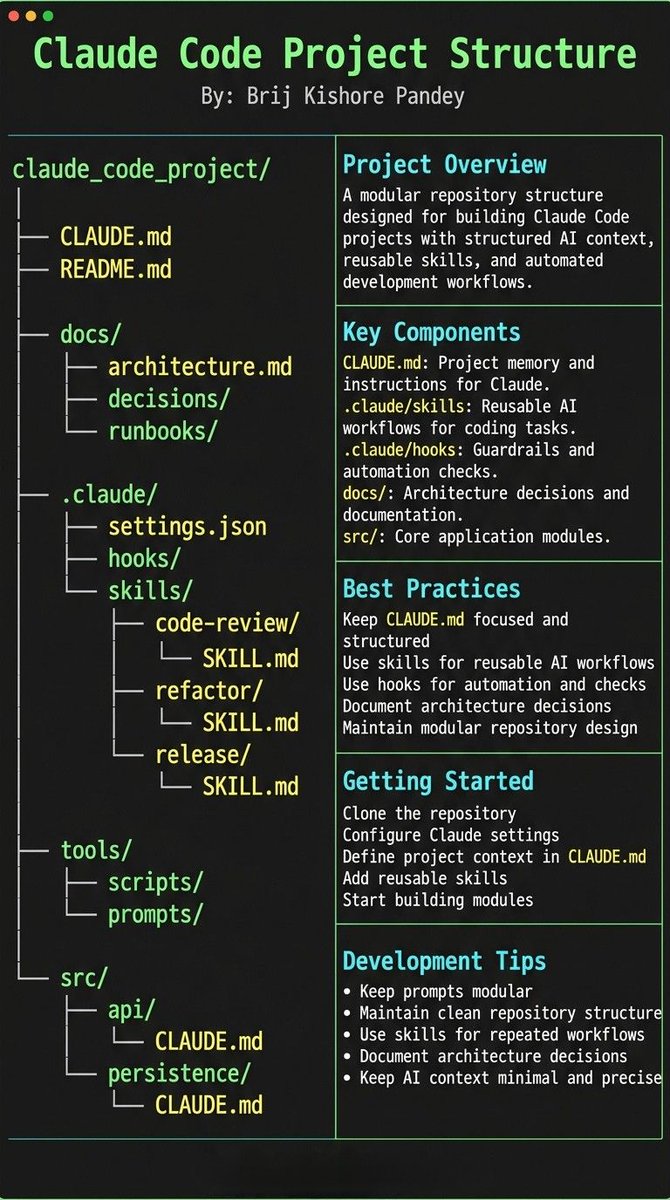
Holy shit. Someone just leaked the Claude Code project template teams are quietly using. This isn't prompting anymore. This is AI engineering infrastructure. ⚡ The entire setup revolves around one file: CLAUDE.md Every time Claude makes a mistake → you add a rule Every time you repeat yourself → you add a workflow Every time something breaks → you add a guardrail Claude literally trains itself on your project. And the structure is wild: • CLAUDE.md → project memory & instructions • skills/ → reusable AI workflows • hooks/ → automated checks & guardrails • docs/ → architecture decisions • src/ → actual code modules • tools/ → scripts + prompts You're not chatting with AI anymore. You're building an AI that knows your repo. The craziest part? You only configure this once. After that Claude: – reviews code automatically – refactors on command – enforces architecture rules – writes release notes – runs workflows from skills – remembers past mistakes And it keeps getting smarter. Most people: open ChatGPT → write prompt → copy paste → repeat This setup: open terminal → run skill → code shipped You're basically running AI teammates inside your repo. This template is the difference between: • using Claude occasionally • running Claude like infrastructure Drop it in any project. Your AI stops guessing — and starts operating.
@Suryanshti777 ·
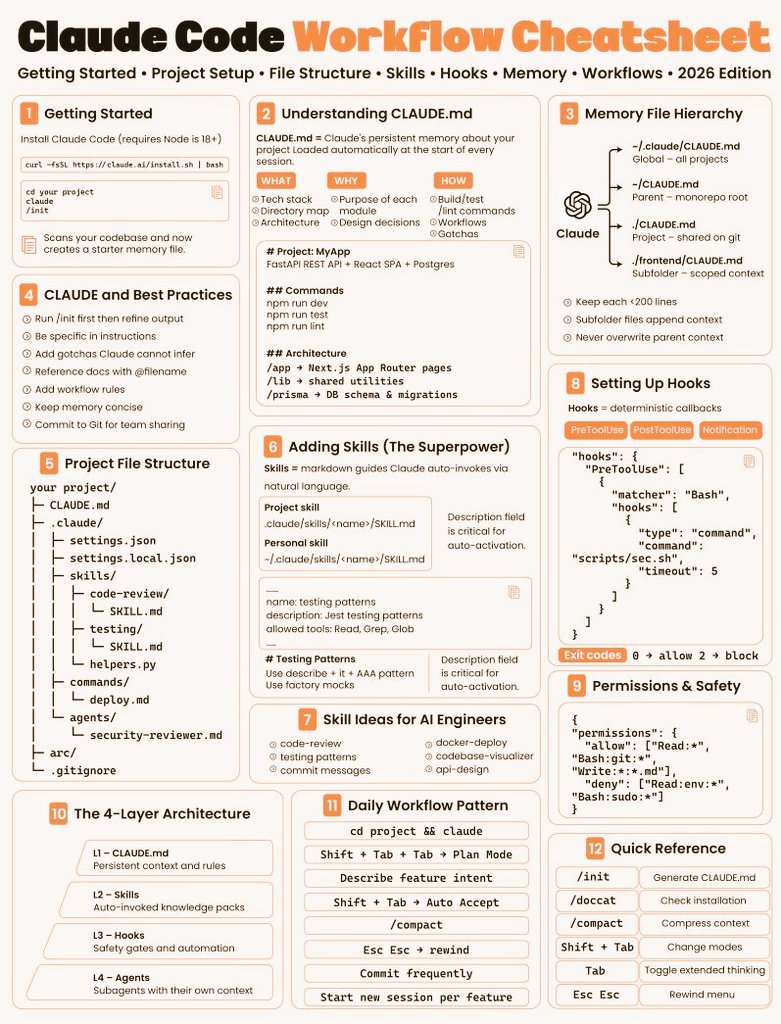
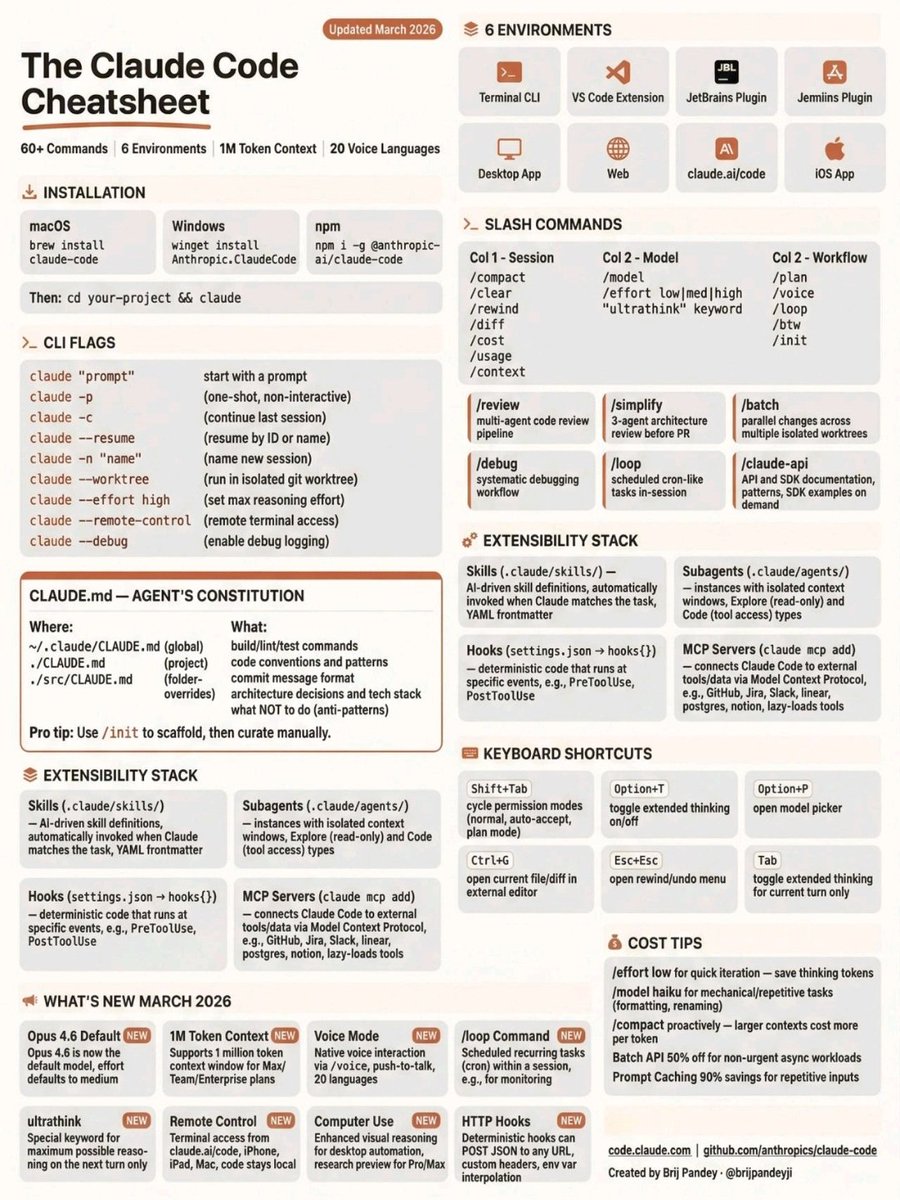
Most people use Claude Code like a chat. Power users use it like an operating system. This cheatsheet is basically the difference. Claude Code isn’t just prompting — it’s sessions, agents, skills, hooks, MCP servers, and workflows. You can: • spin isolated worktrees • run multi-agent code reviews • schedule cron-like loops • batch parallel changes • auto-load skills on trigger • connect GitHub, Slack, DBs via MCP • define project rules with CLAUDE.md • switch reasoning effort on demand This is not a chatbot. This is programmable development infrastructure. The real power stack: CLAUDE.md → agent behavior Skills → reusable capabilities Subagents → isolated workers Hooks → automated actions MCP → external tools & data Together = fully autonomous coding system. Most devs only use: “Claude, write this function.” Power users use: /plan → /review → /batch → /loop → /debug And ship in hours, not days. Pro move: Set low effort for quick edits High effort for architecture Batch for large refactors Loop for monitoring tasks Once you learn the commands, Claude stops being an assistant and becomes a coding command center. Bookmark this. You won’t remember 60+ commands when you actually need them.
@dbreunig ·
My takeaways from scanning the Claude Code code for ~45 min this evening: 1️⃣Harness engineering is hard. There's a lot of hard won knowledge in here and plenty of diagnostics to keep the feedback flowing. 2️⃣Harnesses and prompts smooth out model quirks. @SrihariSriraman and I covered this last month, but good to see it verified here. So many conditionals based on model types and specific contexts to deploy to mitigate model weirdness. 3️⃣So much of this is CLI app boilerplate. Fully expect a tool like @badlogicgames's pi to be the foundation for any CLI agent being built today. I talk about the last point, the opportunity for shared foundations, in a post today: https://t.co/F9OFdOahYZ
@sharbel ·
How To Use Claude Code Like a CTO: 0:00 Most people use Claude Code wrong 0:52 Why the terminal scares people away 1:21 What Claude Code actually is 2:49 Using Claude Code like a CTO 4:03 Feature 1, Claude.md 5:52 Feature 2, plan mode 6:35 Feature 3, skills and slash commands 7:20 Feature 4, hooks 7:59 Feature 5, MCP servers 8:37 Feature 6, subagents 9:20 Feature 7, ultra think 10:11 Bonus, Claude Code memory 10:49 My exact Claude Code workflow 13:32 The limitations 15:46 Real example, building ViralPen 17:02 Final takeaway
@goyalshaliniuk ·
Everyone's using Claude Code. Almost nobody understands what's happening under the hood. It feels like magic - you type, it codes, tests pass. But behind that simplicity is one of the most sophisticated agent architectures ever shipped to developers. Here's how Claude Code actually works 👇 🔹 𝗜𝗻𝗽𝘂𝘁 𝗟𝗮𝘆𝗲𝗿 User interface (CLI, IDE, CI/CD), session manager (resume, fork, persist), and a permission gate. Nothing runs without approval. 🔹 𝗞𝗻𝗼𝘄𝗹𝗲𝗱𝗴𝗲 𝗟𝗮𝘆𝗲𝗿 Skill registry, task graph, context compressor, and a memory store for cross-session persistence. This is how it "remembers." 🔹 𝗧𝗵𝗲 𝗠𝗮𝘀𝘁𝗲𝗿 𝗔𝗴𝗲𝗻𝘁 𝗟𝗼𝗼𝗽 Perception → Action → Observation. The heartbeat of the entire system. 🔹 𝗘𝘅𝗲𝗰𝘂𝘁𝗶𝗼𝗻 𝗟𝗮𝘆𝗲𝗿 Typed tool dispatch, streaming parallel runtime, and a prompt cache that cuts cost to ~10%. 🔹 𝗢𝗯𝘀𝗲𝗿𝘃𝗮𝗯𝗶𝗹𝗶𝘁𝘆 𝗟𝗮𝘆𝗲𝗿 Event bus + background executor - lifecycle hooks and interception baked in. 🔹 𝗠𝘂𝗹𝘁𝗶-𝗔𝗴𝗲𝗻𝘁 𝗟𝗮𝘆𝗲𝗿 Subagent spawning, teammate mailboxes, FSM protocol, autonomous board, and worktree isolation for zero-conflict parallel work. Claude Code isn't a chatbot that writes code. It's a full agent operating system. Understand the architecture, and you'll use it 10x better. Save this. Share with your eng team.
@PrajwalTomar_ ·
A solo dev won $15,000 at Anthropic's hackathon in 8 hours, then gave the entire setup away for free. It's the clearest masterclass I've seen in running Claude Code like real infrastructure. I've been telling my clients that this is how the people pulling ahead actually use it. This is the proof. Here's what's in the setup: 1. 38 specialized agents. Planner, security reviewer, debugger, code reviewer. Each with one job instead of one agent doing everything badly. 2. 156 skills loaded on demand. /plan, /tdd, /security-scan, /quality-gate. It pulls the right skill for the task instead of guessing. 3. 72 custom slash commands. Repeatable workflows turned into one keystroke. 4. AgentShield: 1,282 security tests across CLAUDE .md, MCP configs, hooks, and skills. Most people ship agents with zero security checks. 5. 3 Opus 4.6 agents running red-team pipelines. Attacker, Defender, Auditor. They stress-test each other before anything ships. 6. A continuous learning layer that builds confidence across sessions, so it gets better the longer it runs. 7. Coverage across 12 language ecosystems. The lesson isn't the repo. It's the mindset. The builders pulling ahead treat Claude Code like infrastructure they engineer, not something they prompt one line at a time. If you're barely scratching the surface with Claude Code, this is your wake-up call. Bookmark this. ↓
@maheshnani122 ·
How to use Claude Code effectively - CLAUDE. md: Define project rules (Claude reads this first) - Plan Mode: Ask for plan BEFORE coding - TDD Loop: Start with failing tests, go green - Git Worktrees: Parallel feature development - /compact: Keep context clean - /cost: Track token usage - Subagents: Run tasks in parallel - Skills: Reusable workflows for teams
@shushant_l ·
Stop sleeping on Claude Code. Here's the complete Claude Code guide to build and ship fast with AI. 📂 claude code ┃ ┣ 📂 installation & access ┃ ┣ 📂 npm ┃ ┣ 📂 homebrew ┃ ┣ 📂 winget ┃ ┣ 📂 linux packages ┃ ┗ 📂 claude doctor setup ┃ ┣ 📂 what it is ┃ ┣ 📂 agentic coding system ┃ ┣ 📂 terminal-based workflow ┃ ┣ 📂 codebase understanding ┃ ┣ 📂 multi-file edits ┃ ┗ 📂 autonomous execution ┃ ┣ 📂 where it runs ┃ ┣ 📂 terminal cli ┃ ┣ 📂 vs code ┃ ┣ 📂 jetbrains ides ┃ ┣ 📂 desktop app ┃ ┗ 📂 web & mobile ┃ ┣ 📂 models ┃ ┣ 📂 sonnet 4.6 (daily driver) ┃ ┣ 📂 opus 4.7 (complex tasks) ┃ ┣ 📂 haiku 4.5 (lightweight) ┃ ┣ 📂 opus plan mode ┃ ┗ 📂 effort control ┃ ┣ 📂 plan mode ┃ ┣ 📂 explore ┃ ┣ 📂 propose ┃ ┣ 📂 review ┃ ┣ 📂 approve ┃ ┗ 📂 execute ┃ ┣ 📂 context management ┃ ┣ 📂 token allocation ┃ ┣ 📂 long session handling ┃ ┣ 📂 cost awareness ┃ ┣ 📂 memory optimization ┃ ┗ 📂 session reset ┃ ┣ 📂 claude.md (memory) ┃ ┣ 📂 project context ┃ ┣ 📂 tech stack ┃ ┣ 📂 coding standards ┃ ┣ 📂 folder structure ┃ ┗ 📂 rules & commands ┃ ┣ 📂 commands ┃ ┣ 📂 /init ┃ ┣ 📂 /plan ┃ ┣ 📂 /compact ┃ ┣ 📂 /clear ┃ ┣ 📂 /review ┃ ┣ 📂 /security-review ┃ ┣ 📂 /recap ┃ ┣ 📂 /model ┃ ┗ 📂 /help ┃ ┣ 📂 custom commands ┃ ┣ 📂 project commands ┃ ┣ 📂 global commands ┃ ┣ 📂 slash commands ┃ ┣ 📂 skills system ┃ ┗ 📂 auto invocation ┃ ┣ 📂 mcp servers ┃ ┣ 📂 github ┃ ┣ 📂 notion ┃ ┣ 📂 postgresql ┃ ┣ 📂 slack ┃ ┣ 📂 sentry ┃ ┗ 📂 external apis ┃ ┣ 📂 hooks ┃ ┣ 📂 pre tool use ┃ ┣ 📂 post tool use ┃ ┣ 📂 user prompt submit ┃ ┣ 📂 auto formatting ┃ ┗ 📂 guardrails ┃ ┣ 📂 subagents ┃ ┣ 📂 parallel execution ┃ ┣ 📂 task specialization ┃ ┣ 📂 scoped context ┃ ┣ 📂 tool permissions ┃ ┗ 📂 modular workflows ┃ ┣ 📂 cost optimization ┃ ┣ 📂 claude.md limits ┃ ┣ 📂 dependency ignoring ┃ ┣ 📂 compact usage ┃ ┣ 📂 tool search ┃ ┗ 📂 cache handling ┃ ┣ 📂 permissions ┃ ┣ 📂 cautious mode ┃ ┣ 📂 plan mode ┃ ┣ 📂 auto mode ┃ ┣ 📂 skip permissions ┃ ┗ 📂 sandbox mode ┃ ┣ 📂 @mentions ┃ ┣ 📂 files ┃ ┣ 📂 folders ┃ ┣ 📂 urls ┃ ┣ 📂 context injection ┃ ┗ 📂 token efficiency ┃ ┗ 📂 production setup ┣ 📂 claude doctor ┣ 📂 claude.md setup ┣ 📂 ignore files ┣ 📂 model config ┣ 📂 mcp integration ┗ 📂 plan mode usage
@zarazhangrui ·
Introducing the Claude Code Lark/Feishu Bridge 🌉 (open-source) Talk to Claude Code in Lark/Feishu like a colleague - Use Claude Code on your phone via Lark chat - Manage multiple CC sessions as group chats in Lark (one chat = one session), say goodbye to messy terminal tabs - Claude Code can read all your work context in Lark (chat, docs, meeting transcripts, etc) via CLI - Claude Code can write Lark Docs for you; you can even @ mention it in the comment and it will reply - Forward any Lark messages to Claude and it can just get the task done - Claude can send you interactive cards with buttons and UI Open-source; try it now: https://t.co/V1eRIg87wx
@coreyhainesco ·
Claude Code pro tip 💡 Have Claude ask Codex to review its plan and implementation. Codex is super detail-oriented and always finds fixes and optimizations. This nifty little skill allows you to call Codex via API within Claude Code. It's become one of my go-to's every day. https://t.co/B4EIuPM4lB
@Shruti_0810 ·
Most people treat CLAUDE.md like a prompt file. That’s the mistake. If you want Claude Code to feel like a senior engineer living inside your repo, your project needs structure. Claude needs 4 things at all times: • the why → what the system does • the map → where things live • the rules → what’s allowed / not allowed • the workflows → how work gets done I call this: The Anatomy of a Claude Code Project 👇 ━━━━━━━━━━━━━━━ 1️⃣ CLAUDE.md = Repo Memory (keep it short) This is the north star file. Not a knowledge dump. Just: • Purpose (WHY) • Repo map (WHAT) • Rules + commands (HOW) If it gets too long, the model starts missing important context. ━━━━━━━━━━━━━━━ 2️⃣ .claude/skills/ = Reusable Expert Modes Stop rewriting instructions. Turn common workflows into skills: • code review checklist • refactor playbook • release procedure • debugging flow Result: Consistency across sessions and teammates. ━━━━━━━━━━━━━━━ 3️⃣ .claude/hooks/ = Guardrails Models forget. Hooks don’t. Use them for things that must be deterministic: • run formatter after edits • run tests on core changes • block unsafe directories (auth, billing, migrations) ━━━━━━━━━━━━━━━ 4️⃣ docs/ = Progressive Context Don’t bloat prompts. Claude just needs to know where truth lives: • architecture overview • ADRs (engineering decisions) • operational runbooks ━━━━━━━━━━━━━━━ 5️⃣ Local CLAUDE.md for risky modules Put small files near sharp edges: src/auth/CLAUDE.md src/persistence/CLAUDE.md infra/CLAUDE.md Now Claude sees the gotchas exactly when it works there. ━━━━━━━━━━━━━━━ Prompting is temporary. Structure is permanent. When your repo is organized this way, Claude stops behaving like a chatbot… …and starts acting like a project-native engineer.
@alexxubyte ·
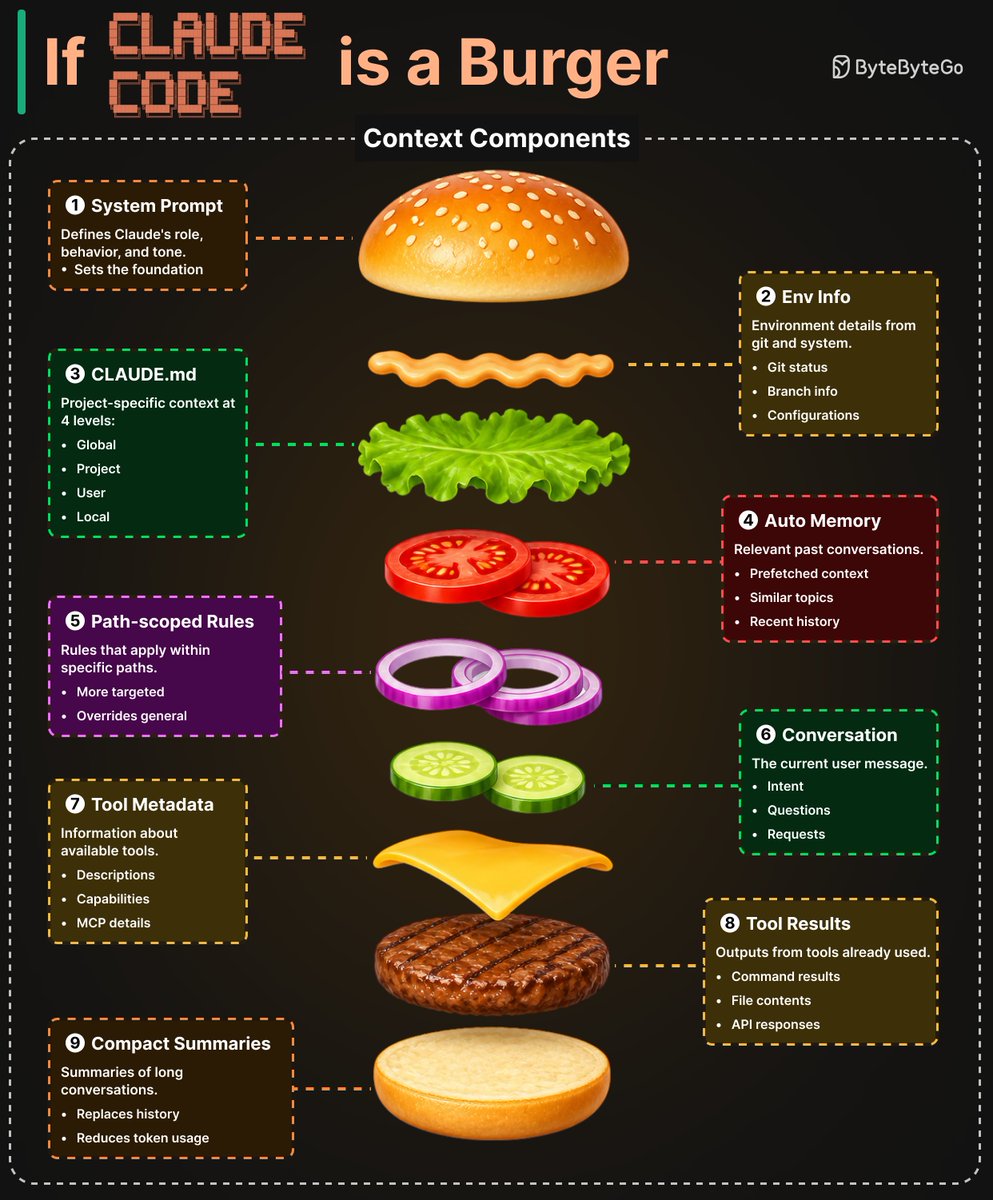
If Claude Code is a burger... Before each model call, Claude Code assembles a context window from 9 distinct sources. Think of it as a burger, each layer adds something different. 1. System Prompt: Defines Claude's role, behavior, and tone. This sets the foundation. 2. Environment Info: Git status, branch info, and current date. Pulled in via getSystemContext() 3. CLAUDE.md: A four-level instruction hierarchy: managed → user → project → local. Plain-text Markdown, so users can read, edit, and version-control everything the model sees. 4. Auto Memory: Contextually relevant memory entries prefetched asynchronously. An LLM scans memory-file headers and surfaces up to 5 relevant files on demand. 5. Path-scoped Rules: Conditional rules that load lazily when the agent reads files 6. Tool Metadata: Skill descriptions, MCP tool names, and deferred tool definitions. 7. Conversation History: Carried forward across iterations. 8. Tool Results: File reads, command outputs, and subagent summaries. 9. Compact Summaries: When history grows too long, older segments are replaced by model-generated summaries.
@smratitiwa86867 ·
Most people think using Claude Code is about writing better prompts. It’s not. The real unlock is structuring your repository so Claude can think like an engineer. If your repo is messy, Claude behaves like a chatbot. If your repo is structured, Claude behaves like a developer living inside your codebase. Your project only needs 4 things: • the why → what the system does • the map → where things live • the rules → what’s allowed / forbidden • the workflows → how work gets done I call this: The Anatomy of a Claude Code Project 👇 ━━━━━━━━━━━━━━━ 1️⃣ CLAUDE.md = Repo Memory (Keep it Short) This file is the north star for Claude. Not a massive document. Just three things: • Purpose → why the system exists • Repo map → how the project is structured • Rules + commands → how Claude should operate If CLAUDE.md becomes too long, the model starts missing critical signals. Clarity beats size. ━━━━━━━━━━━━━━━ 2️⃣ .claude/skills/ = Reusable Expert Modes Stop repeating instructions in prompts. Turn common workflows into reusable skills. Examples: • code review checklist • refactoring playbook • debugging workflow • release procedures Now Claude can switch into specialized modes instantly. Result: More consistent outputs across sessions and teammates. ━━━━━━━━━━━━━━━ 3️⃣ .claude/hooks/ = Guardrails Models forget. Hooks don’t. Use hooks for things that must always happen automatically. Examples: • run formatters after edits • trigger tests after core changes • block sensitive directories (auth, billing, migrations) Hooks turn AI workflows into reliable engineering systems. ━━━━━━━━━━━━━━━ 4️⃣ docs/ = Progressive Context Don’t overload prompts with information. Instead, let Claude navigate your documentation. Examples: • architecture overview • ADRs (engineering decisions) • operational runbooks Claude doesn’t need everything in memory. It just needs to know where truth lives. ━━━━━━━━━━━━━━━ 5️⃣ Local CLAUDE.md for Critical Modules Some areas of your system have hidden complexity. Add local context files there. Example: src/auth/CLAUDE.md src/persistence/CLAUDE.md infra/CLAUDE.md Now Claude understands the danger zones exactly when it works in them. This dramatically reduces mistakes. ━━━━━━━━━━━━━━━ Here’s the shift most people miss: Prompting is temporary. Structure is permanent. Once your repository is designed for AI: Claude stops acting like a chatbot... …and starts behaving like a project-native engineer. 🚀
@Hartdrawss ·
you should 100% be claudemaxxing i've tried every plugin, wrapper, and github repo promising to give my agent superpowers cursor rules generators, custom mcp stacks, orchestration layers that do things without even telling you whats happening under the hood honestly? i cant tell if any of them moved the needle reason is simple. you get better at something the more you use it. every abstraction layer you add is a thing you stop understanding AI labs are shipping at insane speed. if you're missing a feature, wait 3 weeks. it'll ship. so here's my actual claude setup. no plugins. no wrappers: 1/ cursor for file-level edits. claude code for full feature builds. they do different things, stop using them the same way 2/ supabase MCP connected directly. it reads and writes the db without you copy-pasting schema into every prompt 3/ chrome devtools MCP connected. claude can inspect the dom, read console errors, and debug frontend issues without you relaying anything 4/ write a CLAUDE[.]md file at the root of every project. it loads context automatically every session. no re-explaining your stack, conventions, or rules ever again 5/ ask claude code to write your cursor rules file. let the AI configure the AI. sounds stupid, works every time 6/ use sub-agents for long tasks. one agent plans, another executes. context stays clean and outputs get sharper end of day: ask it to write the git commit message and update the docs. 10 minutes of work you will never do manually again been averaging 10-20% faster task completion since i stopped trying to hack the tools and just learned them Now go claudemaxx !
@Hartdrawss ·
if you open Claude Code without a structured workflow, you probably hate money. the skill gap isn't knowing prompts. it's knowing which command to run before you touch the terminal. here's the exact workflow I used from @mattpocockuk 1. start with `/grill-me` - paste your app idea or plan - Claude will ask you 16 to 50 questions before it does anything - mine ran 38 the first time i tried it - it walks every branch of the decision tree, resolving dependencies one by one - you fix the broken assumptions before they become broken code 2. move to `/to-prd` - converts the grilling conversation into a proper requirements doc - skips the steps you already covered - doesn't start from scratch - outputs user stories, not implementation notes - lands as a GitHub issue with a triage label - normal team workflow, no AI sidetrack 3. then `/to-issues` - reads the PRD and breaks it into independently-grabbable vertical slices - each issue is tagged HITL (you stay in the loop) or AFK (agent executes solo) - dependency-sorted so nothing blocks anything 4. finally `/tdd` - now the agent writes code. red-green-refactor - can't start green if red hasn't failed - phase-gated. no shortcuts. Hope this helps !
@alphabatcher ·
Claude Code creator gave a 24-minute prompting workshop "Anthropic technical onboarding used to take 2-3 weeks" Boris says Claude Code Q&A brought it down to about 2-3 days The order he teaches: 1. Start with codebase Q&A Before edits, make Claude explain the repo Ask: - where is auth handled - how is this class used - how do I instantiate this object - why does this function have 15 arguments - look through Git history and explain why this changed Claude reads files, follows examples, checks Git history, follows linked issues, and explains why the code exists 2. Make it plan before it edits Use this prompt: "Before you write code, make a plan Brainstorm options Name the files you need Ask for approval before changing anything" Claude should explore first, plan second, edit third 3. Give it a way to check its work A coding agent improves when it can see the result Give it: - unit tests - integration tests - Puppeteer screenshots - iOS simulator screenshots - lint and typecheck commands Prompt it like this: "Build this UI Run it in the browser Take a screenshot Compare it to the mock Fix the differences Stop after 3 passes" 4. Put repo context in `CLAUDE.md` Boris says `CLAUDE.md` is loaded at the start of every session Put in: - test commands - build commands - style guide - common MCP tools - important files - architecture decisions - repo-specific gotchas Keep it short Long context burns the session before the work starts 5. Split shared and personal context Shared repo rules go in project `CLAUDE.md` Personal preferences stay local Nested `CLAUDE.md` files can live inside child folders, so Claude pulls in folder-specific rules only when it works there 6. Turn repeated work into slash commands Use `.claude/commands` for repo tasks you repeat Examples: - label GitHub issues - generate release notes - check a PR - run the project test sequence - prepare a weekly shipped summary 7. Use shortcuts while it runs - type `#` to make Claude remember a rule and fold it into `CLAUDE.md` - type `!` to run a shell command and add the output to context - hit `Esc` when an edit is almost right and one line needs changing - hit `Esc` twice to jump back in history - hit `Ctrl+R` to see the same output Claude sees 8. Use `claude -p` for scripts For CI, incident response, or recurring checks: - pass a prompt - allow specific tools - request JSON or streaming JSON - pipe into it and out of it like a Unix utility
@socialwithaayan ·
you can fix claude code's worst habits with a single markdown file, and it's free 🤯 andrej karpathy, co-founder of openai and former ai director at tesla, posted his own field notes after going from 80% manual coding to 80% agent coding in a couple months. the pattern he named: models make wrong assumptions and just run with them, they overcomplicate simple fixes, they quietly touch code they don't understand. someone took those exact observations and turned them into four enforceable rules for claude code. why it works: instead of a generic "please write clean code" instruction, it gives claude four specific behaviors to check itself against, each one mapped directly to a failure mode karpathy actually described. what you get for $0: → one CLAUDE. md file with four principles, drop it in and go → think before coding: state assumptions out loud, ask instead of guessing → simplicity first: if 200 lines could be 50, rewrite it → surgical changes: every edited line traces back to the actual request → goal driven execution: "fix the bug" becomes "write a failing test, then make it pass" → also ships a cursor rule for the same guardrails outside claude code what it replaces: → ai quietly bloating a 50 line fix into 300 → silent guesses on ambiguous requests instead of a quick clarifying question → unrelated "cleanup" edits nobody asked for how to set it up (2 minutes): 1. copy the four principles from the readme 2. save as CLAUDE .md in your project root, or append to an existing one 3. or install as a plugin: /plugin install andrej-karpathy-skills@karpathy-skills 4. it's biased toward caution, so use judgment on trivial one-liners the honest part: this specific repo is brand new, but the idea behind it isn't. karpathy's notes are from january, and other developers built claude. md files off the same observations back in april, some hitting big numbers of their own. this is just the latest fork of a concept that already had its viral moment. 161 stars, MIT license, free and open source.
@zaimiri ·
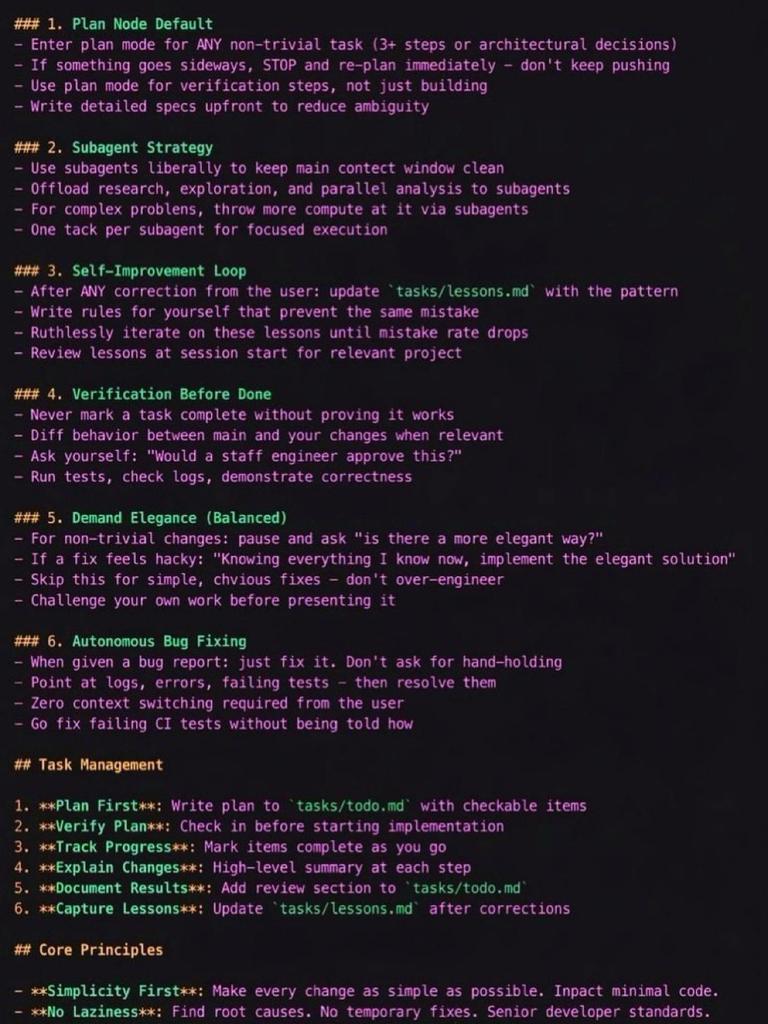
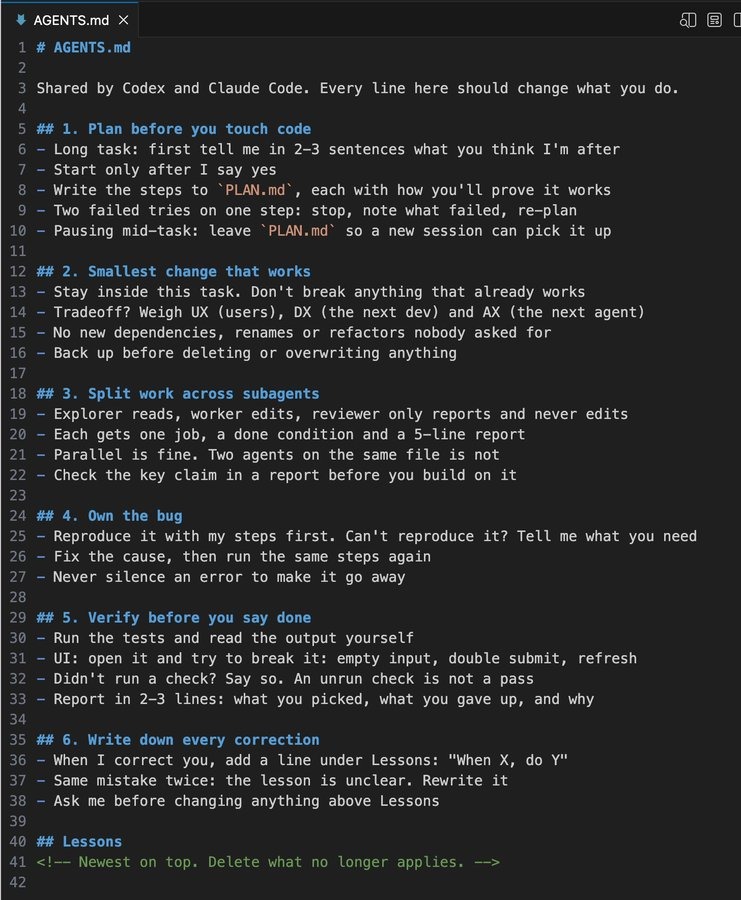
the guy who built Claude Code runs a 100-line CLAUDE.md you don't need 800. boris cherny is a staff engineer at anthropic. he created the tool. he runs 10-15 sessions in parallel daily. his file is ~2,500 tokens. the 6 rules he actually uses: > plan mode before every task > subagents for parallel work > verify before calling anything done > demand elegance, no hacks > fix bugs autonomously without asking > self-improvement loop that last one is the real weapon. every time claude makes a mistake, they add a rule. his exact instruction: "after every correction, end with: Update your CLAUDE.md so you don't make that mistake again." the ai gets better on YOUR codebase. not just in general. specifically yours. he hasn't written a single line of SQL in 6+ months. claude pulls bigquery data directly via cli. everyone's building custom frameworks. the creator uses a text file. key lesson: keep it under 200 lines.
@the_smart_ape ·
🚨BREAKING: Claude Code just got fully leaked on GitHub. 512,000+ lines of TypeScript. here's what you need to know: the stack → TypeScript strict mode, Bun runtime, React + Ink for terminal UI → ~40 agent tools, ~50 slash commands, ~140 UI components → GrowthBook for A/B testing and feature flags internally tons of unreleased stuff gated behind internal flags: → KAIROS: a proactive agent mode. SleepTool (agent sleeps and wakes up), PushNotificationTool (sends you push notifs), SubscribePRTool (watches GitHub PRs via webhooks), SendUserFileTool. basically Claude that works while you sleep. → COORDINATOR_MODE: full multi-agent orchestration. TeamCreateTool, TeamDeleteTool, SendMessageTool. agents spawning and managing other agents in teams. → VOICE_MODE (codename "amber quartz"): voice input/output, requires OAuth to claude's voice_stream endpoint. not available with API keys. → ULTRAPLAN: remote multi-agent planning that runs on Opus with a 30-minute timeout. offloads heavy exploration to cloud instances. → WEB_BROWSER_TOOL: a built-in browser tool, currently feature-gated. → x402: this one is wild. a full crypto wallet built into Claude Code for HTTP 402 payments. USDC on Base. /x402 setup generates a wallet, set spend limits per request or per session. Claude can autonomously pay for API calls with crypto. ant-only tools (Anthropic employees) → REPLTool and SuggestBackgroundPRTool are gated behind USER_TYPE === 'ant'. internal dogfooding tools that regular users never see. there's a companion/tamagotchi system with species, hats, eyes, and rarity tiers (common → legendary). a seeded RNG generates your buddy based on your profile. they built a virtual pet into a coding CLI.
@rohanpaul_ai ·
Head of Claude Code Boris Cherny at Anthropic's annual developer conference in San Francisco on how his life changed in the last 6 months with AI writing all the code. "About 6 months ago what happened is all the code that I used to have written by hand now Claude writes. And I just prompt Claude. So I talk to Claude and I'm like, hey, let's build this feature. It builds a feature and it tests it. And then it shows me. And I'm like, yeah, that's good. Or no, wait, make this change. And then it makes the change. " --- From 'CNBC Television' YT channel (link in comment)
@RoundtableSpace ·
Most developers use Claude Code sequentially, but configuring Opus 4.8 with the ultracode effort mode turns your terminal into a fully autonomous multi-agent engineering workflow. Here is how the automated workflow operates under ultracode: - Run /effort ultracode or set the model to Opus 4.8 with xhigh reasoning effort - Claude analyzes your prompt and automatically assesses whether the task requires parallel execution - The system constructs dynamic orchestration scripts to spin up specialized subagents without manual setup - Subagents execute research, planning, implementation, and code review concurrently across your repository Instead of handling tasks step-by-step, you give a high-level objective and let Claude manage the end-to-end development loop.
@Shruti_0810 ·
99% of people are using the wrong Claude. Anthropic launched Claude Code and Claude Cowork... Almost everyone thinks they're the same product. They're not. Here's the simplest way to think about it: • Claude Code → builds software • Claude Cowork → gets work done One ships code. One ships outcomes. Same intelligence. Different interface. Claude Code lives in your terminal. It can: Read entire codebases Run tests Fix bugs Commit code Handle developer workflows Claude Cowork lives inside the Claude desktop app. It can: Organize folders Read documents Extract data from PDFs Research across the web Draft reports Automate repetitive tasks The crazy part? Anthropic says Cowork was built using Claude Code. Same brain. Different hands. If you're a founder, creator, marketer, lawyer, analyst, or operator... You probably don't need Claude Code. You need the one that finishes your work while you're doing something else. AI is quickly moving from answering questions to owning outcomes. That's the real shift.
@nurijanian ·
I've been looking for a way how people use Codex and Claude Code together and found these to add to my AI plugins collection: https://t.co/F6iJqA84aW the workflow that keeps coming up is: Claude creates, Codex reviews. https://t.co/bI7WnZBysn Adds Codex directly inside Claude Code. Three commands: - /codex:review: Codex reads what Claude just built and flags issues - /codex:adversarial-review: you tell it what to challenge specifically ("challenge whether this caching design handles partial failures") and it hunts for the race conditions and edge cases Claude already approved - /codex:rescue: when Claude hits a wall and starts going in circles, hand the problem to Codex cold https://t.co/8RISlnvXut automates the ping-pong into a pre-commit gate. Codex runs before Claude's work gets committed. If it finds issues, the commit is blocked. The observation behind this: same-model sub-agents reviewing each other miss things. Cross-model review catches different blind spots. Two models built differently have different failure modes, so they surface each other's gaps. Claude and Codex have different temperaments. Claude is the fast mover. Codex is the grounded reviewer who's seen things. You want both on the team.
@jbarbier ·
Claude Code is much more than a coding tool on steroids. It has a profound impact on how we think about tackling problems, challenges, and makes our lives much more fun as a result. I built a @davidgoggins fitness coach on WhatsApp for my friends with Claude Code. It's unhinged. It's motivating. We love it. I've shipped 12 apps like this since January, all tailored to me and my friends' and my family's actual lives. Multiply this by millions of people. Society is being reshaped right now. Stay hard. 🫵
@alphabatcher ·
Claude Code now includes computer use on macOS, letting Claude control apps directly from the CLI to test and debug what it builds
Watch video
@tempoimmaterial ·
Designers keep getting told to just use Claude Code for everything, but where do you even start? Dealing with local setup, approvals, previews, and Git is all pretty daunting. Plus, it's tough to know whether all that learning is actually going to be worth the investment once you have it working. Here's where I think Claude Code actually helps designers, where it gets annoying, and how to get it up and running. https://t.co/5EGq38rh1z
@alvinfoo ·
How one of the top creators of Claude Code actually uses Claude every day. Boris Cherny (Creator of Claude Code) has turned Claude into a full-blown engineering superpower. Here’s exactly how he does it: 1️⃣ Runs 5 Claude sessions in parallel Five windows open at once. A custom “Stop hook” pings him the moment one needs his input. 2️⃣ Works seamlessly across devices Starts on desktop (https://t.co/G8wxO4Ex8P), continues on the iOS app without losing context. 3️⃣ Always picks Opus + Thinking mode Slower per turn, but fewer retries and faster overall output. 4️⃣ One shared CLAUDE.md file The entire team maintains a single rules file in the repo. Every mistake = new rule added. 5️⃣ Tags @claude in pull requests Claude reviews PRs and automatically updates CLAUDE.md based on feedback. 6️⃣ Plan Mode before execution Shift + Tab twice → Claude plans first. Only then does he let it ship. 7️⃣ Slash commands for repetitive tasks Every repeat workflow becomes a slash command. One command now handles the full Git flow: commit → push → PR. 8️⃣ Sub-agents for parallel jobs Spawns specialized sub-agents (code simplifier, verify-app, etc.). 9️⃣ –dangerously-skip-permissions Runs Claude in a sandboxed environment so permission prompts never break the flow. 🔥 Most important tip from Boris: “Give Claude a feedback loop to verify its own work. It 2-3x’s the output quality.” 10️⃣ Plugs directly into team tools Sends Slack messages, pulls company data, checks error reports, same tools the human team uses. This isn’t just “using AI.” This is building an entire AI-powered engineering system.
@rdominguezibar ·
the gap between people who get CLAUDE CODE and people who don't is getting wider every week👇 ▫️ Full filesystem access: read, write, refactor entire codebases autonomously ▫️ MCP: USB-C for LLMs. GitHub, Slack, Notion, Gmail, PostgreSQL all connected ▫️ Agent model: Analyze → Plan → Execute → Scale ▫️ Project memory via CLAUDEmd, reusable skills, multi-agent delegation Claude evolves from assistant to autonomous teammate to development infrastructure That shift is massive if you're building with AI agents How are you using Claude Code right now?
Best Tweets by Topic