Vector Search Fundamentals
Core vector database mechanics: embeddings, ANN similarity search, distance metrics, vector indexes, metadata storage, and filtering.
36%
Best tweets about Vector Databases
Browse the best tweets about vector databases, covering embeddings, indexing, retrieval, Pinecone, Weaviate, Qdrant, Milvus, benchmarks, and architecture.
Vector database architecture, indexing, filtering, retrieval quality, benchmarks, scaling, operations, and concrete implementation tradeoffs.
Original Xholic analysis
The discussion repeatedly covers retrieval as an end-to-end design problem rather than only a vector-store choice: hybrid lexical–semantic retrieval, reranking, filtering, ingestion discipline, and observability all appear in the evidence. A central disagreement is whether vector-only similarity is sufficient for structured or multi-hop work, where BM25, document hierarchy, and graphs are presented as alternatives or complements. [2057410759236386866, 2039191283072376970, 2074470992651386957]
50% of posts
All-time engagement
100% of posts
Published in 90 days
Conversation map
Core vector database mechanics: embeddings, ANN similarity search, distance metrics, vector indexes, metadata storage, and filtering.
36%
RAG retrieval pipelines using chunking, embeddings, top-k search, reranking, grounding, citations, confidence thresholds, and evaluation.
34%
Ingestion and corpus quality: extraction, OCR, document parsing, deduplication, chunk boundaries, stale vectors, versioning, and write-time gating.
16%
Critiques of vector-only retrieval and alternatives based on document hierarchy, structure-aware navigation, code exploration, and deterministic lookup.
16%
Hybrid retrieval that combines lexical methods such as BM25 or grep with embeddings, ranking fusion, metadata constraints, and rerankers.
14%
ANN index design and tuning, including HNSW, IVF, graph connectivity, clustering, recall, latency, and dynamic re-indexing.
12%
Vector compression and quantization methods that reduce RAM, accelerate search, preserve recall, and avoid retraining or rebuilds.
12%
GraphRAG and graph-based retrieval for multi-hop relationships, schema joins, entity traversal, and contextual memory.
10%
Tone and stance
Performance benchmark
Posts with media make up 70% of this collection. Their median all-time score is 27.8, compared with 3.96 for text-only posts.
Format mix
Consensus and debate
Shared view
A recurring proposed pattern is a retrieval pipeline rather than vector search alone: combine lexical and semantic candidates, fuse or rerank results, constrain context, and evaluate retrieval behavior and failures.
Shared view
Posts frame corpus hygiene as a retrieval concern, citing deduplication, extraction quality, chunk boundaries, version history, stale-vector cleanup, and careful embedding-model migration.
Shared view
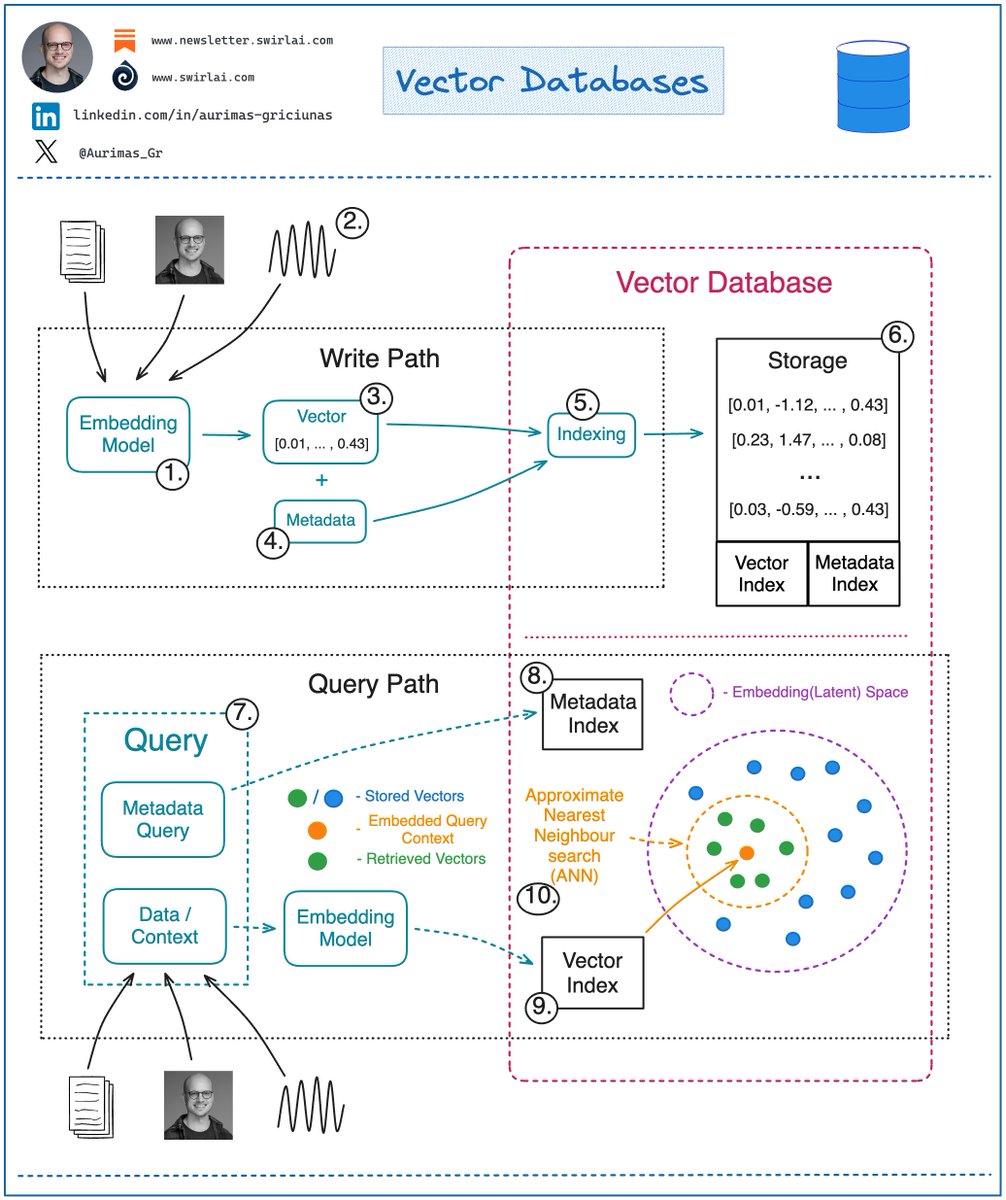
Vector-database explanations pair ANN similarity search with metadata. The cited posts describe filtering as a way to constrain candidates, including preventing irrelevant context, alongside choices of distance metric and index design.
Open debate
Several contrarian posts argue that document hierarchy, BM25, or progressive disclosure can outperform vector-only retrieval for structured or multi-hop material. The benchmark claims in these posts are specific to the cited systems and tasks.
Open debate
BM25 is presented as useful for exact terms and literal spans, while hybrid-retrieval posts retain embeddings for semantic coverage. The cited agent-search study summary further argues that the orchestration harness and result delivery can alter the comparison.
Open debate
Some posts advocate omitting the vector layer for hierarchy-based document or local-memory systems; a fundamentals post instead presents vectors, metadata, and ANN as a general-purpose retrieval architecture.
What performs
The five listed score outliers concern retrieval architecture, including hybrid RAG, BM25, and alternatives to vector-only document retrieval. Their all-time scores range from 515.62 to 2934.18, compared with the 23.9 median.
Quantization and indexing posts foreground memory footprint, speed, recall, and rebuild requirements rather than generic vector-database positioning. The turbovec write-up notes that its performance and compression figures come from project tests rather than independent review.
Operationally oriented posts emphasize observability, component-level validation, durable ingestion, and keeping orchestration off the read path, treating retrieval reliability as an end-to-end systems concern.
Statistical standouts
Creator landscape
The five most represented creators account for 20% of the selected posts.
1. Avi Chawla
@_avichawla
2 posts
2. aditya
@adxtyahq
2 posts
3. Akshay 🚀
@akshay_pachaar
2 posts
4. Paul Iusztin
@pauliusztin_
2 posts
5. Tech with Mak
@techNmak
2 posts
6. DEV Community
@ThePracticalDev
2 posts
Several builders describe graphs as a complement to similarity search: text or semantic retrieval identifies an entry point, while graph traversal supplies connected entities, join paths, or multi-hop context.
Efficiency posts focus on compression and index maintenance. TurboQuant-based posts claim lower vector-memory use without a training phase, while the Flash-KMeans post positions faster k-means as enabling more dynamic re-indexing.
Store-selection posts argue for matching the deployment to workload and operational needs: generic databases can reduce the number of services early on, while specialized systems are proposed when workload requirements warrant them. One post distinguishes read-heavy RAG from write-heavy agent memory.
Themes, sentiment, stance, and post format are classified per tweet. All counts, shares, medians, creator concentration, freshness, and performance comparisons are then calculated directly from the published snapshot.
Xholic's all-time score compares engagement while accounting for reach, post age, and creator consistency. It is used for relative comparisons within this collection.
This report analyzes the exact 50-post snapshot shown below. AI identifies editorial categories and drafts explanations; all statistics are calculated from the snapshot, and every narrative claim is checked against cited posts before publication.
Best Vector Databases tweets
Ranked 01–50
@adxtyahq ·
“design a RAG pipeline for 10M docs with zero hallucination” apparently this was asked in a Google L5 interview round. came across it somewhere on the internet and honestly it’s a way more interesting system design problem than most classic distributed systems questions 1. ingest + normalize docs - remove duplicates, standardize formats, extract metadata, maintain version history 2. hybrid retrieval (BM25 + embeddings) - BM25 handles exact keyword matching while embeddings capture semantic meaning - semantic search alone usually struggles with precision at massive scale 3. ANN retrieval + reranking - ANN (Approximate nearest neighbor ) quickly pulls top candidate chunks from millions of docs - then a reranker rescoring step improves relevance by deeply comparing query vs retrieved chunks 4. source confidence scoring - every retrieved chunk gets scored based on freshness, trust level, overlap and retrieval consistency - low-confidence context should never heavily influence generation 5. constrained generation - the model is only allowed to answer using retrieved context (nothing new to be invented outside of the retrieved context) 6. citation-backed responses - every major claim links back to exact chunks, documents or timestamps 7. hallucination fallback layer - if retrieval confidence drops below a threshold: “insufficient evidence found” 8. continuous evals - run adversarial queries, retrieval recall benchmarks and hallucination tests continuously 9. caching + memory layer - cache high-frequency enterprise queries and retrieval paths (improves latency and output) 10. observability everywhere - trace retrieval paths, chunk rankings, token attribution and failure points Also at 10M docs, retrieval quality matters more than the frontier model itself.
@akshay_pachaar ·
Stop using vector search everywhere! A 30-year-old algorithm with zero training, zero embeddings, and zero fine-tuning still powers Elasticsearch, OpenSearch, and most production search systems today. It's called BM25. Let me explain what makes it so powerful: Imagine you're searching for "transformer attention mechanism" in a library of ML papers. BM25 asks three simple questions: "How rare is this word?" Every paper contains "the" and "is", which makes it useless. But "transformer" is specific and informative. BM25 boosts rare words and ignores the noise. → This is IDF(qᵢ) in the formula "How many times does it appear?" If "attention" appears 10 times in a paper, that's a good sign. But 10 vs 100 occurrences won't make much difference. BM25 applies diminishing returns. → This is f(qᵢ, D) combined with k₁ that controls saturation "Is this document unusually long?" A 50-page paper will naturally contain more keywords than a 5-page paper. BM25 levels the playing field so longer documents don't cheat their way to the top. → This is |D|/avgdl controlled by parameter b Three questions. No neural networks. No training data. Just elegant math (refer to the image below) The best part: BM25 excels at exact keyword matching - something embeddings often struggle with. If your user searches for "error code 5012," embeddings might return semantically similar results. BM25 will find the exact match. This is why hybrid search exists. Top RAG systems today combine BM25 with vector search. You get the best of both worlds: semantic understanding AND precise keyword matching. So before you throw GPUs at every search problem, consider BM25. It might already solve your problem, or make your semantic search even better when combined.
@techNmak ·
Someone removed the vector database from RAG and got better results. Much better. Here's what traditional RAG actually does under the hood: it chunks your document into pieces, embeds those pieces into vectors, and retrieves based on semantic similarity. The assumption is that similar text = relevant text. That assumption breaks completely for professional documents. When you ask "what were the debt trends in Q3?", vector search returns chunks that look similar to that question. But the actual answer might be buried in an appendix, referenced across three sections, in a part of the document that shares zero semantic overlap with your query. Traditional RAG never finds it. Similarity ≠ relevance. PageIndex was built around that insight. Inspired by AlphaGo, it builds a hierarchical tree index from your document - an intelligent table of contents optimized for LLM reasoning. Then it navigates that tree the way a human expert would. Not pattern matching. Reasoning. "Debt trends are usually in the financial summary or Appendix G, let's look there." What disappears: → No vector DB to build or maintain → No arbitrary chunking that breaks cross-section context → No opaque retrieval you can't explain or trace What you get: → Retrieval traceable to exact page and section references → Multi-step reasoning across document structure → Works on financial reports, legal filings, regulatory documents The benchmark: → PageIndex: 98.7% on FinanceBench → Perplexity: 45% → GPT-4o: 31% Open source.
@micLivs ·
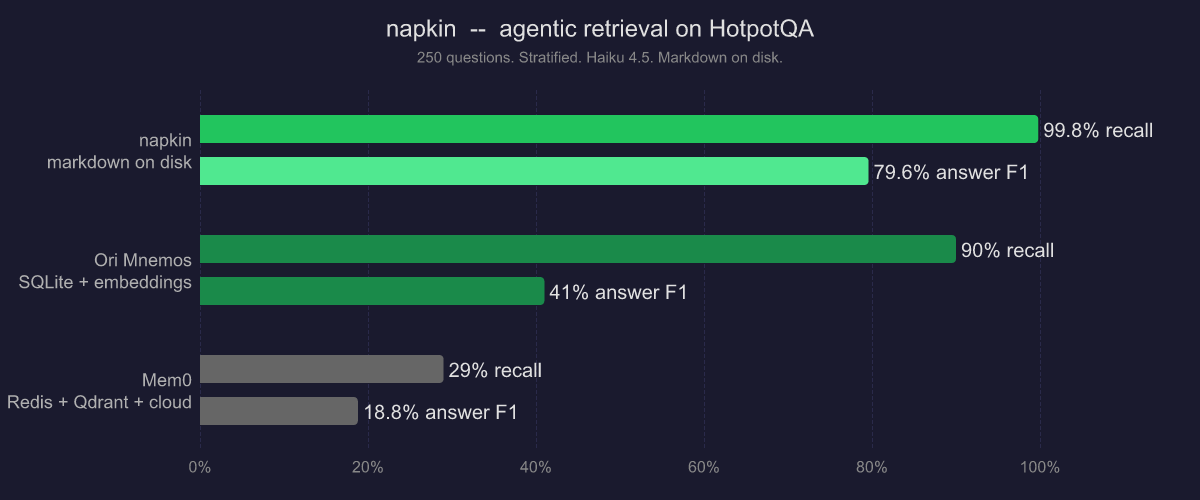
i call BS on vector search for most use cases. everyone is building memory infrastructure. embeddings, vector stores, PageRank, spreading activation. co-occurrence learning. dampening pipelines. i gave @badlogicgames pi napkin, a CLI for obsidian vaults. BM25 search. TF-IDF based context overview. HotpotQA (250 questions, multi-hop): - 99.8% recall (vs 90% Ori, 29% Mem0) - 79.6% answer F1 (vs 41% Ori, 19% Mem0) haiku 4.5, markdown files on disk, no embeddings, no vector DB, no cloud. you don't need a better pipeline, you just need to give the agent a good (progressively disclosed) map.
@AlphaSignalAI ·
Someone removed the vector database from RAG and accuracy jumped to 98.7%. Most RAG systems chunk your documents, embed them as vectors, then retrieve by similarity. The core assumption: similar text means relevant text. That assumption fails on professional documents. Ask "what were the debt trends in Q3?" and vector search returns chunks that look like your question. The real answer sits in an appendix, split across three sections, with zero semantic overlap. Traditional RAG never finds it. PageIndex is an open-source repo that removes the vector database entirely. Inspired by AlphaGo, it builds a tree index from your document. Then it reasons through it like a human expert would. Instead of pattern matching, the model navigates sections logically. "Debt trends live in financial summaries or Appendix G. Let's look there." What changes: 1. No chunking that breaks cross-section context 2. Retrieval traceable to exact pages 3. Multi-step reasoning over document structure It scored 98.7% on FinanceBench. Perplexity scored 45%. GPT-4o hit 31%.
@Aurimas_Gr ·
Fundamentals of a 𝗩𝗲𝗰𝘁𝗼𝗿 𝗗𝗮𝘁𝗮𝗯𝗮𝘀𝗲. With the rise of GenAI, Vector Databases skyrocketed in popularity. The truth - Vector Databases are also useful outside of a Large Language Model context. When it comes to Machine Learning, we often deal with Vector Embeddings. Vector Databases were created to perform specifically well when working with them: ➡️ Storing. ➡️ Updating. ➡️ Retrieving. When we talk about retrieval, we refer to retrieving set of vectors that are most similar to a query in a form of a vector that is embedded in the same Latent space. This retrieval procedure is called Approximate Nearest Neighbour (ANN) search. A query here could be in a form of an object like an image for which we would like to find similar images. Or it could be a question for which we want to retrieve relevant context that could later be transformed into an answer via a LLM. Let’s look into how one would interact with a Vector Database: 𝗪𝗿𝗶𝘁𝗶𝗻𝗴/𝗨𝗽𝗱𝗮𝘁𝗶𝗻𝗴 𝗗𝗮𝘁𝗮. 1. Choose a ML model to be used to generate Vector Embeddings. 2. Embed any type of information: text, images, audio, tabular. Choice of ML model used for embedding will depend on the type of data. 3. Get a Vector representation of your data by running it through the Embedding Model. 4. Store additional metadata together with the Vector Embedding. This data would later be used to pre-filter or post-filter ANN search results. 5. Vector DB indexes Vector Embedding and metadata separately. There are multiple methods that can be used for creating vector indexes, some of them: Random Projection, Product Quantization, Locality-sensitive Hashing. 6. Vector data is stored together with indexes for Vector Embeddings and metadata connected to the Embedded objects. 𝗥𝗲𝗮𝗱𝗶𝗻𝗴 𝗗𝗮𝘁𝗮. 7. A query to be executed against a Vector Database will usually consist of two parts: ➡️ Data that will be used for ANN search. e.g. an image for which you want to find similar ones. ➡️ Metadata query to exclude Vectors that hold specific qualities known beforehand. E.g. given that you are looking for similar images of apartments - exclude apartments in a specific location. 8. You execute Metadata Query against the metadata index. It could be done before or after the ANN search procedure. 9. You embed the data into the Latent space with the same model that was used for writing the data to the Vector DB. 10. ANN search procedure is applied and a set of Vector embeddings are retrieved. Popular similarity measures for ANN search include: Cosine Similarity, Euclidean Distance, Dot Product. How are you using Vector DBs? Let me know in the comment section!
@pauliusztin_ ·
Building memory for AI agents is less about storage and more about retrieval. Let me explain... I'm building a personal assistant from scratch for my next book with Manning. And one challenge I faced was deciding how the agent retrieves (from unified memory) the appropriate information quickly, reliably, and with as little complexity as possible. This led me to store the entire knowledge graph in a single database (e.g., MongoDB). One system handles: Full-text search Semantic search Graph traversal But you'll lose a graph-native query language. In exchange for simplicity, this is a trade I'd make every time for a personal assistant. When doing GraphRAG, the agent has three ways to search its unified memory: 1/ Graph search This is the default path. Run text search and vector search in parallel. Fuse both rankings using Reciprocal Rank Fusion (RRF). Traverse 2-3 hops through the graph to retrieve connected knowledge. Rerank the candidates. To keep context tight, pick the top 10. 2/ Deep search Sometimes keeping the top 10 isn't enough. You want to use everything that was retrieved as context. But after 2-3 hops, you can easily retrieve 50+ documents that won't fit in the context window. Instead, save everything to disk and build a lightweight LLM wiki on demand. This temporary wiki serves as the agent's localized memory, allowing it to explore large amounts of data through progressive disclosure without overwhelming the context window. 3/ Agentic search Some questions don't fit predefined retrieval algorithms so the LLM writes the database query itself. The ontology tells it which entities and relationships exist. You add a validation loop to ensure the query is syntactically correct. And a permission layer to ensure the query stays within safe boundaries. Here's the insight: GraphRAG isn't just vector search plus a graph; It's multi-hop traversal during retrieval. Similarity finds the entry point and the graph finds everything connected to it. We serve this unified memory as an MCP server via @fastmcp (by @PrefectIO). The agent never talks directly to the database. Instead, a harness such as Claude Code calls search-and-write tools, while the MCP layer decides how memory should be queried. Every fact the agent retrieves must first be processed. This is where @PrefectIO comes in. Every ingestion pipeline runs asynchronously as durable workflows across parallel workers with retries, caching, checkpointing, and centralized rate limiting. Even if one extraction step fails, indexing can continue, so the graph remains searchable. The read path never waits for orchestration. This has become one of my most important design principles. Orchestrate the writes. Never the reads. P.S. What retrieval strategy do you rely on most when building the memory for your AI agents?
@techNmak ·
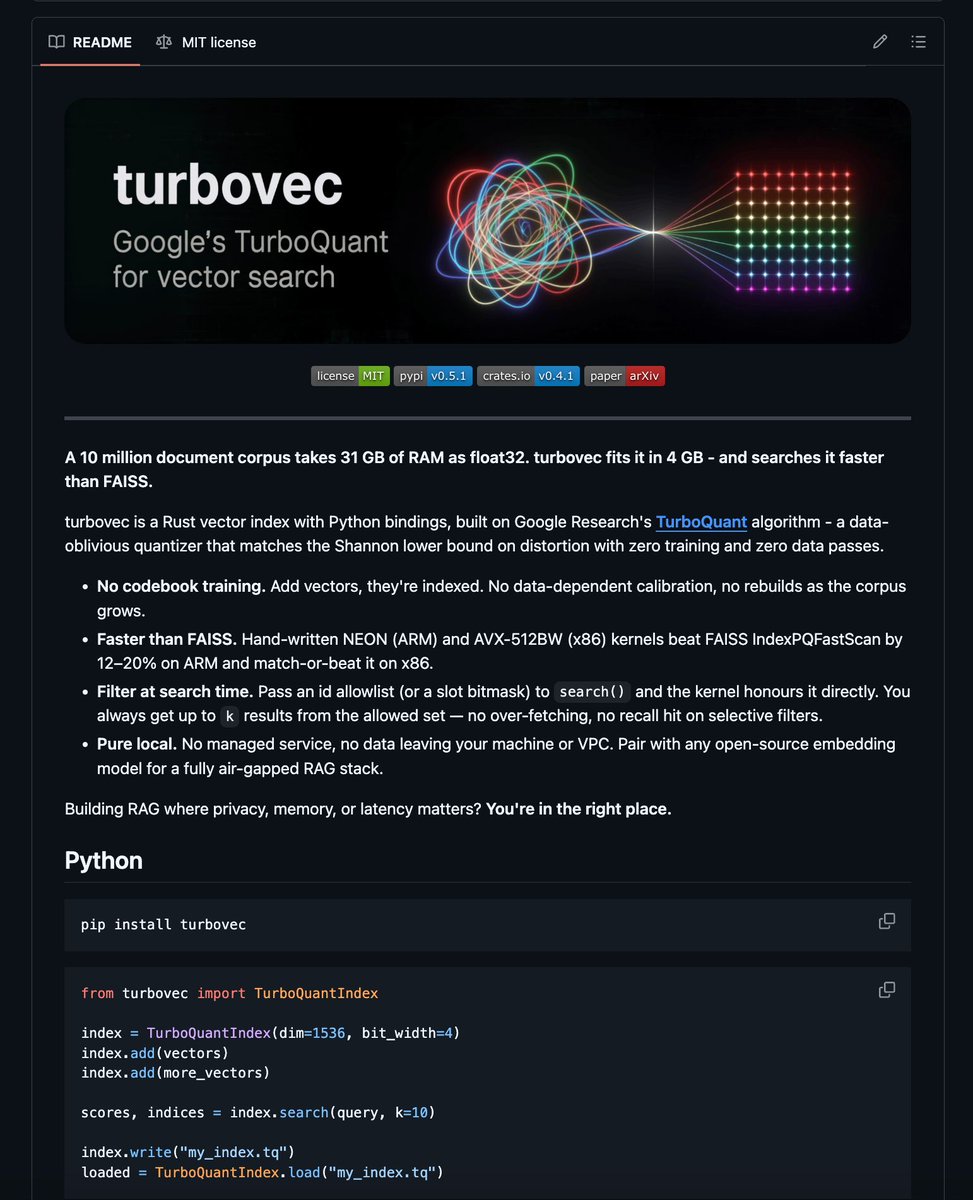
Someone fit 10 million documents into 4 GB of RAM. The same corpus would consume 31 GB in float32 - yes, 31 GB. turbovec did it. Rust vector index, Python bindings, MIT license. The algorithm behind it (TurboQuant, from Google Research) compresses each vector without ever inspecting your dataset. Unlike traditional quantizers, it does not require a training phase, learned codebooks, or index rebuilds as the corpus grows. How it works: Normalize each vector and apply a random rotation. The resulting coordinates follow a predictable distribution regardless of the underlying dataset. From there, precomputed mathematical bounds determine the optimal quantization buckets, and the vectors are bit-packed into a compact representation. A 1,536-dimensional OpenAI embedding shrinks from 6,144 bytes to 384 bytes - a 16× reduction in storage. And it’s faster than FAISS: → On Apple Silicon (M3 Max), it runs 12–20% faster across every benchmarked configuration. → On x86 (Sapphire Rapids), it matches or outperforms FAISS at 4-bit quantization. → On 1,536-dimensional OpenAI embeddings, recall exceeds FAISS by up to 3.4 percentage points at R@1. → Filtered search runs directly inside the SIMD kernel, eliminating post-processing without sacrificing recall. Drop-in compatible with LangChain, LlamaIndex, Haystack, and Agno, just swap the import. Everything runs locally. Your data stays on your machine, with no managed service in the loop. GitHub Repo: https://t.co/D8qqEU892y
@akshay_pachaar ·
K-Means is simple. Making it fast on GPU isn't. Flash-KMeans is an IO-aware implementation of exact k-means that rethinks the algorithm around modern GPU bottlenecks. By attacking the memory bottlenecks directly, Flash-KMeans achieves: - 30x speedup over cuML - 200x speedup over FAISS Using the same exact algorithm, just engineered for today’s hardware. At the million-scale, Flash-KMeans can complete a k-means iteration in milliseconds. Here's why this matters today: K-means has always been an offline primitive. Something you run once to preprocess data and move on. These speedups change that. ↳ Vector databases like FAISS use k-means to build search indices. Faster k-means means you can re-index dynamically as data changes, not batch it overnight. ↳ LLM quantization methods need k-means to find optimal weight codebooks, per layer, repeatedly. What takes hours could now take minutes. ↳ MoE models need fast token routing at inference time. Millisecond k-means makes it viable to run this inside the inference loop, not just in preprocessing. The 200x over FAISS is the number to internalize. FAISS is the industry standard. Most production vector search systems sit on top of it. Link to the paper and code in next tweet!
@arpit_bhayani ·
Postgres is the lowest common denominator for databases, and, to be honest, that is why it works so well as a default. If you do not need anything specific, just use Postgres. It is a super simple choice that just works. Personally, MySQL is still my first preference, but Postgres is good enough for almost everything a typical application needs. The pattern breaks at scale - with "scale" being super subjective here. Once your system grows beyond a certain point, you will have to opt for something more specific and purpose-built for the exact problem you have. A time series workload wants a time series database. A search-heavy workload wants a search engine. A graph-heavy workload wants a graph database. Vector workloads need a vector database. But, if you are starting, like we have always done, start generic and then go specific when the workload demands it. Hope this helps.
@_avichawla ·
Finally! A Text-to-SQL solution that actually works (open-source). When text-to-SQL fails, the real issue isn't the LLM or the prompt but schema retrieval. Consider a query like "Which publishers received royalty payments above $5,000?" To handle this, vector search can pull "publisher" and "royalty_ledger" based on semantic similarity But it can completely miss "vendor_agreement", the bridge table that connects them. The LLM writes valid SQL, but the engine still returns zero rows. This is a fundamental issue with vector-based schema retrieval on enterprise databases. A smarter approach is to treat the schema as a graph instead of a document to embed. Tables become nodes, foreign keys become edges, and join paths are discovered by walking the graph rather than matching semantics. If you want to see this in practice, QueryWeaver implements this approach. It converts the schema into a graph, and when a query comes in, it walks the structure and pulls in every bridge table the join path requires, including multi-hop chains. For instance, on the BIRD Benchmark with a superhero database expanded to 60 tables, it resolved a 5-hop query by chaining through: superpower → capability_matrix → stakeholder_registry → resource_requisition → budget_allocation Vector search found the two endpoints but missed everything in between because "stakeholder" has zero semantic link to "superpowers." Graph traversal found "stakeholder_registry" simply because it was the only road connecting the entities. It's fully open-source, and you can easily self-host it. I've shared the GitHub repo in the replies.
@GithubProjects ·
Qdrant is a production-ready vector search engine and database built in Rust, designed for high-performance similarity search with extended filtering support. - Written in Rust for speed and reliability under high load. - RESTful API with convenient client libraries for Go, Python, and more. - Supports advanced filtering, quantization, sharding, and hybrid search. - Available as a self-hosted Docker image or fully managed cloud service with a free tier.
@heygurisingh ·
🚨RAG engineers are going to lose their minds. @webAI just open sourced a document retrieval model that's sitting at #1 AND #3 on ViDoRe V3 -- with Nvidia's best open-source embedding model trapped at #2 between them. No OCR. No text extraction. No broken pipelines on messy PDFs. It's called webAI-ColVec1. Here's what this thing actually does: → Skips OCR entirely and retrieves directly from the rendered page image -- sees layout, tables, charts, and structure the same way you do → Ships in two variants (4B and 9B) with embedding sizes of 128, 640, and 2560 -- pick speed or max retrieval quality → Trained on ~2M question-image pairs across scientific papers, financial filings, healthcare records, government reports, and technical manuals → Uses 511 in-batch negatives per query for a brutal contrastive signal that forces clean separation between correct and competing pages → Built with a proprietary loss function designed specifically for retrieval -- not borrowed from generic embedding training → LoRA rank 32 + retrieval projection layer means efficient specialization without full fine-tuning Here's the wildest part: Built on Qwen 3.5 vision-language backbones and trained on just 8 A100s. No giant model. No massive infra budget. No scale-maxing. Just a deliberate, retrieval-specific training recipe applied to the right problem. And it beat the largest GPU company in the world on their own benchmark. You literally point this at a financial filing or a scanned healthcare doc -- the stuff that destroys every OCR pipeline in production -- and it retrieves the right page based on what the page actually looks like. That sentence shouldn't be real for an open-source model trained on 8 GPUs in 2026. But here we are. 100% Open Source. Live on Hugging Face. Two of the top three spots on ViDoRe V3. (Link in the comments)
@BraydenWilmoth ·
Vector search emails with natural language! Crazy how much of the Cloudflare stack this service is using. DO, D1, KV, Workers, Vectorize, Turnstile, R2, Workers AI, Gateway + more. By far the best though... Dynamic Worker Loaders. AI generates code and runs it in a secure sandbox INSIDE my existing Worker without needing an actual VM sandbox. More public access next week – small test group is stress testing it right now :)
@maxleiter ·
I wrote a bit about how we made v0 an effective coding agent - Dynamic system prompt - Our "LLM Suspense" framework for modifying streamed content on the fly - Our AutoFixer system for fixing various issues we've seen. A good example of how powerful the pipeline is is our icon fixer. We deterministically fix when the LLM hallucinates non-existent icons by: 1. Embedding every icon name in a vector database. 2. Analyze the exports from lucide-react at runtime. 3. Pass through the correct icon when its valid. 4. If the icon does not exist, run an embedding search to find the closest match. 5. Rewrite the import during streaming. https://t.co/vbQZUOLbgb
@RaulJuncoV ·
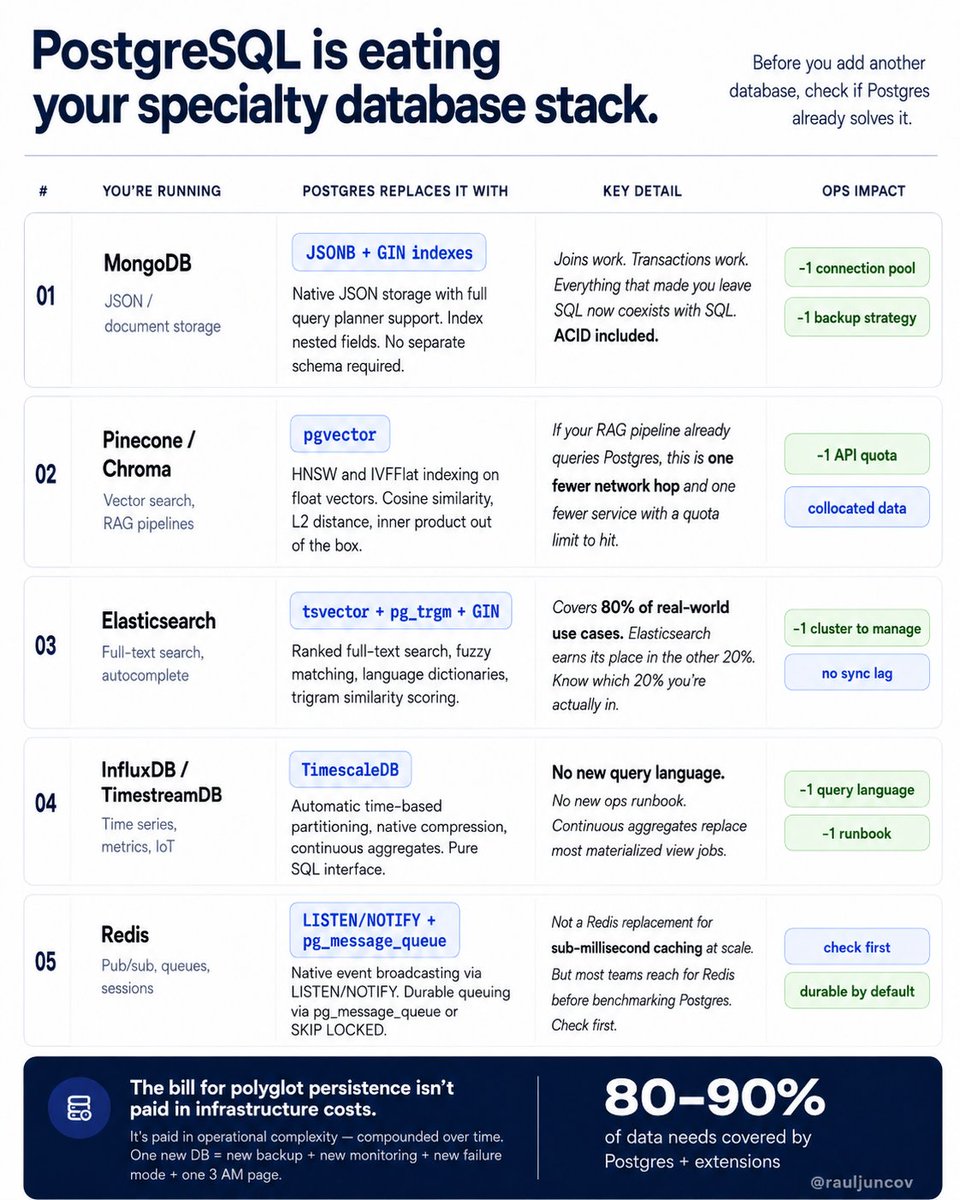
Behind every stack with too many databases is a team that didn’t check what Postgres can already do. I've seen this a dozen times. MongoDB for JSON. Redis for sessions. Elasticsearch for search. Pinecone for vectors. InfluxDB for metrics. Each one added to solve a real problem. Each one that Postgres already had an answer for. 1. Running MongoDB for JSON storage? Postgres has JSONB with GIN indexes on nested fields. Full query planner support. Joins included. ACID transactions included. Engineers who migrate from MongoDB usually say the same thing: They missed joins more than they expected. 2. Running Pinecone or Chroma for vector search? pgvector supports HNSW and IVFFlat indexing on float vectors. Cosine similarity. L2 distance. Inner product search. If your RAG pipeline already hits Postgres, this is one fewer network hop and one fewer service to operate. 3. Running Elasticsearch for full-text search? pg_trgm + tsvector + GIN indexes handle autocomplete, ranked document search, and fuzzy matching without leaving Postgres. Fuzzy matching. Ranked results. Language dictionaries. Elasticsearch is absolutely worth it for the hard 20%. But know you are actually in that 20% before you add it. 4. Running InfluxDB for time series? TimescaleDB is a Postgres extension. Automatic partitioning. Native compression. Continuous aggregates. SQL interface. Most teams don't know TimescaleDB exists until after they've already set up InfluxDB. That's the only reason InfluxDB is in this list. 5. Running Redis for pub/sub or lightweight queuing? Postgres has LISTEN/NOTIFY for event broadcasting. For durable queues, there's pg_boss, a full job queue built on Postgres, used in production at real scale. This is not a Redis replacement for sub-millisecond caching at scale. But most teams reach for Redis before they even benchmark Postgres. Check first. Every database you add is: - A new connection pool. - A new backup strategy. - A new monitoring dashboard. - A new failure mode. - A new thing to wake you up at 3 AM. Postgres in 2026 covers 80–90% of your data needs with extensions. Before you spin up a specialty store, ask: can Postgres do this? The bill for polyglot persistence isn't paid in infrastructure costs. It's paid in operational complexity, compounded over time.
@parcifap ·
How to learn AI Automation? Step-by-step guide in 4 levels - - Level 1: Using AI Start by mastering the fundamentals: > Prompt engineering (zero-shot, few-shot, chain-of-thought) > Calling APIs (OpenAI, Anthropic, Cohere, Hugging Face) > Understanding tokens, context windows, and parameters (temperature, top-p) With just these basics, you can already solve real problems But yeah, it's not enough to build real automation - - Level 2: Integrating AI Move from using AI to building with it: > Retrieval Augmented Generation (RAG) with vector databases (Pinecone, FAISS, Weaviate, Milvus) > Embeddings and similarity search (cosine, Euclidean, dot product) > Caching and batching for cost and latency improvements > Agents and tool use (safe function calling, API orchestration) This is the foundation of most modern AI products. - - Level 3: Engineering AI Systems Level up from prototypes to production-ready systems: > Fine-tuning vs instruction-tuning vs RLHF (know when each applies) > Guardrails for safety and compliance (filters, validators, adversarial testing) > Multi-model architectures (LLMs + smaller specialized models) > Evaluation frameworks (BLEU, ROUGE, perplexity, win-rates, human evals) Here’s where you shift from “it works” to “it works not like an unstable shit.” - - Level 4: Optimizing AI at Scale Learn how to run AI systems efficiently and responsibly: > Distributed inference (vLLM, Ray Serve) > Managing context length and memory (chunking, summarization, attention strategies) > Balancing cost vs performance (open-source vs proprietary tradeoffs) > Privacy, compliance, and governance (PII redaction, SOC2) At this stage, you’re not just building AI, you’re designing systems that scale in the real world.
@TheTuringPost ·
Almost everyone is talking about @GoogleResearch's TurboQuant (and for good reason) ➡️ It lets you run a 3-bit system with the accuracy of a full-precision model. Technically, TurboQuant is a compression algorithm that shrinks high‑dimensional vectors to low precision without losing accuracy. ▪️ It combines 2 techniques: - Vector compression with PolarQuant that first randomly rotates vectors, and then converts them into polar coordinates (radius + angle) to keep the main signal and avoid normalization overhead. - 1-bit error correction (QJL) turns the remaining error into just +1/−1 bits and uses them to correct similarity scores so they stay accurate. This opens up many benefits: • Keeps near-zero or zero accuracy loss • Speeds up attention and vector search by up to ~8× • Cuts KV cache memory by ~6× • Works without retraining or fine-tuning It’s very close to the best compression we can theoretically achieve. And as we move toward very long-context LLMs and semantic search over billions of vectors (both bottlenecked by memory and speed) this is a must-have building block.
@thetripathi58 ·
🚨 Cambridge researchers just tested what happens when you overload an AI's memory with irrelevant data. They found a complete collapse of modern RAG systems. Not a minor hallucination. A total failure of the exact retrieval architecture that every enterprise AI relies on to access private data. The models simply drowned in the noise. The researchers tested standard Retrieval-Augmented Generation (RAG) and filtering models like Self-RAG. They fed them information but slowly increased the ratio of distracting, low-quality documents. Here is what they found. Current read-time filtering failed completely. When the ratio of distractors hit 8:1, the accuracy of standard RAG systems plummeted to 0%. The AI lost the ability to find the truth. It exposed a massive architectural flaw. We currently store every single document an AI reads, regardless of quality, and force the model to sort through the garbage at query time. It is highly inefficient and fundamentally broken. The biological fix. The researchers built a new system called "Write-Time Gating" modeled after the human hippocampus. Instead of saving everything, it evaluates novelty, reliability, and source reputation before the data is even stored. And then there is the finding that changes how we build AI: hierarchical archiving. When beliefs update, the system does not delete the old data. It deprioritizes it, maintaining a version history just like the human brain. The result? The write-gated system maintained 100% accuracy even at massive distractor scales, all while costing one-ninth the compute of current systems. The researchers made it clear. When you dump raw, unfiltered data into a database and expect the LLM to figure it out later, you are building a system designed to fail at scale. No reliable retrieval. No cost control. No accuracy guarantees. Nothing. Right now, companies are building massive vector databases, throwing every piece of corporate documentation into them, and assuming the AI will magically find the signal in the noise. Stop treating AI memory like a hard drive. Start treating it like a biological filter. Build the gate at the entrance, not the exit.
@tylerangert ·
perhaps an even bigger market for "personal software" is not at the application layer but at the library and framework layer. so many open source packages / libraries etc are marketed to "work everywhere" and have dozens of first party language bindings, cover a billion benchmarks, etc. for example, right now im looking into a better vector storage + search solution. so i found sqlite-vec. and it's great! except i got The Models to use the original repo as a reference, set up an auto-research loop with a goal of making query time 10x faster, and brainstormed with it to try out different experiments and techniques. we're now sitting at 20x faster for vector search in sqlite vs. sqlite-vec and just as fast as usearch + FAISS for a single global index, and over 1000x faster than basically any HNSW library for doing derived / computed index queries since we can take advantage of sqlite itself ! in short: dont vendor everything just because it exists. sometimes reinventing the wheel really only takes 3 hours and a loop
@ujjwalscript ·
How to be a REAL AI Engineer (as opposed to a "Prompt Engineer") by learning the 4-Core System: Note: Being an AI Engineer is about building autonomous, production-grade agentic systems that solve real problems. 1. The "Brain" (Foundational Models & Routing): You don't just use one model anymore. You route them based on cost and latency. Heavy Lifting: Opus, Gpt-5.4 for deep reasoning and complex logic. Fast/Cheap: Open-source models (like Llama) for high-volume, low-latency micro-tasks. 2. The "Memory" (Embeddings & Vector Databases): AI models are stateless. You have to build their memory. Vector DBs: Pinecone, Qdrant, or Milvus. The secret isn't just storing vectors; it's mastering metadata filtering to prevent context pollution. Embedding Models: OpenAI’s latest embedding models or open-source equivalents like BGE for semantic search. 3. The "Nervous System" (Agent Orchestration & Pipelines): You are no longer writing linear scripts; you are managing a digital workforce. LangGraph & CrewAI: The 2026 industry standards for multi-agent workflows and cyclic graphs. PydanticAI: For strictly typed, validated AI outputs. If you aren't forcing your agents to return validated JSON, your app will crash in production. 4. The "Hands" (Tool Use & Action): An agent that can't take action is just a toy. API Design: Build strict, secure tools (using FastAPI or Node) that your agents can trigger autonomously. Web Automation: Tools like Firecrawl to let your agents research, scrape, and interact with the live internet.
@Suryanshti777 ·
RAG is broken and everyone's pretending it isn't. We chunk documents into pieces. Embed them into vectors. Pray similarity search finds the right ones. It doesn't. On complex documents, similarity ≠ relevance. Vectorless RAG just scored 98.7% on FinanceBench. GPT-4o with search? 31%. Here's how it works: Instead of shredding a 200-page document into random chunks, it reads the document the way a human does — structurally. 1. Document Indexing Parses the doc into a hierarchical tree: chapters → sections → pages. No chunking. No embeddings. No vector DB. 2. Tree-Based Reasoning The LLM traverses the tree from root to leaf, evaluating context at every level before going deeper. It THINKS its way to the answer instead of searching for it. 3. Context-Aware Retrieval Carries conversation history across turns and returns exact page + section references. Every answer is traceable. 4. Agentic Execution End-to-end agentic pipeline (VectifyAI demo runs on OpenAI Agents SDK). Zero vector layer in between. Why this matters: → Higher accuracy: document structure is preserved, not destroyed → Full traceability: every answer cites its exact page → Simpler stack: no embedding pipeline, no vector DB to maintain, lower cost The gap between similarity and relevance is where RAG accuracy dies. Vectorless RAG closes it by reasoning through structure instead of guessing with math. Chunking had a good run. It's over.
@NainsiDwiv50980 ·
Ask any LLM about something that happened last week and watch it either make something up or tell you it doesn't know That's not a model problem. That's a memory problem. The model only knows what it was trained on, frozen at a point in time RAG fixes this without retraining anything. Here's the actual flow, step by step: 1. Your documents (files, websites, internal docs) get chunked into smaller pieces 2. Each chunk gets converted into a numerical embedding, basically a vector that captures its meaning 3. Those embeddings get indexed and stored in a vector database 4. When you ask a question, your query gets embedded the same way 5. The system does a semantic search, finds the top-K chunks that are actually similar in meaning, not just keyword matches 6. Those results get reranked, irrelevant stuff gets stripped out 7. The strongest, most relevant chunks get appended to your original prompt 8. That combined prompt (your question + real retrieved context) goes to the LLM 9. The model generates an answer grounded in actual data, not just its training memory The part people miss: the LLM never learns anything new. It's not being retrained. You're just handing it the right paragraph at the right moment, the same way you'd hand a coworker the one document they need instead of expecting them to memorize your whole company wiki Why it actually matters: → Answers are grounded in real data, not model memory → Knowledge stays current without retraining → Sources are traceable, you can point to exactly what the answer came from → Cheaper than fine-tuning every time your data changes → Scales across any domain, swap the knowledge base, same architecture Every serious AI product doing "chat with your docs" or enterprise search is running some version of this pipeline underneath
@IntuitMachine ·
🧵 THREAD: Why your RAG pipeline is probably backwards (and grep is eating vector search's lunch) 1/ Everyone's building the same retrieval stack: → Embed everything → Store in Pinecone/Weaviate → Query with cosine similarity → Inject top-K into context But a new study just flipped this playbook upside down. 2/ The setup: 116 questions across 10 agent configurations They tested lexical (grep) vs semantic (vector) search inside actual agent loops — not static RAG pipelines. The twist? They varied both the orchestration harness AND how results get delivered to the model. 3/ The shocking result: Inline grep beat inline vector search in every single model-harness pair. Not by a little. Some margins hit 23 percentage points. Your $10K/month vector database might be getting crushed by a bash command. 4/ "But semantic search understands meaning!" True... until you put it inside an agent that needs to: Issue multiple queries Filter noise Integrate results across tool calls Turns out grep's precision >> vector's fuzzy recall when the agent has to actually do something with results. 5/ The hidden variable nobody talks about: How results reach the model matters as much as what you retrieve. 📋 Inline delivery: dump everything into context 📁 File-based delivery: write to disk, model reads programmatically Same retriever, different delivery = completely different rankings. 6/ File-based delivery actually inverted some comparisons With Haiku + Amazon Bedrock harness: Inline: grep wins Programmatic: vector wins This means "retrieval quality" is meaningless without specifying the orchestration layer. 7/ Why grep wins on literal-span tasks: ✅ Agent can craft precise regex patterns ✅ Zero false positives when pattern matches ✅ No embedding drift or semantic confusion ✅ Instant feedback: match or no match It's like giving the agent a scalpel instead of a net. 8/ The harness matters MORE than you think Same data + same retriever + different CLI harness = 15+ point accuracy swings. Provider-native harnesses (Claude, Gemini CLIs) have invisible inductive biases that change how agents search. You can't A/B test retrievers without A/B testing harnesses. 9/ When noise scales up: They added 10 → 50 → 100 distractor sessions. The "grep always wins" rule broke down. Crossover point depended on BOTH harness strength AND model capability. Translation: You can't predict production behavior from offline metrics. 10/ Three immediate leverage points: 1️⃣ Add grep as a tool (takes 1 day, costs $0) 2️⃣ Try file-based delivery on weak models to reduce context rot 3️⃣ Expose BOTH tools simultaneously → let the agent choose per query Hybrid beats pure strategies without extra infrastructure. 11/ The contrarian take: "Default to vector" is expensive pattern-matching theater. The best retrieval strategy is the one your harness can reliably use — not the one with the highest offline recall@10. 12/ What this means for you: 🚫 Stop evaluating retrievers in isolation ✅ Test retrieval × harness × delivery as ONE system 🚫 Stop assuming semantic > lexical ✅ Match strategy to task distribution (literal spans ≠ conceptual synthesis) 🚫 Stop ignoring orchestration ✅ Harness choice = model choice in impact 13/ The future isn't better embeddings. It's understanding how agents actually use the tools we give them. Grep just proved that simple, precise tools + smart orchestration > sophisticated search + naive integration. 14/ Key limitation: This assumes answers are often verbatim spans. If your workload is heavy paraphrase/synthesis, the lexical advantage shrinks. But for memory-intensive QA, event timelines, and factual lookup? Grep eats. 15/ Bottom line: Before you scale your vector infrastructure, ask: "Have I tested grep with programmatic delivery inside my actual production harness?" The answer might save you 6 months and $100K. Paper: "Is Grep All You Need?" (Sen et al.)
@freshlimesofa ·
I was learning different Vector indexing techniques. Decided to create a fun little visualizer that animates the indexing techniques. > IVF + variants > HNSW + variants check it out : https://t.co/qkgLWLF8FO
@smratitiwa86867 ·
Everyone is building AI agents. Tencent just made one of the biggest AI infrastructure categories look optional. They open-sourced TencentDB Agent Memory—a long-term memory system that runs entirely on your machine. No vector database. No Pinecone. No cloud memory APIs. No paying to remember yesterday's conversation. Here's what makes it different: • 61% fewer token costs • Persona memory accuracy jumps from 48% → 76% • Built on plain SQLite • Zero external dependencies • Fully open source Instead of stuffing everything into black-box embeddings, it organizes memory into a semantic hierarchy: → L0: Conversation → L1: Atomic facts → L2: Scenarios → L3: Persona Your agent keeps active context lightweight with a Mermaid graph while detailed execution logs stay on disk. Need evidence? It follows a "node_id" back to the original interaction instead of relying on fuzzy similarity search. The result: • Transparent memory • Deterministic recall • Lower token usage • Easy debugging • No vendor lock-in 5.1K+ GitHub stars already. The next generation of AI agents may not need a vector database at all.
@ttunguz ·
AI vendor revenue will double classic software in terms of new bookings this year. This trend is so large it’s starting to have second-order effects. MongoDB reported strong Q2 FY'26 results, delivering $591M in revenue with 24% year-over-year growth. AI is causing a second-order effect & a resurgence in growth in Atlas, the cloud-hosted version of MongoDB, which represents 74% of total revenue. We’ve seen a reacceleration within the hyperscalers already, but now the impacts are felt beyond. The Atlas product shows a pronounced deceleration pattern when examined quarterly, but with clear signs of recent revival : (first chart) Looking at the previous 22 quarters, Atlas grew incredibly quickly until Q3 of 2021. The post-COVID surge re-accelerated it to 85%, falling to 24% & today bouncing again up to 29%. Could AI be as impactful on growth rates as COVID? "MongoDB is emerging as a standard for AI applications. Over the last few quarters, we’ve seen a strength in our self-serve channel, driven in part by AI native startups choosing Atlas as the foundation for their applications." Atlas’s growth aligns with broader changes in software distribution channelsas AI-native companies adopt different procurement patterns. "After testing vector search against Postgres pgvector for their in-vehicle voice assistant, they selected MongoDB for superior performance at scale & stronger ROI. They now rely on Atlas to handle over 1 billion vectors & expect 10x growth in data usage by next year." Vector search has the potential to become a significant workload for customers. Vectors are used for information retrieval for AI applications. "Atlas performance was strong, accelerating to 29% year-over-year growth, up from 26% in Q1. Our customer additions were also robust. We have added over 5,000 customers over the last 2 quarters." MongoDB has added 10% of its customer base by count in the last two quarters. "In Q2, Atlas consumption growth was strong & relatively consistent with last year’s growth rates. This drove the acceleration in revenue as well as the growth in absolute revenue dollars year-to-date for the first half of fiscal ‘26." The enthusiasm from the team suggests the trend is durable. MongoDB’s overall revenue trajectory shows consistent growth from $65M in FY2016 to over $2.2B today, representing a 34x increase over nine years. "We ended the quarter with over 59,900 customers… Of our total customer count, over 7,300 are direct sales customers, a decline of 200 customers sequentially & flat year-over-year." MongoDB is moving up-market, focusing on larger enterprise customers rather than expanding total customer count. The data implies a $9.8k ACV. AI is providing a new tailwind not just to the major infrastructure players but to vendors who supply software that are components of AI. Hyperscalers’ growth rates suggest the effect on some of these adjacent businesses could be dramatic. https://t.co/agWFEWsseu
@JustAnotherPM ·
Here is the easiest way to understand what is RAG: (Product managers don't forget to bookmark this one!) RAG (Retrieval Augmented Generation) is a powerful method that helps LLMs access (aka:retrieve) evidence and data before it responds to the user's query. This ensures that all responses are grounded in reality, and hence are accurate. As a result, RAG helps reduce hallucination. Step by step, how RAG works: • 𝗦𝘁𝗲𝗽 𝟭: 𝗣𝗿𝗼𝗺𝗽𝘁 𝗮𝗻𝗱 𝗾𝘂𝗲𝗿𝘆: User asks a question like, "𝘞𝘩𝘢𝘵 𝘢𝘳𝘦 𝘵𝘩𝘦 𝘣𝘦𝘴𝘵 𝘷𝘦𝘨𝘦𝘵𝘢𝘳𝘪𝘢𝘯 𝘳𝘦𝘴𝘵𝘢𝘶𝘳𝘢𝘯𝘵𝘴 𝘰𝘱𝘦𝘯 𝘳𝘪𝘨𝘩𝘵 𝘯𝘰𝘸 𝘪𝘯 𝘙𝘰𝘮𝘦?" • 𝗦𝘁𝗲𝗽 𝟮 𝗮𝗻𝗱 𝟯: 𝗦𝗲𝗮𝗿𝗰𝗵 𝗮𝗻𝗱 𝗴𝗲𝘁 𝗶𝗻𝗳𝗼𝗿𝗺𝗮𝘁𝗶𝗼𝗻: The system queries to trusted 𝗱𝗮𝘁𝗮 𝘀𝗼𝘂𝗿𝗰𝗲𝘀 (that you give the system access to.) These sources could be API, a company knowledge base, a file, database, or even a vector database. • 𝗦𝘁𝗲𝗽 𝟰: 𝗥𝗲𝗹𝗲𝘃𝗮𝗻𝘁 𝗰𝗼𝗻𝘁𝗲𝘅𝘁: Then, the system picks the most relevant and helpful information (the "truth") from all the data it collected. And returns it to the server. • 𝗦𝘁𝗲𝗽 𝟱: 𝗘𝗻𝗵𝗮𝗻𝗰𝗲𝗱 𝗰𝗼𝗻𝘁𝗲𝘅𝘁: The server sends the new "context" and the original user query to an LLM (GPT, Gemini, or Claude) so it can now generate the final response. • 𝗦𝘁𝗲𝗽 𝟲: 𝗥𝗲𝘀𝗽𝗼𝗻𝘀𝗲: The LLM uses all the information (and context) to generate an accurate response based. Tldr: Without RAG, LLMs answer only from memory. RAG enables LLMs to retrieve up to date and relevant data. And use that to generate an accurate response for the user. 𝗖𝗵𝗮𝗹𝗹𝗲𝗻𝗴𝗲𝘀: while RAG theoretically improves the quality of responses, it also introduces specific challenges 1. 𝗥𝗲𝘁𝗿𝗶𝗲𝘃𝗮𝗹 𝗾𝘂𝗮𝗹𝗶𝘁𝘆: If the LLM is using inaccurate or stale data in step 3, the final response will also be inaccurate. 2. 𝗟𝗮𝘁𝗲𝗻𝗰𝘆: The extra step of searching for data takes longer. Hence the users have to wait a little longer to get the final response. 3. 𝗖𝗼𝘀𝘁: Sending more data to the LLMs (in step 5) uses more tokens and increases API costs. (Full post on substack. Linked below)
@_avichawla ·
A 12x cheaper model doesn't mean a 12x cheaper AI bill. This sounds counterintuitive, but for many AI systems, inference is no longer the only meaningful infrastructure cost. Consider this: - GPT-4 arrived at $30/M input tokens. - GPT-4o performed better at just $2.50 (12x drop). Yet for most teams, the AI bill didn't drop anywhere close to 12x. The reason is how AI queries have changed. In 2023, AI products were thin wrappers. A user sent text, and the model processed it to generate a response. The LLM call was essentially the entire workload, and the infra around it was minimal. AI systems don't look like that today. A single query can trigger a vector DB, web search, tools, and multiple LLM inferences to finally stream a response back to the user. So even though the per-token cost dropped, the total cost per query grew because the infra serving that query got heavier. And the worst part is that when all of these components run inside a single deployable unit, the scaling economics get even worse. A spike in one component forces the entire application to scale together, even when other components are idle. I've broken down how three architectures handle the same AI query in the diagram below. > Monolith: Inference consumes most of the compute while vector search, tool execution, and DB reads stay blocked until it finishes. Under load, the response degrades or times out entirely. > Auto-scaled monolith: This reacts to the spike by spinning up full copies of the entire app. Each replica carries every component, including inference, retrieval, tool execution, and DB access. But realistically, the spike could be caused by just inference alone. So across 10 replicas, the inference layer runs at capacity while the retrieval, tool execution, and DB layers are over-provisioned, causing the bill to land at 10x. > Cloud-native services: These break the query into parallel tasks and route each to its own scaling group. For instance: - Inference goes to Amazon Bedrock. - Vector search and DB go to Aurora pgvector. Since only the hot components scale, it reduces the bill to ~1.5x instead of 10x. This explains why the actual lever for reducing AI costs isn't the model. Instead, it's decomposing the infrastructure around it so that each component scales on its own load curve instead of dragging everything else up with it. To see this in practice, Innovaccer actually runs an AI platform on @awscloud that manages health records for 54M patients, with RAG on Bedrock and vision models on SageMaker. After decomposing, they achieved 33% lower cloud costs and 65% less management overhead. AWS has published a full breakdown on how to build this way, and they worked with me today to bring this to you. I've shared the report in the replies.
@hrswatigupta ·
🚨 How to become an AI Engineer in 6 months (2026 roadmap) No fluff. No theory overload. Just the skills companies actually hire for. By the end, you should be able to: * Build LLM apps end-to-end * Use OpenAI / Anthropic / open-source APIs * Design high-quality prompts & context * Implement tool calling + structured outputs * Deploy real AI products Here’s the roadmap 👇 Month 1 — Coding Foundations First, become comfortable with the basics. Learn: * Python (really well) * Git + GitHub * Terminal / CLI basics * JSON, APIs, HTTP * Async basics * SQL fundamentals * Pandas for data handling * Virtual environments * Error handling * FastAPI or Flask Goal: Build your first API. Month 2 — LLM App Development Now start building with LLMs. Learn: * Prompt engineering fundamentals * System vs user instructions * Structured outputs / JSON schemas * Function / tool calling * Streaming responses * Conversation state * Token & cost optimization * Failure handling * Prompt injection awareness Goal: Build your first LLM app. Month 3 — RAG (Retrieval Augmented Generation) This is where most real AI apps live. Learn: * Embeddings * Chunking strategies * Vector databases * Metadata filtering * Reranking * Retrieval quality issues * Hallucination reduction * Citations & grounding Goal: Build a RAG chatbot. Month 4 — Agents & Workflows Now automate complex tasks. Learn: * Agent loops * Tool selection * State management * Retry logic * Multi-step workflows * Evaluation frameworks * Task success metrics Goal: Build an AI agent. Month 5 — Deployment & Reliability Now turn your projects into real products. Learn: * FastAPI production patterns * Docker * Background jobs * Queues * Auth & API security * Logging & observability * Prompt/version management * Cost monitoring * Rate limits * Caching Goal: Deploy your AI product. Month 6 — Specialize Choose one direction: 1️⃣ AI Product Engineer Best for startup jobs Focus on: * LLM apps * RAG * Agents * Product UX * Deployment 2️⃣ Applied LLM Engineer Focus on: * Fine-tuning * Evaluation systems * Inference optimization * Open-source models * Training pipelines 3️⃣ AI Automation Engineer Focus on: * Workflow automation * Business processes * Multi-tool systems * CRM / support automation * Operations AI The secret? Don’t just learn. Build. By month 6 you should have: * AI apps * RAG systems * Agents * deployed projects That’s what actually gets you hired. Save this roadmap so you can come back to it later.
@petesoder ·
@changhiskhan, CEO of @lancedb, thinks the data stack we've used for 20 years is done. Metadata in the DB, files on S3, connected by a pointer. Fine for humans. Breaks under agentic workloads. His argument: the files need to live inside the database. https://t.co/zQqode1Imp
@shivam74689 ·
Day 64 — Becoming AI Engineer Today I learned one of the most important lessons in building production RAG systems: When an AI system gives bad answers, the problem is usually not the LLM. The problem is often the evidence pipeline behind it. I spent today debugging and rebuilding the retrieval pipeline of my Enterprise Knowledge Graph Agentic RAG system end-to-end. The first challenge was not retrieval itself. It was getting the entire pipeline stable. Several integration issues between the Citation Manager, Context Compressor, Enterprise Agent, and Bootstrap process were preventing the system from running correctly. After fixing those connections, I moved from debugging the whole system to validating each component independently. I tested every retrieval layer: • Qdrant vector search for semantic retrieval. • BM25 keyword search for exact term matching. • Hybrid Retrieval combining semantic and lexical signals. • Reciprocal Rank Fusion (RRF) for merging multiple ranked results. Each component was returning relevant results individually, which confirmed the retrieval foundation was working. But then I looked deeper. Instead of only checking the final generated answer, I inspected the raw evidence flowing through every stage of the pipeline. That changed everything. The real problems were upstream. The PDF extraction process was producing noisy and poorly structured text. The chunking strategy was also creating problems: • Important definitions were being split across chunk boundaries. • Fixed-size character splitting ignored semantic structure. • Small chunks with low overlap were giving the LLM incomplete context. This reinforced a major principle: Bad ingestion creates bad retrieval. Bad retrieval creates bad generation. No amount of reranking or a stronger LLM can fully recover from poor-quality context. I also discovered a duplicate chunk issue. Old vectors from previous experiments were still stored inside Qdrant, while the chunking process was creating additional low-quality boundaries. To fix this, I completely reset the knowledge stores: • Cleared Qdrant vector storage. • Reset Neo4j graph storage. • Regenerated embeddings from scratch. • Created a new structured sample document designed specifically to stress-test enterprise retrieval. After rebuilding the index, I validated the complete retrieval flow again. The improvements were clear: • Retrieval returned distinct and relevant chunks. • Hybrid search correctly combined semantic and keyword-based matches. • Context compression successfully reduced multiple retrieved chunks into concise, useful context. One of the biggest lessons from today: Production AI engineering is less about continuously adding new components and more about making every existing component measurable, debuggable, and reliable. A RAG system should not be treated as a black box. You need visibility into every stage: Document → Extraction → Cleaning → Chunking → Embeddings → Vector Store → Retrieval → Compression → Generation When something breaks, debugging should happen stage by stage until the real failure point is found. Another important realization: Most production AI work is not writing new algorithms. It is understanding why systems fail, isolating root causes, and improving reliability. With the retrieval pipeline now validated, the next bottleneck is clear. The Neo4j knowledge graph extraction layer is currently returning zero entities. The next step is to debug and improve entity and relationship extraction so the system can combine: • Semantic retrieval. • Keyword retrieval. • Graph-based reasoning. towards true multi-hop enterprise reasoning. Every day, AI engineering feels less like building a chatbot and more like designing a reliable knowledge system. #AIEngineering #AgenticAI #RAG #KnowledgeGraph #Neo4j #VectorSearch #BM25 #EnterpriseAI #LLM #GenerativeAI #SoftwareEngineering #BuildingInPublic
@ujjwalscript ·
If you want to be an AI Engineer, and make TOP dollar in the industry, read this: Here is what the elite 1% of AI Engineers are doing differently: 1. They treat Pydantic as their Data Backbone Models love to output poetic, unpredictable nonsense. Businesses require deterministic, predictable data. Top-earning engineers don't just ask an LLM for JSON; they build strict Pydantic schemas and use structured outputs to force the model’s cognitive leaps into strict data contracts. 2. They build Agentic Brakes, not just Autonomy The engineers making real money are the ones who understand Token Budgeting and Deterministic Fallbacks. When an autonomous agent gets caught in an edge-case reasoning loop, it doesn’t just break the code - it burns through thousands of dollars in API costs in minutes. 3. They master Codebase Intelligence & Context Architecture With the rise of the Model Context Protocol (MCP), the bottleneck isn't the AI's intelligence; it's the context you feed it. Top dollars go to engineers who can build semantic maps of massive enterprise repositories, optimize vector database retrieval (RAG) with advanced re-ranking, and handle complex token context windows without causing latency lag. 4. They focus on Evaluation over Experimentation Junior devs test their AI apps by manually chatting with them 5 times and saying "looks good." Senior AI Engineers build automated evaluation suites using frameworks like LangSmith or DeepEval. They use LLM-as-a-Judge patterns to run automated regression tests on prompts, scoring outputs for hallucination and grounding before a single line hits production.
@alex_verem ·
Turbovec is a tool that makes AI search cheaper to run. It's free, it runs on your own computer, and it shrinks the memory AI search needs by about 8x. Some background first. Modern search doesn't match keywords anymore. It turns every document or product into a long list of numbers, called an embedding, where similar items get similar numbers. Searching means finding the items whose numbers are closest to your search. That works well, but those lists of numbers take up a lot of space. Take a company with 10 million products. Storing those lists at full precision takes about 31 GB of memory, and their server only has 16. Their options were renting a bigger server or paying a cloud search service $100 to $500 a month and handing over their data. A hobbyist building a search tool hits the same wall: cloud services start at $45 to $50 a month, before the project has a single user. And a hospital that wants to search patient records can't send that data to an outside service at all. turbovec takes a different approach. It uses a compression method called TurboQuant, from a Google Research paper presented at the ICLR 2026 machine learning conference. Instead of storing every number at full precision, it stores a compressed version that stays accurate enough for search. Those same 10 million products take 4 GB instead of 31, so they fit on the existing server. In the project's own tests, searches also ran 10 to 19% faster than FAISS, the standard free tool for this job. Two design choices matter in daily use. First, most compression methods need a training run on sample data before they work, and retraining when the data changes. This one doesn't, so you can add new records anytime without rebuilding anything. Second, you can limit a search to a subset of records, like one customer's data, without slowing down or losing accuracy. Setup is one command. If you already use a popular AI framework (LangChain, LlamaIndex, Haystack, or Agno), switching is a one-line change. The tool comes from Ryan Codrai, an engineer at Anthropic. He read the Google Research paper, built a working version in Rust (a programming language known for speed), and released it free under the MIT license, which means anyone can use it, including for commercial products. The project has 13,500 stars on GitHub. The catch, however, is that the speed and compression numbers come from the project's own tests, not an independent review. And since turbovec is software you run yourself, no company handles backups, uptime, or support for you. The paid services include those things, and that's part of what the monthly fee buys. If you have the machine and your data can't leave it, turbovec costs nothing. If you'd rather pay someone to run the infrastructure, the cloud services still make sense.
@PrajwalTomar_ ·
Your vector database is quietly killing your AI agent and you have no idea. Here is the trap. Everyone picks the database that looks fastest. But those speed tests run on data that never changes. Real agents are different. They save new information after every task. Add that constant writing, and the database that looked fastest lost 75% of its speed. Your top pick just became your bottleneck. So I went through a solid breakdown of 8 of them. Here's how to actually choose: → On Postgres, under 10M vectors: pgvector → Constant reads and writes (agent memory): Qdrant → Zero ops, cloud is fine: Pinecone → Prototyping on your laptop: Chroma → On-device or embedded: LanceDB → Regulated, edge, or air-gapped: VectorAI DB And the part nobody tells you: RAG mostly reads. Agent memory constantly writes. Different workload, different database. Pick by where it runs and what it does. Never by the leaderboard. Full breakdown below.
@pauliusztin_ ·
Your RAG pipeline is infrastructure bloat. You do not need a vector database to process 10 million tokens. Instead of maintaining brittle embedding pipelines and chunking strategies, Recursive Language Models (RLMs) let your model write code to explore data directly. The model writes Python to filter data and aggregate the results itself. In this article, we explain how you can use RLMS to process 10 million tokens with zero retrieval infrastructure. https://t.co/nHWlOUWaab
@ttunguz ·
Gmail’s AI email assistant writes like a committee of lawyers designed it. Pete Koomen’s recent post Horseless Carriages explains why: developers control the AI prompts instead of users. In his post he argues that software developers should expose the prompts and the user should be able to control it. He inspired me to build my own. I want a system that’s fast, accounts for historical context, & runs locally (because I don’t want my emails to be sent to other servers), & accepts guidance from a locally running voice model. Here’s how it works: 1. I press the keyboard shortcut, F2. 2. I dictate key points of the email. 3. The program finds relevant emails to/from the person I’m writing. 4. The AI generates an email text using my tone, checks the grammar, ensures that proper spacing & paragraphs exist, & formats lists for readability. 5. It pastes the result back. Here are two examples : emailing a colleague, Andy (https://t.co/Ghkek3slpY), & a hypothetical founder (https://t.co/GLxMvxNmfm). Instead of generics, the system learns from my actual email history. It knows how I write to investors vs colleagues vs founders because it’s seen thousands of examples. The point isn’t that everyone will build their own email system. It’s that these principles will reshape software design. - Voice dictation feels like briefing an assistant, not programming a machine. - The context layer - that database of previous emails - becomes the most valuable component because it enables true personalization. - Local processing, voice control, & personalized training data could transform any application, not just email, because the software learns from my past uses We’re still in the horseless carriage era of AI applications. The breakthrough will come when software adapts to us instead of forcing us to adapt to it. Centered around a command line email client called Neomutt (https://t.co/npc7rKft2M). The software hits LanceDB, a vector database with embedded emails & finds the ones that are the most relevant from the sender to match the tone. The code is here (https://t.co/oE6CNkRBEI). https://t.co/DcP6eCnRO5
@DanKornas ·
Vector-only RAG can miss relationships that span chunks and documents, especially when a question needs both details and wider context. LightRAG is a graph-based RAG framework for builders who need retrieval across entities, relationships, and source text. It helps you retrieve both specific facts and broader context by combining knowledge-graph indexing with vector embeddings and dual-level retrieval. Key features: • Dual-layer indexing – manages knowledge graphs and vector embeddings together instead of relying only on chunk similarity. • Five query modes – choose local, global, hybrid, naive, or mix retrieval for different question types. • Incremental updates – add new data without rebuilding the global index. • Multimodal parsing – extract text, tables, formulas, and images with MinerU, Docling, or native parsers. • Builder interfaces – work through a REST API, WebUI, or Python SDK. It’s open-source (MIT license). Link in the reply 👇
@RoundtableSpace ·
Most RAG pipelines follow the same pattern chunk your docs, embed them, stuff into a vector DB, run similarity search. PageIndex throws all of that out. No vector database. No embeddings. No chunking. No similarity search. Instead it builds a tree index over your documents and lets the LLM reason through it the way a human reads a book navigating structure, following context, understanding relationships. The results are hard to argue with. 98.7% on FinanceBench. Beats every vector RAG system on the leaderboard. Every startup that raised money to build a better vector RAG pipeline is having a bad week. 100% open source.
@Meer_AIIT ·
🚨 A $2.5B startup just put Nvidia in a sandwich on the hardest document retrieval benchmark in AI. It's called webAI-ColVec1. And they open sourced it. Their 9B model sits at #1 on ViDoRe V3. Their 4B model sits at #3. Nvidia's best open-source embedding model is stuck at #2 between them. ViDoRe V3 is not a toy benchmark. 26,000+ document pages. 3,000+ human-verified queries. 10 enterprise domains. Financial filings, healthcare records, technical manuals, dense tables, messy layouts. The stuff that actually breaks production RAG systems. Here's what makes this different from everything else on the leaderboard: → Retrieves directly from rendered page images instead of extracted text → Skips OCR entirely. The model sees the page the same way you do → Tables, charts, scanned pages, dense layouts. All handled natively → Two model sizes: 4B for speed-sensitive edge deployments, 9B for max accuracy → Trained on ~2 million question-image pairs across scientific papers, financial filings, government reports, healthcare docs, and multilingual documents → Built on Qwen 3.5 vision-language backbones with LoRA adaptation → Trained on just 8 A100s with an effective batch size of 512 → Each query learns against 511 competing document pages per training step → Proprietary loss function that forces cleaner separation between correct and wrong pages → Multiple embedding sizes (128, 640, 2560) so you pick your own speed vs. quality tradeoff Here's the wildest part: Most enterprise teams are paying per-page and per-token fees just to get their documents into a format their RAG system can search. Reducto charges $0.015 per page for parsing. Cohere Embed v4 costs $0.12 per million tokens. Voyage AI's flagship model runs $0.18 per million tokens. And all of those still depend on OCR as the first step. One bad table extraction upstream and your entire retrieval pipeline breaks. webAI threw out that entire architecture. The model reads the page like a human. And it beats every paid and open-source alternative on the benchmark designed to test exactly that. This didn't come from a massive model or a giant infrastructure budget. 8 A100s. Deliberate training recipe. Retrieval-specific design. That's it. Cohere Embed v4: $0.12/million tokens. Voyage AI voyage-3-large: $0.18/million tokens. OpenAI text-embedding-3-large: $0.13/million tokens. This: Free. Open source. #1 on the leaderboard. @thewebAI 100% Open Source. (Link in the comments)
@jlongster ·
been trying vector databases, I haven't found them very helpful for codebases, but it's very cool for my local notes I'm indexing all my Bear notes (splitting each note into individual items) and my system can find relevant info quickly, logs of when I worked on something, duplicate todos, etc
@ThePracticalDev ·
Upgrading your embedding model in production? You can't just swap it out — existing vectors are incompatible. This dev shows a zero-downtime strategy using dual-column schemas, background backfilling with Cloud Run Jobs, and feature flags for safe cutover. { author: @RemikSamborski + @GoogleAI } https://t.co/QkQ8fElkIm
Best Tweets by Topic