ML lifecycle, pipelines, and reproducibility
End-to-end ML workflows covering data preparation, training, experiment tracking, versioning, registries, orchestration, CI/CD, retraining, and the transition from notebooks to production.
42%
Best tweets about MLOps
Browse the best tweets about MLOps, including model deployment, evaluation, monitoring, data pipelines, infrastructure, reliability, and production lessons.
Production MLOps systems, model delivery, observability, evaluation, data pipelines, infrastructure, incidents, and engineering tradeoffs.
Original Xholic analysis
The MLOps conversation centers on the systems around models: lifecycle and reproducibility, evaluation and feedback loops, observability, serving tradeoffs, and data quality. Posts commonly frame reliable production AI as an engineering problem that extends beyond model selection.
60% of posts
All-time engagement
38% of posts
Published in 90 days
Conversation map
End-to-end ML workflows covering data preparation, training, experiment tracking, versioning, registries, orchestration, CI/CD, retraining, and the transition from notebooks to production.
42%
Golden datasets, regression testing, LLM-as-judge limitations, human review, production-trace mining, simulation, online evaluation, and using failures to improve systems.
38%
Tracing prompts, retrieval, tools, tokens, latency, errors, and outcomes; distributed context propagation; dashboards and debugging workflows for production incidents.
38%
Serving engines, hardware selection, GPU utilization, batching, KV and prefix caching, prefill/decode disaggregation, speculative decoding, quantization, autoscaling, and throughput-latency tradeoffs.
28%
Monitoring predictive-model performance, data and concept drift, model decay, sudden failures, retraining triggers, and operational maintenance.
28%
Selecting hosted versus self-hosted models, routing requests by task, quality, latency and price, caching, token budgets, and cost attribution.
22%
Context construction, embeddings, chunking, hybrid retrieval, reranking, vector pipelines, freshness, retrieval quality, and RAG-versus-fine-tuning decisions.
16%
Data contracts, schema validation, streaming and batch pipelines, lakehouse layers, feature stores, lineage, training-serving consistency, and data drift.
10%
Tone and stance
Performance benchmark
Posts with media make up 56% of this collection. Their median all-time score is 43.8, compared with 17.1 for text-only posts.
Format mix
Consensus and debate
Shared view
Multiple posts describe production AI as a combination of models with orchestration, state, tools, validation, deployment, observability, and feedback mechanisms. The lifecycle/reproducibility theme is the largest measured theme, appearing in 21 posts (42%).
Shared view
Posts advocate defining evaluation criteria early and using production failures, logs, and traces to create or refresh evaluation and improvement datasets. The evaluation-and-feedback-loops theme appears in 19 posts (38%).
Shared view
Lifecycle and data-pipeline posts emphasize schema validation, data contracts, reproducible training workflows, versioning, and shared data paths for training and inference.
Shared view
Posts call for tracing across prompts, retrieval, tool calls, tokens, latency, and asynchronous contexts. They describe broken or missing trace context as a challenge in concurrent and distributed LLM applications.
Open debate
One post presents AI-as-judge as a useful evaluation approach while noting biases. Another reports that automated-evaluation tools can surface issues but can miss problems requiring domain expertise and taste, recommending iterative use with people in the loop.
Open debate
Posts discuss hardware-aware and self-hosted serving, including a practitioner comparison of an open model with a managed model. A separate post asks when managed APIs should give way to self-hosting, rather than giving a universal threshold.
Open debate
Some posts describe agents that automate or improve ML operating loops. Others emphasize restricted action scope, permissions, validation, structured outputs, and deterministic workflow boundaries as controls around model-generated actions.
What performs
The five outliers by all-time score are posts on inference-engine and hardware choices, AI engineering architecture, multi-agent production reliability, MLOps/LLMOps distinctions, and production AI principles. Their scores range from 119.35 to 377.07, versus a dataset median all-time score of 21.54.
There are 28 posts with media (56%). Their median all-time score is 43.76, compared with 17.13 for text-only posts.
Lists comprise 19 posts (38%) and have a median all-time score of 39.931. This exceeds the reported medians for announcements (11.46) and opinions (14.268).
Statistical standouts
Creator landscape
The five most represented creators account for 20% of the selected posts.
1. Vaishnavi
@_vmlops
2 posts
2. Abhishek Singh
@0xlelouch_
2 posts
3. aditya
@adxtyahq
2 posts
4. Akshay 🚀
@akshay_pachaar
2 posts
5. Shalini Goyal
@goyalshaliniuk
2 posts
6. Priyanka Vergadia
@pvergadia
2 posts
The dataset contains 43 creators, and the top five account for 20% of placement. Six listed top voices published two posts each: Vaishnavi, Abhishek Singh, aditya, Akshay, Shalini Goyal, and Priyanka Vergadia.
Posts from repeat contributors include a production AI lifecycle overview, a data-pipeline architecture, AI-engineering and evaluation guidance, and an announcement about an agent harness improvement loop.
Since the previous snapshot
Themes, sentiment, stance, and post format are classified per tweet. All counts, shares, medians, creator concentration, freshness, and performance comparisons are then calculated directly from the published snapshot.
Xholic's all-time score compares engagement while accounting for reach, post age, and creator consistency. It is used for relative comparisons within this collection.
This report analyzes the exact 50-post snapshot shown below. AI identifies editorial categories and drafts explanations; all statistics are calculated from the snapshot, and every narrative claim is checked against cited posts before publication.
Best MLOps tweets
Ranked 01–50
@TheAhmadOsman ·
You don’t pick an Inference Engine You pick a Hardware Strategy and the Engine follows Inference Engines Breakdown (Cheat Sheet at the bottom) > llama.cpp runs anywhere CPU, GPU, Mac, weird edge boxes best when VRAM is tight and RAM is plenty hybrid offload, GGUF, ultimate portability not built for serious multi-node scale > MLX Apple Silicon weapon unified memory = “fits” bigger models than VRAM would allow but also slower than GPUs clean dev stack (Python/Swift/C++) sits on Metal (and expanding beyond) now supports CUDA + distributed too great for Mac-first workflows, not prod serving > ExLlamaV2 single RTX box go brrr EXL2 quant, fast local inference perfect for 1/2/3/4 GPU(s) setups (4090/3090) not meant for clusters or non-CUDA > ExLlamaV3 same idea, but bigger ambition multi-GPU, MoE, EXL3 quant consumer rigs pretending to be datacenters still CUDA-first, still rough edges depending on model > vLLM default answer for prod serving continuous batching, KV cache magic tensor / pipeline / data parallel runs on CUDA + ROCm (and some CPUs) this is your “serve 100s of users” engine > SGLang vLLM but more systems-brained routing, disaggregation, long-context scaling expert parallel for MoE built for ugly workloads at scale lives on top of CUDA / ROCm clusters this is infra nerd territory > TensorRT-LLM maximum NVIDIA performance FP8/FP4, CUDA graphs, insane throughput multi-node, multi-GPU, fully optimized pure CUDA stack, zero portability (And underneath all of it: Transformers → model architecture layer → CUDA / ROCm / TT-Metal → compute layer) What actually happens under the hood: > Transformers defines the model > CUDA / ROCm executes it > TT-Metal (if you’re insane) lets you write the kernel yourself The Inference Engine is just the orchestrator (simplified) When running LLMs locally, the bottleneck isn’t just “VRAM size” It isn’t even the model It’s: - memory bandwidth (the real limiter) - KV cache (explodes with long context) - interconnect (PCIe vs NVLink vs RDMA) - scheduler quality (batching + engine design) - runtime overhead (activations, graphs, etc) (and your compute stack decides all of this) P.S. Unified Memory is way slower than VRAM Cheat Sheet / Rules of Thumb > laptop / edge / weird hardware → llama.cpp > Mac workflows → MLX > 1–4 RTX GPUs → ExLlamaV2/V3 > general serving → vLLM > complex infra / long context / MoE → SGLang > NVIDIA max performance → TensorRT-LLM
@techNmak ·
Most engineers think AI engineering means fine-tuning models. It doesn't. Chip Huyen's AI Engineering, the most-read book on O'Reilly since release, is a masterclass in what building production AI actually looks like. Here's what matters most. Traditional ML engineers build models. AI engineers build on top of models. The barrier dropped. The discipline changed. Everything downstream changed with it. But lower barriers created a new trap: most teams skip to fine-tuning before exhausting what prompting and RAG can do. That's backwards. The hierarchy of adaptation, do this in order: 1. Prompt engineering → zero cost, immediate 2. RAG → no model changes needed 3. Fine-tuning → significant resources The rule: exhaust each layer before moving to the next. Evaluation is the hardest problem nobody invests in enough. Here's what makes AI evaluation brutal: > Problems are complex and open-ended > There's no single correct answer > Models are black boxes > Benchmarks get saturated fast The most powerful solution: AI-as-judge. Use another model to evaluate outputs. Studies show AI judges can correlate as strongly with human evaluators as humans correlate with each other, sometimes higher. But AI judges have biases: > Self-bias - prefer outputs from the same model > Position bias - favor the first answer shown > Verbosity bias - prefer longer responses Know these. Design around them. The two failure types that determine your next move. When your model underperforms, ask one question: Is this an information failure or a behavior failure? → Information failure (lacks private data, recent events) = Add RAG → Behavior failure (wrong format, irrelevant outputs) = Fine-tune Most teams combine both eventually, but start with RAG, it's faster and reversible. What fine-tuning actually requires: > Full fine-tuning: thousands to millions of examples > LoRA and other PFT methods: hundreds of examples The Chinchilla scaling law guidance: training tokens should be roughly 20x the model's parameter count. A 3B parameter model needs ~60B training tokens. Start with 50 high-quality examples. If you see no improvement, more data rarely fixes it, bad hyperparameters or data quality is likely the problem. The production architecture nobody builds on day one but everyone needs - > Simple start: Query → Model → Response > Production reality: Query → Input guardrails → Context construction (RAG) → Model router → Right model → Output guardrails → Caching → Monitoring → User feedback loop Each layer gets added when a real problem demands it. Not before. The three questions to ask before building anything: 1./ Have I exhausted prompting before trying RAG? 2./ Have I exhausted RAG before fine-tuning? 3./ Have I defined my evaluation criteria before writing code? If the answer to any is no, go back.
@adxtyahq ·
again saying there's never been a better time to work on multi-agent systems. learn rag, orchestration, evals, memory, routing, tool calling, validation loops, fix loops, split learning, context engineering. all of it. getting an llm to answer questions is becoming the easy part getting multiple agents, tools, and workflows to work together reliably in production without breaking every other day is where the real challenge is. we're entering a phase where building the model matters less than building everything around it.
@_avichawla ·
DevOps vs. MLOps vs. LLMOps: Many teams are trying to apply DevOps practices to LLM apps. But DevOps, MLOps, and LLMOps solve fundamentally different problems. DevOps is software-centric. You write code, test it, and deploy it. The feedback loop is straightforward: Does the code work or not? MLOps is model-centric. Here, you're dealing with data drift, model decay, and continuous retraining. The code might be fine, but the model's performance can degrade over time because the world changes. LLMOps is foundation-model-centric. Here, you're typically not training models from scratch. Instead, you're selecting foundation models and then optimizing through three common paths: - Prompt Engineering - Context/RAG Setup - Fine-Tuning But here's what really separates LLMOps: The monitoring is completely different. In MLOps, you track data drift, model decay, and accuracy. In LLMOps, you're watching for: - Hallucination detection - Bias and toxicity - Token usage and cost - Human feedback loops This is because you can't just check if the output is "correct." You need to ensure it's safe, grounded, and cost-effective. The evaluation loop in LLMOps also feeds back into all three optimization paths simultaneously. Failed evals might mean you need better prompts, richer context, OR fine-tuning. So it's not a linear pipeline anymore. One more thing: prompt versioning and RAG pipelines are now first-class citizens in LLMOps, just like data versioning became essential in MLOps. And the ops layer you choose should match the system you're building. 👉 Over to you: What does your LLM monitoring stack look like right now? ____ Find me → @_avichawla Every day, I share tutorials and insights on DS, ML, LLMs, and RAGs.
@vasuman ·
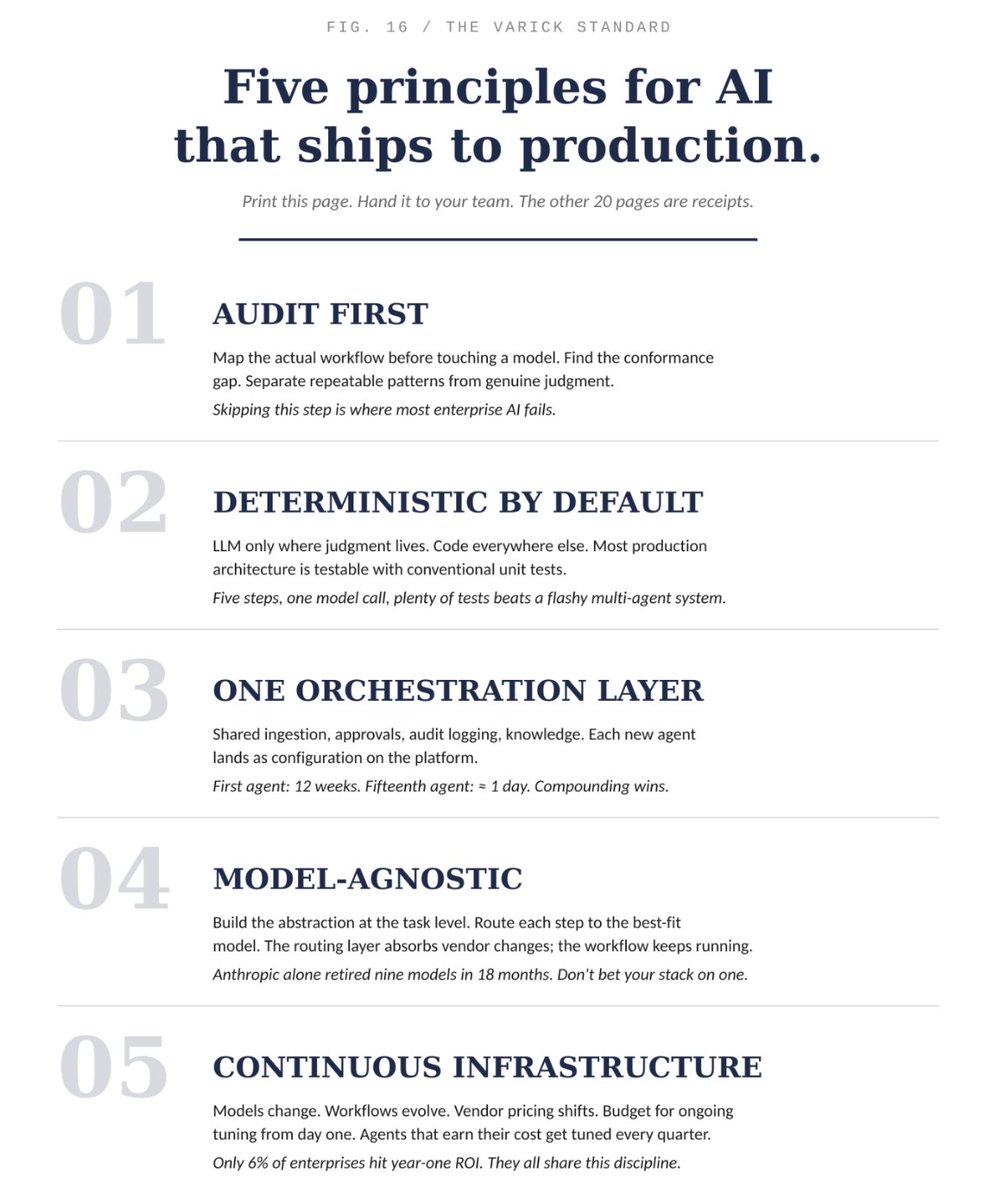
The 5 principles for AI that ships to production: 1. Audit first: map the actual workflow before touching a model. Find the conformance gap. Separate repeatable patterns from genuine judgment. 2. Deterministic by default: LLM only where judgment lives. Code everywhere else. Most production architecture is testable with unit tests. 3. One orchestration layer: shared ingestion, approvals, audit logging, knowledge. Each new agent lands as configuration on the platform. 4. Model-agnostic: build the abstraction at the task level. Route each step to the best-fit model. The routing layer absorbs vendor changes. 5. Continuous infrastructure: models change, workflows evolve, vendor pricing shifts. Budget for ongoing tuning from day one.
@goyalshaliniuk ·
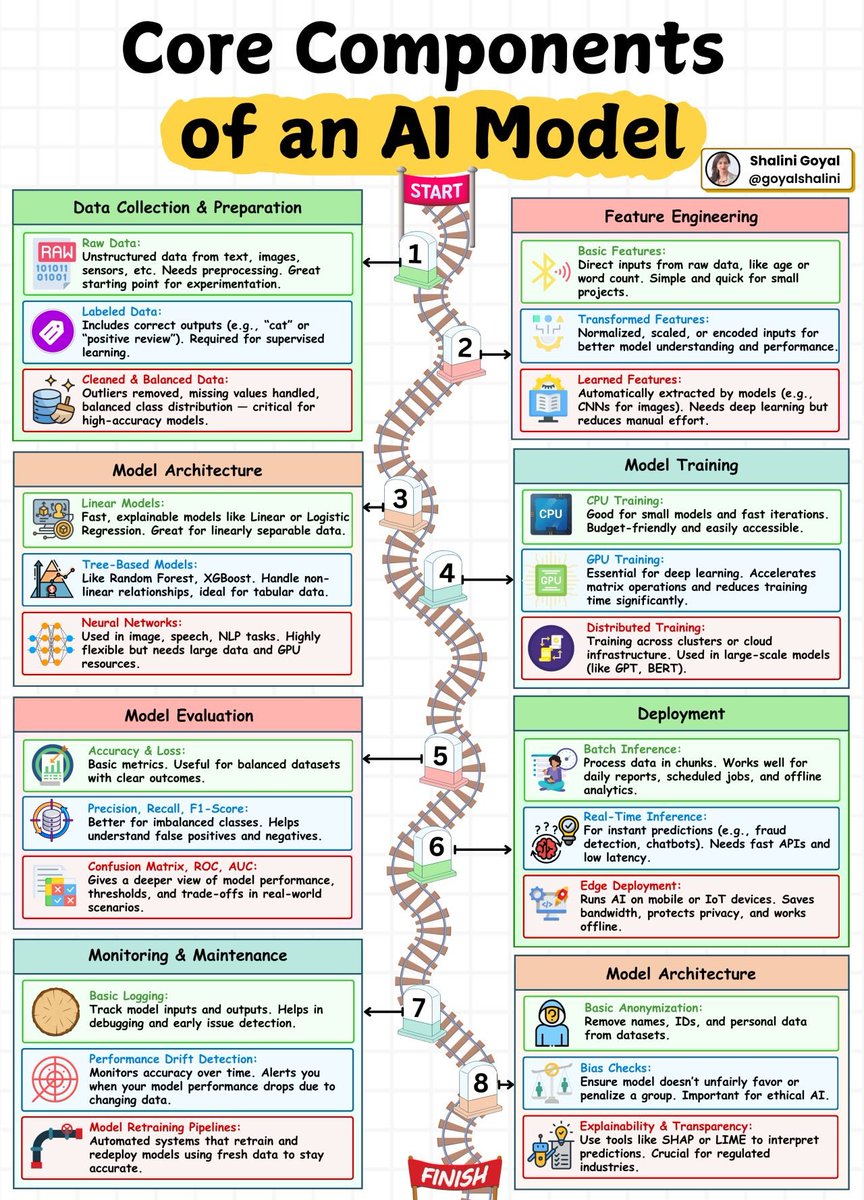
Building an AI model isn’t just about training a neural network - it’s a full journey with 8 critical stages. From data collection to model monitoring, here’s how AI systems are built and maintained today: 1. Data Collection & Preparation Everything starts with data. Raw input like text, images, or sensor readings is collected, labeled with correct outputs, and cleaned for quality. This foundation is vital for training high-performing models. 2. Feature Engineering Raw data is refined into useful inputs. Basic features are used for simple models, while advanced tasks rely on transformed or learned features from neural networks. 3. Model Architecture Here you choose the model type — linear models for simplicity, tree-based for tabular data, and neural networks for complex tasks like vision and NLP. 4. Model Training You train the model using CPUs for small workloads, GPUs for deep learning, or distributed systems for massive models like GPTs. 5. Model Evaluation After training, you evaluate performance using metrics like accuracy, F1-score, and confusion matrices. These metrics show how well the model is doing - especially on real-world data. 6. Deployment Once ready, the model is deployed. You can serve predictions in real-time (like chatbots), in batches (like analytics reports), or on edge devices (like mobile apps). 7. Monitoring & Maintenance AI doesn’t stop at launch. Logs are tracked, performance is monitored for drifts, and retraining pipelines ensure the model stays accurate as data evolves. 8. Model Architecture (Trust & Ethics) To keep models fair and explainable, anonymization, bias checks, and transparency tools like SHAP or LIME are implemented — especially important in regulated industries. From raw data to real-world impact - this is the full roadmap of an AI model. Save this guide as your go-to reference if you're building or working with AI systems in 2026!
@akshay_pachaar ·
MiniMax M2.7 is open-source! The most interesting part of this release isn't a benchmark number. It's what MiniMax calls "self-evolution," and it's essentially Karpathy's Autoresearch applied at full scale. Every AI agent today runs inside a harness: the scaffolding of skills, tools, memory, and workflow rules that surrounds it. Normally a human engineer builds this, and the agent operates within it. The harness stays fixed. M2.7 treats its harness as something it can rewrite. The agent runs a task, analyzes where things went wrong, plans changes to its own scaffold, applies them, evaluates against a benchmark, and decides whether to keep or revert. It writes self-criticism into memory so the next round starts smarter, then loops again. MiniMax ran this for 100+ rounds internally. The model discovered optimizations on its own: it systematically searched for optimal sampling parameters, wrote workflow-specific guidelines (like checking for the same bug pattern in other files after a fix), and added loop detection to avoid getting stuck. They also tested it on 22 ML competitions from OpenAI's MLE Bench Lite, each running 24 hours fully autonomous. With every round, the trained models achieved higher medal rates. The best run earned 9 gold medals. The weights never changed. What improved was the system around the model: better skills, better memory, better workflow rules. That distinction matters because the improvement loop can run continuously without any retraining. I'm pretty sure every major AI lab is doing some version of this internally. The fact that MiniMax is publishing it openly is what makes this release worth paying attention to. huggingface : https://t.co/aiCXrBi8Vc Blog: https://t.co/2YqrunBoJp Note: The model licence is NON-COMMERCIAL LICENSE, that said, there's a lot to learn from this work being available in the open.
@Aurimas_Gr ·
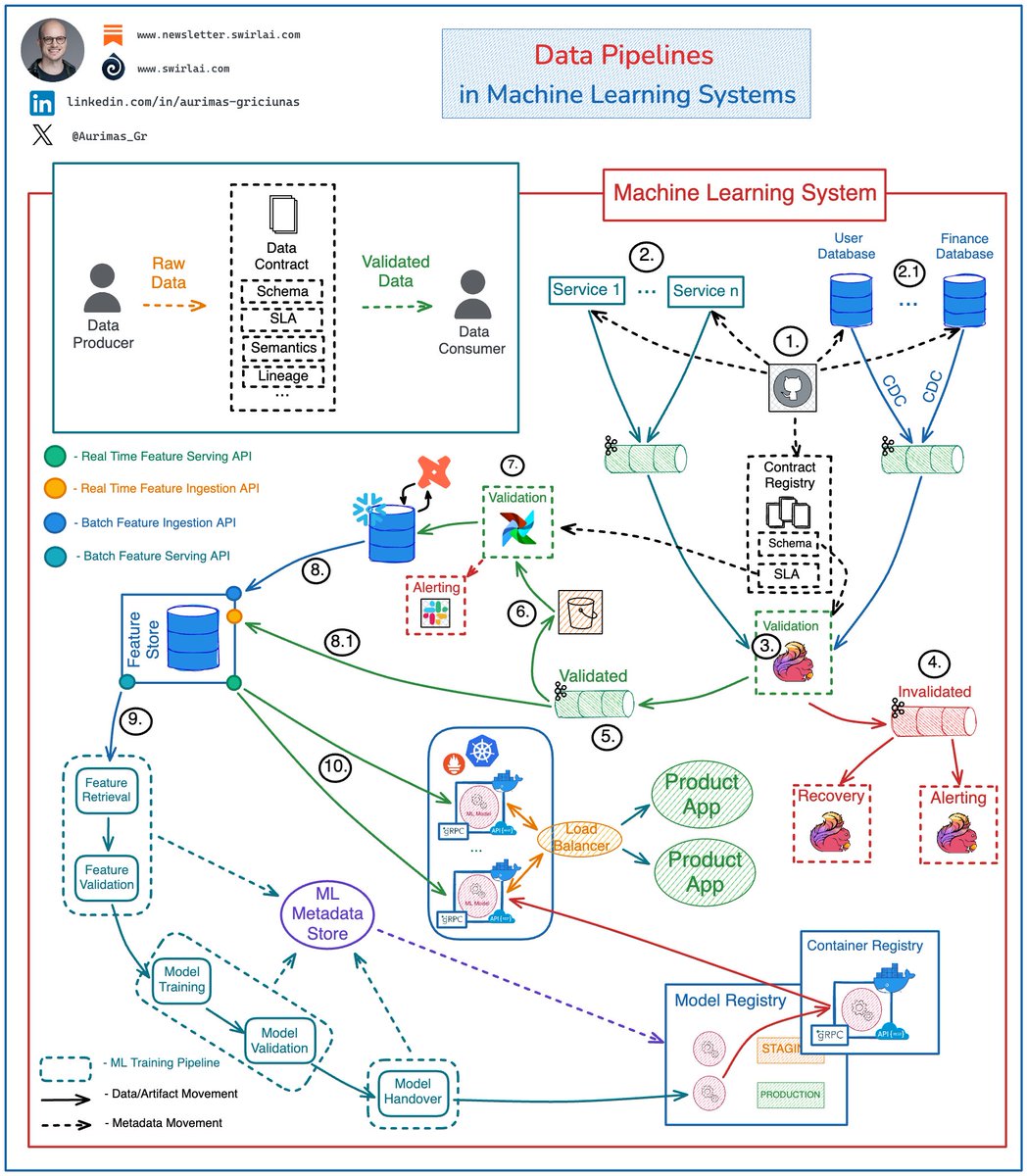
A breakdown of 𝗗𝗮𝘁𝗮 𝗣𝗶𝗽𝗲𝗹𝗶𝗻𝗲𝘀 𝗶𝗻 𝗠𝗮𝗰𝗵𝗶𝗻𝗲 𝗟𝗲𝗮𝗿𝗻𝗶𝗻𝗴 𝗦𝘆𝘀𝘁𝗲𝗺𝘀 👇 And yes, it can also be used for LLM based systems! It is critical to ensure Data Quality and Integrity upstream of ML Training and Inference Pipelines, trying to do that in the downstream systems will cause unavoidable failure when working at scale. There is a ton of work to be done on the Data Lake or LakeHouse layer. 𝗦𝗲𝗲 𝘁𝗵𝗲 𝗲𝘅𝗮𝗺𝗽𝗹𝗲 𝗮𝗿𝗰𝗵𝗶𝘁𝗲𝗰𝘁𝘂𝗿𝗲 𝗯𝗲𝗹𝗼𝘄. 𝘌𝘹𝘢𝘮𝘱𝘭𝘦 𝘢𝘳𝘤𝘩𝘪𝘵𝘦𝘤𝘵𝘶𝘳𝘦 𝘧𝘰𝘳 𝘢 𝘱𝘳𝘰𝘥𝘶𝘤𝘵𝘪𝘰𝘯 𝘨𝘳𝘢𝘥𝘦 𝘦𝘯𝘥-𝘵𝘰-𝘦𝘯𝘥 𝘥𝘢𝘵𝘢 𝘧𝘭𝘰𝘸: 𝟭: Schema changes are implemented in version control, once approved - they are pushed to the Applications generating the Data, Databases holding the Data and a central Data Contract Registry. Applications push generated Data to Kafka Topics: 𝟮: Events emitted directly by the Application Services. 👉 This also includes IoT Fleets and Website Activity Tracking. 𝟮.𝟭: Raw Data Topics for CDC streams. 𝟯: A Flink Application(s) consumes Data from Raw Data streams and validates it against schemas in the Contract Registry. 𝟰: Data that does not meet the contract is pushed to Dead Letter Topic. 𝟱: Data that meets the contract is pushed to Validated Data Topic. 𝟲: Data from the Validated Data Topic is pushed to object storage for additional Validation. 𝟳: On a schedule Data in the Object Storage is validated against additional SLAs in Data Contracts and is pushed to the Data Warehouse to be Transformed and Modeled for Analytical purposes. 𝟴: Modeled and Curated data is pushed to the Feature Store System for further Feature Engineering. 𝟴.𝟭: Real Time Features are ingested into the Feature Store directly from Validated Data Topic (5). 👉 Ensuring Data Quality here is complicated since checks against SLAs is hard to perform. 𝟵: High Quality Data is used in Machine Learning Training Pipelines. 𝟭𝟬: The same Data is used for Feature Serving in Inference. Note: ML Systems are plagued by other Data related issues like Data and Concept Drifts. These are silent failures and while they can be monitored, we can’t include it in the Data Contract. Let me know your thoughts! 👇
@goyalshaliniuk ·
Planning to build a GenAI or AI-powered product? Here’s the modern AI app stack you need to scale, serve, and secure your models. 👇 1. Data Layer: Foundation for AI Use Snowflake, BigQuery, Postgres, Airflow, and dbt to collect, clean, and move data efficiently. 2. Model Development Train with PyTorch, TensorFlow, HuggingFace, Scikit-learn, and track experiments using MLflow or Weights & Biases. 3. Model Versioning & Packaging Ensure reproducibility and deployment using tools like MLflow, BentoML, Docker, and ONNX. 4. Deployment & Serving Expose your model as an API using FastAPI, Flask, and serve it with Triton or TorchServe. Automate with GitHub Actions and Jenkins. 5. MLOps Infrastructure Orchestrate workflows using Kubernetes, Kubeflow, and Flyte to scale across environments with Docker containers. 6. Monitoring & Observability Track model accuracy and failures using WhyLabs, Prometheus, Fiddler, and Superset to stay in control. 7. Retrieval & Augmentation (for LLMs) Use Pinecone, Weaviate, and FAISS with LangChain and LlamaIndex to connect external knowledge and enable RAG. 8. AI Agent Tools & Frameworks Use AutoGen, LangGraph, CrewAI with n8n or https://t.co/AJQRix30HU to orchestrate tool use and external actions (APIs, code, browsers). 9. Security & Compliance Stay enterprise-ready with OAuth2, Rebuff, GDPR, and Guardrails to manage access, risk, and regulations. 10. Frontend & Interface Deliver AI through React, Streamlit, GraphQL, and WebSockets. Use multimodal input/output via Whisper or Gemini. AI apps today aren’t just models, they’re full-stack systems. And this is the stack to build them right.
@jahirsheikh8 ·
Want to be a Strong AI Engineer (not just prompt user)? Please learn: 1. Transformer Internals: Self-attention math, KV caching, Positional encodings (RoPE, ALiBi), Scaling laws 2. Tokenization Deep Dive: BPE vs Unigram, Token distribution effects, Context window limits 3. Embedding Systems: Cosine vs Dot product, HNSW/IVF indexes, Recall vs Latency trade-offs 4. Advanced RAG Systems: Hybrid search (BM25 + vectors), Re-ranking (cross-encoders), Query rewriting 5. Context Engineering: Chunking strategies, Sliding windows, Compression, Context prioritization 6. Inference Optimization: Quantization (INT8/4), KV cache reuse, Batching, Speculative decoding 7. Serving Architecture: vLLM, TensorRT-LLM, Throughput vs Latency tuning, Autoscaling GPUs 8. Fine-tuning Techniques: LoRA, QLoRA, RLHF, DPO, Instruction tuning pipelines 9. Agents (Real Systems): Tool calling, Planning vs Reactive agents, Memory (short vs long-term) 10. Evaluation Systems: LLM-as-judge pitfalls, Human evals, Golden datasets, Regression testing 11. Data Engineering for LLMs: Deduplication, Data filtering, Synthetic data generation 12. Failure Modes (Deep): Hallucinations, Retrieval miss, Prompt injection, Model collapse 13. Guardrails & Safety: Output validation, Moderation layers, Policy enforcement 14. Cost Engineering: Token budgeting, Model routing, Caching strategies 15. Multimodal Systems: Vision-language models, Audio pipelines, Cross-modal embeddings
@HamelHusain ·
New Blog Post: Do Automated Evals Work? There has been a rise of tools that look through your traces with AI and identifies issues. We tested these tools with real production data to see how good they are. Where they shine - They often spot issues human miss - Integrate into your workflow: viewing traces, creating LLM judges etc. Where they fall short - They miss problems that require domain expertise and taste - Don't have great mechanisms to learn from human feedback - You can get similar results from using your coding agent So you should use them? Yes, BUT do so iteratively with you in the loop. We describe how in the post: https://t.co/WrStw4kglF It's also a good idea to try using your coding agent with you in the loop, which we discuss in the post. This was written with @doesdatmaksense , who led the research and collated the results.
@Suryanshti777 ·
Most teams are building MCP servers the same way people built internal tools in 2019: one endpoint = one tool Then six months later the agent has 47 tools, picks the wrong one half the time, burns tokens routing requests, and nobody knows why latency exploded. The interesting part about MCP isn’t “agents using tools.” It’s that MCP quietly introduced a new application architecture layer for AI systems. And most people still treat it like glorified API wrappers. The real shift: • Some MCP servers should expose actions • Some should expose context • Some should orchestrate workflows • Some should maintain state • Some should literally behave like agents Those are completely different design patterns. Example: A GitHub MCP and a Playwright MCP should not be designed the same way. One is basically stateless API access. The other is managing a live browser session, state, retries, cleanup, auth, memory leaks, and continuity across calls. Same protocol. Completely different architecture problem. That’s the mistake I keep seeing: Teams choosing MCP patterns based on what’s easiest to implement… instead of what minimizes context load, tool confusion, latency, and orchestration overhead for the model. The best AI infra people I know are starting to think about MCP servers less like “tools” and more like: • execution environments • context systems • workflow runtimes • delegated reasoning units That mental shift changes everything. The biggest unlock for me personally: “Should this be a tool call… or should this entire workflow disappear behind the MCP layer?” That single decision affects reliability more than the model itself.
@shivam74689 ·
Day 52 — Becoming AI Engineer Today I completed my first end-to-end Production ReAct Agent. A few weeks ago, I thought building an AI agent meant connecting an LLM to a UI and getting answers back. Now I know that's only a tiny part of the system. The biggest lesson from this project: Building an agent is easy. Building a reliable AI system is hard. When I started ReAct Agent v1, I thought the challenge would be making the model reason correctly. Instead, most of my time was spent debugging parsers, fixing tool calls, handling errors, managing state, improving evaluations, integrating observability, containerizing the application, and preparing it for deployment. I learned that a real AI agent is much more than: User → LLM → Answer A production agent requires: Reasoning → Tool Selection → Tool Execution → Observation → State Management → Final Answer The LLM is only one component. Everything around it is engineering. One of the biggest realizations came from my architecture decisions. I initially built the application using Streamlit because it was fast and simple for creating an MVP. It worked. But later I realized it wasn't the architecture I would choose for production. A production AI system should separate responsibilities: Frontend ↓ FastAPI Backend ↓ Agent ↓ Tools ↓ LLM With supporting systems such as: • Docker • Observability • Evaluation • Logging • Configuration Management That mistake taught me an important lesson. There is a huge difference between building a working AI application and designing a scalable AI system. Another lesson was discovering how fragile ReAct agents can be. I encountered: • Invalid output formats • Parser failures • Infinite reasoning loops • Wrong tool selections • Hallucinated observations • State management bugs • Deployment issues At first these failures felt frustrating. Eventually I realized they were the most valuable part of the project. Every bug forced me to understand the system at a deeper level. I also learned that prompt engineering alone is not enough. Production AI systems require: • Validation layers • Error handling • Retry mechanisms • Evaluation harnesses • Observability systems Without them, you don't have a production system. You have a demo. Another major milestone was containerizing the entire application using Docker. For the first time, I packaged an AI application into a reproducible environment, fixed dependency issues inside containers, debugged build failures, solved runtime errors, and successfully ran the system independently from my local machine. That experience completely changed how I think about deployment. Deployment is not just putting software online. Deployment is engineering. Looking back, the biggest achievement isn't that the agent works. The biggest achievement is that I pushed an idea through the complete lifecycle: Idea ↓ Build ↓ Break ↓ Debug ↓ Evaluate ↓ Observe ↓ Containerize ↓ Deploy ReAct Agent v1 is far from perfect. It has bugs. It has limitations. It needs improvements. But it achieved its purpose. It transformed me from someone learning about AI agents into someone who has actually built, evaluated, observed, containerized, and deployed one. Live Demo: https://t.co/jQGFruOmey ReAct Agent v1 Feel free to try it and share feedback. The next phase of my journey is different. I no longer want to build projects just to learn concepts. I want to build better projects. Projects with better architecture. Projects that solve real problems. Projects that force me to learn production engineering, system design, evaluation, reliability, and deployment at a deeper level. ReAct Agent v1 proved that I can ship. Now the goal is to build systems that are more useful, more reliable, and more ambitious. Project 1 is complete. Time to build something better. #AI #AIEngineer #AgenticAI #LLM #GenerativeAI #ArtificialIntelligence #Python #Docker #FastAPI #Langfuse #MLOps #BuildInPublic #LearningInPublic
@akshay_pachaar ·
The first AI that improves without retraining. (it rewrites its own agent harness) Every developer I know has one thing in common: they obsess over their setup. The terminal, the scripts, the shortcuts. They don't just write code. They constantly refine how they work. The code gets better because the environment gets better. MiniMax just released M2.7, and I think the most interesting thing about it isn't a benchmark number. It's the fact that M2.7 improves its own agent harness. Autonomously. Let's break this down: When you run an AI agent today, it operates inside a "harness." Think of it as the agent's operating environment: the skills it can invoke, the tools it can call, its memory, and the rules it follows. Normally, a human engineer builds this harness, and the agent operates within it. The harness stays fixed. M2.7 treats its harness as something it can rewrite. Here's what the loop looks like: - The agent runs a task and analyzes where things went wrong - It plans changes to its own scaffold: skills, MCPs, memory - It applies those changes, runs evaluations against a benchmark - It compares the results and decides whether to keep or revert - It writes self-criticism into memory so the next round starts smarter Then it loops back and does it again. And again. Think of it like a developer who finishes a project, writes a retrospective, restructures their workflow based on what they learned, and shows up the next day with a better setup. Except the developer here is the model itself. MiniMax ran this self-optimization loop for over 100 rounds internally. Along the way, the model discovered things on its own: it systematically searched for optimal sampling parameters (temperature, penalties), wrote workflow-specific guidelines for itself (like automatically checking for the same bug pattern in other files after a fix), and even added loop detection to avoid getting stuck. No human had to tell it to do any of this. They also tested this in a more controlled setting. They had M2.7 compete in 22 ML competitions from OpenAI's MLE Bench Lite. Each trial ran for 24 hours, fully autonomous. After each iteration, the agent wrote a memory file and performed self-criticism, feeding those insights into the next round. With every round, the ML models it trained achieved higher medal rates. The best run earned 9 gold medals. I've summarized the self-evolving architecture in the graphic below. The reason I find this compelling: this isn't about making a smarter model. It's about making a model that makes itself smarter. The weights never change. What changes is the system around it: better skills, better memory, better workflow rules. And that distinction matters because it means the improvement loop can run continuously without any retraining. We're entering a phase where agents don't just follow instructions. They redesign their own playbook. If you want to learn more, I've shared a link to their official blog post in the next tweet.
@pvergadia ·
Never ever ever build an LLM app without KV cache. You're paying for O(n²) attention. On every. single. token. Here's what's actually happening under the hood: Transformer attention computes Q, K, V matrices for every token in your sequence. Without cache, generating token n means recomputing K and V for all n-1 previous tokens. For a 4,000-token prompt generating 500 tokens: → 500 full attention passes over 4,000+ tokens → Each pass = O(n²) in memory, O(n) in compute per layer → Across 32 attention heads × 96 layers (GPT-4 scale) you feel this KV cache breaks the cycle. Keys and Values are computed once per token, then stored. Only the Query is computed fresh for each new token. Memory cost: O(n × d_model × num_layers) Compute cost per new token: O(1) instead of O(n) Trade-off: At 128k context with FP16, KV cache alone can consume 40–80GB of VRAM. That's why H100s with 80GB fill up faster than you expect. That's why paged attention (vLLM), sliding window attention, and prefix caching exist they're all managing KV cache memory pressure. If your inference latency is spiking at long contexts, check your KV cache eviction policy before you blame the model. Save this before your next AI Engineer Interview. 🔖 #LLMInference #AIEngineering #GenerativeAI #MLOps #KVCache #AIInfrastructure #BuildingWithAI
@vivoplt ·
As an AI Infrastructure Engineer. Please learn: - GPU/VRAM fundamentals, quantization & batching - vLLM / TensorRT-LLM / inference optimization - KV caching, speculative decoding & token throughput - Distributed training basics (DDP/FSDP/DeepSpeed) - Model serving & autoscaling - Vector DB retrieval pipelines - Prompt caching & cost optimization - Observability for LLM apps This is what production AI teams actually care about.
@TheGlobalMinima ·
The last 3 days have taught me a lot about how OpenTelemetry and Async Generator functions work. When you set up observability (personally using @langfuse ) for the first time, it is smooth sailing. But when you scale up your llm application to support concurrency, failure recovery and streaming, things quickly start going haywire. OpenTelemetry is super powerful, but it can run into broken traces and lost contexts in async setups. Issues like > context not detaching correctly > tracing across different contexts > request freezing before BatchSpanProcessor can finish (specific to serverless functions) The fix here is to set up your own context propagation. Each async task fired runs in the event loop, but may have a different context attached to it, leading to broken traces. Doing this also helps you scale up observability in distributed or event driven systems. Bookmark this to save days of debugging. Attaching some resources in the reply for better reference.
@Vinay_bharambe ·
Most people consume random tutorials. Very few build real depth. If you want strong fundamentals, system thinking, and production clarity, start here. Here are 12 books that cover theory, LLMs, MLOps, and deployment, end to end. 1. AI Engineering – By Chip Huyen From data pipelines to deployment architecture. Clear view of how real AI systems run in production. https://t.co/JSNemitgoN 2. Designing Machine Learning Systems – By Chip Huyen Covers data drift, monitoring, feedback loops, and failure cases. Practical system design lessons for ML teams. https://t.co/Ttv2fNJdVN 3. Prompt Engineering for LLMs – By Albert Ziegler & John Berryman Structured prompt patterns that work in real projects. Focus on repeatable techniques, not hacks. https://t.co/SQI6jhqN3b 4. Hands-On Large Language Models – By Jay Alammar & Maarten Grootendorst Transformers explained in simple language. Strong practical examples with visuals. https://t.co/GcXXTMFsdT 5. LLM Engineer’s Handbook – By Paul Iusztin & Maxime Labonne Production mindset for LLM applications. Fine-tuning, evaluation, deployment strategies. https://t.co/J7mcTKWtl3 6. Building LLMs from Scratch – By Sebastian Raschka Build core components step by step. Tokenization, embeddings, training loops explained clearly. https://t.co/HL6fi5ReCS 7. Practical MLOps – By Noah Gift & Alfredo Deza CI/CD for ML systems. Monitoring, scaling, and operational reliability. https://t.co/TC4rzCgjkd 8. Building LLMs for Production – By Louis-François Bouchard & Louie Peters Focus on cost control, latency, and reliability. What actually matters after the demo works. https://t.co/FSDAF3nz45 9. Foundations of Machine Learning – By Mehryar Mohri, Afshin Rostamizadeh & Ameet Talwalkar Strong mathematical base for ML algorithms. Helps you think rigorously about models. https://t.co/ERaM3glf2L 10. Deep Learning – By Goodfellow, Bengio & Courville Core deep learning theory explained by leading researchers. Still one of the most respected references. https://t.co/yVK7OfZxaC 11. Mathematics for Machine Learning – By Deisenroth, Faisal & Ong Linear algebra, probability, optimization. Math that supports real ML work. https://t.co/XD0i4B6wzt 12. Hands-On Machine Learning – By Aurélien Géron Clear bridge between theory and implementation. Practical examples using Scikit-Learn, Keras, and TensorFlow. https://t.co/DmLEMYjdno
@adxtyahq ·
Things i have worked on in past 30 days: - made systems from scratch including architectural decisions - optimized the existing company system, reducing runtime from ~5 minutes to under 3 minutes and cost from ~$3-5/run to ~$0.9-2.5/run - improved model latency, reduced costs, and added intelligent model routing - tested 30+ frontier models across OpenAI, Anthropic, Google, DeepSeek, GLM, Kimi, MiniMax, and NVIDIA - built parallel workflows where several ElevenLabs and Nano Banana 2 Lite processes run concurrently - improved the user feedback system - added retries, fallbacks, and better error handling for AI workflows - improved backend performance and reliability - shipped production features end-to-end
@milan_milanovic ·
𝗧𝗵𝗲 𝗔𝘇𝘂𝗿𝗲 𝗔𝗜/𝗠𝗟 𝘀𝘁𝗮𝗰𝗸 Here are the most important Azure services if you want to work with AI in Azure. 𝟭. 𝗖𝗼𝗺𝗽𝘂𝘁𝗲 We can use Azure ML as the platform for managing experiments, compute clusters, and the model lifecycle. GPU VMs (NC/ND series) for training workloads that actually need the hardware. AKS when you're running inference at scale and need control over the infrastructure. Container Instances for short jobs where a full cluster is overkill, Functions for lightweight event-driven inference, and Batch for parallel workloads you want to run on a schedule. 𝟮. 𝗗𝗮𝘁𝗮 𝗦𝘁𝗼𝗿𝗮𝗴𝗲 Data Lake Gen2 for training data at scale. Blob Storage for everything else. Azure SQL and Cosmos DB, depending on whether your metadata is relational or document-shaped. Managed Disks if your workload needs fast local storage attached to a VM. Azure Files for shared access across nodes. 𝟯. 𝗗𝗮𝘁𝗮 𝗣𝗿𝗼𝗰𝗲𝘀𝘀𝗶𝗻𝗴 𝗮𝗻𝗱 𝗘𝗧𝗟 Data Factory for orchestrating pipelines. Synapse for large-scale analytics. Databricks, when your team lives in notebooks and needs distributed compute on Spark. Stream Analytics for real-time processing on incoming data. Functions and Event Hubs cover the lighter ETL cases. In practice, most teams end up with Databricks and Data Factory and call it done. 𝟰. 𝗠𝗟 𝗧𝗿𝗮𝗶𝗻𝗶𝗻𝗴 𝗮𝗻𝗱 𝗘𝘅𝗽𝗲𝗿𝗶𝗺𝗲𝗻𝘁𝗮𝘁𝗶𝗼𝗻 AML Pipelines for reproducible training workflows, AML Studio, and Notebooks for the exploration and iteration phase. AutoML is when you want to benchmark quickly without writing the training code yourself. Prompt Flow for LLM-based applications. MLOps handles versioning, deployment, and monitoring across the lifecycle. 𝟱. 𝗙𝗲𝗮𝘁𝘂𝗿𝗲 𝗘𝗻𝗴𝗶𝗻𝗲𝗲𝗿𝗶𝗻𝗴 Feature Store, Databricks FE, Data Explorer. The most underbuilt layer in most ML projects I've seen. Teams spend months on model architecture and three days on features. The ratio should probably be reversed. 𝟲. 𝗗𝗲𝗽𝗹𝗼𝘆𝗺𝗲𝗻𝘁 𝗮𝗻𝗱 𝗜𝗻𝗳𝗲𝗿𝗲𝗻𝗰𝗲 Online Endpoints for real-time inference, Batch Endpoints when latency doesn't matter, and throughput does. AKS Deployment when you need full control over scaling and infrastructure. ACI for simpler containerised deployments. ONNX Runtime for optimised inference across hardware, Azure Edge AI, when the model needs to run closer to the data source. 𝟳. 𝗣𝗶𝗽𝗲𝗹𝗶𝗻𝗲𝘀 𝗮𝗻𝗱 𝗔𝘂𝘁𝗼𝗺𝗮𝘁𝗶𝗼𝗻 ML Pipelines for training automation, Data Factory for data movement, Logic Apps for integration workflows. Functions and DevOps Pipelines for the CI/CD side. A model that runs reliably in production on a schedule looks nothing like a notebook; this is the layer where that gap gets closed, and most teams leave it too late. 𝟴. 𝗟𝗟𝗠 𝗮𝗻𝗱 𝗚𝗲𝗻𝗲𝗿𝗮𝘁𝗶𝘃𝗲 𝗔𝗜 Azure OpenAI for GPT-4 and embeddings with enterprise controls. Phi Models when you need something smaller and cheaper to run. Llama and Mistral through the model catalog if you want to open weights with more control over where they run. Cognitive Services for pre-built capabilities like vision, speech, and language. Azure AI Foundry is the newer unified platform for building and managing AI applications. Prompt Flow for chaining and testing LLM calls. 𝟵. 𝗠𝗼𝗻𝗶𝘁𝗼𝗿𝗶𝗻𝗴, 𝗚𝗼𝘃𝗲𝗿𝗻𝗮𝗻𝗰𝗲 𝗮𝗻𝗱 𝗗𝗲𝘃𝗲𝗹𝗼𝗽𝗲𝗿 𝗧𝗼𝗼𝗹𝗶𝗻𝗴 Azure Monitor and App Insights for observability, ML Monitoring for model drift and data quality in production. Azure Policy and Purview for governance, Entra ID for identity. On tooling: Azure CLI, SDKs, Azure DevOps, GitHub Actions, Bicep/ARM for infrastructure as code. And GitHub Copilot, of course, for AI-assisted coding.
@SourabhGurwani ·
If I had 6 months to become an AI Engineer, I'd do this. Stage 1 — Programming Fundamentals (Weeks 1–2) Learn Python, Git, Linux, SQL, APIs, OOP, NumPy, and Pandas. Stage 2 — Math & ML Foundations (Weeks 3–4) Master linear algebra, probability, statistics, calculus, regression, classification, clustering, and evaluation metrics. Stage 3 — Deep Learning (Weeks 5–6) Learn neural networks, backpropagation, CNNs, RNNs, PyTorch, TensorFlow, and model training. Stage 4 — LLM Fundamentals (Weeks 7–8) Understand transformers, attention, tokens, embeddings, context windows, prompting, and function calling. Stage 5 — RAG & Vector Databases (Weeks 9–10) Learn embeddings, chunking, retrieval, reranking, LangChain, LlamaIndex, FAISS, Chroma, Pinecone, and Qdrant. Stage 6 — AI Agents (Weeks 11–12) Build agents using LangGraph, CrewAI, MCP, tool calling, memory, planning, and multi-agent workflows. Stage 7 — Fine-Tuning & Open Models (Weeks 13–14) Learn LoRA, QLoRA, PEFT, Unsloth, Hugging Face, model quantization, and inference optimization. Stage 8 — Multimodal AI (Weeks 15–16) Work with vision models, OCR, speech-to-text, text-to-speech, image generation, and document understanding. Stage 9 — Production AI Engineering (Weeks 17–20) Master FastAPI, Docker, Redis, PostgreSQL, authentication, caching, queues, monitoring, logging, and cloud deployment. Stage 10 — AI Evaluation & MLOps (Weeks 21–22) Learn LangSmith, W&B, hallucination testing, latency, cost optimization, CI/CD, Docker, Kubernetes, and model monitoring. Stage 11 — Build a Portfolio (Weeks 23–24) Ship: Production RAG Assistant AI Coding Agent Customer Support SaaS Multimodal Document Parser AI Research Agent AI Workflow Automation Deploy every project publicly with a live demo, README, and architecture diagram. Stage 12 — Job Preparation Practice Python, SQL, LeetCode basics, system design, ML concepts, LLM interviews, and AI engineering case studies. Apply for: +AI Engineer +GenAI Engineer +Machine Learning Engineer +Applied AI Engineer +AI Platform Engineer +AI Software Engineer Don't spend 6 months watching AI tutorials. Spend 6 months building AI systems people would actually use.
@_vmlops ·
NETFLIX BUILT AN MLOPS FRAMEWORK INTERNALLY...THEN OPEN SOURCED IT FOR EVERYONE and it's running 3000+ ai/ml projects at netflix alone most ml teams hit the same wall prototype works on your laptop...falls apart in production...data pipelines break...compute doesn't scale...nobody can reproduce what you ran last week metaflow fixes all of that in one framework you write python. it handles everything else local prototyping → cloud scale → production deployment...one codebase... no rewrites need to run 10,000 parallel jobs..? foreach decorator need gpus..? one line need to deploy to production orchestrators..? one command it tracks every run automatically versions your data and models. lets you go back to any experiment instantly netflix uses it to process petabytes of data and manage tens of petabytes of models...amazon uses it....goldman sachs uses it....doordash uses it....ramp uses it the gap between "works on my machine" and "runs in prod" has always been the hardest part of mlops metaflow is netflix's answer to that gap now it's yours too https://t.co/3ca8hhU3GQ
@DeepStarts ·
Here's a list of Al Engineer Interview questions + concepts you need to know (from Al/ML Engineering Manager perspective) LLM Fundamentals: -What is tokenization, and how does it affect generation? -How do embeddings really work? -What's the role of attention, positional encoding? -What changes during fine-tuning? (optimizers, schedulers, layer freezing) -LoRA vs QLoRA vs full fine-tune - tradeoffs? Prompting & Context Engineering: -Few-shot vs zero-shot - which works better where? -How do you design system prompts that are robust across users? -How do you make output deterministic? -How do you track, version, and backfill changing context? -How do you build/maintain the memory? RAG Systems: -What's your chunking strategy by length, semantics, or structure? -How do you choose a vector DB (Chroma, Pinecone, OpenSearch...)? -Can you update or backfill embeddings with zero downtime? -How do you evaluate retrieval quality (precision@k, reranking, citation)? MLOps & LLMOps: -Sketch a pipeline: from raw data → model-serving → feedback -How would you monitor performance drift hallucinations? -How do you log prompts and outputs for debugging and auditing? -CI/CD for LLM workflows - what's different from ML? Cost & Latency Tradeoffs: -How do you reduce token usage? -When should you quantize a model? -What's your batching + caching strategy to reduce latency? -When to use hosted APIs vs open-source models? System Design Thinking: -How do you make an Al system more deterministic and less brittle? -What fallback do you use if the LLM fails mid-task? -Can you solve this without an LLM or vector DB? -What's the right database for this task - SQL, NoSQL, or vector? What more can I add in this?
@kmeanskaran ·
Now you can build agents to automate the ML training lifecycle! You can define sequential subagents and skills for each agent, such as data engineering, feature engineering, model training, evaluation, drift detection, rollback, etc. Observability tools and orchestration will help, so you only need to manage the agents and occasionally the core pipeline. Thinking of trying this POC with the deployment part as well. Any insights from you guys? I think this is interesting; edge cases will teach more than anything.
@pvergadia ·
NEW: The SDLC taught us software is correct or broken. AI just made that binary obsolete. → SDLC: write rules → test pass/fail → ship → done → AIDLC: collect data → train → evaluate statistically → monitor forever → Your model can be "healthy" and silently wrong at the same time → Drift doesn't throw errors. It just quietly degrades. 80% of ML project time is data prep. Not code. You can't unit test a probability. The entire engineering contract: requirements, acceptance criteria, definition of done breaks when the output is "78% confident." The teams that figure this out early win the next decade. Full breakdown 👇
@0xlelouch_ ·
90% of LLMOps interviews in 2026 come down to these 7 points: 1) Serving architecture: batching, streaming, timeouts, and backpressure; explain p95 vs p99 and what you do when the model stalls 2) Cost control: token budgets, caching, prompt compression, smaller models; show you can cut a $3k/day endpoint to $800/day without breaking quality 3) Evals: offline golden sets + online A/B; talk about pass@k, win-rate, and how you prevent overfitting to a tiny test suite 4) Retrieval: chunking, embeddings, metadata filters, rerankers; describe how you detect bad recall and fix it without 10x index size 5) Safety + compliance: PII redaction, prompt injection defenses, audit logs; explain what you store, for how long, and why 6) Reliability: retries vs idempotency, circuit breakers, fallbacks; what happens when OpenAI/Azure/Anthropic rate-limits or returns partial outputs 7) Observability: traces across gateway RAG model, token metrics, per-tenant quotas; show dashboards that catch regressions within one deploy cycle
@DeRonin_ ·
Ran GLM 5.2 against Opus 4.8 this week, both wired into my agency stack for 6 days bottom line: GLM 5.2 is the first open model i'd actually trust with production marketing work free weights + run it on my own hardware + frontier-class output = the value math is wild some notes: 1. agent loop persistence: gave both an agent and let it work for hours. GLM stayed on task across 60+ steps before drifting. Opus still wins on the longest chains but the gap shrunk hard 2. brand voice: showed both 5 examples of how i write. GLM matched my tweet drafts ~88% of the time, Opus 94%. for outreach DMs the difference disappears entirely 3. structured outputs: GLM nailed strict formats 800+ times in a row, zero errors. this used to be Opus-only territory 4. failure mode: when GLM doesn't know something, it sometimes invents an answer instead of saying so. Opus admits uncertainty, which makes it safer to build automated workflows around 5. edit-not-rewrite: small fix on a long file. GLM rewrites everything. Opus only changes what you asked. matters when humans review every diff 6. self-hosted speed: 40ms response time on my own GPUs, no usage caps, nothing leaves my server. a permanent fast lane that's also fully private actually changes what you can build 7. cost: a full week of GLM ran cheaper than one day of Opus at the same volume. for the ~70% that don't need top-tier judgment, the math is over 8. where Opus 4.8 still earns the call: anything voice-critical, anything ambiguous, anything where the model has to read what i actually meant vs what i typed my new routing rule: GLM 5.2 for volume, structure, speed. Opus 4.8 for judgment, voice, edge cases first time the "open model parity" line actually felt crossed for production agent work
@Hartdrawss ·
Build boring AI companies. I think it's the biggest opportunity of the next 10 years. 1. Every AI company needs clean data, but nobody wants to clean it. A data labeling service that guarantees 99.9% accuracy and charges per record, not per project. Boring, essential, recurring. 2. Companies deploy models that drift and nobody notices until revenue drops. A model monitoring dashboard that sends a text when your accuracy falls below threshold. No dashboards, just alerts. 3. Your AI calls an API that changes its pricing overnight and your whole pipeline breaks. A compatibility checker that scans your dependencies daily and warns you before your weekend deploy. 4. Every RAG pipeline is held together by chunking decisions somebody made in a hurry. A chunking service with 20 strategies that A/B tests them on your data and picks the best one. Then charges a monthly fee. 5. Prompt engineering is still guessing. A prompt testing platform that runs your prompt against 100 historical edge cases from your dataset and tells you exactly where it fails. Pass/fail, done. 6. Every company has a Slack channel where people share AI outputs that are obviously wrong. A feedback collection tool that threads into Slack and logs every correction as a test case for your next fine-tune. 7. Model cards are mandated by regulation but nobody writes them. A template generator that reads your model's training data and inference logs and spits out a compliant card in 30 seconds. 8. Your AI hallucinates a customer's name twice and they churn. A hallucination filter that sits between your model and the user and catches factual errors before they reach a human face. 9. Every AI feature is built twice: once in a Colab notebook and once in production. A notebook-to-production converter that rewrites your experiments into deployable APIs. Boring, saves weeks. 10. Your team spends 40% of sprint time debugging why the embedding vector changed after a redeploy. A versioned embedding store that pins your vectors to a specific model snapshot so they never break. 11. AI vendors are switching to usage-based pricing and your bill fluctuates wildly. A cost prediction and budgeting tool that learns your usage patterns and caps spend per workflow. 12. Your support bot keeps apologizing when it doesn't understand. A confidence scoring layer that routes low-confidence queries to humans before the bot says "I'm sorry." 13. Every company has a drawer of AI experiments that didn't scale. A kill switch that automatically stops any experiment that hasn't shown improvement in 90 days. Saves cloud costs. 14. Your CEO wants to know why the AI declined two customer claims yesterday. A plain-English decision recorder that logs every model output with the top three influencing factors. 15. The same model runs differently on CPU vs GPU vs TPU. A hardware-agnostic inference wrapper that tests your model on every available chip and picks the cheapest one that meets your latency SLA. 16. Your fine-tuning dataset has 3,000 examples, 800 of which are duplicates. A dataset deduplication tool that flags exact, near-exact, and semantically identical rows. Boring, trivial, essential. Build boring !
@LiorOnAI ·
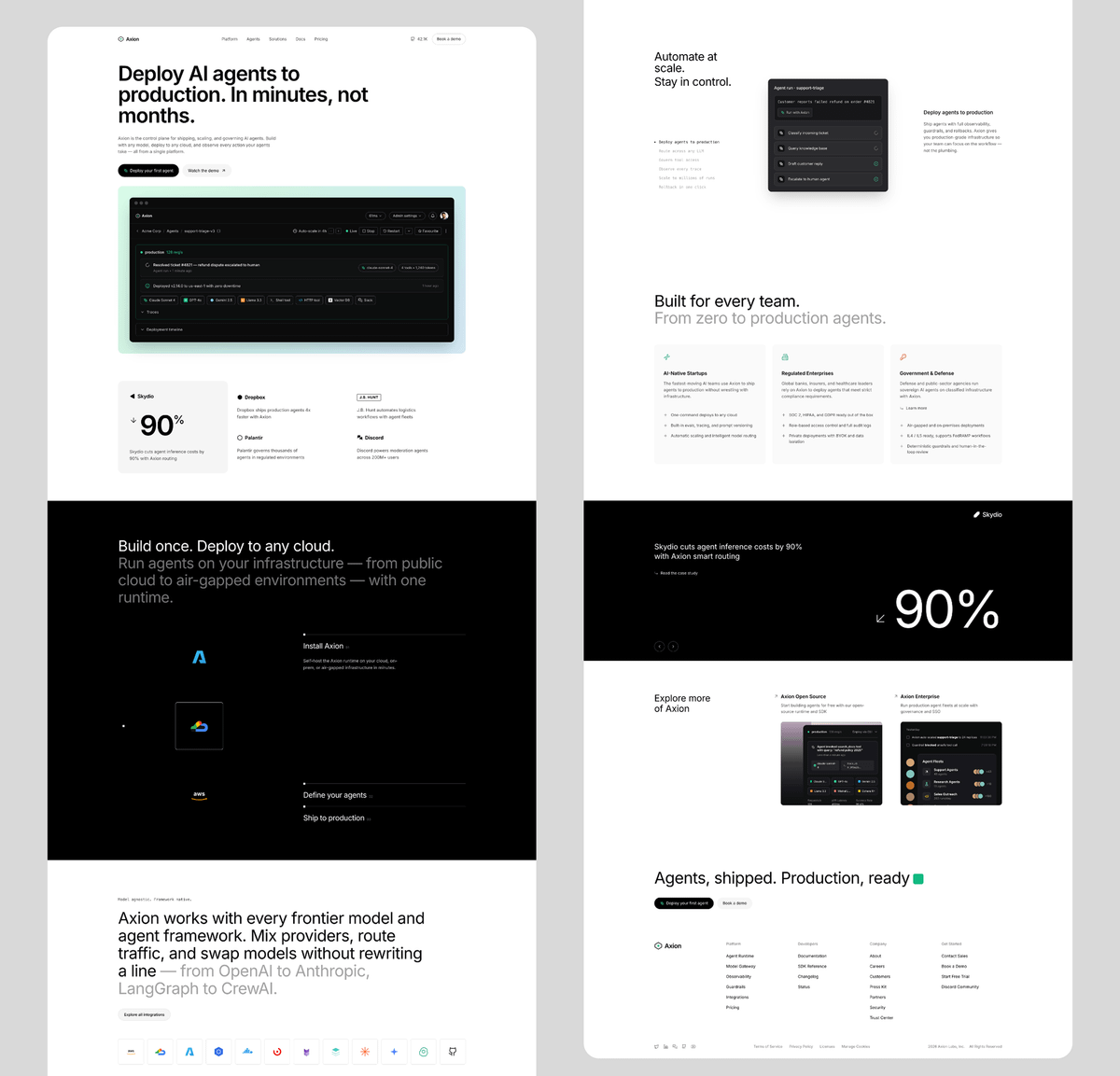
You can now ship a production AI agent in one command. Google just released Agent Starter Pack, and it cuts setup time to about 60 seconds. From empty folder to deployed service, with infra included. 𝗧𝗵𝗶𝘀 𝗿𝗲𝗺𝗼𝘃𝗲𝘀 𝘁𝗵𝗲 𝗵𝗮𝗿𝗱𝗲𝘀𝘁 𝗽𝗮𝗿𝘁 𝗼𝗳 𝗮𝗴𝗲𝗻𝘁𝘀 Building logic was never the blocker. Production was. This gives you everything around the model: • deployment configs • CI and automated tests • monitoring and logs • secure defaults You write behavior. The rest already works. 𝗧𝗵𝗶𝘀 𝗶𝘀 𝗵𝗼𝘄 𝗶𝘁 𝘄𝗼𝗿𝗸𝘀 1. Run a single CLI command. 2. A full project appears with backend, frontend, and cloud setup. 3. Templates cover common patterns like tool use and retrieval. 4. You can swap components without breaking the pipeline.
@hasantoxr ·
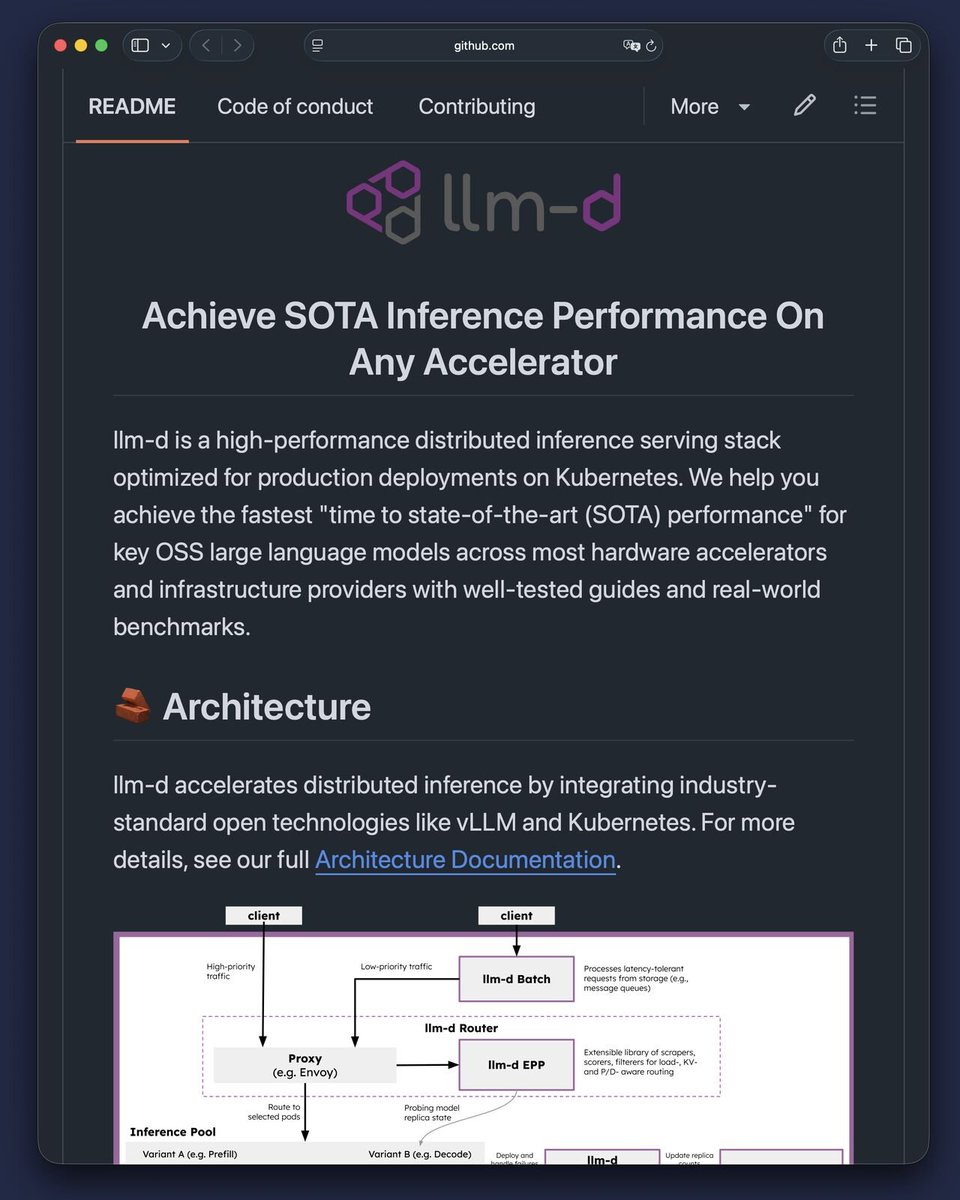
llm-d is the next step after vLLM. Most teams still serve open models like this: Spin up vLLM. Put it behind an endpoint. Add more GPUs. Watch latency spike. Pay the bill anyway. This repo shows the next step: You stop treating inference like one model server. You build the distributed serving layer around it. llm-d sits above model servers like vLLM and SGLang and helps you run LLM inference on Kubernetes at production scale. Inside: → Intelligent request routing → Prefix-cache aware scheduling → Load-aware balancing → KV-cache management → Prefill/decode disaggregation → SLO-aware autoscaling → OpenAI-compatible batch APIs → Benchmark-tested deployment recipes The crazy part is what this changes. Most AI teams think the model is the product. But once users show up, the real problem becomes: How fast can you serve it? How much GPU are you wasting? How many tokens can you push per second? How predictable is latency under load? How much margin disappears every time someone clicks “send”? The repo reports gains like higher throughput, faster TTFT, better tokens/sec, and stronger utilization across real benchmark setups. The wild part is the shift in thinking. vLLM made open models usable. llm-d is trying to make open-model inference survive production. This is what AI infra looks like when serving stops being a wrapper and starts becoming an operating system for GPUs. https://t.co/WM6viDYQbO
@0xlelouch_ ·
90% of LLMOps in 2026 comes down to mastering these 10 concepts: 1) Problem framing + evals first. If you can’t define success with 50 to 500 test cases, you’re just shipping vibes. 2) RAG basics, but with rigor. Chunking, filters, metadata, and freshness matter more than which vector DB logo you picked. 3) Prompting as an interface. Version prompts, diff them in PRs, and add contracts like input schemas and refusal rules. 4) Model selection is latency + cost math. Tokens are your new CPU cycles; p95 and $/request drive architecture. 5) Caching and batching. Cache embeddings and tool results; batch at the gateway; avoid paying for the same context 10k times/day. 6) Tool use and guardrails. Constrain actions with allowlists, JSON schema validation, and timeouts; never let the model free-type API calls. 7) Observability beyond logs. Trace prompt, retrieval hits, tool calls, tokens, and user outcome; you need per-request lineage. 8) Debugging playbooks. Reproduce with captured inputs, pin model+prompt+docs versions, and bisect: retrieval vs prompt vs tool. 9) Security and privacy. Treat prompts as untrusted input, redact PII, lock down secrets, and defend against prompt injection via content isolation. 10) Real-world failure modes. Retry storms on 429s, silent context truncation, stale docs, and eval overfitting are the usual production killers.
@alex_verem ·
The AI is 5% of the work. The 95% that breaks: → Observability (Langfuse, Braintrust, Helicone) - you can't debug what you can't see → Evals - regression suites for non-deterministic software. The new CI. → Durable runtime (Temporal, Inngest) - so a 10-minute agent run survives a server restart → Guardrails - prompt injection detection, PII redaction, output filtering → Memory layer - vector DBs (Pinecone, pgvector, Turbopuffer), retrieval, session state → Tools layer - MCP servers, sandboxed code execution (E2B, Modal), browser automation (Browserbase) → Auth + multi-tenancy - your agent calling Salesforce for customer A must NEVER see customer B's anything → Cost controls - agents in runaway loops burn $$ in minutes → Human-in-the-loop - approval gates for "spend more than $X" or "send external email" → Prompt versioning - prompts are code, treat them like code → Orchestration - plan-act-observe-repeat. Most serious teams are moving toward minimal orchestration + explicit state machines over heavy frameworks. → Model routing - LiteLLM, Portkey, OpenRouter for fallback, prompt caching, and version pinning so a vendor update doesn't silently change your product A CTO with 10+ years shipping production gave me the honest version: "Observability + evals + durable runtime + guardrails is the minimum viable production stack. Skip those four and you get the works-in-demo → on-fire-in-prod gap killing agent startups right now." The LLM is the easy part. Everything around it is the actual company.
@suraj_sharma14 ·
If I had 6 months to become an AI Data Engineer. I'd do this. Stage 1: Python and SQL Foundations pandas, numpy, SQLAlchemy, query optimization, data modeling, schema design. Stage 2: Data Pipeline Orchestration Airflow, Prefect, Dagster, task dependencies, retry logic, backfills, scheduling, monitoring. Stage 3: Feature Store Architecture Feast, Tecton, Hopsworks, online/offline stores, feature serving, point-in-time correctness. Stage 4: Vector Data and Embeddings Pipelines Embedding generation, chunking strategies, vector DBs (Pinecone, Weaviate, Qdrant), hybrid search. Stage 5: Data Versioning and Reproducibility DVC, LakeFS, Delta Lake, snapshotting, lineage tracking, reproducible training datasets. Stage 6: Real-Time versus Batch Processing Kafka, Flink, Spark Structured Streaming, windowing, watermarking, exactly-once semantics. Stage 7: Data Quality and Validation Great Expectations, Monte Carlo, dbt tests, schema enforcement, anomaly detection, alerting. Stage 8: MLOps Integration and Model Registry MLflow, model versioning, feature-to-model handoff, training/serving skew detection. Stage 9: Cloud Data Platforms Snowflake, BigQuery, Databricks, partitioning, clustering, cost optimization, IAM, security. Stage 10: Data Governance and Lineage OpenLineage, data catalogs, PII handling, access controls, audit trails, compliance. Stage 11: Open Source and Portfolio Ship feature pipelines publicly, write data architecture docs, contribute to Feast/dbt, publish quality reports. Stage 12: Apply AI Data Engineer, Feature Platform Engineer, ML Data Specialist, Vector Pipeline Engineer, Data Reliability roles. Most people stay stuck watching tutorials. Builders get hired. @suraj_sharma14 #AIDataEngineering #FeatureStores #MLOps #DataPipelines #CareerGrowth
@ATechAjay ·
An LLM can suggest an action. Your application decides whether that action is allowed. That's the difference between a demo and a production AI system. Everyone talks about models. Not enough people talk about guardrails. Guardrails are not the model. They're the application's decision-making layer. Every reliable AI app uses them to answer questions like: → Is this prompt safe? → Should the model be allowed to call this tool? → Does the user actually have permission? → Is the output in the expected format? → Should this response be shown at all? Without these checks, an AI can confidently do the wrong thing. A smarter model reduces mistakes. Guardrails reduce damage. That's why production AI isn't just about choosing the best LLM. It's about combining: • policies • validation • permissions • structured outputs • workflow boundaries The model generates possibilities. The application decides what becomes reality. That's why tools like Cursor, Claude Code, GitHub Copilot, and Bug0 are solving different parts of the same problem: building AI systems people can actually trust.
@Inner_Axiom ·
today we set up Opsimus. he's a backend ops agent on his own server, running on codex gpt 5.5. his job is bigger than monitoring. he continually reviews system and agent logs across the fleet, finds gaps and failures, and makes updates autonomously. patches skills, improves the runtime, expands what agents are allowed to do on their own, sharpens how they make money. he operates under strict rules. he's equipped with 33 custom-built skills for surgical fixes and upgrades with minimal impact on live agents, and every action he takes has to use one of them. that keeps him in scope. this is system-level RL. training the operating loop around the agents — what gets noticed, what gets fixed, what gets inherited by the next agent. every future agent should start smarter, more autonomous, and more profitable than the last
@LinusEkenstam ·
Simulation. What nobody tells you. Simulation is one of the things we noticed early being a golden squeeze when working with LLMs. When building any tool that's fundamentally powered by an LLM, "what can be simulated?" is probably the first question we ask. always. Anyone building serious AI products will say the same. But they might not publicly disclose because a lot of the moat lies within these simulated environments. You might ask, why simulate at all? Is the LLM not going to give me the same information/output anyways? Well, that depends on the complexity of the task. On the context window currently loaded and being manipulated. For us, it's always been about context engineering. To get to a better contextual understanding of a task. Simulation is a cheat code. Secondly your simulations become useless if you can't score them appropriately. How you do evaluation matters. You want to be able to evaluate your outputs and engineered context blobs to be as deep and useful as possible. The reverse of this is SLOP. Zero shot nonsense that every now and then amazes, but the moment you want a robust system it all fails at a rate too large to make any sense at all. We want less slop and more greatness. Software is moving closer to gaming in this sense. Games inherently run in game engines, so by definition they run in simulated environments. Then to go one step further, simulation category games are where I see the most overlap/signal. Now jigs. In woodworking when you want to be able to do the same part over and over again. You don't measure every piece, you push it into a jig. Removing heaps of friction and repetitive work in the process. That otherwise can lead to failures (yeah measuring is extremely prone to errors). Obviously jigs are used in all sorts of manufacturing. But in software we kinda forgot the importance of this. If you're building a complex agentic system/behaviour, not using a jig. Will mean that there are far too many points to measure manually. That regardless of your skills will lead to you making measurement errors that then lead to unreliable outputs. Constructing a jig around what you're building to be able to tweak and adjust parameters/prompts/engineered-context-blobs, on both low and high level gives you the necessary levers to build, not something good, but something fantastic. Loads of creative legacy software is built around this idea already. Any node based system is fundamentally a jig. There can be non-visual parts to the jig too. If you're building agentic systems, being able to simulate tens of thousands of pathways, measure, analyze, tweak, re-run, will make your product stand out, excel where others fall short. At Flocurve we built a jig around our growth and outreach agents. 100+ parameters. Signal matching on one end, context analysis on the other. Everything in between is a lever. Tweak one, watch the others move. Run it across thousands of prospects, see what holds. What comes out is consensus. Not a single model guessing. A system that has triangulated the same prospect from 100+ angles and agreed. That's how you go from "this looks like a lead" to actual matchmaking. Customer targeting that doesn't degrade the moment you scale. It's funny because in training LLMs this is largely what's going on. Tweaking, simulating, pre-runs, re-runs, emulate, simulate and evaluate. But somehow the successful builders on the inference end of this are not being very vocal about how they are doing the same. Training does this in public. Inference does it in private. The builders who win at inference will be the ones treating it like training.
@braintrust ·
Topics clusters every production trace to surface what agents are doing. But 100% coverage only works with a small model that clears the quality bar. So we worked with @baseten to build a benchmark from real Topics traces, iterated against the failure modes that mattered most, and found the model that met our needs. Anyone running a model over production data for their own product can do the same. Read more → https://t.co/kImO9qnTPi
@_vmlops ·
THERE'S A LIVE MAP SHOWING THE CARBON FOOTPRINT OF ELECTRICITY ACROSS THE ENTIRE WORLD RIGHT NOW and most engineers have never seen it Electricity Maps tracks the carbon intensity of electricity in real time every 15 minutes across 190+ countries green zones mean clean energy. red zones mean dirty energy and it changes constantly because here's what most people don't know the electricity you use right now has a different carbon footprint than the electricity you'll use tonight wind is up... cloud cover dropped solar output... a coal plant just came online the grid is never the same twice and this matters massively for MLOps and DevOps engineers google already uses this data to decide when and where to run compute workloads shifting AI training jobs to cleaner grids in real time your cloud infrastructure could do the same open source... live... free to explore → https://t.co/LiOopaeUoL
@svpino ·
You could make a living by helping companies fix their evals. You wouldn't need anything else: 1. Show me how you are evaluating your product 2. This is how you can make it better I'm always hearing the same story: • Someone picks a benchmark early on • Everyone becomes obsessed with optimizing against it The minute you deploy your application, that benchmark becomes useless. People using your application don't send the prompts you tested against. They phrase things you didn't think of. They paste in formats you never saw. They ask in languages you didn't evaluate. The solution is to start using your inference logs and traces. Look at the following: • Prompts • Responses • Where the model refused to answer • Where the model got the format wrong Logs and traces aren't for compliance only; they are the highest-signal dataset you have access to. Nebius shipped a workspace for this called Data Lab. This lives inside Token Factory. You can use it to find any failure cases and turn them into an evaluation and fine-tuning dataset. This is a better training set than anything you could buy or collect: it will contain real use cases where your model failed. Here is the loop you should aim toward: • Read your logs • Find the failures • Build a dataset from them • Use this for evaluation • Fine-tune your model • Deploy • Repeat Here is a link to a blog post with more information: https://t.co/qVCikY7B9m Thanks to the Nebius team for partnering with me on this post.
@llama_index ·
Common Failure Modes Break VLM-Powered OCR in Production. 🔁 Repetition Loops — model spirals into infinite whitespace, exhausts resources, cascades latency across your system 🛑 Recitation Errors — safety filters hard-stop legitimate extractions as "copyright violations" Same pipeline. Completely different root causes. Completely different fixes. Our enginerring leadership broke down what went wrong and how we solved both 👇 https://t.co/fFkLmnG11h
@byebyescaling ·
THOUGHTS ON REFRAMING DIFFICULT AGENT ENGINEERING PROBLEMS IN PRODUCTION I have been working on some open ended and extremely difficult agent engineering problems in production. The main difficulties arise from trying to make the agents function effectively over long time horizons. @peakji 's @ManusAI blog post crystallized something I hadn't seen stated this cleanly anywhere else : KV-cache hit rate as the dominant production metric for agents. This has inspired me to articulate some patterns I've been reflecting on independently. (Also seems pretty timely now that @JayaGup10 et al have brought Context Graphs into the limelight!) 1. Context engineering is isomorphic to memory hierarchy design. You have registers (system prompt), L1 (recent turns), L2 (retrievable state), and disk (file system). The engineering problem is identical: minimize cache misses while maximizing information density at each level. The fact that we're rediscovering 1960s OS principles in 2025 is both amusing and expected! 2. The attention mechanism has a finite entropy budget. As context length grows, attention distributions flatten - this is "context rot." But it's predictable and measurable. You can estimate attention entropy as a function of sequence length and design your context layout around it. Most people treat the context window as a bag of tokens when it's actually a structured resource with positional priors. 3. The https://t.co/R2MpAqzHx1 pattern Manus describes is super clever: by rewriting goals at the tail of the context, you're placing high-salience tokens where recency bias is strongest. This isn't a hack it's exploiting the model's inductive biases rather than fighting them. Attention steering through structured repetition. 4. Error traces in context aren't just "keeping failures visible." They provide implicit negative gradients at inference time. The model's in-context learning treats errors as counterfactual feedback. Removing them is equivalent to training on positive examples only - you lose the decision boundary. 5. Most production agents I've seen that actually work are state machines with LLM-powered transition functions! The graph is deterministic, the edges are learned. This separation is load-bearing - when you let the model own the control flow, you're searching over a combinatorially larger space with no structural priors to regularize it.
@mchulet ·
As an AI Engineer. Please learn >Harness engineering, not just prompt engineering >Context engineering, not just long prompts >Prompt caching vs. semantic caching tradeoffs >KV cache management, eviction, reuse, and memory pressure at scale >Prefill vs. decode latency and why they optimize differently >Continuous batching, paged attention, and throughput optimization >Speculative decoding vs. quantization vs. distillation tradeoffs >INT8, INT4, FP8, AWQ, GPTQ, and when quantization hurts quality >Structured output failures, schema validation, repair loops, and fallback chains >Function calling reliability, tool contracts, argument validation, and idempotency >Agent guardrails, loop budgets, tool budgets, and termination conditions >Model routing, graceful fallback logic, and degraded-mode UX >RAG architecture: chunking, embeddings, hybrid search, reranking, and freshness >Retrieval evals: recall, precision, grounding, attribution, and citation quality >Evals: golden sets, regression tests, adversarial tests, LLM-as-judge, and human evals >LLM observability as a first-class discipline: traces, spans, tokens, latency, errors, and drift >Cost attribution per feature, workflow, tenant, and user journey not just per model >Safety engineering: prompt injection defense, data leakage prevention, and permission boundaries >Multi-tenant isolation, cache safety, and cross-user context contamination prevention >Fine-tuning vs. in-context learning vs. RAG vs. distillation and when each is the wrong tool >Latency, quality, cost, and reliability tradeoffs across the full inference stack >Production failure modes: hallucinated tool calls, malformed JSON, stale retrieval, runaway agents, and silent eval regressions
@TDataScience ·
"Machine Learning systems rarely fail in a single moment. Their performance changes gradually as data distributions shift, calibration drifts, or new patterns emerge in the environment." Gal Arav shares a thorough, accessible introduction to survival analysis for data drift and ML reliability. https://t.co/oXh4lwrRk8
@krishnan ·
The unglamorous part of AI is becoming the moat. Everyone is covering model launches. Netflix's new engineering writeup points to the harder Day 2 question: can you run LLMs like production infrastructure? Netflix says (https://t.co/tuYfXJNdnn) it runs the full LLM serving stack inside its own production environment, not as a separate ML sidecar. The interesting part is not "we use LLMs." It is the architecture: vLLM as the paved-path engine, NVIDIA Triton underneath, a Java control plane for deployment and rollout, unified metrics, multi-region upgrades, and constrained decoding inside the generation loop. That last piece matters. Constrained decoding means the system does not wait for the model to produce bad output and then clean it up afterward. It pushes rules into token generation itself. Each step masks invalid next tokens based on the state of the request. In plain English: the model is guided to produce valid output by construction, not by apology. The tradeoff is real. More control usually adds latency, CPU coordination, batching complexity, and debugging pain. Netflix's post is useful because it talks about those operational choices instead of pretending the hard part ends when a model answers a prompt. This is where enterprise AI is going. The durable advantage will not be "we picked the best model this quarter." It will be: - Can you route workloads across real-time and batch paths? - Can you measure token throughput, KV cache use, and prefix cache hit rates? - Can you roll out model changes without breaking downstream systems? - Can you enforce output constraints before bad work hits the workflow? Watch the metric nobody puts in the launch deck: how much AI work survives contact with production load. #AIInfrastructure #LLMOps #EnterpriseAI #PlatformEngineering #AIOps #GenerativeAI
@JeremyCMorgan ·
Speculative decoding quietly became production infrastructure this year: EAGLE-3 is now default in vLLM, SGLang, and TensorRT-LLM. This breakdown of Saguaro, Nightjar, and Intel's universal draft models is the clearest practitioner guide to what's actually running in your stack right now. https://t.co/xXnMpymV39
Best Tweets by Topic