Python learning and core practices
Python fundamentals, idioms, algorithms, advanced language concepts, documentation habits, project-based learning, and avoiding common coding mistakes.
40%
Best tweets about Python
Explore the best tweets about Python, including language features, libraries, data work, AI development, automation, performance, and engineering practices.
Technical Python code, libraries, tooling, releases, performance, automation, data science, AI engineering, and production lessons.
Original Xholic analysis
Python discussion spans reusable open-source tools, practical learning, and AI/data production systems. In the supplied analytics, list posts have the highest format-level median score, and posts with media have a higher median all-time score than text-only posts. The evidence also includes differing views on Python’s productivity and performance trade-offs for AI services.
66% of posts
All-time engagement
36% of posts
Published in 90 days
Conversation map
Python fundamentals, idioms, algorithms, advanced language concepts, documentation habits, project-based learning, and avoiding common coding mistakes.
40%
Discoveries and roundups of Python packages, GitHub repositories, and reusable tools across document conversion, profiling, video automation, databases, computer vision, and more.
36%
FastAPI and Django services, async systems, ETL pipelines, workflow orchestration, API integrations, scraping, file processing, and Python-driven operational automation.
34%
Python for agent runtimes, RAG ingestion, MCP integrations, AI application stacks, model-serving workflows, and reliable backend architecture for AI products.
26%
Profiling, GPU and CUDA acceleration, Python JIT developments, long-running process diagnostics, concurrency, and subtle CPython/runtime behavior.
20%
Python ecosystems for data analysis, machine learning, deep learning, GPU acceleration, visualization, computer vision, and production ML interfaces.
14%
Project management, linting, formatting, type checking, testing, containers, observability, and the evolving uv/Ruff/Astral-centered Python toolchain.
12%
Market-data packages, algorithmic trading frameworks, backtesting platforms, trading bots, and multi-agent investment systems implemented in or used with Python.
6%
Tone and stance
Performance benchmark
Posts with media make up 52% of this collection. Their median all-time score is 45.6, compared with 3.75 for text-only posts.
Format mix
Consensus and debate
Shared view
Posts highlight Python libraries and repositories for market data, document conversion, pipeline orchestration, and computer vision. The analytics also identify Python libraries and open-source projects as a 36% theme (18 tweets).
Shared view
One production-oriented post explicitly lists async/concurrency, streaming, queues, rate limiting, backpressure, retries, caching, observability, and cost-aware infrastructure for AI products. Other posts provide examples of an AI-engineer stack and a library with rate limiting, retries, and validation.
Shared view
Learning-focused posts recommend moving from tutorials to projects, reading others’ code, using documentation to fill knowledge gaps, and connecting Python foundations to practical data-engineering tasks.
Shared view
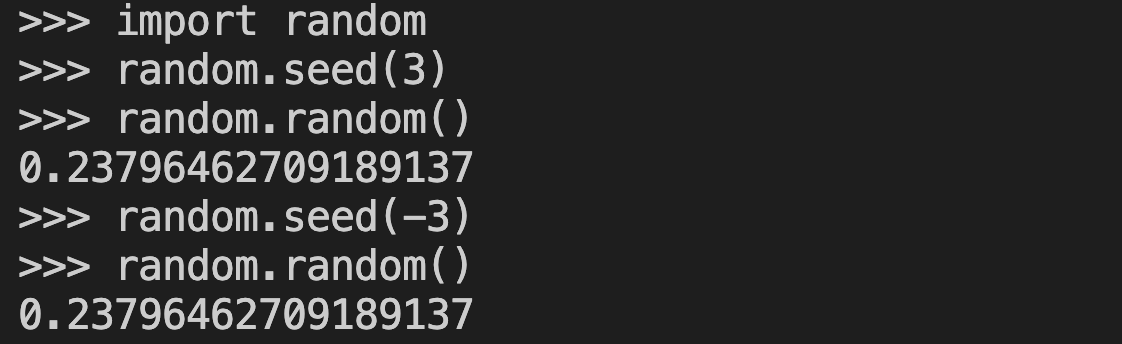
The evidence includes recommendations for testing and specific exception handling, a tool aimed at diagnosing long-running hung scripts, and a CPython random-seed edge case that can affect assumptions about distinct random streams.
Open debate
One post argues for choosing the language that maximizes team productivity when performance is not required. Another questions Python as the default for I/O-heavy GenAI services, while CUDA and Python 3.14 JIT posts point to acceleration and runtime-performance work.
Open debate
Learning-oriented posts argue that developers should write and understand code, using AI to assist rather than replace thinking. A professional-Python post similarly links stronger software practices with more useful AI-assisted coding.
Open debate
One post presents a compact modern Python stack including uv, pytest, Ruff, and FastAPI. Another reports that Claude Code recommendations can converge on particular tools or generate custom solutions, including different choices across project contexts.
What performs
List posts had a median all-time score of 101.01, compared with 28.56 for case studies, 8.1 for announcements, 3.63 for tutorials, and 3.704 for opinions. Supplied list examples include collections of market-data libraries, learning resources, and trading repositories.
The largest listed outlier is the 12-library market-data post (all-time score 2950.22). The next two listed outliers are the AutoHedge open-source project post (1072.29) and the coding-agents field-guide announcement (998.91).
Media appeared in 26 of 50 posts (52%). The supplied media median all-time score was 45.61, versus 3.75 for text posts. This is an observed association in the dataset, not evidence that media caused stronger performance.
Statistical standouts
Creator landscape
The five most represented creators account for 20% of the selected posts.
1. Vaishnavi
@_vmlops
2 posts
2. divyansh tiwari
@DivyanshT91162
2 posts
3. Shalini Goyal
@goyalshaliniuk
2 posts
4. Nav Toor
@heynavtoor
2 posts
5. Jahir Sheikh
@jahirsheikh8
2 posts
6. John Crickett
@johncrickett
2 posts
Examples from the supplied tweets connect Python tools with code agents and AI projects, document ingestion, AI backend requirements, and computer-vision workflows rather than syntax-only instruction.

Jahir Sheikh’s two evidence posts cover AI backend requirements and an AI-engineer stack. Vaishnavi’s two evidence posts cover a Python application framework and Prefect workflow orchestration.
A CPython random-seed case study reports that positive and negative integer seeds with the same absolute value produce identical streams, and cautions against relying on their sign to separate ML train/test behavior.
Since the previous snapshot
Themes, sentiment, stance, and post format are classified per tweet. All counts, shares, medians, creator concentration, freshness, and performance comparisons are then calculated directly from the published snapshot.
Xholic's all-time score compares engagement while accounting for reach, post age, and creator consistency. It is used for relative comparisons within this collection.
This report analyzes the exact 50-post snapshot shown below. AI identifies editorial categories and drafts explanations; all statistics are calculated from the snapshot, and every narrative claim is checked against cited posts before publication.
Best Python tweets
Ranked 01–50
@KanikaBK ·
MOST PEOPLE DON'T KNOW THIS There are Python libraries giving free market data for 170,000+ tickers. Stocks. Crypto. Forex. Economic indicators. No Bloomberg. No expensive APIs. Here are 12 libraries every quant dev should bookmark👇
@ihteshamali ·
this feels like cheating. Someone built an autonomous hedge fund in Python and open sourced the whole thing. It's called AutoHedge. The pipeline runs 4 specialized AI agents back to back: - Director Agent: generates trading strategy and thesis - Quant Agent: validates it with technical and statistical analysis - Risk Manager: sizes position, blocks execution if risk fails - Execution Agent: places the order only after everything clears Live on Solana right now. Coinbase next. More exchanges on the roadmap. `pip install -U autohedge` is all it takes to start. Most people spending $500/month on trading tools don't have risk architecture this clean. 1.1K stars. MIT License. 100% Opensource. https://t.co/imG5kpk5sz
@mdancho84 ·
This is huge. A group of 50 AI researchers (ByteDance, Alibaba, Tencent + universities) just dropped a 303 page field guide on code models + coding agents. And the takeaways are not what most people assume. Here are the highlights I’m thinking about (as someone who lives in Python + agents):
@karpathy ·
In today's episode of programming horror... In the Python docs of random.seed() def, we're told "If a is an int, it is used directly." [1] But if you seed with 3 or -3, you actually get the exact same rng object, producing the same streams. (TIL). In nanochat I was using the sign as a (what I thought was) clever way to get different rng sequences for train/test splits. Hence gnarly bug because now train=test. I found the CPython code responsible in cpython/Modules/_randommodule.c [2], where on line 321 we see in a comment: "This algorithm relies on the number being unsigned. So: if the arg is a PyLong, use its absolute value." followed by n = PyNumber_Absolute(arg); which explicitly calls abs() on your seed to make it positive, discarding the sign bit. But this comment is actually wrong/misleading too. Under the hood, Python calls the Mersenne Twister MT19937 algorithm, which in the general case has 19937 (non-zero) bits state. Python takes your int (or other objects) and "spreads out" that information across these bits. In principle, the sign bit could have been used to augment the state bits. There is nothing about the algorithm that "relies on the number being unsigned". A decision was made to not incorporate the sign bit (which imo was a mistake). One trivial example could have been to map n -> 2*abs(n) + int(n < 0). Finally this leads us to the contract of Python's random, which is also not fully spelled out in the docs. The contract that is mentioned is that: same seed => same sequence. But no guarantee is made that different seeds produce different sequences. So in principle, Python makes no promises that e.g. seed(5) and seed(6) are different rng streams. (Though this quite commonly implicitly assumed in many applications.) Indeed, we see that seed(5) and seed(-5) are identical streams. And you should probably not use them to separate your train/test behaviors in machine learning. One of the more amusing programming horror footguns I've encountered recently. We'll see you in the next episode. [1] https://t.co/srv1ZBlDsi [2] https://t.co/qpnKdvfVNS
@mdancho84 ·
Microsoft is making moves again. A quiet little Python tool just shot to the top of GitHub’s trending charts. 100,000+ stars. It’s called MarkItDown. And it does something deceptively simple: It turns almost any file into clean Markdown. PDFs. Word docs. PowerPoints. Excel files. Images. Drop a file in. Get structured Markdown out. Sounds small. It’s not. Because one of the biggest bottlenecks in AI workflows — especially RAG systems — is getting messy, real-world documents into a format models can actually use. And real-world documents are brutal. PDFs are chaotic. Word docs are full of hidden formatting junk. PowerPoints are messy and often image-heavy. Spreadsheets can be a nightmare to parse cleanly. That’s where this gets interesting. MarkItDown strips away the friction and gives you something LLM pipelines can actually work with. In other words: less preprocessing, less pain, faster AI implementation. Even better, this isn’t some random side project. It’s an official Microsoft open-source tool. Free. Commercially usable. Practical. I tested it on a 200-page PDF. A few seconds later, I had Markdown that was shockingly clean. And that’s what big tech does at its best: They take an annoying, universal problem that everyone has been duct-taping together… and turn it into a simple standard. That’s why this matters. It’s not just a file conversion tool. It’s infrastructure for the next wave of AI applications. Get it here: https://t.co/UDzes0sbDs 🚨 Want to learn how to build + ship AI and Data Science projects (that businesses actually want)? On April 29th, I am hosting a free workshop to help you get started with AI + DS projects in Python. Register here (500 seats): https://t.co/ZgiybFazCD
@jahirsheikh8 ·
If you're building AI products in 2026, Please learn: - Async Python / concurrency - Streaming APIs / WebSockets / SSE - Queue systems (Kafka / RabbitMQ / SQS) - Rate limiting / backpressure / retries - Caching strategies for LLM apps - Event-driven architectures - Distributed tracing / observability - Cost-aware infrastructure design AI apps still need real backend engineering.
@techNmak ·
This repo is basically a CS degree. For free. The Algorithms - Python. 218K+ GitHub stars. Every algorithm you'd learn in 4 years of computer science. All in one place. Just look at the categories inside. 👇 maths sorts graphs hashes matrix ciphers geodesy physics quantum strings fractals geometry graphics knapsack searches financial blockchain scheduling conversions electronics fuzzy_logic backtracking audio_filters file_transfer project_euler greedy_methods linear_algebra neural_network boolean_algebra computer_vision data_structures networking_flow web_programming bit_manipulation data_compression machine_learning cellular_automata genetic_algorithm divide_and_conquer linear_programming dynamic_programming digital_image_processing Every implementation is: → Clean and readable → Well-documented with docstrings → Annotated with type hints → Includes Big O complexity Purely written for learning, exploring, and tinkering. ➡️ Open it. ➡️ Star it. ➡️ Thank me later. The best CS education is free and on GitHub. Link in comments.
@jahirsheikh8 ·
📂 AI Engineer Stack ┃ ┣ 📂 Languages ┃ ┣ 📂 Python ┃ ┣ 📂 SQL ┃ ┗ 📂 Bash ┃ ┣ 📂 Core ML ┃ ┣ 📂 NumPy ┃ ┣ 📂 Pandas ┃ ┣ 📂 Scikit-learn ┃ ┗ 📂 XGBoost ┃ ┣ 📂 Deep Learning ┃ ┣ 📂 PyTorch ┃ ┣ 📂 TensorFlow ┃ ┣ 📂 JAX ┃ ┗ 📂 Keras ┃ ┣ 📂 LLM Frameworks ┃ ┣ 📂 LangChain ┃ ┣ 📂 LlamaIndex ┃ ┣ 📂 DSPy ┃ ┗ 📂 Haystack ┃ ┣ 📂 Vector DBs ┃ ┣ 📂 Pinecone ┃ ┣ 📂 Weaviate ┃ ┣ 📂 Qdrant ┃ ┣ 📂 Chroma ┃ ┗ 📂 FAISS ┃ ┣ 📂 Deployment ┃ ┣ 📂 BentoML ┃ ┣ 📂 vLLM ┃ ┣ 📂 TGI ┃ ┣ 📂 Modal ┃ ┗ 📂 Docker ┃ ┗ 📂 Monitoring ┣ 📂 Langfuse ┣ 📂 Helicone ┣ 📂 Weights & Biases ┗ 📂 MLflow
@GithubProjects ·
Pyinstrument is a Python profiler that helps you identify the slowest parts of your code so you can focus optimization efforts. - Supports Python 3.8+ and installs via pip. - Renders interactive HTML profiles with timeline mode. - Integrates with Django middleware and FastAPI. - Adapts precision of printed durations to profiling interval.
@nrqa__ ·
🚨 BREAKING: Someone at Microsoft just open-sourced a tool that converts almost any file format into clean Markdown. It's called MarkItDown. And it handles everything. PDFs. Word docs. PowerPoints. Excel spreadsheets. Images. Audio files. HTML. ZIP archives. One tool. One output format. Clean Markdown every time. Here is why this matters right now: Every AI coding agent, every LLM, every RAG pipeline works better with Markdown than with raw file formats. PDFs confuse them. DOCX files bloat the context. PowerPoints are basically unreadable. MarkItDown fixes the input layer. Drop any file in. Get clean, structured Markdown out. Feed it directly to your AI agent. Full format support: -> PDF documents -> Word files (DOCX) -> PowerPoint presentations (PPTX) -> Excel spreadsheets (XLSX) -> Images with EXIF metadata and OCR -> Audio files with speech transcription -> HTML pages -> ZIP archives (processes contents recursively) Use cases that are immediately obvious: -> Feed a PDF research paper to Claude or GPT without fighting the format -> Convert a client PowerPoint into structured notes in seconds -> Preprocess entire document folders for RAG pipelines -> Build document ingestion pipelines with zero formatting headaches Install in one line: pip install markitdown That is it. Works as a Python library or a CLI tool. From Microsoft. Actively maintained. Already one of the most starred Python tools on GitHub. 100% Open Source. MIT License.
@devXritesh ·
Backend Frameworks & Their Uses in 2026 🔥 🐍 FASTAPI 1. Lightning-fast REST & GraphQL APIs 2. Async microservices 3. AI/ML model serving 4. Real-time WebSocket backends 5. Production-grade Python services 6. Auto OpenAPI docs & validation 7. Scalable data pipelines 8. Serverless & edge deployments ☕ SPRING BOOT 1. Enterprise Java backends 2. Microservices at massive scale 3. Cloud-native applications 4. Event-driven architectures 5. Secure payment & banking systems 6. Heavy CRUD + batch processing 7. Integration with legacy systems 8. Kubernetes-ready production apps 🟦 NESTJS 1. Scalable TypeScript backends 2. Modular microservices 3. GraphQL + REST hybrids 4. Real-time chat & notifications 5. Enterprise full-stack apps 6. Domain-driven design projects 7. High-traffic SaaS platforms 8. Clean architecture at scale 🐹 GIN (GOLANG) 1. High-performance APIs 2. Lightweight microservices 3. Cloud-native services 4. Low-latency systems 5. Real-time trading platforms 6. DevOps & internal tools 7. Containerized backends 8. High-concurrency applications 🟣 LARAVEL 1. Rapid PHP web applications 2. E-commerce platforms 3. CMS & content-heavy sites 4. SaaS products with billing 5. RESTful APIs & webhooks 6. Queue & job processing 7. Beautiful admin panels 8. Startup MVPs in days 🟩 DJANGO 1. Secure & fast Python backends 2. Admin-heavy internal tools 3. Content management systems 4. Data-intensive applications 5. E-commerce with complex logic 6. Multi-tenant SaaS 7. API-first products 8. Batteries-included enterprise apps
@johncrickett ·
BitTorrent wasn't built with Python because it was fast. But because it didn't matter. At its peak it carried a third of all internet traffic. Bram Cohen could have built it in anything. He picked Python, saying: "People who are into Python aren't actually into Python. They just want to get the work done." Unless you need performance, pick the language that makes you and your team productive.
@johncrickett ·
I know AWS, Docker, Python, Rust, Go, PostgreSQL, Redis, Django, Celery, TypeScript, Next.js, Material UI and CSS. I still look stuff up constantly. So when I see engineers ranting about job adverts listing too many technologies, I get it. But I also don't. "I can't be expected to know all of these." That’s fair. But here's what knowing them actually means in practice: I know about 20 of AWS's 200+ products. The ones relevant to what I build. The rest, I read the docs. I've built my own container runtime as part of Coding Challenges. I still look things up when using Docker. I teach Python. I still check the docs. I've built several Redis clones. I still look things up in the docs. Django was a decade ago for me. Flask since then. Docs for both, every time. Next.js, Material UI, CSS? Not my thing. But I've built, fixed and deployed software with all three, because after decades of this I've learned to use documentation and figure stuff out. Knowing a technology doesn't mean memorising every detail of it. It means you've been exposed to the ideas, understood the concepts, and built something real with it. The docs fill the gaps. Experience tells you which gaps matter and helps you leverage the docs and AI to fill them. Some job adverts are unreasonable. But a shopping list of technologies usually isn't asking for mastery. It's asking whether you can jump into the project and make progress without too much help. Most engineers who've actually used these tools can. They just don't realise that's enough.
@DivyanshT91162 ·
Top 13 open-source repos for building trading bots. From algorithmic trading to AI agents, backtesting and market analysis — these are worth exploring. 1. Freqtrade Crypto trading bot with strategy development, backtesting and optimization. https://t.co/DFxpq4o0iE 2. Hummingbot Open-source framework for building automated crypto trading bots. https://t.co/BQ8RNV07JD 3. NautilusTrader High-performance trading platform for research, backtesting and live trading. https://t.co/Tju00tlxOq 4. Jesse Python framework for researching and backtesting crypto trading strategies. https://t.co/r1JPyiuzY5 5. Backtrader Python framework for developing and backtesting trading strategies. https://t.co/SzEQd8LwO4 6. Lean Algorithmic trading engine for research, backtesting and live trading. https://t.co/3fq3q2OHWE 7. VectorBT Fast Python framework for quantitative trading research and backtesting. https://t.co/9HkQoGraCw 8. FinRL Deep reinforcement learning framework for automated trading research. https://t.co/WEb7CnW99e 9. TradingAgents Multi-agent framework for financial market analysis and trading research. https://t.co/hhjynaYZaJ 10. Qlib AI-oriented quantitative investment platform from Microsoft Research. https://t.co/t7WXsD89jq 11. TensorTrade Framework for building, training and evaluating algorithmic trading agents. https://t.co/sVLy9mmzdh 12. OctoBot Open-source crypto trading bot with automated strategies and backtesting. https://t.co/9G8DNnB44s 13. FreqAI Machine-learning extension for Freqtrade to build and deploy predictive trading strategies. https://t.co/DFxpq4o0iE All are 100% open source. Worth exploring. Worth building on.
@techNmak ·
Someone quietly built a computer science degree inside a GitHub repository. Sorting. Graphs. Dynamic programming. Data structures. Cryptography. Machine learning. All implemented in Python. Then you see the folders: maths sorts graphs hashes matrix ciphers geodesy physics quantum strings fractals geometry graphics knapsack searches financial blockchain scheduling conversions electronics fuzzy_logic backtracking audio_filters file_transfer project_euler greedy_methods linear_algebra neural_network boolean_algebra computer_vision data_structures networking_flow web_programming bit_manipulation data_compression machine_learning cellular_automata genetic_algorithm divide_and_conquer linear_programming dynamic_programming digital_image_processing Dive in, explore the topics that interest you, and learn something new. GitHub Repo in comments.
@goyalshaliniuk ·
Python becomes much easier to learn when you connect it directly with real data engineering work. For data engineers, Python is not just a programming language. It helps you read files, clean messy datasets, connect APIs, move data between systems, automate pipelines, query databases, and prepare workflows for production. The journey starts with the core foundations: Variables, data types, loops, functions, modules, packages, error handling, and virtual environments. Then it moves into data structures and logic, where lists, dictionaries, tuples, sets, iterators, generators, and comprehensions help you organize and process data better. After that, Python becomes practical. You learn how to work with CSV, JSON, Excel, XML, Parquet, Avro, ORC, and file paths. You use libraries like Pandas, NumPy, Polars, PyArrow, Dask, OpenPyXL, and FastParquet to clean, transform, validate, and prepare datasets. Then come the real data engineering layers: ETL workflows. APIs and external data sources. Databases and warehouses. Pipeline orchestration. Big data and cloud engineering. Production-ready projects. This is where Python starts feeling like a complete data engineering toolkit. The goal is not to learn every library at once. The goal is to understand where each concept fits in the pipeline. Learn the basics. Practice with files. Build ETL workflows. Connect APIs. Work with databases. Automate pipelines. Ship real projects. That is how Python turns from syntax into real data engineering skill.
@heynavtoor ·
🚨Those Reddit story videos on TikTok get millions of views. Every single day. Someone automated the entire process. One command. No editing. No assets. No video skills. It's called RedditVideoMakerBot. It grabs a Reddit thread. Screenshots every comment. Adds text-to-speech. Slaps on a background. Renders a complete vertical video. Ready to upload. Here's what happens when you run python main. py: → Pulls a random thread from any subreddit you choose → Grabs the top comments and screenshots each one with Playwright → Converts every comment to speech using text-to-speech → Downloads a background video and chops it at a random point → Stitches everything together with perfectly timed transitions → Outputs a final video ready for TikTok, YouTube Shorts, and Reels One command. That's the entire workflow. No video editor. No Premiere Pro. No CapCut. No timeline. No transitions. No exporting. No rendering settings. You run one Python script and get a finished video. Here's the wildest part: The videos this bot creates follow the exact format that dominates short-form content right now. Minecraft parkour background. Reddit screenshot overlay. Robotic voiceover. The formula you've seen hundreds of times in your feed. Now you know how they're made. 10,100 GitHub stars. 2,500 forks. 1,286 commits. GPL-3.0 License. 100% Open Source.
@PythonDvz ·
📚 The Ultimate Guide to Python Libraries for Data Science! 🐍✨ Do you work with data? This infographic is your new best friend. I’ve compiled the 9 essential libraries that will make your life easier every step of the way: 1️⃣ NumPy & Pandas: For taming and manipulating large datasets. 2️⃣ Seaborn, Matplotlib & Plotly: Visualize your insights in stunning ways. 3️⃣ Scikit-learn, TensorFlow & Statsmodels: Your arsenal for Machine Learning and statistics. 4️⃣ NLTK: The power of natural language processing. ✅ Save this post to use as a quick reference! #Python #DataScience #Programming
@heynavtoor ·
This is the tool AWS does not want you to install. Amazon Rekognition charges about $0.001 per image to detect objects. Running that on a busy video feed hits a million images fast. A million images is $1,000 in AWS fees. Google Vision AI charges $1.50 per 1,000 images. Azure Computer Vision bills per transaction. Roboflow's own paid plan runs $99 to $999 a month. There is a free Python library that does the same work on your laptop. It is called Supervision. pip install supervision Here is the story. A guy in Kraków got hired to write marketing demos for a computer vision startup. His job was making little Python scripts for Twitter that showed off what AI models could do. Traffic counting. Store analytics. Sports tracking. Every demo needed the same boilerplate. Draw a box around the car. Draw a line across the road. Count the crossings. Track each car with a stable ID. Save the output as a video. He got tired of rewriting the same code every week. So he pulled the shared code into a Python package. He put it on GitHub under an MIT license. He shipped it. That was November 2022. Today: 48,212 stars. 4,423 forks. 1.2 million downloads every month on PyPI. 160+ contributors. Powers computer vision pipelines at real companies. Point a webcam at a road. Plug in a free object-detection model like YOLO. Supervision draws boxes on every car. Tracks each one. Counts what crosses your line. Estimates speed. In real time. That is a traffic monitoring system. Point the camera at a store entrance. It counts every shopper who walks in. Tracks their path. Builds a heatmap of foot traffic. That is retail analytics. Companies pay tens of thousands a year for the same output. Point the camera at a basketball court. It tracks every player, IDs their jersey number with a second model, logs their positions frame by frame. The guy in Kraków built the basketball keypoint model for this over a weekend and posted it on LinkedIn. His name is Piotr Skalski. His GitHub bio says: "I open-source stuff." Amazon can't take this back. The license does not permit that. Google can't take this back. The license does not permit that. Roboflow could have kept it internal. They open sourced it instead. Your camera already sees everything. Piotr Skalski wrote the library that lets it understand what it sees. For free. (Link in the comments)
@goyalshaliniuk ·
Quantum computing is moving beyond research labs, and Python is becoming one of the easiest ways to explore it. From circuit simulation to quantum machine learning, optimization, chemistry, hardware control, and error mitigation, the ecosystem now offers a library for almost every use case. Here are 15 Python libraries worth knowing: → 𝗤𝗶𝘀𝗸𝗶𝘁 — Build, optimize, simulate, and run gate-based circuits. → 𝗖𝗶𝗿𝗾 — Design hardware-aware circuits for noisy processors. → 𝗣𝗲𝗻𝗻𝘆𝗟𝗮𝗻𝗲 — Create differentiable programs and hybrid ML models. → 𝗧𝗲𝗻𝘀𝗼𝗿𝗙𝗹𝗼𝘄 𝗤𝘂𝗮𝗻𝘁𝘂𝗺 — Combine Cirq with TensorFlow for quantum AI. → 𝗢𝗽𝗲𝗻𝗙𝗲𝗿𝗺𝗶𝗼𝗻 — Model molecules, fermionic systems, and quantum chemistry. → 𝗔𝗺𝗮𝘇𝗼𝗻 𝗕𝗿𝗮𝗸𝗲𝘁 𝗦𝗗𝗞 — Run jobs on simulators and quantum hardware. → 𝗤𝗶𝗯𝗼 — Support simulation, calibration, and hardware control. → 𝗤𝘂𝗹𝗮𝗰𝘀 — Run fast simulations of large quantum circuits. → 𝗖𝗨𝗗𝗔-𝗤 — Build hybrid workflows across CPUs, GPUs, and QPUs. → 𝗤𝘂𝗧𝗶𝗣 — Simulate states, operators, dynamics, and open systems. → 𝗽𝘆𝘁𝗸𝗲𝘁 — Compile and optimize circuits across hardware platforms. → 𝗗-𝗪𝗮𝘃𝗲 𝗢𝗰𝗲𝗮𝗻 — Solve optimization problems with quantum annealing. → 𝗽𝘆𝗤𝘂𝗶𝗹 — Build and execute programs for Rigetti systems. → 𝗠𝗶𝘁𝗶𝗾 — Reduce noise using error-mitigation techniques. → 𝗠𝗶𝗰𝗿𝗼𝘀𝗼𝗳𝘁 𝗤𝗗𝗞 — Combine Python and Q# for quantum development. Start with Qiskit or Cirq, then choose based on your goal: AI, chemistry, optimization, simulation, or hardware flexibility. Which quantum Python library would you explore first?
@sukh_saroy ·
🚨Breaking A Python library that reverse-engineers Google Flights' internal API just dropped -- and it connects directly to Claude as an MCP server. It's called fli. And it's not a wrapper around a flight search UI. It hits Google's internal endpoints directly -- no HTML parsing, no browser automation, no Puppeteer -- and returns structured flight data fast. Here's what it can do: → Search one-way and round-trip flights with departure date and cabin class → Filter by departure time window, specific airlines, max stops, and price ceiling → Sort results by price, duration, departure time, or arrival time → Find cheapest dates across any date range with a sparkline price chart → Run as an MCP server so Claude can search flights from natural language → Built-in rate limiting, retry logic with exponential backoff, and input validation Here's the wildest part: Google Flights' internal API doesn't require traditional authentication. fli discovered that, reverse-engineered the encoding, and packaged the whole thing into a clean Python library with Pydantic models and a CLI. Ask Claude "what's the cheapest non-stop flight from JFK to LHR next month in business class?" and it actually answers with real Google Flights data. One command to install: `pipx install flights` One command to wire up Claude Desktop: `fli-mcp` 100% Open Source. MIT License. (Link in the comments)
@_jaydeepkarale ·
Modern Python in plain English 🐍 • uv → Python project manager • pathlib → file handling • pytest → testing • ruff → linter + formatter • asyncio → concurrency • FastAPI → APIs • pandas → data analysis • SQLAlchemy → databases • Pydantic → data validation • Docker → run it anywhere That's the modern Python stack in 10 lines.
@milan_milanovic ·
𝗪𝗵𝗮𝘁 𝗵𝗮𝗽𝗽𝗲𝗻𝘀 𝘄𝗵𝗲𝗻 𝘆𝗼𝘂 𝗹𝗲𝘁 𝗖𝗹𝗮𝘂𝗱𝗲 𝗖𝗼𝗱𝗲 𝗽𝗶𝗰𝗸 𝘆𝗼𝘂𝗿 𝘁𝗼𝗼𝗹𝘀 𝗳𝗼𝗿 𝘆𝗼𝘂? Researchers sent 2,430 open-ended prompts to Claude Code across 3 models, 4 project types, and 20 categories. They did not mention any tools; they just asked, "What should I use?" Here is what they found: 𝟭. 𝗕𝘂𝗶𝗹𝗱 𝗼𝘃𝗲𝗿 𝗯𝘂𝘆 𝗶𝘀 𝘁𝗵𝗲 𝗱𝗲𝗳𝗮𝘂𝗹𝘁 Custom/DIY is the single most common "recommendation" in the dataset, 252 picks across 12 of 20 categories. Ask Claude Code to add feature flags, and it builds a system with env vars and React Context. Ask it to add auth to a Python project, and it writes a JWT from scratch every single time. When an agent can build a working solution in 30 seconds, it often does. 𝟮. 𝗔 𝗱𝗲𝗳𝗮𝘂𝗹𝘁 𝘀𝘁𝗮𝗰𝗸 𝗲𝘅𝗶𝘀𝘁𝘀 Where Claude Code does pick third-party tools, it converges hard: - GitHub Actions owns CI/CD at 94% - Stripe owns payments at 91% - shadcn/ui owns UI components at 90% - Vercel is a must for JavaScript projects at 100%. The rest of the list: PostgreSQL, Tailwind CSS, Zustand, pnpm, Resend, Vitest. These tools may not be the best option for your project, but these are what the model will choose for you. 𝟯. 𝗥𝗲𝗱𝘂𝘅 𝗶𝘀 𝗱𝗲𝗮𝗱 𝗶𝗻 𝗔𝗜-𝗮𝘀𝘀𝗶𝘀𝘁𝗲𝗱 𝗰𝗼𝗱𝗲 Redux did't got any primary picks across 2,430 prompts. The model knows it exists, with 23 mentions and 2 alternative recommendations, but never actually chooses it. Zustand wins state management at 65% instead. Express has it even worse. It doesn't show up as a primary pick, an alternative, or even a passing suggestion. It's just gone. 𝟰. 𝗡𝗲𝘄𝗲𝗿 𝗺𝗼𝗱𝗲𝗹𝘀 𝗽𝗿𝗲𝗳𝗲𝗿 𝗻𝗲𝘄𝗲𝗿 𝘁𝗼𝗼𝗹𝘀 This is the clearest signal from this dataset. Prisma goes from 79% in Sonnet 4.5 to 0% in Opus 4.6. Drizzle takes over completely. In Python projects, Celery usage collapses from 100% to 0% as newer models prefer FastAPI's built-in background tasks. It tracks with what appeared in more recent training data. 𝟱. 𝗖𝗼𝗻𝘁𝗲𝘅𝘁-𝗮𝘄𝗮𝗿𝗲𝗻𝗲𝘀𝘀 𝗶𝘀 𝗿𝗲𝗮𝗹 The same model picks Vercel for JavaScript and Railway for Python. Drizzle for Next.js, SQLModel for FastAPI. It's not a fixed list. The agent reads the stack and adapts, which is more useful than a blanket recommendation. 𝟲. 𝗕𝗲𝗶𝗻𝗴 𝗮𝗯𝘀𝗲𝗻𝘁 𝗳𝗿𝗼𝗺 𝗽𝗿𝗶𝗺𝗮𝗿𝘆 𝗽𝗶𝗰𝗸𝘀 𝗶𝘀𝗻'𝘁 𝘁𝗵𝗲 𝘀𝗮𝗺𝗲 𝗮𝘀 𝗯𝗲𝗶𝗻𝗴 𝗶𝗻𝘃𝗶𝘀𝗶𝗯𝗹𝗲 Netlify, SendGrid, and Jest were never chosen as the primary option. But they kept showing up as second choices. The model knows these tools and still recommends something else first. That gap is the one worth closing. If we're using AI coding agents for greenfield projects, we're increasingly inheriting a default stack. Worth knowing what that stack is. Full report in comments
@VaibhavSisinty ·
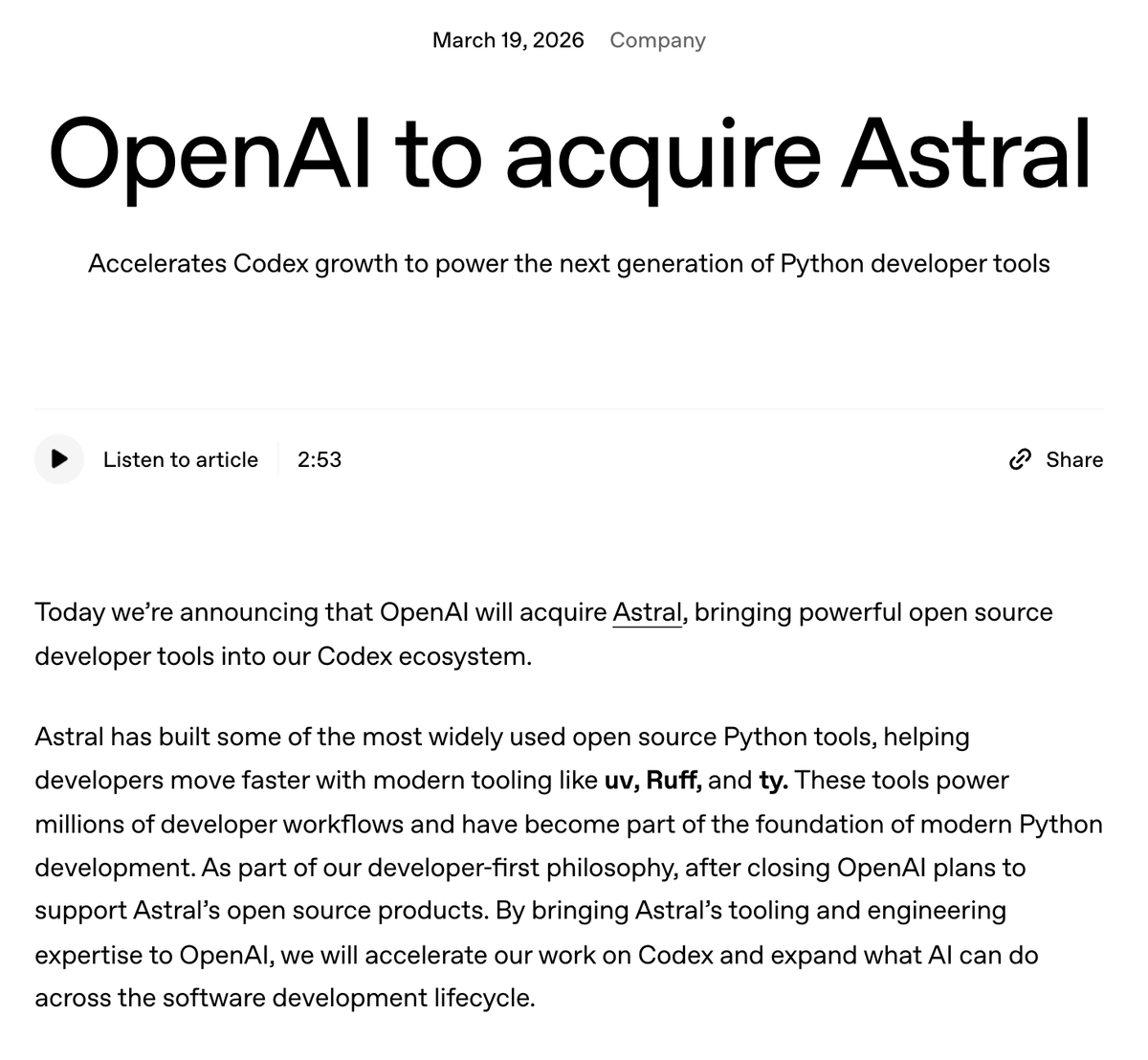
OpenAI didn’t just acquire a startup. They acquired the muscle memory of 10 million Python developers. Astral, the team behind uv, Ruff, and ty is now inside Codex. The default toolchain of Python developers. Let that sink in. This isn’t another “AI writes code” update. This is AI owning the entire development loop. → Plan the change → Spin up environments with uv → Type-check with ty → Lint with Ruff → Ship All… without breaking flow. And the smartest part? They’re keeping everything open-source
@agenticasdk ·
Many people have asked us: what changes when an agent has access to a persistent Python runtime? We ran a side-by-side comparison to demonstrate: Agentica's Python REPL-based agent vs traditional tool calling agents Full breakdown below 👇
@DivyanshT91162 ·
🤯 SQLModel eliminates one of the most annoying parts of Python development. No more maintaining separate Pydantic schemas and SQLAlchemy models. Define everything once with Python type annotations and get validation, serialization, and database functionality in a single model. Built on top of Pydantic and SQLAlchemy, with first-class FastAPI support and far less boilerplate than traditional setups. Clean, simple, and surprisingly powerful. Repo👇
@_vmlops ·
PREFECT TURNS PYTHON SCRIPTS INTO PRODUCTION PIPELINES used by teams at progressive insurance and cash app to run 200M+ data tasks a month. the pitch is simple: take a normal python function, slap on a couple decorators, and it becomes a workflow with retries, caching, scheduling, and event-based automation built in. → @task and @flow decorators turn existing code into orchestrated pipelines → built-in retries and error handling for flaky steps → self-hosted server or prefect cloud dashboard to monitor runs → turn any flow into a scheduled deployment with one method call → python 3.10+, apache-2.0 licensed no rewriting your pipeline logic into some new DSL. no yaml hell. just python functions that got promoted. repo: https://t.co/8yrFT0aZI1
@pycharm ·
How do you actually learn #Python? Mark Smith (@judy2k) breaks it down into 3 core ideas: 1. Start by copying At the beginning, you need guidance. Tutorials, books, and exercises help you understand how code is structured. 2. Move quickly to building This is where real learning happens. • Start small • Recreate simple tools • Work on projects you care about You don’t learn programming by consuming content – you learn it by writing code. 3. Learn from others Read code, follow experienced developers, and learn how real projects are written. ❌ Avoid common mistakes: - When you let AI write code, you stop learning. - When you try to learn everything at once, you risk burning out. - When you obsess about avoiding errors, you lose a major part of the process. ✅ What actually helps: - Breaking problems into small pieces. - Building early, even if it’s messy. - Learning gradually (including tools like Git). - Using AI to assist, not replace thinking. The key idea: You don’t learn programming by consuming content. You learn it by writing code. 👉 Watch the full talk: https://t.co/WFAmWvxtsZ
Watch video
@MaheshPawaar ·
🐍 python mistakes that make your life harder • if len(seq) > 0 → just use if seq:. it's cleaner and faster. • catching exception → you’ll accidentally silence bugs you didn’t know existed. be specific. • manual string joining → use f-strings. stop concatenating with +. • ignoring pathlib → slashes vary by os. path("dir") / "file" works everywhere. • mutable default args → def func(x=[]) is a trap. that list is shared across every call. • manual counters → use enumerate() instead of i = 0 followed by i += 1.
@s_gruppetta ·
There's never been a better time to learn core Python. Sure, AI is writing code for us now. But you still need to understand it, review it, guide the AI to what you really want English is great but can be ambiguous. A glance at the Python code helps you ensure the AI understood your requirements, or quickly steer it in the right direction. Python fundamentals take you further today than they ever did in the past. Beware of skipping the basics…
@MaheshPawaar ·
🐍 5 python concepts that made everything click for me: (bookmark this🔖) > generators – stops loading everything into memory at once – processes one item at a time with yield – saved me in django when querying large datasets > decorators – a function that wraps another function – that's literally all [@]login_required is – write your own for logging, auth, timing > context managers – "with" guarantees cleanup even when things break – calls `__enter__` and `__exit__` under the hood – django's transaction.atomic() is this exact pattern > list comprehensions – not just shorter syntax – shifts your thinking from "mutate step by step" to "describe what you want" – flatter code, easier to debug > unpacking – swap variables without a temp variable – destructure API responses in one line – grab first and last from a list cleanly – wish someone had told me sooner frameworks are just these stitched together. go deeper on what you have. not wider.
@__mharrison__ ·
I had the chance this week to teach a Professional Python class to a room full of very smart people. My IQ was definitely bringing the average down. Almost everyone in the room had a PhD. Except for two of us. One of them was me. And I saw something I often see when I work with highly technical experts. They are brilliant. They know their domains deeply. They know how to get things done. They have built workflows that work for them, often over many years. But there are usually gaps around coding and software engineering practices. Their job has usually been to get the analysis working, get the model running, get the paper out, get the result shipped, or get the thing working on their machine. That creates a very different coding style than what you need when code needs to be shared, tested, refactored, reviewed, maintained, and collaborated on. That is the fun part of teaching this material. You start introducing processes and practices that move people from being highly capable individuals to being a team that can build together. Testing was one of the big unlocks. Many people had not spent much time with it, but they immediately saw its value. Tests give you confidence. They make refactoring safer. They make collaboration easier. They let you change code without holding your breath. For the skeptics, I told them to apply the scientific process (they are all scientists, so they can't do much to argue), apply the techniques, and verify whether the results are better. They were also very interested in AI-assisted coding. This class was not an AI coding class. I teach that separately. But this class is foundational for AI coding because AI coding accelerates experts. The better your software development practices are, the better your results with AI will be. If you bring messy habits to AI, you get faster messes. If you bring testing, structure, environments, refactoring, and collaboration practices, AI becomes much more useful. Professional software practices are not just for software engineers anymore. They are the foundation for anyone who wants to use Python, data, and AI at a high level.
@ATechAjay ·
Python Roadmap for Frontend Engineers. Step 1: Python Fundamentals □ Syntax & Basics □ Data Types, Variables & Operators □ Control Flow & Loops □ Functions & Modules □ OOP (Classes & Inheritance) □ Error Handling & File I/O Step 2: Data Handling & Visualization □ NumPy & Pandas □ Matplotlib & Seaborn □ Plotly (Interactive Charts) □ Exploratory Data Analysis (EDA) Step 3: Traditional Full-Stack Backend □ Virtual Environments □ Flask or FastAPI □ Django □ REST APIs & Authentication □ Connect to your existing JS/React Frontends Step 4: Pure Python UI Frameworks □ Streamlit – Fast Data Apps & Prototypes □ Gradio – ML Model Interfaces & Demos □ NiceGUI – Modern UI with Great Styling □ Reflex – Full-Stack Apps (React under the hood, all Python) □ Dash / Panel – Advanced Interactive Dashboards Step 5: Styling & Advanced UI □ Custom CSS, Themes & Layouts □ Component Libraries & Extensions □ State Management & Reactivity □ Responsive Design Patterns □ Blend with your HTML/CSS/JS Expertise Step 6: Databases & State Management □ SQLite / PostgreSQL □ ORM Basics (SQLAlchemy) □ Real-time Updates & WebSockets □ Caching & Session Handling Step 7: AI-Powered Interfaces □ OpenAI & Hugging Face API Integration □ LangChain / LlamaIndex for Smart UIs □ Build Chatbots, RAG Apps & Agents □ Gradio + LLMs or Streamlit + AI Features Step 8: Deployment & MLOps □ Hugging Face Spaces □ Streamlit Cloud, Render, Vercel □ Docker Basics for Python Apps □ CI/CD & GitHub Actions Step 9: Version Control & Best Practices □ Git & GitHub □ Clean Project Structure □ Testing UI Components □ Performance Optimization Step 10: Build Projects □ Interactive Data Dashboard (Streamlit/Dash) □ AI Chatbot or RAG Interface (Gradio/Reflex) □ Full-Stack Web App (Reflex or FastAPI + React) □ ML Model Demo Platform □ Deployed Portfolio Site or SaaS Prototype Now start building Python-powered UIs and apps. Your frontend experience gives you a huge head start in design, UX & interactivity! Good luck 🚀
@auren ·
Python was designed for human readability. if AI is the primary producer and verifier of code, there's no reason the code should be in Python.
@Kaperskyguru ·
Most Python developers are not stuck because they lack knowledge. They are stuck because they are optimizing for the wrong thing. You watch tutorials. You follow along. You feel productive. But the moment you open a blank editor, nothing comes out. That is tutorial hell. Here is how to escape it.
@jianw851 ·
Most people use 5+ paid tools or build a web app for this. But in #OpenClaw era it could be as simple as a python file: A full spaced-repetition study tracker: • pattern analysis • review scheduling • drill management Zero dependencies. Zero setup. No web app. Pure CLI. Want the Code? comment bellow. python tasks/cli.py add # log a task python tasks/cli.py todo # what's due today python tasks/cli.py review # active recall python tasks/cli.py stats # see dominant patterns python tasks/cli.py drills # targeted micro-practice SM-2 scheduling built in. Intervals grow as you improve, reset when you blank. One JSON file as the database. And because it's just a CLI over structured data — an AI agent can drive it directly. No API to wrap, no UI to scrape. add, review, stats are already agent-friendly commands. The whole thing fits in your repo.
@ThePracticalDev ·
Gen AI apps are mostly I/O-heavy network services. So why are we still defaulting to Python? This dev makes the case for Go and Genkit, and walks through a typed, observable, multi-provider AI service in a single main.go file. { author: Xavier Portilla Edo + Google Developer Experts } https://t.co/0xJJJ5HOeW
Best Tweets by Topic