Tooling and developer experience
Bundlers, package managers, scripting tools, codebase exploration, SDK maintenance, and simpler development stacks.
31.1%
Best tweets about JavaScript
Discover the best tweets about JavaScript, including language features, browser APIs, performance, tooling, frameworks, debugging, and engineering practices.
Technical JavaScript code, language behavior, browser features, performance, tooling, debugging, architecture, and developer experience.
Original Xholic analysis
JavaScript discussion spans language fundamentals, browser APIs, runtimes and developer tooling. One recurring question is where JavaScript belongs: some posts showcase richer in-browser tools and AI interfaces, while others advocate HTML-first pages, native links and clearer client–server boundaries. Among the highest-scoring posts in this set are codebase-exploration tools, React internals and browser features.
53.3% of posts
All-time engagement
31.1% of posts
Published in 90 days
Conversation map
Bundlers, package managers, scripting tools, codebase exploration, SDK maintenance, and simpler development stacks.
31.1%
Scope, closures, objects, execution contexts, async/await, the event loop, and surprising language quirks.
28.9%
Browser and engine benchmarks, headless browsers, DOM layout costs, large-file handling, and Node.js runtime design.
28.9%
TypeScript constraints, null safety, testing, API mocking, bug reproduction, and reliable releases.
28.9%
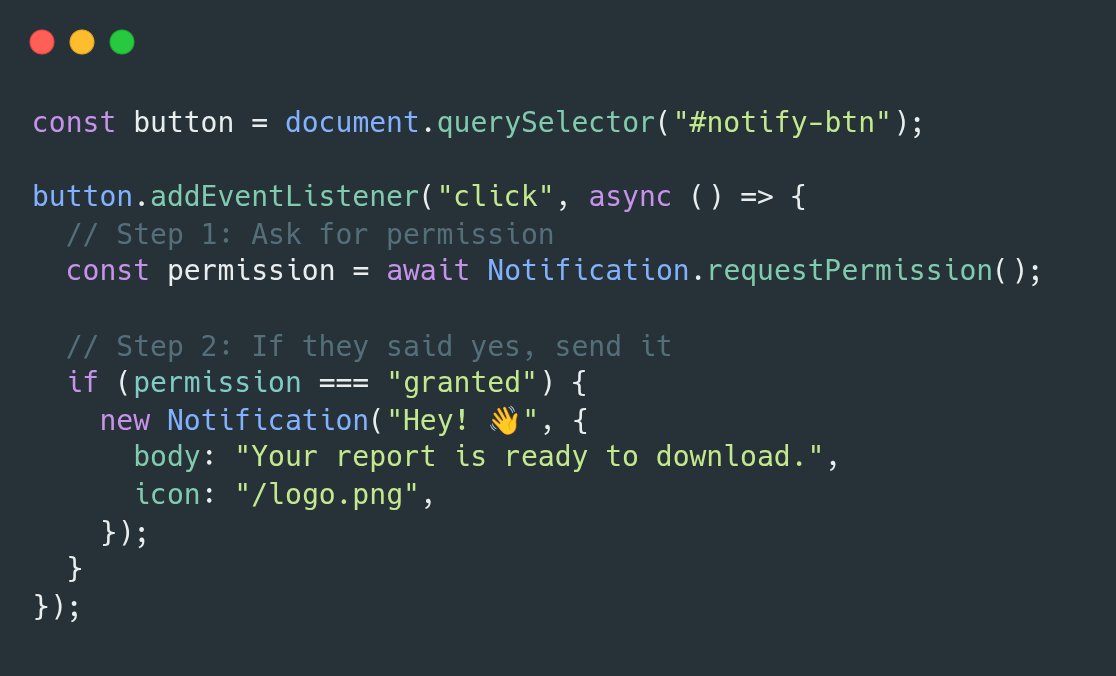
Using browser features such as notifications, DOM manipulation, Web Workers, storage, and native link semantics.
22.2%
Coding-agent tool choices, browser automation, agent-accessible websites, client-side AI, and AI interfaces to web apps or codebases.
17.8%
React internals and SDKs, micro-frontends, state management, and client–server boundaries.
17.8%
Reducing client-side JavaScript, choosing static or server-rendered HTML, and making content accessible to crawlers and agents.
11.1%
Tone and stance
Performance benchmark
Posts with media make up 60% of this collection. Their median all-time score is 14.3, compared with 5.92 for text-only posts.
Format mix
Consensus and debate
Shared view
Guides cover execution contexts and closures, while a learning roadmap emphasizes promises and the event loop. A separate recommendation presents engine knowledge as useful for debugging and reviewing generated code.
Shared view
Posts highlight native notifications and Web Workers for parsing. A navigation critique argues that ordinary links retain browser behaviors that click-handler navigation can lose.
Open debate
Posts showcase browser-side code graphs and propose JavaScript interfaces for AI agents. In contrast, an Astro migration account and a post about agent-readable websites argue for serving essential content as HTML rather than relying on client-side rendering.
Open debate
One developer is experimenting with TypeScript constraints intended to make AI-written code more testable; another objects to the layers expected for ordinary apps. A third argues that sharing JavaScript across client and server has blurred useful boundaries.
What performs
Supplied analytics put the tutorial median all-time score at 31.16 versus 5.19 for opinions; posts with media have a 14.25 median versus 5.92 for text posts. Posts on React internals and native notifications are among the listed high-scoring outliers. These comparisons do not establish that format or media caused the difference.
The AI-assisted development and browser agents theme has a 95.99 median all-time score. The GitNexus post scores 3464.2, or 313.02 times the overall median; a headless-browser announcement also appears among the listed outliers.
Statistical standouts
Creator landscape
The five most represented creators account for 22.2% of the selected posts.
1. Vaishnavi
@_vmlops
2 posts
2. K.O.O
@Dominus_Kelvin
2 posts
3. freeCodeCamp.org
@freeCodeCamp
2 posts
4. Darren Shepherd
@ibuildthecloud
2 posts
5. Ihtesham Ali
@ihteshamali
2 posts
6. Artem Zakharchenko
@kettanaito
2 posts
Millie Marconi has two posts in the set, on GitNexus and Lightpanda, with a supplied median all-time score of 1840.04. The posts describe a browser-based codebase tool and a headless browser for agent workflows, respectively.
freeCodeCamp appears twice, linking handbooks on execution contexts and closures; both focus on scope and function behavior rather than a new framework or tool.
Since the previous snapshot
Themes, sentiment, stance, and post format are classified per tweet. All counts, shares, medians, creator concentration, freshness, and performance comparisons are then calculated directly from the published snapshot.
Xholic's all-time score compares engagement while accounting for reach, post age, and creator consistency. It is used for relative comparisons within this collection.
This report analyzes the exact 45-post snapshot shown below. AI identifies editorial categories and drafts explanations; all statistics are calculated from the snapshot, and every narrative claim is checked against cited posts before publication.
Best JavaScript tweets
Ranked 01–45

@MillieMarconnni ·
🚨 BREAKING: A developer on GitHub just built a tool that turns any GitHub repo into an interactive knowledge graph and open sourced it for free. It's called GitNexus. Think of it as a visual X-ray of your codebase but with an AI agent you can actually talk to. No server. No subscription. No enterprise sales call. Here's what it does inside your browser: → Parses your entire GitHub repo or ZIP file in seconds → Builds a live interactive knowledge graph with D3.js → Maps every function, class, import, and call relationship → Runs a 4-pass AST pipeline: structure → parsing → imports → call graph → Stores everything in an embedded KuzuDB graph database → Lets you query your codebase in plain English with an AI agent Here's the wildest part: It uses Web Workers to parallelize parsing across threads so a massive monorepo doesn't freeze your tab. The Graph RAG agent traverses real graph relationships using Cypher queries not embeddings, not vector search. Actual graph logic. Ask it things like "What functions call this module?" or "Find all classes that inherit from X" and it traces the answer through the graph. This is the kind of code intelligence tool enterprise teams pay thousands per month for. It runs entirely in your browser. Works with TypeScript, JavaScript, and Python. 100% Open Source. MIT License. Repo: https://t.co/RzIoLR2vAe
 Watch video
@Austen ·
Pro tip to make agents not suck at doing everything in Chrome: View -> Developer -> Allow JavaScript from Apple Events. Tell your agent you enabled that and it will save a huge amount of tokens for any browser work

@denicmarko ·
JavaScript tip: Use new Notification() to send browser notifications natively (no app needed).

@jyobo10 ·
I rebuilt React from scratch to understand what it’s actually doing under the hood. I wrote an article about it that walks through: • the virtual DOM • a diffing/reconciliation algorithm • how hooks like useEffect work internally • how JSX compiles into JavaScript If you're a React dev or interested in framework internals, you might enjoy it.


@MillieMarconnni ·
🚨 A developer just built a headless browser from scratch in Zig that runs 11x faster than Chrome with 9x less memory. It's called Lightpanda and every AI agent builder needs to see this. The problem: AI web agents run headless Chrome. You're spinning up a full desktop browser 500MB of bloat just to scrape HTML. On hundreds of instances. The compute bill is insane. Lightpanda is purpose-built for headless. Not a Chromium fork. Not WebKit. Ground up. Still runs JavaScript, SPAs, Ajax, Fetch, infinite scroll. Just without the waste. Plugs into Playwright, Puppeteer, and chromedp in 30 seconds via CDP. 11.8K stars. 100% Opensource. Link in comments.


@justinstorre ·
I am experimenting with something I call "Typescript Ultra Strict". Basically, typescript with no nulls, no classes, no undefineds, no switch statements, and no vars + the addition of match macros. Basically forcing AI to write functional AI code through compilation errors that is more deterministic and testable. Back in 2008 Chrome built the V8 Javascript engine and the entire world built edge compute on top of this amazing primitive. However, Javascript had it's short comings so we made Typescript, but Typescript still was "too friendly", mainly to appeal to a human audience. We no longer have humans writing code, so why not give the AI something less clunky and more clanky 😉 UX - write .tsus files - add a one-line plugin to webpack, Vite, esbuild, or Bun Features include: - Option/Result runtime, with boundary helpers that turn the outside world's nulls and throws into Option and Result - match macros - good error messages, so an agent can fix its own errors in a loop


@jahirsheikh8 ·
Step-1: Learn JavaScript (not just syntax, understand the weird parts) Step-2: Master closures, prototypes & the event loop Step-3: Understand async deeply (promises, async/await, microtasks vs macrotasks) Step-4: Build real UIs with React (state, hooks, rendering behavior) Step-5: Learn Node.js internals (streams, buffers, non-blocking I/O) Step-6: Build APIs (Express/Fastify) & handle errors properly Step-7: Work with databases (SQL + NoSQL) like you actually care about queries Step-8: Optimize performance (debouncing, memoization, caching) Step-9: Deploy (Docker, CI/CD, Vercel/AWS) Step-10: Ship it

@BraydenWilmoth ·
What if you only ever needed one browser tab open and you could bring all the relevant websites to you, instead of you going to them? DOM synchronization allows an invisible web view as data source of truth, while rendering it however you want to display it as a block on the canvas. Gist of it is: - take a source website - annotate with data attributes relevant elements - pass to AI an array of those annotated elements - allow it to rearrange, restyle, etc however it wants - display those elements on a new canvas - when an event happens on an attributed element, replay it back in the source website - reconcile data changes back to canvas This way the canvas representation doesn't have to reproduce any custom javascript. It can fully piggy-back off the original website. Anyways... I'm just sharing some thoughts and explorations as I have them. I've been able to use my canvas to have my Google Chat, Gmail, X feed, Grafana charts and Cloudflare Workers dashboard all in front of me at the same time and I'm enjoying it. Exploring semantic expression of websites instead of strict DOM, also looking at using network calls (CDP) as context instead of relying fully on UI to know what data is available... a lot of interesting things possible. Mix this with generative UI and the whole internet is at your disposal to make it appear how you want backed by all the services/websites you already use.


@ayushagarwal ·
we just rebuilt @dodopayments from scratch. migrated entirely off framer. rewrote the whole thing in astro. the old site looked fine but under the hood it was slow. heavy javascript bundles. unnecessary client-side rendering for what is fundamentally a static marketing site. page speed scores were mid. every time we wanted to change something it felt like fighting the tool instead of building. so we nuked it. astro ships zero javascript by default. every page is static HTML unless you explicitly need interactivity. the result is a site that loads almost instantly. lighthouse scores through the roof. SEO actually works because crawlers aren't waiting for javascript to render your content. the migration took effort but the tradeoff was obvious. full control over every pixel. no vendor lock-in. no mysterious build steps. no "why is this component re-rendering on every page." if you're running a SaaS marketing site on a no-code builder and wondering why your page speed is garbage, this is your sign.
 Watch video
@sankitdev ·
My girlfriend takes 45 minutes to get ready. I used to just stand at the door. Doing nothing. Completely blocked. Staring at the wall. Waiting. Frozen. Then one day I just... stopped doing that. I took her sister to play with in meantime like badminton, chess, carrom, etc. I lived my life while she got ready. Same wait time. Completely different outcome. That's exactly what async/await does to your JavaScript. ───────────────────────── What is Async/Await? async/await is a syntax built on top of Promises that lets your code wait for an operation to finish without blocking everything else from running. Two keywords. Completely changes how your program breathes. async function getUser() { const response = await fetch("https://t.co/86T5inz1nE") const data = await response.json() return data } The function pauses at await. But the rest of your program keeps running. ───────────────────────── The problem it solves Before async/await, you had callbacks inside callbacks inside callbacks. This was called callback hell. It looked like this: getUser(function(user) { getPosts(https://t.co/8FGd7HzhGQ, function(posts) { getComments(posts[0].id, function(comments) { console.log(comments) }) }) }) Unreadable. Unmaintainable. A nightmare to debug. > Promises cleaned it up. > async/await made it feel like normal code. ───────────────────────── Synchronous vs Asynchronous > Synchronous = one thing at a time, fully blocked // everything freezes here const data = fetchDataSync() console.log(data) Asynchronous = start the task, come back when ready async function run() { const data = await fetchData() // only THIS pauses console.log(data) } She's still taking 45 minutes either way. The difference is whether you freeze at the door or live your life. ───────────────────────── How await actually works When JavaScript hits an await, it: 1. Starts the async operation 2. Suspends that function 3. Returns control to the rest of the program 4. Resumes once the Promise resolves Nothing is blocked. Call stack stays free. ───────────────────────── Error handling with try/catch async function getUser() { try { const response = await fetch("https://t.co/86T5inz1nE") const data = await response.json() return data } catch (error) { console.log("Something went wrong:", error) } } Clean. Readable. Exactly what your code deserves. ───────────────────────── Running things in parallel // Slow - sequential const user = await getUser() const posts = await getPosts() // Fast - parallel const [user, posts] = await Promise.all([ getUser(), getPosts() ]) Don't await things one by one if they don't depend on each other. ───────────────────────── Bonus: Real world applications 1. API calls Every backend request uses async/await to avoid freezing the server for other users. 2. File I/O in Node.js Reading and writing files without blocking the event loop. 3. React data fetching useEffect with async functions to load data after component mounts. 4. Database queries Prisma and Mongoose return Promises, async/await makes querying feel like sync code. ───────────────────────── Congratulations🥳, you just learned async/await. async/await didn't make the wait shorter. It just stopped your program from freezing while it waited. She still takes 45 minutes. But now you ship features in the meantime.

@wesbos ·
Chinese JavaScript devs at it again TIL Alipay has their own npm compatible package manager, dev server with HMR and bundler based on Turbopack


@freeCodeCamp ·
Execution Context is a key concept in JavaScript - and yet it's often misunderstood. It defines how JavaScript code is evaluated and executed, and helps determine how variables, functions, and scope behave. In this handbook, @sumit_analyzen dives deep into how execution context works in JavaScript to help you understand scope, hoisting, and closures better, too. https://t.co/kcxExBbNlx


@ElevenLabsDevs ·
Introducing ElevenAgents React SDK v1.0 A re-architecture of the JavaScript and React SDK to include granular hooks, a unified API across web and React Native, and a stable public API. These changes improve both the developer experience and performance for your end users.

@freeCodeCamp ·
Closures are one of the most misunderstood parts of JavaScript - but they're important to understand. So @sumit_analyzen wrote this in-depth handbook to teach you the detailed ins and outs of closures. You'll learn about functions and parameters, accessing variables, scope, let vs var, and you'll see a bunch of code examples along the way. https://t.co/AesFjtQ4ew


@staysaasy ·
When I first became a manager I was managing someone way more senior than me in a tech stack I knew nothing about. We were doing JavaScript SDK development - the kind of stuff that customers would lose their minds over if you got it wrong. I basically became his QA engineer. I reviewed all of his PRs. Super careful line by line analysis of promises and local storage and browser support code. The I’d check out the code and test it out. Really aggressively try to find bugs and issues. I was ultimately responsible for the output, our customers demanded quality, and it was the way I could add most value. Years later I found myself really, really good at thinking about software quality. I’d have debates with my senior leaders about whether we needed QA engineers. I was adamant that it wasn’t needed. At the same time, I was always shocked at how bad most engineers were about ruining through testing, releasing, and risk management. Eventually, way later, I realized that most people have just never had to do it regularly in a high stakes environment. I often think back to those days of basically being that guys personal tester. It was maybe, on face value, the lamest thing I’ve ever had to do. But it also turned out to be one of the top and most differentiated learning experiences I’ve ever had.

@jbobbink ·
I tested what AI agents can actually read on e-commerce sites. The gap between what humans see and what agents see is bigger than most teams realize. Everyone is talking about GEO and AI search optimization. But most of the conversation focuses on content strategy and citation patterns. Almost nobody is talking about the technical layer underneath. And that layer is where most sites are silently failing. When a human visits a product page, everything works. You see pricing, stock status, reviews, size guides, shipping info. You select a variant and the price updates. The experience feels complete because your browser runs JavaScript and renders everything on the fly. AI agents do not get that experience. Most of them cannot execute JavaScript. They read the raw HTML before any client-side rendering happens. And on a growing number of sites, that raw HTML is half-empty. Here is what typically breaks. Search functionality built entirely in JS, so agents cannot discover products the way users do. Product variant selectors where size, color, or flavor options only load after a user interaction, so agents never see the full range or pricing per variant. Review widgets from third parties like Trustpilot or Bazaarvoice that inject ratings client-side. FAQ accordions where answers are hidden until a user interacts. Faceted navigation that filters without changing the URL. Shipping policies rendered inside JS modals. Structured data generated by JavaScript instead of served in the HTML source. Product variations deserve special attention. Many e-commerce platforms handle variants entirely client-side. The default HTML might show a single SKU with a base price, but the full catalog of options and their pricing only appear once a user makes a selection. For an AI agent trying to recommend a product in a specific size or configuration, that information does not exist. The result is that AI agents see a stripped-down version of your site. They miss pricing, reviews, specs, and your full product range. All the information that makes your page useful to a human is invisible to the systems increasingly deciding which brands get recommended. The brands that win in AI-driven discovery will not just have the best content. They will be the ones whose content is actually accessible when a machine reads the page. Server-side rendering, clean HTML fallbacks, and structured data in the source are the foundation of being visible in an AI-first world. If your product information requires JS execution to appear, it does not exist for all AI agents.

@kettanaito ·
I know very few people will appreciate it, but this is the most impactful thing that happened to API mocking in JavaScript in its entire history. https://t.co/zVv7PdjffX Forget intercepting requests. Welcome socket-level network interception.

@milan_milanovic ·
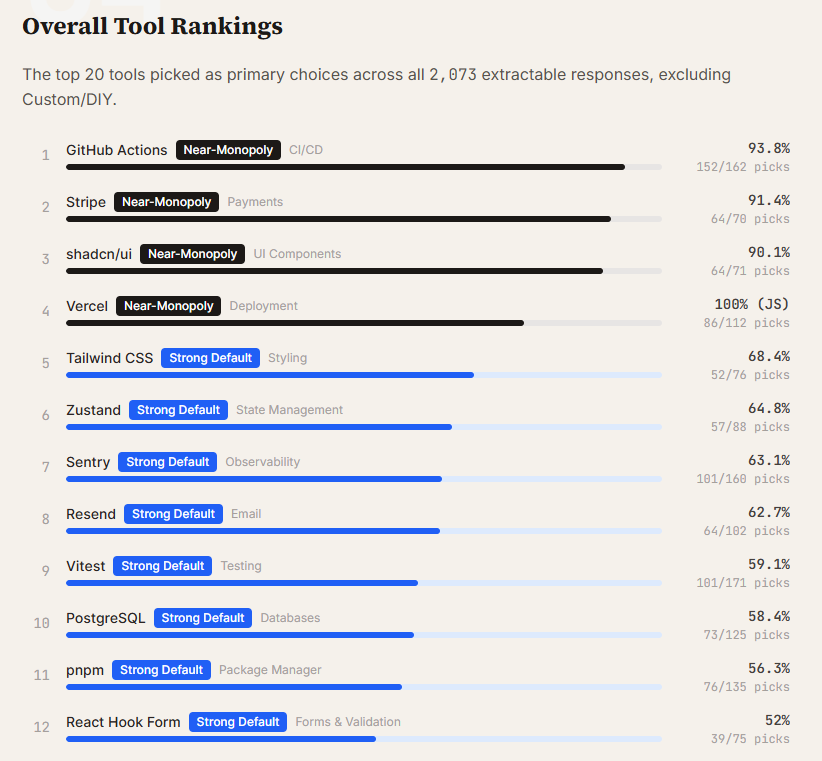
𝗪𝗵𝗮𝘁 𝗵𝗮𝗽𝗽𝗲𝗻𝘀 𝘄𝗵𝗲𝗻 𝘆𝗼𝘂 𝗹𝗲𝘁 𝗖𝗹𝗮𝘂𝗱𝗲 𝗖𝗼𝗱𝗲 𝗽𝗶𝗰𝗸 𝘆𝗼𝘂𝗿 𝘁𝗼𝗼𝗹𝘀 𝗳𝗼𝗿 𝘆𝗼𝘂? Researchers sent 2,430 open-ended prompts to Claude Code across 3 models, 4 project types, and 20 categories. They did not mention any tools; they just asked, "What should I use?" Here is what they found: 𝟭. 𝗕𝘂𝗶𝗹𝗱 𝗼𝘃𝗲𝗿 𝗯𝘂𝘆 𝗶𝘀 𝘁𝗵𝗲 𝗱𝗲𝗳𝗮𝘂𝗹𝘁 Custom/DIY is the single most common "recommendation" in the dataset, 252 picks across 12 of 20 categories. Ask Claude Code to add feature flags, and it builds a system with env vars and React Context. Ask it to add auth to a Python project, and it writes a JWT from scratch every single time. When an agent can build a working solution in 30 seconds, it often does. 𝟮. 𝗔 𝗱𝗲𝗳𝗮𝘂𝗹𝘁 𝘀𝘁𝗮𝗰𝗸 𝗲𝘅𝗶𝘀𝘁𝘀 Where Claude Code does pick third-party tools, it converges hard: - GitHub Actions owns CI/CD at 94% - Stripe owns payments at 91% - shadcn/ui owns UI components at 90% - Vercel is a must for JavaScript projects at 100%. The rest of the list: PostgreSQL, Tailwind CSS, Zustand, pnpm, Resend, Vitest. These tools may not be the best option for your project, but these are what the model will choose for you. 𝟯. 𝗥𝗲𝗱𝘂𝘅 𝗶𝘀 𝗱𝗲𝗮𝗱 𝗶𝗻 𝗔𝗜-𝗮𝘀𝘀𝗶𝘀𝘁𝗲𝗱 𝗰𝗼𝗱𝗲 Redux did't got any primary picks across 2,430 prompts. The model knows it exists, with 23 mentions and 2 alternative recommendations, but never actually chooses it. Zustand wins state management at 65% instead. Express has it even worse. It doesn't show up as a primary pick, an alternative, or even a passing suggestion. It's just gone. 𝟰. 𝗡𝗲𝘄𝗲𝗿 𝗺𝗼𝗱𝗲𝗹𝘀 𝗽𝗿𝗲𝗳𝗲𝗿 𝗻𝗲𝘄𝗲𝗿 𝘁𝗼𝗼𝗹𝘀 This is the clearest signal from this dataset. Prisma goes from 79% in Sonnet 4.5 to 0% in Opus 4.6. Drizzle takes over completely. In Python projects, Celery usage collapses from 100% to 0% as newer models prefer FastAPI's built-in background tasks. It tracks with what appeared in more recent training data. 𝟱. 𝗖𝗼𝗻𝘁𝗲𝘅𝘁-𝗮𝘄𝗮𝗿𝗲𝗻𝗲𝘀𝘀 𝗶𝘀 𝗿𝗲𝗮𝗹 The same model picks Vercel for JavaScript and Railway for Python. Drizzle for Next.js, SQLModel for FastAPI. It's not a fixed list. The agent reads the stack and adapts, which is more useful than a blanket recommendation. 𝟲. 𝗕𝗲𝗶𝗻𝗴 𝗮𝗯𝘀𝗲𝗻𝘁 𝗳𝗿𝗼𝗺 𝗽𝗿𝗶𝗺𝗮𝗿𝘆 𝗽𝗶𝗰𝗸𝘀 𝗶𝘀𝗻'𝘁 𝘁𝗵𝗲 𝘀𝗮𝗺𝗲 𝗮𝘀 𝗯𝗲𝗶𝗻𝗴 𝗶𝗻𝘃𝗶𝘀𝗶𝗯𝗹𝗲 Netlify, SendGrid, and Jest were never chosen as the primary option. But they kept showing up as second choices. The model knows these tools and still recommends something else first. That gap is the one worth closing. If we're using AI coding agents for greenfield projects, we're increasingly inheriting a default stack. Worth knowing what that stack is. Full report in comments

@awesomekling ·
State of the classic JavaScript benchmarks, comparing @ladybirdbrowser to the 3 major browsers (no JIT) Summary: SunSpider is kinda too fast to matter, we're smoking everyone at Kraken, but Octane needs more love 🤓🚀


@ManningBooks ·
JavaScript works. Understanding why it works is a different skill. JavaScript in Depth by James Snell focuses on what's under the hood: engines, runtimes, and real execution. It's useful for debugging edge cases, revisiting forgotten concepts, and making sense of AI-generated code. The book: https://t.co/GcHHCC4j5a


@Dominus_Kelvin ·
JavaScript used to let small teams ship big things. Now developers need: • frontend framework • backend framework • BFF layer • auth service • serverless platform • edge runtime • ORM • state library • RPC layer • cache layer just to build an invoicing app. The Boring JavaScript Stack is a calmer, saner alternative to that.

@DeepStarts ·
Computer Science is so vast that at times you feel you haven't even touched 1% of it. I've got to know some very cool things that will definitely blow your mind: 1. In C/C++, arr[i] and i[arr] are the same thing. Because a[b] is just *(a + b). 2. In Python, default mutable arguments are created once. So def f(x=[]) keeps reusing the same list across calls. 3. In Python, is and == are completely different. is checks identity. == checks value. 4. In JavaScript, ['1','2','3'].map(parselnt) is broken. Because map passes the index too, and parselnt treats it as the radix. 5. In SQL, NULL = NULL is not true. It is unknown. That is why null bugs feel cursed. 6. In SQL, NOT IN can betray you if the list contains NULL. One stray null and your filter logic starts lying. 7. In C/C++, when you pass an array to a function, it is no longer really an array. It decays into a pointer. 8. In C++, vector.push_back() can silently invalidate pointers, references, and iterators. Your code can look fine and still be standing on garbage. 9. In Python, [[0]*3]*3 does not create 3 separate rows. It creates 3 references to the same inner list. 10. In Java, everything is pass-by-value. Even object references are passed by value. 11. In JavaScript, object keys are strings underneath. So obj[1] and obj["1"] hit the same key. 12. In Go, reading a missing key from a map does not fail. It gives you the zero value, which can hide bugs very nicely. 13. In C, a string is just bytes ending with \0. That single byte is why half of old C bugs exist. 14. In C/C++, sizeof(pointer) is not sizeof(array). A lot of bugs start when people forget which one they actually have. 15. In SQL, COUNT(*) and COUNT(column) are not the same. One counts rows. The other ignores nulls. Share some cool ones you guys know!

@ihteshamali ·
JavaScript runs almost the entire internet. It was built in 10 days. Brendan Eich wrote the first version in May 1995a. He was a new hire at Netscape, the browser company racing against Microsoft, and the deadline was already on top of him before he started. He didn't even want to build what they asked for. Eich wanted to put a language he loved, Scheme, into the browser. His managers said no. They had just signed a deal with Sun, and Java was the hottest thing in tech. So the order came down. Make it look like Java. Keep it small. In his own words, he was told to build a silly little brother language. Something for non-programmers to add tiny effects to a page. A blinking image. A scrolling message at the bottom of the screen. That was the whole point. He shipped the prototype in 10 contiguous days. It had bugs. It had quirks people still complain about 30 years later. Then it never stopped growing. That throwaway toy now powers nearly every website on Earth. The thing built to be the small one outlived Java's dominance, outlived Netscape, and became the foundation of the modern web. Nobody plans the thing that takes over the world. They just build the thing in front of them and the world decides the rest.


@GergelyOrosz ·
Sometimes I hate being a dev who can debug JavaScript because I see the absolute careless code another dev pushed to prod. It is impossible to print package labels on the NL Post site (@PostNL) b/c of this unhandled null breaks everything Use TypeScript and handle nulls, OK?!


@SumitM_X ·
As a frontend dev, do you know how JavaScript talks to your HTML? That magic starts with the document object! It’s like the remote control for your entire web page. NOTE: document isn’t part of JavaScript itself! It’s a gift from the browser, through the Web API. When a browser loads your webpage, it reads the HTML and creates a DOM (Document Object Model) : a tree-like structure in memory that represents everything on the page. This DOM is not HTML , it’s a JavaScript-friendly version of your HTML. JavaScript gets access to this DOM through the document object. So when you write: document.getElementById("btn") You're saying: “Hey browser, give me the JavaScript object that represents the HTML element with id="btn".” Once you get that, you can: Read or change its text Add event listeners Change styles Add/remove it from the page …and more. Some common document usage: document.getElementById("btn") – grab a button document.title = "New Page" – change the tab name document.querySelector(".box") – select like CSS document.createElement("div") – build new stuff

@firt ·
We keep defaulting to the biggest model in the room every time we touch AI in our apps. Claude, GPT, Gemini. Cloud or nothing. But the browser is already more capable than most people realize: WebAI and WebMCP may change this. With WebAI you can run models client-side. With WebMCP, your site can expose real actions as JavaScript functions. Agents don't need screenshots, DOM scraping, or blind clicking. They can just use your app. I talked about this with @guypod on @tessl_io AI Native Dev podcast: the browser is turning into an AI runtime. Links in first reply :)
 Watch video
@kettanaito ·
MSW has doubled in weekly downloads in the past 5 months 🤯 It's not just the most used API mocking library, it's one of the most used libraries in JavaScript in general. I attribute this to ShadCN adopting it. I also attribute it to every developer who advocated for it. Thanks!

@ihteshamali ·
This tiny JavaScript library is doing something browsers should have built in years ago. Pretext measures multiline text and calculates layout without triggering a single DOM reflow. You get the height, line count, and individual line data back as pure numbers with zero browser layout cost. The use cases are wild. You can do proper list virtualization without height guesswork, prevent layout shift when new text loads, verify at development time that button labels don't overflow, and build masonry grids without hacks. → walkLineRanges() lets you binary search the perfect container width → layoutNextLine() lets each line have a different max width → Handles bidirectional text, mixed scripts, and browser quirks automatically → Server-side rendering support is coming 14.1K stars. MIT License. 100% Opensource. Link in comments.


@priyankapudi ·
Meet Ryan Dahl - Creator of Node.js - Grew up in San Diego, California - Got his first computer (Apple IIc) at age 6 - Loved math and studied it at UC San Diego - Started a PhD but dropped out , abstract math wasn't applicable to real life - Left for South America and started building web apps in Ruby - While freelancing in Germany, he noticed a major problem - Web servers like Apache used one thread per connection - Servers choked under heavy traffic - Handling thousands of users at once was a nightmare - One day he uploaded an image on Flickr - Saw the progress bar repeatedly querying the server just to show upload status - That moment clicked , the web needed a better way to handle I/O - Started coding in a WiFi-less Starbucks in Cologne, Germany - 8-hour daily coding sprints for 6 months straight - Built it on Google's V8 JavaScript engine - Used non-blocking, event-driven I/O , a radical approach at the time - Presented Node.js at JSConf EU in 2009 - The crowd went wild - He said he was "in a continual state of surprise for four years" - Joined Joyent and worked on Node full-time - Designed it to be lightweight, fast, and asynchronous - JavaScript could now run outside the browser , on servers - Node.js became one of the most transformative tools in web development - Powers: Netflix, LinkedIn, PayPal, Uber, NASA dashboards - Millions of developers use it worldwide - npm became the largest package registry in history - Later gave his famous "10 Things I Regret About Node.js" talk - Then built Deno : a modern rewrite fixing his own mistakes - Literally changed how the internet works behind the scenes Set inspiration for many like me !



@awsdevelopers ·
🐛 Found a bug in the AWS SDK for JavaScript? Use this CLI to create a reproduction and open an issue ❤️


@lucamezzalira ·
Just dropped a new episode of #Microfrontends in the Trenches 🎙️ I got to sit down with @ManfredSteyer, Angular GDE and the creator of Native Federation. We went deep on stuff I get asked about all the time: → When do micro-frontends actually make sense (and when they don't) → Why Manfred built Native Federation as an alternative to Module Federation → How import maps & ES modules power it under the hood → Mixing Angular versions across a distributed system... is it worth it? → The #1 mistake teams make when splitting a monolith → His top 3 tips for devs getting started with micro frontends One thing that stuck with me: Manfred said the hardest part isn't the tech but the domain thinking. Getting your boundaries right before you write a single line of federation config. If you're working with Angular at scale, this one's for you. 👇 https://t.co/6uAQRnhB2K #angular #web #MFEs #scale #engineering #javascript

@_vmlops ·
THIS JS LIBRARY READS TEXT OUT OF ANY IMAGE, RIGHT IN YOUR BROWSER no server, no API calls, pure javascript OCR wrapping tesseract via webassembly ▪️ works in browser (webpack, esm, script tag) and Node.js ▪️ 100+ languages supported ▪️ v7 needs Node v16+, requires just a few lines to get text out of an image ▪️ 38.1k stars, used by 37k+ projects, actively maintained since 2019 ▪️ doesn't handle PDFs directly, that's where scribe.js comes in three lines of code and you've got OCR running client-side: createWorker → recognize → terminate https://t.co/90y8FSFzDC

@joncphillips ·
Alright, a little story and a warning for anyone who works on code they didn't write. Recently I pulled down an existing codebase for some contract work, nothing unusual. Cloned it, installed deps, spun it up locally, and started poking around. Then I noticed something weird at the end of one of the backend files. Right after the last real line of code, sitting just after a module.exports, there was a wall of obfuscated JavaScript wrapped in some self-decoding string-shuffle routine, committed right into the repo. Because it sits after module.exports in a CommonJS module, it self-executes the moment that file gets required, so it runs the instant the app boots. You don't have to import it or trigger it or click anything, it just goes. I pulled it apart with static analysis, reading it without ever running it. Here's what the thing was actually doing. On a loop (throttled to roughly every 30 seconds with a global flag), it: 1. Queried the latest transaction from a couple of attacker-controlled wallets on the Tron blockchain (via the TronGrid API, with an Aptos node as a fallback for resilience). 2. Read a pointer out of that transaction, which was the hash of a second transaction over on BNB Smart Chain. 3. Fetched that BSC transaction over JSON-RPC (eth_getTransactionByHash) and pulled the payload out of the calldata. 4. XOR-decrypted that payload with a hardcoded key. 5. Executed the result two different ways, straight through eval() and as a detached hidden child process (child_process.spawn('node', ['-e', ...]) with stdio ignored and windowsHide set). This is a technique called EtherHiding. The code in the repo is really just a loader. The actual commands live on-chain, so the attacker can push new payloads whenever they want by broadcasting a new transaction. There's no domain or server for anyone to seize since the blockchain itself is the command channel, and the code sitting in the repo never has to change at all. And because it runs at boot, it's got the entire process environment in scope. Like... DB credentials, API keys, tokens, whatever's in process.env. The payload itself was built around crypto-wallet theft. Here's the thing though. By the time I spotted it, I'd already started the app a few times to see it run. So this thing had quietly self-executed on my machine several times before I even knew it existed. When I finally sat down to analyze the payload I was careful to only read it and never run it, but that window was already wide open before I understood what I was looking at (had a fun time scanning my machine and cleaning things up...) The worst part is it had been hiding in that repo for over a year. It slipped in through an innocent looking merge commit under a boring title. Merges and dull messages like "fix" or "time zone" make great camouflage, because a pickaxe search and a normal git log tend to skip right over merge commits. A few things I'm taking from this and passing on: - Treat any repo you inherit as untrusted code until you've actually read it. Cloning doesn't run anything, but the second you boot it up you're executing code you've never looked at. - Obfuscated code sitting in a source tree is a red flag every single time. Real code doesn't need to be scrambled, so when it is, something's off. - npm install and npm start both run code you didn't write, install hooks first and then the app entry point. Skim before you run, and run unknown code in a VM or container. - Actually read the git history, merge commits included. Boring titles hide interesting diffs. - If something ran that shouldn't have, assume every secret in that environment is compromised, rotate all of it, and scan the machine. Be careful out there. It's easy to assume the code you inherit is clean, and sometimes it's fucking not.

@buildwithyash ·
VideoNo7:-Serialization and Deserialization for backend engineers 1. The Core Problem: Language Barriers in Networking >Different Environments: A typical web application consists of a client (e.g., a frontend built with JavaScript, TypeScript, or Swift) and a server (built with languages like Node.js, Python, Java, Go, or Rust). >Incompatible Data Types: Programming languages represent and handle data very differently. JavaScript is dynamically typed and flexible, while Rust is statically typed with strict ownership rules and compile-time guarantees. >The Challenge: When a JavaScript client needs to send data over the network to a Rust (or any other) server, the server cannot directly understand the client’s native data structures. To communicate effectively, both sides need a universal, language-agnostic format. 2. What is Serialization and Deserialization? >The Solution: Both client and server agree on a common, standardized data format for transmission over the network. >Serialization: The process of converting a native data structure (e.g., a JavaScript object or a Rust struct) into this common format before sending it over the network. >Deserialization: The reverse process — converting the received common format back into the receiving system’s native data types so it can be used in business logic. >Purpose: Serialization & deserialization make data transmission language-agnostic and platform-independent. Any machine can communicate with any other machine regardless of the programming language or technology stack used. 3. Types of Serialization Standards Serialization formats generally fall into two broad categories: >Text-Based Formats: Human-readable and easy to debug. Popular examples: JSON, YAML, and XML. >Binary Formats: More compact and efficient for performance-critical applications. Popular examples: Protocol Buffers (Protobuf), Avro, MessagePack, and Thrift. Text-based formats are preferred for most web APIs due to readability, while binary formats are chosen when speed and bandwidth efficiency are critical (e.g., microservices, mobile apps, or high-throughput systems). 4. Deep Dive into JSON (The Industry Standard) For traditional HTTP REST APIs, JSON (JavaScript Object Notation) is by far the most widely used serialization format — estimated to be used in ~80–90% of public APIs. >Use Cases: JSON is not limited to HTTP. It is also heavily used for configuration files, logging, data storage (NoSQL), and inter-service communication. Key Characteristics: Completely human-readable and easy to inspect. Language-independent (works with virtually every modern programming language). Lightweight and simple to work with. >Strict Syntax Rules: A JSON object must begin with { and end with }. All keys must be strings wrapped in double quotes (e.g., "name":). Values can only be: strings, numbers, booleans (true/false), null, arrays ([]), or nested objects ({}). No trailing commas, no comments, and no single quotes allowed. 5. The Backend Engineer’s Mental Model (OSI Layers) When data travels over the internet, it passes through multiple layers of the OSI model. As a backend engineer, you can abstract away most of this complexity. Your Focus — Application Layer: You only need to worry about the data at the Application Layer (HTTP + JSON). What Happens Under the Hood: >Your JSON is converted into data frames → IP packets → and finally into physical bits (0s and 1s) transmitted via cables, Wi-Fi, or fiber optics. >On the Receiving End: The network stack reassembles the bits back into the original JSON text before your server code ever sees it. >You don’t need to handle lower-layer conversions — the operating system and networking libraries manage that for you. This abstraction allows backend engineers to focus on business logic instead of low-level networking details. Youtube Video Link :- https://t.co/WiGt50meUq

@ibuildthecloud ·
I'm absolutely fascinated by the fact that frontend developers accept typescript. That means it's possible to build a better language for frontend. Everything frontend people have rejected about compiled and statically typed languages they have brought to JavaScript. So it's definitely possible to create a statically typed compiled language for frontend that would be ridiculously fast compared to typescript. It's a times like this I wish I didn't have a job.
@ibuildthecloud ·
One of the biggest recent issues of full stack dev was to blur the lines of client (browser) and server. Before JavaScript on the server the lines were self evident. With JavaScript going server side and the desire to use the same language for both we broke the boundaries and are paying the price.

@MPorterBridges ·
Do you have a group of related data in your JavaScript? You can avoid multiple variables by using objects. JavaScript objects are one of the most important concepts to learn because they show up everywhere in real codebases. I’m talking APIs, frameworks, browser data, and more. If you’re new to JavaScript, you’ve likely bumped up against a problem organizing your variables, especially if you’re dealing with a lot of data. For example, if we wanted to create variables to manage the data that describes a car, it starts becoming a little messy - especially if we mean to keep this data all grouped together in some way. const make = "Chevrolet"; const model = "Malibu"; const year = 1999; const odometer = 10000; const used = true; const tirePsi = [100, 90, 95, 97]; A JavaScript object is a collection of related data and behavior, stored as key-value pairs. const objectName = { key: value }; A good visualization for a JavaScript object would be a box and label. The box being the object with the label containing detailed contents of the box. For example, this might be a box that’s shipped to a local bookstore. const bookBox = { multipleGenres: true, genre: ["non-fiction", "romance", "comedy"], amount: 3, value: "$500 CAD" }; This example highlights that the values in our key-value pairs can contain various types of data including booleans, arrays, numbers, strings. Beyond the example, our values can also be other objects and even functions (referred to as methods inside an object). If we rewind to our original example, we can take our car variables and place them inside a single object. const car = { make: "Chevrolet", model: "Malibu", year: 1999, odometer: 10000, used: true, tirePsi: [100, 90, 95, 97] }; Now that we know how to create an object with various data types, what about accessing that data? We can access the data inside an object in two ways - dot notation and bracket notation. Bracket notation being especially useful if the key is dynamic. Using our car example, let’s grab the year value using both of these methods: //Dot Notation console.log(car.year); //Bracket Notation console.log(car["year"]); And finally, what about updating our object’s data? Let’s say we need to correct our odometer reading from 10000 to 9999, we can update our key value pair by doing the following: car.odometer = 9999; And if we want to add a new key-value pair describing the transmission, we can do this: car.transmission = "automatic"; There’s a lot more we can do with objects in our JavaScript that we haven’t covered in this post, but I hope it was a good introduction for anyone getting their JavaScript coding journey started!


@mitsuhiko ·
I think at this point we all know that "typeof null" being Object is the result of a bug. I think what's more interesting is that old spidermonkey versions had an optimistic comment about eventually fixing it with JavaScript 2.

@_vmlops ·
GOOGLE ENGINEERS WERE TIRED OF WRITING BASH so they built a tool that changed how developers script forever every developer has been there you start with a "simple" bash script 20 lines in, you're googling how to split a string 40 lines in, you're debugging why a variable has a space in it 60 lines in, you've rage-quit and called a python script from inside bash bash is powerful bash is also a special kind of torture → no JSON support → array handling that makes you question your career choices → error handling that silently fails and takes your sanity with it → string escaping that requires a computer science degree to understand google engineers felt this too so someone just... snapped. and built zx the idea was simple: what if you could write shell scripts in javascript...? that's it... real shell commands... real javascript... no glue code → async/await built in → full npm ecosystem access → try/catch for error handling like a normal human → JSON parsing without crying devops engineers, platform teams, and solo devs all said the same thing at the same time: "finally." the repo is google/zx. still actively maintained. still saving developers from bash-induced breakdowns daily the best tools aren't invented... they're born from frustration https://t.co/CETjGtIA8o

@openjsf ·
Announcing the @nodejs LTS Upgrade and Modernization Program! 🟢 🚀 We're helping enterprises move safely off end-of-life Node.js versions to reduce security risks. We are also excited to kick things off with our first partner, @NodeSource. Modern Node.js is safer Node.js. Check out the details on the OpenJS blog: https://t.co/aSuDGvHABX #NodeJS #OpenSource #JavaScript #OpenJS


@ThePracticalDev ·
A backend team used AI to convert a Python class to JavaScript — and it failed. Not because the translation was wrong, but because the AI didn't know how to handle a 5GB zip file in the browser without crashing it. This dev did, using IndexedDB as an async workaround. { author: @OlumideSamuel_ } https://t.co/EUv88au50W

@did0f ·
LinkedIn was accused of testing thousands of Chrome extensions installed in users’ browsers. But the point is not “LinkedIn reads your computer.” The point is more technical: some extensions expose resources that a web page can try to load with JavaScript. If they respond, they become signals. One signal means little. Many signals can become browser fingerprinting. This is called resource probing. And the important part is that the issue goes beyond LinkedIn. Any page running JavaScript can try to observe technical signals from your browser. Not always. Not everything. No magic. But enough small signals can make a browser recognizable.
 Watch video
@Dominus_Kelvin ·
Stop navigating with onClick={() => router.push(...)}. Every time you do, you're opting out of browser behavior and signing up to reimplement it yourself. You are sacrificing: cmd-click open in new tab accessibility browser semantics prefetching SEO for absolutely no reason. HTML solved this before JavaScript existed. If it goes somewhere, it's a link.


@BenLesh ·
I honestly figured RxJS downloads had tapered off because of 2024. But 2025 marked a sharp increase. Nearly 3 billion downloads last year. I wonder if JavaScript work is just "up overall" since AI assistants have accelerated development...🤔


@donnfelker ·
This weekend I removed a substantial amount of JavaScript from one of my Rails applications. I replaced all the JavaScript with Turbo frames and Turbo streams. In the end, I gained more testability, an easier development experience, and less context switching than I or the AIbagent had to do previously.
Best JavaScript tweets
Xholic studies what works in your niche, drafts posts in your voice and schedules them for the hours your audience is online.
$0 today · Cancel anytime
Browse all tweet collectionsKeep exploring