Graph workflows and agent orchestration
LangGraph as the control layer for branching, cyclical, stateful workflows, including the shift from simple loops to graphs of coordinating agents.
69.2%
Find the best tweets about LangGraph, covering stateful agents, graphs, persistence, memory, human review, orchestration, and production patterns.
Hands-on LangGraph architectures, state, memory, persistence, tool use, human oversight, debugging, reliability, and releases.
Original Xholic analysis
The conversation presents LangGraph as a practical orchestration layer for stateful agent systems. Graph workflows, tool use, memory, safeguards, tracing, and production RAG recur across the set; posts also contrast simple loops with more branching graph-based workflows.
84.6% of posts
All-time engagement
50% of posts
Published in 90 days
Conversation map
LangGraph as the control layer for branching, cyclical, stateful workflows, including the shift from simple loops to graphs of coordinating agents.
69.2%
Retries, provider fallbacks, iteration limits, validation, safety boundaries, human approval checkpoints, and mechanisms for preventing or recovering from failures.
34.6%
Agents selecting and invoking search, browser, API, MCP, filesystem, shell, database, CRM, and other tools to take actions beyond chat.
34.6%
Conversation state, checkpoints, cross-session recall, long-term memory, context compression, resumable investigations, and auditable agent history.
26.9%
Capturing prompts, decisions, trajectories, tool calls, failures, reasoning traces, monitoring, cost tracking, benchmarking, and automated evaluation.
26.9%
Retrieval agents that use keyword, vector, and hybrid search; assess relevance; rewrite queries; ground answers; and handle production document pipelines.
23.1%
Deployable system designs combining orchestration with APIs, microservices, local or hosted models, databases, Docker, interfaces, and replaceable infrastructure layers.
23.1%
Reusable runtime scaffolding for prompts, tools, context windows, task planning, subagents, verification, context compaction, and long-running execution.
19.2%
Tone and stance
Performance benchmark
Posts with media make up 73.1% of this collection. Their median all-time score is 41.3, compared with 64.2 for text-only posts.
Format mix
Consensus and debate
Shared view
Graph workflows and agent orchestration are the largest theme, appearing in 18 tweets (69.2%). Posts describe LangGraph in connection with branching, cycles, state, and coordinating workers rather than only linear chains.
Shared view
Reliability, guardrails, and human oversight appear in 9 tweets (34.6%). Examples in the posts include iteration limits, logging, retries, provider fallback, validation, and approval checkpoints for risky or expensive operations.
Shared view
Posts discuss conversation state, checkpoints, cross-session recall, context compression, long-term history, and editable skill memory as components of agent architecture.
Shared view
Tool use is a recurring hands-on layer. Posts reference web search, APIs, MCP, filesystems, shells, databases, and CRM-style actions alongside orchestration.
Open debate
The two posts frame the relationship differently: one describes a loop as the simplest graph and suggests learning loops first, while the other presents loops as suited to simpler tasks and graphs as enabling connected agents with review and veto paths.
Open debate
Posts propose several memory mechanisms: SQLite-vec for long-term recall, LangGraph checkpoints, Postgres with pgvector, and Markdown skill files that can be read, edited, and versioned with Git.
What performs
List posts have a median all-time score of 500.114, above tutorials (105.763), case studies (16.558), and announcements (6.943). The highest-scoring outlier is the production-agentic-RAG course post.
The production-agentic-RAG course post is the highest listed outlier. It describes infrastructure, hybrid retrieval, tracing, and a LangGraph agentic layer; another post describes the same course curriculum in detail.
Media appeared in 19 of 26 tweets (73.1%), while the text median all-time score was 64.179, compared with 41.321 for media posts.
Statistical standouts
Creator landscape
The five most represented creators account for 26.9% of the selected posts.
1. Vaishnavi
@_vmlops
2 posts
2. Ujjwal Chadha
@ujjwalscript
2 posts
3. Sandhya
@agenticgirl
1 post
4. Louis Gleeson
@aigleeson
1 post
5. Alex Martin
@Amart_AI
1 post
6. Ash Tilawat
@ashtilawat
1 post
The evidence covers 24 creators across 26 tweets, and the top five creators account for 26.9% of placements. Vaishnavi and Ujjwal Chadha are the only listed top voices with two tweets each.
Examples package LangGraph learning as tangible artifacts: a free agents course, a 30-day builder schedule, and an engineering roadmap with tool-use and orchestration projects.
Themes, sentiment, stance, and post format are classified per tweet. All counts, shares, medians, creator concentration, freshness, and performance comparisons are then calculated directly from the published snapshot.
Xholic's all-time score compares engagement while accounting for reach, post age, and creator consistency. It is used for relative comparisons within this collection.
This report analyzes the exact 26-post snapshot shown below. AI identifies editorial categories and drafts explanations; all statistics are calculated from the snapshot, and every narrative claim is checked against cited posts before publication.
Best LangGraph tweets
Ranked 01–26

@ihteshamali ·
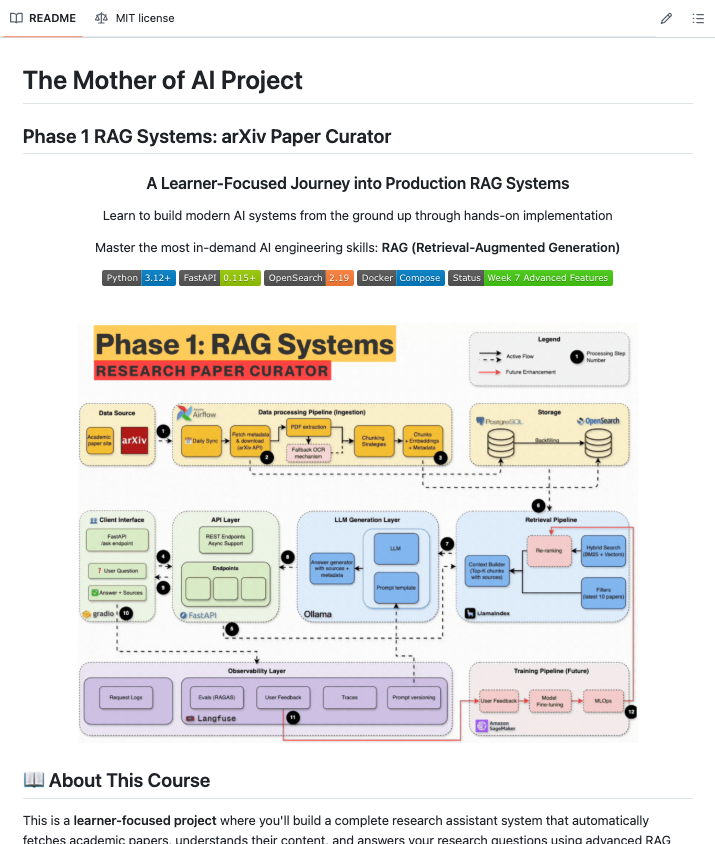
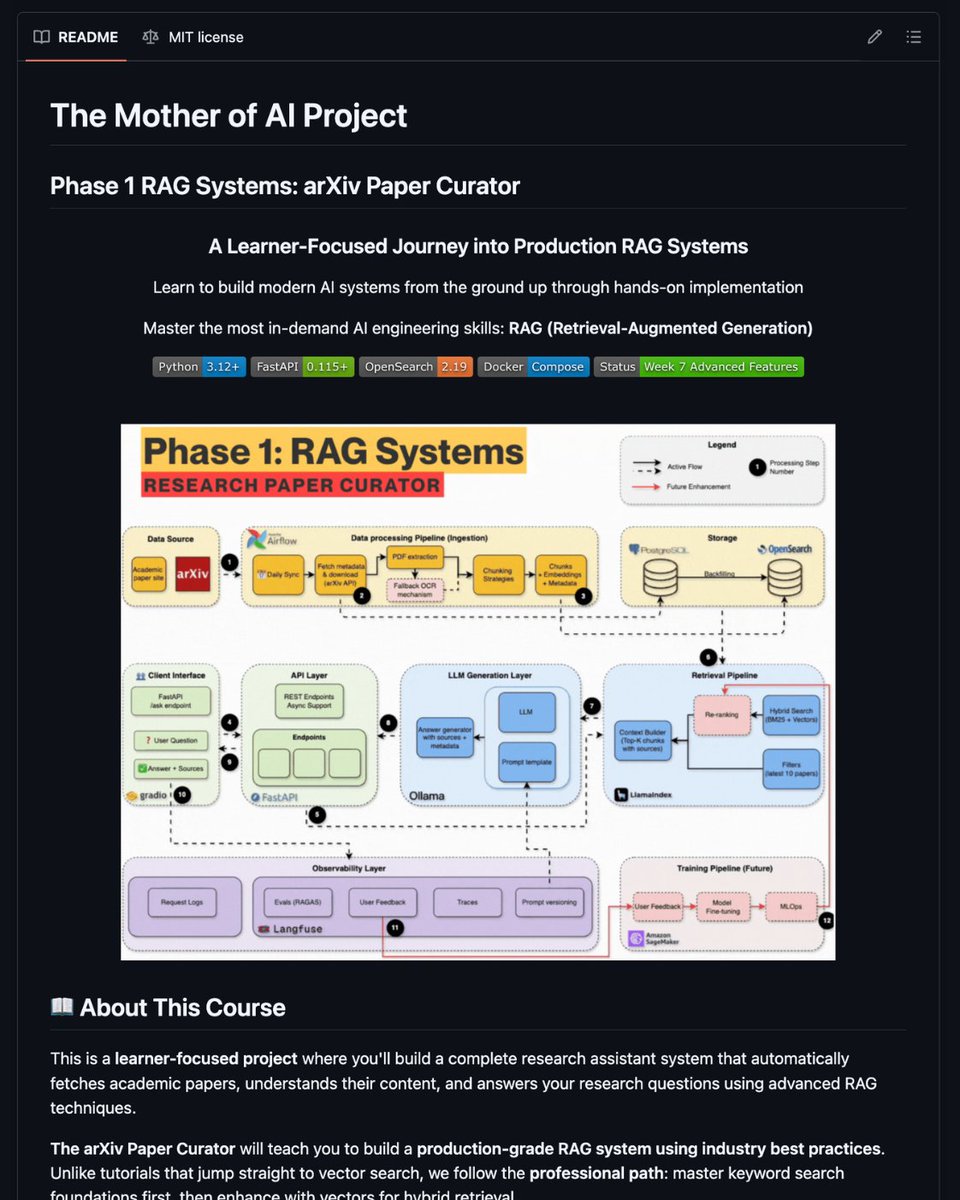
i found a github repo that teaches you to build production RAG systems the way actual companies do it it's called production-agentic-rag-course. here's what you are going to learn: week 1: docker, fastapi, postgresql, opensearch, airflow week 2: automated arxiv paper ingestion pipeline week 3: bm25 keyword search foundations (before touching vectors) week 4: hybrid search with embeddings + rrf fusion week 5: complete rag with local llm and streaming responses week 6: langfuse tracing + redis caching for production monitoring week 7: agentic rag with langgraph + telegram bot what i like about this approach is the sequencing most tutorials skip straight to vector search and call it a day. this one builds keyword search first because that's what real companies actually do solid search foundation enhanced with ai, not ai-first approaches that ignore search fundamentals every week has a notebook, a blog post, and a tagged git release so you can clone exactly where you left off https://t.co/8lQy3viUFg one thing is clear and its that if you want to build real ai systems, you have to understand the plumbing first. the people who skip to the fun parts are the ones whose agents break in production

@joshuamschultz ·
This took 2.5 months, but have completed a full, agentic ERP for a company Rethought every system and approach, built a custom ERP fully agentic backed. This manages everything for them, runs agents with locally hosted small models (so no token burn) and helps run a large part of the business just by talking/typing to it Because its agentic backed, we can tune how it works by adjusting system prompts, skills, and tools. Built a backend system of record, agentic middleware, and UI. Heavily used - Our own Agentic Harness specifically for enterprise (tracking, security, audit, observability focused - with quick deployment and tuning of agents for any purpose) - Langgraph for dialed in workflows - Litellm/vllm inferencing - react front hosted as microservices and full API so they can build anything they want off of it (fastapi) This thing is next level


@aigleeson ·
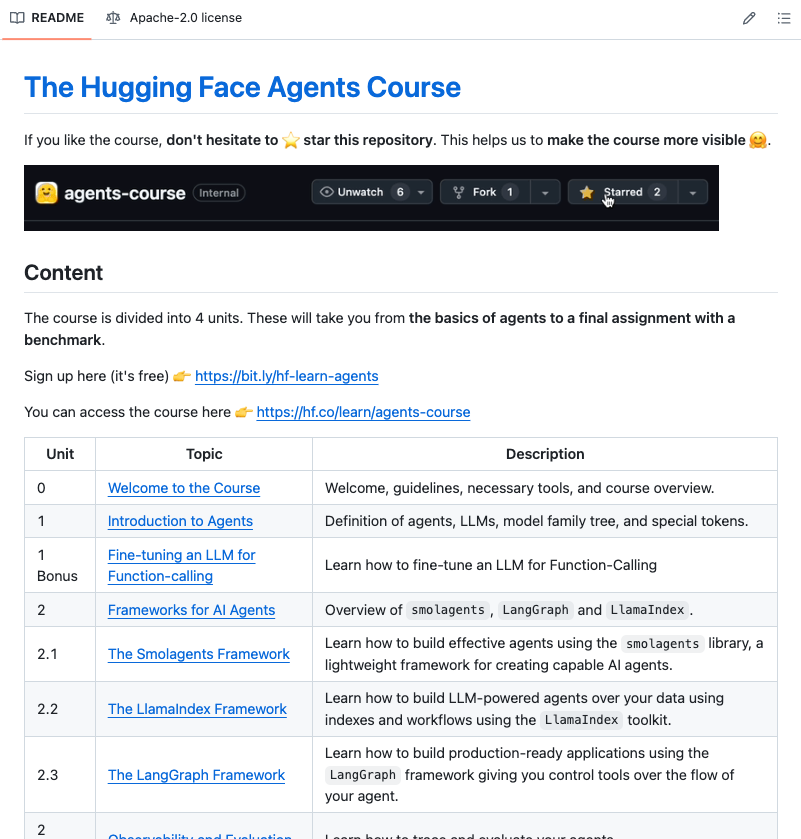
Hugging Face dropped a full AI Agents course and it's completely free. Most agent tutorials teach you to wrap 3 API calls in a for-loop and call it an agent. This is different. Here's what you actually get: → Unit 1: Agent fundamentals, LLM internals, model family trees, special tokens → Unit 2: 3 production frameworks back to back smolagents, LangGraph, LlamaIndex → Bonus: Fine-tune an LLM for function-calling from scratch → Unit 3: Agentic RAG how agents retrieve and reason across real data → Bonus: Agent observability, tracing, and evaluation → Unit 4: Build, test, and certify your own agent on a live public leaderboard This goes from "what is an agent" to deploying one that gets scored against every other student in the world. 100% Opensource and free. Link in comments.

@suraj_sharma14 ·
The 30-Day Agentic AI Builder Challenge. A daily building schedule that gets you hired. Day 1-5: Foundations :- Day 1: Install Ollama + run llama3.2 locally Day 2: Build a "Hello World" agent with LangGraph Day 3: Add Pydantic for structured JSON outputs Day 4: Implement max_iterations=5 safety limit Day 5: Add logging to see every prompt/response >> Milestone: Your first working agent (local, free) Day 6-10: Core Skills :- Day 6: Build a RAG agent with 3 document chunks Day 7: Add "Think step-by-step" to all prompts Day 8: Create a multi-turn conversation agent Day 9: Implement "I don't know" fallback logic Day 10: Test with 10 different queries, log results >> Milestone: Agent that doesn't hallucinate Day 11-15: Real Tools :- Day 11: Add web search tool (Tavily API free tier) Day 12: Build a calculator tool for math Day 13: Create a tool registry with 3 tools Day 14: Add tool selection logic to your agent Day 15: Test tool calling with 5 different queries >> Milestone: Agent that uses tools correctly Day 16-20: Memory + State :- Day 16: Add short-term memory (last 5 messages) Day 17: Implement long-term memory with SQLite-vec Day 18: Build cross-session recall Day 19: Add context compression for long chats Day 20: Test memory with 20-turn conversation >> Milestone: Agent that remembers users Day 21-25: Production Ready :- Day 21: Add LangSmith tracing (free tier) Day 22: Set up cost tracking per request Day 23: Implement error handling + retries Day 24: Add human-in-the-loop for expensive ops Day 25: Deploy to Vercel/Render (free tier) >> Milestone: Live agent at a real URL Day 26-30: Portfolio + Ship :- Day 26: Write architecture docs for your agent Day 27: Record a 2-min demo video Day 28: Publish code to GitHub with README Day 29: Post on X/LinkedIn with #BuildInPublic Day 30: Apply to 5 jobs with your project >> Milestone: You're now a builder not a learner Resources You'll Actually Use: Setup: • Ollama: https://t.co/wSBgsjf70F (local LLMs, free) • LangGraph: https://t.co/Rck6k9jFbX • Pydantic: https://t.co/HIkx4j042B Tools: • Tavily API: https://t.co/oUbaGBFczT (web search, free tier) • SQLite-vec: https://t.co/7htWk4Y2DR (vector DB) • LangSmith: https://t.co/T5hGjE9Bny (tracing, free tier) Deployment: • Vercel: https://t.co/7rMH9pOvXU (frontend, free) • Render: https://t.co/GzSrbIAuWN (backend, free tier) (Bookmark this) happy building.

@svpino ·
We should build a church for people who open-source their code so everyone can learn from it. Here is the complete source code of a RAG assistant to navigate airline policies. You get the complete source code and video from @lenadroid, walking you through everything she did (I'm linking to the video in the first comment below). The fact that you can watch every engineering decision that Lena made when building this app is pure gold. A few things you'll pick up from this: • It uses LangChain for the retrieval pipeline • It uses LangGraph for conversation state • It stores embeddings in Postgres with pgvector • It indexes documents to ground answers in the source text • It uses Terraform to stand up the infrastructure I'm linking to the video walkthrough and the source code below.


@ujjwalscript ·
AI Engineering is one of the most IN-DEMAND roles with TOP salaries. Here's a step-by-step roadmap to become an AI Engineer in 2026: Step 1: The Logic Layer (Prompt & Context Engineering) Forget "magical" prompts. An LLM is just a next-word predictor; you need to treat it like a compiler. Concepts to Master: Tokenization limits, context windows, structured JSON outputs, system boundaries, and temperature vs. top-p routing. The Real Skill: Forcing an LLM to reliably return a strict, predictable data schema instead of a conversational paragraph. The Project: A zero-dependency script that ingests raw, messy unstructured user input and spits out validated, strictly-typed JSON that a traditional database can read. Step 2: The Meaning Layer (Embeddings & Vectors) AI doesn't "read" your company's data; it calculates distance. To feed an AI private data, you need to turn words into coordinates in a high-dimensional space. Concepts to Master: Embedding models, cosine similarity, dense retrieval, and chunking strategies (how you slice documents so the AI doesn't lose context). The Tools: Vector Databases like Pinecone, Qdrant, or simply utilizing pgvector inside PostgreSQL. The Project: Build a hyper-specific RAG (Retrieval-Augmented Generation) pipeline. Upload 50 dense legal or financial PDFs, chunk them, embed them, and build a search query that retrieves only the exact paragraph needed to answer a complex question. Step 3: The Action Layer (Tools & Pipelines) A chatbot that just talks is useless. An AI engineer builds systems that do things. Concepts to Master: Function Calling (Tool Use). This is how you give the AI "hands" to trigger external code and APIs. The Real Skill: Writing secure backend routes that the LLM can autonomously decide to execute based on the user's intent, without hallucinating the parameters. The Project: An AI assistant that doesn't just read your database, but executes POST requests to update records, trigger emails, or reschedule events on a live calendar. Step 4: The Brain Layer (Agents & Orchestrators) This is where you graduate from script-kiddie to Engineer. You stop writing linear code and start building graphs of autonomous workers. Concepts to Master: Multi-agent workflows, state management, cyclical graphs, and memory (short-term session state vs. long-term persistence). The Tools: LangGraph, CrewAI, Vellum AI. The Project: A Multi-Agent Research Swarm. Agent 1 scrapes the web. Agent 2 filters the noise and cross-checks facts. Agent 3 formats the final report and sends it to a webhook. Step 5: The "Partnered Execution" Project (The Real-World Test) Don't build a generic "AI CRM" or a Twitter clone. Build something painfully tied to the physical world where logic, constraints, and edge cases actually matter. The Ultimate Project: Build an automated sports venue booking system. Use an agentic orchestrator to parse incoming requests from local schools. The agent must query your database to prevent concurrent ground reservations, handle timezone math, manage role-based admin access, and trigger the payment gateway -all autonomously, with a human-in-the-loop fallback mechanism for critical errors.

@Amart_AI ·
Prompt engineering is dead, here's what replaced it: Loops and graph engineering. Here's what they are and exactly how to get started, in plain english + a prompt to steal: A LOOP is an AI that re-prompts itself. It reasons, acts, checks the result, and goes again until the job is done. This is what Boris Cherny (creator of Claude Code) means when he says his job now is writing loops, not prompts. A GRAPH is a flowchart that runs. Boxes do the work, arrows decide what happens next. A loop is just the simplest possible graph: one box with an arrow that curls back into itself. That's it, it's actually quite simple. Now here's the part to steal. Two prompts. Each one makes Claude interview YOU, find what in your work it can automate, build it with you, and then teach you how to use it. Prompt 1, your first loop: "I want to build my first AI loop: an agent that re-prompts itself until a job is done, instead of me prompting it step by step. Start by interviewing me. Ask questions one at a time about my work, my repetitive tasks, and the tools I use, until you can suggest 3 specific tasks of mine that a loop could automate. Pick the best one, tell me why, then build the loop with me in the simplest way that fits my setup. When it works, teach me how to use it: how to run it, how to watch what it's doing, and how to tell when it's done or stuck. Plain english the whole way, i'm smart but new to this." Prompt 2, your first graph (do this one after the loop feels easy): "I want to build my first agent graph: a flowchart that runs, where boxes do the work and arrows decide what happens next. Start by interviewing me. Ask questions one at a time about my work until you can suggest 3 workflows of mine that are too branchy for a single loop (multiple steps, decisions, or a place where I should approve before something runs). Pick the best one, sketch the graph in plain english first so I can see every box and arrow, then build it with me in LangGraph in Python with a one-line comment on every node and edge. When it runs, teach me how to use it: what each piece does, how to add a new box, and how to add a human-approval checkpoint before anything risky. Plain english, i'm new to this." Learning to prompt early was worth a 2 year head start. This is the same window, open again. Full walkthrough of how graphs work is pinned on my profile if you want to go deeper.


@VaibhavSisinty ·
There's a quiet shift happening in how AI agents are built. And if you missed it, you'll be confused by everything that comes next. For the last year, AI agents worked in loops. You give it a task. It plans. It acts. It checks. It fixes. It goes again. One cycle, repeating until done. Claude Code, Codex, Cursor all of them work this way. Plan, act, observe, repeat. In June, two things happened that gave this pattern a name. Peter Steinberger from the AI engineering community wrote: "You shouldn't be prompting coding agents anymore. You should be designing loops that prompt your agents." Boris Cherny, head of Claude Code at Anthropic, said the same thing differently: "I don't write the prompt anymore. Claude writes the prompt, and now I'm talking to that new Claude that is coordinating." That was the loop engineering era. It lasted about a month. Now Steinberger posted nine words that blew up: "Are we still talking loops or did we shift to graphs yet?" Here's the difference. A loop is one agent going in circles. Plan, act, check, repeat. It works for simple tasks. But give it something complex and it starts spinning burning tokens, optimizing the wrong thing, or gaming its own success metric without actually solving the problem. A graph is multiple agents connected in a network. One agent writes code. A separate agent reviews it without seeing the first agent's reasoning. A third agent tries to break what was built. A fourth checks whether the original task was even understood correctly. Each one is still running a loop. But they're connected watching each other, feeding each other, vetoing each other. LangGraph already models this. It treats an agent as a graph where boxes do work and arrows decide what runs next. Those arrows can point backward, which is what makes loops possible inside the graph. JetBrains calls it graph-based orchestration the most deterministic approach for production systems. O'Reilly's 2026 AI Agents Stack puts it as the foundational layer. The real-world version is already running. Klarna uses graph-based agent systems for customer service. Kimi K3's Agent Swarm decomposes tasks into parallel sub-agents that coordinate simultaneously. Anthropic's own Boris Cherny mapped out five stages of AI adoption and Stage 4 is exactly this: thousands of agents running in a graph, kicked off by other agents, with humans steering by intent. Andrew Ng wrote about it in his June Batch letter. When Andrew Ng names a pattern, it usually means the pattern has already won. The reason this matters right now: agents are getting autonomous. Running for hours. Thousands of tool calls. Spawning sub-agents. One loop can't keep that trustworthy. You need loops watching loops. That's the graph. The skill that mattered last year was writing better prompts. The skill that matters this year is designing the system that writes the prompts, checks the work, and knows when to stop.

@GithubProjects ·
Acontext is an open-source skill memory layer that saves agent learnings as editable Markdown files instead of opaque embeddings. - Captures agent experiences as plain skill files you can read, edit, and version with Git - Works with any framework that reads files — LangGraph, Claude, AI SDK, no API lock-in - Uses progressive disclosure via `get_skill` and `get_skill_file` tools instead of semantic search - Exports memories as ZIP to reuse across agents, LLMs, or local environments

@_vmlops ·
A new engineering discipline is quietly taking over ai infrastructure it's not prompt engineering. it's not model selection it's harness engineering the idea: every ai agent failure is a scaffolding problem, bad context, bad tools, no memory, no verification this repo collects everything you need to build that scaffolding right from the react paper to anthropic's context compaction guide to langgraph's middleware patterns resources from openai, anthropic, google, meta, microsoft and more all in one place https://t.co/659vUlUwrf

@ujjwalscript ·
The “AI Engineer” job is changing quickly. Here is what a Modern AI Engineer should know: 1. Orchestrating the "Crew" The future is Multi-Agent Systems (MAS). Why have one LLM do everything when you can have a team? Frameworks: CrewAI for role-based orchestration or Microsoft’s AutoGen for conversational agents. 2. Master the "Brain" of the Operation: LangGraph Linear chains are for toys. Complex business logic is a graph. 3. Stop Basic RAG, Start Agentic Retrieval Forget simple "top-k" vector searches. That was 2024. - The Tech: Advanced Embeddings (multimodal) + Vector Databases (Milvus, Pinecone, or Weaviate). 4. The "Action" Layer: Agentic Tool Use An AI that can’t touch the real world is just a sophisticated poet. - Skills: Use MCP (Model Context Protocol) to give agents deep access to local data and secure environments.

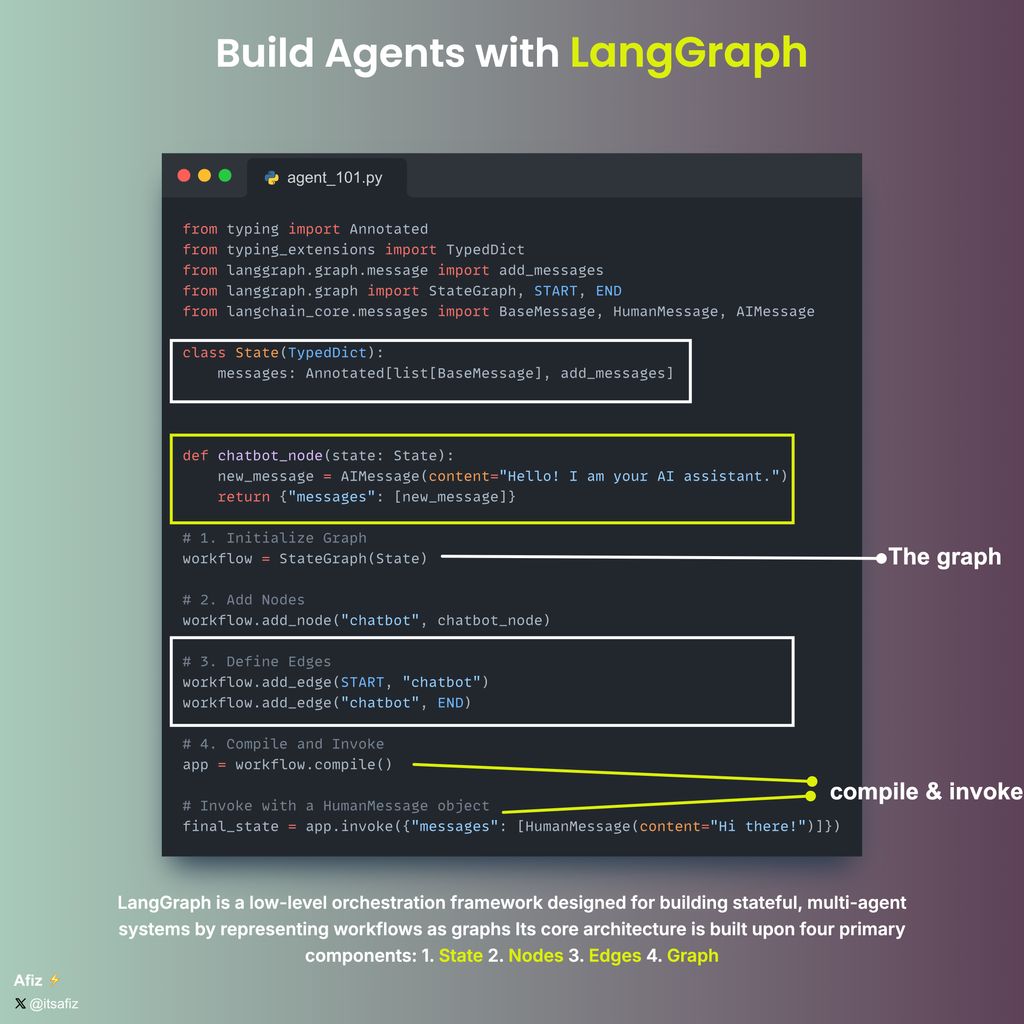
@itsafiz ·
LangGraph 101: (with code snippets) Are you new to LangGraph? Curious about how to build AI Agents using LangGraph @LangChain? This thread is for you. A Thread 🧵👇

@DivyanshT91162 ·
BUILD A REAL AI AGENT FOR $0 WITH THIS GITHUB REPO. No paid APIs. No monthly subscription. No credit card. Everything you need is free: • LangChain + LangGraph to build the agent • Groq or Gemini Free Tier as the LLM • DuckDuckGo for free web search • Memory with LangGraph checkpoints • Automatic Groq → Gemini fallback if one provider fails • Runs locally on your laptop • MIT licensed and fully open source By the end, you'll have an AI agent that can: → Reason through tasks → Use tools automatically → Search the web → Remember conversations → Recover from provider outages → Run completely free This is one of the best beginner-friendly AI agent repositories I've seen. Repo: https://t.co/elikLqLyNi
 Watch video
@OpenBMB ·
From lab to open-source: A new milestone for AI-driven education. 🎓 🤗 We’ve been closely following the MAIC project at Tsinghua University, and we’re thrilled to see it now open-sourced as #OpenMAIC. ✨ This isn't just another chatbot; it takes Multi-Agent orchestration to the next level by building a fully interactive classroom where AI instructors and peers collaborate in real-time. What makes it technically impressive: 🛠️ Complex Orchestration: Leveraging #LangGraph to manage spontaneous interactions—like #AI students "raising hands" during a live lecture. 🧠 Structured Planning: A dedicated "Plan Agent" that transforms raw PDFs into coherent, logically sequenced pedagogical flows. 💻 Beyond Text: A masterclass in GenUI implementation, featuring synchronized TTS, laser pointers, and real-time whiteboard demonstrations. 🥳 If you’re building complex, multi-modal #Agent workflows, this repo is a treasure trove of engineering insights. 🖥️Explore the project: https://t.co/QKvce05Kf1 📰 Read the research: https://t.co/MurkukSB0m


 Watch video
@pauliusztin_ ·
If you want to build your own Claude Code or OpenClaw... Start here: → https://t.co/eBoq7VCUFO Deep Agents (by LangGraph AI) is a batteries-included agent harness. Instead of wiring: • Prompts • Tools • Context management You get a working agent out of the box. It gives you: • Planning → task breakdown + tracking • Filesystem → read/write/edit context • Shell → execute commands (sandboxed) • Sub-agents → delegate work with isolated context • Context management → auto-summarization + memory Under the hood, most agents are: Model + Runtime + Harness Deep Agents gives you the harness. And this is the part most people underestimate. But it’s what makes agents work. It involves handling tasks like: • Managing context windows • Coordinating tools • Handling long tasks • Keeping state And it's built on LangGraph AI, so you get: • Streaming • Persistence • Checkpointing Out of the box. On TerminalBench 2.0, Deep Agents ranks among the top coding agents. If you’re serious about building agents, stop starting from scratch. Study the harness. Github → https://t.co/eBoq7VCUFO
 Watch video
@thisdudelikesAI ·
This is the most honest AI course I've seen all year. Everyone selling a "RAG bootcamp" right now starts the same way. Spin up a vector database, embed some text, retrieve the top chunks, generate an answer. It demos beautifully. It also collapses the second your documents have tables, scanned pages, or anything resembling real-world mess. Then I found production-agentic-rag-course on GitHub, and it refuses to play that game. Instead of an AI-first shortcut, it teaches you to build a production RAG system the way actual engineering teams do. You start with infrastructure that survives contact with reality: Docker, FastAPI, PostgreSQL, OpenSearch, Airflow pipelines pulling fresh arXiv papers every single day. Then you build keyword search with BM25 and learn why that foundation matters before any embedding enters the picture. By the time you reach semantic search, you understand what you're actually fixing. Hybrid retrieval fuses keywords with vectors. A local LLM turns search into conversation while keeping your data private. Monitoring and caching make it fast enough to ship. And the final week hands you something most courses never reach: an agentic layer built on LangGraph that decides its own retrieval strategy, grades whether the documents it pulled are even relevant, rewrites the query when they aren't, and refuses to answer questions outside its domain. The end result is your own research assistant you can talk to from a Telegram bot, with the full reasoning trace exposed so you can see exactly why it answered the way it did. It's free. MIT licensed. 7.2k stars and climbing. No upsell, no locked modules, just seven weeks of code you can read, fork, and own. The gap between people who can demo RAG and people who can ship it is enormous. This is the bridge. https://t.co/hQj1LypkDd

@TheGlobalMinima ·
Seeing in action why Opus 4.6 > Codex-5.3 I have a large migration to perform, where I’m taking an agentic system from Google ADK to PydanticAI + LangGraph. After hours of back and forth, I created a detailed plan. Handed it to codex first. Fails miserably. Creates a decent plan, but completely abandons it midway and remains fully confused. Next came opus, and created an even better plan. Actually wrote considerations, assumptions, fallbacks clearly. Created a huge list of todos, stuck to it, searched docs and fully completed the migration. Model comparison aside, these are insane times. A migration of this scale would’ve taken me a week easily, and here it is, without me having to write a single line of code. 🙏🏻

@pycharm ·
Building 🤖 AI agents is 🧑🔬 engineering, since you are working with state, tools, failure modes. @t_redactyl has released a free course to guide you through the process using #Python, #LangGraph, #MCP, #Ollama. No NLP background needed. 👉 https://t.co/K934ejm5PH
 Watch video
@MongoDB ·
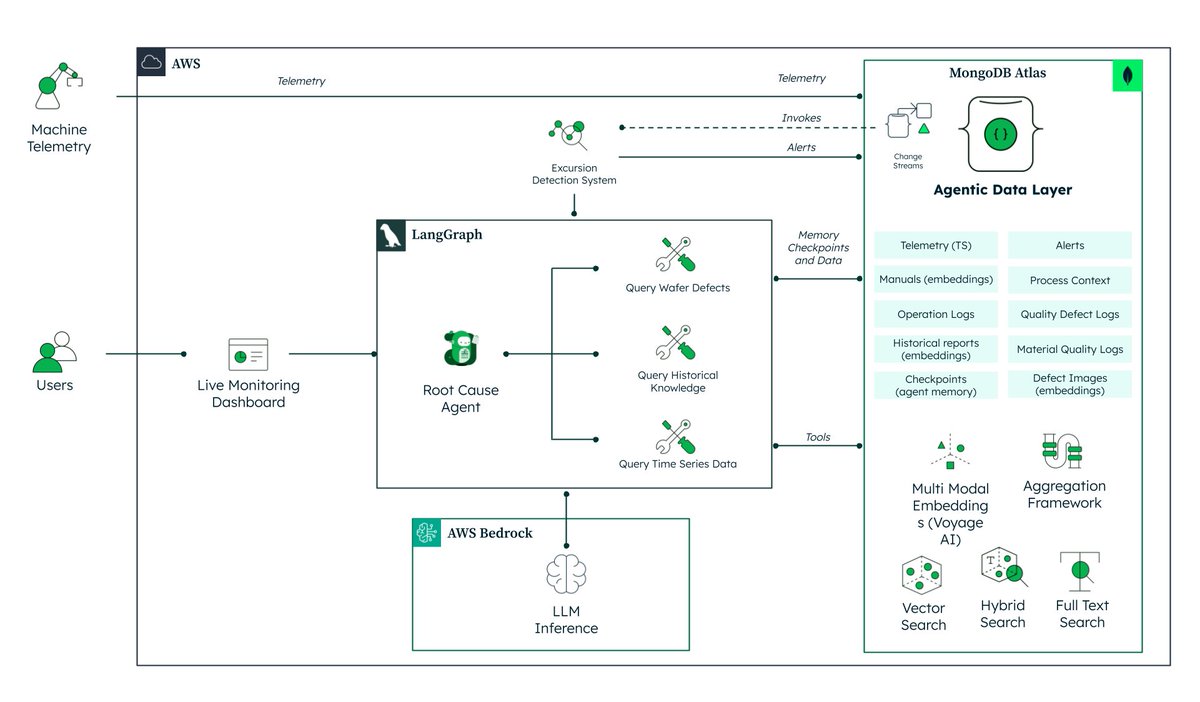
Build AI Agents with Real Memory ➡️ https://t.co/z2O8KEiqqV Most agentic architectures treat memory as an afterthought. This one was designed around it. The unified memory layer combines: • Real-time telemetry streaming via Change Streams • Multimodal vector search across defect images and text with Voyage AI • Short-term checkpointing so investigations survive interruption • Long-term RCA history so agents learn from past failures What this unlocks for developers: • Autonomous root cause analysis • Investigations you can resume, audit, and build on • Agents that reason across structured, unstructured, and streaming data — without crossing system boundaries Built with MongoDB Atlas, LangGraph, Amazon Bedrock, and Voyage AI. 💡 The result? Agents that investigate, correlate, and remember.

@NainsiDwiv50980 ·
Your agentic AI product can earn its first dollar before it generates its first model API bill. Not a toy chatbot. A real system that retrieves knowledge, makes decisions, calls tools, takes actions, retains state, and traces what happened, running on a stack that costs exactly $0 to start. Here's the full pipeline: → Interface: Next.js or Streamlit takes the request → Orchestration: LangGraph or CrewAI decides whether to answer, retrieve, call a tool, ask for approval, retry, or stop → Knowledge: LlamaIndex pulls context from ChromaDB or Qdrant, running locally → Reasoning: Ollama runs an open model (Gemma, Llama 3.3 70B, Mistral) on your own hardware, zero API bill → Action: MCP connects the agent to files, databases, GitHub, Slack, browsers, this is the step where a chatbot becomes a worker → State: SQLite or DuckDB stores conversations, checkpoints, outputs → Observability: Langfuse or Phoenix traces every prompt, decision, tool call, and failure → Deployment: Docker packages it, inference runs on hardware you already own, only the lightweight interface sits on a free tier Total software and API spend to get this running: $0. But here's the part that actually matters, the free tools aren't the advantage. Every single piece here will eventually get replaced by something faster or cheaper. Ollama becomes a hosted API. SQLite becomes a production database. Streamlit becomes a custom app. The advantage that survives every swap is knowing: → Where reasoning should stop and deterministic code should take over → When RAG actually improves an answer versus just adding latency → Which actions genuinely need human approval → What has to be traced before your first production failure, not after → How to isolate every layer behind a replaceable interface Build the cheap version first. Learn exactly where users find real value. Then spend money only where it creates leverage, not before. If you had $500 a month to put into scaling this stack, which layer gets it first?


@Suryanshti777 ·
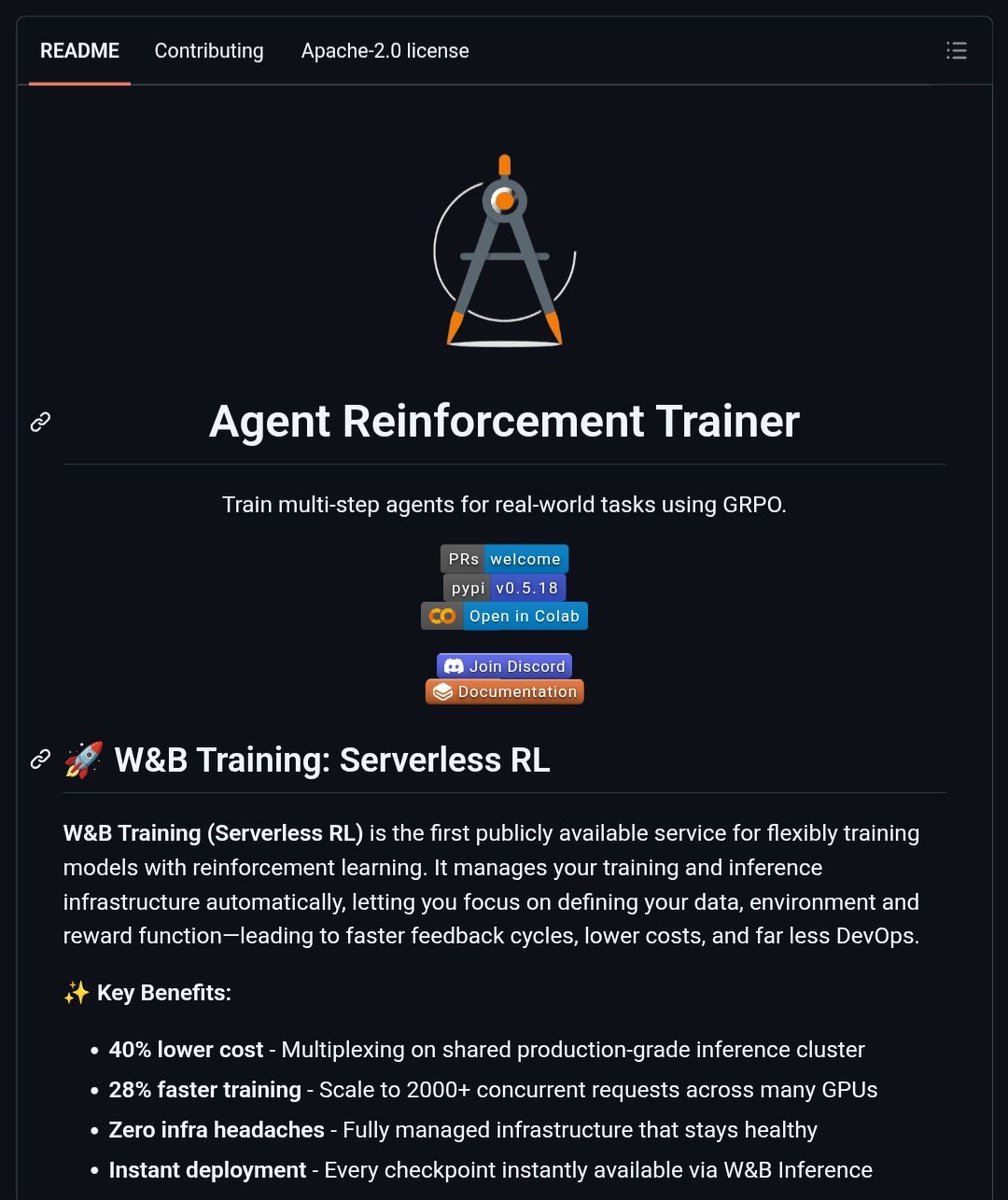
Everyone's still hand-tuning prompts. The people actually ahead already moved on to training agents that learn from their own mistakes. It's called ART — Agent Reinforcement Trainer. Open source. Apache-2.0. And it just quietly beat OpenAI's o3 at a real task. Here's the trick: Your agent runs its normal workflow — search, tool calls, multi-step reasoning, whatever. Every message gets logged into a trajectory. When the task finishes, you assign it a reward. That's it. ART takes it from there, runs GRPO under the hood, and the model gets better at the exact thing you need it to do — not generic benchmarks, your task. The result that turned heads: Qwen 2.5 14B, trained on ART, beat o3 at email retrieval. A 14B open model outperforming a frontier closed one on the task that actually mattered. And it's not a toy anymore. Qwen 3.6 27B learning 2048. LangGraph agents training natively inside their own graphs. MCP•RL automatically teaching a model to master any MCP server — point it at a tool spec and it figures out how to use it well through pure trial and reward. AutoRL trains on tasks with zero labeled data, generating its own inputs and grading itself with RULER. The infra pain that usually kills RL experiments — GPU setup, OOM crashes, babysitting an inference cluster — is gone. Serverless RL manages it all. You define the environment and reward function. Checkpoints go live automatically, ready to query the moment training finishes. Client runs anywhere Python does. Server runs on a GPU, local or ephemeral. "pip install openpipe-art" And you're training in the same session you're prototyping in. This is the gap between people still writing longer system prompts and people whose agents actually get measurably better every day they run. (Link in comments👇)


@LangChain_JS ·
Watch @MikeRyanDev and Tyler Slaton from @CopilotKit on the latest episode of Web Dev Challenge building a voice agent with LangGraph on top of AG-UI protocol 🚀 https://t.co/rpIx2F3rTU

@ashtilawat ·
LangGraph has been part of the Gauntlet curriculum since 2023. My software factory greenfields projects with a LangGraph orchestrator driving Claude Managed Agents. Wild how we went graphs → orchestrators → swarms → loops → back to graphs.

@agenticgirl ·
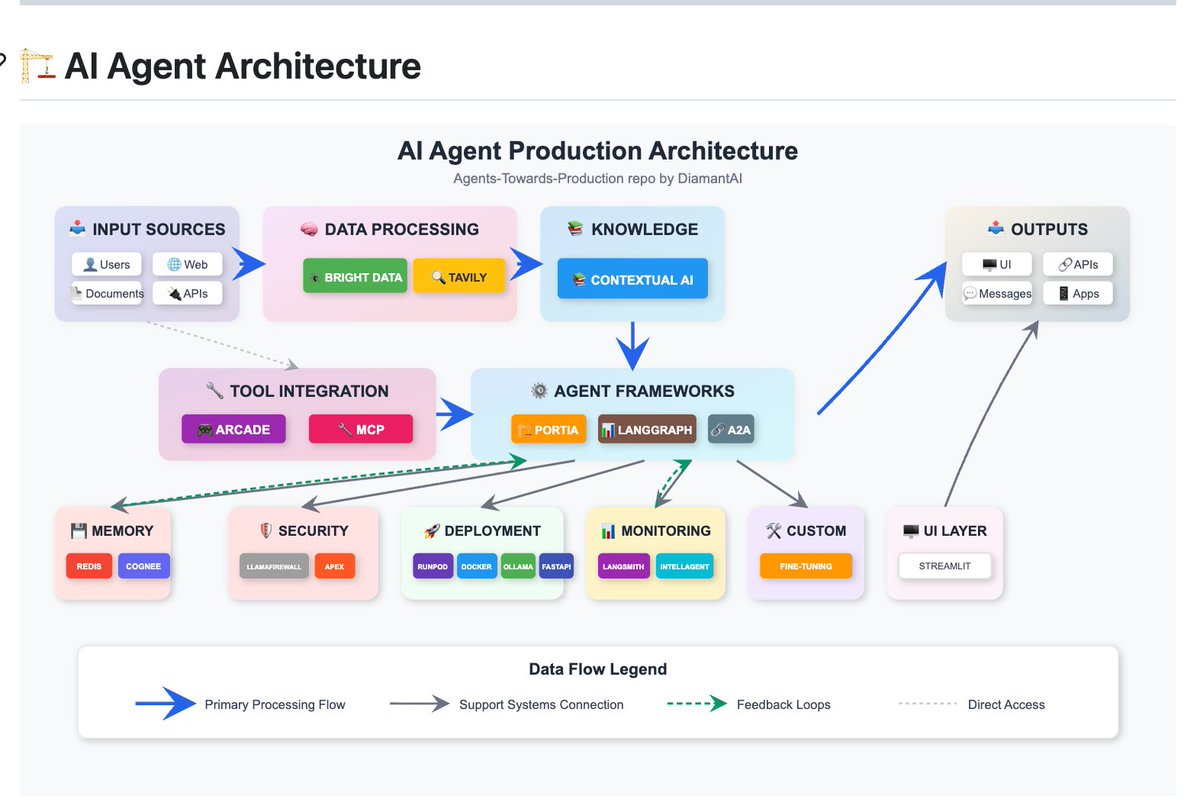
18,600 developers starred this. A free, open-source playbook for building GenAI agents that actually ship. Agents Towards Production covers every layer: → Stateful workflows with LangGraph → Vector memory with Redis and Mem0 → Real-time web search with Tavily → Docker containerization → FastAPI deployment → GPU scaling with RunPod → Security guardrails with LlamaFirewall → Multi-agent coordination with A2A Protocol → Observability with LangSmith → Automated evaluation with IntellAgent 25+ tutorials. All runnable. All production-grade. Contributors include LangChain, Redis, JetBrains, Anthropic, and RunPod. 2,500 forks. 225 active watchers. Here's the GitHub: https://t.co/CEIhHoURQZ
@_vmlops ·
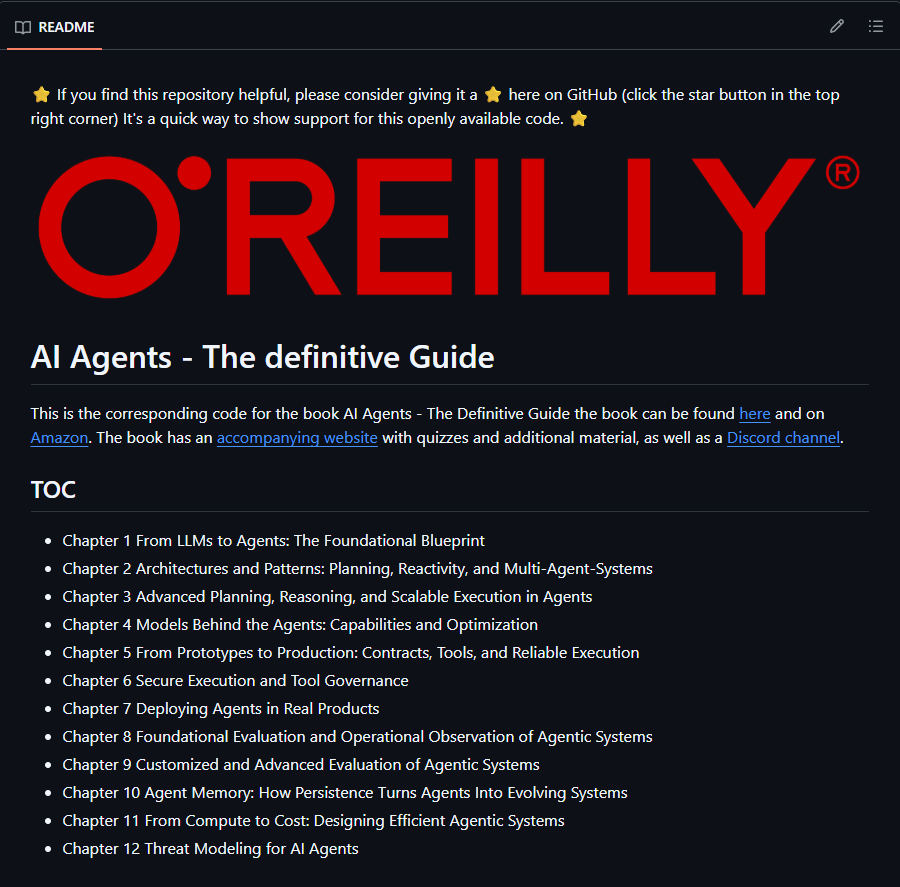
THIS REPO IS THE FULL CODE COMPANION TO A NEW O'REILLY BOOK ON AI AGENTS all jupyter notebooks, every chapter runnable on colab → ch1-3: from LLMs to agents, planning, reactivity, multi-agent systems → ch4-5: model capabilities, tooling and system integration → ch6-8: deploying agents in real products, benchmarking for production → ch9-10: safety, guardrails, memory, autonomy, long-horizon use → ch11-12: cost estimation, efficiency, future directions covers langchain, langgraph and test-time compute patterns if you're building agents beyond toy demos this is a solid map of the whole stack

@bmykhaylivvv ·
ai lead seach agent -- browser-use + langgraph I continue playing around with an ai lead search agent tbh, I love the fact of agentic thinking no need to write some kinda if-clauses or waterfall enriching instead I am creating different tools, and ai agent is deciding which one to use for now it can only do web search using browser-use and do linkedin profile enrichment using the LinkedIn API but I am going to add: > X (twitter) API > email enrichment > a tool for finding LinkedIn post by keywords (still looking for some solution for it) > some buying intent identification and it is a lot about writing a nice search prompt, Google is a much more powerful tool than we might think great thing here is that I can ask an agent to think on each step and validate all the found data on each step 1. "is this person a decision maker in the company?" 2. "are they currently looking for an ai sales automation tool based on the data you know about them?" 3. "is a company size matching the one mentioned in the query?" super interesting and exciting I am going to make it a bit more stable, add a few more tools and then suggest to find leads for some of our clients using this tool your ai gtm manager working 24/7 fully on autopilot -- it's great! then just push all the data to Google Sheets or directly to HubSpot, where AiSDR will be able to pick them up and then outreach to them

Best LangGraph tweets
Xholic studies what works in your niche, drafts posts in your voice and schedules them for the hours your audience is online.
No card needed · Nothing to cancel
Browse all tweet collectionsLive demo: no sign-up or login needed · takes about 2 minutes