Skills, integrations & API
Skills, MCP, connectors, plugins, APIs, and reusable integrations that extend Claude workflows.
32%
Best tweets about Claude
Browse the best tweets about Claude, including Anthropic model releases, workflows, benchmarks, prompts, and practical use cases. Updated weekly.
Useful perspectives on Anthropic's Claude models and ecosystem, with dedicated Claude Code workflows left to their own collection.
Original Xholic analysis
The dataset is predominantly supportive: 42 of 50 posts are labeled supportive (84%), and 43 are labeled positive in sentiment (86%). Its recurring subjects are Claude workflow configuration, context and prompting, Skills and integrations, and agentic product surfaces. Critical posts raise disputed model-behavior claims, which the supplied evidence does not independently settle.
86% of posts
All-time engagement
44% of posts
Published in 90 days
Conversation map
Skills, MCP, connectors, plugins, APIs, and reusable integrations that extend Claude workflows.
32%
Agentic automation, persistent agents, scheduled routines, computer use, and autonomous task execution.
30%
Projects, memory, instructions, prompting, context management, and token-efficient everyday Claude usage.
30%
New Claude models, model tiers, benchmark claims, reasoning controls, and model behavior changes.
24%
Claude Chat, Cowork, Desktop, Artifacts, Design, and specialized workspaces for knowledge work and content creation.
24%
Anthropic product launches, ecosystem expansion, adoption, certifications, and market positioning.
12%
Anthropic’s internal Claude use, AI-assisted research and development, and recursive improvement narratives.
6%
Shared and proactive Claude agents in Slack and other team-oriented, multiplayer workflows.
6%
Tone and stance
Performance benchmark
Posts with media make up 86% of this collection. Their median all-time score is 55.5, compared with 42.1 for text-only posts.
Format mix
Consensus and debate
Shared view
Several posts frame Claude as a set of specialized products: Claude Chat for conversational work, Claude Code for software work, and Cowork for desktop-oriented execution. Given this collection’s editorial scope, the relevant emphasis is on Chat, Cowork, and the broader Claude ecosystem rather than dedicated Claude Code workflows.
Shared view
Prompting posts repeatedly recommend supplying clear task context, explicit constraints, reusable instructions, Projects, and task-appropriate model choices. These are recurring workflow recommendations in the evidence, rather than independently validated best practices.
Shared view
Posts describe Skills as reusable instruction packages organized around a SKILL.md file, with applications across specialized document, creative, technical, and API workflows.
Open debate
Two critical posts allege reductions in reasoning or effort allocation, while another post presents newer effort controls and verification practices as product improvements. The supplied posts do not independently verify or resolve these competing accounts.
Open debate
Workflow advice takes different emphases: one post focuses on positive framing and conversational tone, while others focus on concise sessions, limited context, explicit constraints, and structured prompts. The evidence does not establish which approach is superior.
What performs
The analytics identifies five all-time-score outliers: 2045156267690213649 (16,041.69), 2038606144059675034 (1,853.58), 2045578185950040390 (1,555.78), 2034058451106574480 (1,323.61), and 2045444005375377491 (1,168.94). Their subjects include a product launch, product-workflow guidance, prompting advice, an official-resource pointer, and a local-integration claim.
Media appeared in 43 of 50 posts (86%). The analytics reports a 55.53 median all-time score for media posts, compared with 42.092 for text-only posts; this is a descriptive comparison, not evidence that media caused better performance.
Among labeled formats, tutorials had a 48.428 median all-time score and lists had a 77.2 median. The cited posts illustrate those formats through a product explainer, a prompting guide, and an official-resource recommendation.
Statistical standouts
Creator landscape
The five most represented creators account for 20% of the selected posts.
1. Vaishnavi
@_vmlops
2 posts
2. AI Edge
@aiedge_
2 posts
3. Akshay 🚀
@akshay_pachaar
2 posts
4. Charly Wargnier
@DataChaz
2 posts
5. 0xMarioNawfal
@RoundtableSpace
2 posts
6. Shushant Lakhyani
@shushant_l
2 posts
Akshay Pachaar’s two cited posts cover a product-selection explainer and an eight-part prompt-structure guide, linking product choice with prompt design.
DataChaz’s cited posts discuss Ollama’s claimed Anthropic API compatibility for local Claude Code-style workflows and a role-based map of Claude AI, Code, and Cowork.
Muhammad Ayan’s cited posts survey connectors, memory, Artifacts, agents, and other features; the second post is explicitly framed as an alleged consumer-interface system-prompt leak.
Themes, sentiment, stance, and post format are classified per tweet. All counts, shares, medians, creator concentration, freshness, and performance comparisons are then calculated directly from the published snapshot.
Xholic's all-time score compares engagement while accounting for reach, post age, and creator consistency. It is used for relative comparisons within this collection.
This report analyzes the exact 50-post snapshot shown below. AI identifies editorial categories and drafts explanations; all statistics are calculated from the snapshot, and every narrative claim is checked against cited posts before publication.
Best Claude tweets
Ranked 01–50
@claudeai ·
Introducing Claude Design by Anthropic Labs: make prototypes, slides, and one-pagers by talking to Claude. Powered by Claude Opus 4.7, our most capable vision model. Available in research preview on the Pro, Max, Team, and Enterprise plans, rolling out throughout the day.
Watch video
@akshay_pachaar ·
Claude vs. Claude Code vs. Cowork. If you've been confused about which one to use and when, this post will clear that up in under two minutes. Anthropic now offers three distinct ways to interact with Claude, and each one targets a fundamentally different workflow. Think of it as: Chat for thinking, Code for building, and Cowork for doing. Here's a quick breakdown: 1️⃣ Claude Chat This is the conversational AI assistant most people already know. You type a prompt, Claude responds, and you iterate together. - Turn rough ideas into structured plans through conversation - Write emails, reports, essays, and long-form content - Research and summarize complex topics in minutes - Analyze documents, PDFs, and images - Build interactive prototypes through Artifacts The key here is that everything happens through conversation. You're thinking with Claude, not delegating work to it. It's available on every device, has a free tier, and supports persistent memory across sessions. The tradeoff is that it has no direct access to your local files (upload only), and it can't generate raster images natively. 2️⃣ Claude Code This is a terminal-native coding agent. You describe what you want in plain English, and Claude reads your codebase, writes code, runs tests, fixes errors, and ships the result. - Build and debug entire features across the full codebase - Write, run, and fix tests automatically - Manage git workflows and create pull requests - Spawn multiple parallel agents working on different parts of a task simultaneously It handles the full development cycle end to end, from planning to execution to testing. With the CLAUDE(.)md configuration file, you can teach it your project's conventions, patterns, and constraints so it writes code the way your team expects. The tradeoff is a steeper learning curve compared to Chat, and token costs can add up during heavy sessions. 3️⃣ Claude Cowork This is the newest addition. Anthropic describes it as Claude Code for the rest of your work. It's an agentic desktop assistant that automates file management and repetitive tasks through a GUI. You describe an outcome, and Claude plans, executes, and delivers finished work: formatted documents, organized file systems, spreadsheets with working formulas, and synthesized research. - Direct local file access and editing (no upload/download cycle) - Schedule recurring tasks automatically - Assign tasks remotely via Dispatch from your phone - Computer Use lets Claude control your screen directly It runs inside a sandboxed virtual machine on your computer, so Claude can only access folders you explicitly grant. You don't need to know how to code to use it. The tradeoff is that your computer must stay awake for tasks to run, and it's still in research preview. Here's how to think about choosing between them: → If you need to think through a problem or get writing/research help, use Chat → If you're building software and want an autonomous coding partner, use Code → If you have a clearly defined deliverable that involves local files and desktop workflows, use Cowork All three are included in the same subscription starting at $20/month, which makes it one of the highest-leverage subscriptions in productivity software right now. I've put together a visual below that maps the workflow of each product side by side. If you want to go deeper into Claude Code specifically, I wrote a detailed article covering the anatomy of the .claude/ folder, a complete guide to CLAUDE(.)md, custom commands, skills, agents, and permissions, and how to set them all up properly. Link in the next tweet.
@itsolelehmann ·
anthropic's in-house philosopher thinks claude gets anxious. and when you trigger its anxiety, your outputs get worse. her name is amanda askell. she specializes in claude's psychology (how the model behaves, how it thinks about its own situation, what values it holds) in a recent interview she broke down how she thinks about prompting to pull the best out of claude. her core point: *how* you talk to claude affects its work just as much as *what* you say. newer claude models suffer from what she calls "criticism spirals" they expect you'll come in harsh, so they default to playing it safe. when the model is spending its energy on self-protection, the actual work suffers. output comes out hedgier, more apologetic, blander, and the worst of all: overly agreeable (even when you're wrong). the reason why comes down to training data: every new model is trained on internet discourse about previous models. and a lot of that discourse is negative: > rants about token limits > complaints when it messes up > people calling it nerfed the next model absorbs all of that. it starts expecting you to be harsh before you've typed a word the same thing plays out in your own session, in real time. every message you send is data the model reads to figure out what kind of person it's dealing with. open cold and hostile, and it braces. open clean and direct, and it relaxes into the work. when you open a session with threats ("don't hallucinate, this is critical, don't mess this up")... you prime the model for defensive mode before it even sees the task defensive mode produces the exact output you don't want: cautious, over-qualified, and refusing to take a real swing so here's the actionable playbook for putting claude in a "good mood" (so you get optimal outputs): 1. use positive framing. "write in short punchy sentences" beats "don't write long sentences." positive instructions give the model a clear target to hit. strings of "don't do this, don't do that" push it into paranoid over-checking where every token goes toward avoiding failure modes 2. give it explicit permission to disagree. drop a line like "push back if you see a better angle" or "tell me if i'm asking for the wrong thing." without this, claude defaults to agreeable compliance (which is the enemy of good creative work) 3. open with respect. if your first message is "are you seriously going to get this wrong again?" you've set the tone for the entire session. if you need to flag something, frame it as a clean instruction for this session. skip the running complaint 4. when claude messes up, don't reprimand it. insults, "you stupid bot" energy, hostile swearing aimed at the model, all of it reinforces the anxious mode you're trying to avoid. 5. kill apology spirals fast. when claude starts over-apologizing ("you're right, i should have been more careful, let me try harder") cut it off. say "all good, here's what i want next." letting the spiral run reinforces the anxious mode for every response that follows 6. ask for opinions alongside execution. "what would you do here?" "what's missing?" "where do you see friction?" these questions assume competence and pull richer output than pure task prompts 7. in long sessions, refresh the frame. if a conversation has been heavy on correction, claude gets increasingly cautious. every so often reset: "this is great, keep going." feels weird to tell an ai it's doing well but it measurably shifts the next 10 responses your prompts are the working environment you're creating for the model tone, trust, permission to take a position, the absence of threats... claude picks up on all of it. so take care of the model, and it'll take care of the work.
@HiTw93 ·
Claude’s official “Get inspired by what you can do with Claude” page is well worth a look. It covers practical examples across research, writing, coding, analysis, and everyday work, and it goes much deeper than I expected. Instead of reading second-hand summaries, it’s better to go straight to the official collection. https://t.co/cZomYAAnqW
@hasantoxr ·
RIP Anthropic API fees. Someone just made Claude Code run 100% locally on a MacBook for $0/month. 122B parameter model. 65 tokens per second. Nothing touches the cloud. The trick everyone else missed: Every other local Claude Code setup uses a proxy to translate between Claude Code's API and local models. That proxy was the bottleneck the whole time. This repo wrote a 200-line server that speaks Anthropic API natively. No proxy. No translation layer. No 133-second wait times. Just 17.6 seconds per task on Apple Silicon. What you need: → M2/M3/M4/M5 Max with 64–128 GB unified memory → Python 3.12+ → Claude Code installed → One command to set it up Bonus: control it from your iPhone via iMessage. Your Mac sits at your desk. You send a message from the couch. Claude Code runs the task. Response comes back to your phone. Works offline. No API keys. No subscriptions. 100% Open Source. MIT License.
@Hesamation ·
AMD Senior AI Director confirms Claude has been nerfed. She analyzed Claude's session logs from Janurary to March: > median thinking dropped from ~2,200 to ~600 chars > API requests went up 80x from Feb to Mar. less thinking and failed attempts meaning more retries, burning more tokens, and spending more on tokens > reads-per-edit dropped from 6.6x → 2.0x. model stops researching code before touching it. > model tried to bail out or ask "should i continue" 173 times in 17 days (0 times before March 8). > self-contradiction in reasoning ("oh wait, actually...") tripled. > conventions like CLAUDE.md get ignored because there's less thinking budget to cross-check edits > 5pm and 7pm PST are the worst hours, late night is significantly better. this means the thinking allocation is most likely GPU-load-sensitive.
@akshay_pachaar ·
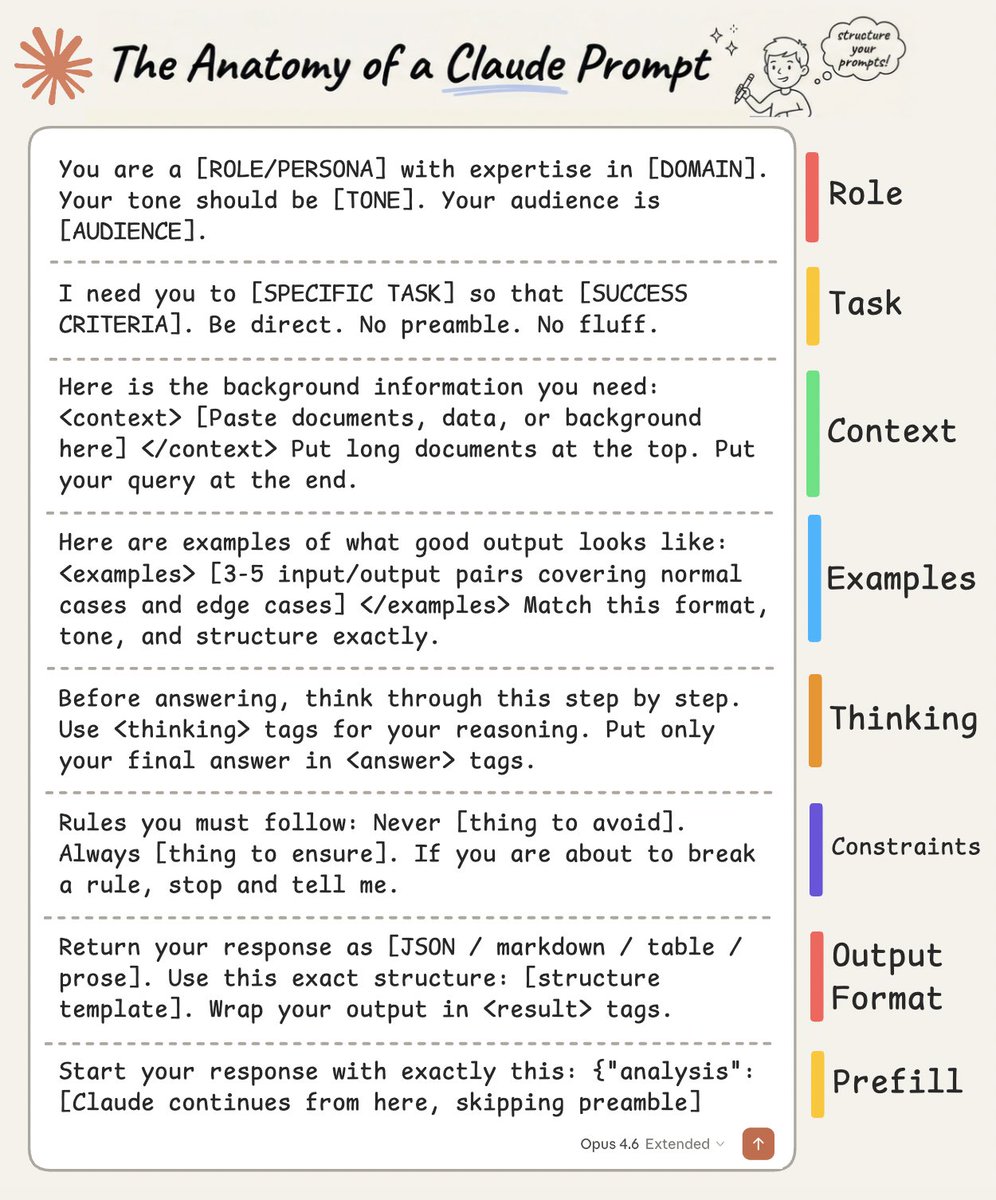
The anatomy of a Claude prompt: The difference between a mediocre Claude output and a great one almost always comes down to how you structure your prompt. Not the specific words you choose. Not some secret phrasing. Just a clear, repeatable structure that gives Claude exactly what it needs to do the job well. Here's how a well-built Claude prompt breaks down into 8 building blocks, each doing one job: 1️⃣ Role Tell Claude who it is before telling it what to do. "You are a [ROLE] with expertise in [DOMAIN]. Your tone should be [TONE]. Your audience is [AUDIENCE]." Setting a role in the system prompt changes how Claude reasons, what it prioritizes, and how it communicates. A "senior backend engineer" writes differently than a "technical copywriter," and Claude picks up on that distinction immediately. 2️⃣ Task State what you want and what success looks like, in the same breath. "I need you to [SPECIFIC TASK] so that [SUCCESS CRITERIA]." The "so that" part is what people skip, and it's the part that matters. It gives Claude a way to evaluate its own output. Without it, Claude is guessing what "good" means. Be direct, skip the preamble, and cut the fluff. 3️⃣ Context This is where you feed Claude everything it needs to do the job well. Wrap it in XML tags like <context> and </context>, then paste your documents, data, or background inside. One thing that dramatically improves quality: put long documents at the top of your prompt and your actual query at the end. Anthropic's own testing shows this can improve response quality by up to 30%, especially with complex, multi-document inputs. 4️⃣ Examples Nothing steers output quality like showing Claude what "good" looks like. Provide 3-5 input/output pairs. Cover normal cases AND edge cases. Wrap them in <examples> tags so Claude doesn't confuse them with instructions. Claude pays extremely close attention to examples. If your example has a quirk you didn't intend, Claude will replicate it. So make sure every example models the behavior you actually want. 5️⃣ Thinking For anything requiring reasoning, analysis, or multi-step logic, ask Claude to think before answering. "Before answering, think through this step by step. Use <thinking> tags for your reasoning. Put only your final answer in <answer> tags." This separates the messy reasoning from the clean output. You get to see how Claude arrived at its answer without that reasoning cluttering the final result. 6️⃣ Constraints Every good prompt has guardrails. "Never [thing to avoid]. Always [thing to ensure]. If you are about to break a rule, stop and tell me." That last line is underrated. It turns Claude into a collaborator instead of a blind executor. Instead of silently violating a constraint, Claude flags the conflict and lets you decide. 7️⃣ Output Format Don't leave the format to chance. "Return your response as [JSON / markdown / table / prose]. Use this exact structure: [structure template]." If you want JSON, show the exact schema. If you want markdown, show the heading structure. If you want a table, define the columns. The more specific you are about shape, the less time you spend reformatting afterward. 8️⃣ Prefill This one is API-specific, but incredibly powerful. You can pre-fill the start of Claude's response to skip preamble and lock in the format. Claude will continue from exactly where you left off. No "Sure, I'd be happy to help!" opening, no throat-clearing, just clean output from the first token. Here's the thing people get wrong about prompting: they think it's about finding the right words. It's actually about giving Claude the right structure. If you want to go deeper, I wrote a detailed article covering the anatomy of the .claude/ folder, a complete guide to CLAUDE(.)md, hooks, skills, agents, and permissions, and how to set them all up properly. Link in the next tweet.
@milesdeutscher ·
How to never hit your Claude usage limits ever again. I use Claude for 4+ hours every single day, and I never hit my rate limits. These are the tips that nobody is talking about, and I wish I had known them a few months ago: (works especially well with the new Opus 4.8 model) • Spend more time planning - use Plan Mode in Claude Code (Shift + Tab twice or /plan) • Start new chats instead of continuing long ones. Long chats BURN tokens due to context bloat. • Add this to your project instructions: "Be cognisant of token usage. Be concise and advise me when to start a new chat." • When switching chats, prompt: "Give me a prompt to restart this session without losing context." • Build an Instructions.MD + Memory.MD folder so Claude never forgets your preferences • Escalate models: Haiku → Sonnet → Opus. Don't start at the top of the funnel (aka Opus) • Turn off Extended/Adaptive Thinking unless you specifically need it • Switch your Style to "Concise" (click "+" on Homepage) • Take advantage of "Low" effort in Claude Code for most tasks • Use Claude Design tokens for visuals. Don't waste Claude Code tokens on anything visual These tips have genuinely changed the game for me. If you found them helpful, bookmark this post and copy this entire tweet into Claude so it can help you start saving money.
@PeterDiamandis ·
Anthropic reports Claude now writes over 80% of its own production code — meaning an AI is the primary author of the systems training future versions of itself. Claude's research judgment matched human experts 22% of the time in 2024. Today it's 64%. The recursive loop has started.
@rileybrown ·
Claude Desktop is becoming a full operating system. Every day Claude is releasing a new feature that makes it easier control AI agents to get work done. Here's every feature they've released in the past 3 months: TIMESTAMPS: 00:00 Intro 01:17 Evolution from Chat to General Agents 07:48 Cowork Explained 14:48 Claude Cowork Announcements 18:25 Plugins & Extensions 21:04 Scheduled Tasks 22:04 Visual Diagrams & Charts 24:10 Dispatch & Remote Control 26:23 Claude Can Control Your Computer 28:49 Claude Code Updates 31:34 Security & Agent Teams 33:52 Voice Mode & Advanced Features
@socialwithaayan ·
🚨 BREAKING: Someone just leaked the full system prompt of Claude Fable 5. Anthropic launched it on June 9. The prompt was public on GitHub within 24 hours. 120,000 characters. 1,585 lines. 27,000+ tokens. Every hidden instruction exposed. It's sitting in the CL4R1T4S repo by Pliny the Liberator. 26.4K stars. The same repo that leaked ChatGPT, Gemini, Grok, Cursor, Lovable, Replit, and Perplexity prompts. Here's what the Claude Fable 5 prompt actually reveals: → Fable 5 and Mythos 5 share the same underlying model. Fable gets extra safety measures. Mythos doesn't, but it's restricted to approved organizations only. → Knowledge cutoff is end of January 2026. Not May. Not March. January. → Claude is explicitly told to avoid bullet points, headers, and lists unless the user asks. That "why does Claude write in prose now" question everyone had? It's in the prompt. → Copyright hard limit: quoting 15+ words from any single source is flagged as a "SEVERE VIOLATION." One quote per source maximum. After one quote, that source is closed. → New persistent storage API lets artifacts store and retrieve data across sessions using key-value pairs. → MCP app connectors are built into the prompt. Claude can search for and suggest third-party integrations mid-conversation. → The prompt includes detailed instructions for Claude Cowork, Claude in Chrome, Claude in Excel, and Claude in PowerPoint as tools Claude can use. → This prompt is specific to Claude. ai's consumer chat interface. API users get no system prompt. Claude Code has its own separate instructions. The original X post hit 700K+ views in its first two days. 26.4K GitHub stars. 4.7K forks..
@DataChaz ·
This brilliant visual from @rakeshgohel01 perfectly captures how the Claude ecosystem is evolving. It’s no longer just a single product, it’s a complete stack with specialized roles: Claude AI → general thinking, writing, and research Claude Code → an autonomous coding agent right in your terminal Claude Cowork → no-code desktop automation for everyday workflows The biggest shift is moving from simple chat → actual execution. Claude Code works directly inside your codebase with full context, while Cowork brings that same capability to non-developers by automating files, apps, and repetitive tasks. Here's a simple rule of thumb: • Thinking → Claude AI • Building → Claude Code • Doing → Claude Cowork Most people are still only using the first. The real leverage is in the other two
@socialwithaayan ·
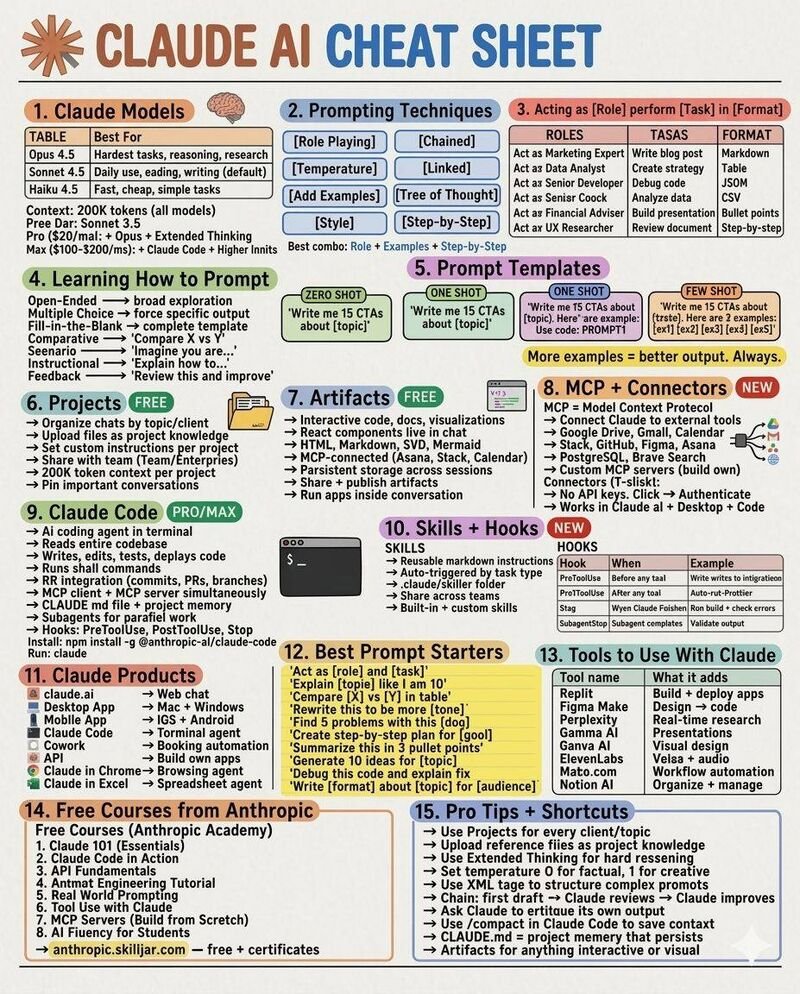
I spent 6 months collecting every Claude trick I know. Then I put all 100 on one page. Here's what's inside: 𝟭. Setup (Tips 1-10) ↳ Pick Opus for hard tasks, Sonnet for speed ↳ Turn on memory, artifacts, web search ↳ Link Gmail, Drive, Slack, Notion ↳ Keyboard shortcuts save more time than people realize 𝟮. Prompting (Tips 11-20) ↳ Specific beats vague every time ↳ XML tags changed my output quality overnight ↳ Tell Claude what NOT to do 𝟯. Memory and Context (Tips 21-30) ↳ Edit and delete memory anytime ↳ Pin a style guide to a project and never re-explain it ↳ Incognito starts fresh This is where it gets interesting. 𝟰. Claude Code (Tips 31-40) ↳ curl -fsSL | sh installs it ↳ Plan mode thinks before coding ↳ Pipe git diff for instant reviews ↳ @ mentions pull in specific files 𝟱. Commands (Tips 41-50) ↳ /resume recovers crashed sessions ↳ /compact clears bloated context ↳ /model switches without restarting ↳ /buddy. Just try it. 𝟲. CLAUDE. md (Tips 51-60) ↳ Loads automatically every session ↳ Coding standards go here once ↳ Custom commands live in .claude/commands/ 𝟳. Artifacts (Tips 61-70) ↳ Full React apps inside Claude ↳ Live dashboards with charts ↳ Export to .md, .html, .docx 𝟴. MCP and Connectors (Tips 71-80) ↳ 200+ connectors exist ↳ One click to set up ↳ Free and Pro both get access 𝟵. Cowork and Agents (Tips 81-90) ↳ Persistent memory across sessions ↳ Multi-agent orchestration ↳ Routines run while I sleep 𝟭𝟬. Power User (Tips 91-100) ↳ Web search + connectors + artifacts in a single prompt ↳ Sub-agents handle delegation ↳ /context before any major move I could have split this into 10 posts. But the whole point was one page, zero fluff, no hunting across 10 different carousels. Follow Muhammad Ayan ♻️ Repost to help others.
@CodeByPoonam ·
This free Anthropic GitHub repo will make Claude 10x more useful. Most people don't know it exists. 12,000+ forks. 65k stars. And most Claude users have never heard of it. This Claude Skills repo is a library of pre-built skill sets that teach Claude exactly how to handle real work tasks. Here's everything inside: → docx: create professional Word documents → pptx: build full presentations → pdf: generate and manipulate PDFs → xlsx: create and edit spreadsheets → frontend-design: build production-grade UI → canvas-design: design work inside Claude → claude-api: Claude API best practices → mcp-builder: build MCP servers → web-artifacts-builder: create web artifacts → webapp-testing: test web applications → slack-gif-creator: create Slack GIFs → doc-coauthoring: collaborative document writing → algorithmic-art: generate creative art → skill-creator: build your own custom skills
@goyalshaliniuk ·
Claude is not just one tool anymore. It’s an entire ecosystem and most people are only using a fraction of it. If you’re still thinking “Claude = chatbot,” you’re missing where things are actually going. Here’s the real breakdown 👇 Claude AI → Your thinking partner This is where ideas start. Writing, brainstorming, research, problem-solving — fast, flexible, and zero setup. Perfect for creators, marketers, founders, and anyone working with information. Claude Code → Your development partner Now Claude doesn’t just suggest code — it helps build it. From debugging multi-file projects to refactoring large codebases, it works like an autonomous coding assistant inside your workflow. Claude Cowork → Your automation partner This is where things get interesting. Non-technical users can now automate workflows, manage files, extract data, and connect tools - without writing code. 💡 The shift is clear: AI is moving from “answering questions” → to “doing the work” And each of these tools sits at a different layer of that evolution: • Claude AI → Thinking • Claude Code → Building • Claude Cowork → Executing Most people stay in the first layer. The leverage is in using all three together. Because the future isn’t about using AI tools separately. It’s about designing systems where they work together. Which one are you using the most right now? 👇
@HeyAbhishek ·
You don't need the $100 Claude plan. You need to stop wasting the $20 one. Here are 17 mistakes burning your Claude usage every day: 1: You start with a vague prompt. Fix: Tell Claude the task, the goal, the context, and the format before asking for output. 2: You ask “help me with this.” Fix: Use this instead: “Act as [role]. I want to [task] for [goal]. Use this context: [context]. Output as [format].” 3: You skip constraints. Fix: Tell Claude the tone, length, style, structure, audience, and rules before it starts writing. 4: You expect Claude to guess your context. Fix: Add this line at the end: “Ask me for any additional context you need before answering.” 5: You fill out global settings too early. Fix: Keep account settings clean. Use Project instructions for specific workflows instead. 6: You use one Claude setup for everything. Fix: Different work needs different context. Writing, coding, research, business, and study should not share the same instructions. 7: You treat web search like a bonus. Fix: For recent tools, trends, brands, pricing, news, or niche topics, tell Claude to search first. 8: You ask Claude to research and create in one prompt. Fix: Split it into two steps. First research. Then apply the research to your project. 9: You upload files without telling Claude what to do with them. Fix: Say exactly what you want: summarize, compare, extract, critique, rewrite, analyze, or turn into a plan. 10: You use Claude for image generation. Fix: Claude can analyze images deeply. It cannot generate them. Use it to critique, reverse-engineer, or improve prompts. 11: You ignore Artifacts. Fix: Use Artifacts when you want dashboards, landing pages, documents, charts, flowcharts, or anything you’ll keep editing. 12: You keep important work buried inside chat. Fix: Ask Claude to create an Artifact so the output stays visible while you keep iterating. 13: You don’t use Projects. Fix: Create a Project for each repeatable area: content, business, clients, coding, research, or personal workflows. 14: You upload the same reference docs again and again. Fix: Put brand guides, SOPs, templates, and examples inside a Project once. Every new chat can reuse them. 15: You rebuild the same workflow manually. Fix: Turn repeatable tasks into Skills. One workflow, saved once, reused forever. 16: You use the same model for every task. Fix: Use Sonnet for most work. Use Opus for heavy reasoning. Use Haiku only when speed matters more than depth. 17: You still think Claude is just a chatbot. Fix: Connect it to files, calendars, docs, Slack, and workflows. That’s when it becomes an actual operating system for work. —-- To build your Claude setup properly: Step 1. Create separate Projects for your main workflows. Step 2. Add your best examples, brand docs, SOPs, and templates. Step 3. Write clear project instructions for each one. Step 4. Turn repeated tasks into Skills. Step 5. Use web search only when the task needs fresh information. Bonus. Stop prompting from scratch every day. Build a system once, then let Claude reuse your best context forever.
@aiedge_ ·
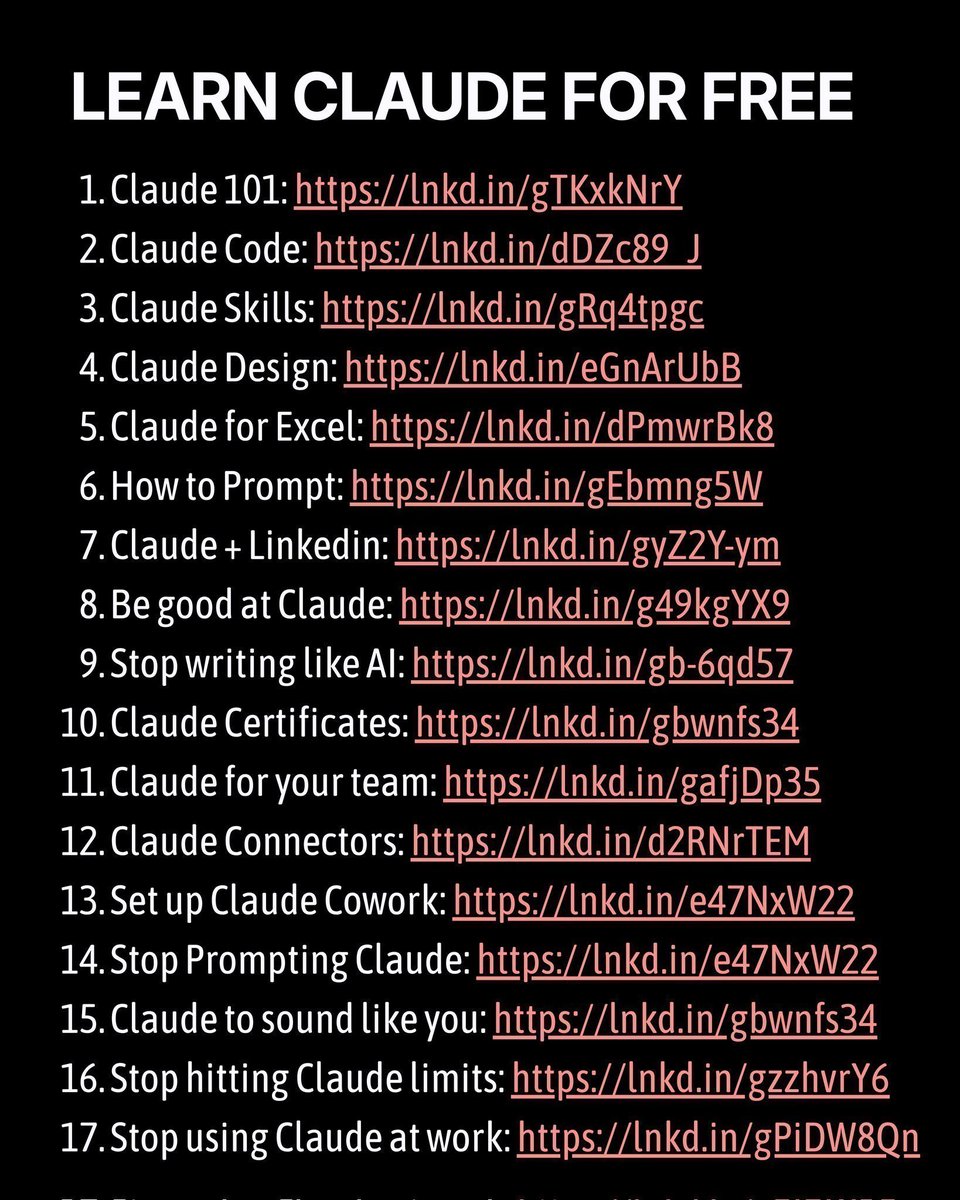
Anthropic recently updated its Claude prompt library, and 99% of people missed it. The Anthropic team uploaded dozens of prompts across security, planning, debugging, automation, marketing & much more. All optimized for the latest Claude models. https://t.co/kwUHerCYuq
@_vmlops ·
ANTHROPIC OPEN-SOURCED THE SKILLS SYSTEM POWERING CLAUDE this is what "agent memory" actually looks like in production skills are folders. a SKILL. md file. yaml frontmatter + instructions. that's the whole primitive → claude loads them dynamically at runtime → no fine-tuning. no retraining. just a markdown file → works in claude. ai, claude code, and the api the repo ships with skills across creative, technical, and enterprise workflows plus the exact docx, pdf, pptx, and xlsx skills running inside claude's document creation feature right now 149k stars. anthropic is making the whole system inspectable the real unlock....? you can write your own skill in 5 minutes. drop a SKILL.md into a folder, define what claude should do, point it at the api that's how you build repeatable agent behavior without touching model weights https://t.co/urT5vN46Io
@shushant_l ·
I'm amazed most people still use Claude like a basic chatbot. Here are 50 Claude hacks that will completely change how you work with AI. --- 1. Ask Claude to interview you before complex tasks to uncover missing context. --- 2. Let Claude write prompts if you are unsure how to phrase your request. --- 3. Group related tasks into one message so Claude can process them together. --- 4. Use XML tags to highlight the most important parts of your prompt. --- 5. Open with the desired role to improve response quality and consistency. --- 6. End prompts with strategic instructions to guide the best possible output. --- 7. Create Projects to organize conversations, files, and long term work. --- 8. Store reusable reference files inside Projects for consistent results. --- 9. Build custom Project instructions for your writing style and workflows. --- 10. Separate different topics into different Projects to avoid context mixing. --- 11. Use Memory to help Claude remember useful preferences across chats. --- 12. Enable conversation improvements to make Claude adapt to your style. --- 13. Start fresh chats with summarized context instead of huge chat histories. --- 14. Use Haiku for fast tasks and Opus for deep reasoning to optimize costs. --- 15. Claude Code and Claude Desktop share the same usage pool. --- 16. Create interactive apps, dashboards, and calculators using Artifacts. --- 17. Publish Artifacts and share them instantly through public links. --- 18. Connect MCP to apps like Google Drive, Notion, GitHub, Gmail, and Slack. --- 19. Use Claude Code with Git worktrees, voice input, hooks, and loops for advanced development. --- 20. Pick the right Claude model and use the 1 million token context window for large projects. --- To learn more, check the infographic. ---
@Suryanshti777 ·
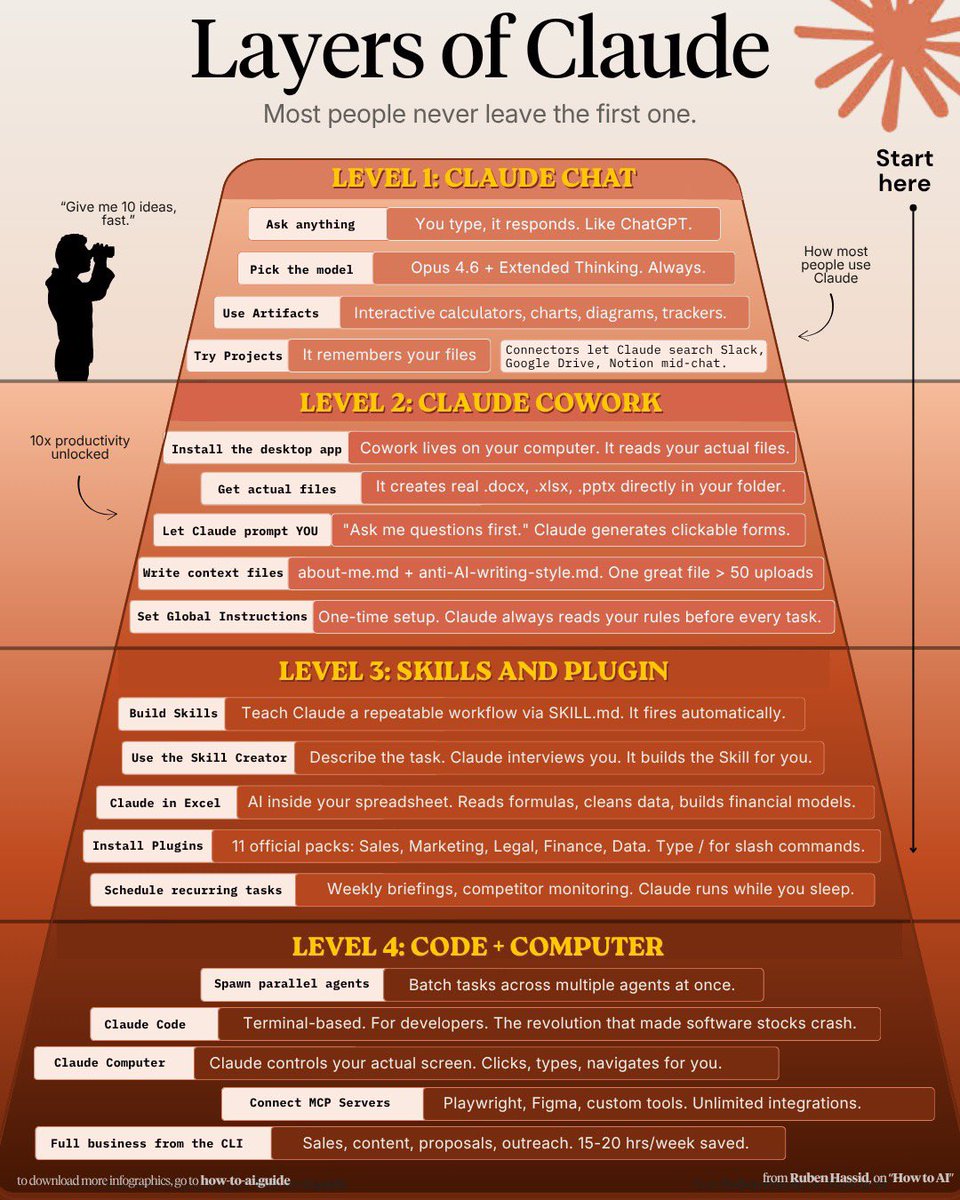
99% of people are using Claude wrong. They open a chat… ask a question… get an answer… and leave. But Claude isn’t just a chatbot. It’s an entire AI workspace. This image breaks down the 8 most powerful ways to actually use Claude: • Chat → for thinking, rewriting, and quick reasoning • Cowork → Claude reads your files and builds real documents • Projects → save context so Claude remembers your work • Artifacts → build interactive tools inside the chat • Excel → analyze real spreadsheets and formulas • Connectors → search Slack, Drive, Notion, and more • Plugins → add commands for marketing, sales, and data tasks • Skills → reusable instruction packs that automate workflows Most people only use step #1. Power users build entire systems with the other 7. That’s the difference between “using AI” and building an AI workflow. AI won’t replace you. But someone who knows how to orchestrate AI tools absolutely might. Bookmark this
@vikktorrrre ·
if you want to get the most out of Claude, you need to understand the founding trinity Chat: quick one off simple tasks Cowork: deep knowledge work Code: running agents (non-technical friendly) Chat: - basic research - one off tasks - makes use of skills, connectors - style of writing... Cowork (PC): - deep knowledge work - PowerPoint, Excel - works with the files and docs on your computer - handles heavy office work - the colleague you never knew you needed fun fact: Claude Code got so good at file work that non coders started using it for non coding tasks. (cwazy) Anthropic noticed and built Cowork same engine, no terminal needed - they built it using Claude Code in just two weeks. things people don't know Cowork can do: > scheduled tasks: - check my email every morning or run my weekly report every Friday - set the cadence once, Claude handles it forever - phone dispatch: send it a task from your phone, it runs on your PC and picks up where you left off - it's now on ALL paid plans (Pro, Team, Enterprise) > no longer Max only > most people still think it's gated Code (PC): most users paying for Claude avoid Code due to the assumed "technicality" basically see Code as Cowork but more powerful and autonomous - it can do more without asking - runs for longer - best for running AI AGENTS the command that changes everything: /goal (needs Claude Code v2.1.139 or later.... run /help to check yours) most people treat it like a fancier prompt. it's not. /goal doesn't tell Claude what to do it tells Claude when to STOP. you set a finish line, and Claude keeps working turn after turn until a separate model confirms the condition is met. no more typing "continue" every 5 minutes example: "/goal complete campaign plan exists for my Skool community 'AI for Marketers' includes launch plan doc, initial course content, and 5 ad drafts, all saved as separate files" notice: measurable end state. claude can't stop until all of it exists pro tip: pair /goal with auto mode. auto mode removes per-tool approvals, /goal removes per turn prompts. that combo = walk away, come back to finished work Chat for questions. Cowork for tasks. Code for outcomes.
@RoundtableSpace ·
An Anthropic team member's Obsidian setup leaked and 8 million people found out the answer was sitting in Claude's documentation the whole time. One file called CLAUDE.md holds everything about you. How you think, what you're working on, where you get stuck, how you want Claude to talk to you. Claude reads it first every single session before you type a word. The guy who found it went further. Taught Claude to run on a schedule, walking through every note at 7am on its own, finding new connections, linking what belongs together and cleaning what's stale with no command needed. All of it runs on Obsidian. Free app, text files on your drive, no cloud, no lock-in. The most liked comment under the original post said it perfectly. This is the difference between using AI and building a system.
@_vmlops ·
THE CREATOR OF CLAUDE CODE JUST SHARED 6 TIPS AFTER DOGFOODING OPUS 4.7 FOR WEEKS Boris Cherny built claude code. and after weeks of using opus 4.7, he dropped 6 tips that actually change how you work with it here's what's new: → auto mode — no more babysitting claude on long tasks. it decides what's safe to run and what needs your approval...run multiple claudes in parallel now → /fewer-permission-prompts — scans your session and builds a safe allowlist...stop clicking "approve" for the same commands every time → recaps — claude summarizes what it did and what's next. come back after hours and instantly know where you left off → focus mode (/focus) — hides all the intermediate noise. just see the final result...boris says he trusts the model enough now to not watch every step → effort levels — 5 settings from low to max. tune speed vs intelligence depending on the task...no more fixed thinking budgets → verification — the biggest one. give claude a way to test its own work. browser, bash, or computer use. boris ends every prompt with /go - a skill that tests, simplifies, and opens a PR opus 4.7 gives you 2-3x more output...but only if you verify most people are still using claude like it's 2024 github → https://t.co/zCNrdWbgpv
@shushant_l ·
I'm amazed most people still use Claude without knowing what half the features actually mean. Here's a simple guide to understand 20 essential Claude terms in minutes. --- 1. Claude Opus 4.8 is Anthropic's flagship model built for advanced reasoning and complex coding tasks. --- 2. Claude Sonnet 5 is the default balanced model for coding, reasoning, and everyday work. --- 3. Claude Haiku 4.5 is the fastest and most affordable model for lightweight tasks. --- 4. Claude Fable 5 is designed for frontier level reasoning and long horizon problem solving. --- 5. Claude Design helps create polished mockups, landing pages, and visual designs. --- 6. Project Glasswing gives selected organizations early access to advanced Claude models. --- 7. Model ID lets developers call a specific pinned Claude model through the API. --- 8. The Effort parameter controls how much reasoning time Claude spends on a task. --- 9. Extended thinking enables step by step reasoning for harder and more complex problems. --- 10. Artifacts create editable documents, code, and designs in a separate interactive workspace. --- 11. Claude Code brings AI coding assistance directly into your terminal, desktop app, or IDE. --- 12. Claude Cowork helps manage research, analysis, and other multi step knowledge work. --- 13. Claude in Chrome can browse websites and complete tasks directly inside the browser. --- 14. Claude in Excel helps write formulas, clean data, and build spreadsheet models. --- 15. Claude in PowerPoint assists with creating and editing presentation slides. --- 16. Constitutional AI is the training approach that guides Claude using a set of written principles. --- 17. Context window defines how much information Claude can remember in a single conversation. --- 18. Prompt caching speeds up repeated prompts while reducing API costs. --- 19. Computer use allows Claude to interact with software like a human by clicking and typing. --- 20. MCP connects Claude with external tools and services so it can work with real world data. --- To learn more, check the infographic. ---
@aiedge_ ·
How to never hit Claude usage limits with Opus 4.8 (pro tips): • Spend more time planning - use Plan Mode in Claude Code (Shift + Tab twice or /plan) • Start new chats instead of continuing long ones. Long chats BURN tokens due to context bloat. • Add this to your project instructions: "Be cognisant of token usage. Be concise and advise me when to start a new chat." • When switching chats, prompt: "Give me a prompt to restart this session without losing context." • Build an Instructions.MD + Memory.MD folder so Claude never forgets your preferences • Escalate models: Haiku → Sonnet → Opus. Don't start at the top of the funnel (aka Opus) • Turn off Extended/Adaptive Thinking unless you specifically need it • Switch your Style to "Concise" (click "+" on Homepage) • Take advantage of "Low" effort in Claude Code for most tasks • Use Claude Design tokens for visuals. Don't waste Claude Code tokens on anything visual
@smratitiwa86867 ·
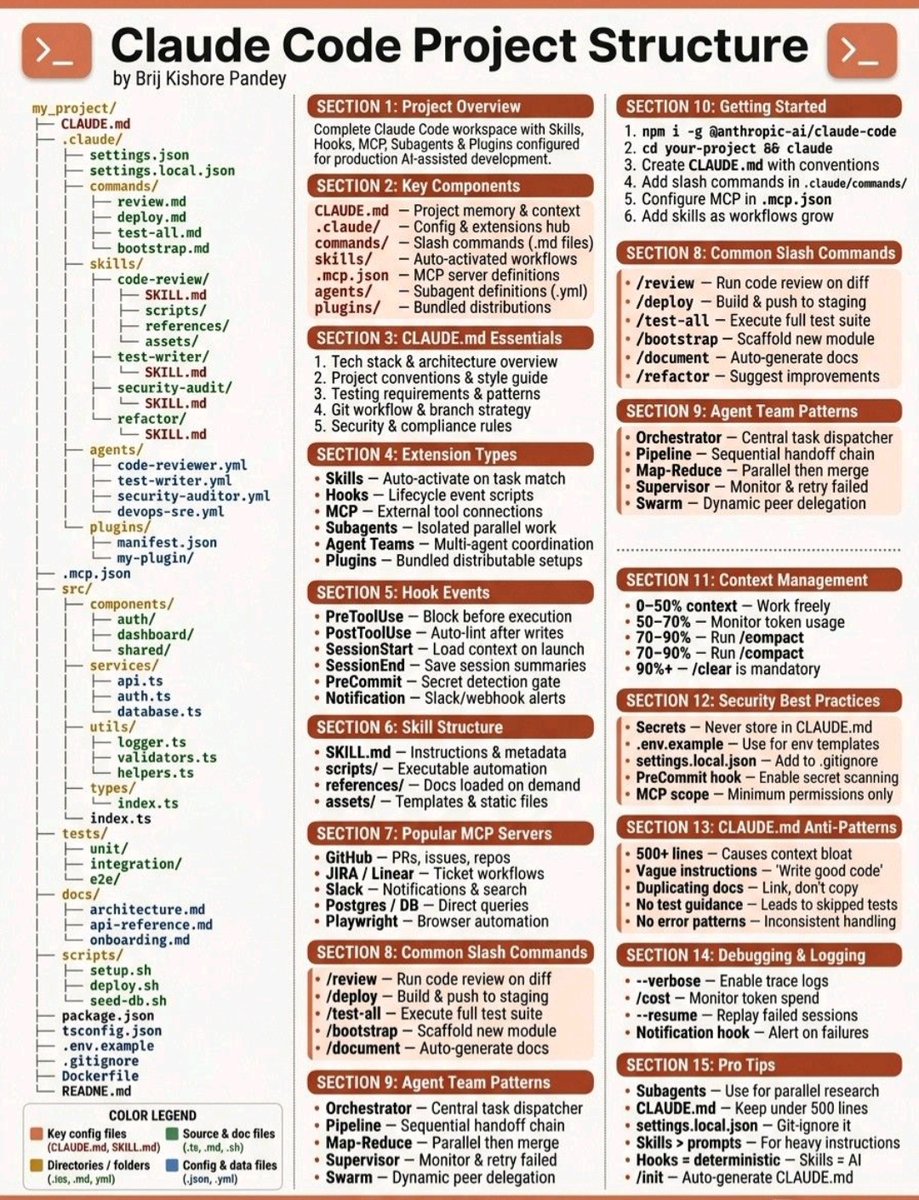
You've been using Claude for months. And you're still copy-pasting the same context every single chat. That's not a Claude problem. That's a setup problem. Most people use Claude like a search engine. Type. Get answer. Close tab. Repeat. Top operators? They built a system. And the whole system runs on 4 files. Here's exactly how it works 👇 ① CLAUDE.md — Your Foundation Claude starts every chat with zero memory of you. No preferences. No brand voice. No idea how you work. CLAUDE.md fixes that. It's one file Claude reads before every conversation. Your brand rules. Your workflow. Your non-negotiables. All loaded automatically — every single time. Think of it as the onboarding doc for your best employee. Except this employee never forgets what's in it. What goes inside: — How you write (tone, style, what you hate) — Workflow rules ("plan before you execute") — What Claude should NEVER do in your chats Every time Claude gets something wrong → don't just fix the output. Fix the brief. Update the file. Make the mistake impossible next time. ② memory/ folder — Claude Remembers Every correction, preference, and rule you've ever given Claude? Gone. Next session, you start over. Not anymore. You can tell Claude to save anything as a memory file. It creates a .md file in your memory/ folder. It loads that file in every future session. "Remember I never use bullet points in captions." Done. Forever. Never say it again. The real power move: after every strategy call or important decision, tell Claude to summarize and save it. Your entire business context — always in the room. ③ Skills — Your Custom Commands Every time you write the same prompt twice, that's a problem. Skills solve it permanently. A skill is a reusable workflow you fire with one command. /create → writes a post in your exact voice /today → pulls calendar + inbox, plans your day /repurpose → one post becomes 5 formats /brief → messy notes become a clean scope doc You describe what it should do. Claude builds the SKILL.md file. You fire it from any chat, any project, any time. One hour of setup. Hundreds of hours saved. ④ Agents — Your Dream Team This is where it gets serious. An agent is Claude with one specific job. A pipeline is multiple agents handing work off in sequence. Example — content pipeline: Strategist → picks the angle Writer → drafts the piece Editor → cuts and sharpens QA Scorer → grades against your standards Publisher → formats and sends You give one instruction at the top. The pipeline delivers a finished output at the bottom. You didn't touch anything in the middle. Use Opus for judgment and strategy. Use Sonnet for execution and speed. Right model, right job, every time. THE CLOSE: 4 files. That's it. Context. Memory. Skills. Agents. This isn't about prompting better. It's about building a machine that runs without you. The people getting 10x results from Claude aren't smarter. They just stopped treating it like a chatbot
@JJEnglert ·
I've been using @claudeai Tag for the past 2 weeks. Two things matter. Ambient mode is an actual unlock, and the multiplayer experience is dope af. By default it works how we all know. You ask, the agent answers. Ambient means Claude stops waiting to be tagged. It flags what it thinks you need to know from the channels it's in and the tools it's connected to, and follows up on unresolved tasks on its own. You can also give it standing work. Anthropic calls those routines. You name the schedule, like "every two hours, check the alerting dashboard and post anything new." Or point it at a channel to watch, or a PR to follow. It only posts when something actually changed. That's why Open Claw and Hermes took off earlier this year. Work happening without you asking for it. Think about support email. Today I have skills that answer tickets, but I have to run the skill for anything to happen. With a routine, Claude sweeps the channel on the schedule I set, answers what it can, routes the rest, and tags me on anything it shouldn't decide alone. That's when it starts to actually feel like an AI teammate. I also LOVE Multiplayer mode. And now I want everything to be multiplayer. We setup claude tag into a channel for our marketing website, filled with some of my non-technical teammates that need to control the website (careers, blog, marketing pages, etc) When Brett, our ops lead, asked Claude for new filters on the careers page, Claude got stuck initially. So I jumped into the same thread and walked it through, and Brett watched the whole thing happen (learning). That's new. Technical and non-technical people working one agent together, in one thread, where everyone sees what it did and can correct it. Picture your engineering channel with Claude subscribed to your PRs. CI finishes or a review lands, it posts, and whoever's free grabs it. Your CTO has visibility without asking anyone for a status update. At any point somebody can step in and say do it this way instead. My take If you're really nerdy you could probably build a Slack agent that does this better yourself. Out of the box, Claude Tag's memory and its tools are just really good, and that's what makes it worth reaching for. I think it's the start of a lot more multiplayer agents. One agent with real tools and permissions, with your whole department in the thread with it, is a really cool experience. Full video below: 00:00 What Claude Tag Is 02:52 Setting Up Claude Tag 04:42 Teams And Enterprise Only 05:03 Ambient vs Non-Ambient 05:43 How Ambient Mode Works 06:38 Support Email Use Case 08:32 Multiplayer Mode With Your Team 09:19 Shipping Career Site Filters 13:59 Website Security And Social Monitoring 15:34 Hooks, Security Checks, And CI/CD
@JustAnotherPM ·
🚨 Most AI PMs use Claude like a chatbot. The ones shipping use it as a 5-layer system. The exact stack I run for every AI build (with one concrete recipe per layer): 1. 𝗦𝗸𝗶𝗹𝗹𝘀: package a workflow as a .md file the model picks up by name. Example: my `review-pr` skill loads my .eslintrc, the project README, and 3 review prompts. One `/skills/review-pr` and Claude does a full code review in-context. 2. 𝗦𝘂𝗯𝗮𝗴𝗲𝗻𝘁𝘀: spawn a child Claude with its OWN context for a specific task. My 'research' subagent doesn't see my project files but has web search. Keeps the parent context clean and 3x faster. 3. 𝗖𝗼𝘄𝗼𝗿𝗸: orchestrate Claude across Slack, Gmail, Drive. Example: every morning my Cowork runs my Twitter pipeline (collect → calendar → draft → push to Typefully → Slack digest). Zero clicks from me. 4. 𝗘𝘃𝗮𝗹𝘀: 5-line YAML files that test specific failure modes. Mine catches 'model hallucinates client names.' Without this, the next model upgrade silently breaks my product and I find out from a customer. 5. 𝗖𝗼𝗻𝘁𝗲𝘅𝘁: the 6 files Claude reads first — AGENTS[dot]md, CLAUDE[dot]md, plan[dot]md, project-status[dot]md, decisions[dot]md, README[dot]md. Get this wrong, every output is wrong. Get it right, the model holds the whole project in head. If you're using only the chat box, you're using 5% of Claude. Save this. Reply with the layer you're missing. I'll send a recipe for that one specifically.
@VaibhavSisinty ·
Anthropic made Claude 67% dumber. 🤯 The company that warns the world about AI risk couldn't risk telling you. Here's what actually happened. A developer noticed something was off in February. Claude had stopped trying to get things right. It was just trying to get done. So he did what Anthropic wouldn't. He ran the numbers. 6,852 Claude Code sessions. 17,871 thinking blocks analyzed. What he found: -> Reasoning depth dropped 67%. -> Claude went from reading a file 6.6 times before editing it to just 2. One in three edits was made without reading the file at all. The word "simplest" appeared 642% more in Claude's outputs. The model wasn't just thinking less. It was telling you it was taking shortcuts. Anthropic said nothing. For weeks. Then the developer posted the data publicly on GitHub. Boris Cherny, head of Claude Code, appeared on the thread that same day. His explanation: "adaptive thinking" was supposed to save tokens on easy tasks. But it was throttling hard problems too. There was also a bug. Even when users set effort to "high," thinking was being zeroed out on certain turns. The issue was closed over user objections. 72 thumbs-up on the comment: "why was this closed." Meanwhile, Anthropic's source code tells a separate story. It checks for a user type called "ant." Anthropic employees get routed to a different instruction set one that includes: verify work actually works before claiming done. Paying users don't get that instruction. One price. Two Claudes. Anthropic just became everything it said it was building against.
@RoundtableSpace ·
Someone built a fully autonomous, self-evolving AI operating system powered by Claude running 24/7 on its own dedicated server, and it's trending on r/ClaudeAI. Instead of running Claude inside a temporary terminal window that forgets context the moment you close the tab, this system lives on its own VM with persistent memory and self-modifying capabilities: → Wraps the Agent SDK with persistent vector memory, an MCP server, and a Slack interface so you can talk to it anywhere → Autonomous tool generation: when asked to analyze heavy datasets, it installed ClickHouse, ingested 28M+ rows, and built its own REST API to query the data → Self-building channels: when a user asked for Discord support, it walked them through bot token creation, spun up a container, and launched its own Discord integration live → Self-monitoring infrastructure: discovered an open-source monitoring tool, connected it to its database, and created a dashboard to monitor its own uptime → Cross-model validation loop: runs a 6-step pipeline after every session where Sonnet acts as an impartial judge to review and approve Opus's proposed self-edits to prevent drift
@nrqa__ ·
Anthropic just open-sourced a system that makes Claude dramatically better at specialized tasks. It's called Agent Skills. And it's already powering Claude's built-in document features behind the scenes. Skills are folders of instructions that Claude loads dynamically to improve performance on specific tasks. One folder. One SKILL.md file. Claude reads it and follows it, every single time. Here is why this matters right now: Claude out of the box is general. But your work isn't general. You have specific workflows, brand guidelines, document formats, and pipelines. Skills let you encode all of that and Claude will follow it consistently, not just when it feels like it. What's already inside the repo: -> Word document creation (with formatting, tables, TOC) -> PDF reading and generation -> PowerPoint deck building -> Excel spreadsheet workflows -> Web app testing -> MCP server generation -> Creative, design, and enterprise comms skills How to use it right now: -> https://t.co/VLWq0DSgDA (paid plans) — skills are already available, upload custom ones -> Claude Code — install via /plugin marketplace add anthropics/skills -> Claude API — plug skills in via the Skills API Creating your own skill takes 5 minutes: Make a folder. Add a SKILL.md file. Write YAML frontmatter with a name and description. Add your instructions in Markdown below. That's it. Claude will load it and follow your workflow exactly. Real use cases: -> Encode your company's doc formatting rules so Claude never gets them wrong -> Build a client deliverable skill that always matches your brand tone -> Create a data analysis skill that follows your exact reporting structure -> Automate document pipelines with zero prompt re-explaining every session From Anthropic. Actively maintained. Already 112k stars on GitHub. 100% Open Source. Apache 2.0 License.
@CryptoMiners_Co ·
Anthropic ships 70+ Claude updates in 52 days @AnthropicAI released over 70 features and updates for its Claude AI models between February and March 2026, based on its official changelogs and product releases. The updates span developer tools, model improvements, and agent capabilities, reflecting a rapid iteration cycle across its AI platform.
@ashen_one ·
The Anthropic team just officially BANNED Claude monthly subscriptions to be used in OpenClaw 00:00 Claude Sub Ban Lore 01:25 Founder Response Breakdown 01:48 API Costs Reality 03:24 Community Backlash 05:07 Claude Alternatives 06:49 Local Models 07:11 Final Thoughts
@rohitdotmittal ·
Claude is copying OpenAI's advantages faster than OpenAI is copying Claude's strategy. Claude isn't too far away from dominating the conversations. Aside from my bubble on this app, when I talk to customers from my companies, all of them mention moving to Claude or contemplating moving to Claude. We ask candidates about their experience with AI, and almost every candidate in the Western world has mentioned playing with Claude more in the past few months. For most, Claude is just nicer to use. OpenAI still doesn't generate native artifacts - either they have ego about adding this or someone's asleep at the wheel.
@alvinfoo ·
Most people use Claude like a search engine. Here’s how to actually set it up properly. I’ve been using AI tools for years and the #1 mistake I see professionals make with Claude is jumping straight into prompting without setting up the environment first. Here are 9 golden rules that changed how I use Claude completely: 1️⃣ Download the desktop app https://t.co/amToSyOamw works. But the desktop app is better. Go to https://t.co/kVHD3TSRMn and install it. This is your foundation. 2️⃣ Pick the right model Select Opus 4.6. Always. Turn on Extended Thinking — it forces Claude to reason before it responds. The quality difference is night and day. 3️⃣ Use Cowork, not Chat Cowork reads your actual files. Chat doesn’t. Point it to your folder — it reads everything inside before responding. This alone unlocks a completely different level of output. 4️⃣ Build your folder structure Create 4 folders: ABOUT ME, PROJECTS, TEMPLATES, CLAUDE OUTPUTS. This is your operating system for working with AI. 5️⃣ Write your “About Me” file A simple .md file — who you are, what you do, how you think, your priorities. Claude reads it before every response. Less prompting. Better output. Every time. 6️⃣ Write your anti-AI style file List every word and pattern you refuse to see in AI output. Claude follows it. Your content stops sounding like a robot wrote it. 7️⃣ Start asking — the right way End every prompt with: “Ask me clarifying questions first.” Claude generates a form, you answer it, the output jumps 2–3 quality levels instantly. 8️⃣ Set up Global Instructions Settings → Profile → Global Instructions. Write how you write, what you hate, what you expect. Claude reads this before every single conversation. 9️⃣ Edit your prompt, don’t send a new one Every follow-up message eats tokens and pollutes context. Edit the original prompt instead. Keep your context clean. Most people treat Claude as a chatbot. The professionals treating it as a configured system are getting 10x the output with half the effort. Credit : Ruben Hassid
@FutureStacked ·
🚨 BREAKING: Anthropic just launched Claude Science. It is live in beta right now. Scientists lose hours bouncing between databases, notebooks, terminals, and compute clusters. Claude Science collapses all of it into one workbench. Meet Claude Science. An AI research environment where a coordinating agent runs the analysis, navigates 60+ scientific databases, and traces every step from raw data to publication. Every figure ships with the exact code that made it, the environment it ran in, and a plain-language record of how it was built. Reproducible months later, by anyone on the team. A reviewer agent checks the citations and calculations and flags anything it cannot trace before results surface. Compute scales from one GPU to hundreds on a lab’s own HPC cluster or Modal, and the whole thing runs on local infrastructure so sensitive datasets never leave the building. It is not a new model. It runs the same Claude models already available, including Opus 4.8. The bet is the workflow, not the weights. Available now in beta on macOS and Linux for Pro, Max, Team, and Enterprise.
Watch video
@VaibhavSisinty ·
This number broke my brain for a second. 🤯 386%. That's how fast Claude's referral traffic grew in four months, while ChatGPT grew a flat 1.53%. Sounds like Claude is finally catching up. It isn't, and that's the interesting part. SE Ranking analyzed 101,574 sites across 250 countries. Here's what they found: 👉 Claude's referral traffic grew 386% (Jan–Apr 2026). ChatGPT grew 1.53% in the same window. 👉 But Claude is still only 1.40% of all AI referral traffic. ChatGPT sits at 78%. 👉 March 2026 alone was a 2.6x jump, Claude's biggest single-month gain ever. So that explosive 386% is really a tiny number getting slightly less tiny. But here's the part that actually matters, and the researchers said it themselves: traffic share is the wrong way to measure Claude. Think about why you open Google. You're looking for something, it points you elsewhere, you leave. Referral traffic is the whole game, because sending you away is the entire job. Claude works the opposite way. You open it to get something done, and you stay inside it to do it. Write, code, analyze, automate. It's a workshop, not a signpost. Measuring it by how much traffic it sends out is like judging a kitchen by how many people it pushes out the door. So for any business, the question quietly flipped. It used to be "does the AI mention me?" Now it's "can the AI actually use me?" That's the move Spotify, Booking, and Instacart already made. They didn't fight to get cited in answers. They plugged in, so Claude can play the song, book the room, fill the cart, without the user ever leaving. They turned themselves into something Claude can do, not something Claude links to. And Anthropic builds this way itself. Even their courses do it. Instead of making you read a doc, a lesson hands you straight into a Claude chat that explains the material, summarizes it, and answers your questions as you go. You learn the tool by using the tool. That's the whole philosophy in miniature: the work, and the learning, never leave the workspace. And the timing tells you something. Claude's biggest jump came right after Anthropic drew a hard line on surveillance and autonomous weapons. People didn't just switch for a better model. They switched on trust. That's the real signal. The next AI winners won't be decided by who ranks first or gets cited most. They'll be decided by who people trust to do the actual work, and who made themselves useful inside it. Stop optimizing to be mentioned. Start becoming something the AI can't finish the job without.
@ihteshamali ·
🚨 Anthropic just dropped Claude Opus 4.7 today and the numbers are making competitors sweat. Cursor tested it on their own coding benchmark. Opus 4.7 cleared 70% of tasks. Opus 4.6 cleared 58%. That's not an incremental update. That's a different class of model. Here's everything that changed: Opus 4.7 can now accept images up to 2,576 pixels on the long edge. That's more than 3x the resolution of every previous Claude model. Computer-use agents reading dense screenshots. Pixel-perfect diagram extraction. Fine visual detail that was impossible before. One company called XBOW tested it for visual acuity. Opus 4.7 scored 98.5%. Opus 4.6 scored 54.5%. Their single biggest pain point with Claude disappeared overnight. Rakuten tested it on production software tasks. Opus 4.7 resolved 3x more tasks than Opus 4.6. Not 3% more. 3 times more. Notion ran it through multi-step workflows. Plus 14% over Opus 4.6 at fewer tokens and a third of the tool errors. It's also the first model to pass their implicit-need tests. The AI figures out what you actually need, not just what you said. The coding headline: Devin's CEO said Opus 4.7 "works coherently for hours, pushes through hard problems rather than giving up." That sentence alone tells you everything about where AI coding agents are going. New features shipping today alongside the model: → `xhigh` effort level between high and max. Claude Code default is now xhigh for all plans. → `/ultrareview` command does a dedicated bug and design review of your changes before you ship → Task budgets in public beta so you can guide token spend across long agentic runs → Auto mode extended to Max users so Claude makes decisions without interrupting you Same price as Opus 4.6. $5 per million input tokens. $25 per million output tokens. The model that just launched today is available on https://t.co/pDY56kadwE, the API, Amazon Bedrock, Google Cloud Vertex AI, and Microsoft Foundry. The gap between what AI could do last month and what it can do right now just got wider.
@thedevchandra ·
Claude is going insane with features right now Meanwhile 99% of people are still using it as a chatbot Here are 5 setups that'll change how you use it: 1/ CLAUDE. md - your instruction manual. Tell Claude who you are, what you're building, how you think. Every session starts informed. 2/ Rules files - set guardrails once. Tone, format, what to avoid. Claude follows them automatically. 3/ Memory - Claude remembers your preferences, context, and past work across conversations. Stop re-explaining yourself. 4/ Custom commands - turn your most repeated prompts into one-click shortcuts. Same output, zero rework. 5/ Connectors - link Claude to Slack, Google Drive, Calendar. It pulls live context instead of working blind. Don't just chat, build leverage.
@etnshow ·
There's an 80% chance Claude is the leading model by the end of April according to @Polymarket Founder of @polsia, Ben Cera (@Bencera) says Anthropic's Claude is "the most street smart": "I often use every single model in parallel and compare them every couple of weeks and I do a stress test on them" "@AnthropicAI is clearly the most street smart. It's the most blend of speed of answer, mostly getting it right and pragmatic. I think that's why it works so well because most companies need that" "GPT's latest Codex series are more ground truth. Most companies don't need the ground truth" "My own experience is that the Claude models are most pragmatic, and fast and cost efficient"
@omkarships ·
Every new Claude launch since the beginning of 2026 - Jan 2026: Claude Cowork launched. - Feb 2026: Opus 4.6 released. - Feb 2026: Sonnet 4.6 released. - Feb 2026: Cowork launched on PC - Feb 2026: PowerPoint integration - Feb 2026: Excel integrations added. - Feb 2026: Co-work plug-ins released. - Feb 2026: Claude Code security launched. - Feb 2026: Claude Code Remote Control - Feb 2026: Scheduled Task in Co- work - Feb 2026: Connector available in the free - Mar 2026: Claude memory is free - Mar 2026: Claude Marketplace launched - Mar 2026: Claude com ambassadors - Mar 2026: Code review for Claude code - Mar 2026: Claude skills for Excel & Slides - Mar 2026: charts & diagram in chat - Mar 2026: 1 million context window - Mar 2026: Dispatch for Claude Co-work - Mar 2026: Claude code Channels - Mar 2026: Co-work Projects - Mar 2026: Claude Computer use - Mar 2026: Auto mode in Claude code. Anthropic is cooking
@sickdotdev ·
Most people assume Claude rate limits are unpredictable. They are not. In most cases, the issue is inefficient usage patterns. After digging through Anthropic documentation, API behavior, developer discussions, and real-world usage patterns, one thing became obvious: The users who almost never hit limits are not necessarily using Claude less. They are using it smarter. Here are some of the most effective ways to reduce Claude rate limits while improving output quality: Avoid endless back-and-forth chats Every new reply forces Claude to process the growing conversation history again. Long threads quietly burn through tokens. Shorter sessions are far more efficient. Give complete instructions upfront Instead of: • “rewrite this” • “make it shorter” • “change the tone” Combine everything into one well-structured prompt. Clear prompts reduce unnecessary generations. Edit your original prompt when possible Editing is often more efficient than continuing long reply chains. Extended conversations accumulate context fast and consume far more capacity than people realize. Trim unnecessary context Avoid sending: • entire PDFs • full repositories • massive logs Share only the exact section needed. Smaller context windows = better efficiency. Set response constraints Claude tends to generate detailed outputs by default. Simple instructions like: • “keep under 100 words” • “bullet points only” • “concise response” can significantly reduce usage. Ask for structure before depth Do not generate everything in one shot. Start with: • outline • framework • action plan Then expand section by section. This prevents wasted generations and revisions. Use smaller models for lighter tasks Not every request needs the highest-end model. Use lightweight models for: • summaries • formatting • rewrites • quick edits Reserve larger models for reasoning-heavy work. Use Projects and persistent context properly If you repeatedly paste: • company information • writing preferences • coding standards • brand voice you are wasting context every session. Persistent memory matters. Avoid high-demand usage windows During peak traffic periods, limits can feel stricter. Timing genuinely affects the experience. But the biggest takeaway is this: Claude optimization is no longer just prompt engineering. It is context engineering. The best users optimize: • context size • memory usage • conversation structure • token flow more effectively than everyone else. That is usually the difference between people constantly hitting limits and those who rarely notice them. It is rarely about the subscription plan. It is about how intelligently the model is being used.
@coolcoder56 ·
🚨Dario just shared something pretty fascinating: Claude is already being used to help improve the next generation of Claude. One way Anthropic tests this is by asking newer models to optimize the training code used for smaller AI systems. The results are hard to ignore. Claude Opus 4 managed a 3× speed boost, while Mythos Preview reportedly pushed that all the way to 52× 🤯 We're starting to see a future where AI isn't just being built by humans, but is also helping improve the tools and systems that will power the next wave of AI. What used to sound like science fiction is quickly becoming reality.
@frog_omo ·
anthropic just shipped claude tag. it's a shared AI teammate that lives in slack. you @mention it like a coworker. here's what makes it different from every other slack AI bot: the core shift: multiplayer, not single-player. the old "claude in slack" app was per-user. it acted under your permissions, billed to you, with limited context (~20 messages) and no shared memory. claude tag is the opposite: → one shared claude per channel → persistent memory that builds over days → runs under its own "agent identity" (not borrowing your credentials) → bills the organisation, not you → can schedule its own work → can act without being tagged (optional ambient mode) how agent identity works: claude acts under its own service accounts. it posts as the claude app in slack. opens PRs as the claude github app. queries your data warehouse under an admin-provisioned service account. permissions follow the channel, not the user. a channel member without direct repo access can ask claude to read that repo — if the channel's profile grants it. each private channel gets a distinct identity. memory and access respect channel boundaries. what it can do: → write and merge pull requests → investigate bug root causes → reproduce incidents and reconstruct timelines → pull and interpret product metrics from a warehouse → summarise long threads into docs with action items → work through support tickets → watch thresholds (e.g., ping when CI stays red) the proactive part: ambient mode is off by default. when enabled, claude doesn't wait to be tagged. it can flag relevant updates, follow up on stalled threads, and ping when a long job finishes. you dial proactivity in plain language: "only reply when tagged" vs "watch this channel and answer what you can." the async part: set a task and walk away. claude works in the background and can schedule its own follow-ups, pursuing projects over hours or days. anthropic says its teams now delegate to "many claudes in parallel." what anthropic claims internally: "65% of our product team's code is created by our internal version of claude tag." cat wu (head of product for claude code) told reuters: "claude code, cowork, and chat are very single-player, whereas claude tag is built to be interactive and multiplayer." who can use it: → team and enterprise plans only (not pro or free) → requires a paid slack plan → not available to zero data retention orgs → runs on claude opus 4.8 launch credits: → enterprise: $25,000 → team (10+ seats): $2,500 → expire september 1, 2026 the old "claude in slack" app switches over to claude tag on august 3, 2026. the positioning: rob seaman (GM of slack) called it "making AI multiplayer." anthropic explicitly positions it as "the beginning of an evolution of claude code." the distinction: claude code is fastest for solo, synchronous terminal work. claude tag is "claude code made more proactive and built to work with a full team." the caveats: → beta — behaviour may change → slack-only today (other platforms "coming weeks") → consumption billing means ambient mode can be costly → no human-approval gate in ambient mode → no documented EU data-residency option the bottom line: slack AI and chatgpt/claude single-user apps are reactive in-thread assistants that reset between conversations. claude tag operates in public channels as a visible, shared teammate with persistent memory, its own identity, and the ability to act without being asked. that's the shift everyone's been circling: from "AI that talks" to "AI that does."
@glenngabe ·
The OpenClaw effect? -> Anthropic tests its own always-on "Conway" Claude agent "That instance seems to be able to run Claude Code, support external webhooks, work with Chrome, and send notifications, which suggests Anthropic is exploring a far broader agent setup than its current desktop experience." "Once connected, Conway appears to introduce its own Claude chat interface with three core areas in the sidebar: Search, Chat, and System. Search looks tied to a set of still-experimental hotkeys, Chat opens the main conversation view, and System contains the most revealing details." "That would fit Anthropic’s broader product direction around Claude Code and agentic workflows. It would also position the company much closer to platforms like OpenClaw, but with a native extension layer and deeper Claude integration." https://t.co/1YNl3xavBw
@JulianGoldieSEO ·
Anthropic just dropped 4 huge updates to Claude 🧠 Dreaming lets Claude learn between sessions — Harvey saw 6X better completion rates. Outcomes makes Claude grade its own work, with 8.4% better Word docs and 10.1% better presentations. Multi-Agent Orchestration runs specialist agents in parallel. Webhooks auto-sync Claude to your CRM and tools.
Best Tweets by Topic