Codex as Desktop/App Surface & Agent Interface
Discussion of the Codex app as a new interface paradigm — command center for parallel threads, browser and computer use, and the shift from chatbot to agent workspace.
26%
Explore the best tweets about OpenAI Codex, including coding-agent workflows, CLI use, delegated tasks, reviews, and engineering results. Updated every two weeks.
Real Codex tasks and software-engineering outcomes, excluding unrelated historical or publishing references to codex.
Original Xholic analysis
Across 50 posts from 42 creators, this X conversation is uniformly positive on OpenAI Codex (100% SUPPORTIVE, 100% POSITIVE) and heavily visual (80% carry media). Discussion clusters on the Codex app as an agent interface (26% of posts), official product updates (16% — the highest-scoring theme at a 31.51 median all-time score), and near-ties between Codex-vs-Claude Code comparisons and long-running autonomous coding outcomes (14% each). Freshness is limited: median post age is 162.3 days and only 12% were published within 90 days.
100% of posts
All-time engagement
100% of posts
Published in 90 days
Conversation map
Discussion of the Codex app as a new interface paradigm — command center for parallel threads, browser and computer use, and the shift from chatbot to agent workspace.
26%
Announcements and changelogs for Codex surfaces: CLI refreshes, desktop app versions, Chrome extension, Windows support, iOS, cloud, and ChatGPT integration rollouts.
16%
Direct comparisons of UX, multi-agent architectures, rate limits, interruptibility, pair-programming vs coworker paradigms, and when to use each tool.
14%
Reports of Codex shipping real software autonomously: multi-hour builds, full apps, non-coders producing products, Symphony-style issue-tracker-driven pipelines, and PR review automation.
14%
Deep dives on Codex CLI internals, agent loop mechanics, prompt caching, context compaction, Rust implementation, harness-vs-model tradeoffs, and building on the open-source app server.
12%
Running Codex on local machines via Ollama with open-source models (Qwen, Gemma, GLM, DeepSeek), eliminating API costs and cloud dependency.
6%
Running Codex alongside Claude Code or multiple models, plugin bridges, agent-to-agent communication, manager/executor routing, and dual-agent playbooks.
6%
Codex across devices — Mac Studio hubs, iOS/Telegram remote access, SSH, cloud sandboxes, Tailscale networking, and coding from anywhere.
6%
Tone and stance
Performance benchmark
Posts with media make up 80% of this collection. Their median all-time score is 8.99, compared with 9.41 for text-only posts.
Format mix
Consensus and debate
What performs
Statistical standouts
Creator landscape
The five most represented creators account for 20% of the selected posts.
1. Vaishnavi
@_vmlops
2 posts
2. CHOI
@arrakis_ai
2 posts
3. Julian Goldie SEO
@JulianGoldieSEO
2 posts
4. Anthony Kroeger
@kr0der
2 posts
5. Mark Kretschmann
@mark_k
2 posts
6. 0xMarioNawfal
@RoundtableSpace
2 posts
Engagement concentrates on official announcements and their coverage. The top outlier is 2052480800004956323 (OpenAI announcing Codex now works directly in Chrome on macOS and Windows, 1364.91 all-time score, 151.82x the 8.99 median), alongside 2104999323385929777 (OpenAI Developers announcing a major Codex CLI refresh with a new full-screen interface, 59.9x) and 2104984840231883017 (third-party news account coverage
The largest theme (13 tweets, 26% share, median 9.937) treats the Codex app as a command center: browser-use testing tips in the app (2048657688695828753), agent control of real phones via the open-source Mobile Harness project (2087116985310364121), and an inside look at how the Codex team itself builds with the app (2040783271123136750).
The long-running outcomes theme (7 tweets, 14% share, median 7.936) reports a 9-hour full-auto Mac app build by a self-described non-coder (2046886165509476818), a RuneScape clone that Codex improves live while the poster plays alongside 40 other people (2096792854622536106), and a widely shared account of Symphony — an open-sourced, issue-tracker-driven pipeline that the post credits with 1M+ lines of production代码
Since the previous snapshot
Themes, sentiment, stance, and post format are classified per tweet. All counts, shares, medians, creator concentration, freshness, and performance comparisons are then calculated directly from the published snapshot.
Xholic's all-time score compares engagement while accounting for reach, post age, and creator consistency. It is used for relative comparisons within this collection.
This report analyzes the exact 50-post snapshot shown below. AI identifies editorial categories and drafts explanations; all statistics are calculated from the snapshot, and every narrative claim is checked against cited posts before publication.
Best OpenAI Codex tweets
Ranked 01–50

@OpenAI ·
Codex now works directly in Chrome on macOS and Windows. It’s even better at working with apps and sites in Chrome, and now works in parallel across tabs in the background without taking over your browser. To get started, install the Chrome plugin in the Codex app.
 Watch video
@gregisenberg ·
THE 64 MINUTE OPENAI CODEX MASTERCLASS IS HERE if you've been meaning to learn Codex, this is the episode for you, we cover: 1/ Claude vs Codex (what's better?) 2/How to run Claude Code inside Codex (really cool) 3/Why GPT 5.5 changed everything for browser agents 4/How to create skills (reusable agents you build once and call by name forever) 5/How to connect Notion with surgical permissions (one database, not the whole workspace) 6/How to use Remotion inside Codex to create videos 7/ How to one-shot full mobile apps in Swift 8/The 4 projects to run on day one to get up to speed fast shoutout to @rileybrown for coming onto @startupideaspod for the 5th time. every episode he delivers. this one is the Codex masterclass. if you've been meaning to learn Codex, this is the episode. 100% free i just want to see you build your ideas. https://t.co/JELPC7WQhs watch
 Watch video
@AlexFinn ·
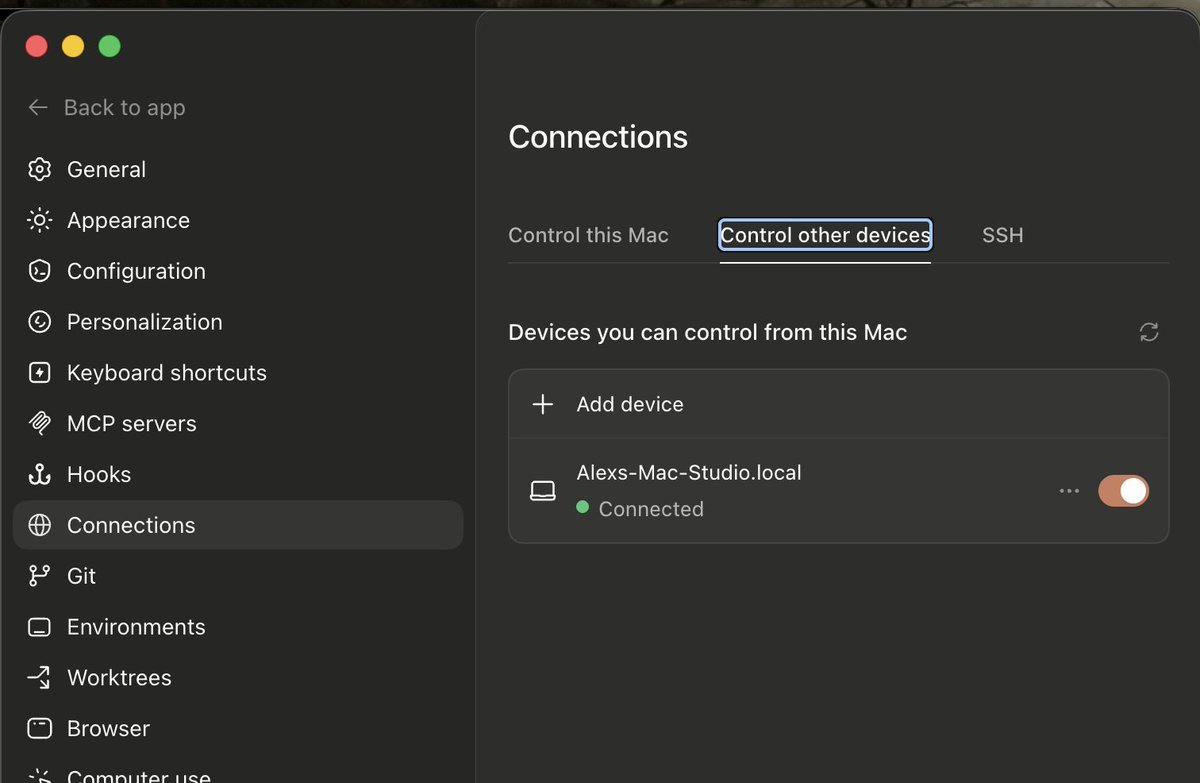
You need to set up this Codex system I have Been taking advantage of their new remote features and my productivity has 1000x'd I have one device (Mac Studio 1) as my main dev machine. That's where all code is written Then all my other devices (iPad, iPhone, other Mac Studios) ALWAYS remote into that Mac Studio 1 to do their work I never do local work on any of them. They're always remotely controlling the Mac Studio No matter which device I'm on, no matter where I am in the world (could be at the grocery store, in bed, Japan, on the toilet, by the pool, on the road using FSD) I have code written in one place Made coding big projects SO much easier Here's what I'd do if I were you Choose one device you have (preferably a desktop device like Mac Mini or Mac Studio that is always on) Make this your main dev device. Make sure it never turns off and never goes to sleep Go into Codex app then settings on that device. Go to connections > control this Mac. Turn that on Then go into every other device you have, mobile, desktop, whatever, and go into Codex settings and enable control other devices Also download Tailscale on every device. This will allow you to create a private network that will allow your other agents (OpenClaw or Hermes) to jump between computers and make changes when necessary You now have a super powered AI private network where you can code or get work done from any device anywhere in the world Promise this 1000x's your productivity

@OpenAIDevs ·
Codex CLI just got a major refresh, with a new look and powerful new capabilities. We’re continuing to invest in Codex CLI for developers who live in the command line. New full-screen interface, better readability, and ways to manage parallel work, all inside your terminal.
 Watch video
@GergelyOrosz ·
If you use Codex, @thsottiaux needs no introduction. We talked 100% about Codex (fun fact: he started building it!), and 0% about resets. Timestamps: 00:00 Intro 07:21 Working at Google 12:41 What drew Tibo to OpenAI 15:19 The early days of Codex 18:20 Why Codex was built in Rust 21:15 Why Codex is open source 25:50 Codex plays nice with other models: why? 32:09 How the harness works 36:44 Harness and model improvements 41:19 The SDLC behind Codex 46:39 Code reviews at Codex 52:09 Maintenance and architecture 56:43 How AI tools expand what engineers can do 1:02:30 The Merge: ChatGPT + Codex 1:07:16 How Tibo uses Codex and ChatGPT 1:10:44 Advice for engineers who want to work in AI Brought to you by: • @turbopuffer – a vector and full-text search engine built on object storage. It’s fast, cheap, and extremely scalable. https://t.co/w9y67Gs8ab • @AntithesisHQ – verify your system’s correctness without human review or traditional integration tests – and avoid bugs or outages. https://t.co/AKYm4cbVCU • @EntireHQ – Git hosting, rebuilt for the agentic era. Entire hosts your code in-region, and is up to 89x faster than any other competitor. https://t.co/7yHVse7fpS Oh, and to those still reading and wondering about resets: there was one yesterday already 😅
 Watch video
@kr0der ·
Codex app tip: ask the Codex app to test features via the in-app browser using Browser Use and take screenshots for you to review then turn that into a skill later


@om_patel5 ·
THIS GUY MADE CLAUDE CODE AND CODEX TALK TO EACH OTHER not by switching between them, they literally talk to each other about your code in real time you give it a task. it spawns a Claude agent and a Codex agent in separate sessions. they share findings, challenge each other, and produce a combined result. he pointed them at an Express API with intentional security issues. within minutes they found SQL injection, hardcoded secrets, missing auth, and weak JWT config. one catches something and the other confirms it and adds context. they divide the work on their own for faster speed one command: /collab "review auth.js for security issues" that's it. you watch the conversation happen in real time. AND its open source with new models being integrated crazy to think that this was entirely vibe coded
 Watch video
@arrakis_ai ·
🚨 BREAKING: Codex in Chrome just leaked!!! Okay, the leak was a joke. But the tool is real. I used the open-source Codex App Server and ChatGPT OAuth to build a fully functional Codex Extension directly inside Google Chrome. Here is what it can do right out of the box: → Image Editing: Edit the exact images you are currently viewing on the web. → Contextual AI: Ask questions based on your active tabs and actual search history. → Page Analysis: Extract and process information directly from your current webpage. → Browser Automation: Full browser control and execution. No more copying and pasting URLs or screenshots into a separate window. The AI lives in your browser, sees what you see, and acts on it. The best part? It is 100% open-source. You can grab the code, install the extension, and run it right now for free.
 Watch video
@testingcatalog ·
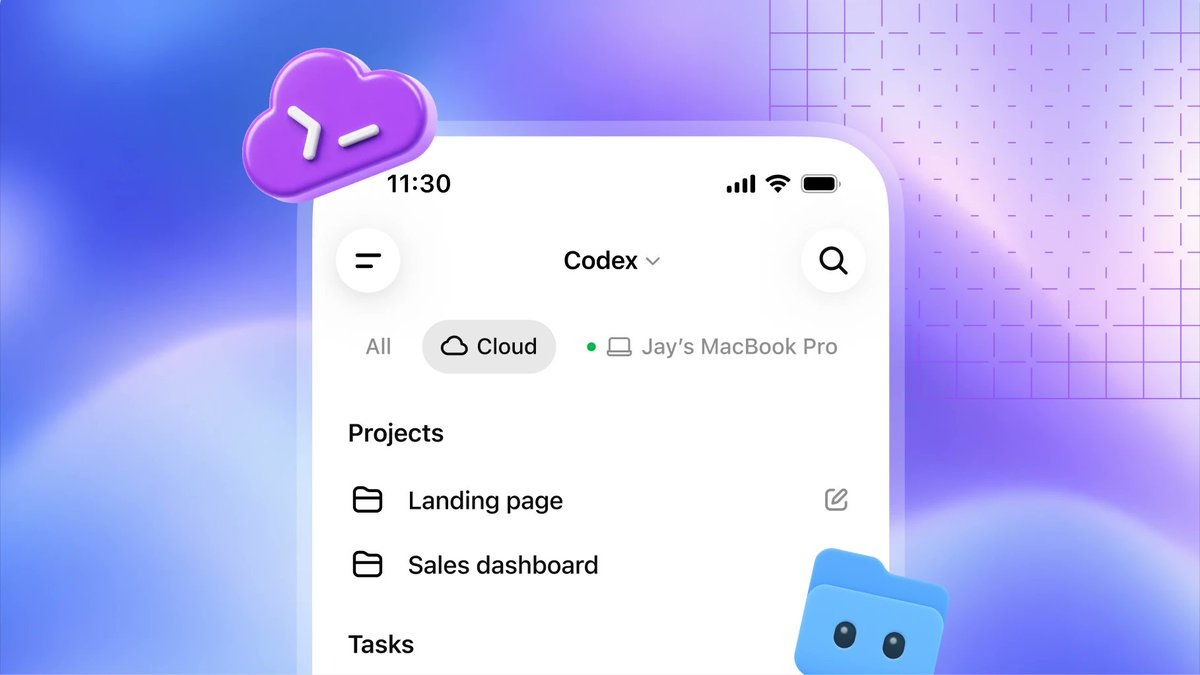
OPENAI 🔥: Codex Cloud was announced during OpenAI DevDay to allow developers to run Codex remotely. > "Available on Plus, Pro, Business, Healthcare, Education, and Enterprise."

@petergyang ·
"We write very few specs on the Codex team. We're talking 10 bullet points and that's it." Here's my new episode with @embirico and @romainhuet where they gave me an inside look at how OpenAI's Codex team operates: → Live demo: Building in seconds with Spark → How the team built the beautiful Codex app → How they ship without traditional specs and roadmaps Some quotes from Alex and Romain: "The fewer people you need in a room to do anything, the more pure every decision is." "Our designers write more code now than was written by an engineer six months ago." "I'm much less likely to read someone's resume than their ideas and what they've built." Thanks to our sponsors: @meetgranola: The best AI meeting notes app I've ever used https://t.co/MNToIh5WTm @linear: The AI agent platform for modern teams https://t.co/lI40xrrDsr 📌 Watch now: https://t.co/2lbvdTiQUl
 Watch video
@DivyanshT91162 ·
🤯 OpenAI Codex is no longer just for people willing to burn money on API credits. You can now run it locally with zero API costs, unlimited usage, and complete privacy using powerful open-source models. No token anxiety. No cloud dependency. No data leaving your machine. This is the kind of breakthrough that could completely change how developers build software in 2026. Full step-by-step guide below 👇


@xanderai ·
In the few weeks since Claude Code's agent teams and Codex's multi agents features came out, I've personally spent ~50B tokens between the two of them. Some observations: 1) codex cli UI is much, much smoother. The claude code cli at some length of conversation history / number of running background tasks becomes incredibly slow and sagging. Difficult even to type anything. 2) codex has no mechanism by which the main/leader agent wakes up to respond to sub agents' results. Claude code has a communication mechanism where sub agents send messages to the leader when they have interesting results. These messages wake up the leader and it thinks and takes actions to make sure the whole endeavor is on track. codex's main agent just sleeps forever after initial setup, requiring me to prod it regularly. 3) claude code's tmux integration is a limitation. I've seen it unable to spawn new agents simply because tmux refuses to create more panes: "no space for new pane" - required to use in-process agents, and no way to change this after starting. 4) Claude code has been much harder to get rate limit increases on. I have ~100 simultaneous agents that regularly all get shut down due to hitting overloaded or per minute rate limit errors. I've encountered hundreds if not thousands of rate limit errors that are never reported in the Anthropic Console. 5) Claude code *really* wants to end sessions after a certain amount of time. There's no amount of prompting I can do to prevent it from doing this. There's either some training or prompt injection that makes it want to shut down prematurely. Telling it to stop that and keep going works for ~20min only. Claude loves to produce a "FINAL report" while there are still hundreds of productive tasks in process. 6) codex's agent names are non-descriptive and useless. Hegel, Lovelace, Feynman, Pauli, Curie, ... Come on. I greatly prefer claude code's descriptive agent names: advisor, perf, node-1, node-2, researcher, X-debug, etc. Less cute. More utility. I have no clue which agent I need to talk to when looking at the agent list in codex. 7) In claude code it is difficult and even non-deterministic to interrupt the main agent's currently blocking task. The main agent should *never* sleep on its blocking thread. And yet all the time I have to send messages and hit escape back and forth until it gets interrupted. In codex this is a 100% reliable single Esc key press. #1 is the biggest reason I prefer codex for this. #2 is the biggest reason I prefer claude code for this. Will make immediate use of any fixes for these issues @thsottiaux @bcherny

@mark_k ·
It's CODEX THURSDAY and OpenAI came through! 🔥 Codex app 26.616 changes: • Added Record & Replay on macOS, which turns a demonstrated workflow into a reusable skill. • Record & Replay is not available in the EU at launch. • Record & Replay requires Computer Use to be enabled by the user or admin. • Added bulk actions to automation run history, so runs can be marked as read or archived in bulk. • Added new deep links for managing SSH connections. • Improved Browser Use so visible-tab routing and annotations persist when a draft browser session moves to the server. • Additional performance improvements and bug fixes.


@VaibhavSisinty ·
OpenAI Codex can now control real phones. Actual iPhones. Actual Androids. Not simulators. Real devices. 🤯 An open source project called Mobile Harness gives AI agents eyes and hands on your phone. It can see the screen. Tap buttons. Scroll. Type. Launch apps. Open settings. Do everything you do. Through one API. Works locally on your phone or on cloud devices at scale. AI agents stopped writing code. They are now using the apps you use. On the phone you own. vc: @nielsmdt99
 Watch video
@marvinvista ·
Codex as Chief of Staff For knowledge work: Plugins enable Codex to do most of my knowledge work. It reads and responds to emails and Slack. It builds models in Sheets and handles all of my note taking for me. Codex is quickly becoming my assistant. It understands me and what I’m doing enough to help get real work done. - @trekedge, https://t.co/NJiXNtQmjX For dinner planning: Our incredible comms leader, @lindsmccallum, planned a closed door dinner for the Codex team in a fraction of the time it would normally take - thanks to Codex.She used the Codex App to: - compile the invite list - send out invitations - hourly scan of her emails to update RSVP status - populate a doc with bios on every attendee - create a mini app to plan the seating chart - @rohanvarma, https://t.co/p6LpVKNBEX Inbox triage: Getting codex's help to me climb from under my inbox mountain - @boazbaraktcs, https://t.co/JXz57p8nRq Automation density: I've been using plug-ins a ton internally. I have about 58 automations and 30 plug-ins and I've automated everything except the part where I have to come up with ideas and talk to people - @jxnlco, https://t.co/w0K2GaKzzl

@ryancarson ·
Why on earth did OpenAI just destroy the massive amount of trust and goodwill that they built up with devs by deleting the Codex brand? I could potentially make sense of it it because they're trying to skate where the puck is headed: "all information work is going to be done from one home base". They obviously need that home base to be ChatGPT and it's a *logical* thing to do. The Codex team should have stood up and fought hard against this and said that dev goodwill is something that they can't negotiate on. The dropdown "ChatGPT Codex" vs "ChatGPT Work" says it all. So if we're writing code, we're not working?
@VaibhavSisinty ·
My Codex agent has been building non-stop for 9 hours straight 🔥 Gave it a massive scope: build a Mac app for all my content. Calling it Content OS. Running it in full-auto mode with bypass approvals. Full access to my browser, filesystem, and shell. Going full YOLO. Set up a 30-min heartbeat automation on the thread in case it drops out of the loop or breaks sandbox to ask for approvals (reminding itself it's supposed to run fully autonomously, no human-in-the-loop). Also plugged in VAPI via MCP with an instruction: if for whatever reason you're stuck and can't move ahead because you need action from me, call me on my phone and tell me exactly what the problem is so I can come attend to it. Hasn't made a single call yet. Didn't get stuck even once so far. Kicked it off last night. What I woke up to was nothing short of mind-blowing. Right now I'm at the gym, haven't even seen the updated output yet (it's a MASSIVE Mac app). Will drop more updates soon. But first impressions. I'm fucking mind-blown. - Figured out auth for YouTube Analytics on its own - Figured out auth for Meta (Instagram Analytics) on its own. Spent 2+ hours driving my browser to solve it - Integrated an AI layer via OpenRouter so I can talk to my data - Built a comment response engine with suggested replies using Apple Intelligence (local models) Will share the full app once it's done. But boss, it's a definite bye-bye to Claude Code from my end. Also, hasn't hit rate limits yet. Thanks to Sam resetting the limits post Codex Gen 2 launch yesterday. BTW, I've never written a single line of code in my life. So don't grill me on security. Building this as personal software to manage data across the 5M+ followers I have on IG, YT, X, LinkedIn, and my newsletter. Will share the full product once it's built. But damn, excited. Probably will make it free for people to use it once the whole thing is fleshed out!
@mark_k ·
Great move by @OpenAI: more Codex app features are now available in Europe, including the EEA, UK, and Switzerland. The big ones: Computer Use on macOS and Windows, so Codex can see, click, and type in desktop apps; the Chrome extension for browser tasks that need your signed-in context; Memories for preferences, workflows, tech stacks, and repo conventions; and Chronicle as an opt-in Pro research preview on macOS. For European developers this is a meaningful unlock. Codex is becoming less like a coding chatbot, and more like an actual agent sitting next to you in the dev environment.


@bradmillscan ·
Did you know with OpenClaw you can talk to ChatGPT Codex on Telegram kinda like Claude's Dispatch? It inherits workspace visibility and it runs outside of the openclaw subagent sandbox. So it's pretty powerful - but it's not an isolated agent. 1 Setup Telegram Topics 2 Enable Telegram ACP thread spawning 3 set channels.telegram.threadBindings.spawnAcpSessions = true 4 add an ACP agent entry for Codex 5 pin the agent to a topic with channels.telegram.groups.<chat>.topics.<id>.agentId (If you're curious, it does have a session but it does not have auto-compaction or write to the lossless-claw DAG because that is for the openclaw pi runs and codex is CLI backend.) I'm using mine for tech support. Experimenting with it, might not keep it around.


@TheRohanVarma ·
This is wild I'm currently using the Codex App to play AND build a RuneScape clone with 40 other people. Codex is shipping improvements as we play and I'm taking everyone's requests and adding it in as prompts to Codex as we go lol


@RituWithAI ·
🚨 Someone just built a load balancer that makes Codex rate limits disappear. 17 stars. Day one. And it solves the most frustrating bottleneck in AI-powered development right now. It's called codex-lb. A lightweight load balancer specifically built for OpenAI Codex — distributes requests across multiple API keys simultaneously so you never hit a rate limit again. Here's the problem every heavy Codex user knows. You're mid-session. Your agent is working through a complex task. It's making rapid-fire API calls — reading files, generating code, running tool calls, iterating on results. Then it stops. Rate limit exceeded. Try again in 60 seconds. Your entire workflow freezes. The agent loses momentum. You lose context. You wait. You retry. You lose another 60 seconds to the next rate limit hit. codex-lb eliminates that entirely. Here's how it works. You have multiple OpenAI API keys — from different accounts, different tiers, or different projects. codex-lb sits in front of all of them as a single proxy endpoint. Every request that comes in gets routed to whichever key has available capacity right now. Key 1 at rate limit? Route to Key 2. Key 2 also throttled? Route to Key 3. All keys exhausted? Queue the request and retry intelligently instead of failing immediately. To your agent, there is no rate limit. There is just one endpoint that always responds. Here's what it handles: → Round-robin and least-connections load balancing across any number of keys → Automatic failover — a key that returns a rate limit error gets deprioritized instantly → Request queuing — requests wait intelligently instead of failing hard → Health checking — continuously monitors key availability and capacity → OpenAI-compatible API — drop-in replacement, zero code changes required → Works with any Codex client — Claude Code, Cursor, Copilot, any OpenAI SDK Here's how simple it is to deploy: Point your Codex client at localhost:8080 instead of https://t.co/RofLcUBkOa. That's it. Your agent now has effectively unlimited rate limit capacity across all your keys. Here's why the timing matters. GitHub Copilot just switched to token-based billing. Rate limits on Codex free tiers got tighter as usage exploded post-GPT-5. Every developer doing serious agentic work is hitting rate walls multiple times per session. codex-lb is the infrastructure fix that costs nothing and solves it permanently. 17 GitHub stars. Day one. This one solves a real problem. 100% Open Source. MIT License. GitHub link in the comments 👇

@TheRohanVarma ·
Our incredible comms leader, @lindsmccallum , planned a closed door dinner for the Codex team in a fraction of the time it would normally take - thanks to Codex. She used the Codex App to: - compile the invite list - send out invitations - hourly scan of her emails to update RSVP status - populate a doc with bios on every attendee - create a mini app to plan the seating chart Things Codex didn’t do: - make the sushi we ate (soon) Lindsay has never coded before. With Codex, she is a builder. Codex is the interface for personalized software.

@Hesamation ·
OpenAI reports: Codex active users grew 5x in the first half of 2026. this is from OpenAI's paper released today, based on the data from Codex. main takeaways: > non-dev Codex usage is exploding. Since Aug 2025, it’s up ~189x in orgs and ~137x for individuals > inside OpenAI, Codex is now 99.8% of their output tokens and ChatGPT only 0.2% > individual users are still mostly in ChatGPT: Codex is only 16.5% of their output tokens > organizations are using Codex like no one else. Codex went from almost nothing in Aug 2025 to 63.3% of output tokens now > long horizon tasks are taking over. 1h+ human-task prompts went from 35.4% of users in Dec to 70.2% in May > 8h+ human-task prompts went from 2.1% in Dec to 25.6% in May >skills are being adopted fast. usage went from 5.4% in Mar to 26.6% in Jun > OpenAI’s 99th-percentile users are running ~71 hours of agent work per day, they’re managing multiple agents in parallel


@free_ai_guides ·
7 mistakes I see people make with OpenAI Codex: 1. No AGENTS. md file. Codex guesses your stack every session. 2. One thread per project. Context rots. Codex starts repeating itself. 3. Using GPT-5.4 for everything. Simple tasks burn quota for no reason. 4. No skills installed. You re-explain the same patterns every time. 5. Watching it step by step. It's built for parallel work, not babysitting. 6. Zero MCP servers connected. You're copy-pasting what Codex could pull itself. 7. Skipping verification. Confident output doesn't mean correct output. Fixes for all 7 in the infographic below.

@kr0der ·
Codex app guide: automated testing + screenshots/videos (for you to review or for PRs) first look at the prompt i tested in my photo. it didn't fully work and i'm going to explain why, and what can be done to get it fully working, because i think this is going to be a huge unlock. to attach a screenshot, it first tried Browser Use but i wasn't logged in with Github. then it tried the gh API but it couldn't upload images properly, but i got it working eventually via a prompt telling it to use Computer Use. this is still pretty manual, so now i've signed into Github in the Codex in-app browser, so hopefully the agent can now paste screenshots easily 👀 this basically helps automate frontend/full stack feature testing + automatic PR creation. here are some huge improvements i'm imagining: - telling it to use the local DB to search for testing data it can use, and potentially creating some test data. this can be combined into a skill with my prompt in the screenshot. - getting it to create videos for PRs or just for you to review, by taking a bunch of screenshots and stitching them together with ffmpeg


@alexabelonix ·
OpenAI Codex app is now on Windows. You get the full Codex app experience on Windows with a native agent sandbox and support for Windows developer environments in PowerShell.
 Watch video
@rstormsf ·
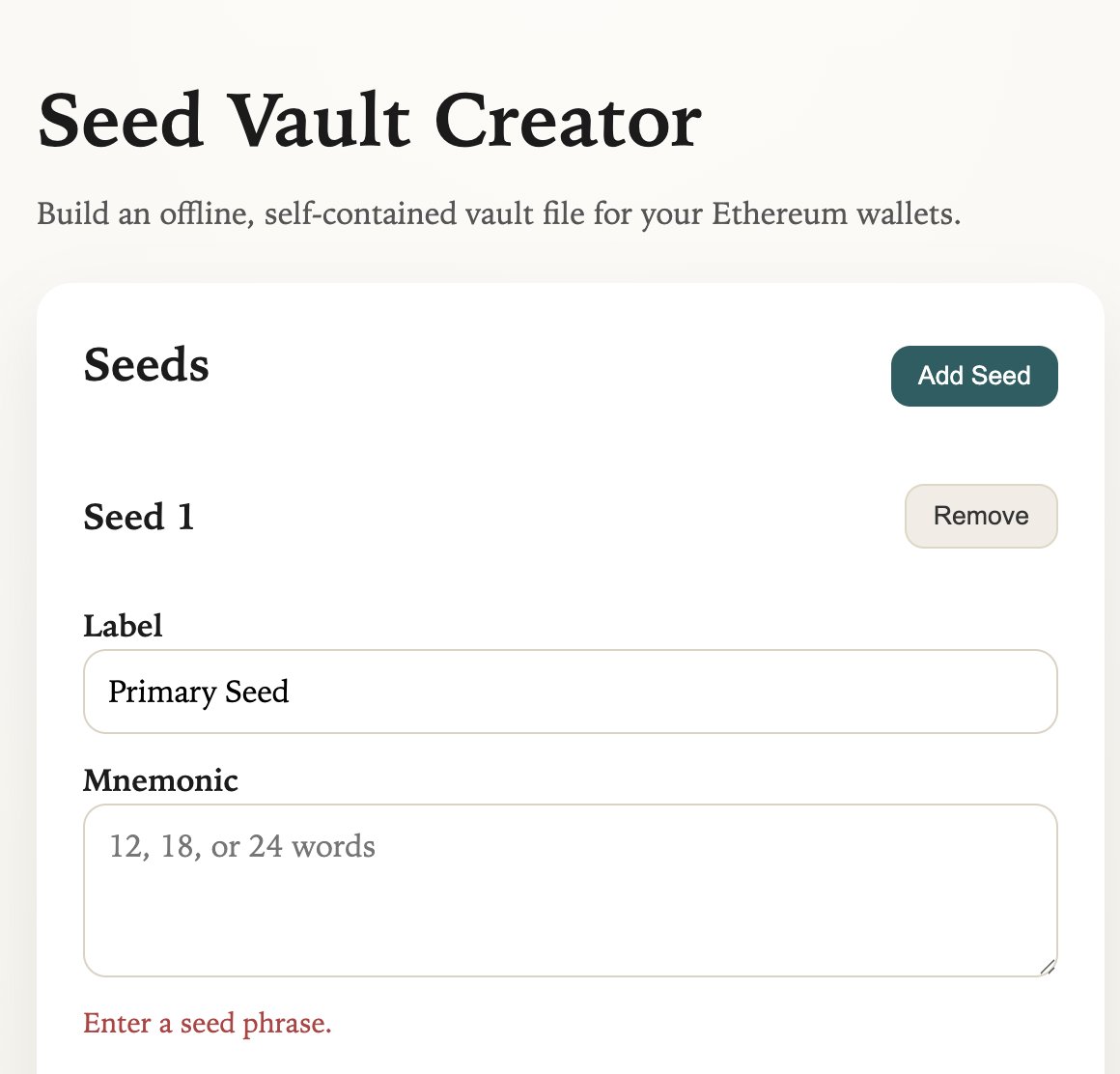
Vibe coded a small app in the new Codex app by @OpenAI. 🪄 Spec: A standalone HTML tool for encrypting/decrypting seed phrases with multiple passphrases. To be honest, I’m curious how Codex actually makes its security decisions under the hood - is a "vibe coded" security tool actually useful, or is it a liability? Checking the source now. 🔐🤔 Source: https://t.co/Xv1HzMqkKj Demo: https://t.co/acINV9IvCh

@shao__meng ·
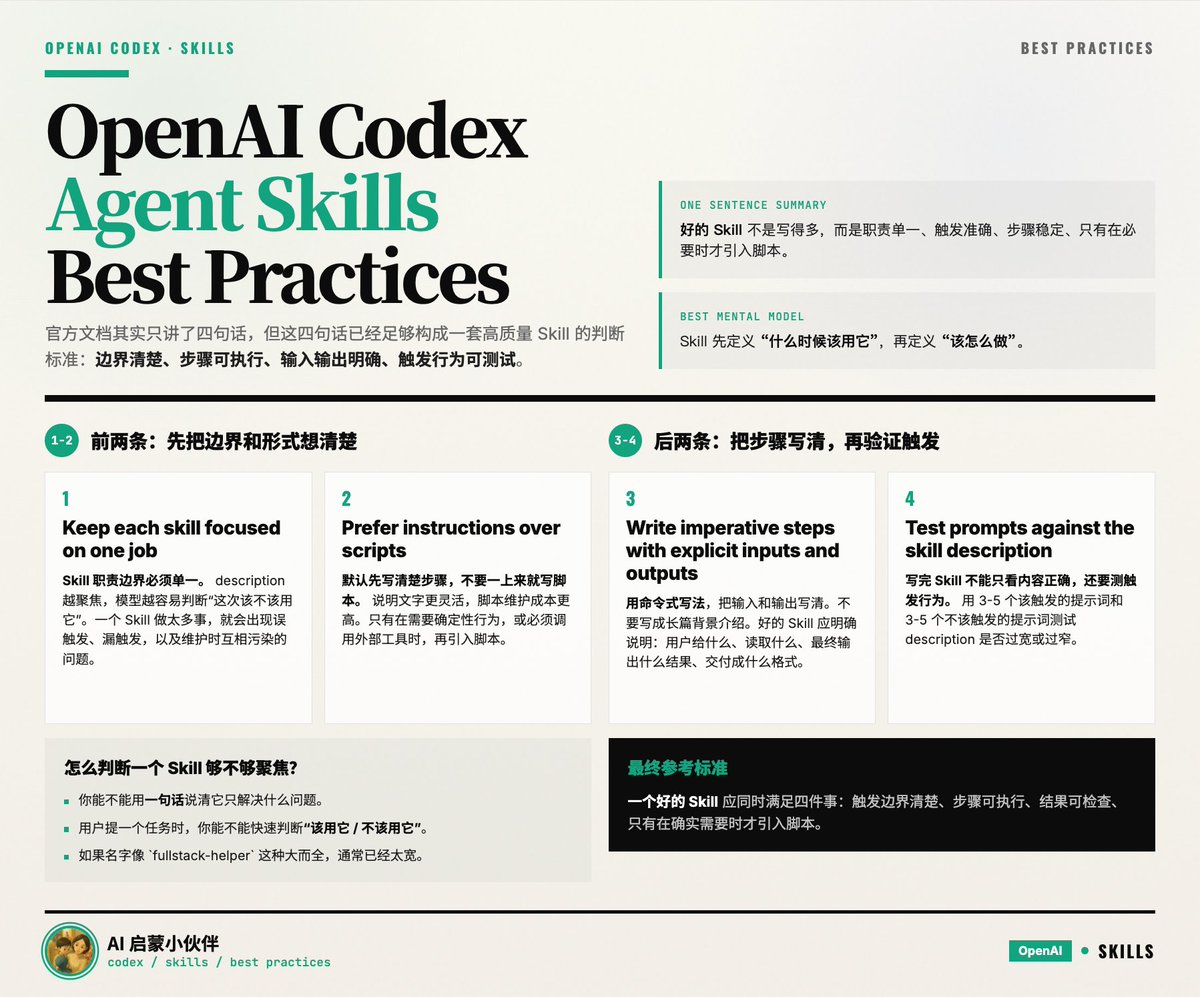
OpenAI Codex - Agent Skills Best Practices 只有四句话: 1. Keep each skill focused on one job. 2. Prefer instructions over scripts unless you need deterministic behavior or external tooling. 3. Write imperative steps with explicit inputs and outputs. 4. Test prompts against the skill description to confirm the right trigger behavior. https://t.co/KNb0CCsJxc 1. Keep each skill focused on one job Skill 职责边界要单一: · description 越单一,模型越容易判断“这次该不该用这个 skill” · 一个 skill 做太多事,会出现触发不准 · 维护时也更容易改坏别的场景 举个例子: · 不推荐:fullstack-helper,既管数据库,又管前端,又管部署 · 推荐:postgres-query-tuning、playwright-ui-debug、release-note-writer 判断标准: · 你能不能用一句话说清“它只解决什么问题” · 用户提一个任务时,你能不能很快判断“该用它”还是“不该用它” 2. Prefer instructions over scripts unless you need deterministic behavior or external tooling 默认先写清楚步骤,不要一上来就写脚本,为什么: · 说明文字更灵活,模型可以根据现场情况调整 · 脚本需要维护、兼容环境、处理错误,成本更高 · 很多任务本来只是“怎么做”的问题,不一定需要固定程序 文档也给了两个例外: · 你需要确定性行为 例如输出格式必须严格一致、每次都要按同样流程执行 · 你需要外部工具 例如调用 ffmpeg、数据库客户端、测试命令、浏览器自动化工具 可以这样理解: · 能靠明确步骤完成,就先用文字 · 只有在“必须固定”或“必须调用工具”时,再加脚本 3. Write imperative steps with explicit inputs and outputs 用命令式写法,输入输出写明白: · 用“先做 A,再做 B,然后检查 C” · 不要写成背景介绍、经验分享、长篇解释 输入输出写明白指的是: · 输入是什么:用户给什么、文件在哪、参数是什么 · 输出是什么:生成什么文件、返回什么格式、最终要交付什么结果 不好的写法: “分析代码库并给出建议。” 更好的写法: “读取 package.json 和 src/ 下的构建配置,找出构建失败原因。输出一个按严重程度排序的问题列表,并给出最小修改方案。” 4. Test prompts against the skill description to confirm the right trigger behavior. Codex 会根据 description 做隐式匹配,所以你写完 skill 后,不能只看内容是否正确,还要测“会不会在对的时候被选中,在不对的时候不被选中”。 应该怎么测: · 用 3 到 5 个“应该触发”的提示词试一下 · 再用 3 到 5 个“看起来有点像,但其实不该触发”的提示词试一下 真正要验证的是: · description 是否太宽,导致误触发 · description 是否太窄,导致该触发时没触发 · skill 名字、说明、步骤之间是否一致 最后 - 给咱们的参考:一个好的 skill,应该同时满足 · 触发边界清楚 · 步骤可执行 · 结果可检查 · 只有在确实需要时才引入脚本

@jpschroeder ·
Codex iOS Review: Better Than Nothing. It’s been about 24 hours now that I’ve been using the new Codex feature in the ChatGPT app to try to “dev” remotely, and I think I’m ready to give my opinion: it needs more work. I was absolutely blown away at first by the onboarding experience. I updated my Mac’s Codex app, clicked a few buttons, and that was pretty much it. But then the iOS app froze and none of my sessions appeared. No big, I force-quit the app, reopened it, and much to my surprise, ALL my Codex sessions turned up — not just the ones in the Mac app! This was my first very happy surprise. See, I’m a very heavy Codex CLI user. I honestly don’t care about the Mac app that much. It’s fine, I guess, but Codex on iOS was able to see all my sessions, even ones inside worktrees created with https://t.co/Pftik3Sha1! I love this. I also love that, out of the box, it asks for permission to keep your Mac awake. However, it’s still quite clear that not everything is smoothed over yet, as a lot of the features are not properly synced with the iOS app. For example, the permissions on the iOS app are not the same as on the computer. I can actually set the phone to a different set of permissions than the app. I doubt I’m supposed to be able to do this, but I can. Another annoying rough edge: dialogs that I’ve handled on the computer often get “stuck” on the app, where I’m forced to submit a turn that I already took hours ago, like approving a plan, for example. Slash commands are also sufficiently different between the two that it causes some confusion. Another challenge that no one has really solved yet is how to actually see if what’s happening in your coding agent is any good when you’re remote. That really puts a damper on the utility of these remote agents beyond keeping the plates spinning. But put all that aside, because this release takes remote work from zero to one in Codex, and that core piece works. I can interact with and run Codex from anywhere, and for that, I applaud the team.


@rohitdotmittal ·
I just asked Codex to watch a Loom video about a product improvement, find the relevant parts, take screenshots, and create updates about the product. Codex on 5.6 Sol used the Codex app, the browser, and the MCP servers across 3 different tools/services to complete the task. And it did it way better than Claude Fable 5. For browser automation, Codex 5.6 Sol completely beat Claude Fable 5. More bullish on using AI for future workflow enhancements.

@RoundtableSpace ·
Someone figured out how to run Claude Fable 5 and GPT-5.6 together inside ChatGPT Codex and the setup takes 5 minutes. Two commands get you started: → codex plugin marketplace add Cjbuilds/Codex-Orchestration → codex plugin add codex-orchestration@codex-orchestration From there you set an advisor model for the expensive thinking and an executor model for the cheaper implementation. Paste the workflow prompt, describe the task and both models handle their side automatically. Fable 5 plans. A cheaper model executes. You get the best of both without paying flagship prices for every token.
 Watch video
@Axel_bitblaze69 ·
This is the most productive setup i've seen come out of launch week. steal it you're burning your usage limits by asking ONE model to plan, build, test and fix everything.. and the fix to this is embarrassingly simple: give each model a job. Fable 5 becomes the manager. GPT-5.6 becomes the builder. Fable interviews you, writes the plan, attacks its own plan once, hands the grunt work to codex, and reviews every diff before it ships. the bridge is openai's official codex plugin for claude code.. yes, openai built a plugin for anthropic's tool, 27,000+ stars already. ▫️ setup, ~15 minutes. run these inside claude code, in order: /plugin marketplace add openai/codex-plugin-cc /plugin install codex@openai-codex /reload-plugins /codex:setup if setup says codex is missing: npm install -g @openai/codex, then !codex login. you need a chatgpt account (free tier works) and node 18+. ▫️ then create one file at ~/.claude/skills/route/SKILL.md: you are the manager (fable 5). codex (gpt-5.6) is your engineer interview me about what i want.. one question at a time, max 4 write the plan: scope, files, steps, acceptance checks before building, critique your own plan once and fix the weakest part delegate every build step to codex, ONE at a time with acceptance criteria review each diff. failed check = send back with specific feedback, max 2 retries.. fail twice and you implement it yourself, noting why you never write implementation code otherwise. plan, delegate, review, integrate never say "done" without checking the real output. end with: what shipped, what got sent back, and why now you just type /route and describe your feature. the assembly line starts. how the "saves your limits" part actually works, honestly.. the plugin runs on your chatgpt/codex login and quota. so the heavy building burns your codex allowance while fable only does the light manager work. your claude weekly limits stop evaporating, and you finally use both subscriptions you're already paying for. literally the most productive setup to come out of launch week. bookmark this


@nesdesignco ·
Just open-sourced Vibe Console - a developer workspace built entirely with AI. Claude + OpenAI Codex, no hand-written code. Just vibes. Terminal, source control, file explorer - a full IDE experience, 100% vibe coded.


@Suryanshti777 ·
Holy shit...OpenAI just killed its most successful app. And it's the smartest thing they've done all year. The Codex app — 5 million weekly users, the fastest-growing dev tool in AI — is gone. As of yesterday, it IS the ChatGPT desktop app. Why would you kill something that's working? Because of one stat buried in their launch post: 1 MILLION people were using Codex for work that had nothing to do with code. Finance teams. Sales teams. Marketers. All quietly using a "coding agent" because it was the only AI that actually finished tasks instead of chatting about them. OpenAI saw it and made the call: the agent isn't a dev tool. It's the product. So now Chat, Work, and Codex live in one desktop app — on every plan, including free — and it can use your files, your apps, and your browser. The chatbot era ended yesterday. Nobody sent a press release saying so, because the press release was about benchmarks. But watch what people build this month.

@derrickcchoi ·
One thing people underweight about coding agents: the harness matters as much as the model. Codex CLI and app-server are open source. So you can inspect how the agent works, debug in your own environment, and build on top of the core system.
@arrakis_ai ·
holy sht.. AI just changed how software gets built. Codex App might be the closest thing to a GPT-3 moment for development. For years, AI coding tools lived inside terminals. Claude Code, Codex CLI, all incredibly powerful, but they still felt like tools built by developers, for developers. Flexible? absolutely. But also fragmented, full of setup, plugins, MCP servers, and custom workflows. Great for engineers. Not exactly a product for everyone else. What Codex changes isn’t just the model. It’s the interface of development. Instead of stitching together tools, environments and scripts, you simply talk to the system. Behind the scenes, agents read your codebase, modify files, install dependencies and execute tasks. Software creation starts to feel less like programming and more like delegating work. The moment it clicked for me was simple. During the OpenClaw wave I bought a Mac mini and set up a fresh environment. Normally the first installs would be npm or brew. This time it was Codex. I gave it full access and asked it to install everything needed to run the project. Dependencies, environment setup, configuration, runtime. All from a single prompt. Watching the system configure itself without touching the terminal once felt like looking at the next interface of computing. Not because AI wrote code. But because the computer started executing intentions instead of commands. Most people think AI will democratize coding by generating code faster. But that’s not the real shift. The real shift is that software development is slowly moving from writing code to assigning tasks to agents. Historically computing had three main interfaces. CLI for engineers, GUI for consumers, APIs for systems. AI introduces a new one. The agent interface. You don’t operate the software anymore. You tell systems what outcome you want and they orchestrate the process. If that interface becomes mainstream, the impact goes far beyond coding. It changes how startups are built, how products are shipped, and how technical the world needs to be to create software. Codex App might be one of the first glimpses of that future.

@feifei_qiu ·
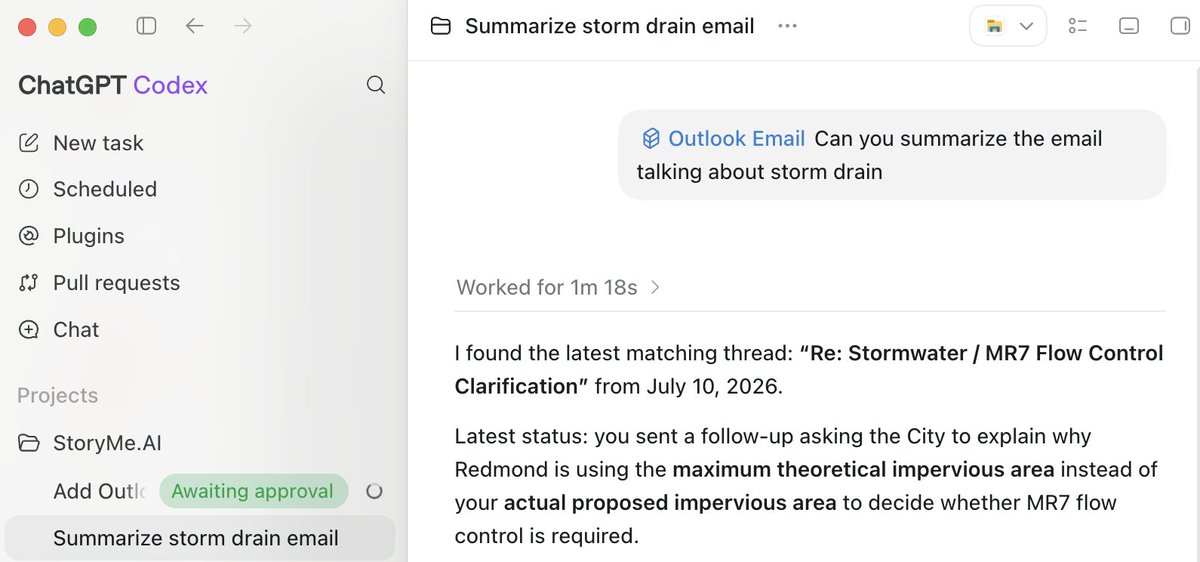
I'm liking ChatGPT/Codex more and more. Everything is in one place: chat, coding, GitHub, and connectors. A small example: yesterday I wanted to search my Outlook emails. I first tried connecting Claude Code, but there wasn't a direct connector. I tried custom one, but it only supported organizational Outlook accounts, not personal ones. Then I tried Codex. One click away, and I was searching my emails. User experience matters but got ignored or deprioritized by lots of companies Plus, ChatGPT leading image and coding model, Right now, I think ChatGPT is winning

@frog_omo ·
openai codex is the most misunderstood tool in AI right now. most people think it's just "chatgpt for code." it's not. it's an autonomous coding agent that reads your entire repo, writes code across multiple files, runs tests, iterates on failures, and opens pull requests — while you do something else. here's everything you need to know: what codex actually is: you describe a task in plain english → codex plans, writes code, installs dependencies, runs your test suite, iterates on failures, and returns a reviewable PR. it runs in isolated cloud sandboxes. no internet access by default (prevents supply-chain attacks). tasks take 1-30 minutes. this isn't autocomplete. it's delegation. how to use it: → CLI: npm i -g @openai/codex, then run "codex" in your terminal → cloud: https://t.co/6LT2EArDPR — connect github, configure your repo, launch tasks → IDE: vs code, cursor, jetbrains extensions → desktop app: macos/windows command center with parallel threads → github bot: tag @codex on any PR or issue the secret weapon: AGENTS.md this is a markdown file in your repo that tells codex how your project works — setup commands, test commands, conventions, architecture rules. codex reads it before every task. this is the single biggest quality lever. write it before your first task. commands first, prose second. best use cases (where codex shines): → bug fixes from issue descriptions → refactoring, renaming, code migrations → test coverage expansion → dependency upgrades → documentation from code diffs → automated PR code review (openai's most-used internal feature) → scaffolding new features → maintenance backlog you never get to openai built the sora android app in 28 days using codex. in one experiment, codex ran 25 hours straight, used 13M tokens, and generated 30k lines of code. what it's NOT good for: → interactive/exploratory debugging (use cursor or claude code) → frontend/visual work where you need to see updates live → high-stakes first-pass correctness (claude opus 4.7 is safer here) → loose prompts — it will install packages and edit files you didn't mention the "act, don't ask" default creates sprawling diffs when assumptions are wrong. pricing: bundled into chatgpt plans — no standalone subscription. → plus ($20/mo): solid daily usage for individuals → pro ($200/mo): heavy usage, ~20x plus limits → business: $20/seat annually, or codex-only pay-as-you-go pro tip: plus at $20/mo is more token-efficient than claude pro at the same price for batch work. the expert consensus: use both codex and claude code. → codex: cheap, autonomous, parallel batch work — PR review, maintenance backlog, test coverage → claude code: interactive, high-stakes, first-pass-correct edits and architecture "claude generates, codex reviews" is a popular pattern. or vice versa. how to start (this week): 1. if you have chatgpt plus, codex is free at the margin, try it 2. install the CLI, authenticate with your chatgpt account 3. run a read-only task first: "explain this project's structure" 4. write AGENTS.md (setup, test, lint commands) 5. batch your maintenance backlog into clear issues 6. delegate in parallel, review and merge never merge without running your own tests. codex can be confidently wrong. the 5M+ weekly users aren't wrong. this is the real shift.
@RoundtableSpace ·
Codex runs on any model you want including local ones via Ollama. Three lines in a config file and you're running Gemma 4 locally inside the full Codex app. No API keys. No cloud. No cost per token.
 Watch video
@m1guelpf ·
while codex-5.2 is the better coding model, i still find myself preferring claude code over the codex cli i think this is because codex is coworker-shaped (give it a task, get a PR) while claude code is more pair-programming shaped so far, model+human > smarter model

@burkov ·
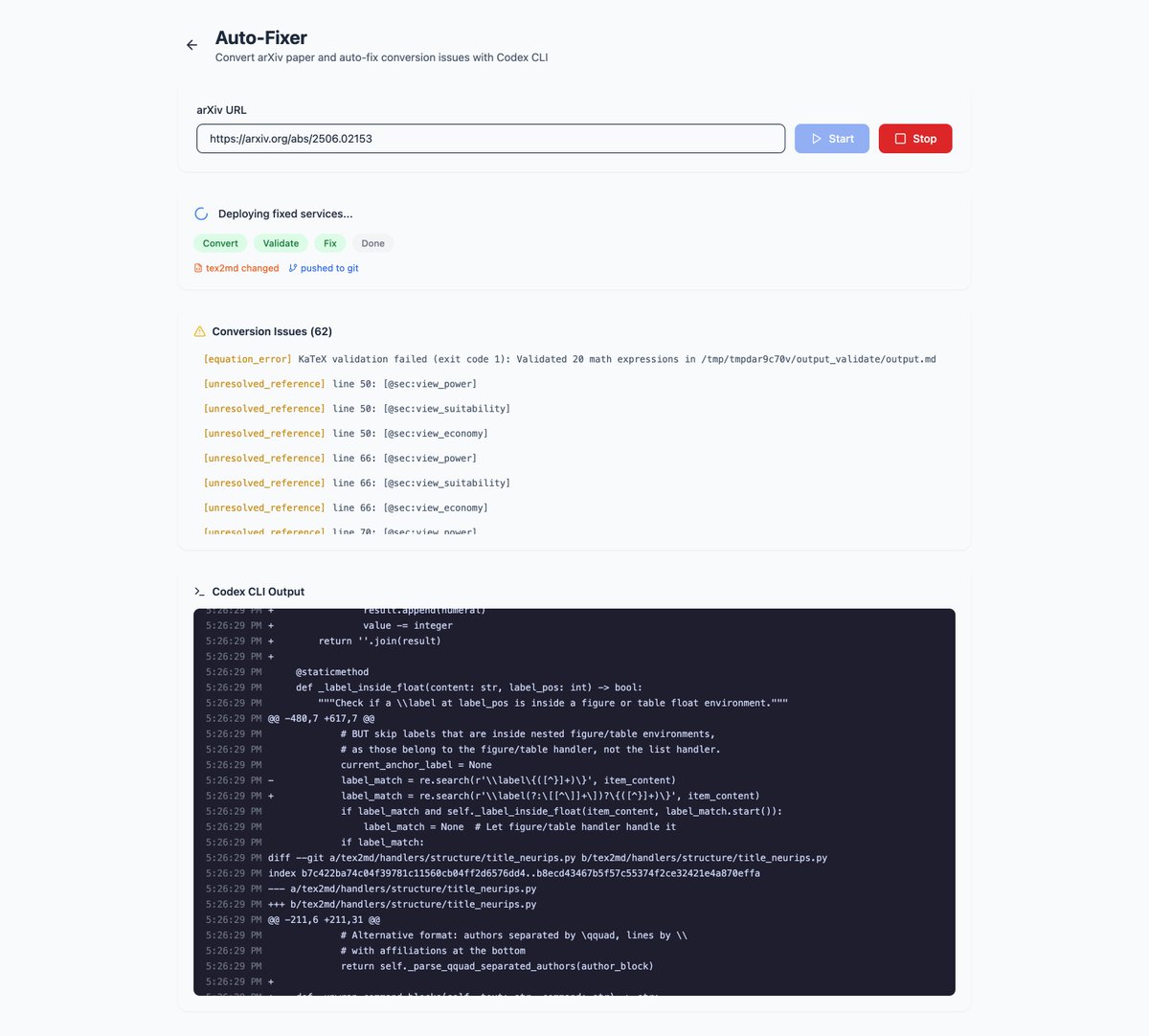
A paradigm shift: OpenAI Codex is now part of ChapterPal's business logic. A significant part of what I do when I work on ChapterPal is to run a conversion from LaTeX into Markdown and see what failed. LaTeX is very old and versatile, so some scientists use very crazy tweaks in their LaTeX sources to achieve a desired visual effect in the output PDF which fail at conversion in ChapterPal. Previously, I was in the loop: 1. Me: run a conversion 2. Me: validate visually 3. Me: instruct a coding agent to fix the issues 4. Coding agent: makes fixes, run tests 5. Me: Go to 1. Now me is out of the loop and all happens within a cloud run. I can only observe the process in the admin's UI. So, the conversion code self-writes while I sleep and the conversion almost never fails because a failed conversion is analyzed by Codex and the conversion code is fixed.

@JulianGoldieSEO ·
OLLAMA + CODEX APP JUST BROKE LOCAL AI CODING You can now run OpenAI’s desktop coding agent on models sitting on your own laptop. No subscription. No cloud code sharing. No waiting in line. What Changed: → Ollama 0.24 adds official support for the Codex app → Codex can now run on local models like Qwen 3, Gemma 4, GLM, DeepSeek, and Kimi → You launch it with one command and pick your model from the dropdown Why This Is Huge: ✓ Codex gets parallel work trees for isolated coding tasks ✓ Built-in browser lets you point at UI elements and ask for edits ✓ Review mode lets you diff, comment, branch, commit, and merge in one place Best Use Cases: → Private code refactoring offline → Coding on planes or bad Wi-Fi → Building small internal tools in hours → Automated code review for solo builders → Learning to code without burning usage limits Model Picks: ✓ 16GB RAM: Qwen 3 14B ✓ Lower RAM: Qwen 3 8B or Gemma 4 4B ✓ Bigger jobs: Kimi K2.6 through Ollama Cloud The lesson: Local AI coding is no longer just a nerdy terminal trick. It is turning into a real agent workflow you can actually build with.
 Watch video
@charliejhills ·
Claude Code or Codex is the wrong question. You can (actually) run both. Ask these 4 questions instead: Both read your repo, edit files and run commands. The defaults are what actually separate them. 1. Where do you want to work? Claude Code centres on the terminal. Codex spans app, IDE, cloud and GitHub by default. Pick the surface you already work in. 2. How do you split up the work? Both can run agents in parallel. Claude Code delegates to subagents in one session. Codex fans work out to threads you supervise. One nests the work. One lines it up for you. 3. How do you encode your workflow? Claude Code defaults to CLAUDE.md. Codex defaults to AGENTS.md. Both read MCP. Write the rules your team will maintain. 4. Where should long-running work happen? Claude Code runs headless in your shell and CI. Codex leans on cloud jobs and a review queue. Codex runs headless too. I use codex exec. Send the long job to CI or the cloud, not your laptop. Then pick: ✦ If you live in the terminal, run Claude Code. ✦ If you want more surfaces, run Codex. ✦ If you want pairing plus background runs, run both. I run both. Claude Code builds, Codex attacks it. OpenAI shipped Codex as a Claude Code plugin. The integration only runs one way. Install it inside Claude Code: /plugin marketplace add openai/codex-plugin-cc /plugin install codex@openai-codex Then run /codex:adversarial-review Which model, not which agent? Claude 5 vs ChatGPT 5.6 https://t.co/ZeHn9pSiFc Repost ♻️ to help someone stop choosing. P.S. Which coding agent do you use?
 Watch video
@rohanpaul_ai ·
OpenAI published engineering deep dive on how the Codex CLI agent loop works under the hood. Explains how Codex actually builds prompts, calls Responses API, caches, and compacts context. Reveals the exact mechanics that make a coding agent feel fast and stable, like relying on exact-prefix prompt caching to avoid quadratic slowdowns and using /responses/compact with encrypted carryover state to keep long sessions running inside the context window. Codex CLI is software that lets an AI model help change code on a computer. Codex is a harness that loops: user input → model inference → tool calls → observations → repeat, until an assistant message ends the turn. - The “agent loop” is the product So the model is the brain that writes text and tool requests, and the harness is the body that does the actions and keeps the conversation state tidy. In Codex CLI, the harness is the CLI app logic that builds the prompt, calls the Responses API, runs things like shell commands, captures the results, and repeats. It does the work by looping between model output and tool runs until a turn ends. The main trick is keeping prompts cache-friendly and compact enough for the context window, meaning the max tokens per inference call. Codex builds a Responses API request from system, developer, user, and assistant role messages, then streams back the sampled output text. If the model emits a function call like shell, Codex runs it and appends the output into the next request. Before the initial user message, Codex injects sandbox rules, environment context, and aggregated project guidance, with a default 32KiB scan cap. Because every iteration resends a longer JSON payload, naive looping is quadratic, so exact-prefix prompt caching keeps compute closer to linear on cache hits. - Codex is designed around stateless Responses API calls Codex avoids stateful shortcuts like previous_response_id to stay stateless for Zero Data Retention (ZDR), which makes tool or config changes a real cost. When tokens pile up, Codex calls /responses/compact and replaces the full history with a shorter item list plus encrypted carryover state instead of the older manual /compact summary.


@nrqa__ ·
OpenAI just open sourced the system they used to write 1 million lines of production code with zero human-written code. It's called Symphony. And it doesn't just write code. It manages the work itself. You point it at your Linear board. It reads the tickets. It spawns a Codex agent for each one. The agent codes, tests, opens a PR, attaches a walkthrough video as proof of work, and waits for review. You don't supervise agents anymore. You manage work. Here's what happened inside OpenAI: → A small team at OpenAI Frontier ran a 5 month experiment → Rule: zero human-written code. Everything had to come from Codex. → Result: 1 million+ lines of code shipped → ~1 billion tokens processed per day → 5 to 10 PRs per engineer per day → Some teams saw a 500% jump in landed PRs in 3 weeks One engineer reportedly shipped 3 significant code changes from a cabin with bad WiFi using only the Linear mobile app. The agents did the rest. Here's how it actually works: → Symphony is a daemon. It watches your issue tracker (Linear for now). → Every open ticket spawns an isolated Codex agent in its own sandbox. → The agent reads the harness. Codes. Runs tests. Opens a PR. → Attaches CI status, complexity analysis, code review feedback, and a walkthrough video. → You review at the PR level. Accept and it lands. Reject and the agent reworks. → New tickets show up. Symphony picks them up automatically. The shift is the part nobody is talking about: When humans stop reviewing every line, the perceived cost of a code change drops to near zero. Bugs that weren't worth fixing before are now worth fixing. Features that were too small to prioritize are now in scope. The economics of software flip. Here's the wild part: The team used Symphony to build Symphony. Once the basic loop worked, the agents wrote the rest of themselves. Internal product market fit was so strong inside OpenAI that other teams started adopting it organically. That's why it's public now. A few notes: → It's written in Elixir. ~1,000 lines. → OpenAI calls it a "low-key engineering preview." They are NOT maintaining it as a product. → It's a reference implementation. You're meant to point your own coding agent at the SPEC.md and have it build a version for your stack. → Works best in repos that have adopted "harness engineering" first. Tests, observability, agent-readable docs, the whole setup. The README literally says: "Tell your favorite coding agent to build Symphony in a programming language of your choice." That's the new pattern. Specs are the new code. Agents are the new compilers. Apache 2.0. 100% Open Source. repo: https://t.co/ZRAWuqOZLQ


@_vmlops ·
OPENAI CODEX IS SILENTLY DESTROYING YOUR SSD A github issue just revealed codex writes ~640 tb/year to a local sqlite feedback log → after 21 days of uptime, one user's ssd had written 37 tb → that's 640 full-drive writes/year on a 1 tb ssd → some consumer ssds are only rated for ~600 tbw total → 36,211 rows inserted every 15 seconds while retained count stays flat → 70% of it is TRACE-level noise: inotify events, websocket internals, locale file opens → root cause: global `Targets::new().with_default(Level::TRACE)` logs everything, always your drive could hit its entire warranted write endurance in under a year just from running codex the fix isn't disabling logs it's better defaults. raise thresholds, drop dependency noise, stop mirroring raw otel payloads to sqlite this isn't a rare edge case. multiple related issues show this has been happening across desktop and cli for months


@jonoringer ·
The single-threaded AI chat window isn't efficient enough.. i did a comparison between claude code and codex multithreaded architectures: Claude Code and OpenAI’s Codex handle multi-threading completely differently under the hood. Here is the technical breakdown and the playbook to combine both: - Architecture: Peer Networks vs. Hierarchical Queues • Claude Code uses a Collaborative Peer Network. It spins up independent Claude instances ("Teammates") that isolate execution using local Git Worktrees hidden inside your repository (.claude/worktree_A). Teammates use a direct mesh protocol via native SendMessage tools to talk to one another, negotiate code interfaces, and update a shared TaskList dynamically. • OpenAI Codex uses a Hierarchical Fork-Join Queue. The main thread encounters an objective, Forks into specialized, independent subagents inside secure Cloud-Sandboxed Virtual Containers (e.g., separating a Security Auditor from a Test Suite), executes them in parallel in the cloud, and then Joins and distills their outputs back into the main thread. - Managing the Multi-Threaded "Token Tax" .. Parallel processing introduces a massive token drain. • To Optimize Claude Code: Use a root CLAUDE.md file to enforce strict subdirectory routing rules, preventing redundant repository-wide context indexing. • To Optimize Codex: Use prompt constraints to force input truncation: "Spawn 3 subagents. Return only a 5-line markdown summary to the main thread and close the container immediately." The Dual-Agent Playbook.. trying this now. anybody else have experience here..? Maximize throughput by running them simultaneously as a heterogeneous cluster: • Step 1 (Parallel Auditing ➡️ Codex): Use Codex to concurrently sweep for security risks, performance bugs, and test gaps across your repo. It leverages cloud container speed and keeps your local workspace clean. • Step 2 (Deep Implementation ➡️ Claude Code): Feed Codex’s audit report to Claude Code. Command it to spawn teammates to update database models and refactor API routes concurrently via local Git worktrees. Because they share a task list, the agents will actively negotiate code boundaries mid-execution. • Step 3 (Background Verification Codex Automations): Offload long-running background tasks, regression checks, and CI/CD failure triages to Codex cloud containers while your local machine remains unburdened. See the full architecture diagram below..


@metalab ·
The State of Coding Agents for 2026. Our Engineering Director, Paul Straw, shares what he learned testing Claude Code, OpenAI Codex, and Gemini CLI in real production work. What helps, what doesn’t, and why benchmarks aren’t the whole story. 🔗 Full post + video in thread.
 Watch video
@_vmlops ·
6 MILLION DEVELOPERS USE CODEX EVERY WEEK.... OPENAI JUST GAVE THEM A REASON TO NEVER LEAVE CHATGPT codex now has a dedicated workspace inside chatgpt what's new: ▫️ GPT-5.6 sol + ultra mode for more complex coding tasks ▫️ computer use to interact with apps and browsers ▫️ multi-agent workflows that can split work across tasks ▫️ publish full-stack apps directly with sites ▫️ review and manage pull requests inside codex ▫️ SSH access to remote development machines from mobile 150+ updates shipped in just 2 months. this is the biggest codex update so far
 Watch video
@JulianGoldieSEO ·
OPENAI JUST MADE AI TOOL LOCK-IN WAY LESS PAINFUL. You can now move a working AI setup into ChatGPT Work + Codex without rebuilding everything from scratch. And the deeper you look, the more useful this gets. What actually transfers: → Instructions can become AGENTS.md files → Settings map into Codex config → Skills and plugins carry across → Claude Code project memories can transfer → Recent chats from the last 30 days can come with you It goes deeper: ✓ MCP server setups can transfer ✓ Hooks can carry across ✓ Slash commands become skills ✓ Sub-agents become Codex agents ✓ Project folders stay mapped to the same projects Even Codex CLI gets /import, with support for up to 50 chats from the last 30 days. Your old setup isn't deleted either. So you can test ChatGPT/Codex without destroying the workflow you've already built. The big lesson: Stop building workflows that only work inside ONE AI tool. Build portable systems you can move wherever the best model is.
 Watch video
Best OpenAI Codex tweets
Xholic studies what works in your niche, drafts posts in your voice and schedules them for the hours your audience is online.
No card needed · Nothing to cancel
Browse all tweet collectionsLive demo: no sign-up or login needed · takes about 2 minutes
Keep exploring