Privacy, cost and hybrid routing
Running inference locally for privacy and zero API bills, offloading routine tasks to local models while keeping frontier models for hard work.
37.2%
Find the best tweets about Ollama, including local model setup, performance, hardware, integrations, model files, and developer workflows.
Hands-on Ollama setup, local inference, supported models, integrations, performance, troubleshooting, and releases.
Original Xholic analysis
The Ollama conversation is overwhelmingly supportive (83.7% supportive stance, 86% positive sentiment). It centers on local inference for privacy and cost, and coding-agent integrations and open-source apps draw the highest median engagement. The top outliers are ollama's MLX-on-Apple-Silicon announcement and Akshay's post on Anthropic Messages API compatibility. Mixed MLX benchmark reports and a DGX Spark GPU-detection complaint add caution.
86% of posts
All-time engagement
41.9% of posts
Published in 90 days
Conversation map
Running inference locally for privacy and zero API bills, offloading routine tasks to local models while keeping frontier models for hard work.
37.2%
Running specific models like Gemma 4, Qwen 3.5, and Llama via ollama run commands, with recommended settings, variants, and version requirements.
27.9%
Using Ollama as a backend for Claude Code, OpenCode, Codex, VS Code Copilot and API-compatible proxies like Anthropic Messages compatibility and Switchyard.
25.6%
Tools like llmfit and hardware ladders for matching RAM, VRAM, and quantization to models, plus device setups from Raspberry Pi to DGX Spark.
23.3%
Ollama in Hermes Agent, OpenClaw, MCP servers, and RAG stacks for local embeddings, context compression, and multi-agent profiles.
18.6%
Community tools powered by local Ollama models: desktop assistants, OCR, screen observers, offline survival kits, and Claude output rewriters.
14%
Ollama's MLX backend on Apple Silicon, NVFP4 quantization, cache improvements, and user tok/s benchmarks versus llama.cpp and LM Studio.
9.3%
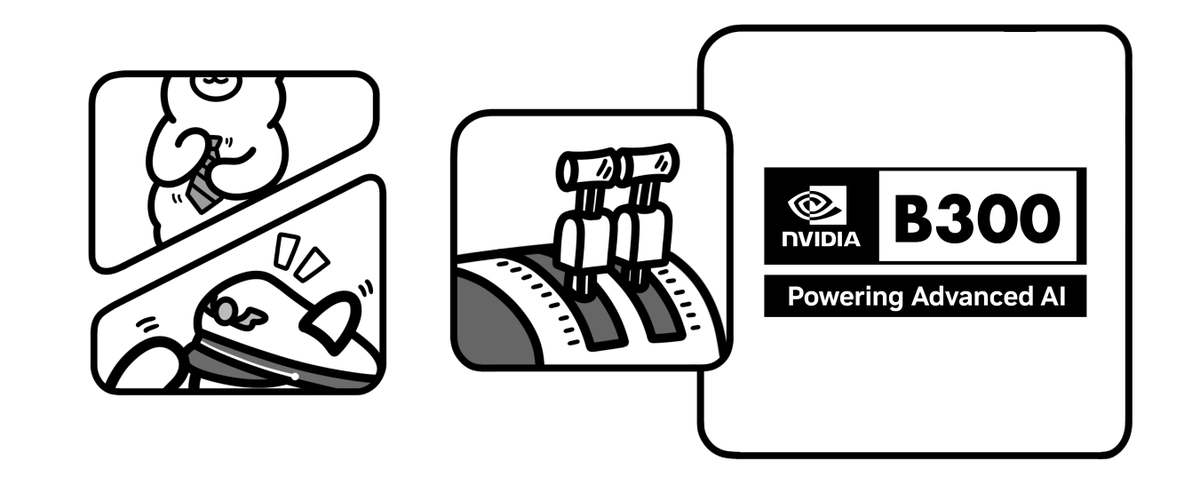
New Ollama capabilities such as image generation, Ollama cloud on NVIDIA B300, launch integrations, and GPU detection issues.
7%
Tone and stance
Performance benchmark
Posts with media make up 74.4% of this collection. Their median all-time score is 12.6, compared with 1.55 for text-only posts.
Format mix
Consensus and debate
Shared view
The largest theme (37.2%, 16 tweets) frames Ollama as a way to keep data on-device and avoid API costs. Posts promote tools like Thuki, Project N.O.M.A.D. and Ollama-OCR on the promise that nothing leaves the machine.
Shared view
Several authors recommend offloading routine tasks to local models while reserving frontier models for planning or complex logic. Examples include handing off to Qwen 3.5:9b after frontier planning and using a 7B model for regex and unit tests.
Shared view
Coding-agent integration (25.6% of tweets) is a shared thread. Posts cover Anthropic Messages API compatibility for Claude Code, env-var setup pointing to localhost:11434, OpenCode with Gemma 4, and local models in VS Code Copilot.
Shared view
Hardware sizing tools like llmfit and LLM Hardware Scanner recur, along with a memory-first hardware ladder. The shared advice is to check RAM, VRAM and quantization fit before pulling models.
Open debate
witcheer reports M5 decode rising from 58 to 112 tok/s with the MLX backend. Saiyam Pathak measured Ollama MLX at 23.11 tok/s versus 33.82 tok/s in LM Studio MLX, and 21.70 tok/s for a Nemotron GGUF in llama.cpp. He notes the comparison is not apples to apples and needs testing across architectures.
Open debate
Craig Hewitt suggests local models can replace 50% of frontier-model work. Machina says OpenCode with Gemma 4 is yet to match frontier models, and Axel Bitblaze says a free 3B model obviously doesn't perform like a $2,000 setup.
Open debate
Saiyam Pathak says Ollama on DGX Spark doesn't run properly because it won't detect the GPU, and calls vLLM the best option for now. This contrasts with positive device setups elsewhere.
What performs
74.4% of tweets carry media. Their median all-time score is 12.55, versus 1.551 for text-only posts.
ollama's Apple Silicon MLX post scored 1027.55, 102.02x the 10.072 median. Next is Akshay's Anthropic Messages API compatibility post at 699.01 (69.4x).
The open-source apps theme has a 106.19 median score and coding-agent integrations 52.061, while model usage tips sit at 1.62. LIST-format posts have a 121.34 median versus 4.355 for tutorials, though the samples are small (6 app tweets, 2 lists).
ANNOUNCEMENT is the leading format at 41.9%, with a 43.13 median score. The platform-features theme, which includes the image-generation post, has a low 0.645 median.
Statistical standouts
Creator landscape
The five most represented creators account for 23.3% of the selected posts.
1. Vaishnavi
@_vmlops
2 posts
2. Jeremy Morgan
@JeremyCMorgan
2 posts
3. Julian Goldie SEO
@JulianGoldieSEO
2 posts
4. ollama
@ollama
2 posts
5. Om Patel
@om_patel5
2 posts
6. Saiyam Pathak
@SaiyamPathak
2 posts
ollama posted two tweets with a 552.61 median score, the highest among top voices. They cover MLX on Apple Silicon and the B300-backed cloud update.
37 creators contributed 43 tweets, and the top five account for 23.3% of placements. No top voice posted more than two tweets.
Julian Goldie SEO posted two Gemma 4 setup guides with specific ollama run commands and settings. The pair's median score was 1.14, well below the 10.072 overall median.
Since the previous snapshot
Themes, sentiment, stance, and post format are classified per tweet. All counts, shares, medians, creator concentration, freshness, and performance comparisons are then calculated directly from the published snapshot.
Xholic's all-time score compares engagement while accounting for reach, post age, and creator consistency. It is used for relative comparisons within this collection.
This report analyzes the exact 43-post snapshot shown below. AI identifies editorial categories and drafts explanations; all statistics are calculated from the snapshot, and every narrative claim is checked against cited posts before publication.
Best Ollama tweets
Ranked 01–43

@ollama ·
Ollama is now updated to run the fastest on Apple silicon, powered by MLX, Apple's machine learning framework. This change unlocks much faster performance to accelerate demanding work on macOS: - Personal assistants like OpenClaw - Coding agents like Claude Code, OpenCode, or Codex
 Watch video
@akshay_pachaar ·
this is huge. ollama is now compatible with the anthropic messages API. which means you can use claude code with open-source models. think about that for a second. the entire claude harness: - the agentic loops - the tool use - the coding workflows all powered by private LLMs running on your own machine.
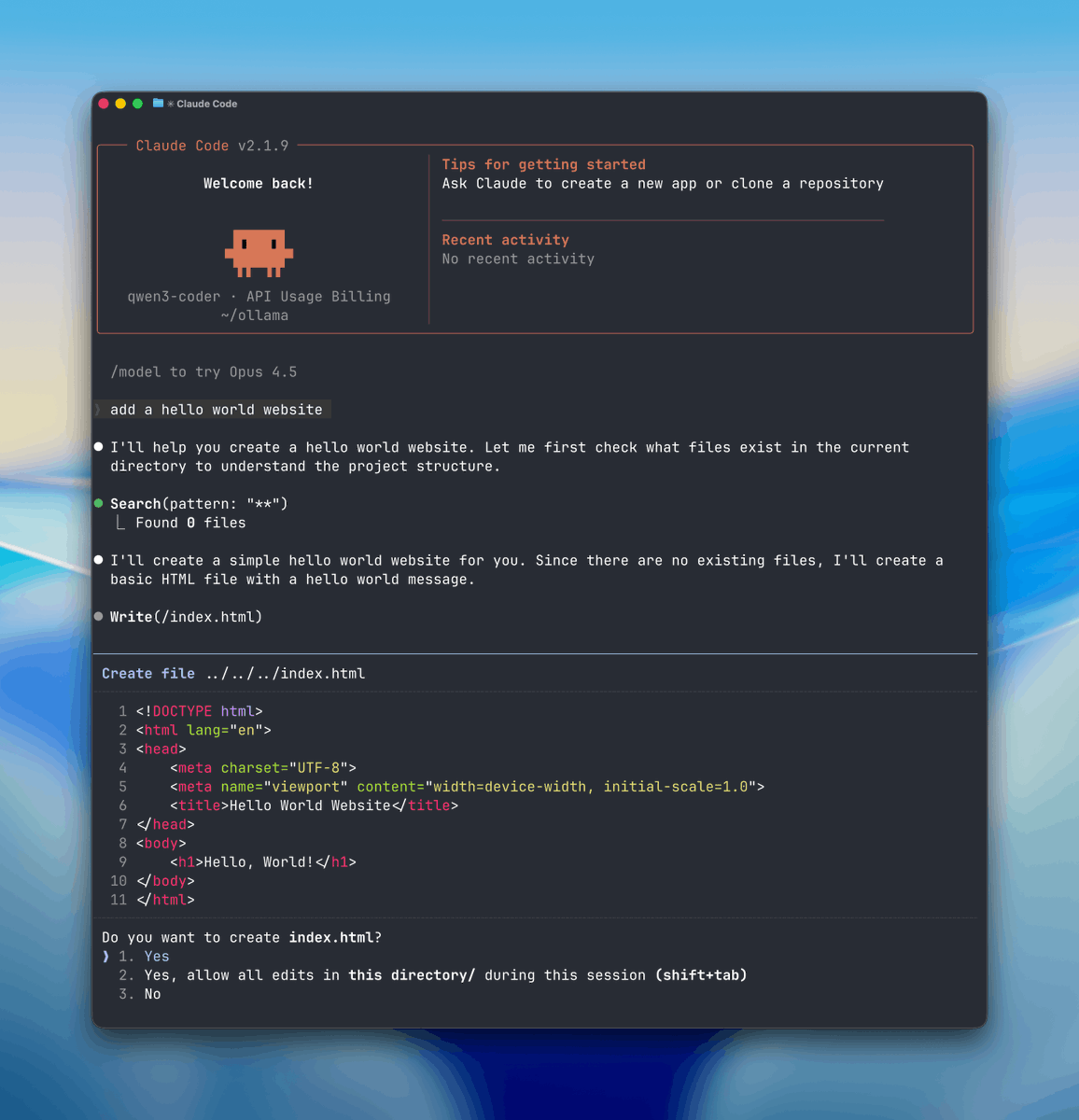

@rasbt ·
Claude distillation has been a big topic this week while I am (coincidentally) writing Chapter 8 on model distillation. In that context, I shared some utilities to generate distillation data from all sorts of open-weight models via OpenRouter and Ollama: https://t.co/IsfNDpcGAw
 Watch video
@eng_khairallah1 ·
🚨 BREAKING: AI coding agents hallucinate because they can't actually read your codebase. This MCP server fixes that. It's called Context+. Bookmark it for later. It builds a real semantic map of your entire codebase before your AI touches a single line of code. 17 tools. 43 file extensions. Actual syntax trees, not regex. Here's what it does that nothing else does: → Tree-sitter AST parsing across 43 file extensions. Real syntax trees with function signatures, class methods, and symbol ranges → Spectral Clustering that groups semantically related files into labeled clusters → Obsidian-style wikilinks that map high-level features to their corresponding code files → Blast radius tracing. Before any change, it shows every file and line where a symbol is imported or used → Semantic search by meaning. Ask what something does, not what it's called. Uses Ollama vector embeddings with disk cache → Identifier-level retrieval for functions, classes, and variables with ranked call sites and line numbers → In-memory property graph with decay scoring that tracks how your codebase actually connects Here's the part that changes how AI writes code: The propose_commit tool. It validates changes against strict rules, creates a shadow restore point, and only then writes to disk. If something goes wrong, one command undoes any AI change without touching your git history. Your AI can't just freestyle your production code anymore. Works with Claude Code, Cursor, VS Code, Windsurf, and OpenCode. Powered by Ollama locally. No external API calls needed for embeddings. 100% Open Source. MIT License. (Link in the comments)
 Watch video
@om_patel5 ·
THIS GUY BUILT A FREE AI ASSISTANT THAT FLOATS ON TOP OF YOUR SCREEN AND RUNS 100% LOCALLY it's called Thuki (Vietnamese for secretary). double-tap Control and it pops up right on top of whatever you're working on. even fullscreen apps. highlight any text first and it arrives pre-filled as context. ask your question, get your answer, dismiss it, and get back to work. runs locally through Ollama powered by Gemma 4. no API keys, no accounts, no subscriptions, and no cloud. nothing ever leaves your machine. the whole point is to ask AI a quick question without switching apps, without paying for another subscription, and without your conversations ending up on someone else's server free AND open source. people are already swapping in different models like Qwen to use less resources
 Watch video
@VaibhavSisinty ·
An engineer got so tired of reading Claude's writing that he built a plugin to translate it into English. 🤯 It is called Claudish to English. A Claude Code plugin. Here is how it works. Every time Claude responds, the plugin sends the output to a local AI model running on your machine. That model rewrites it in simpler language. You see the clean version in your terminal. The original response stays untouched. Claude does not know anything changed. It does not affect how Claude thinks or acts. You are only changing what you read. → Runs locally through Ollama. → Shows both versions side by side so you can check the original anytime. → Works with any local model. Gemma 4 by default. → Free. Open source. Pending review on Anthropic's plugin store. The fact that someone had to build a translator for an AI's writing says everything about where we are right now.


@charliejhills ·
🚨Stop gambling on the wrong local LLM. Most people download a model, watch it crawl, then start over. LLM Hardware Scanner is a CLI tool that scans your actual specs and ranks hundreds of LLMs before you waste the bandwidth: ⤷ Reads your RAM, CPU, and GPU to score real compatibility ⤷ Accounts for MoE activation not just bloated total parameter counts ⤷ Auto-selects the optimal quantization for your exact setup ⤷ Ranks models across quality, speed, context length, and true memory fit ⤷ Works natively with Ollama, llama.cpp, and MLX ⤷ Shows a composite score plus a speed estimate before you download a single byte Not a benchmark site. Not a spec sheet. A hardware-aware ranker that tells you the truth about what will actually run on your machine. One scan. Instant ranking. Zero wasted downloads.
 Watch video
@heygurisingh ·
🚨 BREAKING: Someone open-sourced a full offline survival computer with AI, Wikipedia, and maps built in. Project N.O.M.A.D. is an open-source offline survival computer. Self-contained. Zero internet required after install. Zero telemetry. Everything runs locally on your hardware. What it includes: → Full Wikipedia archives via Kiwix → Offline maps via OpenStreetMap → Local AI models via Ollama + Open WebUI → Calculators, reference tools, resource libraries → A management UI to control everything from a browser One curl command installs the entire system on any Debian-based machine. Runs headless as a server so any device on your local network can access it. Minimum specs to run the base system: dual-core processor, 4GB RAM, 5GB storage. To run local LLMs offline, you want 32GB RAM and an NVIDIA RTX 3060 or better. No accounts. No authentication by default. No cloud dependency. No phone-home behavior. Built to function when nothing else does. The grid, the cloud, the API you depend on. None of it is guaranteed. The people building local-first systems right now are the ones who won’t be asking for help when access disappears.


@support_huihui ·
When using the free-code mode with a local model, set the following three parameters. export ANTHROPIC_BASE_URL=http://localhost:11434 export ANTHROPIC_AUTH_TOKEN=ollama export ANTHROPIC_API_KEY="" free-code -p "hello" --model xxx https://t.co/ubjnB9rBiJ
@ollama ·
Ollama's cloud is updated to use NVIDIA's latest data center hardware: B300 for Kimi K2.5 and GLM-5 models. This significantly improves the model performance with faster throughput and lower latency while maintaining reliable tool calls for integrations. All this works with Ollama's integrations via Ollama's launch command and over 45,000 custom integrations from GitHub.
@om_patel5 ·
THIS GUY BUILT A FREE AI ASSISTANT THAT FLOATS ON YOUR MACOS DESKTOP AND RUNS COMPLETELY LOCALLY no API keys, no subscriptions, no cloud, and nothing leaves your machine it runs local models like gemma and qwen through ollama right on your mac the assistant floats on top of whatever you're working on so you can ask it questions without switching apps or opening a browser completely free and open source on github the best part is zero dependency on any AI company. no anthropic billing, no openai rate limits, and no monthly subscriptions that keep going up you own the model and the data, and it also runs whether you have internet or not you can even swap in different models. gemma for general use, qwen 3 1.7B for lighter resource usage on older macs a stealth mode is being developed so it doesn't show during screen recordings (which tells you exactly what people plan to use this for lol) the local AI movement keeps growing and tools like this are why
 Watch video
@fahdmirza ·
🔥 Hermes Agent just shipped multi-agent profiles and it changes everything. One machine, three completely independent agents, three different model backends — all running simultaneously with zero cross-contamination. 🔹 Fresh install of Hermes Agent v0.6.0 🔹 Default profile with GLM 5.1 via ZAI 🔹 Researcher profile with MiniMax M2.7 🔹 Coder profile with Qwen3.5 27B fully local via Ollama 🔹 Telegram integration on the researcher profile 🔹 All three agents confirmed live simultaneously Watch the full setup below 👇

@EXM7777 ·
how to set up OpenCode (the privacy-first Claude Code alternative) in 3 minutes: > install: npm i -g opencode-ai > configure your preferred model provider > cd into your project directory > run: opencode it reads your codebase locally, builds context on your machine, and only sends the specific prompt + relevant code to the LLM this is the best configuration for privacy-sensitive work: > use Ollama with Gemma 4 > zero data leaves your machine > you get agentic coding with file editing, terminal access, and multi-step reasoning > completely free yet to match frontier models, but it's kinda crazy we can run this type of workflow on a mid laptop

@DataChaz ·
💡 Tip If you only have a 16GB GPU: you can run Qwen 3.5:9b locally via Ollama. - Unbelievable 130 t/s throughput - Perfect for straightforward, common tasks Use frontier models for planning, then hand off to Qwen for the rest! ;)
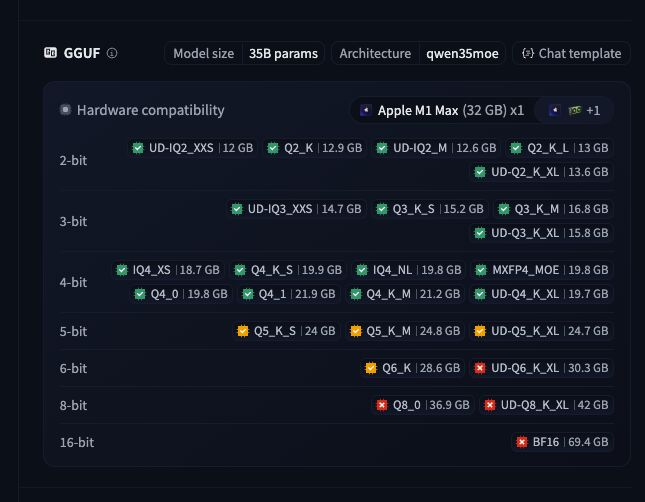

@witcheer ·
I run ollama on a Mac Mini for local compression. every message my agent sends passes through a local qwen model to summarise context before it overflows. speed matters because slow compression means slow responses across every cron job. ollama shipped MLX backend for Apple Silicon. the numbers on M5: → prefill: 1,810 tok/s (was 1,154). 57% faster → decode: 112 tok/s (was 58). 93% faster that's not a marginal improvement. my compression pipeline got nearly 2x faster with a software update. three things that matter beyond the speed numbers: 1/ the cache got smarter. ollama now reuses cache across conversations and stores snapshots at intelligent points in the prompt. for agent workloads with shared system prompts, (which is exactly how OpenClaw works) this means less re-processing on every call. 2/ NVFP4 quantisation. NVIDIA's 4-bit format, now running locally on Apple Silicon. same quantisation format used in production inference. your local model and the cloud model now speak the same precision language. 3/ the model they ship with it: qwen3.5-35B-A3B, a 35B mixture-of-experts with only 3B active parameters. tuned for coding tasks. needs 32GB+ unified memory.


@alex_verem ·
Found an open source tool that watches your screen and pings you when something happens. It's called Observer. You build tiny AI agents that monitor your screen, camera, or mic with a local model, then react. Your training run crashes, you get a Telegram message. A dashboard error rings your phone with a text-to-speech readout. Sensors: screen, OCR, camera, mic, clipboard, meeting audio. Actions: email, Discord, Telegram, WhatsApp, phone calls, screen recording. The models run through Ollama or llama.cpp. No cloud API sees your screen. Setup: system prompt + sensor + a few lines of JS. One agent takes minutes. 1.6k stars. Point an observer at your screen and go do something else.
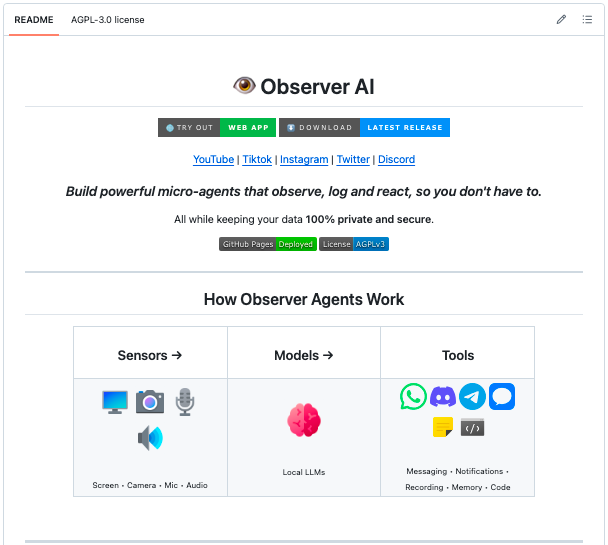

@tonysimons ·
Hermes Agent just got a serious speed injection. First-turn startup latency was cut by ~80%. Cold submit → request dispatch: 4.3s before 0.9s after The fix? @Teknium tracked the actual pre-request stalls and cut them out: 🔹 Discord capability detection moved off the blocking path 🔹 pointless Ollama probes skipped for known non-Ollama providers 🔹 Python env probing warmed off-thread 🔹 MCP imports skipped when there are no MCP tools 🔹 CLI pre-imports while you’re still typing Hermes keeps getting sharper. PR: https://t.co/6FYpEGQulR


@itsafiz ·
This is huge! Now you can use local models in VS Code Copilot. if you have Ollama installed, you can select any local model within in @code a step-by-step guide 🧵 👇


@Cyb3rMaddy ·
Been messing around with local, uncensored LLMs... Ollama runs open-source LLMs locally. It’s handy for security research, private workflows, and anything you don’t want leaving your machine — even works without internet. No cloud calls. No sending prompts somewhere you can’t see. Which you can scale on an enterprise level if needed, or just have your own custom private AI. You can even mod these with your own system prompts. Messing around with dolphin-llama3:8b for red teaming. As you can see below, totally unrestricted. At least it gives a warning...? ☠️


@DivyanshT91162 ·
Everyone keeps asking: "Can my PC run this LLM?" Now there's finally a tool that answers with actual data. llmfit. Instead of guessing, it scans your hardware and ranks hundreds of LLMs based on: • Memory fit • Estimated speed • Model quality • Context length It also supports: → Multi-GPU setups → MoE models → Dynamic quantization → Ollama, llama.cpp, MLX, LM Studio & Docker Model Runner → Interactive TUI + CLI The coolest part? You can benchmark real token/s on your own machine and contribute those measurements back to the project. That means recommendations get more accurate over time—and users with the same hardware can see verified performance before running a single benchmark. No more downloading 40GB models just to discover they crawl at 2 tok/s. 100% Open Source. License: MIT. Worth bookmarking if you're running local AI. REPO👇



@ayushagarwal ·
contextmcp v0.5.0 just shipped. contextmcp is our open-source MCP server that indexes your documentation and serves it as context to AI agents. point it at your docs repo, it chunks, embeds, and gives your agent the right documentation when it needs it. what's new: → Ollama support. fully offline, no API key, zero cost local embeddings. also added Cohere and Voyage AI as providers → GitLab source. index docs from gitlab or self-hosted instances. not just GitHub anymore → validate and doctor commands. catch misconfigs before you waste time on a full reindex all backward compatible. 50+ stars. @dodopayments
 Watch video
@_vmlops ·
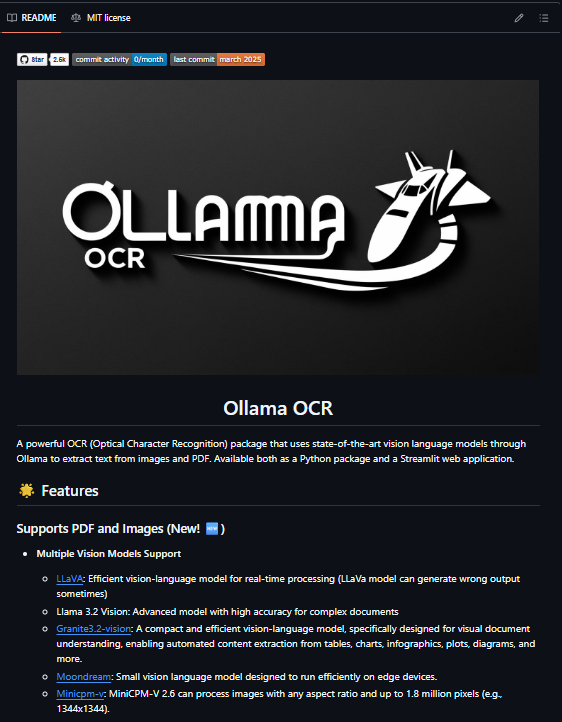
OLLAMA-OCR TURNS YOUR SCANNED DOCS INTO CLEAN MARKDOWN built on top of ollama's local vision models, no cloud APIs, no OCR subscriptions → swap between llava, llama 3.2 vision, granite3.2-vision, moondream, minicpm-v depending on speed vs accuracy needs → output as markdown, plain text, JSON, tables, or key-value pairs → batch process entire folders in parallel with progress tracking built in → built-in image preprocessing before it even hits the model → streamlit web app included if you don't want to touch code pip install and you're extracting text in minutes. 2.3k stars, actively maintained your documents never leave your machine.

@ai_for_success ·
Running the Muse Glimmer MLX version locally via Ollama, and I’m getting around 45 to 50 t/s. I tested it with my Hermes Agent setup as well, and it’s good. Been running it since yesterday, and so far, so good. Pretty impressive for its size. Obviously, you can’t compare it to much larger models.
 Watch video
@_vmlops ·
LOCAL AI MODELS INSIDE COPILOT CHAT This vs code extension just changed the game run deepseek, llama, qwen locally via ollama all through github copilot chat no api keys...no cloud...no switching tabs inline completions, tool & mcp support, vision, model switching without ever leaving the editor copilot chat just became a local ai playground
 Watch video
@sabir_huss50540 ·
🚨BREAKING: NVIDIA open-sourced the missing adapter that lets Claude Code and Codex run on any model you want, including one on your own hardware. It's called Switchyard. Right now your coding agent is married to one provider's API. Claude Code speaks Anthropic. Codex speaks OpenAI. Point either at a cheaper open model or a box in your own datacenter and it breaks, because the wire format is wrong. Switching models means rewriting the client. That friction is the leash the vendors keep you on. This cuts the leash. Here's what it actually does: → Sits between your agent and the model as a proxy, translating on the fly between OpenAI Chat, Anthropic Messages, and OpenAI Responses formats, so the agent keeps speaking its native API while a totally different backend answers → Serves those requests from vLLM, NVIDIA NIM, Ollama, or any OpenAI-compatible endpoint, hosted or fully self-hosted → Routes traffic intelligently: run every turn on a cheap model first and let a judge escalate only the hard ones to the expensive model, splitting cost from capability → Or route on signals already in the conversation, tool results and errors, so most turns get placed without spending a model call to decide → Do fixed A/B splits across models for real benchmarking, or drop in your own routing algorithm in Rust → Ships Prometheus metrics for requests, errors, latency, tokens, and routing overhead out of the box One honest flag, and it's a big one: NVIDIA labels this pre-alpha software that's evolving rapidly. This is an architecture bet to watch and test, not something to put in front of production traffic yet. The people who aren't locked to one model didn't negotiate a better contract. They put a translator in the middle and stopped caring whose API their agent was born speaking. Apache-2.0 licensed. 100% Open Source. (Link in the comments)


@0xalank ·
I bet all the GPU miners on @QuaiNetwork are loving this era of running AI at home since they already have all the hardware for it I've been outfitting my setup with a 4070 Ti to run hermes agent with Qwen3 32b with ollama if anyone has tips on hermes agent would appreciate them!

@NainsiDwiv50980 ·
Your agentic AI product can earn its first dollar before it generates its first model API bill. Not a toy chatbot. A real system that retrieves knowledge, makes decisions, calls tools, takes actions, retains state, and traces what happened, running on a stack that costs exactly $0 to start. Here's the full pipeline: → Interface: Next.js or Streamlit takes the request → Orchestration: LangGraph or CrewAI decides whether to answer, retrieve, call a tool, ask for approval, retry, or stop → Knowledge: LlamaIndex pulls context from ChromaDB or Qdrant, running locally → Reasoning: Ollama runs an open model (Gemma, Llama 3.3 70B, Mistral) on your own hardware, zero API bill → Action: MCP connects the agent to files, databases, GitHub, Slack, browsers, this is the step where a chatbot becomes a worker → State: SQLite or DuckDB stores conversations, checkpoints, outputs → Observability: Langfuse or Phoenix traces every prompt, decision, tool call, and failure → Deployment: Docker packages it, inference runs on hardware you already own, only the lightweight interface sits on a free tier Total software and API spend to get this running: $0. But here's the part that actually matters, the free tools aren't the advantage. Every single piece here will eventually get replaced by something faster or cheaper. Ollama becomes a hosted API. SQLite becomes a production database. Streamlit becomes a custom app. The advantage that survives every swap is knowing: → Where reasoning should stop and deterministic code should take over → When RAG actually improves an answer versus just adding latency → Which actions genuinely need human approval → What has to be traced before your first production failure, not after → How to isolate every layer behind a replaceable interface Build the cheap version first. Learn exactly where users find real value. Then spend money only where it creates leverage, not before. If you had $500 a month to put into scaling this stack, which layer gets it first?


@Axel_bitblaze69 ·
local AI is now useful enough to keep at home imp.. a small machine sitting on your desk can now handle a large part of your everyday AI work for roughly a few dollars in electricity each month, depending on what you run and how often. things like: - drafting - summarising - basic coding help - classifying information - reading your own files - running repetitive automations all without paying for every request or sending the work to a cloud model. the goal isn’t to replace Claude or ChatGPT completely. the better setup is probably: local AI for the repetitive, private, high-volume work one strong cloud model for the difficult stuff first, prove the workflow tonight for free don’t buy anything yet. install Ollama, then run a small model: ollama run llama3.2:3b that’s it. you’re talking to a model running on your own computer. many modern laptops with around 8GB of memory can run a small quantized model, although the speed and usable context will depend on the machine. Ollama supports macOS, Windows and Linux. and if you’d rather use a proper chat window than a terminal, install Open WebUI on top. it connects to Ollama and gives you something much closer to a private ChatGPT interface running on localhost. use it for a weekend. not because a free 3B model performs like a $2,000 setup. it obviously doesn’t. you’re testing something more basic: does running AI locally fit the way you work? try it on your documents, notes, repetitive writing and simple automations. if those workflows feel useful, then better hardware gives you stronger models, longer context and faster output. one rule before buying anything buy memory first, speed second. model size is the first hard limit. if the model doesn’t fit into available memory, it either won’t load properly or will spill into slower system memory and become painful to use. speed matters after that. memory decides what you can run in the first place. a rough ladder: - 8GB → small 3B–7B quantized models - 24GB → 14B models comfortably, some 32B models with compromises - 128GB → 70B-class quantized models and much longer contexts these aren’t hard laws. quantization, context length and how much memory the operating system already uses can change the result. unified-memory machines are interesting because the CPU and GPU draw from one shared memory pool instead of the GPU being limited to a separate chunk of VRAM. the hardware ladder around $249 → Jetson Orin Nano Super, 8GB the cheapest dedicated entry. tiny, efficient and capable of running smaller local models, although it’s more of a developer or edge-AI machine than a normal desktop. NVIDIA currently lists it at $249. from $599 → Mac mini M4, 16–32GB unified memory probably the easiest quiet, always-on local AI box to live with. the M4 model starts with 16GB and can be configured to 24GB or 32GB. used RTX 3090 → 24GB VRAM still an obvious option when you want a lot of NVIDIA VRAM without buying a current flagship card. but remember, the GPU isn’t the computer. you still need the motherboard, CPU, RAM, storage, case and power supply around it. Used pricing will depend heavily on your market. The RTX 3090 itself has 24GB of GDDR6X memory. around $2,000 → Ryzen AI Max+ 395 with 128GB unified memory this is where local AI starts becoming serious. AMD supports configurations with up to 128GB of unified memory, with a large share available to the GPU, and Framework introduced its 128GB desktop configuration at $1,999. $4,000+ → high-end Mac Studio and DGX Spark territory this only starts making sense when you’re running large models constantly, fine-tuning, building AI products or already spending serious money on cloud GPUs. DGX Spark has 128GB of unified memory, and NVIDIA raised its Founders Edition MSRP to $4,699 in February 2026.


@AlphaSignalAI ·
Stop downloading LLMs your machine was never going to run. llmfit scans your hardware and tells you exactly which models will run. It scans your RAM, CPU, GPU, and VRAM first. Then it scores every model across four dimensions: 1. Quality, based on parameter count and quantization 2. Speed, estimating tokens per second for your exact backend 3. Fit, matching memory use to your hardware 4. Context window support for your use case Each model gets a label: Perfect, Good, Marginal, or Too Tight. It picks the best quantization automatically, stepping down until something fits. Covers hundreds of models from Meta, Mistral, Qwen, and DeepSeek. Works with Ollama, llama.cpp, MLX, and LM Studio out of the box. Open-source.
 Watch video
@Shruti_0810 ·
The most expensive part of this AI setup isn't the hardware. It's... nothing. A Raspberry Pi 5 with 16GB RAM and a 512GB NVMe is powering: • Local LLMs with Ollama • Claude Code via localhost • Bluetooth analysis • Wi-Fi security testing • Packet capture All from a device that fits in a shoulder bag. Instead of sending prompts to the cloud, everything runs locally. That means: → No API bills → No internet required for inference → Sensitive data stays on the device → One machine handles both AI and security workflows The idea of carrying an AI coding assistant and a portable security lab together would've sounded unrealistic not long ago. Now it's a Raspberry Pi project anyone can build.
 Watch video
@SaiyamPathak ·
Yesterday in the video I took - the qwen32B which was a dense 32B and all active parameters for every token whereas for the MLX version it was A3B - active 3B. this morning I ran some tests again: - Qwen3.5 (NVFP4, MLX): 23.11 tok/s decode - Nemotron (GGUF, llama.cpp): 21.70 tok/s decode So not that much of a difference - maybe llamacpp already good for M1 type - I need to test it across all architectures though. Interestingly I tested the LMstudio as well that had the MLX support for quite some time now. results are pretty interesting and I tried kind of similar models although its not apples to apples. LM Studio - MLX - Qwen3.5-35B-A3B-4bit - 33.82 tok/s Ollama - MLX - qwen3.5:35b-a3b-coding-nvfp4 - 23.11 tok/s the 4-bit quantization is different here for both models. Can you share your benchmarks? anything anyone tested.


@AlexEngineerAI ·
Stop using Claude for basic regex and unit tests. Run a 7B model locally via Ollama for the small stuff. It saves your token limit for the complex architectural logic. Free compute is the ultimate leverage for solo founders.

@TheCraigHewitt ·
Getting local AI models set up is easier than you think. In this video I compare Ollama to LMStudio as well as explore the newest open weight models like Gemma 4 and Qwen 3.5. Local models are just getting really good, and I think can replace 50% of what you're doing with frontier models like Opus 4.6 and GPT 5.4 And they're just getting better, getting smaller, and easier to run.
 Watch video
@JulianGoldieSEO ·
𝗚𝗼𝗼𝗴𝗹𝗲'𝘀 𝗚𝗲𝗺𝗺𝗮 𝟰 𝗿𝘂𝗻𝘀 𝗳𝗿𝗲𝗲 𝗼𝗻 𝘆𝗼𝘂𝗿 𝗹𝗮𝗽𝘁𝗼𝗽 𝗮𝗻𝗱 𝗿𝗮𝗻𝗸𝗲𝗱 𝗻𝘂𝗺𝗯𝗲𝗿 𝟯 𝗶𝗻 𝘁𝗵𝗲 𝘄𝗼𝗿𝗹𝗱 𝗼𝗻 𝗮𝗻 𝗼𝗽𝗲𝗻 𝗺𝗼𝗱𝗲𝗹 𝗹𝗲𝗮𝗱𝗲𝗿𝗯𝗼𝗮𝗿𝗱. No subscriptions. No data leaving your machine. No internet needed once it's set up. Here's which model to pick and how to run it: → Standard laptop: ollama run gemma4:e4b (9.6GB, runs at 4B during inference) → Higher-end workstation: ollama run gemma4:26b (18GB, fast and high quality) → Maximum quality: ollama run gemma4:31b (20GB, ranked #3 globally) Settings most people skip that actually matter: → Temperature 1.0, top_p 0.95, top_k 64. Google recommends these for all Gemma 4 models. Use them. → Enable thinking mode for complex tasks. Include the think token at the start of your system prompt. Turn it off for simple fast answers. → Put your image before your text in every prompt. Better performance according to the official docs. → For image tasks: use lower token budgets for classification, higher budgets for OCR and document reading. → Don't feed thinking output back into your conversation history. Only the final response. Make sure Ollama is on version 0.20 or higher before pulling. Gemma 4 requires it. Apache 2.0 license. Commercial use. No restrictions.
 Watch video
@ThePracticalDev ·
Gemma 4 12B runs on a standard 16GB laptop thanks to Quantization-Aware Training. This tutorial walks through building a fully offline visual AI agent with Python and Ollama. { author: @leslysandra + @GoogleDevExpert } https://t.co/X60OI4zb42

@DomJoLuna ·
Everybody's panicking about Anthropic cutting off OpenClaw today. A lot of people are switching to OpenAI as their default model, and to be frank, that's a downgrade you don't need to make. Here's what's actually happening…Anthropic is separating subscription limits from third-party tool usage. Your Claude subscription still works. Your Claude account still works. You just need to enable "extra usage" in your account settings (it's a pay-as-you-go option billed separately). They're even giving you a one-time credit equal to your plan cost and offering up to 30% off on pre-purchased usage bundles. So before you rip out the brain that actually feels like a thinking partner and replace it with something that reads like a corporate memo, just turn on extra usage. It takes 30 seconds. But here's the bigger play that nobody's talking about (cause AI releases move at light speed nowadays) Google dropped Gemma 4 two days ago under Apache 2.0. Fully open, fully commercial, zero restrictions. The 26B Mixture-of-Experts model is currently ranked #3 open model in the world, and it only activates 3.8 billion parameters during inference. That means it runs on a Mac Mini. Read that again. A top-3 open model running locally on a $600 machine. We're deploying it across our compute cluster today. Here’s the setup: → Ollama + Gemma 4 26B MoE for all routine work (heartbeats, task execution, research, monitoring) → TurboQuant KV cache compression to keep memory tight on 16GB machines → Claude Opus stays as the executive brain for complex strategy and conversation → Projected savings: ~$2k+/month by moving operational workload off API If you're running OpenClaw on a Mac Mini or any Apple Silicon machine, you can do the same thing right now: ollama pull gemma4:26b Set it as your primary model in OpenClaw, keep Claude as your fallback for the conversations that matter, and your monthly API bill drops to almost nothing for routine work. The best part? Gemma 4 has native function calling, 256K context, and system instruction support built in. It's not a toy, it handles OpenClaw's tool chain natively. Don't downgrade your AI partner because Anthropic changed a billing policy. There are better moves on the board.

@JeremyCMorgan ·
If your last local-LLM setup was early 2025, the viable model list moved. This refresh covers Ollama, llama.cpp, and VRAM sizing, with Qwen 2.5 Coder 32B the standout coding pick at 24GB, scoring ahead of GPT-4o on HumanEval per the post. Recalibrate before buying a box. https://t.co/586xnyLAtR
@JeremyCMorgan ·
A concrete local AI coding stack instead of vague "run models locally" advice. Ollama backend, OpenCode shell, Chrome DevTools and GitHub MCP as tools, with model picks by hardware (GLM-4.7-Flash vs Qwen3-Coder). A baseline to benchmark your setup against. https://t.co/dhMnAS7Poi

@WesRoth ·
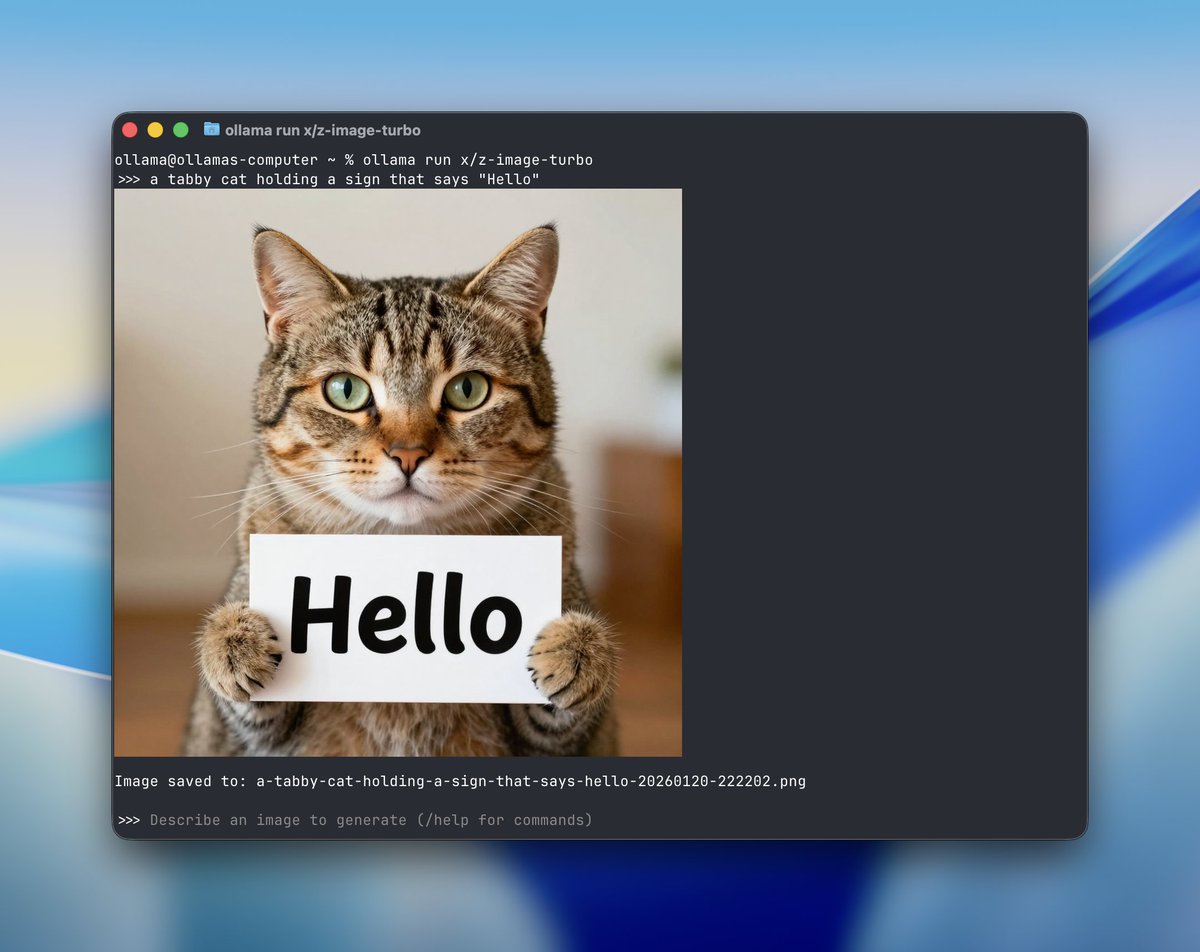
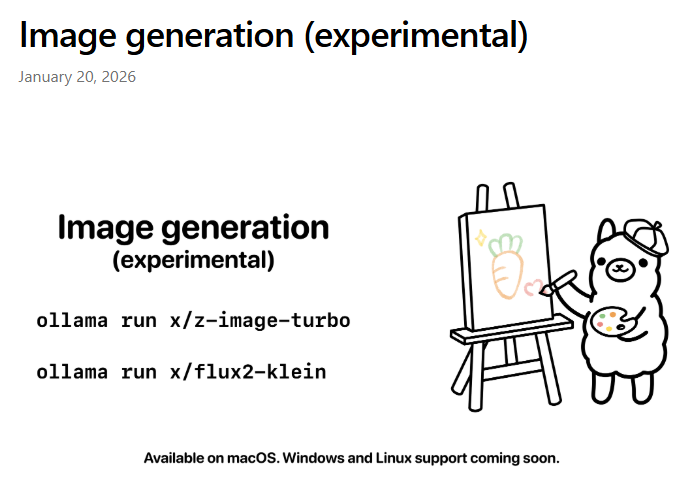
Ollama has officially added image generation capabilities now live for macOS, with support for Windows and Linux coming soon. Users can generate photorealistic or stylized images right from their terminal using models like: Z-Image Turbo (from Alibaba’s Tongyi Lab): great at realism, bilingual text rendering (English + Chinese), and open for commercial use (Apache 2.0). FLUX.2 Klein (by Black Forest Labs): excels at text in images, UI mockups, and product visuals. Comes in 4B (open) and 9B (non-commercial) versions. Customization options include image size, random seed, number of steps, and negative prompts. Images save locally and even render inline in supported terminals like iTerm2 and Ghostty.

@TDataScience ·
From installing Ollama to launching OpenCode with a local model, Shuai Guo presents a step-by-step tutorial on building your own local coding agent with Gemma 4. https://t.co/EkLE5CCAOc
@JulianGoldieSEO ·
𝗥𝘂𝗻 𝗚𝗼𝗼𝗴𝗹𝗲'𝘀 𝗚𝗲𝗺𝗺𝗮 𝟰 𝗹𝗼𝗰𝗮𝗹𝗹𝘆 𝗳𝗼𝗿 𝗳𝗿𝗲𝗲 𝗶𝗻 𝗺𝗶𝗻𝘂𝘁𝗲𝘀 𝘂𝘀𝗶𝗻𝗴 𝗢𝗹𝗹𝗮𝗺𝗮. Ranked number 3 in the world among open models. Runs on your laptop. No cloud. No data leaving your machine. Here's exactly which model to pick: → E4B (9.6GB): Start here if you're on a typical laptop. Run: ollama run gemma4:e4b → 26B MoE (18GB): Only activates 4B parameters during inference. Fast with high quality. Run: ollama run gemma4:26b → 31B dense (20GB): Maximum quality. Number 3 globally. Run: ollama run gemma4:31b Best practices most people skip: → Set temperature 1.0, top_p 0.95, top_k 64. Google recommends these across all use cases. → Turn thinking mode ON for math, coding, and analysis. Turn it OFF for quick summaries. → When sending an image with a question put the image first then your text. Better performance. → Don't include the model's thinking output in your conversation history. Only final responses. Coding benchmark jumped from 110 ELO on Gemma 3 to 2,150 on the 31B. That's a generational gap in one release. Apache 2.0 license. Commercial use, fine-tuning, redistribution. No hidden restrictions. Install Ollama at https://t.co/493GbXWz04. Make sure you're on version 0.20 or higher for Gemma 4 support.
 Watch video
@PixelRainbowNFT ·
🧠 Holy crap. I just figured out something about OpenClaw Everyone keeps debating: OpenViking vs. Hindsight. Pick one. They're competing plugins. You have to choose. Wrong. As of v0.2.8, you can run both simultaneously! Here's why I stoked rn: OpenViking Plugin 2.0 quietly upgraded from being a memory-slot plugin to a Context Engine — a completely different plugin hook with 7 lifecycle stages vs. the old 2. It's no longer competing for the same slot. That means Hindsight can still occupy the memory slot (lossless PostgreSQL capture of every single turn), while OpenViking runs as the context engine (tiered L0/L1/L2 retrieval, hierarchical compression, 91% token reduction). You're not choosing between a safety net and a sports car. You get both. What I'm about to unlock on my setup: ✅ OpenViking handling how context gets assembled — smart, compressed, ranked ✅ Hindsight capturing everything — lossless, no judgment, no missed turns ✅ If OpenViking ever hangs → memory capture keeps running through Hindsight ✅ Local embeddings via Ollama on Apple Silicon — zero API cost for the memory layer ✅ Both services run on host OS → when I port to a container later, it's one URL change The influencer content keeps telling you to "pick the right memory plugin." The actual alpha is in the architecture docs and GitHub changelogs nobody reads. Go deep. Read the release notes. The edge is in there.
@SaiyamPathak ·
my DGX spark fan in full force! Gemma results will be shared in a few Ollama for DGX spark don't run properly as it won't detect the GPU - vllm is the best for now - I am also running their llama cpp playbook will share the results shortly the the video dropping on gemma 4 soon!

Best Ollama tweets
Xholic studies what works in your niche, drafts posts in your voice and schedules them for the hours your audience is online.
$0 today · Card required · Cancel anytime
Browse all tweet collectionsLive demo: no sign-up or login needed · takes about 2 minutes
Keep exploring