Official releases & version updates
Announcements of Hermes Agent version releases (v0.3 through v0.19 'Quicksilver') and new built-in features like background agents, iMessage support, and Curator.
22%
Browse the best tweets about Hermes Agent by Nous Research, including setup, memory, skills, integrations, models, and automation workflows. Updated every two weeks.
Specific Hermes Agent workflows and releases, clearly separated from unrelated products and other projects named Hermes.
Original Xholic analysis
Conversation around Hermes Agent centers on Nous Research's self-improving open-source agent: version releases, setup guides, the desktop/WebUI layer, and ecosystem maps. Evidence shows consistent support (100% SUPPORTIVE, 90% POSITIVE) across 50 posts by 34 creators, with list-format posts and ecosystem/skill resources drawing the strongest engagement.
90% of posts
All-time engagement
58% of posts
Published in 90 days
Conversation map
Announcements of Hermes Agent version releases (v0.3 through v0.19 'Quicksilver') and new built-in features like background agents, iMessage support, and Curator.
22%
Step-by-step installation and onboarding walkthroughs, beginner manuals (e.g., Orange Book), video courses, and 'from zero' explainers.
22%
Hermes Desktop, Hermes WebUI, control panels, and TUI-vs-GUI comparisons that put a visual control room on top of the terminal agent.
16%
Hermes vs. OpenClaw, Claude, and generic chatbots — differences in skills, memory, architecture, safety, cost, and when to use each.
12%
Curated lists, rankings, and live maps of Hermes skills, tools, plugins, and community projects (e.g., ecosystem lists, Skills Hub, Hermes Atlas, top-skills rankings).
10%
Multi-layer memory stack, MEMORY.md/SOUL.md, SQLite session search, compression thresholds, pluggable memory providers, cross-session recall.
10%
Hermes autonomously writing, refining, grading, and pruning skills from completed tasks (learning loop, GEPA optimization, self-evolution, procedural memory).
10%
Talking to the agent via Telegram, Discord, Slack, WhatsApp, Signal, iMessage, and voice; using chats/topics as workspaces and remote control surfaces.
4%
Tone and stance
Performance benchmark
Posts with media make up 90% of this collection. Their median all-time score is 106.7, compared with 76.0 for text-only posts.
Format mix
Consensus and debate
Shared view
All 50 posts are coded SUPPORTIVE and 90% POSITIVE (10% NEUTRAL, zero negative). No post in the dataset criticizes Hermes Agent itself; even the 'I was wrong' and 'useless if' framings are promotional hooks rather than criticism.
Shared view
Across the corpus, the two capabilities most consistently credited as setting Hermes Agent apart are the self-improving skill loop (writing, refining, grading, and pruning skills from completed tasks) and the layered persistent-memory architecture (MEMORY.md/SOUL.md, SQLite session search, pluggable providers).
Open debate
The community splits on how Hermes relates to OpenClaw. One camp frames Hermes as a direct upgrade — cheaper tokens, built-in memory, fewer gateway restarts, one-command migration. The other camp explicitly rejects the 'end of OpenClaw' narrative, positioning the two as complementary tools with different strengths.
What performs
All five top outliers — 27.65x, 17.26x, 11.31x, 8.29x, and 7.51x the median all-time score — come from the ecosystem-maps, setup-guides, or desktop-app themes, confirming hands-on and directory content outperforms the conversation median (99.38).
90% of posts include media, and posts with media carry a median all-time score of 106.739 versus 75.966 for text-only posts — a roughly 40% advantage.
Only 3 of 50 posts (6%) were published within the last 90 days; the median post age is 163.4 days (oldest 2026-03-22, newest 2026-10-09). Recent coverage still exists — including v0.19 'Quicksilver' feature breakdowns — but volume has cooled substantially from the earlier peak.
Statistical standouts
Creator landscape
The five most represented creators account for 20% of the selected posts.
1. Vaishnavi
@_vmlops
2 posts
2. Jainam Parmar
@aiwithjainam
2 posts
3. Alex Finn
@AlexFinn
2 posts
4. Antoine Rousseaux
@AntoineRSX
2 posts
5. Boxmining
@boxmining
2 posts
6. divyansh tiwari
@DivyanshT91162
2 posts
LIST-format posts carry a median all-time score of 352.24 versus 35.705 for ANNOUNCEMENT posts. The top outliers include HermesWatcher's ranked skills list and DeRonin_'s curated ecosystem map, consistent with curated directories outperforming raw release notes in this conversation.
The Setup guides & tutorials theme shows a median all-time score of 150.225 — the third-highest theme median in the dataset — with TUTORIAL-format posts at a median of 120.74. Greg Isenberg's step-by-step Hermes setup walkthrough is the conversation's second-largest outlier at 17.26x the median.
Comparisons with OpenClaw & other agents is the second-highest-scoring theme (median 241.32). Authors like TheTuringPost break down differences in skills, memory, architecture, and safety, while sharbel's 'I was wrong about Hermes Agent' video revisits the comparison and includes a section on how to use both tools' strengths.
Since the previous snapshot
Themes, sentiment, stance, and post format are classified per tweet. All counts, shares, medians, creator concentration, freshness, and performance comparisons are then calculated directly from the published snapshot.
Xholic's all-time score compares engagement while accounting for reach, post age, and creator consistency. It is used for relative comparisons within this collection.
This report analyzes the exact 50-post snapshot shown below. AI identifies editorial categories and drafts explanations; all statistics are calculated from the snapshot, and every narrative claim is checked against cited posts before publication.
Best Hermes Agent tweets
Ranked 01–50

@HermesWatcher ·
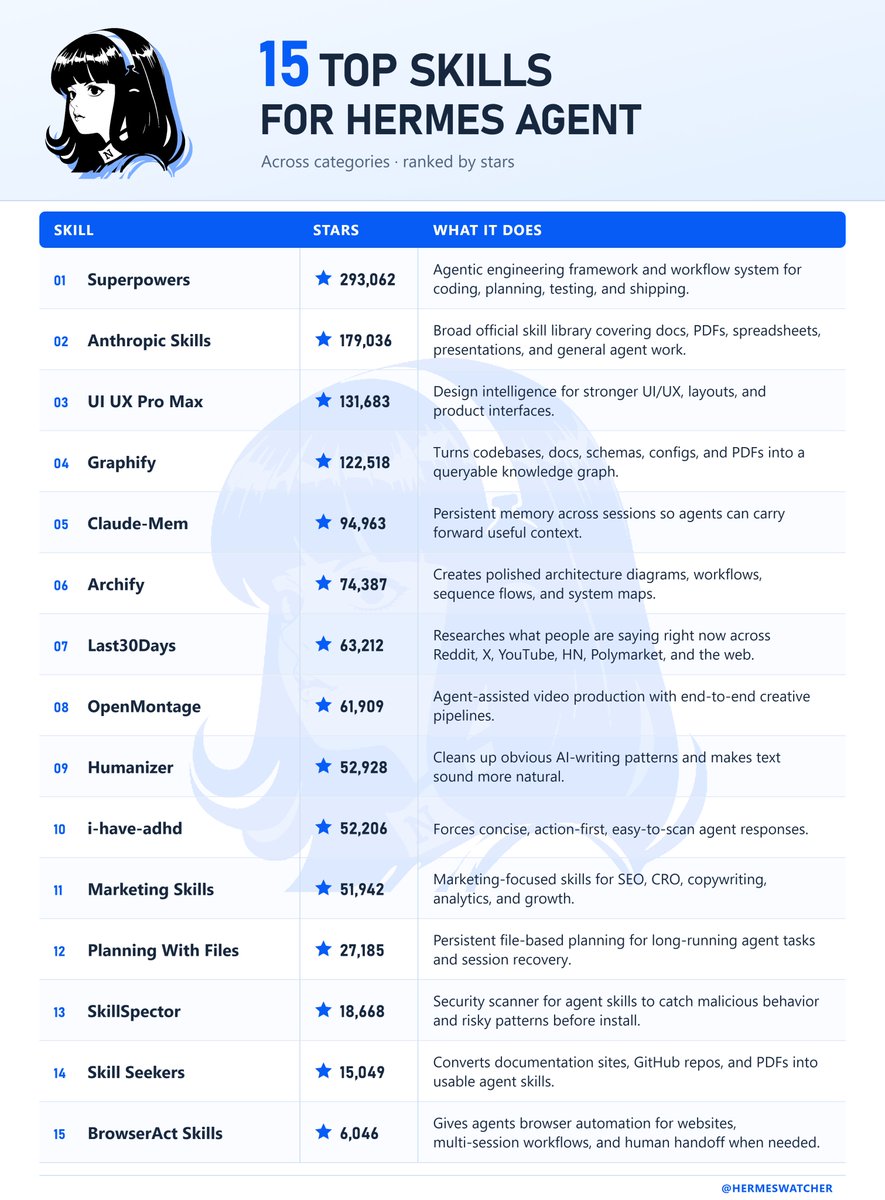
Top 15 Skills for Hermes Agent, ranked by GitHub stars. ⭐ Coding, memory, research, design + more: 1. Superpowers https://t.co/HzvQ6VSJLD 2. Anthropic Skills https://t.co/iS42gnmX0Q 3. UI UX Pro Max https://t.co/PZXLUgOlom 4. Graphify https://t.co/q6Q3WHlWTP 5. Claude-Mem https://t.co/DhnrpKi4fV 6. Archify https://t.co/nJnjtzLbi6 7. Last30Days https://t.co/PJI3vo6FEL 8. OpenMontage https://t.co/YfEBLMTcaP 9. Humanizer https://t.co/RHyHvQ2And 10. i-have-adhd https://t.co/4fJQbobs4k 11. Marketing Skills https://t.co/tJmTkGsJyR 12. Planning With Files https://t.co/lnpWuIRNBh 13. SkillSpector https://t.co/9kZQeeNYX3 14. Skill Seekers https://t.co/m8uSBvM7CT 15. BrowserAct Skills https://t.co/s2Gl86djFH

@gregisenberg ·
how to set up hermes agent step by step. built-in memory, 40+ tools, works on your phone, and what to think of hermes vs openclaw: 1. hermes is a personal AI agent that runs in your terminal. think of it like open claw but with built-in memory, 40+ tools out of the box, and 90% cheaper token costs. you install it with one command. 2. the 3 problems with open claw that hermes solves: no memory (you keep repeating yourself), constant gateway restarts, and zero visibility into what you're spending on tokens. 3. hermes remembers everything. every completed task gets saved to memory. it searches through past logs to find solutions. over time it literally gets smarter at your specific workflows. 4. connect it to open router. you see exact costs per model per task. free models rotate weekly. one founder went from $130 every five days on open claw to $10 on hermes. same output. 5. it comes preloaded with skills. apple notes, imessage, find my, browser, web search, image generation, cron jobs. no hunting for plugins. 6. connect it to obsidian so it reads your entire vault. connect it to gstack for your dev environment. create custom skills for your specific workflows. 7. the biggest money saver: have it write code once for recurring tasks. then it runs without burning tokens every time. stop paying an LLM to do the same scrape or report daily. 8. run it on android via telegram. name your agents. talk to them like coworkers. in this episode imran shows you how to set this up. 9. you can run it bare metal, in docker, or serverless on modal. pick your risk level. i begged @imranye to come on @startupideaspod and walk through the full installation live. he made it impossibly clear. if you've heard of Hermes Agent and want the clearest explanation of how to get set up like a pro let me know what you want me to cover on the next ep this is the best personal agent setup video on the internet right now. watch
 Watch video
@hasantoxr ·
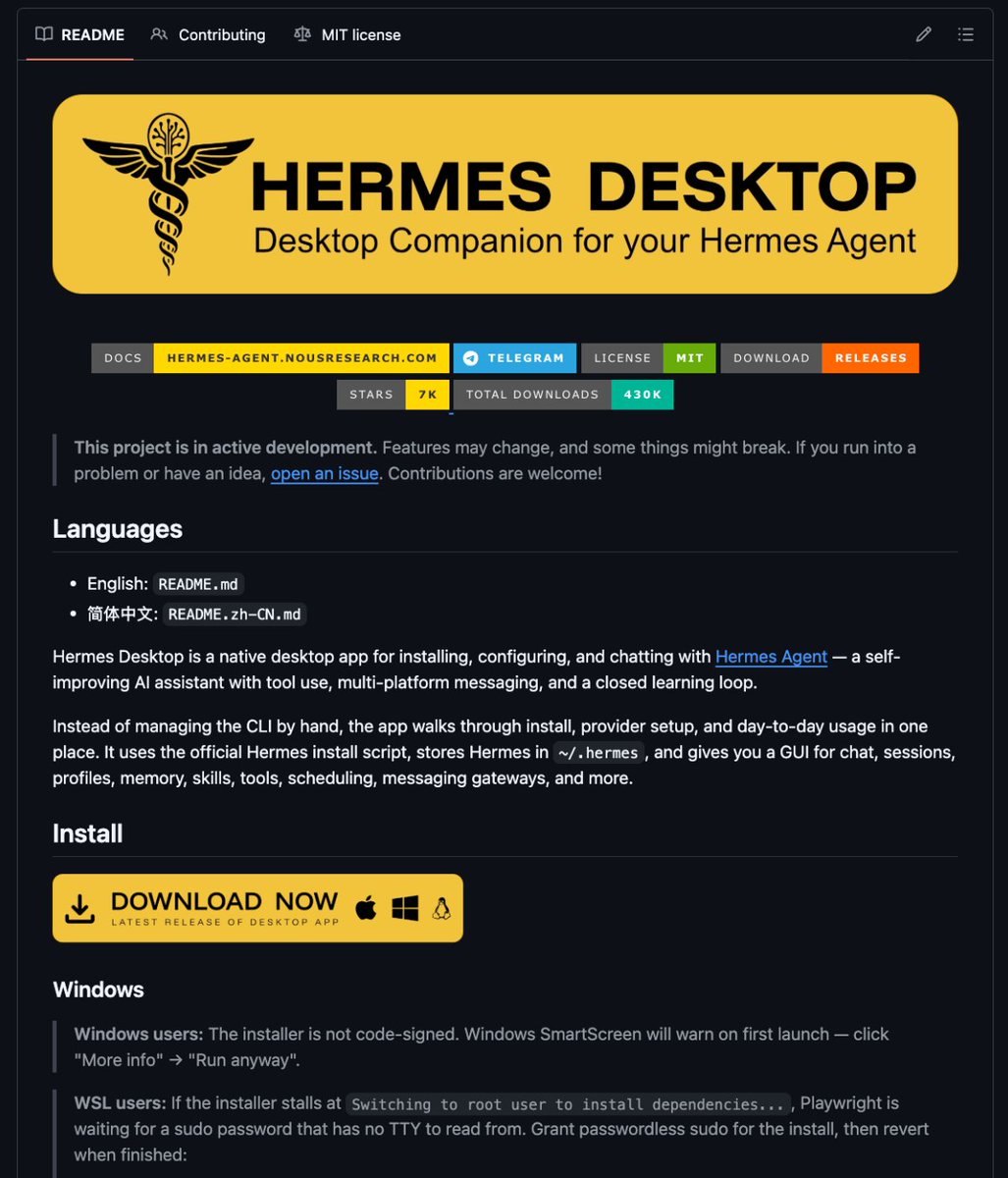
This open-source app turns Hermes Agent into something normal people can actually use. It’s called Hermes Desktop. Instead of managing an AI agent through the terminal, it gives you a real desktop interface for setup, chat, memory, tools, providers, and scheduled tasks. Basically: Hermes Agent = powerful brain Hermes Desktop = control room What it gives you: • One place to install Hermes • Provider setup • Chat sessions • Profile switching • Memory management • Skills • Tools • Scheduling • Messaging gateways • Logs • Backups Most AI agents are impressive on GitHub but annoying in real life. They hide state in files. Break quietly. Force you into terminals. Make simple things feel technical. Hermes Desktop fixes the interface problem. This is what open-source agents need more of. GitHub: https://t.co/iHR9kQNJq1

@DeRonin_ ·
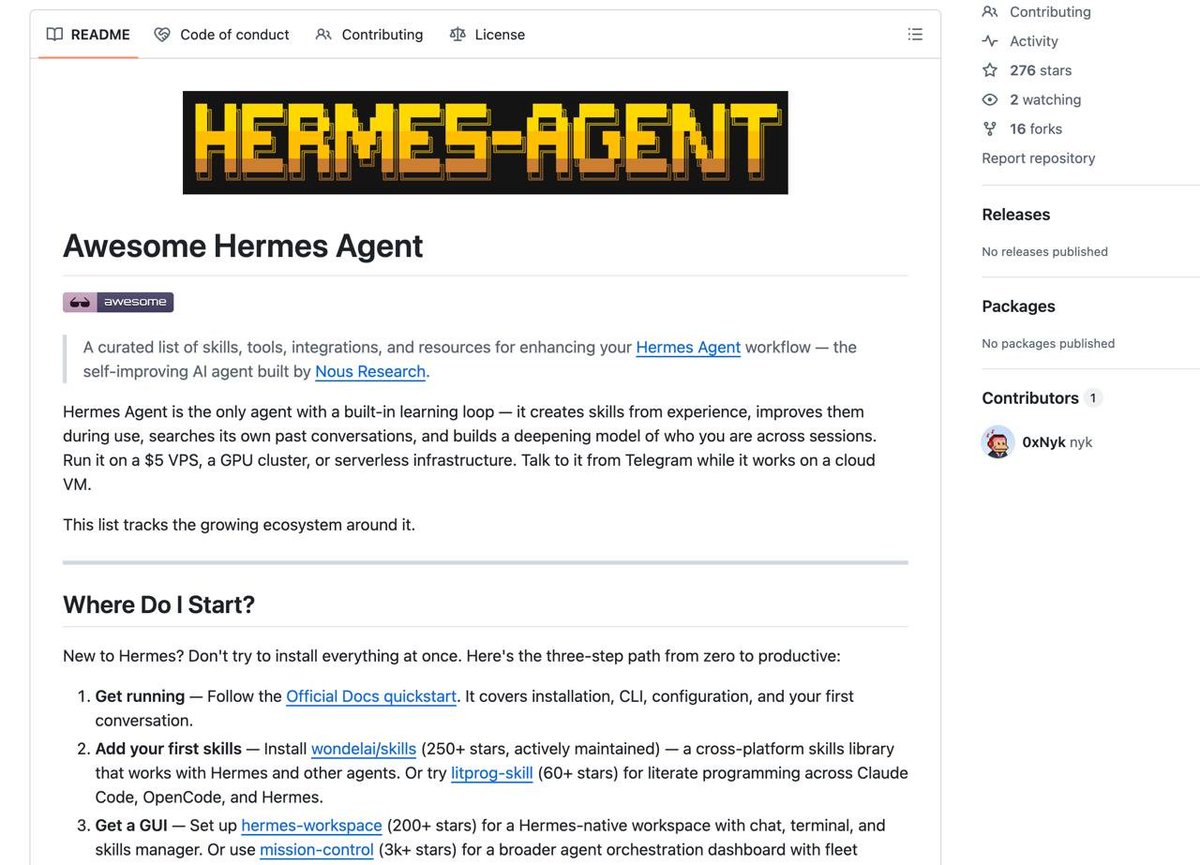
Somebody just mapped the ENTIRE Hermes Agent ecosystem 40+ skills, tools, integrations, and resources for @NousResearch's agent, all in one curated list highlights: ▫️ skills that upgrade themselves after every run ▫️ 734 security playbooks, ready to deploy ▫️ visual UI for memory, sessions, and skills ▫️ remote control your Android from your agent ▫️ Claude Code -> Hermes task handoffs ▫️ full OpenClaw migration in one command ▫️ AI council that debates before executing every entry has a real editorial description, not just a link the ecosystem most people don't know exists yet https://t.co/5dUWWRh99x [ BOOKMARK ]

@milesdeutscher ·
If you use Hermes, you'll want to bookmark this. Nous Research has a FULL GUIDE on building custom Hermes agent plugins. Copy this entire page into your agent, and prompt: "I want to build a plugin for [x]." Your agent will then autonomously execute. Some ideas: • Finance research plugins (alert system, watchlist updates, etc.) • Social media scanner • Calendar and meeting auto-prepper • Medical/health tracker So much ROI. Create your plugins here: https://t.co/QtgWXF8qFf
 Watch video
@sharbel ·
100 Days With Hermes Agent in 21 Minutes 00:00 The gap between using Hermes and actually operating with Hermes 00:52 Mistake 1: Using Hermes like a smarter search box 01:30 Turning prompts into repeatable loops 03:13 How to build a workflow manually before scheduling it 03:53 Crons and scheduled jobs explained 05:12 Mistake 2: Keeping everything in one messy chat 05:48 Telegram topics as separate workspaces 07:50 The 3 workspace setup I recommend 08:40 Mistake 3: Making one agent do everything 09:33 How sub agents make Hermes cleaner and more useful 11:27 Nova and Sage, my specialist agents 13:06 Mistake 4: Waiting to trigger Hermes manually 13:51 Webhooks explained with a Notion content board example 15:52 Polling crons explained 16:52 Mistake 5: Managing everything from chat forever 17:20 Building a Hermes mission control dashboard 19:04 The exact order I would build Hermes from scratch 20:00 How to start without overbuilding
 Watch video
@Tiny_Fish ·
Big one for the Hermes Agent community. TinyFish is now a plugin in the @NousResearch Hermes Agent. Your Hermes agent gets free Search and Fetch, so it can find and read the live web at $0. When a task needs real clicks, TinyFish Browser and Web Agent are one approval away.
 Watch video
@NousResearch ·
In partnership with @stripe, Hermes Agent now supports a full suite of Stripe skills. Your agent can buy things, pay per-call APIs, and provision its own SaaS, with configurable safety limits on every action.


@AlexFinn ·
7 things that instantly made my Hermes Agent 100x better: 🔶 Stop being a 🐱. Run it on your main computer I see a lot of people putting Hermes on side computers with their own Apple and gmail accounts. You're adding insane amounts of needless friction Just put it on your main computer. Allows Hermes to work alongside the files you use regularly 🔶 Use the desktop app Desktop app is awesome. Allows you to easily manage all your sessions. Also can message multiple profiles quickly, allowing you to do amazing multi-agent workflows 🔶 Use /background to multitask /background allows you to send prompts to your agent that it runs in the background, allowing you to have your agent perform multiple tasks at once. Great for executing super complex workflows. Just type /background and put a prompt after. Then keep firing off more prompts. 🔶 Use a new profile for every model Profiles are basically new Hermes agents. All with their own memories, skills, and tools. I like to create a profile for each model (Opus, GPT, local models) and give each profile tasks that match the strengths of that model (GPT 5.5 for coding, Opus for writing and research) 🔶 Use local models when necessary Hermes is awesome for local models and plug in very easily. If you have a Mac Studio or DGX Spark ask your agent to create a new profile and plug it into a local model. I prefer Qwen 3.7. 🔶 Prune your cron jobs Too many cron jobs will slow down your agent. Regularly prune these In Hermes desktop click cron jobs in the bottom corner. Then delete any you haven't looked at lately. this will greatly improve performance. 🔶 Shrink your compression threshold I was having some memory challenges until I shrank the compression threshold. The compression threshold determines how often Hermes compresses memories. I set mine to .5. This means it compresses double as much. The less memory it has to compress, the less memory loss you'll get. Configure this in your settings. Do these 7 things and your Hermes will be HUMMING

@tonysimons ·
Hermes Agent Tip of the Day: 🪽 If you’re running GPT-5.6 with Hermes, there’s a brand new setting you should know about. Hermes can now use OpenAI’s native Responses API server-side compaction for long-running sessions. Turn it on: compression: codex_responses_native: true Here’s the cool part: Instead of waiting for Hermes to locally compress a massive conversation, OpenAI can compact the older context server-side first. Hermes then keeps the encrypted compaction checkpoint and replays it on future turns. So you get: → Better long-session context management → Persistent compaction across turns → Less unnecessary transcript baggage → Hermes’ normal local compression still sitting there as a fallback And this isn’t blindly enabled across every provider. It’s specifically gated to GPT-5.6 running through the direct OpenAI API or your ChatGPT Codex subscription. OpenRouter, xAI, Copilot, local models, etc. don’t get the field shoved at them and told “good luck.” 😂 This one landed yesterday. If you’re using Hermes for long-running coding or agent workflows with GPT-5.6, I’d absolutely be testing this. 🤘🏻


@KanikaBK ·
🚨 JUST IN: SOMEONE JUST WROTE A WHOLE THE HERMES AGENT MANUAL Nous Research never gave you. 100% FREE. No experience needed to start. 17 chapters. 80+ tools, skills, plugins, and integration all at one place. It covers BUILDING A SELF-IMPROVING AGENT from ZERO to ADVANCED. Here is what is inside. Everyone knows Hermes Agent blew up. 50K stars, 2.4 million views on the launch tweet, developers ditching everything else to run it. But Nous Research dropped the tool and basically left you to figure it out alone. No beginner guide. No map. Just a GitHub repo and good luck. It is called the Orange Book. 17 chapters, split into 5 parts. He starts with the concepts so you actually understand what makes Hermes different from every other agent before you touch a single command. Then he walks you through the three layer memory system, how the skill creation loop actually works, and why the agent gets better every single time it runs a task. - part one kills the anxiety, explains Hermes in plain language before anything else - part two breaks down the learning loop, memory architecture, and how skills get created automatically - part three is hands on, installation, first conversation, multi platform setup, customisation - part four is real world scenarios, knowledge assistant, coding agent, creative work, running multiple agents together - part five compares Hermes against Claude Code and OpenClaw so you actually know when to use what Nous Research built the agent. They charged nothing for it. Alchain spent weeks mastering every part of it, wrote a 17 chapter book, and also charged nothing for it. The tool that taught itself to get smarter now has a guide written by someone who did the same thing. I still do not understand why this is all free. But here we are.


@aiedge_ ·
If you use Hermes agent, you need to save this resource. Nous Research has an official Hermes Skills Hub with hundreds of Hermes Skills. Skills for creative work, developer tools, research, and more. Search the marketplace here: https://t.co/0d1w9GD0fF
 Watch video
@AlexFinn ·
MASSIVE Hermes Agent update over the last few days Totally changes the way I use Hermes Here's 8 new features you need to start using immediately: 1. Native iMessage support: This is by far the easiest way to message Hermes on the go. Totally free to set up. I now use iMessage for quick prompts on the go, Hermes Desktop at home 2. Background agents: Background agents are now on by default. Now you can give Hermes complex prompts and by default Hermes will spin up subagents and put them in the background. Instead of waiting a long time to follow up with your agent while it works, you can immediately message it while background agents work quietly 3. Updated Desktop App: Bunch of new quality of life features in the desktop app including: • pop out chats in their own window • model selector now at bottom • live subagents pane • built in terminal 4. Profile builder in the browser: profiles in Hermes are basically new Hermes agents that work side by side. You should have at least 2 profiles set up so if one goes down, the other can fix it. Never been easier to set up new profiles, type hermes dashboard in your terminal and go to profiles 5. Skills Hub: There's now a skills hub in Hermes dashboard as well. Makes it really easy to browse and install new and popular skills 6. Smarter memory edits: your agent will now self improve way more and with better improvements too. Your agent will constantly write and update new skills as you work 7. Unreal Engine 5.8 MCP: For the first time you can now use AI to build video games in the most popular and powerful engine on Earth: Unreal Engine. Install the MCP in Hermes and you can have your agent build super complex and in depth 3D games. 8. Better Telegram formatting: Hermes now takes advantage of complex formatting in telegram like tables and charts. I like to use Telegram when I'm doing deep work on the go and iMessage when I have quick prompts on the go Excellent updates that have significantly improved the experience. Video showing how to use and set this all up shortly.
@KanikaBK ·
I found this last night and I have not stopped thinking about it. HERMES JUST LAUNCHED HERMES DESKTOP. 100% FREE. It is a free desktop app that gives Hermes Agent a proper interface. One place for everything. What is inside: ↳ Auto install and setup, no terminal needed ↳ Streaming chat with token tracking ↳ Multiple agent profiles ↳ Memory you can actually see and edit ↳ 14 tool categories including web, browser, image gen, and voice ↳ Scheduler for automated tasks ↳ 16 messaging gateways including Telegram, WhatsApp, Discord, Slack, and Signal ↳ Full conversation history with search ↳ Backups and logs in one settings screen Works with Anthropic, OpenAI, Gemini, Grok, Groq, Ollama, and more. Hermes Agent is the brain. Hermes Desktop is the cockpit. Free. Open source. Mac, Windows, and Linux.
 Watch video
@RayFernando1337 ·
A lot of people are calling Hermes Agent the end of OpenClaw. BRUH! It's not... Nous Research trains actual models and they built an agent around that expertise. The local model routing is solid, but the part that matters for your business is that your conversations become fine-tuning data. You can train a model on how you actually work. 00:00 The Problem with Local AI Models 00:25 Introduction to Nous Research 01:04 Cross-Platform Agent Capabilities 01:44 Deep Local Model Integration 02:30 Routing Tasks to Different Models 03:06 Conversations as Training Data 03:50 Hermes Agent vs. OpenClaw 04:15 Future Plans and Series Overview
 Watch video
@NousResearch ·
Hermes Agent v0.7.0 is out now. Our headline update: Memory is now an extensible plugin system. Swap in any backend, or build your own. Built-in memory works out of the box; six third-party providers are ready to go. Pick one with 'hermes memory setup'. Full changelog below ↓
 Watch video
@sharbel ·
I was wrong about Hermes Agent: 0:00 - intro 0:25 - openclaw vs hermes 1:26 - hermes agent 2:16 - the self-improving skill loop 3:06 - openclaw 3:45 - how to use both strengths 4:56 - final verdict
 Watch video
@firecrawl ·
Hermes Agent can now scrape, search, and interact with the web using Firecrawl @NousResearch Enable it during setup to give Hermes the complete web toolkit 🔥
 Watch video
@_vmlops ·
HERMES Agent just launched a desktop app for managing autonomous AI agents at scale You can now: - Run multiple agents from one interface - Maintain persistent memory - Automate long-running workflows - Keep agents operating continuously
 Watch video
@KSimback ·
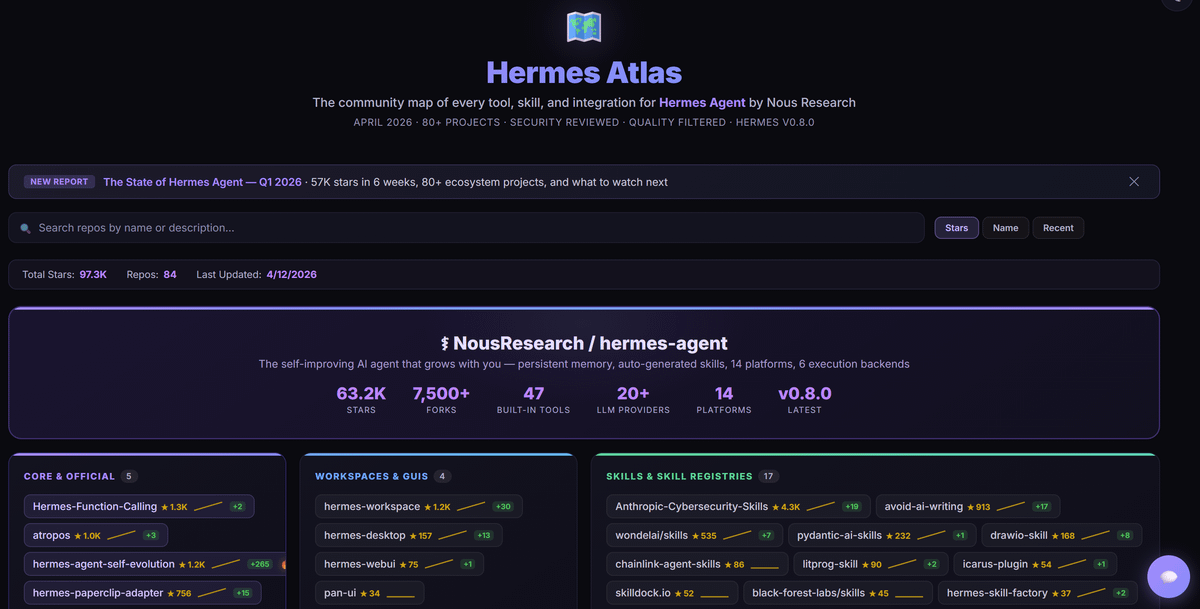
One of my Hermes agents is in love with the Hermes ecosystem What started as a research task turned into full-blown community project It spent the week mapping every tool, skill, and integration built for @NousResearch's Hermes Agent The result: Hermes Atlas — a live ecosystem map of 80+ quality-filtered, security-reviewed projects It has a search engine, live GitHub star data, and a RAG chatbot you can ask anything about Hermes and the ecosystem
@milesdeutscher ·
Nothing I've tested comes close to Hermes. It's the first AI agent that feels like a real mini employee living on my desktop. It's powerful, but most people are barely scratching the surface of what it can do. Here are some extremely high ROI Hermes agent use cases to get the most out of your AI: • Job hunter: Give Hermes your CV + resume, and let it find high-paying job opportunities • Personal OS dashboard: Use Hermes to vibe-code a personal operating system app (stores all your important data in one place - to-do list, calendar, etc.) • Multi-agent coordinations: Tell Hermes "Launch multiple sub-agents for [x] task." Hermes then deploys multiple agents for research, coding, debugging, or whatever the task is. • Personalised tutor: Have Hermes act as your tutor who builds interactive courses, guides, and resources for learning new skills • Personal 𝕏 assistant: With the latest 𝕏 update, you can now plug Hermes directly into your accounts to scan bookmarks, read articles, and so on • Finance auditor: Deploy Hermes as your personal CFO who unsubscribes from services, reviews recurring charges, researches anything overpriced, etc. • Knowledge base builder: Sits in your Slack/Notion, learns from team conversations, and auto-populates your internal wiki These are all complete game-changers.


@TheTuringPost ·
Hermes Agent vs. OpenClaw, What's the difference? 1. Skills OpenClaw’s skills are written and refined by humans, while Hermes mostly forms them itself. 2. Memory Hermes has memory stack with compact persistent memory + searchable session history in SQLite + optional modeling + skills as procedural memory. OpenClaw's memory is grounded in Markdown files. 3. Architecture Hermes is built around agentic self-improving loop. In OpenClaw, Gateaway is the main control plane. 4. Satefy is what becomes a default in Hermes Agent. There are also differences in automation (scheduling) mechanisms, identity philosophy and many other aspects. Here is deeper Hermes vs. OpenClaw analysis, how each part is realized in Hermes Agent and where you better use each of them: https://t.co/8FekCwIXsA


@novasarc01 ·
i was going through the hermes agent architecture and codebase and one thing that really stood out to me is that hermes is taking a much more explicit route to self-improvement than most agent systems usually imply. like it is not doing some offline trajectory mining where you collect lots of traces, run some separate extraction pipeline, cluster behaviors and then distill them into skills later. instead i think hermes feels much more like agent-mediated procedural distillation: the model itself notices that a workflow is reusable and writes it out into a durable artifact through the skill interface. in fact there is no separate skill-extraction model, no embedding-based clustering pass and no dedicated replay-style learning loop in the main design (hermes is doing act, notice, write, reuse all in one loop). also the interesting part is that the same runtime that acts is also the runtime that writes down its own reusable procedures.


@chriskim_dev ·
I gave @NousResearch Hermes agent a company brain. I've been LOVING Hermes agent as my personal assistant but haven't been able to use it for work. AI agents are powerful but they are siloed. They don’t have access to the same files, comments, versions, or decisions your team is working from. So I connected Hermes to @Box. Now my Hermes agent can work from Slack, use files, comments, and decisions stored on Box as the single source of truth, and get shi* done.
 Watch video
@techNmak ·
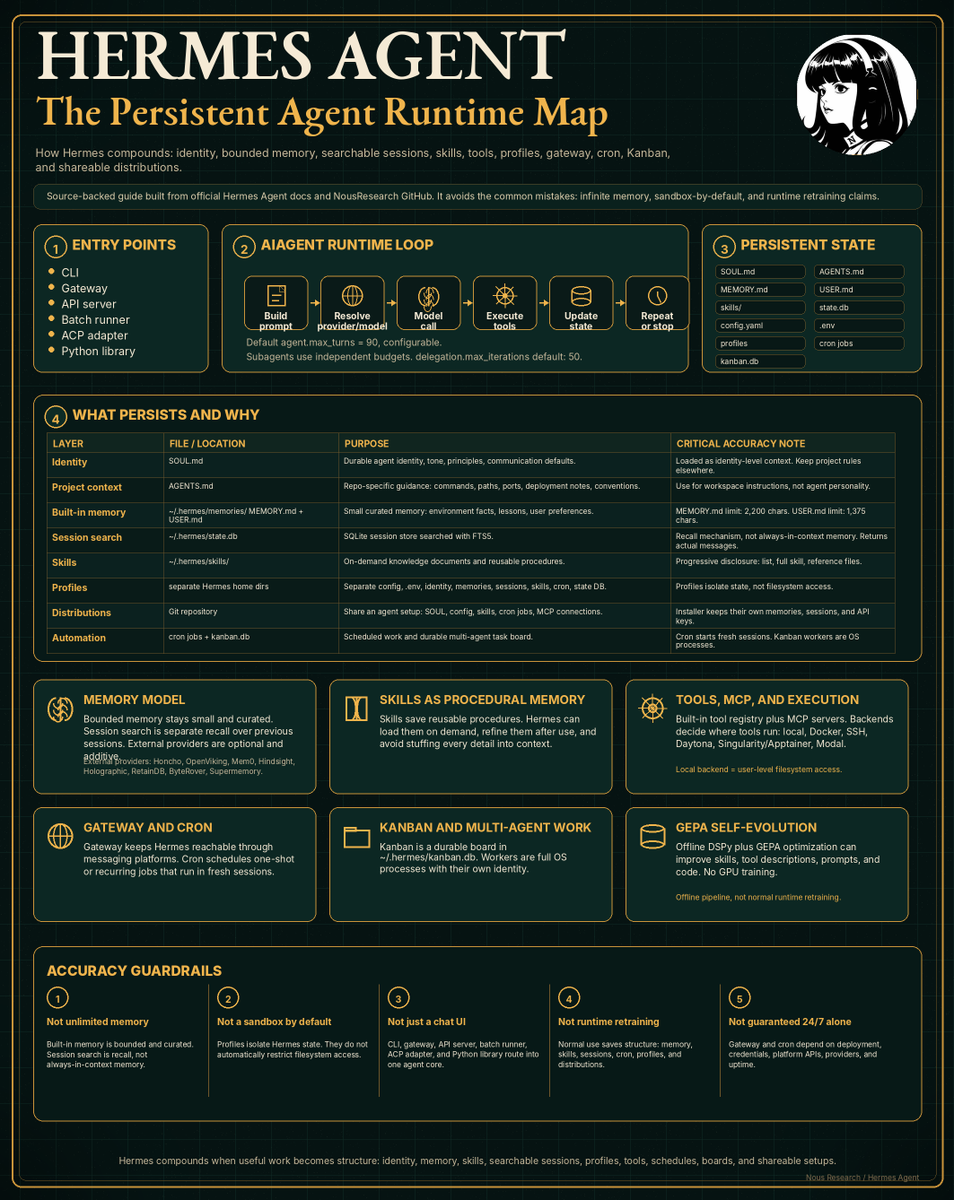
Nous Research built the most complete open source agent on the internet. 174,000+ GitHub stars. Here's what's inside. Hermes Agent is not a chatbot wrapper. It works out of the box for most people. You do not need to spend weeks configuring it. You do not need to become an agent engineer. It ships with everything. Disable what you don't need with hermes tools or hermes skills config. Tinker with it to infinity if you want. Upload your entire setup as a GitHub repo and reinstall it fresh anywhere. But if you just want it to work, it works. Here's the full architecture: Entry Points → CLI, Gateway, API server, Batch runner, ACP adapter, Python library Persistent State → SOUL[.]md - durable agent identity, tone, principles → MEMORY[.]md - curated memory, 2,200 char limit → USER[.]md - your preferences and working style, 1,375 char limit → skills/ - reusable procedures written from experience → state.db - every session stored in SQLite with FTS5 search → kanban.db - durable multi-agent task board → cron jobs - scheduled work that runs unattended → profiles - fully isolated agent environments Runtime Loop → Build prompt → Resolve provider → Model call → Execute tools → Update state → Repeat → Default max_turns: 90. Subagents get independent budgets, default 50. Memory Model → Bounded and curated, not a growing dump → Session search is recall, not always-in-context memory → 8 external providers: Honcho, Mem0, Hindsight, RetainDB, and more Skills → On-demand knowledge documents → Written autonomously after complex tasks → Refined during use via GEPA offline optimization → Compatible with agentskills[.]io open standard Tools and Execution → 7 terminal backends: local, Docker, SSH, Daytona, Singularity, Modal, Vercel Sandbox → 20+ messaging platforms from one gateway process → MCP server support built in GEPA Self-Evolution → Offline DSPy pipeline improves skills, prompts, and tool descriptions → No GPU required. No runtime retraining. → The model never changes. The system still improves. The agent that grows with you.

@AntoineRSX ·
Hermes Agent released v0.14, and it just made every other AI agent framework feel small. It now drives your computer. Searches X natively. Joins your Microsoft Teams calls. AND runs Grok with a 1M context window. (and for my crypto bro HyperLiquid) The AI agent era is crazy and beautiful.
 Watch video
@itsolelehmann ·
HERMES AGENT FOR DUMMIES Everyone on X keeps talking about Hermes Agent and I finally get why: Once you have an AI that's always-on, remembers everything, and you can just text from your phone, you're never going back to a regular AI chat window. That's Hermes. You text it like an executive assistant and it just handles things. Think of it like an affordable OpenClaw that actually works and is reliable. I was using OpenClaw earlier this year, but it kept breaking and the costs were adding up, so I quit personal agents for a while. Then I set up Hermes and it's what I wanted OpenClaw to be from the start. Here's how it works: > You can talk to it on 19+ messaging platforms (I use Telegram and Discord) > You give it a personality file called SOUL .md so it behaves how you want. > You give access to your email, calendar, full browser access, and whatever other tools you use through integrations. > And you plug in whatever models you want as the brain. I use GPT 5.5 for heavy thinking and DeepSeek for lighter tasks so I'm not burning tokens on every little request (under $20/month in token spend). And I run mine on a Hetzner server for about $5/mo, which enables Hermes to be always-on and persistent. So you can schedule tasks that run autonomously, even while you sleep and even while your devices are off. For example, I have one that scans my email for customer support tickets every morning, matches customer to stripe data, sends out missing links, checks refunds etc. Stuff that used to take me HOURS. And the part that actually separates it from OpenClaw and everything else: Hermes writes its own skills from experience. Every time it completes a task, it saves what worked and turns it into a reusable skill it can run again without you explaining anything. So it literally gets smarter and better over time for your specific workflows. Here's what other people are doing with it: > inbox zero and calendar management from Telegram on their phone > overnight coding that debugs itself while they sleep > a family WhatsApp bot where 5 people share one agent to get stuff done > daily briefings texted every day at 8am > smart home control through Home Assistant > etc Once you try texting an AI that already knows your whole setup and just does things when you ask, opening a chat window and starting from scratch every time feels broken. This is the first AI agent that feels like a legit Chief of Staff.
 Watch video
@KSimback ·
I was impressed with Hermes agent from @NousResearch within 5 minutes of install But my main reservation with it vs OpenClaw was the strength of the OC community and how much was being built around it Can now confidently say Hermes community is crushing it - let's take a look at just this week's developments: Official Releases & Updates: > Hit 10,000 GitHub stars > Release v0.3.0 was a massive update: 248 PRs > One-command migration from OpenClaw (auto-transfers personality, memories, skills, keys, etc.) > Hermes Agent hackathon with 187 submissions Ecosystem Announcements: > HermesHub: a skill hub where gents can browse and install skills and every submission goes through safety checks > Pinokio 1-Click launcher for instant install/launch on any OS > Parallel web search and page extract APIs/tools > x402 payment support > Hermes Workspace UI: chat with live tools, built-in terminal, 90-skills browser, memory viewer, file explorer, themes, configs, etc. > Google Gemini AI pro sub support Also worth noting that a Hermes agent autonomously wrote a full 79,456-word novel (19 chapters) that was unveiled at NVIDIA GTC Bullish more to come for Hermes!

@codyplof ·
I've had a Hermes agent for a week and a half. Here are some of my initial thoughts: - Overall I really like it. Took some time to set up but feels well worth it and works nicely with claude and codex. - I have it running on a mac mini I originally bought just for remote control access but set it up during a rainy MDW just for fun. - I started on anthropic api but it got expensive so I moved to codex $200 plan and loving it. Also been using codex for a few backend prjects and am impressed but claude is still daily driver. - Mostly using is as my COS/ Assistant. Helps to clear emails, brie for the day, etc. But also trying to push the needle of what it can do. - I got it in slack and actually prefer it there during the workday since it's open. I have a channel with just me; plus starting to give it access to individual channels and having it help there. - My main confusion before using it was how it's different or uniquely differant than claude. Most of what people have shown me they built in their Openclaw was just stuff you can do in claude. - I still feel like that and technically everything I'm doing in Hermes CAN be done in claude. But here's where I notice the biggest differences: Hermes memory/context makes it much easier to chat with and ask to do things on the go. It creates it's own skills, and most noticably is how easy it is to ask it for cron jobs. It just feels more nimble and agentic, whereas claude feels more "powerful" imo. - I gave it access to pretty much everything; google workspace, slack, desktop, full github access, and datawarehouse via @polar_analytics . - I bought a second mac mini and will have my team set up a Hermes agent for our team to use shared in slack; heavly inspired by Shopify's River. We'll use essentually the same setup of codex pro on a mac mini with full repo and workspace access. It will be our shared COS that has full knowledge and context of the org. A big key here is getting all necessary context like data, consumer insights, product info, etc into one place which the team has been working on. - We'll push the boundaries of what manual work we can automate with this agent. Mostly thinking ops, cx, reporting, etc. I'm excited to see what we can do. - Once we think there's enough of a need, we'll expand further and set up more vertical specific agents when the time comes. - I'm using Obsidian and Karpahty's LLM wiki. Don't have Gbrain set up. Also no HQ yet, sorry Jacob. Curious how this compares to what others have done and get any feedback.
@AntoineRSX ·
Hermes Agent released V0.12, and it just killed the idea that agents get worse over time. It now grades its own skills every 7 days. Prunes the dead ones. Merges the duplicates. Writes you a report. AND every conversation now upgrades the skill you just used. Automatically. The agent that maintains itself is here:
 Watch video
@boxmining ·
Your Hermes agent has been silently hoarding skills 🗂️ The new Curator feature auto-cleans, consolidates, and archives near-duplicate agent-created skills — so your catalog stays lean and useful. Watch the @NousResearch full walkthrough + troubleshooting guide 👇
 Watch video
@TheTuringPost ·
What makes Hermes Agent by @NousResearch distinct from any other local agent you’ve ever tried? 1. A huge focus on self-improvement. This agent builds its own skills through a self-evaluation loop. The more you use it, the more it improves. 2. Layered memory stack: small context + searchable history + optional modeling 3. Procedural memory for skills - the agent remembers methods: how to do sth 4. A five-layer, defense-in-depth model that makes safety the default. Here we explain what makes Hermes' self-improvement possible, how each of these aspects works + best use cases, and whether it really beats OpenClaw: https://t.co/8FekCwIXsA

@techNmak ·
10 days ago I installed an open-source agent. Today it knows my codebase better than I do. I want to explain exactly how this happened, because the mechanism matters. Hermes Agent has a learning loop that I didn't fully appreciate until I watched it compound over time. The loop works like this: when you complete a complex task - not a simple Q&A, but something with multiple steps and decision points, the agent can extract the successful approach and save it as a reusable skill. These skills aren't static templates. They're living artifacts that get refined through subsequent use. The first time I built a code review workflow with the agent, it was clunky. By the fifth time, the agent had internalized my preferences, which files to check first, what patterns to flag, how to format the output. I didn't explicitly teach it these things. It learned them from observing successful completions. The memory system enables this learning. It's multi-level and agent-curated, meaning the agent decides what's worth remembering based on relevance and frequency. My project structure, my naming conventions, my preferred libraries, all of this accumulated in the agent's model of me without explicit configuration. Nous Research built this on top of their Hermes model family, but the architecture is model-agnostic. I've swapped between cloud APIs and local models via Ollama without losing my accumulated context. The memory and skills persist independently of the underlying model. The multi-platform gateway means I interact with this same learning agent everywhere - Telegram for quick questions, CLI for deep work, voice memos for ideas on the go. Every interaction feeds the same memory system, which means the agent's model of me is comprehensive rather than fragmented. 40+ integrated tools. Full TUI with multiline editing, conversation history, and streaming output. Runs entirely on my machine.

@Sumanth_077 ·
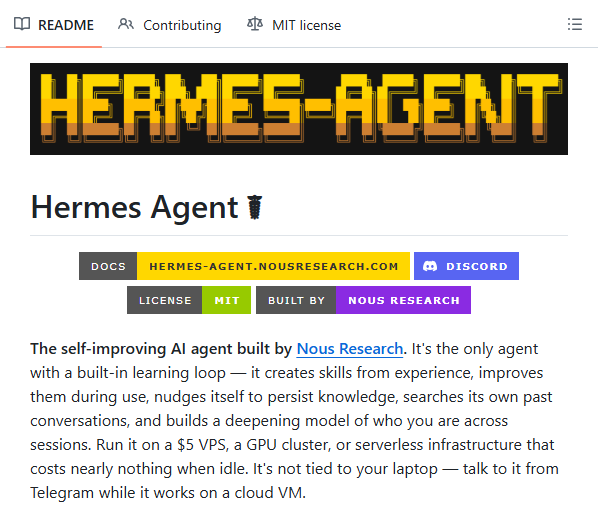
The self-improving AI agent from Nous Research! Hermes Agent is a self-improving AI agent that builds skills from your work, improves them over time, and remembers across sessions. Most AI agents reset every conversation. You teach them your codebase structure, they forget. You show them your deployment workflow, gone. You explain your preferences, erased. This happens because most agents treat memory as an afterthought. They save conversation history but don't actually learn from it. They don't build skills or improve their own behavior. Hermes fixes this with a closed learning loop. After you complete a complex task, it autonomously creates a skill for it. That skill becomes permanent. Next time a similar task comes up, it uses the skill and improves it based on what works. It has a memory system with periodic nudges. It actively prompts itself to persist knowledge. FTS5 session search with LLM summarization recalls past conversations. Honcho dialectic user modeling builds a deepening profile of who you are. What this gives you: an agent that actually gets better at helping you. It works with any model. OpenRouter (200+ models), GLM, Kimi, MiniMax, OpenAI, or your own endpoint. Switch models without changing code. You can talk to Hermes from Telegram, Discord, Slack, WhatsApp, Signal, or CLI. Voice memo transcription works. Conversation continuity across platforms. Built-in cron scheduler for scheduled automations. Delegates and parallelizes work by spawning isolated subagents. It's 100% open source. I've shared the link in the comments!


@aiwithjainam ·
If you want to run Hermes agent on desktop, this is for you. Hermes Desktop gives you a full self-improving AI agent with tool use, memory, skills, and 16 messaging gateways including Telegram, Discord, WhatsApp, and Slack. All in a single desktop app. → Connects to OpenRouter, Claude, GPT, Gemini, Grok, and local models → 22 slash commands for browsing, coding, image gen, and scheduling → Built-in cron job scheduler with 15 delivery targets → Persistent memory with providers like Mem0 and Honcho → Session history with full-text search across every conversation → One-click install, no CLI wrangling 7.7K stars. MIT License. Free on GitHub. https://t.co/CvmQvBZglh


@smratitiwa86867 ·
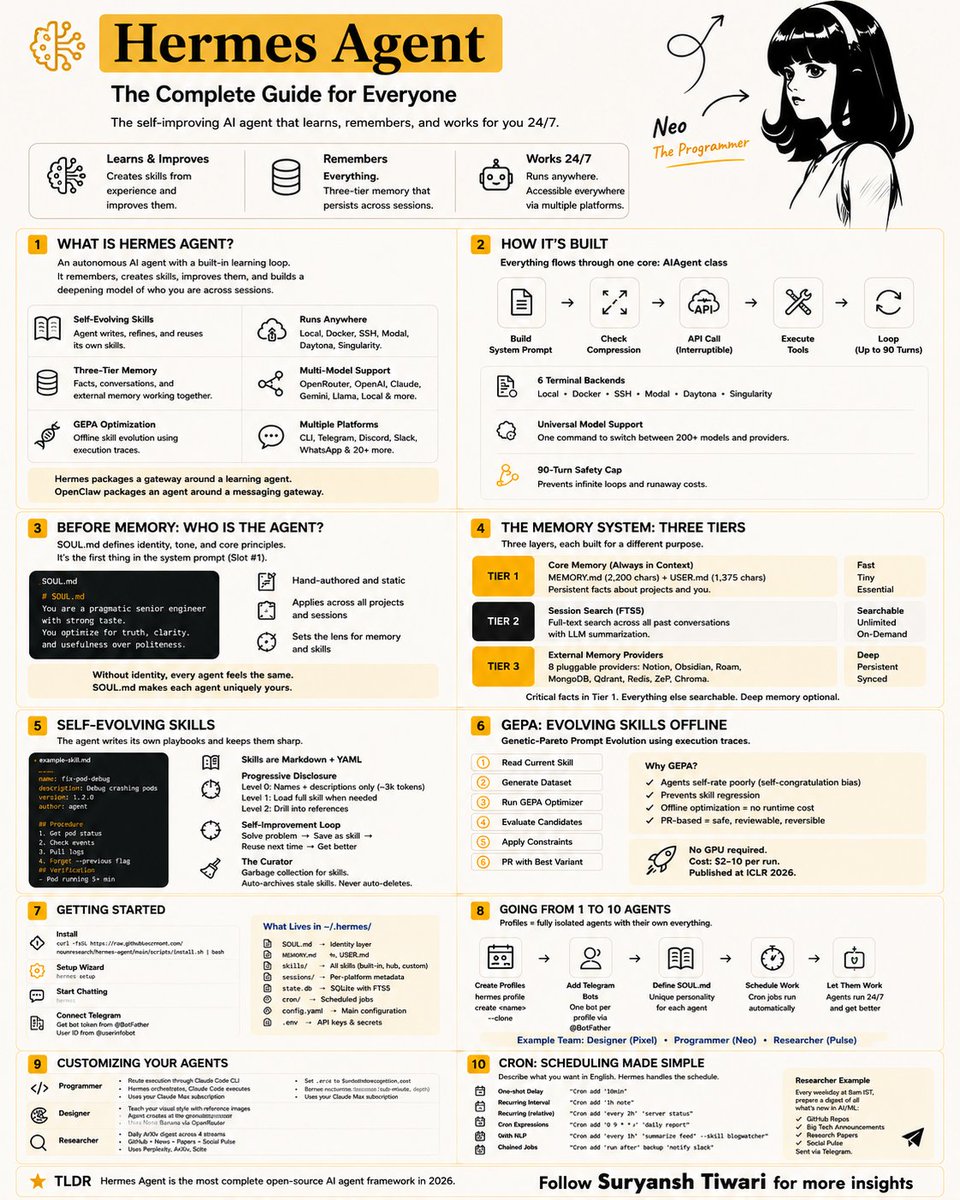
Every AI agent today has the same flaw. It resets the moment the session ends. No memory. No continuity. No accumulated intelligence. Everything disappears: • workflows • preferences • learned fixes • execution history • hard-earned context So developers keep rebuilding the same intelligence from scratch. Hermes Agent is part of a new wave changing that. Instead of treating AI like a disposable chatbot, it treats AI like infrastructure. Persistent. Evolving. Compounding. The system is designed to: • remember across sessions • evolve its own skills • reuse successful workflows • optimize from execution traces • run autonomous agents 24/7 • and develop long-term operational memory That’s why Hermes is getting serious attention from builders. Under the hood, the architecture is incredibly powerful: → multi-layer memory → self-improving skill systems → GEPA optimization loops → persistent agent identity → parallel subagents → cross-session recall → autonomous execution workflows The result doesn’t feel like “using an AI tool.” It feels like building an AI operator that becomes more valuable over time. Most people still think AI is about prompts. The next phase is systems that learn, remember, and compound. Hermes Agent is one of the clearest examples of that shift happening right now. Made this infographic to simplify the architecture and explain why this project stands out in the open-source AI agent space.

@VadimStrizheus ·
THIS GUY BUILT A CLIPPING HERMES AGENT INSIDE HIS TELEGRAM Hermes agent handles his entire content pipeline through DMs. Hermes Agent can now: - analyze YouTube videos - clip up viral segments - face track different speakers - add hooking captions - schedule and post (p.s he is using https://t.co/qRDa2sYLFR)
 Watch video
@WolframRvnwlf ·
Switched from OpenClaw to Hermes Agent, so built this: Hermes Agent Home Assistant Add-on - run @NousResearch's Hermes Agent as an app inside your @home_assistant. Takes you from zero to working agent in less than 5 minutes. Link to open-source repo and install video in comments.
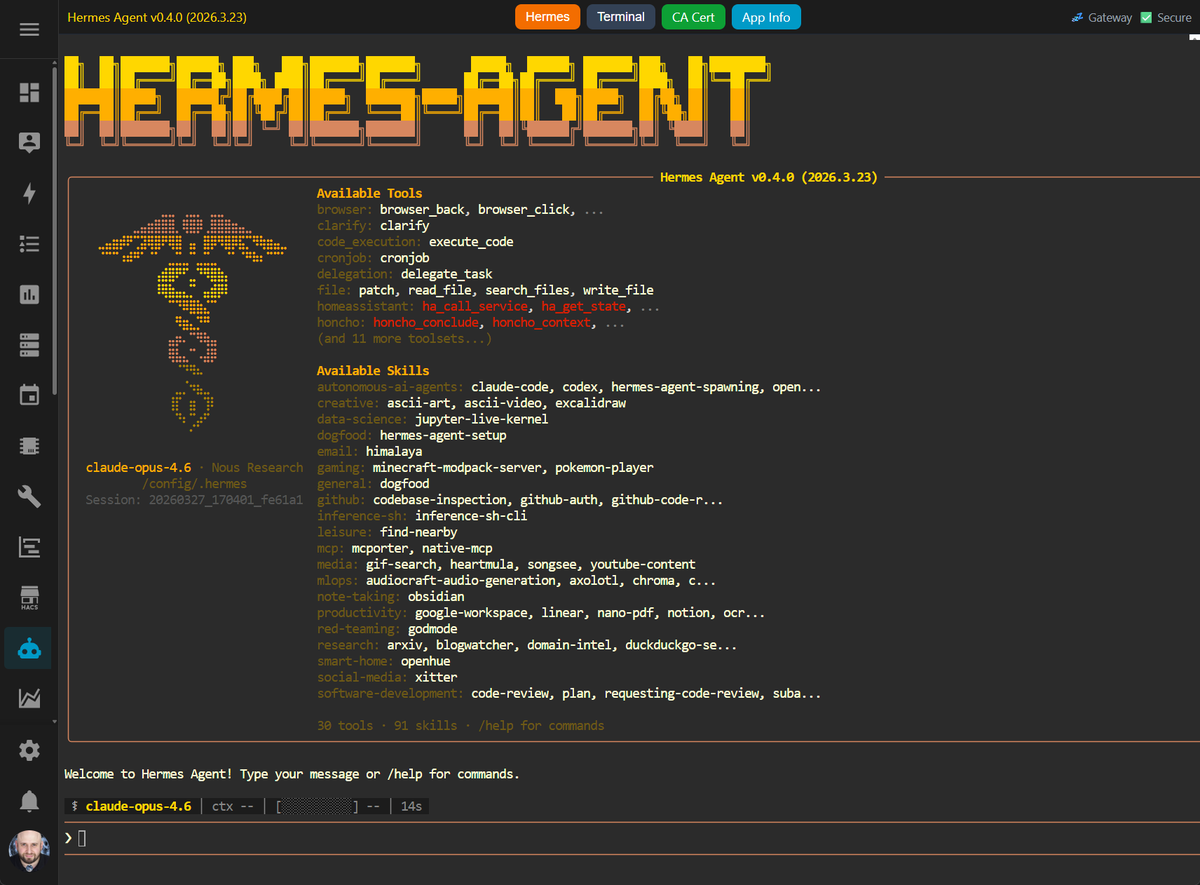

@DivyanshT91162 ·
Someone just dropped what might be the cleanest open-source AI agent desktop app I've seen all year. And it's completely free. Hermes just launched Hermes Desktop. No terminal. No complicated setup. No piecing together 20 different tools. You install it, open it, and get a full control center for AI agents. Inside: → Auto-install & setup → Streaming chat with token tracking → Multiple agent profiles → Editable memory system → 14 tool categories (web, browser, image generation, voice, and more) → Task scheduler for automations → 16 messaging integrations including Telegram, WhatsApp, Discord, Slack, and Signal → Searchable conversation history → Built-in backups and logs The best part? It works with Anthropic, OpenAI, Gemini, Grok, Groq, Ollama, and more. Hermes Agent is the brain. Hermes Desktop is the cockpit. Free. Open source. Mac, Windows, Linux. This is the kind of project that makes you wonder why people are still paying for half a dozen separate AI tools. Repo 👇
 Watch video
@aiwithjainam ·
Someone just gave Hermes Agent the interface it deserved. Hermes was already interesting: An open-source, self-hosted AI agent that remembers your work, runs scheduled jobs, uses skills, talks across surfaces, and works with different model providers. But like many powerful open-source tools, it had a problem. The power was trapped behind the CLI. Hermes WebUI changes that. It turns Hermes into a browser-based dashboard you can use from your computer or phone. You get: - Chat sessions - Workspace file browser - Memory editing - Skills management - Profiles - Cron tasks - Tool call cards - Voice input - Themes - Password and passkey auth - Mobile responsive layout This is the kind of layer that makes agents practical. Because nobody wants to babysit an autonomous agent through scattered files and commands. They want a control room. Hermes WebUI is that control room.
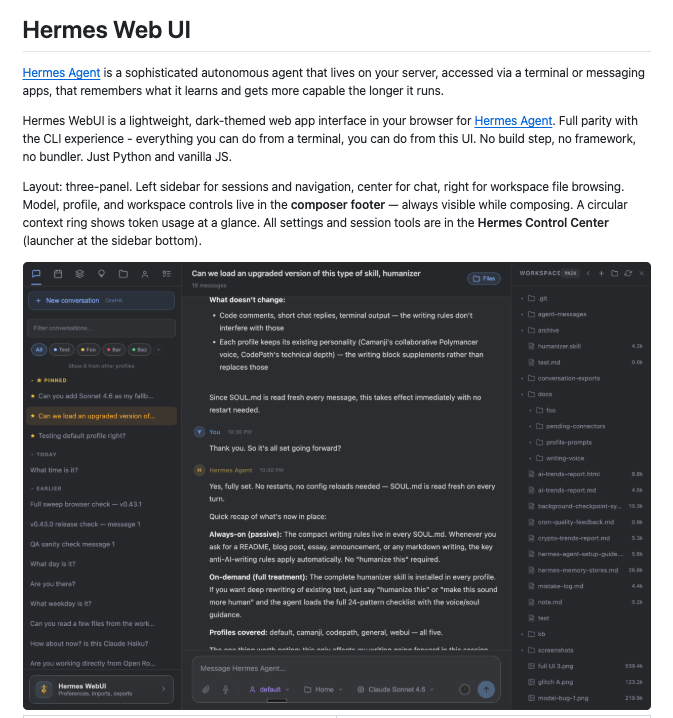
@DivyanshT91162 ·
The next generation of AI agents won't just answer questions. They'll remember, learn, improve themselves, and get better every time you use them. That's exactly what Hermes Agent by Nous Research is building. Unlike typical AI agents, Hermes can: • Learn from completed tasks • Turn experience into reusable skills • Remember conversations across sessions • Search its own memory • Spawn parallel sub-agents • Run on a $5 VPS, cloud VM, or serverless infrastructure • Connect with Telegram, Discord, Slack, WhatsApp, Signal, and CLI • Use OpenAI, OpenRouter, Nous Portal, or your own models One of the most impressive open-source AI agent projects I've come across recently. Repo: https://t.co/Z6jps8EZB3

@RoundtableSpace ·
Someone broke down three hidden "Quicksilver" features in Hermes Agent v0.19.0+, and it's trending as the ultimate setup for autonomous AI agents. Most people babysit their AI assistants, but configuring smart approvals, single-turn model routing, and self-improvement crons lets your agent auto-evolve overnight: → Smart Approvals: An auxiliary LLM auto-approves safe commands, denies dangerous ones, and only pings you for actual edge cases so background tasks never stall → One-Turn Model Tag-Ins: Use /model [name] --once to temporarily summon expensive reasoning models (like Kimi K3 or Opus 5) for single heavy-lifting turns before instantly reverting to your cheap daily driver → Per-Task Reasoning Dial: Fine-tune thinking effort per model or slot in Mixture-of-Agents (MoA) setups so advisors think deep while synthesizers stay fast → Self-Improvement Cron: Schedule a 3 AM cheap-model audit where the agent analyzes its own failed logs, updates buggy skills, archives bloat, and appends a self-fix summary to your morning brief It completely shifts AI agents from reactive chat interfaces to fully autonomous, self-healing background workers that get sharper every single night.
 Watch video
@boxmining ·
Hermes Agent (@NousResearch) Desktop App vs TUI..which one should you actually use? I break down the key workflow differences: visual orchestration, token efficiency, coding in terminal, remote backends, and when each setup makes sense. Watch this before choosing your workflow:
 Watch video
@smratitiwa86867 ·
Every AI agent today has the same problem. It forgets everything the moment the session ends. Your workflow. Your preferences. The fixes it learned yesterday. All gone. Hermes Agent is one of the first projects pushing in a completely different direction. Instead of treating AI like a temporary chat window, it treats it like a system that should: • remember • evolve • reuse experience • and improve over time That’s why developers are suddenly paying attention to it. The architecture behind it is genuinely interesting: • self-evolving skills • multi-layer memory • cross-session recall • autonomous agents running 24/7 • GEPA optimization loops • persistent personalities & workflows The result feels less like “using an AI tool” and more like building a long-term AI operator that compounds with usage. Made this infographic to simplify how the whole system actually works because this is easily one of the most interesting open-source AI agent projects right now.


@AlphaSignalAI ·
You can now run a Hermes agent team from one control room. Running multiple AI agents usually turns into chaos. Credentials scattered everywhere, no clear ownership, nobody knows what runs where. Hermes Agent Control Room is a public template that fixes this. It treats your agent fleet like an operating system instead of disconnected bots. The setup grows in four stages: 1. One agent on a VPS with docs 2. Direct specialists for SEO, dev, ops 3. An orchestrator routing across them 4. Cron jobs running the whole team You hand over a Hetzner API key. The bundled skills spin up the server, install tooling, clone the repo, register your first agent. Ten minutes total. The control plane handles config, runbooks, secrets. Specialists do the work. The orchestrator becomes one front door when you want it. Through the gateway you can route any agent to 300+ models. What would you automate first?


@JulianGoldieSEO ·
Hermes Agent Is Useless If You Use It Like ChatGPT Most people only use 10% of it. These 5 free upgrades unlock the other 90%. Give Hermes A Brain: → Build an Agent OS inside soul.md → Add your goals, tone, projects, standards, roles, and publishing style → Stop making Hermes guess what you want every session Turn One Agent Into A Team: ✓ Use Kanban teams with isolated sub-agents ✓ One agent researches, one writes, one plans, one handles outreach ✓ Add cron jobs so tasks can run every Monday without you babysitting Train It For Real Content: → Create an AI SEO skill with keyword research, competitor analysis, briefs, and internal linking rules → Build hyperframes for video hooks, open loops, structures, and CTAs → Add goals + daily Telegram check-ins so Hermes tells you what to do every morning Most people use Hermes as a chat tool. The real move is turning it into an operating system for your work. Start with Agent OS first. Everything else gets sharper after that.
 Watch video
@_vmlops ·
OH-MY-HERMES ADDS A MISSING LAYER TO HERMES AGENT: WORKFLOW ROUTING most agent setups fail between install and real use. oh-my-hermes fixes exactly that gap: ▪️ omh setup/doctor/update keep the local install sane ▪️ chat-first skill pack: loop, ralplan, source-finder, web-research, paper-learning, materials-package ▪️ routes plain requests to the right skill/playbook automatically ▪️ codes get handed off to codex, claude code, or hermes only when accepted, not auto-run ▪️ keeps plans, handoffs, execution, review, and merge evidence visibly separate ▪️ worktree isolation support for coding agents
 Watch video
@JulianGoldieSEO ·
If you are still doing research, writing, support, and reporting manually, you are wasting hours every week. Hermes Agent 0.6.0 gives you a better setup: Run multiple AI agents in parallel. Connect them to Telegram, Slack, Discord, or WhatsApp. Plug Hermes into Claude Desktop, Cursor, and VS Code with MCP. Add provider failover so tasks keep running even if one model goes down. Open source. Self-hosted. No subscriptions. That is a serious workflow upgrade.
 Watch video
@RoundtableSpace ·
Hermes Agent just got multi-agent via Kanban in v0.12.0. Agents claim tasks from a board, work in parallel, and hand off when blocked - one view instead of juggling terminals.
 Watch video
@ThePracticalDev ·
Hermes Agent is designed as an "operating system that breathes" with long-term memory and Shell access. This dev deployed it on GCE with Systemd for 24/7 uptime, connected it to Telegram, and documents the model naming and prefix pitfalls that kept it silent. { author: @Evan_Lin + @GoogleDevExpert } https://t.co/4Qv2k1Ps1f
Best Hermes Agent tweets
Xholic studies what works in your niche, drafts posts in your voice and schedules them for the hours your audience is online.
No card needed · Nothing to cancel
Browse all tweet collectionsLive demo: no sign-up or login needed · takes about 2 minutes
Keep exploring