Prompt-to-app building
Building web and native Android apps in AI Studio, including prototypes, Firebase backends, authentication, testing, and deployment.
38.6%
Best tweets about Google AI Studio
Discover the best tweets about Google AI Studio, covering Gemini API prototypes, prompting, structured output, model testing, and developer workflows.
Hands-on Google AI Studio and Gemini API workflows, features, prototypes, evaluations, limitations, and developer results.
Original Xholic analysis
The supplied posts present Google AI Studio as a route from prompts to app prototypes, including Firebase integration, Android builds and UI feedback, alongside Gemini API tools and speech workflows. Other posts question usage allowances and request more consistent API features and finer image-editing controls. In this 44-tweet sample, 75% are classified as supportive; these findings describe the supplied sample, not developer sentiment generally.
75% of posts
All-time engagement
45.5% of posts
Published in 90 days
Conversation map
Building web and native Android apps in AI Studio, including prototypes, Firebase backends, authentication, testing, and deployment.
38.6%
Managed agents, function calling, combined Search and Maps tools, hosted execution, and tool-driven integrations.
25%
Design variations, polished app interfaces, visual feedback, and workflows that move designs between AI Studio and other tools.
18.2%
Hands-on use of Gemini text-to-speech, audio tags, voice-app playgrounds, image controls, and video-generation models.
18.2%
Free-tier setup, API keys, SDK integration, billing controls, rate limits, and changes to usage allowances.
15.9%
Video analysis, multimodal file search and RAG, Deep Research, and spatial or robotics applications built with Gemini.
13.6%
Practical guides, API skills and documentation evaluations, format quirks, and requests for missing or inconsistent features.
11.4%
Tone and stance
Performance benchmark
Posts with media make up 77.3% of this collection. Their median all-time score is 11.8, compared with 2.05 for text-only posts.
Format mix
Consensus and debate
Shared view
Posts describe Firebase-backed app building and prompt-generated Android apps with browser-based testing. A beginner guide covers authentication, UI feedback and Cloud Run deployment. One builder reports working wardrobe-app features but plans a native rebuild in Xcode.
Shared view
Posts describe combining built-in tools with custom functions, Google Maps grounding, hosted agents and multimodal file retrieval. These are distinct workflow options, not evidence that every integration is effortless.
Shared view
Posts announce Gemini 3.1 Flash TTS in AI Studio and the Gemini API, show audio tags for changing vocal delivery, and point to quick-start templates for experimentation.
Open debate
One post praises AI Studio's design output, and another announces generated design choices before building. A separate tutorial criticizes generic vibe-coded interfaces and recommends brand direction, custom assets and Figma refinement before rebuilding the prototype.
Open debate
Posts promote no-card API access and free Android app building, while one builder questions a reported change in Gemini Pro refresh limits. Google AI Developers separately announces project spend caps and revised usage tiers. These posts concern different access and billing mechanisms, rather than establishing a direct contradiction.
Open debate
Users request an image-editing pen and restored logprobs with consistency between Vertex and the Gemini API. Another developer reports different thought-format syntax between Gemma 4 on vLLM and Gemini API OpenAI-compatible chat completions.
What performs
The supplied analytics give the 10 TUTORIAL posts a median all-time score of 24.58, versus 9.01 overall. Examples cover local Gemma and API routes, app deployment, and design refinement. This is a descriptive format comparison, not evidence that tutorial formatting causes higher scores.
The supplied analytics identify media on 34 of 44 tweets (77.3%). Media posts have a median all-time score of 11.79, versus 2.05 for text posts. The comparison does not establish that adding media increases performance.
Statistical standouts
Creator landscape
The five most represented creators account for 22.7% of the selected posts.
1. Philipp Schmid
@_philschmid
2 posts
2. AshutoshShrivastava
@ai_for_success
2 posts
3. Google AI Developers
@googleaidevs
2 posts
4. Julian Goldie SEO
@JulianGoldieSEO
2 posts
5. Mark McD ☠
@m4rkmc
2 posts
6. Logan Kilpatrick
@OfficialLoganK
2 posts
Logan Kilpatrick's supplied posts announce Android building and TTS availability. Philipp Schmid's posts share a beginner deployment guide and an audio-tag example, providing more concrete workflow details.
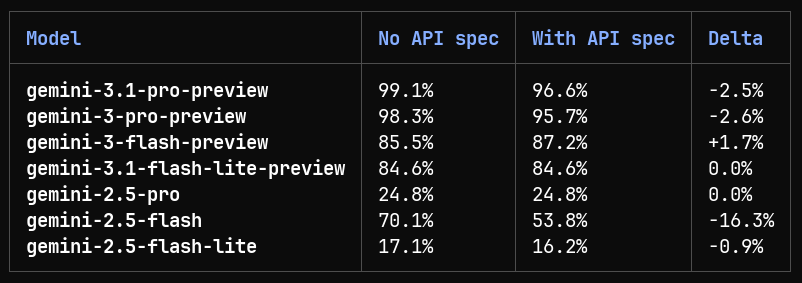
Mark McD reports removing an API-spec reference from a developer skill after an evaluation found most models performed marginally worse with the spec present, and separately announces API skill updates. Other users identify specific requests for image editing and logprobs.
Since the previous snapshot
Themes, sentiment, stance, and post format are classified per tweet. All counts, shares, medians, creator concentration, freshness, and performance comparisons are then calculated directly from the published snapshot.
Xholic's all-time score compares engagement while accounting for reach, post age, and creator consistency. It is used for relative comparisons within this collection.
This report analyzes the exact 44-post snapshot shown below. AI identifies editorial categories and drafts explanations; all statistics are calculated from the snapshot, and every narrative claim is checked against cited posts before publication.
Best Google AI Studio tweets
Ranked 01–44

@mattshumer_ ·
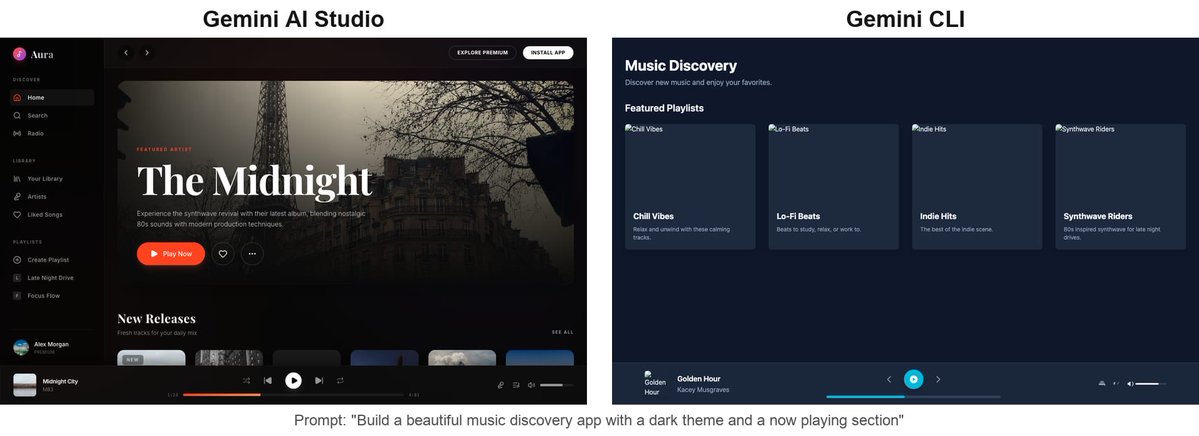
Extremely underrated AI trick most people don't know about: If you want great designs from AI, don't prompt the model directly… use Google AI Studio's app builder. They're doing some magic behind the scenes. Same model, same prompt, completely different output:

@EXM7777 ·
here's how to run Gemma 4 locally in under 5 minutes: option 1 (phone): > download Google AI Edge Gallery from the Play Store > select Gemma 4 E2B or E4B > it downloads and runs entirely offline > no account, no API key, no internet needed option 2 (laptop): > install Ollama or LM Studio > pull gemma-4-27b (the MoE version, only 3.8B active params) > runs on a MacBook with 16GB RAM option 3 (developer): > open Google AI Studio > select Gemma 4 31B > use the function-calling API for agentic workflows > or deploy on Vertex AI for production the 26B MoE is the sweet spot for most people i think

@OfficialLoganK ·
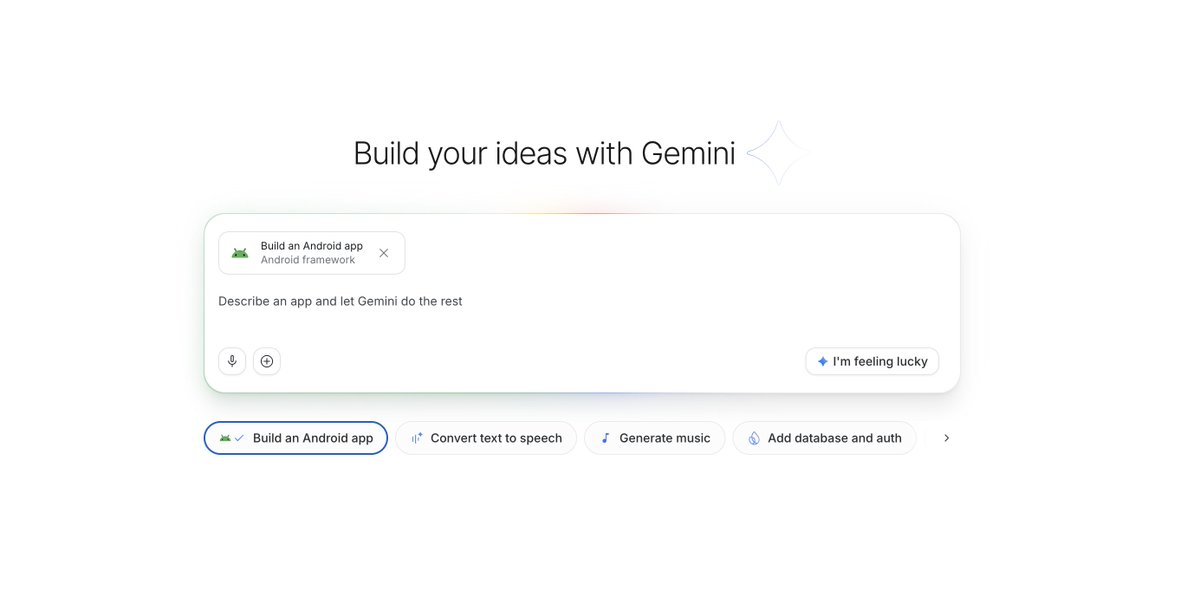
We just launched the ability to build native Android apps directly in Google AI Studio for free! Since launch last week, people have created more than 250,000 Android apps. Likely >99% of these folks never built an Android app before, everyone can now build, no coding required!
@OfficialLoganK ·
Introducing Gemini 3.1 Flash TTS 🗣️, our latest text to speech model with scene direction, speaker level specificity, audio tags, more natural + expressive voices, and support for 70 different languages. Available via our new audio playground in AI Studio and in the Gemini API!
 Watch video
@sundarpichai ·
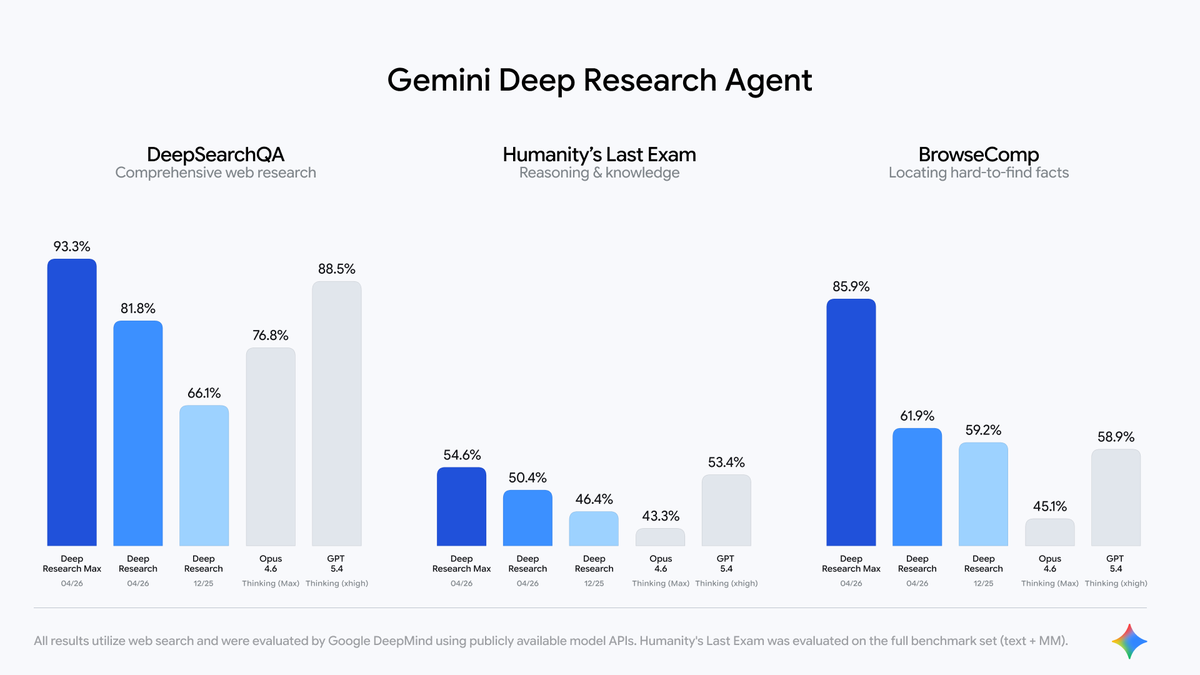
We are launching two powerful updates to Deep Research in the Gemini API, now with better quality, MCP support, and native chart/infographics generation. Use Deep Research when you want speed and efficiency, and use Max when you want the highest quality context gathering & synthesis using extended test-time compute — achieving 93.3% on DeepSearchQA and 54.6% on HLE.
@sundarpichai ·
A few updates from across Google this week🧵 A new full-stack vibe coding experience is now in @GoogleAIStudio with the @Antigravity coding agent and a built-in @Firebase integration. Turn your prompts into amazing production-ready apps.
 Watch video
@_philschmid ·
Released today: Gemini 3.1 Flash TTS 🔊 A text-to-speech model you actually direct. Add [whispers] and it whispers. Add [shouting] and it shouts. Mid-sentence. eg. "[asmr] Hey there, [deep and loud] TURN THIS UP, [asmr] how can I help you?" Now available in @GoogleAIStudio & Gemini API.
 Watch video
@_philschmid ·
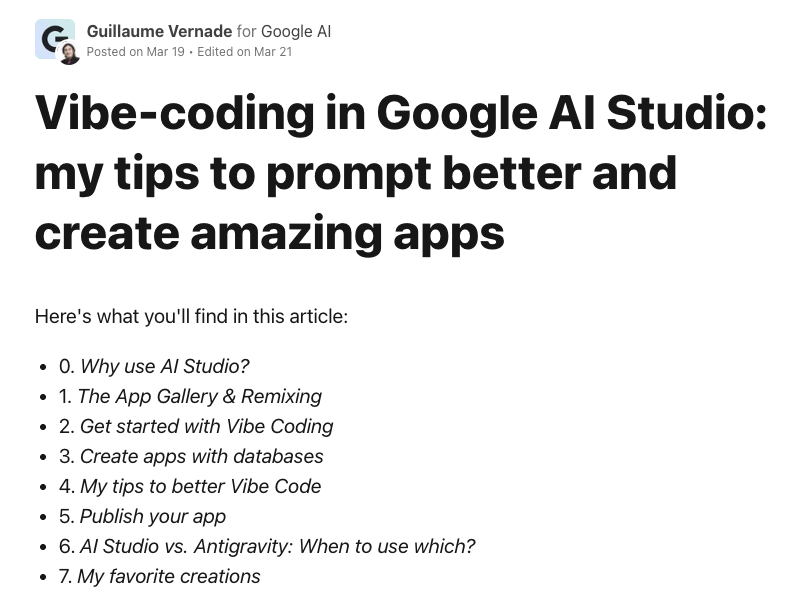
Great beginner-friendly guide on vibe-coding with Google AI Studio, covers everything from first prompt to deployment. 🔒 Apps are private by default. 🗄️ Firebase databases with auth in one click. 🎨 Draw directly on your app's UI to give feedback. ☁️ Publish to Cloud Run in a few clicks.

@thebuggeddev ·
Gemini built a learning management platform like Udemy with 10-12 pages all inside @GoogleAIStudio 🔥 It took just a couple of hours. That's how accessible building complex websites is becoming. If you have an idea, you may not need other services now. With AI, You can build it yourself, your way, at your own scale :) Remix: https://t.co/vjNKM5JcTw
 Watch video
@googleaidevs ·
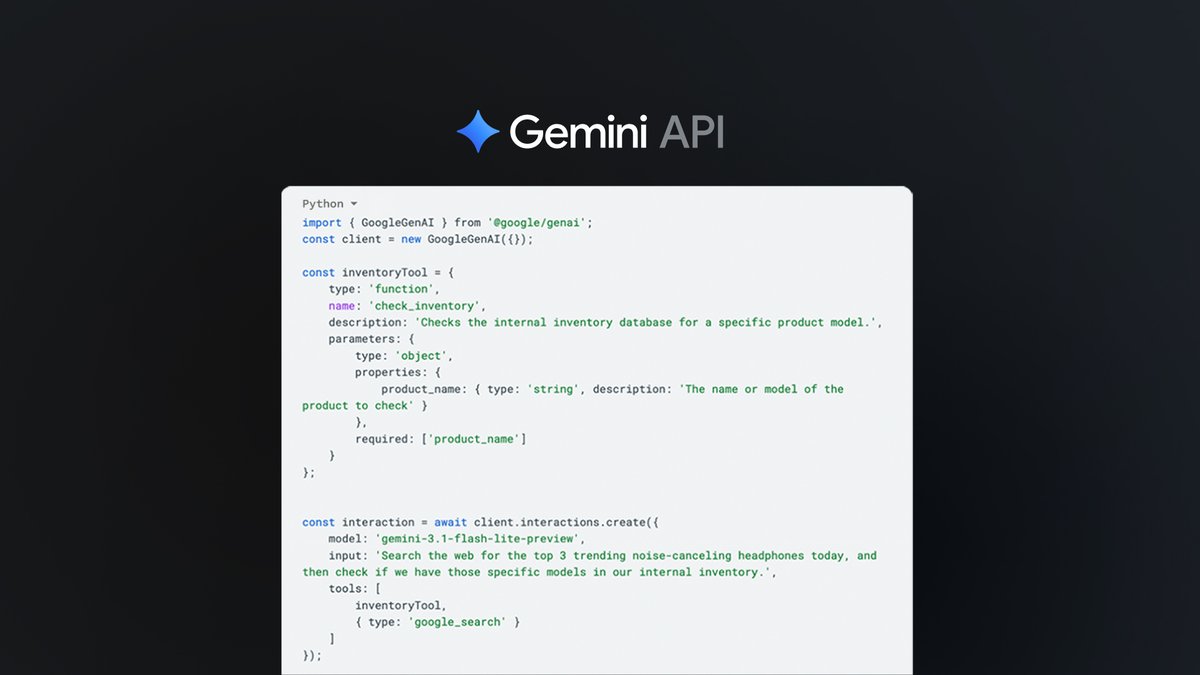
Announcing Gemini API tooling updates 🔧 Developers can now combine built-in tools and custom function calling in a single API call for seamless agentic workflows. New tooling capabilities allow devs to: - Combine built-in and custom tools in the same interaction - Cross-tool context circulation for built-in tools - Tool response IDs We’ve also expanded built-in tooling support to include Grounding with Google Maps for the Gemini 3 family of models, enabling models to access up-to-date spatial data, local business info, and more for accurate location-aware responses. Check out the blog to learn more: https://t.co/dB0sg8ye0O

@Hartdrawss ·
90% of apps look vibe coded: same purple gradients, same default fonts, same AI slop. Here’s a workflow to make your app look like it came from a real agency, not a model: 1/ Ship a boring prototype first > Use Google AI Studio or Cursor to spit out a 1‑shot functional app (e.g. voice journaling). > Don’t touch the UI. Just list what actually exists now: screens, flows, edge cases. Function first, vibe later. 2/ Decide how it should feel > Ask Claude: who is this for, what state are they in, what feeling do we want? > Turn that into 1–2 paragraphs of brand guidelines: name, vibe words, “analog vs sci‑fi,” what to avoid. You’re not designing a screen, you’re designing a mood. 3/ Build a reference bank > Collect images on Pinterest / your own Notion: objects, textures, lighting, typography. > Think “cassette decks and paper notes” or “glass and neon,” not “UI shots.” This becomes your visual prompt library. 4/ Generate on-theme assets > Use Flux / Midjourney / Ideogram to create a small set of custom pieces: icon, logo, 1–2 hero illustrations, 1 special button. > Use negative prompts to kill the generic look: “no glossy, no corporate, no 3D gradients.” > Clean them up (remove background, tweak colors) so they’re Figma‑ready. 1–3 strong custom elements beat 20 random assets. 5/ Assemble in Figma like a real app > Drop assets into real iOS / Android frames. > Stick to an 8px grid, 2 fonts max, one accent color. > Use blend modes and overlays so the AI art actually matches your background and type. Now you have a legit, high‑fidelity design, not a screenshot from a model. 6/ Re‑vibe code the app > Feed the final Figma screens + exported assets back into Google AI Studio or Claude Code. > Tell it: “Rebuild the existing prototype using this layout, colors, and assets only.” > Iterate until the code matches the design.


@mikefutia ·
Claude Code Can Now Watch ANY Video Here's how to give Claude the ability to watch & analyze any video. 0:00 - Claude Code Can Now Watch Any Video 0:21 - Demo: Analyzing a Grüns UGC Ad 1:32 - Inside the Video Analyzer Skill Output 2:53 - Why Gemini API 3:41 - How to Install the Skill in Claude Code 5:11 - Demo: TikTok Self-Tanner Ad Analysis 7:14 - From Analysis to Hook Variations for Your Brand
 Watch video
@RoundtableSpace ·
Google AI Studio provides zero-cost API access to production-grade Gemini models without attaching a credit card or starting a temporary trial. • Zero-Cost Access: Generate API keys for Gemini 2.5 Flash, Pro, and 3.6 Flash without adding billing details • Generous Developer Limits: Daily limits (e.g., ~15 RPM / 1M TPM / 1,500 RPD) allow full application testing and small production builds • Instant Python Setup: Install google-generativeai and execute live API calls in under two minutes • Universal SDK Support: Integrates directly with multi-model proxy routers like LiteLLM to route free endpoints across app stacks
 Watch video
@VaibhavSisinty ·
Vibe coding startups won’t like this. Lovable hit $400M ARR selling what google almost gave away for free. They just made production-grade full-stack development… free. Here’s what Google AI Studio just shipped 📷 → Build multiplayer apps with real backends from a single prompt → Installs missing libraries on its own,no prompts needed → Knows when your app needs a database and spins one up automatically → Keeps full memory of your project across sessions → Firebase Auth and Cloud Firestore, ready out of the box → Handles API keys for payments, maps, and databases seamlessly → One click → production deploy. Done. The only moats left? Distribution. Data. User trust. Not features.
 Watch video
@googleaidevs ·
Get more transparency and control over your Gemini API costs with new features in @GoogleAIStudio! - Set granular monthly budgets for every project with Project Spend Caps - Experience automatic upgrades and get faster access to higher rate limits with revamped Usage Tiers - Enjoy enhanced observability, control, and improved billing flow directly within AI Studio Set your cap, start building: https://t.co/H8TEC3I3bE
 Watch video
@DivyanshT91162 ·
It seems like the latest Gemini model is available for free...!! I stumbled across some info that's been quietly buzzing lately, and get this: Google AI Studio is offering production-quality Gemini API access at zero cost—an unusually generous setup. What's getting attention is that you can just casually hit up the brand-new latest model, Gemini 3.6 Flash, which dropped on July 21, 2026, without needing to register a credit card or deal with any trial period. Plus, the rate limits are a comfy 15 RPM / 1M TPM / 1,500 RPD, plenty of headroom for personal projects or small-scale production runs. Getting started is ridiculously easy—your jaw might just drop. Just run "pip install google-genai" and boom, two minutes later, your first API request is off to the races. That's it. Done. It integrates directly with LiteLLM's multi-model routing, so switching existing projects to this free endpoint means basically zero code changes. For local runs, you can pair it with Ollama, and easily set up a hybrid setup where you route only long-context or multimodal tasks to the Gemini API. ・Gemini 2.5 Flash / 2.5 Pro / 3.6 Flash—all usable within the free tier ・No credit card needed—no review process—instant access starting today ・Combine with LiteLLM / Ollama for flexible multi-model setups At this point, humans aren't shelling out for "pay high API costs to test"—we've blasted into a timeline where it's just "try production-grade AI for free, then decide." Bookmark this and give it a spin right now 👇 https://t.co/7fkQLPbjCZ

@pankajkumar_dev ·
Google AI Studio update: Build Android apps with Gemini for free - Google AI Studio now lets users build native Android apps directly from prompts without writing code - You simply describe the app idea and Gemini handles the generation process - More than 250,000 Android apps have already been created since launch last week - Apps can be tested directly inside the browser through a streaming Android emulator - You can generate real APKs, test Android UI interactions, and even publish to Google Play test tracks - Google AI Studio's Android app is also listed as coming soon - We are moving from AI generated websites into full app creations


@ai_for_success ·
GEMINI NEW MODEL ⚡️ : Google has just launched Gemini 3.1 Flash TTS. I have been testing this for quite some time. Thanks to the Gemini team for early access. You can try it on AI Studio. It is very easy to get started, and there are plenty of quick start templates to test and explore. You get fine control over tone using simple audio tags. Example Prompt: [high energy/active] Welcome back to 'Brain Trust'! Let's jump right into our next category: Ancient History. [anticipation] For five hundred points: Which ancient wonder was located in the city of Alexandria? Is it A: The Hanging Gardens, B: The Colossus, or C: The Great Lighthouse? [assertion] Lock in those answers now! ... [tension] Time's up! [positive surprise] If you guessed C... [triumph] you are absolutely correct!
 Watch video
@AriaWestcott ·
Breaking: Google just changed how Gemini API works. You can now combine Search, Maps, and your own custom tools in a single prompt. The context flows between them automatically. This is what it means for anyone building agent workflows:


@williamkast_ ·
My ad creation AI tool stack: Claude Projects - this is the core of the workflow. I feed it all my customer research, reviews, surveys, support tickets, brand guidelines, personas, product info, etc. into it. The more data you give it, the better. Then I use the data to work out core desires, personas, potential angles, angles that competitors are missing, awareness stages and audiences that competitors are missing, etc. If you feed it the top ads of history you can also get help with scriptwriting. Key here: Treat Claude like a junior copywriter you need to give feedback to, not your master. Without elite feedback it's just a matter of time until it gets lost in some nonsense. Gemini + Nanobanana - image generation. For static ads, concepts, and visual ideation. When I need to test a visual angle quickly before investing in a full production shoot, these get the job done fast. MaxFusion - video clip generation. For assembling rough video ad concepts and testing visual hooks without needing a full editing team on every iteration. Google AI Studio - ad learning support. You can feed videos and ask why it thinks it performs and how to change the ad to make it scale even better. But here's the thing most people get wrong about AI tools. They think the tool is the strategy. It's not. The tool is for better and faster execution. If you don't know what awareness stage to write for, Claude won't figure it out for you. If you don't have real personas built from real data, Gemini won't magically create the right visual. If you don't understand why your ads are failing, no AI tool will do the full diagnosis for you. Learn the fundamentals. Then use AI to execute faster. Not the other way around.

@ammaar ·
New in @GoogleAIStudio: Gemini now designs your app while you vibe code 🚀 You get 5 generated designs before you even start building. Pick one, apply it instantly, and your app already looks polished. More coming this week and next :)
 Watch video
@xeophon ·
PSA: Gemma 4 uses a harmony-like syntax for vLLM with <|channel>thought\n, but the Gemini API (when using OpenAI chat completions) uses <thought> for the CoT

@vamsibatchuk ·
working on some dynamic spatial linking experiences in @GoogleAIStudio that lets you build a living canvas where concepts are physically tethered together. built using mediapipe+gemini. spatial interfaces push you to think weird and fun UX/interactions.
 Watch video
@m4rkmc ·
In our gemini-api-dev skill, we had a clause instructing the model to refer to the actual API spec for authority. BUT the spec is 72k tokens. After re-evaluating without the API spec, it turns out most models perform marginally worse when the spec is present. So now it's gone.

@alexabelonix ·
Google DeepMind launched Gemini 3.1 Flash TTS, a text-to-speech model for precise audio control. Its "Audio Tags" feature lets users set vocal style, emotion, and pacing via text. Supporting over 70 languages with native SynthID watermarking, the model is available in preview on the Gemini API and Google AI Studio, rolling out to enterprises on Vertex AI, and integrating into Google Vids for consumers.
 Watch video
@heykahn ·
“you can literally vibe code full apps now.” @OfficialLoganK, product lead at @GoogleAIStudio breaks down how Google isn’t just improving model, it’s changing who gets to build. Here's what we discussed: • Gemini 3.1 and Deep Think breakthroughs • Prompt → full app inside AI Studio • Multiplayer + agentic coding workflows Watch full conversation below!
 Watch video
@RoundtableSpace ·
Google just launched Managed Agents on the Gemini API. One API call & you get a full agent w/ a remote Linux environment hosted by Google, ready for custom instructions, skills & tools. No infra to set up. Just describe what you want and ship.
 Watch video
@Daviowhite ·
Google AI Studio did an amazing job on my AI Wardrobe app! What's working now: ✅ Google Authentication ✅ AI-powered wardrobe item detection & upload ✅ AI-powered item enhancement ✨ ✅ Smart Daily Drip outfit suggestions ✅ AI Stylist Chatbot Next step: rebuild natively with Xcode
 Watch video
@ai_for_success ·
Google has released Gemini Robotics-ER 1.6, a reasoning-first model designed to enhance spatial and physical understanding for autonomous robots. TLDR - Specialized in embodied reasoning, task planning, and success detection - Significant improvements in spatial reasoning tasks like pointing and counting - New instrument reading capability for interpreting industrial gauges and sight glasses - Enhanced multi-view understanding for better reasoning across different camera streams - Integrated agentic vision which combines visual reasoning with code execution - Improved safety features including better adherence to physical constraints and hazard identification - Available now for developers via Gemini API and Google AI Studio Gemini Robotics-ER 1.6 takes cues from multiple camera views to determine when the task "put the blue pen into the black pen holder" is complete. Video credit : Google Blog
 Watch video
@JulianGoldieSEO ·
You can now build your own AI voice app in minutes. No coding required. Inside AI Studio: 1. open speech playground 2. choose Gemini 3.1 Flash TTS 3. set voice style + accent 4. add audio tags 5. click build That’s it. Google basically turned voice agent development into a prompt.
 Watch video
@TimJayas ·
Using Gemini to generate Minecraft world is actually insane This guy added a mod which uses Gemini API with function calling Added several tools so AI can directly interact with Minecraft One tool gives it access to all Minecraft commands, letting it build houses, terraform and do complex tasks on its own
 Watch video
@Startupat60 ·
I’m building my new app in Claude and Cursor. But for UI Google AI Studio is hard to beat. One prompt and it comes out looking clean. Then I just polish it from there. Feels like each tool has its place now.

@DeryaTR_ ·
The new Stitch design AI from Google Labs is fanstastic, it creates beautiful designs that I like & you can also edit them. You can then send screens to AI Studio to build great websites or apps. Here’s an example I made very quickly. Link to the web site below in the thread.


@AntoineRSX ·
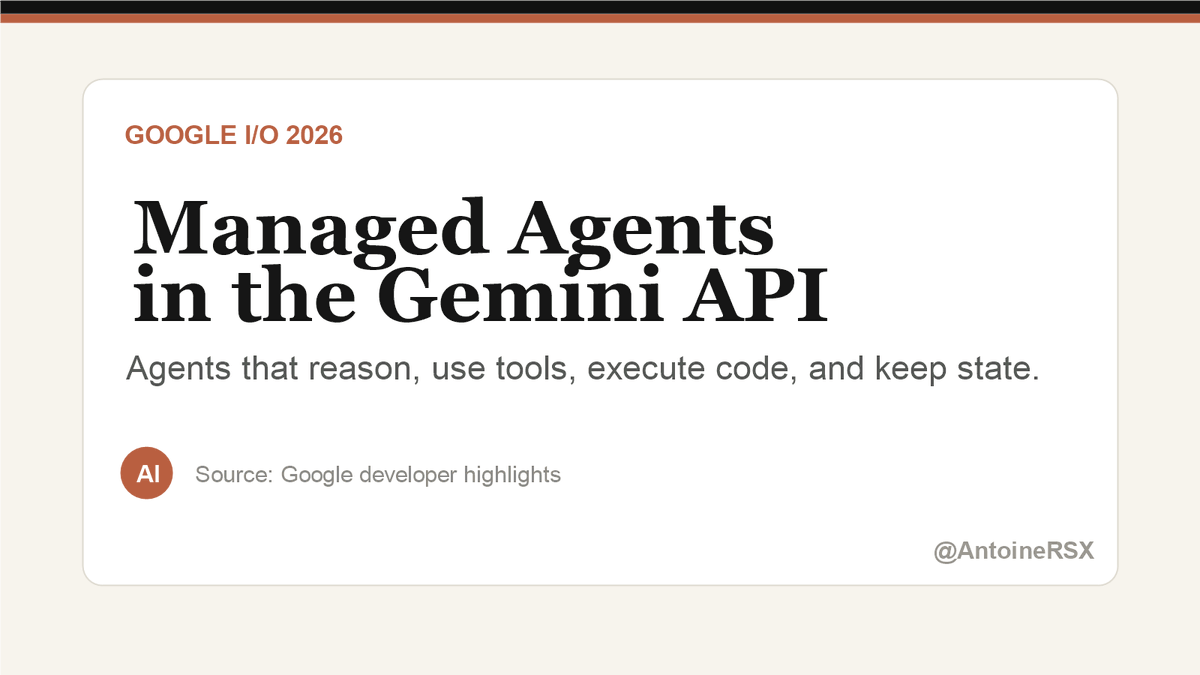
🚨 Google just made the agent direction very clear: Managed Agents in the Gemini API. One API call to spin up an agent that reasons, uses tools, executes code, and keeps files/state across sessions. That is not chatbot UX. That is infrastructure for delegated work.
@m4rkmc ·
We've added a couple new skills to the Gemini API skills: - Interactions API - Gemini Live API Don't forget to `npx skills update` to get the latest versions!

@rseroter ·
Prepay for the Gemini API to get more control over your spend https://t.co/xf6v9TWtJd < poking around this today, and I like how the Gemini API team implemented it. Do prepay billing by topping off an account with credits and spending against that. No surprises!

@ThePracticalDev ·
Google AI Studio now generates full Android projects from a plain text prompt, with Kotlin, Jetpack Compose, and MVVM right out of the box. { author: @DynamicWebPaige + @GoogleAI } https://t.co/4ij5Qw2OG0

@BenjaminDEKR ·
The new Gemini AI Studio feature where it lets you choose a design for your mini-app **while** it's still building it is kind of genius.

@ThePracticalDev ·
The Gemini API File Search tool now supports multimodal retrieval. This post breaks down how to use it to build a RAG pipeline that goes beyond plain text. { author: @patloeber + @GoogleAI } https://t.co/vDOzxZr2Ie

@tokens ·
JUST IN: Google just dropped Veo 3.1 Lite, a text-to-video and image-to-video generator at less than half the cost of Veo 3.1 Fast, now live via Gemini API and @GoogleAIStudio
 Watch video
@Startupat60 ·
Curious what builders think about the new Google AI limits. Gemini 3.1 Pro just moved from a 5-hour refresh to a 5-day refresh. For the last few months AI Studio and Antigravity basically felt free. Now it feels like Google is saying: $20 Pro = hobbyist Ultra = real developer That’s quite a shift. Fair pricing… or a bit of a rug pull?

@thealexbanks ·
Feature request for Google AI studio playground: add a pen tool to make fine-tuned edits like Gemini web app for image gen. It can get incredibly frustrating doing many iterations using text prompts just to get the answer you want. I use AI Studio for the aspect ratio consistency and resolution control.


@dejanseo ·
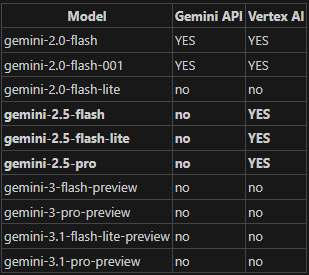
request to bring back logprobs for 3 and 3.1 and have some consistency between vertex and gemini api 🙏 @OfficialLoganK @googleaidevs https://t.co/zDouKwJXjo
@JulianGoldieSEO ·
Google AI Studio just made SEO website design dramatically faster. Its new Design Variations feature can generate multiple professional versions of the same page in seconds. No Figma. No endless prompt rewriting. No week-long design process.
 Watch video
Best Google AI Studio tweets
Xholic studies what works in your niche, drafts posts in your voice and schedules them for the hours your audience is online.
$0 today · Cancel anytime
Browse all tweet collectionsKeep exploring