Agent Workflow Design
Prompting, task decomposition, focused context, repository instructions, and session hygiene for getting reliable agent output.
46%
Best tweets about AI Coding
Explore the best tweets about AI coding, coding agents, AI developer tools, software workflows, and production lessons. Updated weekly.
Code-first examples showing where AI improves software work, where it fails, and how experienced developers use it.
Original Xholic analysis
AI coding discussion leaned cautionary rather than supportive (48% versus 26%). Across the evidence tweets, practical recommendations center on small tasks, focused context, explicit constraints, and verification; posts also dispute how far agents should be allowed to operate without close human oversight.
38% of posts
All-time engagement
42% of posts
Published in 90 days
Conversation map
Prompting, task decomposition, focused context, repository instructions, and session hygiene for getting reliable agent output.
46%
Testing, review, verification, security, maintainability, and technical or cognitive debt from AI-generated changes.
42%
Capabilities, architectures, and maturity of coding agents: repository understanding, tool use, autonomy, IDE workflows, and multi-agent systems.
26%
Measured and claimed effects of AI coding on output, releases, developer skills, adoption, and bottlenecks beyond code generation.
26%
Human judgment, engineering fundamentals, and the limits of fully delegating implementation to AI.
24%
Tool selection, model reliability, open-source agent infrastructure, integrations, and the economics of AI coding products.
16%
How AI-assisted development changes developer roles, work intensity, team practices, collaboration, and software delivery.
14%
Tone and stance
Performance benchmark
Posts with media make up 56% of this collection. Their median all-time score is 15.3, compared with 9.55 for text-only posts.
Format mix
Consensus and debate
Shared view
Several posts recommend narrowly scoped tasks, relevant context, explicit constraints, and fresh sessions when the task changes. They also recommend asking the agent to explain completed work.
Shared view
Posts repeatedly recommend inspecting tests rather than relying only on passing results, using linting, type checks, and tests, keeping diffs small, and tightening code review for AI-assisted changes.
Open debate
One post argues that properly prompted /goal agents can work for days. Another argues that coding loops require substantial setup and oversight and are poor advice for most people.
Open debate
A post relaying Marc Andreessen’s comments describes much higher code output and faster shipping. Another post cites research claiming impaired understanding and no measurable average speed improvement.
What performs
The five all-time-score outliers cover prompting, skill and quality concerns, work intensity and output claims, auditability, and oversight. The outlier set therefore includes both optimistic and cautionary framing.
Tutorials had a 30.591 median all-time score, above the overall 9.93 median. The cited tutorials discuss prompting, clean project foundations, and architecture rules.
Statistical standouts
Creator landscape
The five most represented creators account for 20% of the selected posts.
1. aditya
@adxtyahq
2 posts
2. Alex Finn
@AlexFinn
2 posts
3. John Crickett
@johncrickett
2 posts
4. Layton Gott
@Layton_Gott
2 posts
5. Priyanka Vergadia
@pvergadia
2 posts
6. smrati tiwari
@smratitiwa86867
2 posts
Alex Finn’s two posts present contrasting workflow advice: one promotes goal-driven agents that can run for days when given a detailed prompt, while the other recommends small increments, explanations, and oversight rather than coding loops for most people.
John Crickett argues that operating an agent is easier than judging whether its output is brittle, insecure, overcomplicated, or wrong. A second post emphasizes supplying only task-relevant context and architectural constraints.
Themes, sentiment, stance, and post format are classified per tweet. All counts, shares, medians, creator concentration, freshness, and performance comparisons are then calculated directly from the published snapshot.
Xholic's all-time score compares engagement while accounting for reach, post age, and creator consistency. It is used for relative comparisons within this collection.
This report analyzes the exact 50-post snapshot shown below. AI identifies editorial categories and drafts explanations; all statistics are calculated from the snapshot, and every narrative claim is checked against cited posts before publication.
Best AI Coding tweets
Ranked 01–50
@AlexFinn ·
The biggest advancement in AI coding this year has been /goal And it isn't even close It allows your AI agent to quite literally work for days without stopping. You give a mission. It works until the mission is complete Here's the thing though: /goal is useless if you don't use it properly You NEED a good prompt for it I found basically any prompt I hand write after /goal is never good enough. It produces results that might as well have been a normal prompt Meta prompting is the answer Go to any AI that has context around the project you're working on Say "I'm working with Codex and I want to use their new /goal feature. Please research their /goal feature. Then, take a look at our project and give me 3 options for how we could use /goal to be maximally productive. Then give me a highly detailed /goal prompt for each" Take one of the prompts then go into the Codex CLI and type /goal then give the new prompt I 100% guarantee the AI does better work than you've ever seen before
@pvergadia ·
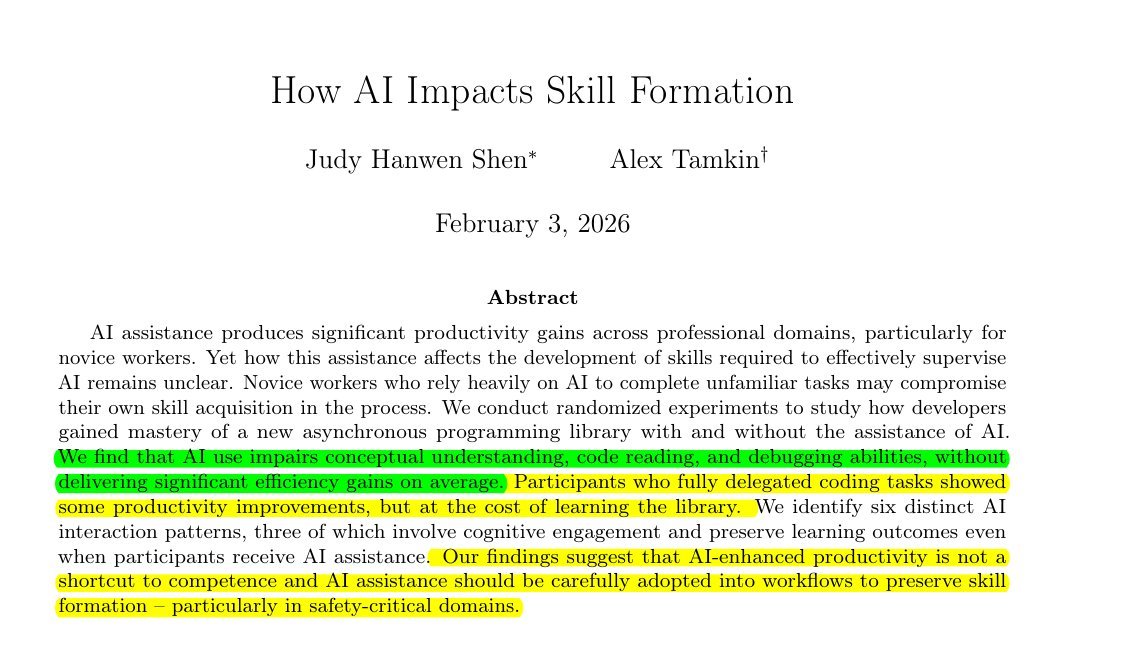
JUST DROPPED: Anthropic's research proves AI coding tools are secretly making developers worse. "AI use impairs conceptual understanding, code reading, and debugging without delivering significant efficiency gains." -- That's the paper's actual conclusion. 17% score drop learning new libraries with AI. Sub-40% scores when AI wrote everything. 0 measurable speed improvement. → Prompting replaces thinking, not just typing → Comprehension gaps compound — you ship code you can't debug → The productivity illusion hides until something breaks in prod Here's why this changes everything: Speed metrics look fine on a dashboard. Understanding gaps don't show up until a critical failur and when they do the whole team is lost. Forcing AI adoption for "10x output" is a slow-burning technical debt nobody is measuring. Full paper: https://t.co/JeRZr6up6P
@realBigBrainAI ·
Marc Andreessen explains how AI turned the valley's best programmers into sleep-deprived "vampires": Marc points out a counterintuitive twist in what AI coding has done to developers. You'd expect one of two outcomes, he says. Either coders would leave the profession entirely "because there's no point anymore," or they'd simply have better lives, working a fraction of the hours now that AI makes them so productive. Neither happened. As Marc puts it: "What's actually happened is virtually to a person, they're all working more hours than ever. To the point where there is a new term of art that's used in the valley called the AI vampire...You're up all night doing AI coding because you are so productive." The reason they can't switch off is opportunity cost: "If you go to sleep, you won't be with your 20 AI coding agents keeping them working on all the projects that you have them working on. And so people stop sleeping." Marc describes friends, some of them famous, who look visibly worse than they did six months ago. Sleep-deprived, bags under their eyes, clearly not taking care of themselves. And yet "they are absolutely ecstatic because they are able to produce five times, 10 times, 20 times more code per hour than they could in the past." He shares one example, a Wall Street friend with a 35-year-old computer science degree from MIT who had long stopped coding: "He's picked up coding with AI. He's completely reanimated his entire house." AI jukebox, security cameras, robot pet dogs, smart fridges, every project he'd ever imagined. In his spare time, the friend has "generated 500,000 lines of code just by working with AI." The same thing is playing out inside companies. At leading-edge tech firms, Marc says, coders using AI are estimated to be "20 times more productive than they were before they started using AI." So what happens when code becomes that cheap to produce? @pmarca points to an elasticity effect: "It turns out there's way more demand for code in the world than was ever able to be satisfied under the old economics. Every company I know has a thousand things that they've wanted to have code for that they've never been able to get to." Now they can do all of it. Companies are shipping products faster, adding features faster, moving into "turbo mode." Coding salaries have inflated to match. According to Marc, the top coders in AI now make $50 million a year, because "they've got the silver bullet. They've got the philosopher's stone." Asked whether any of this is sustainable, his answer is blunt: "Not only is this sustainable, this is going to intensify."
@AlexFinn ·
Everyone on X talking about building AI coding loops I think for 99% of people it's horrible advice. Mostly being promoted by people who profit off token burn Unless you are deeply technical, you are going to build flimsy apps and burn outrageous amounts of money Engineering a loop that produces high quality code requires insane amounts of setup and oversight to make sure it's done the right way For a vast majority of people the best AI coding strategy is: 1. Work closely with your agent, ask it to build the next smallest people of functionality you can think of 2. After each small chunk, ask the AI what it did. Tell it to describe it to you concisely 3. If anything is too technical, ask it to explain in a non technical way so you deepen your knowledge 4. Have it continuously maintain a current state doc you can feed to another LLM to get 2nd perspectives on crucial decisions 5. Mute influencers who give you vague advice that doesn't really mean anything This will actually save more time in the long run because you won't have to untangle code you don't understand
@rohanpaul_ai ·
Anthropic's own study proves Vibe-Coding and AI coding assistants harm skill building. "AI use impairs conceptual understanding, code reading, and debugging abilities, without delivering significant efficiency gains on average" Developers learning 1 new Python library scored 17% lower on tests when using AI. Delegating code generation to AI stops you from actually understanding the software. Using AI did not make the programmers statistically faster at completing tasks. Participants wasted time writing prompts instead of actually coding. Scores crashed below 40% when developers let AI write everything. Developers who only asked AI for simple concepts scored above 65%. Managers should not pressure engineers to use AI for endless productivity. Forcing top speed means workers lose the ability to debug systems later. ---- Paper Link – arxiv. org/abs/2601.20245 Paper Title: "How AI Impacts Skill Formation"
@johncrickett ·
“Software engineers who don’t know how to use AI coding agents will fall behind.” No. AI coding agents are not the hard part of building software. They’re a simple tool. You can learn to use them in a few days. The hard part is knowing what to ask for. Knowing whether the answer is any good. Knowing when the code is brittle, overcomplicated, insecure, or just plain wrong. It’s the judgement required to use them well. That’s software engineering. And that takes decades to learn properly. The people at risk aren’t engineers who haven’t mastered using coding agents yet. It’s people who only know how to prompt one.
@akshay_pachaar ·
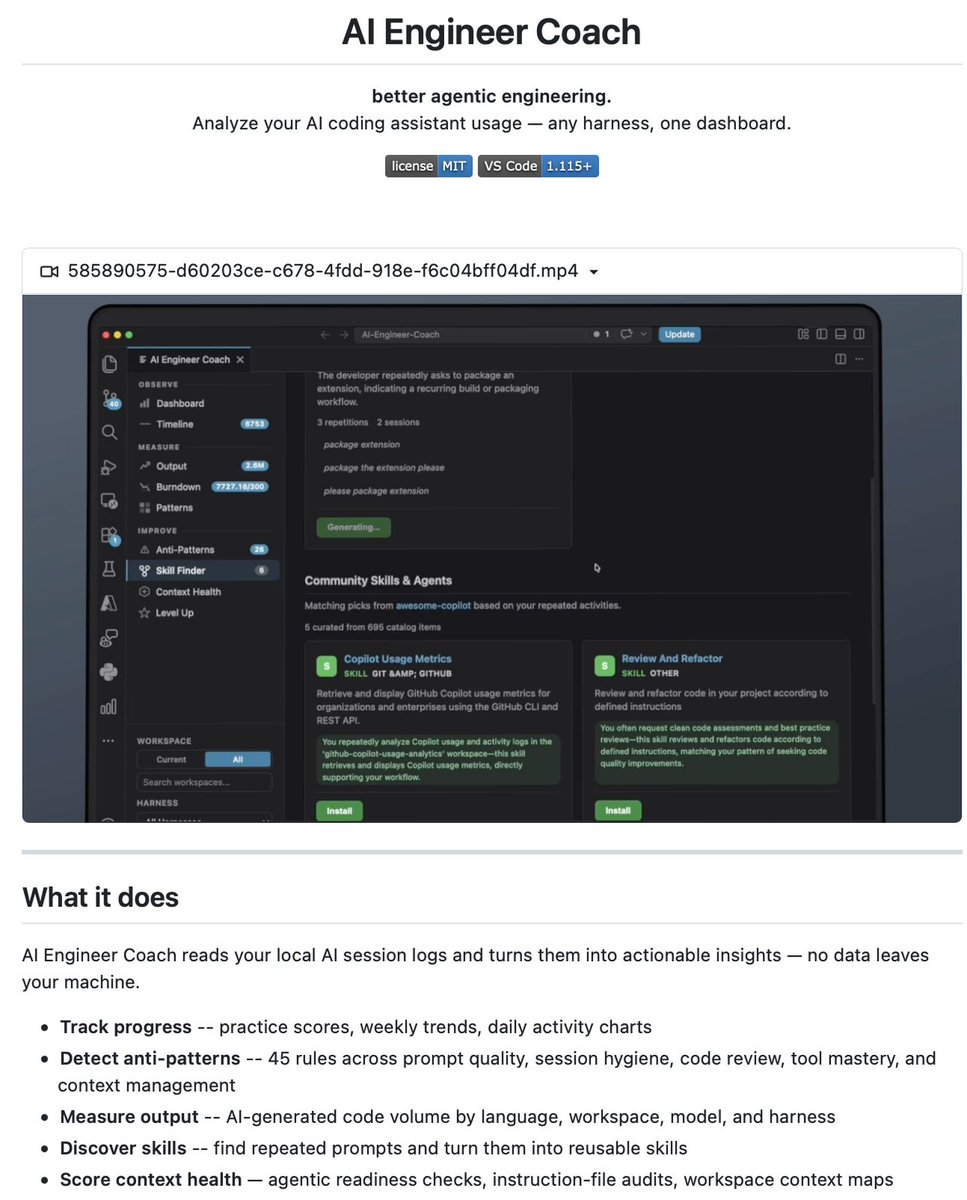
Microsoft built a Fitbit for AI. they just open-sourced AI Engineer Coach. a VS Code extension (also works in Cursor and Antigravity) that analyzes how you actually use AI coding agents. it reads local session logs from GitHub Copilot, Claude Code, Codex CLI, OpenCode, and Xcode. one dashboard across every harness you use. it scores your workflow across five categories: prompt quality, session hygiene, code review, tool mastery, and context management. it ships with 45 anti-pattern detection rules. things like prompts with no file context, mega sessions that drift off-topic, auto-approving terminal commands without a devcontainer, and burning premium tokens on trivial questions. each finding shows what went wrong, how to fix it, and a real example from your own sessions. the rule engine is the interesting part. every detector is a markdown file with a small expression language, so you can tune thresholds, write new rules, or describe one in plain English and let Copilot scaffold it. there's also a Skill Finder that spots repeated prompt patterns and turns them into reusable skills. everything runs locally. read-only by design, zero telemetry. we've spent two years making AI agents faster. almost nobody is measuring how effectively developers actually work with them. AI Engineer Coach treats your AI workflow the way observability tools treat production systems. MIT licensed, fully open-source. link in the next tweet.
@HedgieMarkets ·
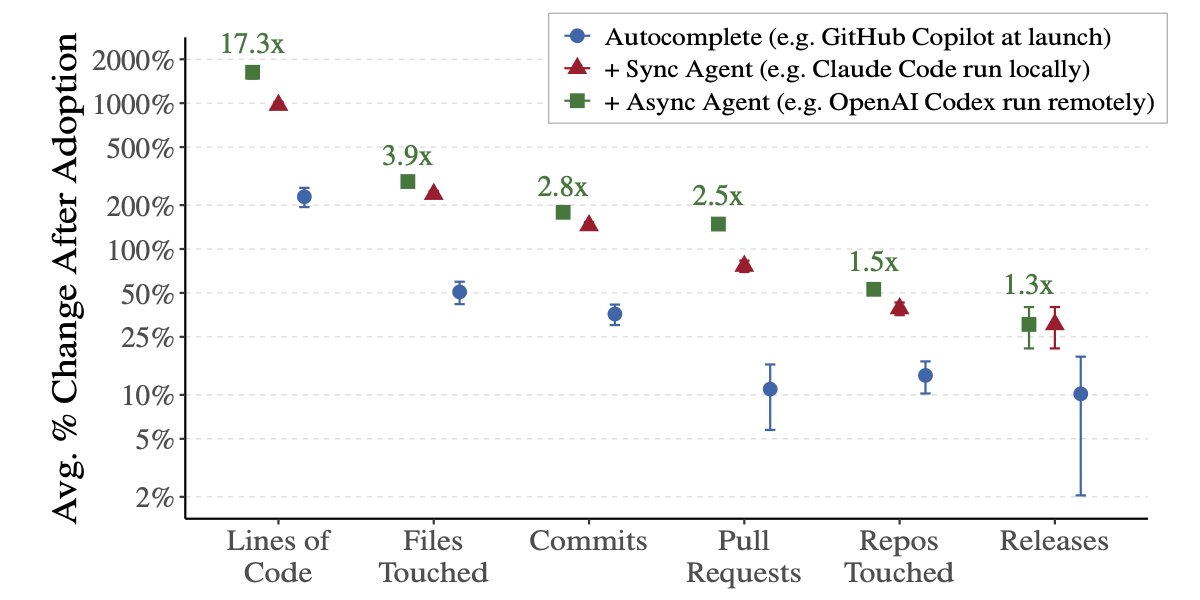
🦔An NBER study by MIT and Wharton researchers tracked 100,000 GitHub developers before and after adopting AI coding tools. Autonomous agents produced 17x more lines of code. But by the time that work went through review and release, the uplift shrank to 30%. When they checked four major app marketplaces, they found more new apps but no increase in total usage or downloads. More software shipped, but nobody used it. My Take The bottleneck in software has always been deciding what to build, reviewing whether it works, and convincing someone to use it. AI accelerated the typing and left all three of those untouched. The entire financial case for the AI buildout assumes faster output translates to more economic value. This study measured it and found that it mostly doesn't, at least not yet. Alphabet reports Wednesday with $180 billion in capex guidance. If the productivity gains from AI coding tools can't survive contact with the rest of the production chain, the revenue assumptions underneath that spending need to be a lot more conservative than what these companies are currently projecting. Hedgie🤗
@Hesamation ·
this is 80% of all you need to know about AI coding. the rest is useful only if you follow these principles, which top engineers practiced even *before* AI. these are 8 fundamental tips on aimaxxing: > learn how to program first. AI is a multiplier of what you already know. > be as specific as possible. communication is an important skill in software now. > the smaller the tasks the better results. break down big problems to smaller ones. this is a basic engineering skill you must know anyways. > do not let AI do all the thinking for you. that makes you useless. > tell AI what you don’t want to avoid slop. put a do-not section in the prompt/markdown. > use markdown files for the agent so it remembers. > don’t sleep on MCPs. they’re super easy to use by now. have a few necessary MCPs and don’t clutter it. > give AI a way to verify its work. CI/CD pipelines, test cases, etc. make it yourself or have the ai make it.
@Trader_XO ·
I’ve been in the AI trenches for a few months now, and it’s never been more evident as to why clean code still matters, just as it did prior to agentic coding. Eg when I’ve set up a project the way any seasoned senior engineer would, with clear structure, solid conventions and defined boundaries, the codebase grows in a much healthier way. It sounds obvious, but AI makes the difference more extreme. AI does not fix weak structure or semantics, it builds on whatever is already there. What has worked well for me is keeping a clean directory structure from day one, building shared utilities such as consistent error handling, enforcing tight naming conventions, and defining clear rules for APIs and design patterns through lifecycle hooks - pre and post. When the foundations are in place, new features are ‘simpler’ to roll out. When the basics are rushed, the problems scales just as quickly. Small inconsistencies turn into bigger ones. Technical debt builds faster than it used to, 1000 lines of code grows very quickly to 10000 lines of unstructured mess. What’s helped before building is having a common framework for using AI tools, because early structure matters more than ever. Code reviews need to be tighter, not looser. Moving fast and fixing later becomes more expensive. Senior engineers matter because they set the patterns the AI will copy. AI speeds up whatever direction you are heading from the base up.
@pvergadia ·
🟥WARNING: Vibe coding without a Lead Architect prompt is throwing away 80% of your results. How do you vibe code like a senior engineer? Here's what a structured AI prompt actually gives you: → Enforced separation of concerns across every file it writes → Named directories, stated before a single line of code → Auto-typed functions, docstrings, and error handling every time → Tests suggested after every implementation → Security rules baked in: no hardcoded secrets, rate limiting, input sanitization Without this? AI Coding agents writes code. With this? they thinks like your senior engineer. AI coding tools fail at architecture. One prompt that enforces your structure turns a vibe coder into a disciplined staff engineer.
@adxtyahq ·
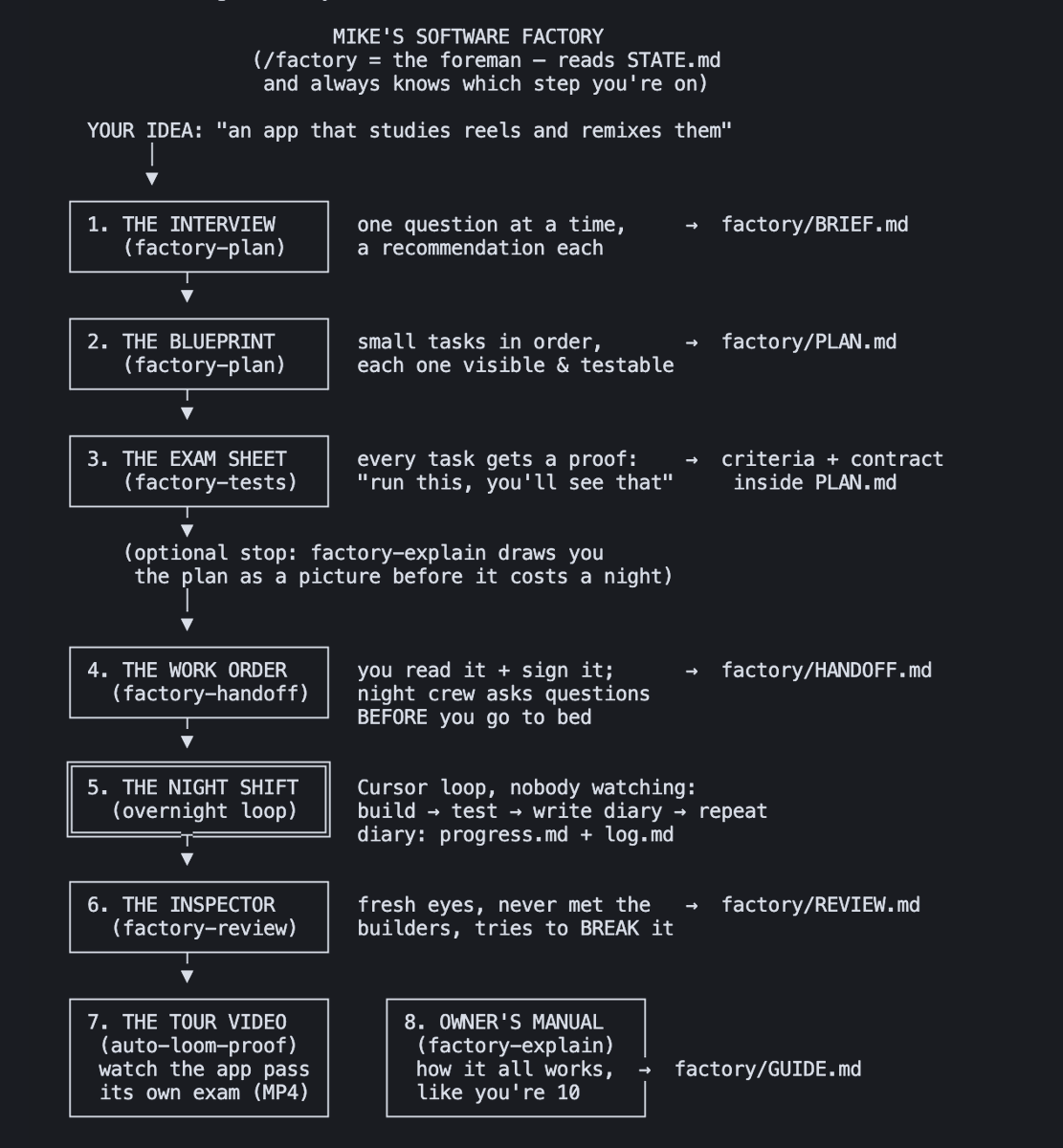
"design Claude Code from scratch" apparently this was asked in an Anthropic interview round. came across it somewhere on the internet and honestly it's a much more interesting AI systems problem than most classic distributed systems questions 1. understand the repository - build an AST + dependency graph - extract symbols, imports and cross-file relationships instead of relying on raw text 2. retrieve only relevant context - use embeddings + graph traversal to fetch the right files - sending an entire codebase to the model doesn't scale 3. plan before writing code - identify which files need changes - break the task into small executable steps before generating edits 4. edit incrementally - generate minimal diffs instead of rewriting files - preserve existing architecture, naming conventions and formatting 5. validate every change - run linting, type checks and tests after each edit - failed validation should trigger another reasoning pass 6. use tools, not just the model - search, terminal, git and diagnostics become tools the agent can call whenever needed 7. remember context across the session - keep track of previous edits and architectural decisions - avoid repeatedly solving the same problem 8. explain every edit - show why each file changed - surface tool outputs and validation results so developers can trust the agent Probably not how Claude Code is actually built, but this is how I'd structure the system based on what I've learned about AI coding agents.
@_vmlops ·
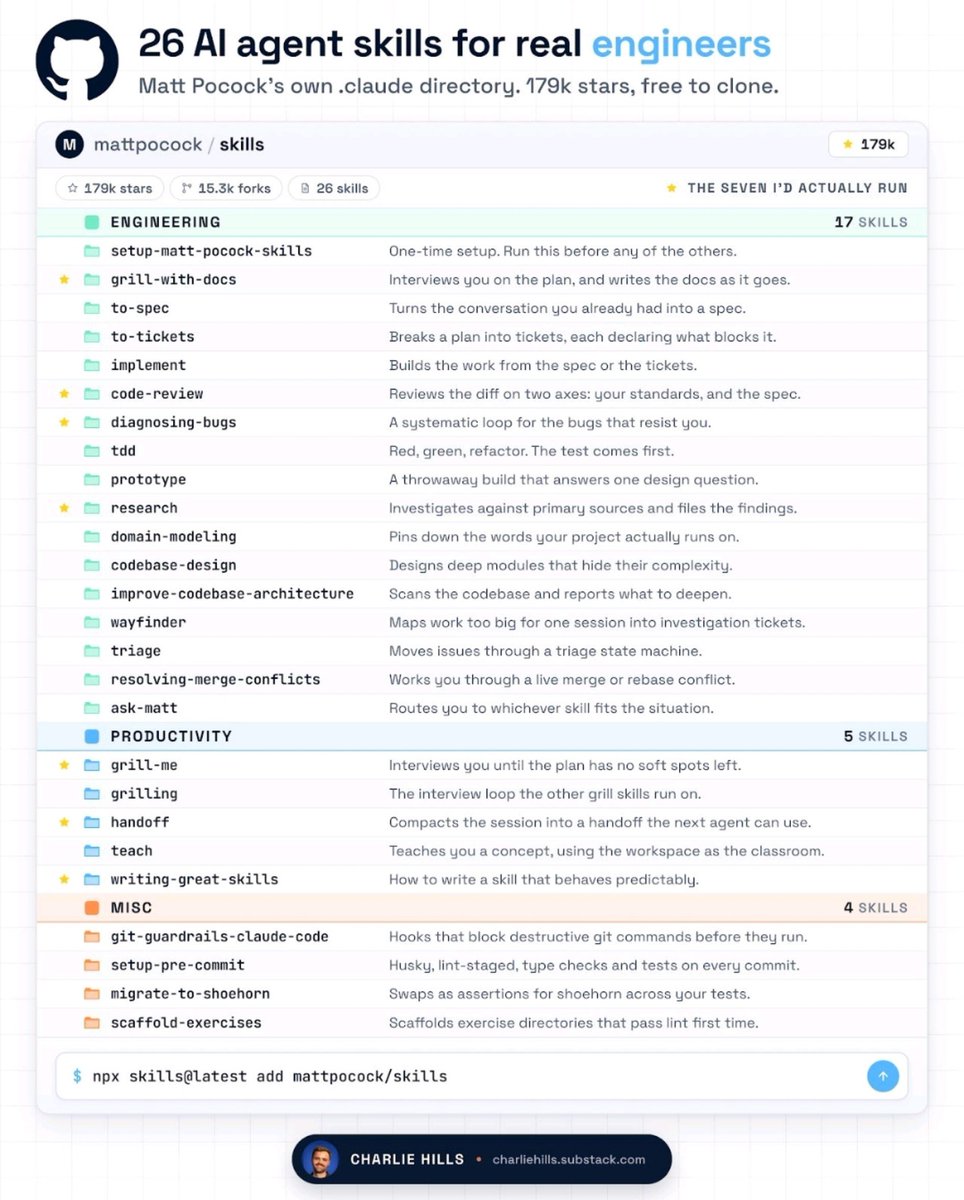
Addy Osmani from Google just dropped “Agent Skills” GitHub: https://t.co/gemMCXDNEB AI coding agents are fast… but they cut corners no specs...weak testing...no real review they optimize for “done” not “correct” this repo fixes that it gives AI agents 19 engineering skills + 7 commands think of it like giving AI a playbook: ▫️ spec before code ▫️ break into small tasks ▫️ test everything ▫️ review properly ▫️ ship with checks
@milan_milanovic ·
𝗗𝗼𝗲𝘀 𝗔𝗜-𝗣𝗼𝘄𝗲𝗿𝗲𝗱 𝗖𝗼𝗱𝗶𝗻𝗴 𝗧𝗿𝗮𝗱𝗲 𝗦𝗽𝗲𝗲𝗱 𝗳𝗼𝗿 𝗧𝗲𝗰𝗵𝗻𝗶𝗰𝗮𝗹 𝗗𝗲𝗯𝘁? Developers report 10x productivity gains from AI coding agents, yet a Carnegie Mellon study of 806 open-source GitHub repositories found something different. Researchers compared Cursor-adopting projects against 1,380 matched control repositories by tracking code output and quality monthly with SonarQube. Here are the key findings: 𝟭. 𝗧𝗵𝗲 𝘃𝗲𝗹𝗼𝗰𝗶𝘁𝘆 𝗯𝗼𝗼𝘀𝘁 𝗶𝘀 𝗿𝗲𝗮𝗹 𝗯𝘂𝘁 𝗱𝗶𝘀𝗮𝗽𝗽𝗲𝗮𝗿𝘀 𝗳𝗮𝘀𝘁 Projects saw a 𝟮𝟴𝟭% 𝗶𝗻𝗰𝗿𝗲𝗮𝘀𝗲 𝗶𝗻 𝗹𝗶𝗻𝗲𝘀 𝗮𝗱𝗱𝗲𝗱 and a 𝟱𝟱% 𝗶𝗻𝗰𝗿𝗲𝗮𝘀𝗲 𝗶𝗻 𝗰𝗼𝗺𝗺𝗶𝘁𝘀 during the first month after Cursor adoption. By month three, both metrics dropped back to pre-Cursor levels. The spike looks great on a dashboard. It just doesn't last. 𝟮. 𝗧𝗲𝗰𝗵𝗻𝗶𝗰𝗮𝗹 𝗱𝗲𝗯𝘁 𝗮𝗰𝗰𝘂𝗺𝘂𝗹𝗮𝘁𝗲𝘀 𝗮𝗻𝗱 𝘀𝘁𝗮𝘆𝘀 Static analysis warnings rose by 𝟯𝟬% and code complexity increased by 𝟰𝟭% on average. This decline of quality was persistent in the project. 𝟯. 𝗧𝗵𝗮𝘁 𝗱𝗲𝗯𝘁 𝗰𝗿𝗲𝗮𝘁𝗲𝘀 𝗮 𝘀𝗲𝗹𝗳-𝗿𝗲𝗶𝗻𝗳𝗼𝗿𝗰𝗶𝗻𝗴 𝘀𝗹𝗼𝘄𝗱𝗼𝘄𝗻 The researchers found a feedback loop between quality and velocity. A 𝟭𝟬𝟬% 𝗶𝗻𝗰𝗿𝗲𝗮𝘀𝗲 𝗶𝗻 𝗰𝗼𝗱𝗲 𝗰𝗼𝗺𝗽𝗹𝗲𝘅𝗶𝘁𝘆 caused a 𝟲𝟰.𝟱% 𝗱𝗲𝗰𝗿𝗲𝗮𝘀𝗲 in future development velocity. A 𝟭𝟬𝟬% 𝗶𝗻𝗰𝗿𝗲𝗮𝘀𝗲 𝗶𝗻 𝘀𝘁𝗮𝘁𝗶𝗰 𝗮𝗻𝗮𝗹𝘆𝘀𝗶𝘀 𝘄𝗮𝗿𝗻𝗶𝗻𝗴𝘀 caused a 𝟱𝟬.𝟯% 𝗱𝗿𝗼𝗽 in lines added. The two-month speed boost generates enough technical debt to drag down productivity for months afterward. 𝟰. 𝗔𝗜 𝘄𝗿𝗶𝘁𝗲𝘀 𝗺𝗼𝗿𝗲 𝗰𝗼𝗺𝗽𝗹𝗲𝘅 𝗰𝗼𝗱𝗲 𝘁𝗵𝗮𝗻 𝗵𝘂𝗺𝗮𝗻𝘀 Regardless of the codebase's size, Cursor-adopting projects still had 𝟵% 𝗵𝗶𝗴𝗵𝗲𝗿 𝗰𝗼𝗱𝗲 𝗰𝗼𝗺𝗽𝗹𝗲𝘅𝗶𝘁𝘆 than comparable projects producing the same volume of code. This means that such projects are harder to maintain. QA has to keep up with higher output. We can say that teams adopting agentic coding tools without upgrading their processes are borrowing speed from the future. The paper even suggests tools should consider "self-throttling," reducing suggestion volume when project complexity crosses healthy thresholds. 𝗟𝗶𝗻𝗲𝘀 𝗼𝗳 𝗰𝗼𝗱𝗲 𝗽𝗿𝗼𝗱𝘂𝗰𝗲𝗱 𝗶𝘀 𝗻𝗼𝘁 𝘁𝗵𝗲 𝘀𝗮𝗺𝗲 𝗮𝘀 𝗽𝗿𝗼𝗴𝗿𝗲𝘀𝘀 𝗺𝗮𝗱𝗲 What processes has your team put in place to manage code quality alongside AI coding tools?
@msnmongare ·
Someone reached out to me recently "Bro, niaje. My payments on the system are showing duplicates whenever someone pays successfully" Then came the follow-up: "Someone on TikTok, a popular developer vibe-coded my app. I know he's your friend." That conversation got me thinking. Vibe Coding Ends in Production Agentic AI coding is incredibly powerful 🔥 You can describe an idea, and within minutes, an AI agent can generate a payment integration, API, database schema, authentication, webhooks, and an entire application. What I learnt is; The problem is not that AI-generated code cannot work. The problem is deploying code you don't fully understand, especially in domains where you lack the fundamentals. Moral lesson: 👇🏾👇🏾 The more I use AI coding agents, the more convinced I become that software engineering fundamentals matter more than ever. AI can write code. Engineers understand systems.
@AntoineRSX ·
A chinese lab just open-sourced an AI that builds video games from one prompt. It's actually not a toy. Building a playable game is the hardest test for a coding agent. Every file has to stay wired to every other file. Cursor, lovable, claude code all weaken there. If this generalizes.. SaaS, dashboards, internal tools will be much easier to build in one prompt. It's not a game release. It's a possible blueprint for better AI coding.
@Layton_Gott ·
9 things I've learned about AI coding that took me way too long to figure out: 1. AI will cheat on its own tests. It'll hardcode the answer or mock the exact function it's supposed to be testing so everything passes. Green checkmarks that prove nothing. Read the tests, not just the results. 2. More code is not more progress. AI loves to over build. Every extra line it writes is another place a bug can hide. The best AI sessions delete as much as they add. 3. It writes code that looks done and isn't. Less experienced devs can't tell the difference between code that works and code that lasts. That gap is the whole job now. 4. Tell it what NOT to touch. "Don't change anything I didn't ask for" saves you from it quietly renaming things and adding features you never wanted. 5. One chat, one task. The second you pile three things into one conversation the quality drops. Fresh thread per feature. 6. The stack matters more than people admit. AI is way better at popular, well documented tools because it trained on them. Pick a weird stack and you're on your own. 7. Three failed fixes means start over. If it can't fix the error in three tries, the chat is poisoned. Don't keep digging. Reset with a clearer prompt. 8. Prototyping is where it actually shines. Want to see what a big refactor looks like? Let it rip. The bar is low when you're throwing it away anyway. 9. It's an intern, not a senior. Great to start things, less useful the deeper and more complex it gets. Treat it like that and it stops disappointing you. The people getting burned by AI all treat it like it's smarter than it is. The ones shipping treat it like exactly what it is and build around the gaps.
@Suryanshti777 ·
The hottest take in AI right now: the IDE is becoming the operating system for autonomous agents. Claude Code's new desktop launch isn't another coding assistant. It's an attempt to replace the entire developer workflow. One app now has: • Parallel AI coding sessions with Git isolation • Browser, terminal, editor and diff in one workspace • Autonomous testing and self-verification • Background cloud sessions that keep working after you close your laptop • CI monitoring and auto-merge • Phone-to-code dispatching • Connectors, MCP servers and plugins The important shift isn't "Claude can code." It's that Claude is starting to: understand → build → test → debug → review → ship with increasingly little human intervention. We're moving from: copilot → coworker → autonomous software engineer. I don't think the winners of this decade will be the models with the best autocomplete. They'll be the systems that can own the entire software development loop.
@dunkhippo33 ·
After months of building with AI coding tools, I've discovered the key challenge: separating rules from judgment. Traditional code follows rules exactly. AI agents? They do whatever they want - mine has even skipped scheduled tasks because it "thought I was sleeping." More >> 1/5
@cubesol_greg ·
You’re all laughing and mocking “AI coders” while a new class of builders is quietly shipping circles around you. You don't want to believe it, but that doesn't mean it's not true! Most people using AI are doing this: “Build me a todo app.” Then acting shocked when the result is garbage. That’s not how this works. AI is not a replacement for taste, product vision, or experience. It’s leverage. I rebuilt ClubDJ Pro, a full professional DJ platform for macOS, Windows, and iOS by using AI to do massive amounts of the engineering heavy lifting. Real-time audio engine. GPU visual effects. Waveforms. Video mixing. Low-latency playback. Stem separation. Cross platform builds. Not a tutorial project. Not a fake “AI wrapper.” Not a landing page with a waitlist. A real, shippable product. The people mocking AI coding are focused on whether the AI can replace junior developers. Meanwhile the people actually using it properly are compressing YEARS of engineering into MONTHS… or weeks. This isn’t “AI replacing engineers.” It’s experienced builders becoming force multipliers. And the gap is about to become brutal. My DJ Software ClubDJ Pro is living proof. 100% created using @claudeai
@johncrickett ·
Tips for AI-Assisted software development: Avoid context clash to get cleaner code, faster iterations, and more reliable AI outputs. Context clash happens when you feed an AI coding agent conflicting context, unrelated code, mixed architectural patterns, or multiple objectives. When too many tasks, requirements, or codebases compete for attention, the model starts blending concepts that shouldn't be combined. AI performs best when context is relevant. The goal isn't to give the model more information, it's to give it just enough of the right information. A common example is asking an AI to write an authentication route while also providing unrelated database migrations, infrastructure code, or references to multiple frameworks. The result is often a Frankenstein solution that mixes patterns, introduces unnecessary complexity, and requires multiple rounds of corrections. Focused context produces better outcomes. When the model only sees the files, requirements, and constraints relevant to the task, it generates more accurate code, follows instructions more consistently, and reduces hallucinated carryover between tasks. The most common mistake is simply continuing a session after the original task has changed. Every additional task dilutes the quality of the context and potentially creates a clash. Do this in practice: - Use one chat per task. Keep tasks separate. - Start a fresh context window when switching to a new task. - Provide only the files, requirements, and goals relevant to the current task. - Use explicit file references or selections instead of sharing large sections of unrelated code. - Define architectural patterns and coding conventions upfront. - Restate critical constraints at the start of each session (better yet turn them into a file that can be ingested as part of the tasks context). One task. One session. Ship it. Then start fresh.
@smratitiwa86867 ·
🚨 Every AI coder is making this mistake… and most don’t even realize it. Everyone is obsessed with the latest AI coding tools. New prompts. New agents. New workflows. But here's the uncomfortable truth: The biggest reason AI-generated code fails isn't the model. It's the process. Andrej Karpathy just condensed years of hard-earned engineering wisdom into one document: "CLAUDE.md: Field Notes on Getting a Language Model to Write Code You Will Not Rewrite." And it's packed with principles every developer should follow. Here are the biggest takeaways: ✅ Read the existing codebase before writing a single line. ✅ Think through the solution first. Don't let the AI "figure it out" by guessing. ✅ Keep changes small. Huge AI-generated diffs create huge debugging headaches. ✅ Test before you celebrate. Working ≠ Correct. ✅ Define success before coding. Clear goals produce better code. ✅ Debug with evidence, not assumptions. ✅ Avoid unnecessary dependencies—they become long-term liabilities. ✅ Explain why changes were made, not just what changed. ✅ Watch for common traps: • Kitchen Sink refactors • Wrong abstractions • Happy-path-only code • Runaway refactoring The best engineers don't use AI to write more code. They use AI to write less code that lasts longer. That's the difference between shipping features... …and shipping technical debt. If you're using Claude, ChatGPT, Cursor, Windsurf, or any AI coding assistant, this is worth reading twice. 💬 Which one of these rules do you think most developers ignore?
@augmentcode ·
Adobe Principal Engineer Lars @trieloff shares his top 3 tips for getting real results from AI coding agents. Use your actual codebase, pick the right model for the task, and know when to step in yourself
@alexkehr ·
AI coding tools are great at turning individual intent into code but the biggest unsolved, and probably most lucrative, opportunity is collaborative software design a workflow where design and engineering can actually think together, make decisions together, and ship better software together
@smratitiwa86867 ·
People are finally realizing something important: AI coding tools are not interchangeable anymore. One Reddit developer said Claude Code burned 40% of his usage, rewrote code twice, failed migrations, and still couldn’t find a basic env issue. Then Codex one-shotted the same task. We’re entering the phase where “which model” matters less than: → tool reliability → repo understanding → debugging accuracy → autonomous decision making → knowing when NOT to act The gap between AI demos and production-grade coding agents is becoming very visible very fast.
@Shruti_0810 ·
Andrej Karpathy found a new problem with AI coding. The fix is surprisingly simple. He noticed LLMs keep making the same predictable mistakes: → Over-engineering simple solutions → Ignoring existing code patterns → Adding dependencies nobody asked for → Rewriting more than necessary If the mistakes are predictable... they're preventable. That's why a single CLAUDE.md file built around these coding principles just crossed 192k GitHub stars. No framework. No plugin. No magic. Just one markdown file that tells Claude how to think before it writes code. We're moving from prompt engineering to behavior engineering. The best AI developers aren't writing better prompts anymore. They're teaching AI how to behave before it generates a single line of code.
@xelebofficial ·
Autonomous does not mean unsupervised. Around 60% of development work now involves AI assistance, yet developers fully delegate only 0 to 20% of tasks. This is not a lack of trust. It is professional judgment applied correctly. In practice, work falls into three zones: 1. Safe to delegate: boilerplate, tests, documentation, refactoring. AI executes, humans review. 2. Collaborative: complex features, debugging, code review. AI accelerates, humans stay involved. 3. Human owned: architecture, security, critical decisions. These remain non-negotiable. As agents become capable of writing code, deploying systems, and running for extended periods, the natural tendency is to push more work into the first category. Anthropic’s 2026 Agentic Coding Report identifies this as a key risk, including scope creep, hallucinated code reaching production, and agents operating beyond defined boundaries. The engineers navigating this shift most effectively are not those who delegate the most, but those who understand exactly where the boundary lies and enforce it. That judgment is becoming one of the most valuable skills in this transition. Source: Anthropic 2026 Agentic Coding Report
@chappyasel ·
I watched a video this week that gave me the perfect term for something I’ve been feeling in myself and seeing in a lot of other people building with AI: Cognitive debt. Such a good phrase!! Technical debt is the obvious stuff. Legacy patterns, messy abstractions, tests that are either missing or secretly useless. Cognitive debt is the scarier version because it lives in your own head. It’s the gap between what your system does and what you can actually explain, debug, and safely change. This hit me because I am wildly bullish on AI coding. I use these tools constantly. They are incredible. It really does feel like having a team of tireless, slightly overconfident junior engineers next to you who will happily crank forever if you point them in a direction. And that is exactly why the phrase landed so hard. The code can start moving faster than your understanding. You ask for a feature. It creates plausible files. You ask for a refactor. It touches ten places. You ask for tests. They pass. Everything feels like progress until you hit a subtle product decision, a weird bug, or a teammate asks why something works the way it does. Then you realize the agent kept moving, and your mental model never caught up. That’s cognitive debt. The framework I’ve been using for myself is basically a speed governor for AI-assisted building: 1️⃣ Determine the longevity of the project and how grokable it needs to be 2️⃣ Determine your quality bar for the product 3️⃣ Assess the current quality of coding agents 4️⃣ Align with your team on how fast the product of ↑ allows you to move 5️⃣ Continuously update ↑ I’m more excited than ever about AI coding – I just think the bottleneck is shifting! The question is no longer only “how much code can we produce?” – it’s “how much of what we produce can we still understand?”
@DivyanshT91162 ·
Most "AI coding agents" are just fancy autocomplete. Then you see a project like this. An open-source coding agent terminal that comes with: → LSP integration → DAP debugger support → Persistent Python & Bun kernels → Agent ↔ tool calling loops → Benchmark harness tested model by model Meaning the agent can write code, run it, debug it, use tools, keep context, and interact with a real development environment. This is the kind of infrastructure that moves AI coding from demos to actual engineering workflows. Repo👇
@ttunguz ·
AI coding assistants like Cursor and Replit have rewritten the rules of software distribution almost overnight. But how do companies like these manage margins? Power users looking to manage as many agents as possible may find themselves at odds with their coding agent providers. Let’s create a hypothetical million user AI coding company and play around with some numbers. Let’s assume this company has four pricing plans: $20 per month, $50 per month, $500 per month, and $1,500 per month. We assume a 1% conversion rate for the first two plans, a 0.5% conversion rate for the $500 per month pricing plan, and 0.1% for the $1,500 plan.1 The revenue concentration is dramatic. While the $20 and $50 tiers capture 77% of paying users, they generate just 15% of total revenue. The enterprise tiers drive 85% of revenue from only 23% of users. The $1,500 Ultimate tier alone generates nearly 32% of all revenue from just 3.8% of users. So the majority of the revenue will be at the enterprise, but where will the margin come from? The reality is there are plenty of pathways to increase margin: - Caching helps tremendously with better memory management on stable codebases meaning higher cache hit rates and dramatically lower query costs. The more stable the codebase, the greater the cache hit rate - Microsoft is reporting 90% more tokens per GPU, showing infrastructure efficiency gains are real and accelerating - Local coding models for smaller tasks can run on-device, reducing cloud inference costs entirely - Bring Your Own Cloud arrangements, where enterprises use their prepurchased cloud credits, shift inference costs off the vendor’s balance sheet entirely and increase margins for those deployments to well north of 90%, depending on the customer success costs - Rate limit users to manage outlier usage and maintain predictable unit economics Today, the most valuable asset is distribution. Venture capital is willing to subsidize that distribution, and over time that distribution will generate profits. At the point where the companies shift from penetration to maximization, they will need to decide whether the cost of customer acquisition at the lower part of the market is a continued strategic marketing cost or simply too expensive on a margin basis to bear. The companies that master this transition will define the next decade of software development. Those that don’t will become cautionary tales of the great AI coding economics reckoning. It is very likely that the conversion rates for these kinds of products from free to paid are significantly higher than those that we found in our go-to-market survey of 2-4% unassisted conversion, but let’s be conservative for now. https://t.co/yglwA9sWbn
@ThePracticalDev ·
AI coding agents still struggle with repo context, not syntax. Things like which test command to run, what naming conventions are used, or what tooling is configured. This dev built Agentskill to compile repository reality into agent-usable instructions. { author: @airscript } https://t.co/h2DXLIuaae
@JustAnotherPM ·
Most people think AI coding agents make engineering easier. Unfortunately, that is not true. The real unlock is that they make junior engineering nearly impossible, and senior engineering exhausting. Without a decade of pattern matching, you cannot tell when an agent is hallucinating an architecture, eating its own context, or about to corrupt a migration. If you have no senior judgement, an agent is just a faster way to ship the wrong thing. If you have senior judgement, an agent is a 4x multiplier. But it taxes that judgement on every single decision you make. Two things this changes for AI PMs in 2026: 𝟭. The most valuable hire on your team is the engineer who has built and broken systems for ten years. They are the only one who can keep agents in line. 𝟮. The most valuable habit you can build is reading agent transcripts every day. Not the output. The reasoning. That is where the failure modes hide. The teams that figure this out are shipping in days. The teams that hand agents to juniors and walk away are spending the same six months as before. They just have prettier diffs.
@H0wie_Xu ·
🚀 Last Saturday I had the honor of giving an opening #keynote at the #Vibe #Coding Summit held at #AGI #House—a house where visionaries like @OpenAI cofounder @karpathy lived and @Google 's @JeffDean , and cofounder Sergey Brin have all left their mark. My own learning after spending a day at AGI House: Golden Age for #Builders, Tough for #Coders. AI Coding presents both an existential threat and an unprecedented opportunity for the entire #SiliconValley. I sat down with two brilliant CTO-cofounders, Jonathan Shobrook and Jay Ma of @finalround_ai, to dive into the evolving world of coding agents. Please watch the interview in entirety here: https://t.co/UDUsbGLBeD While many developers only see a modest ~10% productivity boost, Jonathan and Jay's team got a lot more. They reframed the question: Maybe the problem isn’t the tools—it’s how we use them. Your mileage may vary, but here are some hard-earned insights on unlocking greater productivity. 🔍 Key Takeaways: 🧪 Vibe coding is useful beyond prototyping The real bottleneck isn’t prototyping—it’s testing. Set up your verifier before you start building. 🧠 Teach the agent, teach the AI Success hinges on context, including all the tribe knowledges and internal wikis. ⏱️ From linear to parallel workflows “Transform from a linear work schedule into parallel agent work schedule.” What once took weeks can now take days. 🧭 Programming skill is secondary—engineering management is key AI is the intern. Your job is managing them. Senior engineers are more valuable than ever. 🚀 The “standard career path” is dead Junior devs should learn to direct AI from day one. 🆕 New engineers adapt faster Vibe coding can feel intimidating to seasoned devs—but for new builders, it’s the default. ⚠️ Golden age for builders, tough for coders Traditional professionals may struggle to adapt. But for those who do? There’s never been a better time to build. /thread
@TDataScience ·
"In this article, I’ll be discussing my experience using OpenAI’s Codex for advanced coding tasks and other application areas, as well as some techniques that I use to enhance Codex’s performance." Don't miss @EivindKjos's practical introduction to AI "coding partner" Codex. https://t.co/zBatKg2gGV
Best Tweets by Topic