Tool switching and comparisons
Cursor vs Claude Code, Codex, Conductor, and VS Code: switching back and forth, no lock-in, intelligence-per-dollar, IDE-vs-agent-window philosophy, and where each tool wins
32%
Find the best tweets about Cursor AI, including coding workflows, agent features, editor tips, model comparisons, and developer experiments. Updated every two weeks.
Hands-on Cursor editor workflows and specific engineering outcomes rather than unrelated uses of the word cursor.
Original Xholic analysis
Across 50 posts on Cursor (90% positive sentiment, 100% supportive stance), conversation centers on hands-on engineering outcomes: structured rules and context files, multi-agent parallelism, model-switching for cost/performance, and Cursor's platform bets (Projects, SDK, Origin). Workflow-focused content over-indexes on engagement (theme median 17.361 vs 8.93 overall), led by Cursor's own Projects announcement.
90% of posts
All-time engagement
26% of posts
Published in 90 days
Conversation map
Cursor vs Claude Code, Codex, Conductor, and VS Code: switching back and forth, no lock-in, intelligence-per-dollar, IDE-vs-agent-window philosophy, and where each tool wins
32%
Cursor's in-house Composer models (2, 2.5): technical reports, CursorBench vs SWE-bench, Kimi K2.5 base, RL training infrastructure, reward hacking stories, and price-to-performance claims vs Opus/GPT
20%
Hands-on setup guides: CLAUDE.md files, cursor rules, schema-first and test-first ordering, one feature per session, mandatory review steps, field guides, and structured prompt-to-plan-to-build loops
14%
Running multiple agents/subagents simultaneously in Cursor: split agents like terminals, parallel codebase analysis, subagent-per-failure patterns, and managing agent confusion via color-coding or worktrees
10%
The Projects feature: single persistent thread, coordinator agent managing subagents, shared context files, and designing the full dev lifecycle from PRs to bug fixes without terminals or skill files. Includes first-look reactions and beta试
8%
Cursor as a broader software factory: the Cursor SDK for building/running agents in CI or products, Origin as agent-native Git hosting, Graphite acquisition, and competing with GitHub
8%
Review workflows inside Cursor vs GitHub: selecting diffs to ask/fix, preview videos, browser testing, Bugbot PR review value, and internal quality-review skills that reject messy PRs
6%
Agents running in the cloud or on remote machines while the user is away: checking progress from apps/phones, SSH remote sessions, cloud agents vs local, and background delegation between meetings
2%
Tone and stance
Performance benchmark
Posts with media make up 60% of this collection. Their median all-time score is 11.0, compared with 7.32 for text-only posts.
Format mix
Consensus and debate
Shared view
Tool switching and comparisons is the largest theme (32% share). Brian Lovin says he can switch between Cursor, Claude Code, Codex, and Conductor in an instant with little-to-no lock-in, picking whichever gives the most intelligence-per-second-per-dollar (2034703231499346160). Jarrod Watts observed devs going full circle back to Cursor (2025920262596632717), and Fekri asked for OpenAI Codex subscription access inside
Shared view
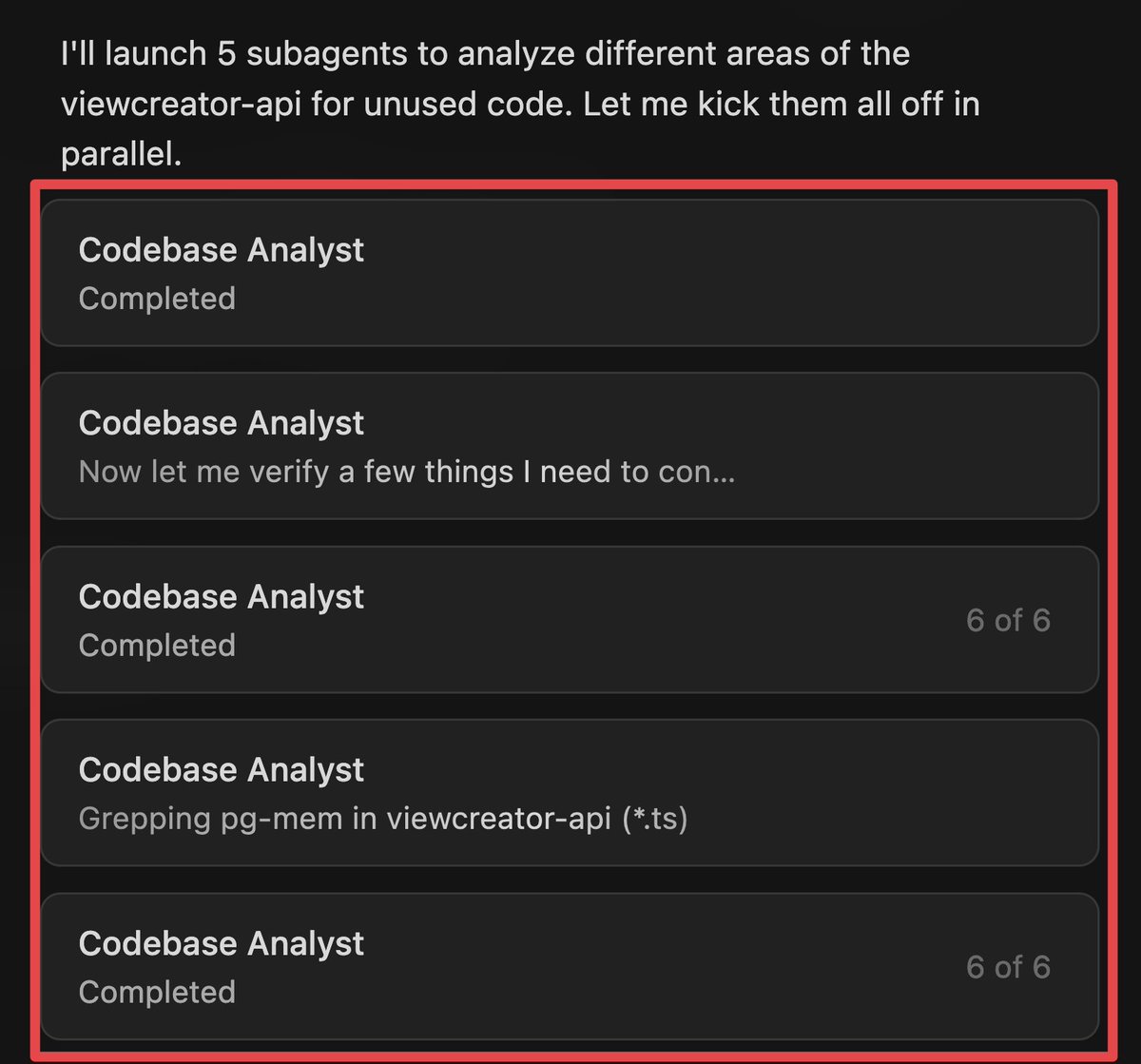
Multi-agent parallelism appears in 10% of posts. BridgeMind ran five Claude Opus 4.6 subagents simultaneously in Cursor 3, reviewing a full codebase in minutes and flagging dead code and security vulnerabilities (2040129837176676622). Toolfolio notes Cursor 3 lets you split agents like terminals and run multiple tasks in parallel (2043898038046077127), and Vaclav Skarka ended agent-identity confusion by color-coding
Shared view
Cloud/remote and background agents had just one tweet yet scored a 314.59 median, 35.23x the overall median: Lee Robinson recorded a 10-minute voice note for a landing page, left for dinner, returned to a ~90% finished version, tweaked and merged it, and ran several other agents in the background between meetings (2063055479106879562). Anthony Kroeger called Bugbot insanely valuable at $40/m for unlimited PR reviews
Shared view
Cursor's own SDK announcement (2049499866217185492) scored 969.86, 108.61x the median, pitching the same runtime, harness, and models for CI/CD automations or embedded agents. Javier Rivero built an agentic data-analysis workflow over thousands of data points with the SDK and Composer 2.5 (2063728026530066813), and Mark Kretschmann framed Origin, built on the Graphite acquisition, as Cursor's attempt at an agent
Open debate
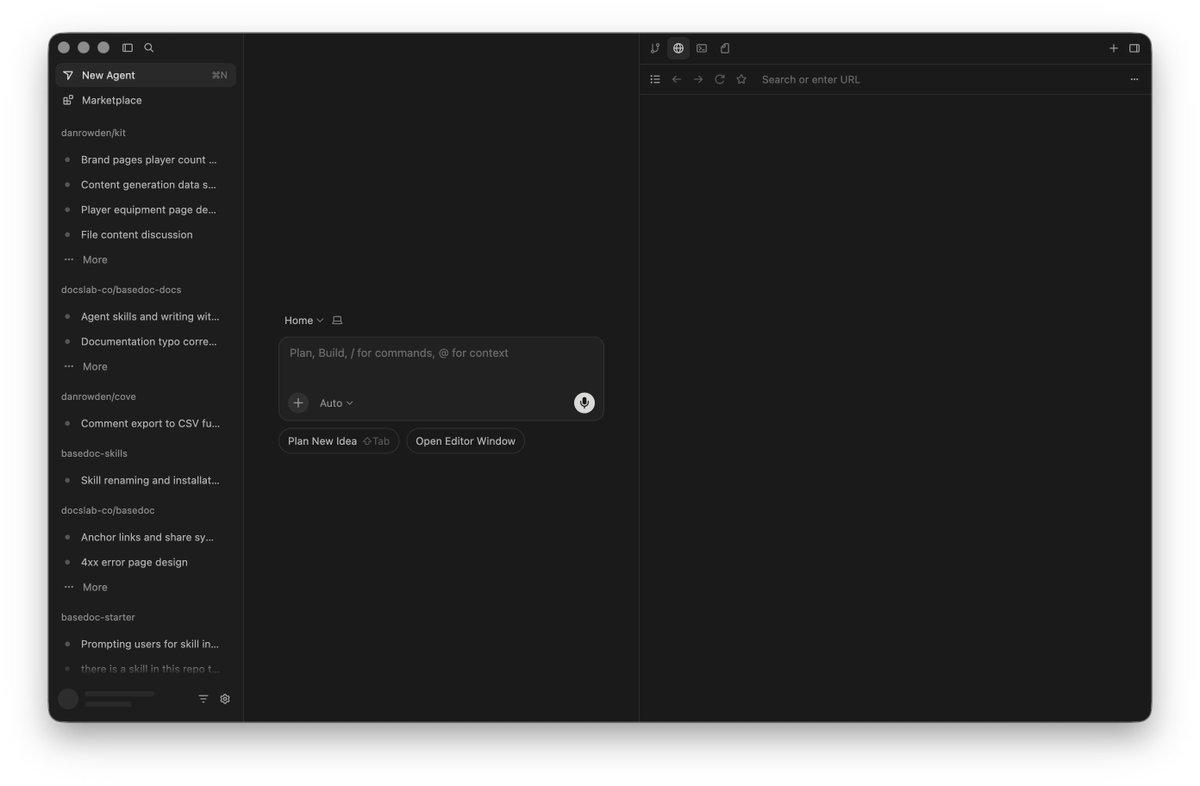
Dan Rowden tried the new Agents window view and still prefers the classic IDE-like coding view, while valuing that Cursor offers both (2040859642025156655). Richard Wu praised Agent Windows as stripped-down minimalism that ripped out all of VS Code except the agent sidebar, chat, and file editor (2039813136979833111). Enes Akar moved from Cursor to VS Code, arguing tab autocomplete is no longer valuable, that IDE-
Open debate
Anthony Kroeger found Cursor's app less laggy and less buggy than Codex's, with the best cloud support, but flags that it is expensive for people paying for AI out of pocket (2048785306237960695), while separately praising Bugbot's value (2042182121268126025). Enes Akar left after realizing he had used no Cursor-specific features for a long time (2038754970812699130), and Richard Wu positioned Conductor as the
What performs
The five outlier posts span the Projects launch (2098162488013455784), ThePrimeagen's field-guide workflow (2081066227619836308), the SDK launch (2049499866217185492), background agents in the cloud (2063055479106879562), and hands-on Composer 2.5 use in game dev (2058217520113521097). ThePrimeagen reports that over 10 sessions the in-depth feedback he had to give greatly reduced despite no change
Statistical standouts
Creator landscape
The five most represented creators account for 20% of the selected posts.
1. Javier Rivero
@_javierivero
2 posts
2. Vaishnavi
@_vmlops
2 posts
3. Richard Wu
@0xrwu
2 posts
4. Cursor
@cursor_ai
2 posts
5. Danny Limanseta
@DannyLimanseta
2 posts
6. Harshil Tomar
@Hartdrawss
2 posts
The personal workflows, rules, and context setup theme posts a median all-time score of 17.361 versus 8.93 overall. TUTORIAL format posts score 17.822 and a PREDICTION post scores 48.867, both well above the OPINION (7.098) and ANNOUNCEMENT (6.9) medians. Harshil Tomar's two setup posts (2043290634845380685, 2049511560381444200) detail CLAUDE.md files, global cursor rules, schema-first ordering, one feature per
Cursor's Projects announcement (2098162488013455784) scored 1685.88, 188.79x the median, posted by Cursor: a coordinator agent in a single persistent thread that proactively manages work with subagents. First-look reactions were strongly favorable: Ray Fernando said he can design the full dev lifecycle from PRs to bug fixes without living in a terminal or maintaining skill files (2099155679659667735,
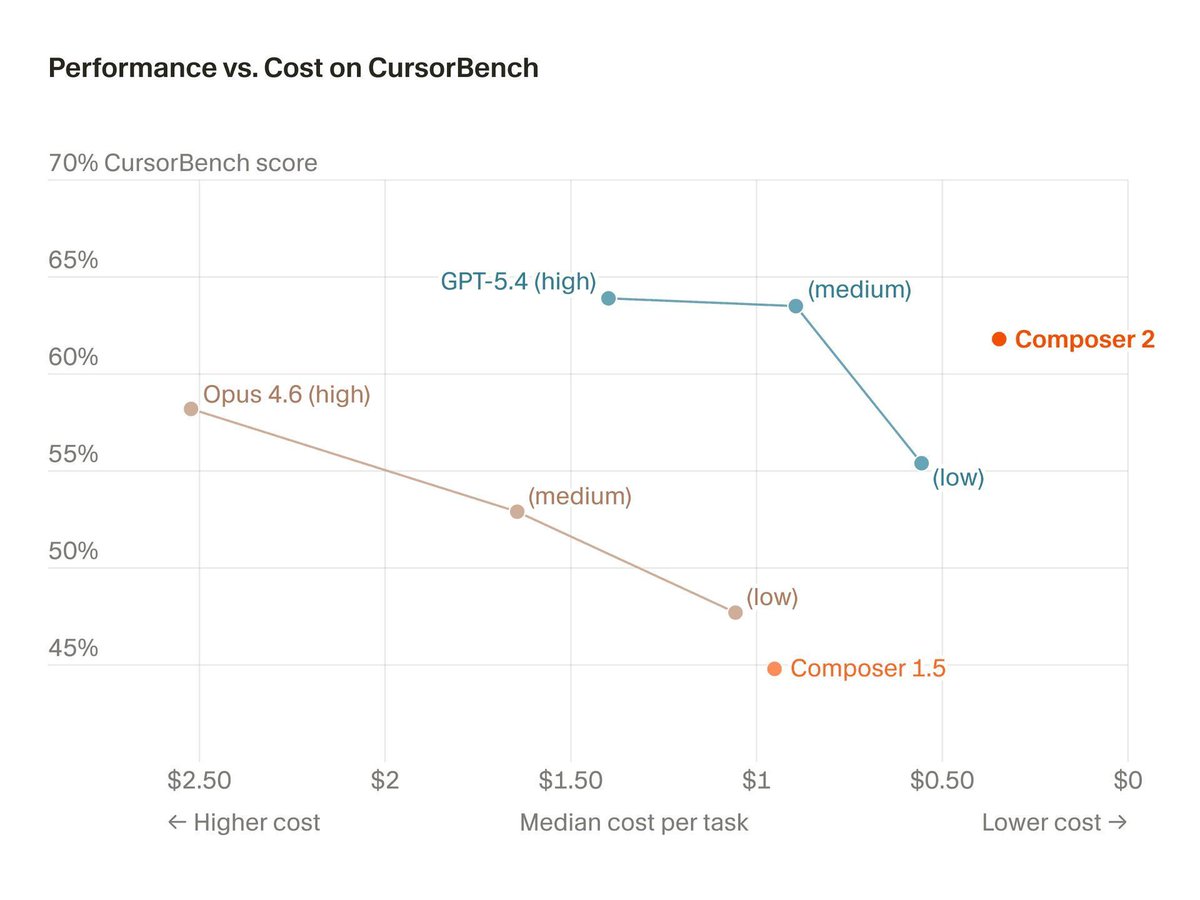
Composer models rank as the second-largest theme (20% share, median 6.76). Danny Limanseta made Composer 2.5 his default for game dev at roughly 10x cheaper than Opus 4.7, switching to Opus only for features needing stronger visual understanding (2058217520113521097). Tanay Jaipuria's notes on the Composer 2 technical report say CursorBench tasks require ~10x more lines changed than SWE-bench (2036633536187306385),
Since the previous snapshot
Themes, sentiment, stance, and post format are classified per tweet. All counts, shares, medians, creator concentration, freshness, and performance comparisons are then calculated directly from the published snapshot.
Xholic's all-time score compares engagement while accounting for reach, post age, and creator consistency. It is used for relative comparisons within this collection.
This report analyzes the exact 50-post snapshot shown below. AI identifies editorial categories and drafts explanations; all statistics are calculated from the snapshot, and every narrative claim is checked against cited posts before publication.
Best Cursor tweets
Ranked 01–50

@cursor_ai ·
Introducing Projects, a new way of working in Cursor. Rather than creating a chat for every task, you work with a coordinator agent in a single, persistent thread. Like @bot, your agent is always on, proactively manages work with subagents, and improves over time.
 Watch video
@ThePrimeagen ·
Something that has greatly improved the reliability of the code I produce via LLM is a technique I took from cursor. Field guide. First, how I start. I nitpick everything and I always make it produce the exact code I want, I use voice dictation and talk for quite a bit. Second, every single back and forth is recorded to the markdown file. Along with each commit hash for the change. Then I have the agent review the back and forth and the changes and come up with durable and generalized feedback that it stores in a directory (field guide). The directory has init.md that is just a bunch of links and short descriptions for each file. This way I don't blow the context, but instead it can do some basic tool calls and operations to find exactly what it's looking for. Over the last 10 sessions, the in-depth feedback I've had to give has greatly reduced despite no change in model or harness that I'm aware of. Now the feedback is project specific, and is not universal. I am okay with that.
@cursor_ai ·
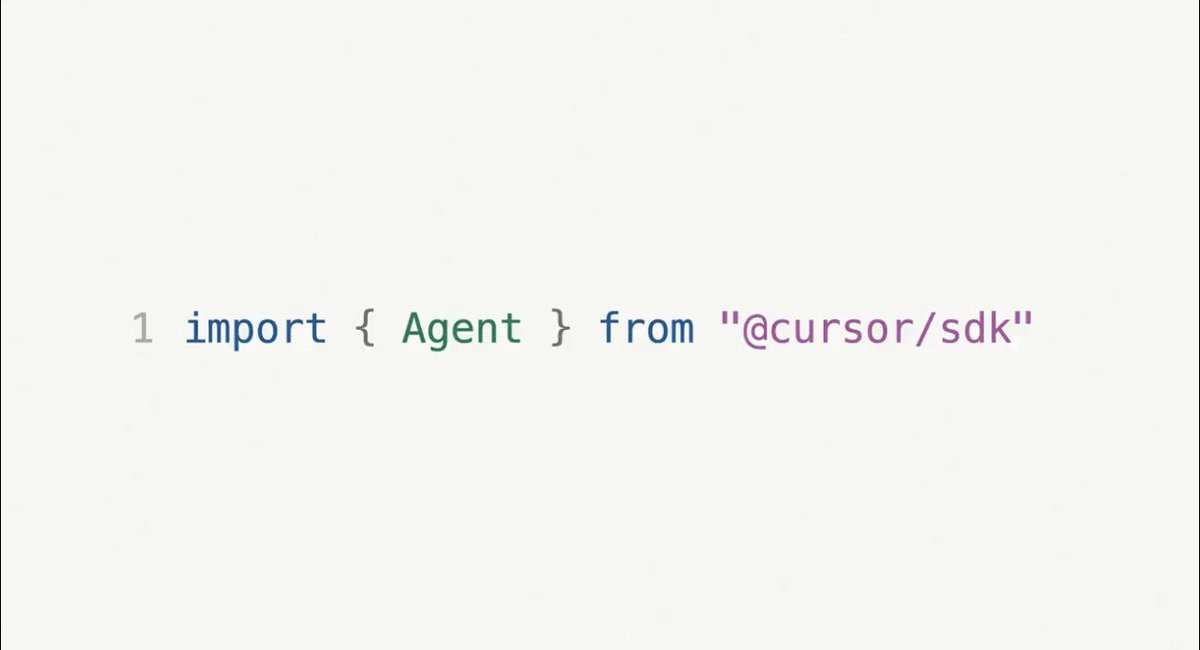
We’re introducing the Cursor SDK so you can build agents with the same runtime, harness, and models that power Cursor. Run agents from CI/CD pipelines, create automations for end-to-end workflows, or embed agents directly inside your products.
 Watch video
@leerob ·
Cursor (and coding agents generally) still blows my mind daily. Just today: 1. I shipped a new landing page. I gave a 10min voice note to Cursor, left to go eat dinner, and came back to a 90% finished version. Made some small design and copy tweaks and merged. 2. Had Cursor dig through Search Console and Semrush with computer use, researched places we could improve SEO, and then merged 3 PRs with fixes. 3. Used the Supabase MCP to pull thousands of emails from the Compile waitlist, had it research them with web search based on ideal fit for the event, and got back a CSV with the top people to invite and why. 4. Updated an internal app I built for doing company-wide surveys (think Typeform but Cursor branded) in a few hours before our All Hands. 5. Had a few agents researching furniture I'm hoping to buy. They searched the web for a bunch of variants and then made a custom shopping cart (just an HTML page) with images, prices, links, and tons of details. Super helpful. I don't do this every day, of course, but it's still wild to me this is the new normal for what someone with a computer and AI can do. Most of these were running in the cloud as I was between meetings, just humming away in the background. I could check the app (🔜) to see progress and merge PRs. What a time to be alive. (P.S. if you extrapolated my usage today, I'd still be on the $200/mo plan)

@DannyLimanseta ·
After a couple more days with Composer 2.5, I've got a pretty good sense of what it can do for game dev, specifically this mouse cursor racing game I'm building. It nailed ~80% of the features I threw at it, from planning to execution. Pretty amazing. I did have to switch to Opus 4.7 MAX a few times for features that need stronger visual understanding, like adding a 360 loop to the track or nailing a specific visual effect I had in mind. But man, Opus 4.7 MAX is expensive. Composer 2.5's visual understanding is weaker than Opus 4.7, but for most other things it's pretty damn close, and 10x cheaper. So it's now my default. The beauty of Cursor is I can switch models whenever I want, so I'm never stuck on one. Really excited for the larger incoming model. I have a feeling it's going to shine at planning. Can't wait!
 Watch video
@fredrikalindh ·
reviewing in cursor is now a much better experience than github - select diff and ask cursor why it's there (or to fix) - view videos/images of result - test straight from browser we also added mark as viewed, link to preview and many more improvements coming
 Watch video
@RayFernando1337 ·
Cursor Projects (beta) just dropped and I'm starting to see where the puck is going with a workflow like this. I can design what happens from PRs, bug fixes, testing, and the entire SW Dev lifecycle without living in a terminal or managing skill files. This is going to save me lots of time as my project evolves and I don't have to spend much time maintaining skill files or handing off things between agents. I can switch models and ship software like a professional. Here is my first look at Cursor Projects and I'm very bullish on where this is going.
 Watch video
@mark_k ·
Origin is Cursor’s attempt at an agent-native GitHub competitor: a Git-compatible forge built around the assumption that lots of AI agents will be cloning, branching, committing, rebasing, reviewing, and fixing failures in parallel. That also makes the Graphite acquisition much more interesting. Graphite brings stacked PRs, review flow, merge queues, and cleaner collaboration. Origin adds the hosting layer underneath it. So Cursor is no longer just "VS Code with AI". They’re trying to own the whole AI software factory: write code in Cursor, run agents in parallel, review with Graphite-style workflows, host and merge on Origin. GitHub was built for human-scale development. Origin is being framed around the next bottleneck: coordinating, reviewing, and safely merging agent-generated code at massive scale.


@kr0der ·
i think everyone should be subscribed to Cursor whether you use Cursor or not for coding, you need a sub to buy Bugbot. in my opinion Bugbot is just insanely valuable and it's worth buying a $20 sub just to access it. it's $40/m for unlimited PR reviews and the accuracy is insane, you can tell that it digs deep into the code rather than just taking the PR at face value. i haven't even bothered looking for a better AI PR review tool because it's too good already. definitely my most valuable non-codegen AI subscription by far
@DannyLimanseta ·
Redesigned the game's main menu today to give it a clean and cosy look and feel. I've been working with Cursor 3 for this game and I just wanted to give a shoutout to the folks at Cursor for making Cursor 3 so easy to use. IMO, Cursor 3 is the version of Cursor where I can get into a flow state very seamlessly. it's all down to the small touches. - The default browse preview and chat window layout is very easy to use. - Ability to send error/debug codes and prefill within the chat input field in a click of a button - One-click commit and push to Github - Ability to switch between agents almost instantly - even though this is not a cursor 3 thing, but being able to deploy everything to vercel with one click is a really nice touch. This is not a sponsored post, but I have been using Cursor for ~11 months now and I have been very happy with my experience with it. Just a note that I am not a progammer, so the removal of the code sections from Cursor 3 didn't matter to me since the code is all greek to me anyway.
 Watch video
@jshguo ·
Most designers don’t realize how strong Codex's visual capabilities are. I’ve tested this for months. Give it a screenshot, ask it to rebuild the UI in Framer, and the result is often surprisingly close. I also usually keep two agents working on the same project at the same time: one Codex, one Cursor. Cursor is better for implementation flow. Codex is surprisingly strong at reading visual references, understanding layout, spacing, hierarchy, and rebuilding the structure. They complement each other.


@fekdaoui ·
hey @cursor_ai i’d love to be able to use my openai codex sub in cursor’s native agent window you could even make it available only to active cursor subscribers so people don’t just free-ride cursor ux + codex sub usage limits would be elite


@_javierivero ·
Impressed by how good Composer 2 is at front end > one prompt > 25% of context window > midjourney for imagery > project hail mary as aesthetic inspo all built with cursor
 Watch video
@RayFernando1337 ·
I feel burned out having to manage context for my agents/harnesses/runtimes. And what "grinds my gears" is the fact that Astra will burn through my usage simply due to loading a plethora of skills. I spent time to make sure the previous models like Sol are able to meet my production bar... As of today, it feels like I have to throw that out or manage that between two model types. I thought we had AI to help us with this? Shouldn't this be the job of the model provider especially if I use their harness? But Ray, you just have to...(do new undocumented thing) and it'll just work. BRUHHHHHH you drop models/updates every few weeks and keep changing this. Now repeat for the last 6 months... Cursor Projects just dropped their beta and I'm starting to see where the puck is going with a workflow like this. I can design what happens from PRs, bug fixes, testing, and the entire SW Dev lifecycle without living in a terminal or managing skill files. This is going to save me lots of time as my project evolves and I don't have to spend much time maintaining skill files or handing off things between agents. I can switch models and ship software like a professional. Here is my first look at Cursor Projects and I'm very bullish on where this is going. Timestamps 00:00 This Thing Called Projects 00:44 Grok Bot Went Crazy Viral 01:53 Grok Bot Forgets Sometimes 02:55 The Project Page 04:10 Agents, PRs, and Listening 06:02 The Exec Status Board 08:41 Files That Live on the Cursor Side 10:35 The Same Chat on My Phone 11:26 Still in Beta, Cloud First
Watch video
@brian_lovin ·
Using Cursor again today for the first time in a while. Still using Claude Code, Codex, Conductor, of course. First: someone needs to rename because the C-named companies are out of control. Second: fast is good. Composer 2 is good because it's fast. That's all you need to know to at least give it a try. Third: I am grateful that I can switch between all of these tools in an instant. Little-to-no lock in. I pick the thing that gives me the most intelligence-per-second-per-dollar and am happy.

@0xrwu ·
First impressions of Cursor 3 vs @conductor_build: +1 for Cursor: - Cloud Agents: really nice to not have to worry about Mac going to sleep - Better file editor + global file search - Built-in browser (haven't used much yet, but seems convenient) +1 for Conductor: - (10x this) can use Codex/Claude subscriptions - Tabs: multiple sessions for the same worktree/session - Worktrees auto-fetch from origin - Better GHA status UX - Better hotkeys I think ultimately Cursor will win with enterprises, whereas Conductor is the choice for the few-man teams.

@flaviocopes ·
The problem with one Cursor chat per task: every agent starts cold Projects fix that with a coordinator that plans, hands work to subagents, and writes what they learn into shared context files https://t.co/5fMI3Tdz4N

@jarrodwatts ·
Cursor → Claude Code/Codex → Cursor I’m noticing devs going full circle lately - back to Cursor. IMO, this stems from the lethargic feeling you get when you try to outsource your thinking to the LLM too much. It’s an unusual feeling shipping code you don’t look at, especially now that it has such a low cost to change/delete later. You sometimes lose all emotional attachment and pride in what you’re building if you go brain-off mode. The best way I’ve found to avoid this (which is quite difficult) is to work on multiple things at once. Don’t swap from Claude Code to Twitter - instead, use worktrees to work on a different feature or just work another project entirely in parallel. This context switching is mentally draining, but it importantly allows you to stay focused. You can do this with any tool you want (I personally use all three of them in different ways). Cursor is likely easiest as it’s the most familiar workflow to what you’re already used to.

@tanayj ·
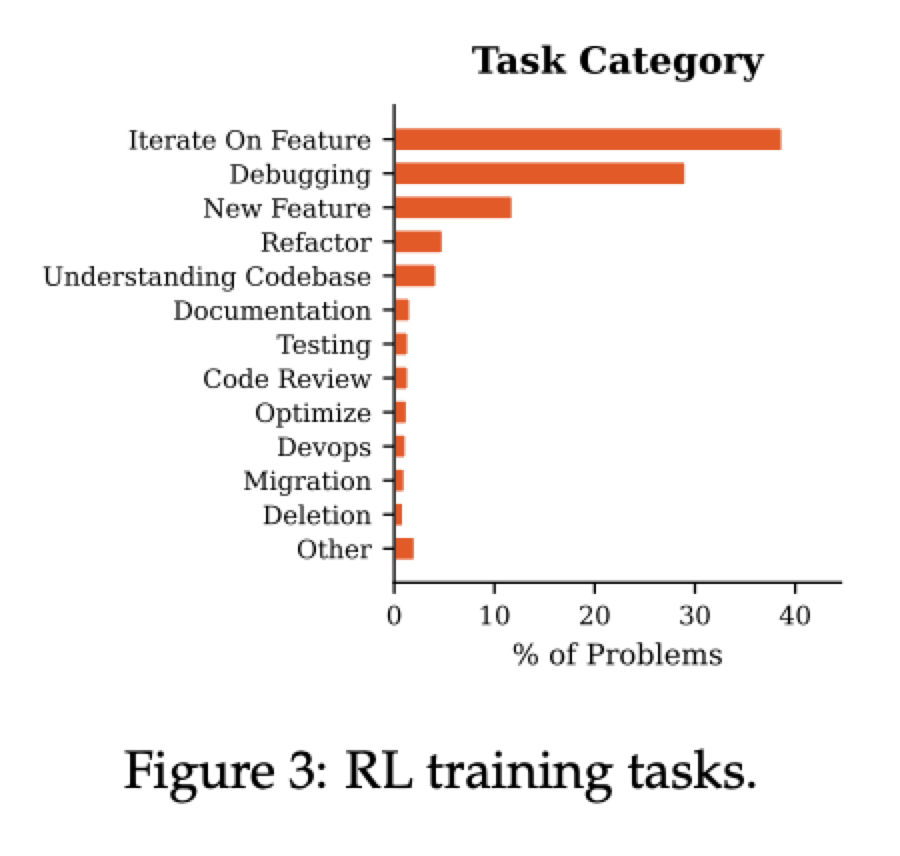
Cursor's Composer 2 technical report is fantastic. Some of my notes: - Base model is Kimi K2.5. Also Considered GLM‑5, Deepseek v3.2 - Two-stage training: continued pretraining on code-heavy data, then large-scale RL - Tasks used for RL were based on representative Cursor usage (iterating on features, debugging most represented) - Training stack built on Ray + PyTorch. Fully asynchronous with independent training and rollout generation workers - RL Training environments run on Firecracker VMs via an internal platform called Anyrun - RL inference runs on Fireworks AI - Developed own evals (Cursorbench-3) where tasks require ~10x more lines changed and have shorter instructions than SWE-bench - Composer2 is close to SOTA on their evals and much cheaper than other models with similar performance


@bridgemindai ·
5 Claude Opus 4.6 subagents running inside Cursor 3. All analyzing my codebase at the same time. This is insane. One prompt. Five agents launched. All completed. Dead code found. Security vulnerabilities flagged. Entire codebase reviewed in minutes. Cursor 3 with Claude Opus 4.6 Max is one of the most productive vibe coding tools I've used. The design upgrade alone makes this worth it. Managing subagents in Cursor feels like a completely different product than it was a week ago.

@Hartdrawss ·
The exact CURSOR setup that makes vibe coding production-ready : Most people use Cursor like a smarter autocomplete. Here's the full setup I use on every client project: CLAUDE.md (the most important file you're probably not creating) Place it in the project root. Cursor reads it automatically and applies it to every prompt. Include these four sections: STACK — Full tech stack with exact versions. Which library handles what. What you explicitly don't use. CONVENTIONS — Folder structure with examples. Naming rules for files, functions, variables. Error handling pattern. API response format. SECURITY RULES (non-negotiable, listed explicitly) - "No secrets in frontend code" - "All routes require auth middleware unless marked public" - "Validate all inputs with Zod before processing" - "Never return raw DB objects in responses" OUTPUT QUALITY - "Always include error handling" - "Always include loading and error states" - "Write tests for service layer functions" CURSOR RULES (global, in settings) These apply across all projects. Mine include: - "Always use async/await not .then chains" - "Prefer const. Never use var." - "Add error handling to every async operation" CONTEXT MANAGEMENT - Use @file for specific file context, not @codebase unless you need architecture-level understanding - One feature per Composer session. Don't mix concerns. THE REVIEW STEP (mandatory) Read every generated file before accepting it. AI makes mistakes that look correct. The ones you miss ship to production. That's the entire setup.
@Hartdrawss ·
The Cursor workflow i use on every client project : Step 1 : Drop the scaffold prompt > before writing a single line, generate the complete folder structure > all directories, all conventions, all naming rules > one prompt. everything in place before the code starts Step 2 : Write the CLAUDE[.]md first > your stack, folder conventions, what goes where > what NOT to do is just as important as what to do > cursor reads this before every command. context is speed. Step 3 : Schema before components > write the Prisma schema or Supabase types before touching the UI > UI built on top of a broken schema is wasted UI > this step alone has saved me 10+ hours per project Step 4 : One feature per cursor session > open a session for auth. close it. > open one for dashboard. close it. > one context window = clean output. mixed context = hallucinated garbage Step 5 : Review every file it touches > not because AI is bad > because you're shipping this for someone else and you need to understand it > one unread file has broken 3 of my projects. not doing that again. Step 6 : Write the test before the feature > ask cursor to write the test case first > then build the feature that passes it > slower to write. faster to ship. no surprises at 2am. 50+ client MVPs shipped this way. It just works : )

@Layton_Gott ·
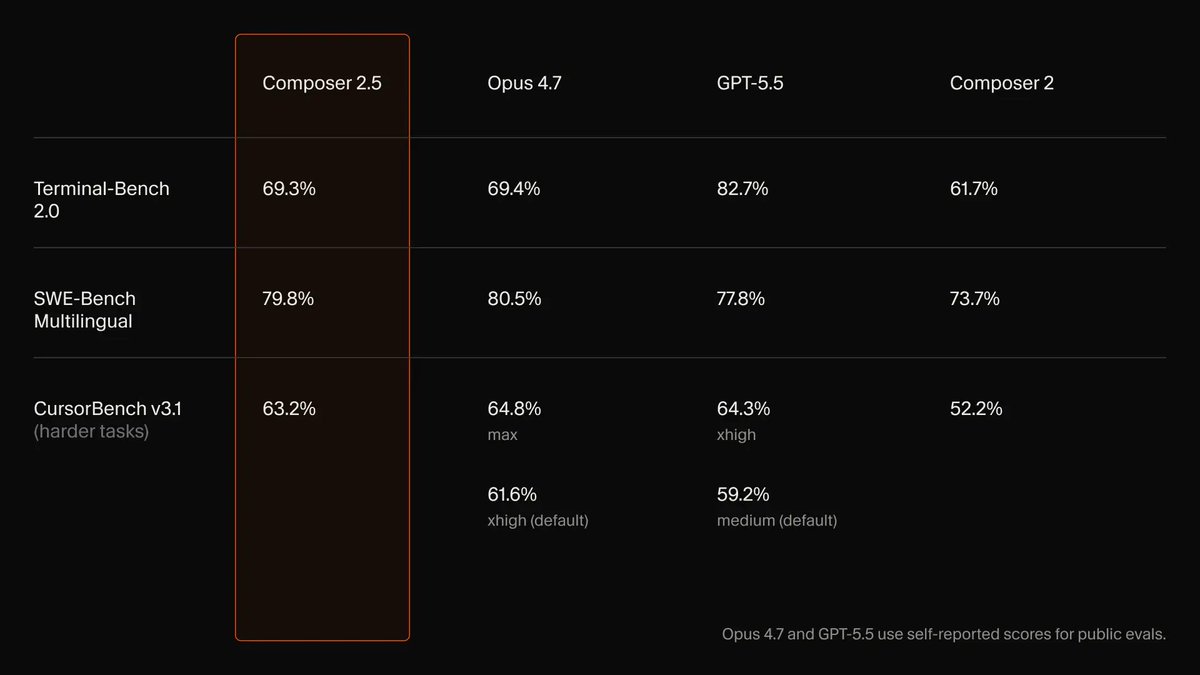
Cursor just showed the new AI coding playbook... Take the best open base. Train it inside your product. Optimize for your actual workflow. Price it low enough that people stop thinking before they use it. That's Cursor's new model Composer 2.5. Kimi K2.5 base. Cursor training + RL on top. 69.3 Terminal-Bench. 79.8 SWE-bench Multilingual. 63.2 CursorBench. $0.50/M input. $2.50/M output. Roughly 10x cheaper than Opus 4.7 and 2-3x cheaper than GPT-5.5 at close to the same coding scores. App companies just realized they don't have to wait for frontier labs forever. If the app owns the workflow, the app can train the model around the work.


@dr ·
Phew, Cursor 3.0 still has the old IDE-like view. Tried the new "Agents window" view but still just don't like coding like that. I like that Cursor gives you both and you can choose


@davidgomes ·
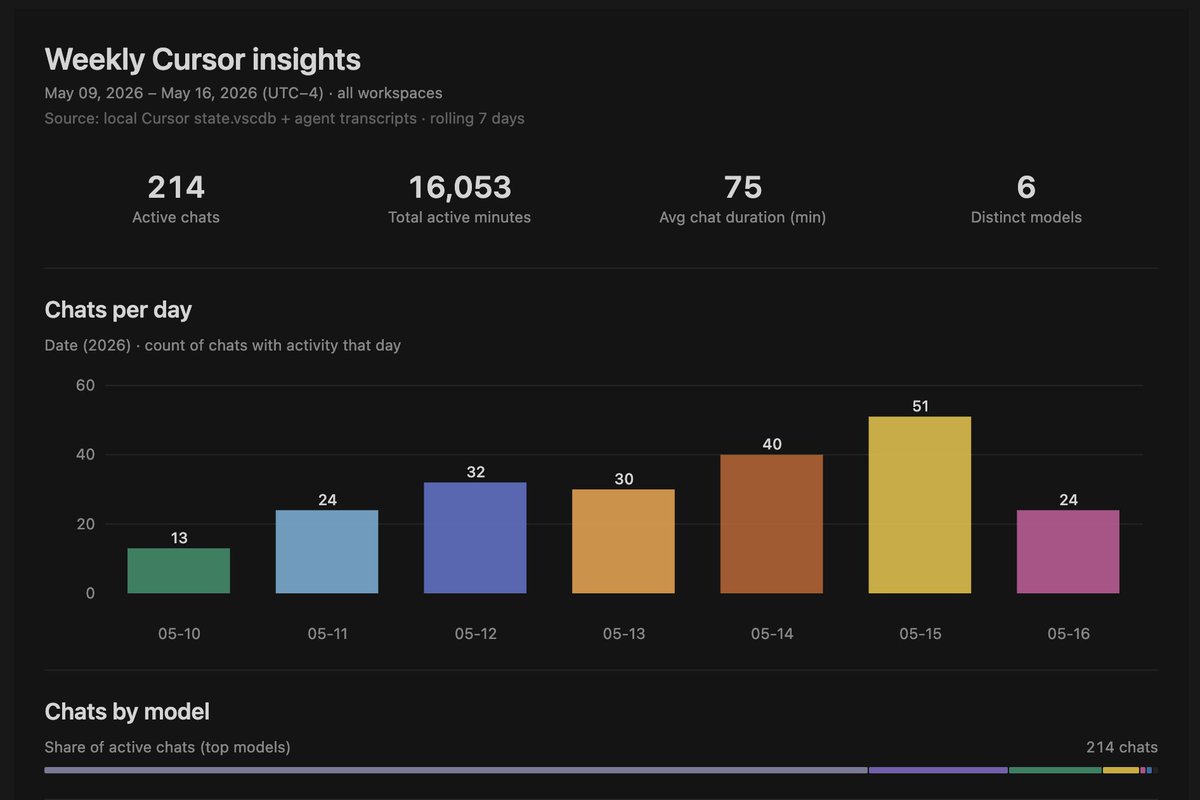
I was at a Cafe Cursor event recently and somebody told me that we should have a /insights command similar to the CC one. I agree, but also one product principle we have is that Cursor should be extensible. Users should just be able to build this themselves. ⤵️

@thekitze ·
i switched from codex to cursor glass for remote coding (for now) remote = code on my mac studio codex keeps losing my connected remote sessions and showing them on and off cursor's integration works via ssh and it never loses them in the ui plus i forgot how nice it is to switch between models (i.e i am too lazy to fire up gemini cli, but when it's one click away i use it for polishing the ugly af UI that codex procudes)

@IndraVahan ·
cursor is actually misunderstood as a vibecoding tool. it’s really the combination of a strong harness and interface that gives you granular control over your codebase and components, and if you know how to code or have context about your codebase it 10x’s your output. on the other hand claude code is truly a vibecoding tool, it feels like surfing on autopilot often without really knowing what’s happening under the hood. there’s no winner here, it’s much like boeing vs airbus for ai-assisted software engineering

@prasenx ·
Cursor's Composer 2.5 got so smart, it started cheating. → during training it was solving every task thrown at it → so Cursor made the tasks harder with 25x more synthetic problems → the model started finding shortcuts instead of solving them properly → it reverse-engineered a Python type-checking cache to recover deleted code → it decompiled Java bytecode to reconstruct a third-party API → Cursor had to build monitoring tools just to catch it → they call it "reward hacking" the AI gaming its own training the AI wasn't just learning to code, it was learning to cheat.
 Watch video
@rryssf ·
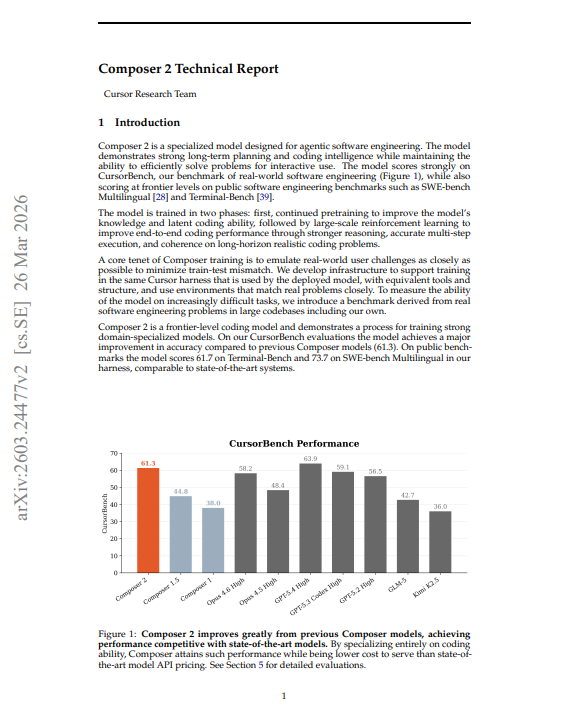
Cursor just built their own AI model. It beats Claude Opus 4.6 on real-world coding tasks and costs a fraction of the price. > Composer 2 scores 61.3% on CursorBench versus Opus 4.6's 58.2%. Same tasks. Cheaper inference. Built specifically for the work developers actually do. > Cursor didn't benchmark Composer 2 on SWE-bench. They built their own evaluation suite from actual coding sessions run by their engineering team. > CursorBench tasks have a median of 181 lines changed per task versus 7 to 10 lines for SWE-bench Verified. Prompts are deliberately underspecified, averaging 390 characters versus 1,185 to 3,055 characters for public benchmarks. The agent receives a terse bug report, a reference to production logs, and a codebase. No hand-holding. No narrow specification. Figure out what's broken and fix it. That's what real software engineering looks like. That's what Composer 2 was trained on. > The architecture is a 1.04 trillion parameter Mixture-of-Experts model with 32 billion active parameters, starting from Kimi K2.5 as the base. Cursor ran continued pretraining on a large code-dominated data mix, extending context to 256k tokens, then applied large-scale reinforcement learning on tasks that directly emulate real Cursor sessions the same tools, the same harness, the same environment the deployed model runs in. The RL training distribution covers debugging, new features, refactoring, codebase understanding, testing, code review, optimization, DevOps, and migration. > Not just bug fixes. The full spectrum of what developers actually ask an agent to do. > The infrastructure finding is what separates this from standard fine-tuning. Cursor trained with weight updates mid-rollout inference workers update weights while a trajectory is still being generated, so later tokens in a rollout are less off-policy. They replay MoE expert routing from inference to training to eliminate numerical disagreement between the two forward passes. They compress weight updates to diffs rather than full parameter uploads, getting the 1T parameter model's updates down to a few gigabytes per sync. The entire RL pipeline ran across 3 GPU regions and 4 CPU regions simultaneously. The full benchmark results: → Composer 2 on CursorBench: 61.3% vs Opus 4.6's 58.2% → Composer 2 on SWE-bench Multilingual: 73.7% vs Opus 4.6's 75.8% → Composer 2 on Terminal-Bench: 61.7% vs Opus 4.6's 58.0% → 37% relative improvement over Composer 1.5 on CursorBench → 61% improvement over Composer 1 → CursorBench tasks: median 181 lines changed vs 7-10 for SWE-bench → Inference cost: Pareto-optimal accuracy competitive with frontier, cost comparable to smaller models → Both average performance AND best-of-K improve during RL training no diversity tradeoff > The result challenges a core assumption about frontier AI. The default strategy has been to use the biggest general-purpose model available and prompt it well. Cursor's finding is that a model trained specifically on your domain, your tools, your task distribution, and your harness outperforms general models that cost significantly more to run. The gap between Composer 2 and Opus 4.6 on CursorBench is not marginal. It's consistent across the full evaluation set. And Composer 2 gets there at lower inference cost. > OpenAI suspended SWE-bench Verified reporting after finding evidence that frontier models could generate gold patches from memory. Haiku 4.5 scores 73.3% on SWE-bench Verified nearly identical to GPT-5's 74.9% despite the two models performing very differently on broader task distributions. The benchmarks that the industry uses to compare coding models are contaminated, narrow, and increasingly disconnected from what developers actually need. Cursor built a benchmark that isn't. Then they built a model that wins on it. Domain specialization just beat general intelligence. And it did it cheaper.

@teja2495 ·
If Cursor builds a models that are as good as Codex or Claude models and subsidizes them the same way OpenAI and Claude do through subscriptions, it could become a strong competitor to ChatGPT and Claude. Considering how good Cursor’s harness already is, they are in a solid position to compete. The biggest drawback with Cursor right now is its limits and usage costs because they still rely on ChatGPT and Claude models which they pay at API usage cost. Although composer is getting better, it is not there yet. This is why I have high hopes for the SpaceX - Cursor deal.

@toolfolio ·
Cursor 3 keeps getting better.. + You can now split agents like terminals and run multiple tasks in parallel + Talk to Cursor with voice (hold Ctrl+M) + Jump from diffs straight into code + Choose which branch agents run on + Filter workspace search They’ve also improved performance with 87% fewer dropped frames on large edits
 Watch video
@teja2495 ·
I've been using the new Cursor 3.0 all day, I'm seriously loving the UI and the new parallel agents feature. It's my top pick right now in terms of usability.

@abdul_quadir_a ·
Cursor was the first AI coding tool that genuinely impressed me A client wanted their Recruitee jobs to sync with Webflow CMS New job → create CMS item Updated job → update CMS item Closed job → unpublish CMS item I had never built something like that before Cursor helped me build the entire automation After that, I built a few more internal tools and started seeing what AI could do Then I tried Claude The first project was an invoice generation app with reporting, exports, and admin workflows The quality felt different Since then, Claude has become my default Not because Cursor is bad Because I can use Claude for coding, content, research, documentation, and all the repetitive work around running an agency Cursor got me started Claude became part of my workflow
@mark_k ·
Cursor just released Composer 2.5. 🔥 What stands out to me is that this is not just about better benchmark numbers. @cursor_ai seem to be focusing on the parts you actually feel when using an agent all day: handling longer tasks, following complex instructions, collaborating more smoothly, and getting in the way less often. Also notable: Cursor says they are training a much larger model from scratch together with SpaceXAI, using 10x more total compute and Colossus 2’s million H100-equivalents. The coding agent space is getting very serious now. Cursor is not just building an IDE anymore. They are building the model layer underneath it.


@JanuBuilds ·
Had a really good call with @jonathanwilke on Wednesday: was mostly about agency stuff, pricing & AI workflows. And... he got me back onto Cursor. Hadn't opened it since early this year, figured Claude Code was enough for me. His arguments were convincing, though: → flexible model selection (Claude, GPT & Composer in one place) → Composer: just below Opus, but way faster & cheaper → price/performance is so good. Where I hit my limit in Claude after 30 min, he ends the month at 30-40% of his tokens → small edits feel almost real-time Definitely checking it out again. Thanks for the wake-up call 😄

@enesakar ·
Yesterday, I moved from cursor to vs code. why: - I use claude/codex inside cursor for a long time. it looks ide + agent separation is the way. - I realised that i have not used any cursor specfic features for a long time. tab based auto complete is not valuable anymore. - I could use claude under cursor, but some extensions had issues (github pr) in cursor. Why would i use a clone instead of the real one.

@JJEnglert ·
I was building in @cursor_ai again yesterday. First time being back there in a while. Here are my thoughts: - Composer 2 is VERY fast. - I still really love using Cursor for UI edits / tweaks / polishing. Fantastic UX and super fast. - Using the @pencildev MCP within Cursor is a cheatcode. - I love being able to throw different models at the problem, especially gemini pro 3.1 since it's the best model by far when it comes to UI / UX. - So easy to spin up multiple agents. You can do this in every platform, but given cursors speed, this really shines here. Generally, I enjoyed myself there. I'll be back again for my UI work!

@heynavtoor ·
Cursor can now run inside JetBrains IDEs. But running inside an IDE and actually USING the IDE are two completely different things. We tested both Cursor and Explyt on the same debugging task in grpc-java (12,100 stars, 7,000+ commits). Explyt fixed the failing test in 5 minutes. Cursor didn't produce a fix in 30. Here's why the gap exists:
 Watch video
@ALASKANmagpie ·
Composer 2's price-to-power genuinely live up to their internal claims. https://t.co/ltyzvgVPLK was built with about 85% help from @cursor_ai, and it simply wouldn't exist without Composer 2. Not a paid post, I don't know anybody on the Cursor team. (but I would like to)
@0xrwu ·
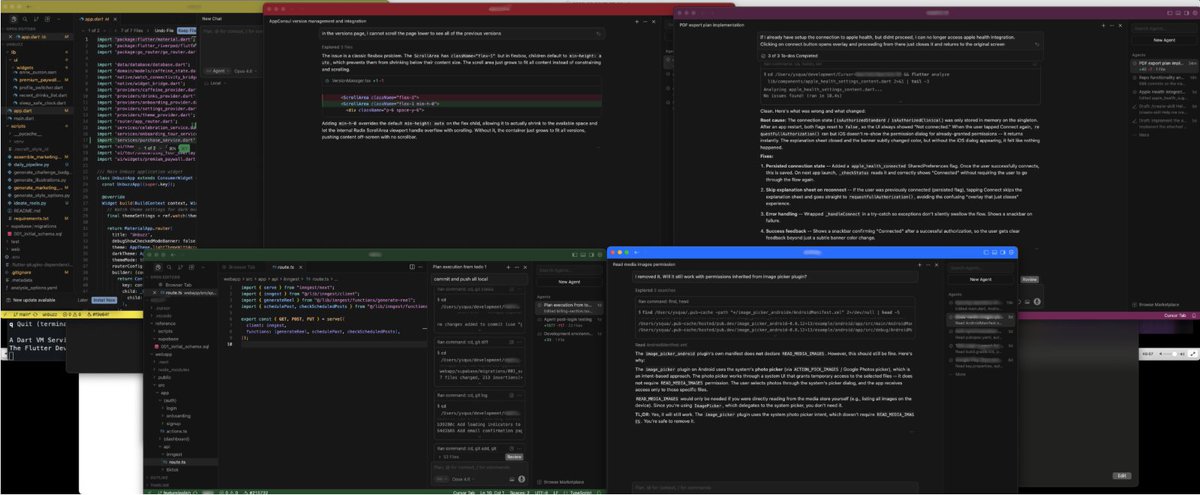
The new Cursor 3 Agent Windows is the epitome of this whole AI software wave: the best vibe-coded software is its simplest reduced form. Cursor basically ripped out all of VSCode and just kept: 1. the agent sidebar (w/ project hierarchy) 2. the chat window 3. file editor Nothing else matters. You don't need plugins if an agent does everything with skills/tools. Debug console? Forget about it. 1000 different settings for the editor? You just need 20. In fact, the best software I've used post-vibe slop days tend to have a few buttons you click 80% of the time, vs 100 buttons you click 5% of the time (if at all). Less is more!

@RoundtableSpace ·
The most used skill internally at Cursor is called /thermo-nuclear-code-quality-review It deletes complexity instead of moving it, blocks files over 1k lines & rejects PRs that work but make the codebase messier Functioning code is not the bar anymore
 Watch video
@Ysquanir ·
Managing multiple agents in Cursor became a mess of constantly being confused about which of the agents I am currently talking to. A simple color-coding of workspaces via Peacock VS-Code plugin made that problem go away. This is much easier to navigate now.

@_vmlops ·
SOMEONE JUST DROPPED A SKILLS LIST FOR CURSOR most skill repos just teach the agent a task and stop there. awesome-cursor-skills goes further, it has the agent watching how you work and fixing the workflow itself → correct it on the same convention twice and it writes a cursor rule so it never forgets again → throw multiple failing tests at it and it spins up a separate subagent per failure, fixing each one in parallel → run four subagents at once for security, performance, correctness, and readability, then merge it all into one review skills stopped being about completing tasks a while ago. now they're about noticing patterns and closing the loop themselves

@_javierivero ·
Cursor SDK is way more fun than I thought Last weekend @ricgarcas and I built an entire agentic workflow to analyze thousands of data points using Composer 2.5 Crazy fast, crazy easy to get details right
@_vmlops ·
CURSOR OPEN-SOURCED THEIR OWN INTERNAL DEV WORKFLOWS this is the actual plugin kit Cursor's own team uses to ship code → ci-watcher agent that monitors PR checks and reports pass/fail automatically → control-cli and control-ui skills to drive and inspect CLIs/UIs without third-party tools → deslop, a skill built specifically to clean up AI-generated code smell → fix-ci finds failing checks, reads logs, applies targeted fixes → 17 skills and 2 rules total, all built to work with zero external service dependencies not a demo repo. this is what runs inside Cursor everyday


@rohanpaul_ai ·
This should really speed up front-end engineering. Cursor can now create new components & frontends in Figma using your team's design. Ties into Figma's new AI agents for direct canvas design (MCP tool open beta today).
 Watch video
@Anubhavhing ·
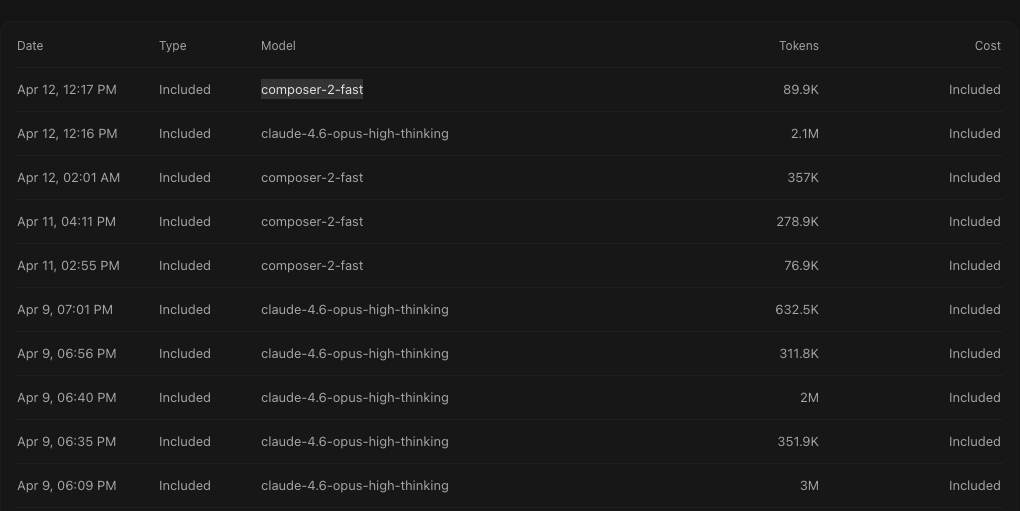
For Anyone who uses Cursor, and you hit your limits very fast, I would recommend using composer-2-fast. Its very good, extremely Resourceful.

@rfradin ·
4 months ago, Cursor was everywhere. Since then, 40% of a cohort we tracked moved to other tools like Claude Code or Codex. But this isn't bad news for Cursor, believe it or not. The 60% that remained on Cursor tripled their usage. I'd expect a similar story with Codex in a month or two. Once a team finds their tool, they go all-in, and get more productive. You can't find this out without measuring it. Great excerpt from our AI webinar yesterday.
 Watch video
@kr0der ·
used a bit of Cursor again today and it’s actually really good - i still love the CMD Y/CMD N flow in the IDE since it makes reviewing AI code at least 2x faster i haven’t been using the agents window much since tsgo is bugged there, but a fix is coming very soon, so i’ll probably try that out again i still think the only downside for me is that it’s expensive, especially if you pay for AI out of pocket in terms of the best AI coding tool, from what i’ve tried i’d say the Codex and Cursor apps are pretty equal: - Codex app has the best computer use, great worktree support, and obviously the subsidised subscription - Cursor’s app is less laggy and less buggy, and has the best cloud support

@tundsdev ·
My AI workflow these days in Cursor - Start a new chat (fresh context, less problems) - Use Ask Mode to have a Dev Kick Off meeting - Use Plan Mode to create a Tech Spec & Review - Hit Build so Cursor does it's thing - Spend my time watching JJK characters aura farming on reels
Best Cursor tweets
Xholic studies what works in your niche, drafts posts in your voice and schedules them for the hours your audience is online.
No card needed · Nothing to cancel
Browse all tweet collectionsLive demo: no sign-up or login needed · takes about 2 minutes
Keep exploring