If you’re staring at a packed inbox of Direct Messages on X (formerly Twitter), you already know the problem isn’t sending messages. It’s replying quickly, staying personal, and not turning your account into a spam machine. Twitter DM automation can solve that, but only if it’s built around consent, pacing, and human review.
The best workflow is usually simple in concept and strict in execution. You define the right use case, respect X’s product and policy limits, build a narrow automation path, and keep a person in the loop for anything sensitive. Done that way, DM automation becomes a support and revenue aid, not a compliance headache.
Introduction
A founder gets 40 inbound DMs after a product launch, a creator gets buried under partnership requests, or a support team keeps answering the same question for the tenth time that day. The messages matter, but the inbox moves faster than a human can handle. That’s where twitter dm automation helps, not by replacing judgment, but by handling the repetitive parts that slow every good response down.
The catch is that X doesn’t treat DMs like an open broadcast channel. DMs started in 2006 as “notes directly to you,” and the platform later tightened the whole surface around limited-history retrieval and event-driven access, which means the automation model has always been constrained rather than free-for-all. For teams that build around those constraints, the payoff is faster replies, cleaner routing, and fewer lost conversations.
Practical rule: automate the workflow around the message, not the relationship itself.
Defining Goals and Use Cases
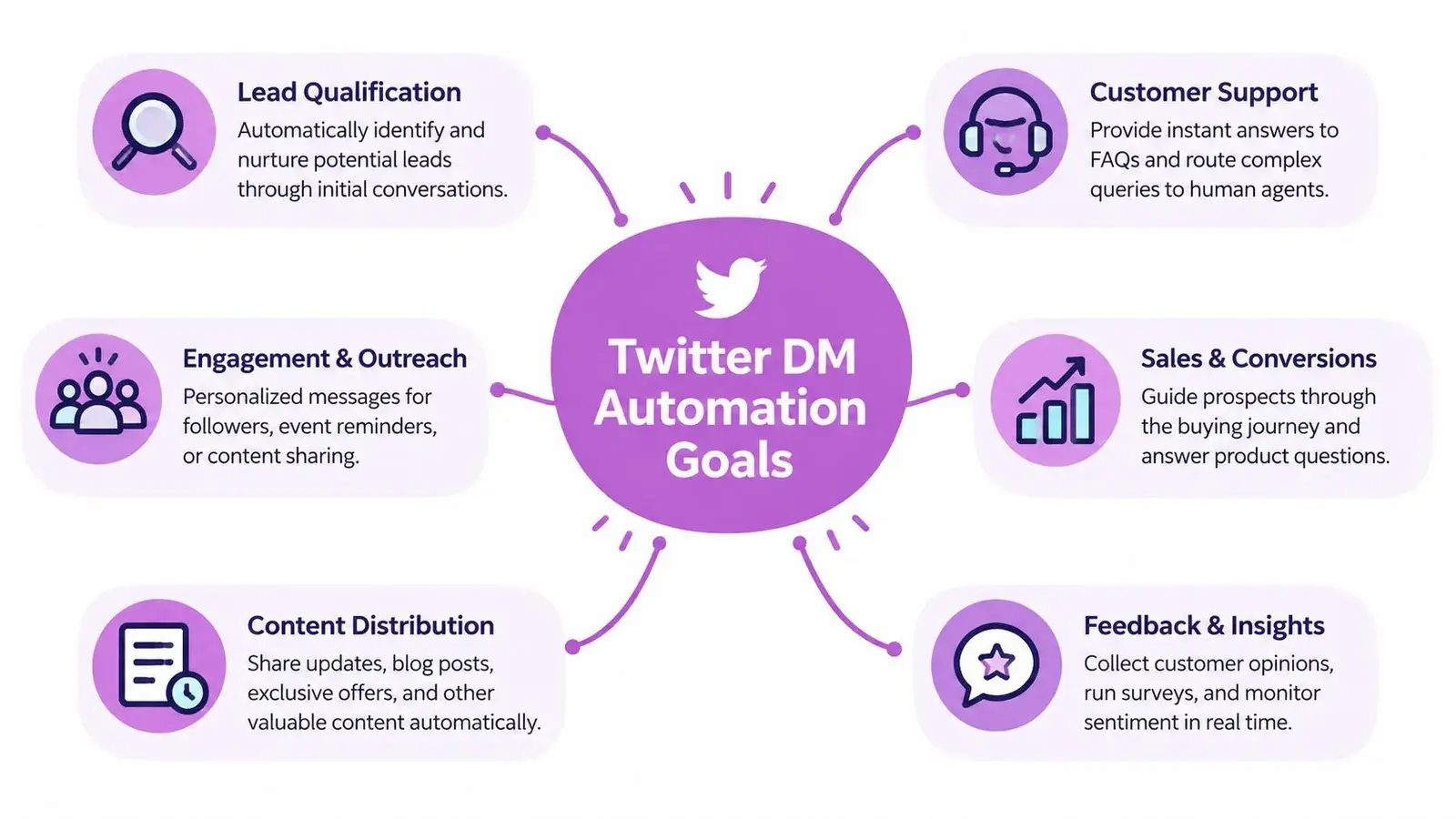
Before writing a sequence, decide what problem the system is solving. If the goal is lead qualification, the workflow should ask one or two short questions and route qualified replies to a human fast. If the goal is support triage, the system should identify the issue, collect the minimum needed context, and hand off anything complex.
The best use cases are narrow
A consent-based DM workflow works best when the recipient already expects contact. That’s the overlooked part of the conversation, because most coverage focuses on cold outreach, while the more practical question is how to automate only opt-in DMs without drifting into prohibited behavior. For a founder, that usually means inbound lead follow-up, post-event replies, or a request for more information after someone comments or asks for a link.
A simple decision filter helps:
- Lead qualification: use it when speed matters and the first reply can be standardized.
- Customer support triage: use it when you need to separate FAQ-level issues from sensitive tickets.
- Onboarding reminders: use it when users have already opted in and need nudges, not persuasion.
- Event follow-up: use it when the recipient has already interacted with your brand or session.
- Content delivery: use it when someone explicitly asked to receive a resource or next step.
If a workflow needs deep context, emotional nuance, or negotiation, keep more of it human. If it needs consistent routing, quick acknowledgement, or a short next question, automation can carry the load.
For broader growth workflows, it also helps to map the DM system to the rest of your X motion. If you’re pairing inbound conversations with outreach, this breakdown of affiliate marketing on Twitter is a useful companion read for understanding where DMs fit into the larger funnel.
For support-heavy teams, a modern support automation architecture is a good reference point because the same design logic applies, narrow intake, fast triage, and human escalation when the script stops fitting. If you need a product-aware support workflow specifically, the same architecture principles translate well to Twitter customer support.
Navigating Legal and Policy Constraints
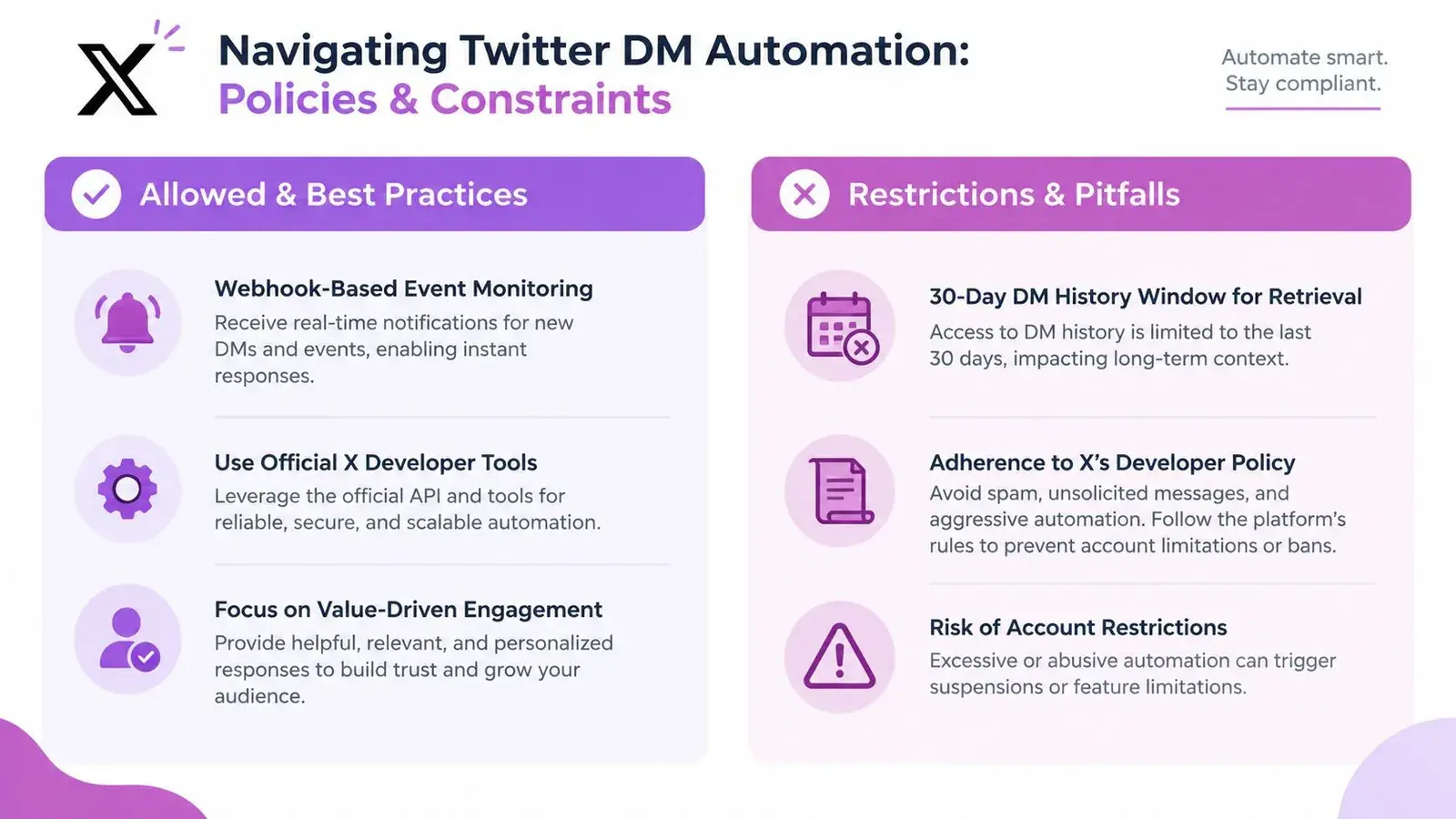
A working DM system starts with the platform limits, not with the message template. X’s DM docs are explicit about what you can and cannot access, so any workflow that assumes unrestricted inbox polling or long-term message retrieval is built on the wrong foundation. The current DM history endpoint only reaches back 30 days, and live event handling runs through webhooks via the Account Activity API. X’s DM overview is the right reference for that boundary.
Retrieval limits shape the architecture
That 30-day window changes how context should be stored. Keep the data needed for the active thread, recent events, and explicit intake points, then hand off anything messy or sensitive to a person before the conversation drifts beyond what the API can support. For support-heavy teams, the same design logic shows up in Twitter customer support workflows, where narrow intake and fast escalation matter more than broad history access.
X’s Developer Policy also sets privacy expectations for DM-capable services. It requires services that send DMs to protect message content from unauthorized access and to notify users if read-receipt events are sent. Treat that as a design constraint from the start, since private-message handling cannot be bolted on after the workflow is already live. The policy language spells out those obligations directly.
Allowed patterns and obvious failures
Consent is the safest operating model. X’s automation rules allow automated DMs when recipients have requested contact or clearly signaled intent, and they require a clear opt-out path. Cold bulk DMs, programmatic marketing blasts, and repeated follow-up messages are the patterns that usually create trouble, especially when the copy is repetitive or pushy.
A practical rule set helps keep the workflow honest:
- Do: reply to inbound requests, route support questions, and draft responses for human review.
- Do: keep opt-out language simple and easy to use.
- Don’t: send the same pitch to a list and call it personalization.
- Don’t: depend on long conversation histories the API does not provide.
- Don’t: assume a tool makes a policy violation safer.
A key trade-off is reach versus risk. Broader automation can move faster, but it also increases exposure when consent is unclear or the message is irrelevant. The safer systems stay close to recent, user-initiated conversations and keep a person in the loop where judgment matters. For a practical policy frame, the compliance playbook for X DM automation is a useful reference.
Building the Automation Workflow
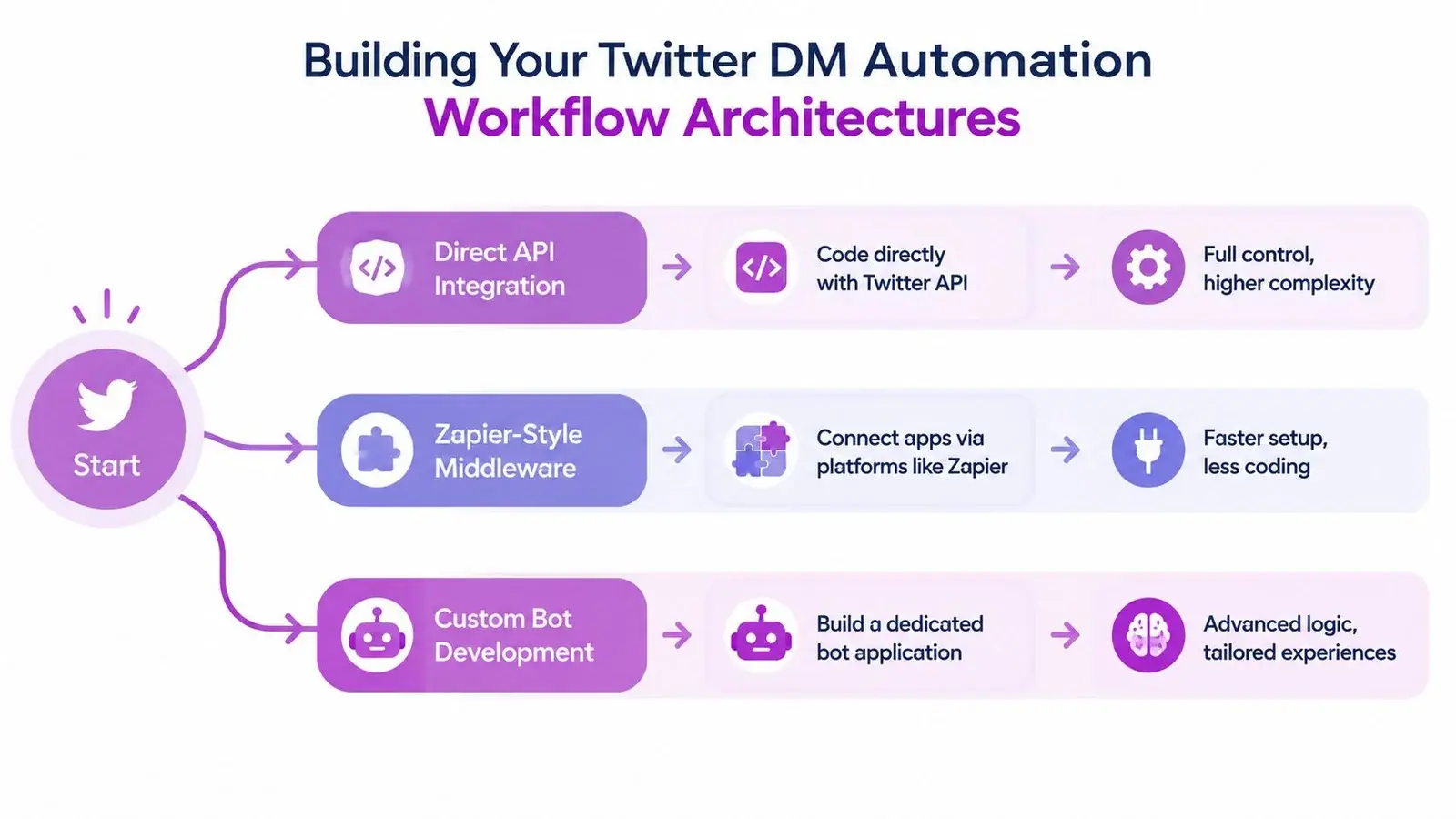
The safest workflows on X usually fall into three buckets. Direct API integration gives you the most control. Middleware tools like Zapier-style connectors reduce setup time. Custom bot frameworks are for teams that need more logic, but they also need more discipline because complexity makes mistakes easier to hide.
Direct API integration
This is the best choice when your team wants a narrow, reliable path from trigger to response. You authenticate against X, listen for incoming events through the supported webhook flow, store only the context you need, and route the draft to a human or a decision engine before anything sends. That’s the model that fits consent-based DMs best, because it keeps the system aligned with recent activity and clear intent.
A good direct build has four pieces: authentication, event handling, reply drafting, and error handling. If any one of those is missing, the workflow becomes fragile. If you’re mapping the implementation details, this set of Twitter API examples is useful as a reference point for how the platform’s pieces fit together.
Middleware and modular workflows
Zapier-style tools are useful when the trigger is simple and the response logic isn’t too complex. A form submission, a CRM status change, or a tagged inbound message can all start a DM workflow without custom infrastructure. The trade-off is control. Once the flow gets more nuanced, you’ll feel the limits of no-code routing pretty quickly.
That’s why I like middleware for support intake and lightweight lead routing, but not for anything that needs rich personalization or careful exception handling. In those cases, you want a system that can decide whether to draft, skip, escalate, or wait.
Custom bot frameworks
Custom frameworks make sense when you need conditional logic, message variants, or a multi-step conversation with context-aware branching. They’re also where most mistakes happen, because teams overbuild the automation before they’ve proven the use case. Keep the first version small. One trigger, one decision point, one response path, one fallback to a human.
Build the smallest useful system first. If the flow works with a simple script and a review queue, you probably don’t need a heavier architecture yet.
The practical shape of a strong workflow looks like this:
- Capture intent. Only move forward when the recipient has requested contact, asked a question, or signaled interest.
- Draft the reply. Keep it short, specific, and tied to the original message.
- Review the message. Human approval should happen before anything sensitive goes out.
- Send with pacing. Use human-like delays, not rigid bursts.
- Log the outcome. Track what was sent, what was edited, and what received a reply.
Operational guides that focus on safer pacing consistently recommend low-volume, high-personalization sending, with one common reference point being about 15–20 DMs per day as a starting range, then gradual ramping with short messages and human-like timing. That guidance aligns with what keeps accounts healthy in practice. Exerta’s overview of comment-to-DM automation is also helpful if your workflow starts from public engagement rather than a cold inbox.
The biggest mistake is treating the message template as the whole system. Timing, pacing, opt-out handling, and error recovery matter just as much as the copy.
Integrating Human-in-Loop Controls and Testing
A DM system without review controls becomes a liability fast. The safer pattern is to separate draft generation from publishing, then give a human clear points to approve, edit, skip, or stop the workflow. That keeps automation useful without handing it final authority over every message.
The control points that matter
Draft approval is the first gate. If a message uses the wrong product, repeats the same phrasing too often, or sends a link before trust is established, the review step should catch it. Manual review queues matter most when the account handles support, complaints, or high-value inbound leads, because those conversations need judgment.
The next controls are operational. Error alerts show when the workflow breaks or starts behaving oddly. Rollback procedures let you pause or revert the system before a small bug turns into a spam problem.
X’s Developer Policy adds another reason to keep humans in the loop. Services sending DMs need to protect DM content from unauthorized access and notify users if read-receipt events are sent, so access controls and auditability belong in the system itself. The policy text is the clearest source for that requirement.
A practical pre-launch checklist helps keep the workflow honest:
- Draft review: every automated reply can be approved or edited.
- Fallback path: failed sends route to a human queue.
- Audit trail: every send, edit, and skip is logged.
- Opt-out handling: users can stop follow-ups without friction.
- Sandbox testing: new flows run in staging before production.
If the workflow is built around a CRM, a Twitter CRM tools lens is useful. The CRM should store context and ownership, but the DM layer still needs guardrails, because visibility in the CRM does not replace policy compliance.
If the message would feel awkward when read out loud by a support rep, it probably needs another review.
Testing should cover personalization fields, links, fallback text, and edge cases like missing names or stale intent signals. A staging account is the right place to confirm that the automation behaves normally before it touches a real inbox.
Measuring Performance and Responsible Best Practices
The wrong way to judge DM automation is by volume alone. A workflow that sends more messages but creates more blocks, more complaints, or more awkward handoffs is worse, not better. The right metrics tell you whether the system is opening useful conversations without burning trust.
The metrics that matter
Start with delivery, replies, blocks or reports, and throughput. Delivery tells you whether the message landed. Reply rate tells you whether the wording and timing are doing real work. Block and report rates are your safety signal, because they show when the workflow is crossing into annoyance or spam.
Independent 2026 guidance treats DM automation as a conversation opener, not a broadcast channel, and suggests 15–30% reply-rate targets for well-targeted, personalized outreach while keeping block/report rates below 2%. That benchmark is useful not because it guarantees success, but because it keeps teams focused on recipient response instead of raw send count.
How to read the numbers
If replies are low and blocks are low, the targeting is probably off, not the mechanics. If replies are decent but blocks creep up, the message is too aggressive or too frequent. If throughput is high but response quality drops, the system is prioritizing speed over fit.
A lightweight review routine works well:
- Segment by use case. Don’t compare support triage to lead qualification.
- Compare message variants. Small wording changes can change response patterns.
- Watch opt-out behavior. Recipients who ask to stop should stop immediately.
- Limit follow-ups. More pings don’t fix weak relevance.
- Audit personalization. If every message reads the same, the workflow isn’t personalized.
Responsible best practice is to keep messages short, use variable pacing, and avoid predictable bursts. The safer systems are the ones that look like a knowledgeable person replying at a normal speed, not a script emptying a queue. If you need a rule of thumb, treat each DM as the start of a conversation, not the end of a funnel.
Conclusion
Twitter DM automation works when the system is built around consent, recent context, and human review. The hard constraints matter, the 30-day retrieval window, webhook-based access, privacy protections, and opt-in-only sending all shape what a real workflow can do. Once those are respected, automation becomes a practical way to answer faster, route better, and keep important conversations from slipping through the cracks.
The best starting point is small. Pick one use case, define the trigger, write a short sequence, add a review gate, and test it in staging before you touch production. If the first version feels boring, that’s usually a good sign. Boring is safer, and safer is easier to improve.
If you want a cleaner way to plan personalized X workflows without losing the human review layer, Xholic AI can help you decide what to say next and what conversations are worth joining. It’s built for context-aware growth, so you can stay consistent while keeping control over what gets published and how you engage.