
You’re probably here because something on X broke, a form disappeared into the void, or a billing or account issue needs a human reply and you’re tired of guessing where to click next. Twitter customer support on X (formerly Twitter) is real, but it’s fragmented, slow, and built around self-serve forms first, public replies second, and human escalation only when you know how to push. The practical move is to treat it like an escalation chain, not a single contact page.
Why X Customer Support Feels So Hard to Reach
X support feels hard to reach because the platform was designed to scale self-service, not hand-holding. Most users are routed into the Help Center and forms, while live chat and phone-style access stay out of sight. That’s frustrating when the problem is urgent, because the pain point becomes the lack of a reply, not just the search for a contact method.
Why the experience breaks down
The channel also behaves differently from normal customer support systems. A public post can surface a problem fast, but it doesn’t guarantee ownership, context, or resolution. That’s why generic guides that point you to one form miss the bigger issue, they assume the first submission is the solution instead of the start of the process.
For creators, founders, and indie hackers, the consequences are more serious than they appear from the outside. A suspended account can cut off an audience, a billing issue can interrupt a paid workflow, and a compromised profile can spread damage before anyone responds. In those cases, speed matters, but so does choosing the right path the first time.
Practical rule: treat X support like a queue with different lanes, not a single inbox.
The best way to use the system is to match the problem to the correct form, then escalate only when the normal path fails. If you also track conversations around your own brand, the same logic helps you spot what matters before it turns into a support fire. A useful starting point for that broader monitoring workflow is Xholic AI’s guide to Twitter listening tools for 2026, especially if you’re trying to separate real support issues from casual mentions.
Finding the Right Help Center Form for Your Issue
The Help Center works better when you submit the exact issue type instead of the closest-looking one. Before you send anything, gather your evidence, write down what happened, and decide whether the problem is about access, payments, safety, or policy. That extra five minutes matters because vague submissions are easy to ignore, while complete ones are easier to route.
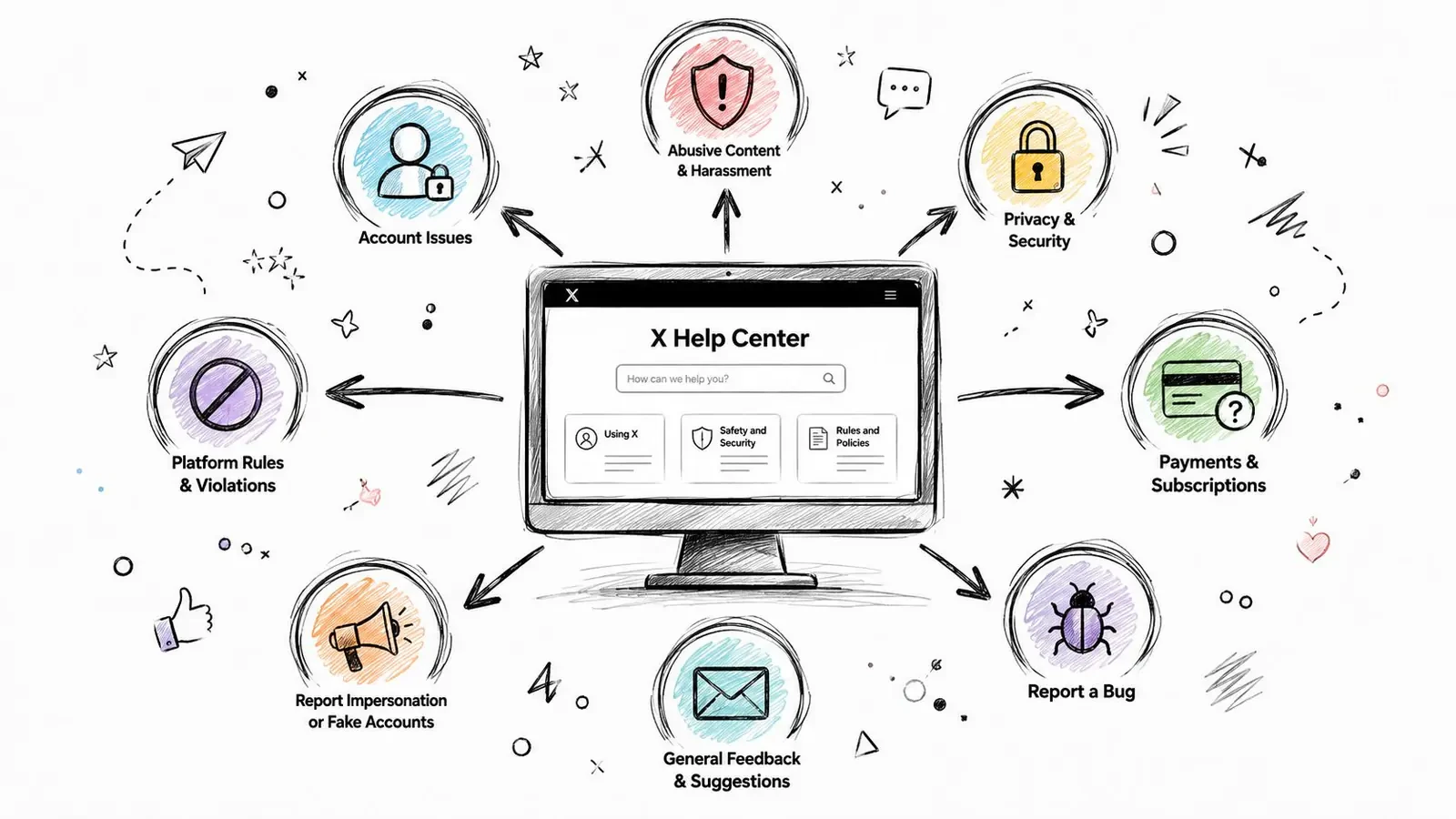
Account access and suspension appeals
Use the account access or suspension appeal path when you can’t log in, you’ve been locked out, or X says your account violated a rule. Include your username, the email linked to the account if you still have it, and any notice or error message you received. If the account was restricted after a specific post, save the post URL, the timestamp, and a screenshot before you submit.
Billing, subscriptions, and payments
Choose the billing or subscription form when the issue is about Premium access, recurring charges, refunds, or missing features after payment. Attach payment confirmation, the charge date, and the device or browser you used when the problem appeared. If a payment problem is tied to a profile change, Xholic’s guide to changing your Twitter handle can help you separate an identity issue from a billing issue before you file.
Hacked, compromised, and impersonated accounts
If someone else accessed your account, changed your email, or posted from your profile, use the compromised-account route immediately. Save proof of ownership, old login details, and examples of the suspicious activity. Don’t wait to clean up the evidence, because deleted posts, changed bios, and altered settings can make the trail harder to follow.
Harassment and policy violations
Use the harassment or abuse form when the problem is about threats, impersonation, spam, or policy-breaking posts. Provide tweet IDs, account URLs, and short notes on why the content matters, not just a sentence that says “this is bad.” The more precise your report, the easier it is for X to separate one-off annoyance from a real moderation issue.
Keep your submission tight. A complete report is more useful than a dramatic one.
Contacting @support Through Direct Messages
The @support route sits between self-serve forms and public escalation. It’s most useful for basic account questions, follow-up on a stuck ticket, or cases where you need to confirm that a submission went through. It’s less useful for deep appeals, because the account is not a magic backdoor to a human resolution team.
How to write the message
Keep the first message short, specific, and calm. State the username, the issue type, when it started, and whether you already used the Help Center form. If you have a case or reference number, include it once, clearly, and don’t bury it under a long story.
Public complaints often get attention, but they also invite noise. DMing @support gives you a cleaner paper trail, and it keeps personal details out of a public thread where they don’t belong. That’s especially important for brand operators, because some companies run dedicated support handles for their own customers, while @support is meant for platform issues, not every brand complaint in the ecosystem.
If your team handles customer messages on X, a good way to sharpen the tone is to borrow from empathy statements for customer service teams. The point isn’t to sound scripted, it’s to acknowledge the problem without overexplaining or sounding defensive.
What not to do
Don’t spam the account with repeated DMs. Don’t paste private data into a public reply thread. And don’t assume a quick acknowledgment means the problem is fully owned, because @support often acts as a triage layer rather than the final resolver.
A short, well-formed DM beats three angry threads every time.
For creators and founders, the distinction matters. If you’re dealing with your own followers, answer them through your brand workflow. If you’re dealing with a platform problem, keep the message directed at X and leave brand support logic out of it.
Escalation Strategies When Standard Channels Fail
When the Help Center goes quiet and @support doesn’t reply, the move is to escalate in layers, not to panic-post everything at once. Start by checking whether your original submission was complete. A missing screenshot, a mislabeled issue, or a vague explanation can stall the ticket before anyone sees it.
Work the escalation ladder
First, resend through the correct form if you picked the wrong category. If the issue is still unresolved, use a concise public mention strategy. Tag @support in a factual post, mention your issue in one or two lines, and include the reference number from the original submission so the thread has a link back to your case.
After that, expand the circle carefully. Sometimes relevant product or business accounts see public escalations faster than private forms do, especially when the issue affects a visible account or a business workflow. The tradeoff is obvious, public escalation can create attention, but it can also make a sensitive case noisier than it needs to be.
For a structured version of this approach, Carti’s escalation help is a useful reference because it frames escalation as a sequence, not a single complaint. If you’re dealing with a suspension or account recovery issue, Xholic’s account suspension screen generator guide can also help you organize the evidence you’re presenting before you make the next move.
Know when to stop pushing
Not every issue gets a clean resolution. Some cases sit in a gray zone where the platform’s internal queue, the type of violation, or the account state makes the outcome hard to predict. At that point, the key decision is whether you have enough evidence and business value to keep investing time, or whether it’s smarter to shift effort elsewhere.
Public escalation is a tool, not a guarantee.
That’s the hard truth most guides skip. The goal isn’t to “beat” the system, it’s to keep your case visible long enough for the right person to notice it.
When to Move Support Conversations Off X
X is good for fast acknowledgment, not for end-to-end troubleshooting. That line matters because public replies are visible, permanent, and easy to misread. If the issue involves account-specific data, complex technical back-and-forth, or anything sensitive, move it off-platform as soon as the conversation needs depth.
Public first, private second
Salesforce’s guidance on Twitter support says teams should answer on X, but handle multi-step technical problems offline, and avoid asking for sensitive information in public because X is a public forum. Zendesk gives the same basic rule, if the issue needs more than a quick response, move it into private direct messages. That boundary is useful whether you’re a customer or a brand.
Use public replies for quick triage, visible acknowledgment, and routing. Use email, a help desk, or another private channel when the case needs logs, identity verification, account changes, or back-and-forth that would clutter a public thread. If you’re operating a brand account, this keeps you from accidentally exposing customer details in replies that never should’ve been public.
A simple decision test
- Stay on X when the issue is simple, public, and answerable in one exchange.
- Move off X when the issue needs verification, multiple steps, or sensitive data.
- Keep public only for the summary, then ask for the private path in the next message.
That’s also where a smarter reply workflow helps. If your own account gets a high volume of support mentions, Xholic’s Engage can surface the conversations worth responding to and help draft replies that route people to the right channel without sounding cold or robotic.
Building a Practical Support Workflow for Your X Presence
If you’re a founder, creator, or operator, you’re not just a customer on X, you’re also a support desk with a public face. That means your workflow has to handle quick acknowledgments, messy edge cases, and the occasional issue that belongs nowhere near the feed. X’s own customer-service materials point toward a queue-management mindset, and that’s the right mental model.

What to measure
The most useful support metrics on X are operational, not vanity-based. Track time to first response, the volume of brand replies to customer tweets, the number of tweets you like or acknowledge, and the rate at which replies move a case forward. X’s partner guidance emphasizes these same inputs because they tell you whether support is fast, visible, and useful.
The older brand-side history matters here too. A 2014 Twitter customer-service study by Simply Measured found that mentions of dedicated customer-service handles increased 44% year over year, brands responded to 43% more tweets, and average response time rose only 10%. Twitter’s own customer-service playbook later reported that Tweets aimed at leading brands’ service usernames had grown 2.5x over two years, monthly unique users requesting help grew 54% year over year, and leading B2C companies were responding to about 60% of Tweets directed at their service accounts.
What to automate and what to keep human
Automation should handle routing, tagging, and repetitive acknowledgments. Human judgment should handle refunds, account-sensitive issues, tone, and anything that could become public friction. If you want a broader operating lens for that split, SMB workflow automation best practices is a helpful reference because it frames automation as a filter, not a replacement for judgment.
A simple support workflow looks like this:
- Triage the mention by topic and urgency.
- Acknowledge fast if the issue is public and simple.
- Move private when the case needs details.
- Escalate internally when the issue is high risk or account-specific.
- Close the loop with a clear public or private resolution.
If you want a quicker way to audit whether your X support setup is usable, Xholic’s X business readiness scorecard can help you think through the support side alongside content and presence. The bigger lesson is simple, X support is a visible front door, not your whole building.
Your Twitter Customer Support Action Checklist
If your account is suspended, start with the correct appeal form, attach your username, the relevant error or notice, and screenshots, then wait before resubmitting. If the appeal goes nowhere, verify that you used the right category, then escalate with a concise public mention that includes your reference number. If your case involves billing, use the billing or subscription path and attach proof of payment.
If your account was hacked or impersonated, prioritize the compromised-account route and save evidence before it changes. If you’re dealing with harassment or policy violations, include tweet URLs, account handles, and short notes that explain why the content matters. The better your evidence, the less likely your report gets treated like a vague complaint.
If you’re a creator or founder running support on your own account, set visible hours, decide what stays public, and move sensitive issues private fast. Track first response time, reply volume, and the handoff rate from public to private channels. Don’t let your public feed become a messy help desk.
The right move depends on the problem. Start with the Help Center when you need official routing, use @support when you need follow-up, and escalate publicly only when the normal path stalls. If you’re building your own support workflow on X, the goal is the same every time, fast triage, clear ownership, and a private path for anything that shouldn’t stay public.
Xholic AI helps you decide what to say next, which conversations are worth joining, and how to keep your X workflow moving without living in the feed. If you want that same context-aware approach for replies, research, and support-style messaging, visit Xholic AI and see how it can fit into your daily X workflow.
Customer support can also become a measurable retention and service channel. Use the X Monetization Calculator when you need to compare support-related service revenue, delivery costs, and contribution with other X business models.