347.6 million monthly active users in 2020 and 557 million in 2025 show that X still has enormous reach, but growth hacking on X works best as a system, not a hunt for viral posts. The practical loop is targeted replies, original content patterns, consistent scheduling, and measurement, adjusted for your audience, timing, relationships, and account context.
The popular advice is usually too shallow: post more, reply early, add hashtags, and wait for distribution to do the rest. That approach creates activity, not necessarily audience movement. X, formerly Twitter, can still help founders, creators, marketers, analysts, and Web3 builders build authority or generate demand, but the platform’s audience and attention patterns are mixed. One 2026 market summary reports 557 million monthly active users worldwide in 2025, while another reports 561 million in July 2025 versus 586 million in July 2024, so selective participation matters more than blind volume. SocialPilot’s X statistics and Gist’s growth-hacking analysis provide that broader context.
This comparison examines seven tools that support different parts of the operating system: Xholic AI, Tweet Hunter, Typefully, Buffer, Metricool, Fedica, and Audiense. For each, you’ll find when to use it, how to work with it, what to measure, where it falls short, a realistic founder or creator scenario, and how to use AI without surrendering editorial control.
1. Xholic AI
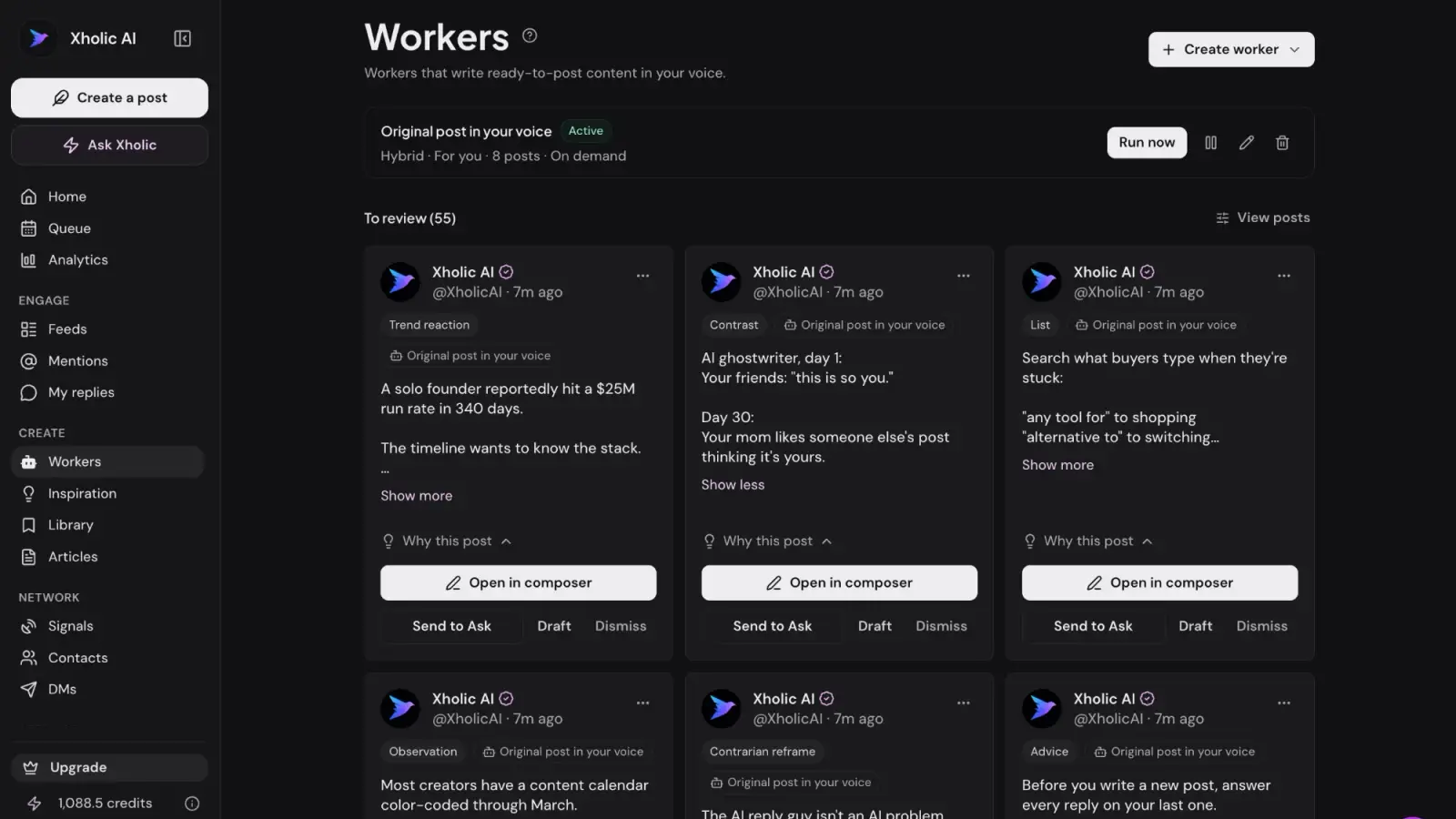
Xholic AI fits teams whose bottleneck is choosing the right conversations, adding a useful perspective, and turning research into consistent publishing. It treats growth on X as a connected workflow, with human review between discovery, drafting, analysis, and posting. That makes it different from an autonomous engagement bot or a generic tweet generator.
Its Context settings hold your style guide, About You, products, interests, and rules, and replies also learn from your real past replies, posts, and the edits you make. A reply draft can therefore begin with relevant context instead of a blank prompt. Every suggestion still requires a human decision before publication.
Best use cases and workflow
Use Xholic when you need one operating process for conversation research, reply writing, content analysis, remixing, and scheduling. The Chrome extension keeps reply drafting, post remixing, and profile analytics inside X, while the web app supports broader research and planning.
A practical workflow:
- Research conversations: Use Engage feeds to find discussions related to your expertise, audience, product, or industry.
- Add a contribution: Generate a context-aware reply, then insert a specific observation, counterexample, question, or relevant experience.
- Study structures: Search the Inspiration Library, which contains more than 12 million indexed tweets, for hooks, formats, creators, and topic patterns.
- Examine mechanics: Send the post to Ask Xholic to break down its hook, tension, structure, flow, supporting points, and payoff.
- Adapt the idea: Use Tweet Remixer to rebuild the structure for your niche, product, point of view, and writing style. Do not copy the original wording.
- Schedule approved content: Organize posts in Smart Scheduler at exact times or in recurring slots.
- Train the system: Edit drafts before posting and keep your Context settings current so later suggestions better reflect your standards.
A founder building a developer tool could use Engage feeds to find discussions about developer workflows instead of replying to every popular AI post. The products in Xholic’s Context settings keep product context available, while the founder reviews each draft and adds a teaching point before mentioning the product. Ask Xholic can then break down a strong technical post, and Remixer can turn its underlying structure into an original build-in-public update.
Practical rule: Use AI to reduce research and drafting time, not to hand over judgment. A fast, generic reply remains generic.
The trade-off is that Xholic’s value grows with usage and the edits you make. The workflow also depends heavily on the Chrome extension and X’s interface, so browser or platform changes may affect how you work. Teams seeking high-volume features or professionally written daily posts should review the current plans at Xholic AI and confirm which capabilities are included.
Track profile visits from replies, follows from profile visits, meaningful replies, post saves, qualified conversations, and product actions. Draft volume measures activity. These metrics show whether the workflow is creating real audience movement. AI can speed execution, but it cannot supply audience fit or a credible point of view.
Ready to build a more focused, human-reviewed growth system for X? Explore Xholic AI to find worthwhile conversations, develop personalized replies, study proven structures, and schedule content you have approved.
2. Tweet Hunter
Tweet Hunter suits creators and operators who want an X-focused workspace for idea discovery, targeted engagement, AI-assisted writing, scheduling, and analytics. Its library and CRM features support a connected workflow: find relevant conversations, study proven structures, publish useful material, and measure whether attention turns into audience movement.
The platform includes a library of more than 12 million viral tweets, filtered by hooks and formats. Engage and CRM help organize priority accounts and conversations. The AI writer generates ideas, rewrites, hooks, and smart replies. Scheduling supports evergreen recycling and auto-retweets, while higher tiers offer auto-plugs and Auto-DMs.
Where it fits
Tweet Hunter works best for a founder with a consistent publishing habit who loses time moving between research, drafting, account review, and scheduling. A solo founder launching a B2B product could save posts about customer problems, tag relevant accounts, extract recurring themes, and queue approved updates for the week.
Use the platform as an operating loop:
- Study a pattern: Search the library for structures related to your subject. Borrow the structure, not the wording.
- Select conversations: Add customers, peers, accounts, and recurring topics to Engage or CRM. Prioritize discussions where your experience adds something useful.
- Draft from evidence: Ask the AI writer for variations, then add a specific observation, result, or disagreement. Review every draft before publishing.
- Schedule repeatable material: Queue educational posts, product lessons, and follow-ups. Keep timely replies and sensitive conversations manual.
- Measure movement: Compare profile visits, replies, reposts, quote posts, follows, and conversions by content type.
A founder sharing lessons from customer interviews can use this workflow to turn one validated problem into a reply, a standalone post, and a later follow-up. AI can expand the drafts, but the founder should verify context, remove generic claims, and decide whether the conversation deserves a response.
For a broader tool comparison, this comparison of tweet generator tools for X growth in 2026 shows how a writing-focused product differs from a wider growth suite. For a direct feature and pricing comparison, see the PostSyncer comparison page.
Automation creates the main risk. Auto-DMs and auto-plugs can feel intrusive without clear recipient intent. Use narrow audiences, small tests, and human approval. Track reply quality and qualified conversations, not only scheduled volume.
Tweet Hunter is a practical choice for one X-specific environment for content and engagement. It is less suitable when deep audience segmentation or multi-network reporting is the primary requirement. Plans currently run from Discover at $29/month to Grow at $49/month and Enterprise at $199/month, with a 7-day trial. Review the current Tweet Hunter platform before selecting a plan, since paid tiers and automation limits can change, and see Xholic vs Tweet Hunter for a side-by-side comparison.
3. Typefully
Typefully is built for people who think best in a focused writing environment. It supports individual X posts, threads, scheduling, collaboration, and publishing to other networks, with an editor that keeps the act of writing separate from the distractions of the main timeline.
That makes it especially useful for a creator or technical founder who has plenty of ideas but publishes inconsistently. A founder documenting product development might capture notes during the day, turn one lesson into a concise post and a thread, then place both into a queue for review. The workflow protects writing time without requiring the founder to remain online all day.
Writing and scheduling workflow
Start with a weekly source of material, such as customer questions, product decisions, experiment notes, or industry observations. Draft the core idea in Typefully, use the in-editor AI assistant for alternative hooks or tighter phrasing, and then remove anything that sounds unlike you. AI should help with options, not decide what you believe.
Typefully’s best-time guidance can help you form a starting hypothesis, but it shouldn’t replace audience-specific testing. Buffer’s analysis of more than 8 million posts identified 9 a.m. Tuesday as the top-performing time in its dataset, with 10 a.m. Wednesday and 9 a.m. Wednesday close behind. A separate analysis from Sprout Social, covering nearly 2 billion engagements, pointed to Tuesday through Thursday, noon to 6 p.m. local time as a strong window. Those findings support weekday testing, not a universal posting rule.
The best scheduler is the one that helps you publish the content you can actually sustain.
Typefully’s advantages are its clean UX, strong thread composition, collaboration tools, and multi-network support. Its limitations are equally clear. Advanced research and X-specific analytics are lighter than in tools focused on discovery or audience intelligence. The free plan allows 10 posts a month, Creator is $99 a year with annual billing only, and Business is $18/month per social set, billed yearly. Check current plans in the Typefully editor and scheduler before committing, or see Xholic vs Typefully.
Track scheduled-to-published consistency, thread completion signals, replies, profile visits, and follows attributed to posts. Don’t judge the tool by how many drafts it helps you create. Judge it by whether your best ideas reach the audience reliably and remain recognizably yours.
4. Buffer
Buffer suits teams that need dependable scheduling across X and other channels, without adopting a research-heavy growth suite. It supports individual posts and threads, mentions, queues, calendar planning, collaboration, approvals, and basic content analytics.
Its value is operational consistency. A small marketing team can let a strategist prepare the calendar, a subject-matter expert check technical accuracy, and an editor approve the final copy. The result is fewer last-minute posts and a clear record of what reached publication.
What Buffer does well
Buffer works best as the publishing layer in a connected X growth system:
- Calendar management: Plan posts across channels and spot gaps before they become publishing problems.
- Approval workflows: Keep final decisions with people when several contributors handle one account.
- Queue-based publishing: Maintain a dependable rhythm without manually posting every update.
- Multi-account work: Set channel-specific schedules for clients, brands, or internal projects.
- Basic performance review: Compare posts and identify stronger topics or weaker formats.
A content manager launching a feature could schedule an educational explanation, prepare replies to likely customer questions, and leave room for live discussion. The workflow is useful only if research and participation come first. Filling every queue slot can crowd out timely replies and make an account sound repetitive.
Buffer does not answer, “Which conversation should I join today?” Its discovery, semantic research, and reply context are lighter than those of a purpose-built growth system. Use X search, saved topics, and human judgment to find relevant conversations, then use Buffer to publish the repeatable parts.
For a wider comparison, review these social media scheduling tools. For guidance on using AI to generate social media content, refer to this AI social media content guide. AI can suggest variations or turn approved ideas into drafts, but a founder or creator should review every post for accuracy, voice, and timely context.
Buffer’s free plan covers 3 channels, and paid plans are priced per channel: Essentials at $6/month and Team at $12/month. That may suit smaller teams, while costs rise as you add channels. Confirm current options at Buffer before budgeting, and see Xholic vs Buffer for how it compares on X.
Track publishing reliability, approval turnaround, engagement by channel, profile visits, and actions after a post. If output rises without meaningful conversations or audience movement, improve topic research and reply quality before increasing queue capacity.
5. Metricool
Metricool suits operators who must connect scheduling with reporting, competitor analysis, multi-network planning, and client-ready documentation. Agencies, social media managers, and data-oriented startup teams gain more from it than solo creators seeking only a clean X editor.
It supports X scheduling and analytics, best-time guidance, competitor views, downloadable PDF and PPT reports, bulk uploads, multi-network calendars, and auto-UTM options. Its studies and educational material can guide planning, but benchmarks remain directional because your audience may behave differently from the accounts in a dataset.
Use reporting to choose the next move
Metricool earns its place when performance must be explained to a client or team. A social media manager can compare education, opinion, proof, product, conversation, and announcement posts across a product account, founder account, and campaign account. The report should separate reach, interaction, and business outcomes.
X engagement rates can look small even when a post creates useful audience movement. Rival IQ reports an overall median engagement rate of 0.029%, while Sprout Social’s 2025 benchmark reports an average of 0.16% across brands, with variation by company size and sector. Rival IQ’s X engagement benchmark supports a conservative approach: improve relevance, replies, and hooks before adding generic posting volume.
Use this review loop:
- Group posts by purpose: education, opinion, proof, product, conversation, or announcement.
- Compare interaction types: review likes, replies, reposts, and quote posts together.
- Add downstream signals: track profile visits, link clicks, signups, demos, or qualified conversations.
- Record context: note launches, news cycles, collaborations, and unusual timing.
- Choose one change: apply the strongest evidence to the next content cycle.
For example, a founder can use Metricool to see whether product explainers create profile visits while opinion posts generate replies, then adjust the publishing mix. AI can help label posts or draft report summaries, but a human should verify classifications, context, and recommendations.
The trade-off is breadth. X or Twitter access requires an add-on and is not included on the free plan, while the interface may feel heavy for a single-network creator. Verify the current plan structure at Metricool, then compare features in this Twitter marketing tools guide.
6. Fedica
Fedica, formerly Tweepsmap and incorporating Followerwonk heritage, suits teams that need audience research connected to publishing decisions. It combines follower analysis, listening, geography, interests, sentiment, scheduling, and account discovery. Use it to understand who already follows you and which communities you’re not reaching, then turn those findings into conversations and content.
Start with a business question. A founder entering a new market might ask whether attention comes from potential buyers, practitioners, investors, or adjacent creators. Fedica can help compare follower geography, related accounts, keywords, hashtags, and audience overlap before the founder commits to a content plan.
The practical workflow is a research-to-participation loop:
- Audit audience signals: Review growth, demographics, geolocation, and possible bot indicators.
- Examine conversation demand: Track keywords, hashtags, alerts, and recurring themes.
- Compare networks: Check lists, common followers, and relevant accounts to locate connected communities.
- Select useful discussions: Choose threads where the founder can contribute specific knowledge.
- Test timing: Use the best-times engine as a starting hypothesis, then compare results after publishing.
Treat every finding as a lead, not proof. A technical founder may assume posts attract customers because they receive attention from experienced builders. The audience could still consist mainly of peers. That distinction changes the examples, calls to action, and conversion path.
Measure audience-fit signals alongside activity: topic overlap, qualified profile visits, meaningful replies, relevant follower growth, and business actions. Follower demographics describe who is present, not who intends to buy. Check whether audience research produces better conversations and downstream movement over several content cycles.
The trade-off is depth. Fedica offers more follower and audience analysis than a basic scheduler, but its interface can feel complex when you only need a posting queue. Pricing and the free option may also require verification, so review the current plans at Fedica. AI can help cluster conversations or suggest audience segments, but a human should inspect classifications before changing positioning or outreach.
7. Audiense
Audiense suits teams that need audience intelligence before they scale content or outreach. It helps define communities, identify interests and affinities, guide positioning, assess creator partnerships, and support media planning. A solo creator seeking a simple posting queue may find that scope excessive. A larger team can use it to replace broad assumptions with structured audience research.
The platform supports Boolean audience definitions from conversations and profiles, segmentation, personality insights, reporting, and Twitter Marketing Connect for audiences, community management, and DM workflows.
Use Audiense before the content calendar
A category such as “developers,” “founders,” or “crypto users” is too broad for a precise campaign. A startup marketing team can create audience groups from language, interests, followed accounts, and conversation behavior, then adapt hooks and examples for each group.
Start with the decision the research must support: positioning, partner selection, content planning, or campaign design. Build audiences with conversation and profile signals, compare differences in interests, affinities, and language, then convert those patterns into messaging, offers, and creator outreach. Publish against the hypothesis and compare qualified conversations and downstream actions with earlier content.
A founder promoting a developer product might discover that one segment responds to implementation details while another responds to team-wide workflow problems. That finding should change the examples and calls to action, not merely add another audience label.
Audiense’s value sits upstream of daily publishing. It shows who matters and how sub-communities differ. A separate writing, scheduling, and review workflow still turns those findings into posts and replies. Human judgment remains necessary, especially when an audience cluster reflects shared interests rather than purchase intent.
The trade-offs are premium pricing, a learning curve, and the time needed to apply research consistently. Confirm the current product scope at Audiense, particularly if community management matters as much as intelligence. For a wider comparison of listening workflows, consult these Twitter listening tools.
Measure success through audience fit, partner quality, message clarity, qualified replies, relevant profile visits, and business actions. AI can group conversation themes or suggest segments, but a human should review those classifications before changing positioning or outreach.
Top 7 Twitter Growth-Hacking Tools Compared
| Tool | 🔄 Implementation complexity | ⚡ Resource requirements | 📊 Expected outcomes | 💡 Ideal use cases | ⭐ Key advantages |
|---|---|---|---|---|---|
| Xholic AI | Moderate→High: Chrome extension + Context settings setup and ongoing edits to drafts | Paid tiers (Pro/Max/Ultra), AI credits, Chrome extension; usage increases quality | High personalization & context-aware replies that improve over time ⭐⭐⭐⭐ | Creators/founders who need reply drafts, remixing and product-aware engagement | Deep personalization, workflow-first extension, large inspiration library |
| Tweet Hunter | Moderate: set up engagement lists and automations; learning to tune automations | Discover $29/mo, Grow $49/mo, Enterprise $199/mo; 7-day trial | Strong growth via targeted engagement and content ideation ⭐⭐⭐⭐ | Creators/operators focused on targeted outreach and engagement scaling | 12M+ viral library, CRM-style engagement, practical growth levers (Auto-DM/auto-plug) |
| Typefully | Low: frictionless editor and scheduler with simple AI controls | Free plan (10 posts/month); Creator $99/yr; Business $18/mo per social set | Better-written threads and consistent posting; streamlined drafting ⭐⭐⭐ | Solo creators and small teams prioritizing thread writing and clean UX | Excellent writing UX, thread-first tools, multi-network scheduling |
| Buffer | Low: straightforward composer, queue and team workflows | Budget-friendly tiers, scales by number of channels; free plan available | Reliable cross-network scheduling and baseline analytics ⭐⭐⭐ | Teams/agencies needing predictable multi-account publishing | Simple, reliable scheduling; team approvals; cost-predictable scaling |
| Metricool | Moderate: broader analytics and reporting setup for multi-network use | Paid plans; X features may require add-on; bulk uploads and reporting tools | Strong performance reporting, competitor benchmarks and downloadable reports ⭐⭐⭐⭐ | Agencies and data-driven teams needing client reports and benchmarking | Robust reporting, competitor analysis, multi-network calendar |
| Fedica (Tweepsmap + Followerwonk) | Moderate→High: rich UI with many research tools to configure | Tiered pricing (some free); features for follower analysis and listening | Deep follower and audience insights to guide content strategy ⭐⭐⭐⭐ | Analysts and marketers focused on follower analytics and listening | Advanced follower analytics, geolocation maps, listening & influencer discovery |
| Audiense | High: enterprise setup, segmentation logic and onboarding required | Premium pricing; enterprise-level support and training | Precise audience segmentation and strategic insights for targeting ⭐⭐⭐⭐ | Enterprises and teams needing deep audience intelligence and partnerships | Best-in-class audience discovery, segmentation, and personality/affinity insights |
Turn Seven Tactics Into a Repeatable X Workflow
The tools differ, but the operating loop is consistent. Start by identifying the audience you want to attract and the conversations where that audience already spends attention. Save promising posts, recurring questions, strong objections, and useful examples. Then study hooks and structures without copying the wording, draft original replies and posts, schedule what can be planned, and leave room for real-time participation.
A weekly workflow can stay simple:
- Research conversations: Use Engage feeds, Fedica, Audiense, or native lists to identify relevant discussions.
- Capture evidence: Save posts, customer questions, product lessons, and interesting claims in Collections or a comparable research system.
- Study structure: Use Ask Xholic or another analysis workflow to understand the opening, tension, progression, and payoff.
- Draft in context: Write replies and original posts that add a specific point of view. Product mentions should appear only when they help the conversation.
- Schedule approved content: Use Smart Scheduler, Typefully, Buffer, Metricool, or Tweet Hunter for dependable publishing.
- Review movement: Examine impressions, engagement, profile visits, follower movement, link clicks, signups, demos, and meaningful business actions together.
- Adjust one variable: Change the topic, hook, format, timing, or conversation target, but not everything at once.
The measurement layer matters because raw follower count can hide weak audience fit. X’s practical engagement-rate formula is Total Engagements divided by Total Followers, multiplied by 100, with engagements including likes, replies, reposts, and quote tweets. CreatiCalc’s engagement-rate explanation is useful for keeping the calculation broader than likes alone.
Timing deserves a similar level of discipline. Use weekday mornings and early afternoons as test windows, then compare results in your audience’s local time. Don’t treat any benchmark as a distribution guarantee. X’s engagement environment is structurally low, and content quality, topic relevance, account relationships, and context still determine whether attention turns into action.
Growth hacking on X is less about maximizing activity and more about increasing the percentage of activity that reaches the right people.
Start with one or two tactics. A founder might pair Xholic AI for conversation research and context-aware replies with Buffer for team approvals. A solo creator might choose Typefully for focused writing and scheduling. An analyst might start with Fedica or Audiense before investing in a broader publishing stack. Define a baseline first, then run the workflow consistently long enough to see patterns.
Xholic can reduce manual research and context switching through Engage feeds, Context settings, Ask Xholic, Tweet Remixer, Collections, and Smart Scheduler. The Chrome extension keeps reply drafting, remixing, and scheduling close to X, while human review remains the safeguard against off-voice, irrelevant, or promotional content. If you also publish research or reports, structured AI agent workflows for analysts can help connect your findings to repeatable content operations beyond the timeline.
Visit Xholic AI to explore a personalized X growth workflow, or begin with its free X growth tools to audit your profile, calculate engagement, test posting times, and improve your next publishing cycle.
Xholic AI helps you find worthwhile conversations, generate personalized replies, study proven post structures, remix ideas for your own context, and schedule approved content without acting as an autonomous bot. Visit Xholic AI to start building a more focused, human-reviewed growth system for X.