You’ve found an image in an X post and need the clean file, not a blurry screenshot with a cropped edge. A Twitter photo downloader saves photos attached to public X posts, but the result depends on which image resource you’re viewing and whether the tool retrieves the media file or only the rendered preview. For a one-off save, X’s built-in options may be enough. For archiving, research, or repurposing, you’ll need to verify the image variant, preserve its context, and record who published it.
What a Twitter Photo Downloader Does and When You Need One
A Twitter photo downloader is a tool or workflow for saving an image from an X post to your computer or phone. It can usually retrieve a photo attached directly to a public post, and some tools can handle multiple attached photos. It may not retrieve protected, deleted, unavailable, or externally hosted images, and it won’t automatically give you permission to reuse someone else’s work.
The practical distinction is between saving what you can see and preserving the best available media asset. A screenshot captures the rendered page, including browser controls, cropping, and interface elements. Native saving or a dedicated downloader may resolve the underlying media URL instead, giving you a cleaner file for an archive, content reference, design review, or research collection.
Twitter’s native image layer became broadly useful after Twitter Images launched in June 2011 and was reported as rolling out to all users on August 10, 2011, creating the foundation for routine image sharing inside tweets (Adweek’s account of Twitter’s photo-sharing rollout). X’s account archive and data-export flow serves a different purpose. It’s intended for your own account information and shared media, not bulk downloading of public posts from other users.
Choose the workflow by the job
Use the simplest method that meets your quality and volume requirements.
- One public photo: Open the image and save it directly from X.
- Several images in one post: Open each attachment separately and confirm that each file saved correctly.
- Research archive: Record the post URL, author, date, and context alongside the image.
- Content repurposing: Verify rights and download the largest available rendition before editing.
- Your own account: Consider an account archive or export rather than a third-party downloader.
The scale of X media explains why this distinction matters. A dataset covering 14.595 billion geolocated tweets posted between September 1, 2013 and March 15, 2023 identified 1.675 billion shared images, with 800.3 million still available for download in early 2024 (the Twitter History and Image Sharing dataset release). The archive is enormous, but availability changes over time.
For a practical walkthrough of the basic workflow, use this Twitter image downloader guide. The key decision is simple: are you saving a picture for personal reference, or are you creating a durable, attributable media record?
Know Your Image Type Before You Download
The image on your screen may belong to one of three different resources: a photo attached to a post, a profile or header image, or a preview generated from an external link. They can look similar in the timeline, but they don’t behave the same way when saved.
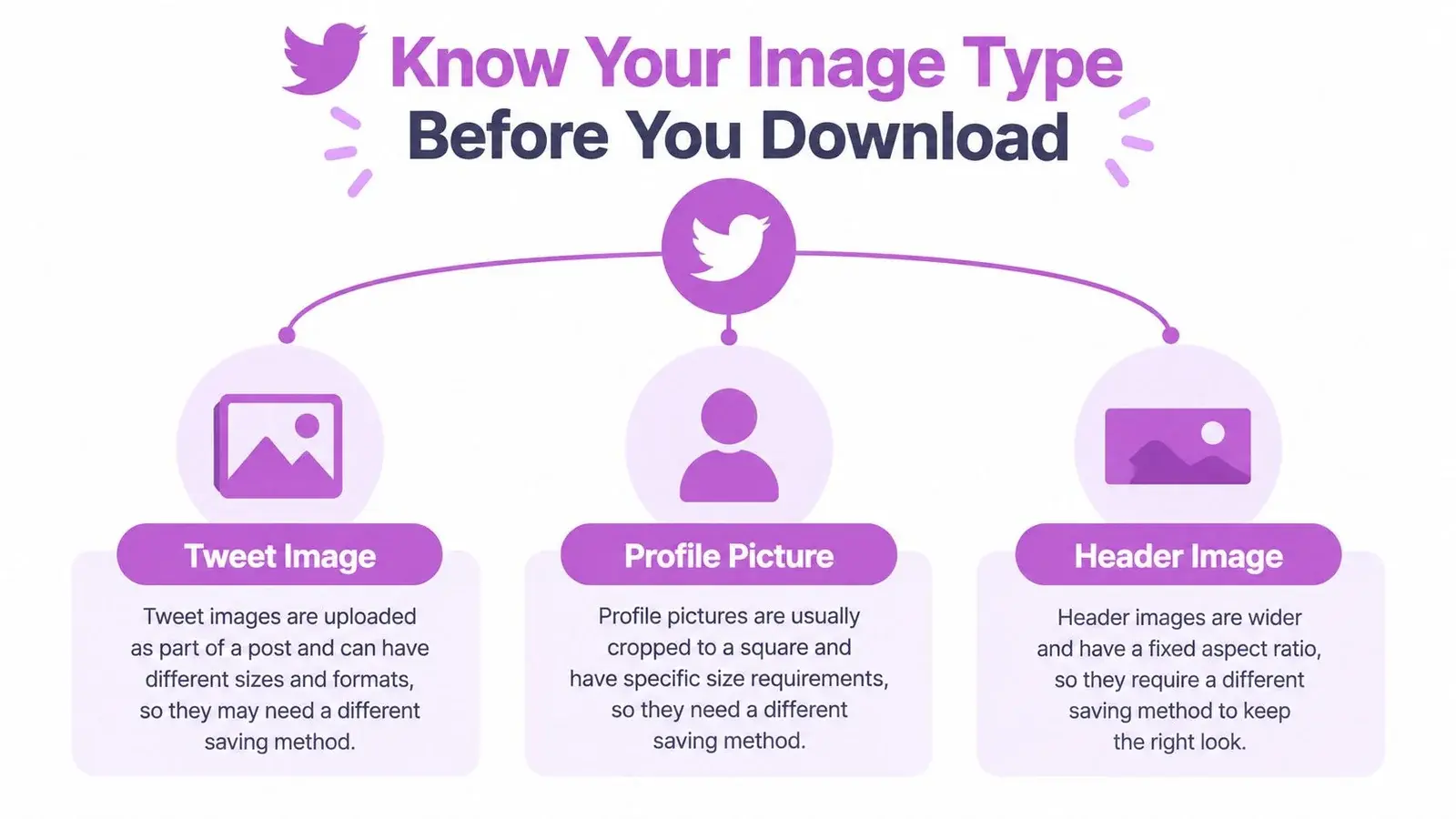
Tweet photos are media attachments
A standard post photo is hosted as media attached to the post. A post can contain one image or multiple images, and each attachment should be treated as its own file. Open the image viewer and inspect the image rather than saving the thumbnail shown in the feed.
The visible image can be a resized derivative. X may serve a version optimized for the browser, mobile app, or timeline layout instead of the largest available rendition. A downloader that captures the first image element it encounters may therefore save a smaller or cropped asset.
Profile and header images follow different rules
A profile image is usually a square avatar, while a header image is a wide banner. Don’t expect the same URL handling or dimensions as a post attachment. Current X image guidance commonly documents 400 × 400 pixels for profile photos and 1200 × 675 pixels for single in-stream photos, with the relevant placement and file limits documented in the Twitter image size guide.
A header image can also be displayed with cropping that changes across devices. If you need it for brand research, save the image and record the profile URL, because the visible crop isn’t necessarily the original composition.
Link cards are previews, not always the source image
When a post shares a website URL, X may display a card image pulled from that site. That image isn’t necessarily stored as a native X photo. Saving it from the card may give you a preview asset, while the original file remains on the linked website.
Check the post text and card destination before treating the image as an X upload. If attribution or reuse matters, identify the site and original publisher rather than assuming the account that shared the card owns the image.
Practical rule: If the post opens an image viewer, treat it as an attached photo. If it opens a website, investigate the destination before archiving or reusing the asset.
Screenshots are the least reliable option for quality. They preserve what the interface rendered, not necessarily the stored media, and they can strip useful metadata. Use them only when you need visual evidence of the post as displayed, such as a context record or moderation note.
How to Download Photos from X Without Extra Tools
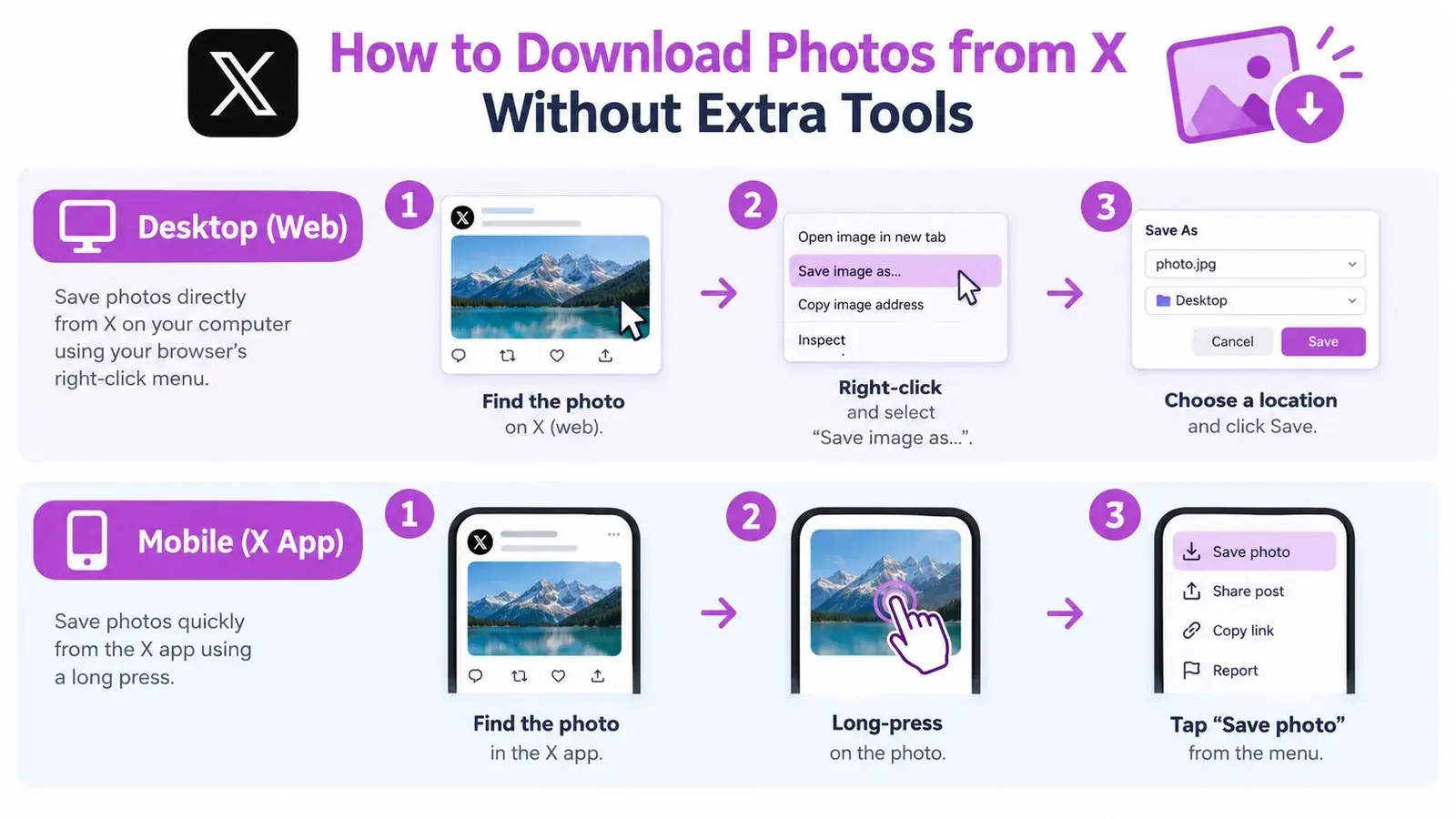
You can save many public X photos without installing anything. Start with the least technical method, then move toward the source media only when the saved file looks compressed, cropped, or unexpectedly small.
Desktop method
- Open the post itself. Click the image from the post rather than saving the thumbnail in the timeline.
- Open the image viewer. Let the larger version load fully.
- Right-click the image. Choose the browser’s save option, such as “Save Image As.”
- Use a clear filename. Include the author or post identifier and the date in your local archive.
- Open the saved file. Check its dimensions, file type, and sharpness before deleting the source tab.
If the browser saves a small file, don’t immediately assume the network failed. You may have captured a rendered derivative. On desktop, opening the image in a new tab can expose a direct media resource that is easier to inspect and save.
Mobile method
In the X app, press and hold the image and use the available save or share option. On a mobile browser, press and hold after opening the image viewer, then choose the device’s image-saving option.
Mobile apps often optimize images for the screen and connection. If quality is critical, repeat the workflow in a desktop browser and compare the saved dimensions. A phone screenshot should be the fallback, not the preferred archive copy.
Check the media URL when quality matters
X image URLs can expose a format or size variant. In some cases, changing the requested variant to the original rendition can retrieve a larger file, but this only works when the source media remains available and the URL follows the expected structure. Don’t treat an “original” label as proof that the camera-original file still exists. X may have resized or optimized the asset before delivery.
The reliable sequence is:
- Resolve the media: Open the attached photo, not the timeline thumbnail.
- Inspect the response: Confirm that the browser is receiving an image file.
- Prefer the largest available rendition: Compare dimensions and aspect ratio.
- Save before editing: Keep the downloaded source separate from any cropped or compressed copy.
- Record context: Store the post URL and author with the file.
Standard in-stream images are commonly documented at a 5 MB ceiling, while profile images are commonly capped at 2 MB, with JPG, PNG, and GIF among the typical accepted formats (X image size and format guidance). BMP and TIFF files may not round-trip cleanly through X, so don’t use the platform’s behavior as proof that a file was originally in a particular format.
Use browser developer tools only when necessary
For an image that refuses to save normally, open your browser’s developer tools and inspect the Network panel while the image loads. Filter for image requests, select the media response, and open the request in a new tab if the browser offers that option.
This approach is useful for troubleshooting, not for bypassing access controls. It won’t make a protected or deleted post available, and it doesn’t turn a link-card preview into the original website image. A detailed Twitter media scraper guide can help explain the underlying request flow, but use extraction methods carefully and respect X’s rules and the publisher’s rights.
For related media workflows, this guide to downloading Twitter videos, GIFs, and photos covers the differences between image and moving-media files.
Browser Extensions and Online Tools Including Xholic
Tool choice comes down to speed, volume, quality control, and privacy. A browser extension can be convenient while you browse, an online downloader can reduce setup for occasional saves, and a dedicated workflow can make research archives easier to organize.
X restricted API access in 2023, so bulk workflows may depend on authenticated browser sessions, cookies, or other extraction methods. That introduces a trade-off: a tool that asks for more access may handle more complex pages, but you should understand what permissions it requests and avoid entering your X password into an untrusted service.
| Method | Best For | Quality Preserved | Batch Support |
|---|---|---|---|
| Browser extension | Saving while browsing | Depends on whether it resolves the media endpoint | Usually limited |
| Online URL downloader | Occasional public-post saves | Can preserve quality when it fetches the largest available asset | Varies by tool |
| Manual browser workflow | One-off downloads and troubleshooting | High when you verify the media response | Low |
| Xholic media-download tool | Public-post media saves connected to X research | Designed to fetch available image assets, including full-size tweet photos | Useful for posts with multiple photos |
Browser extensions reduce friction
An extension can add a download control near an image or post. That’s helpful when you save references throughout the day, especially if opening each attachment manually interrupts your research.
The weakness is transparency. Some extensions save the currently rendered image instead of resolving the largest media variant. Others request broad permissions or rely on your logged-in browser session. Review the extension’s permissions, test it on a post with a clear high-resolution image, and inspect the resulting file before using it for production work.
Xholic’s Chrome extension for X growth workflows does not download images. It handles replies, remixing, and profile analytics on X, so pair it with a downloader when image saving is part of a broader content-research process. Keep the roles separate: a media downloader saves the asset, while a research system helps you organize and study the post around it.
Online downloaders are convenient but require judgment
Paste-URL tools are fast for a public post you don’t need to process repeatedly. They can be useful when you’re on a device where installing an extension isn’t practical.
Don’t upload private material or provide account credentials to a service just to save a public image. Check whether the tool handles multi-image posts separately, whether it returns the original available rendition, and whether it creates a local file without changing the image format unnecessarily.
For a serious archive, convenience isn’t enough. You need a repeatable filename, source record, media check, and storage location. A one-click download that loses the author or post context creates extra work later.
Choose the tool that makes verification easy. Fast extraction is useful only when you can still tell where the file came from and whether it’s the right rendition.
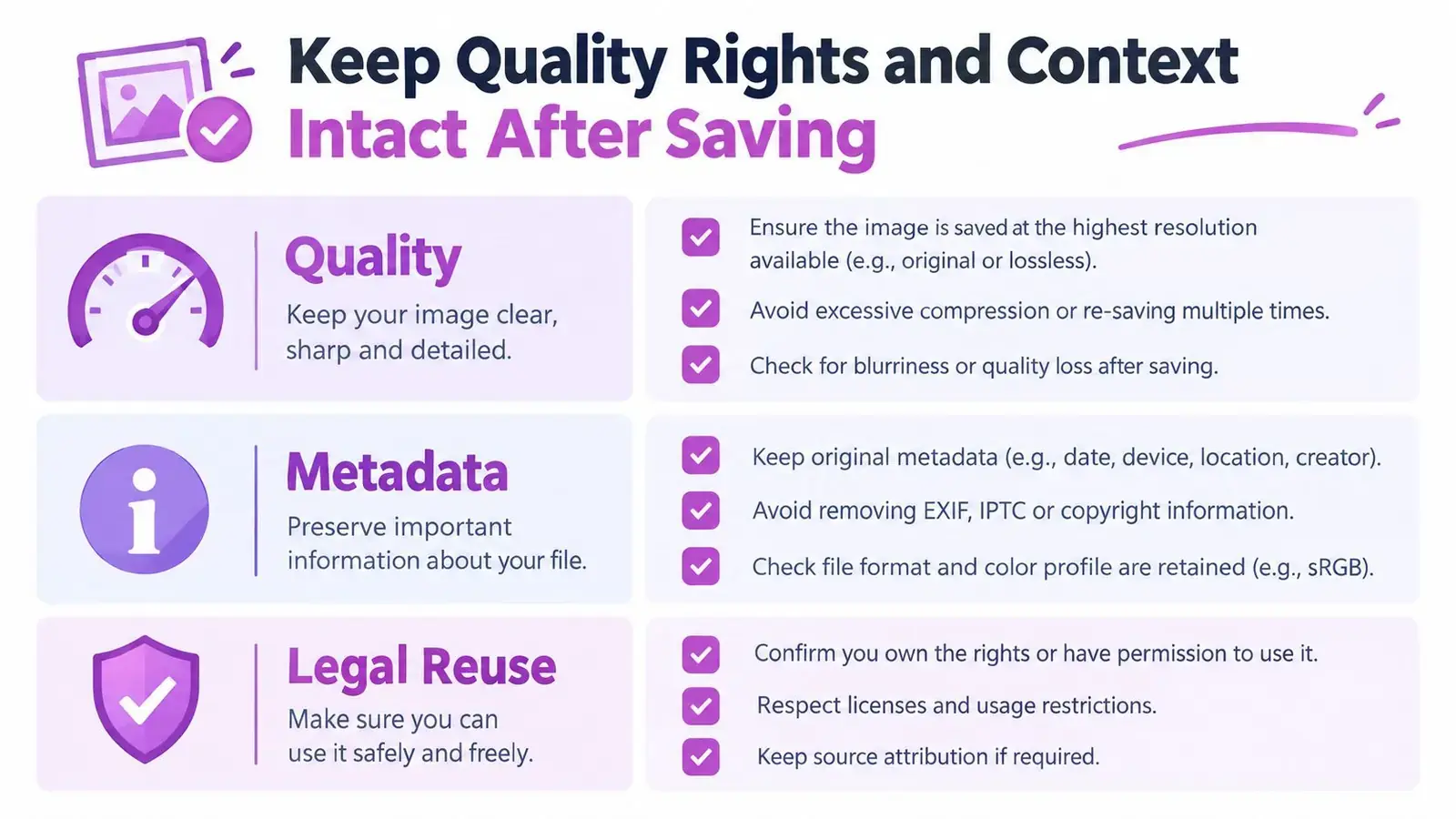
Keep Quality Rights and Context Intact After Saving
A downloaded image is only useful later if you can verify its quality, origin, and permitted use. Treat the file and its context as one record. Separating them is how teams end up with an unattributed image and no reliable way to reconstruct the source.
Preserve the largest practical rendition
After downloading, inspect the file rather than trusting the filename. Compare its dimensions with the displayed aspect ratio, look for obvious compression, and confirm that a multi-image post produced separate files. Keep the source untouched, then create resized versions for presentations, newsletters, or social posts.
The platform’s image payload constraints matter during this check. A production workflow should identify whether the asset is an in-stream photo, profile image, or card resource before saving or reprocessing it. If the source is already optimized by X, you can preserve the best available version, but you can’t recreate information that the platform no longer serves.
Keep accessibility metadata visible
Alt text is separate from the image file. X developers must request the alt_text field with expansions=attachments.media_keys and media.fields=alt_text when retrieving post media through the developer workflow (X’s developer changelog). Current X media documentation caps image alt text at 1,000 characters (X media metadata documentation).
If you’re archiving for research or republishing with permission, save the available alt text in a sidecar note or spreadsheet. Don’t assume that downloading the JPG or PNG preserves the description. The text can contain useful accessibility context that isn’t visible in the pixels.
Record provenance before you reuse anything
For each saved asset, retain:
- Source URL: The direct post URL, not only a shortened share link.
- Account identity: The username and display name as shown when saved.
- Posting date: Record the date displayed by X.
- Context: Keep the surrounding post text or a context screenshot when necessary.
- Rights status: Note whether you created the image, received permission, or are saving it for private reference.
X’s copyright policy says the platform responds to reports of alleged infringement, including unauthorized use of copyrighted images as profile or header photos, images uploaded through X’s media hosting, and posts linking to allegedly infringing material (X copyright policy). X’s Terms of Service also grant the platform a broad license to use, copy, reproduce, adapt, publish, display, download, and distribute user content, but that platform license doesn’t automatically grant you the right to commercially reuse another person’s image (X Terms of Service).
Personal saving, internal analysis, editorial quotation, redistribution, and commercial use are different activities. Ask for permission when the intended use goes beyond private reference, and don’t imply endorsement just because an image came from a public post.
Troubleshooting Common Download Problems and Quick Fixes
Most failed downloads have a recognizable cause. Diagnose the file and the post before switching tools.
- Low-resolution result: You saved the timeline derivative or a screenshot. Open the image viewer and compare the largest available rendition.
- Download button does nothing: The service may need a public post URL, or the post may require authentication. Try the browser workflow without sharing credentials.
- GIF or WebP behaves differently: Format support and size ceilings can vary by surface, especially between mobile and web. Save the delivered file first, then convert a working copy.
- No image appears: The post may contain a link-card preview, protected media, or a deleted attachment. Follow the destination site for card images, or accept that unavailable media can’t be reconstructed.
- Multiple images are missing: Some tools fetch only the first attachment. Open and save each media item separately, then verify the file count.
- The post disappeared: A live downloader can’t retrieve deleted or protected content. For your own account, use the account archive or export flow instead of trying to treat it like a public-post download.
For moving media, this Twitter video downloader guide explains why video and GIF handling differs from ordinary photo saving. Before building a large archive, test one recent public post, inspect the downloaded file, save the source details, and place the record in a clearly named collection.
Xholic AI can help turn saved X research into a repeatable growth workflow by connecting media discovery with organized collections, relevant conversations, and personalized content context. If you want to save useful posts without losing track of why they matter, visit Xholic AI and build a review-first system around your X research.