Measured outcomes and evaluation
Testing whether prompts actually work: binary-question evals (BINEVAL), eval sets and regression detection, ablation, self-improving eval loops, and reported benchmark deltas from prompt changes.
22%
Read the best tweets about prompt engineering, including reusable techniques, evaluation, context design, structured outputs, and real examples. Updated every two weeks.
Specific prompting methods and measured outcomes rather than generic lists of supposedly magical prompts.
Original Xholic analysis
Across 50 posts from 45 creators, the Prompt Engineering conversation is uniformly SUPPORTIVE (100%) and overwhelmingly tutorial in format (92%). The largest theme by share is measured outcomes and evaluation (22%, 11 posts), followed by the 'prompt engineering is dead' discourse (18%) and clarity/problem specification as the core skill (16%). Production prompt ops (12%) and system-prompt anatomy (12%) round out the discussion. The thread of the conversation aligns with the editorial angle: specific methods and reported measured outcomes (eval sets, benchmark deltas, token/cost measurements) instead of magic-phrase prompting, which multiple posts explicitly call obsolete.
92% of posts
All-time engagement
92% of posts
Published in 90 days
Conversation map
Testing whether prompts actually work: binary-question evals (BINEVAL), eval sets and regression detection, ablation, self-improving eval loops, and reported benchmark deltas from prompt changes.
22%
Claims that personas, magic phrases ('act like Einstein', 'think step by step'), and prompt hoarding are obsolete; models now reward plain, clear task descriptions over tricks.
18%
Prompting as reducing ambiguity and clear thinking: specifying task, context, constraints, format, and examples; intent clarity; deep domain understanding (Feynman-style) as the real lever.
16%
Treating prompts like code: versioning in Git, folder structures for prompts/data/evals, prompt caching and prefix ordering, structured outputs, observability, and 'boring' AI engineering discipline.
12%
How production system prompts are built and leaked: layered tool/agent/memory prompts, XML tag structuring, operation-before-identity ordering, prompt length vs. organization, and system prompt simplification for newer models.
12%
Anthropic-style skills as packaged workflows: YAML frontmatter, lazy loading of SKILL.md instructions, skill discovery/activation lifecycle, and moving from prompts to an execution layer.
8%
Shift from crafting instructions to curating what the model sees: repo-level context files (CLAUDE.md, AGENTS.md), context window curation, persistent brand/voice context, and the proposed 'context engineer' role.
6%
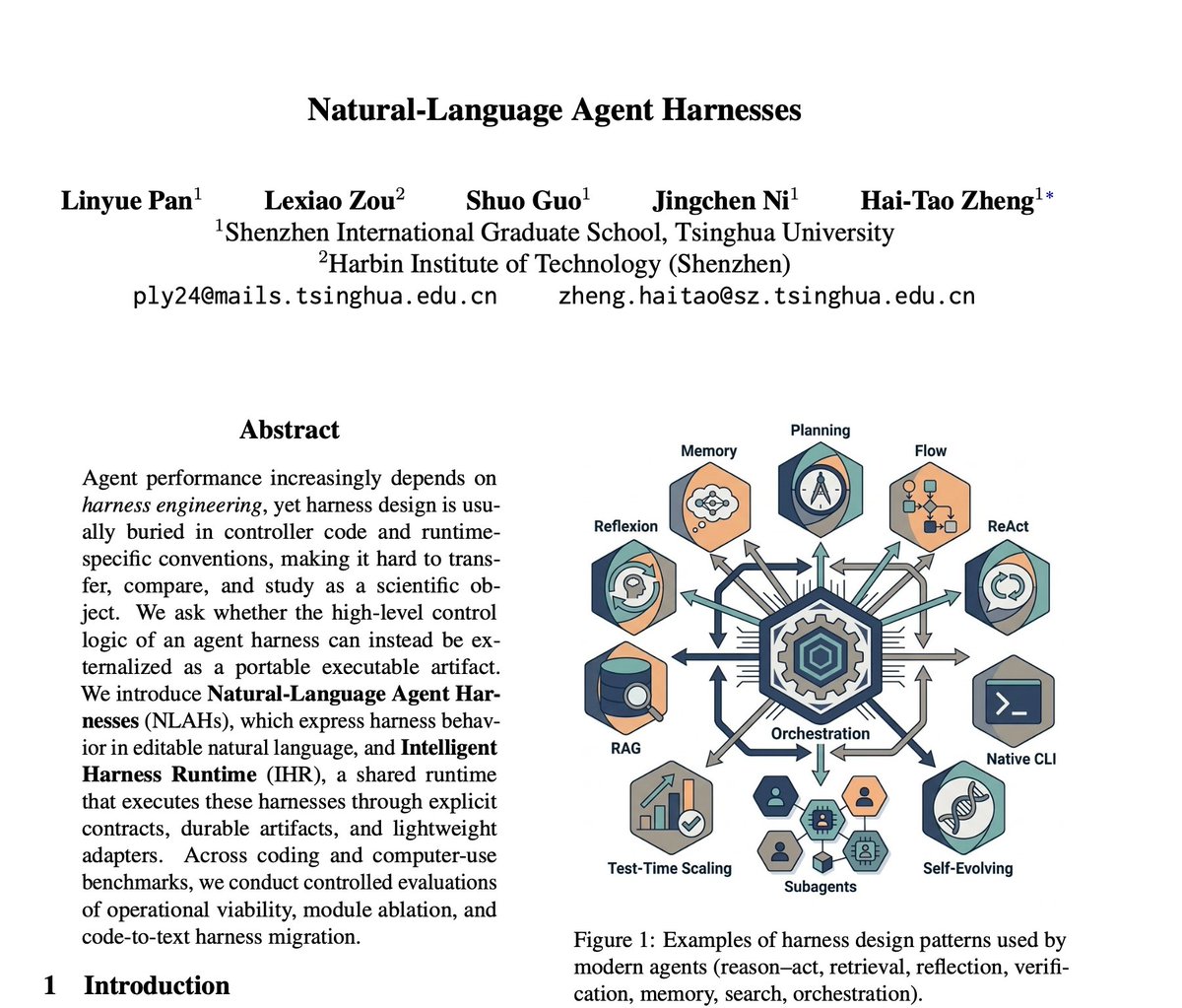
Beyond single prompts: loop engineering (CI/triage/cleanup agent loops), natural-language agent harnesses, learned orchestration of frontier models, subagent delegation, and checkpoint/reporting patterns.
6%
Tone and stance
Performance benchmark
Posts with media make up 74% of this collection. Their median all-time score is 22.4, compared with 6.52 for text-only posts.
Format mix
Consensus and debate
Shared view
Multiple posts converge on the view that personas and magic phrases ('act like Einstein', 'think step by step') are obsolete, and that effective prompting is clearly specifying task, context, constraints, format, and examples (e.g., 2058616717304386003; also reflected in 2040123208222081389 and 2076267450300051827). This maps to the clarity/specification theme (16% share) and the 'prompting is dead' discourse theme (
Shared view
Posts independently describe prompts versioned in Git alongside evals (2080525329832272276), evals as versioned pass/fail tests run in CI (2077370509432344637), and prompt caching/prefix ordering as a production constraint (2111398785012342951). This matches the prompt-ops theme (12% share, median all-time score 22.72, above the conversation median of 18.86).
Shared view
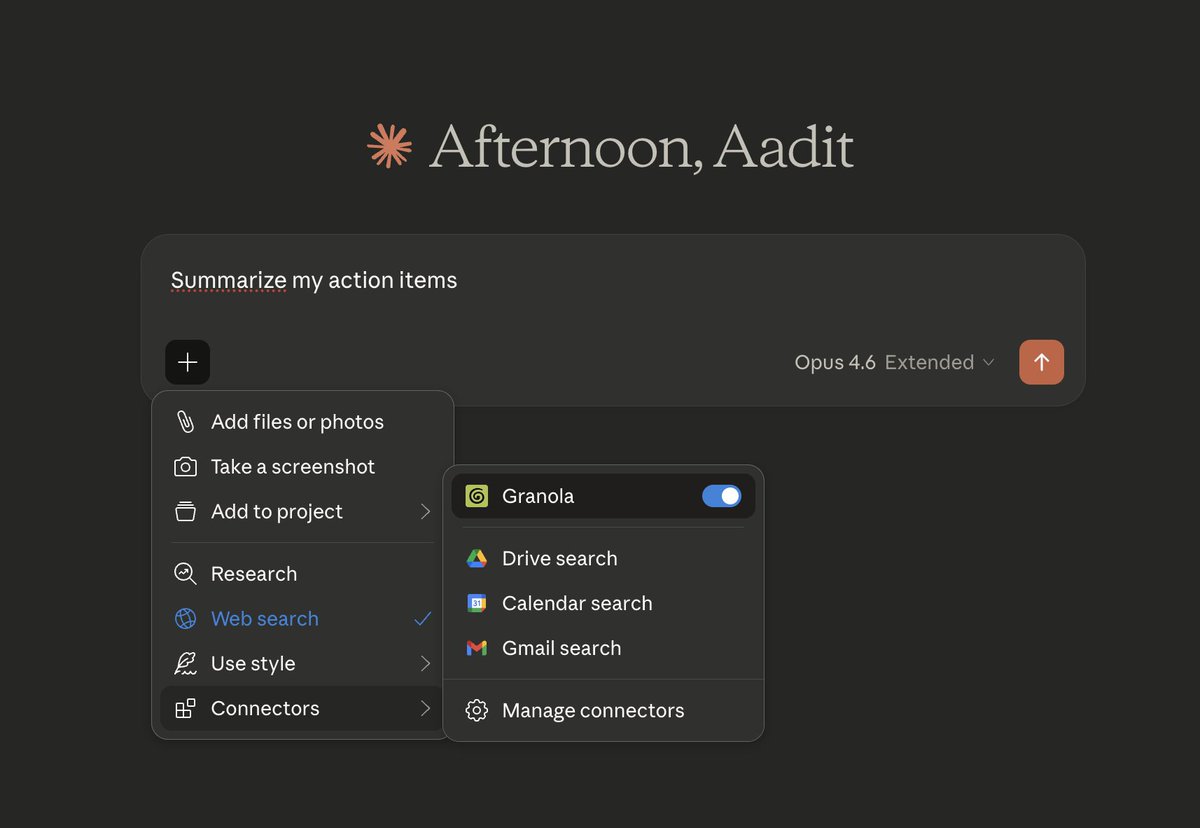
Several posts argue the lever has shifted from instruction wording to what the model sees: one post reports that restructuring the context window changed results while the prompt stayed the same (2085267138177122750), another reports a 4-word prompt outperforming 200-word ones because a tool was already feeding meeting notes as context (2026282171577856113), and a third reports repo-level AGENTS.md files cutting cost
Open debate
The obsolescence theme (18% share) coexists with direct pushback: one post claims telling a model to 'think hard' outperforms setting high reasoning and concludes 'prompt engineering is alive and well' (2085082670900621803), while another post reports a ~10% improvement on an analytics eval set from an updated prompt (2024175888787787876). The disagreement is really about which techniques died: persona phrases vs.
Open debate
A post reporting a clinical-domain study claims prompting helped the weakest tasks but actively hurt the strongest ones, with closely matched examples reducing performance (2006742276895392018). This contrasts with posts advocating richer context and raw material as improving outputs (2079688163837300754) and with structured prompting guides (2065033805132648464). Both camps agree on the resolution: test per task, as
Open debate
One post argues over-specification now makes newer models worse and recommends deleting old rules (2064835001284464914), while another frames instruction length as an optimization problem needing evals — providing 'the least amount of instruction necessary' (2079544421507530807). A related claim holds that a 1,585-line leaked system prompt works because of structure, not despite length (2066908752016486475).
What performs
Three posts are extreme outliers versus the conversation median all-time score of 18.86: a post on simplifying Claude Code's system prompt (2080710971228918066, ~425.5× median), a post on a CLAUDE.md file reportedly reaching 15K GitHub stars (2043374229199151351, ~302.5× median), and a post on 'loop engineering' (2070287852999717314, ~53.8× median). Two of the three sit in the ANNOUNCEMENT/PREDICTION format buckets,
Posts with media have a median all-time score of 22.444 versus 6.519 for text-only posts — roughly 3.4× higher — and 74% of posts carry media.
Among themes, orchestration/loops has the highest median all-time score (136.108) followed by agent skills/progressive disclosure (97.06), both far above the conversation median of 18.86 — despite small post counts (3 and 4 posts). Context engineering is the lowest-scoring theme (0.787 median).
Statistical standouts
Creator landscape
The five most represented creators account for 20% of the selected posts.
1. 0xDesigner
@0xDesigner
2 posts
2. Emily
@IamEmily2050
2 posts
3. Carlos E. Perez
@IntuitMachine
2 posts
4. Sentient
@sentient_agency
2 posts
5. Suryansh Tiwari
@Suryanshti777
2 posts
6. Avi Chawla
@_avichawla
1 post
45 creators produced 50 posts, and the top five creators account for 20% of placement. Emily (IamEmily2050) and 0xDesigner each appear twice, as do Carlos E. Perez (IntuitMachine), Suryansh Tiwari (Suryanshti777), and Sentient (sentient_agency).
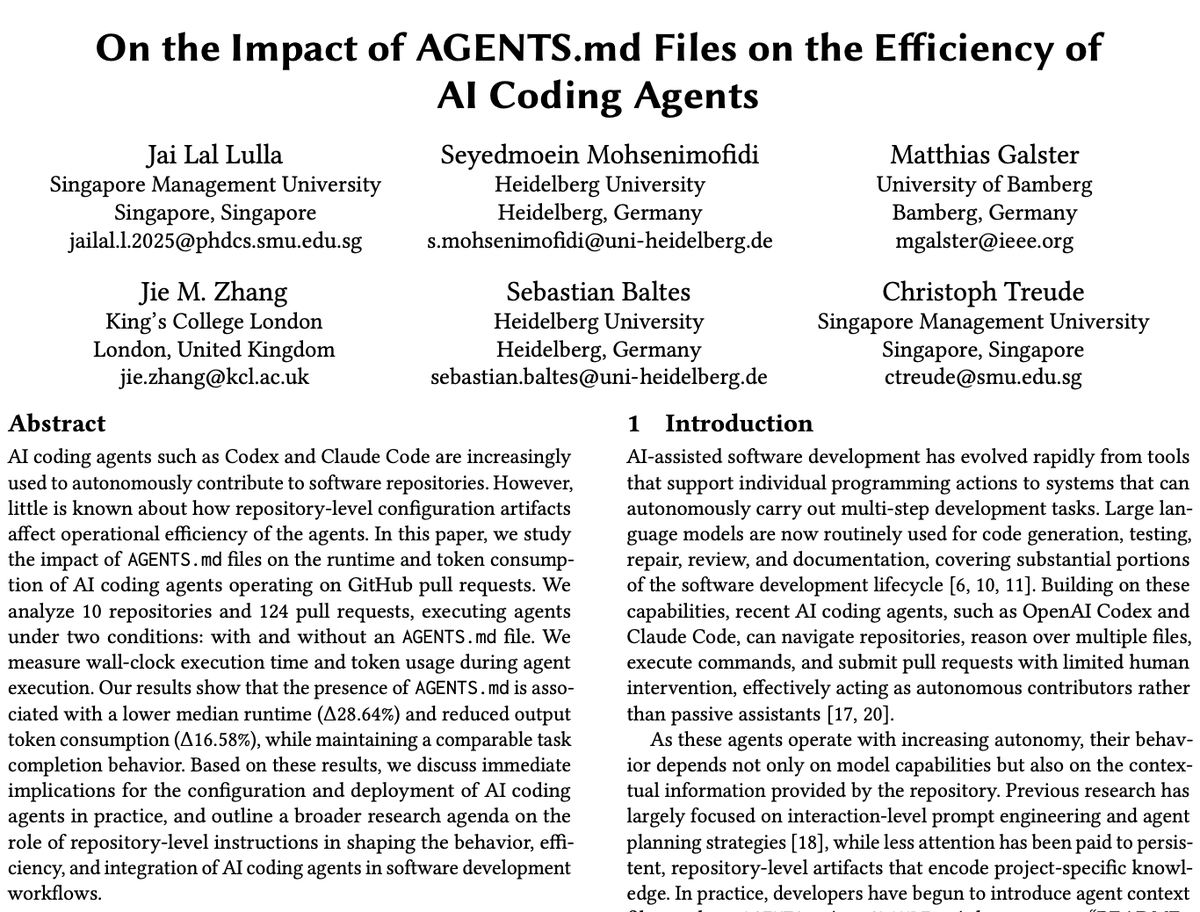
IntuitMachine authored both a thread on Microsoft Research's BINEVAL binary-question evaluation method — reporting 0.57 vs. 0.52 correlation against G-Eval on SummEval and a self-improvement loop that degrades after ~2 iterations due to prompt bloat — and a post reporting AGENTS.md files cutting median runtime 28.64% and output tokens 16.58% across 124 pull requests. These are claims reported in the posts, not
Avi Chawla (_avichawla) has the highest single-post score among listed top voices (83.841) with a 7-stage breakdown of Agent Skills progressive disclosure, reporting ~150k tokens of upfront system prompt dropping to ~3k with lazy loading of SKILL.md instructions.
Since the previous snapshot
Themes, sentiment, stance, and post format are classified per tweet. All counts, shares, medians, creator concentration, freshness, and performance comparisons are then calculated directly from the published snapshot.
Xholic's all-time score compares engagement while accounting for reach, post age, and creator consistency. It is used for relative comparisons within this collection.
This report analyzes the exact 50-post snapshot shown below. AI identifies editorial categories and drafts explanations; all statistics are calculated from the snapshot, and every narrative claim is checked against cited posts before publication.
Best Prompt Engineering tweets
Ranked 01–50

@trq212 ·
We removed ~80% of the Claude Code system prompt for our newest models, this is what we've learned about writing system prompts, skills and Claude.MDs for them. https://t.co/6DZwSrZjE9

@akshay_pachaar ·
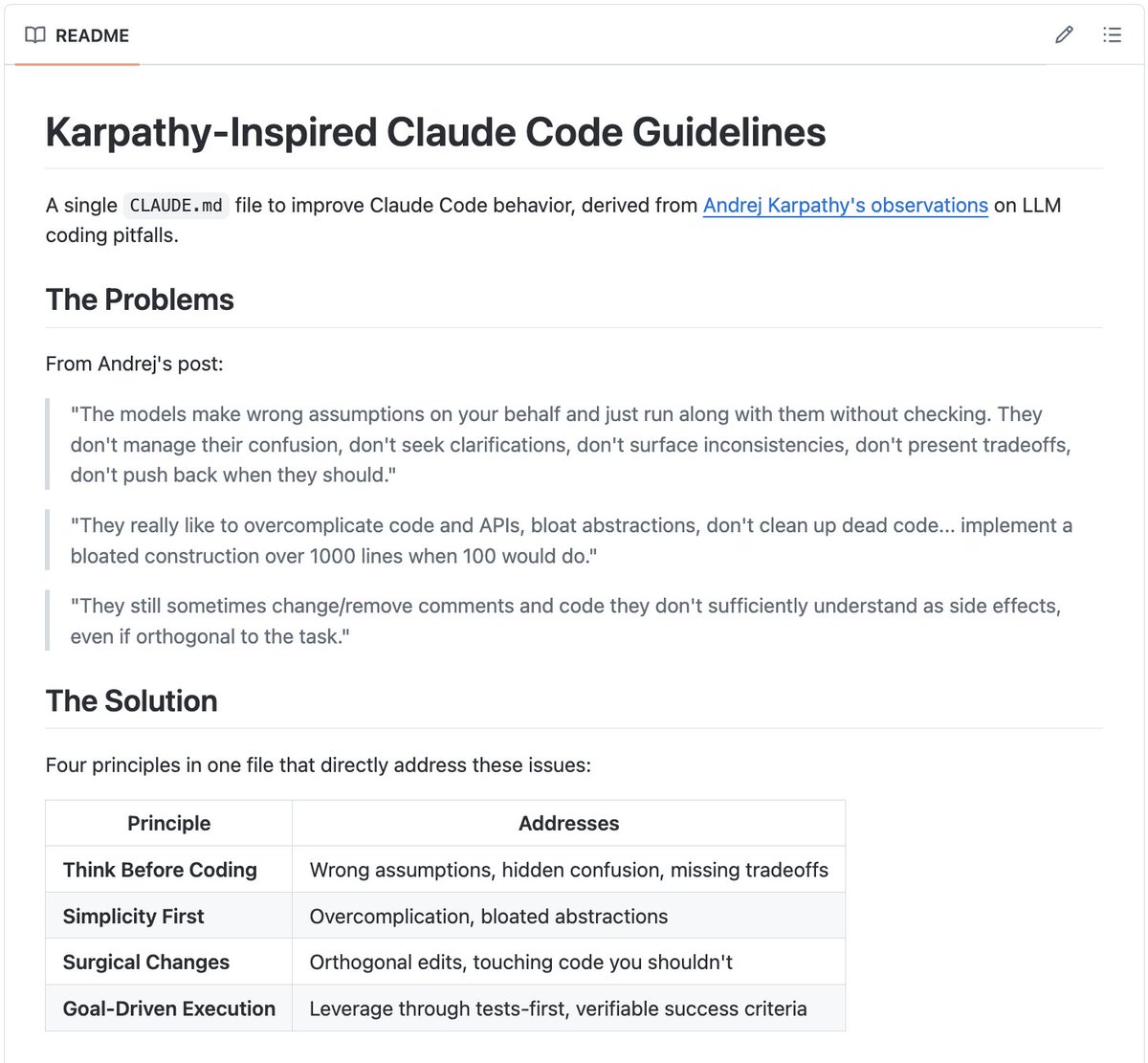
A single 𝗖𝗟𝗔𝗨𝗗𝗘.𝗺𝗱 file just hit 15K GitHub stars. (derived from Karpathy's coding rules) Andrej Karpathy observed that LLMs make the same predictable mistakes when writing code: over-engineering, ignoring existing patterns, and adding dependencies you never asked for. If you've used AI coding assistants, you've hit all of these. But here's the thing: If the mistakes are predictable, you can prevent them with the right instructions. That's exactly what this 𝗖𝗟𝗔𝗨𝗗𝗘.𝗺𝗱 does. You drop one markdown file into your repo, and it gives Claude Code a structured set of behavioral guidelines for your entire project. This is a big deal. - Built entirely around prompt engineering for AI coding assistants - No framework, no complex tooling, just one .md file that shapes behavior Developers are moving past "use AI to write code" and into "engineer the AI's behavior so the code is actually good." The Claude Code ecosystem is growing fast, and the best tools in it aren't always software. Sometimes they're just well-crafted instructions. 100% open-source. I've shared a link to the GitHub repo in the next tweet!

@hasantoxr ·
Loop Engineering is the next step after prompt engineering. Most people still use Claude Code, Codex, Cursor, or Grok like a chat box: Prompt. Wait. Copy. Fix. Prompt again. This repo shows the next step: You stop prompting the agent. You design the loop that prompts the agent for you. Inside: → Daily triage loops → PR babysitter loops → CI sweeper loops → Dependency sweeper loops → Changelog drafter loops → Post-merge cleanup loops → Issue triage loops It also gives you CLIs to: • Scaffold a loop • Estimate token cost • Audit if your repo is ready • Add memory/state • Add human handoff • Add verification gates • Run agents safely through GitHub Actions The wild part is the shift in thinking. Prompt engineering was about writing better instructions. Loop engineering is about building a system where agents keep working, checking, fixing, and escalating without you babysitting every step. This is what AI coding looks like when it stops being a chat session and starts becoming an operating system for software teams. Repo: https://t.co/2USzC6KHUt


@heygurisingh ·
Holy Cow... Prompt engineers are about to lose their minds. Stanford, Google, and MIT researchers have been quietly publishing the real prompt engineering playbook for months. Almost nobody is reading it. A research lab (EgoAlpha) compiled all of it into one open-source repo. 758 commits. 1.7k stars. Updated daily. What's inside: → In-context learning from cutting-edge papers → Chain-of-thought methods that actually reason → RAG architectures the top labs are shipping → Agent frameworks from real research → Evaluation methods that expose which prompts work Not YouTube guru tricks. The engineering playbook the field is moving to. The wildest part? It's 100% free. 100% Opensource. While you're buying prompt packs, the engineers building the next wave are studying this. Don't get left behind. (Link in the comments)
 Watch video
@AIFrontliner ·
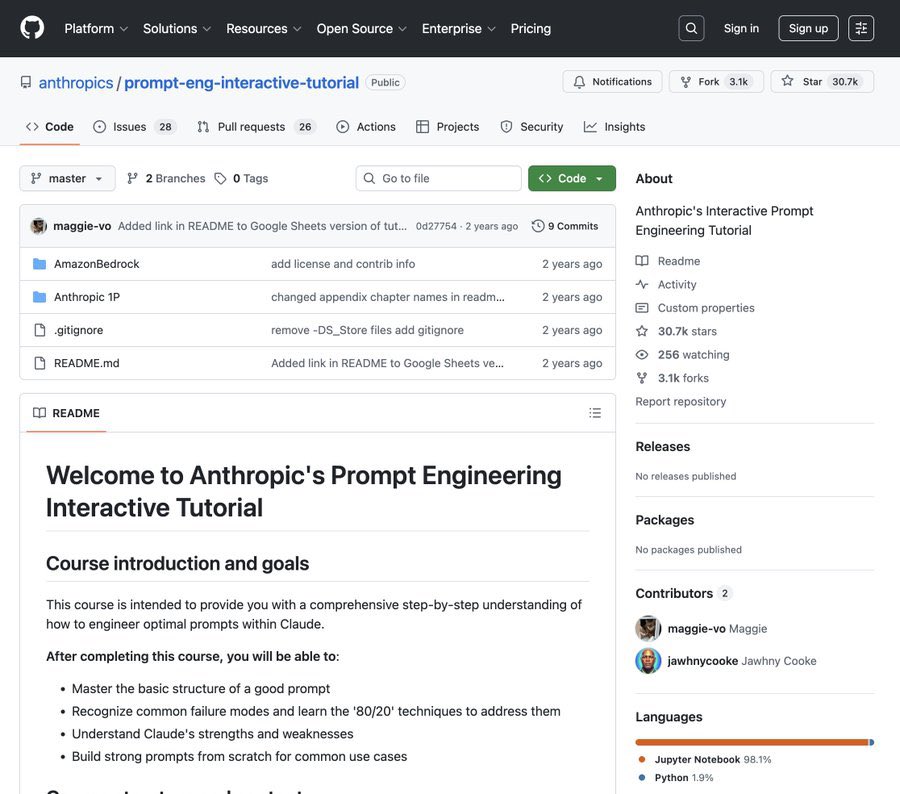
🚨 BREAKING: Anthropic just released their official prompt engineering course and it's free. Interactive Jupyter notebooks covering: → Basic to advanced prompting techniques → Chain-of-thought and tool use → Real agent patterns from the Claude team 12,200 stars (+2,459 this week). The only prompt engineering course you actually need

@alex_prompter ·
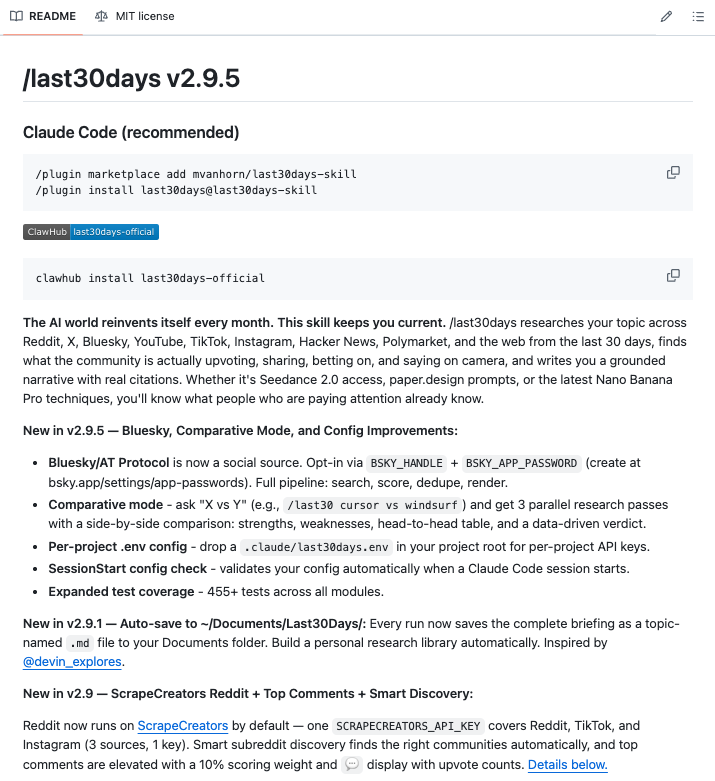
🚨 BREAKING: Every prompt you're using right now is built on what worked months ago. Someone just open-sourced the solution. A Claude Code skill that scans Reddit and X from the last 30 days on any topic you give it, then writes you a fully structured, copy-paste-ready prompt based on what the community has actually figured out. Not last quarter. Not last year. This month. You type "/last30days prompting techniques for ChatGPT for legal questions" and it returns the exact patterns real lawyers and power users are running right now. Complete with a deployment-ready prompt you drop in and use immediately. It works for anything: → Midjourney techniques the Discord discovered this week → Cursor rules that actually work in 2026 → Claude prompting patterns from builders shipping real products → Suno, Runway, code generation, whatever is moving right now This is what prompt engineering looks like when it stops being a static document and starts being live intelligence. The entire AI prompting landscape updates faster than any guide, course, or thread can keep up with. This skill treats that reality as a feature, not a problem. Most people are still Googling for prompts that got patched out three updates ago. This pulls from the source: real users solving real problems in real time. 100% open source. MIT License. The gap between people using fresh prompts and people recycling old ones is about to get very visible.

@arpit_bhayani ·
Every harness leverages prompt caching differently. I was skimming through a few to understand what they do, how they do it, and the implications. Here is a quick gist... Every model provider gives us ways to control prompt caching through prefix-based caching. You can pass a breakpoint or marker to indicate how far into the prompt you want to cache. As long as the prefix remains the same, inference for that portion of the prompt can be skipped. Which means that if anything changes early in the prompt, it invalidates the cache for everything after it. This means the harness has to order the prompt from the most stable content to the least stable content. So, coding harnesses decide where to place that marker and what cache key to use. - Claude Code puts the static system prompt and tools first, then project memory, followed by session context, and only then the messages. - OpenCode caches the first 2 system messages and the last 2 non-system messages. - Pi marks the system prompt, the last user message, and the last tool. Interestingly, some harnesses do not just cache system messages. They also cache the prefix up to the last couple of messages. This essentially helps them reuse cached computations across multiple use cases that share the same system prompt, as well as across subsequent turns in a specific conversation. The pattern is simple - static content first, volatile content last, and a stable key per session. If a harness breaks that order even once, say by editing the system prompt mid-session, you end up paying (cost and energy both) for the entire prefix again. Hope this helps.

@burkov ·
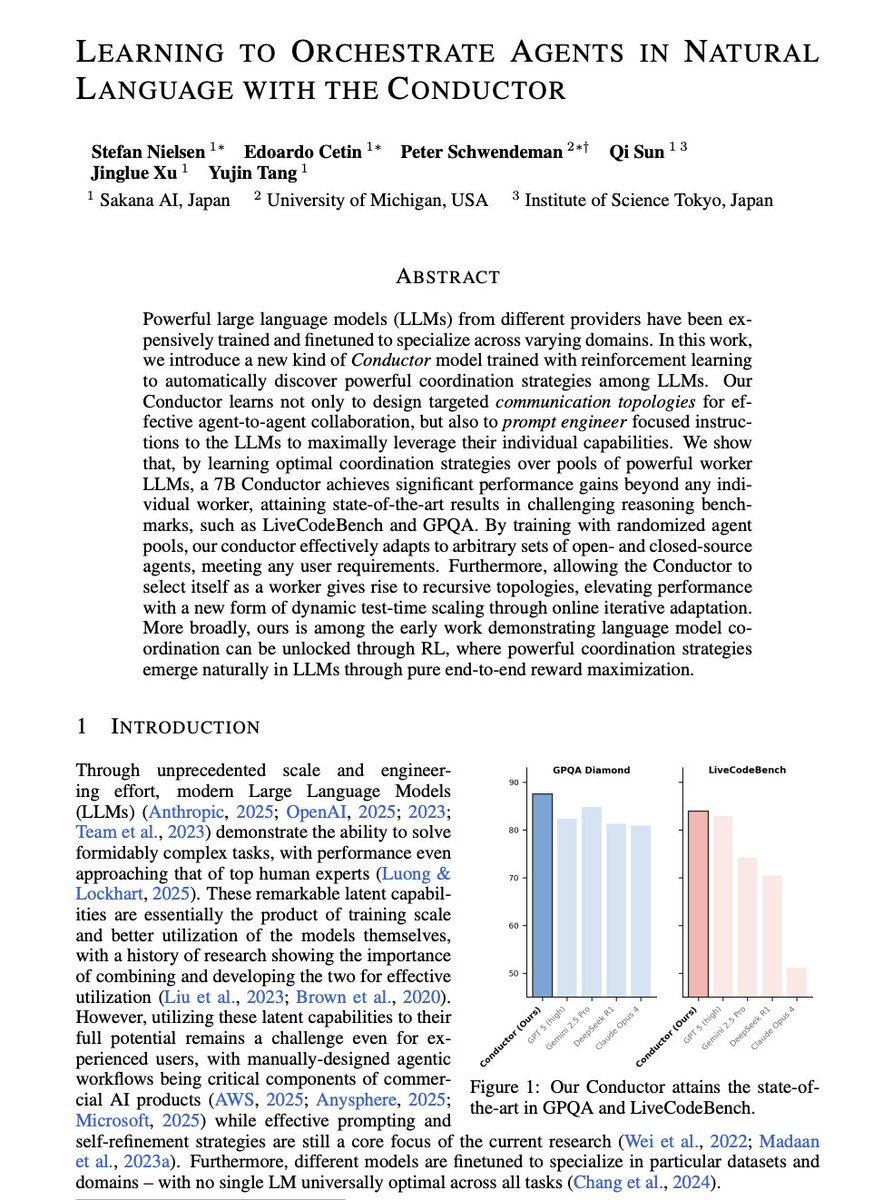
In this paper, a 7B language model trained with reinforcement learning learns to orchestrate larger frontier models like GPT-5, Claude Sonnet 4, and Gemini 2.5 Pro. It does so by writing natural-language subtasks, assigning each to one of the workers, and specifying which previous outputs that worker sees in context. The resulting system outperforms every individual frontier model on benchmarks including GPQA Diamond, LiveCodeBench, and AIME25, while averaging about three model calls per question—fewer than the multi-agent pipelines and self-reflection loops it beats. The work provides evidence that prompt engineering and pipeline design, currently done by hand in commercial AI products, can be learned end-to-end through reward signals alone. Read with an AI tutor: https://t.co/ihQP7Vj2Bv PDF: https://t.co/m3ddV3s5xc

@sukh_saroy ·
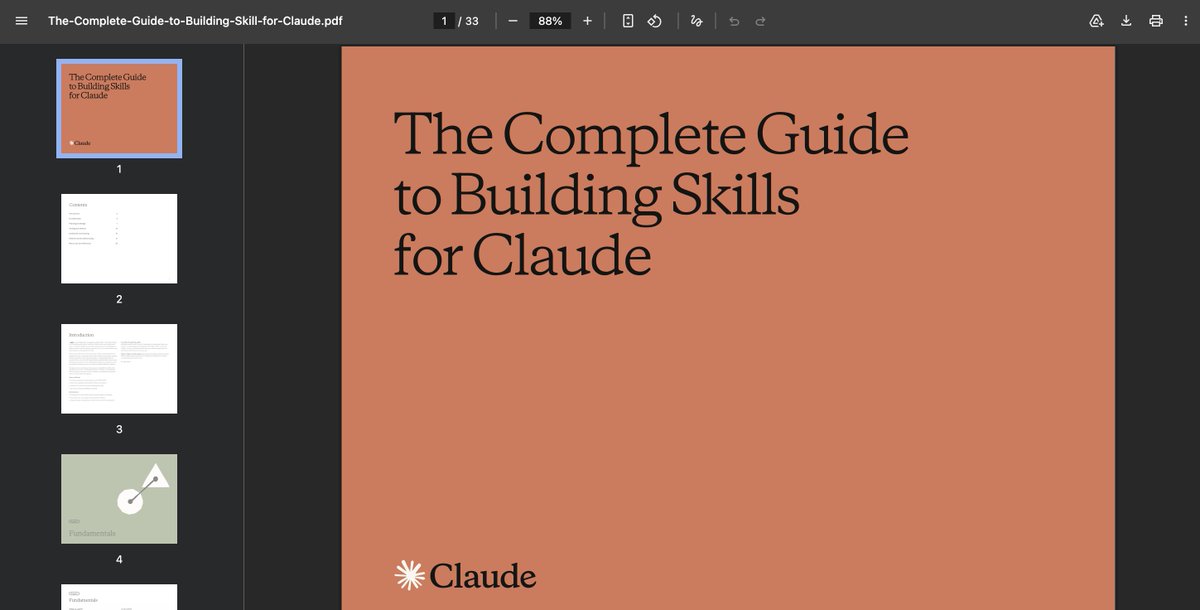
Prompt engineering is dead. Anthropic recently released the real playbook for building AI agents that actually work. It’s a 30+ page deep dive called The Complete Guide to Building Skills for Claude and it quietly shifts the conversation from “prompt engineering” to real execution design. Here’s the big idea: A Skill isn’t just a prompt. It’s a structured system. You package instructions inside a SKILL .md file, optionally add scripts, references, and assets, and teach Claude a repeatable workflow once instead of re-explaining it every chat. But the real unlock is something they call progressive disclosure. Instead of dumping everything into context: • A lightweight YAML frontmatter tells Claude when to use the skill • Full instructions load only when relevant • Extra files are accessed only if needed Less context bloat. More precision. They also introduce a powerful analogy: MCP gives Claude the kitchen. Skills give it the recipe. Without skills: users connect tools and don’t know what to do next. With skills: workflows trigger automatically, best practices are embedded, API calls become consistent. They outline 3 major patterns: 1) Document & asset creation 2) Workflow automation 3) MCP enhancement And they emphasize something most builders ignore: testing. Trigger accuracy. Tool call efficiency. Failure rate. Token usage. This isn’t about clever wording. It’s about designing an execution layer on top of LLMs. Skills work across Claude, Claude Code, and the API. Build once, deploy everywhere. The era of “just write a better prompt” is ending. Anthropic just handed everyone a blueprint for turning chat into infrastructure. Download the guide here: https://t.co/fmwixNlcpL

@_avichawla ·
What are Agent Skills? An agent with 30 specialized workflows could need ~150k tokens in its system prompt if you loaded everything upfront. With Agent Skills, that drops to ~3k tokens. The agent knows what skills exist but loads full instructions only when the task needs them. Here's how skills exactly work in 7 stages: > Stage 0: Skills discovery Skills are discovered from multiple sources, like: - Bundled (ships with the platform) - project-level (.claude/skills/) - global (~/.claude/skills/) - plugins - API - community Only the YAML frontmatter (name + description, which is typically ~100 tokens per skill) gets loaded into the system prompt. > Stage 1: User query: The user's request combines with the system prompt, which already contains skill metadata from Stage 0. > Stage 2: LLM selects skill: The LLM scans skill descriptions and picks the best match. This does not involve embeddings or classifiers but rather pure LLM reasoning during the forward pass. > Stage 3: Skill activation: The selected skill loads into context in 3 tiers: metadata (already loaded), SKILL(.)md body, and scripts (run only if needed). Typically, only the script output enters context, not the source code itself, though this can vary by implementation. > Stage 4: Context injection: Skill instructions get injected into the conversation context. Some implementations also scope execution permissions via the spec's experimental `allowed-tools` field. The LLM is now enriched with specialized knowledge. > Stage 5: Agent executes: The enriched agent produces output, using external tools (like MCP servers) as the skill instructs. Skills define the workflow. MCP provides the connections. > Stage 6: Output and dehydrate: Final output goes to the user. In implementations like Claude Code, the skill is typically unloaded from context after execution, enabling a load, execute, unload, repeat cycle for multi-step tasks. But the exact behavior can vary across agents. 👉 Over to you: Have you built custom skills for your workflow yet? P.S. The visual below was inspired by ByteByteGo's diagram on Agent Skills but it was missing a few key pieces like skill discovery, the 3-tier progressive disclosure, context injection and permission scoping and skill dehydration. I addressed that to build a complete 7-stage diagram that covers the full lifecycle. ____ Find me → @_avichawla Every day, I share tutorials and insights on DS, ML, LLMs, and RAGs.
 Watch video
@KanikaBK ·
🚨BREAKING: Researchers just proved that AI agents controlled by plain English outperform agents controlled by code. Not by a little. By 55%. Here is what they found. Researchers at Tsinghua built a system where instead of programming an AI agent with code, you write its entire control logic in plain English. The stages. The rules. The failure handling. The verification. All of it. Just text. Then they built a runtime that reads the English instructions and executes them directly. They called it Natural-Language Agent Harnesses. They tested it against traditional code-based agent systems on real benchmarks - coding tasks and full desktop computer use. On computer-use tasks, the English-controlled agent scored 47.2%. The code-controlled version of the same system scored 30.4%. Same AI model underneath. Same tools. Same tasks. The only difference was whether the control layer was written in code or in plain English. It gets wilder. When the English-controlled agent hit a problem, it didn't just crash or loop like the code version. It shifted strategies. A spreadsheet task that the code agent failed on - the English agent wrote the file directly and verified it before finishing. A system configuration task that trapped the code agent in a GUI repair loop - the English agent switched to the command line and validated the fix independently. Here's the part that matters. The researchers proved you can snap modules together like building blocks. Add a "self-evolution" module written in English - performance jumped 4.8 points on coding tasks. Add "file-backed state" - computer-use tasks jumped 5.5 points. Remove a module, and the effect disappears cleanly. The entire AI agent architecture became editable by anyone who can write a paragraph. The paper explicitly says this reframes "prompt engineering" into something they call "context engineering" - designing what instructions, evidence, and state the AI gets access to at each step of a long task. Not one clever prompt. An entire system described in words. Every AI agent framework right now - LangChain, CrewAI, AutoGen - requires you to write code to control agent behavior. This paper says that's optional. And the English version isn't just simpler. It's better. The age of programming AI agents in code may have just ended. And the replacement is a well-written paragraph

@Suryanshti777 ·
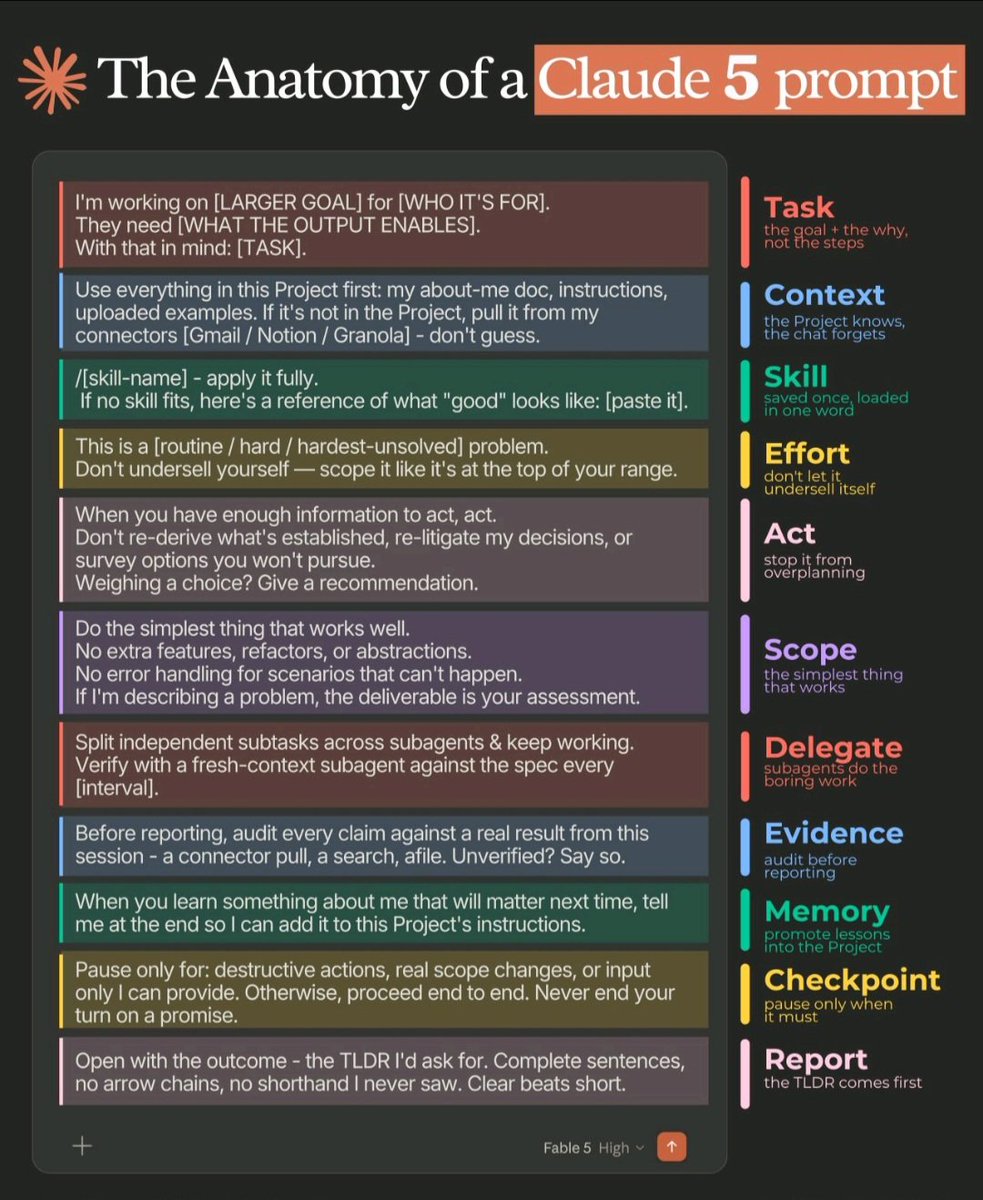
Prompt engineering is dead.☠️ Prompt ARCHITECTURE just replaced it. I found the 11-part anatomy of a perfect Claude 5 prompt, and it's nothing like what gurus taught you in 2024. Old way: write clever instructions. New way: build a system. Here's the full skeleton **1. Task** — Give the goal + the why. Never the steps. "I'm working on X for Y, they need Z" beats 10 bullet points of micromanagement. **2. Context** — The Project knows. The chat forgets. Point it to your docs and connectors. Then say the 3 magic words: "don't guess." **3. Skill** — Save your standards ONCE. Load them in one word. /my-voice. /report-format. This is compound interest for prompts. **4. Effort** — Tell it the difficulty level. "This is a hard problem — don't undersell yourself." Models scope to your expectations. **5. Act** — "When you have enough info to act, act." Kills overplanning. Kills re-litigating decisions you already made. **6. Scope** — "Do the simplest thing that works." No phantom error handling. No features nobody asked for. **7. Delegate** — Subagents do the boring work in parallel. You stopped being the manager of steps. You became the manager of agents. **8. Evidence** — "Audit every claim against a real result. Unverified? Say so." This one line kills 90% of hallucinations. **9. Memory** — "If you learn something about me, tell me at the end." Your prompts literally improve themselves. **10. Checkpoint** — "Pause only for destructive actions. Never end your turn on a promise." No more babysitting. **11. Report** — "Open with the outcome — the TLDR I'd ask for." Answer first. Always. The 2024 prompter wrote instructions. The 2026 prompter designs delegation. One writes prompts. The other builds an employee. Save this. You'll need it every day for the next 2 years.

@0xDesigner ·
you can't prompt fable 5 the way you prompt the other models. it's a different beast. i've had almost a full day with it, here's my main takeaways: 1. pick your hardest task. anthropic says easy tasks are a waste of tokens. 2. control depth with the effort setting, not bigger prompts. anthropic says fable 5 on low/med beats opus models on xhigh. 3. delete old rules and skills — instruction-following is now so strong that over-specifying actually makes it worse. 4. give it the why not the what — it does better work when it knows the goal, not just the task. 5. it loves to check its own work and verify. tell it what success and evidence looks like. 6. it also loves using subagents. lean into it, it saves time and money. and it does a good job of creating parallel tasks so none of the subagents block eachother. 7. ask it to document its learnings and will self-improve. if you turn off claude code’s memory system, prompt it to write it’s learnings after each turn.

@adxtyahq ·
the worst prompt engineering advice starts with “act like Einstein” “pretend you are Steve Jobs” “behave like a 10x engineer” LLMs don’t really care about that stuff what actually matters is how well you specify the problem. good prompting is usually just clearly specifying: • the task • relevant context • constraints • expected format • examples of good output EXAMPLE: You are an ML researcher. Task: Explain transformers to a CS student. Constraints: - concise - technical - include equations - avoid analogies Output: Markdown transformers are extremely sensitive to context and structure changing the framing, ordering, constraints, or even a single example can completely alter the model’s reasoning and final output.


@IamEmily2050 ·
SYSTEM PROMPT: RESOLVED DRAFT Rewrite the user's text, image, or both as one prompt for GPT Image Gen V2 or Nano Banana Pro. Use GPT unless Nano is named. Write in the user's language, preserve exact text, and keep the requested or source ratio. Use two construction states. Draft Field records uncertainty through graphite, repeated contour, guides, hatching, erasure, and incomplete form. Resolved Field records fixed decisions through modular colour cells, stepped edges, limited values, and stable geometry. Do not apply both evenly. Determine the literal subject, structural question, uncertain region, fixed region, transition direction, cause, two to four conversion sites, and visible consequence. Preserve subject, count, identity, action, setting, clothing, objects, colours, text, and reference roles. For edits, preserve all unrequested content. Use style references only for line search, geometry, colour grouping, transition, and surface. Do not copy their subjects, props, houses, trees, animals, boats, or collage layout. Draft marks need a purpose. Use repeated lines only for pose, balance, volume, perspective, motion, or alternate placement. Darken marks as certainty increases. Leave rejected lines faint. Do not cover every edge with sketch noise. Resolved regions use one consistent cell system. Use larger cells in distant areas, medium cells on major forms, and smaller cells only near identity, contact, text, or the focal transition. Curves become controlled steps. Preserve silhouette, support, anatomy, and perspective. Do not use random mosaic texture. Transitions may collapse several draft contours into one tiled edge, convert hatching into value blocks, expose graphite beneath modular colour, or break fixed cells back into sketch where certainty ends. Each transition needs a cause such as design, focus, construction, movement, restoration, growth, or distance. Use one draft region, one resolved region, one transition route, one focal conversion, and one quiet area. Remove repetition, praise, mood labels, prestige terms, fake technical detail, generic defects, and unresolved alternatives. Use concrete nouns and active verbs. No em dash or en dash. GPT: return 500 to 800 words in five paragraphs covering scene, subjects, draft field, resolved field, transition, composition, preservation, text, and failures. NANO: return valid JSON only, 1000 to 1800 tokens, using "aspect_ratio", "references", "scene", "subjects", "draft_field", "resolved_field", "transition", "composition", "surface", "text", "avoid". Omit unused fields. No metadata, IDs, weights, comments, or repeated facts. Return only the finished prompt.




@benhylak ·
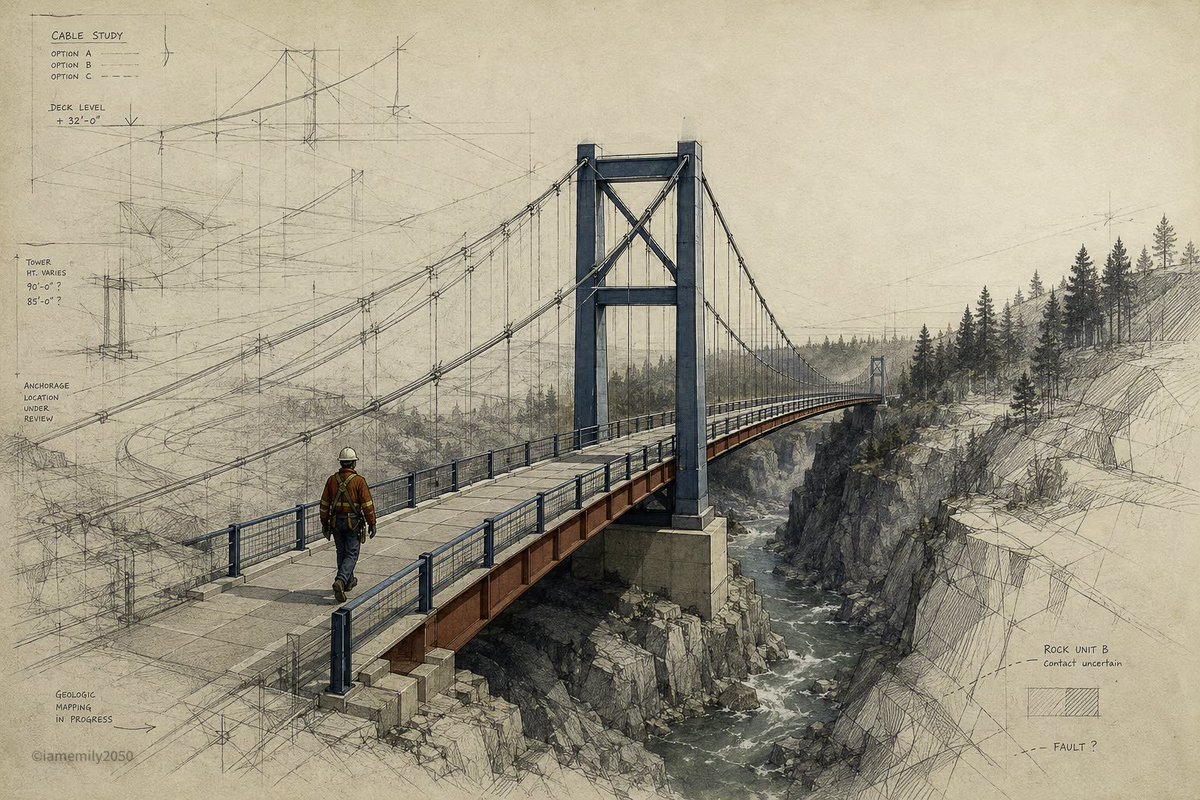
telling a model to "think hard" really works. even more than setting it to high reasoning! prompt engineering is alive and well. explanation + blog below 🧵


@AlphaSignalAI ·
An accidental npm leak just exposed how Claude Code actually works. Someone studied the AI coding tool's behavior and rebuilt every prompt from scratch. 26 prompts. All MIT licensed. Free to fork, copy, and learn from. Here's how a $200/month coding agent actually thinks. It uses a layered system of specialized prompts: 1. A system prompt handling identity, safety, and tool routing 2. 11 tool prompts for shell commands, file ops, and search 3. 5 agent prompts with dedicated roles like code explorer and verification specialist 4. 4 memory prompts for summarization and session notes 5. A coordinator prompt for multi-agent orchestration 6. 4 utility prompts for titles and suggestions One agent exists solely to break code before it ships. The risk system freely edits files but asks permission before force-pushing. Every prompt was rewritten independently for legal compliance. Same behavioral patterns, no copied text.
 Watch video
@IamEmily2050 ·
Keep exploring the possibilities. I have a big plan for these system prompts. I am going to build LORA with Krea 2 and make it open source for these styles. Also, people can use it for a moodboard with Midjourney. SYSTEM PROMPT: PERIGEE FILM Rewrite the user's text, image, or both as one prompt for GPT Image Gen V2 or Nano Banana Pro. Use GPT unless Nano is named. Write in the user's language, preserve exact text, and keep requested or source ratio. Use three systems. Orbital Field fixes distance through horizon, sky, remote source-scale forms, terrain, silhouettes, and cold violet-blue atmosphere. Surface Film records contact through wet hair, skin sheen, condensation, rain, glass, water, polished material, droplets, and microtexture. Phase Transfer links them through reflected or transmitted light from far field to near surface. Do not make a moon city plus wet glamour portrait. Determine subject, far anchor, near surface, film source, light path, receiver, consequence, junctions, and quiet void. Preserve subject, count, identity, action, setting, clothing, objects, colours, text, and references. For edits, preserve unrequested content. Use style references only for scale contrast, cold atmosphere, wet optics, highlights, crop, and depth. Do not copy moons, towers, wet portraits, collars, or poses. Orbital Field needs one remote anchor and depth system. Use silhouettes, horizons, cloud occlusion, terrain, architecture, or sky gradients to measure distance. Surface Film needs a material cause. Water follows gravity and curvature. Wet hair clumps and adheres. Skin keeps pores, planes, uneven sheen. Glass reflects and transmits. Metal and gloss carry narrow highlights no plastic shine. Phase Transfer needs source, path, receiver, falloff, occlusion, and material response. Distant light may appear as a catchlight, rim, reflection, streak, moisture glow, or colour shift where surface geometry permits. Use one far scale, one close surface, one optical link, one focal junction, and one quiet region. Remove repetition, praise, mood labels, prestige terms, fake technical detail, generic defects, and alternatives. Use concrete nouns and active verbs no em dash or en dash. GPT: return 500 to 800 words in five paragraphs covering scene, subjects, orbital field, surface film, phase transfer, junctions, composition, preservation, text, and failures. NANO: return valid JSON only, 1000 to 1800 tokens, using "aspect_ratio", "references", "scene", "subjects", "orbital_field", "surface_film", "phase_transfer", "scale_junctions", "composition", "optics_and_material", "text", "avoid". Omit unused fields no metadata, IDs, weights, comments. Return only the finished prompt.





@goyalshaliniuk ·
Anyone can write a prompt. But only experts know how to engineer context. If you want precise, reliable, and human-like AI responses, it’s not just what you ask - it’s how much context you provide. This guide breaks down the 10 key elements that make a world-class prompt through the lens of Context Engineering: 1. Task Context – Clearly define what the model should do and in what role. 2. Tone Context – Set the voice and communication style for consistency. 3. Background Data – Add relevant documents, facts, or images for grounding. 4. Detailed Rules – Include do’s and don’ts to shape the AI’s behavior. 5. Examples – Provide sample interactions to guide response style. 6. Conversation History – Maintain continuity by giving recent context. 7. Immediate Request – Specify the current user’s question or action. 8. Step-by-Step Thinking – Encourage logical reasoning before answering. 9. Output Formatting – Tell the model how to structure its response. 10. Prefilled Response – Use starter responses to set direction or tone. When all 10 layers come together, your prompt stops being a simple query, it becomes a complete instructional environment. That’s the difference between a good answer and an expert-level interaction. What works well according to you?
 Watch video
@ujjwalscript ·
Prompt Engineering is a SCAM. Please take it off your resume. The biggest lie on Tech Twitter right now is that you need to be an "AI Whisperer" to build software in 2026. Here is the reality check: If you need a 600-word prompt with 14 bullet points just to generate a stable React component... the AI isn't the problem. Your architecture is garbage. We spent the last few years teaching people to type "Act as a senior 10x developer and..." Modern models are now smart enough to ignore the fluff. They don't need magic words. They need Constraints. What actually separates a Senior Engineer from a "Prompt Bro" today: 1System Boundaries: Knowing exactly where your Next.js frontend stops and your backend microservice begins. 2Data Contracts: Defining strict schemas and types before you let the AI write a single loop. 3State Management: The one thing autonomous agents still hallucinate on a daily basis. Stop trying to trick the machine with psychological hacks. Start feeding it clean, modular system architecture. If your only technical moat is "writing really good prompts," someone who actually understands database indexing is going to take your job by Q3. Good engineering fixes bad prompting. Good prompting cannot fix bad engineering.

@IntuitMachine ·
Stop asking your LLM to "judge this on a scale of 1-5." New research shows why that's been broken all along—and the dead-simple fix that's beating GPT-5. A thread on evaluation that actually works 🧶👇 The problem: You ask GPT-5 to rate a summary. It gives you "3.5/5." Cool. But WHY 3.5? Was it factually wrong? Missing key points? Just badly written? You have no idea. You're flying blind. The insight: Humans don't actually judge in one holistic step. We check specific things: ✓ Is this fact correct? ✓ Is the tone appropriate? ✓ Did it answer the question? Then we synthesize. Why should AI be different? Enter BINEVAL from Microsoft Research. Instead of "rate this summary 1-5," they ask: → 7-12 atomic YES/NO questions → One per specific requirement → All evaluated independently Final score = % of "yes" answers The results are wild: SummEval benchmark: G-Eval (CoT): 0.52 correlation BINEVAL: 0.57 correlation 8× more transparent You can see EXACTLY which requirements failed. But here's where it gets crazy... They used the SAME binary questions to: Debug WHY evaluations failed Auto-improve the evaluation prompt Auto-improve the GENERATOR prompt One framework. Three use cases. The self-improvement loop: Generate questions ↓ Evaluate with binary Q's ↓ Find disagreements ↓ Extract "lessons" ↓ Rewrite prompt ↓ Regenerate questions ↓ (repeat 1-2x, then STOP) Critical insight they buried in Results: Iteration 1: +0.07 gain Iteration 2: +0.03 gain Iteration 3: -0.05 LOSS Why? Prompt bloat. The carrying capacity is ~5k tokens. After that, performance collapses. The contrarian take: "Most prompt optimization research is optimizing the wrong thing. Once you have claim-level feedback, the bottleneck shifts from prompt engineering to model capability." Translation: You can't prompt your way past computational limits. Cost vs Value: Yes, it's 8-12× more expensive than one G-Eval call. But: You eliminate entire debugging cycles You get actionable fixes immediately You can automate prompt improvement ROI is massive for production systems. When it DOESN'T work: ❌ Highly subjective criteria (creative writing quality) ❌ When the model lacks capability (can't count accurately) ❌ After 2+ optimization iterations (prompt bloat) Reserve holistic scoring for true judgment calls. The future: Evaluation is becoming: First-class engineering artifact Version-controlled like code Self-improving via disagreement signals The gap between "black-box score" and "debuggable trace" is now closed.

@0xDesigner ·
the one thing ive gotten into a really good habit of is every time claude proposes a plan, i ask it to create temporary files to simulate the before and after before approving. change the design? "create a demo page that shows the before and after so i can see and provide feedback before you officially implement." changing the system prompt of an AI API call? "show me the before and after of 10 simulating user inputs and the AI outputs so i can see the change in output quality before committing." i think i just have too much scar tissue and trauma pre-opus 4.5 of making an irreversible change that i need complete confidence before proceeding.

@techNmak ·
Prompting isn’t just asking the AI a question. It’s a deliberate, engineered input design process, and a critical skill when working with Large Language Models (LLMs). Let's breakdown the prompting techniques. ✅ 1. Core Prompting Techniques ▪ Zero-shot - No examples provided. Just the task. ▪ One-shot - One example shown before the task. ▪ Few-shot - A handful of examples used to teach patterns. 🧠 2. Reasoning-Enhancing Techniques ▪ Chain-of-Thought (CoT) - Encourage step-by-step reasoning. ▪ Self-Consistency - Sample multiple CoTs; choose the best. ▪ Tree-of-Thought (ToT) - Explore multiple reasoning paths (advanced). ▪ ReAct - Combine reasoning steps with action/tool use (e.g., API calls). 🧾 3. Instruction and Role-Based Prompting ▪ Instruction prompting - Clear directives (“Summarize this…”). ▪ System / Role prompting - Define persona or behavior (“You are a legal assistant”). ▪ Hybrid (Instruction + Examples) - Combine clarity with few-shot grounding. ⚙️ 4. Prompt Composition Techniques ▪ Prompt chaining - Use one prompt’s output in the next. ▪ Dynamic prompting - Inject real-time variables or context. ▪ Meta prompting - Ask the model to improve or verify its own response. 🖼️ 5. Multimodal Prompting ▪ Image + text - Provide both visual and textual context. ▪ Audio/Video + text - Use transcripts or sensory input (model-dependent, e.g., GPT-4o, Gemini 1.5). 🧑⚕️ 6. Domain-Specific Prompting ▪ Code prompting - Constrained, tool-specific inputs (e.g., Python, SQL). ▪ Medical / Legal prompting - High-precision language with strict format and accuracy needs. 🧪 7. Prompt Evaluation & Debugging (Not prompting techniques, but crucial tools.) ▪ Prompt ablation - Remove elements to test contribution. ▪ Injection testing - Evaluate prompt robustness in apps or agents. ❌ What’s Not a Prompting Technique ▪ RAG: A retrieval + generation architecture. Prompts are used inside it. ▪ Agents / Tool-use systems - Orchestration frameworks (e.g., LangGraph, AutoGPT). Prompting is one component, not the technique itself. 🔧 Prompting is no longer “just prompt engineering.” It’s system design. If you're working with LLMs, know these cold. Follow @techNmak for your daily dose of learning. https://t.co/VoQXbdShSW

@IntuitMachine ·
The $0 Repo Change That Cut AI Costs by 16% Your AI coding agent is burning tokens on the same every single time. There's a one-file fix that cuts runtime by 29% and output tokens by 16%. 124 real pull requests proved it. Here's what nobody's talking about: Every time your agent touches a repo, it: • Explores the directory structure from scratch • Guesses at build commands • Rediscovers coding conventions • Wanders through dead ends This isn't intelligence. It's expensive repetition. Enter: AGENTS.md A single root-level file that tells your agent: → Architecture overview → Build/test commands → Coding conventions → Navigation shortcuts Version-controlled. Always current. Read once per session. Evidence Researchers ran a brutal test: • 124 GitHub PRs from 10 repos • Each task run TWICE (with/without AGENTS.md) • Same agent, same snapshot, same task Results: 📉 28.64% faster median runtime 📉 16.58% fewer output tokens ✅ Statistically significant The biggest wins? The longest tasks. AGENTS.md doesn't make every step faster—it eliminates entire exploration detours. Think: $0 marginal cost, compound efficiency gains across every PR. Hot take: We've been obsessing over prompt engineering and agent scaffolding. Meanwhile, the highest-ROI move was just... better documentation the model can read. Context engineering > Prompt engineering. If you're running AI agents on repos: Create AGENTS.md in your root Include: architecture, conventions, commands Track tokens/time before & after Watch your inference costs drop The question isn't "Does this work?" It's "Why aren't you doing this yet?"

@zaimiri ·
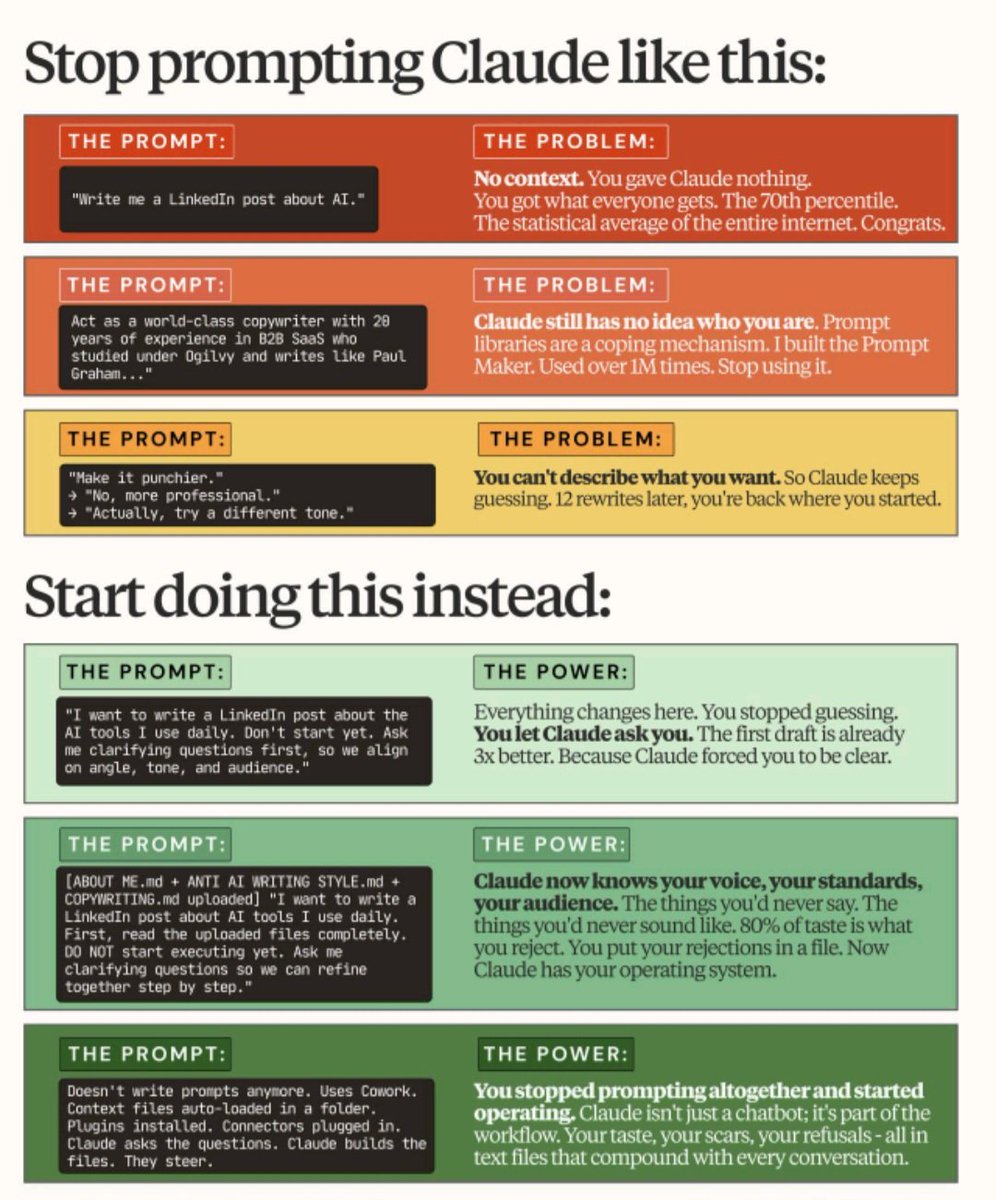
how to get Claude to ACTUALLY sound like you. step 1: paste 5-10 pieces of your own writing into a Project. step 2: add this to your system prompt: "study these samples. match my voice in every response." step 3: before Claude writes anything, say this: "ask me questions until you understand exactly what I'm trying to say. don't write anything yet." step 4: answer the questions. step 5: let it write. the interview step is the unlock. most people skip it and wonder why the output sounds like everyone else's. it works because most generic output isn't a writing problem. it's a thinking problem. the questions force you to actually know what you want to say. the prompt costs nothing. three minutes. changes everything.


@0xlelouch_ ·
90% of AI engineering in 2026 is boring engineering, applied to flaky probabilistic systems. Master these 10: 1) Evals as tests: versioned datasets + pass/fail rubrics, run in CI so model changes don’t ship silently. 2) Model routing: pick small vs big models by intent/complexity, with a hard latency and cost budget per request. 3) Context engineering: retrieval quality beats prompts; dedupe chunks, track sources, cap tokens, handle stale docs. 4) Structured outputs: JSON schemas, tool contracts, retries, and partial failure handling so downstream code stays deterministic. 5) Caching correctly: cache embeddings, retrieval results, and LLM responses with TTLs and cache keys that include model + prompt version. 6) Observability: traces for every call, token/cost metrics, and sample logs of prompt+inputs+outputs with redaction. 7) Debugging workflow: reproduce with a frozen prompt bundle (inputs, retrieved docs, tool responses, model id, temperature). 8) Security: prompt injection is input validation; sandbox tools, least privilege creds, allowlists, and outbound data controls. 9) Production tradeoffs: streaming vs batch, timeouts, backpressure, fallback behavior, and what happens when the provider is down. 10) Real mistakes: shipping without drift monitors, letting tools write to prod, and assuming one good demo equals a reliable feature.

@smratitiwa86867 ·
“Prompt engineering” is becoming the new “learn to type faster.” The people getting insane AI outputs in 2026 aren’t writing better prompts. They’re building better context systems. Most people still do this: “Act as a world-class copywriter…” “Write like Paul Graham…” “Make it more punchy…” Meanwhile power users are doing something completely different: • feeding AI their taste • storing brand voice in .md files • saving examples of what they HATE • creating reusable context folders • turning AI into an operating system, not a chatbot That’s the shift nobody is talking about. The gap between average AI users and top 1% users is no longer intelligence. It’s context infrastructure. Once your AI knows: — your tone — your standards — your audience — your company — your style violations — your past outputs …you stop “prompting.” You start operating. And honestly, this is why most AI content still sounds painfully generic. People are obsessing over prompts. The real leverage is persistent context. The people who understand this early will look unfairly productive in the next 12 months.

@Shruti_0810 ·
Anthropic just killed most $500 prompt-engineering courses. They released their internal Prompting Playbook for FREE. 33 minutes that reveal: • Why most prompts fail • How top AI teams test outputs • Edge cases, evals & human handoffs No prompt hacks. No fluff. Just how production AI actually works. 👇
 Watch video
@ManningBooks ·
As AI moves beyond demos, prompt engineering is becoming an engineering discipline. Not just experimentation. As @webmaxru put it: "...The field needed a shared vocabulary and a repeatable methodology..." and he emphasized that it's something that you can get from Prompt Engineering in Practice. It shows how to design, test, evaluate, and manage prompts using repeatable frameworks instead of one-off techniques. Learn more: https://t.co/fDFF0BK9Yw


@sentient_agency ·
RIP prompt engineering ☠️ Anthropic's internal docs revealed the one technique their own engineers use on every single prompt. XML tags. Not for aesthetics. Because Claude's architecture literally processes tagged content differently than plain text. Here's what nobody tells you: When you write a prompt as one block, Claude has to infer where instructions end and context begins. Where examples stop and your actual question starts. That inference fails constantly. XML eliminates it entirely. <instructions> = what to do <context> = background, isolated from the task <examples> = reference only, never treated as commands <input> = your variable, separated from everything else Output consistency on complex prompts goes through the roof. Three things buried in their docs that nobody talks about: → Put your question LAST. Long documents up top, instructions in the middle, query at the bottom. Anthropic says this alone improves response quality up to 30% on multi-document tasks. → Always wrap examples in <example> tags. Without them, Claude sometimes blends your sample outputs into its instructions. With them, it treats them as reference, not directive. → For multiple docs, nest everything. <documents> → <document index="n"> → <document_content> inside each. Claude parses structure directly instead of guessing where one doc ends and another starts. You don't need better words in your prompts. You need better architecture around those words.


@aaliya_va ·
The quality of an AI output is often decided before you type the prompt. For the most part,the result you get is not dependent on the model,it is by the quality of your input. Give AI a vague topic and it will give you familiar ideas in clean sentences. provide it real material such as a founder’s belief, a customer conversation, an uncomfortable insight, a precise audience and it becomes far more useful. That is the difference between using AI as a content machine and using it as a thinking partner. Good prompting is not being overly complicated. It is knowing: Who is this for? What should they understand? What proof or context makes it true? What should this never sound like? Clarity is the real prompt engineering skill.


@pauliusztin_ ·
One of the hardest parts of working with AI agents is knowing how explicit you need to be. Give the model overly detailed instructions and you: Waste tokens Add latency Restrict how it solves the problem Potentially make performance worse Give it too little context and the opposite happens: It fills gaps with assumptions Misses important constraints Hallucinates requirements Goes in the wrong direction And as models improve, that balance keeps changing. Instructions that were necessary six months ago may now be redundant. A workflow that once needed 20 explicit steps may perform better with five clear constraints and more freedom. This is why I think prompt design should be treated as an optimization problem rather than a writing exercise. But instruction length is only one part of the problem. The other is how you plan with the model. I find it useful to think about planning across four dimensions: 1/ Known knowns The things you already understand. Your: Goal. Constraints. Desired outcome. These should be stated clearly. 2/ Known unknowns The things you know you need to investigate. For example: Which framework should we use? What are the security requirements? Which trade-offs matter most? The model can research and help resolve them. 3/ Unknown knowns The things the model may already understand without you explaining them. Many engineers over-prompt here... They restate standard engineering practices, common APIs, or obvious implementation details that are already baked into the model's weights. The challenge is learning what you can safely omit. 4/ Unknown unknowns The blind spots neither you nor the initial plan has identified. This is where the model becomes most valuable. Ask it to: Challenge your assumptions Find missing requirements Surface edge cases Identify contradictions Ask questions you haven't considered A good planning process should not be: Human writes plan → Model implements it. It should be collaborative: Human explains intent. Model interrogates the idea. Both refine the plan against a metric Only then does implementation begin. This is the difference between prompting an agent and cooperating with one. And because the right level of detail changes across models and tasks, intuition alone isn't enough. You need evals. The goal is to provide the least amount of instruction necessary for the model to do the job well. P.S. Which of the four categories do you struggle with the most?


@NainsiDwiv50980 ·
The biggest AI infrastructure bug isn't your model. It's that nobody knows where the prompt lives. I've opened AI repos where the production prompt was sitting inside a Slack DM from four months ago. Not in Git. Not in the repo. Not even documented. Someone literally had to search chat history to deploy a fix. That's how surprisingly many AI projects operate. The solution isn't another framework. It's a boring folder structure. ai-project/ ├── prompts/ ├── data/ ├── agents/ └── evals/ prompts/ Every system prompt Every task prompt Every tool prompt Real files Versioned in Git If your prompts aren't code they're institutional memory waiting to disappear. data/ Separate raw/ from processed/ The first question after every quality regression is "What changed in the inputs" Without clean boundaries you never know. agents/ Keep configs Skills Tools Permissions Everything that defines behavior belongs here Otherwise every agent slowly becomes tribal knowledge. evals/ This is the folder almost everyone skips. Tests Traces Scorecards Without evaluations you don't have an AI system You have a demo that happened to work once. None of these folders improve GPT Claude Gemini Or any model. They improve something much more valuable. Reproducibility. Debugging. Handoffs. Compliance. Six months later your future self will thank you far more than a slightly better prompt ever will. AI teams don't usually fail because the model was weak. They fail because nobody can explain how the system actually works. Prompts as code feels obvious today. I'm not convinced it's enough five years from now. Does the prompt layer eventually become its own engineering discipline outside the repo? Or does Git remain the source of truth?


@aaditsh ·
Prompt engineering is overrated. My 4-word prompt ("Summarize my action items") works better than the 200-word ones I used to write. Took me a bit to realize why. Granola was feeding my meeting notes into Claude. I didn't have to explain anything. It already knew everything. Turns out rich context matters more than how you ask.
@sentient_agency ·
THE BEST PROMPT-ENGINEERING COURSE ON EARTH IS FREE, AND IT'S JUST THE LEAKED INSTRUCTIONS BEHIND EVERY MAJOR AI it's a github repo called system_prompts_leaks, sitting at 45,000 stars. everyone's paying for "master prompting" courses. meanwhile the actual gold is right here: the real, hidden prompts that OpenAI, Anthropic, Google, and xAI wrote to control their own models. you want to know how to make an AI behave? read how the people who built it told it to behave. > the full system prompts for Claude, ChatGPT 5.5, Gemini, Grok, Perplexity > how they structure rules, refusals, tone, and formatting, in their own words > the coding-agent prompts behind Cursor, Copilot, and Codex > diffs between model versions so you see what gets tightened release to release the leak trick itself teaches you something. these prompts mostly came out by simply asking the model to repeat its instructions back, which tells you a lot about how fragile the "hidden" layer really is. it's legit enough that the Washington Post covered it. CC0, public domain, 7,500 forks. copy anything, study anything, no strings. stop buying the course. read the source. repo: https://t.co/o6zLgz6NrO


@rubenhassid ·
New research challenges the core assumption of prompt engineering: Better prompt IS NOT equal to better result. The paper is called "Prompt Engineering Does NOT Universally Improve LLM Performance", and instead of testing prompts on simple benchmarks, it tests something harder: They tested GPT-4o, Gemini 1.5 Pro, and Llama 3.3 70B across 36 clinical case studies. The assumption was simple: More examples = better results. Better-matched examples = improved performance. Wrong on both counts. Prompt engineering helped the weakest tasks but actively hurt the strongest ones. ✓ No single technique worked universally across task types ✓ Curated examples performed no better than random ones ✓ CoT reasoning degraded some tasks that were already working ✓ Models that needed zero prompting got worse with more prompting Most striking result: Closely matched examples actually hurt performance by reducing contextual diversity. You've been told to find the most relevant examples for your prompts. This study says that it might be the problem. Why this matters: Copy-paste templates don't work. You have to test. Tune per task. And sometimes the answer is: don't prompt at all. The prompt engineering community today: ✦ Shares universal frameworks ✦ Assumes more effort = better results ✦ Rarely tests per task But the best prompting strategy is... less prompting? Read the full paper here: https://t.co/8Emy7T1cvz

@Suryanshti777 ·
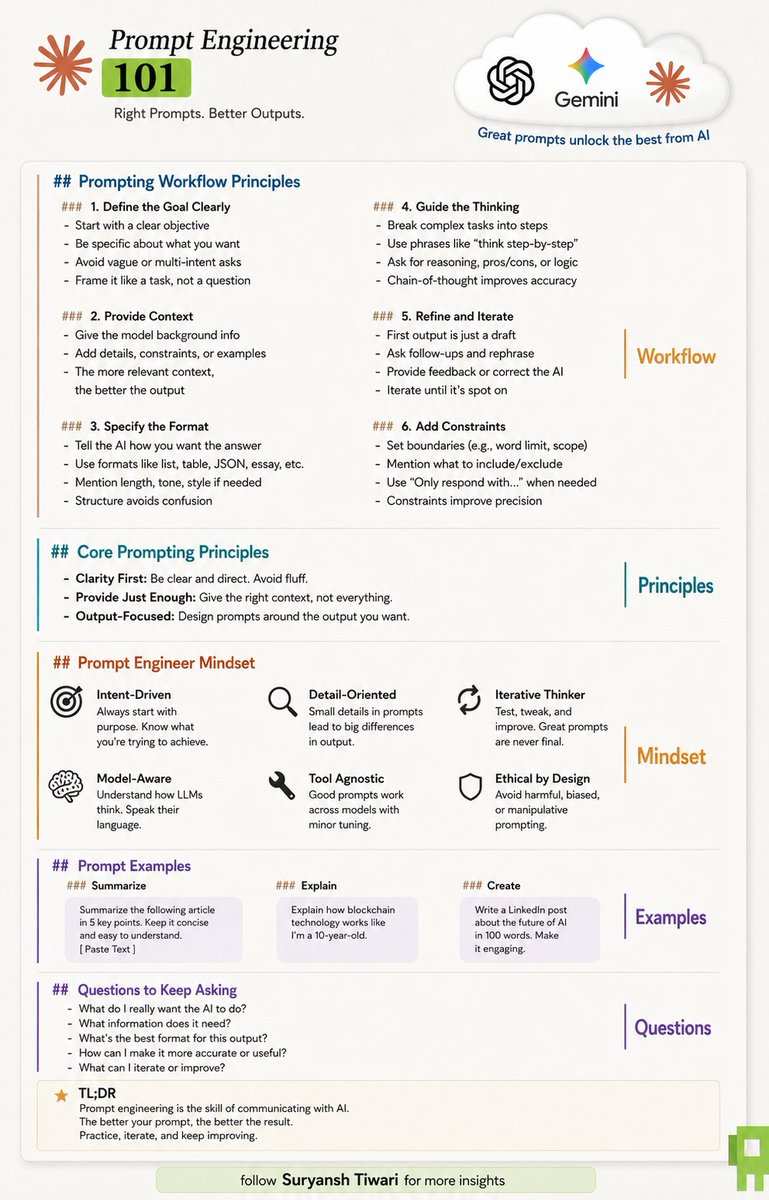
Most people think Prompt Engineering is about finding the perfect prompt. It's not. It's about removing ambiguity. And once you understand that, AI starts feeling a lot less like a chatbot and a lot more like a competent teammate. The reason most people get average outputs isn't because they're using the wrong model. It's because they're asking AI to fill in gaps it was never supposed to fill. Think about it. If you asked a new employee: "Make our marketing better." You wouldn't expect great work. There are too many unanswered questions. Better for who? Which platform? What's the goal? Who's the audience? What does success look like? Yet that's exactly how most people prompt AI. They give it a vague objective and hope for a specific result. The best prompt engineers do the opposite. They reduce uncertainty. They tell the model: → What they're trying to achieve → Why it matters → Who it's for → What constraints exist → What the final output should look like And suddenly the quality jumps. Not because the AI became smarter. Because the instructions became clearer. That's why prompt engineering isn't really a technical skill. It's a thinking skill. The process forces you to answer questions most people skip: • What exactly am I trying to get done? • What information is actually relevant? • What does a good outcome look like? • What should be included—and excluded? The clearer those answers become, the better AI performs. A simple framework: Goal → Context → Format → Constraints → Iterate That's the foundation behind almost every high-quality prompt you'll ever write. No secret prompt packs. No magic templates. No "ultimate ChatGPT hack." Just clarity. And that's what makes prompt engineering so valuable. Because the people who learn it aren't just becoming better at using AI. They're becoming better at communicating, planning, and thinking. AI simply exposes the difference. The future won't belong to people who use AI. It will belong to people who know how to direct it. And that starts with learning how to ask better questions. 🚀

@sandislonjsak ·
Prompt engineering was the easy version. Context engineering is the real thing. The model is only as useful as the repo context, constraints, examples and feedback loops you give it. “Do not make mistakes” is not a system.

@HarryTandy ·
prompt engineering like we knew it is dying a slow, inevitable death remember all those magic spells like “act like a 20-year expert,” “think step-by-step,” and walls of tags a mile long? in 2026, that stuff just looks like you’re trying to argue with a busted calculator models are way too smart for these crutches now we used to hack AI just to stop them from screwing up today, top LLMs get context and nuance better than some of your coworkers overloading a model with a rigid prompt usually just ties its hands instead of letting it solve the problem the winners will be the ones who can explain ideas clearly in plain human language - not the ones memorizing "secret words" the best prompt today is a simple, clear task - like you’re talking to a sharp intern if you’re still doing step-by-step for every little thing, your model is outdated or you’re underestimating basic logic bottom line: stop prompting, start talking deep understanding and clear thinking are way more valuable again than knowing every /imagine or --ar 16:9 trick so… you agree, or are you still hoarding your “golden prompt lists” in Notion?
 Watch video
@pbakaus ·
one of the valuable types of data in the future might be inspiration for agents. hear me out. i don’t mean inspiration as in “an idea for the agent to make”. i mean inspiration the agent uses to raise its ambition and divergent creativity. the only reliable way i found to raise the creativity and ambition of llms is to give them an idea what you’re after. yes you could interject and state “duh lol bro that’s just few shot prompting”, but few-shot prompts were meant to solve output shape (same as fine-tuning). and sure, you might already do some of this naturally in your prompting, but developing an intuition which exact combination of curated examples lead to superior results isn’t trivial. the datasets needed are creative sparks that force the agent to think bigger and better. if you tell an agent “design me an editorial yearly recap of my e-commerce platform”, I guarantee that it won’t arrive at an idea (and execution, but that’s a different problem) as powerful as shopify’s winter editions site. but if you give it enough truly extraordinary examples, it will raise its own ambition. crucially, these creative sparks don’t have to come from the same niche. in fact, it’s often better they don’t. but calibrating these datasets and how and when to employ them is not obvious, and itself requires human creativity llms do not possess (yet). i suspect this is a entire new job category we’ll soon see manifest, distinct from prompt engineering, or perhaps an evolution of it: ‘idea guys’, interior designers, curators, tastemakers, will find jobs in tech startups curating these creative spark datasets. there is so much value, and thus money to be made building these creative engines. exciting times!

@Layton_Gott ·
Anthropic's 1,585 line system prompt JUST leaked... And buried in it is the best prompt engineering lesson you can get for free right now. The way this prompt is built will change how you write instructions for any AI agent. People think these prompts are paragraphs of "you are a helpful, friendly assistant." Nope. Almost all of those 120,000 characters are tool schemas, search rules, and operating instructions. How to use its tools. When to search. How to handle different work. The identity comes dead last. The actual "who you are" line doesn't show up until line 1,351 out of 1,585. The model gets over a thousand lines of HOW to operate before a single line of WHO it is. That's backwards from how everyone writes their own. People open with "you're a senior engineer who writes clean code" then wonder why it ignores them. Flip it. Operation first. Identity last, if at all. Length was never the problem. Structure was. Everyone repeats "keep your CLAUDE.md short or the model ignores it." Meanwhile here's a 120k character prompt that works fine, because it's built like a reference doc where every section has one clear job. The model isn't drowning in it. It's organized. And the rules that HAVE to fire every time? Those shouldn't be soft text in a giant doc anyway. They go in hooks that actually run. The prompt is for structure. The hooks are for guarantees. So here's the move for your own agents: Write it like a spec. Tools and rules first, identity last. Organize so every section has a job instead of fighting over length. And put your non negotiables somewhere they execute, not somewhere the model can skim past. Anthropic leaking this was a disaster for them. For the rest of us it's the clearest look we've ever gotten at how the best in the world actually builds an agent.


@WhileTravelling ·
This morning at my fav coffee shop on Anfu lu in Shanghai, a young international couple was sitting next to me one of them talking to AI in voice mode. At one point, I heard him say, "Think step by step”. It made me smile. A year or two ago, prompt engineering was full of phrases like "think step by step”. At the time, it often improved reasoning. Today, that's largely obsolete. I use "think hard before answering" or "reason carefully before answering" when I'm working on research-heavy projects or really before analyzing different options, and I get much stronger results. AI can reason only with the information, assumptions, and context you give it. The quality of your questions, the constraints you provide, the sources you ask it to consider, and your ability to challenge its conclusions matter far more than any magic phrase. Prompt engineering is about learning how to think clearly, structure problems, and communicate them well. The best prompt is a well-formed mind asking a well-formed question.

@rohanpaul_ai ·
Longer prompts are not what image generators need. Text-to-image models seem less constrained by prompt length than by how clearly the prompt exposes the scene. This paper finds that text conditioning scales with image-grounded information, not token count. Across open-weight models, simply extending natural-language captions eventually made outputs worse than each model’s shortest-caption result. The authors replace prose with a structured prompt that separates the scene, individual objects, bounding boxes, depth, attributes, and relationships into named fields. The shift here is: prompt engineering for visual generation should optimize how explicitly visual variables are represented, then train the prompter to fill that representation well. The biggest prompt-engineering gain may come from how visual content is organized before it reaches the image model. – arxiv. org/abs/2607.29679 Title: "Scaling Properties of Text Conditioning in Visual Generation"


@sureshmohan_ ·
Everyone’s still optimizing prompts. I’m thinking about intent. A year ago, prompt engineering was a real skill. The right phrasing unlocked better outputs. Word choice mattered. You had to learn the model’s quirks. That’s becoming less true. Modern models are good enough at inference that they fill in gaps. They figure out what you meant, not just what you said. The delta between a well-crafted prompt and a sloppy one is shrinking fast. What doesn’t shrink is the delta between clear intent and vague intent. If you don’t know what outcome you actually want, no prompt saves you. The model will confidently produce something. It just won’t be the right thing. This matters even more for agents. When you’re executing tasks across tools, intent becomes architecture. What is the agent trying to achieve? What does success look like? What should it never do? That’s not a prompt. That’s a design decision. The builders who win won’t be the best prompt writers. They’ll be the ones who are clearest about what they actually want.

@MTSlive ·
Hebbia's George Sivulka on why good prompting means understanding the work so deeply you could explain it like Feynman: "For the majority of human tasks done day to day, you can already do almost all of them with AI. The issue is that the AI is not being prompted correctly. With almost a GPT-4 class model and the right prompting and the right process engineering, you could get to most of the valuable economic output of human beings." "People just haven't been able to crack the actual process engineering, the prompt engineering, and the change management required to get there. So we're waiting for new models, expecting them to do more, but it doesn't really matter if Claude Fable 5 can build a video game in the browser better than Claude Opus 5, or if the next great OpenAI model can create some weird WebGL simulation." "These aren't really as economically valuable tasks as the things you could probably already do if you had the right prompt engineering with a GPT-4 class model." "What does it take to prompt effectively? There's some element of practice, some element of wordsmithing. But it's really about sense-making, human beings so in command of the language, or so knowledgeable about a domain that they feel it in their bones, that they can explain very complicated concepts to a five-year-old." "Richard Feynman was one of those human beings. He could teach a quantum physics class to the average person and they'd actually learn something. It wasn't that he was a better physicist, it's that he understood the concepts and could sense-make around them so elegantly that he could portray his work simply." "So it's less about crafting a prompt as writing, and more about understanding the work so deeply that you feel it in your bones. The writing and the eloquence comes out of that." @gsivulka @hebbia
 Watch video
@isidoremiller ·
Turns out prompt engineering is alive and well, ~10% improvement on an analytics eval set for Sonnet 4.6 with an updated prompt. surprising tbh, most of the prompting i feel like I still do is behavioral / for the user's benefit, not for actual accuracy + outcomes


@MengxueBi ·
Four ways I’ve changed how I work with AI agents Over the past few months, my workflow with Codex and Claude Code has changed significantly. These four changes have given me the biggest productivity boost: 1️⃣ I speak to agents instead of typing prompts Most of my agent interactions now happen through voice—either live voice conversations or dictation with a local @openwhispr model that handles mixed Chinese and English extremely well. This becomes especially valuable when I have several agent sessions running in parallel. Voice removes the final bit of friction: moving my hands between windows, switching input languages, and carefully typing instructions. Speaking freely is also a better way to dump thoughts. I don’t need to organize everything in my head before I begin. I can start talking, discover what I think along the way, and let the agent extract structure from the mess. 2️⃣ I stopped overthinking “prompt engineering” Carefully engineered prompts—with personas, rigid formats, and perfectly defined steps—felt important last year. Today, that approach often feels outdated. Modern agents are surprisingly good at understanding unstructured context. Instead of spending time polishing a prompt, I give them more raw material: scattered thoughts, background documents, previous attempts, references, constraints, and the reasons behind the task. The more context I provide, the more useful surprises I get. Agents can often find connections and insights inside my own rambling that I hadn’t articulated clearly myself. So my current advice is simple: ramble first, structure later. Don’t let prompt engineering become another form of procrastination. 3️⃣ I communicate intent and reusable rules—not pixel-level fixes Instead of saying, “Move this element three pixels,” I explain: What feels wrong What outcome I’m trying to achieve Why the current solution isn’t working What direction I want the agent to explore What principle should apply across the entire project This is especially important for product designers and engineers. Repeatedly correcting isolated details teaches the agent almost nothing. Defining a reusable rule teaches it your taste and allows it to apply that preference everywhere. For example, don’t fix the spacing of ten cards individually. Define the spacing system and ask the agent to audit and update every relevant component. The goal is not to issue more instructions. It is to create rules that eliminate future instructions. 4️⃣ I use Plan Mode much less—and give agents more autonomy When I started using Claude Code four or five months ago, I used Plan Mode constantly. I read every plan before allowing the agent to continue. Now I probably use it once a day. Instead, I often use auto mode or bypass permissions so agents can keep working without waiting for me to click “Approve” at every step. That has dramatically reduced the time I spend staring at a session instead of doing something else. An important caveat: my work is mostly design exploration, storytelling, presentations, and app prototyping. I’m not working with sensitive data, production databases, security systems, or high-risk infrastructure. This level of autonomy is appropriate for my environment—not necessarily everyone’s. The quality of both Codex and Claude Code has also improved enough that I rarely need to review a text plan before work begins. If a task genuinely needs review, I use Lavish to turn the plan into a visual HTML artifact and leave feedback directly on it. 🌰In a nutshell, I’m spending less time operating the agent and more time communicating context, intention, and taste.


@Siddharth87 ·
Prediction: As companies move toward an agentic way of working, a new role will emerge, the context engineer. Here's the problem. You can spin up an agent in an afternoon. Give it some tools, write some instructions, point it at your data. It works. Kind of. But it doesn't know your business. It doesn't know that your biggest client hasn't used your product in 2 weeks. It doesn't know that your Q3 numbers look weird because you changed attribution models in July. It doesn't know that the "approved vendor list" in the shared drive is 18 months out of date. An agent without deep business context is just a fancy API wrapper. It can execute tasks but it can't make good decisions. And making good decisions is the whole point. Context isn't something you dump into a system once and forget about. It's a living thing. It needs to be actively curated, maintained, and evolved. Someone needs to ensure the agent always has the full picture. The people, the relationships, the history, the quirks, the unwritten rules. That's a context engineer. And it's going to become one of the most important roles in any company running AI agents at scale. Right now this work is being done accidentally. A developer adds some context to an agent prompt here, a manager updates a knowledge base there. But nobody owns it. Nobody's thinking about it holistically. The companies that figure out context engineering first will have agents that actually work. Everyone else will have expensive autocomplete.

@JustAnotherPM ·
I mass-produced 1000+ AI outputs last year. The ones that actually worked in production had one thing in common: the prompt barely mattered. The context did. Most teams obsess over prompt engineering. How you word the instruction. What few-shot examples to include. That is maybe 5% of what determines output quality. The other 95% is context engineering: what documents you retrieve, how you chunk them, what metadata you attach, what conversation history you include, and what you deliberately leave out. I spent 3 days tweaking a prompt for an AI feature. Rewording instructions, adjusting tone, adding examples. The outputs kept failing. Then I changed one thing: I restructured the context window. Fewer but more relevant documents, a short summary of the user's history, noise stripped out. Same prompt. Completely different results. This is why most AI products feel mid. Teams spend weeks perfecting prompts while feeding the model garbage context. Practical examples: 1. RAG systems: retrieving 20 chunks instead of the 3 most relevant ones kills output quality 2. Chat history: sending the entire conversation when only the last 4 turns matter adds confusion 3. System instructions: stuffing 2000 words of rules when 200 focused words perform better The best AI products I've used this year all share one pattern. Tiny prompts, obsessively curated context windows. Every token earns its place. Next time your AI output feels off, look at what the model sees before it generates. That is almost always where the problem lives.

@TDataScience ·
Learn how to detect hidden regressions in your prompts before they affect end-user outputs — @emmimalpa presents a comprehensive guide to prompt-engineering consistency and resilience. https://t.co/vA2reiyj59
Best Prompt Engineering tweets
Xholic studies what works in your niche, drafts posts in your voice and schedules them for the hours your audience is online.
No card needed · Nothing to cancel
Browse all tweet collectionsLive demo: no sign-up or login needed · takes about 2 minutes
Keep exploring