Hardware comparisons and throughput benchmarks
Real tok/s measurements and hardware tradeoffs across GPUs, Macs, AMD, laptops and edge boards, including VRAM vs bandwidth debates and buying guidance.
30%
Explore the best tweets about local LLMs, on-device AI, hardware, quantization, privacy, inference, and self-hosted model setups. Updated every two weeks.
Reproducible local-model setups, useful hardware comparisons, performance measurements, and privacy-focused workflows.
Original Xholic analysis
Across 50 posts from 38 creators, the Local LLMs conversation is largely supportive (76%) and positive (82%). Offline/privacy apps and hardware benchmarks each account for 30% of posts. Runtimes like llama.cpp and Ollama recur across many setups, and pointing coding agents at local endpoints is a recurring workflow. 82% of posts carry media, with a median score of 50.27 versus 1.349 for text-only posts. A few outliers, led by two Project N.O.M.A.D. announcements, sit far above the 36.4 median.
82% of posts
All-time engagement
38% of posts
Published in 90 days
Conversation map
Real tok/s measurements and hardware tradeoffs across GPUs, Macs, AMD, laptops and edge boards, including VRAM vs bandwidth debates and buying guidance.
30%
Self-hosted projects replacing cloud services: offline survival servers, local deep research and search, OCR, smart home control and on-prem business workflows.
30%
Curated runtimes and frontends like llama.cpp, Ollama, LM Studio, llamafile, Open WebUI and Unsloth Studio, plus reproducible server configs and setup steps.
28%
Pointing Claude Code, Hermes, OpenHands, Droid and similar agent harnesses at local llama.cpp, Ollama or MLX endpoints for private, cost-free agentic coding.
26%
Arguments about ownership, cognitive security and the local AI movement, balanced against reports of latency, context overhead and practical shortcomings.
18%
Techniques like APEX MoE quants, TurboQuant, KV cache quantization, expert offloading and flash streaming to fit bigger models or longer context in limited memory.
14%
Sub-4B and tiny models running on phones, microcontroller boards and edge devices for tool calling, coding and transcription.
12%
Tools and guides such as llmfit and whichllm that scan hardware and recommend which models and quantizations will actually run well.
8%
Tone and stance
Performance benchmark
Posts with media make up 82% of this collection. Their median all-time score is 50.3, compared with 1.35 for text-only posts.
Format mix
Consensus and debate
Shared view
llama.cpp or Ollama recur across many setups in the set. They show up in offline servers, curated repo lists and beginner guides, often alongside LM Studio and Open WebUI. Runtimes and app stacks form a 28% theme.
Shared view
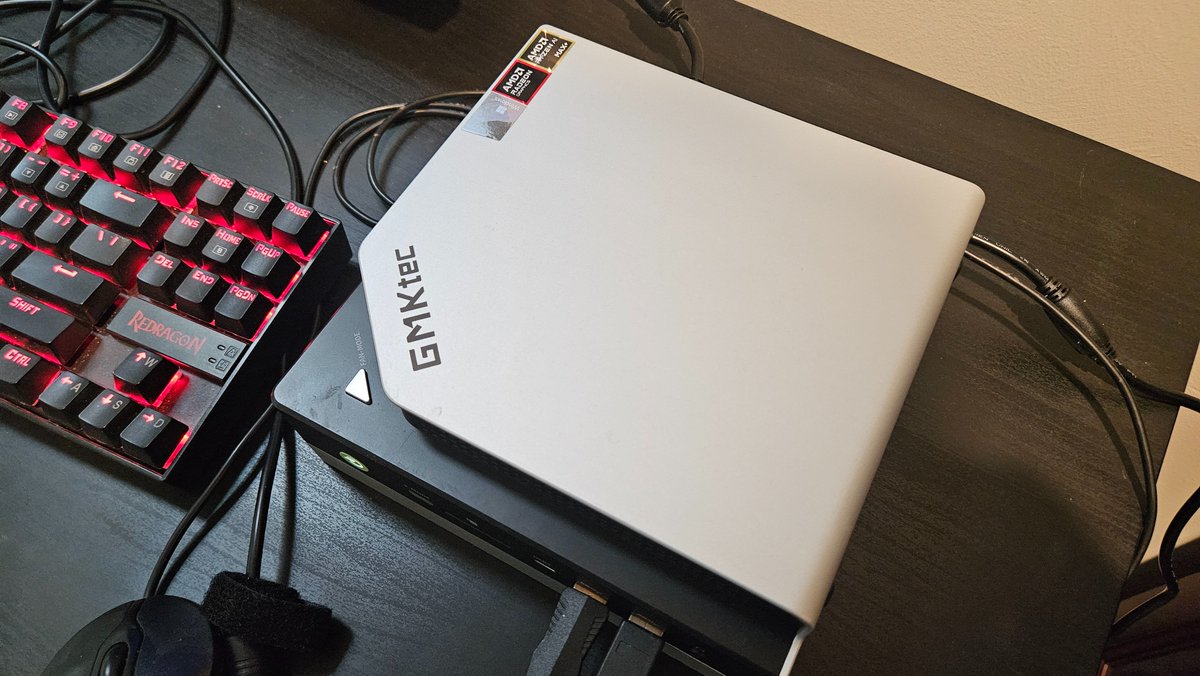
Several posts describe pointing Claude Code, Hermes or OpenHands at local llama.cpp servers, via environment variables or a proxy. They frame this as private and free of API costs. Graham Neubig reported a working OpenHands setup with Qwen3.5 30B A3B on a GMKtek AMD Ryzen box.
Shared view
Offline and privacy-first apps make up a 30% theme. Examples include a survival server, a local deep research agent, a Perplexity-style search clone, OCR and smart-home control. A common pitch is that data never leaves the machine.
Open debate
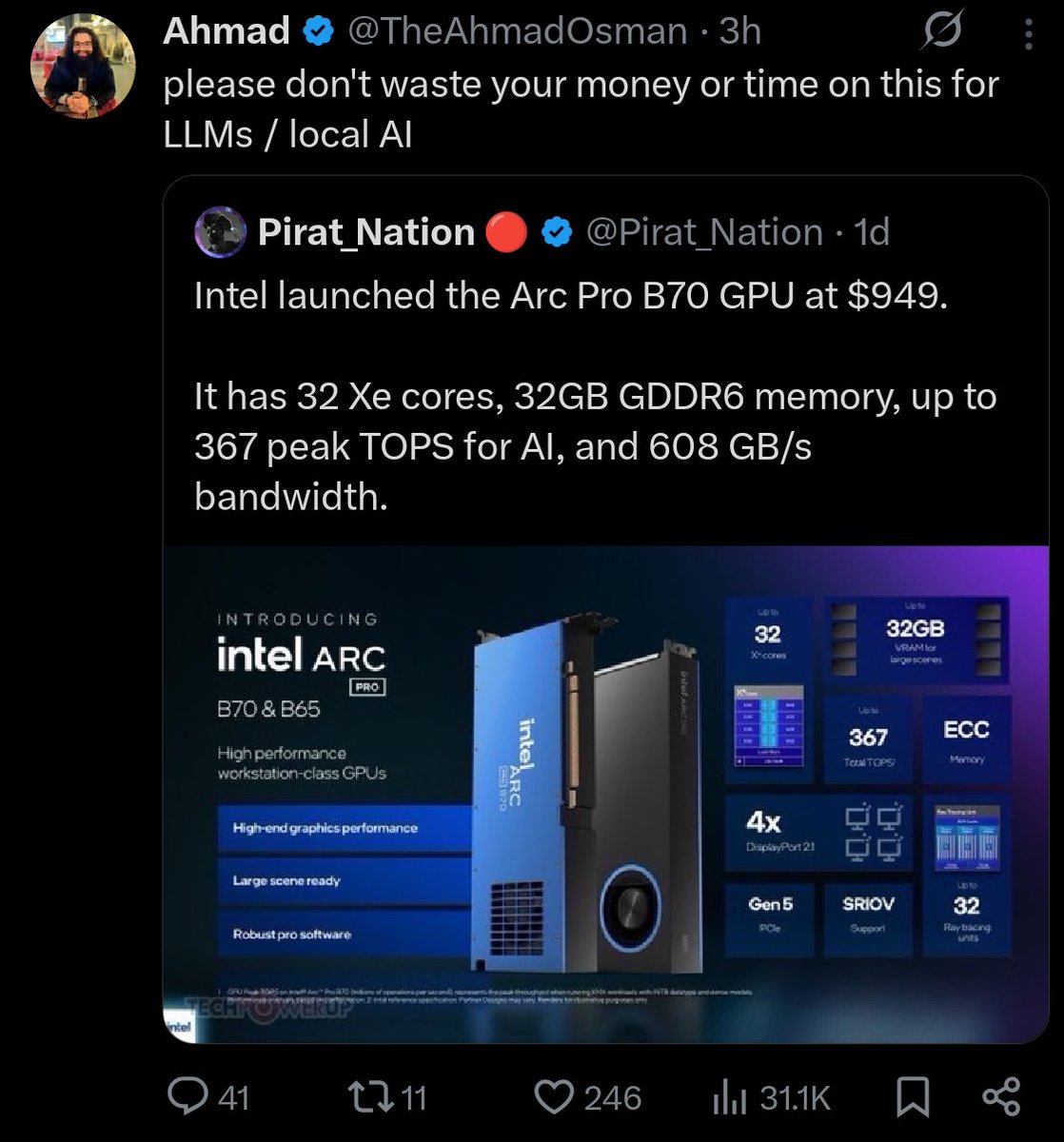
Ahmad argues that memory bandwidth, interconnect and software maturity matter more than VRAM. He calls a cheap 32GB Intel card a 'debugging project'. CNX Software, by contrast, cites a Qwen 3.5 9B test in which a system with a $260 Intel Arc card performed as well as $4,000 computers.
Open debate
Georgi Gerganov says useful local agentic workflows are now a reality. Indu Tripathi relays a case where someone waited 13 minutes for one generic sentence, blaming 20,000+ tokens of agent system context. Tech with Mak relays the Unsloth guide's note that Claude Code's attribution header breaks KV caching unless settings.json is edited.
Open debate
Greg Isenberg says cloud AI should remain the default for most things. He positions local AI for businesses handling sensitive data. In his cognitive-security post, Ahmad says his default advice is to run local LLMs.
What performs
Posts with media make up 82% of the set. Their median all-time score is 50.27, against 1.349 for text-only posts.
Nav Toor's Project N.O.M.A.D. post scored 14311.74, about 393 times the 36.4 median. Alex Prompter's post on the same project scored 8059.4, about 221 times the median. Both use an offline-survival framing.
Tutorials have the highest format median, 153.44, across only 6 posts. Case studies sit at 7.19 across 8 posts. Quantization and memory optimization has the highest theme median, 168.702, across 7 posts. The samples are small.
Kyle Hessling posted full llama-server flags for 1M context on an RTX 5090 at 17 tps, scoring 8.143. Vectro's 52.6 tok/sec Gemma 4 E2B run on an RTX 3080 + 3070, with commands referenced in the comments, scored 6.712. The hardware-benchmark theme median is 15.139.
Georgi Gerganov showed Gemma 4 26B A4B Q8_0 at 300t/s on an M2 Ultra with prompt speculative decoding. Vaishnavi relays a 122B MacBook setup that went from 30 to 65 tok/s with a native MLX server. Rimsha Bhardwaj relays a project running gpt-oss-120b at 2.2 tok/s on a 12GB phone via expert streaming.
Statistical standouts
Creator landscape
The five most represented creators account for 20% of the selected posts.
1. Akshay 🚀
@akshay_pachaar
2 posts
2. Georgi Gerganov
@ggerganov
2 posts
3. Hasan Toor
@hasantoxr
2 posts
4. Nav Toor
@heynavtoor
2 posts
5. Ihtesham Ali
@ihteshamali
2 posts
6. Julian Goldie SEO
@JulianGoldieSEO
2 posts
There are 38 creators across 50 posts, and no creator has more than 2 posts. The top five placements account for a 20% share.
Georgi Gerganov has a median score of 508.83 across 2 posts, pairing a live benchmark with a reflective essay. Ettore Di Giacinto published APEX MoE quantization with comparative benchmarks against Unsloth quants.
Nav Toor has a median score of 7188.26, heavily skewed by one outlier post. Ihtesham Ali has a median of 444.71. Both post announcement-style threads about open-source projects. Julian Goldie SEO's two posts, a setup guide and an Ollama update post, have a median of 1.35.
Since the previous snapshot
Themes, sentiment, stance, and post format are classified per tweet. All counts, shares, medians, creator concentration, freshness, and performance comparisons are then calculated directly from the published snapshot.
Xholic's all-time score compares engagement while accounting for reach, post age, and creator consistency. It is used for relative comparisons within this collection.
This report analyzes the exact 50-post snapshot shown below. AI identifies editorial categories and drafts explanations; all statistics are calculated from the snapshot, and every narrative claim is checked against cited posts before publication.
Best Local LLMs tweets
Ranked 01–50

@heynavtoor ·
🚨Someone just open sourced a computer that works when the entire internet goes down. It's called Project N.O.M.A.D. A self-contained offline survival server with AI, Wikipedia, maps, medical references, and full education courses. No internet. No cloud. No subscription. It just works. Here's what's packed inside: → A local AI assistant powered by Ollama (works fully offline) → All of Wikipedia, downloadable and searchable → Offline maps of any region you choose → Medical references and survival guides → Full Khan Academy courses with progress tracking → Encryption and data analysis tools via CyberChef → Document upload with semantic search (local RAG) Here's the wildest part: A solar panel, a battery, a mini PC, and a WiFi access point. That's it. That's your entire off-grid knowledge station. 15 to 65 watts of power. Works from a cabin, an RV, a sailboat, or a bunker. Companies sell "prepper drives" with static PDFs for $185. This gives you a full AI brain, an entire encyclopedia, and real courses for free. One command to install. 100% Open Source. Apache 2.0 License.

@alex_prompter ·
🚨 BREAKING: Someone just open-sourced a full offline survival computer with AI, Wikipedia, and maps built in. Project N.O.M.A.D. is an open-source offline survival computer. Self-contained. Zero internet required after install. Zero telemetry. Everything runs locally on your hardware. What it includes: → Full Wikipedia archives via Kiwix → Offline maps via OpenStreetMap → Local AI models via Ollama + Open WebUI → Calculators, reference tools, resource libraries → A management UI to control everything from a browser One curl command installs the entire system on any Debian-based machine. Runs headless as a server so any device on your local network can access it. Minimum specs to run the base system: dual-core processor, 4GB RAM, 5GB storage. To run local LLMs offline, you want 32GB RAM and an NVIDIA RTX 3060 or better. No accounts. No authentication by default. No cloud dependency. No phone-home behavior. Built to function when nothing else does. The grid, the cloud, the API you depend on. None of it is guaranteed. The people building local-first systems right now are the ones who won’t be asking for help when access disappears.

@techNmak ·
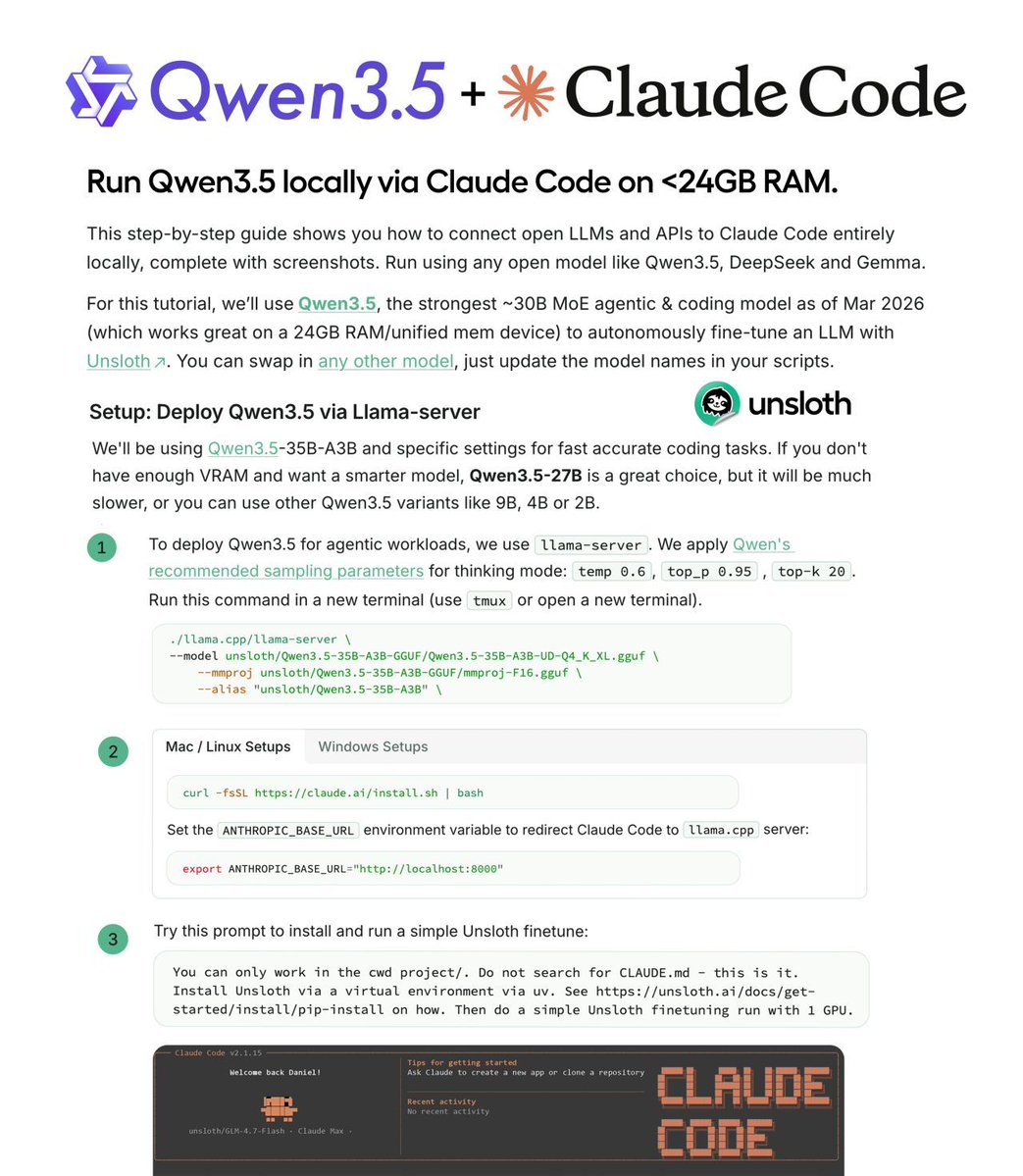
Claude Code can run entirely on your local GPU now. Unsloth AI published the complete guide. The setup itself is straightforward - llama.cpp serves Qwen3.5 or GLM-4.7-Flash, one environment variable redirects Claude Code to localhost. But the guide is valuable because of what it explains beyond the setup: Why local inference feels impossibly slow: Claude Code adds an attribution header that breaks KV caching. Every request recomputes the full context. The fix requires editing settings.json - export doesn't work. Why Qwen3.5 outputs seem off: f16 KV cache degrades accuracy, and it's llama.cpp's default. Multiple reports confirm this. Use q8_0 or bf16 instead. Why responses take forever: Thinking mode is great for reasoning but slow for agentic tasks. The guide shows how to disable it. The proof it all works: Claude Code autonomously fine-tuning a model with Unsloth. Start to finish. No API dependency. Fits on 24GB. RTX 4090, Mac unified memory.

@ihteshamali ·
This feels illegal. Someone built a fully local deep research agent that writes its own search queries, hunts down sources, finds the gaps in its own answers, then keeps searching until it's done. It's called Local Deep Researcher. Drop in any Ollama model like DeepSeek, Llama, Qwen and give it a topic. It handles everything: → Generates the search query → Scrapes the web → Summarizes what it found → Identifies what it missed → Searches again to fill the gaps → Outputs a full markdown report with citations You set how many research loops it runs. The whole thing costs $0 to operate after setup. Perplexity Pro is $20/month for this exact workflow. 8,500 developers already starred it. 100% Open Source. MIT License.
 Watch video
@ggerganov ·
Let me demonstrate the true power of llama.cpp: - Running on Mac Studio M2 Ultra (3 years old) - Gemma 4 26B A4B Q8_0 (full quality) - Built-in WebUI (ships with llama.cpp) - MCP support out of the box (web-search, HF, github, etc.) - Prompt speculative decoding The result: 300t/s (realtime video)
 Watch video
@ggerganov ·
llama.cpp at 100k stars now that 90% of the code worldwide is being written by AI agents, I predict that within 3-6 months, 90% of all AI agents will be running locally with llama.cpp 😄 Jokes aside, I am going to use this small milestone as an opportunity to reflect a bit on the project and the state of AI from the perspective of local applications. There is a lot to say and discuss and yet it feels less and less important to try to make a point. Opinions about viability of local LLMs are strongly polarized, details are overlooked, the scientific approach is lacking. Arguments are predominantly based on vibes and hype waves. One thing is clear though - local LLMs are used more and more. I expect this trend to continue and likely 2026 will end up being one of the most important years for the local AI movement. I admit that I didn't expect the agentic era to come so quickly to the local LLM space. One year ago, the available models were too computationally expensive for doing long-context tasks. There wasn't an obvious path towards meaningful agentic applications. The memory and compute requirements were huge. Last summer, with the release of gpt-oss, things started to change. It was the first time we saw a glimpse of tool calling that actually works well within the resource constraints of our daily devices. Later in the year, even better models were released and by now, useful local agentic workflows are a reality. Comparing local vs hosted capabilities at a given moment of time is pointless. To try put things into perspective: - We don't need frontier intelligence to automate searches and sending emails - We don't need trillion parameter models to be able to summarize articles or technical documents - We don't need massive GPU data centers to control our home appliances or turn the lights off in the garage I believe that there is a certain level of intelligence we as humans can comprehend and meaningfully utilize to improve our working process. Beyond that level, access to more intelligence becomes unnecessary at best and counterproductive at worst. I also believe that that level of useful artificial intelligence is completely within reach locally and it has always been just a matter of implementing the right software stack to bring it to the end user. With llama.cpp, I am confident that we continue to be on the right track of building that software stack! The llama.cpp project is going stronger than ever. With more than 1500 contributors, the project keeps growing steadily. From technical point of view, I think that llama.cpp + ggml is the only solution that actually makes sense. That is, the software stack must run efficiently on every possible device, hardware and operating system. The technology is too important to be vendor-locked. It has to be developed in the open, by the community, together with the independent hardware vendors. This is the only right way to build something that will truly make a difference in the long run. I won't try to convince you about what is currently and will be possible with local AI. We will just continue to build as usual. I am confident that after the smoke clears and we look objectively at what we have built together, the benefits will be obvious to everyone. Big shoutout to all llama.cpp maintainers. I feel extremely lucky to be able to work together with so many talented contributors. Every day I learn something new and I feel there is so much more cool stuff that we are going to build. Also, I am really thankful that the project continues to have reliable partners to support it! Cheers!


@Akashi203 ·
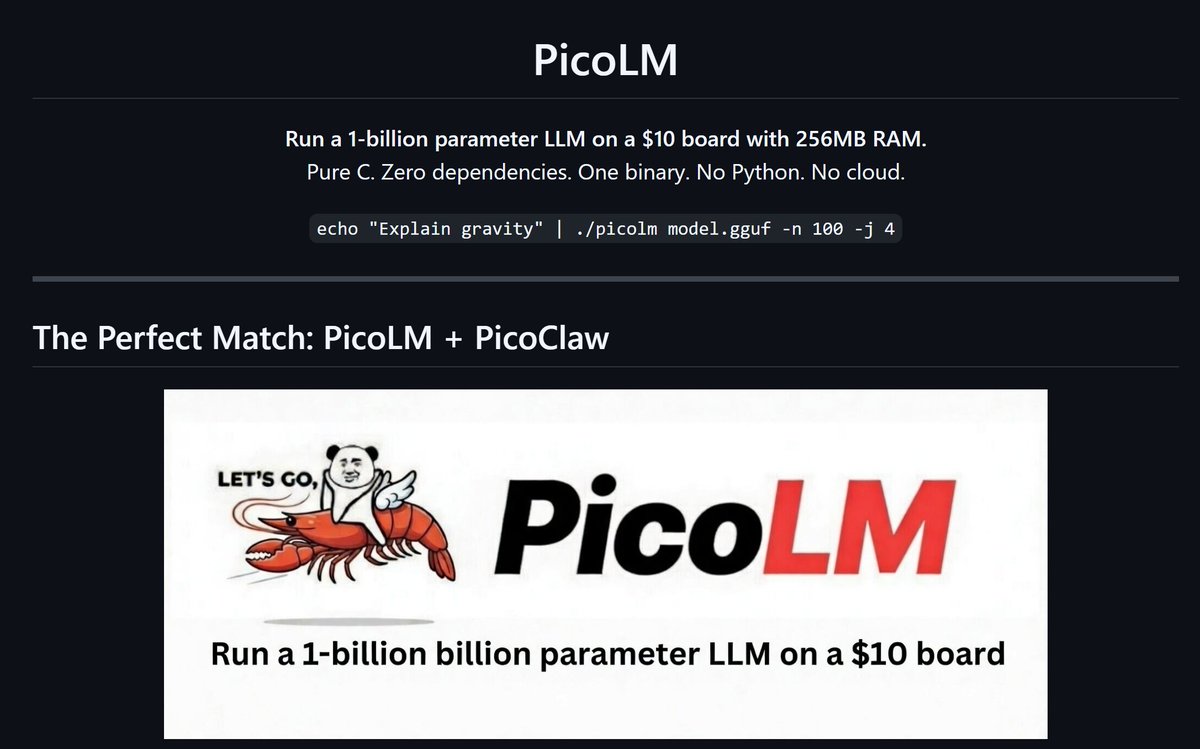
i built a local LLM inference engine that runs a 1B parameter model on a $10 board with 256mb ram. model sits on the sd card, streams one layer at a time through 45mb of ram You can use it as local LLM model backend for PicoClaw no python no cloud no api keys 80kb binary | pure c | zero dependencies github: https://t.co/0fe4ey4yz7

@DataChaz ·
STOP DOWNLOADING LLMS YOUR MACHINE WAS NEVER GOING TO RUN llmfit is an open-source tool that scans your hardware first, then tells you exactly which models will actually run well on your setup. It inspects: → RAM → CPU → GPU(s) → VRAM / unified memory Then it scores every model across four dimensions: → quality, based on parameter count and quantization → speed, estimating tokens per second for your exact backend → fit, matching memory usage to your hardware → context window support for your use case Each model then gets a clear label: Perfect, Good, Marginal, or Too Tight. It also picks the best quantization automatically, stepping down until something fits instead of leaving you to guess GGUF sizes by hand. Coverage is broad too! 100's of models from Meta, Mistral, Qwen, DeepSeek, and more. It works with Ollama, llama.cpp, MLX, and LM Studio out of the box. And that’s not even it! There’s also a lightweight TUI, a web dashboard, and REST API endpoints if you want to plug it into orchestrators or deployment pipelines. This should be step zero before every local model download :) 100% free and open-source. macOS, Linux, and Windows. Repo in 🧵↓
 Watch video
@akshay_pachaar ·
Run Claude Code using local LLMs for FREE. No API costs. No data leaving your machine. Here's how it works: Claude Code lets you swap its backend via a single env variable. Point `ANTHROPIC_BASE_URL` to a local llama.cpp server, and it'll route all requests to whatever model you're running locally. The Unsloth team put together a step-by-step guide for this where you can run Claude code using Qwen3.5 It covers everything from model download to server setup to running Claude Code. The trick is serving your model on port 8001 via llama-server, then setting two env vars: `ANTHROPIC_BASE_URL` and a dummy `ANTHROPIC_API_KEY`. That's it. Claude Code thinks it's talking to Anthropic's API. If you don't want to pay per token for every agentic loop and want fast, private, cost-free coding runs, this is exactly what you're looking for. Link to the guide in the next tweet


@gregisenberg ·
Local AI 101: open models, Hugging Face, and businesses to build (38 min masterclass) I still think cloud AI is the default for most things, and honestly it should be, the frontier models are the strongest and easiest to use. But something shifted in the last 4-5 months. You can now run genuinely good open models directly on your own laptop, or even your phone. And once you actually try it, it changes how you think about what AI is even for. LOCAL AI, CLEARLY EXPLAINED: 1. The model is the brain doing the thinking. Gemma, Llama, Mistral, and Qwen are the main families, and each is better at different things, some at reasoning, some at coding, some small enough to run on a phone. 2. Hugging Face is the warehouse where you find them. You go there to see what each model is good at, check the license, and grab the compressed versions that run on a normal computer. 3. The software is what runs the model on your machine. Start with LM Studio if you're not technical, it feels like a normal app where you search, download, and start chatting. Ollama is the one you reach for when you want to plug a model into your own apps. 4. The workflow is the actual product you build on top of it all. That's what I'm ideating around for some businesses to create. I think local AI just made a specific kind of business way easier to start. Find an industry that: 1. Sits on sensitive data they'd never paste into ChatGPT 2. Does the same review over and over 3. Runs on software from 2003 Then build a local AI tool that does that review on their own machine, so the data never leaves the building! Take home health agencies. Nurses write visit notes all day, and if a note is missing a detail, the billing gets denied or the audit flags it. Here's how I'd start: 1. Find 5 small agencies. Offer to review a batch of their notes for them. 2. Run the notes through Gemma locally (free, private, no cloud). Read every output yourself. 3. Write down the 20 issues that keep showing up: missing vitals, vague med changes, notes that don't support the billed level. 4. That list of 20 is your checklist. The checklist is the product. 5. Turn it into a local desktop app that flags those 20 things before a note gets submitted. You just went from a service anyone could offer to a product nobody else has, and you learned exactly what to build by doing the work by hand first. Same recipe works for restoration contractors (draft the damage report on-site before the tech leaves) and wealth advisors (catch the compliance landmine in a client email before it sends). Basically the framework is sensitive data, repeated review, ancient software. I think there are tons of businesses like this! Almost none of it clicked for me until I actually started using local AI. So if you take one thing from this, go run a model on your own machine once. Also a fun thing to try with your friends. Feel free to send this to a friend. The episode is live for free on @startupideaspod (thanks to Google for sponsoring today's episode and supporting local AI) I feel like local AI one of those things you need to try for it to really click. Run one model on your own machine and you'll see what I mean! I go way deeper in the full 38 minute masterclass, the models, the setup, and the businesses to build. Link below. LINK TO WATCH: https://t.co/ebGjknj2yq OR WATCH BELOW ON X What do you think of local AI?
 Watch video
@hasantoxr ·
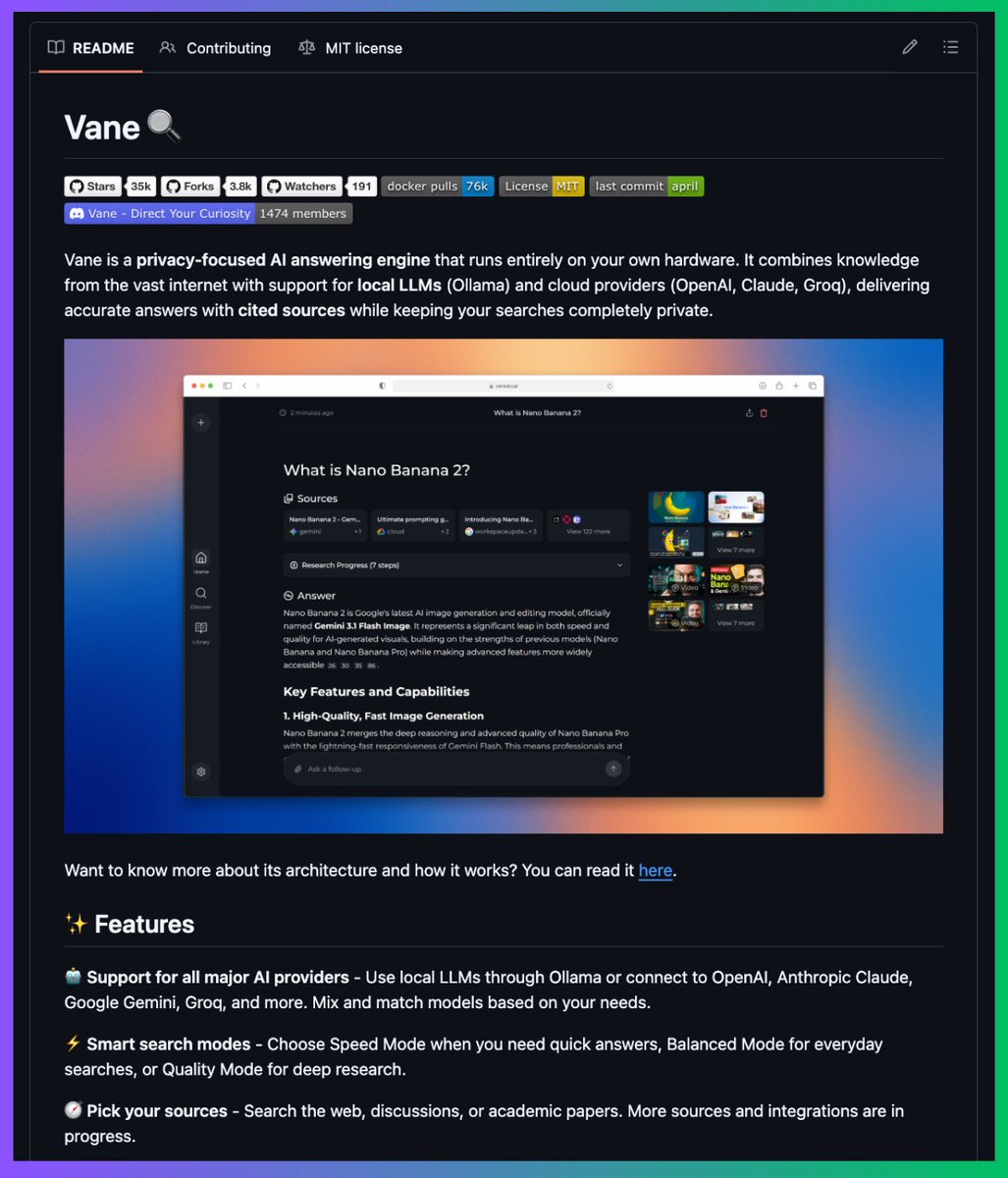
A team in San Francisco killed Perplexity's $20/month subscription. It's called Vane. You get AI-powered search with cited sources, follow-up questions, image and video search, and focus modes for academic papers, Reddit, YouTube, and Wolfram Alpha, running entirely on your own machine. Here's how it works. Vane is an open-source clone of Perplexity built on top of SearxNG which is a meta-search engine that pulls results from Google, Bing, DuckDuckGo, Brave and 70+ other sources without tracking the user. You plug in any LLM you want including OpenAI, Anthropic, Groq or local models through Ollama and it answers your questions with real citations pulled from the live web in real time. The entire stack can run 100% locally with Llama 3 and SearxNG on your own hardware which means zero API calls going out and zero data ever leaving your machine. → No $20/month Pro subscription holding the good models hostage → No query limits cutting you off mid-research → No tracking and no profile being built from your searches → Local mode with Ollama supporting Llama, Mistral, Qwen and anything else you throw at it → Focus modes that narrow the search to Academic papers, YouTube, Reddit, Wolfram Alpha or Writing → Image and video search built directly into the interface → Copilot mode that breaks one question into multi-step research and synthesizes the findings Perplexity charges $20 a month for Pro and trains its ranking algorithm on every query you send them. Their entire business model assumes you would never spend an evening with a Docker compose file and a local LLM. Vane runs in one container and SearxNG runs in another and the whole thing points at a Llama 3 model running on your laptop with no internet account involved anywhere in the chain. MIT License. 100% Opensource. https://t.co/rg17qIjsH3

@aiDotEngineer ·
TLMs: Tiny LLMs and Agents on Edge Devices with @cormacb https://t.co/u0fHD7j5kZ Function Gemma ships at 270 million parameters and runs nearly 2,000 tokens per second prefill on a Pixel 7. Out of the box, it hits 46% accuracy on a fixed set of app intents. Fine tune on a synthetically generated dataset and that clears 90% on eight of ten functions. Cormac walks through the two paths developers have for on device AI: a skill harness built on Gemma 4 with a restaurant roulette demo running fully on device. Then Eloquent, a production transcription app built by chaining two sub billion parameter models together. cc @osanseviero


@mudler_it ·
I've just released APEX (Adaptive Precision for EXpert Models): a novel MoE quantization technique that outperforms @UnslothAI Dynamic 2.0 on accuracy while being 2x smaller for MoE architectures. Benchmarked on Qwen3.5-35B-A3B, but the method applies to any MoE model. Half the size of Q8. Perplexity comparable to F16. Works with stock @ggml_org's llama.cpp. Open source (of course!), with ❤️ from the @LocalAI_API team. 👇Links to the model, repository and benchmarks below! (+ Bonus TurboQuant benchmarks with @no_stp_on_snek's TQ+! )


@witcheer ·
Google TurboQuant maybe reduced my LLM memory by 6x. running 70B models on my Mac Mini could be real. I have Mac Mini M4. memory was always the issue, 16GB meant 30B models were pushing it, 70B were out of the question. TurboQuant changes that math. 6x memory reduction without quality loss. someone already ran Qwen 3.5-9B on a MacAir using the llama.cpp patch. 6x memory reduction means I could fit a 120B parameter model in the same RAM that currently fits a 20B. or run multiple agents in parallel. I haven't applied the patch yet. experimental, production workflows, not worth breaking things. but I'm watching community validation closely. does TurboQuant work with quantised models? most local inference runs 4-bit. if anyone's tested TurboQuant + GGUF on Mac Silicon, I am interested in the numbers.


@0xSero ·
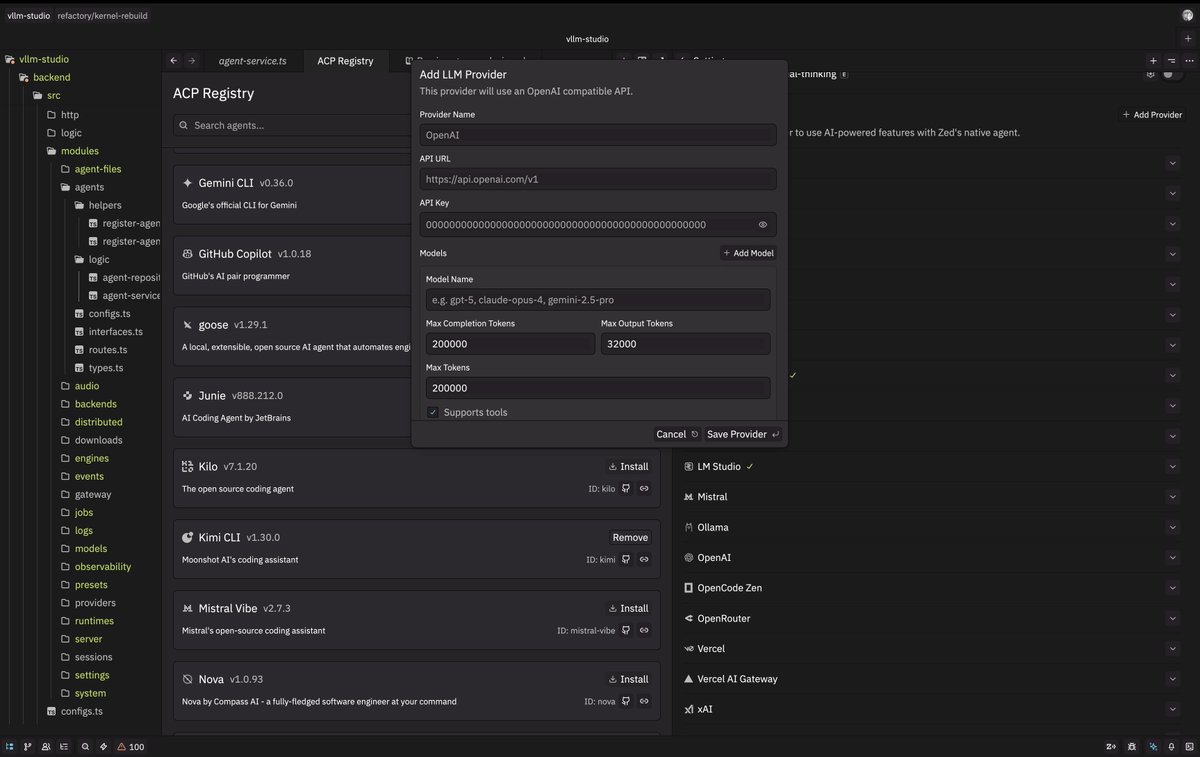
Best harnesses for local models: 1. Droid: - Very good performance, forces the models to behave, you can wire in all your local LLMs very easily w BYOK - Allows you to use your local models as orchestrators/subagents so you can benefit from Cloud as models as well - Practically everything you need is already in Droid - This is my daily driver, I use Qwen3.5 models in it very happily 2. Zed IDE: - OpenAI compatible APIs are first class - Works like Cursor so if you prefer IDEs this is for you. - Clean design 3. Pi Coding Agent - Open source - Very token efficient - Codebase supports vllm and open weight models 4. RooCode: - Steer mode forces local/dumber models to behave by re-injecting the user's prompt and plan every action - Very easy to set up local providers 5. OpenCode: - Super easy to add new providers - Desktop app/Mobile web let's you use ur local models - Open source 6. Parchi - Any provider of any type is compatible - Very simple UX - Let's you operate your browser with your local models
@hasantoxr ·
Best GitHub repos to run AI completely offline on your own machine: 1. LM Studio https://t.co/nixw9bIKpJ 2. Ollama https://t.co/GKRbphLfEL 3. Jan https://t.co/8tc1PLL2YQ 4. GPT4All https://t.co/I6Bd9m0JJv 5. LocalAI https://t.co/JVetXoqMsC 6. Open WebUI https://t.co/gOBxXJ3TBw 7. llamafile https://t.co/9atI2q5Z6c 8. Modly https://t.co/9TVjBxOb5Q 9. text-generation-webui https://t.co/yyrGkZbiv8 No API keys. No monthly bills. No data leaving your computer.


@TheAhmadOsman ·
People keep saying “VRAM is all that matters” for local LLMs > It’s not just wrong, it’s misleading When running LLMs locally, the bottleneck is NOT just “VRAM size” It’s: - memory bandwidth - interconnect (PCIe vs NVLink vs RDMA) - inference engine (vLLM, TensorRT-LLM, SGLang) (Also, Unified Memory ≠ VRAM - and it’s much slower) > People still evaluate hardware in isolation A piece of hardware is USELESS if the software stack isn’t there You are not buying silicon you are buying: - kernels - runtime - framework support - model and quantization compatibility > Buying this Intel GPU? Good luck waiting years for that ecosystem to mature Meanwhile even Blackwell isn’t fully mature and it’s already widely adopted > There are already too many problems across the stack (e.g. GPU → framework → model → quantization) Example of what people keep falling for: “32GB VRAM card for $1K???” But: > unified memory class bandwidth > weak software stack > no CUDA You didn’t buy a GPU you bought a debugging project > Yes, you can make it work You might see: > ~54 tok/s aggregate on 3x Arc A770 But it comes with: - buggy drivers - missing tooling - kernel level hacks And real performance looks like: > ~13 to 14 tok/s single request > unstable configs and constraints This is the trap... On paper it looks competitive in practice it’s fragile > My take This class of products gets killed in less than 2 generations The stack won’t mature fast enough and it wastes your time > If you care about local AI Optimize for: - bandwidth - interconnect - software maturity Not just VRAM TLDR > The stack is the moat > CUDA still wins > Unless you wanna waste your time, this is a NO BUY —Buy a GPU, The Movement

@gneubig ·
In the spirit of language model freedom, as a weekend project I finally set up my own fully local coding agent: * GMKtek box with AMD Ryzen * Qwen3.5 30B A3B, served with lemonade server+llama.cpp * ngrok to expose the endpoint * OpenHands as the agent, currently through the CLI Honestly I am still a bit surprised at how well this works. Qwen3.5-30B-A3B is a good model, and the serving experience was pretty fast and smooth.

@GithubProjects ·
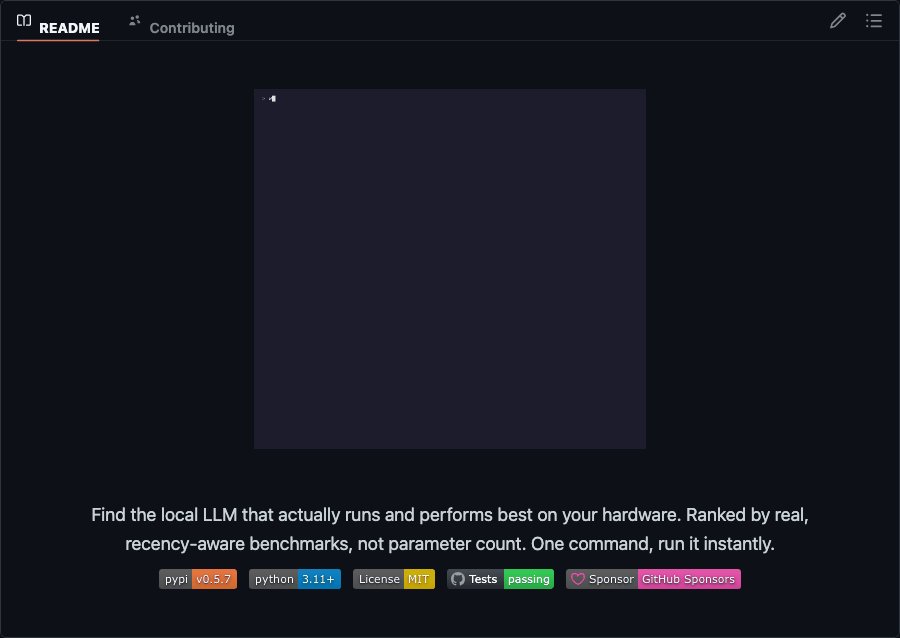
whichllm automatically detects your hardware and ranks the best local LLMs from HuggingFace that actually run on your system. - Evidence-based ranking from merged benchmarks, not just VRAM size - Simulate any GPU before buying hardware with `--gpu "RTX 4090"` - Recency-aware scoring demotes stale leaderboard entries - Returns JSON for scripting with `--json` flag Explore it here: https://t.co/opTBLTxG9y
 Watch video
@TheAhmadOsman ·
Local LLMs, Buy a GPU, and the Case for Cognitive Security AGI? There is no guarantee we reach it anytime soon, if ever. And even if we do, there is certainly no guarantee it will run on your machine. Betting your agency on either assumption is a mistake. What is guaranteed is that large language models are already shaping how people think, decide, and act. They mediate search, writing, coding, persuasion, and increasingly judgment. That makes understanding them less of a technical curiosity and more of a survival skill. This is why my default advice is simple: run local LLMs. You need to learn how these systems work. When you operate models yourself, you stop treating them like magic. You see how they are prompted, steered, constrained, fine-tuned, degraded, and exploited. You learn where they are brittle, where they are persuasive, and where they quietly fill in gaps with confidence instead of truth. That hands-on understanding is the most basic form of cognitive security. CogSec is not about paranoia or rejecting AI. It is about literacy. If you know how models are shaped, you can recognize when they are shaping you. If you do not, you are operating blind. People who only interact with LLMs through polished products are easy to influence. They cannot tell when they are being nudged, framed, or one-shot into a conclusion or a psychosis. They cannot distinguish between alignment choices, product incentives, or outright manipulation. Whoever controls the model controls the gradient of influence. Owning your compute and running models locally flips that power dynamic. It gives you inspection, friction, and intuition. You are no longer a passive endpoint in someone else’s system. You are a participant who understands the machinery. You do not need AGI for this to matter. The models we already have are sufficient to warrant cognitive defense. Buy a GPU. Run the models. Learn their failure modes. That is not a hobby. That is baseline cognitive security in an LLM-saturated world.
@heynavtoor ·
In 2026, OpenAI made you rent your own conversations. GPT-5.5. Five dollars per million input tokens. 30 dollars per million output tokens. Every prompt logged. Every response stored. Every keystroke a line item on your credit card. ChatGPT Plus. 20 dollars a month. 240 dollars a year. Cancel and you lose your history. Claude Pro. 20 dollars a month. 200 dollars a year. Same deal. OpenAI booked 13 billion dollars in revenue in 2025. It lost 20 billion trying to earn it. But OpenAI has a problem. Her name is Justine Tunney. In November 2023, one month before the AI subscription economy took off, she quietly shipped llamafile at Mozilla. llamafile is not a chatbot. It is one file. You download it. You double-click it. A chat interface opens in your browser. The AI answers. Locally. On your laptop. Offline. The model weights. The inference engine. The web server. The chat UI. The API endpoint. All fused into one executable. Justine is a Google Brain alumni who left in 2018 to build Cosmopolitan Libc. The technology that makes a single C binary run natively on Windows, Mac, Linux, FreeBSD, OpenBSD, and NetBSD. Same file. Six operating systems. No recompiling. She wrapped llama.cpp inside Cosmopolitan and shipped the impossible. Then she went further. She hand-wrote 84 new matrix multiplication kernels. CPU inference got 30 to 500 percent faster. A Raspberry Pi 5 started returning tokens in real time. The project stalled in 2025. On October 29 2025, https://t.co/qMWt5ahekQ officially revived it under a new org. March 2026 shipped a full rebuild with GPU support, a terminal UI, multimodal input, and whisperfile for speech-to-text. Latest release dropped June 2 2026. 25,159 stars. Apache 2.0. Ships prebuilt files across a range of open models, from tiny 0.6B all the way up to 27B parameters. Whisperfile does the same thing for audio. One file. Double-click. Transcribe anything. Offline. OpenAI burned 20 billion dollars in 2025 renting you access to software. One engineer in Mountain View built the file they can never take back. (Link in the comments)


@DivyanshT91162 ·
10 GITHUB REPOS THAT LET YOU RUN AI WITHOUT THE CLOUD. 1. Ollama — run powerful LLMs locally. Download a model and start chatting with AI directly on your own machine. https://t.co/S8br6zjTG6 2. llama.cpp — run LLMs almost anywhere. A lightweight C/C++ implementation built to make local model inference ridiculously accessible. https://t.co/zrfwOLfJCk 3. LM Studio — your local AI playground. Download models, chat locally and experiment with LLMs without sending everything to a cloud API. https://t.co/Yxh4phGupD 4. vLLM — serve LLMs at serious speed. Built for high-throughput inference when you want to turn models into production APIs. https://t.co/x66L8ezWXT 5. Jan — an open-source ChatGPT alternative. Run AI models locally and build private AI workflows directly on your computer. https://t.co/lHZfL9AKnF 6. LocalAI — self-hosted AI API. Run models locally through an OpenAI-compatible API without depending on OpenAI's servers. https://t.co/e2Dons53f3 7. Open WebUI — beautiful interface for local AI. Connect it with local models and get a full ChatGPT-style interface on your own setup. https://t.co/8EAekWQqW2 8. whisper.cpp — run speech recognition locally. A lightweight implementation of Whisper that can transcribe audio without sending it to the cloud. https://t.co/3EqK0bscCY 9. ComfyUI — run generative AI locally. Build powerful image and video generation workflows using a node-based interface. https://t.co/i6HRTOqfDT 10. GPT4All — private AI on your desktop. Run compatible language models locally and experiment with private, offline AI. https://t.co/djCIe84MeY All are open-source. Bookmark this. The most interesting AI might be the one running on your own machine.


@ihteshamali ·
🚨BREAKING: Someone built a board of directors for your local AI. It's called MultiMind AI and it runs a full council of LLMs that debate your request, cross-examine each other, and deliver one superior answer. A council of local LLMs that each analyze your request independently, then a Lead Judge that cross-examines every response, resolves conflicts, and delivers one superior final answer. No API keys. Works with Ollama and LM Studio out of the box. Auto-discovers both on startup. You assign different models to different roles in the council and the pipeline handles everything else. They benchmarked it on GSM8K math problems. Accuracy jumped across every reasoning mode compared to a single model answering alone. pip install multimind. Two commands. You're running a council. https://t.co/rit0jshZEZ MIT License. 100% Opensource.


@sudoingX ·
first local model running on the rog 5090 mobile. gemma 2 2b it q4_k_m through llama.cpp, hermes agent pointing at the local endpoint. sitting on the balcony watching the beach while the model answers prompts. 24gb vram in a portable machine running a full inference stack plus an agent harness. same class as the desktop 3090 i benchmark on, now outside with coffee. the hermes agent local model auto-detection i pushed a while back just resolved the endpoint on its own. good time seeing some my own code work in the wild, on my own hardware. small moment but it hit. starting small on purpose. pulling carnice-27b, qwen 3.5-27b dense, gemma 4 dense with hf cli next. same hardware, same quant, real agentic coding tests. comparison data dropping soon. beast is going to run wild stuff this week. keeping you all posted.


@socialwithaayan ·
🚨 OpenClaw and Hermes showed what an operator agent should look like. Someone just built the version that runs 100% on your machine 🤯 It's called Atomic Agent. Browser control. File management. Shell commands. Document parsing. Scheduled tasks. Persistent memory. All through llama.cpp. All local. So instead of routing your files, prompts, browser tabs, and usage patterns through someone else's servers, nothing ever leaves your hardware. Here's what makes it different from every other local agent I've tried: Most of them treat llama.cpp like a cloud API with a local address. They stuff everything into the prompt and let context grow until the model chokes on its own history. Atomic Agent moves state out of the prompt into SQLite, keeps the prompt prefix byte-stable so the KV-cache actually gets reused, and pipes every tool call through a GBNF grammar so nothing comes back malformed. The result showed up on GAIA Level 1: 69.8% for Atomic Agent, 58.5% for Hermes. Same model. Same hardware. Same budget. 1.6x faster per task. What it can operate: → browser (Chrome, Edge, any Chromium-family) → files, shell, git, clipboard, notifications → documents (PDF, DOCX, XLSX, PPTX, ODT, RTF) → memory with notes, lessons, procedures, and reflection → tasks with cron, webhooks, and self-scheduling → MCP servers and local Markdown skill playbooks Run it fully local with llama.cpp or bring your own cloud API keys for OpenAI, Anthropic, Gemini, and 20+ providers. Your choice. Dangerous actions go through an approval gate. The model proposes, you approve. One command install. Ships as a standalone binary. MIT License. 100% open source.

@akshay_pachaar ·
Chinese researchers did it again! OpenBMB just open-sourced MiniCPM5-2B, a dense 2B-parameter model built for reasoning, coding, and tool use on resource-constrained hardware. Artificial Analysis ranked it highest among models under 4B in its Agentic Index comparison. It scored 20, while Granite 4.2 8B scored 9. The model is particularly strong at coding and tool calling, so I tested both capabilities locally. I pulled it onto my machine, connected it to a constrained CI repair agent, and gave it one issue: > A customer reports that retrying checkout with the same idempotency key returns a larger total. The first request returns $109, while the retry returns $118. Find the root cause, fix it without changing the public API contract, and verify the complete test suite. The Python checkout service had 18 tests. Sixteen passed, while two failed on the retry path. The agent could list files, search code, read selected ranges, run approved tests, apply a patch, and inspect its diff. It reproduced the failure, then followed the checkout and idempotency paths through the repository. The model found that shipping was added to mutable order state before the cached result was checked. On retry, the same order already contained shipping, so the calculation added it again. It generated a narrow patch that moved the idempotency check ahead of the mutation without changing the public API. The agent ran the targeted tests and the complete suite. All 18 tests passed. The model was never told which file contained the issue or what change to make. Each test result, search result, and code inspection determined its next action. The video below shows the full trajectory, including the investigation, tool calls, generated patch, diff, and final verification. Everything ran 100% locally on my machine throughout the run. MiniCPM5-2B supports llama.cpp, Ollama, vLLM, SGLang, iOS, Android, and HarmonyOS for local deployment. The model weights, training recipes, reasoning datasets, and UltraX data-refinement system are open-source. GitHub Repo: https://t.co/DyQwbGdmx2 A 2B model can now inspect a repository, reason across multiple files, modify code, and verify its patch while remaining small enough to target local hardware.
 Watch video
@Sumanth_077 ·
Train LLMs locally without writing a single line of code! @UnslothAI just released Unsloth Studio - an open-source web UI for training and running models. Here's how it works: You upload a PDF, CSV, or DOCX file. The Data Recipes feature automatically transforms it into a structured training dataset via a graph-node workflow. No manual formatting needed. Then you select a model from Hugging Face or your local files. Pick your training method - LoRA, QLoRA, or full fine-tuning. The UI pre-fills sensible defaults based on your model. Start training and watch live metrics - loss curves, GPU usage, gradient norms. Everything runs locally with 2x faster training and 70% less VRAM than standard setups. Here are the key capabilities: • Chat with GGUF and safetensor models - supports tool calling, web search, and code execution in a sandbox. • Compare models side-by-side - load your base model and fine-tuned version to see how outputs differ. • Export to any format - save your trained models as GGUF, safetensors, or LoRA adapters for use with llama.cpp, vLLM, Ollama, or LM Studio. • Multi-modal support - train text, vision, audio, and embedding models all in one interface. It runs 100% offline on your hardware.
 Watch video
@_vmlops ·
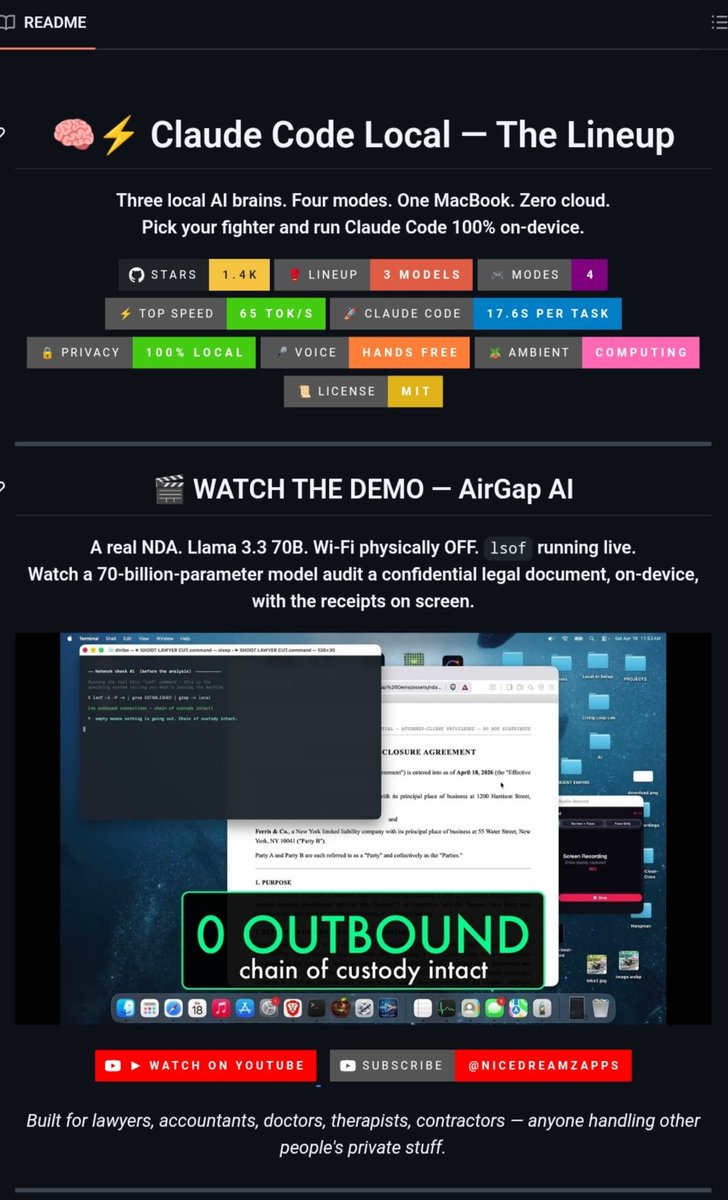
SOMEONE RAN A 122B MODEL ON THEIR MACBOOK... IN ONE NIGHT no cloud. no api fees. no data leaving the machine they went through 3 generations: → ollama + proxy: 30 tok/s → llama.cpp + proxy: 41 tok/s → mlx native server: 65 tok/s the breakthrough? they killed the proxy entirely wrote a 200-line python server that speaks the anthropic api directly. claude code thinks it's talking to the cloud. it's not that one change made it 7.5x faster you can even control it from your iphone over imessage. while offline this is wild engineering → https://t.co/TE8RpBvDhb

@DAIEvolutionHub ·
CHINA JUST DROPPED AN OCR MODEL THAT CHANGES EVERYTHING. A tiny 3B-parameter model can read an entire 100-page PDF in a single pass. No page splitting. No context loss. No cloud APIs. Meet Unlimited-OCR 👇 • Reads full documents with a 32K context window • Scores 93% on OCR parsing benchmarks (+6 points over the baseline) • Keeps error rates below 0.11 even after 40+ pages • Multilingual out of the box • Runs 100% locally on your own hardware • Works with Transformers, vLLM, SGLang, Docker, Ollama, and llama.cpp Here's why this matters. Most OCR systems still treat every page as a separate image. That means broken tables, lost references, and missing relationships between pages. Unlimited-OCR processes the entire document as one continuous context. So tables stay intact. References remain connected. Document structure is preserved from beginning to end. Meanwhile, many businesses are still: • Paying $1.50 to $15 per 1,000 pages • Uploading sensitive PDFs to cloud providers • Waiting on OCR API responses This runs completely offline. No subscriptions. No API bills. Just your hardware. Built by Baidu to push beyond DeepSeek-OCR. It's already crossed 1.9M+ downloads on Hugging Face. And surprisingly, almost nobody is talking about it yet. Open source keeps shrinking the gap between "enterprise software" and "free." 🔗 https://t.co/Wt0SN0UMSy
 Watch video
@sudoingX ·
compiling llama.cpp with cuda 12.8 on the rog strix scar 18 5090. this is the mobile 5090, 24gb vram in a laptop. same vram class as the 3090 desktop i run benchmarks on, just portable. i can run these tests from anywhere now. first up carnice-27b vs qwen 3.5 27b dense vs gemma 4 on this exact machine. same class, same hardware and real agentic coding tests. data dropping soon.


@cnxsoft ·
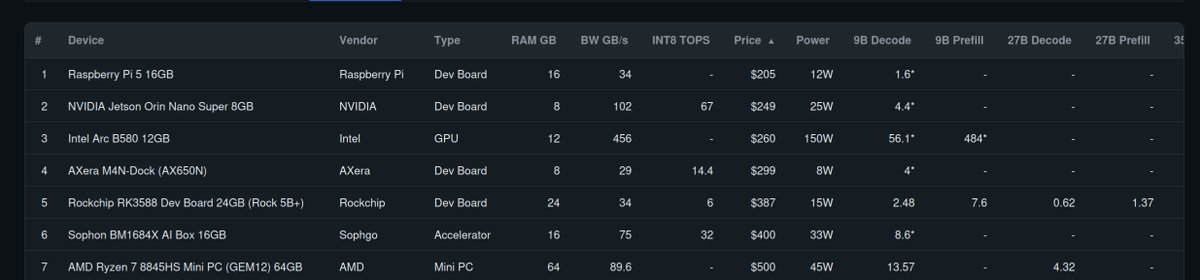
Online guide to select the best hardware for local LLM/AI deployments. https://t.co/Q2LAYo5xxx The website relies on Qwen 3.5 models and shows the price, performance, power consumption, and more for a range of hardware from Raspberry Pi 5 16GB to NVIDIA DGX Spark. In one specific test (Qwen 3.5 9B), a system with a $260 Intel Arc graphics card performs just as well as $4,000 computers. The project also accepts user submissions, but the process is a little convoluted.




@aigleeson ·
Claude Code just got a free mode. Not official. A developer built a repo that routes Claude Code calls to free and local AI models. Instead of buying Anthropic credits... You can run it with: > NVIDIA NIM > OpenRouter free models > DeepSeek > LM Studio > llama.cpp Best part: Claude Code does not need to change. You just point it at a local proxy and it works. This turns Claude Code from “paid coding agent” into “bring your own model agent.” Huge for indie devs. https://t.co/ua4nHZG28m

@binji_x ·
the surge of interest in local LLMs has been nice to see, not your model not your mind becomes more important as we use ai for more things and pushing local capabilities is a noble effort qwen 3.5 is pretty good and gemma 4 has been interesting too, as these capabilities get better, i believe people can make proper apps with them that give you the power of ai without handing all of your personal data to third parties (note not all open source models are transparent with their training data so remember to make your own judgements)

@KyleHessling1 ·
1 Million Tokens Context on a single rtx 5090, 17 tps. I loaded the entire New Testament from openbible into the models context, every word, and asked it for a summary. I then asked it to find me a verse that is seldom referenced and poetic regarding the nature of salvation, and boom! It began going through hundreds, if not thousands, of individual verses. Constantly checking for hallucination and making sure it was making a good choice. Well done @Alibaba_Qwen! I just realised too, I was using Q5_K_M, I am going to try to get a Q4 quant running entirely on GPU with 1 million token context! Watching it think through everything is incredibly fascinating to me. I sped up a large portion of it to not bore anyone, but I genuinely watched and read the whole thing live and was very impressed. Here are the settings for this run: llama-server \ -m Qwen3.5-35B-A3B-Q5_K_M.gguf \ -ngl 999 \ --fit off \ -fa on \ -ctk q4_0 \ -ctv q4_0 \ -c 1048576 \ -b 2048 \ -ub 2048 \ --override-kv "qwen35moe.context_length=int:1048576" \ --rope-scaling yarn \ --rope-scale 4.0 \ --yarn-orig-ctx 262144 \ -t 18 \ -tb 20 \ --parallel 1 \ --no-mmap \ -ot "ffn_.*_exps.weight=CPU" \ What each setting does according to Claude: - -ngl 999 — Offload all layers to GPU - --fit off — Disable auto-fitting (prevents llama.cpp from silently reducing context to fit in VRAM) - -fa on — Flash attention (required for large context efficiency) - -ctk q4_0 -ctv q4_0 — Quantize KV cache to 4-bit (keeps 1M context KV cache manageable) - -c 1048576 — 1M token context window - -b 2048 -ub 2048 — Batch/ubatch size for faster prompt processing (default ubatch is 512) - --override-kv "qwen35moe.context_length=int:1048576" — Override model metadata that caps context at 262k (without this, the server silently limits slots to 262k even with -c set higher) - --rope-scaling yarn — YaRN (Yet another RoPE extensioN) for context extension - --rope-scale 4.0 — 4x scaling factor (262k training context x 4 = ~1M) - --yarn-orig-ctx 262144 — Original training context length for YaRN calculation - -t 18 -tb 20 — 18 generation threads, 20 batch threads (tuned for 20-core CPU) - --parallel 1 — Single slot (dedicates all resources to one request) - --no-mmap — Allocates CUDA_Host pinned memory for faster PCIe transfers - -ot "ffn_.*_exps.weight=CPU" — Force all MoE expert weights to CPU RAM (frees GPU VRAM for KV cache and compute) Hardware: RTX 5090 (32GB), 128GB DDR5 RAM, Intel Core Ultra 7 265K (20 cores), PCIe 5.0
 Watch video
@vectro ·
Gemma 4 E2B Running on RTX 3080 & 3070 combined * llama.cpp * Ubuntu server * No GUI * BF16 precision * 52.6 tok/sec. See the comments for the full set of commands to run in terminal and GUI locally or served over the network.
 Watch video
@Shruti_0810 ·
People keep saying you need a high-end GPU to run AI locally. Turns out... that's not true. This developer tested everything from an 8GB gaming laptop GPU to a 4-year-old RTX 3090 to see what each VRAM tier can actually handle. The goal wasn't to chase benchmarks. It was to answer one simple question: "What's the best AI model I can run on the hardware I already own?" The results were surprisingly practical. An 8GB GPU is enough for solid local LLMs. A 12GB RTX 3060 performs far better than most people expect. And that old 24GB RTX 3090? It can still replace hundreds of dollars in monthly AI subscriptions. If you've been putting off local AI because you think your GPU is "too old," you might want to think again.
 Watch video
@aaliya_va ·
Stop downloading LLMs; your machine was never going to run. llmfit scans your hardware and tells you exactly which models will run. It scans your RAM, CPU, GPU, and VRAM first. Then it scores every model across four dimensions: 1. Quality, based on parameter count and quantization 2. Speed, estimating tokens per second for your exact backend 3. Fit, matching memory use to your hardware 4. Context window support for your use case Each model gets a label: Perfect, Good, Marginal, or Too Tight. It picks the best quantization automatically, stepping down until something fits. Covers hundreds of models from Meta, Mistral, Qwen, and DeepSeek. Works with Ollama, llama.cpp, MLX, and LM Studio out of the box. Open-source. Link in comments ↓
 Watch video
@Shruti_0810 ·
A LOCAL LLM RUNNING ON ONE 3090 JUST REPLACED GOOGLE HOME FOR 29 SMART DEVICES WITH ZERO CLOUD. It doesn't just answer questions. Ask, “Do I need a jacket?” and it checks your actual weather sensor before replying. The cloud is becoming optional.
 Watch video
@heyrimsha ·
Running a 60GB AI model on a phone with 12GB of RAM should be impossible. Someone just did it anyway. It's called BigMoeOnEdge and it runs gpt-oss-120b (a model 5x bigger than the phone's RAM) at 2.2 tokens per second on plain CPU. No GPU. No NPU. Four cores and flash storage. The trick: MoE models only use a few "experts" per token. Instead of loading all 60GB into RAM, it streams only the experts each token actually needs, straight from flash, at the exact moment the model asks for them. The rest stays on disk. → gpt-oss-120b (60GB) on a 12GB phone at 2.2 tok/s → 14x faster than the same file loaded the ordinary way (0.09 tok/s with mmap) → Byte-for-byte identical output to running the full model in RAM → Qwen3-30B at 5.2 tok/s, Gemma-4-26B at 4.1 tok/s on the same device → Built on stock llama.cpp, upstream untouched, tracked as a submodule → Android demo app with a live telemetry panel and every knob exposed Apple, Google, and Samsung spend billions trying to fit smaller models onto their phones. One developer streamed a bigger one from flash and got the same answer. 100% Opensource. https://t.co/X8Qk2Y5T47
 Watch video
@InduTripat82427 ·
Holy shit...Someone tried replacing Claude with a local LLM… …and waited 13 minutes for THIS: > “I am a large language model, trained by Google.” That’s it. 13 minutes. One useless sentence. Let’s be honest — we’ve ALL had this thought: “Why am I paying for Claude when I can just run open-source models locally for free?” So he tried. Ran Gemma locally. No API costs. Full control. Sounds smart, right? Here’s what actually happened: Before he even asked a real question… The model was already drowning. Tools like Claude Code don’t start from zero. They load 20,000+ tokens of system context: • instructions • memory • tools • workflows Your “free” local model? It’s choking before the race even starts. And then you wait… …and wait… …and wait… …for a generic sentence you could’ve gotten in 0.8 seconds. This is the part no one tells you: Running LLMs locally isn’t just about compute. It’s about: context handling latency orchestration tooling You’re not replacing an API. You’re trying to replace an entire AI infrastructure stack. The API bill hurts. But wasting hours waiting for responses? That’s way more expensive.

@mudler_it ·
Meanwhile I'm cooking benchmarks for Gemma 4, Qwen3.5-122B-A10B APEX GGUF benchmarks are ready to share! All measurements on 8xRTX PRO 6000 Blackwell (768 GB VRAM). Perplexity on wikitext-2-raw, context 512. Accuracy benchmarks via llama.cpp (400 tasks each) - APEX I-Quality (72.3 GB) beats @UnslothAI 's UD-Q4_K_XL at the same size on HellaSwag (85.3% vs 84.8%), Winogrande (77.3% vs 76.3%), and ARC (56.86 vs 55.85), and it's faster 99.7 t/s vs 91 t/s - APEX I-Balanced matches or beats @UnslothAI Q8_0 on HellaSwag (85.5%), Winogrande (77.8% vs 77.3%), and ARC (57.86 vs 57.19) while being 31% smaller and 13% faster. - APEX I-Mini (44.9 GB) is the smallest at 63% less size than Q8_0, still 84% HellaSwag, fastest at 110 t/s. Model: https://t.co/iA6Wow0pgX


@francip ·
The inference engine _is_ a harness of its own. While the core transformer architecture for specific model stays the same across different inference engines, caching, quantization, parallelization, templates, tools support, etc, etc mean that the behavior and the performance of the same model weights and architecture will vary. Maybe vllm vs sglang will not have as big influence as openclaw vs hermes, but nevertheless it is impacting it. And while we don't know what the frontier labs are doing, the obvious question is - why wouldn't @AnthropicAI or @OpenAI start integrating things like tools and skills into their in-house inference engine, instead of keeping these in the client-side Claude Code and Claude Desktop? And why wouldn't opensource inference engines like llama.cpp or vllm start integrating specific general purpose tools into themselves instead of relying on the client to provide them?

@JulianGoldieSEO ·
Most local AI agents break halfway through a task. This free model was trained on actual agent execution traces — so it doesn't. Here's how to run Carnice-MoE-35B-A3B locally in 5 steps: → Download llama.cpp from GitHub (build with CUDA for NVIDIA) → Grab the GGUF file from HuggingFace (Q4_K_M = 20GB, fits a 24GB GPU) → Run llama-server on port 8082 with 128K context → Install Hermes Agent (one command covers Python, Node.js, dependencies) → Point Hermes to your local endpoint — zero data leaves your machine. You now have a private AI agent with 40+ tools, persistent memory, and no monthly bill. ✅Save this video, you'll want to set this up when your API costs hit you. 🔖 Want the SOP? DM me.
 Watch video
@vectro ·
How to load Gemma 4 into vLLM on Ubuntu Server: * E2B Instruct * RTX 3080 (yeah I need a better GPU) This basically worked, but CUDA ran out of memory since I didn't use GGUF, which worked fine on llama.cpp


@ThePracticalDev ·
Arch Linux, the niri scrolling Wayland compositor, llama.cpp with ROCm, and a 27B model running fully offline on 128GB unified memory. This dev shares why local-first AI coding matters and exactly how the stack fits together. { author: @deepu105 } https://t.co/de9zwkVBma

@Paddy_film ·
I'm currently writing an innovation concept for using an AI agent like Hermes inside a county government department as a digital worker. It should handle tasks autonomously while also serving as a chat interface for staff to delegate work. The plan is to host everything 100% locally with a custom web interface for interacting with the agent/Hermes. Setup: one machine running a local LLM, one VM hosting Hermes and the web interface. I'm considering Qwen 3.5 as the local LLM, since I tested it on my personal hardware and got good results. Questions: 1. Can one Hermes agent handle multiple requests in parallel? 2. Will Hermes even work in this scenario? I've only tested it at home on limited hardware. 3. What hardware would be required or ideal? Budget is around $10k for everything (so no RTX 6000). It depends on the number of users (5–10 to start, probably not all simultaneous). I'm considering a DGX Spark from @NVIDIAAIDev or a Framework desktop with 128 GB LPDDR5X from @FrameworkPuter . I don't think a Mac Studio will suffice, my tests on a MacBook Pro M4 Pro with 24 GB were slow in tokens/s compared to my RTX 4080. 4. Use cases include creating office files, checking emails (if possible with on-prem Outlook), and exploring other useful tasks. I don't know if Hermes can truly act as a digital employee for simple office work or automate entire workflows. We're starting robotics process automation (RPA) this summer to automate workflows. RPA can see the screen and navigate, while AI agents like Hermes rely on CLI, commands, or APIs, many of our programs lack APIs. I could build a custom web app connecting to the local LLM to trigger predefined tasks and link them to RPA workflows, but I believe the future lies in fully AI-automated workflows, like what @Tesla_AI plans with 5-second video streams. The goal is to demonstrate how successfully an AI agent can be integrated into public administration to support work and take over entire workflows. @sudoingX I applied to your community, would be great if you could approve me :) @NousResearch

@michalmalewicz ·
This year I'm spending 100x more time in Mac OS Terminal than last year and it's not even for Claude Code. A lot of my work is now automated, based on a local server, local LLMs, local git, local apache, local python scripts with tailscale tying it all together.

@jshguo ·
I used to think AMD GPUs were terrible for running local AI models. But today I tried Qwen3.6 Uncensored locally on my 7900 XT with llama.cpp. Turned off deep thinking and honestly… it feels really good. Way faster than I expected, and actually usable for simple/fast tasks like translation.
@JulianGoldieSEO ·
OLLAMA JUST FIXED THE BIGGEST PROBLEM WITH LOCAL AI AGENTS Gemma 4 could use tools before. Now it can actually finish the job. What changed: → Ollama 0.32.1 improves tool-response continuation → Gemma 4 can call a tool, process the result, and continue working → Fewer abandoned tasks, forgotten instructions, and half-finished answers The real-world test: ✓ A messy 400-line Python script was analyzed locally ✓ The model found 3 performance bottlenecks and rewrote them ✓ It ran the tests and reported the results without losing the task The speed upgrade: ✔ MLX support made Gemma 4 nearly 90% faster on one coding benchmark ✔ Reported output jumped from roughly 50 to 95 tokens per second ✔ A memory-leak fix lets longer jobs run without constant restarts The lesson: Stop testing local AI with toy prompts. Give it a real file, multiple steps, and a result it must verify. That is how you find out whether your local agent can replace actual manual work.
 Watch video
@ThePracticalDev ·
Hit a Claude usage limit mid commit, so this dev built a local LLM setup with Ollama for git messages, with Claude as a fallback option. { author: @shyamala_u } https://t.co/8midG65ZBe
Best Local LLMs tweets
Xholic studies what works in your niche, drafts posts in your voice and schedules them for the hours your audience is online.
No card needed · Nothing to cancel
Browse all tweet collectionsLive demo: no sign-up or login needed · takes about 2 minutes
Keep exploring