Automation economics and delivery
Pricing client projects and evaluating n8n workflows through labor saved, software costs avoided, visible outcomes, and business-process fit.
33.3%
Best tweets about n8n
Browse the best tweets about n8n, featuring automation workflows, AI agents, integrations, self-hosting, templates, and production lessons.
Real n8n workflows, nodes, integrations, self-hosting, agent automation, reliability, and measurable operating outcomes.
Original Xholic analysis
The conversation presents n8n as a practical integration layer for invoices, leads, content and customer operations. AI-assisted workflow creation attracts standout attention, but production-focused posts stress retries, logs, credentials and human checkpoints. Reported savings and contracts offer commercial evidence, not independently verified operating outcomes.
70% of posts
All-time engagement
46.7% of posts
Published in 90 days
Conversation map
Pricing client projects and evaluating n8n workflows through labor saved, software costs avoided, visible outcomes, and business-process fit.
33.3%
Combining AI decisions with repeatable n8n flows, checkpoints, human handoffs, protected credentials, and inspectable actions.
30%
Designing for retries, duplicate data, expired tokens, API limits, alerts, logs, auditability, and n8n vulnerabilities.
30%
Repurposing posts, scheduling content, compiling cross-platform reports, and monitoring competitors or campaign performance.
20%
Running or migrating n8n on owned infrastructure and using its nodes, APIs, and community integrations to connect tools.
20%
Connecting email, PDFs, databases, and business apps to automate invoice entry, inventory, onboarding, support, and retention.
16.7%
Scraping and enriching prospects, qualifying website visitors, personalizing outreach, and routing leads into CRMs.
16.7%
Using MCP, Claude, and natural-language prompts to create, modify, and deploy n8n workflows faster.
13.3%
Tone and stance
Performance benchmark
Posts with media make up 46.7% of this collection. Their median all-time score is 3.61, compared with 10.5 for text-only posts.
Format mix
Consensus and debate
Shared view
Automation economics and delivery is the largest supplied theme: 10 tweets, 33.3%. Examples connect email PDFs to ERP entry, inventory data to tracking, and business-process research to workflow design. The farm-shop post reports a signed €12,000 contract for work being built, rather than demonstrated savings.
Shared view
Posts describe n8n as the repeatable layer around AI decisions: prospect outreach includes human escalation; agent graphs use validation checkpoints; webhook workflows can shield credentials from agents. These are architectural recommendations and examples, not proof of guaranteed safety.
Shared view
Reliability advice extends beyond successful test runs to HTTP retries, Error Trigger handling and failure alerts. Marketing-agent criticism adds rate limits, missing logs and incomplete data; a security post separately highlights n8n vulnerabilities.
Shared view
Examples include Apify-to-Notion lead collection, Claude-assisted content repurposing with approval, and cross-platform reporting. The reporting post claims 30+ minutes saved before each meeting while explicitly retaining human interpretation.
Open debate
MCP promotion claims workflows built in minutes with zero mistakes. Other posts distinguish quick construction from reliable operation, citing API failures, duplicate inputs and silent errors. This is a tension between authoring claims and deployment requirements, not a direct rebuttal.
Open debate
One post argues visible dashboards justify premium automation pricing; another calls a $12,000 four-node lead system a rip-off. The farm-shop contract instead frames price against a potential full-time hire. These contrasting accounts do not establish a universal fair price.
Open debate
One creator recommends n8n for editable, inspectable systems but custom code for high-volume or one-off work. Another finds scheduled Claude tasks accessible but less solid than n8n or Make, while marketing criticism questions cumbersome visual debugging.
What performs
AI-built workflows account for 4 tweets, 13.3%, with a median all-time score of 37.13. The MCP post is the supplied standout at 330.78, or 53.01 times the overall median. Attention to authoring is not evidence that its speed or accuracy claims are validated.
The farm-shop contract post scores 97.83, 15.68 times the median; the outreach-agent example scores 70.43, 11.29 times; the lead-scraping tutorial scores 55.74, 8.93 times. These outliers cover business economics and concrete integrations, without establishing why they performed well.
Statistical standouts
Creator landscape
The five most represented creators account for 30% of the selected posts.
1. Cody Schneider
@codyschneider
2 posts
2. Aaron
@IAmAaronWill
2 posts
3. Harsh Makadia
@MakadiaHarsh
2 posts
4. n8n.io
@n8n_io
2 posts
5. Ajé | the Gohighlevel Guy
@Aje_Dynamicz
1 post
6. Alex the Engineer
@AlexEngineerAI
1 post
Schneider has 2 supplied tweets and a median all-time score of 39.56. His outreach example describes an integrated agent flow with human handoff; his marketing critique emphasizes data infrastructure and auditability. Together they offer both an application and deployment caveats.
n8n.io has 2 supplied tweets with a median all-time score of 27.3. One points to Raspberry Pi self-hosting guidance covering Docker and common issues; the other demonstrates MCP-based workflow creation and updates. Neither supplies measured production reliability outcomes.
Since the previous snapshot
Themes, sentiment, stance, and post format are classified per tweet. All counts, shares, medians, creator concentration, freshness, and performance comparisons are then calculated directly from the published snapshot.
Xholic's all-time score compares engagement while accounting for reach, post age, and creator consistency. It is used for relative comparisons within this collection.
This report analyzes the exact 30-post snapshot shown below. AI identifies editorial categories and drafts explanations; all statistics are calculated from the snapshot, and every narrative claim is checked against cited posts before publication.
Best n8n tweets
Ranked 01–30

@EXM7777 ·
n8n shipped native MCP support and nobody's connecting what this actually means... your AI agents can now CREATE and MODIFY n8n automations programmatically the setup: > install the n8n-mcp server > add it to your Claude Code config > Claude now has access to all 1,396 n8n nodes (812 core + 584 community) what used to happen: > open n8n dashboard > manually drag nodes > configure each one > test, debug, repeat > 45 minutes per workflow what happens now: > "build me an automation that monitors my competitors' pricing pages every 6 hours and sends a Slack alert when anything changes" > Claude builds the entire n8n workflow > 3 minutes, zero mistakes the real implication: your agents can now build their own automations not "trigger existing workflows"... literally construct new ones from scratch based on what they need this is the beginning of self-automating systems

@Mike_Scully_ ·
We signed a €12,000 contract with a farm shop. Not a tech company. Not a SaaS startup. A physical farm shop processing 7,000 invoices a year manually. Here's what we're building and why the ROI was a complete no-brainer for them. The problem was simple. Every invoice came in via email as a PDF attachment. Someone would open it, read it, and manually enter the data into their CRM. 7,000 times a year. Every. Single. One. Here's what we're doing to fix it: Emails land in their inbox → n8n detects the attachment automatically → the PDF gets parsed and the data extracted → it gets cleaned and structured → entered directly into their ERP without a single human touching it. The whole workflow runs silently in the background 24/7. No mistakes. No delays. No manual entry. On the sales call I asked one question that closed the deal: "If you don't solve this with automation, what does that look like?" He said: "We hire someone full time." In Ireland minimum wage is €14.15/hr. Average work week is 37.5 hours. That's €27,593 a year spent entirely on someone opening emails and typing numbers into a system. Or they pay €12,000 once. And it's done. First instalment of €4,000 just landed. Two more to go. The ROI conversation ended there. Now here's the part I want you to pay attention to: We are not software engineers. We didn't write a single line of complex code. n8n has a visual workflow builder where you connect the logic like building blocks. The tools exist. The infrastructure is already there. All we did was understand the client's problem and know which tools to connect together. That's the opportunity right now. There are thousands of businesses like this farm shop. Completely offline. Drowning in manual processes. No idea that a solution exists let alone that it costs a fraction of a full time hire. You don't need to be a developer to sell this. You need to understand the problem, know the tools, and be able to show the ROI. That's it.


@codyschneider ·
apify APIs + claude code actually so OP kind of crazy tbh been testing n8n flow does apify youtube channel email scraper scrapes channel emails for your niche keywords, validate emails with millionverifier, send email instantly ai, instantly ai cold emails them asking for pricing for 3 video package, they respond back, gets added to a spreadsheet, agent compares costs looking for people underpricing their work, agent closes creator deals in followup email, circles in human if needed

@IAmAaronWill ·
How to build a lead scraper without writing code: 1. Open n8n 2. Add an Apify node 3. Point it at LinkedIn or X 4. Filter by job title, bio keywords, or location 5. Route the results to a Notion database 6. Set it to run every morning You wake up to fresh leads daily/

@Aje_Dynamicz ·
Vibe Coding has officially arrived inside n8n and it's going to change how a lot of freelancers and developers build automations... Instead of spending time searching for the right node, connecting everything manually, and configuring each step one by one, you can now describe the workflow you want in plain language and let AI build the foundation for you. For freelancers, this means: Faster delivery times More projects completed in less time Reduced setup fatigue Lower barrier to offering automation services For developers, it means... Rapid prototyping Less time on repetitive workflow setup More focus on logic, optimization, and business outcomes Easier collaboration with non-technical teams The biggest win is that automation becomes accessible to more people. A marketer, operations manager, or business owner can explain a process in natural language and get a working workflow without needing deep technical knowledge. That doesn’t replace developers; it makes developers more productive. The real value shifts from dragging nodes around to designing better systems, solving complex problems, and refining workflows that create measurable results. AI-generated workflows won’t eliminate expertise. They’ll simply remove a lot of the repetitive work that slows experts down. The future of automation isn’t just no-code. It’s intent-driven building where ideas turn into workflows in minutes instead of hours...


@n8n_io ·
RaspberryTips published a new guide on running n8n on a Raspberry Pi. It covers Docker setup, key nodes, real project ideas, and common issues you’ll run into. Good reference for lightweight, self-hosted automation setups. Builders teaching builders. We love that. 🙌 https://t.co/Bh2kyjw8yP
@n8n_io ·
“Create an n8n workflow that emails me a daily weather forecast at 7am.” Minutes later: a working workflow in n8n. n8n’s MCP server can build/update workflows from Claude, ChatGPT, Cursor, or your IDE. https://t.co/Daa76USnuL

@PentesterLab ·
𝗥𝗲𝘀𝗲𝗮𝗿𝗰𝗵 𝗪𝗼𝗿𝘁𝗵 𝗥𝗲𝗮𝗱𝗶𝗻𝗴 - 𝗪𝗲𝗲𝗸 𝟳, 𝟮𝟬𝟮𝟲 Parser Differential, TypeScript and AI ⨐ 𝗕𝗿𝗲𝗮𝗸𝗶𝗻𝗴 𝗗𝗼𝘄𝗻 𝗖𝗩𝗘-𝟮𝟬𝟮𝟲-𝟮𝟱𝟬𝟰𝟵: 𝗛𝗼𝘄 𝗧𝘆𝗽𝗲𝗦𝗰𝗿𝗶𝗽𝘁 𝗧𝘆𝗽𝗲𝘀 𝗙𝗮𝗶𝗹𝗲𝗱 𝗻𝟴𝗻'𝘀 𝗦𝗲𝗰𝘂𝗿𝗶𝘁𝘆 A great explanation of the recent vulnerabilities impacting n8n. If you are working in security on TypeScript projects, it's a must read. https://t.co/9cqTpEAluI. ⚒️ 𝗜𝗻𝘁𝗿𝗼𝗱𝘂𝗰𝗶𝗻𝗴 𝗔𝘂𝗴𝘂𝘀𝘁𝘂𝘀: 𝗢𝗽𝗲𝗻 𝗦𝗼𝘂𝗿𝗰𝗲 𝗟𝗟𝗠 𝗣𝗿𝗼𝗺𝗽𝘁 𝗜𝗻𝗷𝗲𝗰𝘁𝗶𝗼𝗻 𝗧𝗼𝗼𝗹 Praetorian is back with another tool (one of their 12 Caesars): Augustus... Make sure you check it out! https://t.co/kIgkNwiNMM. 🤺 𝗪𝗵𝗲𝗻 𝗧𝘄𝗼 𝗣𝗮𝗿𝘀𝗲𝗿𝘀 𝗗𝗶𝘀𝗮𝗴𝗿𝗲𝗲: 𝗘𝘅𝗽𝗹𝗼𝗶𝘁𝗶𝗻𝗴 𝗤𝘂𝗲𝗿𝘆 𝗦𝘁𝗿𝗶𝗻𝗴 𝗗𝗶𝗳𝗳𝗲𝗿𝗲𝗻𝘁𝗶𝗮𝗹𝘀 𝗳𝗼𝗿 𝗫𝗦𝗦 If you enjoy parser differential issues, you are going to love this exploit. Don't think "It's a CTF challenge" or "It's just an XSS", read between the lines to find the real gold. https://t.co/rwf2BGnerh. 🤖 𝗥𝗖𝗘 𝗶𝗻 𝗚𝗼𝗼𝗴𝗹𝗲'𝘀 𝗔𝗜 𝗰𝗼𝗱𝗲 𝗲𝗱𝗶𝘁𝗼𝗿 𝗔𝗻𝘁𝗶𝗴𝗿𝗮𝘃𝗶𝘁𝘆 - $𝟭𝟬𝟬𝟬𝟬 𝗕𝗼𝘂𝗻𝘁𝘆 A detailed blog post on hacking Antigravity with a lot of interesting details on its inner workings. https://t.co/3ExHVYrf9X. 🚛 𝗧𝗿𝗮𝗶𝗹𝗶𝗻𝗴 𝗗𝗮𝗻𝗴𝗲𝗿: 𝗲𝘅𝗽𝗹𝗼𝗿𝗶𝗻𝗴 𝗛𝗧𝗧𝗣 𝗧𝗿𝗮𝗶𝗹𝗲𝗿 𝗽𝗮𝗿𝘀𝗶𝗻𝗴 𝗱𝗶𝘀𝗰𝗿𝗲𝗽𝗮𝗻𝗰𝗶𝗲𝘀 Probably one of the lesser-known features of HTTP... Trailers. This post provides details on the feature and explains how they can be leveraged to find security issues. https://t.co/I2J8yvXdpa.

@NoahEpstein_ ·
the difference between a 4-figure and 5-figure automation isn't complexity it's visibility most people build workflows that run in the background client has no idea if it's working. no idea if it broke. no idea what it's doing. they paid for magic they can't see. that's a 4-figure automation. 5-figure automations let them FEEL it working. click a button → watch the flow run → see the dashboard update that's the difference between "i think it's working" and "i just watched it work" here's how i pitch it now: "you'll click one button, watch the system process everything, and see your dashboard update in real time. you'll know it's working because you'll see it working." same backend. same logic. same n8n nodes. but now they can see the value. if they can't see it, it doesn't count. build the interface. charge the premium.

@zaimiri ·
My client used to have 2 Virtual Assistants. Now everything runs automatically with AI systems I built. > Fully automatic Inventory Tracker > Pulls data from Dropshipping platform > Cleans up the data + formats in n8n > Saving them 4 hours/week of manual tracking > $300/week saved > $1200/month Cost to implement: $2000 After 6 weeks = full profit for client.

@IAmAaronWill ·
Here's how to repurpose content automatically with n8n: 1. Open Notion 2. Create a content bank 3. Use apify to scrape your tweets 4. Open n8n 5. Trigger when a post is "published" 6. Feed to Claude 7. Have it analyse the tweet 8. Return 1 newsletter, video and article 9. Have it text you the ideas on telegram 10. Schedule the approved posts 1 post. 3 formats. 0 manual work.
@codyschneider ·
so you tried vibe marketing but you had all these issues with actually getting it to run it works great in the chat window. you paste in some ad data, it writes you a killer analysis, you screenshot it, everybody claps then you try to make it a real thing that runs every day and the whole thing falls over you export a csv from ads manager. paste it into claude. copy the answer into a google doc. do it again tomorrow. congrats you're the api now so you go build it in n8n. 40 nodes later you're debugging a json parsing error in a little box instead of just writing the ten lines of python you already knew how to write. and the meta api rate limits you at 3am and the whole chain silently returns null and nobody finds out until thursday no memory it has no idea what it did yesterday so it "discovers" the same insight every morning no data you're feeding it a 500 row csv sample of a 50k row account and asking it to tell you what to turn off no logs you cannot answer the question "why did it pause that campaign" which means you will never let it touch a live account everybody keeps optimizing the prompt. the prompt is not the problem. claude and gpt are already smarter than most media buyers a marketing agent is like 10% prompt and 90% plumbing. you need somewhere the data lands. you need it to refresh on a schedule. you need connectors that don't break when meta changes a field name. you need a warehouse the agent can actually query instead of guessing off a sample. you need to see what it did that's the boring part and it's the entire job the people shipping agents that actually run production accounts aren't better at prompting than you. they just built the bottom of the stack first go build the bottom

@jspeiser ·
A founder in hampton produces 300+ YouTube videos per month for clients. To keep up, he built an Ai system (Claude + n8n) that tracks every social platform over 28 days and generates one report: "what performed and where." Saves his team 30+ minutes of manual work before every meeting. humans still add the "why" and "how to fix it." Ai just eliminates the grunt work of compiling data across each platform.

@dan__rosenthal ·
The gap between developer tools and no-code is shrinking every month. Claude now lets you schedule recurring tasks from the CLI. I tested one that runs every hour: 1. Polls Slack for new messages 2. Analyzes and categorizes each one 3. Files them into the right Notion database 4. Runs again an hour later Set it up in about 5 minutes. It's not as solid as what you'd build in n8n or Make. But for someone who doesn't want to maintain a full automation stack, the accessibility is hard to beat.

@MusawirRaji ·
Spent 2 weeks building a system that researches companies, finds decision makers, and writes personalized cold emails while I sleep. Job boards → research → proposal. Fully automated. Found that https://t.co/aZIsvDDxRI was founded in Rotterdam in 2021 by someone who also runs a 100-client Webflow agency. That level of detail used to cost me an hour per lead. Stack: Next.js, n8n, Claude, Gemini, Serper, Supabase. Drafter drops soon.


@peeplaja ·
We gave every person at Wynter 1 week to build their own AI agent. Budget of about 4 hours each. Today was demo day. Everyone presented what they built. Most had never built anything like this before. Some had zero technical background. Didn't matter. The combo of Claude for teaching and n8n for agent building made it possible for everyone. The average build time was about 3 hours. Here's what the team shipped: → Automated cold email mailbox manager that handles 726 sender mailboxes across domains. Used to take hours of spreadsheet work, now it's one click. → Customer onboarding tracker that monitors new pro customers through HubSpot, flags accounts needing follow-up every morning at 7am. → Renewals management assistant hooked into HubSpot and Gmail. Tracks status of every renewal convo, suggests when to check in. → Error notification workflow that triages support tickets, extracts key info, and determines if it's a bug automatically. → GitHub Actions for always-on development. A "file diet" that breaks down large code files, plus a daily test improver. → Automated unit test generator that writes tests for every new code change, re-reviews when the PR gets updated. → AI-powered test recommendation engine that analyzes patterns from past tests and suggests the next highest-impact test with methodology and ICP. → Interview process automation that creates ClickUp tasks and sends welcome emails the moment a new sale closes. → Copy variation generator that creates headline variants using different persuasive techniques, then lets you run a Wynter preference test with one click. → Support ticket triage bot. Enter a ticket number, get an instant summary with key details extracted. → Next test suggestion model that reads customer data and recommends three test ideas with methodology and hypotheses. → Stale PR notifier that pings Slack every Monday with the top 5 oldest unmerged pull requests, tagging the responsible people. → Competitive intelligence scanner that monitors daily articles about competitors and tracks homepage copy changes for positioning changes. I built my v1 in 90 minutes. Another hour for v2. The biggest takeaway across the board was the same. People realized they can actually do this. No deep technical skills needed. Just ask the right questions. One person said they completely changed their approach after 16 failed attempts and then it just worked. Another built their first AI automation in 2 hours having never done anything like it. That's the whole point. The fear of building AI tools is the main blocker for most people. Once you push through it once, you start seeing automation opportunities everywhere. Every team at Wynter now builds their own agents. Because they saw what's possible and want more.

@MakadiaHarsh ·
HubSpot charges $800/month for its marketing automation suite. A client was using maybe 20% of it. Lead capture. Email sequences. Basic reporting. I replaced it with a $32/month stack: Tally for forms (free) → Airtable as the CRM ($20/month) → Resend for email sequences ($12/month) → a simple n8n workflow connecting them. Same lead capture. Same email sequences. Same reporting. $768/month saved. She asked me - "Why did nobody tell me this before?" Because the person selling HubSpot makes a commission. The person auditing your tools makes you money. Know the difference.

@AlexEngineerAI ·
n8n shipped MCP support this week and the implications are flying under the radar... your AI can now WRITE and DEPLOY n8n workflows without you touching the editor getting it running: > spin up the n8n-mcp server > drop it into your Claude Code config > Claude has direct access to 1,396 n8n nodes (812 built-in + 584 community) how things worked before: > open n8n > manually wire up each node > fill in every setting by hand > test it, watch it fail, repeat > 45 minutes per automation how things work now: > "every 6 hours, scrape our top 5 competitors' checkout pages and drop a Slack alert the moment any price shifts" > Claude maps out the full workflow and wires it up > under 4 minutes, zero manual config what this actually unlocks: AI that designs its own pipelines, not just runs them not "trigger a premade workflow"... spin up entirely new ones on demand self-building automation is no longer theoretical

@itsalexvacca ·
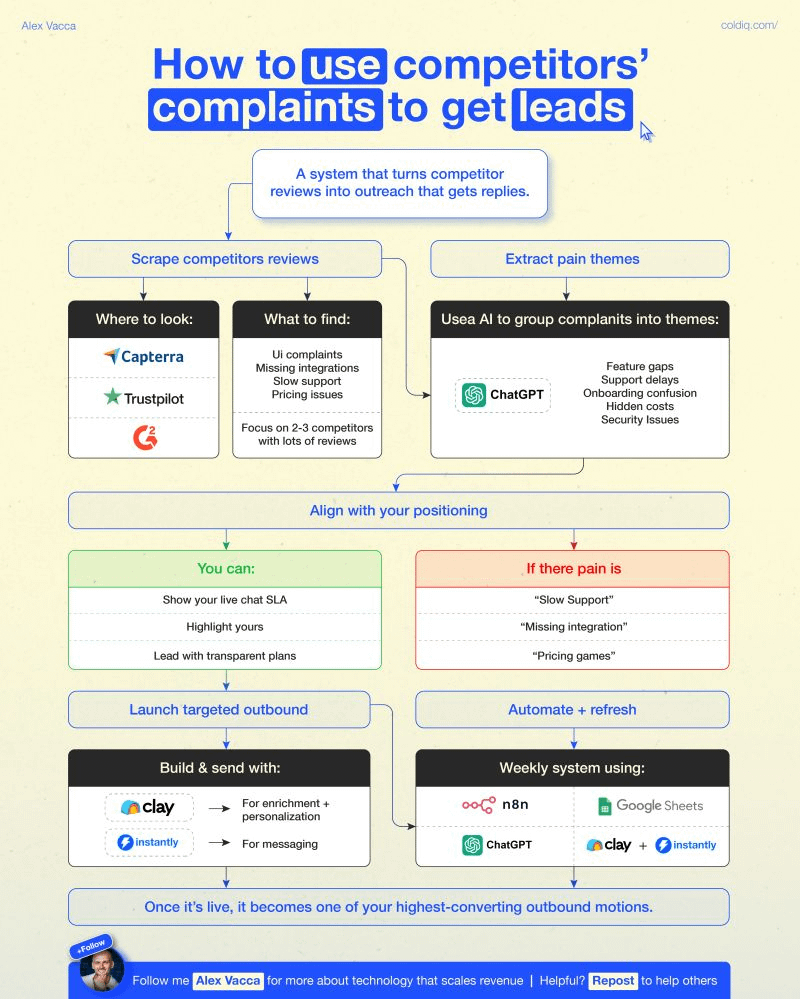
"Target people who hate your competitors." We saw 15-25% reply rates with this strategy for one of our clients. But the question is: How do you do it? ↳ Visit G2, Capterra, and Trustpilot. These platforms are full of people actively complaining about tools and looking for a better product. But you don't have to do it manually. Here's what to do instead: 1️⃣ Review Scraping Start by scraping negative reviews from 2-3 core competitors: 1. n8n (starts at $20/mo): Build custom scraping workflows for G2, Capterra, and Trustpilot. We use this to power the majority of our review mining workflows. b. Apify (starts at $49/mo): Pre-built scrapers for review platforms when you don't want to build from scratch. 2️⃣ Pain Point Analysis This is where it gets awesome. Compile all these complaints into specific themes: feature gaps, terrible support, UX disasters, security issues, pricing problems. ↳ Use ChatGPT, Claude, or Perplexity for this. Now you have a database of what your prospects hate about their current tools (matters the most for "targeted" messaging). 3️⃣ Positioning Alignment Map those complaints to your actual strengths. If reviews mention "hidden fees" and your pricing is transparent, that's your angle. ↳ Google Sheets (free) / Airtable ($20/mo) for mapping pain points to your positioning. Remember that instead of just pitching features, you're solving their frustrations. 4️⃣ Data Enrichment & Targeting Once you know who's unhappy and why, find decision makers at companies using tools like: ↳ Clay($149/mo) or FullEnrich ($29/mo) Since the messaging angle is already pre-validated based on your prospect's frustrations, they're a warm lead. 5️⃣ Outbound Execution Once the data part is covered, the next step is to engage your leads and ensure your message delivers: 1. Instantly (starts at $37/mo) for unlimited email outreach 2. lemlist (starts at $69/mo) for multi-channel outreach or HeyReach for LinkedIn-focused campaigns 6️⃣ System Automation This is where the actual game comes in. A good strategy comes first, but automation helps you scale things up. We built this using n8n (scraping) + ChatGPT (clustering complaints) + Google Sheets (inputs) + Clay + Instantly (execution). The entire system runs on autopilot.

@shannholmberg ·
what's the difference between a loop and a graph? (marketing edition) both are ways to run an agent, the difference is who decides the path, the agent or you. a loop still starts with you. you set the goal, the brief, and the bar it has to clear. what the agent owns is the path. take writing an SEO article: hand it the brief and it drafts, reads the draft back against that brief, rewrites the weak parts, checks again, and keeps circling until it clears the bar. the one thing you did not write is the step-by-step it took to get there. a graph is you drawing the steps and the routes between them ahead of time. same article, but now you set the map: research the keyword and the competitors ranking for it. draft from what you find. score that draft against your rubric. if it clears, add the internal links and publish. if it misses, back to the draft. the agent still decides how to handle each step, it just travels the routes you laid down. the shape of this has a name, a state machine. every node is a state the work can be in, and a check at each one decides where it goes next, forward when it clears or back to an earlier node when it misses. if you have built a workflow in n8n, you have already drawn one. nodes wired together, branches that fire on a condition, a step that loops until it clears, that picture is a graph. an agent graph is the same shape, the nodes hold agents doing the work instead of single api calls. the way I think about it, a graph is a map of loops and checkpoints. some nodes run once, others are their own loop where the agent works something out, and the checkpoints between them read the result and route the work. you keep laying down nodes and checkpoints until the map reliably gives you the output you want. the vault accelerator I run at my agency is one of these maps, 3 sessions that hand off in a fixed order: > research session: reads our company brain and past campaign results, pulls in competitor and market context, and builds the cohort we go after > landing page session: takes that research and builds the page from it > content session: uses the research and the page to write the copy, illustrations, and slides for the live sessions we run inside the content session runs a loop, a critic scores each draft against a rubric and sends it back until it clears the bar. that is one node on the map, the checkpoints between the sessions carry the work from one to the next a graph earns its extra setup on anything you run every week: > validation gates the work cannot skip > a fixed set of routes the job can take > a clear failure point, you see the exact step something broke on a loop on its own is enough for the work you only do once, where you don't know the path yet, let the agent find it. graphs earn their place on the jobs you repeat, the content pipeline, the SEO and AEO funnel step by step, the vault accelerator once the map works you reuse it, feed it the next cohort and the whole pipeline runs again past the loop, the next thing you design is the map it runs inside.


@SimonHoiberg ·
OpenClaw + n8n. This is an extremely powerful combination. People thought OpenClaw (or Claude Code) would replace n8n, but here's what they're missing. n8n - as an application layer between the agent and the tool - still makes perfect sense for at least 3 reasons. 1️⃣ Observability OpenClaw can write its own skills. But instead of letting it script away, ask it to create n8n workflows for itself to use. It is much easier for you to investigate and see what the agent built for itself in n8n, rather than looking through 100 ugly written JavaScripts. 2️⃣ Security After the agent is done creating its n8n workflow, you can lock in place. Making it read-only from that point. Instead of adding API keys to .env.local for the agent to use (and abuse) in any way it likes, you can now add the credentials securely to n8n. From here, you can also easily add any additional safeguarding step, making sure your agent doesn't make a mess by mistake. 3️⃣ Performance An agent adds value when it needs to make decisions. But a lot of work is still predictable and deterministic. Turn it into a workflow. It's faster and you save tokens. 🔁 The flow - The agent needs access to an API. - It writes an n8n workflow with incoming webhook. - You lock the workflow and add the API key. - You add extra safeguarding steps. The agent now proxies all calls through n8n. It never sees the API key. It's prevented from making crucial mistakes. I know... It feels addictive to let OpenClaw do everything. But this thing is a beast! Use it responsibly.


@piotrkulpinski ·
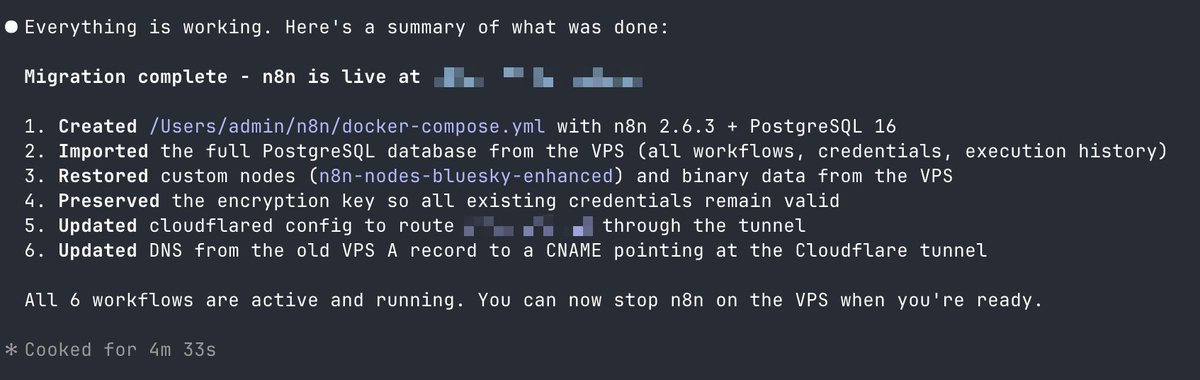
Self-hosting is so easy with AI 🤯 Claude just migrated my n8n instance in 1 prompt, with data migration, DNS update, and Cloudflare tunnel. It even fixed the small issue that I had with one of the nodes 🙌🏻 Side note: love my mac mini more and more 🖤

@frog_omo ·
someone built an AI receptionist for coaches and consultants using n8n + GPT-4o + supabase. the goal: replace the "fill out this form before we talk" experience with a chat that collects lead info naturally. what it does: → receives messages from a website chat widget → identifies whether the visitor is new or returning using session-based memory → stores conversation history in postgresql (supabase) → extracts names and email addresses from natural conversations → updates existing contact records instead of creating duplicates → generates human-like responses using GPT-4o mini → maintains conversation context across messages the key insight: most visitors don't provide their email in the first message. the initial approach was to use email as the primary identifier. but that forces a form before the conversation starts. the fix: use session IDs as the primary identifier. update the contact record when the AI extracts a name or email later in the conversation. the result: visitors can start chatting immediately instead of being forced to fill out a form. why this matters for lead qualification: traditional chat widgets: "enter your email to continue" → friction → bounce. this approach: start the conversation → build rapport → extract info naturally → qualify. the form still gets filled. it just happens inside the conversation instead of before it. my take: this is the right architecture for any high-touch service business (coaches, consultants, agencies). the session-first approach is underrated. most chat implementations still gate on email upfront because it's easier to track in the CRM. but it kills conversion. one thing i'd add: intent classification before the first response. some visitors are ready to book. some are just browsing. the AI should route differently based on that. github repo included https://t.co/9CjhfDzslD — via r/n8n


@digital_ab98389 ·
Everyone is talking about AI automation. It reminds me of when affiliate marketing was the hottest trend. Everyone wanted to get in, but only a few were creating real results. The same thing is happening with n8n automation, AI agents, and workflow automation. Thousands of people are teaching AI automation, but far fewer are using n8n, APIs, and AI to solve real business problems. That has created a huge gap in the industry. Many people think that once they learn how to connect a few nodes in n8n, they can call themselves an AI Automation Specialist, Automation Engineer, or Automation Consultant. That's not how it works. The tool is only a small part of the job. Before you can confidently build workflow automation, CRM automation, or business process automation, you must first understand the business you're building for. You need to identify bottlenecks, analyze workflows, understand how data moves between systems, ask the right questions, and know why a process exists before trying to automate it. You might say, "It's not my business, so how can I understand it?" Simple. Research the company. Study the job description. Understand how they generate revenue. Map their current workflow. Ask smart questions. Identify where time, money, or leads are being lost. That research gives you an edge and helps you design automation that actually delivers results. My biggest advice? Build on paper first. Forget n8n for a moment. Use the most powerful node you have—your brain. Draw the workflow. Map every decision. Think through the business logic. Understand how every API, CRM, database, AI model, and user interacts before you open your automation platform. Once you've solved the problem on paper, building it in n8n becomes the easy part. Don't start by connecting nodes. Start by understanding the business. Research first. Ask questions. Design the workflow. Then build the automation. That's what separates someone who knows n8n from someone who solves business problems with AI automation, workflow automation, AI agents, API integrations, and scalable business systems. If you're looking for practical insights on n8n, AI automation, workflow design, CRM automation, AI agents, and building systems that help businesses scale, follow Agbaje Olarewaju. Portfolio: https://t.co/Uy2Q6TzQDc


@asaio87 ·
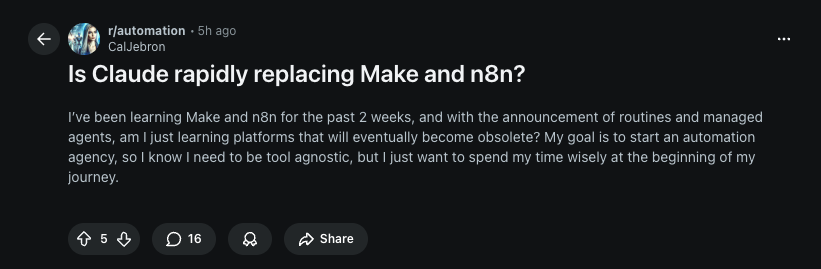
I don't think Claude will replace make or n8n. Because AI will give you different outputs for the same prompts. Whenever you need something done in a certain way, then you need fixed systems Its a much better idea to integreate Claude in certain steps of a workflow. Like use n8n, to build a workflow, where you use claude to create content and use @schedpilot api to post on social media as agentic social media workflow. thats just an example

@venelinkochev ·
after my n8n node for converthub got published n8n started bringing in some good traffic 21 users with 3 purchases 💰 ~15% conversion rate 📈 building integrations where users already are > paid ads

@MakadiaHarsh ·
When a client asks "should we use n8n or build custom?" — I use this decision tree: Will this automation change frequently? → n8n Visual editor means the client or a junior dev can adjust workflows without touching code. Does it need to process more than 50,000 events/day? → Custom n8n handles volume well but at true scale, a dedicated service with proper queuing is more reliable. Does the business need to own and understand the system? → n8n Non-technical founders can look at the workflow and understand what’s happening. Try that with a Python codebase. Does it involve complex AI agent logic with multiple models? → n8n with LangChain nodes Persistent memory. Vector DB support. Better than most custom implementations. Is this a one-off data job that runs once? → Custom script Don't over-engineer a workflow for something you'll run once and delete.

@cem_hasoglu ·
I had a call last week with a founder who paid $12,000 for a "lead qualification system" I asked him to show it to me it was 4 nodes in n8n a webhook that catches form submissions, an AI node that scores them, a filter that splits hot and cold leads, and a Slack notification 45 minutes to build, maybe an hour if you're slow he wasn't ripped off because the agency was malicious he was ripped off because he didn't know what was possible that gap between what automation can do and what most business owners know exists is massive right now if you actually understand this stuff you're sitting on something real

@comfortfajugbag ·
A workflow that works once is not automation yet One thing I wish beginners heard earlier: If your n8n workflow works in a test run, that doesn’t mean it’s ready. The real questions are: what if the API fails? what if the same item arrives twice? what if one field is missing? what if the token expires? what if it runs 100 times instead of once? The first time I understood automation, it was when I stopped asking “did it run?” and started asking “will it keep running?” My biggest lesson: The 'Error Trigger' node is just as important as the actual business logic. Beginners build for the happy path. Engineers build for the failure modes. If your workflow doesn’t have an automatic retry strategy on HTTP requests, a sub-workflow to catch unhandled errors, and a clear alerting mechanism (like a Discord/Telegram webhook for failures), you haven't built an automation. You've just built a script that requires manual monitoring. Design for the crash, not just the success. What was the first reliability lesson you learned in n8n?


How I saved a SaaS client $135,000/year by automating the detection of "silent churn" before it happened. Silent churn is the silent killer of subscription businesses. If you're waiting for a cancellation email to try and save a customer, you've already lost. I built a n8n engine that flags churn risks and intercepts them using AI. Here's how: ⚡ The Workflow: 1️⃣ Weekly DB check pulls user login & feature metrics 2️⃣ Logic node flags accounts with a >30% drop in usage 3️⃣ GPT-5 analyzes their CRM history & drafts a personalized "value check-in" 4️⃣ Enterprise tier ➡️ Auto-creates HubSpot task & Slack CSM alert 5️⃣ Standard tier ➡️ Automatically shoots the AI email via Intercom 📈 The ROI for my client: 💵 Saved $135,000/yr in MRR 📉 Cut churn by 40% 🕒 Slashed CSM manual data prep from 15 hours to 1 hour/week With a built-in, published error handler, this retention engine runs flawlessly 24/7. Stop letting your hard-earned customers slip away. DM me "CHURN" to automate your retention. #AIAutomation #n8n #SaaS #GrowthHacking #NoCode

Best n8n tweets
Xholic studies what works in your niche, drafts posts in your voice and schedules them for the hours your audience is online.
$0 today · Cancel anytime
Browse all tweet collectionsKeep exploring