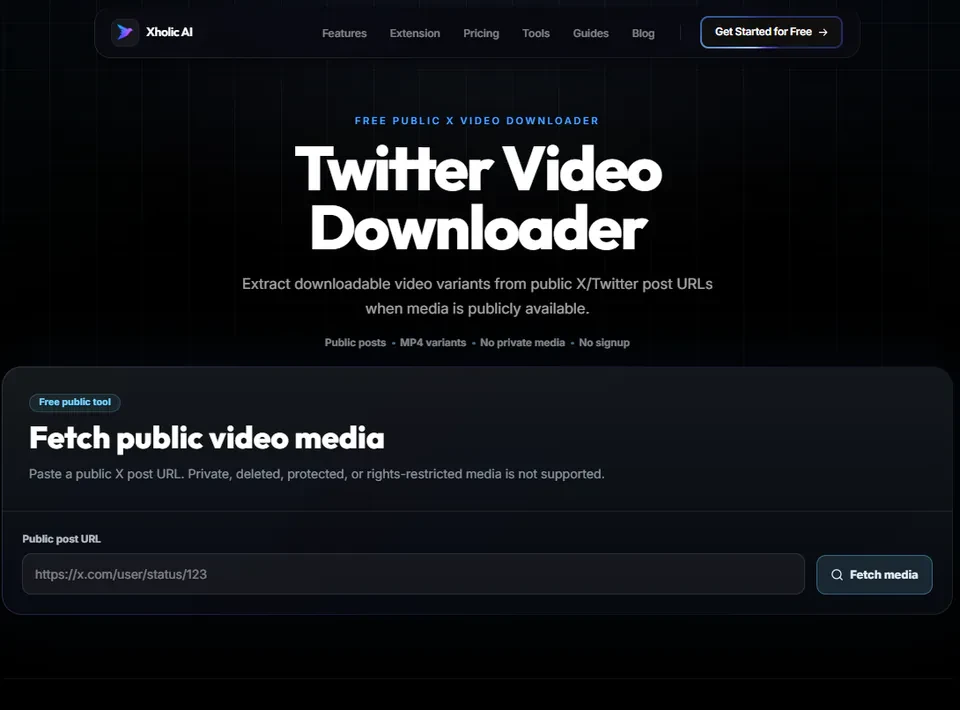
Quick answer: Paste the link of any public tweet containing a video, and the tool fetches the available MP4 file for download. Works directly in your browser on both desktop and mobile - no app install, login, or account connection required.
What Is It?
The Twitter Video Downloader is a free tool at xholic.ai. Paste the link of any public tweet containing a video, and the tool fetches the available MP4 file for download. Works directly in your browser on both desktop and mobile, no app install, login, or account connection required.
Open the Twitter Video Downloader Tool.
Who Uses It and Why
| Who Uses It | What They Use It For |
|---|---|
| Anyone wanting to save a tweet’s video | Found a video on Twitter they want to keep, a clip, a moment, a tutorial, and want it saved locally |
| Content creators | Reference or repurpose video clips with appropriate rights and proper attribution |
| Researchers & journalists | Archive video evidence from public posts for legitimate documentation or reporting |
| Mobile users | Want a quick way to save a Twitter video directly to their phone’s camera roll without a separate app |
How to Use It - Step by Step
It takes under a minute. Here’s exactly what to do:
Step 1: Find the video tweet
Open the tweet on Twitter/X containing the video you want to save.
Step 2: Copy the tweet link
Tap the share icon or the three dots on the tweet, then choose ‘Copy link to Tweet’.
Step 3: Paste into the tool
Go to Twitter Video Downloader Tool and paste the URL into the input box.
Step 4: Fetch available formats
Click fetch. The tool retrieves the available MP4 video variants, often in multiple quality options.
Step 5: Choose quality and download
Select your preferred resolution and click download to save the video to your device.
Pro tip: If multiple quality options appear, choose the highest resolution available unless file size or storage space is a concern. Lower resolutions download faster but lose visual quality, especially noticeable on larger screens.
Real Example
A researcher documenting a public event finds a tweet with relevant video footage. They copy the tweet’s URL, paste it into the Twitter Video Downloader Tool, select the highest available quality, and save the file for their archive, properly noting the original source and tweet link for citation.
Good to Know
Heads up: Always check who owns the video and whether you’re allowed to reuse it before publishing it elsewhere. Downloading a video for personal viewing is generally fine, but republishing someone else’s content without permission can violate copyright and the original creator’s rights, regardless of how easily it was downloaded.
Frequently Asked Questions
Do I need to install an app to use this?
No. The tool runs entirely in your browser on both desktop and mobile. Nothing to install.
Can I download videos from a private account?
No. The tool only works with publicly visible tweets. Private account content cannot be accessed.
What video quality options are available?
This depends on what Twitter originally encoded for that specific video, the tool retrieves whatever quality variants are available, often including multiple resolution options.
Is downloading Twitter videos legal?
Saving a video for personal use is generally acceptable. Republishing or monetizing someone else’s video without permission can violate copyright. Always verify usage rights before reusing any downloaded content publicly.
Why didn’t the download work for my tweet?
Common reasons: the tweet was deleted, the account went private after you copied the link, the link itself was copied incorrectly, or the post doesn’t actually contain a video (some posts only look like they have one).
Related Xholic Tools
These tools work well alongside this one:
- Twitter GIF Downloader - Save looping GIF clips the same way
- Twitter Image Downloader - Save still photos from tweets
- Fake Tweet Generator - Create your own tweet mockup with custom video or image
- X Profile Analytics - See how video posts perform compared to other content types