Crawling, indexing, and sitemaps
Diagnose discovery and index exclusions, manage crawl priority and budget, and use XML sitemaps for visibility and reporting.
59%
Best tweets about Technical SEO
Find the best tweets about technical SEO, including crawling, indexing, rendering, canonicals, site architecture, Core Web Vitals, and diagnostics.
Technical SEO audits, crawling, indexing, rendering, canonicals, architecture, performance, structured data, diagnostics, and measured fixes.
Original Xholic analysis
Technical SEO is framed as foundation work: diagnose discovery, inspect rendered pages, repair URL signals, and strengthen internal links before scaling content. Crawling and indexing dominate the supplied analytics. Automation attracts interest, but contributors warn against trusting tools without checking their access and outputs; performance scores describe attention, not proof of SEO effectiveness.
46.2% of posts
All-time engagement
25.6% of posts
Published in 90 days
Conversation map
Diagnose discovery and index exclusions, manage crawl priority and budget, and use XML sitemaps for visibility and reporting.
59%
Crawl sites and combine Search Console, analytics, URL Inspection, rendered output, and logs to identify and prioritize fixes.
38.5%
Organize page hierarchies, navigation, content hubs, and contextual links so important pages are discoverable and receive authority.
33.3%
Resolve competing URL versions, incorrect canonical tags, duplicate or thin pages, broken URLs, and redirect issues.
25.6%
Check what crawlers actually fetch and render, including JavaScript content, HTML limits, session-dependent pages, and robots rules.
25.6%
Use recurring crawls and performance reports to catch regressions, guide targeted repairs, and verify indexing or traffic outcomes.
23.1%
Measure and improve loading speed, mobile experience, and CWV through rendering choices, lighter assets, and script optimization.
23.1%
Implement and validate schema, titles, headings, breadcrumbs, metadata, and other machine-readable page signals.
15.4%
Tone and stance
Performance benchmark
Posts with media make up 51.3% of this collection. Their median all-time score is 20.3, compared with 11.8 for text-only posts.
Format mix
Consensus and debate
Shared view
Crawling, indexing, and sitemaps account for 23 tweets (59%). Contributors emphasize sitemap reporting, blocked-page checks, and understanding exclusions rather than treating submission alone as a complete indexing strategy.
Shared view
Audit advice combines GSC, crawls, rendered DOM checks, and URL Inspection. A creator's account of a script stripping actual content illustrates why a visually intact site is not sufficient evidence of crawler access.
Shared view
Contributors prioritize contextual internal links, canonical checks, and cleanup of competing pages. One reports a wrong canonical excluding blog posts; another cautions that adding programmatic pages can scale existing discovery problems. These are reported experiences, not controlled causal evidence.
Open debate
Creators describe crawl skills and automated repairs, while others warn that LLM advice can misread JavaScript-dependent sites and audit tools can imply access to unavailable GSC API reports. The tension is between delegated execution and verified diagnostics.
Open debate
Charles_SEO presents the reported 2MB HTML cutoff as an overlooked infrastructure risk. Glenn Gabe emphasizes that most pages will not reach it, while identifying bloated inline assets as an exception. They differ in urgency, not in the stated need to keep critical HTML accessible.
What performs
The supplied format medians are 33.709 for tutorials, 19.47 for lists, and 8.418 for case studies. Sitemap-reporting tutorials exemplify the practical diagnostic format; these scores do not establish that tutorials produce better SEO outcomes.
The broad SEO checklist scores 767.62, or 47.3 times the supplied median; the Googlebot infrastructure post scores 675.62, or 41.63 times the median. Both are attention outliers, not validation of every recommendation or technical claim they contain.
Statistical standouts
Creator landscape
The five most represented creators account for 25.6% of the selected posts.
1. Okara
@askOkara
2 posts
2. Brodie Clark
@brodieseo
2 posts
3. Daniel Foley Carter
@foley_seo
2 posts
4. Harshil Tomar
@Hartdrawss
2 posts
5. Jan-Willem Bobbink
@jbobbink
2 posts
6. Mehrab | SEO Mode
@mehrab_build
2 posts
Across two supplied tweets, askOkara has a median all-time score of 392.75. The posts pair a wide-ranging task list with advice to establish crawlability, indexing, structure, and speed before investing in AEO/GEO.
Brodie Clark's two supplied tweets have a median all-time score of 81.44. His distinctive contribution is sitemap hygiene: submit important sitemaps individually for reporting and inspect cross-domain signals, while recognizing that some exclusions require no action.
Since the previous snapshot
Themes, sentiment, stance, and post format are classified per tweet. All counts, shares, medians, creator concentration, freshness, and performance comparisons are then calculated directly from the published snapshot.
Xholic's all-time score compares engagement while accounting for reach, post age, and creator consistency. It is used for relative comparisons within this collection.
This report analyzes the exact 39-post snapshot shown below. AI identifies editorial categories and drafts explanations; all statistics are calculated from the snapshot, and every narrative claim is checked against cited posts before publication.
Best Technical SEO tweets
Ranked 01–39

@askOkara ·
"SeO iS EaSY" SEO: > fix indexing issues > add breadcrumbs > add canonical tags > fix core web vitals > fix orphan pages > add schema markup > fix heading structure > write original content > avoid duplicate content > get high quality backlinks > use clean, descriptive urls > fix broken links and 404s > check js content is crawlable > fix keyword cannibalization > make the site mobile friendly > add author bio / e-a-t signals > make titles 50-60 characters > write unique meta descriptions > merge thin or overlapping pages > optimize images and add alt text > match every page to search intent > find high volume, low kd keywords > add internal links to important pages > publish comparison/alternatives pages > write the best listicles in your category > create topic clusters around pillar pages > add a google business profile for local seo > monitor pages losing traffic and rankings > validate schema using google's rich results test > create dedicated pages for features / use cases > update dateModified when you refresh content > find old pages ranking on page 2 and update them > submit your sitemap to bingwebmaster and gsc > check robots.txt and noindex tags for blocked pages > find pages with high impressions but low ctr and improve their titles and meta descriptions > search "site:yourdomain(.)com" on google, check titles that are cut off / dont include your target keyword and rewrite them > google your main keywords, expand "people also ask" boxes and create quick faq pages answering the questions

@Charles_SEO ·
The LEAD search engineer at Google just dropped a brand new blog post that confirms something most SEOs have never even heard of... Googlebot only fetches the first 2MB of your pages HTML = Everything after that cutoff doesn't exist to Google!!! Not fetched, not rendered, not indexed. And the Web Rendering Service is completely STATELESS - Meaning it clears local storage and session data between every request, so if your content depends on cookies or session state to render, Google can't see it. External CSS and JS files are fetched SEPARATELY with their own 2MB limit per file, and PDFs get a 64mb limit. So the structure and order of your code literally matters! And is why some CMSs are so much better out the box than others... Make sure you put your meta tags, title, canonicals, and structured data as HIGH as possible in the document. If they're below the 2MB cutoff, Google doesn't know they exist. Most OnPage SEO guides never take any of this into account, but most OnPage is surface-level. The real edge is understanding the infrastructure your content passes through before Google even evaluates it.


@seonatia ·
SEO AUDIT CHECKLIST FOR YOUR STARTUP: ____________ FOUNDATION (0/5) Register your site with Google Search Console (free) Submit your XML sitemap to Google & Bing (free) Verify your site in Google Analytics (GA4) (free) Set your preferred domain (www vs non-www) (once) Install an SEO plugin or configure meta tags (e.g. Yoast, RankMath) (tool) KEYWORD RESEARCH (0/4) Identify 5–10 core topics your customers search for (free) Find long-tail keywords with low competition (tool) Map one primary keyword per page or post (free) Check competitor keywords (Ahrefs, Semrush, or free Ubersuggest) (tool) ON-PAGE SEO (0/6) Write a unique, keyword-rich title tag for every page (50–60 chars) (once) Write a compelling meta description for every page (150–160 chars) (once) Use one H1 tag per page that includes the target keyword (once) Add alt text to all images (once) Use short, descriptive URLs (no dates or random strings) (once) Add internal links between related pages (free) TECHNICAL SEO (0/5) Ensure the site loads in under 3 seconds (test with PageSpeed Insights) (tool) Make the site mobile-responsive (once) Enable HTTPS (SSL certificate installed) (once) Fix broken links and 404 errors (tool) Add structured data / schema markup for your key page types (tool) CONTENT & AUTHORITY (0/5) Publish at least one high-quality blog post per week (free) Target comparison and “best X” keywords relevant to your niche (free) Reach out for 3 backlinks from relevant sites or directories this month (free) List your startup in relevant directories (G2, Capterra, Product Hunt, etc.) (free) Create a Google Business Profile if you have a local audience (free)


@brodieseo ·
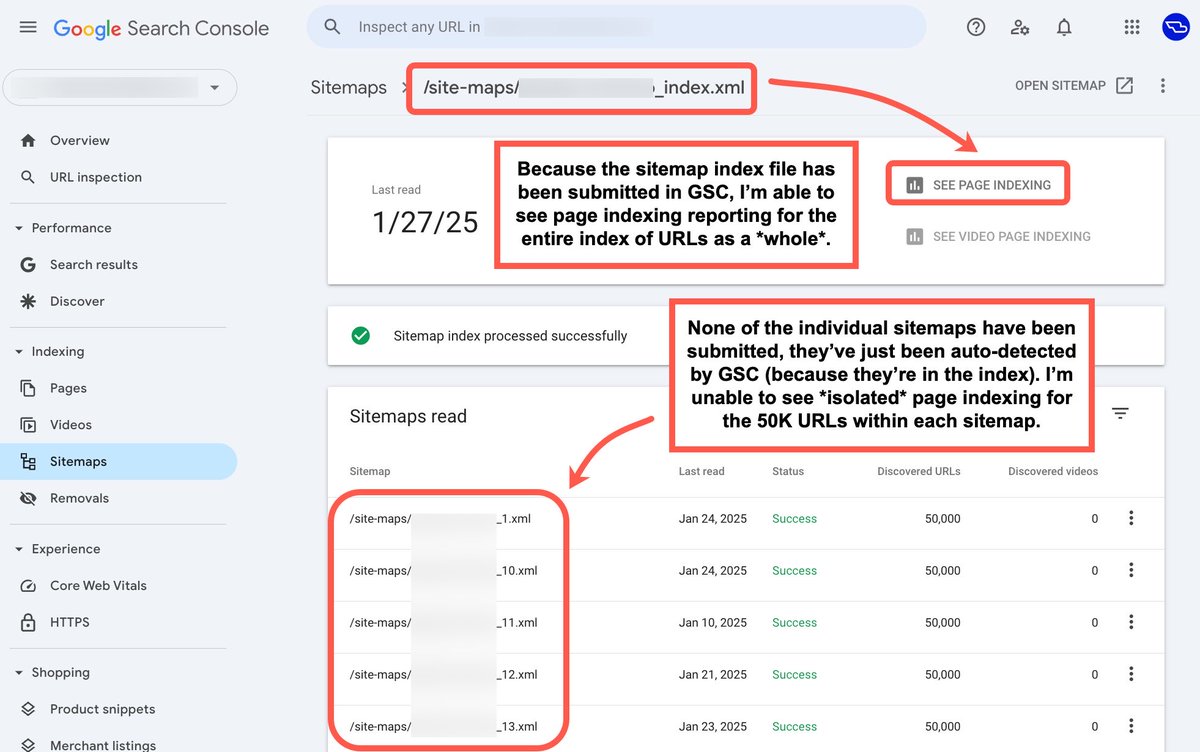
SEO Tip: don't just submit the sitemap index file in Google Search Console, you'll need to submit all important sitemaps individually also. When I get access to a client's GSC, often for very large sites, I unfortunately don't always have access to the indexing data that I need from the get-go. A core reason for this is when only the sitemap index file has been submitted, and not the individual sitemaps for core parts of a site e.g. products, categories, articles, guides etc. This approach effectively applies to all types of sites. Whether it be news publishers (where articles are often grouped within sitemaps by date), eCommerce sites, marketplaces, or sites of any kind. When you think about large sites that are maxing out on the number of pages that they're squishing into a sitemap (50K is the limit), you're losing a great deal of insight along the way, especially if you're only able to view page indexing for millions of URLs at a time. I actually think that Google should really do this automatically when sitemaps are detected within the index, due to the usefulness of the reporting, but I do also understand that it does require input from the site owner in the first instance. If you haven't added your sitemaps to GSC in this way yet, get it over and done with and make the change now. If you end up working with someone in a technical SEO engagement, they will be thankful that you did (if they understand the importance of this reporting view).

@foley_seo ·
SEO is easy. SEO audit: ➜ Tear down of Google Search Console Data ➜ Build segments (non brand/brand) & sub folders (product/category/service/blog) ➜ Last 3 month YoY comparison ➜ Click gap analysis ➜ Core update impact analysis & spam updates ➜ Segment of decaying pages & queries ➜ Crawl of website ➜ Match decaying pages to word count, readability, internal links ➜ Index performance analysis (dead, weak URLS etc) ➜ GA4 data integration with decayed URLS / click gap ➜ Integration of Bouce, Session, Engagement data ➜ Divide word count by consumption time, identify unhelpful content ➜ Set up another website crawl w/ GA4/GSC API & JS render ➜ Export crawl, segment by priority ➜ Render checks key pages (DOM analysis) ➜ JS functionality review (CSR/SSR/Button Events/Dynamic Content) ➜ Canonical checks (self ref, canonical child, non-value paths) Handling of dynamic/parameter URLS ➜ Non value path handling (meta robots/robots) pagination, blog taxonomies etc. ➜ JS Content/Links/Injection Events ➜ HTTP header checks & handling (3xx/4xx/5xx) ➜ HREFLANG ➜ Internal link consistency (http 200 vs internal redirects) ➜ GSC URL Inspection output dom (by page type) ➜ Title & meta export with GSC CTR data - identify weak/gaps ➜ Ensure all content accessible (sufficient link routes) ➜ Rendering & peformance analysis (CWVs, INP, CLS etc) ➜ Crawl stats review (type/bytes/freq) ➜ Robots accessibility ➜ Structured data / JSON / markup / validation ➜ Content auditing NLP, quality, topical weight Niche compliance (YMYL) E-E-A-T & Integrity By performance & age (updated date/lastmod) By performance (word count/engagement time & WPM consumption) Query counts & query alignment (Relevance) Query dilution / topical dilution Cannibalising content Plagarism & Duplication checks Wayback update checks Fact-check validation Internal/external links Content query to anchor rel ➜ Link auditing Ref domain accruement rate Segment by traffic performance Topical trust flow review Link context review Link distribution top pages Anchors PBN/Network checks OBL context Link consolidation & domain redirect checks Lost link checks Link spam reviews Disavow checks ➜ Brand Trust Analysis Brand search volume Search sentiment Search variants Company details & consistency Trust signals (reviews, glassdor) Site policies UGC mentions ➜ User behaviour Engagement analysis Heat, click, scroll map Custom explorations Bounce rates / eng time ➜ Indexing Indexed vs non indexed page analysis Non index reason evaluation Clean up (crawled/discovered curr not indexed) Adjusted HTTP headers Crawl budget / log reviews ➜ SERP Impact AI overview / CTR review Counter content strategy Query count analysis (Devaluation vs slippage) Search appearances


@jbobbink ·
I built a Claude skill for Cloudflare's new /crawl API. One API call. Up to 100,000 pages. HTML, Markdown, or AI-extracted JSON. The skill generates code, handles the full async workflow, and ships with 6 SEO-specific crawl configs: → Content audits → Technical SEO crawls → Hreflang validation → Site migration comparison → Incremental monitoring → Structured data extraction at scale It knows when render:false saves you money (free during beta), which resource types to block, and how to use incremental crawling to cut costs. $5/month for 10 hours of browser time. Roughly 12,000 pages. Try beating that with per-page pricing. Skill file in the comments.

@robj3d3 ·
I made my site’s SEO self-healing. Instead of waiting for Google to tell me a link is broken, I now have my VPS crawl my site on a weekly cron. It emails me any issues, and spins off a subagent to fix it on autopilot. SEO will be huge for @canivibecodeit so this is awesome 😁


@lilyraynyc ·
Friendly reminder to be very careful taking technical SEO advice from LLMs; they will confidently make statements about how sites operate that simply aren’t true in many cases, because most LLMs can’t render JavaScript. This includes Claude.

@jakezward ·
Successful SEO looks like: - 120 new blog posts - 60 high DR backlinks - 500 AI-created pages - 1,000% growth in traffic But remember, it also looks like: - Removing 3 cannibalising pages - Improving a cluster’s internal linking - Tweaking 5 titles for better targeting - Fixing internal links to canonical pages - Writing a featured snippet in 10 minutes - No-indexing low-quality pages in Google - Redirecting a 404 page with 30 backlinks - Creating indexable URLs for 15 sales pages - Adding a new section to an existing blog post Don’t forget to consistently do the little things. They can be just as impactful.
 Watch video
@Marie_Haynes ·
I've seen a lot more sites lately have content shown as "crawled-not currently indexed" in the Page Indexing report in GSC. I wrote a bunch of my thoughts and observations, including an interesting case where a technical reason was the likely cause. However, quality is usually the culprit. This post includes a link to a couple of tools to help you sort through your crawled-not currently indexed report. Hope it helps! https://t.co/nfRJ1jOXJy

@mehrab_build ·
I just had a consulting call with a client who had a serious indexing issue. When most people hear "indexing issue" they immediately think it's an authority problem. And they think the fix is buying backlinks. It is an authority issue. But backlinks won't fix it. The real problem was internal linking. And not the surface level stuff. Most people think internal linking just means making sure every page on your site has at least one link pointing to it. That hardly scratches the surface. The most important thing about internal linking is making sure you're passing authority from the right page, with the right anchor text, to the right target page. Every page on your site that's already ranking for something has authority. That authority can be distributed to your other pages through contextual internal links. This is how you help Google understand which pages matter, and get them indexed and ranked faster. But what if none of your pages are ranking yet? Then your first step is finding extremely low KD keywords and writing content around them. Use those pages to internally link to your other new content, also targeting low KD keywords. Slowly build a web of internally linked pages, and work your way up until your entire site is properly connected, all the way to your money pages. Backlinks help. But if your internal linking is broken, you're leaving a lot of authority on the table that you already own.
@brodieseo ·
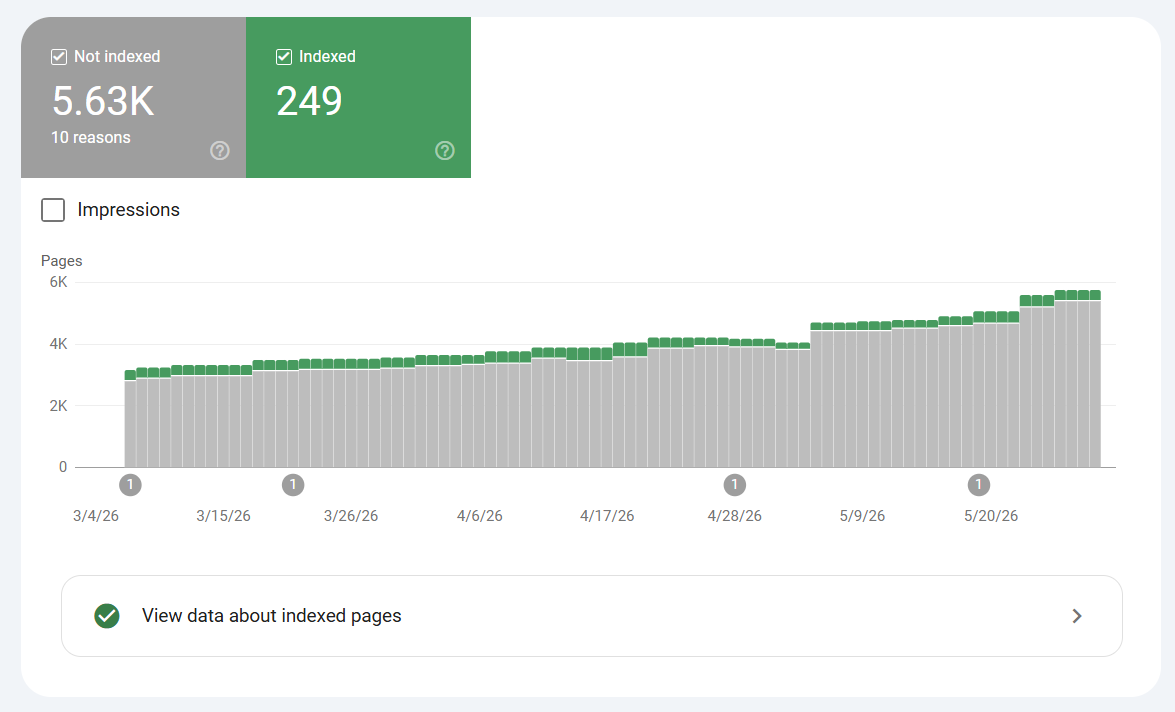
Technical SEO: when expanding internationally, make sure to keep tabs on your XML sitemaps to keep your indexing reports tidy. This is a very common issue that can occur when businesses expand to new regions and are using multiple domain names for the structure of choice (instead of sub-folders or sub-domains). As a strategic decision, there isn't a "one right answer" for how to execute this expansion, but a downside to using multiple domains often results in missing common issues that inevitably arise over time. Looking at the screenshot on the left – what do you notice? The XML sitemap is hosted on the .com.au but is referencing URLs that are on the .com, being a completely different domain. If there isn't an exact match in regional pages, or if the sitemap itself is a relic of the past (continuing to host an outdated sitemap), this will result in Google unnecessarily trying to discover URLs on the .com that may have issues, resulting in a mass of messy exclusions within the page indexing report in GSC. I've seen this same issue result in URLs being grouped into various different exclusion reports at scale in GSC – common ones being "page with redirect" and "not found (404)", which will understandably happen when cross-domain signals are being sent in this way. The lesson here is to pay attention to the various connective signals across each of your regional domains – whether it be within robots files, XML sitemaps, or hreflang. Regularly testing and paying attention to the page indexing report in GSC will allow you to pinpoint these issues. Note: an important reminder that with large websites, exclusions within GSC are completely normal. The important part is understanding why groups of pages are being flagged, and whether an action should be taken. An action isn't always required.


@SEOKeval ·
Brands spend months wondering why their SEO isn't working. I can usually spot the issue in under 10 minutes. Here's what I look for: 1) Do the pages they're trying to rank fulfill the search intent of the target keyword? Ex: Are they targeting keywords on a Product page that Google primarily ranks Product pages for? They should. 2) Are they only targeting broad keywords that are extremely competitive? They shouldn't be. 3) Are there multiple pages competing to rank for the same keyword? There shouldn't be. 4) Do their Product Category pages have keyword-optimized meta titles, H1 tags and content on the page? They should. 5) Does the content on Product Category pages talk about the brand's USPs, include an FAQ, and internally link to other relevant Product Category pages? They should. 6) Are their core Product or Product Category pages linked on the main navigation menu or the homepage? They should be. 7) Does the site have a lot of low-quality blog content that doesn't rank in Google or generate organic clicks? It shouldn't. 8) Does the the site's blog content internally link to relevant Product or Product Category pages? It should. 9) Does the blog content exclusively target top-of-funnel keywords that most people now turn to AI for? It shouldn't. 10) Does the site have a lot of unresolved broken links or broken backlinks? It shouldn't. 11) Are quality backlinks actively being built? They should be. 12) Are Product Category pages being consistently hammered with backlinks each month, with no variation of links to the homepage and blog content? They shouldn't be. 13) Is the homepage the most linked-to page by a large margin? It should be. 14) Are 50% of anchor texts branded? They should be. 15) Was there ever a sudden surge of spammy backlinks over the last few years? There shouldn't be. I'd say 95% of the time, these issues are the root cause of a brand's failing SEO.

@semrush ·
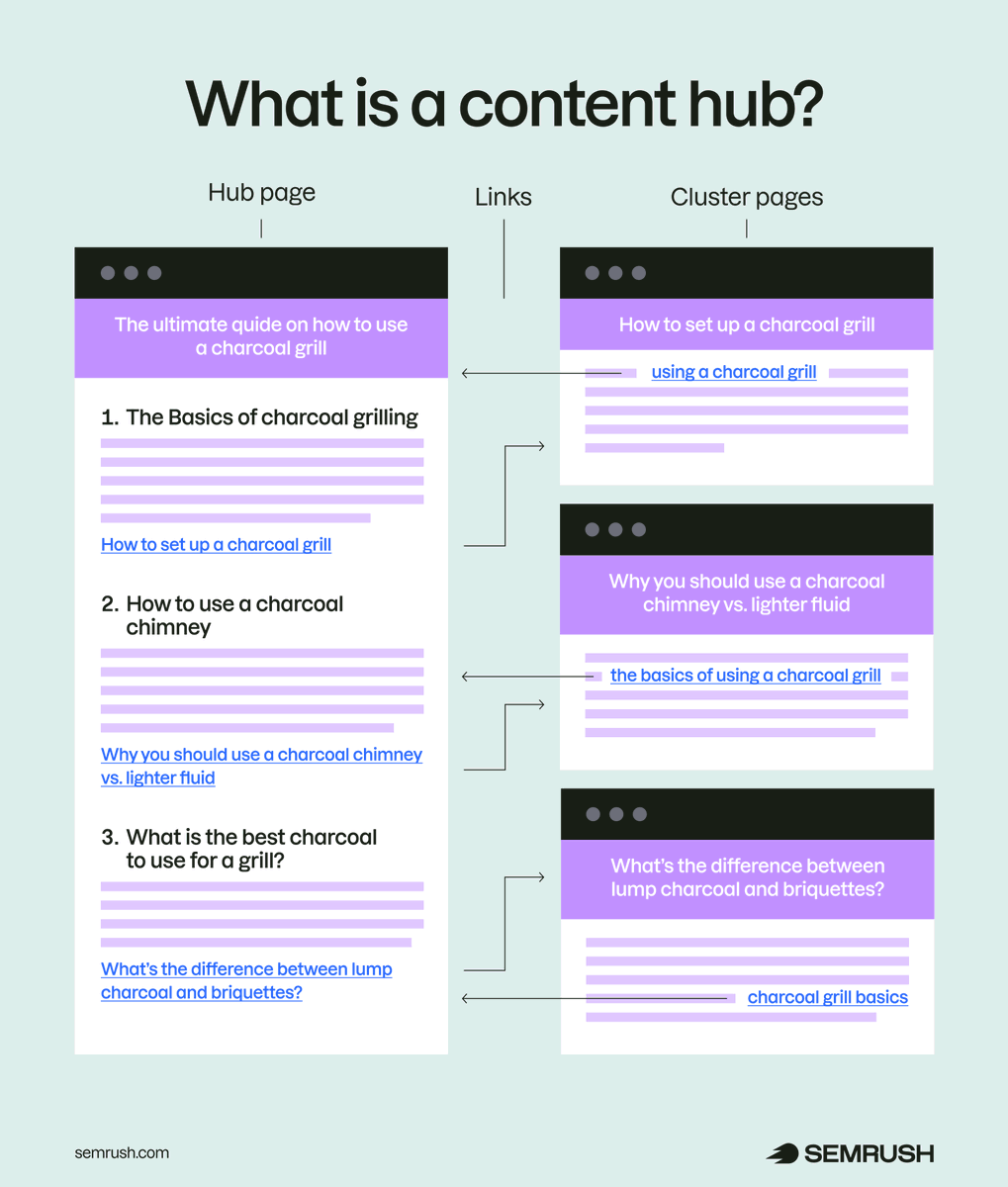
Content hubs go beyond SEO structure. They structure content so search engines and AI systems understand your expertise as a connected topic map – not isolated pages competing on their own. Done right, they strengthen crawlability, deepen context, and sharpen topical authority across your entire domain. https://t.co/bnXpSnb9Kq.

@woocassh ·
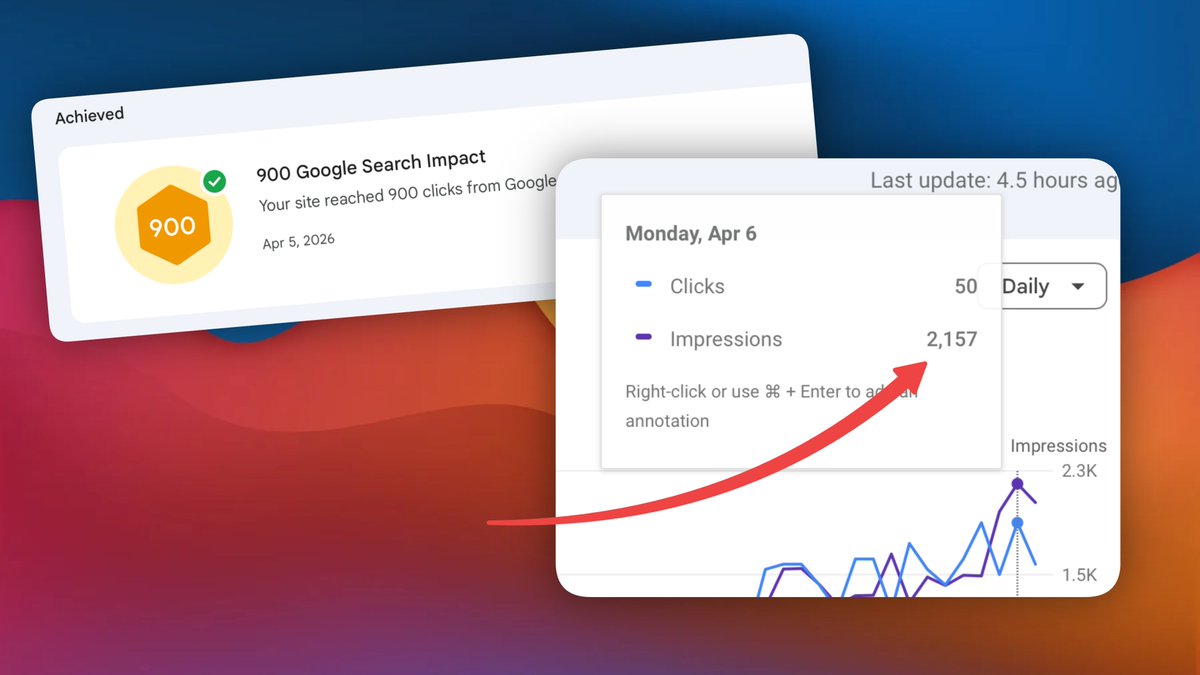
I reached a new SEO milestone! 🤯 > 2k impressions in a single day > 900+ clicks in 28 days 🚀 If you want to know, how here's how: > generate quality content relevant to my product (landing pages + blog posts) > submit sitemaps to google regularly > keep track of what content gets indexed and which doesn't > improve the content that didn't get indexed > rinse and repeat

@sandislonjsak ·
We are working on our new company webpage which we’re launching soon so let me share our internal must haves checklist with you: - Clear value proposition above the fold - Strong primary CTA above the fold - Mobile-friendly responsive design - Fast page load and optimized images - Clear navigation with important pages easy to reach - Dedicated service / product pages - Short, low-friction contact or lead forms - Click-to-call phone number on mobile - Real customer reviews / testimonials - Trust signals near key conversion points - Consistent CTA across important pages - Clear response-time promise - HTTPS with no security or mixed-content warnings - Unique page titles - Unique meta descriptions - Relevant internal links between key pages - Descriptive alt text on images - Analytics and conversion tracking configured - Thank-you page after form submissions - Contact information clearly visible - Strong About page with real people / company story - Case studies / customer success stories - At least 5 useful FAQs - Clear pricing, starting prices or quote expectations where appropriate - Clear differentiation from competitors - Location / service-area pages where relevant - Maps + directions for physical locations - Sticky mobile CTA - Breadcrumb navigation - XML sitemap created and submitted - Properly configured robots.txt - Canonical tags configured correctly - No broken links or dead pages - Custom 404 page with useful navigation - Social share / Open Graph images - Clear privacy policy - Cookie / consent setup where legally required - Structured data / schema markup where relevant - Search-friendly, readable URLs - Regular backups, updates and basic website security monitoring

@thinking_slow ·
each week, i automate more parts of my job. if you're a content marketer, you should probably do the same. i wrote an article with some real-world inspiration from the @ahrefs blog team (and some starter prompts to play with), including: - ✍️ draft SEO articles: an 11-stage pipeline that takes a keyword and returns a full article draft - 🔄 refresh old posts: analyses old claims, inserts product mentions, and closes topic gaps, with an approve/reject interface for edits - 📊 monthly performance reporting: auto-generated on the 2nd of each month, pulls GSC + Ahrefs Web Analytics into one view with KPIs, trends, and winner/loser tables - 🧭 topical authority auditing: embeds every blog URL, buckets pages by distance from the site centroid, and shows how core vs off-topic posts actually perform - 👀 competitor content monitoring: watches competitor sitemaps daily, summarises new posts, and converts saved ones into keyword lists i can target - 🔗 internal linking: for every new post, finds the best existing posts to link from, identifies the exact paragraph, and drafts the anchor text for you full article here: https://t.co/pGWzrpSDmU
@SEOKeval ·
Want to see something wild? I drove a 3-4x increase in NON-BRANDED organic traffic in 2 months. It's not from useless blog content either. The traffic increases are all to Product and Product Category pages. So sales are up a ton. I didn't do anything crazy: 1. Removed a lot of unused pages that were wasting Google's crawl budget. 2. Fixed nearly 60 broken links and broken backlinks. 3. Optimized Product Category pages for low-hanging fruit keyword opportunities that were just off the 1st page of Google. 4. Added content to the bottom of all Product Category pages that highlighted the product's USP, included a brief FAQ, and internally linked to other relevant Product Category pages. 5. Fixed several instances where Product Category pages were targeting multiple keywords of different search intent. 6. Improved the quality of the existing blog content, and built internal links from them to important Product Category pages. 7. Added important Product Category pages to the site's main navigation menu. I published new blog content and did link building as well, but it hasn't been enough time to see the results of that yet. The jump in organic traffic is strictly from dialing in keyword targeting and on-page SEO, improving internal linking, and upgrading the overall quality of the site. Good SEO still starts with the basics.

@askOkara ·
10 SEO best practices to follow in 2026 1. before investing in AEO / GEO or whatever, build a good foundation first - site structure, crawlability, indexing, page speed and technical SEO 2. create pages and content around your core topics to build topical authority 3. collect questions from emails, sales calls, subreddits then build pages that answer them in simple language 4. get backlinks from high quality sites in your niche 5. create pages for high intent searches around your product - comparisons, use cases, integrations, templates, how to queries. 6. improve pages that rank on 1st / 2nd page of google. sometimes all you need to do is improve the title / meta description 7. add internal links to relevant pages 8. create helpful original content that your icp would read 9. double down on keywords you can rank for instead of chasing the highest volume keywords 10. audit your existing pages every 3-6 months. delete, improve or merge low quality pages that dont get traffic / don't deserve to be ranked

@Manixh02 ·
SEO is Easy SEO: > fix indexing issues > add breadcrumbs > add canonical tags > fix core web vitals > fix orphan pages > add schema markup > fix heading structure > write original content > avoid duplicate content > get high quality backlinks > use clean, descriptive urls > fix broken links and 404s > check if content is crawlable > fix keyword cannibalization > make the site mobile friendly > add author bio / e-a-t signals > make titles 50-60 characters > write unique meta descriptions > merge thin or overlapping pages > optimize images and add alt text > match every page to search intent > find high volume, low kd keywords > add internal links to important pages
@mehrab_build ·
3rd month working with this client. It's only March 18th and we already added $1,677 MRR. All from SEO and AEO. Here's the exact blueprint 👇 1. Remove toxic AI content If you used AI to bulk-publish blog content, chances are some of it is actively hurting you. Unrelated topics, keywords that have nothing to do with your niche, and outbound links going to other sites in their network. What I do: remove them all and set up 301 redirects to either the homepage or the closest relevant article. 2. Reverse engineer the competitors I want to see exactly what's working in the space before building any strategy. What pages do they have? How are they doing internal linking? What backlinks do they have? This tells me what's already working, so I'm not guessing. 3. Fix technical issues and on-page SEO Doesn't matter how many backlinks you have. If your site has technical issues or poorly written content, you won't rank. Fix the foundation first, then build links. 4. Invest in link building and PR Backlinks are still one of the most important ranking factors. In any semi-competitive niche, you're not getting to the top 3 without them. I get the best links possible, sometimes the exact same ones as competitors, and run PR campaigns every other month. Don't sleep on this. 5. Monitor what's working, constantly My daily routine: Search Console -> what's working and what's not -> Ahrefs -> check competitors SEO is not a one-off game. You need to stay on top of the data, watch your competitors, and keep adjusting.


@GohilHardy ·
SEO update for @lab_startups Indexed pages grew from 302 → 483 in 15 days. Google discovered 185 new pages and indexed 181 of them. Still fixing indexing issues and helping Google crawl the remaining pages.


@Hartdrawss ·
SEO Things every Vibe Coder MUST Learn (Extended Edition) 1/ Search Intent > Why someone typed that query. Informational, transactional, navigational. Match it or rank nowhere. 2/ Topical Authority > Covering a subject so completely that Google trusts you as the go-to source for it. 3/ Keyword Clustering > Grouping related keywords under one page instead of creating a new page for every variation. 4/ Long Tail Keywords > Low volume, high intent, low competition. Easiest traffic to win and usually the most valuable. 5/ Programmatic SEO > Using templates and data to publish hundreds of pages at scale. One system, compounding returns. 6/ Core Web Vitals > Google's measure of how fast and stable your page feels. Slow sites rank lower, full stop. 7/ E-E-A-T > Experience, Expertise, Authoritativeness, Trust. Google's framework for deciding who deserves to rank. 8/ Canonical Tags > Tells Google which version of a page is the real one. Prevents you from competing with yourself. 9/ Backlink Profile > Who links to you and how authoritative they are. One strong link beats a hundred weak ones. 10/ Internal Linking > Connecting your own pages strategically. Distributes authority and helps Google crawl your site. 11/ Featured Snippet > The answer box at the top of Google. Structure your content to answer questions directly and win it. 12/ Zero Click Search > User gets the answer on Google without visiting your site. Optimise for brand recall anyway. 13/ Schema Markup > Structured data that helps Google understand your content and display rich results. 14/ Index Bloat > Too many low quality pages dilutes your sites authority. Less indexed pages, more focused ranking. 15/ Crawl Budget > Google wont crawl your entire site every day. Make sure your best pages get crawled first.

@glenngabe ·
New from Gary based on the SOTR podcast covering the topic -> Inside Googlebot: Demystifying crawling, fetching, and the bytes we process Regarding the 2BM limit (which is HUGE btw): "For the vast majority of the web, a 2MB HTML payload is massive, and you will never hit this limit. However, if your page includes bloated inline base64 images, massive blocks of inline CSS/JavaScript, or starts with megabytes of menus, you could accidentally push your actual textual content or critical structured data past the 2MB mark. If those crucial bytes aren't fetched, to Googlebot, they simply don't exist." And some best practics: * Keep your HTML lean: Move heavy CSS and JavaScript to external files. While the initial HTML document is capped at 2MB, external scripts, and stylesheets are fetched separately (subject to their own limits). * Order matters: Place your most critical elements — like meta tags, <title> elements, <link> elements, canonicals, and essential structured data — higher up in the HTML document. This ensures they are unlikely to be found below the cutoff. * Monitor your server logs: Keep an eye on your server response times. If your server is struggling to serve bytes, our fetchers will automatically back off to avoid overloading your infrastructure, which will drop your crawl frequency. https://t.co/kYyzCHh5Tr
@Hartdrawss ·
Just hit these numbers on a client Next[.]js build today ??!! LCP 0.40s. CLS 0.06. INP 8ms. heres exactly how i got there: [ step 1 — rendering strategy ] - most devs default everything to SSR and move on completely - that's poor strategy tbh; every route needs a decision. does this page change per user? - we mapped every route before writing a single component - this alone cuts your server response time significantly and it's quite a difference [ step 2 — nothing blocks the fold ] - went through every script loading above the fold like tracking scripts, font loaders, analytics - the browser should paint the page before it does anything else - Hard re-work but was able to clean it up; lazy loaded all of them so they only fire after the page fully paints [ step 3 — SEO infrastructure on day one ] - schema markup, OG tags, sitemap, robots.txt done and knocked out before any feature - crawl structure mapped properly so that google can actually index the right pages [ step 4 — assets compression ] - every image converted to webp, sized for the containers and a s3 integration - fonts subset to only the characters being used - videos compressed hard before the first commit TLDR; performance and SEO aren't a sprint you run before handoff but rather the foundation everything else sits on. if your site isn't ranking or loading slow on mobile don't blame the content !


@omarships ·
My SEO Stack: • site indexed + monitored (GSC) • clean crawl paths (robots + sitemap) • titles/descriptions aligned with intent • canonical + redirect issues resolved • domain consistency (www, https) • internal links structured • technical errors cleared • pages built for specific search intent ( VS, Alts, Comps) • long-tail capture (not just head terms) • improving page speed / CWV • adding structured data • getting real backlinks (distribution > hacks) What am I missing?

@natmiletic ·
Google doesn't care what CMS you use. It cares if your site is slow, has broken links, or serves a terrible mobile experience. WordPress, Webflow, Framer, headless... doesn't matter. Performance and authority matter. Your "old school agency" warning about platform migrations tanking SEO? That's usually about botched redirects and lost content, not the tech stack itself.

@RobHoffman_ ·
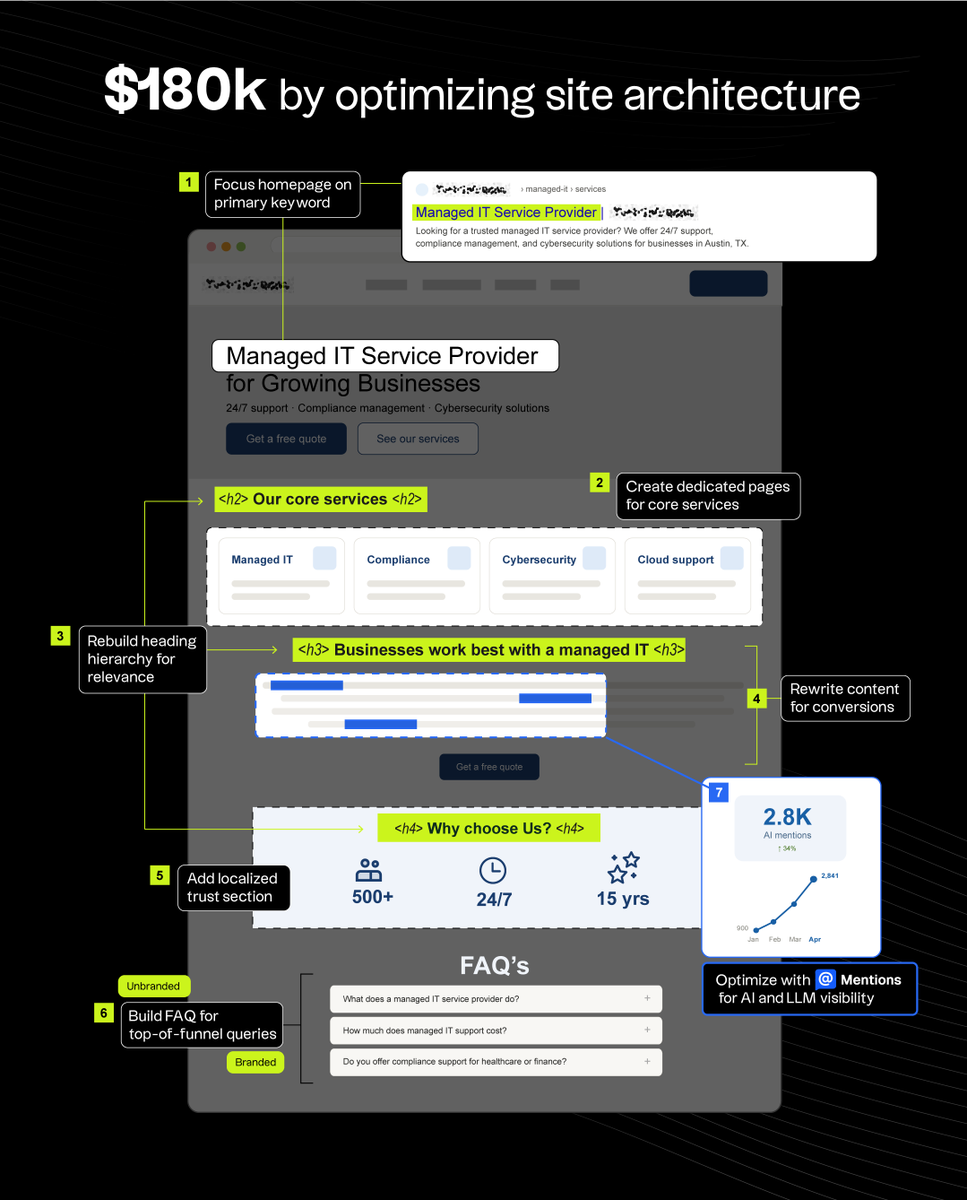
don't buy into the hype on X that spamming SEO articles with Claude will get you traffic/leads. our SEO client made $180,000 last month and we didn't create any new pages. We just optimized their site architecture. here's how: the client is a managed IT and security compliance company. the problem: they were trying to rank for everything at once: managed IT, security compliance, and more, with no clear hierarchy between them. here's how we fixed that and got their money pages ranking: 1. Focused the homepage on their most valuable keyword: "managed IT service provider" 2. Created dedicated pages for their core compliance and security services 3. Rebuilt the heading hierarchy to signal topical relevance 4. Rewrote entire sections of content to read like a buying page, not a blog post 5. Added a localized "Why Choose Us" section to their content for trust 6. Built an FAQ section covering both branded and unbranded high-funnel queries 7. Used Mentions to see what phrases were getting the most AI visibility, then optimized their content around those to rank in LLMs (that last one matters more than most people realize). The lesson: before you publish more pages, make sure your site is optimized.
@omarships ·
Most people shouldn’t be doing pSEO. If Google isn’t indexing or prioritizing your current pages, adding 10k more just dilutes your site. Most sites already struggle with: • pages not getting indexed • low crawl priority • weak internal linking Scaling that = scaling the problem. pSEO only works when: • your domain already has authority • your key pages are consistently indexed • internal links actually pass and concentrate that authority Otherwise you’re just creating thousands of invisible pages and killing your website.
@semrush ·
Google's new AI search guidance is worth paying attention to – not just for what it says, but for what it doesn't. The document reinforces many of the technical fundamentals: crawlability, structured content, clear entity signals, and pages that AI systems can reliably understand and cite. But it also highlights a bigger shift happening beneath the surface. AI search visibility used to be an SEO problem. Now it splits into two: the on-site work is solved, and the off-site work is where the recommendation decision sits. Cleaner robots.txt, stronger E-E-A-T, better extraction structure: those are prerequisites Google's guide codifies well. The off-site work is harder and slower. Google can't write a guide for it because the work depends on independent sources Google doesn't control. Start before your competitors do: https://t.co/Rlsr1lvWyG.

@natmiletic ·
The "Crawled, currently not indexed" nightmare 😱 1. Thin content (yes, even if it's "unique") 2. Duplicate structure across pages 3. Slow load time or broken mobile experience 4. Internal linking that buries the page 5. Low engagement signals if it was indexed before Authority matters, but these kill indexing even on strong domains.

@gaganghotra_ ·
Enterprise technical SEO - if over time there is a build up of millions of redirected URLs and 404/410 BUT still Google keeps on fetching those even after years of that change implementation. What can be done? cuz almost 36% of monthly Googlebot fetches are those URLs which I think is eating into the crawling budget for other important URLs. @patrickstox @MalteLandwehr @Hobo_Web would love to hear your thoughts on this - thanks 😃
@foley_seo ·
Google is indexing LESS content year by year, their threshold for indexing content has gone up significantly. Why? 1. It costs money to store and process website data 2. It doesn't need 10,000 URLS with the same copy 3. It makes no sense to index something you are unlikely to serve (quality issues, trust issues etc) So, I put together a FULL guide on using Google's URL inspection tool. If you aren't using it but you are in SEO, you should be using it. 🡲 Periodically check power pages on a domain to check index state 🡲 Check indexing states 🡲 Address and deal with anomalies 🡲 Request indexing for pages where issues have been fixed 🡲 Check rendered outputs (screenshot / HTML) 🡲 Check canonical profile and so much more. I've done a video which walks you through Google's URL inspection! Enjoy https://t.co/XfJm0q4IkT

@woocassh ·
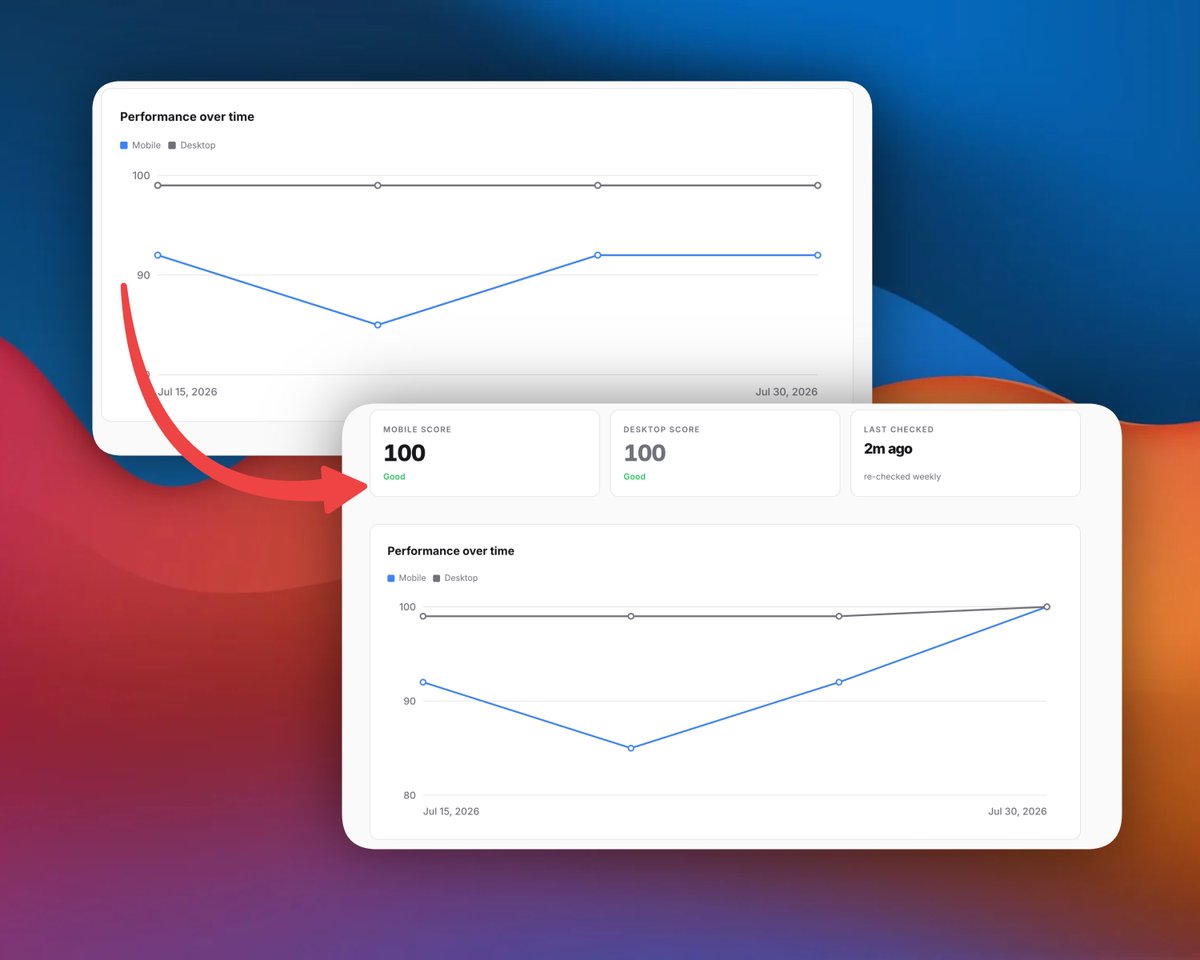
Thursday Technical SEO Tip Page load times matter! 📈 RankGoat keeps track of the performance of my websites overtime using Lighthouse, you can easily do it manually but when you have multiple websites it becomes a pain, and it's easy to forget today it highlighted a few issues that were affecting mobile device performance and load times on itself https://t.co/Ey4XdLEygt I plugged them into claude and the site now loads almost instantly from 99/92 to 100/100 (desktop / mobile) the big (embarassing) issues I had: - 3rd party confetti library loaded on each page but only used on successful signup (no self hosted and minified) - CDN hosted fonts (now self hosted) - using gzip on css as well as html in nginx now so the payload is much smaller also claude naturally ads stuff as you vibe code so its important to keep track of this over time! wishing you more clicks on this fine Thursday!

@aliByteCode ·
another small SEO thing I ignored for way too long: if Google finds multiple URLs with the same or very similar content, it chooses one as the canonical version. You can use rel="canonical" to tell Google which URL you prefer instead of letting it guess. worth checking once your site starts getting more landing pages and blog pages. duplicate URLs can get messy fast.

@Aevmorfop ·
Not sure this counts as marketing… but I went deep on SEO today. Turns out I’d managed to break it at some point, while I was doing another SEO audit 🤦♂️ I was setting things up so Google could see all the “SEO stuff”… but turns out, the same script, was stripping out all of the actual content💀 So from the outside, the site looked fine... but to Google, it was basically empty. No wonder impressions were going nowhere 😬


@ahmadafterhours ·
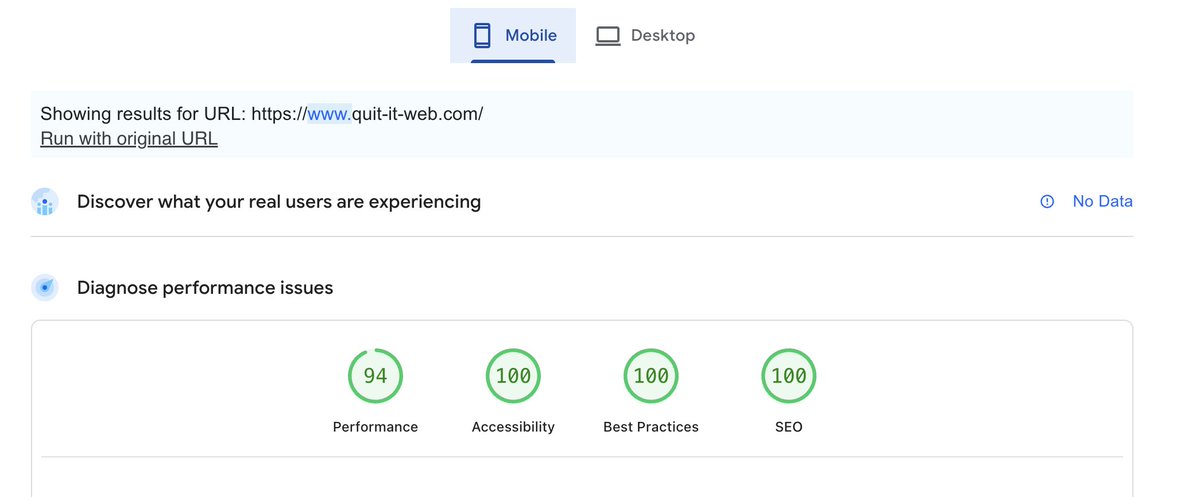
Starting today: one open-source Claude Code skill per day. Day 1 is an SEO audit skill that runs on your real Google Search Console data. The hardest part wasn't the analysis. It was writing down what the Search Console API can't do. Core Web Vitals. The Links report. Crawl Stats. None of them have an API endpoint, they exist only in the UI. A lot of GSC audit tooling quietly pretends otherwise, and that's how you get confident, wrong conclusions. MIT, free, no signup: https://t.co/FvuSK6U1bI What should day 2 be?

@jbobbink ·
I've seen SEOs spend days rebuilding their sites in Markdown to rank in AI search. Tturns out it was all for nothing. Profound just ran the first proper A/B test on this. 381 pages across 6 real websites, tracked over 3 weeks with randomized control groups. The result? Markdown pages got roughly 1 extra bot visit over 3 weeks compared to HTML. One. That's it. The 16% average lift that looks promising on paper is driven entirely by pages that already had heavy bot traffic. The typical page saw almost zero difference. Even ChatGPT-User, which makes up 73% of all AI bot traffic, showed no statistically significant preference for Markdown. Here's the part that should make every SEO pause: Google's John Mueller said LLMs have trained on parsed web pages since the beginning and have no problems dealing with HTML. Bing's Fabrice Canel went further. He called Markdown files "sub-standard" and asked a question every SEO should hear: "how will you know when your .md transform is half-broken on a page? who will fix it?" He also pointed out something critical. Bing ranks based on what customers see, not what bots see. This matters because Markdown for bots creates a second version of your site that humans never review. It's the same problem as cloaking, where you serve different content to different visitors. And we all know how that story ends. Glenn Gabe compared it to AMP, except AMP at least had clear rewards from Google. Markdown has none. After all these years in the SEO threnches I've seen this pattern repeat. A tactic sounds logical. Early adopters report gains. Everyone rushes in. Then the data arrives and shows it was noise all along. Save your engineering hours. Focus on what actually moves the needle: crawlable HTML, clear structure, fast pages, and content that genuinely answers what AI models are looking for. The format you serve bots is not your leverage point. At least not yet.

@bekircagricelik ·
I had 22 blog posts on my site. Google indexed zero of them. Turns out a single wrong canonical tag was telling Google every post was a duplicate. 22 blog posts, completely invisible. Fixed one line of HTML. All 22 entered the indexing queue. Now included this in the @clearauditapp SEO check. Check yours. This bug is silent.
Best Technical SEO tweets
Xholic studies what works in your niche, drafts posts in your voice and schedules them for the hours your audience is online.
$0 today · Cancel anytime
Browse all tweet collectionsKeep exploring