Prioritization & high-leverage one-thing focus
Identifying the few tasks that actually move the needle — the ONE thing, 80/20, daily top-3, question-the-requirement frameworks (Hormozi/Musk) — and protecting focused hours for them.
22%
A curated collection of the sharpest, most-shared X posts about productivity—saved so you do not have to dig through the timeline yourself. Updated every two weeks.
Systems people actually kept using past week two, not just the aesthetic ones.
Original Xholic analysis
Across 50 posts from 44 creators on productivity, the conversation clusters around durable systems: prioritization and one-thing focus (22%), deep work, energy management, and calendar-first planning. A consistent counter-current critiques productivity theater — elaborate setups that collapse within weeks ('maintain them for maybe two weeks,' per 2060029016753467694). Sentiment skews 80% positive / 20% negative, and 100% of posts carry a supportive stance label. Note for recency: the corpus skews older (median post age 178.3 days; only 14% published within 90 days), so it evidences which systems people describe keeping, not week-by-week retention data.
80% of posts
All-time engagement
100% of posts
Published in 90 days
Conversation map
Identifying the few tasks that actually move the needle — the ONE thing, 80/20, daily top-3, question-the-requirement frameworks (Hormozi/Musk) — and protecting focused hours for them.
22%
Protecting focus: phone in another room, single monitor/tab, blocking distracting sites, notification hygiene, environment design, and handling context reconstruction after interruptions.
14%
Calling out elaborate systems, morning routines, and tool hoarding as procrastination in disguise; skepticism toward hacks, '10 hours saved' tools, and AI-generated fantasy schedules that don't survive real life.
12%
Tracking personal energy rhythms and matching task types to peak hours (deep work mornings, admin afternoons), including the energy-output curve and process-over-outcome focus.
12%
Posts sharing the specific apps/tools someone actually uses daily (Notion, Todoist, calendars, task managers), plus curated app roundups and open-source tool spotlights.
12%
Using LLMs and agents (Claude Code, Codex, Claude + Obsidian) to automate tasks, process notes, orchestrate pipelines, and act as an always-on assistant or thinking partner.
10%
Designing the week on the calendar rather than via todo lists: weekly time blocks, themed days, two-week sprints, Perfect Week templates, and blocking time before the week starts.
10%
Productivity through removing tasks, features, apps, and complexity — deleting most of the todo list, cutting systems down to what's necessary, fewer priorities done better.
8%
Tone and stance
Performance benchmark
Posts with media make up 42% of this collection. Their median all-time score is 5.66, compared with 7.42 for text-only posts.
Format mix
Consensus and debate
Shared view
The largest theme (22% share, 11 posts) centers on identifying the few tasks that actually move the needle and protecting focused hours for them. It also produced two of the five outliers: 180.69 (25.89x median) and 108.13 (15.49x median).
Shared view
Energy-management posts (12% share, 6 posts) earned a median all-time score of 16.82, far above the overall post median of 6.98. Posts argue for matching task types to peak hours and focusing on inputs over outcomes.
Shared view
12% of posts call out morning routines, tool hoarding, and elaborate setups as procrastination in disguise, noting that the systems that look best on paper rarely survive contact with real life — one post describes creators maintaining elaborate setups 'for maybe two weeks' before they collapse, which is the exact lens of this editorial angle.
Shared view
The single highest outlier at 272.43 (39.03x median) is a creator's list of the tools they actually use every day — including Notion, Todoist, Slack, and AI tools — framed explicitly around long-term use ('Been using most of these forever'), not a novelty setup. Separately, subtraction-themed posts (delete 80% of the todo list, cut complexity) carry a median score of 10.98, above the 6.98 conversation median.
Open debate
12% of posts recommend specific daily-use apps (median score 14.91), while a critique-themed current of posts pushes back that apps and dashboards are 'procrastinating in a fancy way.' Overall sentiment runs 20% negative, though the analytics do not identify which individual posts carry it. The tension is unresolved in the evidence set.
What performs
Text-only posts carry a median all-time score of 7.419 versus 5.657 for posts with media, even though 42% of the 50 posts included media. The top performer (272.43) is a plain list of tools, consistent with the format data (100% of posts classified as LIST).
The top five of 44 creators account for 20% of placements. Sharran Srivatsaa (median 30) and Stijn Noorman (median 22.57) lead, and Sharran's two-week-sprint planning post scored 32.02 against a 6.98 conversation median.
Statistical standouts
Creator landscape
The five most represented creators account for 20% of the selected posts.
1. Pascal Bornet
@pascal_bornet
2 posts
2. Unfiltered
@quotesdaily100
2 posts
3. Rob
@RobRan6116
2 posts
4. Sharran Srivatsaa
@sharran
2 posts
5. Stijn Noorman
@stijnnoorman
2 posts
6. Terence
@terencebuilds
2 posts
Several build-in-public style posts favor energy management and simplification over elaborate systems: tracking when the brain works best and scheduling accordingly, and deleting most of the todo list to ship the 20% that matters. The strongest of these posts reached 40.73, nearly 6x the conversation median of 6.98.
Since the previous snapshot
Themes, sentiment, stance, and post format are classified per tweet. All counts, shares, medians, creator concentration, freshness, and performance comparisons are then calculated directly from the published snapshot.
Xholic's all-time score compares engagement while accounting for reach, post age, and creator consistency. It is used for relative comparisons within this collection.
This report analyzes the exact 50-post snapshot shown below. AI identifies editorial categories and drafts explanations; all statistics are calculated from the snapshot, and every narrative claim is checked against cited posts before publication.
Best Productivity tweets
Ranked 01–50

@coreyganim ·
my whole productivity stack: -Notion: company OS (rocks, content pipeline, community directory, etc.) -Todoist: every task, each with a Why, a Done, Who, and Access line -Slack: how my team reaches me -Fathom: records every call so I never take notes -Typefully: content scheduling -Kit: email marketing platform -GitHub: two second brains (business + personal) every agent reads first -Claude: my content/marketing daily driver -Codex: daily driver for all other knowledge work Anything not on this list that should be? Anything I should replace? Been using most of these forever.

@eptwts ·
one thing i learned this year that has 10x'ed my productivity: if a repetitive 3 minute action can be turned into a 30 second action, you SHOULD spend 1 hour building a system to automate it a) it saves time b) it saves mental bandwidth to focus on scaling

@Founder_Mode_ ·
Alex Hormozi’s 5-step productivity system that he stole from Elon Musk: Step 1: Question the requirement. Before doing a task, ask why it exists. He breaks that into three questions. 1. What does that mean, so you define the term. 2. How do you know that, so you show the data. 3. Why do I care, so you connect it to growth. If you can’t explain how a task leads to growth, it doesn’t matter. Step 2: Delete After questioning the requirements, start cutting. You could probably delete about 90% of what you’re doing, because it doesn’t drive the business. Deleting returns all the time spent on those tasks. It also removes the cost of switching between them, which is one of the biggest inefficiencies for a human brain. Step 3: Optimize Once you can see what produces output, put your resources where the returns are highest. 87% of Hormozi's traffic comes from two platforms, Instagram and YouTube, but his editors were spread evenly across every platform. Instagram now sends more traffic to acquisition(.)com than YouTube does. With 20 people, he’d put 8 on Instagram, 8 on YouTube, and 1 on each of the other four. TikTok has nearly a million followers and gave him one opt-in in four days. Step 4: Accelerate cycle time Every process can be sped up, but only after the first three steps. Musk said he spent a lot of time speeding up processes at Tesla that he later realized should have been deleted. Step 5: Automate Automation comes last. Musk said his big mistake at Tesla was starting by automating every step.
 Watch video
@nasqret ·
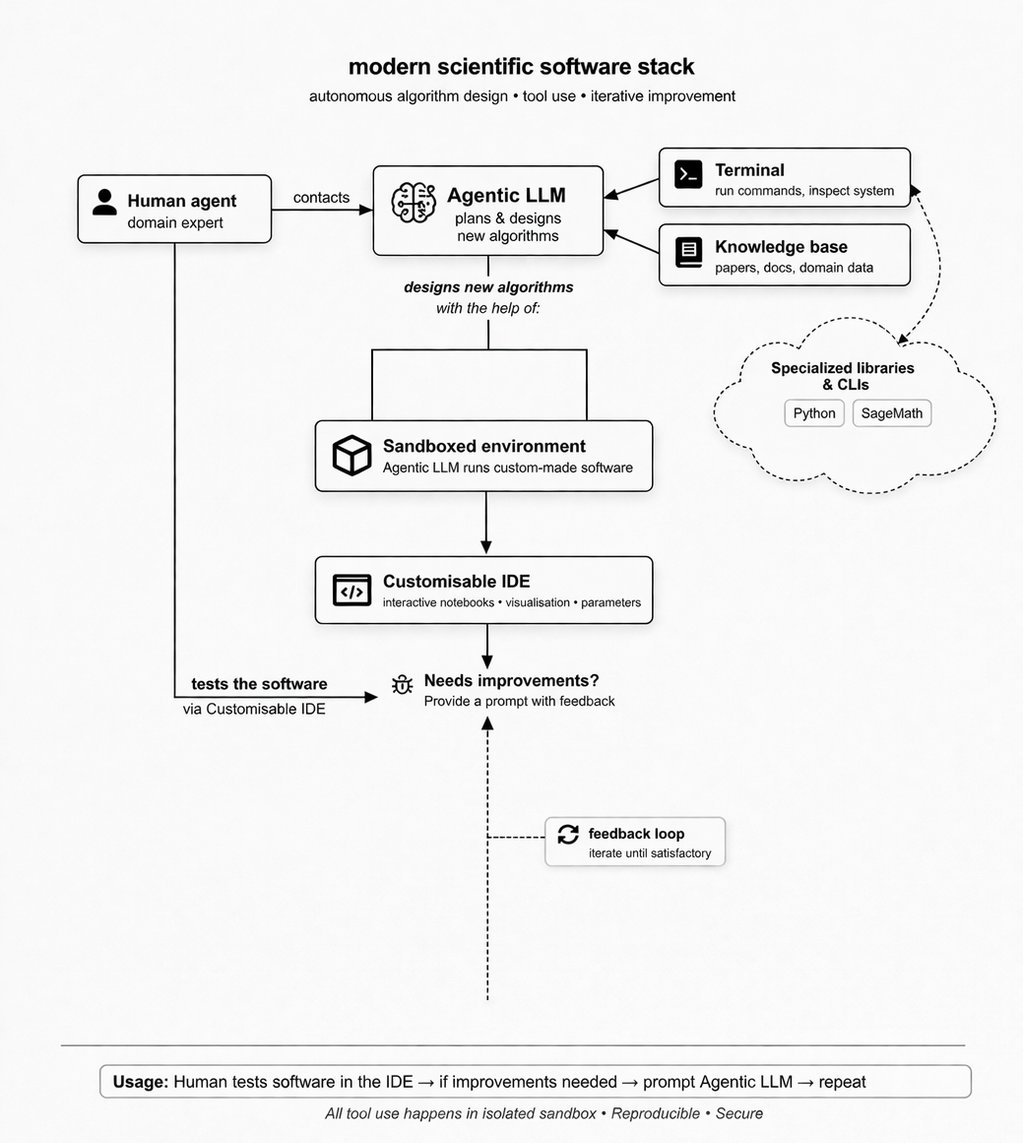
I want to share the workflow I've been developing and refining over the past few months. My typical tasks include: - working with repetitive documents (administration) - creating new documentation (papers, reports, teaching materials, journals) - developing and using custom software (computer algebra systems, Jupyter kernels, CLIs, etc.) - reading and internalising new ideas - developing new ideas (theorems, definitions, etc.) - reviewing and evaluating scientific work (reviews, reports, theses, etc.) In my scientific workflow as a mathematician, I've undergone a significant mental shift. I now organise everything around growing knowledge bases of skills and competencies. Whenever I approach a task, I coordinate-via an agentic LLM-a set of tools tailored specifically to that task. Because many tasks are repetitive, I structure my work into batches that can be encapsulated as reusable skills and agentic workflows. As a result, my default working mode has become almost entirely text-based. I rarely rely on commercial software anymore. When I need a specific algorithm, I simply download an appropriate Git repository and either build my own kernel for VS Code or set up a CLI-based pipeline. In practice, this means my documentation evolves into a kind of database (which I can inspect, for example, with Obsidian). When I need to modify software-say, adjusting magic commands on the server side-I can delegate the task to an agent like Codex or Claude Code, supervising the process as needed. This effectively turns my computer into a hub consisting of: - an LLM agent - a browser/IDE environment - a terminal - memory This setup is universal and machine-independent. In most cases, the LLM agent can help build or adapt custom software to fit specific needs. Everything becomes highly portable and robust. At this point, I've built a collection of skills, prompts, and pipelines that allow me to orchestrate nearly all aspects of my scientific work-except, of course, the thinking itself. When working with students, I create custom examples, convert papers into interactive Jupyter Books, and design tailored pipelines that align with our teaching approach. I'm also building a growing library of tools for writing reports, handling administrative tasks, and supporting search and querying workflows. In many ways, my computer now resembles a minimal terminal, with only occasional shifts in modality (for creating visuals, listening to music, or watching videos). The primary mode of operation is a text-driven pipeline governed by LLM-powered skills that I’ve designed. In the coming days and weeks, I'll share a range of tools I've developed-mostly for personal use. This includes custom kernels for my favourite computer algebra systems, equipped with dedicated magic commands that extend their default functionality. When paired with an agentic LLM, these kernels form a highly flexible environment: files are easily manageable, and workflows can seamlessly integrate websites, services, and all the text-based materials I interact with daily. In my view, this agentic way of working is incredibly powerful—it feels like a practical form of AGI. You’re not replaced by an agent performing high-level conceptual work; instead, you orchestrate everything yourself, from fine-grained operations to the most abstract workflows. It’s an amazing experience, and it’s hard to imagine how I worked just a year ago without this level of agency.


@SahilBloom ·
This is the key to doing great work... I call it the Energy-Output Curve: At the beginning of any project, there’s an initial surge. The activation input of energy is rewarded disproportionately. You get a huge gain in output quality for a relatively small investment of energy. It creates momentum, because the rewards to additional energy feel obvious. Then comes the long, slow, grinding middle. A stretch of increasingly diminishing returns, where each additional unit of energy input produces smaller and less noticeable output quality improvements. The work becomes less stimulating. The dopamine drip starts to run dry. Most people endure it for a little while, but then stop. Not because they lack ambition, but because they’re too focused on the outcomes. The extrinsic rewards for their efforts have become less compelling. The effort starts to feel unjustified. It becomes easy to conclude that you’ve reached the ceiling. That anything more would be inefficient or unnecessary. But that conclusion is wrong—because the curve doesn’t end there. With that final 5% energy input, something remarkable happens. Output quality breaks from the diminishing trend and surges again. The willingness to lean in when others pull away, to invest that “unreasonable” final 5%, is rewarded. The final 5% is where good work becomes great work. And here’s where we confront an interesting paradox: You won’t achieve those top quality outcomes by focusing on the outcomes. The people who reach them are always focused on the inputs. To them, putting in that final 5% feels as obvious as the first 5%. And that fact is more than conjecture: In a 2022 meta-analysis analyzing the impact of goal-setting on performance, researchers found that outcome-focused goals had a negligible effect, while process-focused goals had a profound effect. In simple terms, those who consistently focused on the inputs performed better than those who focused on the outcomes. When you focus on the craft itself, you see it through long after the external rewards fade. You keep showing up. Great work isn’t unlocked by wanting greatness more. It’s unlocked by placing an unreasonable amount of care into the work itself. The universe rewards those who are willing to step into the arena and shut the door behind them. And it doesn't take talent or intelligence to do that. Just courage. Just focus. Just care. If you want to do great work, be a final 5 percenter.


@nireyal ·
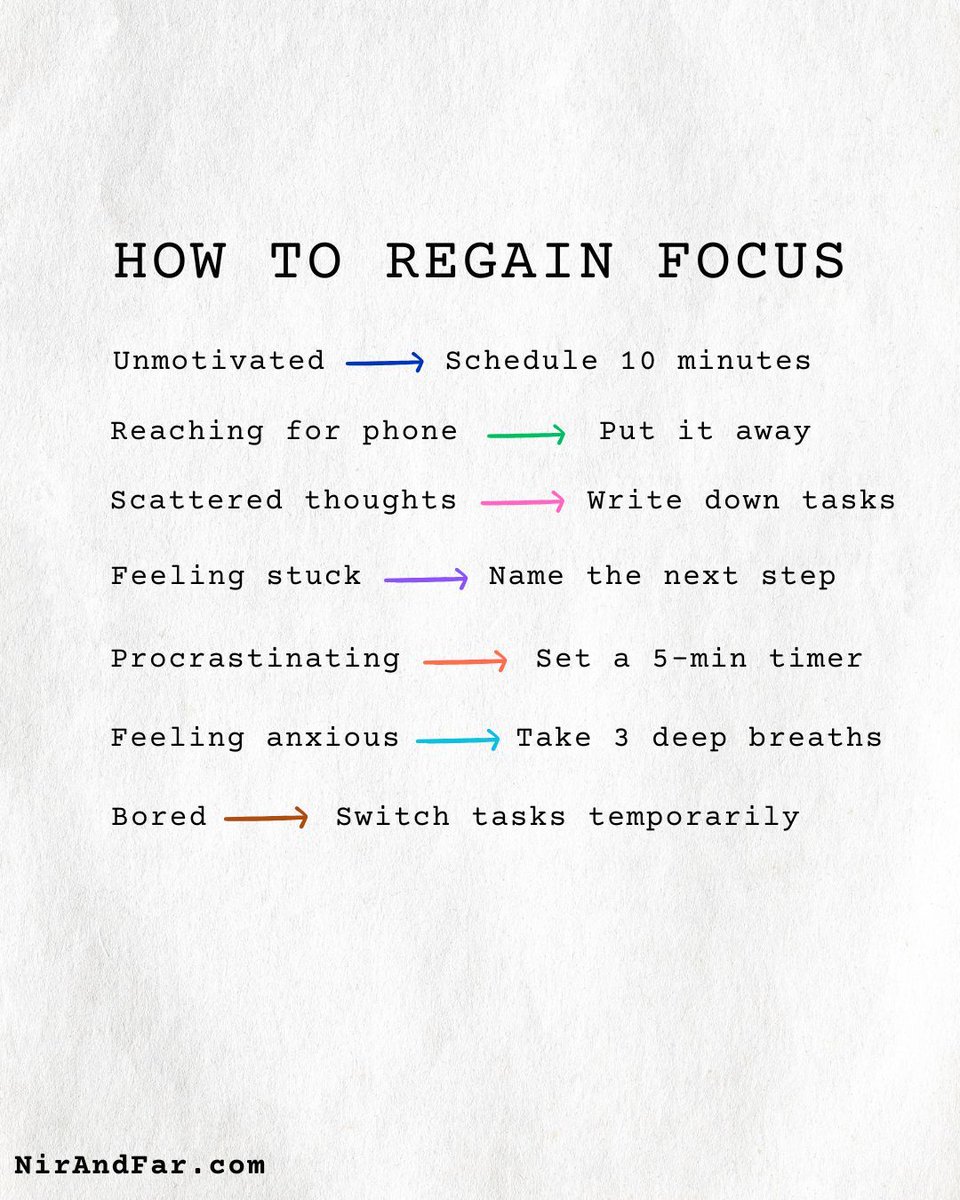
How to regain focus (Hint: The trick isn’t resisting distractions.) Most people think focus is about gritting your teeth OR finding the next productivity hack. But both approaches often make things worse. Why? Hacks create a constant chase for the “perfect system,” which turns into procrastination disguised as productivity. Willpower runs out. The more you fight distractions, the stronger they feel. That’s why the smarter path is noticing urges instead of resisting them. By acknowledging a temptation without judgment, you take away its power. This “before and after” guide is built on that idea. Each “before” pinpoints a common mental state (e.g. unmotivated, anxious, overwhelmed). Each “after” gives you a small, concrete action to reset. 👉 Feeling stuck? Start with just 5 minutes. 👉 Mentally tired? Move your body, even briefly. 👉 Drifting into procrastination? Set a short timer. The result is that you stop fighting yourself and start regaining focus faster and with less effort. Over time, these micro-actions build resilience. You learn not to resist distractions, but to master them.

@kavinbm ·
Building a company is chaos. Especially as a first-time founder/ceo. The bigger we grew, the more I realized I needed systems — not just for the company, but for myself as a CEO. I didn’t find a ready-made playbook that fit. So I built my own. Over the next few weeks, I’m going to open-source as much as we can. They’re the exact workflows and templates we used inside Hike. You’ll get them in Coda/Google Docs so you can copy, remix, and make them your own @Team_Hike Here’s what’s coming → 1. Operating Cadence (26-13-6-4-2-1 System) → Every founder knows how quickly chaos creeps in. This cadence became our way to keep the whole company rowing in sync. 2. Planning & Goal Setting → I learned the hard way that annual plans don’t mean much without a bridge to weekly execution. This system connected the dream to the day-to-day. 3. Weekly Business Reviews (WBRs) → Numbers can overwhelm, but the right lens reveals the story. Our WBRs helped us see patterns early — and course-correct before small issues became big ones. 4. 1:1 System → I found that the best 1:1s weren’t status updates but moments of trust. A few well-placed “magic questions” changed the depth of my conversations forever. 5. Recruiting Review → Hiring mistakes are the most expensive mistakes. This review template kept us honest, pushed us to ask the hard questions, and helped us avoid false positives. 6. All Hands & QnA → As we scaled, people wanted context and connection. We designed All Hands as storytelling, not reporting — so the team felt part of the journey, not just passengers. 7. Performance Management System → Most performance systems kill culture. We built ours to do the opposite — to reward ownership, candor, and growth while still holding a high bar. 8. Hike Code → Our value system that shaped hiring, conversations, and performance reviews — the backbone of alignment and culture at Hike. 9. One Page Documents (OPDs) → I used to get buried in decks. OPDs forced clarity: one page, one idea, one decision. It was amazing how much alignment we got and time saved. 10. Investor Updates → Investor relationships are built on trust. These updates kept us honest, made investors true partners, and saved us in tough moments. 11. Fundraise Tracker → Fundraising is chaos. This tracker was our single source of truth that brought order to the madness and helped us raise hundreds of millions with discipline. These workflows are the product of countless iterations — some on version 10, others on version 20. My hope is they save you cycles, help you sidestep mistakes we stumbled through, and most importantly, give you the freedom to build your company in a way that feels true to you. Main posts will be on Substack, with shorter versions on LinkedIn and X.

@0xaporia ·
My greatest productivity bottleneck is my tendency to be seduced by shitty rabbit holes that end up not moving the needle at all. Spent 3 hours on something that shouldn't have been worth more than 30 minutes. Note to self, once again: A system should be as simple as possible to use but as complex as necessary to retain value. If a unit of complexity doesn't drive a disproportionately valuable insight, output or decision, it gets cut. Optimize for marginal utility of information.
@stijnnoorman ·
Underrated productivity hack: Track your energy for a week. Notice when you're most alert, creative, and focused. Then schedule your most important work during those hours. You get the most done by doing the most important thing when you're at your best.

@drgurner ·
I had a long-time client come back for a struggle with productivity...and the solve was pretty shocking. They were using two monitors. When we took one away, it was like a switch flipped. *Immediately better focus the next day.* Constantly splitting attention was the problem.

@sharran ·
Underrated productivity hack: Plan your life in two-week sprints. Look 1 week back and write down every follow-up you owe people. Then 2 weeks forward: what do you need to prep, book, or deliver?
@sharran ·
The gap between where you are and where you want to be comes down to a handful of small inputs repeated daily. Here are the ones I'm repeating lately: 1/ Scroll less, read more. Short-form content scrambles your brain. I see it in my kids after just 10 minutes of swiping. Retrain your focus with podcasts, books, and longer articles. 2/ How you prepare shows how much you care. Separate preparation from execution. I don't get on a call or start a meeting without the prep work done beforehand. One-page briefs change everything. 3/ Morning = Making. Afternoon = Managing. Create when you're fresh, and operate when you have context. This simple split has boosted my productivity more than anything else. 4/ Be where your feet are. Your full attention is the greatest gift you can give someone. 5/ Replace "I think" with "What do you think?" Harshness has no redeeming quality. Deploying humanity and kindness creates an environment for others to succeed. If you don't like your results, change your inputs.

@YusufPlug_ ·
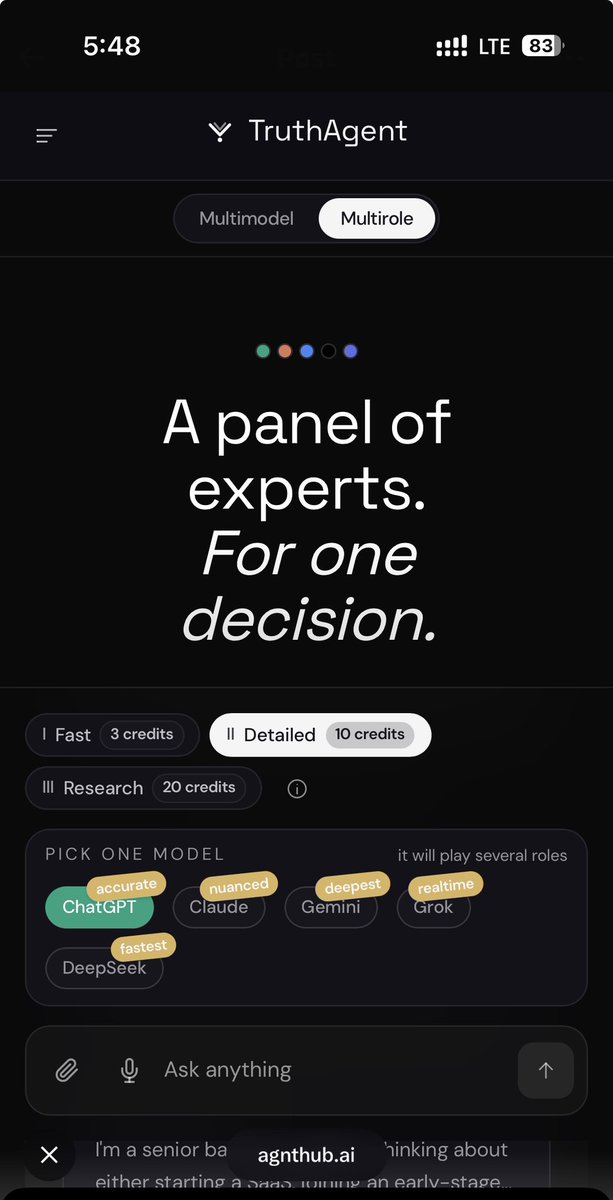
Ask any AI for a productivity system and it hands you the same fantasy. Wake at 5am. Two hours of deep work before anyone touches you. Time-blocked calendar. Focus sprints. Recovery walks. Journaling at night. It reads like a plan built for a person who has no meetings, no kids, no bad sleep, and no manager pinging them at 4:47pm. For marketers this hits hard, because our day is the opposite of that fantasy. Context switching all day. A campaign review, then a Slack fire, then three hours in the content calendar, then a call that eats the block you saved for actual thinking. The "ideal schedule" the model gave you assumes a life you don't have. Here's the part most people miss. The plan isn't wrong because AI is bad at planning. It's wrong because one model builds around one set of assumptions and never gets challenged on them. Clean output, hidden assumptions. This is where running the same question through Truth changes what you get back. Instead of one confident routine, several models pressure-test it from different angles. One flags that your calendar has zero recovery time. One points out you scheduled deep work during your standup window. One asks what happens when a launch week blows the whole system up. One argues the routine ignores the reactive nature of marketing work entirely. You don't walk away with a perfect schedule. You walk away seeing where the plan breaks before you waste two weeks failing at it. The disagreement between the models is the useful part, not the polished version any single one hands you. A productivity system should survive a real Tuesday, not just a screenshot. Next time an AI gives you the 5am fantasy, run it through a few models first and watch which parts fall apart. See where the plan actually breaks: https://t.co/9qbYsFTbnc

@dickiebush ·
All productivity roads lead back to blocking distracting websites, working on one thing at a time, putting your phone in another room, planning your to-do list by hand, and creating a cozy working environment.

@shushant_l ·
Here are 10 mobile apps that will make you so productive, your procrastination might finally file for unemployment. --- 1. Todoist turns the 47 things floating around your brain into tasks you can actually pretend you'll finish today. --- 2. Notion puts your notes, projects, databases, and entire second brain in one place because apparently one brain wasn't enough. --- 3. TickTick handles tasks, habits, reminders, calendars, and focus sessions like the personal assistant you forgot to hire. --- 4. Google Calendar tells Future You exactly what Present You irresponsibly agreed to do. --- 5. Microsoft To Do keeps tasks, reminders, deadlines, and shared lists organized before your brain rage-quits. --- 6. Structured turns your chaotic day into a visual timeline so you can finally see where those mysterious eight hours disappeared. --- 7. Forest grows virtual trees while you focus because apparently disappointing a digital plant is more motivating than missing a deadline. --- 8. Freedom blocks distracting apps and websites because sometimes productivity means putting the internet in jail. --- 9. 1Password remembers your passwords and passkeys so "Forgot Password?" stops being your most visited page. --- 10. Slack keeps team conversations, files, channels, and integrations together so workplace chaos can at least be professionally organized. --- To learn more, check the infographic. --- Get all my visual guides for free here: https://t.co/p3DBZe1GLQ ---


@ryandeiss ·
I used to work 70+ hour weeks and felt like nothing ever got done. The fix was eliminating “reaction mode” by learning to block time differently. These are the 5 weekly time blocks I personally used that work for me: - 4 hours of focus time (deep work, no interruptions) - 1.5 hours of strategy (zoom out, spot trends, think) - 2.5 hours of people time (leadership happens in conversations, not spreadsheets) - 2 hours of recovery (this isn't soft, it's survival) - 2 hours of professional development (you're your company's most valuable asset) That's 12 hours… …less than a third of a 40-hour work week. Each block can be moved, expanded, or multiplied, but they can't be deleted. Every Sunday, I decide what I'm doing in each block. Then I turn those blocks from "claimed time" to actual meetings with myself. The shift for me was to stop confusing motion with progress. Ironically, the more time you block, the more freedom you gain. Because you're finally working on the right things at the right times instead of just reacting to whatever's loudest.

@Oliver_Clingain ·
Harsh truth: Your Notion setup doesn't matter Your morning routine doesn't matter Your color coded calendar doesn't matter You know what matters? Did you send 50 DMs today? Did you book a sales call? Did you close a client? I see people spending HOURS building the perfect productivity system. Then wondering why they're not making money. Because pretty systems don't generate revenue. EXECUTION does. Start optimizing for RESULTS.

@andrebuilds ·
you don't need another productivity system you need to delete 80% of what's on your todo list and ship the 20% that actually moves the needle

@sachinrekhi ·
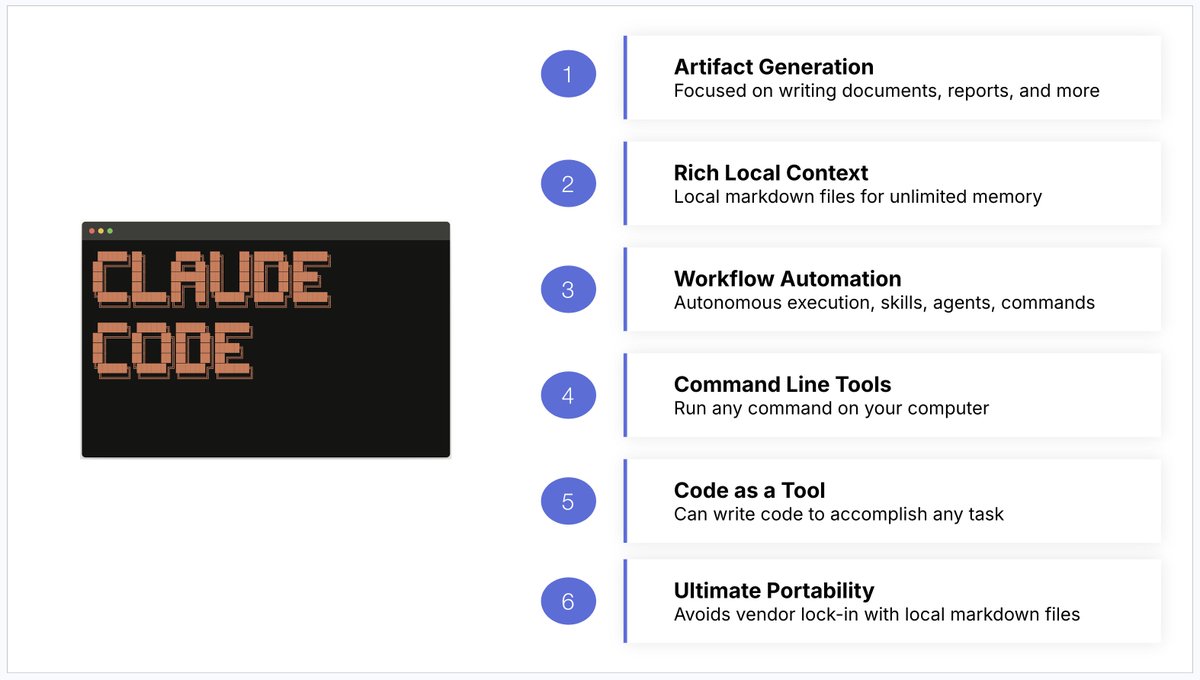
To me it's obvious that Claude Code should be the primary AI productivity tool product managers focus on. But let me spell out what it offers over chatbots like Claude, ChatGPT, or Gemini: 1. It's focused on generating artifacts - documents, reports, and more. These are exactly the deliverables PMs are responsible for. Instead of just using AI for answering questions, Claude Code enables you to use AI to draft the actual work product you are responsible for. 2. It's all about local context in the form of markdown files - Chatbot memory features are pretty limited and unreliable. But Claude Code is brilliant at reading and leveraging local markdown files. Now when you save and organize this context for Claude Code, you give it infinite context and memory. 3. It's fantastic at workflow automation - Claude Code provides a variety of ways, like skills, agents, and commands, to automate an end-to-end workflow so you no longer have to babysit AI while it works, freeing you up to do higher-level work. 4. It can run any command line tool - This enable's Claude Code to do absolutely anything a computer can do. And it does it even faster than using an MCP server. Incredible for advanced workflow automation. 5. It's amazing at writing code for tasks - Claude Code constantly generates bespoke scripts for me to accomplish tasks efficiently without me even needing to ask it to or understand the code. 6. It avoids vendor lock-in - I have ultimate portability to the next hot agent harness or model because all of my context isn't in a proprietary LLM, it's just on my local desktop. For these reasons I've now shifted the majority of my product work to Claude Code.

@danmartell ·
You’re killing your productivity if you’re still running on to-do lists. Most entrepreneurs have long, generic lists. Zero priority. Zero time for it.. The result? You end your day with it longer than you started. After 29 years of entrepreneurship, here’s what I’ve learned… The most productive founders aren’t operating on tasks. They're operating in their calendar. Real blocks of time. Real focus. That’s why every few months I recreate my Perfect Week. Use a template to design the week BEFORE it starts… So every task actually gets done. This simple switch helped me reclaim hours. More done. Less stress. Want the template I use? It’s yours free below 👇 https://t.co/H62WXKZQ19 -DM

@zuess05 ·
I changed one morning habit and my productivity 10x-ed this week 🤩 Before I even open my laptop, I write every single task down. It stays right in front of me all day. It forces me to prioritize and actually ship. I tried all the fancy productivity tools, but nothing beats the dopamine of aggressively crossing a shipped feature out with a pen ✍️


@socialwithaayan ·
Someone built the productivity app that every developer actually wants and made it completely free. Super Productivity is an advanced task manager with timeboxing, time tracking, and native integrations: → Pulls tasks from Jira, GitHub, GitLab, Trello, and OpenProject automatically → Timeboxing built into every task so your day has real structure → Pomodoro timer, break reminders, and focus tools included → No account, no login, no data sent anywhere → Offline-first with optional sync via Dropbox or WebDAV 17,300 stars. 322 contributors. Still actively maintained. Free and open source. MIT license.


@ConsciousRide ·
25 engineering workflows that improve productivity: 1) Understand the problem before opening the IDE. 2) Break work into smaller milestones. 3) Create a quick implementation plan. 4) Read existing code before writing new code. 5) Reuse proven patterns. 6) Build the smallest working version first. 7) Test continuously while coding. 8) Commit small, focused changes. 9) Review your own PR before creating it. 10) Write meaningful PR descriptions. 11) Deploy to staging early. 12) Verify logs after deployment. 13) Monitor production after release. 14) Document important decisions. 15) Automate repetitive tasks. 16) Batch similar work together. 17) Schedule uninterrupted focus blocks. 18) Keep a running TODO list. 19) Track recurring bugs. 20) Remove dead code regularly. 21) Refactor while context is fresh. 22) End the day with clean Git status. 23) Prepare tomorrow’s first task before logging off. 24) Learn from every production issue. 25) Repeat what consistently works.

@quotesdaily100 ·
9 WHY YOU ARE ALWAYS BUSY BUT NEVER ACTUALLY PRODUCTIVE: 1. You are confusing movement with progress. Answering messages, attending meetings, and reorganizing your workspace all feel like work because they consume time and energy. But if none of it moves you closer to a meaningful outcome, you are essentially running very fast while standing completely still. 2. You have no clear priorities so everything feels equally urgent. When nothing is ranked in importance, your brain defaults to doing whatever is easiest or most immediately stimulating rather than what actually matters most for your goals. 3. You are constantly switching between tasks without finishing any of them. Every time you shift your attention, your brain requires several minutes to fully re-engage with the new task. Multiply that across a full day and you lose hours to transition time alone without completing anything of real substance. 4. You say yes too easily and too often. Every commitment you accept is a commitment you make against your own time and focus. A full schedule built from other people's priorities will always feel exhausting and will almost never move your own life forward in any meaningful way. 5. You are working without energy management. Scheduling your most demanding and important work during your lowest energy hours guarantees poor output regardless of how many hours you put in. Productivity is not just about time, it is entirely about matching the right task to the right mental state. 6. Notifications are fragmenting your concentration all day long. Every alert, ping, and banner pulls your attention away from deep work and resets your focus. Research consistently shows that recovering full concentration after an interruption takes far longer than the interruption itself actually lasted. 7. You have no clear stopping point for your tasks. Work without defined endpoints expands to fill whatever time is available, a concept known as Parkinsons Law. Without a boundary, a task that should take one hour quietly stretches into three without producing any additional quality. 8. You are spending the majority of your day reacting rather than creating. Emails, requests, and other people's urgencies pull you into a reactive mode where you feel constantly busy but are essentially just responding to whatever arrives rather than building anything of your own. 9. You never block time for thinking. Planning, reflecting, and strategizing feel unproductive because they produce no visible output in the moment. But people who skip this step spend weeks doing work that thirty minutes of clear thinking would have revealed was completely unnecessary from the beginning.

@Shruti_0810 ·
THIS MAN STOPPED OPENING HIS TASK MANAGER. And somehow… his entire life became MORE organized. No Notion. No productivity dashboards. No 17-tab “second brain.” Just one folder called: “Capture.” Every thought, task, voice note, screenshot, and idea goes in. Claude reads it. Sorts it. Plans it. Reminds him. Runs his life in the background. The scary part? It works better than most people’s $500 productivity stack.
 Watch video
@AlexEngineerAI ·
Honestly, I'm terrible at moving fast. But after 10+ years in engineering, here's my 6-step process for actually shipping things that matter: 1) Before opening any IDE or Slack, sit with a notebook. Terminals and notifications are focus killers. 2) Write down the 2-3 things you've been avoiding most. The ones that keep getting pushed to tomorrow. Those are usually the ones that matter. 3) For each one, ask yourself: - "If this was all I shipped today, would it count?" - "Does finishing this make everything else easier or irrelevant?" 4) Only keep the items where you answered yes to either question. 5) Block 2-3 solid hours for ONE of them. Not 15-minute gaps between meetings. One real block. This is non-negotiable. 6) When you get pulled toward Twitter, side research, or "just checking" something - and you will - don't spiral. Close the tab. Come back to the one thing. Tools I actually reach for during this process: my own builds at for drafting, and Deep Dive for validating whether the idea I'm working on is even worth the block of time. That's the whole system. Fewer things. Deeper focus. Repeat.

@SahilPanhotra ·
The productivity industry is a scam You aren't optimizing workflows You're just procrastinating in a fancy way Stop buying the apps Start doing the work The most productive tool is a blank todo list

@hridoyreh ·
20 productivity hacks for indie hackers: 1. Time-block your day. 2. Build before you consume content. 3. Use the 80/20 rule for every task. 4. Ship something every day, even if tiny. 5. Keep a "Not To Do" list. 6. Automate repetitive tasks with AI. 7. Batch social media content weekly. 8. Use templates for emails. 9. Limit meetings to 15 minutes. 10. Validate ideas before building features. 11. Document processes once and reuse. 12. Turn customer questions into content. 13. Check analytics once per day. 14. Kill features nobody uses. 15. Keep your tech stack simple. 16. Launch ugly, improve later. 17. Start distribution alongside product. 18. Delegate low-value tasks first. 19. End of each day, plan for tomorrow. 20. Focus on revenue-generating work.

@s_chiriac ·
Productivity tips for builders who actually ship stuff: - Code in 25min sprints, ship in 2-week cycles - Kill features that don't matter - Automate the boring parts first - Build for 10 users, not 10 million Most people chase perfect. Winners just ship 🚀

@kennyakanbi ·
Most professionals don't burn out because they're working too hard. They burn out because they're afraid to pause. In the tech and media world, there's a dangerous myth that if you're not actively coding, editing, or shipping, you're falling behind. But non-stop output without strategic input leads directly to low-quality execution. True productivity isn't just about relentless velocity—it's about clarity. And clarity requires space. Stepping back allows you to: 🧠 De-clutter your thinking: Your best architectural and creative breakthroughs happen away from the screen. 🔍 Audit your direction: It prevents you from running at maximum speed in the wrong direction. 🔋 Protect your energy: Sustainable growth requires a fuel tank, not just an accelerator. Rest isn't a sign of weakness or slowing down—it's an operational reset. Today’s takeaway: Rest with intention. Reflect honestly. Recharge completely. 💬 What is your #1 habit for hitting the reset button over the weekend? How do you clear your head before a big push? (P.S. Tomorrow I’m laying out my exact strategy for prepping a new week with high intent and zero wasted motion.) #ResetRechargeReflect #Productivity #GrowthMindset #Leadership #Entrepreneurship #DigitalStrategy #MakMediaTech
 Watch video
@IAmPascio ·
I'm proud to say that I've reached a point where I no longer believe productivity = intensity. Grinding harder is a scam. Real productivity is structural. Designing your day so the important work is unavoidable and everything else is inconvenient is the real unlock.

@terencebuilds ·
Stop optimizing your to-do list. Start optimizing your energy levels. Instead of cramming tasks into low-energy hours, I started tracking when my brain actually works Mornings = Deep coding Afternoons = Marketing (when I can handle rejection better) Evenings = Planning tomorrow Productivity isn't about doing more It's about doing the right things when your brain can actually handle them #BuildInPublic

@alvinfoo ·
I stopped taking notes. I started building a second brain. Here’s the system I use with Claude + Obsidian that changed how I work: Most people consume information. They save articles, bookmark threads, attend webinars, then forget 90% of it by next week. I used to do the same thing. Then I built a system that thinks with me, not just stores for me. The stack is simple: → Obsidian (your personal knowledge graph) → Claude (your AI thinking partner) Here’s the workflow: 1. Capture raw — dump notes, articles, voice memos into Obsidian without filtering. Don’t organize yet. 2. Process with Claude — paste your raw notes and ask Claude to: extract key insights, identify contradictions, connect to existing ideas, and suggest what you’re missing. 3. Build atomic notes — Claude helps you compress every idea into one clear paragraph. One idea. One note. Linked to everything related. 4. Weekly synthesis — every Sunday, I paste 7 days of notes into Claude. It generates a “week in review” summary + surfaces patterns I missed. 5. Ask your brain questions — with Obsidian’s graph + Claude’s reasoning, you can literally query your own thinking. “What have I written about AI agents?” → instant synthesis. The result? I don’t just remember more. I think better. My ideas compound. My content writes itself. My decisions are faster because I’ve already done the thinking, I just surfaced it. This isn’t productivity hacking. It’s building intellectual infrastructure. You don’t need a better memory. You need a system that makes forgetting irrelevant.

@stijnnoorman ·
A few years ago, I discovered the Huberman podcast. Like many others, I was instantly hooked. I had already been into self improvement for a while. So having a neuroscientist explain exactly what works felt like a superpower. I started bingeing the podcast. And then I optimized everything: • Routines • Meditation • Cold showers • Sleep tracking • Morning sunlight • Workout programs • Productivity systems • Non-sleep deep rest • The physiological sigh • 28 different supplements • Complicated diet protocols To make sure I implemented everything, I built a massive habit tracker. It contained 64 habits. At the time, this felt like proof that I was improving rapidly. But in hindsight, I had fallen into a trap. The Optimizer Trap. It's how smart people procrastinate. To be clear, many of the habits above have real benefits. But just because something is beneficial doesn't mean it is beneficial for you to focus on it right now. That distinction matters. This may sound counterintuitive, so let me explain what I mean. I call this the Productivity Paradox. While I was optimizing everything, my life looked exactly the same. • Same problems • Same social situation • Same financial situation I was doing more things than ever. But nothing important had changed. It only felt productive. That’s when I realized something: Most optimization is procrastination in disguise. At any moment, there are a few things in your life that would massively move the needle. For me, those were obvious: • Making more money • Improving my social skills • Figuring out where I wanted to live But those were also the hardest problems. So instead of solving them, I procrastinated by solving other problems that weren't as impactful. For optimizers, the easiest way to avoid a problem is by solving a different one. You're solving problems that make your life 1% better while you could solve the big problem that makes your life 50% better. As optimizers, we often focus on the small improvements because they are easier. And that’s the core mistake. The big improvements usually come from solving the uncomfortable problems we avoid. We optimize things that could be improved, instead of fixing the problems that need to be solved. That's the problem with optimization. And this is exactly what I did when I made my massive habit tracker. Instead of solving 3 important problems, I added dozens of tiny improvements. And while this can be useful, you'll change your life faster if you actually solve the big problems you've been avoiding. Optimization itself isn’t bad. It’s an incredibly powerful tool. But only when you use it in the right order. • First you prioritize. • Then you eliminate. • Then you simplify. And only then do you optimize. So if you recognize yourself in this, ask one question before you optimize something: Is this actually worth optimizing? Because when optimization becomes the goal itself, it usually means you're avoiding the real work. Optimization should be a means to an end. Not the end itself. Only optimize what's worth optimizing. – Stijn PS: there are only 5 things you need to optimize to become a full-time creator. DM me 'optimize' if you want details on how I can help you with this.
@terencebuilds ·
Most "founder productivity" content is a distraction. You don't need a better morning routine. You need to know your ONE thing for the week and protect 2 focused hours a day for it. That's the whole system. #BuildInPublic #SaaS

@Growwithamaka ·
Busy does not equal productive. Systems determine whether effort compounds or collapses. Step back to diagnose the flaws. Fix the process before repeating action. Build systems first True productivity flows from clarity, not chaos.
@quotesdaily100 ·
THINGS YOUR PRODUCTIVITY IS TRYING TO SHOW YOU: 1. Can't start a task → clarity missing not motivation 2. Finishing everything except the one thing → avoidance wearing productivity's mask 3. Always busy but never done → activity confused with progress 4. Tired by 2pm daily → energy managed poorly in the morning 5. To-do list keeps growing → adding without ever subtracting 6. Multitasking feels productive → attention split is attention wasted 7. Best ideas come in the shower → mind needs rest to create 8. Emails answered immediately → urgency of others running your day 9. Working late every night → poor planning during the day 10. Meetings feel like time theft → they often are 11. Can't remember what you did today → no intentional structure in place 12. Phone checked within a minute of waking → someone else sets the mood of your morning 13. Hard to say no to requests → boundaries around time not established 14. Tasks take three times longer than expected → no honest time estimation 15. Weekend needed just to recover → week not sustainable 16. Always starting new projects → completion muscle is weak 17. Feel guilty resting → rest seen as failure not fuel 18. Mornings wasted on low-effort tasks → prime hours spent on the wrong things 19. Environment full of distractions → space not designed for focus 20. Deadline needed to get anything done → working for pressure not purpose 21. Constantly rearranging your schedule → no anchor habits holding the day 22. Lost the why behind your goals → motion without meaning drains fast 23. Comparing output to others → measuring your chapters against their highlights 24. Nothing delegated ever → control costing you time and scale 25. Quitting just before the breakthrough → discomfort mistaken for a dead end

@parkerworth ·
The best productivity hack is spending one a week completely immersed in nature. I try to hike every Saturday, on a new trail, for at least 6-8 hour regardless of the weather. This simple routine: •Rests my mind •Reminence on recents wins. •Lets me reflect on the big picture •Be 100% more productive that next week What habit do you use to reset?


@LawrenceDCodes ·
Here’s an additional high tech productivity tool I’m using for this process - good old fashioned white board 😂. I put any tactics (todos) that I plan to complete for this day in addition to other things that just have to get done. Once complete, I add a check mark. This makes it easy to transfer to my weekly scorecard.


@sexworkceo ·
The system that looks best on paper rarely survives contact with your real life. I have watched creators build elaborate Notion databases, detailed folder structures, and color-coded trackers. They maintain them for maybe two weeks. Then life happens, and the system quietly collapses because it was built around an ideal version of their workflow, not the actual one. When I built my content organization system, I started with where I already spent most of my day. Telegram was already open on my phone constantly. I was already messaging there, already checking it, already living in it. Adding a private channel to store my content required almost no new behavior. It just fit. The system you will actually use is almost always the one built inside a tool you already open every day.

@pascal_bornet ·
𝗧𝗵𝗲 𝘀𝗰𝗮𝗿𝗶𝗲𝘀𝘁 𝗽𝗮𝗿𝘁 𝗶𝘀 𝗵𝗼𝘄 𝗻𝗼𝗿𝗺𝗮𝗹 𝘁𝗵𝗶𝘀 𝗳𝗲𝗲𝗹𝘀. Somewhere along the way, our days became a relay race between screens, and most of us barely noticed because every step felt useful at the time. A message to answer. A meeting to join. A document to finish. A video to relax. One last check before sleeping. I have caught myself doing this too, and the uncomfortable part is that it rarely feels like distraction while it is happening. It feels like productivity, connection, entertainment, or “just five minutes.” That is why willpower is usually the wrong answer. You cannot out-discipline an environment that was built to pull you back in every time you get quiet. Change the environment instead. Put your phone out of reach during deep work, remove the apps that turn boredom into scrolling, make screen time visible, and replace one fast dopamine habit with one slower one: walking, reading, cooking, journaling, or speaking to someone without another device nearby. Attention is not lost in one dramatic collapse. It is traded away in tiny moments that feel reasonable. What is one screen habit you know is costing you more than it gives back? #DeepWork #DigitalBehavior #Productivity #Attention


@pricefoulger ·
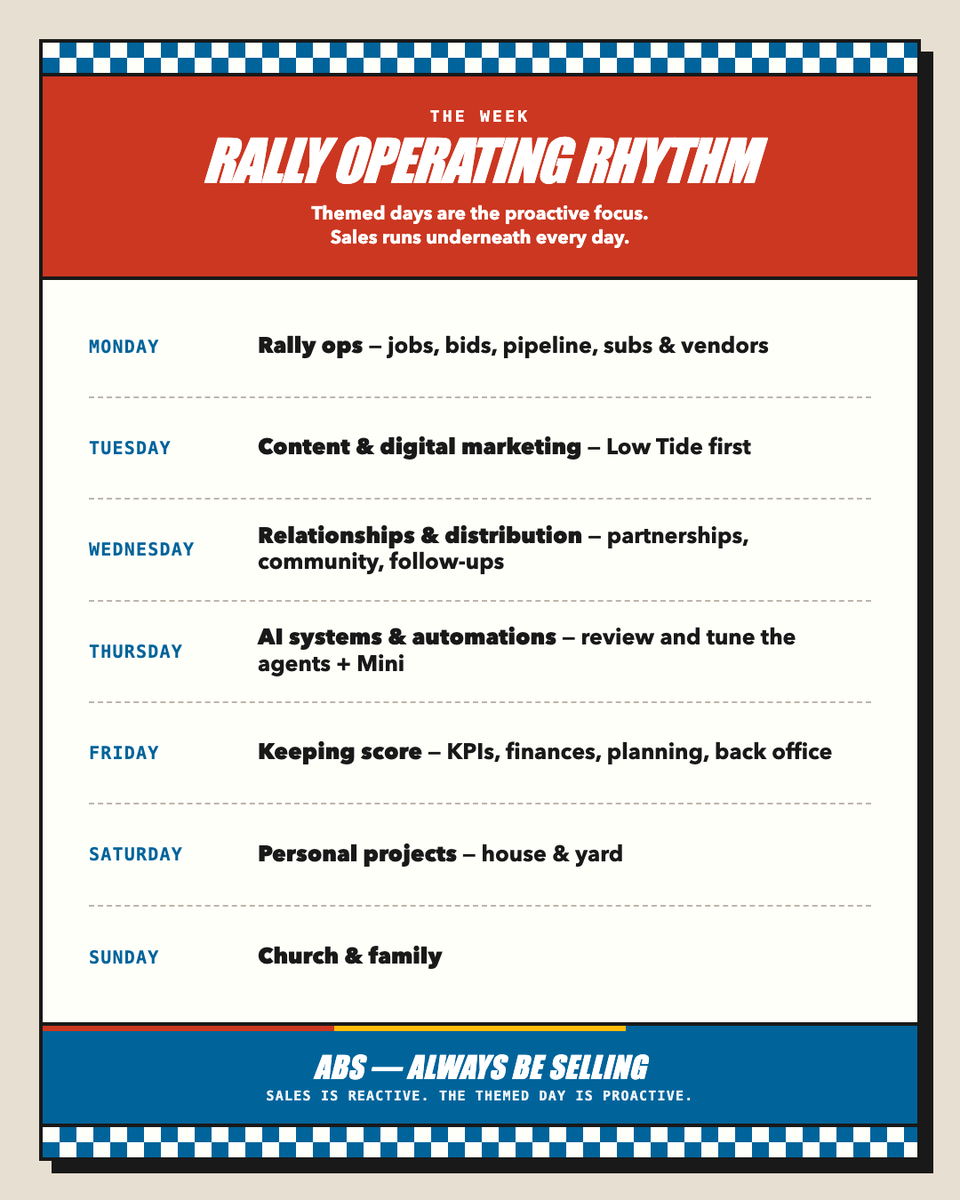
I've tried to commit to a strict schedule so many times now and it never last long. A new thing I'm trying is themed days. Mon: Operations Tue: Content and Marketing Wed: Relationships (vendors, subs, customers) and Distribution Thur: Systems and Automations Fri: Keeping Score aka Review Sat: Family / Personal Su: Church and Family I printed this little card out, and it is taped to my monitor. There's obviously some overlap in things I do every day, like sales, responses, customer support, etc but this system seems to help me have a daily focus so I'm not too scattered and overwhelmed. Curious what other people with scattered brains aka ADD/ADHD do, because most productivity advice doesn't seem to stick for me.

@CODEwalkerr ·
Made my own Freedom tracker I can use everyday to keep track of low-high priority tasks. Includes a timer to keep me aligned and accountable to actually make shit happen. The thing I love about vibe coding is taking the baseline structure of something that works and doing your take on what that would look like. This goes into what Austin Kleon talks about in Steal Like an Artist. Not reinventing the wheel, but providing your unique take on things and not just ripping something that is exact and labeling it as yours. Add a new layer instead of copying. @matt_gray_ is a huge inspiration for me in applying system thinking. Do you have time management issues or are you pretty set within your system and workflow?
 Watch video
@Joey_Walker82 ·
Quick productivity update from the trenches. Been testing these 5 things while building Life Story and Problem Scout. They work: - Time block everything (even 15 min tasks) - Voice notes instead of typing when walking - One browser tab rule (seriously) - Phone in different room during deep work - Ship something daily, even if tiny These have made a big difference.

@sharyph_ ·
The 20-hour work week isn't a fantasy anymore. Here's the system that made it real for 1,000+ solopreneurs. Working less isn't about laziness. It's about systems. The principle: Build systems once, benefit repeatedly. Every repeated task is a system waiting to be built. "Less but better" applied to time. The key isn't time management. It's priority management. Do less, but make each thing high-leverage. Here's the 3-system time-saving stack: 1.Content system Templates, repurposing workflows, AI assistance. Saves 10 hours per week. One core idea → 10 repurposed assets in under an hour. That's leverage. 2. Automation system Email sequences, social scheduling, payment processing. Saves 5 hours per week. Set it up once. It runs forever. 3. Decision system Clear priorities, pre-determined criteria, fewer decisions. Saves 5 hours per week. Decision fatigue kills productivity. Build systems that decide for you. These 3 systems are why I can maintain a creator business without working 80-hour weeks. 65% of creators lack reliable content workflows. 41% struggle with consistent schedules. The solution isn't working more hours. It's building better systems. Time is finite. Leverage is infinite. What's the most time-consuming part of your week? Drop it below…I'll share the system I use.

@RobRan6116 ·
Most productivity advice says: “Stop multitasking.” But modern work isn’t that simple. The real problem is context reconstruction. Every interruption wipes the mental whiteboard and it takes ~15–20 minutes to rebuild. One simple trick: leave breadcrumbs for your future self.
 Watch video
@RobRan6116 ·
Most productivity tools are solving the wrong problem. It’s not workflow. It’s context. You start a project on Monday. You don’t get back to it until Thursday. The hard part isn’t the work. It’s reconstructing the mental state you lost. That’s what I’m building.
 Watch video
@tobi_emonts ·
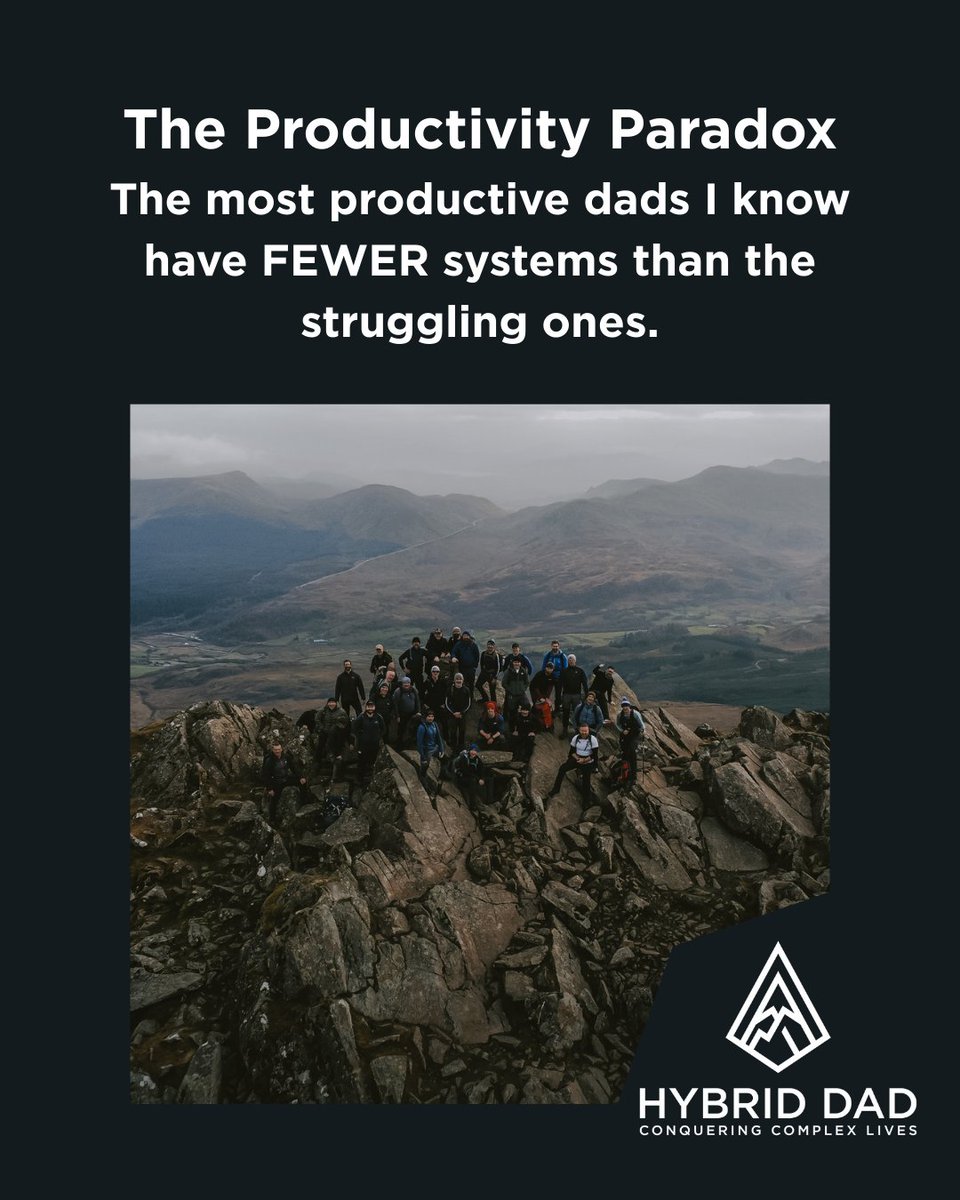
Did you know that the most productive dads I work with have fewer systems than the struggling ones? Sounds backwards. It's not. The struggling dads have apps for everything. Colour coded calendars. Elaborate morning routines that collapse by Wednesday. They're optimising constantly and getting nowhere. The dads who are actually thriving? They do less, better. I learned this the hard way. I was running a team, raising kids, trying to be present everywhere. My system was beautiful. My life was chaos. The breakthrough came when I stopped adding and started subtracting. Fewer priorities. Fewer commitments. Fewer things done excellently instead of many things done adequately. One dad in my group had seventeen different productivity apps on his phone. We deleted all but two. His stress dropped within a week. Not because less is easier. Because less is sustainable. What works: Pick your three priorities for the week. Not ten. Three. Then ruthlessly protect time for those three things and let the rest flex around them. Useful action for your week: Write down everything you're currently trying to maintain. Circle the three that actually matter. Let the rest go, even temporarily. What's one thing you're maintaining out of guilt rather than genuine value? Follow for more content like this.
@pascal_bornet ·
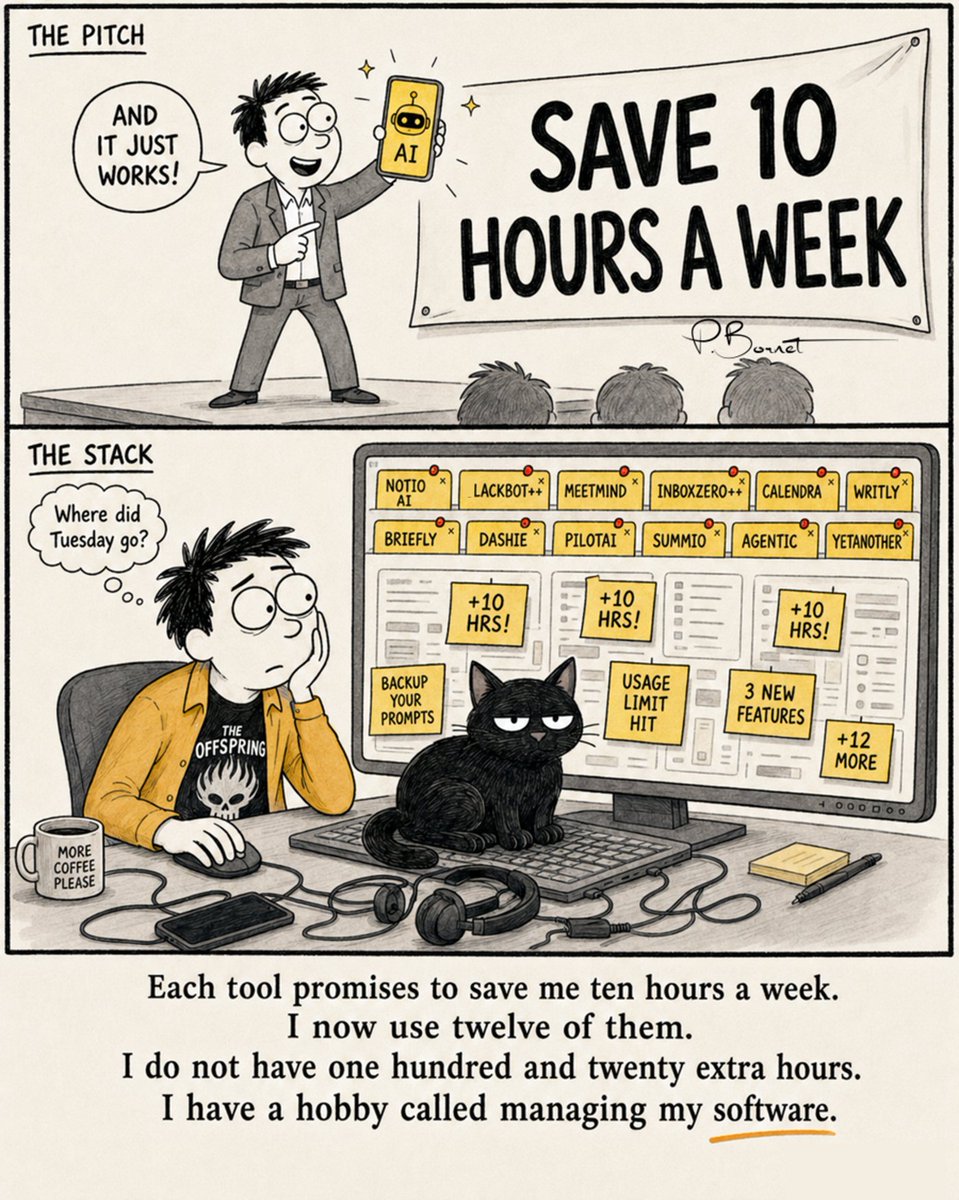
12 tools. Each saves me 10 hours a week. A week only has 168. By that math I should now have negative free time. At this point, I owe Tuesday back. With interest. Every app saved me ten hours and quietly charged me twenty — in tutorials, updates, "backup your prompts," and a notification that just says "👋." I've collected them like a startup graveyard: Briefly, Summio, Dashie, and the gloriously honest one literally named "Yetanother." Next, I'll buy a thirteenth tool to manage the other twelve. It promises to save me ten hours a week. The only one in this picture who actually saved time is the cat. Uses zero apps. Runs the whole desk. Hasn't attended a single onboarding webinar. So — how many "10 hours a week" tools are quietly eating your week right now? 👇 #AItools #Productivity #FutureOfWork

@elgermerlo ·
Claude tip I use constantly: paste in a wall of messy notes or a rough brain dump and prompt it with "turn this into a structured action list, nothing else." No summaries. No intros. Just the tasks. Clears mental clutter faster than any productivity system I've tried.
Best Productivity tweets
Xholic studies what works in your niche, drafts posts in your voice and schedules them for the hours your audience is online.
No card needed · Nothing to cancel
Browse all tweet collectionsLive demo: no sign-up or login needed · takes about 2 minutes
Keep exploring