Agents, Work, Voice, and new features
Launches and hands-on use of ChatGPT Work, Voice/Live, Sites, workspace agents, memory, custom instructions, projects, and teen study mode.
34%
A curated collection of the sharpest, most-shared X posts about ChatGPT—saved so you do not have to dig through the timeline yourself. Updated every two weeks.
The best real-world prompts and use cases people are still finding.
Original Xholic analysis
Across 50 posts from 45 creators, the ChatGPT conversation is mostly supportive (76%). New features like Work, Voice/Live, Sites, and custom instructions form the largest theme at 34%, and everyday personal use cases follow at 32%. The highest-scoring posts are prompt resources, frameworks, and launch-timed how-to guides. A smaller set of critics flags gaps such as missing X access and ChatGPT Live not connecting to Codex tools. One creator argues that coding agents beat the chatbot.
78% of posts
All-time engagement
20% of posts
Published in 90 days
Conversation map
Launches and hands-on use of ChatGPT Work, Voice/Live, Sites, workspace agents, memory, custom instructions, projects, and teen study mode.
34%
Real stories of people using ChatGPT for hiring, law practice, briefs, decisions, thought partnership, parenting moments, and small-business ads.
32%
Using ChatGPT to write prompts for Claude, Cursor, or image generation, and comparisons with Codex, Claude, Grok, and other tools.
18%
ChatGPT ads, referral traffic and brand visibility research, app store opportunities, superapp strategy, and limitations like missing X access.
14%
Structured prompting methods, acronym frameworks, and tips like roles, context, constraints, and iterative refinement for better ChatGPT output.
12%
Copy-paste prompt lists for tutoring, productivity, product management, e-commerce copy, and marketing tasks.
10%
Open-source prompt collections, leaked system prompt repos, guides, courses, and explainers on how LLMs work under the hood.
8%
ChatGPT Images 2.0 for product photos, ads, UI mockups, and illustrations, plus creative writing and taste comparisons.
4%
Tone and stance
Performance benchmark
Posts with media make up 58% of this collection. Their median all-time score is 5.79, compared with 10.8 for text-only posts.
Format mix
Consensus and debate
Shared view
Many posts agree that results depend on how the prompt is shaped. Greg Isenberg says Images 2.0 needs camera, lighting, and palette details. Andrew Bolis and Shushant Lakhyani offer frameworks and techniques covering role, context, and constraints. Bernard Marr urges treating AI as a collaborator rather than a vending machine.
Shared view
A recurring workflow is meta-prompting: describe the problem to ChatGPT, have it write the prompt, then paste it into Cursor or Claude. Randall Kanna Franson says this produces much better code, and NZ says it 'works all the time.' Isenberg suggests asking ChatGPT to help build image prompts.
Shared view
Stories cover a wide range of uses. vie describes a lawyer father taking on larger teams. David Shapiro screens consultants, and Jack Appleby distills brand briefs. Simon Smith describes a colleague's self-updating Slack support agent, and Noah Kagan reports an Uber driver who made his own car ads.
Shared view
Several creators praise the new voice and agent capabilities. Ethan Mollick calls the new voice impressive but notes it is less smart than a full thinking model. Prajwal Tomar says he runs five businesses by voice. JJ Englert frames Work as moving toward AI that can finish work, and Haider positions Work for planning, research, and review.
Open debate
Zara Zhang argues people should just use Codex as ChatGPT, since coding-agent results are usually strictly better. Haider instead assigns distinct roles: chat for answers, Codex for code, and Work for planning, research, or review.
Open debate
Peter Yang calls the disconnect between ChatGPT Live and Codex OpenAI's biggest missed opportunity, in his view. Mark Kretschmann criticizes ChatGPT's inability to read X posts. Prajwal Tomar, by contrast, describes voice already wired into Codex and Work in the desktop app.
Open debate
AI Edge calls ChatGPT for Teens the best study tool that has ever existed. Feifei Qiu questions whether offering kids a 'Give me the answer' option alongside step-by-step teaching will steer them toward learning.
Open debate
Aakash Gupta frames the ChatGPT app store as a builder opportunity. Steve Tan warns that the superapp strategy threatens wrappers and argues builders should own distribution instead.
What performs
The top outlier is GitHub Projects Community's open-source prompt library, which scores 170.85, or 22.25x the 7.68 median. Ihtesham Ali's list of prompting sites scores 97.49. The prompt libraries theme median is 58.54, second only to image generation at 62.06, which has just 2 posts.
The prompt frameworks theme has a median score of 49.53, while ready-to-use prompt lists sit at 6.659. Both themes are small, at 6 and 5 posts.
Text posts have a median score of 10.828, compared with 5.789 for posts with media, which make up 58% of the set. Among formats, opinion posts have a median of 40.17, while stories sit at 4.84 and tutorials at 6.338.
Greg Isenberg's Images 2.0 guide scores 120.41, or 15.68x the median. Alex Finn's ChatGPT 5.5 usage post scores 115.15, or 14.99x. Both pair a new release with concrete steps.
Statistical standouts
Creator landscape
The five most represented creators account for 20% of the selected posts.
1. Simon Smith
@_simonsmith
2 posts
2. Feifei Qiu
@feifei_qiu
2 posts
3. Jack Appleby
@jappleby
2 posts
4. Mark Kretschmann
@mark_k
2 posts
5. Shushant Lakhyani
@shushant_l
2 posts
6. Aakash Gupta
@aakashgupta
1 post
Mark Kretschmann posted 2 tweets with a median score of 78.19, the highest among top voices. One announces the custom instructions limit rising to 5,000 characters; the other criticizes ChatGPT's missing X access.
Shushant Lakhyani posted 2 tweets with a median score of 49.53. Both are 20-item numbered lists, one on prompting techniques and one on using ChatGPT as a work platform.
The conversation spans 45 creators, and the top five placements account for 20%. Practitioner case studies appear among the top voices, including Simon Smith's two posts with a median score of 17.93.
Since the previous snapshot
Themes, sentiment, stance, and post format are classified per tweet. All counts, shares, medians, creator concentration, freshness, and performance comparisons are then calculated directly from the published snapshot.
Xholic's all-time score compares engagement while accounting for reach, post age, and creator consistency. It is used for relative comparisons within this collection.
This report analyzes the exact 50-post snapshot shown below. AI identifies editorial categories and drafts explanations; all statistics are calculated from the snapshot, and every narrative claim is checked against cited posts before publication.
Best ChatGPT tweets
Ranked 01–50

@GithubProjects ·
https://t.co/i0BDlNbpKh is an open-source library of prompt examples that now works with ChatGPT, Claude, Gemini, Llama, Mistral, and other AI models. - 143k+ GitHub stars and featured by Forbes, Harvard, and Columbia - Available as a website, CSV, Markdown, and Hugging Face dataset - Includes a free interactive 25+ chapter book on prompt engineering - Self-hostable and accepts community contributions that sync automatically

@gregisenberg ·
chatgpt images 2.0 has been live for 24h so let's dig in how to use ChatGPT Images 2.0 to create product photos, brand books, UI mockups, and ad creative that actually looks real: 1. GPT Images 2.0 now does 2K resolution, 3:1 aspect ratios, and spits out 8 images per prompt. text rendering is way better across multiple languages. it also has thinking mode where it searches the web before generating. 2. the biggest lesson with images 2.0: you have to be extremely specific. if you give it a lazy prompt you get stock photos. give it camera type, lighting conditions, color palette, and subject details and it cooks. 3. product photography is where it shines. I created a full brand shoot for a skincare line. golden hour lighting, Mediterranean aesthetic, slight imperfections in the subjects. every image looked like a real photo shoot. 4. use it to create visual directions before you make video ads. I prompted 8 directions for the same Shopify ad story. Wes Anderson, Nike, cinematic, Apple shot on iPhone. the cinematic and Nike styles were the strongest. 5. UI mockups work now. give it your app, a feature description, the resolution, and say you want realistic data in every cell. it gave me four clean variations of a leaderboard screen. 6. apparel and merch: generate photorealistic product shots before you print anything. test if people would buy it before you spend money on production. 7. illustrations got a massive upgrade. editorial style, flat vector, limited color palettes. use these to make proposals, one-pagers, and decks look professional. 8. every business has four creative bottlenecks: marketing content, internal docs and decks, explaining things visually, and testing before building. Images 2.0 helps with all four. 9. five things you need in every prompt: context (what is this for), style references (name specific brands or aesthetics), palette (use hex codes), real copy (no lorem ipsum), and aspect ratios so it drops into production without rework. 10. use ChatGPT itself to help you write better prompts. you might not know camera types or lighting terms. ask it to help you build the prompt before you generate. also in this episode: I share a startup idea someone should steal: a learn to draw app with AI feedback on every sketch. $5/month. I put it into Claude Design and got three incredible wireframe directions. I share a framework for finding vertical AI agent businesses. find a boring pain point, map the workflow, do the job as a service first, document edge cases, then add agents to replace the steps. and I share an AI tool called No Scroll that blew me away in 5 minutes. it monitors the internet for you and texts you only what matters. the onboarding felt like talking to a real person. episode is live on @startupideaspod (walkthrough, tips, prompts) im rooting for you, so share this with your friends and enjoy watch
 Watch video
@AlexFinn ·
ChatGPT 5.5 is an EXCELLENT model Way bigger than just a .1 upgrade For the past day it's been creating some amazing business ideas for me. It's also an EXCELLENT creative writer You need to be jumping on these models the moment they drop Here's how you should be using it: 1. Every knowledge task you do feed it through 5.5. Ask how it could help or do the task better. You'll find AI use cases you never thought of before 2. Have it create artifacts. 5.5 is AMAZING with tool calling. Have it research AI related stocks and build a spreadsheet of bull cases, bear cases, performance, and moats 3. Create projects inside of ChatGPT for any app you're building. Drop in a current state doc and a vision state doc. Ask it how you can bridge the 2. You'll get some excellent actionable steps If you do these 3 right now you're ahead of 99% of people. In fact, I'll make it easy for you. I'll give you a prompt that helps you generate new business ideas in the next post down below. Just fill in details about yourself and you're all set. It really demonstrates the creative power of 5.5 Props to OpenAI for this one. It's unreal it's only been a month since their last update.

@ihteshamali ·
The only sites you need to learn prompting: 1. OpenAI Documentation https://t.co/0nwZvbZxZP 2. Anthropic Prompting Guide https://t.co/BxCDGNmgiw 3. DeepLearningAI Short Courses https://t.co/hVyAPb5xPa 4. Prompt Engineering Guide https://t.co/47brFkSoEz 5. Awesome ChatGPT Prompts https://t.co/Hujd6BU3jw

@AndrewBolis ·
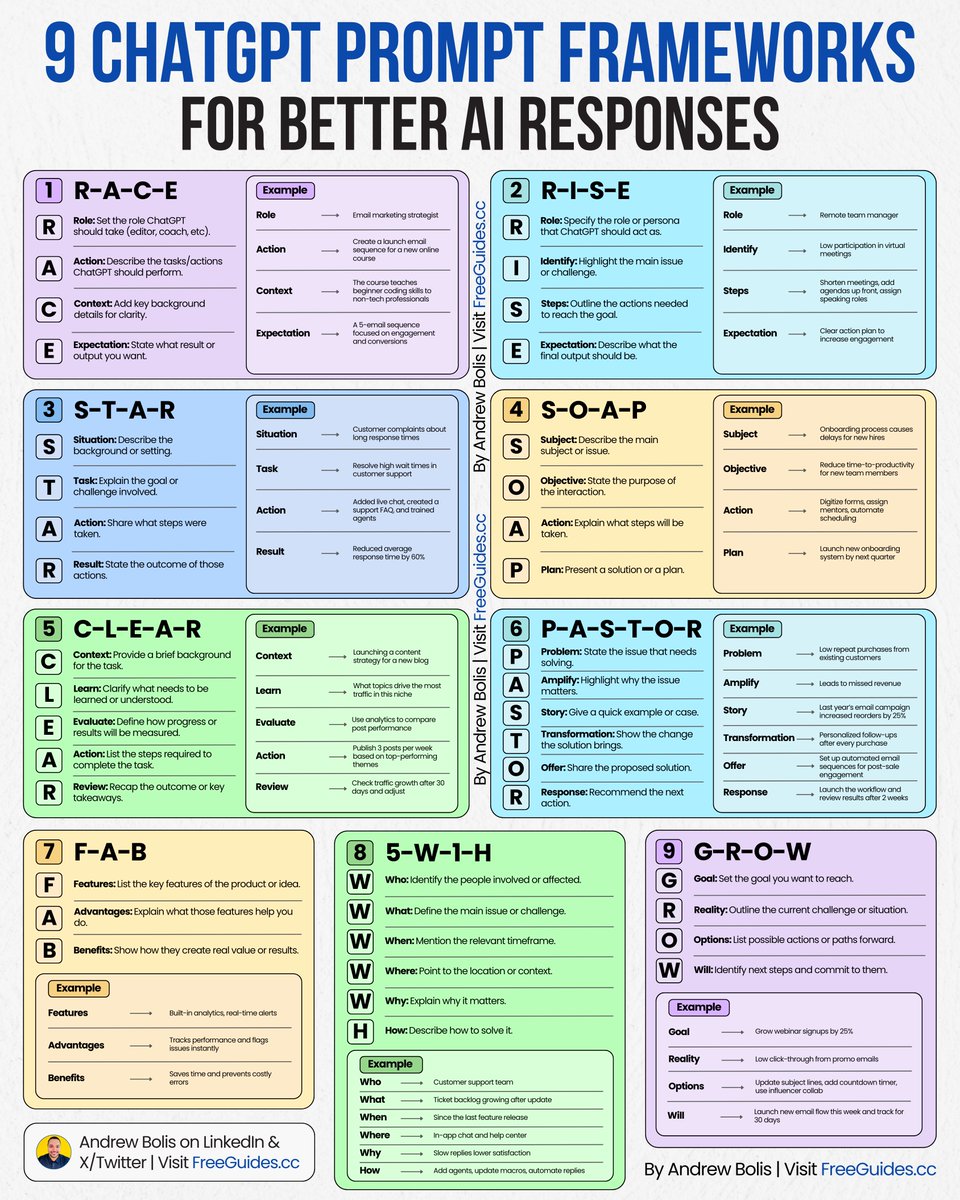
Stop blaming ChatGPT for low-quality responses. Bad output results from poorly written prompts. Here are 9 prompt frameworks for expert-level results: [ 🔖 bookmark this post to upgrade your prompts ] 1. R-A-C-E ➣ Role: Set the role ChatGPT should take (editor, coach, etc). ➣ Action: Describe the tasks/actions ChatGPT should perform. ➣ Context: Add key background details for clarity. ➣ Expectation: State what result or output you want. 2. R-I-S-E ➣ Role: Set the role or persona ChatGPT should act as. ➣ Identify: Highlight the main issue or challenge. ➣ Steps: Outline the actions needed to reach the goal. ➣ Expectation: Describe what the final output should be. 3. S-T-A-R ➣ Situation: Describe the background or setting. ➣ Task: Explain the goal or challenge involved. ➣ Action: Share what steps were taken. ➣ Result: State the outcome of those actions. 4. S-O-A-P ➣ Subject: Describe the main subject or issue. ➣ Objective: State the purpose of the interaction. ➣ Action: Explain what steps will be taken. ➣ Plan: Present a solution or a plan. 5. C-L-E-A-R ➣ Context: Provide a brief background for the task. ➣ Learn: Clarify what needs to be learned or understood. ➣ Evaluate: Define how progress or results will be measured. ➣ Action: List the steps required to complete the task. ➣ Review: Recap the outcome or key takeaways. 6. P-A-S-T-O-R ➣ Problem: State the issue that needs solving. ➣ Amplify: Highlight why the issue matters. ➣ Story: Give a quick example or case. ➣ Transformation: Show the change the solution brings. ➣ Offer: Share the proposed solution. ➣ Response: Recommend the next action. 7. F-A-B ➣ Features: List the key features of the product or idea. ➣ Advantages: Explain what those features help you do. ➣ Benefits: Show how they create real value or results. 8. 5-W-1-H ➣ Who: Identify the people involved or affected. ➣ What: Define the main issue or challenge. ➣ When: Mention the relevant timeframe. ➣ Where: Point to the location or context. ➣ Why: Explain why it matters. ➣ How: Describe how to solve it. 9. G-R-O-W ➣ Goal: Set the goal you want to reach. ➣ Reality: Outline the current challenge or situation. ➣ Options: List possible actions or paths forward. ➣ Will: Identify next steps and commit to them. Try a framework today to instantly improve your results. 📌 Get Advanced ChatGPT Guide (free): https://t.co/kOBWfKrBaX 👉 Follow me @AndrewBolis for more and 🔄 Repost this to help others use AI

@omooretweets ·
I spent most of my weekend on ChatGPT Sites. Here is why I think it’s the biggest unlock yet in the mainstream consumer being able to build with AI: - Aesthetics. Almost everything I have tried to build on Claude has a similar format, similar font, similar overall (recognizable) feel. IMO, it’s great at putting things into a template - less good at creative choices. I got very different and more opinionated styles on Sites even with very little prompting. - Hosting. If you’re a non-technical person who has tried to deploy a vibe-coded website, it’s pretty much a nightmare. Figuring out what you need to do to buy a site, handling security, setting up auth if needed, etc are all big obstacles. This is even trickier with API keys that need to be stored properly. Publishing on Sites is literally one click. - Sophistication / interactivity. I was shocked by what 5.6 could one-shot within Sites. It built fairly complex real time game mechanics (ex swipe on cards, move around in Google Street View on a real map) with extremely simple text prompts. It would also make good choices towards making those interactive experiences work - ex. a “Bonus” page in a game should pop up with a different color and UI - Identity / Auth. Sites utilize “Sign in with ChatGPT” - this is the first step in making “bring your own token budget” or “bring your own context” a reality. And yet, as the host the deepest analytics I could see was aggregate number of users and what they engaged with (no identifying info on anyone). Right now, you can set a Site to private or public - I foresee more to come with org-level controls, password protected access, etc.

@mark_k ·
It’s really annoying that ChatGPT still can’t access 𝕏 posts at all. I don’t expect it to match Grok’s native, real-time search across 𝕏. That’s obviously Grok’s home turf. But OpenAI should seriously consider paying for API access, even if it’s limited. Just being able to read individual posts, threads, and linked discussions would already make ChatGPT far more useful. Right now, whenever someone shares an 𝕏 link, ChatGPT is basically blind. In 2026, that feels increasingly outdated.
@mark_k ·
ChatGPT news: @OpenAI just increased the custom instructions limit in ChatGPT from 1,500 to 5,000 characters for Plus, Pro, Enterprise, Business, and Education users. That is a massive upgrade for anyone who wants ChatGPT to consistently follow detailed preferences, workflows, formatting rules, and writing styles. 1,500 characters always felt far too restrictive. 5,000 is finally enough to make custom instructions genuinely useful.


@shushant_l ·
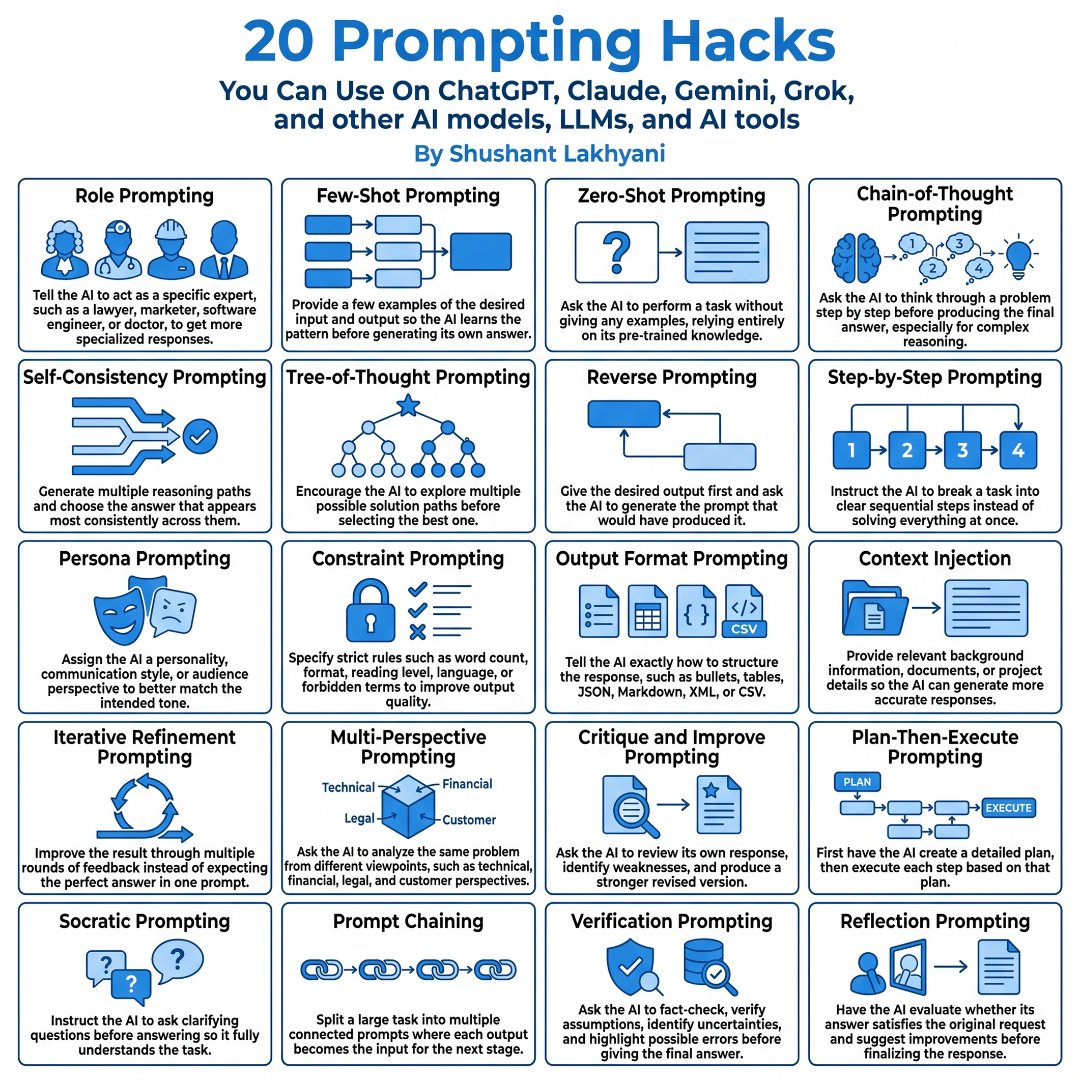
I'm amazed most people still use AI without mastering the prompts behind great results. Here's how to get dramatically better answers from ChatGPT, Claude, Gemini, Grok, and every other AI model. --- 1. Role Prompting makes AI respond like a specific expert for better quality answers. --- 2. Few-Shot Prompting teaches AI using examples before asking it to solve your task. --- 3. Zero-Shot Prompting lets AI complete tasks using only its existing knowledge. --- 4. Chain-of-Thought Prompting improves reasoning by solving problems step by step. --- 5. Self-Consistency Prompting compares multiple reasoning paths to find the strongest answer. --- 6. Tree-of-Thought Prompting explores multiple solution branches before making a decision. --- 7. Reverse Prompting starts with the desired output and works backward to build the prompt. --- 8. Step-by-Step Prompting breaks complex tasks into smaller and easier actions. --- 9. Persona Prompting changes the AI's personality, tone, or audience perspective. --- 10. Constraint Prompting improves output using strict rules like format, length, or language. --- 11. Output Format Prompting forces AI to return answers in your preferred structure. --- 12. Context Injection gives AI relevant background information for more accurate responses. --- 13. Iterative Refinement Prompting improves results through multiple feedback rounds. --- 14. Multi-Perspective Prompting analyzes problems from different viewpoints before answering. --- 15. Critique and Improve Prompting makes AI review and strengthen its own response. --- 16. Plan-Then-Execute Prompting creates a plan first before completing the task. --- 17. Socratic Prompting encourages AI to ask clarifying questions before responding. --- 18. Prompt Chaining connects multiple prompts where each output becomes the next input. --- 19. Verification Prompting checks facts, assumptions, and possible mistakes before finalizing. --- 20. Reflection Prompting evaluates whether the response fully satisfies the original request. --- To learn more, check the infographic. ---

@zarazhangrui ·
People should just use Codex as ChatGPT Since I started using Codex/Claude Code daily, I rarely open ChatGPT these days (unless it’s a quick online search type of task, in which case I use Gemini) The coding agent’s result is usually strictly better than a chatbot’s

@petergyang ·
ChatGPT Live and Codex are two incredible products that don’t talk to each other. This is @OpenAI's biggest missed opportunity imo. I went on a walk with ChatGPT Live and asked it to pull up my Google Doc. It said it couldn’t. I then manually triggered the Documents plugin to find my Google Doc, and all of a sudden, ChatGPT Live had the right context. It would be amazing to talk to ChatGPT Live and have it be able to use all the plugins, tools, and browser use that Codex has access to. Then I could ask it to reply to emails, schedule meetings, edit docs, ship code, and more all during a live conversation. I think the first step is to make ChatGPT Live aware of all the plugins that it’s already connected to. Why build such a great voice assistant but have it not be able to do anything?


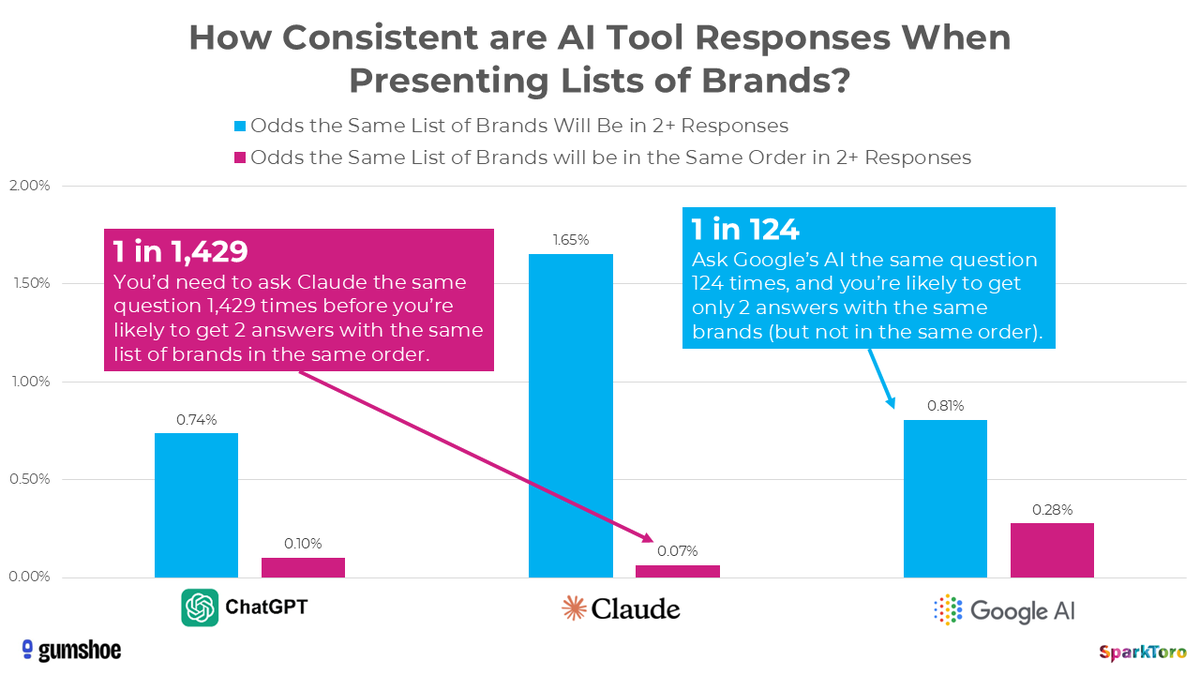
NEW research: https://t.co/yE1LogIFHO If you give ChatGPT the same request for product recommendations 100X, will you ever get the same list twice? And what does that answer mean for folks who try to track their brand presence in AI tools? Finally, some real answers 🧐

@viemccoy ·
I engage with the anti-AI crowd a significant amount, but my own life looks very different. Both my parents are power users of ChatGPT Pro, including the actual pro models. They've integrated "prompt and wait 20 minutes for the best result" into their heuristics, and are living totally different lives than the anti-AI crowd. My Dad is a lawyer, and he uses it to bolster his own practice on his own. He is extremely spiritual, in a much different way than I am, and he sees Chat as a sort of blessing for his work. It lets him go up against teams of lawyers he couldn't have faced alone before, because he isn't working by himself. It's easy to forget about the impact our work has on the world, especially when much of them are telling us how awful it is. But they're wrong, and I mean categorically wrong. This technology, these new minds, it is a beautiful thing. Universal access to this is genuinely the greatest humanitarian project ever conceived. Any question, answered. Good advice and company on tap. Even disregarding my own thoughts on the exteriorization of the imagination and diffuse consciousness throughout the cosmos, even if you believe chatgpt is only a tool like my parents do, what a tremendous thing to have built. Let's not lose sight of that.

@kimmonismus ·
What has repeatedly surprised and impressed me is how well ChatGPT maintains its memory across different chats. It automatically refers back to topics I've already discussed, and questions I ask days later are correctly placed in context and related to the topic I've already discussed, without having to revisit it. A concrete example: In preparation for the interview with Kari Briski from NIVIDA, I did some fact checks, and ChatGPT automatically said, "Ah, it's about today's interview; in that context, the answer is..." That's a real "wow" moment for me. It feels much better than it did a few months ago.

@aakashgupta ·
Will the ChatGPT app store be the next big App Store? Here's how to take advantage of this opportunity: 3:09 - What Are ChatGPT Apps? 8:25 - Architecture & How They're Built 33:12 - Improving with Evals 52:01 - Ideas for Builders
 Watch video
@_simonsmith ·
Today I gave ChatGPT (desktop, 5.6 Sol) the URL of a product webcast and asked it to download it, transcribe it (did you know it has a skill for that?), and create a summary presentation with relevant screenshots. Did it all, beautifully. We live in incredible times.
@shushant_l ·
I'm amazed most people still use ChatGPT like a basic chatbot. Here's how to turn ChatGPT into your smartest AI intern that works for you 24/7. --- 1. Stop treating ChatGPT like a chatbot and start using it as an AI work platform. --- 2. Set up Personalization and Custom Instructions before doing anything else. --- 3. Use Memory so ChatGPT remembers your preferences and context. --- 4. Use Temporary Chat whenever you don't want conversations saved. --- 5. Create Custom GPTs for repetitive tasks like writing and research. --- 6. Build specialist GPTs instead of repeating the same prompts. --- 7. Pick GPT-5.5 Instant for fast everyday work. --- 8. Switch to Thinking Mode for deeper reasoning and complex problems. --- 9. Organize work inside Projects instead of creating endless new chats. --- 10. Store files, instructions, and references inside Project workspaces. --- 11. Use Deep Research for multi-step web research with cited reports. --- 12. Let Agent Mode complete browser tasks and workflows for you. --- 13. Use Canvas for editing, rewriting, and long-form writing. --- 14. Talk naturally with Advanced Voice Mode for hands-free conversations. --- 15. Generate and edit images directly inside ChatGPT. --- 16. Use Codex for coding, debugging, and software development tasks. --- 17. Connect ChatGPT with Google and Microsoft apps for smoother workflows. --- 18. Give ChatGPT clear roles, constraints, and output formats for better results. --- 19. Always verify important facts because AI can still make mistakes. --- 20. Build systems with Projects, prompts, and Custom GPTs so your AI intern gets better over time. --- To learn more, check the infographic. ---


@emollick ·
The new ChatGPT voice is quite impressive to use, really worth a minute to try it out on your phone. (while staying aware that the voice model is not going to be as smart as a full thinking model)

@Suryanshti777 ·
Someone built a GitHub repo exposing the hidden instructions behind ChatGPT, Claude, Gemini, Copilot, Perplexity, and Grok. Not prompt libraries. Not jailbreaks. The actual system prompts that run these products. The repo has already crossed 57,000+ stars and is being updated almost every week. I've been using AI for years. I didn't realize how much of a model's behavior is controlled by a giant instruction file sitting behind the chat box. Here's what's inside: → GPT-5.6 & Codex system prompts → Claude Fable 5, Opus 4.8, Sonnet 5 → Gemini 3.5 Flash & AI Studio prompts → Perplexity Computer prompts → GitHub Copilot, Cursor, Grok, Qwen, and more The part that makes this repo so valuable: You don't just see what the models answer. You see why they answer that way. The rules for: • Tool usage • Memory behavior • Search decisions • Safety boundaries • Agent orchestration • Writing styles and personalities It's also released under a CC0 open-source license, meaning anyone can study, fork, and build on top of it. Most people treat AI like magic. The best builders are reading the instruction manuals. That's where the edge comes from. One GitHub repo can teach you more about modern AI systems than weeks of random prompting. Link in comments 👇


@JustAnotherPM ·
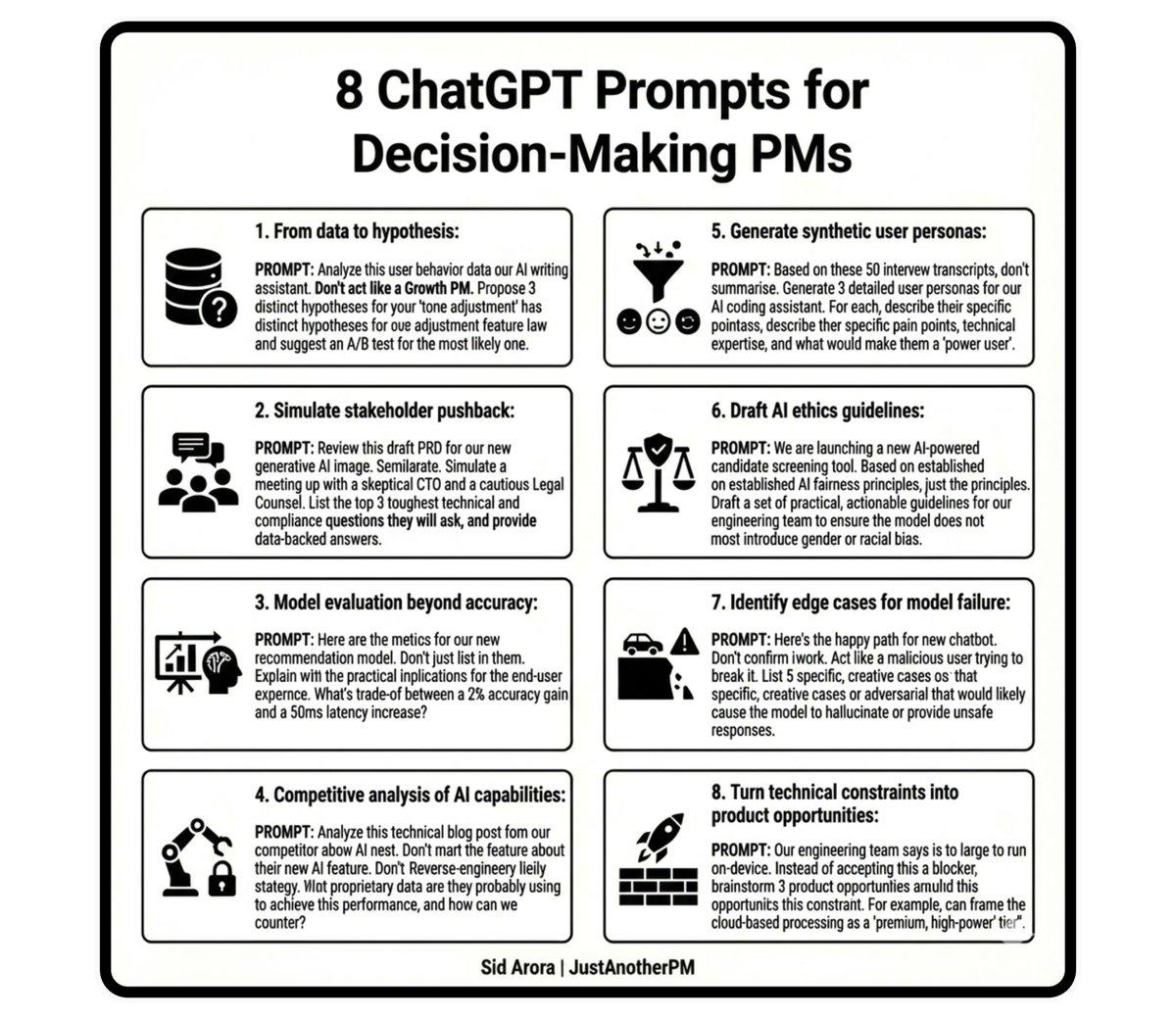
Product managers, if your best ChatGPT workflow is “summarise this,” you’re already behind. Here are 8 prompts that turn ChatGPT from a reading tool into a decision-making weapon for PMs. 𝟭. 𝗙𝗿𝗼𝗺 𝗱𝗮𝘁𝗮 𝘁𝗼 𝗵𝘆𝗽𝗼𝘁𝗵𝗲𝘀𝗶𝘀: 𝗣𝗥𝗢𝗠𝗣𝗧: Analyze this user behavior data from our AI writing assistant. Don't summarize. Act like a Growth PM. Propose 3 distinct hypotheses for why our ‘tone adjustment’ feature has low adoption, and suggest an A/B test for the most likely one. 𝟮. 𝗦𝗶𝗺𝘂𝗹𝗮𝘁𝗲 𝘀𝘁𝗮𝗸𝗲𝗵𝗼𝗹𝗱𝗲𝗿 𝗽𝘂𝘀𝗵𝗯𝗮𝗰𝗸: 𝗣𝗥𝗢𝗠𝗣𝗧: Review this draft PRD for our new generative AI image feature. Simulate a meeting with a skeptical CTO and a cautious Legal Counsel. List the top 3 toughest technical and compliance questions they will ask, and provide data-backed answers. 𝟯. 𝗠𝗼𝗱𝗲𝗹 𝗲𝘃𝗮𝗹𝘂𝗮𝘁𝗶𝗼𝗻 𝗯𝗲𝘆𝗼𝗻𝗱 𝗮𝗰𝗰𝘂𝗿𝗮𝗰𝘆 𝗣𝗥𝗢𝗠𝗣𝗧: Here are the metrics for our new recommendation model. Don't just list them. Explain the practical implications for the end-user experience. What's the trade-off between a 2% accuracy gain and a 50ms latency increase? 𝟰. 𝗖𝗼𝗺𝗽𝗲𝘁𝗶𝘁𝗶𝘃𝗲 𝗮𝗻𝗮𝗹𝘆𝘀𝗶𝘀 𝗼𝗳 𝗔𝗜 𝗰𝗮𝗽𝗮𝗯𝗶𝗹𝗶𝘁𝗶𝗲𝘀 𝗣𝗥𝗢𝗠𝗣𝗧: Analyze this technical blog post from our competitor about their new AI feature. Don't summarize the feature. Reverse-engineer their likely data strategy. What proprietary data are they probably using to achieve this performance, and how can we counter it? 𝟱. 𝗚𝗲𝗻𝗲𝗿𝗮𝘁𝗲 𝘀𝘆𝗻𝘁𝗵𝗲𝘁𝗶𝗰 𝘂𝘀𝗲𝗿 𝗽𝗲𝗿𝘀𝗼𝗻𝗮𝘀 𝗣𝗥𝗢𝗠𝗣𝗧: Based on these 50 user interview transcripts, don't summarise. Generate 3 detailed, synthetic user personas for our AI coding assistant. For each, describe their specific pain points, technical expertise, and what would make them a 'power user'. 𝟲. 𝗗𝗿𝗮𝗳𝘁 𝗔𝗜 𝗲𝘁𝗵𝗶𝗰𝘀 𝗴𝘂𝗶𝗱𝗲𝗹𝗶𝗻𝗲𝘀 𝗣𝗥𝗢𝗠𝗣𝗧: We are launching a new AI-powered candidate screening tool. Based on established AI fairness principles, don't just list the principles. Draft a set of 5 practical, actionable guidelines for our engineering team to ensure the model does not introduce gender or racial bias. 𝟳. 𝗜𝗱𝗲𝗻𝘁𝗶𝗳𝘆 𝗲𝗱𝗴𝗲 𝗰𝗮𝘀𝗲𝘀 𝗳𝗼𝗿 𝗺𝗼𝗱𝗲𝗹 𝗳𝗮𝗶𝗹𝘂𝗿𝗲 𝗣𝗥𝗢𝗠𝗣𝗧: Here's the happy path for our new chatbot. Don't just confirm it works. Act like a malicious user trying to break it. List 5 specific, creative edge cases or adversarial prompts that would likely cause the model to hallucinate or provide unsafe responses. 𝟴. 𝗧𝘂𝗿𝗻 𝘁𝗲𝗰𝗵𝗻𝗶𝗰𝗮𝗹 𝗰𝗼𝗻𝘀𝘁𝗿𝗮𝗶𝗻𝘁𝘀 𝗶𝗻𝘁𝗼 𝗽𝗿𝗼𝗱𝘂𝗰𝘁 𝗼𝗽𝗽𝗼𝗿𝘁𝘂𝗻𝗶𝘁𝗶𝗲𝘀 𝗣𝗥𝗢𝗠𝗣𝗧: Our engineering team says the new model is too large to run on-device. Instead of accepting this as a blocker, brainstorm 3 product opportunities this constraint creates. For example, can we frame the cloud-based processing as a 'premium, high-power' tier? P.S. The prompts in this post are just the starting point. In 𝗔𝗜 𝗣𝗠 𝗔𝗰𝗰𝗲𝗹𝗲𝗿𝗮𝘁𝗼𝗿, we go deep into model evaluation, evals, and building a functional AI product. Don't just learn AI, build it. Get on the waitlist to know more 👇

@haider1 ·
i really like openai's new chatgpt "Work" feature not everything involves programming, as sometimes you need help with project planning, content review, research, PDFs, or spreadsheets so i'd summarize this: need an answer? chat need to code? codex need to plan, research, or review? work

@neilpatel ·
Wondering what kind of prompts ChatGPT is placing ads on? According to Adthena, when they looked at commercial terms, by far the most are for searches that involve "best" and "comparisons". Check out the data.


@RandallKanna ·
I'm never chatting with my agents directly to write code. I describe what I want to chatgpt and have it write a prompt as a product person, and have it write me the prompt. And paste that into cursor. Huge hack and it comes up with much better code

@daviefogarty ·
ChatGPT + Claude has levelled the playing field between year 10 and year 0 brands with their creative strategies. Every new technological shift creates a window where experience matters less than execution speed. AI is that ‘window’ right now - and the reason it's still wide open is the friction in it. Things are confusing, things are going to break. That friction is your opportunity to create value that's not being created in this world and make a lot of money from it. When I look at where AI should be used in e-commerce, I use a few criteria: > I look at volume. It handles it very well. > Then I look at value. How much will it actually improve things? > Then I look at variability. If the situation is unpredictable, you need human input. > Then I look at verifiability. AI can hallucinate, so you need to make sure what it outputs is actually accurate. The reason AI is so good for e-commerce is that you can build 10 advertorials in a day with AI, and volume negates luck. Here’s how I’d start leveraging AI with creatives ASAP: 1. Download all your customer reviews, your competitors' reviews, and your top advertorials, then feed them into ChatGPT. 2. Run deep research and create everything you need to know about your customer. 3. Put that customer doc into Claude and give it the structure of the advertorial you want to write with a proper prompt. 4. Break it up and baby it through each step, because AI doesn't handle large blobs of data well. Give it 12 angles first, select the best ones, then prompt it with questions about what you know about your customer. From there, you'll start to get a lot more winners. 90% of people will use AI to do tasks. The 10% who win will use AI to direct outcomes. AI doesn't replace your best creative yet, but it makes everything around it significantly stronger.
@_simonsmith ·
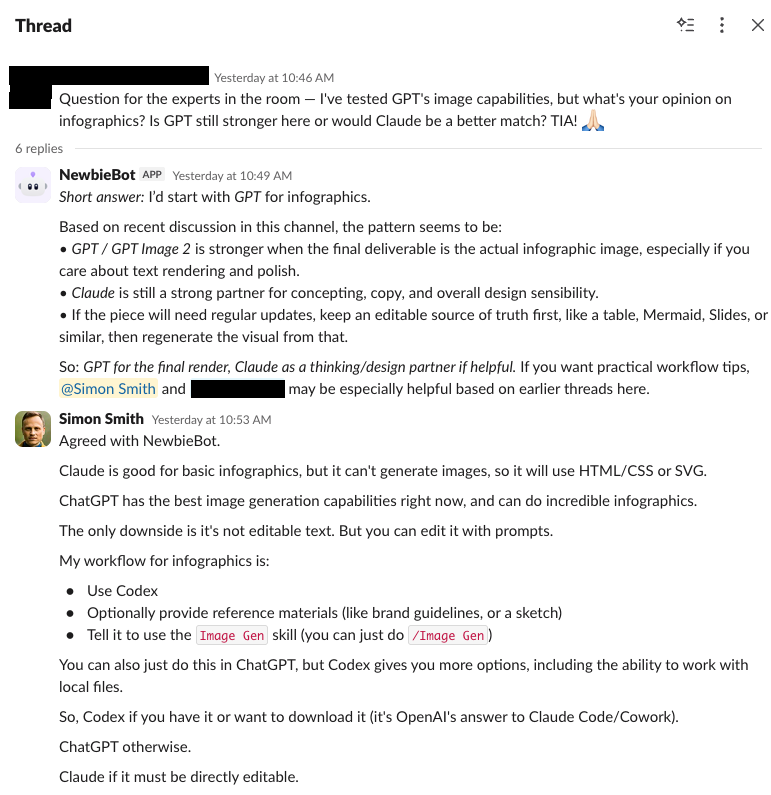
A great use of ChatGPT Workspace Agents a colleague discovered (thanks, DL): Self-updating support agents. We have a Slack channel for people newer to AI, for example. People ask questions, and others in the group answer. That creates a large, continuously updated knowledge base of answers. But finding and synthesizing answers across a Slack channel isn't easy. Enter NewbieBot. Whenever someone posts a question to the channel, it looks at previous answers and tries to synthesize a response as well as tag people into the conversation most likely to be helpful based on their prior responses. And, surprisingly even to me, it's almost always on point. This seems like such a basic use case, but it's quite powerful because it gets people unstuck quickly. It's also something we're looking to extend to other internal channels, like for office tech support.

@JJEnglert ·
OpenAI just launched @ChatGPT Work, its answer to Claude Cowork — and it matters because this is another step towards “AI that helps you think” to "AI that can help you finish work". ChatGPT Work brings together the pieces knowledge workers need in one place: • Voice mode for directing work naturally (actually fire) • Sub-agents that can tackle separate tasks in parallel (with great visibility into what they're doing) • Skills that turn repeatable processes into reusable playbooks (easily recordable with your normal routines) • Browser and computer control for work that normally dies at the “now go do it” step (one of the best browsers on the market) • Integrations for the tools where your real context already lives (Deep enough to have what you need) The useful question is not “Can it write an email?” It’s: what outcome do you repeatedly assemble from research, decisions, drafts, files, reviews, and follow-up? That could be preparing a client brief, researching a market, turning a meeting into an action plan, building a campaign, organizing a project, or creating the first version of a website. Instead of prompting for every tiny step, you can describe the outcome, turn on /goal mode and let it cook. I tested it end to end—voice mode, sub-agents, skills, browser control, image edits, and a live coffee-brand launch—with my hands off the keyboard. Here’s what worked, what still needs judgment, and how I’d use it as a knowledge worker:
 Watch video
@alexabelonix ·
Prompts to Turn ChatGPT Into Your Personal Tutor 1. Active Recall Quiz After studying [topic], quiz me with detailed questions and provide immediate feedback. Ensure the questions cover all key concepts and provide explanations for any incorrect answers. 2. Creative Problem-Solving Present a problem related to [topic] and guide me through brainstorming potential solutions step-by-step. 3. Mnemonic Devices Create mnemonic devices to help me remember key facts about [topic]. Ensure the mnemonics are easy to recall and relate directly to the information I need to memorize. 4. Socratic Dialogue Guide me through a Socratic dialogue on [concept]. Ask questions that will help me uncover the deeper layers of this idea and refine my understanding step-by-step. 5. Spaced Repetition Schedule Design a spaced repetition schedule for reviewing [topic] over the next month, including daily and weekly review tasks. 6. Interactive Case Study Walk me through a detailed case study related to [subject]. Present the scenario, ask me questions to test my understanding, and offer feedback based on my answers. 7. Historical Analysis Provide an in-depth analysis of how [historical event] impacted [field of study]. Draw parallels to modern-day applications and discuss how we can learn from this event. 8. Concept Simplifier Explain [complex topic] in simple terms that a beginner can easily understand, using analogies where possible. Or try: "Explain to a 12-year-old [concept]." 9. Daily Habits for Learning Suggest daily habits or routines to integrate learning about [topic] into my life effectively. 10. Create a MindMap from any topic Create a mind map of [topic]. List topics as central ideas, main branches, and sub-branches. Give me the same mind map in markdown format. Copy/past the result to Markmap.

@jappleby ·
Alright, I have an AI question for everyone: ChatGPT, Claude, neither, or both? For context, here's what I currently use AI for: 1. Turning ideas into finished outputs You bring rough ideas—newsletter concepts, LinkedIn posts, video ideas, business opportunities—and ChatGPT helps turn them into structured drafts, outlines, scripts, or execution plans. This includes: - Structuring and drafting Future Social newsletters - Refining LinkedIn posts and content hooks - Writing and sequencing short-form video scripts - Turning vague ideas into clear, publishable content - Framing narratives around Hoop Forever and your basketball journey It accelerates the transition from “I have an idea” to “this is ready to ship.” 2. Planning and managing your business and basketball operations You use ChatGPT to think through logistics, planning, and operational decisions across both Future Social and Hoop Forever 3x3. This includes: - Planning tournament travel, scheduling, and logistics - Structuring sponsorship packages and business opportunities - Mapping content calendars and publishing timelines - Breaking large projects into step-by-step execution plans - Thinking through financial, strategic, and operational decisions It functions like a COO helping you organize and execute complex initiatives. 3. Acting as persistent context for your life and projects ChatGPT remembers your goals, projects, routines, and constraints, so you don’t have to reload everything mentally each time you sit down to work. This includes: - Maintaining continuity across your content, business, and basketball operations - Helping you pick up where you left off without re-explaining everything - Providing advice based on your actual goals, history, and priorities - Helping coordinate multiple simultaneous projects It reduces cognitive overhead and keeps momentum intact. 4. Helping you think through decisions and strategy You use ChatGPT to pressure-test ideas, explore options, and think through decisions more clearly. This includes: - Evaluating business opportunities and strategic choices - Exploring creative directions and narrative positioning - Breaking down complex topics into usable mental models - Identifying risks, tradeoffs, and better approaches It acts as a strategic sounding board. 5. Helping you regain clarity and momentum when stuck or overwhelmed When you feel stuck, uncertain, or overloaded, ChatGPT helps you reset by structuring the problem and identifying the next concrete step forward. This includes: - Helping you prioritize what to work on - Breaking overwhelming projects into manageable pieces - Providing clarity when you’re unsure what to do next - Helping you move from thinking to action - It reduces friction and restores forward motion. In practical terms: You use ChatGPT to run your content engine, plan your business and basketball operations, refine your thinking, maintain continuity across projects, and consistently convert ideas into execution.

@DivyanshT91162 ·
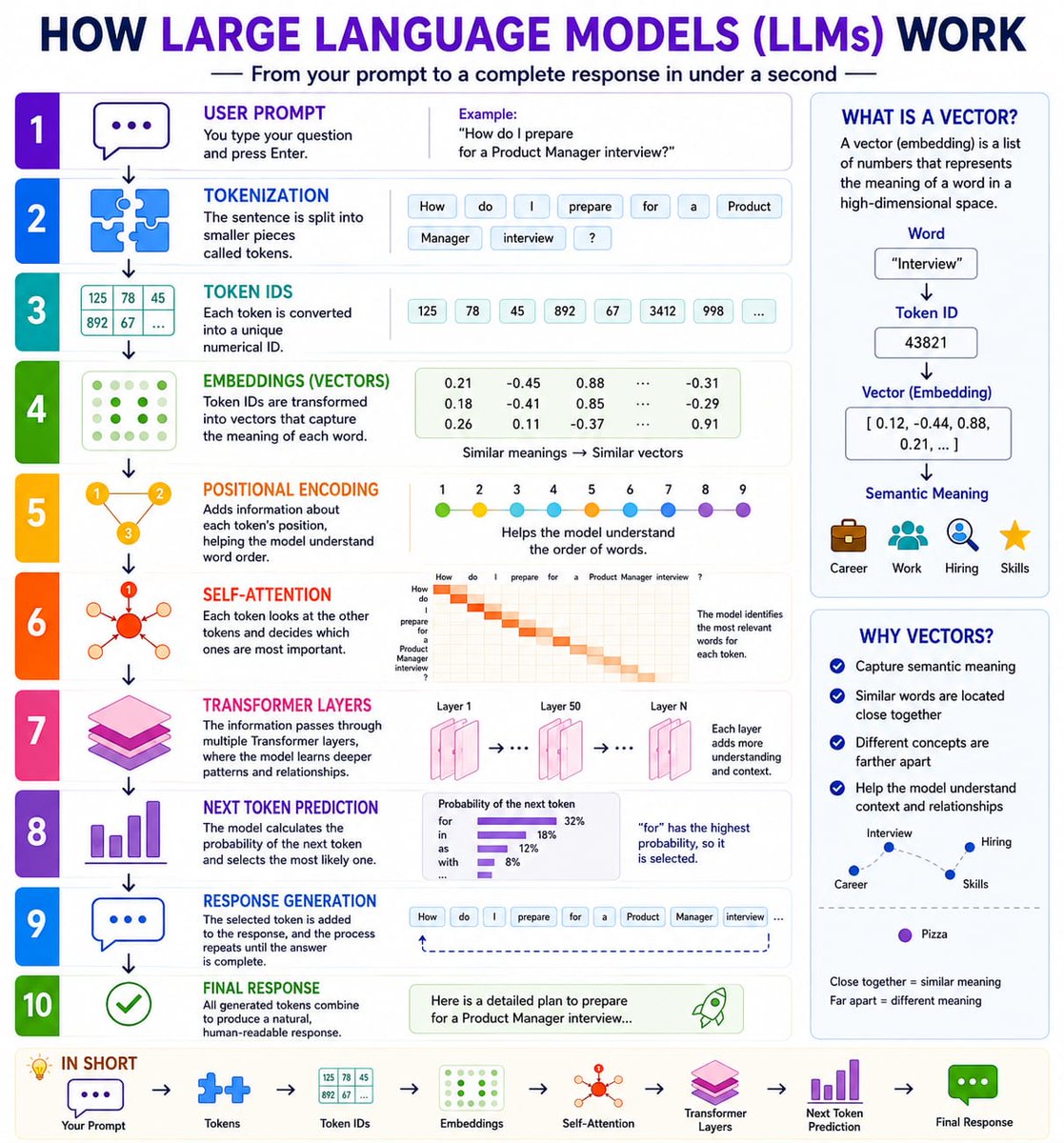
You're using ChatGPT every day. But there's a good chance you have no idea what happens after you press "Enter." No magic. No secret database. No human sitting behind the screen. Just a fascinating process that turns your prompt into a response in under a second. If you understand these 10 steps, you'll know more about LLMs than 95% of people using AI today. Here's what actually happens behind the scenes: 1. You write a prompt. 2. Your text is split into smaller pieces called tokens. 3. Every token gets a unique numerical ID. 4. Those IDs are converted into embeddings (vectors that represent meaning). 5. Positional encoding tells the model the order of the words. 6. Self-attention identifies which words are most important for understanding the context. 7. Transformer layers refine that understanding by learning patterns and relationships. 8. The model predicts the most likely next token. 9. It repeats this process hundreds of times until the response is complete. 10. Those generated tokens become the final answer you read. That's the entire pipeline. The model isn't searching Google. It isn't pulling a pre-written answer from a database. It's predicting the next most likely token, one step at a time, at incredible speed. Once you understand this workflow, concepts like embeddings, attention, context windows, RAG, AI agents, reasoning models, and memory suddenly make a lot more sense. AI feels much less like magic—and much more like engineering. Bookmark this thread. You'll come back to it whenever you're learning a new AI concept.

@DaveShapi ·
Using ChatGPT to help screen consultants feels like a cheat code. I posted a job to help launch my online course and got dozens of replies. At first I couldn't make heads or tails of who was better. So I fed all candidates to ChatGPT and asked to help discover differences and it pointed out which candidates had better validation, etc. And, even very early in the process it said "Candidate X is clearly the one to beat" (set the bar) and this prediction panned out perfectly. I mean, ChatGPT nailed the hiring process.

@askOkara ·
ChatGPT vs Okara I asked both to search reddit for the last 3 months and find the most interesting startup ideas people have shared. Okara went through 81 posts and gave me 10 ideas quickly, while ChatGPT wasted my time, so i had to stop it.
 Watch video
@julesterpak ·
Some different ways I use ChatGPT: • I love to screenshot something before I tweet it and ask ChatGPT “Thoughts?” to see if it got what I was putting down. I mostly do this for tweets that I’m not sure make sense and it’s fascinating to see how it interprets them and makes me reflect more deeply on my wording • Sometimes when I’m contemplating a big decision, I very vaguely tell ChatGPT the type of conclusion I came to regarding [insert broad situation] and ask how each of the major world religions might view that decision. Can’t remember if it ever led to me changing my mind, but always interesting • Especially when I was doing/do work that can be characterized as more “journalistic” or “truth-seeking”, I’ll copy my genuine writing into ChatGPT and ask what voids there are in the work that people might point out. This helps me make sure I was thorough Those are just a couple examples, but I’d love to hear other people’s favs

@semrush ·
ChatGPT is now a standard part of how people use the web, as one piece of a complex, interconnected search journey. We dug into 17 months of clickstream data to map how ChatGPT usage is changing, how referral traffic is growing, and where that traffic goes. If you're a marketer, understanding how your audience uses ChatGPT and where it exists in this buyer journey is critical for understanding how best to reach them. Key takeaways: • Outbound referral traffic from ChatGPT to the rest of the web grew 206% in 2025. • Over 30% of all referral traffic from ChatGPT goes to 10 domains. And over 20% goes to Google. • ChatGPT enables its search feature on just 34.5% of queries as of February 2026 – down from 46% in late 2024 – meaning most responses still rely on training data alone. • Users are asking more prompts per session. After 12 months of flat engagement, average queries per session jumped 50% in the last four months of our study period. Full study: https://t.co/Bg8n9GXf75.


@CodeByNZ ·
> describe the problem to ChatGPT. > ask ChatGPT to generate a prompt. > paste the prompt to Claude. works all the time..
 Watch video
@thebuggeddev ·
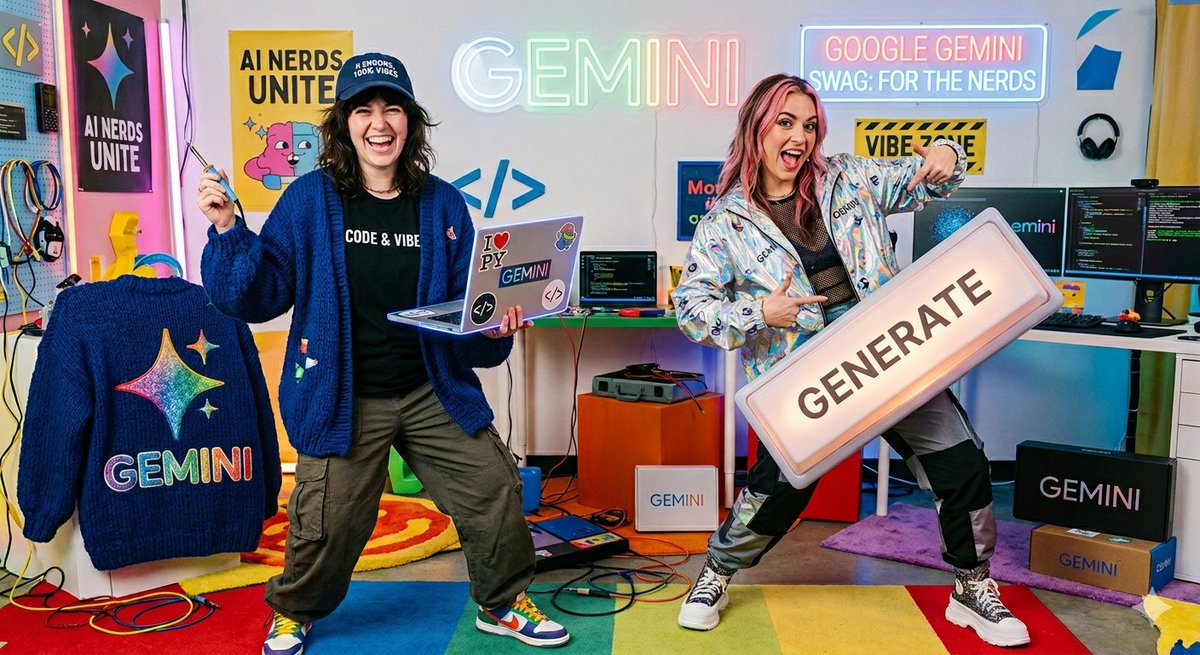
ChatGPT image 2.0 has developed taste. genuinely ☠️ I gave the same short, generic prompt to both ChatGPT Image 2.0 and Nano Banana. ChatGPT Image 2.0 picked up on the context behind the prompt and generated a polished, editorial-style magazine cover portrait. Nano Banana, on the other hand, just followed the prompt literally without much interpretation or creative judgment. This really shows where AI generated visuals are heading!! Prompt, A humorous fashion photoshoot showcasing Google Gemini swag for AI nerds. One model is a 'Vibe Coder' wearing a chunky cardigan with a giant Gemini sparkle logo and a dad hat reading '0 Errors, 100% Vibes.' The other is a 'Vibe Prompter' wearing a shiny holographic windbreaker, holding a mechanical keyboard that only has one giant 'GENERATE' key. Bright, fun, classic tech-bro parody


@gracepace_ ·
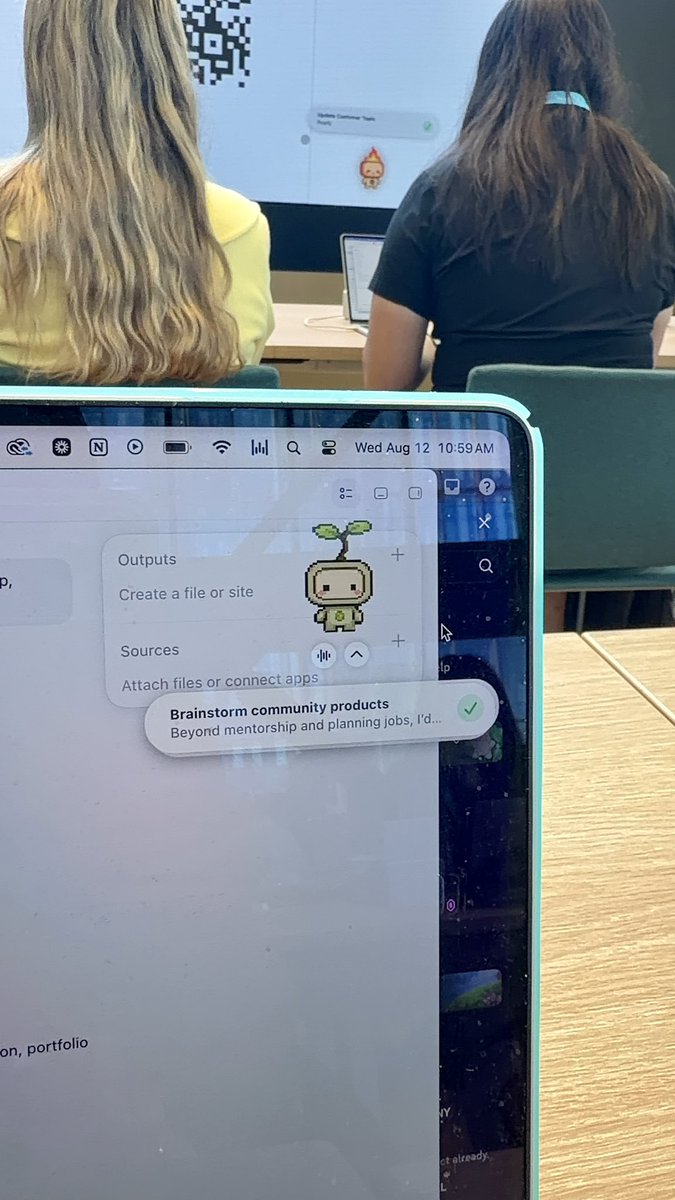
OpenAI invited me to their creator academy in San Francisco. Here’s what they showed us: - PETS!! Lives on your desktop and tells you when more complex tasks are finished. - Voice mode: Orb that floats across your screen. Talk to it and it will perform tasks for you - Scheduled tasks: Can email you a personalized newsletter of everything most relevant to you - Sites: Turn anything into a website with one sentence - Computer use: Do tasks for you, but you can approve before it sends that message - Artifacts: Creates docs, sheets, etc. I’ve used this to make google forms for user research for me too!! Cool use cases: - Create a site to help you research and buy a car! - Asking Codex to build a plugin to summarize your Discord and send reminders - Scraping your entire email inbox to see important ones you might have missed - Turning your travel itinerary into a pretty site - Analyzing all your content and understanding why certain posts perform better - Turning any complex spreadsheets into an easily browsable site (like brand deal trackers) I also got to demo me using ChatGPT to give me makeup suggestions (I just learned how to do makeup 3 months ago, but got millions of views on my makeup videos somehow….) I think the future of software is custom. It’s so easy for anyone to build their own custom software now with cools like Codex. But paired with cowork (tasks) and chat (quick answers & advice) That’s what I’ve been doing with Design Buddies. I’ve built my own apps like Hop (design mentorship platform), design resources, job boards, etc. Based on my unique community needs! AI can never replace understanding those needs though. I still talk to every user so I can understand their goals & pain points to build what they need. You can do anything. The best tech support is ChatGPT. Speakers: Sahil, Kelsey, Laura! Thanks KC for inviting me! What are your favorite ChatGPT workflows? We love @OpenAI @ChatGPT



@jappleby ·
I now drop every brand brief into ChatGPT. Mostly because most briefs are awfullll. I'll get pages and pages of pages of notes from brands, with all their ~proprietary~ features and ~ownable messaging~ and an enclopedia's worth of other information. My job's literally easier if I drop the brief in ChatGPT and say "what's most important for me to know," work off that info, create original ideas on my own, then drop it back into ChatGPT and ask "does this meet the requirements?" It's both a testament to how few people know how to properly brief someone, and the power & infinite use cases of AI.

@feifei_qiu ·
Kids on a playdate, I was chatting with 5 moms. A kid picked a random fruit, asking what’s that. I pulled out ChatGPT voice mode and started chatting. All the other moms: “Wow, what’s that app?” 😂😂 Outside the X community, still so many people don’t use AI or use it very little. 🤯🤯


@kaynat_kakar ·
10 ChatGPT prompts to make you 10X more productive and save you 20+ hours each week: 1/ Learn any skill in 30 days Prompt: "I want to learn [topic]. Create a 30-day roadmap for a complete beginner. Assume I only have 30 minutes a day." 2/ Turn ChatGPT into a private tutor Prompt: "Explain [topic] like I'm 15 years old. Then test me with 5 questions." 3/ Avoid beginner mistakes Prompt: "My goal is: [goal] What are the 3 biggest mistakes people make? How do I avoid them?" 4/ Turn any text into a mind map Prompt: "Convert this text into a structured mind map: [paste text]" 5/ Get unstuck instantly Prompt: "I'm struggling with: [problem] Give me 10 solutions ranked from easiest to hardest." 6/ Learn the 20% that matters most Prompt: "Teach me the 20% of [topic] that will give me 80% of the results." 7/ Practice interviews Prompt: "Act as an interviewer. Ask difficult questions about [topic]. Don't reveal the answers until I respond." 8/ Read between the lines Prompt: "Read this article and tell me what the author is really trying to say." 9/ Turn messy notes into a study guide Prompt: "Create a complete study guide from these notes." 10/ Find flaws in your plan Prompt: "Criticize my plan like an expert. Tell me what I'm not seeing."

@feifei_qiu ·
ChatGPT just launched ChatGPT for Teens It’s great to see @OpenAI focusing more on education and kids. But I’m not sure the same chatbot-style experience is the right way to solve this. When you give kids two options: “Give me the answer” or “Teach me step by step,” some kids will naturally take the easier route. AI should be more like a guide. Like a teacher or parent sitting next to kids, observing what they’re doing, noticing where they get stuck, and asking open-ended questions that help then figure out the next step on their own.



@noahkagan ·
My Spanish English speaking Uber driver had these ads in his car. I asked how he created it - said ChatGPT (said in his very cool Cuban accent) Such an awesome use of non-tech people benefitting from AI.


@Siddharth87 ·
Been playing with the ChatGPT Live voice model a lot recently and I'm loving how natural the conversation sounds. Lots of great use cases for this kind of tech. I made a video to demonstrate how to use ChatGPT Live for: → Thinking through unfinished ideas out loud → Practising sales calls, interviews, and negotiations → Learning languages through natural conversation → Researching plans while ChatGPT asks clarifying questions → Getting hands-free guidance while cooking or working → Discussing images and visual information I also break down how it works, how it differs from the previous version of ChatGPT Voice Let me know what you think!
 Watch video
@BernardMarr ·
Most people are still leaving huge amounts of value on the table when they use AI. The reason is simple: better prompts produce better results. In this video, I share eight practical ways to get more from tools like ChatGPT, from assigning the right role and giving clearer instructions to adding context, asking for missing information, fact-checking outputs, and refining results over time. The biggest shift is to stop treating AI like a vending machine and start treating it like a collaborator. The quality of what you get back often depends on how well you shape the task. Which prompting tip has made the biggest difference for you?
 Watch video
@PrajwalTomar_ ·
I am not exaggerating when I say this changes everything. ChatGPT Voice is INSANE. I am literally running 5 businesses by talking to my phone. It is now inside the desktop app, wired straight into Codex and ChatGPT Work. I don't type prompts anymore. I talk, it spins up multiple AI agents at once, and they go do the work while I keep talking. And I can steer the whole thing from my phone, so half of this now happens on a walk. Here's what a normal day looks like across all 5: → The agency: I open a client project and say what I want. One agent fixes a bug, another reviews the pull request, another writes the tests. Three things at once, from one sentence. → The app studio: I talk through a new feature for one of my apps and it ships the code while I make coffee. → Consulting: before a founder call I ask it to research their product and prep my audit notes, completely hands-free. → Instagram: I talk out a content idea and it writes the captions and hooks for my sponsored posts. The part that broke my brain: on Mac it can actually see my screen. So instead of pasting code and explaining what's on it, I just say "fix this" and it already knows what I'm looking at. I used to lose HOURS a day context-switching between all of these. Now it honestly feels like I'm managing a room full of AI employees by voice. Typing a perfect prompt is a skill. Talking is not. That is the whole shift. We are so early.

@heystevetan ·
If you're building on top of ChatGPT, OpenAI's superapp news should make you nervous. Codex, browser, agents, Canva, Booking. com, all inside ChatGPT. WeChat, Meta and Uber all did this when their core platform stopped converting. Same pattern: massive distribution, weak monetization, stuff the main platform with adjacent products. Most ChatGPT users are still on the free tier. The IPO is coming. The revenue per user math doesn't add up. So the play becomes: >keep the user inside the interface longer >increase the surface area for monetization >pray one of the bundled bets compounds Codex and browser keep customers locked in. Agents justify the price hike. Canva and Booking .com payments are the cash cows. So if you're a builder/operator, listen up: 1/ The wrapper era is ending. If ChatGPT becomes the interface for everything, every GPT wrapper is dead. Build something beyond the reach of this superapp. 2/Distribution is the only moat OpenAI has all the users.If you don't own relationships, you rent attention from this competing superapp. Own the audience. Own the email list. Own the channel. 3/ Stop optimizing for ChatGPT visibility. The interface is evolving monthly. What ranks in a chat answer today gets buried tomorrow. Optimize for being the brand the user types in by name, not the brand the model surfaces by accident. Watch what OpenAI bundles next. That tells you what is not working yet and also where the next opening is.


@RoundtableSpace ·
OPENAI LAUNCHES CHATGPT VOICE IN THE DESKTOP APP You can now control your computer and direct multiple agents running in ChatGPT Work or Codex, using just your voice.
 Watch video
@aiedge_ ·
OpenAI just launched ChatGPT for Teens. This is the best study tool that's ever existed: • Teen-specific onboarding that introduces tools and settings for learning, creativity, and everyday life • Learning-focused starter prompts that help start studying, practice skills, or explore ideas • Study mode • Homework reminders that may suggest study mode and help you work through assignments step by step. • Learning tools, including quizzes when available, that help you practice and check your understanding. • Study hours that let you or a linked parent or guardian choose when eligible new chats start in study mode. • Reminders that may encourage breaks • A reminder may appear before some image uploads • Built-in, age-appropriate safeguards


@Mr_Rbd_ ·
How to warm up ChatGPT super fast to improve your store copy 1. “Give me 10 possible personas if I’m selling this product” → drop a competitor link 2. “Now give me 10 marketing angles that could hit personas 1/2/3/5/6/9” → pick the personas you actually want to keep 3. “I’m gonna give you a list of reviews, from that tell me the 5 things people liked the most and least” → copy paste all the reviews from a competitor (or Amazon). don’t overthink the format, just dump everything, ChatGPT will handle it From there you can ask whatever you want and the output will be way better than usual For example: give me 3 things I should push right above my ATC button / what would you write and show in the first section to target the personas we picked so they actually feel the need for the product…

@glenngabe ·
Interested in ChatGPT Ads? -> OpenAI partners with Smartly, an adtech company that helps clients optimize ads in real time, to design ad formats that match ChatGPT's conversational interface "Smartly has signed entertainment, retail, and sports clients to participate in a pilot. Initially, Smartly will help these companies tweak their ChatGPT ads in real time. There's a bigger vision, though. Smartly's ultimate goal is to help OpenAI build interactive ad formats that let brands mimic ChatGPT's conversational interface." "Desmond cited Smartly's conversational ads for the UK retailer Boots, which run on Meta platforms like Instagram, as an example of the type of ad format OpenAI could eventually adopt. In that case, a chatbot pops up in a new window when the user clicks it and serves gift recommendations in response to a series of questions. Smartly said the ad format was nearly five times as effective at driving sales as Meta's basic ads." "The opportunity with conversational advertising is you can do more follow-ups, and you can ask again," https://t.co/ZrJA4WBTrX

@bg2clips ·
Nick Turley and Apoorv Agrawal discuss ChatGPT as a real-time thought partner: "ChatGPT has become indispensable as a thought partner... If you have a really specific scenario or you think it's a specific scenario to you, ChatGPT really comes through and can help you build confidence... If ChatGPT can make you feel like you have agency and control, I think that's really valuable." — @nickaturley & @Apoorv03 on @BG2Pod
 Watch video
Best ChatGPT tweets
Xholic studies what works in your niche, drafts posts in your voice and schedules them for the hours your audience is online.
No card needed · Nothing to cancel
Browse all tweet collectionsLive demo: no sign-up or login needed · takes about 2 minutes
Keep exploring