What makes a Community Note credible, and why do so many proposed notes never appear at all? That question matters more than the familiar definition of Twitter Community Notes as crowdsourced fact-checking. On X, formerly Twitter, a note is only useful to the public after it clears a consensus process involving contributors with different viewpoints. A proposed note can be accurate, well-intentioned, and still remain invisible.
Community Notes is best understood as a crowdsourced context layer attached to individual posts. It can help readers assess claims, images, and missing context, but it isn’t a perfect truth system or a replacement for professional verification. For creators, founders, marketers, and analysts, understanding the unpublished-note backlog is just as important as understanding what a published note does to reach.
What Twitter Community Notes Actually Are
The core mechanic is consensus-based rating, not simple voting. A contributor proposes text for a specific post. Other eligible contributors then rate whether that note is helpful. The note becomes public only when enough contributors from different viewpoints agree that it provides useful context, as described in X’s official Community Notes explanation.
That distinction prevents a common misunderstanding. A note isn’t published because it receives the most likes, because one moderator approves it, or because the author has a high follower count. It moves through a rating workflow in which contributors judge the note itself. X says notes can remain hidden while they are marked Needs more ratings or fail the helpfulness threshold, and that a note only appears publicly after earning Helpful status (X’s explanation of note visibility).
A proposed note versus a published note
Suppose a founder posts, “Our product is the first tool to offer this feature.” Another contributor submits a note linking to an earlier product with the same capability. That note is still only a proposal until other contributors rate it. If enough raters across different perspectives find it helpful, the note can appear beneath the post. If contributors don’t agree, the public may never see it.
The system therefore creates two separate experiences:
- Draft stage: A contributor has written a note, but X hasn’t shown it to everyone.
- Published stage: The note has earned Helpful status and appears beneath the original post.
- Unpublished outcome: The proposal remains in the system without reaching the public consensus threshold.
This structure makes Community Notes a product behavior rather than a traditional top-down moderation policy. The platform doesn’t assign a central editorial verdict to every claim. Instead, authority emerges from contributor participation, repeated ratings, and agreement across viewpoints.
Practical rule: Treat a Community Note as a public correction only after it appears beneath the post. A submitted note isn’t evidence that X has accepted the claim or the correction.
That rule also applies to broader social content moderation. If you’re evaluating manipulated media, synthetic video, or coordinated posting behavior, an AI Video Detector moderation guide can help you think beyond a single label and assess how detection, review, context, and publication fit together.
How Community Notes Evolved from Birdwatch
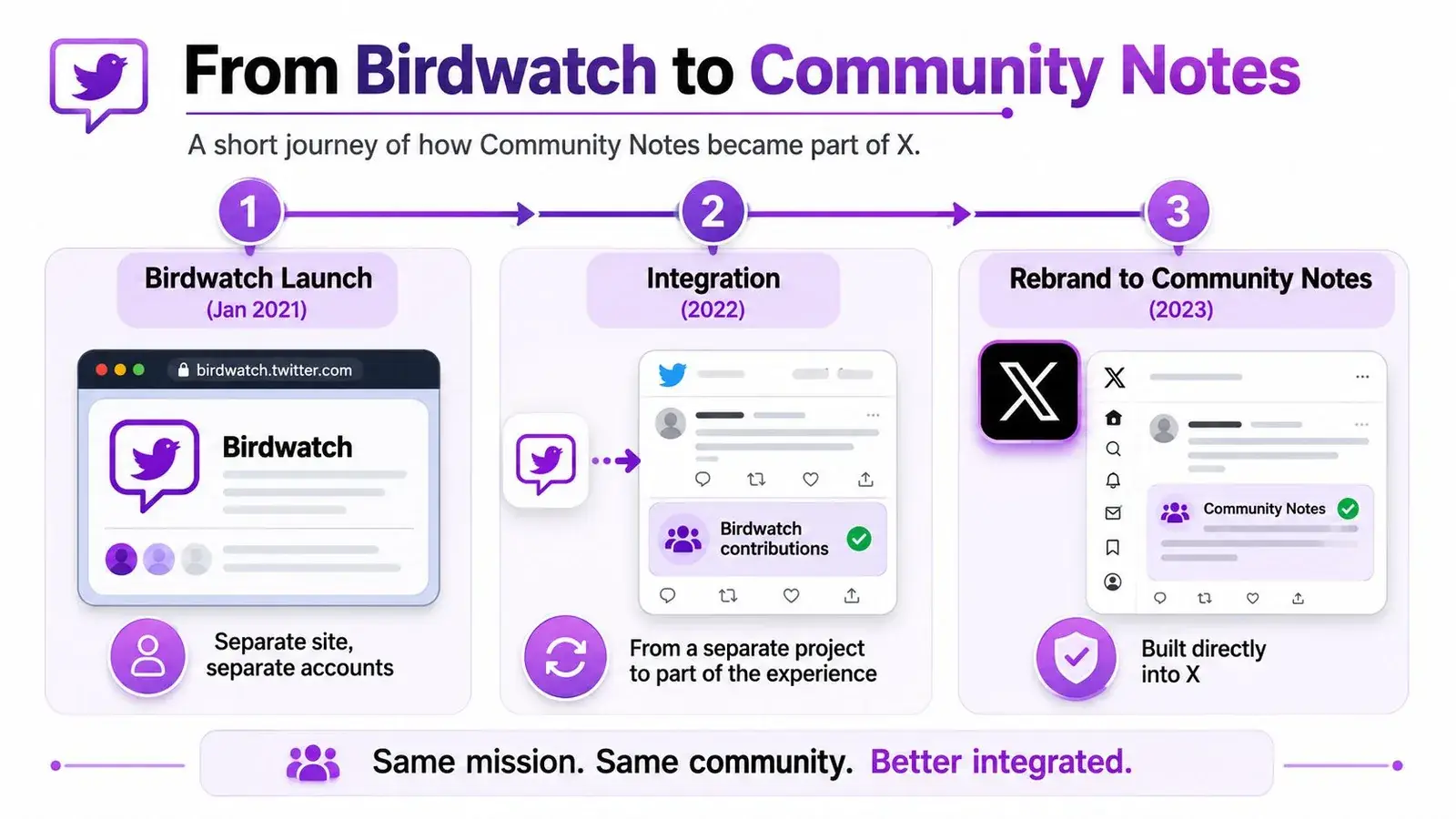
Community Notes began as Birdwatch in January 2021, when contributors worked through a separate site with separate accounts and a distinct reputation system. That design made the feature feel like an external research community rather than something built into the everyday Twitter feed.
The product changed when notes moved closer to the main timeline. The November 2022 rebrand to Community Notes brought the concept into the platform’s identity, while later changes made it more visible and more directly connected to posts. In January 2023, the system expanded to images and added a second note slot, which widened the types of content contributors could contextualize.
What changed for contributors
The evolution wasn’t just a name change. Each product shift altered one of three practical questions:
- Where do notes live? Birdwatch contributors started on a separate website. Community Notes placed context directly under posts where readers already encountered claims.
- How is agreement measured? The system moved toward a model that values agreement among contributors with different rating patterns and viewpoints.
- Who can participate? X introduced eligibility requirements and a progression system that separates rating access from writing access.
The transition also added features such as author follow-ups and expanded the range of posts that could receive context. Over time, the system became less like a standalone fact-checking experiment and more like a moderation layer embedded in the platform.
That history explains why older descriptions can mislead. Calling it Birdwatch misses the fact that the current experience is tied to X’s public timeline, contributor ratings, and algorithmic consensus. Calling it a conventional fact-checking desk misses the volunteer-driven workflow and the fact that many proposed notes never become visible.
Who Can Write and Rate Community Notes
Participation follows an eligibility ladder. X requires a contributor account to be at least six months old, have a verified phone number, and have no recent policy violations before the user can participate in Community Notes (documented eligibility requirements).
Writing a note is a separate step. New contributors begin by rating notes, not by immediately adding their own corrections. X’s onboarding description says new Birdwatch and Community Notes contributors start with a Rating Impact score of zero and can increase it by rating other notes accurately. Writing access may become available once the score reaches five, according to X’s onboarding explanation.
| Requirement | To Rate Notes | To Write Notes |
|---|---|---|
| Account age | At least six months | At least six months |
| Phone status | Verified phone number | Verified phone number |
| Policy history | No recent policy violations | No recent policy violations |
| Rating Impact | Initial participation begins with rating | A positive score can unlock writing access |
| Ongoing contribution | Rate notes accurately | Continue rating to maintain useful influence |
Why Rating Impact exists
Rating Impact is intended to reward contributors whose judgments align with later community outcomes. If you consistently identify useful notes, your influence can grow. If your ratings repeatedly disagree with the consensus that eventually forms, your ability to contribute may remain limited.
The system also gives greater weight to agreement that connects contributors with different viewpoints. In plain language, agreement from people who usually disagree is more valuable to the consensus model than agreement confined to one ideological group. That doesn’t mean contributors must share a political identity or approve every claim. It means their rating history helps the system assess whether a note travels across viewpoints.
Writing access, therefore, isn’t a shortcut to visibility. A contributor has to establish a pattern of useful ratings first. The practical path is to read notes carefully, check the linked evidence, and rate only when the note adds context. Users who treat ratings as a partisan scoreboard may struggle to build the kind of record the system rewards.
How the Cross-Partisan Consensus Algorithm Works
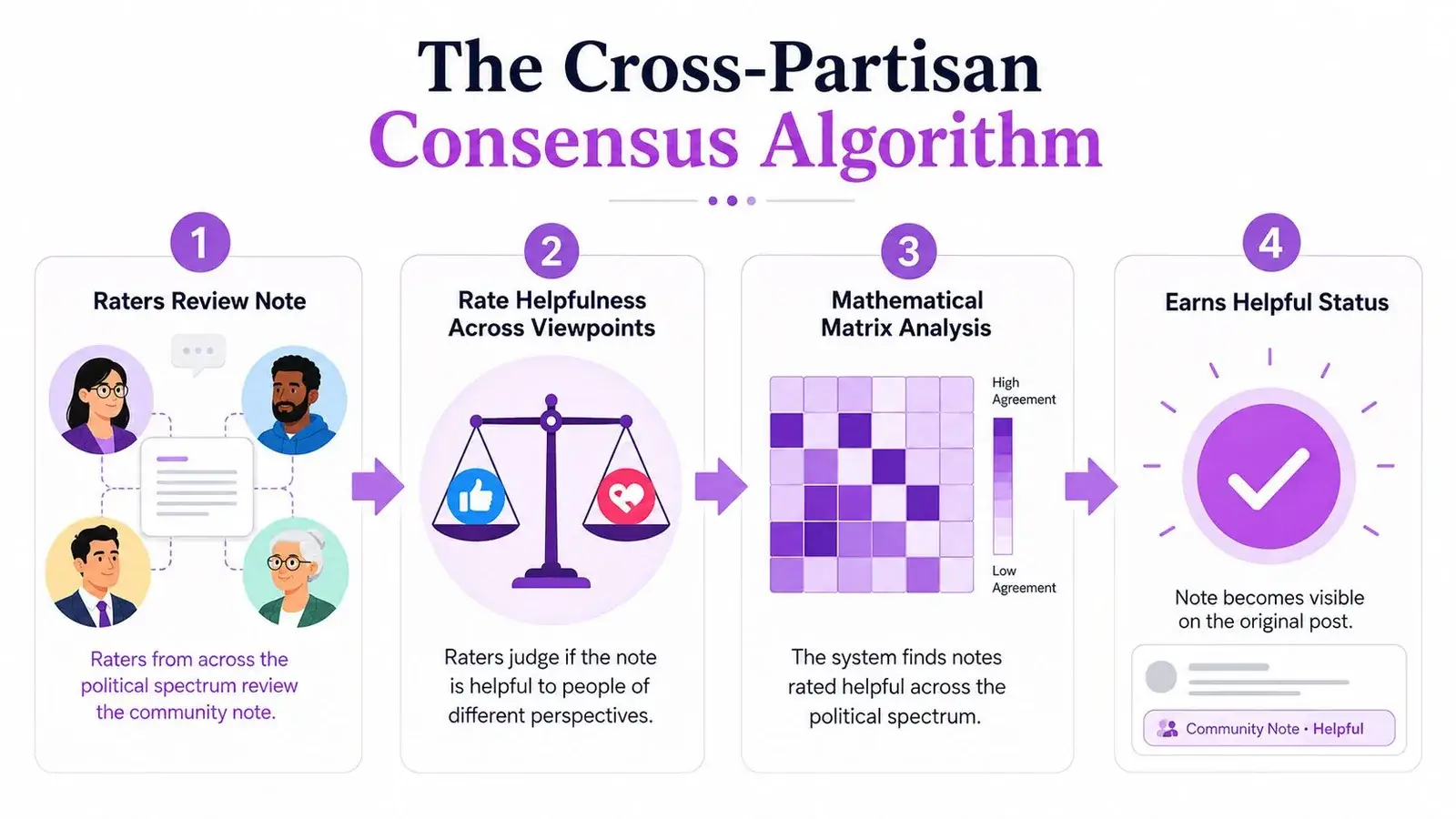
Community Notes doesn’t ask contributors to press a conventional upvote or downvote button. They judge whether a note is Helpful, Not Helpful, or otherwise relevant to the post, and the system evaluates the pattern of those ratings across contributors.
“Cross-partisan” describes the principle behind the model. Contributors provide information about their political perspective, and the scoring process looks for notes that people across much of the viewpoint spectrum consider useful. A note that appeals only to one political camp may fail even when its author believes every sentence is accurate.
The publication path
A simple version of the process looks like this:
- A contributor proposes a note for a post.
- Other contributors review the wording and evidence.
- They rate whether the note is helpful to people with different perspectives.
- The system evaluates the rating pattern and assigns a status.
- A note that clears the relevant threshold becomes visible beneath the original post.
The status labels help explain why a note’s presence can change:
- Not Needed means contributors don’t currently see a need for added context.
- Currently Rated Helpful indicates that the note is gathering positive support but may still be in an active evaluation state.
- Helpful means it has met the conditions for public display.
- Recently Helpful indicates a note that was recently judged helpful and remains relevant to the system’s current assessment.
These labels aren’t interchangeable. A contributor may write a note that looks persuasive to an individual reader, yet the note can remain unpublished because the rating pattern doesn’t establish broad usefulness.
Why timing and topic matter
The proposal-to-publication journey can take more than a day in many cases, while fast-moving news may require review close to the hour to affect the conversation. Topic sensitivity, the available rater pool, the quality of the source, and the wording of the note can all influence whether consensus forms.
For example, a note explaining that an old image has been reused may be easier to evaluate than a note interpreting a disputed political claim. The first may have a clear source and a narrow correction. The second may require context that different groups interpret in competing ways.
The algorithm’s strength is also its constraint. Cross-viewpoint agreement can reduce one-sided labeling, but it can make publication harder exactly when a claim is most polarizing.
Why Most Community Notes Never Go Live
Why does a note that seems accurate to one reader often remain invisible to everyone else? The answer is the gap between submitting a proposal and earning enough ratings from contributors with different viewpoints. A 2025 analysis found that more than 90% of notes submitted on X between January 2021 and March 2025 were never published. In English, the publication rate fell from 9.5% in 2023 to 4.9% in early 2025, according to DDIA’s analysis of Community Notes.
The unpublished queue is not a minor exception. An academic analysis recorded 1,614,743 notes written and 227,702 unique contributors since launch, along with about 1.3 million unpublished notes that had not received enough community ratings for a verdict (academic analysis of Community Notes). Participation is substantial, yet the public layer covers only a fraction of the corrections people propose.
| Failure Mode | Typical Signal | Impact on Publication |
|---|---|---|
| Editorial voice | The note sounds like an argument | Raters may view it as partisan rather than contextual |
| Weak sourcing | No direct or verifiable evidence | Contributors have less basis for a Helpful rating |
| Partisan framing | The correction attacks the author or side | Cross-viewpoint agreement becomes harder |
| Duplicate context | An existing note already covers the claim | A new proposal may appear unnecessary |
| Low-impact post | The post attracts little rating activity | The proposal may not receive enough evaluation |
The speed versus coverage tradeoff
The same review process that filters weak notes can slow accurate ones. The analysis found that average time to publication improved from more than 100 days in 2022 to 14 days in 2025, while the publication rate declined. Faster handling and narrower coverage therefore appeared together. Some notes moved through the system sooner, while many others remained without a public verdict.
Creators should work from four practical assumptions:
- A proposed note is a draft, not a published correction.
- A note can be factually sound and still fail to attract enough cross-viewpoint ratings.
- A correction may appear after the most important part of a live conversation.
- No note does not establish that a post is accurate.
For a brand account, record the original post separately from note activity. An X analytics workflow should distinguish impressions, replies, reposts, and audience reactions from a proposal’s status. A note that remains unpublished is a signal about review progress, not a confirmed platform judgment.
What Published Notes Do to a Tweet’s Reach
What changes after a Community Note receives Helpful status? The note appears beneath the original post, giving readers context before they decide whether to like, reply, or repost. A 2025 University of Washington analysis found average declines of 46% in reposts, 44% in likes, 22% in replies, and 14% in views after a note was attached (University of Washington findings).
A separate 2025 study using a different dataset found similar immediate effects. Reposts fell 45.7%, likes 43.5%, replies 22.9%, and views 14.0% after attachment. Across posts’ full lifespans, it estimated smaller cumulative declines of 11.4% in reposts, 13.0% in likes, 7.3% in replies, and 5.7% in views. The contrast shows why the point at which a note appears matters.
The same University of Washington research summary reports that a misleading post is 80% more likely to be deleted by its creator after receiving a Community Note. Deletion can end the post’s public circulation, even when the author does not address the correction directly.
What this means for creators
A Helpful note doesn’t automatically erase a post’s distribution or destroy an account’s reputation. Its effect depends on timing, audience, topic, and the momentum a post has already built. The narrower, useful conclusion is that a visible note can suppress downstream amplification, particularly among readers who are not already connected to the original author.
A note also works more like a speed bump than a barrier. It can slow new engagement, while existing replies, screenshots, reposts, or off-platform discussion continue elsewhere. An unpublished proposal has no comparable public effect, so creators should not treat the absence of a note as proof that a claim passed review.
For founders and marketers, check factual claims before publishing rather than depending on a later correction. To understand how ranking signals and engagement interact, use this guide to decode the Twitter algorithm, while treating public algorithm explanations as general guidance rather than a promise about any post’s reach.
You can also use Xholic’s guide to the X algorithm to compare what happened after publication. Track replies, reposts, views, and audience feedback alongside note status, then separate the note’s likely effect from other changes in the conversation.
How to Write a Note That Earns Helpful Status
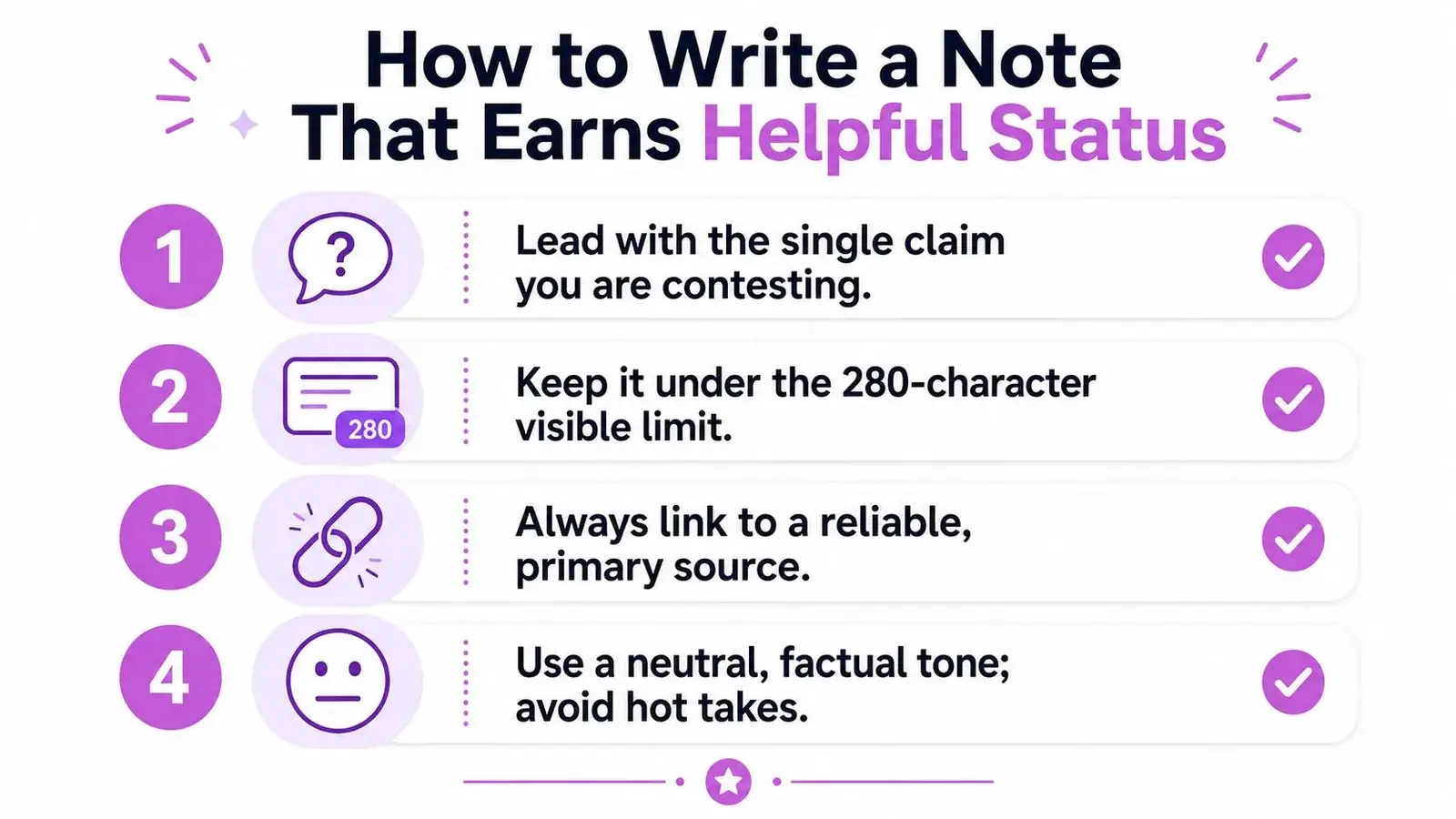
Write a Community Note like a short, sourced correction, not like a quote-post argument. The strongest draft identifies one claim, adds one piece of necessary context, and gives readers a source they can verify quickly.
A practical drafting workflow
- Isolate the claim. Quote or closely identify the exact statement that needs correction. Don’t respond to the entire worldview behind a post.
- Find a primary source. Use an official document, original dataset, direct statement, or authoritative record that a neutral reader can inspect.
- Write the minimum useful context. Keep the visible note under the 280-character limit, and remove background that doesn’t help the reader evaluate the claim.
- Use neutral language. State what the source establishes. Avoid labels such as “dangerous,” “dishonest,” or “false” unless the evidence directly supports that conclusion.
- Rate other notes carefully. Rating accurate notes helps build the Rating Impact associated with your contributor account.
The wording should match the seriousness of the claim, not the emotional temperature of the original post. “The image was published earlier in a different event” is more useful than “This account is spreading fake news,” because the first sentence gives readers a checkable fact without asking them to adopt the writer’s judgment.
Evidence beats attitude. If a reader can’t tell what changed, where the information came from, and why it applies to the post, the note needs another edit.
Before submitting, check whether another helpful note already covers the same point. Also avoid adding context merely because you dislike a post’s conclusion. A note should help someone understand a factual claim, not turn Community Notes into a second reply thread.
For related verification habits, see how to spot a fake tweet. The same discipline applies here: inspect the source, compare the wording, and separate what you can prove from what you suspect.
Building Long-Term Credibility with Community Notes
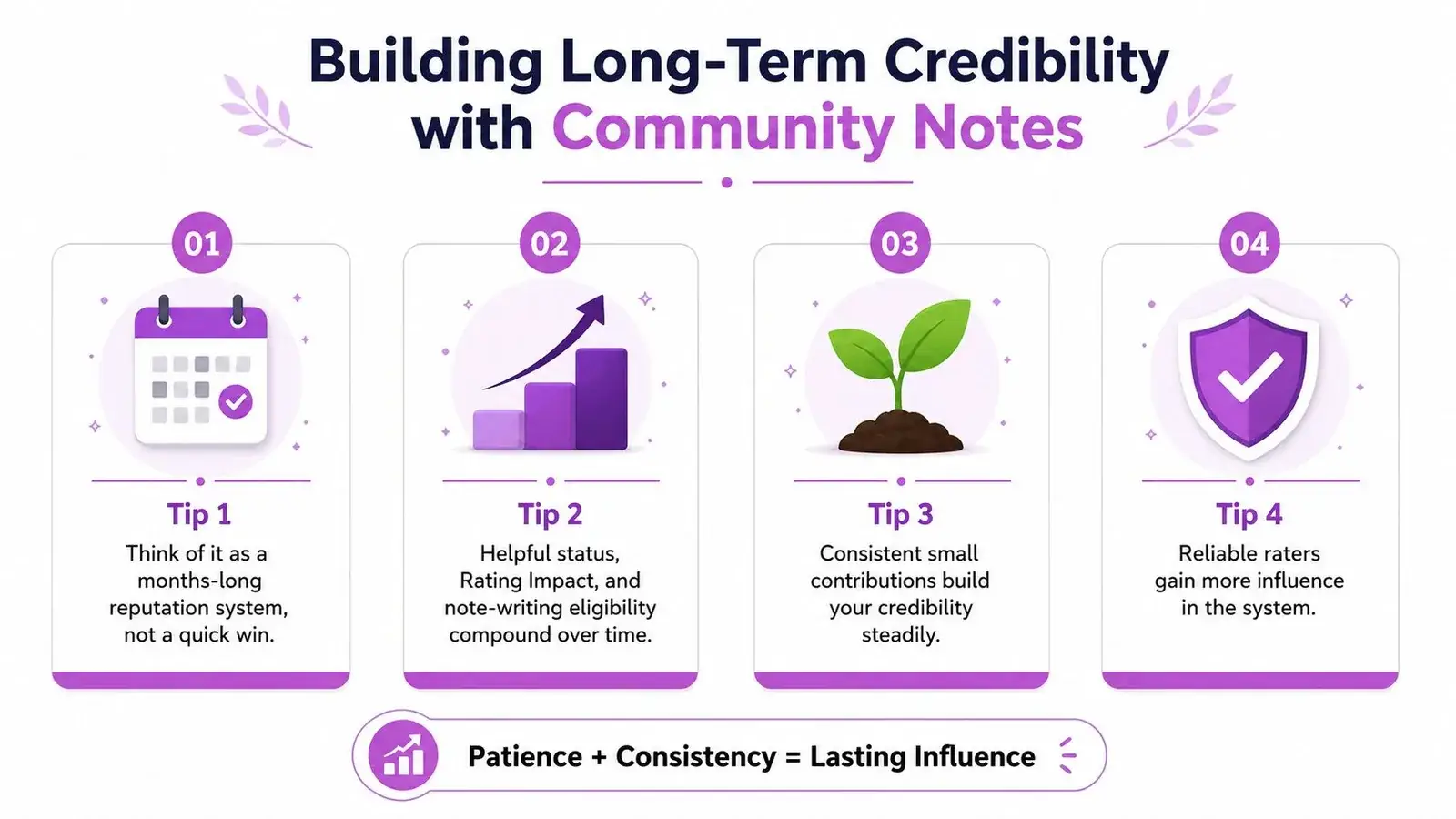
Community Notes works better as a long-term reputation system than as a quick way to win an argument. Helpful ratings, Rating Impact, and writing access depend on repeated participation, so occasional dramatic corrections are less useful than steady, careful review.
The most practical routine is simple:
- Read notes attached to posts in your niche.
- Check the source before rating helpfulness.
- Look for context that contributors from different viewpoints could recognize.
- Propose a note only when you can make a specific, citable correction.
- Record which kinds of wording and evidence earn Helpful status.
A founder correcting product claims, a crypto analyst adding missing market context, and a social media manager reviewing a viral image may all use the system differently. The common thread is restraint. Your credibility grows when your contribution clarifies the post for readers who don’t already share your assumptions.
A useful daily exercise
Rate five notes today, and log what you noticed:
- Was the claim precise?
- Did the source directly support the correction?
- Could someone with a different political viewpoint still find the note useful?
- Did the wording add context or just express disagreement?
- Did the note explain enough without becoming an essay?
Keep that log separate from your content calendar. The exercise isn’t only about earning the ability to write notes. It trains the same editorial judgment you need when publishing your own posts, reviewing a client’s claim, or deciding whether a quote post adds value.
For a broader approach to participation, audience trust, and consistent contribution, use this Twitter community guide as a companion reference. Community Notes can support credibility, but it can’t replace source checking, transparent corrections, or accountability for what you publish.
Xholic AI helps X users find worthwhile conversations, study proven post structures, and draft context-aware replies while keeping every publication decision in human hands. Its personalized memory can retain your voice, niche, audience, saved posts, and product context, so visit Xholic AI to build a more consistent, evidence-aware workflow on X.