Quick answer: Paste or type your tweet text and the tool counts your characters in real time factoring in Twitter’s actual counting rules, including how URLs are counted (always 23 characters), how emojis count, and whether you’re within the 280-character limit.
What Is It?
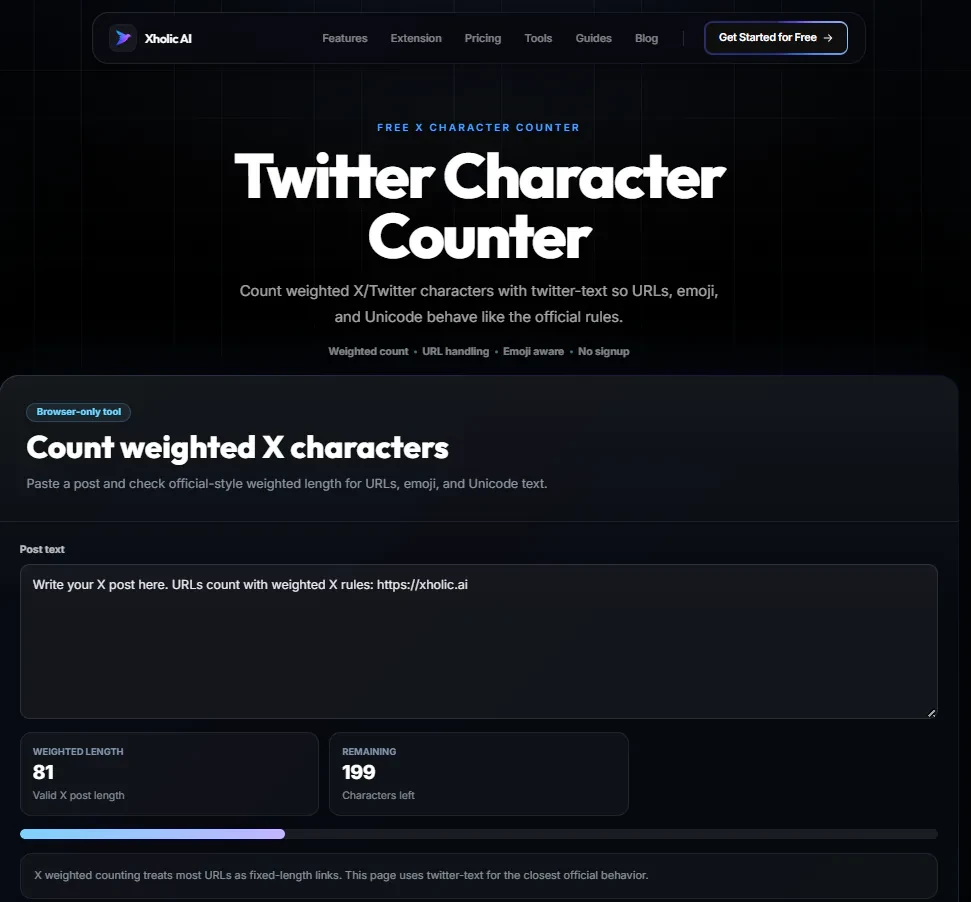
The Twitter Character Counter is a free tool at xholic.ai. Paste or type your tweet text and the tool counts your characters in real time factoring in Twitter’s actual counting rules, including how URLs are counted (always 23 characters), how emojis count, and whether you’re within the 280-character limit.
Open the Twitter Character Counter Tool.
Who Uses It and Why
| Who Uses It | What They Use It For |
|---|---|
| Anyone writing tweets | Check length before posting to avoid the compose box cutting off your text unexpectedly |
| Social media managers | Validate tweet copy for clients before it goes into a scheduling tool |
| Thread writers | Check each individual tweet in a thread stays under 280 characters |
| People writing Twitter bios | Confirm their bio is within the 160-character limit before saving |
| Content repurposers | Trim blog excerpts, newsletter intros, or LinkedIn posts down to tweet length |
How to Use It - Step by Step
It takes under a minute. Here’s exactly what to do:
Step 1: Open the tool
Go to Twitter Character Counter in your browser.
Step 2: Paste or type your text
Drop your tweet draft into the input box. The count updates instantly as you type.
Step 3: Check the count
The tool shows your current character count, how many characters you have remaining, and whether the tweet is valid (under 280 characters).
Step 4: Check URL handling
If your tweet includes a URL, the tool counts it as 23 characters the same way Twitter does regardless of how long the actual URL is. This is an important difference from a standard character counter.
Step 5: Edit and recount
Trim or expand your text directly in the box. The count updates live so you can adjust in real time.
Pro tip: Twitter counts URLs as exactly 23 characters no matter their length. A short URL like xholic.ai/tools and a long URL like xholic.ai/tools/twitter-character-counter/ both count as 23. Factor this in when you’re trying to fit a link into a tight tweet.
Real Example
A social media manager is writing a tweet for a client that includes a 45-character URL and needs to stay under 280. Their word processor shows 295 characters and flags it as too long. They paste it into the Twitter Character Counter which counts the URL as 23 and see the actual count is 273. The tweet fits fine.
What to Do With Your Result
Twitter’s character counting has quirks most people don’t know about. Spaces count as characters. Most emojis count as 2 characters. Some multi-codepoint emojis (flag emojis, skin-tone variants) count as more. And crucially, URLs always count as 23 regardless of length.
Heads up: Don’t rely on your word processor’s character count it uses different rules and will give you a different number than Twitter. Always check with a Twitter-specific counter, especially if you’re close to the 280 limit.
Frequently Asked Questions
Why is my character count different here vs my phone keyboard?
Most keyboards count every character literally. Twitter’s counter applies special rules: URLs are always 23 characters, emojis count as 2, and some characters count differently. This tool uses Twitter’s actual counting rules.
What’s the character limit for a Twitter bio?
160 characters. The tool can check bio text too just paste it in and check the count.
Do hashtags count toward the character limit?
Yes. Every character in a hashtag, including the # symbol, counts toward your 280-character limit.
How many characters is a typical emoji?
Most standard emojis count as 2 characters on Twitter. Multi-codepoint emojis like flag emojis or those with skin-tone modifiers can count as 4 or more.
Does this tool work for X Premium’s longer posts?
X Premium (paid) allows posts up to 25,000 characters. This tool is calibrated for the standard 280-character tweet limit. For Premium long-form posts, the 280-character rule doesn’t apply in the same way.
Can I use this to check multiple tweets at once?
Not simultaneously but you can paste each tweet in turn, check the count, and adjust. It takes about 10 seconds per tweet.
Related Xholic Tools
These tools work well alongside this one:
- Fake Tweet Generator - Preview your tweet’s appearance after confirming the count
- Twitter Font Generator - Some Unicode font styles add to your character count check here after styling
- Twitter Bio Guide - Write a bio that converts visitors and stays within 160 characters
- Reply Chain Generator - Write threads where every tweet stays within the 280-char limit.