Quick answer: Tell the tool your role, your audience, and your preferred tone, and it generates eight different bio options you can copy and paste directly into Twitter. Each option stays within the 160-character limit.
What Is It?
The Twitter Bio Generator is a free tool at xholic.ai. Tell the tool your role, your audience, and your preferred tone, and it generates eight different bio options you can copy and paste directly into Twitter. Each option stays within the 160-character limit.
Open the Twitter Bio Generator Tool.
Who Uses It and Why
| Who Uses It | What They Use It For |
|---|---|
| New Twitter users | Don’t know what to put in their bio want a starting point they can tweak |
| People rebranding | Changing their niche or direction and need a bio that reflects the new focus |
| Founders & creators | Want a bio that clearly communicates their value without sounding generic |
| Job seekers | Need a professional Twitter bio that works for networking and visibility |
| Brand accounts | Want a bio that sells the product rather than describing the company |
How to Use It - Step by Step
It takes under a minute. Here’s exactly what to do:
Step 1: Open the tool
Go to Twitter Bio Generator in your browser.
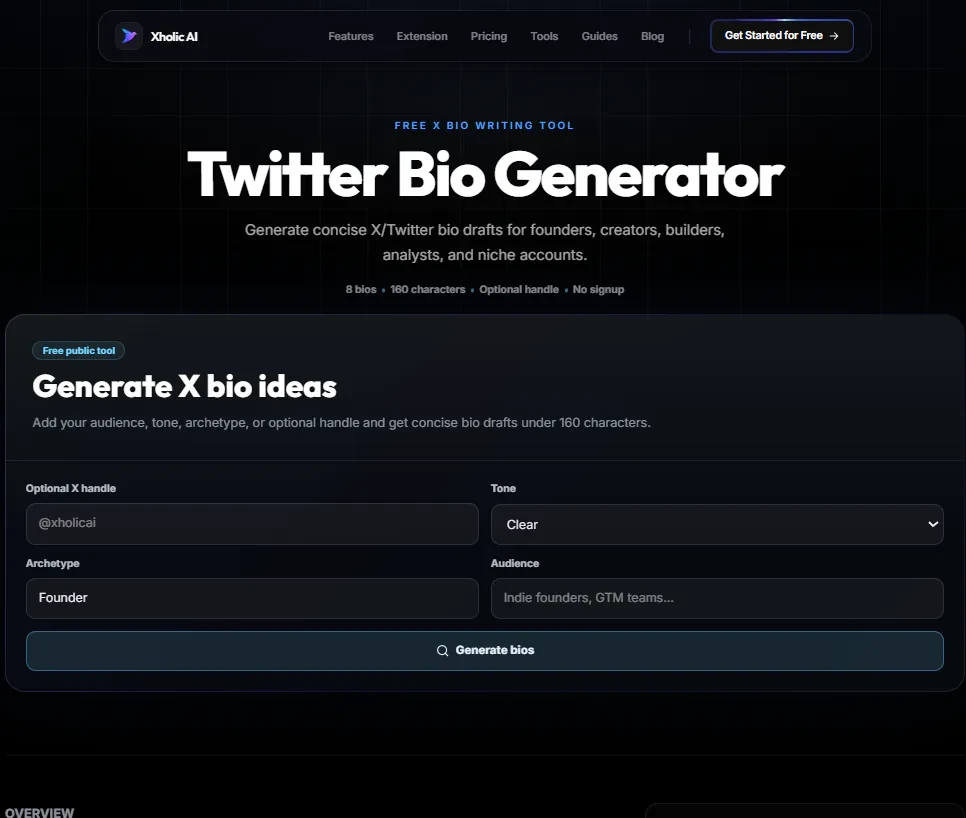
Step 2: Enter your details
Fill in your role or job function, your target audience (who you want to attract), and your preferred tone (professional, conversational, bold, creative).
Step 3: Generate your options
Click Generate. The tool creates eight bio variations, each under 160 characters, covering different angles: credential-first, content-first, story-first, and CTA-first.
Step 4: Read through the options
Each bio takes a slightly different approach. Some lead with your proof point, some with your content promise, some with a hook. Pick the one that feels most like you.
Step 5: Copy and use
Click Copy next to the bio you prefer. Paste it directly into your Twitter bio field. Edit any specific details company names, numbers, URLs to make it fully yours.
Pro tip: Generate a new set of bios every few months - your focus shifts, your proof points grow, and what worked six months ago may not reflect where you are now. Takes 30 seconds and often produces better options as your experience deepens.
Real Example
A freelance designer inputs: role = ‘UX designer’, audience = ‘tech startups and product teams’, tone = ‘professional but approachable’. The tool returns eight options. One reads: ‘UX designer helping early-stage startups build interfaces users actually want to use. 6 years product-side. Portfolio link’. They edit it to add their real years of experience and copy it to Twitter.
What to Do With Your Result
The generated bios are starting points, not final copy. They’re designed to give you eight strong structures you can choose from and personalise not eight bios you use exactly as generated. Always add one specific detail (a real number, a real company, a real outcome) to make it yours.
Heads up: Don’t use a generated bio that doesn’t match what you actually tweet about. The bio sets an expectation if people follow based on ‘I write daily threads on SaaS growth’ and your feed is mixed personal content, they’ll unfollow quickly. Make sure the bio matches the reality of your account.
Frequently Asked Questions
Are the generated bios unique to me?
Each set is generated based on your inputs. Two people with very similar inputs may receive similar structures, but the specifics will differ. Always personalise with your own proof points and details.
Can I regenerate if I don’t like the options?
Yes. Click Generate again for a fresh set. You can also adjust your inputs changing ‘professional’ to ‘bold’ or adding more specific audience detail produces noticeably different results.
Do the generated bios stay under 160 characters?
Yes. All generated options are checked against the 160-character limit. After you personalise adding a company name or URL double-check the count with the Twitter Character Counter.
Can I use this for a business account, not a personal one?
Yes. Enter your brand’s product as the ‘role’, your target customer as the ‘audience’, and your preferred brand voice as the ‘tone’.
How do I know which option is best?
Test it. Update your bio, note the date, and check your profile visit to follow conversion rate in your analytics after 4 weeks. The bio that converts best is the right one.
Related Xholic Tools
These tools work well alongside this one:
- Twitter Bio Templates - Browse structured bio frameworks by account type
- Twitter Bio Guide - The complete guide to writing a bio that converts visitors into followers
- Twitter Character Counter - Confirm your customised bio stays within 160 characters
- Twitter Font Generator - Style your display name to stand out alongside your new bio