Most Twitter profile optimization advice is too shallow. “Use a nice headshot, write a short bio, pin something good” isn’t wrong, but it misses the actual job of a profile on X (Twitter). Your profile has to answer four questions fast: who you are, what you talk about, why you’re worth following, and what a visitor should do next. If those answers are inconsistent across your handle, name, avatar, bio, header, pinned post, and recent content, you lose trust before your best tweets ever get a chance to work.
The practical answer is simple. Treat your profile like a system, not a checklist. Tighten the foundations, make the message obvious, prove it with a pinned post, and keep the whole thing aligned with what you’re posting and replying to right now.
Build Your Foundation Handle, Name, and Avatar
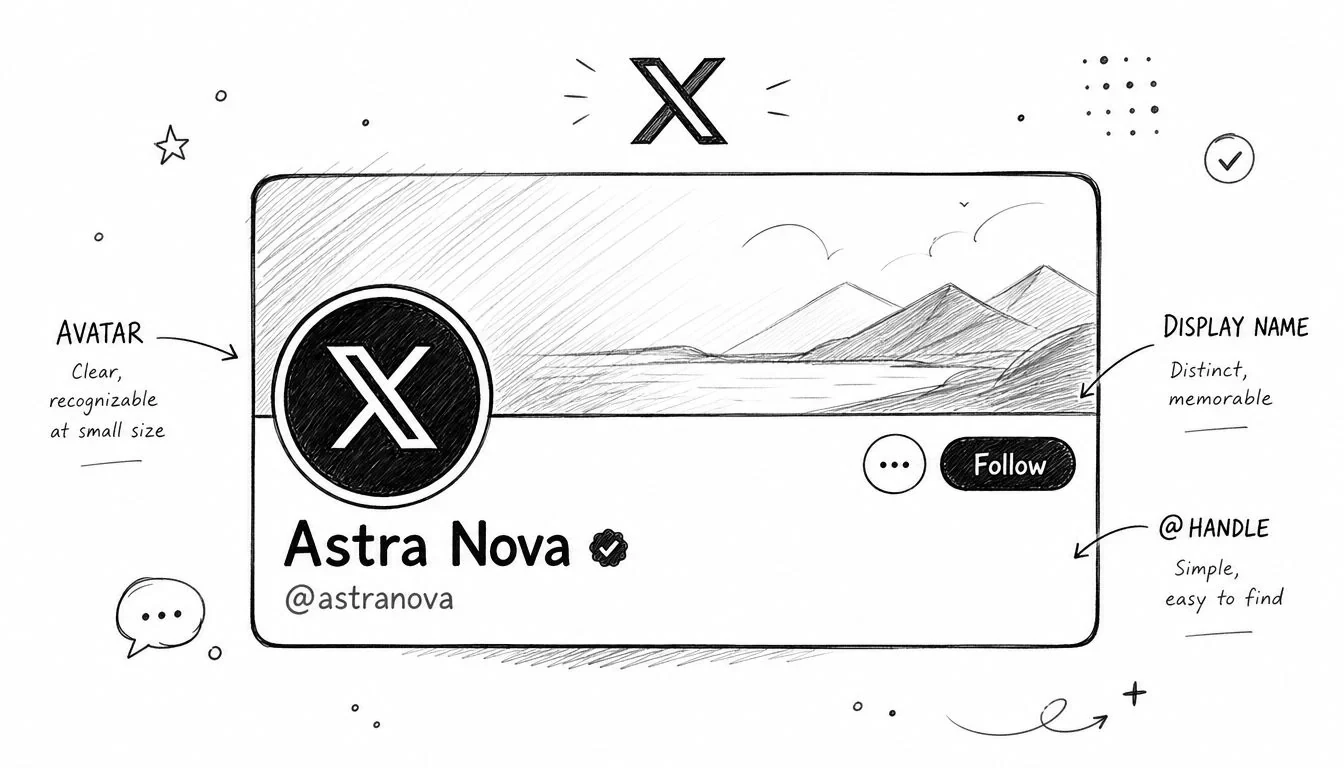
People notice your handle, display name, and avatar before they read a single line of your bio. Those three elements decide whether your profile feels credible, searchable, and easy to remember.
Make the handle easy to tag and remember
A strong handle is simple enough that people can type it without thinking. Long strings, extra punctuation, and random numbers make your profile harder to tag in replies and harder to recall after someone leaves your page.
Three rules work well:
- Keep it short: Short handles are easier to mention in tweets and screenshots.
- Keep it brand-adjacent: If you’re building a product, include the first part of the brand when possible.
- Keep it stable: Don’t keep changing it unless there’s a clear reason.
If you’re still stuck, Wispra’s username strategies are a useful way to think through naming patterns without defaulting to junk handles. If you’re planning a handle change, this guide on what a handle means on Twitter is worth reviewing before you switch.
Use the name field for search, not decoration
The display name field is often wasted on branding flair. On X, that field also affects discoverability. Profiles optimized with semantic keywords in the name field appear in 3x more search results than profiles using only generic names, according to Sprout Social’s Twitter SEO guide.
That means this:
| Weak name | Stronger name |
|---|---|
| Alex | Alex Founder |
| Maya | Maya AI Writer |
| Jordan | Jordan SaaS Marketer |
This doesn’t mean keyword stuffing. It means adding one useful qualifier that tells people, and X search, what lane you occupy.
Practical rule: If someone sees only your name in search results, they should still know your niche.
Pass the squint test with your avatar
Your avatar has one job. Be recognizable at a tiny size.
Open your profile on mobile and squint. If the image turns into a blur, it’s too busy. Founders and creators usually do better with a clear face photo than a logo because it creates immediate person-to-person trust. For company accounts, a simple logo can work, but only if the mark is readable at small scale.
A quick avatar audit:
- Use one clear subject: Face, not a group shot.
- Favor contrast: Dark-on-dark photos disappear in the feed.
- Avoid overdesign: Heavy borders, tiny text, and complex illustrations don’t survive the thumbnail.
I’ve found that polished but overly designed avatars often signal “brand account pretending to be personal.” A plain, clear photo usually performs better because it feels easier to place in a reply thread.
Craft Your Core Message Bio, Header, and Link
Most bios fail because they read like résumés. Visitors don’t care that much about your titles. They care whether your profile quickly explains what you do and why following you will be useful.
Write a bio that explains the outcome
Your bio is constrained to 160 characters, so every word has to earn its place. A functional website link and a clear CTA matter because profiles without them often convert poorly, as noted in TechFunnel’s profile optimization guide.
The biggest improvement I’ve seen from bio rewrites came from one shift. Stop describing yourself like a professional summary. Start describing the outcome you help create.
A weak founder bio says:
- developer
- building AI tools
- startup enthusiast
A stronger one says:
- building a tool that helps creators, founders, and marketers grow on X through better replies, content research, and consistent engagement
That kind of bio reduces confusion fast. People don’t have to click away to understand the point.
For more examples, these Twitter bio ideas for 2026 are useful as templates, especially if you’re trying to sharpen positioning without sounding robotic.
Design a header that adds context
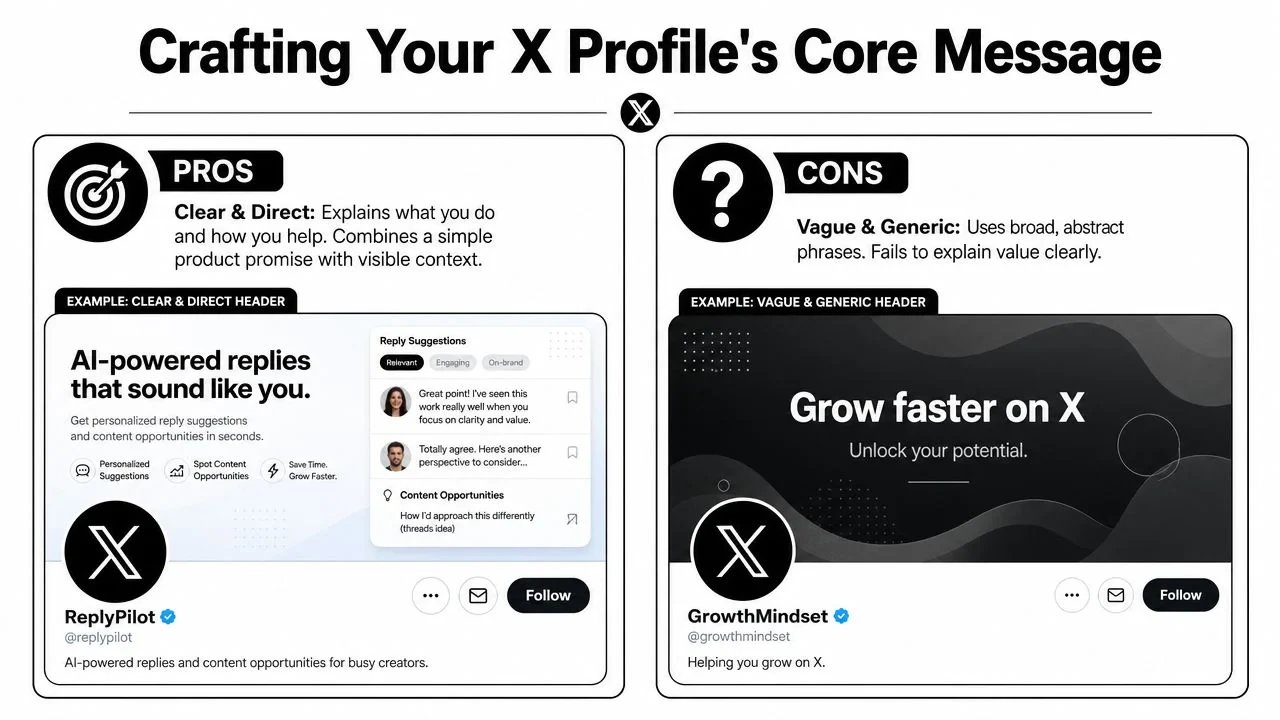
Your header shouldn’t just look clean. It should explain something the bio cannot fit.
Use the header to show one of these:
- Product context: a simple screenshot, workflow, or interface glimpse
- Audience context: who the account helps
- Content context: what followers can expect to learn from your posts
Headers work best at 1500x500 pixels, which gives you enough space to reinforce the message without cramming in tiny text. The mistake I see most is a vague banner with abstract claims like “grow faster on X.” It sounds good, but it doesn’t explain anything.
The cleaner design is not always the clearer design.
Pick one next step
The link in your profile is where many accounts get indecisive. They try to send visitors to everything.
Don’t. Give them one next step.
A founder profile often works better with a softer CTA than a hard conversion CTA. Examples:
- Follow CTA: Follow for lessons, experiments, and breakdowns
- Product CTA: Try the product if visitors already understand it
- Portfolio CTA: Read the thread, case study, or landing page that best explains your work
When I audit profiles, I read the bio, header, and link as one message. If those three elements don’t reinforce each other, the profile feels fragmented even if each piece looks good alone.
Display Your Best Work Pinned Tweet and Highlights
A bio makes a promise. Your pinned tweet proves you can keep it.
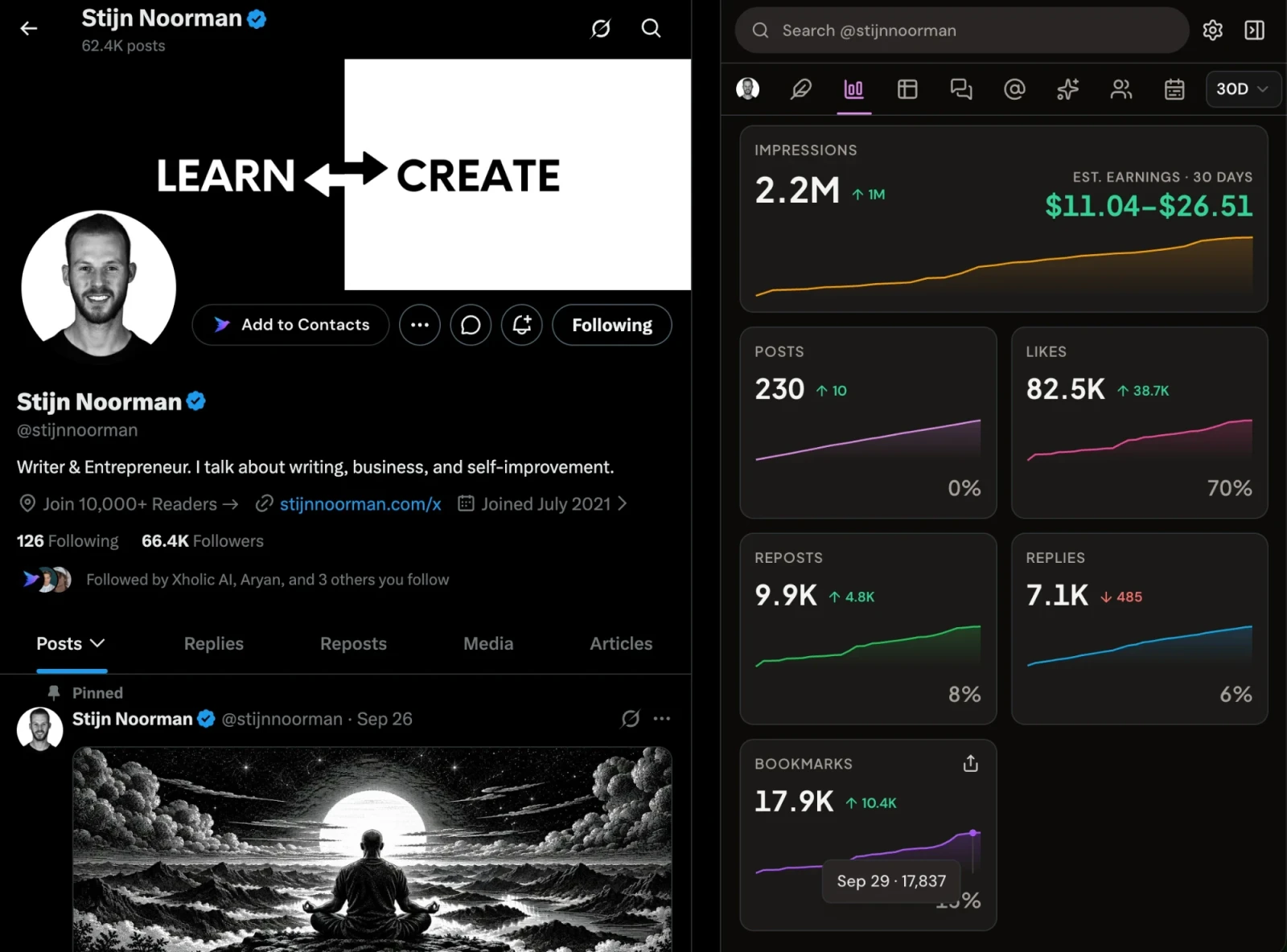
Your pinned tweet is your proof layer
Think of the pinned tweet as the free ad at the top of your profile. It should show expertise, explain your product, or orient a new visitor quickly.
Good pinned tweet options include:
- An intro thread: who you are, what you’re building, what you share
- A proof post: a concrete lesson, breakdown, or workflow with screenshots
- A product explainer: especially useful if your account mixes founder content and product education
One format I like for founders:
Building [product].
Helping [audience] do [outcome].
Here’s the workflow I use every day.Then include a short thread with examples, screenshots, and one clear CTA.
That format works because it bridges identity, value, and evidence.
Rotate pinned content with momentum, not habit
Most advice stops at “pin your best tweet.” That’s incomplete. Your pinned tweet should also match what people are interested in right now.
The more useful approach is to rotate pinned content when your niche shifts, your product message becomes clearer, or a specific topic starts attracting more of the right audience. That idea is captured well in Steady Demand’s write-up on profile reach, which notes that many guides miss the connection between profile optimization and real-time momentum.
Here’s a practical workflow:
- Review the last few weeks of replies and profile visits.
- Look for a topic that’s pulling the most relevant conversations.
- Replace the pinned tweet if your current one no longer represents that interest well.
- Keep the CTA consistent with your bio.
A short demo makes the idea clearer:
Use highlights like a portfolio
Highlights work best when they’re curated, not dumped. If your profile covers multiple content types, use highlights to separate them:
| Highlight type | What to include |
|---|---|
| Build in public | product progress, lessons, launches |
| Expertise | tactical threads, frameworks, breakdowns |
| Social proof | testimonials, strong conversations, useful replies |
I’d rather see three focused highlights than a mixed archive. Visitors scan. They don’t study.
Refine with Advanced Tactics Accessibility and Analytics
Good profiles aren’t only persuasive. They’re legible, inclusive, and measurable.
Accessibility improves clarity
Alt text is one of those details that exposes whether an account is thoughtful or careless. If your images carry meaning, add alt text so more people can understand them, including users relying on screen readers.
That applies to screenshots, diagrams, charts, and product visuals. It also forces you to clarify what the image is supposed to communicate. If writing alt text feels awkward, a tool like this alt-text generator can help you draft a starting point. You’ll still want to edit it for specificity.
A simple standard works well:
- Describe the subject clearly: what’s in the image
- Explain the point briefly: why the image matters
- Skip filler: don’t write generic captions as alt text
Measure profile conversion, not just attention
A profile can look polished and still underperform. You need to watch what happens after people land on it.
The most useful profile metrics are:
- Profile visits: are your tweets and replies earning clicks to your profile
- Follows from profile traffic: does the page convert attention into audience
- Link clicks: does your profile send people to the next step
- Engagement rate on recent posts: does your timeline reinforce the promise your profile makes
Full access to the complete X analytics dashboard, including detailed engagement rate history and follower growth over time, is now restricted to X Premium or X Verified accounts on desktop, according to Hootsuite’s analytics guide. If you care about data-driven optimization, that changes the workflow because you can’t rely on the old free setup.
For a deeper walkthrough, this guide to Twitter analytics is a practical reference.
Measurement rule: Judge profile changes by what they do to profile visits, follow behavior, and link clicks over the next few weeks, not by whether the profile “looks better.”
Also keep current posting quality in view. In 2025, average X engagement rate rose from 1.32% to 1.58%, a 19% increase, while impressions per post fell 5% to 2,711.39, according to Metricool’s X statistics report. That’s a useful reminder that broad reach means less if the audience isn’t the right one.
Implement an AI-Powered Optimization Workflow
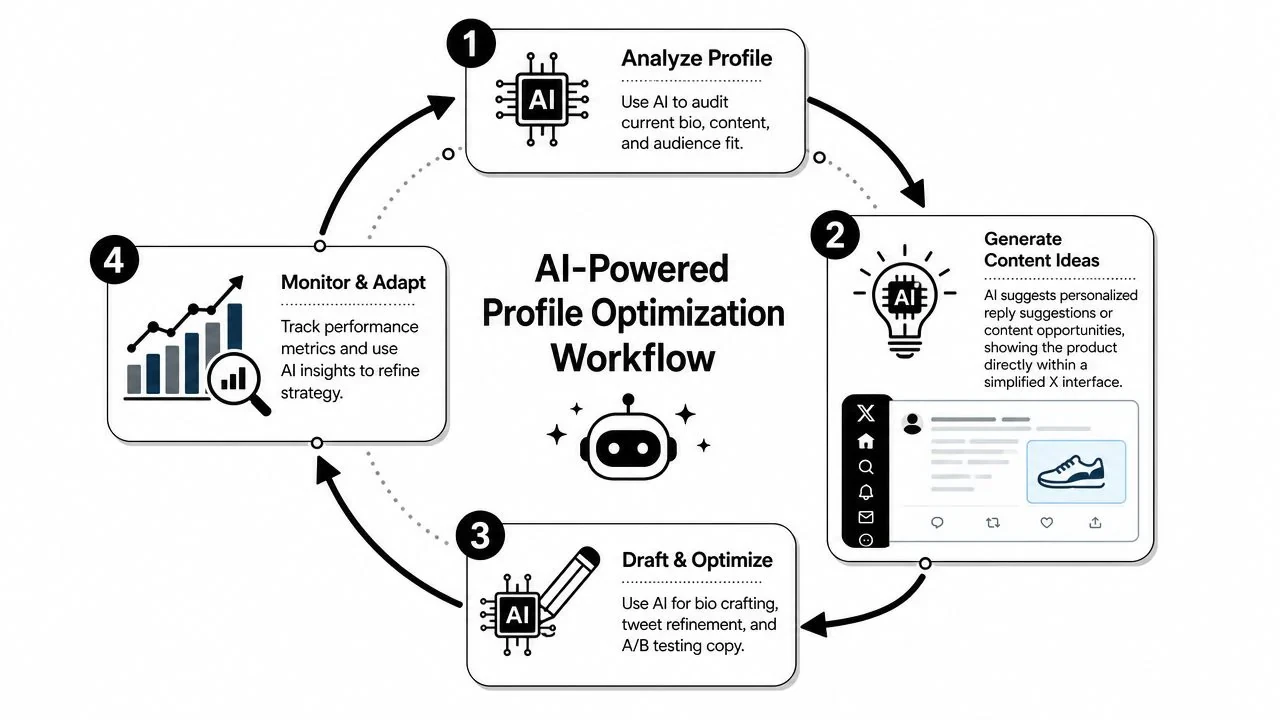
Twitter profile optimization isn’t a one-time cleanup. It’s ongoing alignment between positioning, content, replies, and what your audience is paying attention to now.
A simple weekly operating system
The most reliable workflow I know looks like this:
| Day or moment | Action | Reason |
|---|---|---|
| Early week | Audit profile and pinned tweet | Check for contradictions |
| Daily | Save strong posts, hooks, and replies | Build a usable research bank |
| While browsing | Join relevant conversations early | Attract qualified profile visits |
| Batch session | Draft, refine, and schedule approved posts | Keep the timeline aligned with positioning |
| End of week | Review analytics and profile response | Adjust message and pinned content |
This is also where tools can help without replacing judgment. If you want to explore leading AI tools for marketing, compare them by whether they help with discovery, drafting, organization, scheduling, and review, not just text generation.
Where tools fit without taking over your voice
The main mistake with AI on X is using it to produce generic content faster. That usually weakens the profile because your timeline stops sounding like a real person.
A better use is workflow support:
- Discovery: find conversations worth joining
- Research: save examples and patterns by topic
- Drafting: turn rough ideas into cleaner posts
- Remixing: adapt proven structures without copying
- Scheduling: queue approved posts into a realistic cadence
- Consistency: track whether you’re showing up
One option that fits this operating-system approach is Xholic AI’s tweet generator workflow. It combines semantic search across more than 12 million posts, reply drafting, post remixing, collections, a Chrome extension inside the X feed, a streak heatmap in Analytics, and scheduling for approved posts. Used well, that’s not a substitute for strategy. It’s a way to keep your profile, content ideas, and daily execution from drifting apart.
If you use AI for replies, keep one rule in place: review every draft. Specificity, timing, and voice still matter more than speed.
Common Twitter Profile Optimization Mistakes to Avoid
A lot of bad profiles don’t look bad. They look polished, but they leak trust.
Mismatch is the real conversion killer
The most common mistake is message mismatch. A bio says one thing, the timeline says another, and the pinned tweet points somewhere else.
I audit profiles with four questions:
- Who is this person or brand?
- What do they talk about?
- Why should I follow them?
- What should I do next?
If those answers change depending on whether I read the bio, header, pinned tweet, or recent posts, the profile isn’t optimized. It’s fragmented.
Design choices that quietly hurt trust
Some visual mistakes seem minor but cost you clarity.
A generic wide image often fails as a header because it doesn’t crop well across devices. The recommended header size is 1500x500 pixels, and a poorly chosen image can lose the important part on mobile. Also, failing to pin a high-engagement tweet with visible social proof can diminish conversion rates by up to 60% for new profile visitors, based on the guidance summarized in this YouTube profile optimization walkthrough.
That aligns with what I see in practice. Visitors need one obvious proof signal fast.
What good profiles stop doing
Bad optimization advice usually tells you what to add. Strong profiles also remove things.
- Drop vague slogans: “Building the future” tells me nothing.
- Drop unrelated recent posts: If the last ten posts are random, the bio loses credibility.
- Drop dead pinned tweets: Old launches, stale offers, and low-signal posts work against you.
- Drop overpromotion: If every recent post is selling, visitors assume following you will feel expensive.
Another subtle issue is visual inconsistency. If your profile image, header tone, and tweet style all belong to different brands, the account feels assembled rather than lived in.
A good profile doesn’t try to say everything. It removes the pieces that create doubt.
Frequently Asked Questions
How often should I update my Twitter profile
Update the profile when your positioning changes, your audience changes, or your pinned post no longer reflects what your best content is doing now. Don’t rewrite it every week out of boredom. Most profiles improve more from better alignment than constant tinkering.
A practical rhythm is to review the profile after a few weeks of consistent posting and compare profile visits, follows, and link behavior against the previous period.
Should founders use a personal profile or a brand profile
For most early-stage founders, a personal profile is easier to grow because people follow people faster than they follow logos. It also gives you more room to mix product context, lessons, opinions, and replies naturally.
Brand accounts make more sense once the company has enough standalone identity and content volume to justify a separate voice.
Do emojis help in a bio or name
Sometimes. They can improve scanability if they separate ideas or add tone. They hurt when they replace clarity.
If an emoji makes the bio easier to read, keep it. If it makes the profile feel gimmicky, remove it. I’d avoid stuffing the name field with symbols if you’re using that field to help search discovery.
What should I pin if I do not have social proof yet
Pin an introduction thread or a useful breakdown. Social proof helps, but clarity is more important than pretending you have proof you don’t.
A good early pinned tweet can include:
- who you are
- what you’re building or learning
- what topics you’ll post about
- one concrete example of how you think
Do I need X Premium for profile optimization
No, but it changes what you can measure and how much platform functionality you can access. It also matters for users who want the full desktop analytics dashboard, as covered earlier.
Separate from profile setup, content performance on X now depends heavily on engagement quality. PortoTheme’s review of account growth data notes that X’s algorithm prioritizes engagement rate over follower count as a distribution signal. That means a strong-looking profile still needs an active, relevant audience and a coherent timeline behind it.
If you want a more repeatable system for profile alignment, content research, replies, and scheduling approved posts, try Xholic AI. It’s useful when you want your profile to stay synced with what you’re posting and what your audience is responding to on X.