Quick answer: Design a Twitter header image directly in your browser at the correct dimensions (1500x500px). Add text, adjust the positioning, and export a ready-to-upload PNG. No design software needed.
What Is It?
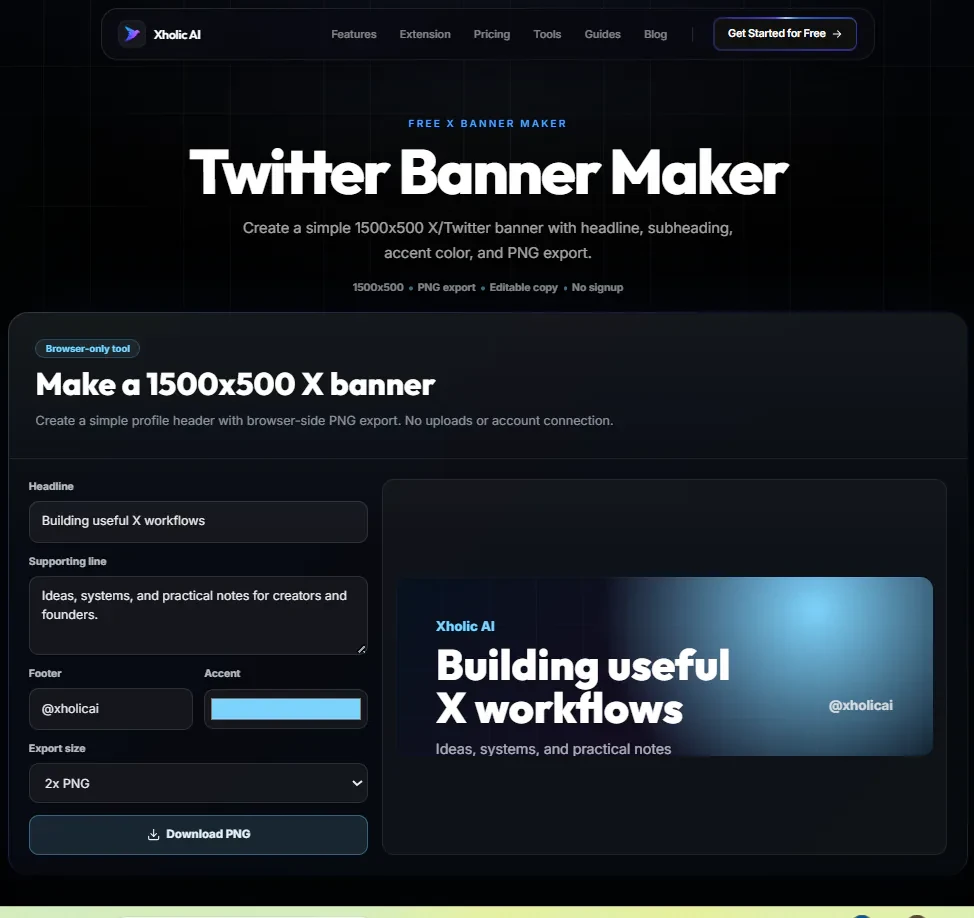
The Twitter Banner Maker is a free tool at xholic.ai. Design a Twitter header image directly in your browser at the correct dimensions (1500x500px). Add text, adjust the positioning, and export a ready-to-upload PNG. No design software needed.
Open the Twitter Banner Maker Tool.
Who Uses It and Why
| Who Uses It | What They Use It For |
|---|---|
| New Twitter users | Need a professional-looking header without knowing Photoshop or Canva |
| Personal brands | Want a header that reinforces their niche and makes their profile feel intentional |
| Businesses & startups | Need a branded Twitter header that matches their website and other social profiles |
| Creators relaunching | Updating their header alongside a new bio or niche pivot |
| Freelancers | Want a header that signals their specialism to potential clients who visit their profile |
How to Use It - Step by Step
It takes under a minute. Here’s exactly what to do:
Step 1: Open the tool
Go to Twitter Banner Maker in any browser.
Step 2: Set your background
Choose a background color or upload a background image. The canvas is automatically set to Twitter’s correct header dimensions: 1500x500 pixels.
Step 3: Add your text
Type your headline, tagline, or call to action. Adjust font size, positioning, and color using the controls. Keep text away from the far-left edge; Twitter rounds corners, and your profile photo sits over the bottom-left of the header.
Step 4: Preview it
The preview shows exactly how the header will look on your profile, including where your profile photo overlaps the bottom-left corner.
Step 5: Export and upload
Click Download to save your PNG. Then go to your Twitter profile, click ‘Edit Profile,’ and upload the image under ‘Header photo’.
Pro tip: Keep your header simple. One clear statement about what you do or who you help, a clean background, and readable text. Headers with too much information look cluttered on both desktop and mobile. Your profile photo already handles the ‘face’ the header handles the ‘message’.
Real Example
A freelance copywriter’s current header is a blurry photo from 2019. They open the Twitter Banner Maker, choose a clean dark blue background, type ‘B2B Copywriter | SaaS & Fintech | DMs open for briefs’, adjust the font to white, center it vertically, and export. They upload it to Twitter in under five minutes. Their profile immediately looks significantly more professional.
What to Do With Your Result
Twitter displays your header at different crop ratios on desktop vs. mobile. On desktop it shows a wider crop; on mobile it may crop the sides. Keep your most important text centered or slightly right of center to avoid it being cut off on any device.
Heads up: The Twitter header dimensions are 1500x500 pixels with a 3:1 aspect ratio. If you upload an image smaller than this, Twitter will stretch it and it will look blurry. The tool exports at exactly the right dimensions don’t resize the exported PNG before uploading.
Frequently Asked Questions
What’s the correct Twitter header size?
1500x500 pixels, 3:1 aspect ratio. The tool exports at exactly this size. Maximum file size Twitter accepts is 5MB.
Why is my header cropped differently on mobile vs. desktop?
Twitter applies different crops on different devices. The desktop version shows the full 1500x500. Mobile crops to roughly 1500x400 from the center. Keep critical text away from the very top and very bottom edges.
Where does my profile photo sit on the header?
Your profile photo appears in the bottom-left corner of the header, overlapping it. The tool’s preview shows this overlap so you can make sure no important text is hidden behind it.
Can I upload my own background photo?
Yes. Upload any image as the background and add text over it. Use a darker or lower-contrast background image so your text remains readable.
What file format does it export?
PNG at 1500x500 pixels. Twitter accepts PNG, JPEG, and PNG is preferred for text-heavy headers because it preserves sharpness.
How often should I update my header?
Whenever your focus, product, or positioning changes. At minimum, review it alongside your bio every 6 months.
Related Xholic Tools
These tools work well alongside this one:
- X Profile Audit - Check your overall profile score a missing header is one of the most common low scores
- Twitter Bio Generator - Write the bio that goes beneath your new header
- Twitter Font Generator - Create a styled text treatment for your banner heading
- Fake Tweet Generator - Preview your full profile look in a tweet mockup after updating your header