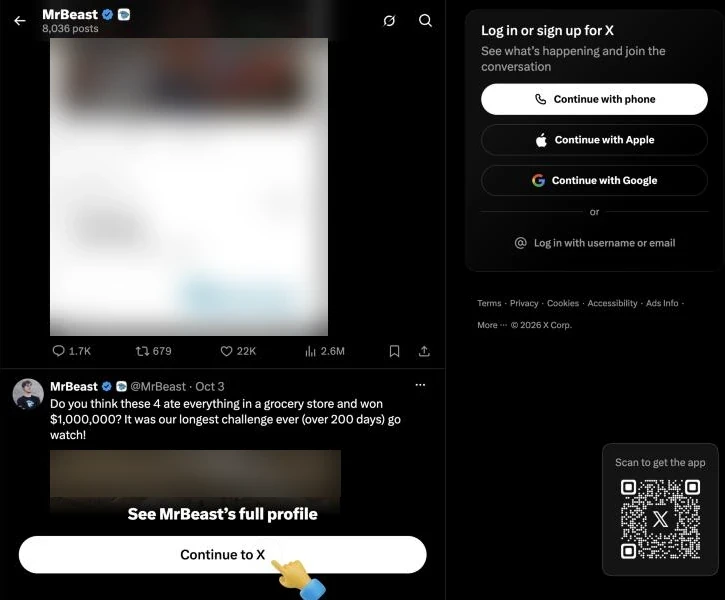
You don’t need an X account to read X, but you won’t see much of it. Open a profile link without logging in and X shows you the top of the page, a few posts, and then a “Continue to X” button that leads to X’s log-in or sign-up screen. Search doesn’t work at all.
This guide shows exactly what X shows logged-out visitors at the time of writing (October 2026), the ways to see tweets without an account that still work, what needs a login, and why no tool can show a private account. We checked what X shows in a browser that has never signed in to X.
Know what X shows when you’re logged out
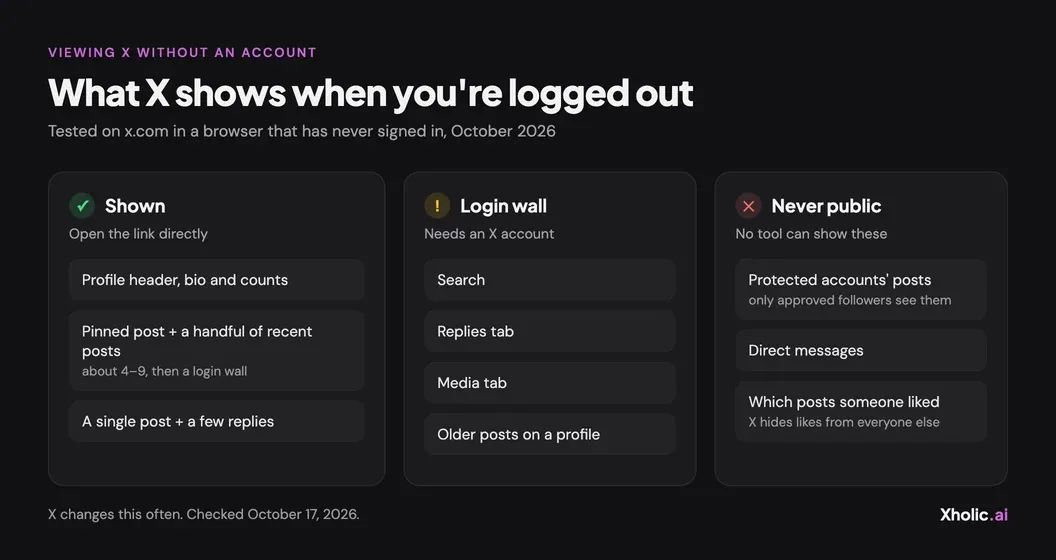
We opened x.com pages in a fresh browser with no X account on October 17, 2026. Here’s what came back:
| Page | Logged-out result |
|---|---|
Profile (x.com/username) |
Shown, but cut short: header, bio, follower and following counts, the pinned post and only about 4 to 9 of the most recent posts. Then “See [name]’s full profile” and a login panel. Scrolling loads nothing more. |
A single post (x.com/username/status/…) |
Shown, with a few replies (3 in our checks), then “See all the replies” and a login panel. |
Replies tab (/with_replies) |
Redirects to the login page. |
Media tab (/media) |
Redirects to the login page. |
Search (x.com/search?q=…) |
Redirects to the login page. |
How many posts you get depends on the account. A very large account showed 4 recent posts in our test, a smaller one showed 9. X can change these limits at any time, so treat the numbers as a snapshot, not a rule.
What needs an X account
- Search. Any search on x.com sends you to the login page.
- Replies and media. The Replies and Media tabs on a profile redirect to the login page.
- Older posts. Anything past the first handful of posts on a profile.
- Full reply threads. A post shows a few replies, not the whole conversation.
- Following, liking, replying and DMs. Anything that acts as you needs an account.
If you need these regularly, a free account is the simplest fix. You don’t have to post or follow anyone to browse.
Open the profile or post link directly
The easiest way to view Twitter without an account is to go straight to the page you want. Type x.com/ followed by the username (for example x.com/nasa) in your browser’s address bar, or open a post link someone sent you.
- Use a browser, not the X app. The X app is built for signed-in use. A phone’s browser works too.
- Type the full address. Profile pages are
x.com/username. Post links look likex.com/username/status/followed by a long number. - Read what loads. You’ll get the profile header, the pinned post and the latest few posts, or the post itself with a few replies.
- Stop at the wall. “Continue to X” leads to the log-in screen. It doesn’t load more posts.
Old twitter.com links still work. They redirect to the same page on x.com.
Search X through Google instead
Since search on x.com needs a login, use a search engine to find posts. Google and Bing index many public X profiles and posts, and you don’t need an account to use them.
Try these in Google:
site:x.com nasafinds pages on x.com that mention NASA. When we tried it on October 17, 2026, Google listed the @NASA profile first, then other NASA accounts and a few recent posts.site:x.com/nasa moonfinds posts from @nasa that mention the Moon.site:x.com "your exact phrase"finds posts that use a phrase word for word.
Search engines only index some posts, sometimes days late, so expect gaps and no live results. Each result opens on x.com with the same logged-out limits as above. If you do have an account, X’s own search is much more precise: our Twitter advanced search operators list shows how to filter by account, date and engagement.
Read posts embedded on other sites
News sites, blogs and newsletters often embed X posts. An embedded post shows the text, images or a video preview, the author and the date, and you can read it without logging in. Search the news for the person or topic you’re following, or check the account’s own website, where people often embed their own posts.
Click an embedded post and it opens on x.com, with the usual logged-out limits.
See an account’s recent posts with X Profile Analytics
To see an account’s recent public posts in one place, use Xholic’s free X Profile Analytics. It needs no X account, no login and no password.
- Open X Profile Analytics and enter a public username, like
@nasaornasa, or paste a profile link. - Run the report. The tool reads the account’s public data, so the lookup isn’t linked to your X account, and the owner isn’t told.
- Scroll to Recent posts. You’ll see up to 30 of the account’s latest original posts (not replies or reposts), refreshed about hourly, with views and engagement for each one.
- Read the rest of the report if you want context: median views, engagement grade, best times to post and top posts.
For well-known accounts, the creator stats pages show the same kind of analytics without running a report. The tool only works with public accounts. It can’t show protected posts, and it never will.
Skip any app that promises to show private accounts
A private (protected) X account shows its posts only to followers the owner has approved. Everyone else, logged in or not, sees at most the profile header, never its posts, until the owner accepts their follow request.
There is no workaround. Protected posts don’t appear in search engines or embeds, so no outside website or app can show them.
No “private Twitter viewer” can show protected posts. The sites and apps that claim to are, at best, a waste of time, and many ask for your X password or an app install. Never give them either.
For a protected account, the only real option is to request to follow it from an X account and wait for the owner to approve.
Frequently asked questions
Can you view Twitter without an account?
Yes, partly. Open a profile or post link in your browser and X shows the profile header, the pinned post, a handful of recent posts and single posts with a few replies. Search, the Replies tab, the Media tab and older posts need an account at the time of writing (October 2026).
Can I search X without an account?
Not on x.com: search redirects logged-out visitors to the login page. Use Google or Bing with site:x.com and a username or phrase instead. Results are incomplete and sometimes delayed, but they don’t need a login.
Will someone know I viewed their X profile?
X doesn’t show anyone a list of who viewed their profile or posts, logged in or not. Viewing public posts without an account, or through X Profile Analytics, isn’t linked to your X account, and the owner isn’t told.
Can I view a private X account without following it?
No. Protected posts are visible only to followers the owner approves. Sites and apps that claim otherwise can’t deliver, and many ask for your X password or an app install, so never give them either.
Why does X only show a few posts when I’m logged out?
X has limited logged-out browsing since 2023, when it cited data scraping as the reason. How much it shows can change at any time. In our October 2026 test, profiles showed about 4 to 9 recent posts before the login wall.
How can I see more of an account’s recent posts without logging in?
Run the account through the free X Profile Analytics tool. Its Recent posts section lists up to 30 of the account’s latest original posts (not replies or reposts) with views and engagement, no login needed.
Related guides and tools
- X Profile Analytics guide: read every number in a public account’s analytics report.
- Twitter advanced search operators: the tested list of X search operators for when you do log in.
- Creator stats: analytics pages for popular X accounts.
- Compare Twitter accounts: put two public accounts side by side.
- All guides: step-by-step guides for every free Xholic tool.