Quick answer: Enter a public Twitter or X handle and the tool scans their recent visible posts to show you their content mix, posting cadence, and which posts performed best. No login or account connection needed, it works entirely from public data.
What Is It?
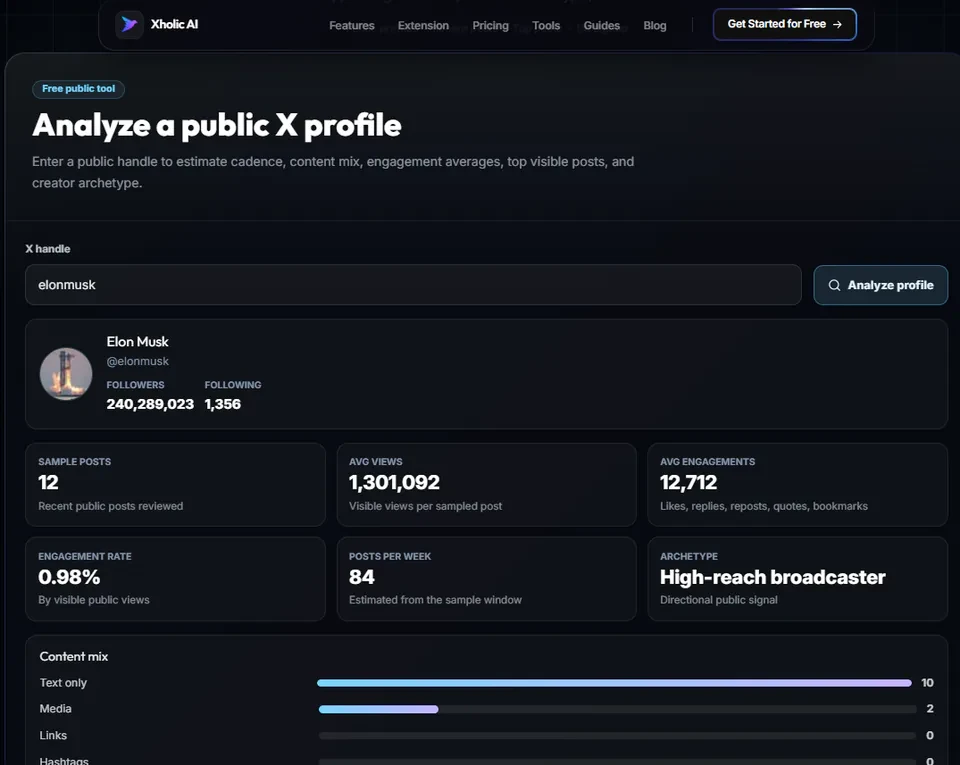
The X Profile Analytics is a free tool at xholic.ai. Enter a public Twitter or X handle and the tool scans their recent visible posts to show you their content mix, posting cadence, and which posts performed best. No login or account connection needed, it works entirely from public data.
Open the X Profile Analytics Tool.
Who Uses It and Why
| Who Uses It | What They Use It For |
|---|---|
| Creators studying competitors | See what content format and posting frequency is working for accounts in their niche |
| Agencies doing client research | Quickly understand a prospective client’s current content patterns before a pitch |
| Brands scouting influencers | Check a creator’s recent post performance before agreeing to a sponsorship |
| Anyone auditing their own account | Get an outside view of their own posting patterns and top content |
How to Use It - Step by Step
It takes under a minute. Here’s exactly what to do:
Step 1: Open the tool
Go to X Profile Analytics Tool in your browser.
Step 2: Enter a handle
Type any public Twitter/X @handle into the input box.
Step 3: Let it scan
The tool reads the account’s recent visible posts and compiles the data, no login needed.
Step 4: Review the breakdown
You’ll see content mix (text, image, video, link posts), posting cadence (how often they post), and a list of their top visible posts by engagement.
Step 5: Compare against your own
Run the same scan on your own handle to see how your patterns compare to accounts performing well in your niche.
Pro tip: Scan 3-5 accounts in your niche that are growing well, not just the biggest accounts. A creator with 8,000 followers and strong engagement often has more useful, copyable patterns than one with 800,000 followers and a completely different content budget.
Real Example
A creator wants to grow in the productivity niche. They scan three established accounts using X Profile Analytics and notice all three post short how-to threads on Tuesday and Thursday mornings, with image posts performing best. They adjust their own posting schedule to match and start testing the same format.
Good to Know
Heads up: This tool reads what’s publicly visible, it can’t see private analytics like impressions or follower demographics for any account, including your own. For your own account’s private metrics, use Twitter’s own analytics or the Xholic browser extension.
Frequently Asked Questions
Does this access private analytics?
No. It reads only what’s publicly visible on a profile, post content, timing, and visible engagement (likes, replies, and reposts). It can’t see private data like impressions, which only the account owner can access.
Can I check any public account?
Yes. Any public Twitter/X profile can be scanned.
How many recent posts does it analyze?
It analyzes the most recent visible posts on the profile, enough to identify patterns in content mix and cadence without requiring account access.
Is this useful for my own account?
Yes. Many people find it useful to see their own account from an outside perspective. The same view a stranger or potential follower would see.
Do I need to log in?
No login or account connection required.
Related Xholic Tools
After reviewing public performance signals, continue with the X Profile Audit Guide to evaluate whether the profile positioning, identity, proof, and conversion path support the activity you observed.
These tools work well alongside this one:
- X Profile Audit - Get a scored breakdown of your profile’s completeness and positioning
- Best Time to Tweet - Estimate stronger posting windows based on visible performance
- Twitter Analytics Guide - The complete guide to understanding your own analytics dashboard
- Live Twitter Follower Count - Track follower growth alongside content performance