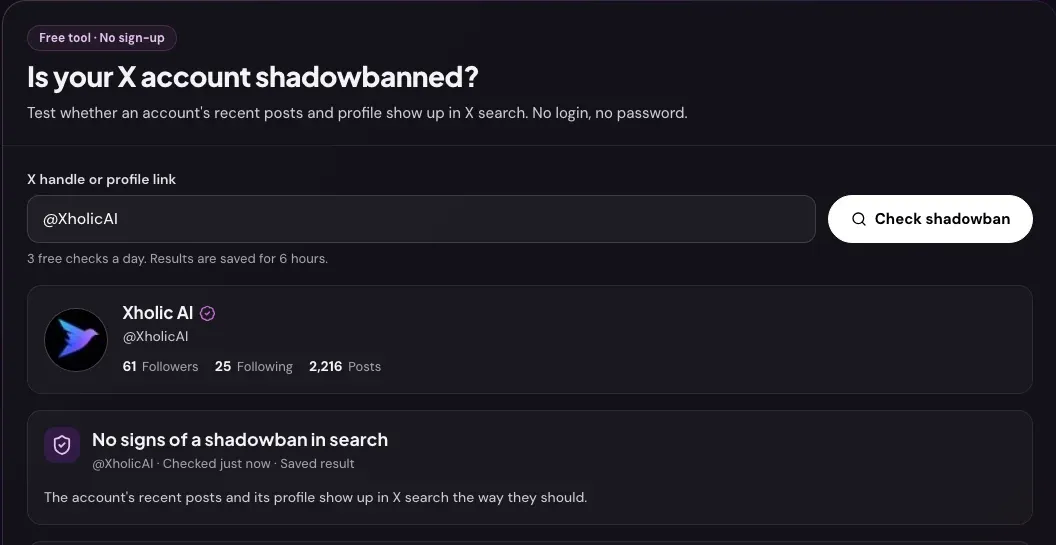
Your views fell off a cliff, your replies seem to vanish, and someone told you that you’re “shadowbanned”. Before you change anything, check. Xholic’s free Twitter Shadowban Checker tests the two kinds of shadowban that leave visible gaps in X search, tells you what it found, and explains what to do next. This guide walks through each step, what every result means, and how to recover if something looks limited.
One thing up front: X never confirms shadowbans. It calls them visibility filtering and doesn’t tell account owners when it applies them. So no checker, including ours, can give you a certain yes or no. What a good checker can do is look where a limit leaves evidence and be honest about what that evidence means.
What the checker tests
| Check | What it looks for | Possible results |
|---|---|---|
| Account status | Whether the account exists, is public and isn’t suspended | Active, protected, unavailable (usually suspended), not found |
| Search ban | Your recent original posts in a from:username search sorted by Latest |
Visible, possible ban, can’t test |
| Search suggestion ban | Your account in X people search for your own username | Visible, possible ban, can’t test |
| Reply deboosting | Replies pushed behind “Show more replies” | Not tested: check it by hand (see below) |
Searches run as a logged-in X account through our data provider. That is close to what another X user sees, but it can differ slightly from a logged-out visitor’s view.
How to check if you’re shadowbanned, step by step
- Enter your username. Type
@name,nameor paste your x.com profile link, then select Check shadowban. You never sign in, and the tool never asks for your password. The handle also goes into the page address as?handle=, so you can bookmark the check. - Read the account status. If the account is protected, suspended or doesn’t exist, the check stops there. Protected posts never appear in public search, and suspended accounts can’t be seen at all, so a search test would tell you nothing new.
- Read the verdict. The top card says one of three things: “No signs of a shadowban in search”, “Signs of reduced search visibility”, or “We couldn’t test search this time”. Under it you’ll see when the check ran.
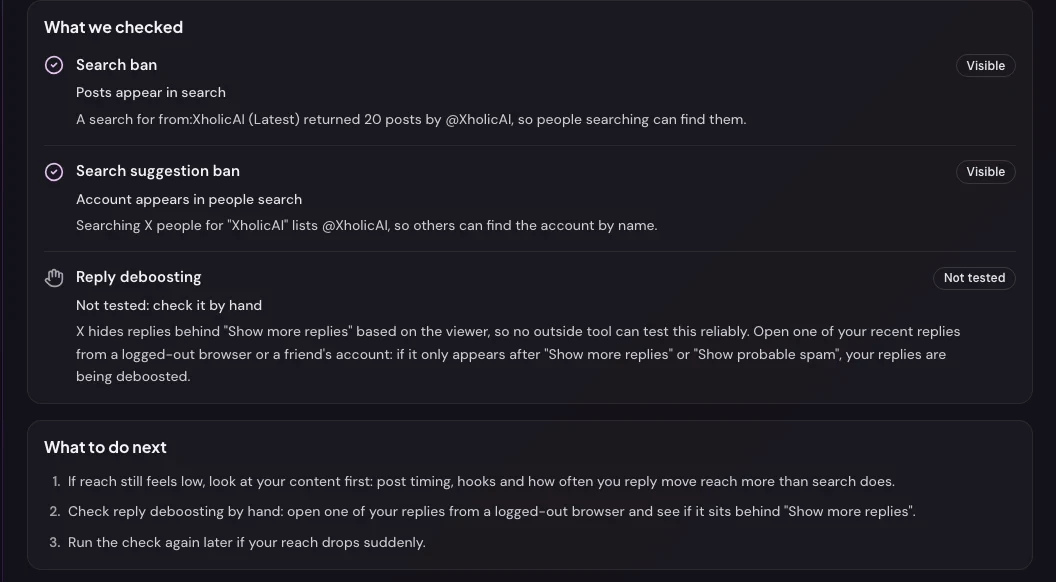
- Read each test line. Every line has an icon, a status in words and a short explanation of exactly what we searched for and what came back.
- Follow “What to do next”. The tips change with the result. If you’re told to check again, wait at least a day: results are saved for 6 hours per username, so checking again sooner shows the same answer.
You get 3 fresh checks a day. Opening a username someone already checked in the last 6 hours doesn’t use one.
What each result means
Search ban
- Visible. The
from:usernamesearch returned your posts. People searching for you can find what you post. - Possible ban. You published original posts in the last 14 days, but the search returned none of them. This is the classic sign of a search ban. Posts from the last 15 minutes don’t count, because search can take a few minutes to index them.
- Can’t test: no recent posts. We found no original posts from the last 14 days, so there was nothing to look for. Post something, wait 15 minutes and check again.
- Couldn’t run the search. X search didn’t answer in time. Try again in a few minutes.
Search suggestion ban
- Visible. Searching X people for your username lists your account.
- Possible ban. Your exact handle wasn’t in the first page of people results. Accounts with a search suggestion ban stop appearing in suggestions and people search, which makes them harder to find by name. A very common username can also push you down the list, so treat this as a hint, especially if the search test is fine.
Reply deboosting (check it by hand)
X decides where replies appear based on who is viewing, so an outside tool can’t test this reliably. To check it yourself:
- Open one of your recent replies on someone else’s post.
- Copy the link and open it in a private browser window, or ask a friend who doesn’t follow you to open it.
- If your reply only appears after Show more replies or Show probable spam, your replies are being deboosted. This also covers what people used to call a “ghost ban”.
The four types of Twitter shadowban
People use “shadowban” for four different limits:
- Search ban: your posts don’t appear in search results, even for your exact username.
- Search suggestion ban: your account doesn’t appear in search suggestions or people search.
- Reply deboosting: your replies are hidden behind “Show more replies”.
- Ghost ban: an older term for replies hidden from everyone but you. X now handles this through reply ranking.
The checker tests the first two and explains how to check the others. For the bigger picture of how X filters visibility, read our Twitter shadowban explainer.
Recovery checklist
If any test came back as a possible ban:
- Stop anything that looks automated. Mass following or unfollowing, auto-replies, and posting the same text or link again and again are the most common triggers.
- Clean up recent posts. Delete posts with stacked hashtags, identical replies sent to many accounts, or anything that could break X’s rules.
- Check for notices. Open the X app and your email. If X asks you to verify a phone number or email, or shows a locked-account prompt, complete it.
- Post normally for a few days. Original posts and genuine replies, at your usual pace. Don’t try to “test” the limit by posting more.
- Check again in 2 to 3 days. Most search limits users report lift within 2 to 14 days once the triggering activity stops.
- Appeal if it lasts. If a notice on your account or a limit lasts beyond two weeks, contact X through its Help Center.
If everything came back visible but your reach is still down, a shadowban probably isn’t the cause. Look at your content and timing instead: run a profile audit, check your engagement rate and find your best time to tweet.
Limits of any shadowban test
- X doesn’t confirm shadowbans. Every checker infers them from what search returns at one moment.
- Search isn’t instant. Brand-new posts may not be indexed for a few minutes, which is why the test ignores the last 15 minutes.
- One page of results. The search test reads the latest page of results, and the people search reads the first page. That’s enough to spot a ban, not to audit every post.
- Logged-in view. Our searches run as a logged-in account, so a logged-out visitor might see slightly different results.
- Saved for 6 hours. A result is reused for 6 hours per username, so changes you make show up on a later check.
Frequently asked questions
How do I know if I’m shadowbanned on Twitter?
Run the free Shadowban Checker with your username. If your recent posts are missing from a from:username search, or your account is missing from people search, that’s a sign of reduced search visibility. Then check your replies by hand from a private browser window.
What does “No signs of a shadowban in search” mean?
Your recent posts appeared in search and your account appeared in people search when we checked. It doesn’t rule out reply deboosting, which you can check by hand, and it doesn’t mean every post gets wide reach.
How long does a shadowban last on X?
X doesn’t publish durations. Most search limits reported by users lift within 2 to 14 days after the activity that triggered them stops. Repeated rule breaks can lead to longer limits or a suspension.
Is the Shadowban Checker safe to use?
Yes. It only reads public data, needs no login and never asks for your password. Never give your X password to any shadowban tool.
Can I check someone else’s account?
Yes, any public username works. Protected accounts can’t be tested, because their posts never appear in public search.
Why does the checker say my account is unavailable?
X shows the account as unavailable, which usually means it’s suspended. A suspension is stronger than a shadowban: nobody can see the account. Log in on x.com to see X’s notice and appeal from its Help Center.
Related guides and tools
- Twitter shadowban explained: how X visibility filtering works and how to recover reach.
- X algorithm: what the ranking system rewards, so you can grow reach once search is clear.
- X Profile Audit guide: find the profile gaps that cost you followers.
- Live Twitter Follower Count: watch your follower count while you recover.