You cannot log into a competitor’s X account. You will never see their private impressions dashboard, DM open rate, or internal growth targets. But that does not make competitor analytics impossible. It means most people are trying to answer the wrong question. Instead of asking, “How do I see their private data?” ask, “What public signals show what is working for them, and how do I track those signals systematically instead of eyeballing their feed once a month?”
This guide walks through exactly that: a repeatable framework for tracking competitor performance on X using only publicly available data, the tools that make the process faster, and what to do with the patterns you find. Pair it with the X/Twitter Analytics Glossary so the terminology below is familiar, and with our broader Twitter competitor analysis guide for the strategic layer above this tactical workflow.
What You Can (and Cannot) See About a Competitor
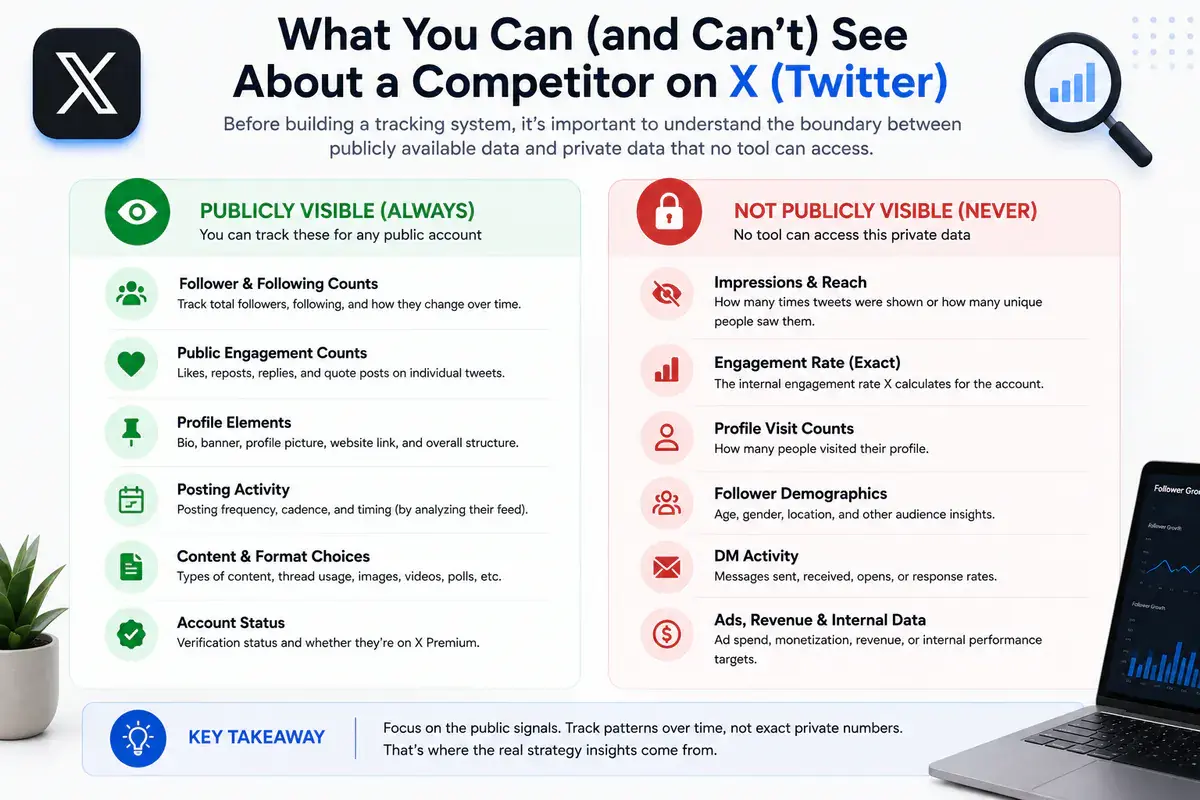
Before building a tracking system, be precise about the boundary. A lot of confusion in this space comes from conflating public and private data.
Publicly visible, always:
- Follower and following counts
- Individual post content, timestamps, and public engagement counts such as likes, reposts, and replies
- Pinned post, bio, banner, and profile structure
- Posting frequency and cadence, inferred by reviewing the timeline
- Whether the account is verified or subscribed to X Premium
Never publicly visible, regardless of tool:
- Impressions and reach on another account’s individual posts
- The account’s internal engagement rate as X calculates it
- Profile visit counts
- Follower demographic breakdowns
- DM activity, ad spend, or revenue data
Any tool claiming to show a competitor’s exact private impressions is either estimating them, which is acceptable when disclosed, or misrepresenting what it is showing. Reputable analytics tools build competitor tracking around public signals and clearly labeled estimates, not fabricated precision. Understanding this distinction up front will save you from chasing numbers that do not exist and help you evaluate a tool’s credibility before relying on it.
This distinction also matters when setting expectations with clients or stakeholders. If you deliver competitor research as part of an SEO or marketing engagement, state which numbers are exact, such as follower counts and visible engagement counts, and which are estimates, such as engagement-rate proxies. That prevents anyone from mistaking a directional signal for a precise figure later.
Step 1: Define Your Competitor Set
Start narrow. Tracking 15 accounts loosely produces worse insight than tracking four or five accounts rigorously. A useful competitor set usually includes:
- 2-3 direct competitors: the same audience, a similar offer, and a comparable account size
- 1 aspirational account: where you want to be in 12-18 months, even if the account is much bigger
- 1 adjacent account: a different niche with an overlapping audience, useful for format and hook ideas without direct competition
Revisit this list quarterly. Competitor sets that never change tend to miss emerging accounts that are beginning to compete for the same audience.
Step 2: Run a Baseline Profile Audit
Before tracking changes over time, capture a snapshot of where each competitor stands today. Record the bio structure, pinned post, banner design, posting frequency, and approximate follower count. Doing this manually for even five accounts is tedious and error-prone. Xholic’s X profile audit tool turns it into a structured report, while the accompanying profile audit guide explains how to interpret the result for your own account or a competitor baseline.
Record these fields in the baseline:
- Follower count as of today
- Bio copy, word for word, because deliberate phrasing is worth studying
- Pinned post topic and format
- Approximate posts per week over the last 30 days
- Whether the account publishes threads, single posts, or a mix
Step 3: Track Growth Trends, Not Just Snapshots
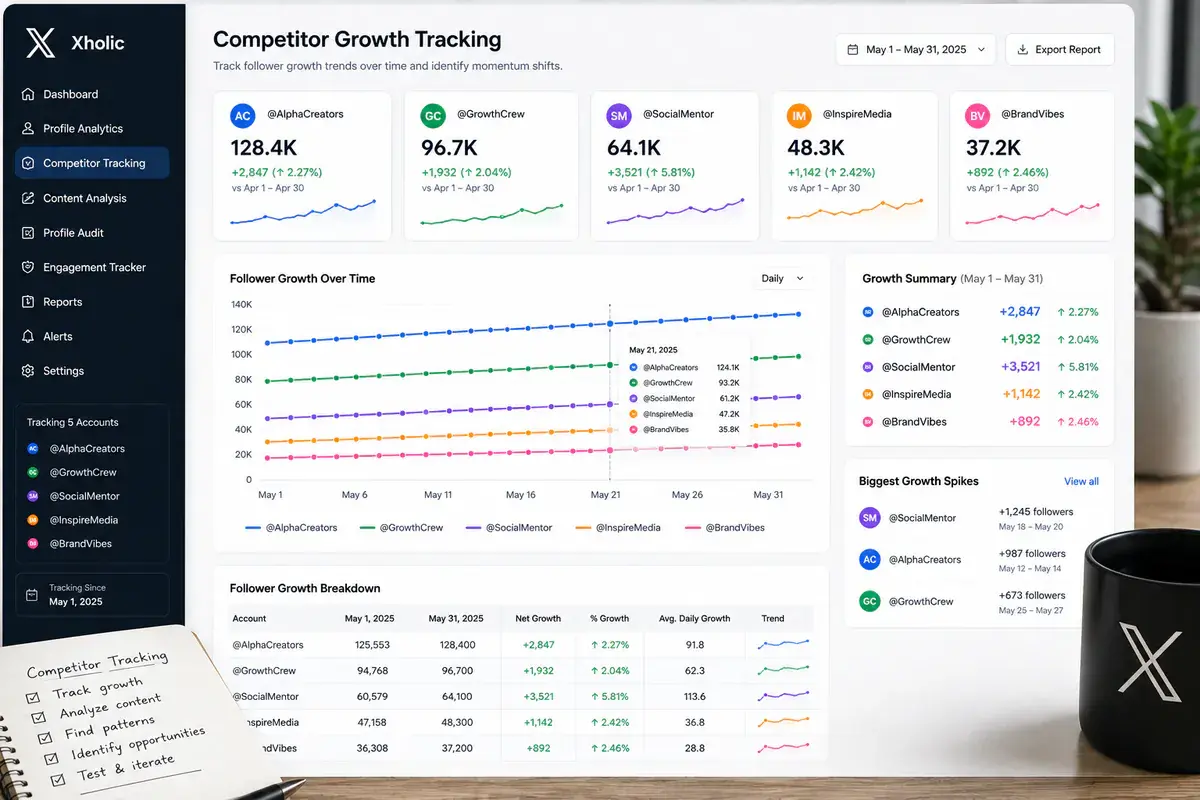
A single follower-count check tells you almost nothing. The real signal is growth rate: how quickly the number is moving and whether it is accelerating or plateauing. Set up recurring tracking instead of relying on manual spot checks. Xholic’s live follower count tracker lets you monitor the current follower count for any public account, while our follower tracker guide explains what can and cannot be measured reliably.
Log these fields weekly for each competitor:
- Current follower count
- Change from the previous week, both absolute and percentage
- Notable spikes and the post or external event that coincided with each one
Spikes are the most valuable data point. When a competitor’s follower growth jumps well above its normal weekly rate, work backward to find the post, thread, podcast appearance, quote repost, or product launch that caused it. That is often a repeatable pattern rather than a fluke.
Step 4: Analyze Content Performance Patterns
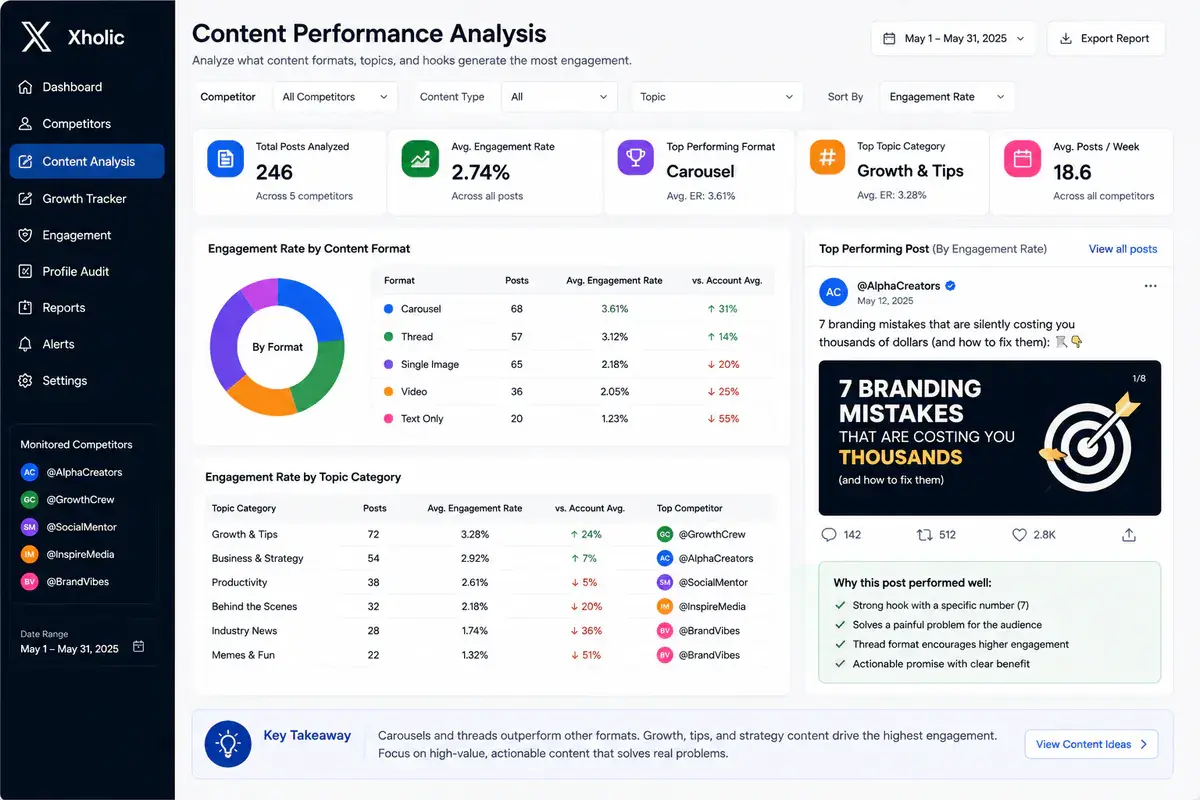
This is where most of the actionable insight lives. Instead of reading a competitor’s feed passively, review the last 30-60 days of posts and categorize them consistently:
- Format: single posts, threads, media-heavy posts, or polls
- Topic clusters: subjects that appear repeatedly and reveal content pillars; compare them with the framework in Twitter content pillars
- Hook style: a question, contrarian statement, data point, personal story, or curiosity gap
- Estimated engagement: visible likes, reposts, and replies used as a rough proxy because impressions are not public
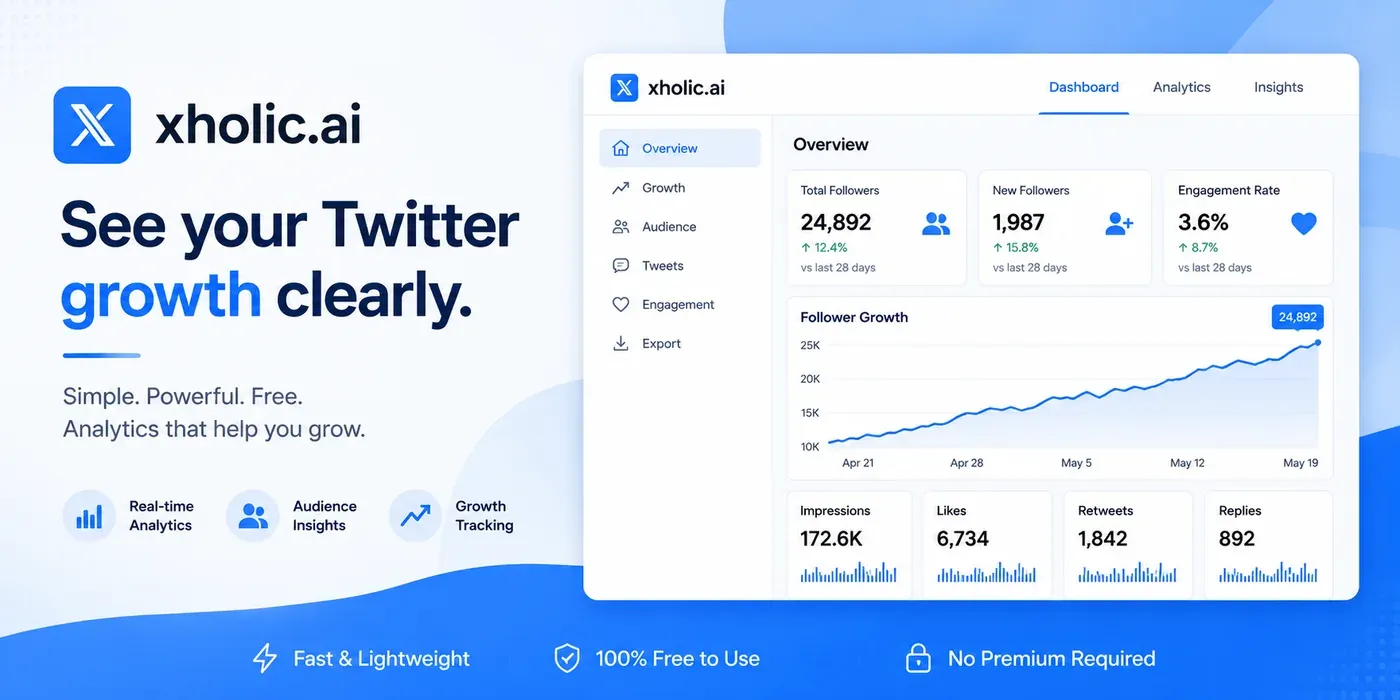
Xholic’s X Profile Analytics tool and the accompanying analytics guide can organize these public signals faster than manual scrolling, surfacing the account’s strongest visible posts instead of only the most recent ones.
Look specifically for outlier posts, meaning posts that perform materially above the account’s usual public baseline. Outliers reveal what resonates with an audience that may overlap with yours, and they are more instructive than average-performing content.
Watch: A Twitter Competitor Analysis Walkthrough
This walkthrough shows how to approach competitive analysis on Twitter as a repeatable research process. Use it alongside the public-signal limits above so the final report separates observable facts from estimates.
Step 5: Benchmark Engagement Rate
Because you cannot see a competitor’s impressions, a true impressions-based engagement rate is not directly calculable for accounts you do not own. What you can calculate is a follower-based engagement proxy:
Follower-based engagement proxy = (likes + reposts + replies) ÷ follower count × 100
Use the result as a relative comparison across accounts in your competitor set, not as an absolute measure of content quality. The proxy can differ substantially from an impressions-based engagement rate, but it is useful for ranking similar public accounts when the method stays consistent. Our engagement rate calculator and full engagement-rate methodology explain the difference between the formulas in more depth.
Step 6: Map Posting Cadence and Timing
Track how often each competitor posts and roughly when. Over two or three weeks, patterns become clearer. Some accounts publish several times a day, while others post once every few days with higher production value per post.
Cross-reference those observations with the general guidance in best time to post on Twitter and how often to post on Twitter. If a competitor consistently outperforms general benchmarks with an unusual cadence, test that pattern yourself before assuming generic advice is optimal for your niche.
Step 7: Set Up an Ongoing Monitoring Cadence
Competitor tracking that happens once and is never revisited is nearly worthless. Its value comes from catching changes over time. Use a sustainable cadence:
- Weekly: follower count and growth-rate check, about five minutes per competitor with a tracking tool
- Monthly: full content review covering top posts, format shifts, and new content pillars
- Quarterly: profile-audit rerun and competitor-set review
Manual Tracking vs. Tool-Based Tracking
Both approaches work, but they trade off differently on time and precision.
| Task | Manual (spreadsheet + scrolling) | Tool-based (for example, Xholic) |
|---|---|---|
| Follower count snapshot | Fast, but easy to forget | Automated collection and a consistent history |
| Follower growth over time | Requires manual weekly logging | Trend becomes visible as snapshots accumulate |
| Top post identification | Requires scrolling through months of history | Visible posts can be sorted by public engagement |
| Engagement proxy calculation | Manual math per post and error-prone at scale | Calculated consistently across many posts |
| Multi-competitor comparison | Time-consuming past two or three accounts | Side-by-side comparison is easier to maintain |
| Historical trend before tracking began | Not available retroactively | Depends on the tool and retained snapshots |
Manual tracking is fine when you casually watch one or two competitors. Once you track a real competitor set on an ongoing basis or report findings to a client, the time cost compounds quickly. A dedicated tool such as Xholic’s X Profile Analytics can save hours of collection and calculation. For a broader comparison, see our free Twitter analytics tools roundup and Twitter analyzer tool comparison.
Track Share of Voice and Mentions
Beyond a competitor’s own posts, periodically check how often other people in the niche mention or discuss the account relative to you and the rest of the competitor set. This is a lightweight version of share of voice, a rough measure of how much conversation centers on each account.
You can approximate it with X’s native search, using operators such as to: and mentions of the competitor’s handle over a fixed time window. Our guide to Twitter advanced search operators covers the syntax, with a mobile version for research on the go.
A rising mention volume without a corresponding increase in the competitor’s own posting activity is especially useful. It can indicate that other accounts are amplifying the competitor organically, which is a stronger long-term growth signal than activity on the account’s own feed alone.
Turn Findings Into Action
Tracking data is valuable only when it changes what you post. After a month of consistent tracking, run a simple review against your own content:
- Cross-reference outlier posts. If several competitors’ top posts share a format or topic pattern, treat it as a validated hypothesis worth testing instead of a coincidence.
- Identify content gaps. Topics the competitor set covers frequently but you have not addressed can represent unmet audience demand.
- Identify differentiation opportunities. Topics or formats no competitor uses well may offer the easiest path to standing out.
- Set a testing cadence. Pick one insight per month to test deliberately instead of overhauling the entire strategy at once. Isolate variables so you learn what worked.
- Re-audit your own account against the same criteria. Run your account through the same profile audit used for competitors so your own profile does not drift while you analyze everyone else.
A Worked Example
Suppose you run a B2B SaaS account with 4,000 followers and track three direct competitors. After four weeks, one competitor’s follower growth rate roughly doubles in a single week. Working backward through that period, you find that the spike aligns with a thread explaining a specific workflow rather than the competitor’s usual product-announcement content.
That is a concrete, testable signal. The audience responded more strongly to educational, workflow-focused content than to product news. You can now test that pattern on your own account instead of assuming the existing content mix is optimal. A single glance at the competitor’s profile would not reveal the pattern, but consistent tracking makes it visible.
Build a Simple Competitor Tracking Report
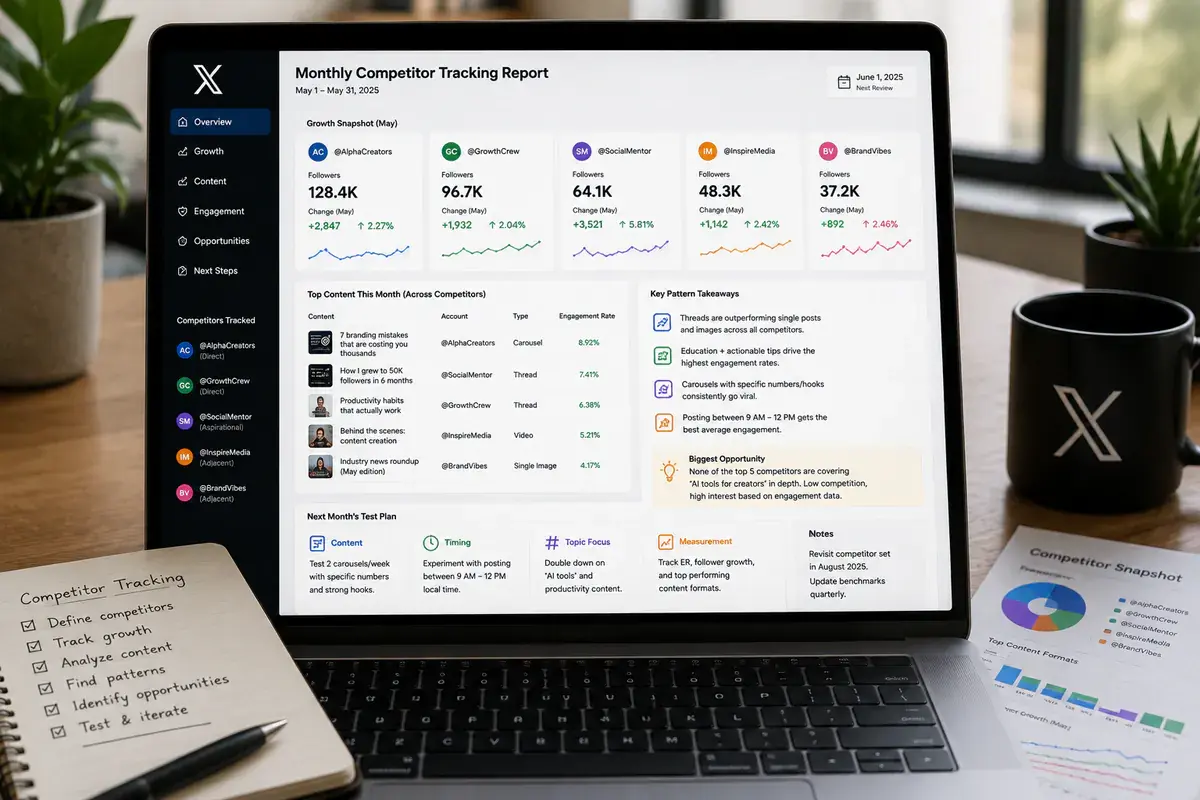
If you do this for a client, a team, or your own review, structure the findings as a recurring report instead of scattering observations across bookmarks and screenshots. A workable monthly format includes:
- Section 1 - Growth snapshot: follower count and growth rate for each competitor, plus a note on notable spikes and likely causes
- Section 2 - Top content: the three to five best-performing visible posts from each competitor, tagged by format and topic
- Section 3 - Pattern summary: formats, topics, or timing patterns shared by several successful accounts
- Section 4 - Gaps and opportunities: topics or formats underrepresented across the set
- Section 5 - Test plan: one or two specific changes to test in your own content during the coming month
Using the same template each month makes long-term trends easier to spot and gives clients or teammates a report they can compare over time. If you manage several client accounts, pulling the underlying public data from one dashboard such as Xholic’s analytics tool also avoids rebuilding the collection process for every report.
Common Mistakes to Avoid
- Tracking too many accounts to do it well. Five accounts tracked rigorously beats fifteen tracked loosely.
- Treating follower-based engagement proxies as exact numbers. They are directional, not precise, so do not present them as impressions-based rates.
- Looking only at recent posts. A competitor’s best post from three months ago may still be more instructive than its newest activity.
- Copying a format without understanding audience fit. Treat findings as hypotheses to adapt and test, not templates to copy.
- Checking sporadically instead of on a schedule. Irregular review misses the growth spikes that carry the most useful signal.
FAQ
Can I see a competitor’s exact impressions or reach on X?
No. Impressions and reach are private metrics visible only to the account owner in first-party analytics. A public-facing tool that shows competitor impressions is providing an estimate, not exact platform data, so check how it discloses the methodology.
What is the best free way to start tracking a competitor?
Log the account’s follower count and top posts weekly in a spreadsheet. That works for one competitor but becomes difficult to maintain past two or three accounts. A tool such as Xholic’s X Profile Analytics automates part of the public-data collection so you can focus on the analysis.
How many competitors should I track?
Four or five is a practical maximum for most individuals and small teams that want to track each account with real rigor. More than that can dilute attention without adding proportional insight.
Is it against X’s rules to track competitor data?
This workflow relies on publicly visible information such as follower counts, public post engagement, and posting activity. It does not involve logging into another account or accessing its private analytics.
How is competitor tracking different from social listening?
Competitor tracking focuses on a defined set of accounts and their performance and content patterns. Social listening is broader: it monitors mentions, keywords, and sentiment across a wider conversation. The practices are complementary.
Should I engage with competitor posts as part of tracking?
Occasional genuine engagement, such as a thoughtful reply, can help with relationship building and visibility. Keep the tracking process itself passive and observational, however, so your actions do not influence the patterns you are trying to read objectively.
How long should I track before drawing conclusions?
Give the process at least four to six weeks before acting on a pattern. A viral post or a slow news week can skew short-term data, while a pattern that holds for a month or two is more reliable.
Can competitor tracking help a brand-new account with no audience?
Yes. A new account has no historical data of its own, so studying what already works for established accounts in the same niche can shorten the early trial-and-error phase. Treat the findings as hypotheses to adapt, not exact templates to copy.
Once you have built a tracking habit for competitors, apply the same rigor to your own account with Xholic’s X Profile Analytics and profile audit tool. The goal of competitor tracking is to close the gap, not just observe it.