Stop Posting Manually: Your Guide to the Best Free Schedulers
Want to stay consistent on X (Twitter) and other platforms without spending all day posting? Start with a free social media scheduler. The best option depends on how you publish: Buffer is great for simple cross-platform posting, Typefully is better if X is your main channel, and Meta Business Suite is hard to beat for Facebook and Instagram. If you’re a creator, founder, or marketer trying to build a real posting habit, the right scheduler saves time, reduces missed posting windows, and gives you a repeatable workflow instead of daily scrambling.
A widely cited 2026 benchmark says managers using scheduling tools save an average of 6.3 hours per week versus manual posting, or about 328 hours per year, according to social media scheduling statistics from ScheduleWave. That’s a key reason free schedulers matter. They don’t just publish later. They help you batch work, protect consistency, and stop living inside every app all day.
If your main growth channel is X, think of scheduling as step one. You still need discovery, replies, and post ideas. But getting your queue under control first makes everything else easier.
1. Buffer
You sit down on Sunday night with seven X posts, two LinkedIn updates, and no interest in publishing them one by one all week. Buffer is one of the fastest ways to get that backlog organized and scheduled without turning content ops into a project of its own.
That is why I still recommend it as a first scheduler for solo creators and small teams. Buffer is easy to learn, the queue is clear, and the setup stays light. If your main problem is inconsistency, it solves that quickly.
Best for simple multi-platform scheduling
Buffer fits best when you already know what you want to post and just need a reliable publishing habit. It is less useful when your real bottleneck is coming up with better ideas, spotting trends on X, or building a repeatable growth loop around replies, reposts, and thread testing.
A practical X workflow in Buffer looks like this:
- Batch drafts once a week: Write several posts in one sitting so you are not relying on daily motivation.
- Set simple posting slots: Reserve different times for sharp opinions, educational posts, and product mentions.
- Edit for X before queueing: Tighten the first line, clean up line breaks, and make sure the post reads well in-feed.
- Use another system for ideation: If your content well is running dry, pull from a fresh list of social media content suggestions for 2026 before filling the queue.
The trade-off is straightforward. Buffer handles scheduling well, but the free plan has limited room, so heavy batchers and multi-account operators can hit the ceiling fast. That usually shows up once posting becomes consistent and volume starts to rise.
I also would not use Buffer alone for serious X growth. Scheduling keeps you visible. Growth on X usually needs a second layer: topic discovery, stronger hooks, reply discipline, and a system for turning good posts into a repeatable format. At that point, a scheduler becomes one part of the stack, not the whole stack.
If you outgrow Buffer, it usually happens in two ways. You need more posting capacity, or you need more help creating posts that are worth scheduling. For X specifically, that is where a scheduler-only workflow starts to feel thin, and a more focused setup makes sense, like this guide to choosing a Twitter scheduler for consistent posting.
Use Buffer if you want to build the habit first. Skip it if you already know you need a full X growth system, not just a queue.
2. Zoho Social
Zoho Social is the free scheduler I usually think of for people who want more structure from day one. It feels more like a business tool than a creator tool, which can be a good thing if you’re managing a founder brand, a local business, or one main company account.
Its free edition is useful because it covers real publishing needs without forcing you into a pure trial mindset. You can schedule across major networks, keep work in one place, and grow into Zoho’s broader ecosystem later if that matters to your stack.

Best for solo operators who want an upgrade path
Zoho Social makes sense when your publishing is tied to a broader business workflow. Maybe you post product updates on X, company news on LinkedIn, and customer-facing content on Instagram. In that setup, the value isn’t just scheduling. It’s staying organized enough that social doesn’t become another disconnected task.
What I like most is the composer. It gives you one place to adapt a post for different platforms without bouncing between tabs. That’s practical for founders building in public, especially when the same idea needs one version for X and another for LinkedIn.
Here’s where Zoho fits well:
- Solo brand management: One person running one main brand across several platforms.
- Early operating discipline: You want social to feel like part of your business system, not a side habit.
- Upgrade flexibility: You may eventually want deeper reporting or CRM-connected workflows.
Zoho Social is less creator-native than Typefully or Xholic, but more operationally grounded for business users.
If you struggle with what to post, pair scheduling with a repeatable ideation workflow. A simple place to start is building rotating themes, like the examples in these social media content suggestions for 2026. Zoho handles publishing well. You still need a content rhythm behind it.
For product details, visit Zoho Social.
3. Metricool
Metricool suits people who schedule with one eye on performance. The posting tools are solid, but its main value is seeing what happened after your posts went out and using that to adjust the next batch.
Best for marketers who care about planning and analytics
I recommend Metricool when basic scheduling stops being enough. That usually happens once you post on X consistently for a few weeks and realize cadence alone does not produce growth. You need to review what earned replies, profile visits, or follow-through, then change your next queue based on that.
Metricool helps with that review step. The calendar gives you a clear view of your publishing rhythm, and the reporting side makes it easier to spot whether a format is working or just filling space.
For X, that matters more than it does on some other platforms. Short-form posts can look busy while doing very little. A tool that lets you compare timing, topic, and engagement trends helps you cut weak patterns faster.
A practical weekly workflow looks like this:
- Review recent posts: Check which posts led to replies, reposts, profile visits, or noticeable spikes in reach.
- Label what worked: Separate strong posts by format, such as contrarian takes, short stories, screenshots, or simple questions.
- Build the next batch: Write more posts in the formats that held attention, then schedule them across the week.
- Repeat with restraint: Keep testing, but do not change everything at once or you lose the signal.
That last part is the trade-off. Metricool gives you more feedback than a bare-bones scheduler, but it still will not tell you what to create next or which conversations on X are worth joining. It improves the measurement layer of your workflow. Discovery and content development still depend on your process.
That is why I see free schedulers as phase one. They help you publish consistently and learn from basic performance data. Once you need stronger idea generation, better pattern spotting, and a tighter system for staying visible on X, you are moving beyond scheduling into a fuller growth stack. If you want to sharpen that measurement piece first, this Twitter analytics workflow for interpreting X performance is a useful next step.
Go to Metricool if you want a free scheduler that gives you more feedback than a simple posting queue.
4. Publer
Publer is the kind of scheduler people keep using after the trial week. The reason is simple. It makes routine publishing feel organized instead of messy.

Best for creators who want a polished calendar
I usually recommend Publer to solo creators and small teams who post across a few platforms and care about staying on schedule without babysitting the tool. The composer is clean, the calendar is easy to read, and asset handling is straightforward. That matters more than feature lists suggest. If scheduling feels annoying, consistency slips first.
For X, Publer works best as a publishing layer once you already know what you want to post. You can batch a week of content, space it out, and keep your queue visible at a glance. That is useful if you are testing post frequency or trying to maintain a daily cadence while still working other channels.
The trade-off is the usual one with free schedulers. They help you publish, but they do not solve discovery, positioning, or idea generation for you. Publer can keep your calendar clean. It will not tell you which conversations on X deserve your attention or which post angles are starting to gain traction in your niche.
Publer tends to fit three practical use cases well:
- Calendar-first planning: You want to see the week laid out before anything goes live.
- Mixed-format publishing: You post a combination of short text, visuals, and repurposed content.
- Early growth systems: You need a reliable scheduler before you invest in a more advanced workflow.
That is why I see Publer as a solid phase-one tool. Use it to build the habit of consistent publishing. Once you outgrow basic scheduling and need help finding ideas, producing stronger posts faster, and staying active on X without guessing, you are looking for a fuller system, not just a better calendar.
Use Publer if clean UX matters as much to you as raw features.
5. Planoly
Planoly is less about pure distribution power and more about presentation. If Instagram is one of your main channels, Planoly can still earn a place in your stack because the visual planning experience is simple and focused.
It’s not the best pick for an X-first operator who needs cross-platform depth. But for creators who care about how a feed looks before it goes live, Planoly stays useful.
Best for Instagram-first visual planning
Planoly works when aesthetics are part of the strategy, not an afterthought. Think coaches, product brands, photographers, or creators with strong visual identity. The grid planning is the reason to use it.
The tradeoff is that the free plan is intentionally narrow. You can get enough value to plan lightly, but not enough to run an aggressive publishing machine. That makes it a sidekick tool more than a complete operating system.
A smart use case is this split workflow:
- Use Planoly for visual sequencing: Arrange carousels, images, and launch posts.
- Use a separate tool for X: Keep text-first posting and engagement in a dedicated workflow.
- Keep approvals simple: Finalize visuals in Planoly, then schedule text content elsewhere.
Don’t force one scheduler to solve every platform equally well. Visual planning and X growth often need different tools.
If you mainly care about feed design, Planoly is worth testing. If your real growth engine is X, it probably won’t be your primary tool.
6. Crowdfire
Crowdfire has been around long enough that most social managers have crossed paths with it at some point. Its appeal is straightforward: light scheduling plus content curation help, which can be useful when the hardest part of your week isn’t publishing. It’s filling the calendar.
That makes Crowdfire more practical for people who struggle with content momentum than for people who need advanced scheduling control.
Best for light scheduling with built-in content suggestions
The strongest use case for Crowdfire is early-stage content support. If you’re managing a small brand and want prompts, article ideas, or source material to react to, it can help reduce the blank-page problem.
I wouldn’t choose it for a serious X growth workflow, though. On X, content discovery needs to be live, contextual, and tied to actual conversations. Generic curation helps fill slots, but it usually doesn’t create strong replies, strong hooks, or well-timed participation.
Crowdfire fits if this sounds like you:
- You post lightly across channels: Enough to need a scheduler, not enough to need a full command center.
- You need content prompts: Discovery support matters more than deep analytics.
- You want to test before upgrading: You’re still figuring out your process.
Visit Crowdfire if your main need is simple scheduling plus help finding what to post about.
7. Typefully
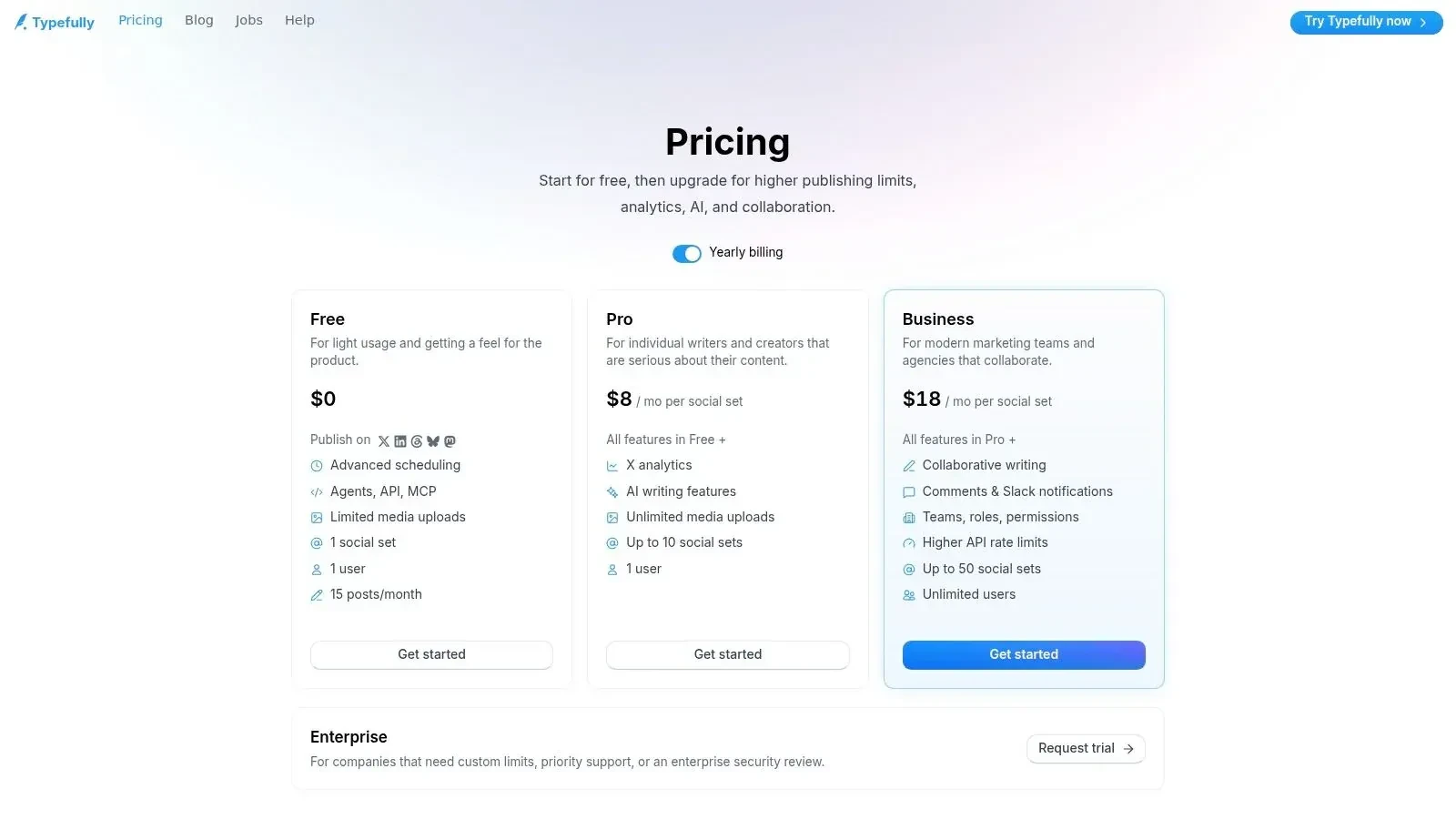
If your world revolves around X, Typefully is one of the most natural tools in this list. It was built around writing first, and that shows. The drafting experience is smoother than most general schedulers, especially for threads, punchy single posts, and clean formatting.
For creators and operators who think in tweets before they think in campaigns, that matters a lot.
Best for X writers and thread-based workflows
Typefully is strongest when writing quality is the bottleneck. If you already know what you want to say but need a better drafting and queueing environment than the native X composer, it’s excellent.
Here’s a simple X example that fits Typefully’s sweet spot:
Building in public gets easier when you stop trying to sound impressive.
Share the failed test.
Share the customer objection.
Share the tiny win that changed your roadmap.
That’s the stuff people remember.
That kind of post is easier to shape in a focused writing tool than in a broad social dashboard. Typefully helps you polish structure, preview threads, and keep a lightweight queue without clutter.
A few good use cases:
- Thread writers: You need formatting support and clean previews.
- X-first creators: Most of your energy goes into one platform.
- Writers who schedule after editing: Draft quality comes before analytics depth.
If you’re trying to improve timing as well as writing, it helps to pair your posting habit with current guidance on the best time to post on Twitter for engagement. And if you want product details, go to Typefully.
8. Meta Business Suite
You schedule an Instagram Reel, a Facebook post, and a Story for the same campaign. If those two channels drive the bulk of your reach, Meta Business Suite is often the fastest free way to get it done.
It works best for teams that are already committed to Facebook and Instagram. You stay inside Meta’s own system, publishing is usually straightforward, and there’s less setup than with a third-party tool.
Best free native scheduler for Facebook and Instagram
The trade-off is simple. Meta Business Suite is a channel tool, not a full content operating system. It handles Meta well, but it does not help much with X, LinkedIn, or YouTube planning, and that matters once your content workflow starts spreading across platforms.
That is why I treat it as an entry-level scheduler, not the final setup. It is useful for keeping Meta content consistent while you build a broader workflow elsewhere. If X is becoming a serious growth channel, you will still need a separate process for idea discovery, writing, testing angles, and posting consistently. A free scheduler handles timing. A stronger system handles momentum.
Use Meta Business Suite when:
- Facebook and Instagram carry the workload: Your audience lives on Meta platforms, so a native tool is enough.
- You want fewer publishing errors: Posting inside Meta’s own environment is often easier to manage than routing everything through another dashboard.
- You only need basic planning and reporting: You care more about getting posts out on time than managing a cross-platform calendar.
Meta Business Suite is a practical starting point. For many small brands, that is enough for a while. The ceiling shows up when scheduling stops being the problem and growth becomes the problem.
For native publishing on Meta channels, go to Meta Business Suite.
9. LinkedIn native scheduler
LinkedIn’s native scheduler is one of the simplest tools on this list, and that’s exactly why some people should use it. If LinkedIn is your main publishing channel, the built-in scheduler removes one more app from your workflow.
That simplicity is especially attractive for founders, consultants, analysts, and B2B marketers who post a few times a week and don’t need a multi-platform command center.
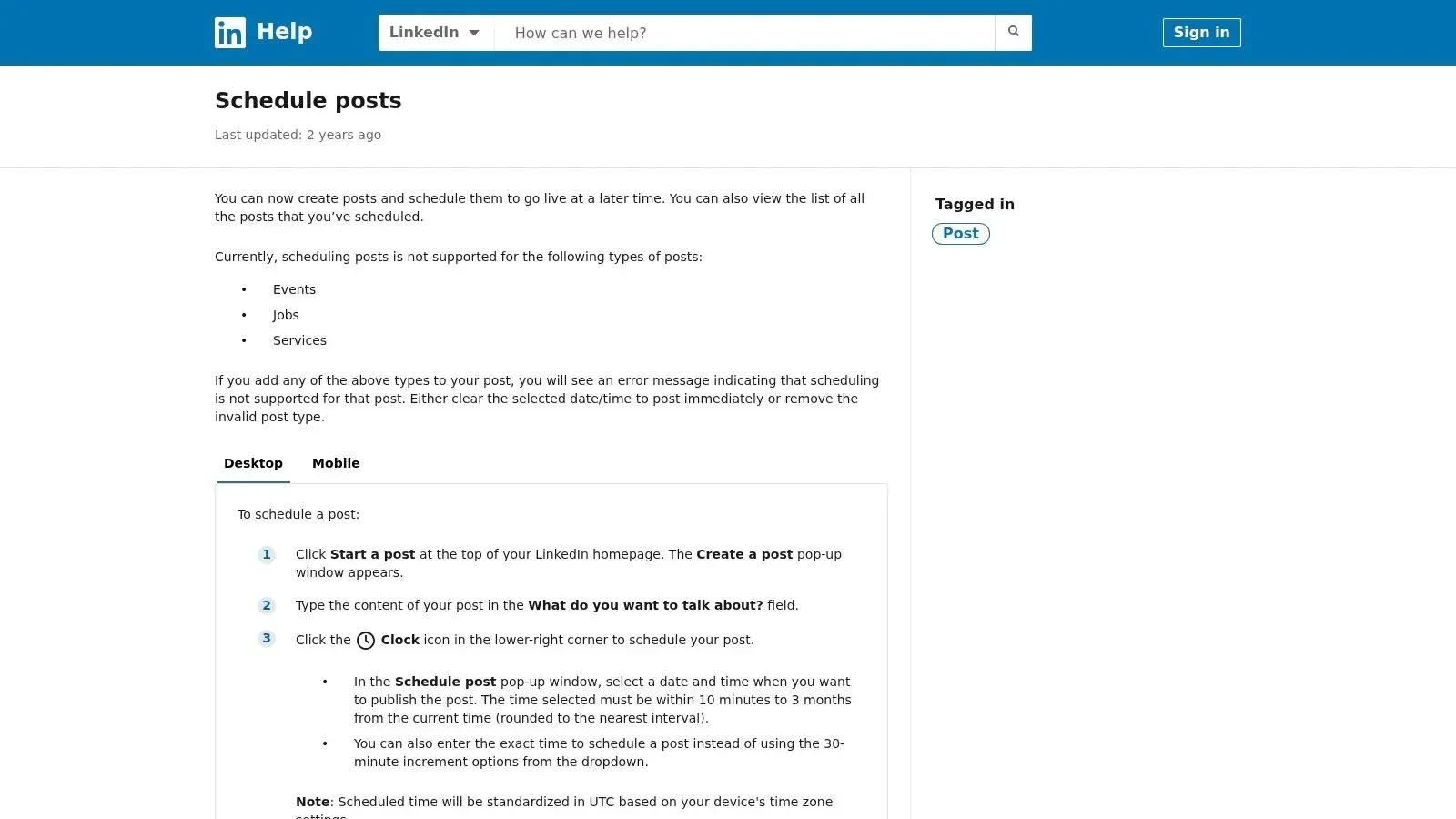
Best for founders and B2B operators posting natively
The native scheduler is good for maintaining cadence with minimal friction. Draft your post, set the time, and move on. If your content strategy is mostly text posts, link posts, and regular thought leadership updates, it gets the job done.
The downside is obvious too. There’s no unified calendar across channels, no stronger drafting layer, and no broader content system around it. That’s fine if LinkedIn is the whole game. It’s limiting if LinkedIn is just one arm of a bigger content strategy.
This works well for:
- Founder-led content: Regular updates, lessons learned, and company-building posts.
- B2B consistency: Scheduled publishing without extra software overhead.
- Low-complexity workflows: You want native posting, not another subscription.
Use the LinkedIn post scheduler if native simplicity is the priority.
10. YouTube Studio
YouTube Studio is a native scheduler, not a social media control panel. But if you publish video regularly, it deserves a place on this list because it handles one very specific job well: batching uploads and setting exact publish times without adding another tool.
For creators who work ahead, that matters more than another generic dashboard.
Best for video-first creators
Scheduling inside YouTube Studio keeps titles, thumbnails, visibility settings, and publishing in one place. That’s cleaner than exporting your process into a third-party scheduler just to say you’re using one system for everything.
This is also where native tools often beat general schedulers. They understand the platform’s publishing flow better because they are the platform’s publishing flow.
Use YouTube Studio if you:
- Batch video production: Record and edit several pieces at once.
- Need exact release control: Set future publish times or prepare premieres.
- Prefer native operations: Keep metadata and scheduling together.
The broader market context matters here. Grand View Research estimated the global social media management market at USD 29.93 billion in 2025 and projects it will reach USD 171.62 billion by 2033, according to Grand View Research’s social media management market report. That growth helps explain why lightweight native scheduling and broader workflow tools now coexist. Users expect more than timed posting, but native tools still win when channel-specific execution matters most.
Go to YouTube Studio if your scheduling problem is mainly video publishing.
Top 10 Free Social Media Schedulers
| Tool | Core features | UX and quality | Price / value | Target audience | Strength / best for |
|---|---|---|---|---|---|
| Buffer | Queue & calendar scheduling, drafts, multi-network, basic analytics | 4/5, clean, low learning curve | Free forever (3 channels, 10 posts/channel); paid for advanced analytics | Solo creators & lean teams | Reliable, fast scheduler |
| Zoho Social | Multi-network publishing, unified composer, AI Zia (limited) | 4/5, responsive UI | Free for 1 brand; upgrade path to CRM & automation | Small businesses & marketers | Best for CRM integration & growth path |
| Metricool | Calendar scheduling, inbox, competitive analytics & benchmarks | 4/5, data-forward visuals | Free single-brand; paid for deeper reports | Marketers & agencies | Analytics & industry studies |
| Publer | Visual content calendar, multi-platform editor, mobile apps | 4/5, polished media handling | Free tier (limited accounts/posts); paid to scale | Creators who post media-heavy content | Smooth media workflow & calendar |
| Planoly | Instagram-first grid planner, calendar, basic IG analytics | 4/5, strong visual planning | Free Personal capped (e.g., 10 uploads/mo); paid unlocks features | IG-first creators & visual brands | Grid & aesthetic planning |
| Crowdfire | Cross-platform scheduling, curated content suggestions | 3.5/5, useful curation, variable updates | Free tier for testing; paid for full features | Solo creators needing content ideas | Content curation to fill calendars |
| Typefully | Thread & long-form composer, scheduling for X/Threads/LinkedIn | 4/5, writer-first UX | Free basic; paid for analytics & higher caps | Writers, X-centric creators | Best for threads & focused drafting |
| Meta Business Suite | Native scheduling for FB & IG, native previews & insights | 4/5, reliable native publishing | 100% Free for Meta platforms | Facebook & Instagram brands | Native publishing with no platform fees |
| LinkedIn (native scheduler) | Schedule posts from composer, manage upcoming posts | 4/5, simple & reliable | Free (native) | B2B founders, professionals, marketers | Native scheduling for LinkedIn consistency |
| YouTube Studio | Exact publish times, premieres, Shorts scheduling | 4/5, robust video workflow | Free (native) | YouTube creators & channels | Video-first scheduling & premieres |
From Scheduling to a Full Growth System
A free social media scheduler is the right first move for most creators, founders, and small teams. It helps you stop posting manually, batch your work, and protect consistency when your week gets busy. For many people, that alone solves the immediate problem. You miss fewer posting windows, your content calendar stops living in your head, and you finally have a system.
But scheduling only handles one part of growth.
On X especially, the bigger challenge usually isn’t pressing publish. It’s knowing what to say, when to join conversations, how to find formats worth repeating, and how to stay consistent without sounding repetitive. A scheduler can hold your queue. It can’t build your content judgment for you.
That’s the graduation point. When your queue is no longer the bottleneck, you need a stronger operating system around it. You need discovery, drafting, remixing, replies, and habit tracking working together. Otherwise you end up with a well-organized calendar full of average posts.
For X creators, I’d think about the stack in four layers:
- Scheduling: Queue approved posts so your cadence doesn’t collapse.
- Discovery: Find high-momentum posts and relevant conversations early.
- Creation: Turn ideas, saved examples, and proven structures into original drafts.
- Consistency: Track whether you’re posting and replying often enough to learn.
That’s where a tool like Xholic AI fits better than a generic scheduler. It’s built around X workflows, not just social publishing in general. You can use Xholic AI to discover high-momentum tweets, search a large tweet library by meaning, save posts into collections, remix proven structures, and draft contextual replies without leaving the feed through its Chrome extension.
The practical difference is this: a scheduler helps you publish what you already have. Xholic helps you find better raw material in the first place.
A simple upgrade path looks like this. Start with a free scheduler if you’re posting manually and need structure fast. Once your posting habit exists, add a discovery and ideation layer. Use saved posts, collections, and semantic search to study what’s working in your niche. Build replies into your daily workflow. Then schedule only the posts you’ve reviewed and want published.
That last part matters. Strong AI workflows still need human review. Drafting, remixing, and scheduling are helpful. Blind automation isn’t.
If you also create mockups for launches, approvals, or internal reviews, Xholic offers useful browser tools like a fake tweet generator, a quote tweet mockup tool, and a reply chain generator. Use them responsibly. Mockups should be labeled clearly when needed and should never be used to impersonate people, fabricate evidence, or mislead viewers.
The best free social media scheduler gets you out of manual mode. The best long-term system helps you grow after that.
If you’re ready to move beyond basic scheduling and build a real X workflow, try Xholic AI. It gives you one place to discover high-momentum conversations, draft better replies, remix proven tweet structures, organize saved posts, and schedule approved content with Smart Scheduler. For anyone serious about growing on X without living in the timeline all day, it’s a much stronger next step than another generic scheduler.